OpenChatCut
Open-source, local-first conversational AI video editor with a professional multi-track timeline, Agent Skills, MCP integration, and Remotion rendering.
原始仓库简介 · 中文摘要待补充 · agent-skills / agentic-ai / ai-agent / ai-video-editor / capcut / chatcut
README / 项目原文

OpenChatCut
简体中文 · English
Open-source ChatCut alternative · agent-native · local-first AI video editor
Let Codex, Claude Code, and the built-in agent read, edit, and export real video projects that remain fully editable. Website: openchatcut.com
OpenChatCut Pro · Desktop edition: install it and start cutting
Introduction · Product Tour · Quick Start · Agent / MCP · Community · Sponsors · Changelog · Star Growth · Contributing










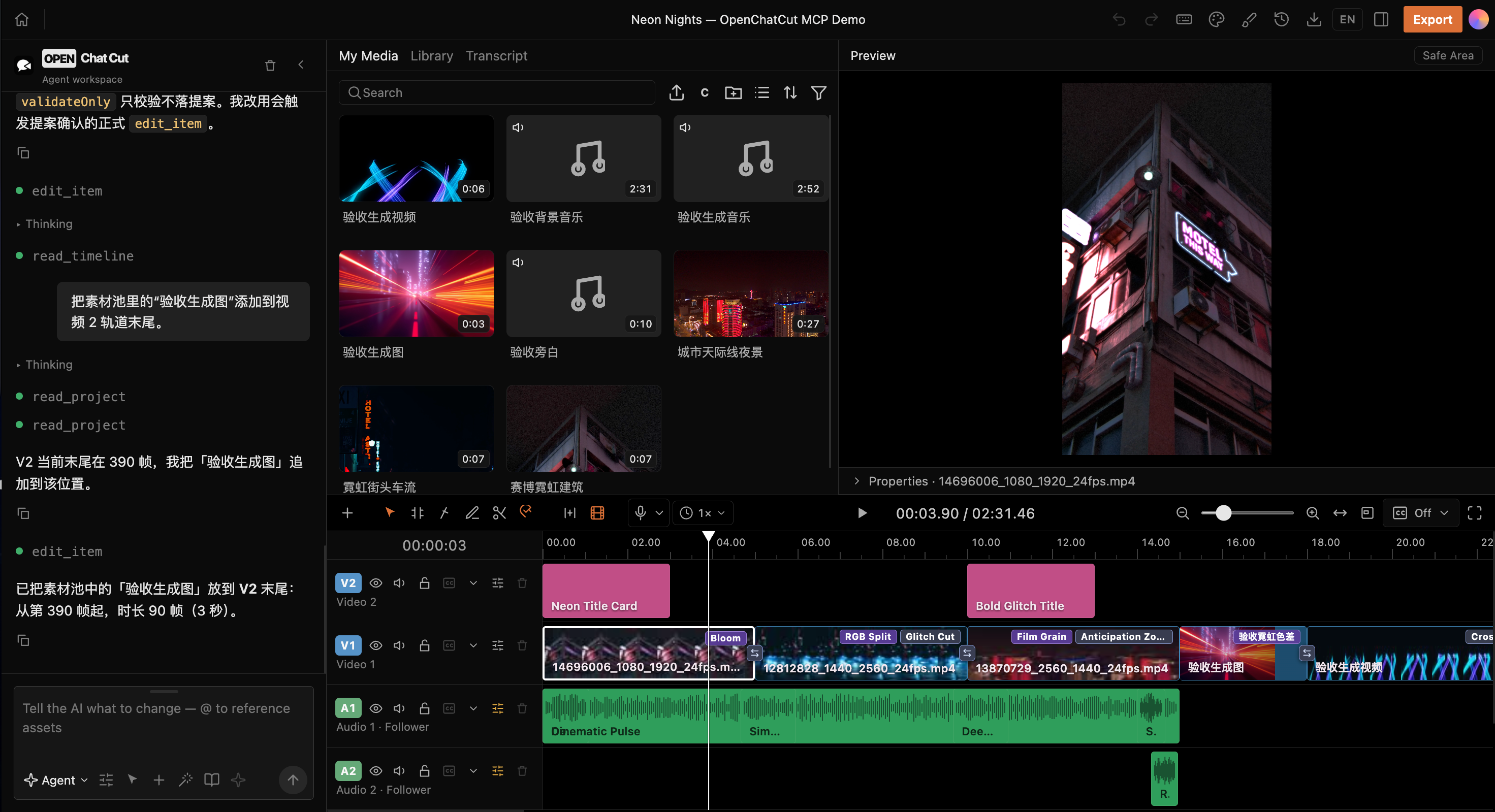
From a single instruction to a real timeline: agents, media, previews, motion graphics, transitions, effects, and multitrack audio all work together in one project.
Sponsors
OfoxAI: Text, image, and video AI in one platform
OfoxAI is a unified API platform for text, image, and video AI, with video models from the Seedance, MiniMax (Hailuo), and Wan families. Choose models for AI applications, agents, creative ideation, image generation, and video assets through one platform. Explore OfoxAI models and APIs →
If OpenChatCut helps you, you can support its continued development on Ko-fi or Afdian.


What is OpenChatCut?
OpenChatCut is an open-source ChatCut alternative: a video editor that brings conversational agents and professional timeline editing into the same workspace. It is independent open source (AGPL), not affiliated with the commercial ChatCut product.
OpenChatCut = local video projects + multitrack timeline + AI agents + MCP + production-ready exports.
It does not merely generate a video that can no longer be changed. Every edit is written to real tracks, clips, transitions, captions, effects, and media inside the project. You can continue editing manually, undo or redo changes, save versions, or hand the project to another agent.
OpenChatCut is built for creators and developers who want AI to participate in the actual editing workflow without giving up professional control, rather than starting over from an empty chat box or an immutable generated result.
Website: https://openchatcut.com
Open-source ChatCut alternative guide: https://openchatcut.com/blog/open-source-chatcut-alternative
ChatCut vs OpenChatCut: https://openchatcut.com/blog/chatcut-vs-openchatcut
🤖 Agent-native: the built-in agent and external MCP agents share the same editing tools.
🎞️ Real timeline: multiple video and audio tracks, transitions, effects, LUTs, zooms, and keyframes.
📝 Transcript-driven editing: word-level transcription, text-based cuts, pause handling, speakers, and linked captions.
✨ Generation and media: images, video, speech, music, sound effects, and online media search.
🧩 Motion Graphics and WebGL: editable motion templates, custom shaders, visual effects, and transitions.
👁️ Visual geometry: in-browser person segmentation and face-safe zones — captions avoid the speaker automatically, reframe follows the subject, and overlay graphics land in empty space.
📦 Production-ready exports: MP4, audio, captions, FCPXML, and complete project data.
🖥️ Local-first: projects and media stay on your machine by default, while API keys remain server-side.
Community
Join the OpenChatCut community to discuss workflows, share feedback, and follow development:
- Join Discord
- Scan the QR code below with WeChat.

Product Tour
The following screenshots show real OpenChatCut projects and editor states, not static mockups.
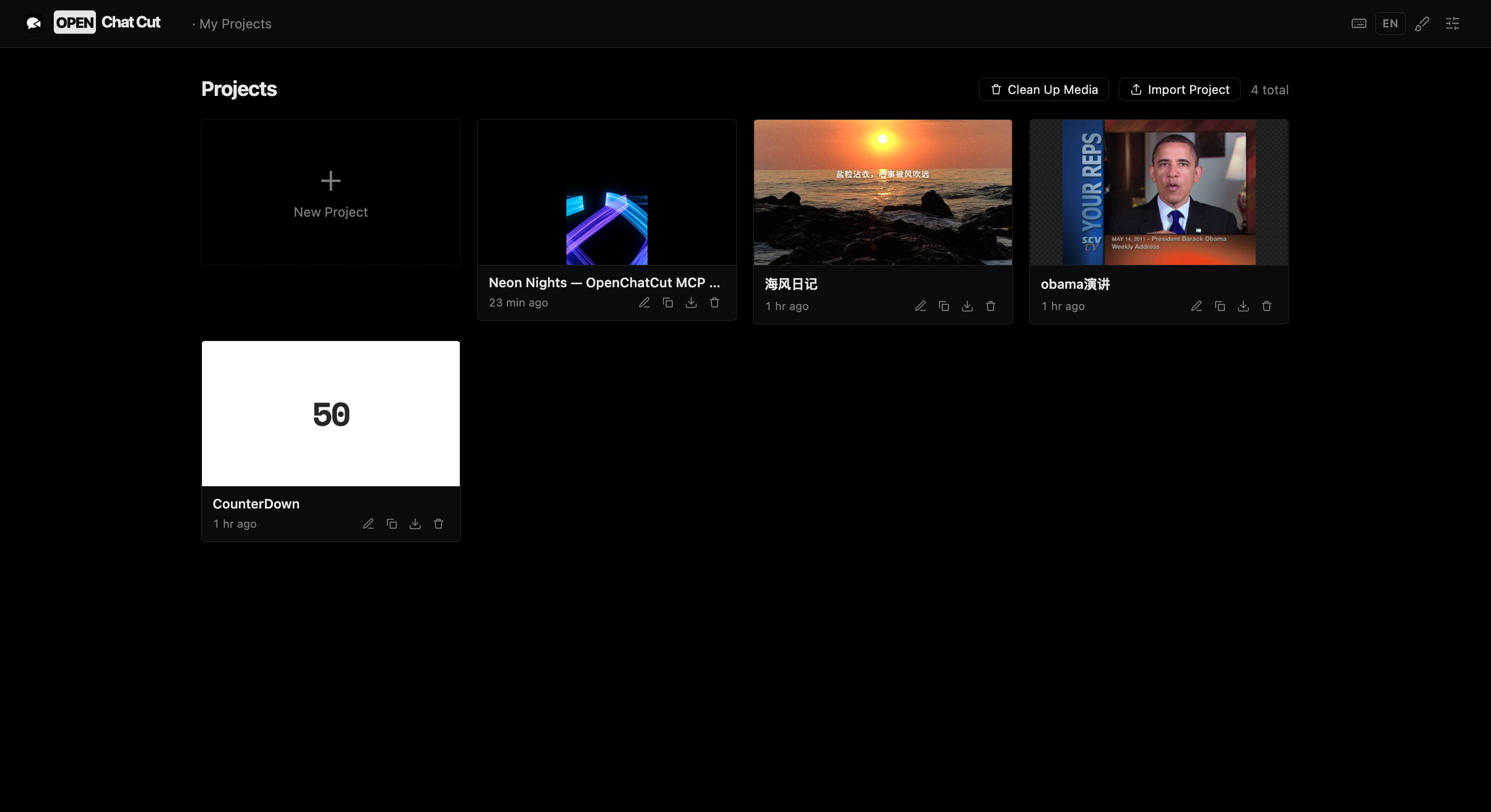 Local project management — Create, import, duplicate, export, and continue editing multiple real projects. |
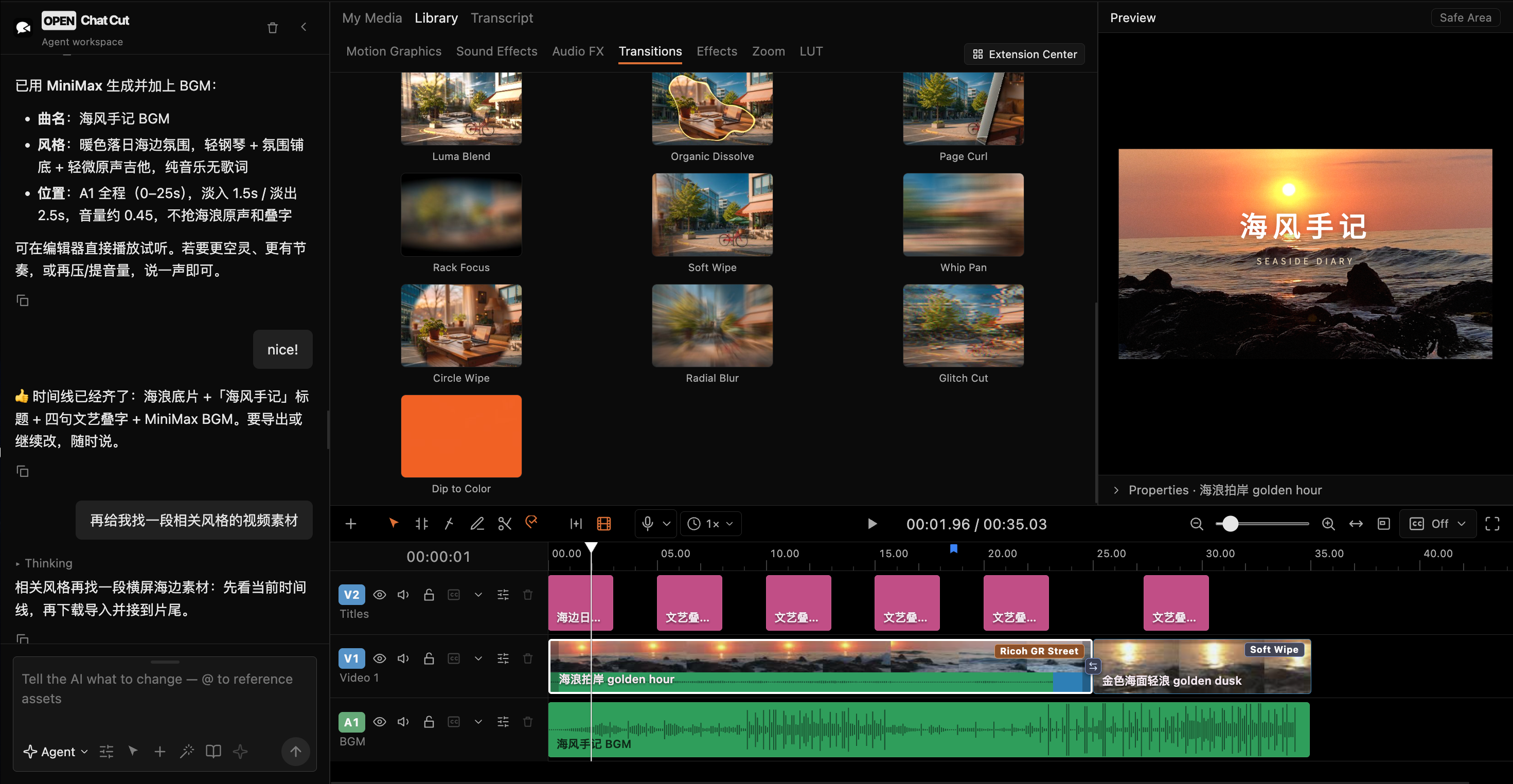 Complete agent-driven editing — Generate music, invoke tools, and write transitions, captions, and multitrack media directly to the timeline. |
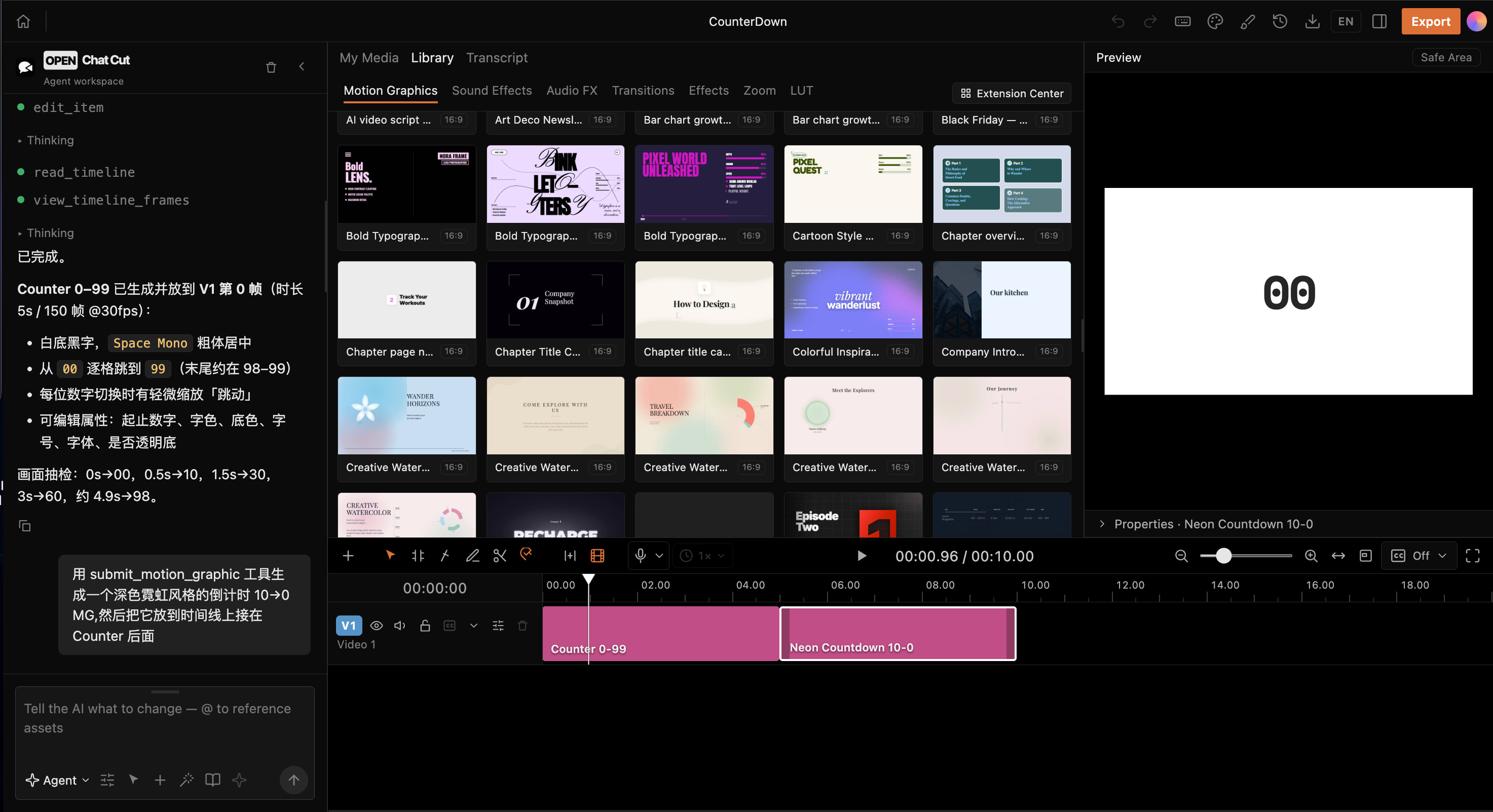 Motion Graphics and agents — Browse motion templates or let an agent generate and assemble editable MG clips. |
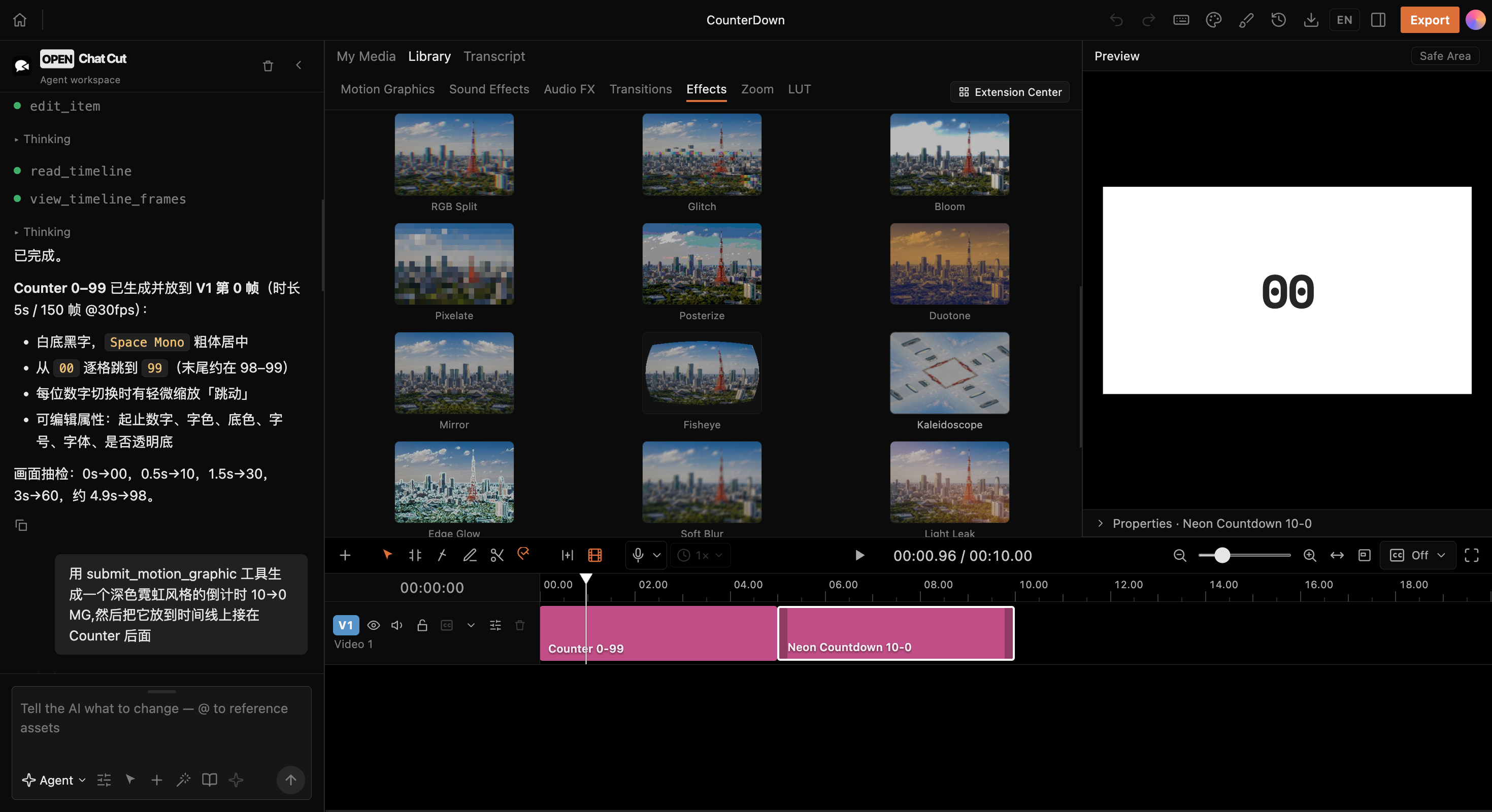 WebGL visual effects — Apply pixelation, duotone, fisheye, kaleidoscope, softening, light leaks, and more directly to clips. |
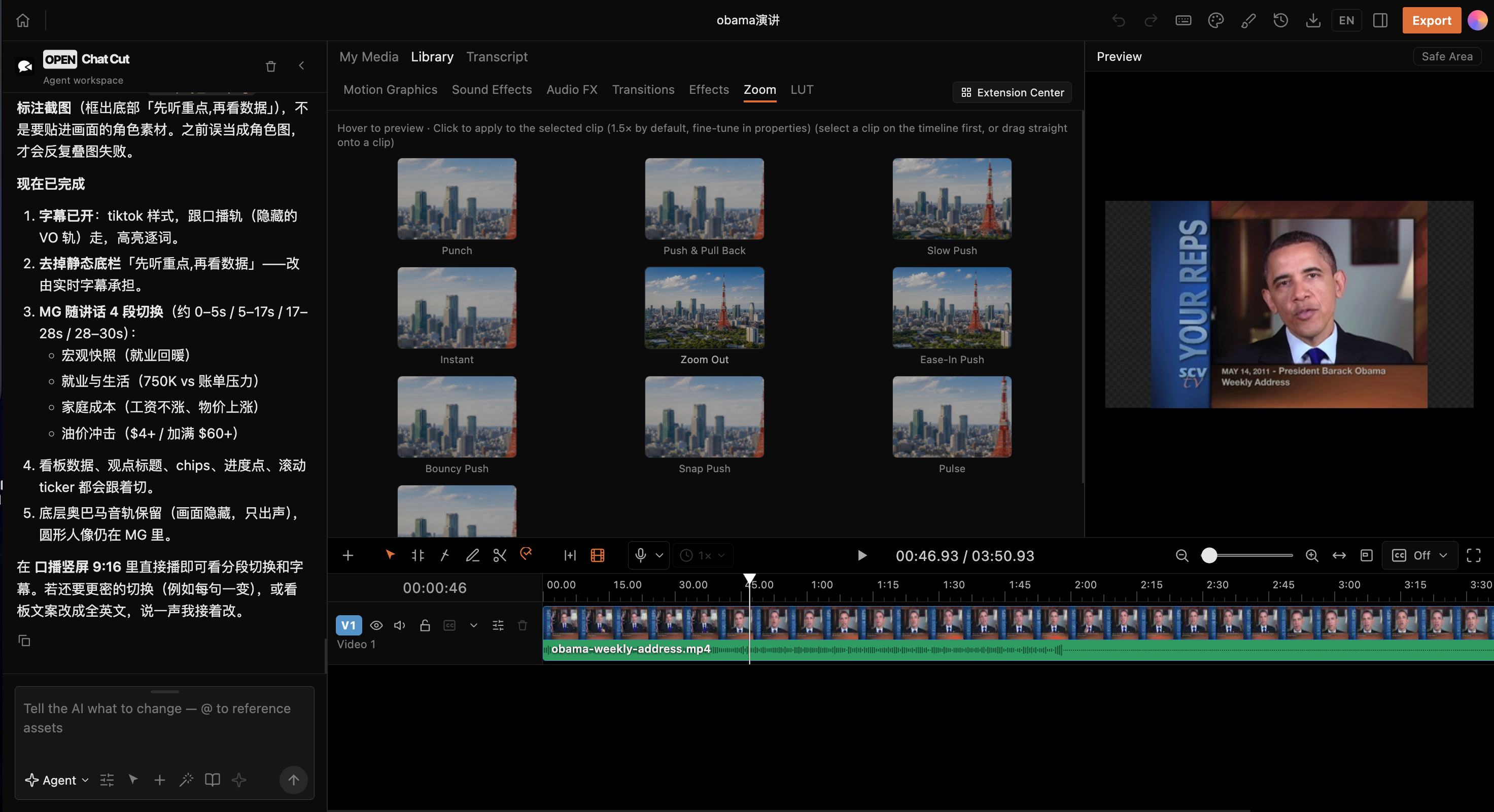 Camera movement and zoom — Push, pull, slow zoom, fast zoom, and eased camera effects work directly with the timeline. |
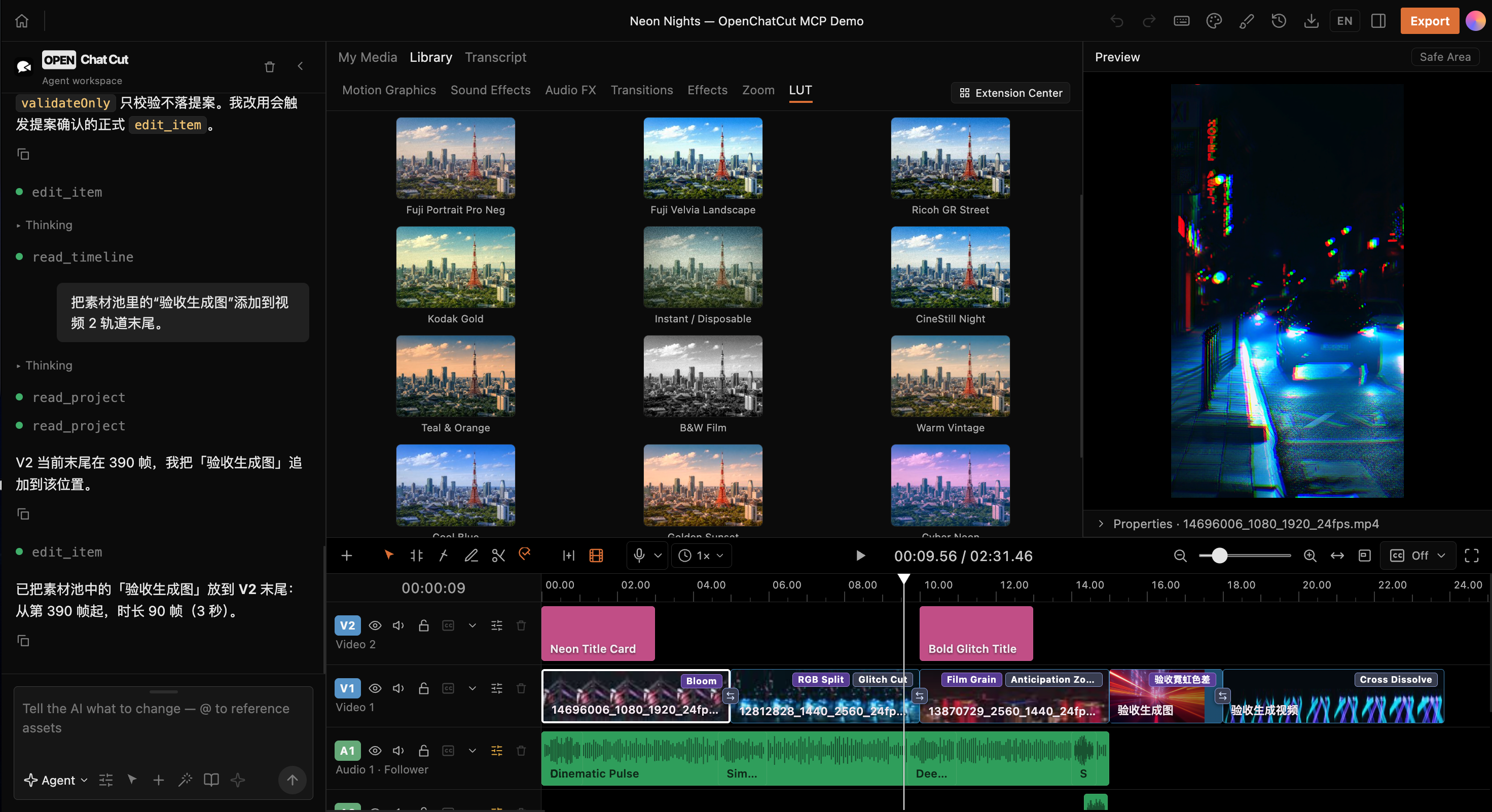 LUTs and color styles — Compare camera transforms and film looks in real time against a consistent reference frame. |
Why OpenChatCut?
Traditional editors excel at precise control. One-shot AI video generators excel at producing results quickly. OpenChatCut connects both approaches through one continuously editable project:
| Capability | Traditional timeline editor | One-shot AI video generation | OpenChatCut |
|---|---|---|---|
| Track- and clip-level precision | ✅ | ❌ | ✅ |
| Modify a project with natural language | ❌ | ✅ | ✅ |
| Inspectable and undoable changes | ✅ | Usually unavailable | ✅ |
| Linked transcript and visuals | Partial | ❌ | ✅ |
| Direct control from Codex / Claude Code | ❌ | ❌ | ✅ MCP |
| Built-in and external agent collaboration | ❌ | ❌ | ✅ Shared tools |
| Local projects and BYOK | Product-dependent | Usually cloud-based | ✅ |
The core editing loop:
Describe the goal → Agent reads the project → Produces verifiable edits → Writes to the timeline
                  → Preview / adjust / undo → Captions and mixing → Export
Core Capabilities
| Area | Implemented capabilities |
|---|---|
| Timeline | Multitrack editing, move, trim, split, ripple edits, snapping, keyframes, markers, undo, and redo |
| Visuals | WebGL effects, LUTs, chroma key, zoom, transitions, and custom shaders |
| Audio | Multiple audio tracks, sound effects, background music, voice-over recording, loudness, auto-ducking, and vocal isolation |
| Transcript | Transcription jobs, word-level editing, pause compression, search, speakers, and clip views |
| Captions | Automatic captions, named styles, translation, timeline overlays, and SRT export |
| Motion Graphics | Built-in templates, a secure sandbox, custom templates, and video rendering |
| AI generation | Image, video, speech, music, and sound-effect jobs with progress tracking |
| Media | Uploads, folders, online image/video/audio search, and Firecrawl visual-media fallback |
| Export | MP4, audio, captions, FCPXML, project import/export, export history, hardware-aware H.264 acceleration, and resource-aware export queueing |
| Publishing | Agent-driven publishing of finished renders to TikTok, Instagram, YouTube, LinkedIn, Facebook, X, Threads, Pinterest, and Bluesky via Upload-Post, with a preview and explicit confirmation first |
| Agent | Built-in conversational agent, skills, proposal-based edits, and external Streamable HTTP MCP |
Community Resources
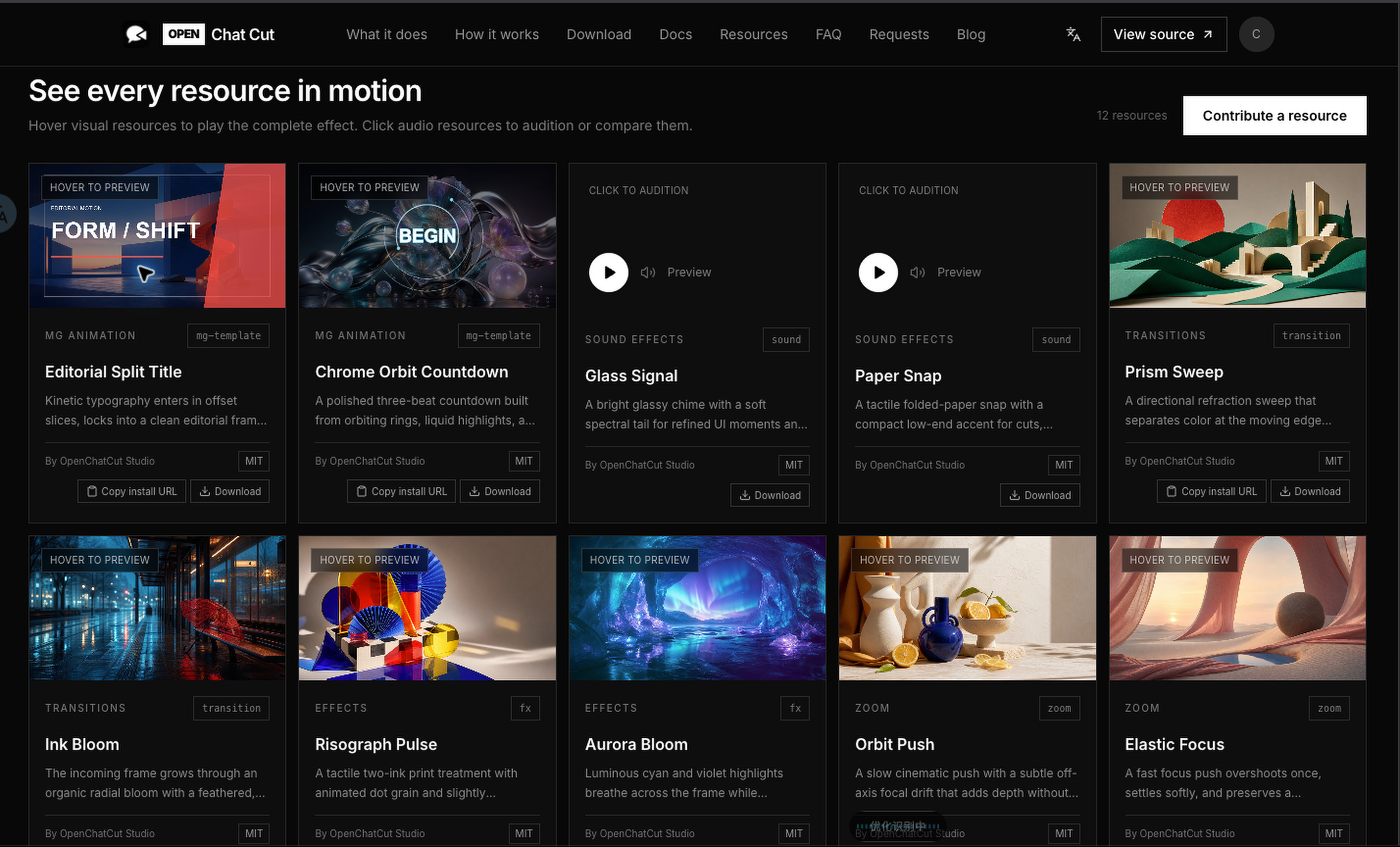
The OpenChatCut resource library is a shared catalog for reusable MG animations, sound effects, transitions, visual effects, zooms, and LUTs.
Discover and install
- Hover visual cards to watch the complete result, or play audio resources before downloading.
- Copy a resource's install URL into OpenChatCut's Extension Center, or download its original package.
- Browse the website catalog inside the editor and manage installed extensions locally.
Contribute a resource
- Open Contribute a resource and choose its category.
- Upload the resource and the category-specific preview inputs; the site renders the published preview.
- Add the creator and license information, then submit it for review and publication.
Installable visual resources use the editor's openchatcut-plugin@1 format and runtime validation. Official OpenChatCut resources use the MIT license; community contributors select a license during submission, and each published card identifies its creator and license.
Use Cases
- Talking-head and interview editing: transcribe audio or video, remove mistakes, pauses, and repetition through text, then generate captions automatically.
- Fast multiformat assembly: import video, images, and audio, then let an agent create the rough cut, transitions, soundtrack, and pacing.
- Short-form and social content: reframe the canvas and generate titles, captions, voice-over, music, and visual packaging.
- Motion Graphics: use built-in templates or ask an agent to create editable motion-graphics clips.
- Developer automation: use MCP to let Codex, Claude Code, or another compatible client inspect and modify a real project.
Workflow
- Create a project and import local media.
- Edit manually on the timeline or describe the result you want.
- The agent reads project context and invokes editing tools.
- Review the proposal and preview the result, then apply, adjust, or undo it.
- Finish captions, audio, effects, and color.
- Export video, audio, captions, FCPXML, or the complete project.
Quick Start
Desktop installers
Download the latest macOS, Windows, and Linux builds from GitHub Releases. The release currently includes DMG installers for Apple Silicon and Intel Macs, an x64 Windows installer, and an x64 Linux AppImage.
These are early builds. The macOS packages are not yet signed or notarized, so the operating system may require manual approval on first launch.
Run from source
Requires Node.js 24.x and npm. The supported Node.js range is enforced by package.json, and .nvmrc selects the matching major version for Node version managers.
On Linux x64, npm install also downloads ONNX Runtime's optional CUDA provider (several hundred MB from NuGet). For a CPU-only install, run ONNXRUNTIME_NODE_INSTALL=skip npm install instead.
git clone https://github.com/0xsline/OpenChatCut.git
cd OpenChatCut
npm install
cp .env.example .env.local
npm run dev
Open:
http://localhost:5199
The editor needs a browser secure context: open OpenChatCut at http://localhost or http://127.0.0.1 on the machine running it, or serve it over HTTPS. Over plain HTTP from another device (a LAN IP or reverse proxy), browsers disable Web Crypto, WebCodecs, and the clipboard, so the project list still loads but the editor shows this requirement instead of opening.
Only add the model or media-service credentials you actually use to .env.local. Features without configured third-party credentials report the missing key explicitly; local timeline editing, built-in media, and other configured capabilities continue to work.
Development launches are isolated per Git checkout/worktree by default. npm run dev and
npm run desktop:dev keep that checkout's projects, imported media, generation jobs,
credentials, settings, and local authorization state under its own profile in
~/.openchatcut/dev-profiles/. Use npm run dev:shared only when you intentionally need
the legacy shared development store.
Built-in Agent authentication
- API keys: open Settings → Agent model, choose a provider, and save its API key and model. Keys remain server-side.
- ChatGPT subscription: install the official Codex CLI 0.146.0 or newer, then open Settings → Agent model → OpenAI · Codex. Sign in through the browser or device-code flow, load the account's models, choose a model-specific reasoning effort (or keep its default), and select Codex from the chat model picker. OpenChatCut uses a dedicated Codex profile; the official CLI owns credential storage, token renewal, and logout, while OAuth tokens are never exposed to the browser.
- Claude subscription: OpenChatCut does not collect Claude OAuth credentials. Use Claude Code through the local MCP connection below. The built-in Agent can use Anthropic through an API key.
The built-in Agent always runs the model loop on the local server. Chat, drafts, and proposals survive page refreshes and local service restarts. Timeline changes still go through the active editor's validated, undoable commands.
Agent local-path access (advanced)
Desktop agents can browse any local directory allowed by the operating system by default, including mounted media drives. browse_local_media lists folders and supported media, searches by filename or relative path and media type, and returns paginated results without importing. The agent can then use import_assets for up to 100 selected paths, import_asset for one path, or import_folder for a whole folder. Imports reuse media probing and reference registration, preserve source files, and skip duplicate content, including duplicates within one batch. Document files such as TXT, Markdown, DOCX, and PDF should be attached to chat instead. In the desktop app these tools are enabled by default; in a browser session they also work, but only for directories listed in AGENT_IMPORT_ROOTS and while the editor is served from the same machine that runs OpenChatCut.
To restrict local access, set a comma-separated value such as AGENT_IMPORT_ROOTS=/Volumes/Media,D:\Projects in .env.local; leave it empty for default unrestricted directory access in the desktop app (a browser session requires the allowlist and refuses these tools while it is empty). Explicit restrictions apply to both browsing and import. Source checkouts read the repository file at startup. Packaged desktop builds read it from Electron's user-data directory: ~/Library/Application Support/OpenChatCut/ on macOS, %APPDATA%\OpenChatCut\ on Windows, and $XDG_CONFIG_HOME/OpenChatCut/ (normally ~/.config/OpenChatCut/) on Linux. Restart after editing the file.
Local H.264 exports automatically prefer VideoToolbox on macOS and NVENC on compatible Windows systems, then fall back to software encoding. Tune render concurrency and the heavy-export limit with OPENCHATCUT_RENDER_CONCURRENCY and OPENCHATCUT_MAX_ACTIVE_EXPORTS, disable hardware encoding with OPENCHATCUT_DISABLE_HARDWARE_ENCODING, or override FFmpeg-side encoder selection with OPENCHATCUT_H264_ENCODER; see .env.example.
On Apple Silicon, more render workers can slow down video-heavy exports even when VideoToolbox encoding is active. See macOS render tuning for an M4 Max benchmark and a way to test your own workload. These measurements do not establish a default for other Macs or Windows.
Desktop development
npm run desktop:dev
The desktop app uses an Electron shell with the same embedded services. The web development build and desktop build share project, agent, generation, and export logic.
Project Status
OpenChatCut is under active development. The editor, project format, and agent tools will continue to evolve. Prebuilt macOS, Windows, and Linux installers are published on GitHub Releases; running from source remains the most transparent option for development and troubleshooting.
The core timeline, local projects, built-in media, and manual editing do not depend on cloud services. Connected features such as AI models, online media, generation, and transcription are enabled only after you configure the corresponding services.
Using OpenChatCut with Codex / Claude Code
Install the single OpenChatCut Agent Skill:
npx skills add 0xsline/OpenChatCut
Then tell the agent Set up OpenChatCut. The installed router registers the
local MCP connection and loads the editor's 26 specialized skills on demand,
so the agent's skill list stays compact.
Custom skills live in a user-visible directory with the same layout as
~/.codex/skills / ~/.claude/skills:
~/.openchatcut/skills/<slug>/SKILL.md (Windows: %USERPROFILE%\.openchatcut\skills\...)
Ask the agent to manage_skill create (or use the bundled skill-creator
workflow) and it writes the SKILL.md there — editable and shareable by hand.
Dropping a SKILL.md into that directory makes it available to the agent, and
selecting a workflow from the chat's / command or the creative-mode picker
activates it for the next message.
OpenChatCut exposes a Streamable HTTP MCP endpoint:
http://localhost:5199/api/external-mcp/mcp
The repository's root .mcp.json already contains the local connection. Before using timeline tools, run OpenChatCut and open the target project. Project listing, creation, and navigation tools do not require the editor to remain open.
Codex app/CLI and Claude Code use the same session workflow:
- Call
begin_edit_sessionand keep the returnededitSessionId. SetapprovalModetomanual(the default) orauto. - Pass that id to every project read/edit tool. Changes are applied only to an isolated draft.
- Call
review_edit_sessionwhen the draft is ready. - In
manualmode, review, preview, select, and approve or reject the proposal inside the open OpenChatCut project. Inautomode,review_edit_sessionapplies the complete draft immediately. The client can pollget_edit_sessionforapplied,rejected, ordiscardedstatus.
Approval in Codex or Claude controls whether the client may call a tool. OpenChatCut project approval is required only for manual sessions; auto sessions explicitly bypass that review. Either mode commits the applied operations atomically as one undo step.
If an auto session becomes stale, it returns an error instead of falling back to manual approval; discard it and start a new session.
Only draft-safe project read/edit tools are exposed in these sessions. Generation, export, project deletion, and other immediate side-effect tools stay unavailable because a rejected proposal could not roll them back.
Codex
Add the following to your Codex configuration:
[mcp_servers.openchatcut]
url = "http://localhost:5199/api/external-mcp/mcp"
Claude Code
claude mcp add --transport http openchatcut \
  http://localhost:5199/api/external-mcp/mcp
You can then describe an editing task directly to the agent:
Start an OpenChatCut edit session. Read the draft, add a scratch sound effect
at 8 seconds on the second audio track, and add a glitch transition between
the adjacent video clips. Submit the draft for review and wait for the user to
approve it in OpenChatCut before reporting that the edit was applied.
External agents invoke the same internal editing tools and EditorCore commands as the editor itself. There are no separate project formats that can drift apart, and the live timeline is not changed while an external draft is being prepared.
Qoder
Qoder is one-click too: the guide's Connect button writes the endpoint and bearer token into Qoder's own settings file, keeping any unrelated settings and MCP servers already there.
~/.qoder/settings.json        (international build)
~/.qoder-cn/settings.json     (China build — written as well when installed)
{
  "mcpServers": {
    "openchatcut": {
      "type": "http",
      "url": "http://localhost:5199/api/external-mcp/mcp",
      "headers": { "Authorization": "Bearer <token>" }
    }
  }
}
Restart Qoder afterwards to load the server.
Qwen Work (千问办公)
千问办公 keeps custom MCP servers inside its own connector store rather than a config file, so OpenChatCut cannot write this one for you. In the guide, use Copy config on the 千问办公 card, then in 千问办公 open 连接器 → 自定义 MCP → 添加, paste the JSON, and save:
{
  "mcpServers": {
    "openchatcut": {
      "type": "streamable-http",
      "url": "http://localhost:5199/api/external-mcp/mcp",
      "headers": { "Authorization": "Bearer <token>" }
    }
  }
}
Protecting MCP access
When exposing the MCP endpoint yourself, configure:
OPENCHATCUT_MCP_TOKEN=your-token
OPENCHATCUT_EDITOR_URL=https://your-editor.example.com
Clients must send Authorization: Bearer <token>. The current bridge is designed for a single user on one machine, not as a multi-tenant service.
Architecture
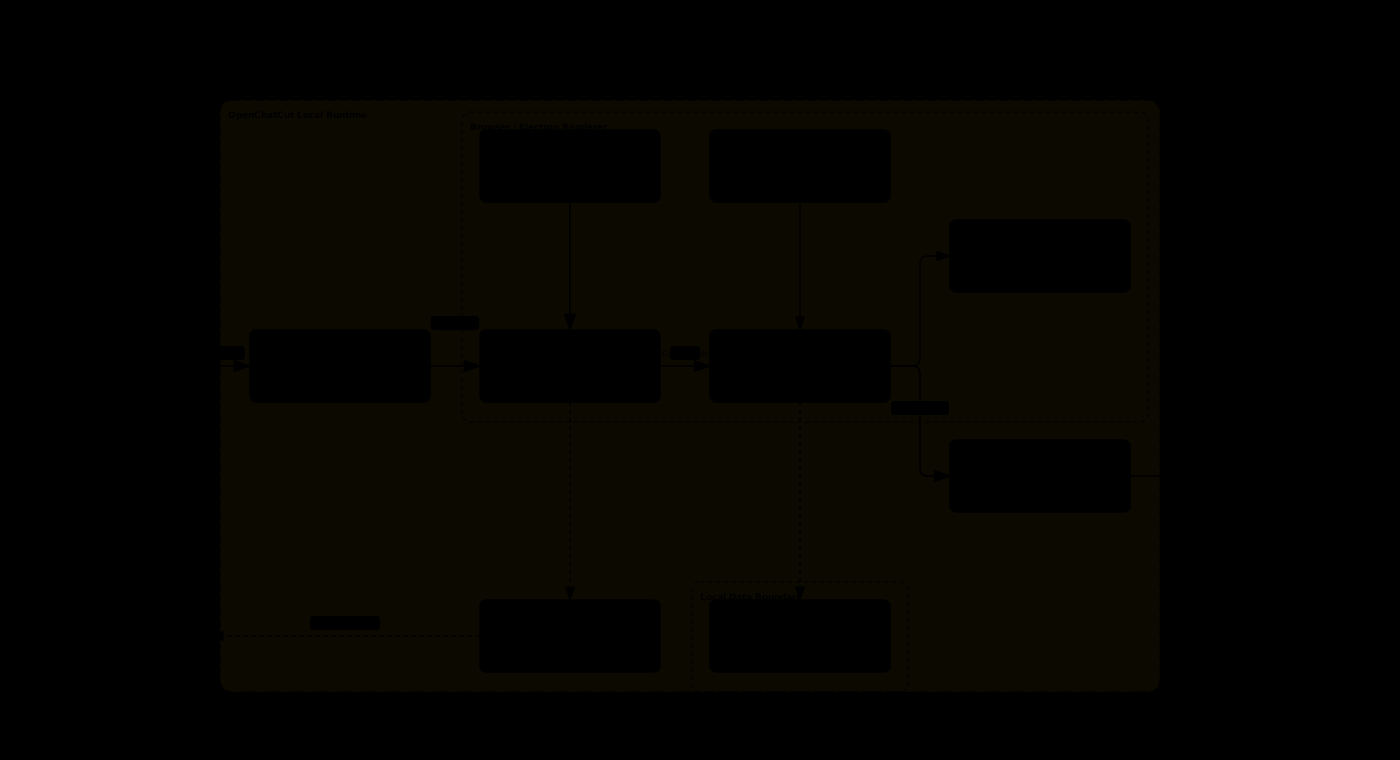
One shared set of agent tools and EditorCore commands connects the built-in agent, external MCP clients, the real timeline, local data, and production exports.
| Layer | Technology |
|---|---|
| Frontend | React 19, TypeScript 6, Vite 8 |
| Editing core | Immutable timeline state, command layer, and proposal-based application |
| Agent | Vercel AI SDK 7 (Anthropic, OpenAI, Gemini, Kimi, Qwen, GLM, DeepSeek, MiniMax, Xiaomi MiMo, Mistral, xAI Grok by API key or SuperGrok/X Premium+ subscription sign-in, OpenRouter, OrcaRouter, OFox, Requesty, Cheaper Inference, and compatible APIs), Agent Skills, MCP SDK |
| Preview and visuals | Remotion Player, WebGL / GLSL |
| Server | Dual-host Vite / Electron plugins and a server-side keystore |
| Persistence | Shared local project store under ~/.openchatcut, IndexedDB cache, configurable local media directory, optional Cloudflare R2 |
| Desktop | Electron 43 |
| Export | Remotion, FFmpeg, FCPXML, SRT |
Directory Overview
| Directory | Responsibility |
|---|---|
src/editor/ |
Timeline state and commands, independent of UI and LLMs |
src/agent/ |
Agent assembly, tools, skills, progress, and settings |
src/library/ |
Library UI for Motion Graphics, sound effects, transitions, effects, LUTs, and more |
src/transcript/ |
Transcription, word-level editing, and transcript UI |
src/captions/ |
Caption models, styles, controls, and preview layer |
src/gl/ |
WebGL effects, transitions, and shader runtime |
src/generate/ |
Clients for image, video, speech, music, and sound-effect generation |
src/persist/ |
Project, chat, version, and media persistence |
server/plugins/ |
Generation, transcription, media, export, and storage services |
desktop/ |
Electron main process and embedded services |
remotion/ |
Headless rendering and export pipeline |
Data and Privacy
- Projects, chat history, and version data are stored in the shared local store under
~/.openchatcut; IndexedDB provides a browser-side cache and legacy-data migration. - User media is stored in a local media directory that you can back up or migrate.
- Whether AI requests leave your machine depends on the model, generation, or media services you configure.
- Unconfigured cloud features do not affect the local timeline or editing of existing media.
- When exposing MCP externally, configure a Bearer Token and restrict network access to the editor endpoint.
Security Model
- API keys are only available to server-side configuration; vendor credentials must never be exposed to the browser through
VITE_. - LLM output, plugin packages, template code, and user input are validated at trust boundaries.
- Motion Graphics and shader code run in a restricted sandbox, with dedicated checks blocking malicious templates.
- Agents modify projects only through
EditorCorecommands, making edits traceable and undoable. - MCP binds locally by default; public endpoints support Bearer Token authentication.
- Local media directories and R2 credentials are managed by the server and never written into project JSON.
Fal.ai image and video generation
Fal.ai is an optional generation provider with an explicit image/video model catalog. Configure it under Settings → AI Generation → Image or Video → Fal.ai. See Fal setup, supported models, and extension guide for supported modes, server-only credentials, and checks that do not spend generation credits.
Development and Verification
# Type checking and production build
npm run build

# Core regression checks
npm test

# Static analysis
npm run lint
After changing the agent, timeline, preview, or export paths, run at least:
npx tsc -b --force
npm test
npm run build
Technical Foundations
OpenChatCut is built with the following core projects and specifications:
| Project / specification | Role in OpenChatCut |
|---|---|
| ChatCut-Inc/agent-plugin | Agent Skills foundation. OpenChatCut adapts the plugin's skill structure and workflows for its local editor, storage, MCP, and tool architecture. See the Agent Skills attribution notice. |
| Remotion | Core foundation for React-based video preview, composition, and server-side rendering. |
| Model Context Protocol | Protocol foundation that enables Codex, Claude Code, and other external agents to access projects and timeline tools. |
| Vercel AI SDK | Provider-neutral model streaming and tool calling for the built-in Agent. |
| tt-a1i/archify | Tool used to define, validate, and generate the README's runtime architecture diagram. |
JianYing / CapCut draft export is powered by capcut-cli.
This list covers the project's major technical foundations. It does not replace the licenses bundled with individual dependencies, fonts, or binaries. See package-lock.json for JavaScript dependency versions and assets/fonts/LICENSES.md for font licenses.
Changelog
See the bilingual CHANGELOG.md for notable changes, or browse all published packages on GitHub Releases.
Star Growth
License
OpenChatCut is licensed under the GNU Affero General Public License v3.0 or later. Third-party components and assets remain subject to their respective licenses.
Contributing
- Create a branch from
main. - Add an executable check for non-trivial logic.
- Run
npm test,npm run lint, andnpm run buildbefore committing. - Open a Pull Request and include screenshots or acceptance evidence for UI or video-behavior changes.
Use GitHub Issues for bug reports and feature requests.
OpenChatCut
简体中文 · English
开源 ChatCut 替代 · Agent-native · local-first AI 视频编辑器
让 Codex、Claude Code 和内置 Agent 直接读取、剪辑并导出可继续编辑的真实视频工程。 官网:openchatcut.com
OpenChatCut Pro · 桌面版:装好就能剪
产品介绍 · 产品导览 · 快速开始 · Agent / MCP · 社区 · 赞助商 · 更新日志 · Star 趋势 · 参与贡献
从一句话到真实时间线:Agent、素材、预览、动态图形、转场、特效与多轨音频在同一个工程中协作。
赞助商
OfoxAI:一个平台,连接文本、图像与视频 AI
OfoxAI 是统一的 AI API 平台,汇集文本、图像和视频模型,支持 Seedance、MiniMax(海螺)、Wan 等视频模型系列。从 AI 应用与智能体开发,到创意构思、图像生成和视频素材制作,通过一个平台选择适合的模型。 探索 OfoxAI 模型与 API →
如果 OpenChatCut 对你有帮助,欢迎通过 Ko-fi 或爱发电支持项目持续开发。

OpenChatCut 是什么
OpenChatCut 是 开源 ChatCut 替代方案:把 对话式 Agent 和 专业时间线编辑 放在同一工作区的 AI 视频编辑器。独立开源(AGPL),与商业版 ChatCut 无隶属关系。
OpenChatCut = 本地视频工程 + 多轨时间线 + AI Agent + MCP + 可交付导出。
它不是只生成一段不可修改的视频。每次编辑都会落到真实工程中的轨道、片段、转场、字幕、特效和素材上;你可以继续手动调整,也可以撤销、重做、保存版本或交给另一个 Agent 接着完成。
它适合希望让 AI 真正参与剪辑流程、同时保留专业编辑控制权的创作者和开发者,而不是每次都从一个空白聊天框或不可修改的生成结果重新开始。
开源 ChatCut 替代说明:https://openchatcut.com/zh/blog/open-source-chatcut-alternative
ChatCut 与 OpenChatCut 对比:https://openchatcut.com/zh/blog/chatcut-vs-openchatcut
🤖 Agent-native:内置 Agent 与外部 MCP Agent 共用同一套编辑工具。
🎞️ 真实时间线:多视频轨、多音频轨、转场、特效、LUT、缩放和关键帧。
📝 文字稿驱动:词级转写、删词剪辑、停顿处理、说话人和字幕联动。
✨ 生成与素材:图片、视频、语音、音乐、音效及在线素材检索。
🧩 MG 与 WebGL:动态图形模板、自定义 shader、视觉特效和转场。
👁️ 视觉几何:浏览器内人像分割与人脸安全区——字幕自动避开说话人、竖屏转换跟随主体、叠加图形自动放入空区。
📦 可交付导出:MP4、音频、字幕、FCPXML 和工程数据。
🖥️ Local-first:工程和素材优先保存在本机,密钥只进入服务端。
社区
加入 OpenChatCut 社区,交流使用心得、功能建议与开发进展:
- 加入 Discord
- 使用微信扫描下方二维码加入微信群。
产品导览
下面均为 OpenChatCut 中的真实工程与编辑状态,而不是静态界面稿。
|
本地工程管理 — 创建、导入、复制、导出并继续编辑多个真实工程。 |
Agent 驱动的完整剪辑 — 生成音乐、调用工具并把转场、字幕与多轨素材写入时间线。 |
|
Motion Graphics 与 Agent — 浏览动态图形模板,也可以让 Agent 生成并组合可继续编辑的 MG 片段。 |
WebGL 视觉特效 — 像素化、双色调、鱼眼、万花筒、柔化与漏光等效果可直接应用到片段。 |
|
镜头运动与缩放 — 推拉、慢推、快速缩放和缓动镜头效果与时间线协同工作。 |
LUT 与色彩风格 — 使用统一参考画面实时比较相机转换与胶片风格。 |
为什么是 OpenChatCut
传统编辑器擅长精细操作,一次性 AI 生成器擅长快速出片。OpenChatCut 把两者连成同一个可持续编辑的工程:
| 能力 | 传统时间线编辑器 | 一次性 AI 视频生成 | OpenChatCut |
|---|---|---|---|
| 精确到轨道和片段 | ✅ | ❌ | ✅ |
| 自然语言修改工程 | ❌ | ✅ | ✅ |
| 修改可检查、可撤销 | ✅ | 通常不可 | ✅ |
| 文字稿与画面联动 | 部分支持 | ❌ | ✅ |
| Codex / Claude Code 直接操作 | ❌ | ❌ | ✅ MCP |
| 内置 Agent 与外部 Agent 协作 | ❌ | ❌ | ✅ 同一工具面 |
| 本地工程与 BYOK | 视产品而定 | 通常云端 | ✅ |
核心编辑循环:
描述目标 → Agent 读取工程 → 生成可验证编辑 → 写入时间线
         → 预览 / 调整 / 撤销 → 字幕与混音 → 导出
核心能力
| 领域 | 已实现能力 |
|---|---|
| 时间线 | 多轨、移动、裁剪、切分、波纹编辑、吸附、关键帧、标记、撤销与重做 |
| 视觉 | WebGL 特效、LUT、色度键、缩放、转场、自定义 shader |
| 音频 | 多音轨、音效、背景音乐、旁白录制、响度、自动闪避、人声隔离 |
| 文字稿 | 转写任务、词级编辑、停顿压缩、查找、说话人和片段视图 |
| 字幕 | 自动字幕、命名样式、翻译、时间线 overlay、SRT 导出 |
| MG | 内置动态图形模板、安全沙箱、自定义模板与视频化 |
| AI 生成 | 图片、视频、语音、音乐和音效任务,支持进度追踪 |
| 素材 | 上传、文件夹、在线图片/视频/音频检索、Firecrawl 视觉素材兜底 |
| 导出 | MP4、音频、字幕、FCPXML、工程导入导出、导出历史、硬件感知的 H.264 加速和资源感知的导出排队 |
| 发布 | Agent 通过 Upload-Post 把成片发布到 TikTok、Instagram、YouTube、LinkedIn、Facebook、X、Threads、Pinterest、Bluesky,先预览、确认后才上传 |
| Agent | 内置对话 Agent、技能系统、提案式编辑、外部 Streamable HTTP MCP |
社区资源库
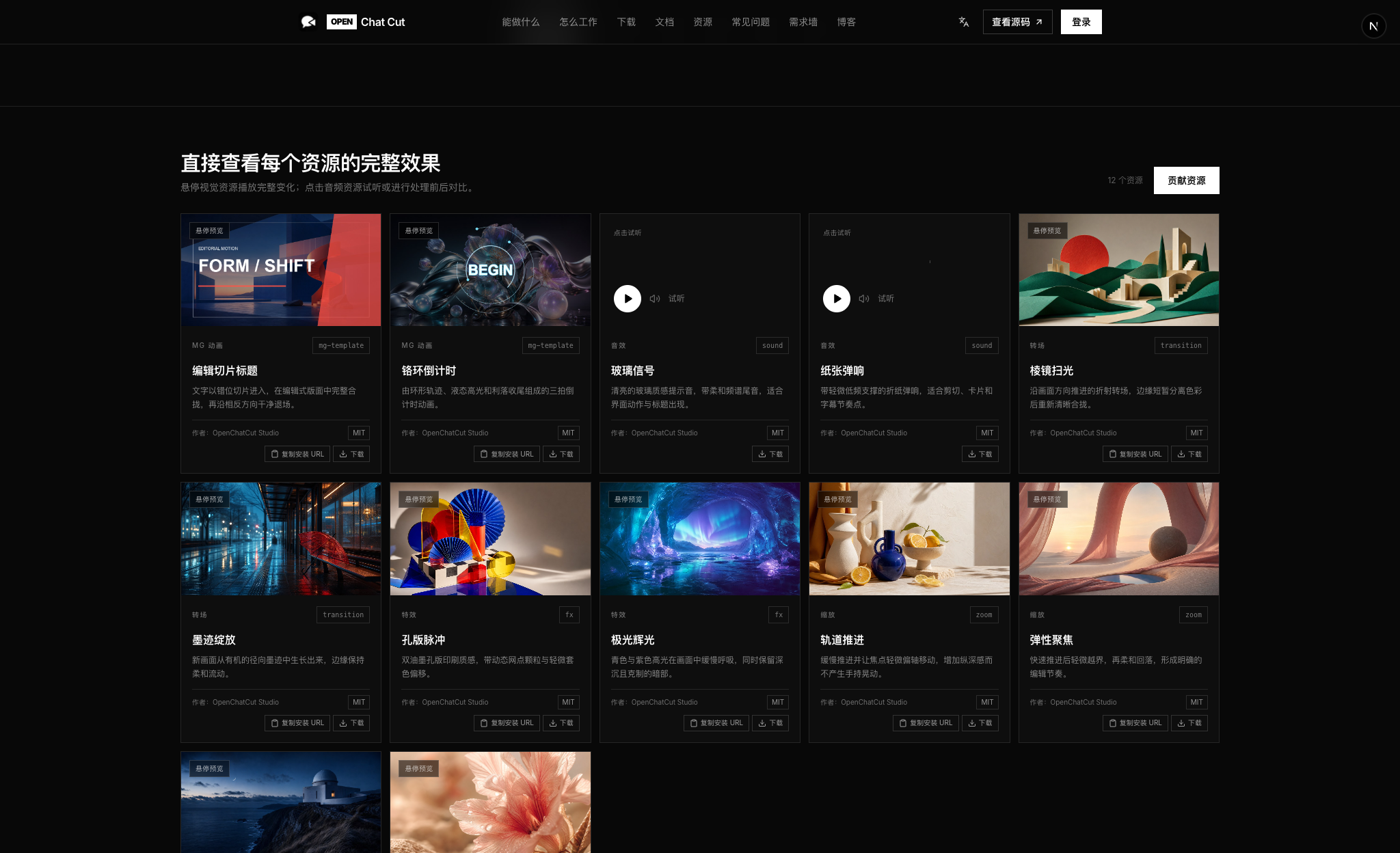
OpenChatCut 社区资源库用于发现、安装和分享可复用的 MG 动画、音效、转场、特效、缩放和 LUT。
发现与安装
- 悬停视觉卡片查看完整变化,下载前可直接试听音频资源。
- 复制资源的安装 URL 到 OpenChatCut 扩展中心,或下载原始资源包。
- 在编辑器内浏览官网目录,并在本机管理已安装扩展。
贡献资源
- 打开贡献资源,选择资源分类。
- 上传资源与该分类要求的预览输入,网站会渲染用于公开展示的预览。
- 填写作者和许可证信息,提交审核;审核通过后公开上架。
可安装的视觉资源沿用编辑器的 openchatcut-plugin@1 格式与运行时校验。OpenChatCut 官方资源使用 MIT 许可证;社区投稿者在提交时选择许可证,发布卡片会显示作者与许可信息。
典型使用场景
- 口播与访谈精剪:转写音视频,按文字删除口误、停顿和冗余内容,再自动生成字幕。
- 多素材快速成片:导入视频、图片和音频,让 Agent 完成粗剪、转场、配乐和节奏调整。
- 短视频与社交内容:重构画幅,生成标题、字幕、旁白、音乐和视觉包装。
- Motion Graphics:使用内置模板或让 Agent 生成可继续编辑的动态图形片段。
- 开发者自动化:通过 MCP 让 Codex、Claude Code 或其他兼容客户端读取并修改真实工程。
使用流程
- 创建工程并导入本地素材。
- 在时间线上手动剪辑,或直接描述想要的结果。
- Agent 读取工程上下文并调用编辑工具。
- 检查提案、预览画面,再应用、调整或撤销。
- 完成字幕、音频、特效和色彩处理。
- 导出视频、音频、字幕、FCPXML 或完整工程。
快速开始
桌面安装包
从 GitHub Releases 下载最新的 macOS、Windows 与 Linux 构建。目前提供 Apple Silicon、Intel Mac 的 DMG、Windows x64 安装包,以及 Linux x64 AppImage。
这些仍是早期构建。macOS 安装包尚未签名和公证,首次启动时可能需要在系统设置中手动允许。
从源码运行
需要 Node.js 24.x 和 npm。package.json 会约束支持的 Node.js 范围,.nvmrc 可供 Node 版本管理器直接选择对应主版本。
在 Linux x64 上,npm install 还会从 NuGet 下载 ONNX Runtime 可选的 CUDA 组件(数百 MB)。只需 CPU 推理时,可改用 ONNXRUNTIME_NODE_INSTALL=skip npm install。
git clone https://github.com/0xsline/OpenChatCut.git
cd OpenChatCut
npm install
cp .env.example .env.local
npm run dev
打开:
http://localhost:5199
编辑器需要浏览器的安全上下文:请在运行 OpenChatCut 的电脑上通过 http://localhost 或 http://127.0.0.1 访问,或通过 HTTPS 提供服务。从其他设备以普通 HTTP 访问(局域网 IP 或反向代理)时,浏览器会禁用 Web Crypto、WebCodecs 和剪贴板,工程列表仍可打开,但编辑器会显示这一要求而不会进入。
.env.local 中只需填写你实际使用的模型或素材服务。没有配置的第三方能力会明确提示缺少对应 Key,不影响本地时间线编辑、内置素材和已配置的其他能力。
开发启动默认按 Git checkout/worktree 隔离。npm run dev 与 npm run desktop:dev
会把当前工作区的工程、导入素材、生成任务、凭据、设置和本机授权状态写入
~/.openchatcut/dev-profiles/ 下的独立配置;只有明确需要旧版共享开发存储时,
才使用 npm run dev:shared。
内置 Agent 登录方式
- API Key:打开设置 → Agent 模型,选择厂商并保存 API Key 与模型;密钥始终留在服务端。
- ChatGPT 订阅:先安装官方 Codex CLI 0.146.0 或更高版本,再进入设置 → Agent 模型 → OpenAI · Codex。可使用浏览器或设备代码登录、读取账号可用模型,并按模型选择推理强度(或保留模型默认值),再在聊天区的模型选择器中切换到 Codex。OpenChatCut 使用独立的 Codex 配置目录;凭据存储、令牌续期与退出均由官方 CLI 负责,OAuth 令牌不会暴露给浏览器。
- Claude 订阅:OpenChatCut 不接收 Claude OAuth 凭据;请通过下文的本机 MCP 连接使用 Claude Code。内置 Agent 仍可通过 Anthropic API Key 使用 Claude。
内置 Agent 的模型循环始终在本机服务端运行。聊天、草稿和提案可跨页面刷新和本地服务重启保留。时间线修改仍通过活动编辑器中经过校验且可撤销的命令完成。
Agent 本地路径访问(高级)
桌面端 Agent 默认可以访问操作系统允许读取的任意本地目录,包括外接素材盘。browse_local_media 可浏览文件夹,按文件名、相对路径和媒体类型搜索,并分页返回结果,不会自动导入。Agent 选好素材后,可用 import_assets 批量导入最多 100 个路径,也可用 import_asset 导入单个路径、import_folder 导入整个文件夹。导入复用媒体探测和源文件引用流程,保留原文件,并跳过媒体池及同一批次中的重复内容。TXT、Markdown、DOCX、PDF 等文稿请作为对话附件添加。桌面端默认启用这些工具;在浏览器中使用时,只有 AGENT_IMPORT_ROOTS 中列出的目录可用,且浏览器需与运行 OpenChatCut 的机器相同(本机访问)。
需要限制目录范围时,可在 .env.local 中填写英文逗号分隔的绝对路径,例如 AGENT_IMPORT_ROOTS=/Volumes/Media,D:\Projects;留空表示桌面端默认放行;浏览器端必须设置该白名单,留空时会拒绝这些工具。手动设置的范围同时适用于浏览和导入。源码运行会读取仓库根目录的文件;桌面安装包会从 Electron 用户数据目录读取:macOS 为 ~/Library/Application Support/OpenChatCut/,Windows 为 %APPDATA%\OpenChatCut\,Linux 为 $XDG_CONFIG_HOME/OpenChatCut/(通常是 ~/.config/OpenChatCut/)。修改后请重启应用。
本地 H.264 导出会在 macOS 上优先使用 VideoToolbox,在兼容的 Windows 设备上优先使用 NVENC,失败时自动回退软件编码。可用 OPENCHATCUT_RENDER_CONCURRENCY 和 OPENCHATCUT_MAX_ACTIVE_EXPORTS 调整渲染并发及重型导出上限,用 OPENCHATCUT_DISABLE_HARDWARE_ENCODING 关闭硬件编码,或用 OPENCHATCUT_H264_ENCODER 覆盖 FFmpeg 侧的编码器选择;详见 .env.example。
桌面端开发
npm run desktop:dev
桌面端使用 Electron 壳层和同一套内嵌服务,Web 开发版与桌面版共享工程、Agent、生成和导出逻辑。
项目状态
OpenChatCut 目前处于积极开发阶段,编辑器、工程格式和 Agent 工具仍会持续迭代。预构建的 macOS、Windows 与 Linux 安装包已发布到 GitHub Releases;开发和排障时,从源码运行仍是最透明的方式。
基础时间线、本地工程、内置素材和手动编辑不依赖云服务。AI 模型、在线素材、生成、转写等联网能力只在你配置对应服务后启用。
在 Codex / Claude Code 中使用
安装单入口 OpenChatCut Agent Skill:
npx skills add 0xsline/OpenChatCut
然后对 Agent 说“设置 OpenChatCut”。安装的路由 Skill 会注册本地 MCP 连接,并按需加载编辑器内置的 26 个专项 Skill,避免技能列表出现大量入口。
自定义技能存放在用户可见目录,与 ~/.codex/skills / ~/.claude/skills 布局一致:
~/.openchatcut/skills/<slug>/SKILL.md (Windows: %USERPROFILE%\.openchatcut\skills\...)
让 Agent 执行 manage_skill create(或使用内置的“技能创作器”工作流),
它会把 SKILL.md 写到该目录——可直接编辑、复制分享。手动放入 SKILL.md 到
该目录即可被 Agent 使用;在聊天的 / 命令或创作模式选择器中选中某个
工作流,下一条消息就会按它执行。
OpenChatCut 暴露 Streamable HTTP MCP:
http://localhost:5199/api/external-mcp/mcp
仓库根目录的 .mcp.json 已包含本地连接。使用时间线工具前,先运行 OpenChatCut 并打开目标工程;工程列表、创建和定位工具不要求编辑器保持打开。
Codex App/CLI 与 Claude Code 使用同一套会话流程:
- 调用
begin_edit_session,保存返回的editSessionId,并将approvalMode设为manual(默认)或auto。 - 后续每个工程读取/编辑工具都传入该 id;所有修改只进入隔离草稿。
- 草稿完成后调用
review_edit_session。 manual模式下,在已打开的 OpenChatCut 工程内审阅、预览、勾选并应用或拒绝提案;auto模式下,review_edit_session会立即应用完整草稿。客户端可轮询get_edit_session获取applied、rejected或discarded状态。
Codex 或 Claude 内的授权决定客户端能否调用工具。只有 manual 会话需要 OpenChatCut 工程内审批;auto 会话会明确跳过该审批。两种模式应用的操作都会原子提交为一个撤销节点。
如果 auto 会话已过期,它会直接返回错误而不会降级为人工审批;请丢弃后重新创建会话。
会话只暴露可安全进入草稿的工程读取/编辑工具。生成、导出、删除工程及其他会立即产生副作用的工具不在会话中开放,因为拒绝提案时无法回滚这些副作用。
Codex
在 Codex 配置中加入:
[mcp_servers.openchatcut]
url = "http://localhost:5199/api/external-mcp/mcp"
Claude Code
claude mcp add --transport http openchatcut \
  http://localhost:5199/api/external-mcp/mcp
然后可以直接对 Agent 描述编辑任务:
启动一个 OpenChatCut 编辑会话,读取草稿,在第二条音频轨的 8 秒处添加划盘音效,
并给相邻视频添加故障转场。提交草稿供审阅,等待我在 OpenChatCut 内应用后,
再报告修改已经生效。
外部 Agent 调用的仍是编辑器内部同一套工具和 EditorCore 命令,不存在两套互相漂移的工程格式;外部草稿准备期间不会修改正式时间线。
Qoder
Qoder 同样支持一键接入:指南里的「连接」按钮会把端点和 Bearer 令牌写进 Qoder 自己的设置文件,已有的其它设置和 MCP 服务保持不变。
~/.qoder/settings.json        (国际版)
~/.qoder-cn/settings.json     (国内版;已安装时一并写入)
{
  "mcpServers": {
    "openchatcut": {
      "type": "http",
      "url": "http://localhost:5199/api/external-mcp/mcp",
      "headers": { "Authorization": "Bearer <令牌>" }
    }
  }
}
写入后重启 Qoder 生效。
千问办公
千问办公 的自定义 MCP 保存在应用内部的连接器里,没有可供写入的配置文件, 因此这一步无法一键完成:在指南中点「千问办公」卡片的「复制配置」,再到 千问办公 的 连接器 → 自定义 MCP → 添加 中粘贴并保存:
{
  "mcpServers": {
    "openchatcut": {
      "type": "streamable-http",
      "url": "http://localhost:5199/api/external-mcp/mcp",
      "headers": { "Authorization": "Bearer <令牌>" }
    }
  }
}
MCP 访问保护
自行暴露 MCP 入口时可配置:
OPENCHATCUT_MCP_TOKEN=your-token
OPENCHATCUT_EDITOR_URL=https://your-editor.example.com
客户端使用 Authorization: Bearer <token>。当前桥接面按单机单用户设计,不作为多租户服务。
架构
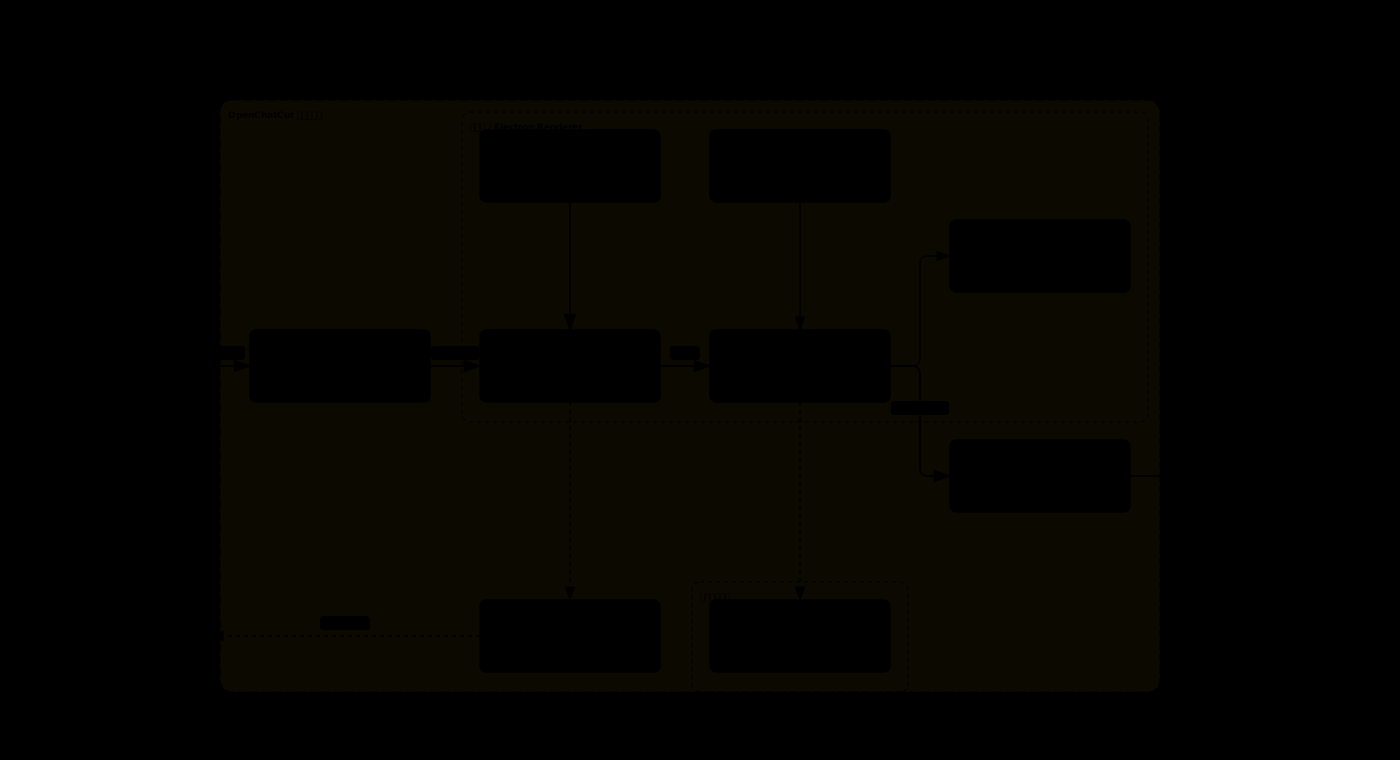
同一套 Agent 工具和 EditorCore 命令连接内置 Agent、外部 MCP、真实时间线、本地数据与交付导出。
| 层 | 技术 |
|---|---|
| 前端 | React 19、TypeScript 6、Vite 8 |
| 编辑核心 | 不可变时间线状态、命令层、提案式应用 |
| Agent | Vercel AI SDK 7(Anthropic、OpenAI、Gemini、Kimi、Qwen、GLM、DeepSeek、MiniMax、小米 MiMo、Mistral、xAI Grok(API Key 或 SuperGrok/X Premium+ 订阅登录)、OpenRouter、OrcaRouter、OFox、Requesty、Cheaper Inference 与兼容接口)、Agent Skills、MCP SDK |
| 预览与视觉 | Remotion Player、WebGL / GLSL |
| 服务端 | Vite / Electron 双宿主插件、服务端密钥仓 |
| 持久化 | ~/.openchatcut 下的本机共享工程库、IndexedDB 缓存、可配置本地素材目录、可选 Cloudflare R2 |
| 桌面端 | Electron 43 |
| 导出 | Remotion、FFmpeg、FCPXML、SRT |
目录速览
| 目录 | 职责 |
|---|---|
src/editor/ |
时间线状态与命令,保持 UI 和 LLM 无关 |
src/agent/ |
Agent 装配、工具、技能、进度和设置 |
src/library/ |
MG、音效、转场、特效、LUT 等资源库 UI |
src/transcript/ |
转写、词级编辑和文字稿 UI |
src/captions/ |
字幕模型、样式、控制和预览层 |
src/gl/ |
WebGL 特效、转场与 shader runtime |
src/generate/ |
图片、视频、语音、音乐和音效生成客户端 |
src/persist/ |
工程、聊天、版本和媒体持久化 |
server/plugins/ |
生成、转写、素材、导出和存储服务 |
desktop/ |
Electron 主进程与内嵌服务 |
remotion/ |
无头渲染和导出管线 |
数据与隐私
- 工程、聊天记录和版本数据保存在
~/.openchatcut下的本机共享工程库中;IndexedDB 用于浏览器端缓存和旧数据迁移。 - 用户媒体保存在本地素材目录,可自行备份和迁移。
- AI 请求是否离开本机,取决于你配置的模型、生成或素材服务。
- 未配置的云端能力不会影响本地时间线和已有素材编辑。
- 对外开放 MCP 时,应配置 Bearer Token,并限制编辑器入口的网络范围。
安全模型
- 密钥只进入服务端配置;浏览器端禁止使用
VITE_暴露供应商密钥。 - LLM 输出、插件包、模板代码和用户输入都在信任边界处校验。
- MG 与 shader 代码进入受限沙箱,恶意模板由专门检查脚本拦截。
- Agent 只经
EditorCore命令改工程,编辑可追踪、可撤销。 - MCP 默认绑定本机;公网入口支持 Bearer Token。
- 本地素材目录和 R2 凭据由服务端管理,不写入工程 JSON。
Fal.ai 图像与视频生成
Fal.ai 是可选的生成服务,提供明确的图像与视频模型目录。 在 设置 → AI 生成 → 生图或生视频 → Fal.ai 中配置。 支持的模型、服务端密钥配置、免费验证和扩展方式见 Fal.ai 使用指南。
开发与验证
# 类型检查与生产构建
npm run build

# 核心回归检查
npm test

# 静态检查
npm run lint
修改 Agent、时间线、预览或导出后,至少运行:
npx tsc -b --force
npm test
npm run build
技术基础
OpenChatCut 基于以下核心项目与规范构建:
| 项目 / 规范 | 在 OpenChatCut 中的作用 |
|---|---|
| ChatCut-Inc/agent-plugin | Agent Skills 的改造基础。OpenChatCut 基于该插件的技能结构与工作流,针对本地编辑器、存储、MCP 和工具架构进行了适配。详见 Agent Skills 来源说明。 |
| Remotion | React 视频预览、合成与服务端渲染的核心基础。 |
| Model Context Protocol | Codex、Claude Code 等外部 Agent 访问工程与时间线工具的协议基础。 |
| Vercel AI SDK | 内置 Agent 的多厂商模型流式响应与工具调用基础。 |
| tt-a1i/archify | README 运行时架构图的定义、校验与 SVG 生成工具。 |
剪映 / CapCut 草稿导出由 capcut-cli 提供支持。
这里列出的是项目的主要技术基础,不替代各依赖、字体和内置二进制随附的许可证。完整 JavaScript 依赖版本见 package-lock.json,字体授权见 assets/fonts/LICENSES.md。
更新日志
重要变更见中英双语的 CHANGELOG.md,所有已发布安装包与源码包见 GitHub Releases。
Star 趋势
许可证
OpenChatCut 采用 GNU Affero General Public License v3.0 或更高版本。 第三方组件与资产仍分别受其自身许可证约束。
贡献
- 从
main创建分支。 - 非平凡逻辑附带一个可运行检查。
- 提交前运行
npm test、npm run lint和npm run build。 - 发起 Pull Request,并附上涉及 UI 或视频行为的截图/验收证据。
问题与功能建议请使用 GitHub Issues。