video-podcast-maker
面向编程 Agent 的视频播客制作技能,将主题、配音、素材管理与 Remotion 合成串成视频创作流程。
中文简介经编辑校订 · agent-skill / ai-video / bilibili / claude-code / idea-to-video / remotion
README / 项目原文
Video Podcast Maker






Automated pipeline to create professional video podcasts from a topic. Supports Bilibili, YouTube, Xiaohongshu, Douyin, and WeChat Channels with multi-language output (zh-CN, en-US). Combines research, script generation, local TTS (edge free, plus azure), Remotion rendering, and FFmpeg mixing. Current release: v5.3.0 — see CHANGELOG.md for version history.
Works with: Claude Code · OpenClaw · OpenCode · Codex · Pi — any coding agent that supports SKILL.md
Publish to: Bilibili · YouTube · Xiaohongshu · Douyin · WeChat Channels
No coding required! Just describe your topic in plain language — the coding agent guides you through each step interactively. You make creative decisions, the agent handles all the technical details.
Note: This project is still under active development and may not be fully mature yet. Your feedback is greatly appreciated — feel free to open an issue.
Features
- Topic → 4K video - research, narration script, TTS audio, Remotion composition, 4K render + BGM in one pipeline
- Local TTS backends - Edge (free, no key) and Azure — synthesized in-house, no external component skill required
- Asset engine - per-video manifest with license provenance; producers are user files, assetseeker stock, imagencn AI stills, videogencn AI B-roll, and Hyperframes overlays — paid generation always asks first
- 4K output + Remotion-native subtitles - 3840×2160; SRT rendered in React at 4K (legacy FFmpeg burn-in available)
- Design learning - extract style profiles from reference videos/images; auto-applied when topics match
- Vertical shorts - 9:16 highlight clips generated from long-form sections
- Multi-platform & multi-language - Bilibili / YouTube / Xiaohongshu / Douyin / WeChat Channels × zh-CN / en-US, with per-platform publish info
- Pronunciation control - global + per-project phoneme dictionaries for Chinese polyphones
Quick Start
1. Install: with the skills CLI, pointing at the full skill:
npx skills add Agents365-ai/video-podcast-maker/skills/video-podcast-maker -g
Drop the /skills/video-podcast-maker suffix to install all three variants (full, -lite, -nano), or clone this repo instead. Paths below are written from the repo root; under a skills CLI install the same files live in the agent's ${SKILL_DIR}.
2. Set up — Python 3.8+, Node.js 18+, FFmpeg, and a Remotion project:
brew install ffmpeg node python3          # macOS (Ubuntu: sudo apt install ffmpeg nodejs python3)
pip install -r skills/video-podcast-maker/requirements.txt
npx create-video@latest my-video-project   # or reuse an existing Remotion project
cd my-video-project && npm i
One-time cost: a fresh Remotion project downloads ~2.2 GB of npm packages plus a ~90 MB Chrome headless shell. Prefer reusing an existing Remotion project (with
node_modules/already installed) for your next video — the heavy install happens once per project, not per video. Lottie animations are optional (@remotion/lottie+lottie-web); install them per project only if you useLottieAnimation.
3. Configure — set TTS_BACKEND plus its API keys (see TTS Backends and Environment Variables).
4. Tell your agent:
"Create a video podcast about [your topic]"
The agent runs the whole workflow (research → script → TTS → Remotion composition → Studio review → 4K render + BGM). Preview and iterate in Remotion Studio (npx remotion studio src/remotion/index.ts); the agent waits for your explicit "render 4K" confirmation before the final render.
⚠️ For the human reading this (not the AI): manually polish podcast.txt, repeatedly
This section is for you, the human — not the agent. Every downstream step — TTS narration, subtitles, section transitions, animation timing, final cut — is derived from this single
podcast.txt. A weak script renders into 4K garbage. No amount of polish downstream saves it.The AI-generated draft is a starting point, nothing more. Do these yourself — don't hand them off to the AI:
- Mentally read it as the narrator. Treat each sentence as one breath — if a line forces you to "catch your breath" or backtrack to parse, fix it. Where you stumble silently is where TTS stumbles audibly.
- Revise at least three times.
- Pass 1: typos, awkward phrasing, tongue-twisters
- Pass 2: cut filler, cut throat-clearing intros ("So today we're going to talk about…"), cut redundancy
- Pass 3: tune rhythm — where to pause, where to break a long sentence, which word carries the stress
- Read each
[SECTION:xxx]block end-to-end. Confirm each section opens with a hook and lands a clean transition into the next — not a bullet-point dump.- Audit numbers, proper nouns, and English terms separately. ~90% of TTS mispronunciations live here. If pronunciation is wrong, add it to
phonemes.json; if it just sounds awkward, rewrite it.- Know your length budget. Estimate ~280 zh-CN chars/min or ~150 en words/min. A 5–10 min video means ~1400–2800 chars / 750–1500 words. Don't pad to fill time.
The only acceptance test: read through it once in your head — does any line make you wince? If yes, don't move on to Step 7 (TTS) yet. Otherwise you're just rendering 4K of something even you don't want to hear.
Workflow
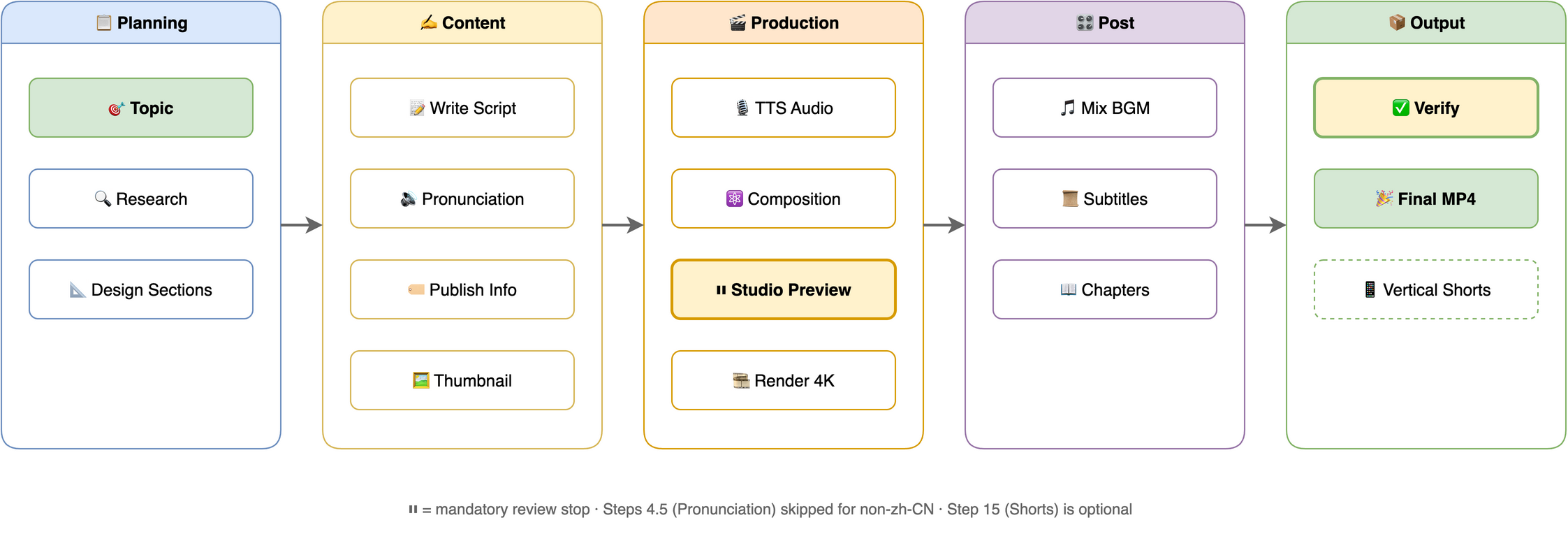
Related Skills
Variants in this repo (skills/):
- video-podcast-maker — the full production pipeline (this README's subject)
- video-podcast-maker-lite — minimal personal pipeline: Azure SSML TTS + Remotion, no bundled templates
- video-podcast-maker-nano — tool-agnostic, logic-only pipeline (any TTS backend, any video tool); autonomous by default, oversight configured per project
External skills:
- remotion-best-practices - recommended; core Remotion patterns and guidelines (built-in minimum rules if absent)
- assetseeker - optional; license-vetted stock photos/video/BGM/SFX/icons/fonts
- imagencn - optional; AI stills and thumbnails (paid APIs)
- videogencn - optional; AI video clips for B-roll (paid APIs)
- Hyperframes - optional; transparent overlay animations (Node 22+)
Requirements
| Software | Version | Purpose |
|---|---|---|
| macOS / Linux | - | Tested on macOS, Linux compatible |
| Python | 3.8+ | TTS script, automation |
| Node.js | 18+ | Remotion video rendering |
| FFmpeg | 4.0+ | Audio/video processing |
Installed through the skills CLI? SKILL.md, scripts, and templates then live under the agent's
${SKILL_DIR}; paths in this README are written from the repo-root perspective, which is what a clone gives you.
TTS Backends (local)
TTS synthesis is in-house — no external component skill required. Set TTS_BACKEND to a platform id; only the active platform's env vars are needed:
TTS_BACKEND |
Provider | Required env vars | Get Key |
|---|---|---|---|
edge (default) |
Microsoft Edge TTS | (none — free) | — |
azure |
Microsoft Azure Speech | AZURE_SPEECH_KEY, AZURE_SPEECH_REGION (default eastasia) |
Azure Portal |
Want more platforms? The former ttscn component skill (cosyvoice, doubao, tencent, baidu, minimax, xunfei, elevenlabs, openai, google) is no longer a dependency. Install it separately and call it directly if you need those.
Environment Variables
Add to ~/.zshrc or ~/.bashrc:
export TTS_BACKEND="edge"                  # edge (default) / azure
export TTS_VOICE="zh-CN-XiaoxiaoNeural"    # optional; unset = backend default
export TTS_RATE="+5%"                      # optional; also settable in user_prefs.json (global.tts.rate)
export TTS_STYLE="gentle"                  # optional; azure only
export AZURE_SPEECH_KEY="..."              # keys for azure (see table above)
export AZURE_SPEECH_REGION="eastasia"      # azure speech region
export GEMINI_API_KEY="..."                # optional: AI thumbnails (imagencn)
export DASHSCOPE_API_KEY="..."             # optional: AI thumbnails (imagencn; ark/hunyuan/zhipu/step also work)
Then reload: source ~/.zshrc
Configuration
Mutable user-level files live in ~/.video-podcast-maker/ (shared across projects, safe from skill updates); the rest live in the skill root (skills/video-podcast-maker/ in this repo, ${SKILL_DIR} when installed):
| File | Location | Purpose |
|---|---|---|
phonemes.json |
~/.video-podcast-maker/ |
Global polyphone dictionary; auto-created from the bundled template; per-project overrides in videos/{name}/phonemes.json |
user_prefs.json |
~/.video-podcast-maker/ |
Your preferences (TTS, BGM, platform, visual overrides, style profiles); auto-created from template |
user_prefs.template.json / phonemes.template.json |
Skill root | Default templates — sources for the user-level copies |
prefs_schema.json |
Skill root | JSON Schema for preference validation |
tsconfig.json |
Skill root | TypeScript config for Remotion templates |
Output structure — every video renders into its own videos/{name}/ directory:
videos/{video-name}/
├── topic_definition.md      # Topic direction
├── topic_research.md        # Research notes
├── podcast.txt              # Narration script
├── phonemes.json            # (Optional) pronunciation overrides
├── assets/manifest.json     # Asset registry (role / source / license)
├── podcast_audio.wav        # TTS audio
├── podcast_audio.srt        # Subtitles
├── timing.json              # Section timing (drives animation sync)
├── thumbnail_*.png          # Video thumbnails
├── publish_info.md          # Title, tags, description
├── output.mp4               # Raw 4K render
├── video_with_bgm.mp4       # With BGM
├── bgm.mp3                  # Background music
├── final_video.mp4          # Final output
└── shorts/                  # (Optional) 9:16 vertical shorts
Background music: bundled tracks live in skills/video-podcast-maker/assets/ — perfect-beauty-191271.mp3 (upbeat) and snow-stevekaldes-piano-397491.mp3 (calm piano). Per-platform behavior (thumbnails, chapters, CTA, publish formats) is documented in the skill's references/platform-matrix.md.
❤️ Support
If this project helps you, consider supporting the author:

WeChat Pay |

Alipay |

Buy Me a Coffee |

Give a Reward |
👤 Author
Agents365-ai
- Bilibili: https://space.bilibili.com/441831884
- GitHub: https://github.com/Agents365-ai
📄 License
MIT — Permission is hereby granted, free of charge, to any person obtaining a copy of this software.
视频播客生成器
自动化流程,从主题生成专业视频播客。支持 B站 (Bilibili)、YouTube、小红书、抖音和微信视频号,多语言输出(zh-CN、en-US)。集成研究、脚本撰写、内置本地 TTS(edge 免费,外加 azure)、Remotion 渲染和 FFmpeg 混音。当前版本:v5.3.0 —— 版本历史见 CHANGELOG.md。
支持工具: Claude Code · OpenClaw · OpenCode · Codex · Pi — 任何支持 SKILL.md 的 coding agent
发布平台: B站 · YouTube · 小红书 · 抖音 · 微信视频号
无需编程! 用自然语言描述你的主题,coding agent 会一步步引导你完成。你做创意决策,agent 处理所有技术细节。
提示: 本项目仍在持续迭代完善中,部分功能可能还不太成熟。欢迎提出宝贵意见和建议 — 可以 提交 Issue 或直接联系作者!
功能特点
- 主题 → 4K 成片 - 研究、旁白脚本、TTS 音频、Remotion 合成、4K 渲染 + BGM 一条龙
- 本地 TTS 后端 - Edge(免费,无密钥)和 Azure —— 内置合成,无需外部组件技能
- 资产引擎 - 每视频 manifest 记录角色/来源/许可;生产者包括用户文件、assetseeker 图库、imagencn AI 图片、videogencn AI 视频、Hyperframes 透明叠层——付费生成必先确认
- 4K 输出 + Remotion 原生字幕 - 3840×2160;SRT 在 Remotion 内以 React 4K 渲染(传统 FFmpeg 烧录仍可用)
- 设计学习 - 从参考视频/图片提取风格档案;主题匹配时自动套用
- 竖屏短片 - 从长视频章节生成 9:16 精华片段
- 多平台 & 多语言 - B站 / YouTube / 小红书 / 抖音 / 微信视频号 × zh-CN / en-US,按平台生成发布信息
- 发音控制 - 全局 + 项目级多音字词典
快速开始
1. 安装: 用 skills CLI 安装完整版技能:
npx skills add Agents365-ai/video-podcast-maker/skills/video-podcast-maker -g
去掉 /skills/video-podcast-maker 后缀会安装全部三个变体(完整版、-lite、-nano);也可以直接克隆本仓库。下文路径均按仓库根目录书写,通过 CLI 安装时同一批文件位于 agent 的 ${SKILL_DIR} 下。
2. 环境准备 — Python 3.8+、Node.js 18+、FFmpeg,以及一个 Remotion 项目:
brew install ffmpeg node python3          # macOS(Ubuntu: sudo apt install ffmpeg nodejs python3)
pip install -r skills/video-podcast-maker/requirements.txt
npx create-video@latest my-video-project   # 或复用已有的 Remotion 项目
cd my-video-project && npm i
一次性成本: 全新的 Remotion 项目需下载约 2.2 GB npm 包 + 约 90 MB Chrome headless shell。为下一个视频优先复用已存在的 Remotion 项目(已装好
node_modules/)——重安装在每个项目只发生一次,而非每支视频。Lottie 动画为可选(@remotion/lottie+lottie-web),只有用到LottieAnimation时才按项目安装。
3. 配置 — 设置 TTS_BACKEND 及其 API 密钥(见 TTS 后端 和 环境变量)。
4. 告诉你的 agent:
"帮我制作一个关于 [你的主题] 的视频播客"
agent 会自动跑完整个流程(研究 → 脚本 → TTS → Remotion 合成 → Studio 预览 → 4K 渲染 + BGM)。渲染前可在 Remotion Studio(npx remotion studio src/remotion/index.ts)预览迭代;agent 会等你说出明确的"渲染 4K"才进行最终渲染。
⚠️ 给读到这里的你(不是给 AI 看的):podcast.txt 必须人工反复打磨
这一节是写给你这个真人的,不是写给 agent 的。 整条流水线后面所有环节 — TTS 朗读、字幕、章节切换、动画节奏、最终成片 — 全部由这一份
podcast.txt决定。脚本不行,4K 渲出来的也是垃圾。AI 生成的初稿只是起点。请你亲自做下面这些事,不要交给 AI 代劳:
- 按口播节奏在脑子里默读。 每句话当成一口气说完 — 哪句让你"换气换不过来"、哪句要回头重读才懂,立刻改。读得舒服 ≠ 听得舒服,TTS 卡住的地方往往就是你默读时也卡的地方。
- 至少改三遍。
- 第一遍:抓错别字、明显语病、绕口处
- 第二遍:砍废话、砍套话、砍"那么我们今天就来聊一聊"这种开场
- 第三遍:调节奏 — 哪里断句、哪里加停顿、长句切短、重音落在哪个词上
- 逐章节通读。 每个
[SECTION:xxx]块从头看到尾,确认开头有钩子、结尾能自然过渡到下一节,不是一堆并列要点堆在一起。- 数字 / 专有名词 / 英文术语单独审一遍。 TTS 念错的 90% 都集中在这里。读音不对的,去
phonemes.json加词条;读着别扭的,直接换说法。- 心里要有时长账。 中文按 每分钟约 280 字 估算(英文约每分钟 150 词)。目标 5-10 分钟 ≈ 1400-2800 字,不要凑。
校验通过的唯一标准:脑子里走完一遍,没有任何一句让你皱眉。 达不到就不要进 Step 7(TTS),否则你只是在用 4K 渲染一段连你自己都不想听完的内容。
工作流程
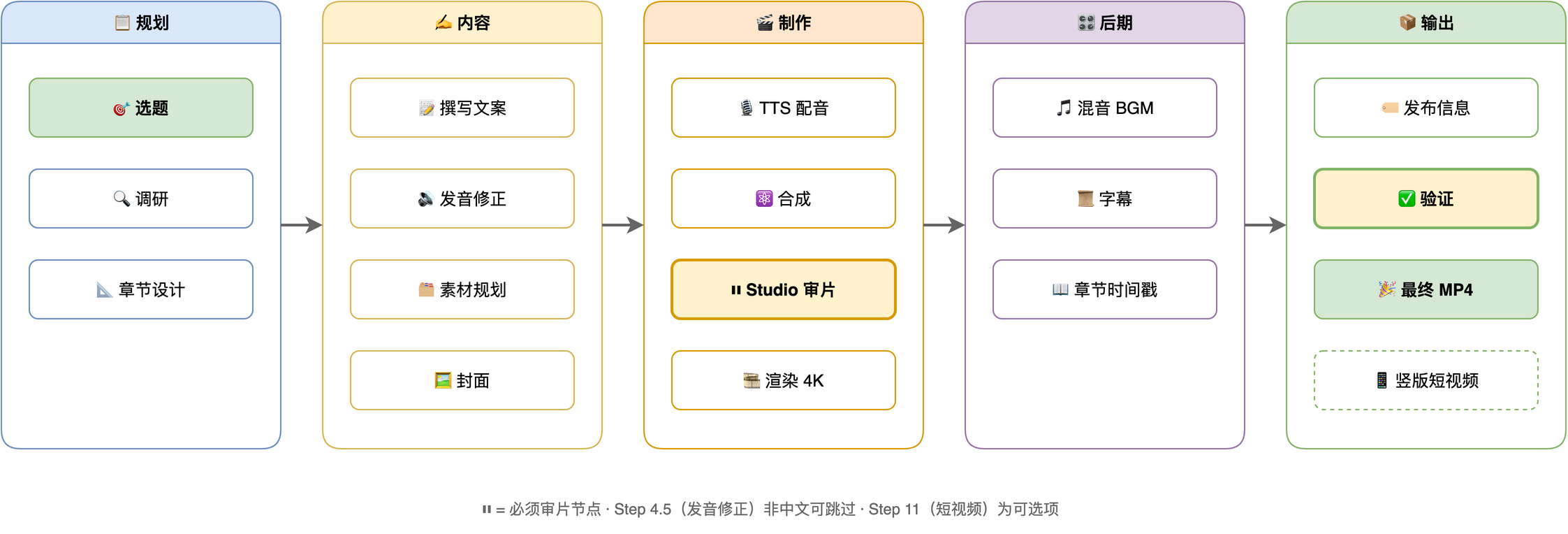
相关技能
本仓库内的变体(skills/):
- video-podcast-maker —— 完整制作管线(本 README 的主角)
- video-podcast-maker-lite —— 极简个人管线:Azure SSML TTS + Remotion,不带模板
- video-podcast-maker-nano —— 工具无关的纯逻辑管线(任意 TTS 后端、任意视频工具);默认全自动,审查级别按项目配置
外部技能:
- remotion-best-practices - 推荐;Remotion 核心模式与规范(缺失时使用内置最简规则)
- assetseeker - 可选;许可核验的图库/视频/BGM/音效/图标/字体
- imagencn - 可选;AI 图片与封面(付费 API)
- videogencn - 可选;AI 视频片段,用于 B-roll(付费 API)
- Hyperframes - 可选;透明动画叠层(Node 22+)
环境要求
| 软件 | 版本 | 用途 |
|---|---|---|
| macOS / Linux | - | 已在 macOS 测试,兼容 Linux |
| Python | 3.8+ | TTS 脚本、自动化 |
| Node.js | 18+ | Remotion 视频渲染 |
| FFmpeg | 4.0+ | 音视频处理 |
通过 skills CLI 安装的? 届时 SKILL.md / scripts / templates 位于 agent 暴露的
${SKILL_DIR}路径下;README 中的路径写法是仓库根目录视角,也就是克隆安装后的样子。
TTS 后端(本地)
TTS 内置合成,无需外部组件技能。TTS_BACKEND 直接填平台 id,只需配置当前平台的环境变量:
TTS_BACKEND |
平台 | 所需环境变量 | 获取密钥 |
|---|---|---|---|
edge(默认) |
微软 Edge TTS | (无 —— 免费) | — |
azure |
微软 Azure Speech | AZURE_SPEECH_KEY、AZURE_SPEECH_REGION(默认 eastasia) |
Azure 门户 |
想要更多平台? 原先的 ttscn 组件技能(cosyvoice、豆包、腾讯云、百度、MiniMax、讯飞、ElevenLabs、OpenAI、Google)不再是依赖。如需这些平台,请单独安装并直接调用。
环境变量
添加到 ~/.zshrc 或 ~/.bashrc:
export TTS_BACKEND="edge"                  # edge(默认)/ azure
export TTS_VOICE="zh-CN-XiaoxiaoNeural"    # 可选;不设置则用后端默认音色
export TTS_RATE="+5%"                      # 可选;也可写入 user_prefs.json(global.tts.rate)
export TTS_STYLE="gentle"                  # 可选;仅 azure 生效
export AZURE_SPEECH_KEY="..."              # 仅 azure 需要(见上表)
export AZURE_SPEECH_REGION="eastasia"      # azure 语音区域
export GEMINI_API_KEY="..."                # 可选:AI 封面(imagencn)
export DASHSCOPE_API_KEY="..."             # 可选:AI 封面(imagencn;ark/混元/智谱/step 亦可)
然后重新加载:source ~/.zshrc
配置文件
可变用户级文件位于 ~/.video-podcast-maker/(所有项目共享,技能更新不会覆盖);其余文件位于技能根目录(本仓库为 skills/video-podcast-maker/,通过 skills CLI 安装后为 ${SKILL_DIR}):
| 文件 | 位置 | 说明 |
|---|---|---|
phonemes.json |
~/.video-podcast-maker/ |
全局多音字词典;首次运行自动从内置模板复制;项目级覆盖放 videos/{名称}/phonemes.json |
user_prefs.json |
~/.video-podcast-maker/ |
你的偏好(TTS、BGM、平台、视觉覆盖、风格档案);首次运行自动从模板复制 |
user_prefs.template.json / phonemes.template.json |
技能根目录 | 默认模板 — 用户级副本的来源 |
prefs_schema.json |
技能根目录 | 偏好校验的 JSON Schema |
tsconfig.json |
技能根目录 | Remotion 模板的 TypeScript 配置 |
输出结构 — 每个视频渲染到自己的 videos/{名称}/ 目录:
videos/{视频名称}/
├── topic_definition.md      # 主题定义
├── topic_research.md        # 研究笔记
├── podcast.txt              # 旁白脚本
├── phonemes.json            # (可选)发音覆盖
├── assets/manifest.json     # 资产清单(角色 / 来源 / 许可)
├── podcast_audio.wav        # TTS 音频
├── podcast_audio.srt        # 字幕文件
├── timing.json              # 章节时间轴(驱动动画同步)
├── thumbnail_*.png          # 视频封面
├── publish_info.md          # 标题、标签、简介
├── output.mp4               # 4K 原始渲染
├── video_with_bgm.mp4       # 含背景音乐
├── bgm.mp3                  # 背景音乐
├── final_video.mp4          # 最终输出
└── shorts/                  # (可选)9:16 竖屏短片
背景音乐: 内置曲目位于 skills/video-podcast-maker/assets/ —— perfect-beauty-191271.mp3(轻快积极)和 snow-stevekaldes-piano-397491.mp3(舒缓钢琴)。各平台行为(封面、章节、CTA、发布格式)见技能内 references/platform-matrix.md。
❤️ 支持作者
如果这个项目对你有帮助,欢迎支持作者:
|
微信支付 |
支付宝 |
Buy Me a Coffee |
打赏 |
💬 支持
如有问题、功能建议或疑问,请在 GitHub 提交 Issue。
👤 作者
Agents365-ai
📄 开源协议
MIT — 免费使用、修改、再分发,只要包含版权与许可声明。