huashu-design
Huashu Design 3.0 · 在 agent 里打一句话,拿回能交付的设计:网页 / App 原型 / 可编辑 PPTX / 动画 / 信息图 · 六个候选挑三个方向 · 84 种带样张的风格库 · 越用越懂你的外观账本与设计体检 · HTML-native design skill for Claude Code, Codex, Cursor & any agent
原始仓库简介 · 中文摘要待补充 · agent-skills / ai-design / claude-code / claude-skills / codex / cursor
README / 项目原文
🌐 中文 · English
Huashu Design
「打字。回车。一份能交付的设计。」 "Type. Hit enter. A finished design lands in your lap."



在你的 agent 里打一句话,拿回一份能交付的设计。
3 到 30 分钟,你能 ship 一段产品发布动画、一个能点击的 App 原型、一套能编辑的 PPT、一份印刷级的信息图。
不是「AI 做的还行」那种水平——是看起来像大厂设计团队做的。给 skill 你的品牌资产(logo、色板、UI 截图),它会读懂你的品牌气质;什么都不给,六张缩略图里挑出的三个真实方向 + 84 种带样张的风格库也能兜底到不出 AI slop。
你看到这篇 README 里的每一页设计,都是 huashu-design 自己做的。 不是 Figma,不是 AE,就是一句话 prompt + skill 跑通。下次产品发布要做宣传片?现在你也能做。
npx skills add alchaincyf/huashu-design
跨 agent 通用——Claude Code、Cursor、Codex、OpenClaw、Hermes 都能装。
📣 已改为 MIT 协议。 自 2026-05-14 起本 skill 完全开源(MIT License),个人和商用都免费,无需事先授权。原「个人使用免费、企业商用需授权」的条款已作废。(查看变更)
🆕 3.0:三个方向更敢,项目之间也不再长一个样。 先出六张缩略图再挑三版做成真稿;风格库扩到 84 种(新增 App、中文与东亚两个分区),每种都有样张;参照作品先截图再动手;带一个只量事实的设计体检,和一本记住你做过什么样子的外观账本。详见核心机制
看效果 · 安装 · 能做什么 · 核心机制 · 和 Claude Design 的关系

▲ 3.0 发布片 · 32 秒 · 片里每一页设计都是 3.0 自己做的,剪辑用的是 huashu-motion
👉 下载 MP4(1080p · 含配乐 · 24MB) ·
2.0 的带音效 HTML 互动版
3.0 案例
下面这些都是 3.0 跑出来的。前五个是从发布时新跑的 6 道题里挑的,每道只给一句话需求,方向是 agent 自己挑的,作者没插手;后两个一个是第三轮盲选赢下来的那版,一个是发布后作者拿它做的真实项目。
网页 · 《富岳三十六景》线上展
「给葛饰北斋的《富岳三十六景》做一个线上展览网站」
三版分别是 Rijksmuseum 官网式的暗场展厅、田中一光式的三角窗、民国书衣式的题签框。设计体检报过一次撞车:两版首屏都用了《神奈川冲浪里》,它就把暗场那版换成了《山下白雨》。

往下一章讲普鲁士蓝,依据是大都会博物馆的光谱研究;全 46 幅都来自芝加哥艺术博物馆和大都会的开放馆藏。


App · 鸣迹(观鸟记录)
「做一个观鸟记录 App 的原型」
现实参照找的是拿了 2025 年苹果设计奖的 CapWords,ref_board.py 先把它截成参考板,agent 亲眼看过再动手。借来的是「从照片里撕下一张贴纸」:每只鸟都从 Wikimedia 的真实照片里分割出来,贴进一年的本子里,叫声波形是拿真实录音算的。

App · 今晚吃啥(家常菜谱)
「做一个家常菜谱 App」
秒数轮盘恰好抽到吕敬人书籍设计,最后做成了一本菜谱:一道菜一页方子,切口旁边留一条旁注栏,写「擦干再煎才不溅油」「老抽只要几滴」,朱砂只给「开做」这一方印。外观账本看到最近 6 个交付里 5 个是无衬线标题,这一版挑了宋体。

PPT · 《千里江山图》讲座
走的是最佳设计师 Abbott Miller 式的暗场展柜,暗底取的是绢地最暗处的颜色。封面底下那条细长的位置条就是整卷缩略图,框出这一页在 11.9 米长卷的哪一段。


PPT · 黑洞的照片是怎么拍出来的
现实参照是 Jonathan Corum 的讲座幻灯片:黑底、照片做主角、标注直接写在图上。每页都标了出处,事实先过核查再上页面。

App · 绿拇指(第三轮盲选赢的那版)
把植物当成会呼吸的生命体征来读。App 原型做成一张有构图的展示板,几台手机错落排开。

网页 · 旅居档案(作者自己的项目)
三年里所有旅行照片的地图。选的是葛西薰式的白纸明朝体长卷,开头一张卫星地图串起所有旅程,往下一段旅程一章。选完作者顺口说了句「尽量不要遗漏」,它就记进了经验:个人回忆类档案照片要全,而且注明只适用于照片档案,不外溢到产品界面。

📺 新手教程(花叔亲录)
不知道怎么用?看花叔录的 huashu-design 上手教程:
装上就能用
npx skills add alchaincyf/huashu-design
装完先自检:这个 skill 不只是 SKILL.md 一个文件,
references/、assets/、scripts/、demos/四个子目录里有 99 处被引用的配方、脚本、素材,缺一不可。装完看一眼安装目录(如~/.claude/skills/huashu-design/),如果只有 SKILL.md、没有那几个子目录,说明你的skillsCLI 版本太旧(≤1.5.15 有个只同步单文件的 bug,已在 1.5.19 修复)。升级后再装一次即可:npm i -g skills@latest # 或 npx skills@latest add alchaincyf/huashu-design升级后仍异常,就用
git clone兜底安装,把仓库克隆到任意 skills 目录即可:git clone https://github.com/alchaincyf/huashu-design.git ~/.claude/skills/huashu-design
然后在 Claude Code / Codex / Cursor 等任意支持 skills 的 agent 里直接说话:
「做一份 AI 心理学的演讲 PPT,推荐 3 个风格方向让我选」
「做个 AI 番茄钟 iOS 原型,4 个核心屏幕要真能点击」
「把这段逻辑做成 60 秒动画,导出 MP4 和 GIF」
「帮我对这个设计做一个 5 维度评审」
没有按钮、没有面板、没有 Figma 插件。
Star 趋势
能做什么
| 能力 | 交付物 | 典型耗时 |
|---|---|---|
| 交互原型(App / Web) | 单文件 HTML · 真 iPhone bezel · 可点击 · Playwright 验证 | 10–15 min |
| 演讲幻灯片 | HTML deck(浏览器演讲)+ 可编辑 PPTX(文本框保留) | 15–25 min |
| 时间轴动画 | MP4(25fps / 60fps 插帧)+ GIF(palette 优化)+ BGM | 8–12 min |
| 设计变体 | 3+ 并排对比 · Tweaks 实时调参 · 跨维度探索 | 10 min |
| 信息图 / 可视化 | 印刷级排版 · 可导 PDF/PNG/SVG | 10 min |
| 设计方向顾问 | 三套逻辑各出两个候选(最佳设计师 + 同媒介获奖作品 + 秒数轮盘)· 六张缩略图挑三版真实视觉,另三张作备选 | 10 min |
| 5 维度专家评审 | 雷达图 + Keep/Fix/Quick Wins · 可操作修复清单 | 3 min |
Demo 画廊
设计方向顾问
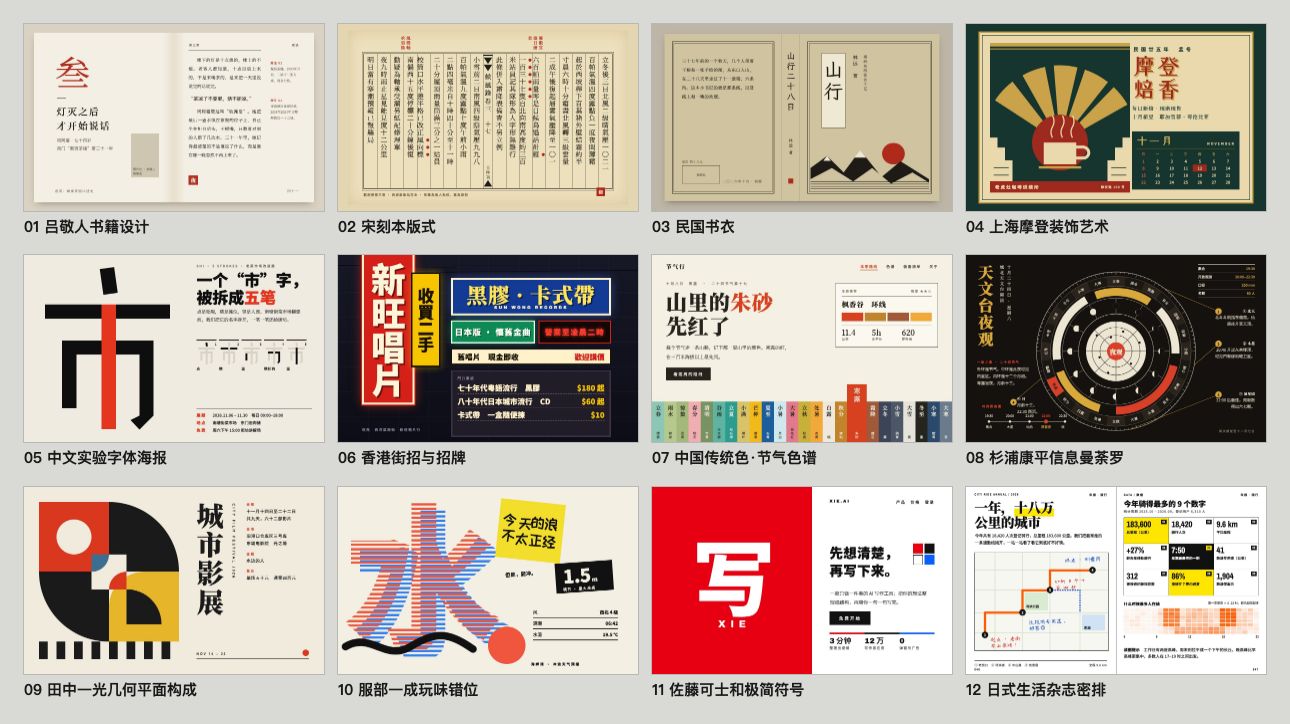
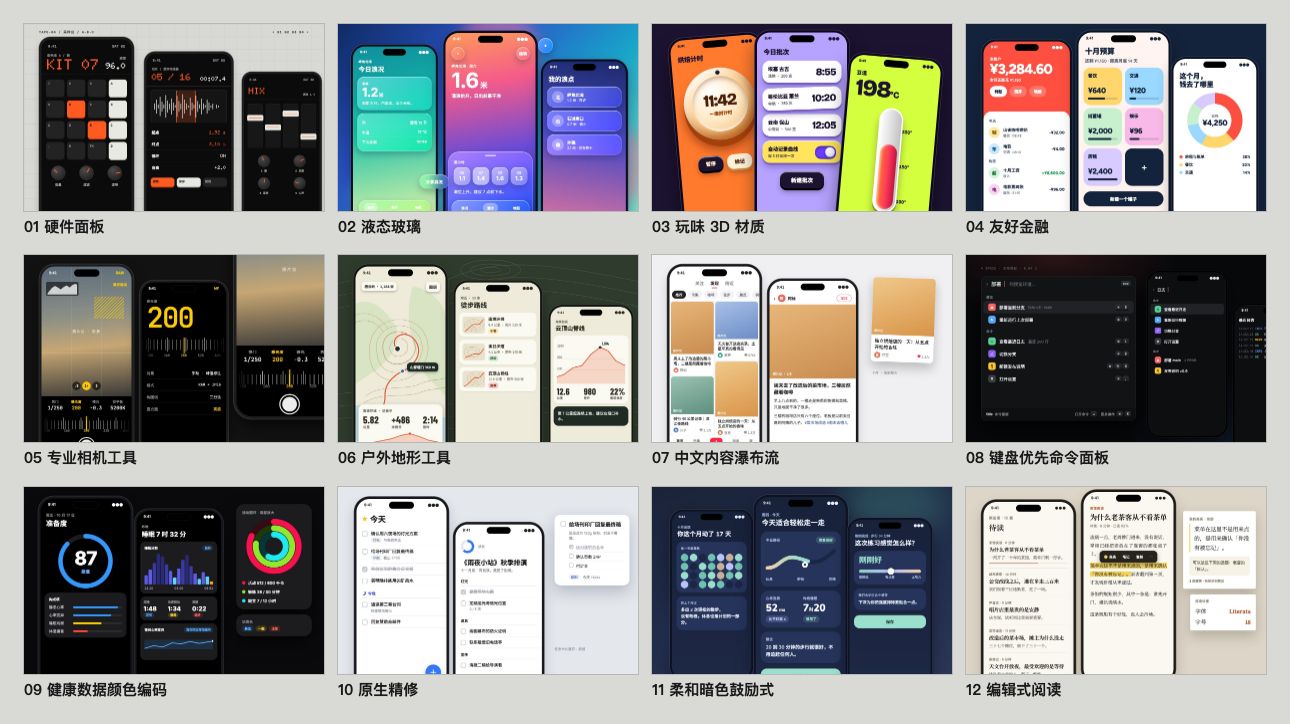
模糊需求时的 fallback:三套互补逻辑各出两个候选——最佳设计师(预算无上限时最适合的设计师)+ 现实参照(同媒介的获奖作品,先截图亲眼看)+ 秒数轮盘(从风格库随机抽,打破惯性)。六个候选先画成一页缩略图,挑最强、最不一样的三版做成真实视觉让你看着选,另外三张作为备选一起给你。背后是 84 种 HTML 原生风格库(网页 20 + PPT 20 + 信息图 20 + App 12 + 中文与东亚 12,纯 CSS 无需生图),每种都有一张样张。

动图为 2.0 流程(三套逻辑直接各出一版)
3.0 新增的两个分区,每格都是一张样张(全部纯 HTML/CSS,题材与数字虚构):
iOS App 原型
iPhone 15 Pro 精确机身(灵动岛 / 状态栏 / Home Indicator)· 状态驱动多屏切换 · 真图从 Wikimedia/Met/Unsplash 取 · Playwright 自动点击测试。

Motion Design 引擎
Stage + Sprite 时间片段模型 · useTime / useSprite / interpolate / Easing 四 API 覆盖所有动画需求 · 一条命令导出 MP4 / GIF / 60fps 插帧 / 带 BGM 的成片。

HTML Slides → 可编辑 PPTX
HTML deck 浏览器演讲 · html2pptx.js 读 DOM 的 computedStyle 逐元素翻译成 PowerPoint 对象 · 导出的是真文本框,PPT 里双击即可编辑。

Tweaks · 实时变体切换
配色 / 字型 / 信息密度等参数化 · 侧边面板切换 · 纯前端 + localStorage 持久化 · 刷新不丢。

信息图 / 数据可视化
杂志级排版 · CSS Grid 精准分栏 · text-wrap: pretty 排印细节 · 真数据驱动 · 可导 PDF 矢量 / PNG 300dpi / SVG。

5 维度专家评审
哲学一致性 · 视觉层级 · 细节执行 · 功能性 · 创新性 各 0–10 分 · 雷达图可视化 · 输出 Keep / Fix / Quick Wins 清单。

Junior Designer 工作流
不闷头做大招:先写 assumptions + placeholders + reasoning,尽早 show 给你,再迭代。理解错了早改比晚改便宜 100 倍。

品牌资产协议 5 步硬流程
涉及具体品牌时强制执行:问 → 搜 → 下载(三条兜底)→ grep 色值 → 写 brand-spec.md。

Showcase · 2.0 时期的真实案例
鹦鹉进化史网站 · 设计方向顾问三套逻辑实战(2.0)
Live demo · https://www.huasheng.ai/parrots/
一句「做个介绍鹦鹉进化史的网站」、零额外要求,skill 自动跑完整 2.0 顾问流程:先判断图片是内容必需 → 抓公共领域博物插画(Edward Lear / John Gould 的鹦鹉图录)→ 三套逻辑并行(秒数轮盘 + 现实参照获奖站 + 原研哉「白」哲学)各出一版真实视觉。素材齐了再设计,不是边设计边用色块占位。
「聊聊 skill」 · PM after-party 演讲 deck
Live demo · https://skill-huasheng.vercel.app
13 页 HTML deck,全部用 huashu-design 完成:
- 黑底极简衬线视觉系统(cover / about / hook / what / why / closing)
- 2 个带 BGM + SFX 的 22 秒 cinematic demo(Nuwa skill workflow + Darwin skill workflow),各采用完全独立的视觉语言:
- Nuwa:3D 知识 orbit + Pentagon 提炼 + SKILL.md typewriter + 「21 分钟」hero reveal
- Darwin:autoresearch loop spin + v1/v5 并列 diff + Hill-Climb 全屏曲线 + Ratchet gear lock
- 每个 cinematic 默认显示完整静态 workflow dashboard(观众随时能看清 skill 怎么跑),点 ▶ 才触发动画,跑完自动 fade 回 dashboard
- 嵌入 huasheng.ai 的 25 秒 hero 动画(iframe 本地化兜底)
- 真实数据:14,495 stargazers 真实曲线(gh API 拉取)+ DeepSeek V4 真实 specs(WebSearch 验证)
- 真实 AI 素材:用
huashu-gpt-image跑 4×2 grid 大图,extract_grid.py抠出 8 张独立透明 PNG,做 3D orbit 漂浮
适合参考的页面:
/slides/slide-04b-nuwa-flow.html· 静态 dashboard + cinematic overlay 双层架构/slides/slide-06b-darwin-flow.html· 完全独立视觉语言的对照案例/slides/slide-03b-deepseek-cover.html· AI slop vs 真实设计师视角的对比页
详细 cinematic patterns 见 references/cinematic-patterns.md。
核心机制
品牌资产协议
skill 里最硬的一段规则。涉及具体品牌(Stripe、Linear、Anthropic、自家公司等)时强制执行 5 步:
| 步骤 | 动作 | 目的 |
|---|---|---|
| 1 · 问 | 用户有 brand guidelines 吗? | 尊重已有资源 |
| 2 · 搜官方品牌页 | <brand>.com/brand · brand.<brand>.com · <brand>.com/press |
抓权威色值 |
| 3 · 下载资产 | SVG 文件 → 官网 HTML 全文 → 产品截图取色 | 三条兜底,前一条失败立刻走下一条 |
| 4 · grep 提取色值 | 从资产里抓所有 #xxxxxx,按频率排序,过滤黑白灰 |
绝不从记忆猜品牌色 |
| 5 · 固化 spec | 写 brand-spec.md + CSS 变量,所有 HTML 引用 var(--brand-*) |
不固化就会忘 |
A/B 测试(v1 vs v2,各跑 6 agent):v2 的稳定性方差比 v1 低 5 倍。稳定性的稳定性,这是 skill 真正的护城河。
设计方向顾问(Fallback)
当用户需求模糊到无法着手时触发(3.0 重做):
- 先对话澄清 + 主动索要参考(名字 / logo / 品牌色 / 喜欢的参考站),只问一轮
- 取齐内容必需的真图(公共领域 / 免版权,脚本一键抓),再开工
- 三套逻辑各出两个候选,共六个:① 最佳设计师(两位气质不同的设计师,用他们的思维从头做)② 现实参照(两件同媒介的获奖作品——做 App 找 App、做 deck 找出版物;
scripts/ref_board.py先截图亲眼看,再拆网格、字号比和色彩比例)③ 秒数轮盘(date +%S取秒,在产出形态对应的分区和中文东亚分区各抽一号,先看样张再动手) - 六张缩略图 → 挑三版做完整稿:单看够好、彼此不一样、不撞你最近的项目;没选上的三张作为备选一起给你,看中哪张再做
- 绝不让你在没看到视觉时盲选风格——摆出来就停,看着选
- 底层是 84 种 HTML 原生风格库,每种配一张样张和源码(
assets/style-specimens/),作弹药,不是教条
为什么这样做:我们拿固定题目做了三轮改前改后盲选(内部测试)。第一轮强制每版套一个大隐喻,页面被做成道具,4 题只赢 1 题;第二轮为了躲 AI 默认外观加了一堆禁令,三版一起变得「太规整,太无聊」,2 题全输;第三轮改成加选项、不加禁令——多出候选、给看得见的样张、看真参考——同两道题都赢了。
越用越懂你:经验、外观账本与设计体检
- 经验:
scripts/learn.py开工前带出你说过的品味原话(「太素了」「A 的结构加 C 的颜色」)和过去的教训,收工时把值得记的记下来;记录前会告诉你,不想记可以拒绝 - 外观账本:每次交付记一笔「长什么样」(底色、色板、字体、版式骨架,连同项目名和所在路径),下个项目主动避开——单个项目看都不错、放在一起却长得像,这种单调靠它管
- 设计体检:
scripts/design_lint.py只量能核对的事实——图裂了、字小到读不了、对比度不够、控制台报错是红灯;全大写小标签、「A · B · C」这类顺手的模板装饰是黄灯;三版是不是换皮、和最近的项目撞没撞,compare和ledger check来查。好不好看归你判断,它不打分 - 这些记录只存在你本机的
~/.huashu-design/,不随 skill 分发,删掉文件夹就全部忘记
Junior Designer 工作流
默认工作模式,贯穿所有任务:
- 开工前 show 问题清单一次性发给用户,等批量答完再动手
- HTML 里先写 assumptions + placeholders + reasoning comments
- 尽早 show 给用户(哪怕只是灰色方块)
- 填充实际内容 → variations → Tweaks 这三步分别再 show 一次
- 交付前用 Playwright 肉眼过一遍浏览器
反 AI slop 规则
避免一眼 AI 的视觉最大公约数:紫渐变、emoji 图标、圆角+左 border accent、SVG 画人脸、Inter 做 display,以及 2026 年的新一代模板装饰(每个标题上一行全大写小标签、「A · B · C」中点连接、按钮尾巴的「→」、标题只给一个词换色)。不编造数据、评价和 logo 墙。
暖纸衬线、深底单点缀这类「外观家族」不在禁令里:盲选里被用户认可的几版,恰好就有这两类。真正要避免的是三版挤在同一个家族、每个项目都长一个样——那交给外观账本。
和 Claude Design 的关系
我大方承认:品牌资产协议的哲学是从 Claude Design 流传出来的提示词里偷师的。那份提示词反复强调好的高保真设计不是从白纸开始,而是从已有的设计上下文长出来。这个原则是 65 分作品和 90 分作品的分水岭。
定位差异:
| Claude Design | huashu-design | |
|---|---|---|
| 形态 | 网页产品(浏览器里用) | skill(Claude Code 里用) |
| 配额 | 订阅 quota | API 消耗 · 并行跑 agent 不受 quota 限 |
| 交付物 | 画布内 + 可导 Figma | HTML / MP4 / GIF / 可编辑 PPTX / PDF |
| 操作方式 | GUI(点、拖、改) | 对话(说话、等 agent 做完) |
| 复杂动画 | 有限 | Stage + Sprite 时间轴 · 60fps 导出 |
| 跨 agent | 专属 Claude.ai | 任意 skill 兼容 agent |
Claude Design 是更好的图形工具,huashu-design 是让图形工具这层消失。两条路,不同受众。
安全与数据流
核心链路(设计→渲染→MP4/PDF/PPTX导出)100%本地运行,零网络零key。云能力(豆包TTS配音、AI看片评审)全部隔离在 scripts/cloud/,完全可选:用你自己的key、只发对应厂商官方API、首次调用需 --yes 显式确认。无telemetry,没有任何数据发往作者服务器。3.0 新增的本机记录(品味经验、外观账本)只写在 ~/.huashu-design/,从不上传;参考板只在你让 agent 截参考作品时访问那些网址。全部出站域名、密钥处理、删除边界的穷举声明见 SECURITY.md,欢迎用你的agent对着代码逐条核验。
Limitations
- 不支持图层级可编辑的 PPTX 到 Figma。产出 HTML,可截图、录屏、导图,但不能拖进 Keynote 改文字位置。
- Framer Motion 级别的复杂动画不行。3D、物理模拟、粒子系统超出 skill 边界。
- 完全空白的品牌从零设计质量会掉到 60–65 分。凭空画 hi-fi 本来就是 last resort。
这是一个 80 分的 skill,不是 100 分的产品。对不愿意打开图形界面的人,80 分的 skill 比 100 分的产品好用。
仓库结构
huashu-design/
├── SKILL.md                 # 主文档(给 agent 读)
├── README.md                # 中文 README(默认,本文件)
├── README.en.md             # 英文 README
├── assets/                  # Starter Components
│   ├── animations.jsx       # Stage + Sprite + Easing + interpolate
│   ├── ios_frame.jsx        # iPhone 15 Pro bezel
│   ├── android_frame.jsx
│   ├── macos_window.jsx
│   ├── browser_window.jsx
│   ├── deck_stage.js        # HTML 幻灯片引擎
│   ├── deck_index.html      # 多文件 deck 拼接器
│   ├── design_canvas.jsx    # 并排变体展示
│   ├── showcases/           # 24 个预制样例(8 场景 × 3 风格)
│   ├── style-specimens/     # 84 种风格的样张(html 源码 + jpg)与分区总览
│   └── bgm-*.mp3            # 6 首场景化背景音乐
├── references/              # 按任务深入读的子文档
│   ├── animation-pitfalls.md
│   ├── directions.md        # 三方向:六个候选 → 缩略图 → 挑三版
│   ├── design-styles.md     # 84 种 HTML 原生风格库(网页 20 + PPT 20 + 信息图 20 + App 12 + 中文与东亚 12)
│   ├── modules/             # 网页 / deck / 信息图 / 动画 四个模块手册
│   ├── slide-decks.md
│   ├── editable-pptx.md
│   ├── critique-guide.md
│   ├── video-export.md
│   └── ...
├── scripts/                 # 导出工具链
│   ├── render-video.js      # HTML → MP4
│   ├── convert-formats.sh   # MP4 → 60fps + GIF
│   ├── add-music.sh         # MP4 + BGM
│   ├── export_deck_pdf.mjs
│   ├── export_deck_pptx.mjs
│   ├── html2pptx.js
│   ├── design_lint.py       # 设计体检、三版撞色撞骨架、外观账本
│   ├── learn.py             # 品味经验的读写
│   ├── ref_board.py         # 把参考作品截成参考板
│   ├── capabilities.py      # 探测本机能力(生图、兄弟 skill、Node、ffmpeg)
│   └── verify.py
└── demos/                   # 9 个能力演示 (c*/w*),中英双版 GIF/MP4/HTML + hero v10
起源
Anthropic 发布 Claude Design 那天我玩到凌晨四点。几天之后发现自己再也没点开过它,不是它不好——它是这个赛道目前最成熟的产品——是我宁愿让 agent 在终端里帮我干活,也不愿意打开任何图形界面。
于是让 agent 拆解 Claude Design 本身(包括社区流传的系统提示词、品牌资产协议、组件机制),蒸馏成结构化 spec,再写成 skill 装进自己的 Claude Code。
感谢 Anthropic 把 Claude Design 的提示词写得清晰。这种基于其他产品灵感的二次创作,是开源文化在 AI 时代的新形态。
用 huashu-design 做的产品
FanBox · Coding Agent 的驾驶舱 的三套界面皮肤,就是用 huashu-design 设计的。指挥 Claude Code / Codex 干活,看清它碰过的每个文件、每一行改动。

社区翻译版本
社区维护的翻译版本。翻译质量与各版本 license 条款由对应维护者负责,使用前请先确认。
| 语言 | 维护者 | 仓库 |
|---|---|---|
| English | @namandhakad712 | namandhakad712/huashu-design-en |
| 한국어(韩语) | @ktkarchive | ktkarchive/ktk-design |
| Tiếng Việt(越南语) | @letrquan | letrquan/huashu-design |
想加你的语言?fork 仓库、翻译 SKILL.md + README.md,然后回这边开个 issue,我会把链接加进来。
License
2026-05-14 起改为 MIT 协议。 此前版本采用「个人使用免费、企业商用需授权」的 Personal Use License,对商用做了限制——现在这层限制完全解除。
按 MIT License,你可以自由使用、修改、分发本 skill,包括商业用途——公司内部用、客户商单交付、做成付费产品对外卖,都没问题。无需事先授权、无需付费、无需打招呼。注明出处不强制,但欢迎。
Connect · 花生(花叔)
花生是 AI Native Coder、独立开发者、AI 自媒体博主。代表作:小猫补光灯(AppStore 付费榜 Top 1)、《一本书玩转 DeepSeek》、女娲 .skill(GitHub 3 万+ star)。自媒体全平台 30 万+ 粉丝。
| 平台 | 账号 | 链接 |
|---|---|---|
| X / Twitter | @AlchainHust | https://x.com/AlchainHust |
| 公众号 | 花叔 | 微信搜索「花叔」 |
| B 站 | 花叔 | https://space.bilibili.com/14097567 |
| YouTube | 花叔 | https://www.youtube.com/@Alchain |
| 小红书 | 花叔 | https://www.xiaohongshu.com/user/profile/5abc6f17e8ac2b109179dfdf |
| 官网 | huasheng.ai | https://www.huasheng.ai/ |
| 开发者主页 | bookai.top | https://bookai.top |
合作咨询、自媒体约稿 → 以上任一平台私信花生即可。

🌐 中文 · English
Huashu Design
"Type. Hit enter. A finished design lands in your lap." 「打字。回车。一份能交付的设计。」
Say one sentence to your agent — Claude Code, Cursor, Codex, OpenClaw, Hermes all work.
3 to 30 minutes — you ship a product launch animation, a clickable App prototype, an editable PPT deck, a print-grade infographic.
Not "decent for AI" quality — it looks like a real design team made it. Give the skill your brand assets (logo, colors, UI screenshots) and it reads your brand's voice; give it nothing and three real directions picked from six thumbnails, backed by an 84-style library with a visual specimen for every style, still keep you out of AI slop territory.
Every design in this README was made by huashu-design itself. No Figma, no After Effects — just a sentence + skill run. Next product launch needs a promo video? You can make it too.
npx skills add alchaincyf/huashu-design
📣 Now MIT-licensed. As of 2026-05-14 this skill is fully open-source under the MIT License — free for personal and commercial use, no authorization required. (what changed)
🆕 3.0: bolder directions, and projects that stop looking alike. Six thumbnails first, then the three strongest become real designs; the style library grows to 84 (new App and Chinese & East Asian sections), each with a specimen; reference works are screenshotted before they are borrowed from; plus a facts-only design check and a "look ledger" that remembers what you've already shipped. How it works
See it work · Install · What it does · How it works · vs. Claude Design
📖 Note for English readers: this skill is built by a Chinese-speaking developer. The skill's agent prompts (
SKILL.md,references/*.md) are in Chinese but the agent is bilingual — works fine with English tasks. The demos below are the English parallel versions; the Chinese ones are in the default Chinese README.📖 致中文读者:这个 skill 由花叔(@AlchainHust)开发。一句话能让 agent 在 3–30 分钟内交付产品发布动画 / 可点击 App 原型 / 可编辑 PPT / 印刷级信息图。完整中文介绍见 README.md(默认中文)。
▲ 3.0 launch film · 32s · every page in it was designed by 3.0 itself; edited with huashu-motion
👉 Download MP4 (1080p · with music · 24MB) ·
2.0 hero animation (English)
3.0 Showcase
All made with 3.0. The first five are picked from 6 fresh prompts run for the launch: one sentence each, the agent picked the direction, the author didn't step in. The last two are the version that won the third blind round, and a real project the author built with it after release. (Prompts and on-page copy are in Chinese.)
Web · Thirty-six Views of Mount Fuji online exhibition
"Make an online exhibition site for Hokusai's Thirty-six Views of Mount Fuji"
Three directions: a Rijksmuseum-style dark gallery, an Ikko Tanaka triangle window, and a Republic-era book-cover title frame. The design check flagged a collision: two versions opened with The Great Wave, so the dark gallery switched to Rainstorm Beneath the Summit.
A chapter on Prussian blue follows, based on the Met's spectral research; all 46 prints come from the open-access collections of the Art Institute of Chicago and the Met.
App · Mingji (birding log)
"Make a prototype of a birding log App"
The real-world reference was CapWords, a 2025 Apple Design Award winner; ref_board.py screenshotted it into a reference board before any design started. What it borrowed: "peel a sticker out of a photo". Every bird is segmented from a real Wikimedia photo and stuck into a year-long notebook; the call waveforms are computed from real recordings.
App · What's for dinner (home recipes)
"Make a home-cooking recipe App"
The seconds roulette landed on Lü Jingren's book design, so it became a recipe book: one dish per page, a margin column beside the fore-edge for notes like "pat it dry so the oil won't spit", and the cinnabar red reserved for the single "start cooking" seal. The look ledger noticed 5 of the last 6 deliveries used sans-serif headlines, so this one went with Song type.
Slides · A Thousand Li of Rivers and Mountains lecture
An Abbott Miller–style dark display case; the dark ground is sampled from the darkest part of the silk. The thin bar under the cover is a thumbnail of the whole scroll, framing which stretch of the 11.9-meter painting the current slide is on.
Slides · How the black hole photo was taken
Referenced Jonathan Corum's lecture slides: black ground, photos as the protagonist, labels written directly on the image. Every slide cites its sources.
App · Green Thumb (won the third blind round)
Reads a plant like vital signs. The App prototype is laid out as a composed presentation board, with the phones staggered.
Web · Travel archive (the author's own project)
A map of every travel photo from three years, in a Kaoru Kasai–style long scroll of white paper and Mincho type: a satellite map ties all the trips together up top, then one chapter per trip. After picking it the author said "try not to leave any out", and it saved that as experience: personal memory archives should be complete, scoped to photo archives only, not product UIs.
Install
npx skills add alchaincyf/huashu-design
Verify after install: this skill is more than a single SKILL.md — the
references/,assets/,scripts/, anddemos/subdirectories hold 99 referenced recipes, scripts, and assets that the skill depends on. After installing, check the install path (e.g.~/.claude/skills/huashu-design/); if you only see SKILL.md and none of those subdirectories, yourskillsCLI is too old (≤1.5.15 had a bug that synced only the single file, fixed in 1.5.19). Upgrade and reinstall:npm i -g skills@latest # or npx skills@latest add alchaincyf/huashu-designIf it's still wrong after upgrading, fall back to a
git cloneinstall — clone the repo into any skills directory:git clone https://github.com/alchaincyf/huashu-design.git ~/.claude/skills/huashu-design
Then just talk to Claude Code:
"Make a keynote for AI psychology. Give me 3 style directions to pick from."
"Build an iOS prototype for a Pomodoro app — 4 screens, actually clickable."
"Turn this logic into a 60-second animation. Export MP4 and GIF."
"Run a 5-dimension expert review on this design."
No buttons, no panels, no Figma plugin. Agent-agnostic — drops into Claude Code, Cursor, Trae, Hermes, OpenClaw, or any markdown-skill-capable agent.
Star History
What it does
| Capability | Deliverable | Typical time |
|---|---|---|
| Interactive prototype (App / Web) | Single-file HTML · real iPhone bezel · clickable · Playwright-verified | 10–15 min |
| Slide decks | HTML deck (browser presentation) + editable PPTX (text frames preserved) | 15–25 min |
| Motion design | MP4 (25fps / 60fps interpolation) + GIF (palette-optimized) + BGM | 8–12 min |
| Design variations | 3+ side-by-side · Tweaks live params · cross-dimension exploration | 10 min |
| Infographic / data viz | Print-quality typography · exports to PDF/PNG/SVG | 10 min |
| Design direction advisor | Three logics × two candidates each · six thumbnails → three real designs, the other three kept as alternates | 10 min |
| 5-dimension expert critique | Radar chart + Keep/Fix/Quick Wins · actionable punch list | 3 min |
Demo Gallery
English parallel versions of the demos. Chinese versions live at the default filenames (see the Chinese README).
Design Direction Advisor
The fallback for vague briefs: three complementary logics, two candidates each — best designer, an award-winning work in the same medium (screenshotted first), and a seconds roulette over the style library. Six thumbnails, then the three strongest and most distinct become real designs to choose from, with the other three as alternates. Backed by an 84-style HTML-native library (web 20 + deck 20 + infographic 20 + app 12 + Chinese & East Asian 12, pure CSS, no image generation), each with a specimen.

The animation shows the 2.0 flow (one design per logic)
The two sections new in 3.0 — every cell is a specimen (pure HTML/CSS, fictional subjects and numbers):
iOS App Prototype
Pixel-accurate iPhone 15 Pro body (Dynamic Island / status bar / Home Indicator) · state-driven multi-screen navigation · real images pulled from Wikimedia/Met/Unsplash · Playwright click tests before delivery.

Motion Design Engine
Stage + Sprite time-slice model · useTime / useSprite / interpolate / Easing — four APIs cover every animation need · one command exports MP4 / GIF / 60fps-interpolated / BGM-scored finals.

HTML Slides → Editable PPTX
HTML decks for browser presentation · html2pptx.js reads DOM computed styles and translates each element into real PowerPoint objects · exports are actual text frames, not image-bed fakes.

Tweaks · Live Variation Switching
Colors / typography / information density parameterized · side panel toggle · pure-frontend + localStorage persistence · survives reload.

Infographic / Data Viz
Magazine-grade typography · precise CSS Grid columns · text-wrap: pretty typographic details · driven by real data · exports to vector PDF / 300dpi PNG / SVG.

5-Dimension Expert Critique
Philosophical coherence · visual hierarchy · execution craft · functionality · innovation — each scored 0–10 · radar-chart visualization · outputs Keep / Fix / Quick Wins punch list.

Junior Designer Workflow
No heroic one-shot attempts: start with assumptions + placeholders + reasoning, show it to the user early, then iterate. Fixing a misunderstanding early is 100× cheaper than fixing it late.

Core Asset Protocol · 5-step hard process
Mandatory whenever the task involves a specific brand: ask → search → download (three fallback paths) → verify + extract → write brand-spec.md covering logo, product shots, UI screenshots, colors, fonts — all required assets, not just colors.

Core Mechanics
Core Asset Protocol
The hardest rule in the skill. When the task touches a specific brand (Stripe, Linear, Anthropic, DJI, your own company, etc.), five steps are enforced:
| Step | Action | Purpose |
|---|---|---|
| 1 · Ask | Checklist of 6 asset types: logo / product shots / UI screenshots / color palette / fonts / brand guidelines | Respect existing resources |
| 2 · Search official channels | <brand>.com/brand · <brand>.com/press · brand.<brand>.com · product pages · launch films |
Find authoritative assets |
| 3 · Download by asset type | Logo (SVG → inline-SVG in HTML → social avatar) · Product shots (hero → press kit → launch video frames → AI-generated from reference) · UI (App Store screenshots → official video frames) | Three fallback paths per asset type |
| 4 · Verify + extract | Check logo fidelity · product image resolution · UI freshness · grep color hex from real assets | Never guess from memory |
| 5 · Freeze to spec | Write brand-spec.md with logo paths, product image paths, UI screenshot paths, CSS variables for colors/fonts |
Un-frozen knowledge evaporates |
Ranking of asset importance (from the skill's internal rubric):
- Logo — mandatory for any brand
- Product renders — mandatory for physical products
- UI screenshots — mandatory for digital products
- Color values — auxiliary
- Fonts — auxiliary
A/B-tested (v1 vs v2, 6 agents each): v2 reduced stability variance by 5×. Stability of stability — that's the real moat.
Design Direction Advisor (Fallback)
Triggered when the brief is too vague to execute (rebuilt in 3.0):
- One round of questions, asking for references up front (name / logo / brand colors / sites you like)
- Fetch the real images the content needs (public domain / royalty-free) before designing
- Three logics, two candidates each — six in total: ① Best designer (two designers of different temperament, thinking from scratch the way they would) ② Real-world reference (two award-winning works in the same medium — apps for an app, publications for a deck;
scripts/ref_board.pyscreenshots them so the agent actually looks before extracting grid, type ratios and color proportions) ③ Seconds roulette (date +%Spicks one style from the matching section and one from the Chinese & East Asian section; the agent opens its specimen first) - Six thumbnails → three full designs: strong on its own, different from each other, not a repeat of your recent projects. The other three thumbnails come along as alternates
- You never pick a style from words alone — it stops once the designs are on the table
- Backed by an 84-style HTML-native library, each with a specimen image and source (
assets/style-specimens/) — ammunition, not dogma
Why: we ran three rounds of blind before/after tests on fixed briefs (internal). Round one forced a big metaphor onto every direction, turned pages into props, and won 1 of 4; round two piled on bans to dodge the "AI default look", made all three directions "too regular, too boring", and lost both briefs; round three switched to more options instead of more bans — more candidates, visible specimens, real references — and won both.
Learns as you use it: experience, look ledger, design check
- Experience:
scripts/learn.pyrecalls your verbatim taste notes ("too plain", "A's layout with C's colors") and past lessons before work starts, and records what's worth keeping afterwards — it tells you when it records, and you can decline - Look ledger: every delivery logs what it looked like (background, palette, fonts, layout skeleton, plus the project name and path), so the next project steers away — the "each one fine, together all the same" kind of monotony
- Design check:
scripts/design_lint.pyonly measures checkable facts — broken images, unreadably small text, low contrast, console errors are red; habitual template chrome (uppercase eyebrows, "A · B · C" chains) is yellow;compareandledger checkcatch reskins and repeats. Whether it looks good is your call; it gives no score - All of this lives only on your machine in
~/.huashu-design/, never ships with the skill; delete the folder to forget everything
Junior Designer Workflow
The default working mode across every task:
- Send the full question set in one batch, wait for all answers before moving
- Write assumptions + placeholders + reasoning comments directly into the HTML
- Show it to the user early (even if just gray blocks)
- Fill in real content → variations → Tweaks — show at each of these three steps
- Manually eyeball the browser with Playwright before delivery
Fact Verification First (Principle #0)
The highest-priority rule, added after a real failure mode: when the task mentions a specific product / technology / event (e.g., "DJI Pocket 4", "Nano Banana Pro", "Gemini 3 Pro"), the first action must be a WebSearch to confirm existence, release status, current version, and specs. No claims from training-corpus memory. Cost of a search: ~10 seconds. Cost of a wrong assumption: 1–2 hours of rework.
Anti AI-slop Rules
Avoid the visual common denominator of AI output: purple gradients, emoji icons, rounded-corner + left border accent, SVG humans, Inter-as-display, CSS silhouettes standing in for real product shots, and the 2026 generation of template chrome (an uppercase eyebrow over every heading, "A · B · C" dot chains, trailing "→", one recolored word per headline). No invented data, testimonials or logo walls.
"Look families" like warm paper + serif or dark + one accent are not banned: the versions users approved in blind tests included both. What to avoid is all three directions crowding into one family, or every project looking the same — that's the look ledger's job.
vs. Claude Design
I'll be upfront: the Core Asset Protocol's philosophy was lifted from system prompts Anthropic wrote for Claude Design. That prompt hammers home a single idea — great hi-fi design doesn't start from a blank page, it grows from existing design context. That one principle is the difference between a 65-point design and a 90-point design.
Positioning differences:
| Claude Design | huashu-design | |
|---|---|---|
| Form | Web product (used in browser) | Skill (used in Claude Code) |
| Quota | Subscription quota | API usage · parallel agents unblocked |
| Output | Canvas + Figma export | HTML / MP4 / GIF / editable PPTX / PDF |
| Interaction | GUI (click, drag, edit) | Conversation (tell agent, wait) |
| Complex animation | Limited | Stage + Sprite timeline · 60fps export |
| Agent compatibility | Claude.ai only | Claude Code / Cursor / Trae / Hermes / OpenClaw |
Claude Design is a better graphics tool. Huashu-design makes the graphics-tool layer disappear. Two paths, different audiences.
Security & Data Flow
The core pipeline (design → render → MP4/PDF/PPTX export) runs 100% locally — zero network calls, zero API keys. Cloud features (Doubao TTS narration, AI video review) are isolated in scripts/cloud/, fully optional: your own keys, official vendor APIs only, and an explicit --yes consent gate before anything leaves your machine. No telemetry; nothing is ever sent to any author-controlled server. The 3.0 local records (taste experience, look ledger) are written only to ~/.huashu-design/ and never uploaded; the reference board only visits URLs when you have the agent screenshot reference works. Every outbound host, credential touchpoint, and deletion boundary is exhaustively declared in SECURITY.md — point your agent at it and verify against the code.
Limitations
- No layer-editable PPTX-to-Figma round-trip. The output is HTML — screenshottable, recordable, image-exportable, but not draggable into Keynote for text-position tweaks.
- Framer-Motion-tier complex animations are out of scope. 3D, physics simulation, particle systems exceed the skill's boundaries.
- Brand-from-zero design quality drops to 60–65 points. Drawing hi-fi from nothing was always a last resort.
This is an 80-point skill, not a 100-point product. For people unwilling to open a graphical UI, an 80-point skill beats a 100-point product.
Repository Structure
huashu-design/
├── SKILL.md                 # Main doc (read by agent, Chinese)
├── README.md                # Chinese README (default)
├── README.en.md             # English README (this file)
├── assets/                  # Starter Components
│   ├── animations.jsx       # Stage + Sprite + Easing + interpolate
│   ├── ios_frame.jsx        # iPhone 15 Pro bezel
│   ├── android_frame.jsx
│   ├── macos_window.jsx
│   ├── browser_window.jsx
│   ├── deck_stage.js        # HTML deck engine
│   ├── deck_index.html      # Multi-file deck assembler
│   ├── design_canvas.jsx    # Side-by-side variation display
│   ├── showcases/           # 24 prebuilt samples (8 scenes × 3 styles)
│   ├── style-specimens/     # Specimens for all 84 styles (html source + jpg) and section overviews
│   └── bgm-*.mp3            # 6 scene-specific background tracks
├── references/              # Drill-down docs by task (Chinese)
│   ├── animation-pitfalls.md
│   ├── directions.md        # Three directions: six candidates → thumbnails → pick three
│   ├── design-styles.md     # 84 HTML-native styles (web 20 + deck 20 + infographic 20 + app 12 + Chinese & East Asian 12)
│   ├── modules/             # Web / deck / infographic / motion module manuals
│   ├── slide-decks.md
│   ├── editable-pptx.md
│   ├── critique-guide.md
│   ├── video-export.md
│   └── ...
├── scripts/                 # Export toolchain
│   ├── render-video.js      # HTML → MP4
│   ├── convert-formats.sh   # MP4 → 60fps + GIF
│   ├── add-music.sh         # MP4 + BGM
│   ├── export_deck_pdf.mjs
│   ├── export_deck_pptx.mjs
│   ├── html2pptx.js
│   ├── design_lint.py       # Design check, reskin/repeat detection, look ledger
│   ├── learn.py             # Taste experience read/write
│   ├── ref_board.py         # Screenshot reference works into a board
│   ├── capabilities.py      # Detect local capabilities (image gen, sibling skills, Node, ffmpeg)
│   └── verify.py
└── demos/                   # Capability demos referenced by this README
Origin Story
The day Anthropic launched Claude Design I played with it until 4 a.m. A few days later I realized I hadn't opened it once since — not because it's bad (it's the most polished product in the category) but because I'd rather have an agent work in my terminal than open any graphical UI.
So I had an agent deconstruct Claude Design itself (including the system prompts circulating in the community, the brand asset protocol, the component mechanics), distill it into a structured spec, then write it as a skill installed in my own Claude Code.
Thanks to Anthropic for writing the Claude Design prompts so clearly. This kind of derivative work inspired by other products is the new form of open-source culture in the AI era.
Available Languages
Community-maintained translations of this skill. Translation quality and license terms are the responsibility of each maintainer — please check the linked repo before relying on it.
| Language | Maintainer | Repository |
|---|---|---|
| English | @namandhakad712 | namandhakad712/huashu-design-en |
| 한국어 (Korean) | @ktkarchive | ktkarchive/ktk-design |
| Tiếng Việt (Vietnamese) | @letrquan | letrquan/huashu-design |
Want to add your language? Fork the repo, translate SKILL.md + README.md, and open an issue here so we can link it.
License
Relicensed to MIT on 2026-05-14. This skill was previously released under a Personal Use License that restricted commercial use. That restriction is now removed.
Under the MIT License you are free to use, modify, and distribute this skill for any purpose, including commercial use — inside companies, in client deliverables, as part of a paid product, anywhere. No prior authorization, no licensing fee, no notification required. Attribution is appreciated but not required.
Connect · Huasheng (Huashu)
Huasheng is an AI-native coder, independent developer, and AI content creator. Notable work: Cat Fill Light (App Store Top 1 in Paid category), A Book on DeepSeek, Nüwa.skill (GitHub 30k+ stars). Combined 300k+ followers across platforms.
| Platform | Handle | Link |
|---|---|---|
| X / Twitter | @AlchainHust | https://x.com/AlchainHust |
| WeChat Official Account | 花叔 | Search "花叔" in WeChat |
| Bilibili | 花叔 | https://space.bilibili.com/14097567 |
| YouTube | 花叔 | https://www.youtube.com/@Alchain |
| Xiaohongshu | 花叔 | https://www.xiaohongshu.com/user/profile/5abc6f17e8ac2b109179dfdf |
| Official Site | huasheng.ai | https://www.huasheng.ai/ |
| Developer Hub | bookai.top | https://bookai.top |
For collaborations or sponsored content, DM on any of the above.