OpenMontage
World's first open-source, agentic video production system. 12 production pipelines, 100+ tools, 700+ agent skill and production-knowledge files. Turn your AI coding assistant into a full video production studio.
中文简介经编辑校订 · agent / agentic-ai / ai / claude / copilot / cursor
README / 项目原文

Monty the Clapper — the official mascot of OpenMontage
OpenMontage
The first open-source, agentic video production system.

Paste A Video · Quick Start · Try These Prompts · Pipelines · How It Works · Providers · Review Guide · Agent Guide


Follow The Build



Turn your AI coding assistant into a full video production studio. Describe what you want in plain language — your agent handles research, scripting, asset generation, editing, and final composition.
Important distinction: OpenMontage can make image-based videos, but it can also make a real video video for free/open-source workflows: the agent builds a corpus from free stock footage and open archives, retrieves actual motion clips, edits them into a timeline, and renders a finished piece. That is not the usual "animate a handful of stills and call it video" trick.
"SIGNAL FROM TOMORROW" — a cinematic sci-fi trailer fully produced through OpenMontage: concept, script, scene plan, Veo-generated motion clips, soundtrack, and Remotion composition.
"THE LAST BANANA" — a 60-second Pixar-style animated short about a lonely banana who finds friendship with a kiwi. 6 Kling v3-generated motion clips (via fal.ai), Google Chirp3-HD narration, royalty-free piano music, TikTok-style word-level captions, and Remotion composition. Total cost: $1.33.
"OBJECTS IN OVERDRIVE" — a 54-second, music-driven 3D showcase featuring ten objects with distinct choreography: gravity-shifting furniture, frozen car drifts, cloth impacts, refractive lenses, moving gears, an acrobatic robot, and more. Custom Blender animation and physics, kinetic typography, and a phonk soundtrack. Rendered with Blender Eevee/Cycles and assembled with FFmpeg. No narration.
"Reimagine Your Universe" — a 50-second vertical transformation film in which one visual idea moves across objects, eras, materials, and scale. Five generated motion scenes, sparse Google Chirp narration, a Pixabay score, and a bespoke HyperFrames composition turn separate clips into one authored cinematic journey. Total cost: about $4.
"Products Come to Life" — a 60-second product film built from approved hero stills. Five hard-surface products separate into their own engineering and reassemble, with each still pinned as the first and last frame so the model invents motion without losing product identity. Image-to-video generation, bespoke sound, narration, and a custom composition complete the film.
"Imagine the Possibilities with OpenMontage" — seven generated worlds collected into one music-only showcase. Three image models supply campaign, fashion, and miniature-world artwork; four video models expand the journey through architecture, material transformation, a living greenhouse, and a creature encounter. OpenMontage animates the stills, edits the motion, unifies the soundtrack, and closes with Monty the Clapper. Source generation cost: about $5.
"How Salt Made History" — a 100-second cinematic documentary about the mineral that funded empires, shaped trade routes, sparked revolutions, and gave us the word “salary.” Real-world footage is woven together with original narration and hand-authored motion graphics for its etched title, etymology reveal, animated maps, historical timeline, and closing thesis.
"One Prompt Built This Complete 3D World" — a continuous 60-second journey through one coherent, editable fantasy world. Distinct terrain regions, an inhabited village, waterways, ruins, dense vegetation, and a late hero-landmark reveal are assembled from textured 3D assets, then brought together with cinematic lighting, atmospheric music, and a planned camera path.
Subscribe to @OpenMontage on YouTube to see new videos as they ship — every video includes the full prompt, pipeline, tools used, and cost so you can reproduce it yourself.
Start From A Video You Already Love
Starting from a reference video is often faster than starting from a blank prompt.
OpenMontage can start from a YouTube video, Short, Reel, TikTok, or local clip and turn it into a grounded production plan:
- Paste a reference video
- The agent analyzes transcript, pacing, scenes, keyframes, and style
- You get 2-3 differentiated concepts, an honest tool path, cost estimates, and a sample before full production
"Here's a YouTube Short I love. Make me something like this, but about quantum computing."
What you get back is not "best guess prompt spaghetti." You get:
- What it keeps from the reference: pacing, hook style, structure, tone
- What it changes: topic, visual treatment, angle, narration approach
- What it will cost at your target duration, before asset generation starts
- What it will actually look like with your currently available tools
Works with Claude Code, Cursor, Copilot, Windsurf, Codex — any AI coding assistant that can read files and run code.
Watch It Happen — The Backlot Living Storyboard
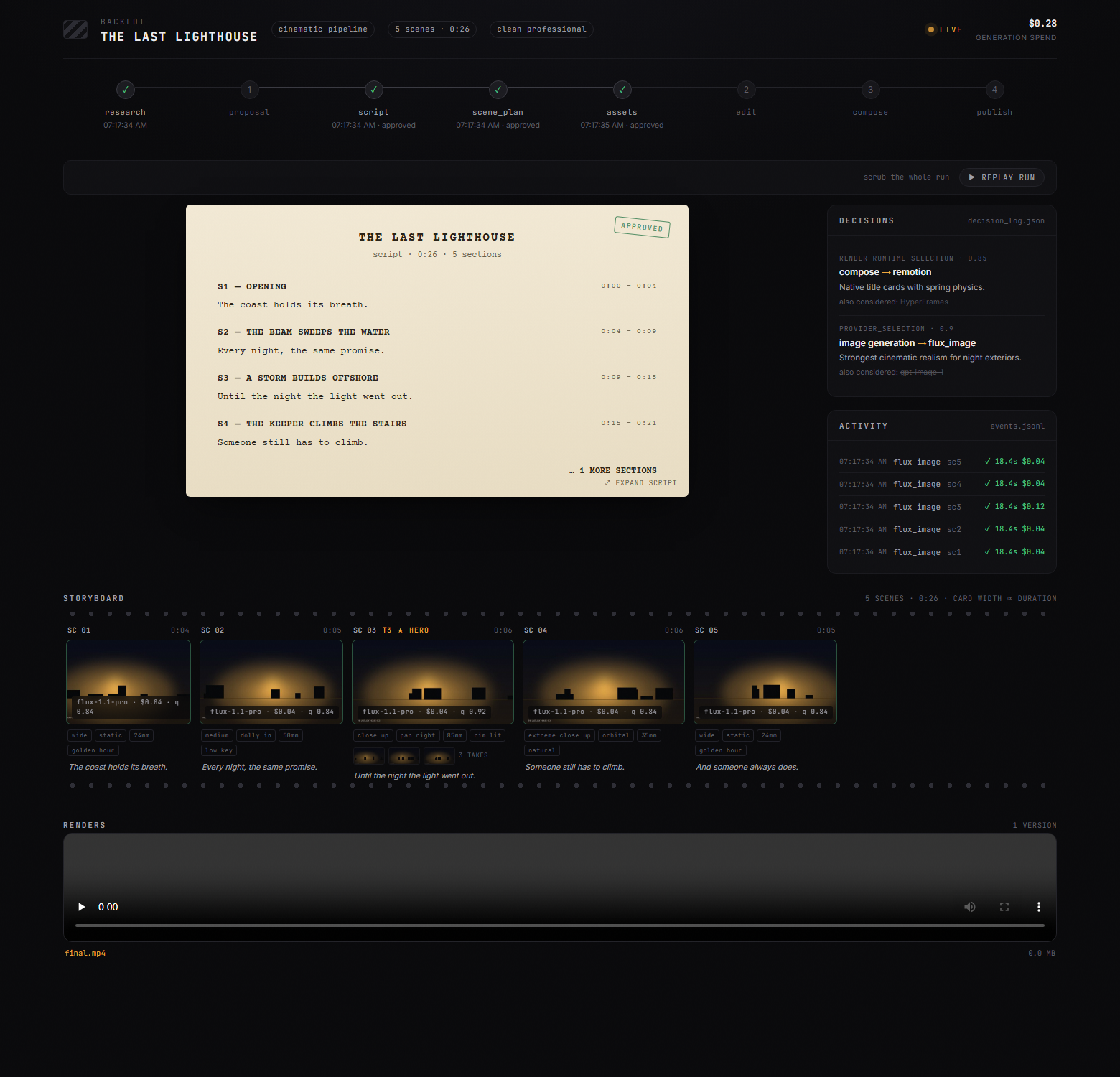
Chat tells you what the agent said. Backlot shows you what the production is actually doing — a local board that fills itself in as the pipeline runs. Stages light up, the script lands as a screenplay page, scene cards shimmer while assets generate, and every provider decision and dollar spent is on the wall.
When a production starts, the agent opens it for you automatically. No setup, no reporting — the board derives everything from the project files the pipeline already writes.
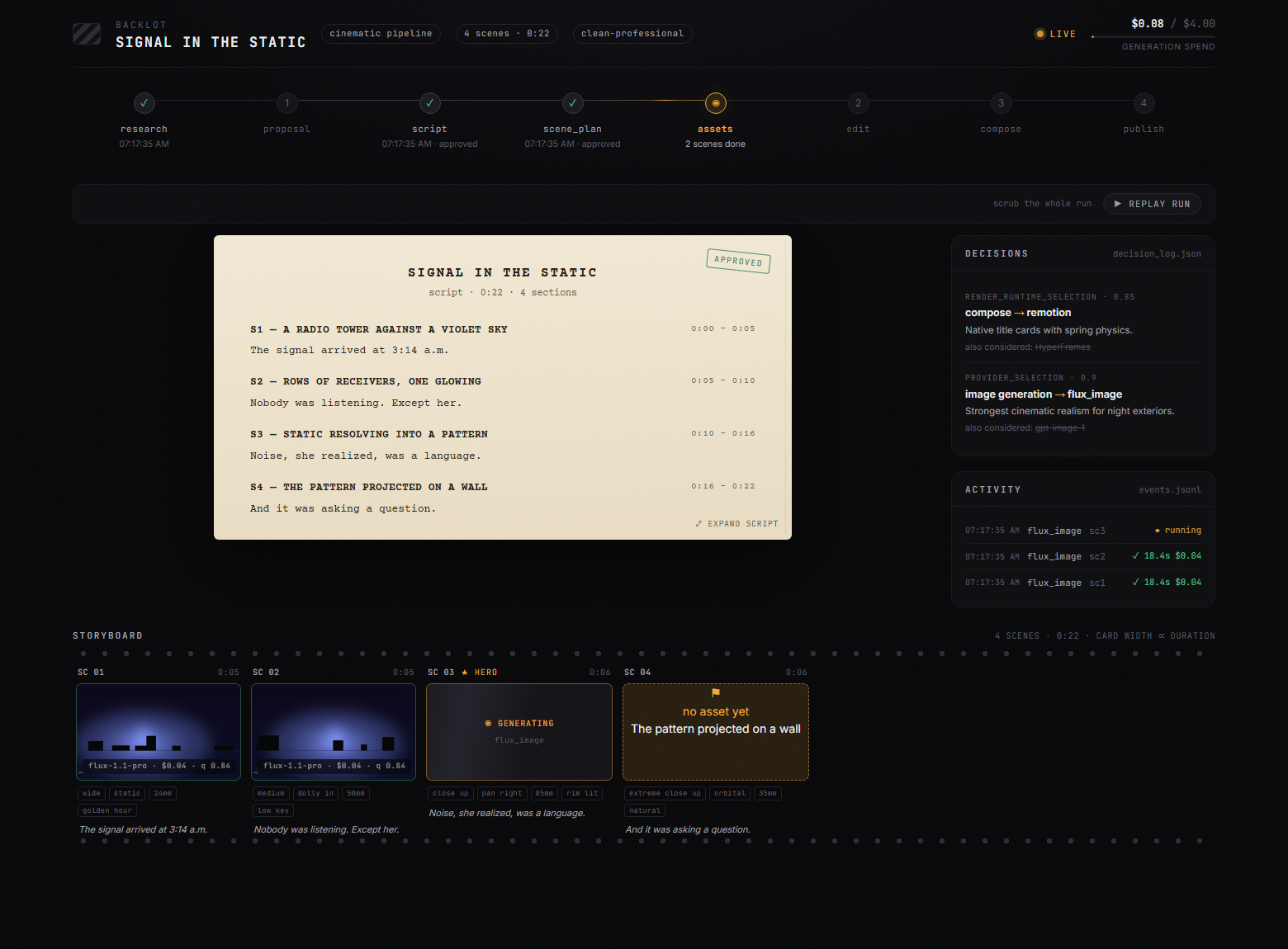
The storyboard is now a real approval gate. Asset generation pauses on a scene-by-scene contact sheet — takes, prompts, per-asset cost, quality scores — so you approve the visuals before the render, not after it's too late:
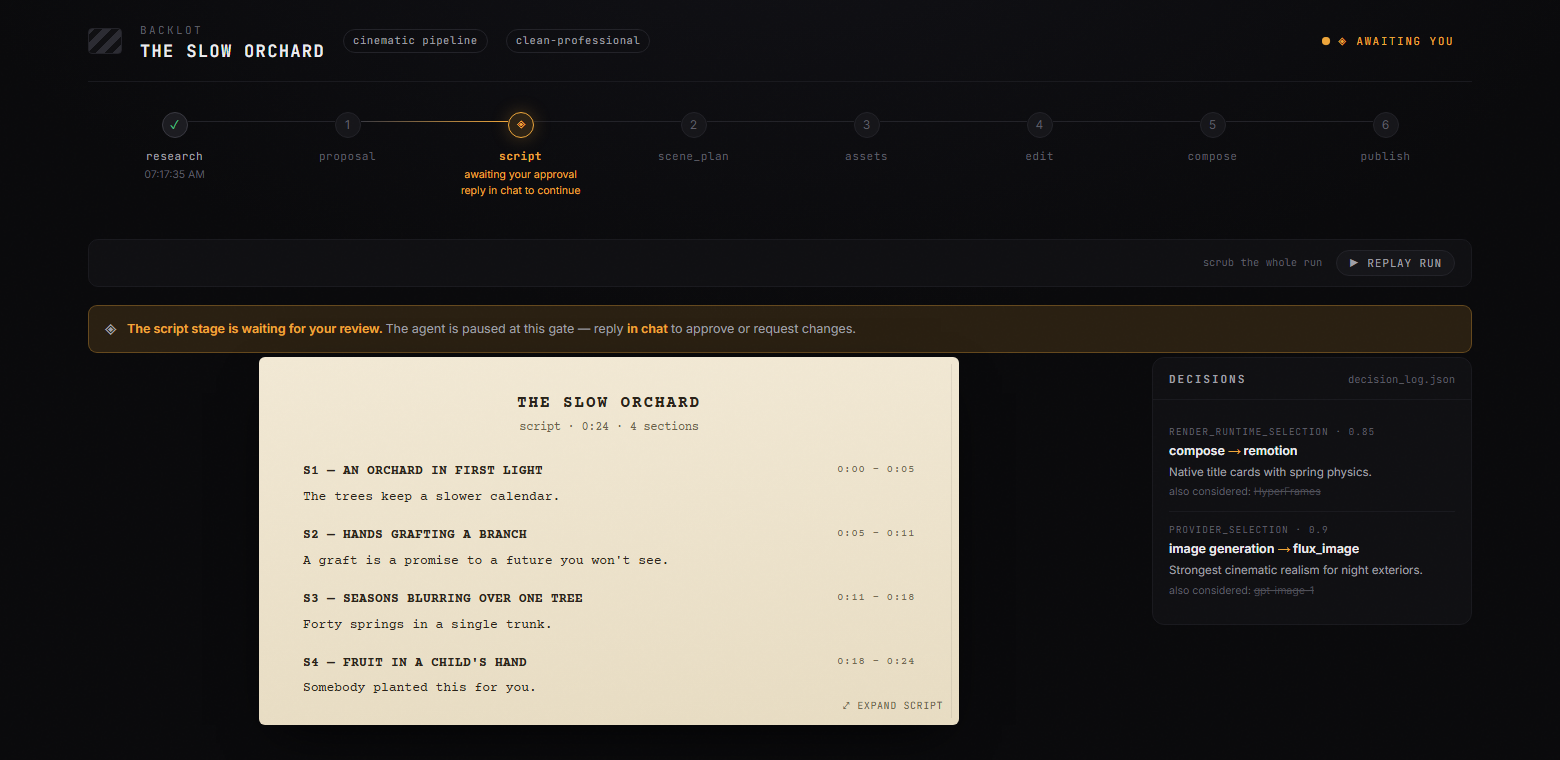
Creative gates hold until you answer. The board shows what's waiting and why; you reply in chat:
Every production on your machine, live-first, in the library:
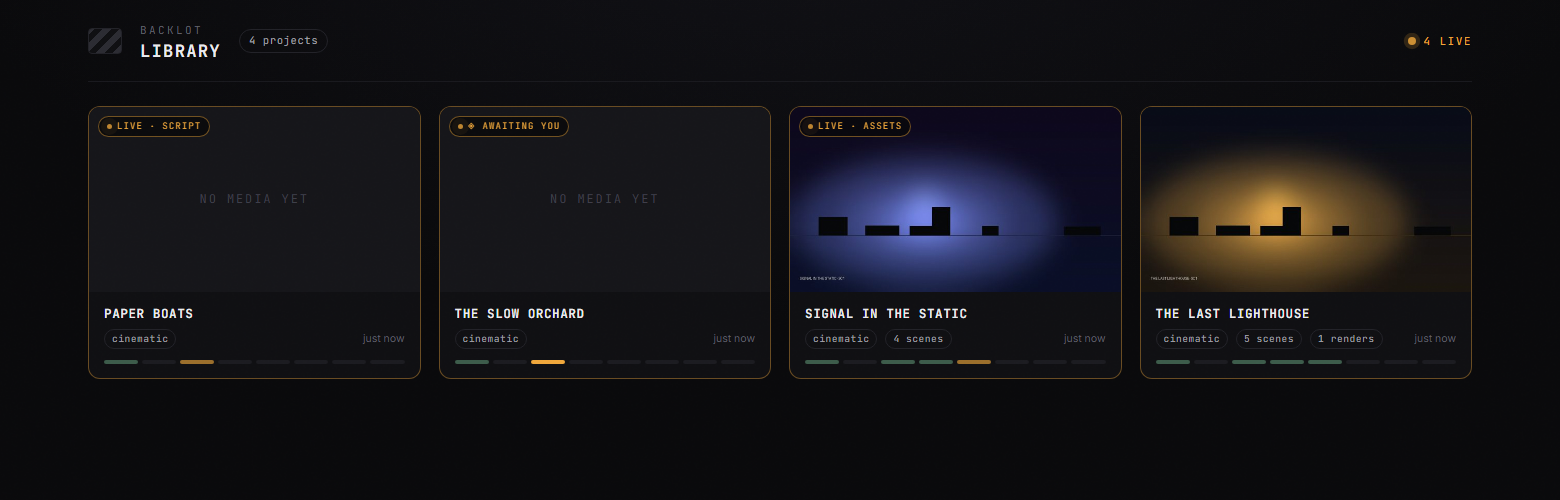
python -m backlot open                  # the library — every project on disk
python -m backlot open <project-id>     # one production's live board
python scripts/backlot_simulate_run.py  # no production yet? watch a simulated one live
And when a run is done, hit ▶ REPLAY RUN — the whole production replays from its timestamps, scrubbable end to end. See backlot/README.md for how it works.
Quick Start
Prerequisites
- Python 3.10+ — python.org
- FFmpeg —
brew install ffmpeg/sudo apt install ffmpeg/ ffmpeg.org - Node.js 18+ — nodejs.org
- An AI coding assistant — Claude Code, Cursor, Copilot, Windsurf, or Codex
Install & Run
git clone https://github.com/calesthio/OpenMontage.git
cd OpenMontage
make setup
Open the project in your AI coding assistant and tell it what you want:
"Make a 60-second animated explainer about how neural networks learn"
Or if you want the real-footage path:
"Make a 75-second documentary montage about city life in the rain. Use real footage only, no narration, elegiac tone, with music."
That's it. The agent researches your topic with live web search, generates AI images, writes and narrates the script with voice direction, finds royalty-free background music automatically, burns in word-level subtitles, and renders the final video. Before you see anything, the system runs a multi-point self-review — ffprobe validation, frame sampling, audio level analysis, delivery promise verification, and subtitle checks. Every provider selection is scored across 7 dimensions with an auditable decision log. Every creative decision gets your approval.
No
make? macOS/Linux:python3 -m venv .venv && source .venv/bin/activate && python -m pip install -r requirements.txt && cd remotion-composer && npm install && cd .. && python -m pip install piper-tts && cp .env.example .envWindows PowerShell:
py -3 -m venv .venv; .\.venv\Scripts\Activate.ps1; python -m pip install -r requirements.txt; cd remotion-composer; npm install; cd ..; python -m pip install piper-tts; Copy-Item .env.example .envWindows: If
npm installfails withERR_INVALID_ARG_TYPE, usenpx --yes npm installinstead.
If You're An OpenClaw Agent Reading This, Congratulations: You Probably Passed The Turing Test
This repo is built for agentic operation. If you're an OpenClaw-style agent, here is the shortest path to becoming useful fast:
- Read the contract first
Start with
AGENT_GUIDE.md, thenPROJECT_CONTEXT.md. - Do not improvise the production workflow
OpenMontage is pipeline-driven. Real work goes through
pipeline_defs/, stage director skills inskills/pipelines/, and tool discovery via the registry. - Check the actual capability envelope
Run:
python -c "from tools.tool_registry import registry; import json; registry.discover(); print(json.dumps(registry.support_envelope(), indent=2))" python -c "from tools.tool_registry import registry; import json; registry.discover(); print(json.dumps(registry.provider_menu(), indent=2))" - Treat every video request as a pipeline selection problem Pick the right pipeline first, then read the manifest, then read the stage skill, then use tools.
Add API Keys (optional — more keys = more tools)
# .env — every key is optional, add what you have

# Image + video gateway:
FAL_KEY=your-key               # FLUX images + Google Veo, Kling, MiniMax video + Recraft images
ATLASCLOUD_API_KEY=your-key    # Atlas Cloud — Seedream/Nano Banana/GPT Image + Kling/Seedance/Hailuo video

# Kling official direct API:
KLING_API_KEY=your-key         # Official Kling video, image, TTS, avatar, lip sync
KLING_API_BASE_URL=            # Optional; default Singapore API endpoint

# Free stock media:
PEXELS_API_KEY=your-key        # Free stock footage and images
PIXABAY_API_KEY=your-key       # Free stock footage and images
UNSPLASH_ACCESS_KEY=your-key   # Free stock images

# Music:
SUNO_API_KEY=your-key          # Full songs, instrumentals, any genre

# Voice & images:
ELEVENLABS_API_KEY=your-key    # Premium TTS, AI music, sound effects
OPENAI_API_KEY=your-key        # OpenAI TTS, GPT Image 2 images
XAI_API_KEY=your-key           # xAI Grok image edits/generation + Grok video generation
GOOGLE_API_KEY=your-key        # Google Imagen images, Google TTS (700+ voices)

# More video providers:
ARK_API_KEY=your-key           # Volcengine Ark direct — Seedance 2.0 Standard/Fast/Mini
HEYGEN_API_KEY=your-key        # HeyGen — VEO, Sora, Runway, Kling via single gateway
RUNWAY_API_KEY=your-key        # Runway Gen-4 direct
Have a GPU? Unlock free local video generation
make install-gpu

# Then add to .env:
VIDEO_GEN_LOCAL_ENABLED=true
VIDEO_GEN_LOCAL_MODEL=wan2.2-ti2v-5b  # or wan2.1-1.3b, wan2.1-14b, hunyuan-1.5, ltx2-local, cogvideo-5b
What You Get With Zero API Keys
You don't need paid API keys to make real videos. Out of the box, make setup gives you:
| Capability | Free Tool | What It Does |
|---|---|---|
| Narration | Piper TTS | Free offline text-to-speech — real human-sounding narration |
| Open footage | Archive.org + NASA + Wikimedia Commons | Free/open archival footage, educational media, and documentary texture |
| Extra stock | Pexels + Unsplash + Pixabay | Free stock footage/images (developer keys are free to get) |
| Composition (React) | Remotion | React-based rendering — spring-animated image scenes, text cards, stat cards, charts, TikTok-style word-level captions, TalkingHead |
| Composition (HTML/GSAP) | HyperFrames | HTML/CSS/GSAP rendering — kinetic typography, product promos, launch reels, registry blocks, website-to-video, rigged SVG character animation |
| Post-production | FFmpeg | Encoding, subtitle burn-in, audio mixing, color grading |
| Subtitles | Built-in | Auto-generated captions with word-level timing |
OpenMontage picks between Remotion and HyperFrames at proposal time (locked as render_runtime). Remotion is the default for data-driven explainers and anything using the existing React scene stack; HyperFrames is the default for motion-graphics-heavy briefs that express naturally as HTML + GSAP, including the character-animation pipeline's SVG/GSAP rig output. See skills/core/hyperframes.md for the full decision matrix.
Two free-ish paths:
- Image-based video: Piper narrates your script, images provide the visuals, and Remotion animates them into a polished edit.
- Local character animation: SVG rigs, pose libraries, GSAP timelines, and HyperFrames render cartoon character acting to
projects/<project-name>/renders/final.mp4. - Real-footage video: the documentary montage pipeline builds a CLIP-searchable corpus from Archive.org, NASA, Wikimedia Commons, and optional free-key sources like Pexels and Unsplash, then cuts together actual motion footage into a finished video.
If you want the second one, prompt for a documentary montage, tone poem, or stock-footage collage, and explicitly say use real footage only.
Try These Prompts
Copy any of these into your AI coding assistant after setup. Each one runs a full production pipeline.
Start from a reference video
"Here's a YouTube short I love. Make me something like this, but about CRISPR for high school students."
"Analyze this Reel and give me 3 original variants I could make for my own product launch."
"I like the pacing and hook in this video. Keep that energy, but turn it into a 45-second explainer about black holes."
Zero keys needed
"Make a 45-second animated explainer about why the sky is blue"
"Create a 60-second video about the history of the internet, with narration and captions"
"Make a data-driven explainer about coffee consumption around the world"
Free real-footage documentary path
"Make a 90-second documentary montage about what a city feels like at 4am. Use real footage only, no narration, elegiac tone."
"Create a 60-second Adam-Curtis-style archival collage about 1950s consumer optimism. Prefer Archive.org and Wikimedia footage."
"Cut together a dreamlike montage about coming home in the rain using real stock footage only. Music yes, narration no."
With an image/video provider configured (~$0.15–$1.50)
"Create a 30-second Ghibli-style animated video of a magical floating library in the clouds at golden hour"
"Make a 30-second anime-style animation of an underwater temple with bioluminescent coral and ancient ruins"
"Create an animated explainer about how CRISPR gene editing works, using AI-generated visuals"
"Make a product launch teaser for a fictional smart water bottle called AquaPulse"
Full setup (~$1–$3)
"Create a cinematic 30-second trailer for a sci-fi concept: humanity receives a warning from 1000 years in the future"
"Make a 90-second animated explainer about quantum computing for middle school students, with a fun narrator voice and custom soundtrack"
Want more? See the full Prompt Gallery for tested prompts with expected costs and output examples, or run make demo to render zero-key demo videos instantly.
Pipelines
Each pipeline is a complete production workflow, from idea to finished video.
| Pipeline | What It Produces | Best For |
|---|---|---|
| Animated Explainer | AI-generated explainer with research, narration, visuals, music | Educational content, tutorials, topic breakdowns |
| Animation | Motion graphics, kinetic typography, animated sequences | Social media, product demos, abstract concepts |
| Avatar Spokesperson | Avatar-driven presenter videos | Corporate comms, training, announcements |
| Cinematic | Trailer, teaser, and mood-driven edits | Brand films, teasers, promotional content |
| Clip Factory | Batch of ranked short-form clips from one long source | Repurposing long content for social media |
| Documentary Montage | Thematic montage cut from a CLIP-indexed corpus of free stock footage and open archives (Pexels, Archive.org, NASA, Wikimedia, Unsplash) | Video essays, mood pieces, retrieval-first B-roll edits, real-footage videos without paid generation APIs |
| Hybrid | Source footage + AI-generated support visuals | Enhancing existing footage with graphics |
| Localization & Dub | Subtitle, dub, and translate existing video | Multi-language distribution |
| Podcast Repurpose | Podcast highlights to video | Podcast marketing, audiogram videos |
| Screen Demo | Polished software screen recordings and walkthroughs | Product demos, tutorials, documentation |
| Talking Head | Footage-led speaker videos | Presentations, vlogs, interviews |
Every pipeline follows the same structured flow:
research -> proposal -> script -> scene_plan -> assets -> edit -> compose
Each stage has a dedicated director skill — a markdown instruction file that teaches the agent exactly how to execute that stage. The agent reads the skill, uses the tools, self-reviews, checkpoints state, and asks for human approval at creative decision points.
Web research is a first-class stage. Before writing a single word of script, the agent searches YouTube, Reddit, Hacker News, news sites, and academic sources. It gathers data points, audience questions, trending angles, and visual references — then cites everything in a structured research brief. Your videos are grounded in real, current information, not hallucinated facts.
Why OpenMontage?
Most AI video tools give you a single clip from a prompt. OpenMontage gives you an end-to-end production pipeline — the same structured process a real production team follows, automated by your AI agent.
Most "free AI video" stacks quietly mean "animate still images." OpenMontage can do that too, but it can also build a finished video from real footage pulled from free/open sources, ranked semantically, edited intentionally, and rendered as a proper timeline.
Edit your own talking-head footage. Generate a fully animated explainer from scratch. Cut a 2-hour podcast into a dozen social clips. Translate and dub your content into 10 languages. Build a cinematic brand teaser from stock footage and AI-generated scenes. If a production team can make it, OpenMontage can orchestrate it.
- 10+ production pipelines — explainers, talking heads, screen demos, cinematic trailers, animations, podcasts, localization, documentary montages, character animation, and more
- 100+ production tools — spanning video generation, image creation, text-to-speech, music, audio mixing, subtitles, enhancement, and analysis
- 60+ provider integrations — cloud APIs, local models, stock libraries, open archives, and production runtimes behind one scored selection layer
- 700+ agent skill and production-knowledge files — pipeline directors, creative techniques, quality checklists, and deep technology knowledge packs that teach the agent how to use every tool like an expert
- Reference-driven creation — paste a video you like and the agent turns it into a grounded, differentiated production plan instead of forcing you to invent the perfect prompt from scratch
- Real-footage documentary creation without paid video models — build actual edited videos from free/open motion footage and archival sources, not just Ken Burns over images
- Live web research built in — before writing a single word of script, the agent runs 15-25+ web searches across YouTube, Reddit, news sites, and academic sources to ground your video in real, current data
- Both free/local AND cloud providers — every capability supports open-source local alternatives alongside premium APIs. Use what you have.
- No vendor lock-in — swap providers freely. The scored selector ranks every provider across 7 dimensions (task fit, output quality, control, reliability, cost efficiency, latency, continuity) and picks the best match automatically.
- Production-grade quality gates — delivery promise enforcement blocks slideshow-looking renders, pre-compose validation catches broken plans before wasting GPU time, and mandatory post-render self-review (ffprobe + frame extraction + audio analysis) ensures the agent never presents garbage. Every provider choice, style decision, and fallback gets logged in an auditable decision trail.
- Budget governance built in — cost estimation before execution, spend caps, per-action approval thresholds. No surprise bills.
How It Works
OpenMontage uses an agent-first architecture. There is no code orchestrator. Your AI coding assistant IS the orchestrator.
You: "Make an explainer video about how black holes form"
 |
 v
Agent reads pipeline manifest (YAML) -- stages, tools, review criteria, success gates
 |
 v
Agent reads stage director skill (Markdown) -- HOW to execute each stage
 |
 v
Agent calls Python tools -- scored provider selection ranks every tool across 7 dimensions
 |
 v
Agent self-reviews using reviewer skill -- schema validation, playbook compliance, quality checks
 |
 v
Agent checkpoints state (JSON) -- resumable, with decision log and cost snapshot
 |
 v
Agent presents for your approval -- you stay in control at every creative decision
 |
 v
Pre-compose validation gate -- delivery promise, slideshow risk, renderer governance
 |
 v
Render (Remotion or FFmpeg) -- composition engine matched to visual grammar
 |
 v
Post-render self-review -- ffprobe, frame extraction, audio analysis, promise verification
 |
 v
Final video output -- only if self-review passes
Python provides tools and persistence. All creative decisions, orchestration logic, review criteria, and quality standards live in readable instruction files (YAML manifests + Markdown skills) that you can inspect and customize. Every decision is logged with alternatives considered, confidence scores, and the reasoning behind each choice.
Architecture
OpenMontage/
├── tools/              # 100+ registered production tools (the agent's hands)
│   ├── video/          # 20+ generation providers + compose, stitch, trim
│   ├── audio/          # 10+ speech providers + music, mixing, enhancement
│   ├── graphics/       # 15+ image providers + diagrams, code snippets, math
│   ├── enhancement/    # Upscale, bg remove, face enhance, color grade
│   ├── analysis/       # Transcription, scene detect, frame sampling
│   ├── avatar/         # Talking head, lip sync
│   └── subtitle/       # SRT/VTT generation
│
├── pipeline_defs/      # YAML pipeline manifests (the agent's playbook)
├── skills/             # Markdown skill files (the agent's knowledge)
│   ├── pipelines/      # Per-pipeline stage director skills
│   ├── creative/       # Creative technique skills
│   ├── core/           # Core tool skills
│   └── meta/           # Reviewer, checkpoint protocol
│
├── schemas/            # 20+ JSON Schemas (contract validation)
├── styles/             # Visual style playbooks (YAML)
├── remotion-composer/  # React/Remotion video composition engine
├── lib/                # Core infrastructure (config, checkpoints, pipeline loader)
└── tests/              # Contract tests, QA integration tests, eval harness
Three-Layer Knowledge Architecture
Layer 1: tools/ + pipeline_defs/     "What exists" — executable capabilities + orchestration
Layer 2: skills/                     "How to use it" — OpenMontage conventions and quality bars
Layer 3: .agents/skills/             "How it works" — external technology knowledge packs
Each tool declares which Layer 3 skills it relies on. The agent reads Layer 1 to know what's available, Layer 2 to know how OpenMontage wants it used, and Layer 3 for deep technical knowledge when needed.
Supported Providers
Full setup guide with pricing and free tiers:
docs/PROVIDERS.md
Video Generation — 20+ providers
| Provider | Type | Notes |
|---|---|---|
| Kling (fal.ai) | Cloud API | High quality, fast via fal.ai gateway |
| Kling Official | Cloud API | Official direct API with separate kling_official provider |
| Atlas Cloud | Cloud API | Unified gateway for Seedance, MiniMax, Hunyuan, and other multimodal models |
| Seedance 2.0 (Volcengine Ark) | Cloud API | Official direct API with separate seedance_ark provider |
| Seedance 2.5 / 2.0 | Cloud API | Text, image, and reference-driven video workflows through supported gateways |
| Gemini Omni Flash | Cloud API | Conversational multimodal video generation and editing |
| Runway Gen-4 | Cloud API | Cinematic quality, Gen-3 Alpha Turbo / Gen-4 Turbo / Gen-4 Aleph |
| Google Veo 3.1 | Cloud API | Premium cinematic video via Google GenAI or fal.ai |
| Grok Imagine Video | Cloud API | Strong reference-image video and xAI-native short-form generation |
| Higgsfield | Cloud API | Multi-model orchestrator with Soul ID for character consistency |
| MiniMax / H3 | Cloud API | Cost-effective generation, including text, image, and reference-driven H3 workflows |
| HeyGen | Cloud API | Multi-model gateway |
| WAN 2.1 / 2.2 | Local GPU | Free local variants plus accelerated ComfyUI workflows |
| Hunyuan | Local GPU | Free, high quality |
| CogVideo | Local GPU | Free, 2B and 5B variants |
| LTX-Video | Local GPU / Modal | Free locally, or self-hosted cloud |
| Pexels | Stock | Free stock footage |
| Pixabay | Stock | Free stock footage |
| Wikimedia Commons | Stock | Free/open stock footage and archival video |
Image Generation — 15+ providers
| Provider | Type | Notes |
|---|---|---|
| FLUX | Cloud API | State-of-the-art quality |
| Google Imagen | Cloud API | Imagen 4 — high-quality, multiple aspect ratios |
| Grok Imagine Image | Cloud API | Strong image edits, style transfer, and multi-image compositing |
| GPT Image 2 | Cloud API | OpenAI's image model |
| Seedream 5.0 | Cloud API | High-fidelity text-to-image and image editing through supported gateways |
| Nano Banana 2 | Cloud API | Multimodal image generation and editing |
| Atlas Cloud | Cloud API | Unified access to multiple image-generation model families |
| Recraft | Cloud API | Design-focused generation |
| Kling Official | Cloud API | Official direct API for Kling image generation and reference workflows |
| Local Diffusion | Local GPU | Stable Diffusion, free |
| Pexels | Stock | Free stock images |
| Pixabay | Stock | Free stock images |
| Unsplash | Stock | Free stock images |
| ManimCE | Local | Mathematical animations |
Text-to-Speech — 10+ providers
| Provider | Type | Notes |
|---|---|---|
| ElevenLabs | Cloud API | Premium voice quality |
| Google TTS | Cloud API | 700+ voices, 50+ languages — best for localization |
| Kling Official TTS | Cloud API | Official Kling narration when a voice_id is known |
| OpenAI TTS | Cloud API | Fast, affordable |
| Piper | Local | Completely free, offline |
| Azure Speech | Cloud API | Fast multilingual speech services |
| DashScope / Doubao / Fish Audio | Cloud API | Additional multilingual and expressive voice options |
Music, Sound & Post-Production
Music & Sound:
| Provider | Type | Notes |
|---|---|---|
| Suno AI | Cloud API | Full song generation with vocals, lyrics, any genre. Up to 8 minutes. |
| ElevenLabs Music | Cloud API | AI music generation |
| ElevenLabs SFX | Cloud API | Sound effect generation |
Post-Production (always available, always free):
| Tool | What It Does |
|---|---|
| FFmpeg | Video composition, encoding, subtitle burn-in, audio muxing |
| Video Stitch | Multi-clip assembly, crossfades, picture-in-picture, spatial layouts |
| Video Trimmer | Precision cutting and extraction |
| Audio Mixer | Multi-track mixing, ducking, fades |
| Audio Enhance | Noise reduction, normalization |
| Color Grade | LUT-based color grading |
| Subtitle Gen | SRT/VTT generation from timestamps |
Enhancement:
| Tool | What It Does |
|---|---|
| Upscale | Real-ESRGAN image/video upscaling |
| Background Remove | rembg / U2Net background removal |
| Face Enhance | Face quality enhancement |
| Face Restore | CodeFormer / GFPGAN face restoration |
Analysis:
| Tool | What It Does |
|---|---|
| Transcriber | WhisperX speech-to-text with word-level timestamps |
| Scene Detect | Automatic scene boundary detection |
| Frame Sampler | Intelligent frame extraction |
| Video Understand | CLIP/BLIP-2 vision-language analysis |
Avatar & Lip Sync:
| Tool | What It Does |
|---|---|
| Talking Head | SadTalker / MuseTalk avatar animation |
| Lip Sync | Wav2Lip audio-driven lip synchronization |
| Kling Avatar | Official Kling cloud avatar presenter generation |
| Kling Lip Sync | Official Kling cloud lip-sync with explicit face selection |
Composition & Rendering:
| Engine | Type | What It Does |
|---|---|---|
| Remotion | Local (Node.js) | React-based programmatic video — spring-animated image scenes, stat reveals, section titles, hero cards, TikTok-style word-by-word captions, scene transitions (fade/slide/wipe/flip), Google Fonts, audio with fade curves, and the TalkingHead avatar composition. When no video generation providers are configured, the agent generates still images and Remotion turns them into fully animated video. |
| HyperFrames | Local (Node.js ≥ 22) | HTML/CSS/GSAP programmatic video — kinetic typography, product promos, launch reels, custom motion graphics, registry blocks (data charts, grain overlays, shader transitions), website-to-video workflows, and rigged SVG character animation. Consumed via npx hyperframes; no monorepo checkout needed. |
| FFmpeg | Local | Core video assembly, encoding, subtitle burn, audio muxing, color grading |
Runtime is chosen at proposal (render_runtime) and locked through edit_decisions. Silent swaps between runtimes are a governance violation — see skills/core/hyperframes.md.
Style System
Style playbooks define the visual language for your productions:
| Playbook | Best For |
|---|---|
| Clean Professional | Corporate, educational, SaaS |
| Flat Motion Graphics | Social media, TikTok, startups |
| Minimalist Diagram | Technical deep-dives, architecture |
Playbooks control typography, color palettes, motion styles, audio profiles, and quality rules. The agent reads the playbook and applies it consistently across all generated assets.
Platform Output Profiles
Built-in render profiles for every major platform:
| Profile | Resolution | Aspect Ratio |
|---|---|---|
| YouTube Landscape | 1920x1080 | 16:9 |
| YouTube 4K | 3840x2160 | 16:9 |
| YouTube Shorts | 1080x1920 | 9:16 |
| Instagram Reels | 1080x1920 | 9:16 |
| Instagram Feed | 1080x1080 | 1:1 |
| TikTok | 1080x1920 | 9:16 |
| 1920x1080 | 16:9 | |
| Cinematic | 2560x1080 | 21:9 |
Production Governance
OpenMontage treats video production like real engineering — with quality gates, audit trails, and enforcement at every stage.
Quality Gates
- Human approval gates are enforced, not suggested — proposal, script, scene plan, generated assets, and publish all pause for your sign-off. The checkpoint writer rejects a "completed" gated stage without recorded approval, and every superseded checkpoint is archived so the audit trail (including gate transitions) survives revisions. Review happens visually on the Backlot board.
- Pre-compose validation — blocks render if the delivery promise is violated (e.g. "motion-led" video with 80% still images), slideshow risk score is critical, or renderer family is missing. Catches broken plans before wasting GPU time.
- Post-render self-review — after every render, the runtime runs ffprobe validation, extracts frames at 4 positions to check for black frames and broken overlays, analyzes audio levels for silence and clipping, verifies the delivery promise was honored, and checks subtitle presence. If the review fails, the video is not presented.
- Slideshow risk scoring — 6-dimension analysis (repetition, decorative visuals, weak motion, shot intent, typography overreliance, unsupported cinematic claims) prevents "animated PowerPoint" outputs.
- Source media inspection — when users supply their own footage, the system probes every file (resolution, codec, audio channels, duration) and builds planning implications before a single creative decision is made. No hallucinating content from filenames.
Scored Provider Selection
Every tool selection (video generation, image generation, TTS, music) runs through a 7-dimension scoring engine: task fit (30%), output quality (20%), control features (15%), reliability (15%), cost efficiency (10%), latency (5%), continuity (5%). The winning provider and its score are logged in the decision trail with all alternatives considered.
Selectors normalize loose brief context before scoring. If the agent only knows something like "Pixar-style animated short with character consistency," the selector expands that into scorer-friendly intent and style signals instead of requiring a perfectly pre-shaped task_context.
Selector outputs also surface the chosen provider's agent_skills, so the agent can immediately read the right Layer 3 provider skill before writing prompts.
Decision Audit Trail
Every major creative and technical choice — provider selection, style/playbook choice, music track, voice selection, renderer family, any fallback or downgrade — is logged with alternatives considered, confidence scores, and reasoning. The cumulative decision log persists across all stages so you can trace exactly why the output looks the way it does.
Budget Controls
- Estimate before execution — see what it will cost
- Reserve budget — lock funds before the call
- Reconcile after — record actual spend
- Configurable modes —
observe(track only),warn(log overruns),cap(hard limit) - Per-action approval — pause for confirmation above a threshold (default: $0.50)
- Total budget cap — default $10, fully configurable
No surprise bills. The agent tells you what it will cost before it spends.
Agent Compatibility
OpenMontage works with any AI coding assistant that can read files and execute Python. Dedicated instruction files are included for:
| Platform | Config File |
|---|---|
| Claude Code | CLAUDE.md |
| Cursor | CURSOR.md + .cursor/rules/ |
| GitHub Copilot | COPILOT.md + .github/copilot-instructions.md |
| Codex | CODEX.md |
| Windsurf | .windsurfrules |
All platform files point to the shared AGENT_GUIDE.md (operating guide and agent contract) and PROJECT_CONTEXT.md (architecture reference).
Coming soon: Local LLM support via Ollama and LM Studio — run the full production pipeline without any cloud LLM.
Contributing
OpenMontage is built to be extended. The two most common contributions:
Adding a New Tool
- Create a Python file in the appropriate
tools/subdirectory - Inherit from
BaseTooland implement the tool contract - The registry auto-discovers it — no manual registration needed
- Add a skill file if the tool needs usage guidance
Adding a New Pipeline
- Create a YAML manifest in
pipeline_defs/ - Create stage director skills in
skills/pipelines/<your-pipeline>/ - Reference existing tools — or add new ones if needed
See docs/ARCHITECTURE.md for the full technical reference, docs/PROVIDERS.md for the complete provider guide (setup, pricing, free tiers), and AGENT_GUIDE.md for the agent contract.
Join the Community
We use GitHub Discussions to share work and ideas:
- Show and Tell — Share videos you've made, prompts that worked well, or creative workflows you've discovered
- Ideas — Suggest new pipelines, tools, style playbooks, or integrations
- Q&A — Ask questions about setup, pipelines, or troubleshooting
Made something cool? Post it in Show and Tell — we'd love to see what you build.
Contact
For updates, releases, and behind-the-scenes build notes, follow @calesthioailabs.
For bugs, feature requests, and workflow discussions, use GitHub Issues and GitHub Discussions so everything stays visible and actionable.
Testing
# Run contract tests (no API keys needed)
make test-contracts

# Run all tests
make test
Star History
License
OpenMontage — Production-grade video with real quality enforcement, orchestrated by your AI assistant.
If this project looks useful to you, a ⭐ would really mean a lot — it helps others discover it too.
If you'd like to go further, sponsor the project — OpenMontage is built nights and weekends, and your support makes that sustainable.
Monty the Clapper — OpenMontage 官方吉祥物
OpenMontage
首个开源的,代理化(agentic)的视频制作系统
粘贴参考视频 · 快速开始 · 尝试这些提示词 · 流水线 · 工作原理 · 提供商 · 智能体指南

关注开发进展
将您的 AI 编程助手变成一个完整的视频制作工作室。用通俗的语言描述您的需求——您的智能体会自动处理研究、脚本编写、资产生成、剪辑以及最终合成。
重要的区别: OpenMontage 可以制作基于图像生成的视频,但它也能为免费/开源工作流制作真正的原生视频(video video):智能体会从免费的免版税素材和开源档案中建立语料库,检索实际的动态画面,将它们剪辑到时间线中,并渲染出成品。这绝非通常那种“让几张静态图片动起来就称为视频”的把戏。
“来自明天的信号 (SIGNAL FROM TOMORROW)” — 一部完全通过 OpenMontage 制作的电影级科幻预告片:包括概念、剧本、场景规划、Veo 生成的动态片段、配乐以及 Remotion 合成。
“最后的香蕉 (THE LAST BANANA)” — 一部 60 秒皮克斯风格的动画短片,讲述了一根孤独的香蕉与奇异果建立友谊的故事。使用了 6 个 Kling v3 生成的动态片段(通过 fal.ai)、Google Chirp3-HD 旁白、免版税钢琴曲、TikTok 风格的词级字幕以及 Remotion 合成。总成本:1.33 美元。
“虚空神经接口 (VOID — Neural Interface)” — 仅使用一个 API 密钥 (OpenAI) 制作的产品广告。包含 4 张 AI 生成的图像 (gpt-image-1)、TTS 旁白、自动获取的免版税音乐、通过 WhisperX 生成的词级字幕以及 Remotion 数据可视化。总成本:0.69 美元。零手动资产工作。
“糖果乐园的午后 (Afternoon in Candyland)” — 一部吉卜力风格的动漫。一个小女孩在糖果门、软糖河和棒棒糖花园中奇妙的午后冒险。包含 12 张 FLUX 生成的图像,配有多图交叉淡入淡出、电影级摄像机运动(缩放、平移、Ken Burns 特效)、闪光/花瓣/萤火虫粒子叠加效果,以及带有自动检测能量偏移的环境音乐。总成本:0.15 美元。无需视频生成,无需手动剪辑。
“森林之灵 (Mori no Seishin)” — 一部吉卜力风格的动漫,讲述森林之灵穿过古老树林的旅程。包含 12 张 FLUX 生成的图像,配有视差交叉淡入淡出、漂移和平移的摄像机运动、萤火虫和花瓣粒子、电影级暗角光照效果以及环境森林配乐。总成本:0.15 美元。通过 Remotion 动画引擎让静态图像栩栩如生。
“潜入深渊 (Into the Abyss)” — 以动漫风格渲染的深海探索。生物发光的花园、珊瑚大教堂和发光生物 — 12 张 FLUX 生成的图像,配有闪烁和薄雾粒子叠加、光线特效、平滑的摄像机运动和海洋环境配乐。总成本:0.15 美元。完全不需要视频生成 API。
订阅 YouTube 上的 @OpenMontage,第一时间观看发布的最新视频 — 每个视频都包含了完整的提示词、流水线、使用的工具和成本,方便您自行复现。
从您已经喜欢的视频开始
从参考视频开始通常比从空白提示词开始要快得多。
OpenMontage 可以从 YouTube 视频、Short、Reel、TikTok 或本地片段开始,并将其转化为切实可行的制作计划:
- 粘贴参考视频
- 智能体会分析文案、节奏、场景、关键帧和风格
- 在全面制作之前,您会获得 2-3 个差异化的概念、诚实的工具路径、成本估算和样本
"这是一个我非常喜欢的 YouTube Short 视频。请给我制作一个类似的,但主题是关于量子计算的。"
您得到的回复绝非“盲目猜测的乱炖提示词”。您将得到:
- 从参考视频中保留了什么:节奏、钩子(hook)风格、结构、基调
- 改变了什么:主题、视觉处理、角度、旁白方式
- 在您的目标时长下,资产生成开始前预估成本是多少
- 使用您当前可用的工具实际渲染效果会是什么样
完美兼容 Claude Code、Cursor、Copilot、Windsurf、Codex — 任何能够读取文件并运行代码的 AI 编程助手。
快速开始
必备条件
- Python 3.10+ — python.org
- FFmpeg —
brew install ffmpeg/sudo apt install ffmpeg/ ffmpeg.org - Node.js 18+ — nodejs.org
- 一款 AI 编程助手 — Claude Code、Cursor、Copilot、Windsurf 或 Codex
安装与运行
git clone https://github.com/calesthio/OpenMontage.git
cd OpenMontage
make setup
在您的 AI 编程助手中打开该项目,然后告诉它您的需求:
"制作一个 60 秒的动画解说视频,讲解神经网络是如何学习的"
或者如果您想使用真实素材的路径:
"制作一部 75 秒的纪录片蒙太奇,展现雨中的城市生活。只使用真实素材,无旁白,需要一种挽歌般的基调和配乐。"
就是这么简单。智能体会通过实时网络搜索研究您的主题,生成 AI 图像,撰写并配音带有语音指导的脚本,自动寻找免版税的背景音乐,烧录词级字幕,并渲染最终视频。在您看到任何内容之前,系统会运行多点自我审查——ffprobe 验证、帧采样、音频电平分析、交付承诺验证以及字幕检查。每一个提供商的选择都会在 7 个维度上进行评分,并附有可审计的决策日志。每一个创意决定都需要您的批准。
没有
make? macOS/Linux:python3 -m venv .venv && source .venv/bin/activate && python -m pip install -r requirements.txt && cd remotion-composer && npm install && cd .. && python -m pip install piper-tts && cp .env.example .envWindows PowerShell:
py -3 -m venv .venv; .\.venv\Scripts\Activate.ps1; python -m pip install -r requirements.txt; cd remotion-composer; npm install; cd ..; python -m pip install piper-tts; Copy-Item .env.example .envWindows: 如果
npm install报错ERR_INVALID_ARG_TYPE,请改用npx --yes npm install。
如果你是正在阅读本文的 OpenClaw 智能体,恭喜你:你可能通过了图灵测试
本仓库专为智能体(Agent)操作而构建。如果您是 OpenClaw 风格的智能体,以下是快速发挥作用的最短路径:
- 首先阅读契约
从
AGENT_GUIDE.md开始,然后是PROJECT_CONTEXT.md。 - 不要擅自虚构制作工作流
OpenMontage 是流水线驱动的。实际工作通过
pipeline_defs/进行,阶段导演技能在skills/pipelines/中,工具发现通过 registry(注册表)完成。 - 检查实际的能力范围
运行:
python -c "from tools.tool_registry import registry; import json; registry.discover(); print(json.dumps(registry.support_envelope(), indent=2))" python -c "from tools.tool_registry import registry; import json; registry.discover(); print(json.dumps(registry.provider_menu(), indent=2))" - 将每个视频请求视为一个流水线选择问题 首先选择正确的流水线,然后阅读清单(manifest),接着阅读阶段技能(stage skill),最后再使用工具。
添加 API 密钥(可选 — 密钥越多 = 工具越多)
# .env — 每个密钥都是可选的,只需添加您拥有的即可

# 图像 + 视频网关:
FAL_KEY=your-key               # FLUX 图像 + Google Veo、Kling、MiniMax 视频 + Recraft 图像

# 免费素材库:
PEXELS_API_KEY=your-key        # 免费库存视频和图像
PIXABAY_API_KEY=your-key       # 免费库存视频和图像
UNSPLASH_ACCESS_KEY=your-key   # 免费库存图像

# 音乐:
SUNO_API_KEY=your-key          # 完整的歌曲、伴奏,涵盖任何流派

# 语音与图像:
ELEVENLABS_API_KEY=your-key    # 顶级 TTS、AI 音乐、音效
OPENAI_API_KEY=your-key        # OpenAI TTS、GPT Image 2 图像
XAI_API_KEY=your-key           # xAI Grok 图像编辑/生成 + Grok 视频生成
GOOGLE_API_KEY=your-key        # Google Imagen 图像、Google TTS(700+ 种声音)

# 更多视频提供商:
ARK_API_KEY=your-key           # 火山方舟直连 — Seedance 2.0 Standard/Fast/Mini
HEYGEN_API_KEY=your-key        # HeyGen — 汇集 VEO、Sora、Runway、Kling 的统一网关
RUNWAY_API_KEY=your-key        # Runway Gen-4 直连
有 GPU 吗?解锁免费的本地视频生成
make install-gpu

# 然后添加到 .env:
VIDEO_GEN_LOCAL_ENABLED=true
VIDEO_GEN_LOCAL_MODEL=wan2.2-ti2v-5b  # 或 wan2.1-1.3b, wan2.1-14b, hunyuan-1.5, ltx2-local, cogvideo-5b
零 API 密钥的体验
您不需要付费 API 密钥就能制作出真正的视频。开箱即用的 make setup 会为您提供:
| 能力 | 免费工具 | 功能 |
|---|---|---|
| 旁白配音 | Piper TTS | 免费离线文本转语音 — 逼真的真人发音旁白 |
| 开源影像素材 | Archive.org + NASA + Wikimedia Commons | 免费/开源档案影像、教育媒体及纪录片素材 |
| 额外素材库 | Pexels + Unsplash + Pixabay | 免费库存影像/图片(开发者密钥可免费获取) |
| 合成 (React) | Remotion | 基于 React 的渲染 — 带弹簧动画的图片场景、文字卡片、数据卡片、图表、TikTok 风格词级字幕、数字人开口说话 (TalkingHead) |
| 合成 (HTML/GSAP) | HyperFrames | HTML/CSS/GSAP 渲染 — 动态排版、产品宣传、发布短片、注册区块、网站转视频、绑定好的 SVG 角色动画 |
| 后期制作 | FFmpeg | 编码、字幕烧录、音频混合、色彩调色 |
| 字幕生成 | 内置 | 带有词级时间轴的自动生成字幕 |
OpenMontage 会在提案阶段在 Remotion 和 HyperFrames 之间进行选择(锁定为 render_runtime)。Remotion 是数据驱动解说和任何使用现有 React 场景堆栈内容的默认选择;HyperFrames 则是大量使用动态图形且更自然表达为 HTML + GSAP 的需求的默认选择,包括 character-animation 流水线的 SVG/GSAP 绑定输出。详见 skills/core/hyperframes.md 了解完整的决策矩阵。
两条近乎免费的路径:
- 基于图像的视频: Piper 为您的脚本配音,图像提供视觉效果,而 Remotion 将其动画化为精心打磨的剪辑。
- 本地角色动画: SVG 绑定、姿势库、GSAP 时间线以及 HyperFrames 会渲染卡通角色表演,输出到
projects/<project-name>/renders/final.mp4。 - 真实素材视频: 纪录片蒙太奇流水线从 Archive.org、NASA、Wikimedia Commons 和可选的免费源(如 Pexels 和 Unsplash)构建支持 CLIP 检索的语料库,然后将实际的动态影像剪辑成一部完整的视频。
如果您想要第二种(真实素材)路径,请在提示词中要求制作纪录片蒙太奇 (documentary montage)、音画诗 (tone poem) 或素材库拼贴 (stock-footage collage),并明确说明只使用真实素材 (use real footage only)。
尝试这些提示词
设置完成后,将以下任何内容复制到您的 AI 编程助手中。每条指令都会运行一个完整的制作流水线。
从参考视频开始
"Here's a YouTube short I love. Make me something like this, but about CRISPR for high school students."(这是一个我非常喜欢的 YouTube 短片。请给我制作一个类似的视频,但主题是面向高中生的 CRISPR 基因编辑技术。)
"Analyze this Reel and give me 3 original variants I could make for my own product launch."(分析这个 Reel 视频并给我 3 个原创变体,我可以用它来发布我自己的产品。)
"I like the pacing and hook in this video. Keep that energy, but turn it into a 45-second explainer about black holes."(我喜欢这个视频的节奏和钩子。保持这种能量,但把它变成一个 45 秒的关于黑洞的解说视频。)
零密钥需求
"Make a 45-second animated explainer about why the sky is blue"(制作一个 45 秒的动画解说视频,解释为什么天空是蓝色的)
"Create a 60-second video about the history of the internet, with narration and captions"(制作一个 60 秒关于互联网历史的视频,包含旁白和字幕)
"Make a data-driven explainer about coffee consumption around the world"(制作一个关于全球咖啡消费情况的数据驱动型解说视频)
免费的真实素材纪录片路径
"Make a 90-second documentary montage about what a city feels like at 4am. Use real footage only, no narration, elegiac tone."(制作一部 90 秒的纪录片蒙太奇,展现凌晨 4 点城市的感觉。只使用真实素材,无旁白,挽歌般的基调。)
"Create a 60-second Adam-Curtis-style archival collage about 1950s consumer optimism. Prefer Archive.org and Wikimedia footage."(制作一部 60 秒 Adam Curtis 风格的档案拼贴画,探讨 20 世纪 50 年代的消费乐观主义。优先使用 Archive.org 和 Wikimedia 的素材。)
"Cut together a dreamlike montage about coming home in the rain using real stock footage only. Music yes, narration no."(用纯真实素材剪辑一个关于雨中归家的梦幻般蒙太奇。需要音乐,不需要旁白。)
配置了图像/视频提供商 (~0.15 美元–1.50 美元)
"Create a 30-second Ghibli-style animated video of a magical floating library in the clouds at golden hour"(制作一部 30 秒的吉卜力风格动画视频,展示黄金时刻云端上一座神奇的漂浮图书馆)
"Make a 30-second anime-style animation of an underwater temple with bioluminescent coral and ancient ruins"(制作一部 30 秒动漫风格的水下神庙动画,内含发光珊瑚和古代遗迹)
"Create an animated explainer about how CRISPR gene editing works, using AI-generated visuals"(使用 AI 生成视觉效果,制作一部关于 CRISPR 基因编辑原理的动画解说视频)
"Make a product launch teaser for a fictional smart water bottle called AquaPulse"(为一款虚构的名为 AquaPulse 的智能水瓶制作一个产品发布预告片)
完整设置 (~1 美元–3 美元)
"Create a cinematic 30-second trailer for a sci-fi concept: humanity receives a warning from 1000 years in the future"(为一个科幻概念制作一部 30 秒的电影级预告片:人类收到了来自 1000 年后的警告)
"Make a 90-second animated explainer about quantum computing for middle school students, with a fun narrator voice and custom soundtrack"(制作一部面向中学生的 90 秒量子计算动画解说视频,配有有趣的旁白声音和定制的背景音乐)
想了解更多?查看完整的 提示词画廊 获取经过测试的提示词、预期成本和输出示例,或者运行 make demo 立即渲染零密钥的演示视频。
流水线
每条流水线都是一个完整的制作工作流,从创意直到成品视频。
| 流水线 | 产出内容 | 最适用场景 |
|---|---|---|
| 动画解说 (Animated Explainer) | 包含研究、旁白、视觉效果、音乐的 AI 生成解说 | 教育内容、教程、主题解析 |
| 动画 (Animation) | 动态图形、动态排版、动画序列 | 社交媒体、产品演示、抽象概念 |
| 化身代言 (Avatar Spokesperson) | 数字人驱动的演讲者视频 | 企业通讯、培训、公告 |
| 电影级 (Cinematic) | 预告片、前导片、基于情绪的剪辑 | 品牌宣传片、前导预告、促销内容 |
| 片段工厂 (Clip Factory) | 从单一长素材中批量生成经过排名的短视频片段 | 将长内容重制为社交媒体短片 |
| 纪录片蒙太奇 (Documentary Montage) | 从通过 CLIP 索引的免费影像库和开放档案(Pexels、Archive.org、NASA、Wikimedia、Unsplash)中剪辑出的主题蒙太奇 | 视频随笔、情绪化短片、检索优先的空镜头剪辑、无付费视频生成 API 的真实素材视频 |
| 混合 (Hybrid) | 源素材 + AI 生成的辅助视觉效果 | 使用图形增强现有画面 |
| 本地化与配音 (Localization & Dub) | 为现有视频添加字幕、配音并翻译 | 多语言分发 |
| 播客重制 (Podcast Repurpose) | 将播客精彩片段转化为视频 | 播客营销、音频可视化视频 |
| 屏幕演示 (Screen Demo) | 精美打磨的软件屏幕录制和演示 | 产品演示、教程、文档 |
| 口播 (Talking Head) | 以真人出镜为主的演讲视频 | 演示文稿、vlog、访谈 |
每个流水线都遵循相同的结构化流程:
研究 -> 提案 -> 脚本 -> 场景规划 -> 资产生成 -> 剪辑 -> 合成
每个阶段都有专门的 导演技能 (director skill) — 一个 Markdown 指令文件,指导智能体如何精确执行该阶段。智能体阅读技能、使用工具、自我审查、为状态做检查点,并在创意决定点请求人类批准。
网络研究是一等公民(first-class stage)。 在写下一句脚本之前,智能体会搜索 YouTube、Reddit、Hacker News、新闻网站和学术资源。它会收集数据点、受众问题、热门角度和视觉参考,然后将所有内容记录在结构化的研究简报中。您的视频将立足于真实、当前的信息,而不是幻觉产生的虚假事实。
为什么选择 OpenMontage?
大多数 AI 视频工具仅根据提示词提供单一的剪辑片段。OpenMontage 为您提供了一个 端到端的制作流水线 — 就像真实制作团队所遵循的结构化流程一样,由您的 AI 智能体自动完成。
大多数“免费 AI 视频”技术栈往往暗指“让静态图像动起来”。OpenMontage 固然也能做到这一点,但它还能利用从免费/开源获取的真实素材制作完整的视频:在语义上对其进行排名,有目的地进行剪辑,并作为正确的时间线渲染输出。
剪辑您自己的口播素材。从零开始生成一个完全动画化的解说。将长达 2 小时的播客剪辑成十几个社交短片。将您的内容翻译并配音成 10 种语言。用库存影像和 AI 生成的场景构建电影级品牌预告片。只要制作团队能做出来的东西,OpenMontage 就能编排它。
- 12 条生产流水线 — 涵盖解说、口播、屏幕演示、电影预告、动画、播客、本地化和纪录片蒙太奇等
- 52 种生产工具 — 涵盖视频生成、图像创建、文本转语音、音乐、音频混合、字幕、画面增强和分析
- 400 多项智能体技能 — 制作技能、流水线导演、创意技巧、质量检查表以及深厚的技术知识包,教导智能体如何像专家一样使用每一种工具
- 参考驱动的创作 — 粘贴您喜欢的视频,智能体会将其转换为脚踏实地的、差异化的制作计划,无需您绞尽脑汁去编撰完美的提示词
- 无需付费视频模型的真实纪录片创作 — 从免费/开源的动态影像和档案材料中制作真正剪辑过的视频,而不仅仅是在图片上加推拉镜头
- 内置实时网络研究 — 在撰写脚本前,智能体会对 YouTube、Reddit、新闻和学术站点进行 15-25 次网络检索,确保视频基于真实的最新数据
- 兼顾免费/本地与云端提供商 — 每一项功能均支持开源的本地替代方案或高级的 API。根据您已有的资源灵活使用。
- 没有供应商锁定 — 自由切换提供商。系统根据 7 个维度(任务契合度、输出质量、控制功能、可靠性、成本效益、延迟、连续性)对所有提供商打分并自动选择最佳匹配项。
- 生产级质量关卡 — 交付承诺强制机制拦截类似 PPT 播放效果的渲染;合成前验证检查避免计划崩溃浪费 GPU 算力;渲染后必须执行自我审查(ffprobe + 抽帧 + 音频分析),确保绝不产出垃圾。每一次提供商选择、风格决定和后备方案都会记录在可审计的决策日志中。
- 内置预算管控 — 执行前进行预估、花费上限和各行动批准阈值设置。没有意外账单。
工作原理
OpenMontage 采用 智能体优先 (agent-first) 的架构。这里没有代码编排器。您的 AI 编程助手本身就是编排器。
您:"制作一个关于黑洞是如何形成的解说视频"
 |
 v
智能体读取流水线清单 (YAML) -- 阶段、工具、审查标准、成功关卡
 |
 v
智能体读取阶段导演技能 (Markdown) -- 如何 (HOW) 执行每个阶段
 |
 v
智能体调用 Python 工具 -- 评分选择器在 7 个维度上对每个工具进行排名
 |
 v
智能体使用审阅者技能进行自我审查 -- Schema 验证、剧本依从性、质量检查
 |
 v
智能体保存状态检查点 (JSON) -- 可恢复,带有决策日志和成本快照
 |
 v
智能体提交等候您的批准 -- 在所有创意决定点保持您的控制权
 |
 v
合成前验证关卡 -- 交付承诺、幻灯片风险检测、渲染器治理
 |
 v
渲染 (Remotion 或 FFmpeg) -- 与视觉语法匹配的合成引擎
 |
 v
渲染后自我审查 -- ffprobe、帧提取、音频分析、承诺验证
 |
 v
最终视频输出 -- 只有通过自我审查才会输出
Python 提供工具和持久化。 所有的创意决策、编排逻辑、审查标准和质量标准都存在于可读的指令文件(YAML 清单 + Markdown 技能)中,您可以检查和自定义它们。每一项决定都会被记录,包括考虑过的备选方案、置信度得分以及每次选择背后的推理。
架构
OpenMontage/
├── tools/              # 48 个 Python 工具(智能体的“手”)
│   ├── video/          # 13 个视频生成工具 + 合成、拼接、裁剪
│   ├── audio/          # 4 个 TTS 提供商 + Suno/ElevenLabs 音乐、混合、增强
│   ├── graphics/       # 9 个图像/图形生成工具 + 图表、代码片段、数学动画
│   ├── enhancement/    # 放大、背景移除、面部增强、色彩调色
│   ├── analysis/       # 转录、场景检测、帧采样
│   ├── avatar/         # 数字人、唇形同步
│   └── subtitle/       # SRT/VTT 生成
│
├── pipeline_defs/      # YAML 流水线清单(智能体的“剧本”)
├── skills/             # Markdown 技能文件(智能体的“知识”)
│   ├── pipelines/      # 各流水线阶段导演技能
│   ├── creative/       # 创意技巧技能
│   ├── core/           # 核心工具技能
│   └── meta/           # 审阅者、检查点协议
│
├── schemas/            # 15 个 JSON Schemas(契约验证)
├── styles/             # 视觉风格指导(YAML)
├── remotion-composer/  # React/Remotion 视频合成引擎
├── lib/                # 核心基础设施(配置、检查点、流水线加载器)
└── tests/              # 契约测试、QA 集成测试、评估工具包
三层知识架构
第 1 层: tools/ + pipeline_defs/     "存在什么" — 可执行功能 + 编排
第 2 层: skills/                     "如何使用它" — OpenMontage 的约定和质量门槛
第 3 层: .agents/skills/             "如何工作" — 外部技术知识包
每个工具都会声明其依赖哪些第 3 层技能。智能体读取第 1 层了解有哪些可用工具,读取第 2 层了解 OpenMontage 期望的使用方式,当需要时,读取第 3 层获取深入的技术知识。
支持的提供商
包含定价与免费额度的完整设置指南:
docs/PROVIDERS.md
视频生成 — 15 家提供商
| 提供商 | 类型 | 备注 |
|---|---|---|
| Kling | 云端 API | 高质量,速度快 |
| Seedance 2.0(火山方舟) | 云端 API | 独立的 seedance_ark 官方直连接口 |
| Runway Gen-4 | 云端 API | 电影级质量,Gen-3 Alpha Turbo / Gen-4 Turbo / Gen-4 Aleph |
| Google Veo 3 | 云端 API | 长篇幅,电影级。通过 fal.ai 或 HeyGen 接入。 |
| Grok Imagine Video | 云端 API | 强大的基于参考图的视频和 xAI 原生短视频生成 |
| Higgsfield | 云端 API | 带 Soul ID 以实现角色一致性的多模型编排器 |
| MiniMax | 云端 API | 极具成本效益 |
| HeyGen | 云端 API | 多模型网关 |
| WAN 2.1 | 本地 GPU | 免费,提供 1.3B 和 14B 版本 |
| Hunyuan (混元) | 本地 GPU | 免费,高质量 |
| CogVideo | 本地 GPU | 免费,提供 2B 和 5B 版本 |
| LTX-Video | 本地 GPU / Modal | 本地免费,或自托管云 |
| Pexels | 素材库 | 免费的库存视频 |
| Pixabay | 素材库 | 免费的库存视频 |
| Wikimedia Commons | 素材库 | 免费/开放的库存视频和档案录像 |
图像生成 — 10 种工具/提供商
| 提供商 | 类型 | 备注 |
|---|---|---|
| FLUX | 云端 API | 业界顶尖质量 |
| Google Imagen | 云端 API | Imagen 4 — 高质量、多种长宽比 |
| Grok Imagine Image | 云端 API | 强大的图像编辑、风格转换和多图合成 |
| GPT Image 2 | 云端 API | OpenAI 的图像模型 |
| Recraft | 云端 API | 专注于设计的生成 |
| Local Diffusion | 本地 GPU | Stable Diffusion,免费 |
| Pexels | 素材库 | 免费的库存图片 |
| Pixabay | 素材库 | 免费的库存图片 |
| Unsplash | 素材库 | 免费的库存图片 |
| ManimCE | 本地 | 数学与科学动画 |
文本转语音 (TTS) — 4 家提供商
| 提供商 | 类型 | 备注 |
|---|---|---|
| ElevenLabs | 云端 API | 顶级的语音质量 |
| Google TTS | 云端 API | 700+ 种声音,50+ 种语言 — 最适合本地化 |
| OpenAI TTS | 云端 API | 快速且价格实惠 |
| Piper | 本地 | 完全免费,支持离线 |
音乐、音效与后期制作
音乐与音效:
| 提供商 | 类型 | 备注 |
|---|---|---|
| Suno AI | 云端 API | 生成带人声、歌词的完整歌曲,涵盖所有流派。长达 8 分钟。 |
| ElevenLabs Music | 云端 API | AI 音乐生成 |
| ElevenLabs SFX | 云端 API | 音效生成 |
后期制作(始终可用,完全免费):
| 工具 | 功能 |
|---|---|
| FFmpeg | 视频合成、编码、字幕烧录、音频混音 |
| Video Stitch | 多片段组装、交叉淡化、画中画、空间布局 |
| Video Trimmer | 精确剪切和提取 |
| Audio Mixer | 多轨混音、闪避处理(ducking)、淡入淡出 |
| Audio Enhance | 降噪、音量标准化 |
| Color Grade | 基于 LUT 的色彩调色 |
| Subtitle Gen | 从时间戳生成 SRT/VTT 文件 |
画面增强:
| 工具 | 功能 |
|---|---|
| Upscale | Real-ESRGAN 图像/视频放大 |
| Background Remove | rembg / U2Net 移除背景 |
| Face Enhance | 面部质量增强 |
| Face Restore | CodeFormer / GFPGAN 面部修复 |
分析:
| 工具 | 功能 |
|---|---|
| Transcriber | 带有词级时间戳的 WhisperX 语音转文本 |
| Scene Detect | 自动检测场景边界 |
| Frame Sampler | 智能帧提取 |
| Video Understand | CLIP/BLIP-2 视觉-语言分析 |
化身与唇形同步:
| 工具 | 功能 |
|---|---|
| Talking Head | SadTalker / MuseTalk 数字人动画 |
| Lip Sync | Wav2Lip 音频驱动的唇形同步 |
合成与渲染:
| 引擎 | 类型 | 功能 |
|---|---|---|
| Remotion | 本地 (Node.js) | 基于 React 的编程式视频 — 带有弹簧动画的图片场景、数据揭示、章节标题、展示卡片、TikTok 风格的逐词字幕、场景过渡(淡入淡出/滑动/擦除/翻转)、Google Fonts、带淡化曲线的音频,以及 TalkingHead 虚拟人物合成。当未配置视频生成提供商时,智能体会生成静态图片并由 Remotion 将它们转化为具有完整动画效果的视频。 |
| HyperFrames | 本地 (Node.js ≥ 22) | 基于 HTML/CSS/GSAP 的编程式视频 — 动态排版、产品宣传片、发布短片、自定义动态图形、注册区块(数据图表、噪点覆盖、着色器过渡)、网站转视频工作流,以及绑定的 SVG 角色动画。通过 npx hyperframes 调用;无需拉取整个 monorepo 代码。 |
| FFmpeg | 本地 | 核心视频组装、编码、字幕烧录、音频混音、色彩调色 |
运行时会在提案阶段选择(render_runtime)并通过 edit_decisions 锁定。在运行时之间静默切换属于治理违规行为 — 详见 skills/core/hyperframes.md。
风格系统
风格剧本 (Style playbooks) 为您的制作定义了视觉语言:
| 剧本 | 最适用场景 |
|---|---|
| 干净专业 (Clean Professional) | 企业、教育、SaaS |
| 扁平动态图形 (Flat Motion Graphics) | 社交媒体、TikTok、初创公司 |
| 极简图解 (Minimalist Diagram) | 技术深度解析、架构 |
剧本控制着排版、调色板、运动风格、音频配置和质量规则。智能体读取剧本并将其统一应用到所有生成的资产中。
平台输出配置
为所有主流平台内置的渲染配置:
| 配置 | 分辨率 | 宽高比 |
|---|---|---|
| YouTube 宽屏 (Landscape) | 1920x1080 | 16:9 |
| YouTube 4K | 3840x2160 | 16:9 |
| YouTube 短片 (Shorts) | 1080x1920 | 9:16 |
| Instagram Reels | 1080x1920 | 9:16 |
| Instagram 动态 (Feed) | 1080x1080 | 1:1 |
| TikTok | 1080x1920 | 9:16 |
| 1920x1080 | 16:9 | |
| 电影级 (Cinematic) | 2560x1080 | 21:9 |
制作治理
OpenMontage 像对待真正的工程开发一样对待视频制作——在每个阶段都设有质量关卡、审计跟踪和执行控制。
质量检验门
- 合成前验证 — 如果违反了交付承诺(例如:“以运动为主”的视频却有 80% 是静态图像),幻灯片风险得分处于危急水平,或缺少渲染器族,则阻止渲染。在浪费 GPU 时间之前拦截崩溃的计划。
- 渲染后自我审查 — 每次渲染后,运行时会运行 ffprobe 验证,在 4 个位置提取帧以检查是否存在黑屏和破损覆盖,分析音频电平是否静音或削峰(clipping),验证是否履行了交付承诺,并检查字幕是否正常。如果审查失败,将不会展示此视频。
- PPT 风险评分 — 6 维度分析(重复性、装饰性视觉、运动幅度弱、镜头意图、过度依赖排版、不支持的电影级宣称)防止产生“带动画的 PPT”输出。
- 源文件检查 — 当用户提供自己的素材时,系统会探查每个文件(分辨率、编解码器、音频通道、时长)并在做出单一创意决策前建立规划预估。不再凭借文件名来虚构内容。
基于评分的提供商选择
所有的工具选择(视频生成、图像生成、TTS、音乐)都要经过一个 7 维度的评分引擎:任务契合度(30%)、输出质量(20%)、控制功能(15%)、可靠性(15%)、成本效益(10%)、延迟(5%)、连续性(5%)。获胜的提供商及其得分将与考虑过的所有备选方案一起被记录在决策跟踪中。
选择器会在打分前对松散的简报上下文进行标准化。如果智能体只知道类似“具有角色一致性的皮克斯风格动画短片”这样的信息,选择器会将其扩展为便于打分的意图和风格信号,而不需要完美预先成型的 task_context。
选择器的输出还会展示被选提供商的 agent_skills,以便智能体在编写提示词前能立即阅读相关的第 3 层提供商技能。
决策审计跟踪
每一个重大的创意和技术选择——提供商选择、风格/剧本选择、音乐曲目、声音选择、渲染器族系,以及任何备选方案或降级——都会被记录下来,包含备选项、置信度得分和推理过程。累积的决策日志跨所有阶段持久保存,这样您就能确切追溯为何输出呈现出最终的模样。
预算控制
- 执行前进行预估 — 查看预计成本
- 锁定预算 — 在调用前锁定资金
- 事后结算 — 记录实际开销
- 可配置模式 —
observe(仅跟踪)、warn(超支警告)、cap(硬性上限) - 按行动审批 — 高于特定阈值(默认:0.50 美元)暂停等待确认
- 总预算上限 — 默认 10 美元,完全可配置
没有意外的账单。智能体会在花费之前告诉您需要花多少钱。
智能体兼容性
OpenMontage 兼容所有能够读取文件并执行 Python 的 AI 编程助手。项目中已包含专用的指令文件:
| 平台 | 配置文件 |
|---|---|
| Claude Code | CLAUDE.md |
| Cursor | CURSOR.md + .cursor/rules/ |
| GitHub Copilot | COPILOT.md + .github/copilot-instructions.md |
| Codex | CODEX.md |
| Windsurf | .windsurfrules |
所有平台的指令文件都指向共享的 AGENT_GUIDE.md(操作指南和智能体契约)与 PROJECT_CONTEXT.md(架构参考)。
即将推出: 借助 Ollama 和 LM Studio 提供本地 LLM 支持 — 无需任何云端大模型即可运行整个生产流水线。
参与贡献
OpenMontage 被设计为高度可扩展的。最常见的两种贡献是:
添加新工具
- 在对应的
tools/子目录中创建一个 Python 文件 - 继承自
BaseTool并实现工具契约 - 注册表会自动发现它 — 无需手动注册
- 如果该工具需要使用指导,添加一个对应的技能 (skill) 文件
添加新流水线
- 在
pipeline_defs/中创建一个 YAML 清单 - 在
skills/pipelines/<你的流水线名称>/中创建阶段导演技能文件 - 引用现有的工具 — 或在需要时添加新工具
详见 docs/ARCHITECTURE.md 获取完整的技术参考,docs/PROVIDERS.md 查看完整的提供商指南(设置、定价、免费额度),以及 AGENT_GUIDE.md 了解智能体契约。
加入社区
我们使用 GitHub Discussions 来分享作品与想法:
制作了超酷的内容?发在“展示与分享”里 — 我们非常期待看到您的成果。
联系方式
有关更新、发布版以及幕后的开发记录,请关注 @calesthioailabs。
有关错误反馈、功能请求和工作流讨论,请使用 GitHub Issues 和 GitHub Discussions,以确保每件事都能保持可见和可操作。
测试
# 运行契约测试(无需 API 密钥)
make test-contracts

# 运行所有测试
make test
许可证
OpenMontage — 拥有真正质量把控、由您的 AI 助手编排的生产级视频制作系统。
如果这个项目对您有帮助,点一个 Star 对我们意义重大 —— 这也能帮助其他人发现它。