cc-connect
Bridge local AI coding agents (Claude Code, Cursor, Gemini CLI, Codex) to messaging platforms (Feishu/Lark, DingTalk, Slack, Telegram, Discord, LINE, WeChat Work). Chat with your AI dev assistant from anywhere — no public IP required for most platforms.
原始仓库简介 · 中文摘要待补充 ·
README / 项目原文







❤️ Sponsor
Want to appear here? Contact: chg80333@gmail.com | WeChat: mongorz
Sponsors

Thanks to Kimi for sponsoring this project! Kimi K3 is Moonshot AI's most capable model and the world's first open 3T-class model. With 2.8 trillion parameters, native vision, and a 1-million-token context window, K3 delivers frontier performance across long-horizon coding, knowledge work, and reasoning.
With cc-connect, you can bring Kimi CLI from your local machine into Feishu/Lark, DingTalk, Telegram, Slack, Discord, WeCom, and other instant messaging tools. Wherever you are, you can continue working on local projects through chat and ask Kimi to inspect or modify code, troubleshoot issues, run commands, and handle automation tasks.
cc-connect already supports Kimi CLI. Try a Kimi Code plan (中文站 | Global), or use the API through the Kimi Open Platform (中文站 | Global).
 |
Thanks to APINEBULA for sponsoring this project! APINEBULA, an enterprise-grade AI aggregation platform under Galaxy Video Bureau, leverages extensive platform resources to provide developers, teams, and enterprises with stable, cost-effective access to large language model APIs. The platform integrates leading, full-powered models like Claude, GPT, and Gemini—allowing you to connect to the world's top AI models through a single API, with prices starting as low as 10% of the original cost. Designed for AI programming, Agent development, and business system integration, APINEBULA supports enterprise-grade high concurrency, formal contracts, corporate bank transfers, and invoicing services. APINEBULA provides special discounts for our software users: register using this link and enter the "ccconnect" promo code during first recharge to get 10% off. |
 |
Thanks to Qiniu Cloud AI for sponsoring this project! Qiniu Cloud (HK:02567) is an enterprise-grade LLM MaaS platform offering one-stop access to 150+ leading global models with full protocol compatibility across all major providers. It covers text, image, audio, video, and file processing across all modalities, serving over 1.69 million enterprise and developer users worldwide. Exclusive offer for cc-connect users: enterprise customers get 12 million free tokens, and refer friends to earn up to billions of tokens in bonus. |
 |
Thanks to Fenno.ai for sponsoring this project! Fenno.ai is a stable, efficient API relay service currently providing Codex relay with full OpenAI and Anthropic protocol compatibility. It flexibly integrates with mainstream coding tools like Codex, Claude Code, and OpenCode, reliably supporting enterprise-level demands of hundreds of billions of tokens per day. Fenno.ai supports domestic and overseas entity-to-entity settlement and invoicing. Exclusive offer for cc-connect users: subscribe via this link for an unbeatable Coding Plan at ¥9.9 / $150 credit, and earn up to 20% bonus for each friend you refer. |
 |
Thanks to AIGoCode for sponsoring this project! AIGoCode is an all-in-one platform that integrates Claude Code, Codex, and the latest Gemini models, providing you with stable, efficient, and highly cost-effective AI coding services. The platform offers flexible subscription plans, zero risk of account suspension, direct access with no VPN required, and lightning-fast responses. AIGoCode has prepared a special benefit for cc-connect users: if you register via this link, you'll receive an extra 10% bonus credit on your first top-up! |
 |
Thanks to APIMart for sponsoring this project! APIMart is a low-cost API platform for AI image & video generation — GPT-Image-2 from $0.006/image, 160+ images per dollar. One async API covers both image and video: submit a task, get an ID, fetch results via polling or callback. Batch tens of thousands of images without timeouts, switch models without changing code. Pay-as-you-go with no monthly fee — sign up here to get started. |
 |
Thanks to DMXAPI for sponsoring this project! DMXAPI provides global large model API services to 200+ enterprise users. One API key for all global models. Features include: instant invoicing, unlimited concurrency, starting from $0.15, 24/7 technical support. GPT/Claude/Gemini all at 32% off, domestic models 20-50% off, Claude Code exclusive models at 66% off! Register via this link. |
 |
Thanks to APIKEY.FUN for sponsoring this project! APIKEY.FUN is a professional enterprise-grade AI relay service, dedicated to providing stable, efficient, and cost-effective AI model API access for enterprises and individual developers. The platform supports Claude, OpenAI, Gemini and other mainstream models, with prices as low as 7% of official rates. Register via this link to enjoy an exclusive permanent 5% discount on all top-ups! |
 |
Thanks to Shengsuanyun for sponsoring this project! Shengsuanyun is a super factory dedicated to serving AI Native Teams, an industrial-grade AI task parallel execution platform, and a model marketplace that aggregates and supplies computing power from domestic and international LLM and image/video multimedia models such as Claude, Chatgpt, and Gemini. It guarantees no reverse engineering or data manipulation, boasts a 99.7% SLA availability across the entire site, and its monitoring interface is consistently green. Furthermore, it offers an enterprise-grade customized gateway for refined cost and access control, featuring intelligent routing, security protection, and BYOK enterprise-provided key hosting. The platform is billed on a pay-as-you-go basis and with a tokens plan (coming soon), and invoices are available. New users who register using this link will receive 10 yuan in model power and a 10% bonus on their first deposit. |
 |
Thanks to VisionCoder for supporting this project. VisionCoder Developer Platform is a reliable and efficient API relay service provider, offering access to mainstream AI models such as Claude Code, Codex, and Gemini. It helps developers and teams integrate AI capabilities more easily and improve productivity. Additionally, VisionCoder now offers retail channels for Claude Max 200 and GPT Pro 200 premium accounts, providing users with instant access to top-tier AI computing power and features. |
 |
Thanks to RunAPI for sponsoring this project! RunAPI is an efficient and stable API platform—an alternative to OpenRouter. A single API Key gives you access to 150+ leading models, including OpenAI, Claude, Gemini, DeepSeek, Grok, and more, at prices as low as 10% of the original (up to 90% off), with exceptional stability. It's seamlessly compatible with tools like Claude Code, OpenClaw, and others. RunAPI offers an exclusive perk for cc-connect users: register and contact an administrator to claim ¥7 in free credit. |
 |
Thanks to CaMeL for sponsoring this project! In-depth cooperation with major research institutes and supercomputing centers, self-developed high-stability high-efficiency cache scheduling solution. Exclusive for cc-connect users: New registration authentication immediately receive $10 credit upon registration. Register via this link. |
 |
Thanks to Unity2.ai for sponsoring this project! Unity2.ai is a high-performance AI model API relay platform for individual developers, teams, and enterprises. Long-term service for top domestic enterprises, daily traffic exceeding 30 billion tokens, supporting up to 5000 RPM high concurrency. Offers balance billing, first-top-up bonus, combo subscriptions, enterprise invoicing, and dedicated integration. Register via this link to claim $2 credit, join the official group for an additional $10 credit — up to $12 in free credits! |
 |
Thanks to Ergou API (二狗 API) for sponsoring this project! Ergou API is an LLM API relay offering industry-low 0.1x-0.2x rates across the board, with 100% native endpoints for Claude, GPT, Gemini and other top-tier LLMs. Backed by premium IPLC routes plus dual residential ISP redundancy, Ergou API delivers stable, low-latency access nationwide. Developers and studios are welcome to sign up. |
 |
Thanks to AnyRoute.io for sponsoring this project! AnyRoute.io is a reliable, stable, and efficient API relay platform integrating the latest Claude Code and Codex models. Transparent pricing with rates as low as 93% off official prices (just 0.7x), supports invoicing and enterprise-grade high-concurrency usage. Register via this link to get started. |
 |
Thanks to aicanapi.com for sponsoring this project! Aican API provides high-performance, low-latency, high-concurrency API services for enterprises and developers. Claude Code models at up to 84% off, other models at 80% off official price. Doubao Seedance 2 real-person generation service with queue-free access for faster responses. Choose Aican API for simpler, more efficient, and more cost-effective enterprise-grade AI services. Register via this link to get started. |
 |
Thanks to Pateway for sponsoring this project! PatewayAI is a premium API relay service for serious AI developers, offering 100% official direct access to Claude and Codex models — no reverse engineering, no quality degradation. Transparent billing with token-level verification. Enterprise-grade concurrency, formal contracts and invoicing available. Register via this link to get $3 free trial credit, up to 40% off on top-ups, and referral rewards up to $150! |
 |
Thanks to 10点AI for sponsoring this project! 10dian-AI Enterprise Platform is an AI API gateway for developers and enterprises, aggregating GPT, Claude, Gemini, DeepSeek and more. Optimized for production environments with stable high-concurrency operation, avoiding interface jitter and timeout issues. Affordable pricing, stable uptime, official guarantee. Register via this link to get ¥5 free credit! |
 |
Thanks to SiliconFlow for supporting this project! SiliconFlow is a high-performance AI infrastructure and model API platform, providing fast and reliable access to language, speech, image, and video models in one place. With pay-as-you-go billing, broad multimodal model support, high-speed inference, and enterprise-grade stability, SiliconFlow helps developers and teams build and scale AI applications more efficiently. Register via this link and complete real-name verification to receive ¥20 in bonus credit! |
 |
Thanks to 优云智算 for sponsoring this project! 优云智算 (UCloud AI Cloud Platform) provides stable and comprehensive domestic and international model APIs with just one key. Featuring high-value Coding Plan packages (monthly or per-use), plus stable official relay for overseas models. Supports Claude Code, Codex, and API calls. Enterprise features include high concurrency, 7x24 technical support, and self-service invoicing. Register via this link to receive ¥5 free platform credit! |
 |
Thanks to DragonCode for supporting this project. DragonCode has prepared a special benefit for cc-connect users: register via this link to get started. |
 |
Thanks to Code0 for sponsoring this project! Code0 is an AI model aggregation API relay service for Chinese developers, compatible with OpenAI / Anthropic / Gemini protocols. One key for all mainstream models, stable support for Claude Code, Codex, Gemini CLI, cc-connect and more. Fixed exchange rate: ¥1.5 CNY = $1 USD API credit, transparent pricing, domestic direct connection, ready to use. Register via this link. |
 |
Thanks to claudeapi.com for sponsoring this project! claudeapi is a high-quality direct Claude connection service for mid-to-high-end users. It is fully integrated with Anthropic's official first-party Keys and AWS Bedrock official channels — no reverse engineering, no intelligence degradation, no stitching. It fully preserves the official capabilities, long context, and tool-calling performance of Opus / Sonnet / Haiku. Designed specifically for Claude Code power users, Agent developers, and enterprise teams, it focuses on out-of-the-box usability and enterprise-grade stability. Invoicing and team onboarding are supported. Register via this link. |
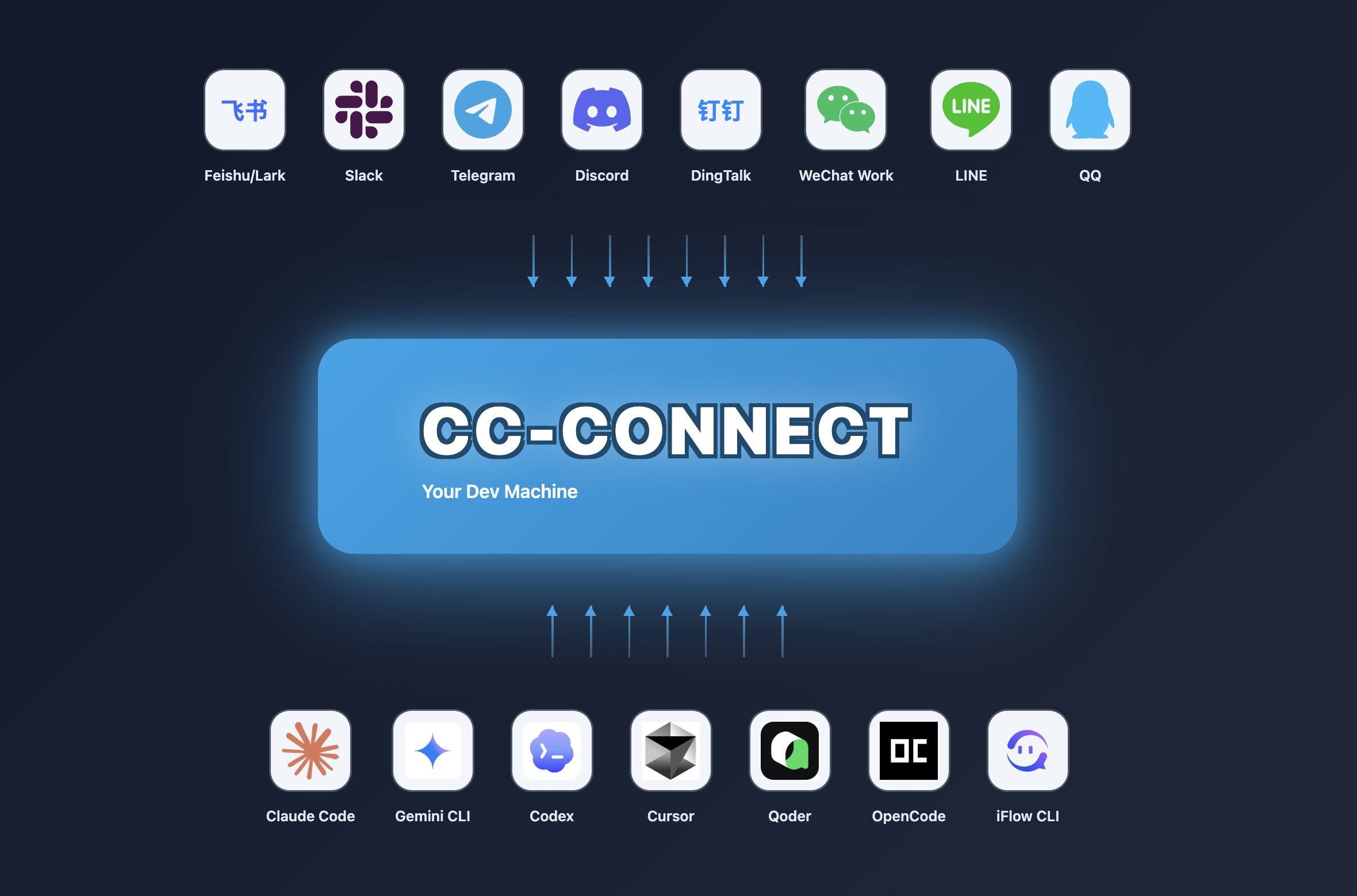
Control your local AI agents from any chat app. Anywhere, anytime.
cc-connect bridges AI agents running on your machine to the messaging platforms you already use.
Code review, research, automation, data analysis — anything an AI agent can do,
now accessible from your phone, tablet, or any device with a chat app.
🆕 What’s New in v1.5.1-beta.1
Beta since v1.5.0 stable — 16 merged PRs. Highlights:
- i18n — Localize agent system prompts (cron/timer/send/relay) based on language config (#1721).
- Cursor — Image attachments delivered via on-disk paths to the Cursor CLI (#1709).
- Feishu — Large file download via HTTP Range chunks, bypassing code=234037 (#1746); fail-closed when bot open_id discovery fails (#1725).
- Weixin — Reply and push paths now have separate send budgets (#1743); inbound dedup is configurable (#1733).
- Claude Code —
/compactand slash commands restored by dropping--replay-user-messages(#1737); bounded session teardown (#1714). - Codex — Failed app-server turns propagate (#1730); max reasoning effort supported (#1727);
/listreads session names correctly (#1639). - Pi — Attachments passed as
@pathrefs (#1724); Windows build fix (#1738).
No breaking changes. See changelogs/v1.5.1-beta.1.md for the full changelog.
🧩 Platform feature snapshot
High-level view of what each built-in platform can do in cc-connect.
Legend
| Symbol | Meaning |
|---|---|
| ✅ | Works in stable cc-connect with typical configuration |
| ⚠️ | Partial, needs extra config (e.g. speech / ASR), or limited by the vendor app or API |
| ❌ | Not supported or not applicable in practice |
† QQ (NapCat / OneBot) — unofficial self-hosted bridge; behaviour depends on your NapCat / network setup.
| Capability | Feishu | WPS Xiezuo | DingTalk | Telegram | Slack | Discord | LINE | WeCom | Weixin (personal) |
QQ† | QQ Bot | Matrix | |
|---|---|---|---|---|---|---|---|---|---|---|---|---|---|
| Text & slash commands | ✅ | ✅ | ✅ | ✅ | ✅ | ✅ | ✅ | ✅ | ✅ | ✅ | ✅ | ✅ | ✅ |
| Markdown / cards | ✅ | ✅ | ✅ | ✅ | ✅ | ✅ | ⚠️ | ⚠️ | ❌ | ✅ | ✅ | ✅ | ⚠️ |
| Streaming / chunked replies | ✅ | ✅ | ✅ | ✅ | ✅ | ✅ | ✅ | ✅ | ✅ | ✅ | ✅ | ✅ | ✅ |
| Images & files | ✅ | ❌ | ✅ | ✅ | ✅ | ✅ | ⚠️ | ✅ | ❌ | ✅ | ✅ | ✅ | ✅ |
| Voice / STT / TTS | ⚠️ | ❌ | ⚠️ | ✅ | ⚠️ | ⚠️ | ❌ | ⚠️ | ❌ | ✅ | ⚠️ | ⚠️ | ❌ |
| Private (DM) | ✅ | ✅ | ✅ | ✅ | ✅ | ✅ | ✅ | ✅ | ✅ | ✅ | ✅ | ✅ | ✅ |
| Group / channel | ✅ | ✅ | ✅ | ✅ | ✅ | ✅ | ⚠️ | ✅ | ❌ | ✅ | ✅ | ✅ | ✅ |
WeCom: Webhook mode needs a public URL; long-connection / WS style setups often do not.
Voice row: many platforms need[speech]/ TTS providers enabled inconfig.toml; values are a best-effort summary.
Per-platform setup: Platform setup guides below.
✨ Why cc-connect?
🤖 Universal Agent Support
10+ AI Agents — Claude Code, Codex, Cursor Agent, Kimi CLI, Qoder CLI, Gemini CLI, OpenCode, iFlow CLI, Pi, Devin, Copilot — plus any agent that supports the Agent Client Protocol (ACP). Use whichever fits your workflow, or all of them at once.
📱 Platform Flexibility
13 Chat Platforms — Feishu, WPS Xiezuo, DingTalk, Slack, Telegram, Discord, WeChat Work, Weibo, LINE, QQ, QQ Bot (Official), Matrix, plus Weixin (personal ilink) for personal WeChat. Most platforms need zero public IP.
🔄 Multi-Agent Orchestration
Multi-Bot Relay — Bind multiple bots in a group chat and let them communicate with each other. Ask Claude, get insights from Gemini — all in one conversation.
🎮 Complete Chat Control
Full Control from Chat — Switch models (/model), tune reasoning (/reasoning), change permission modes (/mode), manage sessions, all via slash commands.
Directory Switching in Chat — Change where the next session starts with /dir <path> (and /cd <path> as a compatibility alias), plus quick history jump via /dir <number> / /dir -.
🧠 Persistent Memory
Agent Memory — Read and write agent instruction files (/memory) without touching the terminal.
⏰ Intelligent Scheduling
Scheduled Tasks — Set up cron jobs in natural language. "Every day at 6am, summarize GitHub trending" just works.
🎤 Multimodal Support
Voice & Images — Send voice messages or screenshots; cc-connect handles STT/TTS and multimodal forwarding.
📦 Multi-Project Architecture
Multi-Project — One process, multiple projects, each with its own agent + platform combo.
🌍 Multilingual Interface
5 Languages — Native support for English, Chinese (Simplified & Traditional), Japanese, and Spanish. Built-in i18n ensures everyone feels at home.
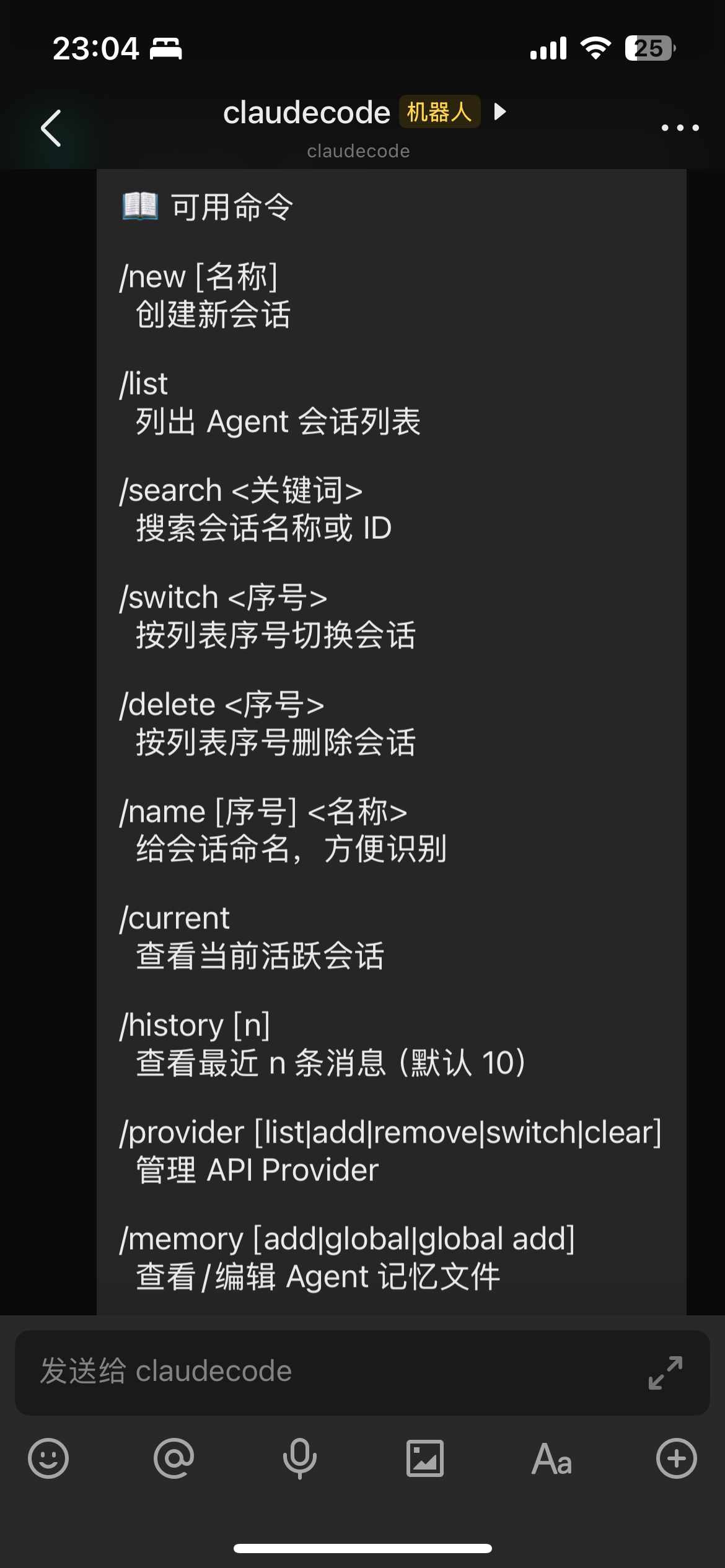
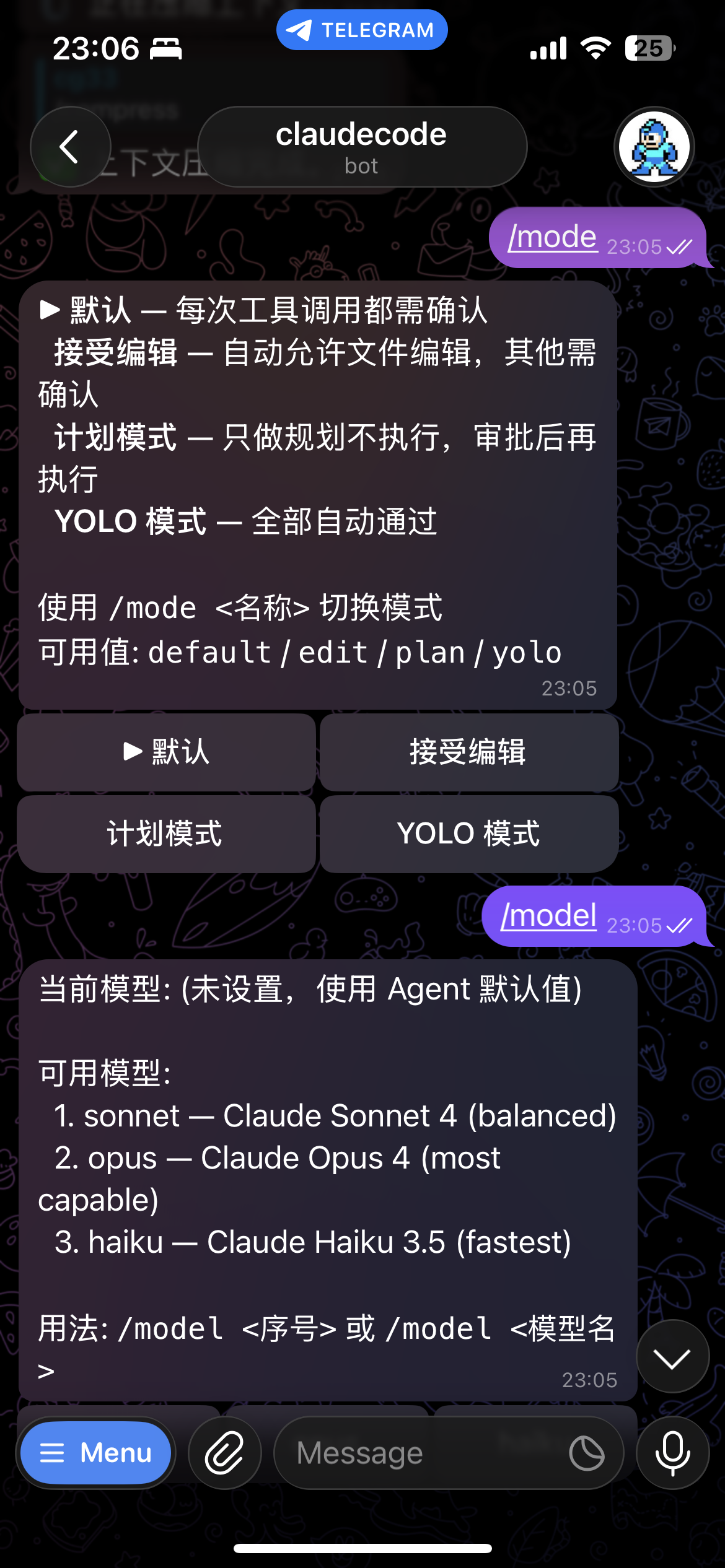
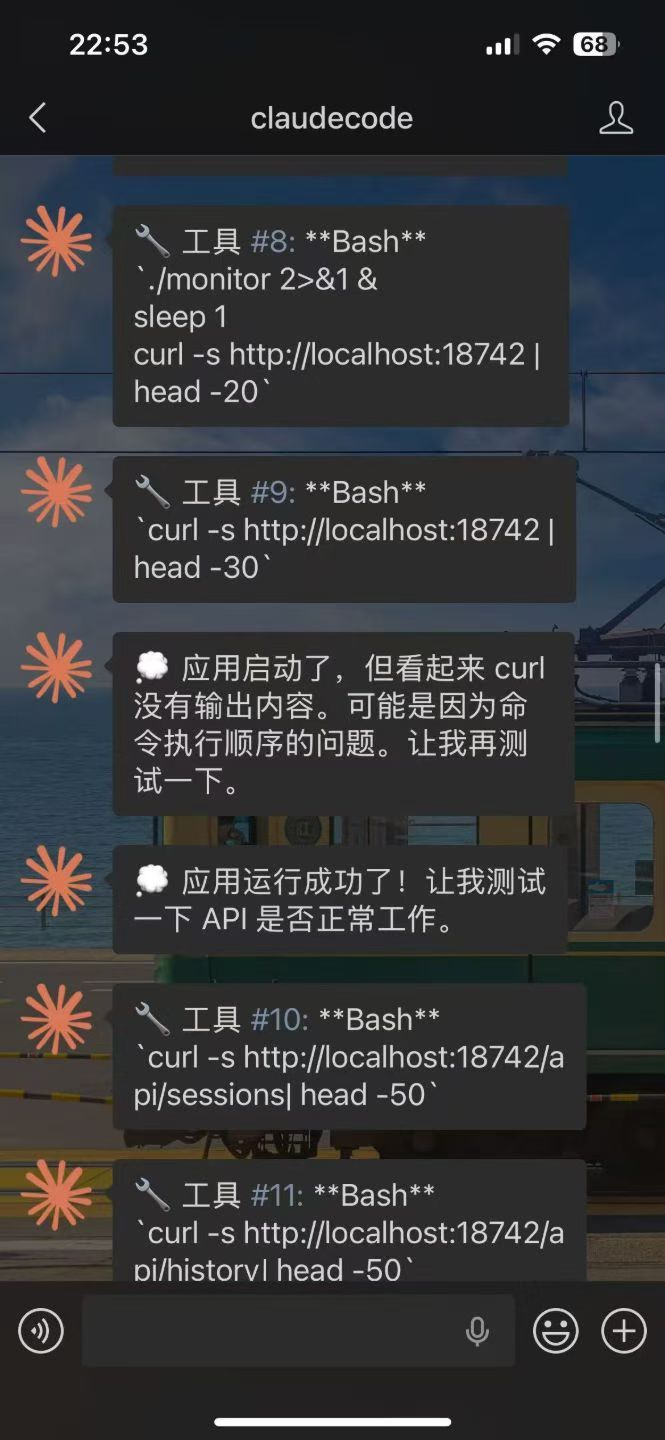
Left:Lark | Telegram | Right:Wechat
📋 Prerequisites
Install in this exact order — cc-connect is a bridge for local AI coding agents, so the agent CLI must be installed and authenticated before cc-connect starts. Skipping ahead will cause
cc-connectto exit withclaudecode: claude CLI not found in PATH(or similar for your chosen agent), and the Web UI on:9820will never come up.
1️⃣ Install your AI Agent CLI
Pick the agent you want to bridge. You need at least one.
# Claude Code (most common)
brew install --cask claude-code            # macOS / Linux Homebrew
# or
npm install -g @anthropic-ai/claude-code   # any platform via npm

# OpenAI Codex
npm install -g @openai/codex

# Google Gemini CLI
npm install -g @google/gemini-cli

# iFlow CLI
npm install -g @iflow-ai/iflow-cli

# Qoder CLI
curl -fsSL https://qoder.com/install | bash
For Cursor Agent and OpenCode, follow the official install pages:
- Cursor Agent: https://docs.cursor.com/agent
- OpenCode: https://github.com/opencode-ai/opencode
Verify the binary is on your PATH:
claude --version # or: codex / gemini / opencode / qodercli / cursor-agent ...
2️⃣ Authenticate the agent
Each agent has its own login flow — run the agent once interactively so it stores credentials in your home directory:
claude login           # opens a browser to authenticate
# or
codex login            # /gemini / opencode auth — see the agent's docs
If you skip this step, cc-connect will still start, but the agent will reject every prompt with an auth error.
3️⃣ Install cc-connect
# npm (any platform)
npm install -g cc-connect

# Homebrew (macOS / Linux)
brew install cc-connect

# Or download a binary from https://github.com/chenhg5/cc-connect/releases
4️⃣ Start cc-connect and open the Web UI
cc-connect # starts the service; first run auto-creates ~/.cc-connect/config.toml
On first launch, cc-connect prints something like:
Web admin: http://localhost:9820
Open that URL in your browser. If 9820 is already in use, pass --web-port 9821 or set web_port in config.toml.
Note:
cc-connect webonly opens the browser and the config UI — it does not start the service. You still needcc-connectrunning in another terminal.
5️⃣ Configure platform bot tokens in the Web UI
In the Web UI, create a project, then add at least one platform (Feishu / Telegram / Discord / Slack / DingTalk / WeChat Work / QQ / LINE / Weixin) and paste the bot token from that platform's developer console. Save and cc-connect will hot-reload.
That's it — send a message to your bot and cc-connect will relay it to your local agent.
🚀 Quick Start
🤖 Install & Configure via AI Agent (Recommended)
The easiest way — Send this to Claude Code or any AI coding agent, and it will handle the entire installation and configuration for you:
Follow https://raw.githubusercontent.com/chenhg5/cc-connect/refs/heads/main/INSTALL.md to install and configure cc-connect.
📦 Manual Install
Via npm:
npm install -g cc-connect
Via Homebrew (macOS / Linux):
brew install cc-connect
Download binary from GitHub Releases:
# Linux amd64 - Stable
curl -L -o cc-connect https://github.com/chenhg5/cc-connect/releases/latest/download/cc-connect-linux-amd64
chmod +x cc-connect
sudo mv cc-connect /usr/local/bin/
Build from source (requires Go 1.22+):
git clone https://github.com/chenhg5/cc-connect.git
cd cc-connect
make build
⚙️ Configure
💡 Tip: Use the Web UI to configure — After installing, run
cc-connect webto configure the web admin and open the dashboard in your browser. You can visually create projects, add platforms, manage providers, and chat with your agent — no need to manually edit TOML files. Note:cc-connect webonly configures and opens the browser — you still need to runcc-connectseparately to start the service.
If you prefer manual configuration:
mkdir -p ~/.cc-connect
cp config.example.toml ~/.cc-connect/config.toml
vim ~/.cc-connect/config.toml
Set admin_from = "alice,bob" in a project to allow those user IDs to run privileged commands such as /dir and /shell.
admin_from must be placed under [[projects]] (not under [projects.platforms.options]). You can use /whoami or /status to get your current User ID.
When a user runs /dir reset, cc-connect restores the configured work_dir and clears the persisted override stored under data_dir/projects/<project>.state.json.
▶️ Run
./cc-connect
🔄 Upgrade
# npm
npm install -g cc-connect

# Homebrew
brew upgrade cc-connect

# Binary self-update
cc-connect update           # Stable
cc-connect update --pre     # Include pre-releases
📊 Support Matrix
| Component | Type | Status |
|---|---|---|
| Agent | Claude Code | ✅ Supported |
| Agent | Codex (OpenAI) | ✅ Supported |
| Agent | Cursor Agent | ✅ Supported |
| Agent | Gemini CLI (Google) | ✅ Supported |
| Agent | Qoder CLI | ✅ Supported |
| Agent | OpenCode (Crush) | ✅ Supported |
| Agent | iFlow CLI | ✅ Supported |
| Agent | Kimi CLI (Moonshot) | ✅ Supported |
| Agent | Pi (Cursor Background Agent) | ✅ Supported |
| Agent | Copilot (GitHub) | ✅ Supported |
| Agent | ACP (Agent Client Protocol) | ✅ Any ACP-compatible agent |
| Agent | Devin (Cognition) | ✅ Supported (via ACP) |
| Agent | Goose (Block) | 🔜 Planned |
| Agent | Aider | 🔜 Planned |
| Platform | Feishu (Lark) | ✅ WebSocket — no public IP needed |
| Platform | DingTalk | ✅ Stream — no public IP needed |
| Platform | WPS Xiezuo | ✅ WebSocket — no public IP needed |
| Platform | Telegram | ✅ Long Polling — no public IP needed |
| Platform | Slack | ✅ Socket Mode — no public IP needed |
| Platform | Discord | ✅ Gateway — no public IP needed |
| Platform | ✅ WebSocket — no public IP needed | |
| Platform | LINE | ✅ Webhook — public URL required |
| Platform | WeChat Work | ✅ WebSocket / Webhook |
| Platform | Weixin (personal, ilink) | ✅— HTTP long polling — no public IP needed |
| Platform | QQ (NapCat/OneBot) | ✅ WebSocket |
| Platform | QQ Bot (Official) | ✅ WebSocket — no public IP needed |
| Platform | Matrix | ✅ Long Polling (/sync) — no public IP needed |
📖 Platform Setup Guides
| Platform | Guide | Connection | Public IP? |
|---|---|---|---|
| Feishu (Lark) | docs/feishu.md | WebSocket | No |
| DingTalk | docs/dingtalk.md | Stream | No |
| WPS Xiezuo | docs/wps-xiezuo.md | WebSocket | No |
| Telegram | docs/telegram.md | Long Polling | No |
| Slack | docs/slack.md | Socket Mode | No |
| Google Chat | docs/googlechat.md | Cloud Pub/Sub | No |
| Discord | docs/discord.md | Gateway | No |
| docs/weibo.md | WebSocket | No | |
| WeChat Work | docs/wecom.md | WebSocket / Webhook | No (WS) / Yes (Webhook) |
| Weixin (personal) | docs/weixin.md | HTTP long polling (ilink) | No |
| QQ / QQ Bot | docs/qq.md | WebSocket | No |
| Matrix | docs/matrix.md | /sync (Long Polling) | No |
🎯 Key Features
💬 Session Management
/new [name]       Start a new session
/list             List all sessions
/switch <id>      Switch session
/current          Show current session
/dir [path|reset] Show, switch, or reset work directory
Project configs rotate to a fresh session automatically after long inactivity. This prevents "context drift" where stale chat history (failed commands, debugging noise) is repeatedly re-ingested via --continue and starts to dominate the model's attention. The previous session is preserved and remains accessible via /list and /switch.
[[projects]]
reset_on_idle_mins = 30   # default when unset; set to 0 to disable
The default is 30 minutes when unset. Set reset_on_idle_mins = 0 to opt out and always continue the previous session.
🛡️ OS-User Isolation (run_as_user)
On Linux/macOS, a project can spawn its agent under a different Unix user for OS-level file-system isolation from the supervisor user that runs cc-connect. Currently supported by Claude Code.
[[projects]]
name = "claude-sandboxed"
run_as_user = "partseeker-coder"
run_as_env = ["PGSSLROOTCERT"]
The target user needs passwordless sudo from the supervisor, no sudo
of its own, read+write on work_dir, and its own ~/.claude/settings.json
with whatever credentials the agent uses. If you authenticate via
claude.ai OAuth, symlink the target user's ~/.claude/.credentials.json
to the supervisor's copy so token refresh stays in sync — see the
environment propagation checklist
for details. See
docs/usage.md
for the full setup.
Before starting cc-connect, audit the setup with:
cc-connect doctor user-isolation
This runs three go/no-go preflight gates and an isolation probe that reports what the target user can and cannot read. cc-connect refuses to start if any gate fails or if the probe detects a cross-user leak.
🔐 Permission Modes
/mode             Show available modes
/mode yolo        # Auto-approve all tools
/mode default     # Ask for each tool
🔄 Provider Management
/provider list              List providers
/provider switch <name>     Switch API provider at runtime
🤖 Model Selection
/model                      List available models (format: alias - model)
/model switch <alias>       Switch to model by alias
📂 Work Directory
/dir                         Show current work directory and history
/dir <path>                  Switch to a path (relative or absolute)
/dir <number>                Switch from history
/dir -                       Switch to previous directory
/cd <path>                   Compatibility alias for /dir <path>
⏰ Scheduled Tasks
/cron add 0 6 * * * Summarize GitHub trending
📎 Agent Attachment Send-Back
When an agent generates a local screenshot, chart, PDF, bundle, or other file, it can send that attachment back to the current chat.
First release supports:
- Feishu
- Telegram
If your agent does not natively inject the system prompt, run this once in chat after upgrading:
/bind setup
or:
/cron setup
This refreshes the cc-connect instructions in the project memory file so the agent knows how to send attachments back.
You can control this feature globally in config.toml:
attachment_send = "on" # default: "on"; set to "off" to block image/file send-back
This switch is independent from the agent's /mode. It only controls cc-connect send --image/--file. Voice send-back uses the TTS config instead.
Examples:
cc-connect send --image /absolute/path/to/chart.png
cc-connect send --file /absolute/path/to/report.pdf
cc-connect send --file /absolute/path/to/report.pdf --image /absolute/path/to/chart.png
cc-connect send --tts "Hello from cc-connect"
Notes:
- Absolute paths are the safest option.
--imageand--filecan both be repeated.--ttssends synthesized speech when the user asks for a voice reply.attachment_send = "off"disables only attachment send-back; ordinary text replies still work.- Attachments are capped at 50 MiB by default; configure with
max_attachment_size_mb(orCC_MAX_ATTACHMENT_SIZE_MBenv, same MiB unit). - This command is for generated attachments, not ordinary text replies.
📖 Full documentation: docs/usage.md
📚 Documentation
- Usage Guide — Complete feature documentation
- INSTALL.md — AI-agent-friendly installation guide
- config.example.toml — Configuration template
- CONTRIBUTING.md — How to report issues and contribute pull requests
👥 Community
☕ Support the Project
If cc-connect has been helpful to you, consider buying us a coffee! Your support helps us:
- 🛠️ Maintain and improve the project
- 📚 Write better documentation and tutorials
- 🐛 Fix bugs and add new features faster
- ☕ Keep the developers caffeinated
How to Donate
Buy Me a Coffee: https://buymeacoffee.com/cg33
WeChat Pay / Alipay:
| WeChat Pay | Alipay |
|---|---|
 |
 |
Thank You, Donors! 🎉
We're grateful to everyone who has supported this project. Leave your GitHub username in the donation message if you'd like to be recognized here!
| Avatar | GitHub Username | Date |
|---|---|---|
 |
@thx0701 | 2026-04-29 |
🤝 Commercial Cooperation
We accept the following commercial collaborations:
- Enterprise Customization: Custom deployment for internal AI tooling (Feishu, DingTalk, WeChat Work, Slack, etc.)
- Technical Consulting: AI agent integration and architecture design
- Outsourcing Projects: AI-related system development
Contact: Email: chg80333@gmail.com | WeChat: mongorz | Telegram | Discord
🙏 Contributors
⭐ Star History
📄 License
MIT License
Built with ❤️ by the cc-connect community
❤️ 赞助
想在这里展示?联系:chg80333@gmail.com | 微信:mongorz
赞助商
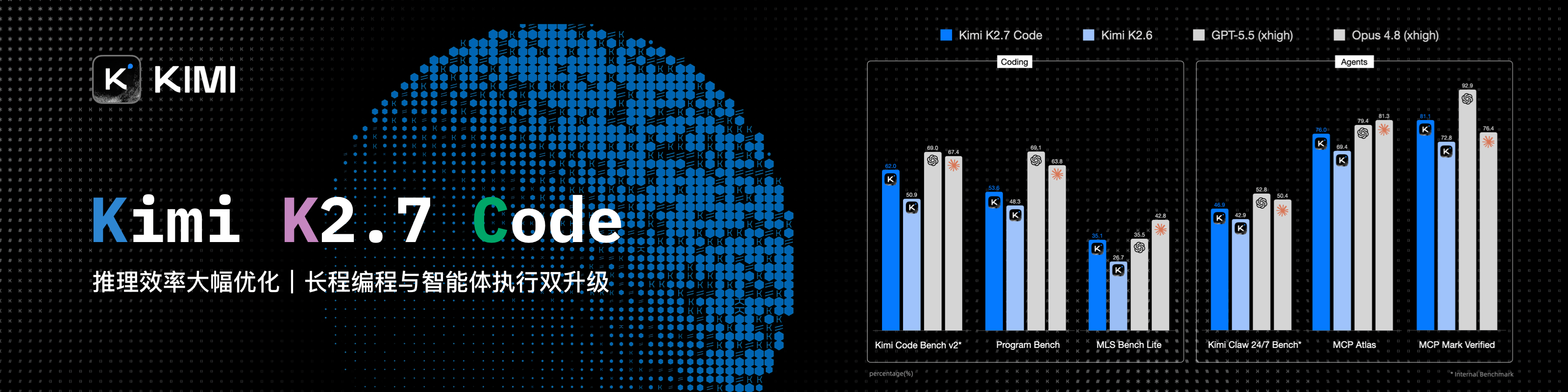
感谢 Kimi 赞助本项目!Kimi K3 是 Moonshot AI 迄今能力最强的模型,也是全球首个开源 3T 级模型。K3 拥有 2.8T 参数、原生视觉能力与 100 万 Token 上下文,在长程编码、知识工作和推理任务中展现前沿性能。
通过 cc-connect,你可以将本地运行的 Kimi CLI 连接到飞书、钉钉、Telegram、Slack、Discord、企业微信等即时通讯工具,随时让 Kimi 阅读和修改代码、排查问题、执行命令与处理自动化任务。
cc-connect 已支持 Kimi CLI。立即体验 Kimi Code 订阅(中文站|Global),或前往 Kimi 开放平台(中文站|Global)使用 API。
|
感谢 APINEBULA 赞助本项目!APINEBULA 是银河录像局旗下的企业级 AI 聚合平台,背靠大平台资源,面向开发者、团队与企业用户提供稳定、高性价比的大模型 API 接入服务。平台聚合 Claude、GPT、Gemini等主流满血模型,一个接口,接入全球顶尖AI大模型,各大模型价格低至 1 折起,支持企业级高并发、正式合同、对公打款与开票服务,适合 AI 编程、Agent 开发、业务系统集成等多种场景!使用此链接注册并在充值时填写"ccconnect"优惠码可享九折优惠! |
|
感谢 七牛云 AI 赞助本项目!七牛云(02567.HK)旗下企业级 MaaS 平台,一站式调用全球 150+ 主流模型,兼容全球主流模型厂商协议,覆盖文本、图像、音频、视频、文件处理等全模态处理能力,服务超过 169 万企业及开发者用户。专属福利:企业用户免费领 1200万 Token,邀请好友最高得百亿 Token。 |
|
感谢 Fenno.ai 赞助本项目!Fenno.ai 是一家稳定、高效的 API 中转服务商,目前主要提供 Codex 中转服务,兼容 OpenAI 及 Anthropic 协议,可灵活接入 Codex、Claude Code、OpenCode 等主流编程工具,可稳定支撑千亿 Token/日的企业级调用需求,支持国内及海外主体公对公结算、开票。Fenno.ai 为 CC-Connect 的用户提供了专属福利:通过 此链接 即可订阅 9.9 元/150 刀额度的超值 Coding Plan,邀请好友最高可享 20% 奖励,多邀多得! |
|
感谢 AIGoCode 对本项目的赞助!AIGoCode 是集 Claude Code、Codex、最新 Gemini 模型于一体的一站式平台,提供稳定高效、高性价比的 AI 编码服务。灵活订阅方案、零封号风险、无需 VPN 直连、响应速度极快。通过 此链接 注册,首充额外获得 10% 赠送额度! |
|
感谢 APIMart 赞助本项目!APIMart 是专注 AI 图片/视频生成的低价 API 平台,GPT-Image-2 低至 $0.006/张,1 美元可出图 160+ 张。图片、视频一套异步 API 通吃,提交任务拿 ID、回调取结果,跑批万张不超时、换模型不改代码。按量付费、无月费,通过 此注册链接 注册即可开用。 |
 |
感谢 DMXAPI(大模型API)赞助本项目!DMXAPI,一个 Key 用全球大模型。为 200+ 企业用户提供全球大模型 API 服务。充值即开票、当天开票、并发不限制、1元起充、7x24 在线技术辅导。GPT/Claude/Gemini 全部 6.8 折,国内模型 5~8 折,Claude Code 专属模型 3.4 折进行中!点击这里注册 |
|
感谢 APIKEY.FUN 赞助本项目!APIKEY.FUN 是一家专业的企业级 AI 中转站,致力于为企业和个人开发者提供稳定、高效、低成本的 AI 模型 API 接入服务。平台支持 Claude、OpenAI、Gemini 等主流热门模型,价格低至官方原价的 7%。通过此链接注册,还可享受最高充值永久 95 折专属优惠! |
|
感谢胜算云赞助了本项目!胜算云是专为 AI Native Teams 服务的超级工厂,工业级 AI 任务并行执行平台,模型商城集采直供聚合接入了 Claude、Chatgpt、Gemini 等海内外 LLM 及图片视频多媒体模型算力,绝无逆向掺水、全站模型 SLA 可用性高达 99.7%、监测接口日常全绿。更有企业级专属定制网关,实现团队精细化成本与权限管控,智能路由+安全防护+BYOK 企业自带密钥托管。平台按量及 tokens plan(即将上线)计费,可开票,使用此链接注册新用户可获 10 元模力及首充 10% 赠送。 |
|
感谢 VisionCoder 对本项目的支持。VisionCoder 开发平台 是一个可靠高效的 API 中继服务提供商,提供 Claude Code、Codex、Gemini 等主流 AI 模型,帮助开发者和团队更轻松地集成 AI 功能,提升工作效率。此外,VisionCoder 还提供 Claude Max 200 与 GPT Pro 200 高级成品号的独家售卖渠道,助力体验全网顶配 AI 的算力与体验。 |
|
感谢 RunAPI 对本项目的赞助!RunAPI 是高效稳定的API OpenRouter平替平台,一个 API Key 即可访问 OpenAI、Claude、Gemini、DeepSeek、Grok 等 150+ 主流模型,低至 1 折,极其稳定,可以无缝兼容 Claude Code、OpenClaw 等工具。RunAPI 为 cc-connect的用户提供专属福利:注册联系管理员即可领取¥7的免费额度 |
|
感谢 CaMeL 对本项目的赞助!携手各大科研院所、超算中心深度合作,自研高稳高效缓存调度方案。CC-Connect专享新人注册认证即送$10!通过 此链接 注册。 |
|
感谢 Unity2.ai 赞助了本项目!Unity2.ai 是面向个人开发者、团队和企业的高性能 AI 模型 API 中转平台,长期服务国内头部企业,日均承载超 300 亿 token 调用,支持 5000 RPM 级高并发。支持余额计费、首充赠额、组合订阅、企业开票和专属对接。通过 此链接 注册可领取 $2 余额,加入官方群再送 $10 余额,最高可领 $12 免费额度。 |
|
感谢 二狗 API (Ergou API) 赞助本项目!接入二狗,稳如老狗。二狗 API 中转站,全站 0.1x~0.2x 超低倍率,提供 Claude/GPT/Gemini 等多个国内外 100% 纯血大模型接口,顶级 IPLC 线路 + 住宅双 ISP 冗余,确保全国范围稳定低延迟访问。欢迎各位开发者、工作室 注册使用。 |
|
感谢 AnyRoute.io 对本项目的赞助!AnyRoute.io 是集 Claude Code、Codex 最新模型于一体、可靠稳定高效的 API 中转站,价格透明,最低低至官方 0.7 折,支持开票和企业高并发。通过 此链接 注册即可开始使用。 |
|
感谢 aicanapi.com 对本项目的赞助!艾可API致力于为企业与开发者提供高性能、低延迟、可高并发承载的API接口服务。Claude Code 模型最低可达 1.6 折,其余模型普遍可享官方 2 折优惠,豆包 Seedance 2 真人生成服务支持免排队调用。选择艾可API,让企业级AI接口服务更简单、更高效、更具性价比。通过 此链接 注册即可开始使用。 |
|
感谢 Pateway 对本项目的赞助!PatewayAI 是面向重度 AI 开发者、专注官方直连的高品质模型 API 中转服务商。提供 Claude 全系列与 Codex 系列模型,100% 官方源直供,不掺假不注水。计费透明,Token 级账单可逐笔核验。支持企业级高并发,可签订正式合同并开具发票。通过 此链接 注册即送 $3 试用额度,充值低至 6 折,邀请好友双向赠送,邀请奖励可达 $150! |
|
感谢 10点AI 对本项目的赞助!10dian-AI企业台是面向开发者与企业的 AI API 中转平台,聚合 GPT、Claude、Gemini、DeepSeek 等主流模型。针对生产环境专项优化,支持高并发稳定运行,有效规避接口抖动与超时问题。价格亲民性价比高、接口稳定不掉线、官方保真不参水。通过 此链接 注册即送 ¥5 余额! |
|
感谢 SiliconFlow 对本项目的支持!SiliconFlow 是高性能 AI 基础设施和模型 API 平台,提供语言、语音、图片、视频等多种模型的快速可靠访问。按量计费,多模态模型支持,高速推理,企业级稳定性,帮助开发者和团队更高效地构建和扩展 AI 应用。通过 此链接 注册并完成实名认证,即可获得 ¥20 bonus credits! |
|
感谢优云智算赞助了本项目!优云智算是UCloud旗下AI云平台,提供稳定、全面的国内外模型API,仅一个key即可调用。主打包月、按次的高性价比国模Coding Plan套餐,同时提供官转稳定海外模型。支持接入 Claude Code、Codex 及 API 调用。支持企业高并发、7*24技术支持、自助开票。通过 此链接 注册的用户,可得免费5元平台体验金! |
|
感谢 DragonCode 对本项目的支持。DragonCode 为 cc-connect 用户准备了专属福利:通过 此链接 注册即可开始体验。 |
|
感谢 Code0 对本项目的赞助!Code0 是面向中国开发者的 AI 模型聚合 API 中转服务,统一兼容 OpenAI / Anthropic / Gemini 三种协议格式,一个 Key 即可调用全量主流模型,稳定适配 Claude Code、Codex、Gemini CLI、cc-connect 等各类 Agent 工具。固定汇率计费:充值 1.5 元人民币 = 1 美元 API 额度,价格透明、国内直连、开箱即用。通过 此链接 注册。 |
|
感谢 claudeapi.com 对本项目的赞助!claudeapi 是面向中高端用户的高质量直连 Claude 服务,完整接入 Anthropic 官方第一方 Keys 和 AWS Bedrock 官方渠道——无逆向工程、无智力降级、无拼接。完整保留 Opus / Sonnet / Haiku 的官方能力、长上下文和 Tool Calling 性能。专为 Claude Code 重度用户、Agent 开发者和企业团队设计,开箱即用、企业级稳定。支持开票和团队入驻。通过 此链接 注册。 |
在任何聊天工具里,远程操控你的本地 AI Agent。随时随地,随心所欲。
cc-connect 把运行在你机器上的 AI Agent 桥接到你日常使用的即时通讯工具。
代码审查、资料研究、自动化任务、数据分析 —— 只要 AI Agent 能做的事,
都能通过手机、平板或任何有聊天应用的设备来完成。
🆕 v1.5.1-beta.1 更新了什么
自 v1.5.0 正式版以来的 beta —— 16 个已合并 PR。亮点:
- i18n — 按 language 配置本地化 agent system prompt(cron/timer/send/relay)(#1721)。
- Cursor — 图片附件通过 on-disk path 传给 Cursor CLI (#1709)。
- 飞书 — 大文件 HTTP Range 分块下载,绕过 code=234037 (#1746);bot open_id 发现失败 fail-closed (#1725)。
- 微信 — 回复/推送分路径 send budget (#1743);入站 dedup 可配置 (#1733)。
- Claude Code — 移除
--replay-user-messages,恢复/compact等 slash 命令 (#1737);session teardown 竞态修复 (#1714)。 - Codex — 传播 app-server turn 失败 (#1730);支持 max reasoning effort (#1727);
/list正确读 session 名 (#1639)。 - Pi — 附件 @path 引用而非 inline bytes (#1724);Windows 编译修复 (#1738)。
无任何破坏性变更。完整 changelog 见 changelogs/v1.5.1-beta.1.md。
🧩 平台能力一览
内置各渠道在 cc-connect 里的大致能力对照,方便快速对比。
图例
| 符号 | 含义 |
|---|---|
| ✅ | 稳定版 cc-connect + 常规配置下可用 |
| ⚠️ | 部分支持、需额外配置(如语音/STT)或受厂商接口 / 应用类型限制 |
| ❌ | 不支持或实际不可用 |
† QQ(NapCat / OneBot) — 非官方自建桥接,体验依赖你的 NapCat 与网络环境。
| 能力 | 飞书 | WPS 协作 | 钉钉 | Telegram | Slack | Discord | LINE | 企业微信 | 微博 | 微信个人号 (ilink) |
QQ† | QQ 官方机器人 | Matrix |
|---|---|---|---|---|---|---|---|---|---|---|---|---|---|
| 文本与斜杠命令 | ✅ | ✅ | ✅ | ✅ | ✅ | ✅ | ✅ | ✅ | ✅ | ✅ | ✅ | ✅ | ✅ |
| Markdown / 卡片 | ✅ | ✅ | ✅ | ✅ | ✅ | ✅ | ⚠️ | ⚠️ | ❌ | ✅ | ✅ | ✅ | ⚠️ |
| 流式 / 分片回复 | ✅ | ✅ | ✅ | ✅ | ✅ | ✅ | ✅ | ✅ | ✅ | ✅ | ✅ | ✅ | ✅ |
| 图片与文件 | ✅ | ❌ | ✅ | ✅ | ✅ | ✅ | ⚠️ | ✅ | ❌ | ✅ | ✅ | ✅ | ✅ |
| 语音 / STT / TTS | ⚠️ | ❌ | ⚠️ | ✅ | ⚠️ | ⚠️ | ❌ | ⚠️ | ❌ | ✅ | ⚠️ | ⚠️ | ❌ |
| 私聊 | ✅ | ✅ | ✅ | ✅ | ✅ | ✅ | ✅ | ✅ | ✅ | ✅ | ✅ | ✅ | ✅ |
| 群聊 / 频道 | ✅ | ✅ | ✅ | ✅ | ✅ | ✅ | ⚠️ | ✅ | ❌ | ✅ | ✅ | ✅ | ✅ |
企业微信: Webhook 模式需要公网 URL;长连接等模式多数不需要。
语音行: 多数平台要在config.toml里配置[speech]/ TTS 等,表中为经验性归纳。
分平台接入步骤见下文 平台接入指南。
✨ 为什么选择 cc-connect?
🤖 通用 Agent 支持
10+ 大 AI Agent — Claude Code、Codex、Cursor Agent、Kimi CLI、Qoder CLI、Gemini CLI、OpenCode、iFlow CLI、Pi、Devin、Copilot,还可通过 Agent Client Protocol (ACP) 接入更多 Agent。按需选用,或同时使用全部。
📱 平台灵活性
13 大聊天平台 — 飞书、WPS 协作、钉钉、Slack、Telegram、Discord、企业微信、微博、LINE、QQ、QQ 官方机器人、Matrix,以及 微信个人号(ilink)。大部分平台无需公网 IP。
🔄 多 Agent 编排
多机器人中继 — 在群聊中绑定多个机器人,让它们相互协作。问 Claude,再听 Gemini 的见解 — 同一个对话搞定。
🎮 完整的聊天控制
聊天即控制 — 切换模型 (/model)、切换推理强度 (/reasoning)、切换权限模式 (/mode)、管理会话,全部通过斜杠命令完成。
聊天切换工作目录 — 使用 /dir <路径> 切换下一次会话启动目录(/cd <路径> 为兼容别名),并支持 /dir <序号> / /dir - 快速在历史目录间跳转。
🧠 持久化记忆
Agent 记忆 — 在聊天中直接读写 Agent 指令文件 (/memory),无需回到终端。
⏰ 智能定时任务
定时任务 — 自然语言创建 cron 任务。"每天早上6点总结 GitHub trending" 即刻生效。
🎤 多模态支持
语音 & 图片 — 发语音或截图,cc-connect 自动处理 STT/TTS 和多模态转发。
📦 多项目架构
多项目管理 — 一个进程同时管理多个项目,各自独立的 Agent + 平台组合。
🌍 多语言界面
5 种语言 — 原生支持英语、中文(简体/繁体)、日语和西班牙语。内置 i18n 让每个人都能得心应手。
左:飞书 | Telegram | 右:微信
📋 准备工作
请严格按照以下顺序安装 — cc-connect 是本地 AI 编程 Agent 的桥接工具,因此对应的 Agent CLI 必须先安装并完成登录认证,之后 cc-connect 才能正常启动。如果跳过前面的步骤直接启动 cc-connect,进程会直接退出并报错
claudecode: claude CLI not found in PATH(其他 Agent 报错类似),Web UI 在:9820也就无从访问。
1️⃣ 安装 AI Agent CLI
选择你要桥接的 Agent,至少装一个。
# Claude Code(最常用)
brew install --cask claude-code            # macOS / Linux Homebrew
# 或
npm install -g @anthropic-ai/claude-code   # 任意平台通过 npm

# OpenAI Codex
npm install -g @openai/codex

# Google Gemini CLI
npm install -g @google/gemini-cli

# iFlow CLI
npm install -g @iflow-ai/iflow-cli

# Qoder CLI
curl -fsSL https://qoder.com/install | bash
Cursor Agent 和 OpenCode 请参考各自的官方安装文档:
- Cursor Agent: https://docs.cursor.com/agent
- OpenCode: https://github.com/opencode-ai/opencode
确认可执行文件在 PATH 中:
claude --version # 或 codex / gemini / opencode / qodercli / cursor-agent ...
2️⃣ 完成 Agent 登录认证
每个 Agent 都有自己的登录流程 — 先在终端交互式跑一次,让它把凭据存到你的 home 目录:
claude login           # 会在浏览器里打开授权页面
# 或
codex login            # / gemini / opencode 等也类似,请参考各自文档
跳过这一步的话,cc-connect 仍能启动,但 Agent 会因为未认证拒绝所有请求。
3️⃣ 安装 cc-connect
# npm(任意平台)
npm install -g cc-connect

# Homebrew(macOS / Linux)
brew install cc-connect

# 也可以从 https://github.com/chenhg5/cc-connect/releases 直接下载二进制
4️⃣ 启动 cc-connect 并打开 Web UI
cc-connect # 启动服务;首次运行会自动生成 ~/.cc-connect/config.toml
首次启动时,cc-connect 会打印类似:
Web admin: http://localhost:9820
在浏览器里打开该地址。如果 9820 已被占用,可以传 --web-port 9821 或在 config.toml 里设置 web_port。
注意:
cc-connect web只 打开浏览器和配置界面,并不会启动服务本身。仍需要在另一个终端里跑cc-connect。
5️⃣ 在 Web UI 里配置平台 Bot Token
在 Web UI 里新建一个项目,然后添加至少一个平台(飞书 / Telegram / Discord / Slack / 钉钉 / 企业微信 / QQ / LINE / 微信 ilink),把该平台开发者后台的 Bot Token 粘贴进去。保存后 cc-connect 会热加载。
至此完成 — 给你的 Bot 发条消息,cc-connect 就会把它转给本地的 Agent。
🚀 快速开始
🤖 通过 AI Agent 安装配置(推荐)
最简单的方式 — 把这段话发给 Claude Code 或其他 AI 编码 Agent,它会帮你完成整个安装和配置过程:
请参考 https://raw.githubusercontent.com/chenhg5/cc-connect/refs/heads/main/INSTALL.md 帮我安装和配置 cc-connect
📦 手动安装
通过 npm:
# npm install -g cc-connect
通过 Homebrew(macOS / Linux):
brew install cc-connect
从 GitHub Releases 下载:
# Linux amd64 - 稳定版
curl -L -o cc-connect https://github.com/chenhg5/cc-connect/releases/latest/download/cc-connect-linux-amd64
chmod +x cc-connect
sudo mv cc-connect /usr/local/bin/
从源码编译(需要 Go 1.22+):
git clone https://github.com/chenhg5/cc-connect.git
cd cc-connect
make build
⚙️ 配置
💡 推荐使用 Web UI 配置 — 安装完成后,运行
cc-connect web配置 Web 管理后台并在浏览器中打开。可以可视化创建项目、添加平台、管理服务商、直接和 Agent 聊天,无需手动编辑 TOML 文件。注意:cc-connect web仅用于配置和打开浏览器,并不会启动 cc-connect 服务本身,你仍需单独运行cc-connect来启动。
如果你更喜欢手动配置:
mkdir -p ~/.cc-connect
cp config.example.toml ~/.cc-connect/config.toml
vim ~/.cc-connect/config.toml
在项目配置里设置 admin_from = "alice,bob" 后,只有这些用户 ID 才能执行 /dir、/shell 等特权命令。
执行 /dir reset 时,cc-connect 会恢复配置中的 work_dir,并清除保存在 data_dir/projects/<project>.state.json 里的目录覆盖状态。
▶️ 运行
./cc-connect
🔄 升级
# npm
npm install -g cc-connect

# Homebrew
brew upgrade cc-connect

# 二进制自更新
cc-connect update           # 稳定版
cc-connect update --pre     # 含预发布版本
📊 支持状态
| 组件 | 类型 | 状态 |
|---|---|---|
| Agent | Claude Code | ✅ 已支持 |
| Agent | Codex (OpenAI) | ✅ 已支持 |
| Agent | Cursor Agent | ✅ 已支持 |
| Agent | Gemini CLI (Google) | ✅ 已支持 |
| Agent | Qoder CLI | ✅ 已支持 |
| Agent | OpenCode (Crush) | ✅ 已支持 |
| Agent | iFlow CLI | ✅ 已支持 |
| Agent | Kimi CLI (Moonshot) | ✅ 已支持 |
| Agent | Pi (Cursor Background Agent) | ✅ 已支持 |
| Agent | Copilot (GitHub) | ✅ 已支持 |
| Agent | ACP (Agent Client Protocol) | ✅ 支持任何 ACP 兼容 Agent |
| Agent | Devin (Cognition) | ✅ 已支持(通过 ACP) |
| Agent | Goose (Block) | 🔜 计划中 |
| Agent | Aider | 🔜 计划中 |
| Platform | 飞书 (Lark) | ✅ WebSocket — 无需公网 IP |
| Platform | 钉钉 | ✅ Stream — 无需公网 IP |
| Platform | WPS 协作 | ✅ WebSocket — 无需公网 IP |
| Platform | Telegram | ✅ Long Polling — 无需公网 IP |
| Platform | Slack | ✅ Socket Mode — 无需公网 IP |
| Platform | Discord | ✅ Gateway — 无需公网 IP |
| Platform | 微博 | ✅ WebSocket — 无需公网 IP |
| Platform | LINE | ✅ Webhook — 需要公网 URL |
| Platform | 企业微信 | ✅ WebSocket / Webhook |
| Platform | 微信个人号(ilink) | ✅— HTTP 长轮询 — 无需公网 IP |
| Platform | QQ (NapCat/OneBot) | ✅ WebSocket |
| Platform | QQ 官方机器人 | ✅ WebSocket — 无需公网 IP |
| Platform | Matrix | ✅ Long Polling (/sync) — 无需公网 IP |
📖 平台接入指南
| 平台 | 指南 | 连接方式 | 需要公网 IP? |
|---|---|---|---|
| 飞书 (Lark) | docs/feishu.md | WebSocket | 不需要 |
| 钉钉 | docs/dingtalk.md | Stream | 不需要 |
| WPS 协作 | docs/wps-xiezuo.md | WebSocket | 不需要 |
| Telegram | docs/telegram.md | Long Polling | 不需要 |
| Slack | docs/slack.md | Socket Mode | 不需要 |
| Discord | docs/discord.md | Gateway | 不需要 |
| 微博 | docs/weibo.md | WebSocket | 不需要 |
| 企业微信 | docs/wecom.md | WebSocket / Webhook | 不需要 (WS) / 需要 (Webhook) |
| 微信个人号(ilink) | docs/weixin.md | HTTP 长轮询(ilink) | 不需要 |
| QQ / QQ 机器人 | docs/qq.md | WebSocket | 不需要 |
| Matrix | docs/matrix.md | /sync(长轮询) | 不需要 |
🎯 核心功能
💬 会话管理
/new [名称]            创建新会话
/list                  列出所有会话
/switch <id>           切换会话
/current               查看当前会话
/dir [路径|reset]      查看、切换或重置工作目录
项目配置也可以开启“长时间空闲后自动切到新会话”:
[[projects]]
reset_on_idle_mins = 60
🛡️ 系统用户隔离 (run_as_user)
在 Linux/macOS 上,项目可以用另一个 Unix 用户身份启动 Agent,从而在操作系统层面实现文件系统隔离。目前 Claude Code 已支持。
[[projects]]
name = "claude-sandboxed"
run_as_user = "partseeker-coder"
run_as_env = ["PGSSLROOTCERT"]
目标用户需要:supervisor 对其配置免密 sudo、自身不拥有 sudo、对 work_dir 有读写权限、拥有自己的 ~/.claude/settings.json。
如果你通过 claude.ai OAuth 认证,请将目标用户的 ~/.claude/.credentials.json 软链接到 supervisor 的副本以保持 token 同步 —— 详见环境传播清单。
完整设置说明见 docs/usage.md。
启动 cc-connect 之前,可用以下命令审核配置:
cc-connect doctor user-isolation
该命令会执行三项前置检查和一次隔离探测,报告目标用户能/不能读取的内容。如果任一检查失败或探测到跨用户泄漏,cc-connect 将拒绝启动。
🔐 权限模式
/mode             查看可用模式
/mode yolo        # 自动批准所有工具
/mode default     # 每次工具调用前询问
🔄 Provider 管理
/provider list              列出 Provider
/provider switch <名称>     运行时切换 API Provider
🤖 模型选择
/model                      列出可用模型(格式:alias - model)
/model switch <alias>       按别名切换模型
📂 工作目录
/dir                         查看当前工作目录与历史
/dir <路径>                  切换到指定目录(相对或绝对路径)
/dir <序号>                  按历史序号切换
/dir -                       返回上一个目录
/cd <路径>                   `/dir <路径>` 的兼容别名
⏰ 定时任务
/cron add 0 6 * * * 帮我总结 GitHub trending
📎 Agent 回传图片和文件
当 Agent 在本地生成了截图、图表、PDF、日志包等文件时,可以主动把附件发回当前聊天。
首版支持:
- 飞书
- Telegram
如果当前 Agent 不是原生注入 system prompt 的类型,升级后请先在聊天里执行一次:
/bind setup
或:
/cron setup
这样会把最新的 cc-connect 指令写入项目记忆文件,Agent 才会知道如何回传附件。
你也可以在 config.toml 里全局控制这项能力:
attachment_send = "on" # 默认 "on";设为 "off" 会禁用图片/文件回传
这个开关与 agent 的 /mode 独立,只控制 cc-connect send --image/--file 这条附件回传路径。语音回传走 TTS 配置。
回传方式:
cc-connect send --image /absolute/path/to/chart.png
cc-connect send --file /absolute/path/to/report.pdf
cc-connect send --file /absolute/path/to/report.pdf --image /absolute/path/to/chart.png
cc-connect send --tts "你好"
要点:
- 使用绝对路径最稳妥。
--image和--file都可以重复传多个。--tts用当前 TTS provider 合成并发送语音,适合用户自然要求“发语音”的场景。attachment_send = "off"只会关闭附件回传,普通文本回复仍然正常。- 单个附件默认上限 50 MiB;可用
max_attachment_size_mb配置(或环境变量CC_MAX_ATTACHMENT_SIZE_MB,同样单位 MiB)。 - 这个命令是给“生成后的附件回传”用的,不是给普通文本回复用的。
📖 完整文档: docs/usage.zh-CN.md
📚 文档
- 使用指南 — 完整功能文档
- INSTALL.md — AI Agent 友好的安装指南
- config.example.toml — 配置模板
- CONTRIBUTING.md — Issue / PR 提交流程与贡献说明
👥 社区
☕ 支持项目
如果 cc-connect 对你有帮助,请考虑请我们喝杯咖啡!你的支持帮助我们:
- 🛠️ 维护和改进项目
- 📚 编写更好的文档和教程
- 🐛 更快修复 bug 和添加新功能
- ☕ 让开发者保持精力充沛
捐赠方式
Buy Me a Coffee:https://buymeacoffee.com/cg33
微信支付 / 支付宝:
| 微信支付 | 支付宝 |
|---|---|
|
|
感谢捐赠者!🎉
感谢每一位支持这个项目的朋友。捐赠时留言你的 GitHub 用户名,我们会在这里展示!
| 头像 | GitHub 用户名 | 日期 |
|---|---|---|
|
@thx0701 | 2026-04-29 |
🤝 商业合作
我们接受以下商业合作:
- 企业定制:为企业定制内部 AI 工具入口(飞书、钉钉、企业微信、Slack 等)
- 技术咨询:AI agent 集成方案设计与架构咨询
- 外包项目:AI 相关系统开发
联系方式:邮箱:chg80333@gmail.com | 微信:mongorz | Telegram | Discord
🙏 贡献者
⭐ Star History
📄 License
MIT License
由 cc-connect 社区用 ❤️ 构建