opik
用于调试、评测和监控 LLM 应用的平台,提供调用追踪、自动评测与 Agent 工作流观测能力。
中文简介经编辑校订 · evaluation / hacktoberfest / hacktoberfest2025 / langchain / llama-index / llm
README / 项目原文
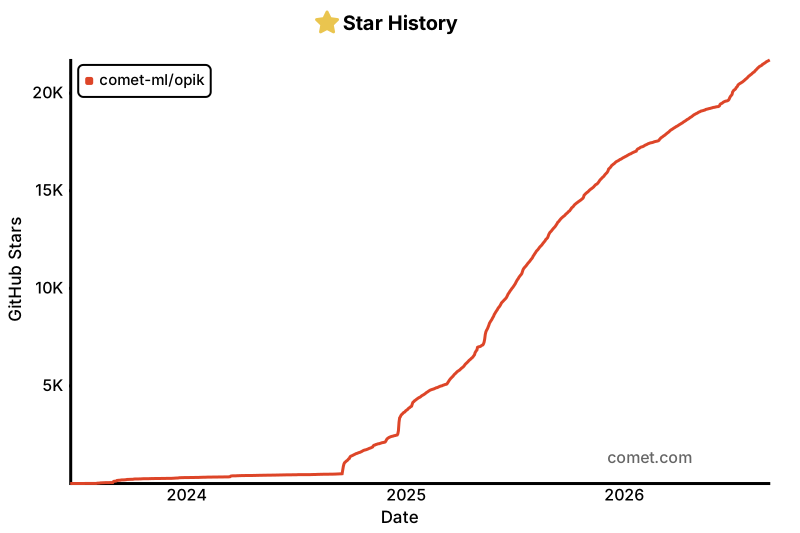
Opik is the open-source LLM observability and evaluation platform for AI agent tracing, LLM evaluation, prompt management, and production monitoring. Built by Comet. Apache-2.0 licensed, free to self-host the full platform, with 20,000+ GitHub stars.
Website • Slack Community • Twitter • Changelog • Documentation
Last updated: 2026-07-17
🧑⚖️ LLM as a Judge • 🔍 Evaluating your Application • ⭐ Star Us • 🤝 Contributing
🚀 What is Opik?
Opik covers the full LLM application lifecycle, from the first trace in development to production monitoring, for teams building LLM apps and AI agents. Key offerings include:
- AI Agent Tracing & Observability: Deep tracing of LLM calls, conversation logging, and agent activity, with full trace trees for multi-step agents and tool calls.
- LLM Evaluation: Datasets, experiments, and LLM-as-a-judge metrics for hallucination detection, moderation, and RAG assessment.
- Prompt & Agent Optimization: The Opik Agent Optimizer SDK to improve prompts and agents.
- Production-Ready Monitoring: Scalable dashboards and online evaluation rules.
- Opik Guardrails: Features to help you implement safe and responsible AI practices.
- CI/CD Evaluation: A PyTest integration to test LLM pipelines on every commit.
Key capabilities include:
Development & Tracing:
- Track all LLM calls and traces with detailed context during development and in production (Quickstart).
- Extensive 3rd-party integrations for easy observability: Seamlessly integrate with a growing list of frameworks, supporting many of the largest and most popular ones natively (including recent additions like Google ADK, Autogen, and Flowise AI). (Integrations)
- Annotate traces and spans with feedback scores via the Python SDK or the UI.
- Experiment with prompts and models in the Prompt Playground.
Evaluation & Testing:
- Automate your LLM application evaluation with Datasets and Experiments.
- Leverage powerful LLM-as-a-judge metrics for complex tasks like hallucination detection, moderation, and RAG assessment (Answer Relevance, Context Precision).
- Integrate evaluations into your CI/CD pipeline with our PyTest integration.
Production Monitoring & Optimization:
- Log high volumes of production traces: Opik is designed for scale (40M+ traces/day).
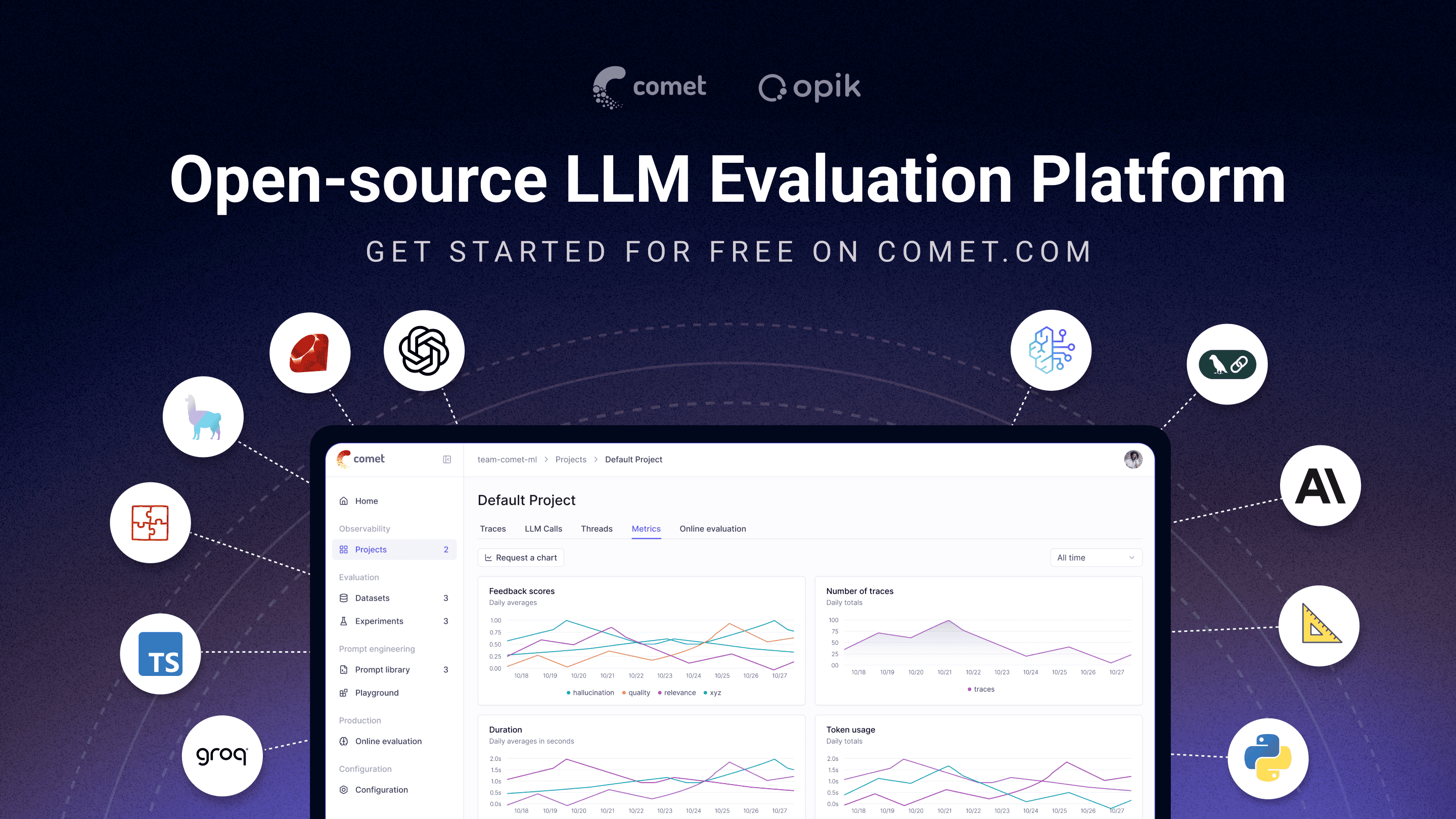
- Monitor feedback scores, trace counts, and token usage over time in the Opik Dashboard.
- Utilize Online Evaluation Rules with LLM-as-a-Judge metrics to identify production issues.
- Leverage Opik Agent Optimizer and Opik Guardrails to continuously improve and secure your LLM applications in production.
Who it's for: ML engineers building LLM-powered agents, AI teams moving from prototype to production, and engineering teams that need open-source, self-hostable observability they can run in their own environment.
Why open source matters here: Opik is Apache-2.0 licensed and free to self-host: the full platform, backend included, not just a client SDK. The repository includes the server backend, web application, tracing, datasets, experiments, evaluations, prompt management, online evaluation, and agent optimization components, all under Apache-2.0. You can run LLM observability inside your own infrastructure with no data leaving your environment and no Enterprise sales conversation required.
[!TIP] If you are looking for features that Opik doesn't have today, please raise a new Feature request 🚀
⚡ Quick Start
Install the Python SDK and configure it:
pip install opik
opik configure
Wrap any function with the @track decorator to start logging traces:
from opik import track
@track
def my_function(input: str) -> str:
return input
Every call to my_function is now logged to Opik, including nested calls, so this works for full agent and pipeline traces, not just single LLM calls. See the Quickstart guide for the TypeScript SDK and other setup options.
Connect your coding agent
Let Claude Code, Cursor, VS Code Copilot, Codex or opencode read your traces, score outputs and run evaluations from chat. One command sets it up. It needs uv and no SDK:
uvx opik mcp configure
The badges and the add-mcp fallback below target Opik Cloud; the command above also handles self-hosted deployments. Other MCP clients on Opik Cloud: npx add-mcp https://www.comet.com/opik/api/v1/mcp --name opik-mcp. Details, troubleshooting and FAQ are in the MCP server guide.
📊 How Does Opik Compare?
Opik competes in the LLM observability / AI agent evaluation category alongside LangSmith, Arize (Phoenix and Arize AX), Weights & Biases (Weave), Langfuse, and Braintrust.
| Capability | Opik | LangSmith | Phoenix | Arize AX | Weights & Biases (Weave) | Langfuse | Braintrust |
|---|---|---|---|---|---|---|---|
| Open source | Yes, Apache-2.0 (full platform) | No | Source-available (Elastic License 2.0, not OSI-approved) | No | Open-source SDK/toolkit; self-managed platform requires a commercial license | MIT-licensed core platform; commercial enterprise modules | No |
| Self-hosted deployment | Yes | Enterprise only | Yes | Enterprise only | Enterprise only for Weave itself | Yes, core | Enterprise only |
| Free tier available (cloud or self-hosted) | Yes, both | Yes, cloud | Yes, self-hosted | Yes, cloud | Yes, cloud | Yes, both | Yes, cloud |
| Agent / multi-step tracing | Yes | Yes | Yes | Yes | Yes | Yes | Yes |
| LLM-as-a-judge evaluation | Yes | Yes | Yes | Yes | Yes | Yes | Yes |
| Prompt management | Yes | Yes | Partly | Partly | Partly | Yes | Yes |
| Framework-agnostic | Yes | Partly, built around LangChain | Yes | Yes | Yes | Yes | Yes |
When teams choose Opik: Opik's full observability, evaluation, and optimization platform is Apache-2.0 licensed and free to self-host. Unlike closed platforms whose self-hosted deployment requires an Enterprise plan, Opik can be deployed without a commercial license, and it's framework-agnostic so it won't lock you into a single agent ecosystem. See the table above for where self-hosting and licensing differ across alternatives.
❓ Frequently Asked Questions
Is Opik open source?
Opik is licensed under Apache 2.0. Its server, web application, and core observability and evaluation capabilities can be self-hosted without a commercial license.
Can I self-host Opik?
Yes. Opik can be deployed locally or in your own infrastructure using the documented self-hosting options.
Does Opik support AI agent tracing?
Yes. Opik captures multi-step traces containing LLM calls, tool executions, retrieval steps, and other agent activity.
Does Opik support LLM evaluation?
Yes. Opik supports datasets, experiments, code-based metrics, LLM-as-a-judge evaluation, and online evaluation.
Is Opik tied to a specific agent framework?
No. Opik is framework-agnostic and supports its SDK, OpenTelemetry, and framework-specific integrations.
🛠️ Opik Server Installation
Get your Opik server running in minutes. Choose the option that best suits your needs:
Option 1: Comet.com Cloud (Easiest & Recommended)
Access Opik instantly without any setup. Ideal for quick starts and hassle-free maintenance.
👉 Create your free Comet account
Option 2: Self-Host Opik for Full Control
Deploy Opik in your own environment. Choose between Docker for local setups or Kubernetes for scalability.
Self-Hosting with Docker Compose (for Local Development & Testing)
This is the simplest way to get a local Opik instance running. Note the new ./opik.sh installation script:
On Linux or Mac Environment:
# Clone the Opik repository
git clone https://github.com/comet-ml/opik.git
# Navigate to the repository
cd opik
# Start the Opik platform
./opik.sh
On Windows Environment:
# Clone the Opik repository
git clone https://github.com/comet-ml/opik.git
# Navigate to the repository
cd opik
# Start the Opik platform
powershell -ExecutionPolicy ByPass -c ".\\opik.ps1"
Installation Script Options
The opik.sh and opik.ps1 scripts support the following options:
# Start full Opik suite (default behavior)
./opik.sh
# Start only infrastructure services (databases, caches etc.)
./opik.sh --infra
# Start infrastructure + backend services
./opik.sh --backend
# Enable guardrails with any profile
./opik.sh --guardrails # Guardrails with full Opik suite
./opik.sh --backend --guardrails # Guardrails with infrastructure + backend
# Build the containers from source before starting
./opik.sh --build
# Check that all containers are healthy
./opik.sh --verify
# Stop all containers
./opik.sh --stop
# Stop all containers and remove all Opik data volumes
# WARNING: ALL OPIK DATA WILL BE LOST
./opik.sh --clean
# Show all available options
./opik.sh --help
Use the --help or --info options to troubleshoot issues. Dockerfiles now ensure containers run as non-root users for enhanced security. Once all is up and running, you can now visit localhost:5173 on your browser! For detailed instructions, see the Local Deployment Guide.
Self-Hosting with Kubernetes & Helm (for Scalable Deployments)
For production or larger-scale self-hosted deployments, Opik can be installed on a Kubernetes cluster using our Helm chart. Click the badge for the full Kubernetes Installation Guide using Helm.
💻 Opik Client SDK
Opik provides a suite of client libraries and a REST API to interact with the Opik server. This includes SDKs for Python and TypeScript, plus first-party OpenTelemetry support: any language with an OpenTelemetry SDK — including Java, Ruby, and .NET — can send traces to Opik. For detailed API and SDK references, see the Opik Client Reference Documentation.
Python SDK Quick Start
To get started with the Python SDK:
Install the package:
# install using pip
pip install opik
# or install with uv
uv pip install opik
Configure the python SDK by running the opik configure command, which will prompt you for your Opik server address (for self-hosted instances) or your API key and workspace (for Comet.com):
opik configure
[!TIP] You can also call
opik.configure(use_local=True)from your Python code to configure the SDK to run on a local self-hosted installation, or provide API key and workspace details directly for Comet.com. Refer to the Python SDK documentation for more configuration options.
You are now ready to start logging traces using the Python SDK.
📝 Logging Traces with Integrations
The easiest way to log traces is to use one of our direct integrations. Opik supports a wide array of frameworks, including recent additions like Google ADK, Autogen, AG2, and Flowise AI:
| Integration | Description | Documentation |
|---|---|---|
| ADK | Log traces for Google Agent Development Kit (ADK) | Documentation |
| AG2 | Log traces for AG2 LLM calls | Documentation |
| Agent Spec | Log traces for Agent Spec calls | Documentation |
| AIsuite | Log traces for aisuite LLM calls | Documentation |
| Agno | Log traces for Agno agent orchestration framework calls | Documentation |
| Anthropic | Log traces for Anthropic LLM calls | Documentation |
| Autogen | Log traces for Autogen agentic workflows | Documentation |
| Bedrock | Log traces for Amazon Bedrock LLM calls | Documentation |
| BeeAI (Python) | Log traces for BeeAI Python agent framework calls | Documentation |
| BeeAI (TypeScript) | Log traces for BeeAI TypeScript agent framework calls | Documentation |
| BytePlus | Log traces for BytePlus LLM calls | Documentation |
| Claude Code | Log traces for Claude Code sessions via the Opik plugin | GitHub |
| Cloudflare Workers AI | Log traces for Cloudflare Workers AI calls | Documentation |
| Cohere | Log traces for Cohere LLM calls | Documentation |
| CrewAI | Log traces for CrewAI calls | Documentation |
| Cursor | Log traces for Cursor conversations | Documentation |
| DeepSeek | Log traces for DeepSeek LLM calls | Documentation |
| Dify | Log traces for Dify agent runs | Documentation |
| DSPY | Log traces for DSPy runs | Documentation |
| Fireworks AI | Log traces for Fireworks AI LLM calls | Documentation |
| Flowise AI | Log traces for Flowise AI visual LLM builder | Documentation |
| Gemini (Python) | Log traces for Google Gemini LLM calls | Documentation |
| Gemini (TypeScript) | Log traces for Google Gemini TypeScript SDK calls | Documentation |
| Groq | Log traces for Groq LLM calls | Documentation |
| Guardrails | Log traces for Guardrails AI validations | Documentation |
| Haystack | Log traces for Haystack calls | Documentation |
| Harbor | Log traces for Harbor benchmark evaluation trials | Documentation |
| Instructor | Log traces for LLM calls made with Instructor | Documentation |
| LangChain (Python) | Log traces for LangChain LLM calls | Documentation |
| LangChain (JS/TS) | Log traces for LangChain JavaScript/TypeScript calls | Documentation |
| LangGraph | Log traces for LangGraph executions | Documentation |
| Langflow | Log traces for Langflow visual AI builder | Documentation |
| LiteLLM | Log traces for LiteLLM model calls | Documentation |
| LiveKit Agents | Log traces for LiveKit Agents AI agent framework calls | Documentation |
| LlamaIndex | Log traces for LlamaIndex LLM calls | Documentation |
| Mastra | Log traces for Mastra AI workflow framework calls | Documentation |
| MCP Server (opik-mcp) | Drive Opik from Claude Code, Cursor, or VS Code via Model Context Protocol | Documentation |
| Microsoft Agent Framework (Python) | Log traces for Microsoft Agent Framework calls | Documentation |
| Microsoft Agent Framework (.NET) | Log traces for Microsoft Agent Framework .NET calls | Documentation |
| Mistral AI | Log traces for Mistral AI LLM calls | Documentation |
| n8n | Log traces for n8n workflow executions | Documentation |
| Novita AI | Log traces for Novita AI LLM calls | Documentation |
| Ollama | Log traces for Ollama LLM calls | Documentation |
| OpenAI (Python) | Log traces for OpenAI LLM calls | Documentation |
| OpenAI (JS/TS) | Log traces for OpenAI JavaScript/TypeScript calls | Documentation |
| OpenAI Agents | Log traces for OpenAI Agents SDK calls | Documentation |
| OpenClaw | Log traces for OpenClaw agent runs | Documentation |
| OpenRouter | Log traces for OpenRouter LLM calls | Documentation |
| OpenTelemetry | Log traces for OpenTelemetry supported calls | Documentation |
| OpenWebUI | Log traces for OpenWebUI conversations | Documentation |
| Pipecat | Log traces for Pipecat real-time voice agent calls | Documentation |
| Predibase | Log traces for Predibase LLM calls | Documentation |
| Pydantic AI | Log traces for PydanticAI agent calls | Documentation |
| Ragas | Log traces for Ragas evaluations | Documentation |
| Semantic Kernel | Log traces for Microsoft Semantic Kernel calls | Documentation |
| Smolagents | Log traces for Smolagents agents | Documentation |
| Spring AI | Log traces for Spring AI framework calls | Documentation |
| Strands Agents | Log traces for Strands agents calls | Documentation |
| Together AI | Log traces for Together AI LLM calls | Documentation |
| TrueFoundry | Log traces for TrueFoundry AI Gateway LLM calls | Documentation |
| TypeSafe AI | Log traces for TypeSafe AI (Jev) System One calls | Documentation |
| Vercel AI SDK | Log traces for Vercel AI SDK calls | Documentation |
| VoltAgent | Log traces for VoltAgent agent framework calls | Documentation |
| WatsonX | Log traces for IBM watsonx LLM calls | Documentation |
| xAI Grok | Log traces for xAI Grok LLM calls | Documentation |
[!TIP] If the framework you are using is not listed above, feel free to open an issue or submit a PR with the integration.
If you are not using any of the frameworks above, you can also use the track function decorator to log traces:
import opik
opik.configure(use_local=True) # Run locally
@opik.track
def my_llm_function(user_question: str) -> str:
# Your LLM code here
return "Hello"
[!TIP] The track decorator can be used in conjunction with any of our integrations and can also be used to track nested function calls.
🧑⚖️ LLM as a Judge metrics
The Python Opik SDK includes a number of LLM as a judge metrics to help you evaluate your LLM application. Learn more about it in the metrics documentation.
To use them, simply import the relevant metric and use the score function:
from opik.evaluation.metrics import Hallucination
metric = Hallucination()
score = metric.score(
input="What is the capital of France?",
output="Paris",
context=["France is a country in Europe."]
)
print(score)

Opik also includes a number of pre-built heuristic metrics as well as the ability to create your own. Learn more about it in the metrics documentation.
🔍 Evaluating your LLM Applications
Opik allows you to evaluate your LLM application during development through Datasets and Experiments. The Opik Dashboard offers enhanced charts for experiments and better handling of large traces. You can also run evaluations as part of your CI/CD pipeline using our PyTest integration.
⭐ Star Us on GitHub
If you find Opik useful, please consider giving us a star! Your support helps us grow our community and continue improving the product.
🤝 Contributing
There are many ways to contribute to Opik:
- Submit bug reports and feature requests
- Review the documentation and submit Pull Requests to improve it
- Speaking or writing about Opik and letting us know
- Upvoting popular feature requests to show your support
To learn more about how to contribute to Opik, please see our contributing guidelines.
注意:此文件使用AI进行机器翻译。欢迎对翻译进行改进!
Opik 是面向 AI 智能体追踪、LLM 评估、提示管理和生产监控的开源 LLM 可观测性与评估平台。由 Comet 打造。采用 Apache-2.0 许可,可免费自托管完整平台,已获得 20,000+ 个 GitHub star。
官网 • Slack 社区 • Twitter • 更新日志 • 文档
最后更新:2026-07-17
🧑⚖️ LLM 作为评判者 • 🔍 评估你的应用 • ⭐ 为我们点亮 Star • 🤝 参与贡献
🚀 什么是 Opik?
Opik 覆盖了 LLM 应用的完整生命周期,从开发阶段的第一条追踪到生产监控,服务于构建 LLM 应用和 AI 智能体的团队。核心能力包括:
- AI 智能体追踪与可观测性:对 LLM 调用、对话日志和智能体活动进行深度追踪,为多步骤智能体和工具调用提供完整的追踪树。
- LLM 评估:提供数据集、实验以及 LLM 作为评判者的指标,用于幻觉检测、内容审核和 RAG 评估。
- 提示与智能体优化:Opik Agent Optimizer SDK,用于改进提示和智能体。
- 生产就绪的监控:可扩展的仪表盘和在线评估规则。
- Opik Guardrails:帮助你实施安全且负责任的 AI 实践的功能。
- CI/CD 评估:PyTest 集成,可在每次提交时测试 LLM 流水线。
核心功能包括:
开发与追踪:
- 在开发和生产环境中跟踪所有 LLM 调用和追踪,并附带详细上下文(快速开始)。
- 丰富的第三方集成,便于实现可观测性:可无缝集成不断增长的框架列表,并原生支持其中许多最大和最流行的框架(包括近期新增的 Google ADK、Autogen 和 Flowise AI)。(集成)
- 通过 Python SDK 或 UI 为追踪和 span 添加反馈评分注解。
- 在提示 Playground 中试验提示和模型。
评估与测试:
生产监控与优化:
适用人群: 构建 LLM 驱动智能体的机器学习工程师、从原型走向生产的 AI 团队,以及需要可在自有环境中运行的开源、可自托管可观测性的工程团队。
为什么开源在这里很重要: Opik 采用 Apache-2.0 许可,可免费自托管:是完整平台,包含后端,而不仅仅是客户端 SDK。该仓库包含服务器后端、Web 应用、追踪、数据集、实验、评估、提示管理、在线评估和智能体优化等组件,全部采用 Apache-2.0 许可。你可以在自己的基础设施内运行 LLM 可观测性,数据不会离开你的环境,也无需进行企业销售洽谈。
[!TIP] 如果你需要 Opik 目前尚未提供的功能,请提交新的功能请求 🚀
⚡ 快速开始
安装 Python SDK 并进行配置:
pip install opik
opik configure
用 @track 装饰器包裹任意函数即可开始记录追踪:
from opik import track
@track
def my_function(input: str) -> str:
return input
现在,每次对 my_function 的调用都会被记录到 Opik,包括嵌套调用,因此它适用于完整的智能体和流水线追踪,而不仅仅是单次 LLM 调用。有关 TypeScript SDK 和其他设置选项,请参阅快速开始指南。
连接你的编码智能体
让 Claude Code、Cursor、VS Code Copilot、Codex 或 opencode 直接在聊天中读取你的追踪、为输出打分并运行评估。一条命令即可完成设置,只需要 uv,无需安装 SDK:
uvx opik mcp configure
上面的徽章和下方的 add-mcp 备用命令面向 Opik Cloud;上面的命令同样适用于自托管部署。Opik Cloud 上的其他 MCP 客户端:npx add-mcp https://www.comet.com/opik/api/v1/mcp --name opik-mcp。详细说明、故障排除和常见问题请参阅 MCP 服务器指南。
📊 Opik 如何对比?
Opik 与 LangSmith、Arize(Phoenix 和 Arize AX)、Weights & Biases(Weave)、Langfuse 和 Braintrust 一同竞争于 LLM 可观测性 / AI 智能体评估 这一领域。
| 能力 | Opik | LangSmith | Phoenix | Arize AX | Weights & Biases (Weave) | Langfuse | Braintrust |
|---|---|---|---|---|---|---|---|
| 开源 | 是,Apache-2.0(完整平台) | 否 | 源码可用(Elastic License 2.0,未获 OSI 批准) | 否 | 开源 SDK/工具包;自管平台需商业许可 | MIT 许可的核心平台;商业企业模块 | 否 |
| 自托管部署 | 是 | 仅企业版 | 是 | 仅企业版 | Weave 本身仅企业版 | 是,核心版 | 仅企业版 |
| 提供免费层(云端或自托管) | 是,两者皆有 | 是,云端 | 是,自托管 | 是,云端 | 是,云端 | 是,两者皆有 | 是,云端 |
| 智能体 / 多步骤追踪 | 是 | 是 | 是 | 是 | 是 | 是 | 是 |
| LLM 作为评判者评估 | 是 | 是 | 是 | 是 | 是 | 是 | 是 |
| 提示管理 | 是 | 是 | 部分支持 | 部分支持 | 部分支持 | 是 | 是 |
| 框架无关 | 是 | 部分,围绕 LangChain 构建 | 是 | 是 | 是 | 是 | 是 |
团队为何选择 Opik: Opik 完整的可观测性、评估和优化平台采用 Apache-2.0 许可,可免费自托管。与那些自托管部署需要企业版计划的封闭平台不同,Opik 无需商业许可即可部署,而且它框架无关,不会将你锁定到单一的智能体生态系统中。有关自托管和许可在各替代方案之间的差异,请参阅上表。
❓ 常见问题
Opik 是开源的吗?
Opik 采用 Apache 2.0 许可。其服务器、Web 应用以及核心的可观测性和评估功能均可在无需商业许可的情况下自托管。
我可以自托管 Opik 吗?
可以。你可以按照文档中的自托管选项在本地或你自己的基础设施中部署 Opik。
Opik 支持 AI 智能体追踪吗?
支持。Opik 可捕获包含 LLM 调用、工具执行、检索步骤和其他智能体活动的多步骤追踪。
Opik 支持 LLM 评估吗?
支持。Opik 支持数据集、实验、基于代码的指标、LLM 作为评判者的评估以及在线评估。
Opik 是否绑定到某个特定的智能体框架?
否。Opik 框架无关,支持其自有 SDK、OpenTelemetry 以及针对特定框架的集成。
🛠️ Opik 服务器安装
几分钟内即可让你的 Opik 服务器运行起来。选择最适合你需求的方式:
方式 1:Comet.com 云端(最简单且推荐)
无需任何设置即可立即访问 Opik。适合快速上手和省心维护。
方式 2:自托管 Opik 以获得完全掌控
在你自己的环境中部署 Opik。可在用于本地设置的 Docker 与用于可扩展性的 Kubernetes 之间进行选择。
使用 Docker Compose 自托管(用于本地开发与测试)
这是让本地 Opik 实例运行起来的最简单方式。请注意新的 ./opik.sh 安装脚本:
在 Linux 或 Mac 环境下:
# Clone the Opik repository
git clone https://github.com/comet-ml/opik.git
# Navigate to the repository
cd opik
# Start the Opik platform
./opik.sh
在 Windows 环境下:
# Clone the Opik repository
git clone https://github.com/comet-ml/opik.git
# Navigate to the repository
cd opik
# Start the Opik platform
powershell -ExecutionPolicy ByPass -c ".\\opik.ps1"
安装脚本选项
opik.sh 和 opik.ps1 脚本支持以下选项:
# Start full Opik suite (default behavior)
./opik.sh
# Start only infrastructure services (databases, caches etc.)
./opik.sh --infra
# Start infrastructure + backend services
./opik.sh --backend
# Enable guardrails with any profile
./opik.sh --guardrails # Guardrails with full Opik suite
./opik.sh --backend --guardrails # Guardrails with infrastructure + backend
# Build the containers from source before starting
./opik.sh --build
# Check that all containers are healthy
./opik.sh --verify
# Stop all containers
./opik.sh --stop
# Stop all containers and remove all Opik data volumes
# WARNING: ALL OPIK DATA WILL BE LOST
./opik.sh --clean
# Show all available options
./opik.sh --help
使用 --help 或 --info 选项来排查问题。Dockerfile 现已确保容器以非 root 用户运行,以增强安全性。一切启动并运行后,你现在就可以在浏览器中访问 localhost:5173 了!有关详细说明,请参阅本地部署指南。
使用 Kubernetes 和 Helm 自托管(用于可扩展部署)
对于生产环境或更大规模的自托管部署,可以使用我们的 Helm chart 将 Opik 安装到 Kubernetes 集群上。点击徽章查看完整的使用 Helm 的 Kubernetes 安装指南。
💻 Opik 客户端 SDK
Opik 提供一套客户端库和一个 REST API 用于与 Opik 服务器交互。这包括面向 Python 和 TypeScript 的 SDK,以及第一方 OpenTelemetry 支持:任何具有 OpenTelemetry SDK 的语言(包括 Java、Ruby 和 .NET)都可以将追踪数据发送到 Opik。有关详细的 API 和 SDK 参考,请参阅 Opik 客户端参考文档。
Python SDK 快速开始
要开始使用 Python SDK:
安装该软件包:
# install using pip
pip install opik
# or install with uv
uv pip install opik
运行 opik configure 命令配置 Python SDK,它会提示你输入 Opik 服务器地址(用于自托管实例)或你的 API 密钥和工作区(用于 Comet.com):
opik configure
[!TIP] 你也可以在 Python 代码中调用
opik.configure(use_local=True),将 SDK 配置为在本地自托管安装上运行,或直接提供 Comet.com 的 API 密钥和工作区详情。有关更多配置选项,请参阅 Python SDK 文档。
现在你已准备好使用 Python SDK 开始记录追踪了。
📝 通过集成记录追踪
记录追踪最简单的方式是使用我们的某个直接集成。Opik 支持种类繁多的框架,包括近期新增的 Google ADK、Autogen、AG2 和 Flowise AI:
| 集成 | 描述 | 文档 |
|---|---|---|
| ADK | 记录 Google Agent Development Kit (ADK) 的追踪 | 文档 |
| AG2 | 记录 AG2 LLM 调用的追踪 | 文档 |
| Agent Spec | 记录 Agent Spec 调用的追踪 | 文档 |
| AIsuite | 记录 aisuite LLM 调用的追踪 | 文档 |
| Agno | 记录 Agno 智能体编排框架调用的追踪 | 文档 |
| Anthropic | 记录 Anthropic LLM 调用的追踪 | 文档 |
| Autogen | 记录 Autogen 智能体化工作流的追踪 | 文档 |
| Bedrock | 记录 Amazon Bedrock LLM 调用的追踪 | 文档 |
| BeeAI (Python) | 记录 BeeAI Python 智能体框架调用的追踪 | 文档 |
| BeeAI (TypeScript) | 记录 BeeAI TypeScript 智能体框架调用的追踪 | 文档 |
| BytePlus | 记录 BytePlus LLM 调用的追踪 | 文档 |
| Cloudflare Workers AI | 记录 Cloudflare Workers AI 调用的追踪 | 文档 |
| Cohere | 记录 Cohere LLM 调用的追踪 | 文档 |
| CrewAI | 记录 CrewAI 调用的追踪 | 文档 |
| Cursor | 记录 Cursor 对话的追踪 | 文档 |
| DeepSeek | 记录 DeepSeek LLM 调用的追踪 | 文档 |
| Dify | 记录 Dify 智能体运行的追踪 | 文档 |
| DSPY | 记录 DSPy 运行的追踪 | 文档 |
| Fireworks AI | 记录 Fireworks AI LLM 调用的追踪 | 文档 |
| Flowise AI | 记录 Flowise AI 可视化 LLM 构建器的追踪 | 文档 |
| Gemini (Python) | 记录 Google Gemini LLM 调用的追踪 | 文档 |
| Gemini (TypeScript) | 记录 Google Gemini TypeScript SDK 调用的追踪 | 文档 |
| Groq | 记录 Groq LLM 调用的追踪 | 文档 |
| Guardrails | 记录 Guardrails AI 校验的追踪 | 文档 |
| Haystack | 记录 Haystack 调用的追踪 | 文档 |
| Harbor | 记录 Harbor 基准评估试验的追踪 | 文档 |
| Instructor | 记录使用 Instructor 进行的 LLM 调用的追踪 | 文档 |
| LangChain (Python) | 记录 LangChain LLM 调用的追踪 | 文档 |
| LangChain (JS/TS) | 记录 LangChain JavaScript/TypeScript 调用的追踪 | 文档 |
| LangGraph | 记录 LangGraph 执行的追踪 | 文档 |
| Langflow | 记录 Langflow 可视化 AI 构建器的追踪 | 文档 |
| LiteLLM | 记录 LiteLLM 模型调用的追踪 | 文档 |
| LiveKit Agents | 记录 LiveKit Agents AI 智能体框架调用的追踪 | 文档 |
| LlamaIndex | 记录 LlamaIndex LLM 调用的追踪 | 文档 |
| Mastra | 记录 Mastra AI 工作流框架调用的追踪 | 文档 |
| Microsoft Agent Framework (Python) | 记录 Microsoft Agent Framework 调用的追踪 | 文档 |
| Microsoft Agent Framework (.NET) | 记录 Microsoft Agent Framework .NET 调用的追踪 | 文档 |
| Mistral AI | 记录 Mistral AI LLM 调用的追踪 | 文档 |
| n8n | 记录 n8n 工作流执行的追踪 | 文档 |
| Novita AI | 记录 Novita AI LLM 调用的追踪 | 文档 |
| Ollama | 记录 Ollama LLM 调用的追踪 | 文档 |
| OpenAI (Python) | 记录 OpenAI LLM 调用的追踪 | 文档 |
| OpenAI (JS/TS) | 记录 OpenAI JavaScript/TypeScript 调用的追踪 | 文档 |
| OpenAI Agents | 记录 OpenAI Agents SDK 调用的追踪 | 文档 |
| OpenClaw | 记录 OpenClaw 智能体运行的追踪 | 文档 |
| OpenRouter | 记录 OpenRouter LLM 调用的追踪 | 文档 |
| OpenTelemetry | 记录 OpenTelemetry 支持的调用的追踪 | 文档 |
| OpenWebUI | 记录 OpenWebUI 对话的追踪 | 文档 |
| Pipecat | 记录 Pipecat 实时语音智能体调用的追踪 | 文档 |
| Predibase | 记录 Predibase LLM 调用的追踪 | 文档 |
| Pydantic AI | 记录 PydanticAI 智能体调用的追踪 | 文档 |
| Ragas | 记录 Ragas 评估的追踪 | 文档 |
| Semantic Kernel | 记录 Microsoft Semantic Kernel 调用的追踪 | 文档 |
| Smolagents | 记录 Smolagents 智能体的追踪 | 文档 |
| Spring AI | 记录 Spring AI 框架调用的追踪 | 文档 |
| Strands Agents | 记录 Strands agents 调用的追踪 | 文档 |
| Together AI | 记录 Together AI LLM 调用的追踪 | 文档 |
| TrueFoundry | 记录 TrueFoundry AI Gateway LLM 调用的追踪 | 文档 |
| TypeSafe AI | 记录 TypeSafe AI (Jev) System One 调用的追踪 | 文档 |
| Vercel AI SDK | 记录 Vercel AI SDK 调用的追踪 | 文档 |
| VoltAgent | 记录 VoltAgent 智能体框架调用的追踪 | 文档 |
| WatsonX | 记录 IBM watsonx LLM 调用的追踪 | 文档 |
| xAI Grok | 记录 xAI Grok LLM 调用的追踪 | 文档 |
[!TIP] 如果你使用的框架未列在上表中,欢迎提交 issue 或提交一个包含该集成的 PR。
如果你没有使用上述任何框架,也可以使用 track 函数装饰器来记录追踪:
import opik
opik.configure(use_local=True) # Run locally
@opik.track
def my_llm_function(user_question: str) -> str:
# Your LLM code here
return "Hello"
[!TIP] track 装饰器可以与我们的任何集成结合使用,也可用于追踪嵌套的函数调用。
🧑⚖️ LLM 作为评判者的指标
Python Opik SDK 包含许多 LLM 作为评判者的指标,帮助你评估 LLM 应用。请在指标文档中了解更多。
要使用它们,只需导入相关指标并使用 score 函数:
from opik.evaluation.metrics import Hallucination
metric = Hallucination()
score = metric.score(
input="What is the capital of France?",
output="Paris",
context=["France is a country in Europe."]
)
print(score)
Opik 还包含许多预构建的启发式指标,并支持创建你自己的指标。请在指标文档中了解更多。
🔍 评估你的 LLM 应用
Opik 允许你在开发阶段通过数据集和实验评估你的 LLM 应用。Opik 仪表盘为实验提供了增强的图表,并能更好地处理大型追踪。你还可以使用我们的 PyTest 集成将评估作为 CI/CD 流水线的一部分运行。
⭐ 在 GitHub 上为我们点亮 Star
如果你觉得 Opik 有用,请考虑给我们点个 star!你的支持将帮助我们壮大社区并持续改进产品。
🤝 参与贡献
为 Opik 做贡献的方式有很多:
- 提交错误报告和功能请求
- 审阅文档并提交Pull Request 来改进它
- 谈论或撰写有关 Opik 的内容,并告诉我们
- 为热门功能请求投票以表达你的支持
要了解有关如何为 Opik 做贡献的更多信息,请参阅我们的贡献指南。