bisheng
BISHENG is an open LLM devops platform for next generation Enterprise AI applications. Powerful and comprehensive features include: GenAI workflow, RAG, Agent, Unified model management, Evaluation, SFT, Dataset Management, Enterprise-level System Management, Observability and more.
原始仓库简介 · 中文摘要待补充 · agent / ai / chatbot / enterprise / finetune / genai
README / 项目原文
Proudly made by Chinese,May we, like the creators of Deepseek and Black Myth: Wukong, bring more wonder and greatness to the world.
源自中国匠心,希望我们能像 [Deepseek]、[黑神话:悟空] 团队一样,给世界带来更多美好。




BISHENG is an open LLM application devops platform, focusing on enterprise scenarios. It has been used by a large number of industry leading organizations and Fortune 500 companies.
"Bi Sheng" was the inventor of movable type printing, which played a vital role in promoting the transmission of human knowledge. We hope that BISHENG can also provide strong support for the widespread implementation of intelligent applications. Everyone is welcome to participate.
Features
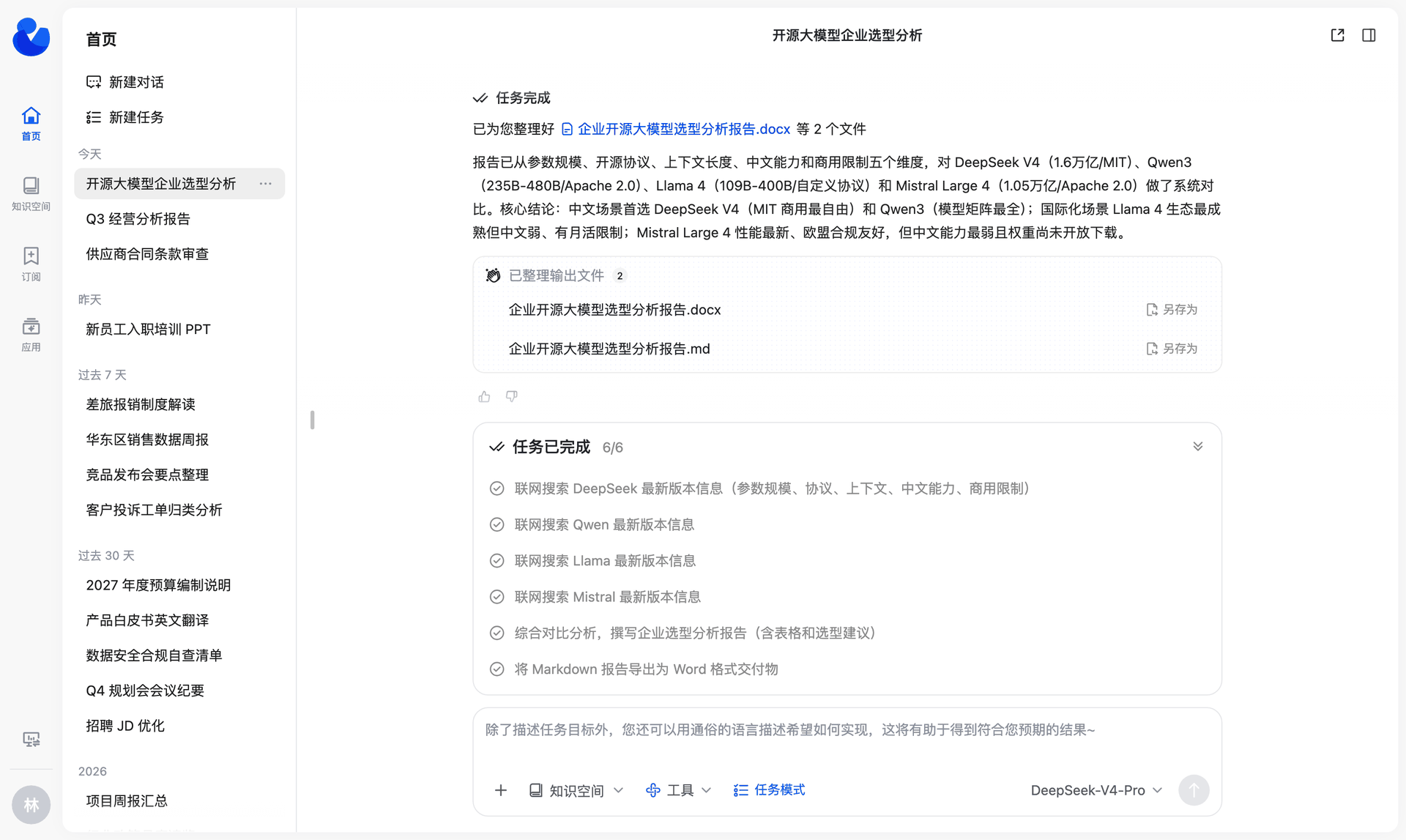
🚀 Task Mode: a general-purpose agent for complex, multi-step work You give it a goal and, if needed, attach files, knowledge bases, tools and skills. The agent breaks the goal into tasks, runs them step by step, and delivers a report, PPT, Excel or Word file.
- 🧠 Task planning + parallel sub-agents: The main agent builds a task checklist, tracks progress, and gives independent research tasks to sub-agents that run in parallel.
- 🙋 Human in the loop: When the agent needs information that only you have, the task pauses until you answer.
- 🧰 Plug-and-play skills: Three built-in skill packs (PPT, Excel, Word) work out of the box. You can also import your team's own skills from a local file or from GitHub.
- 📎 Traceable conclusions: Reports carry citation markers. Click a marker to open the source and go to the cited passage.
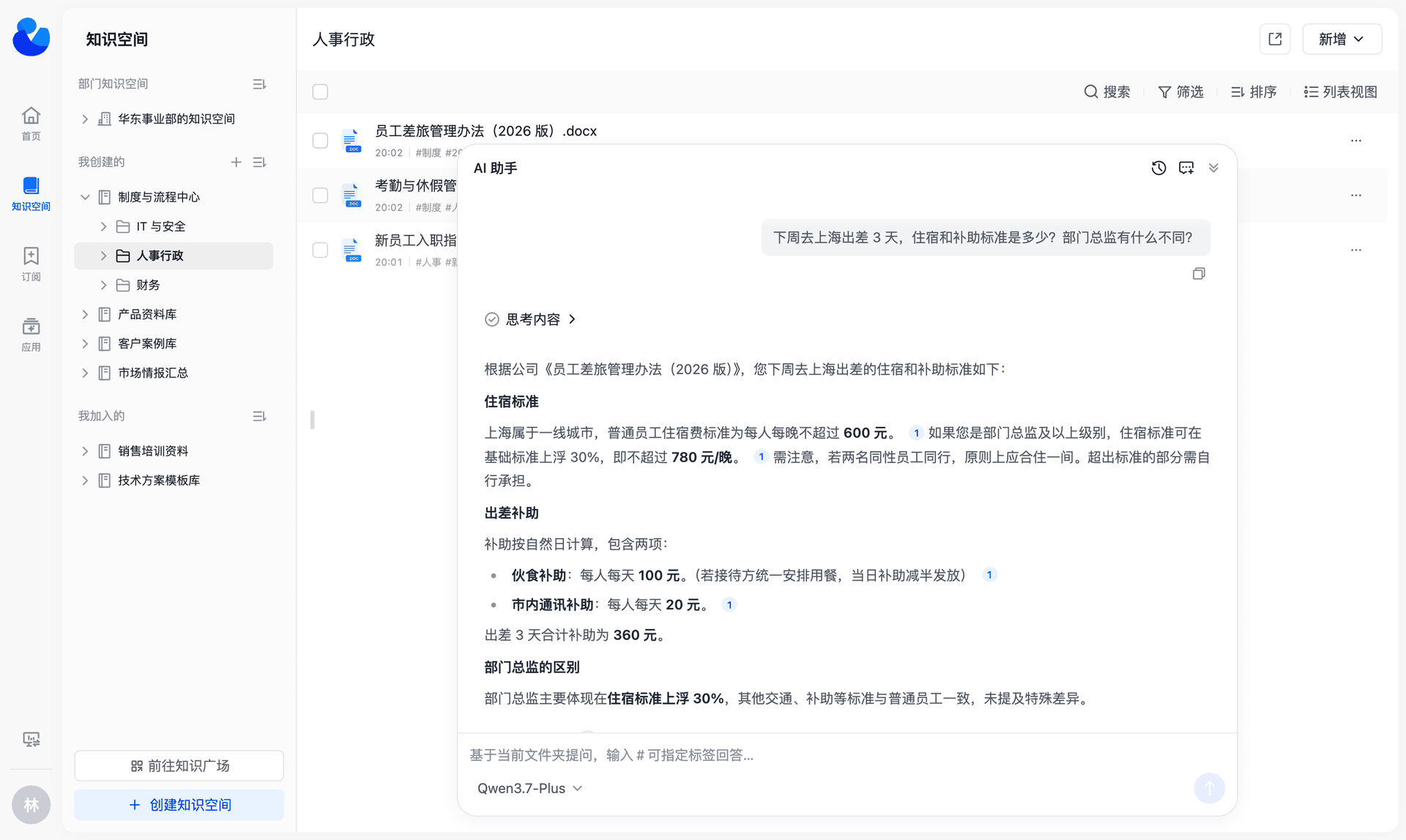
📚 Knowledge Space: an enterprise knowledge base for teams
- 🗂️ Organized content: Multi-level folders, tags, card and list views, and search by keyword and tag together.
- 👥 Built by the team: Invite members with a permission template (Owner / Manager / Editor / Viewer), or publish the space to the Knowledge Square so that others can join. A super admin can create a Department Space for a department in one step.
- 🔐 Permissions down to a single file: Spaces, folders and files use the same set of permission templates. You can grant access to a person, a department (including its sub-departments) or a user group in one step. Folders and files inherit permissions from their parent by default, and you can also set them separately.
- 💬 AI Q&A: Ask questions about one document or about the whole space. Answers show their sources; click a source to open the original text at the cited location.
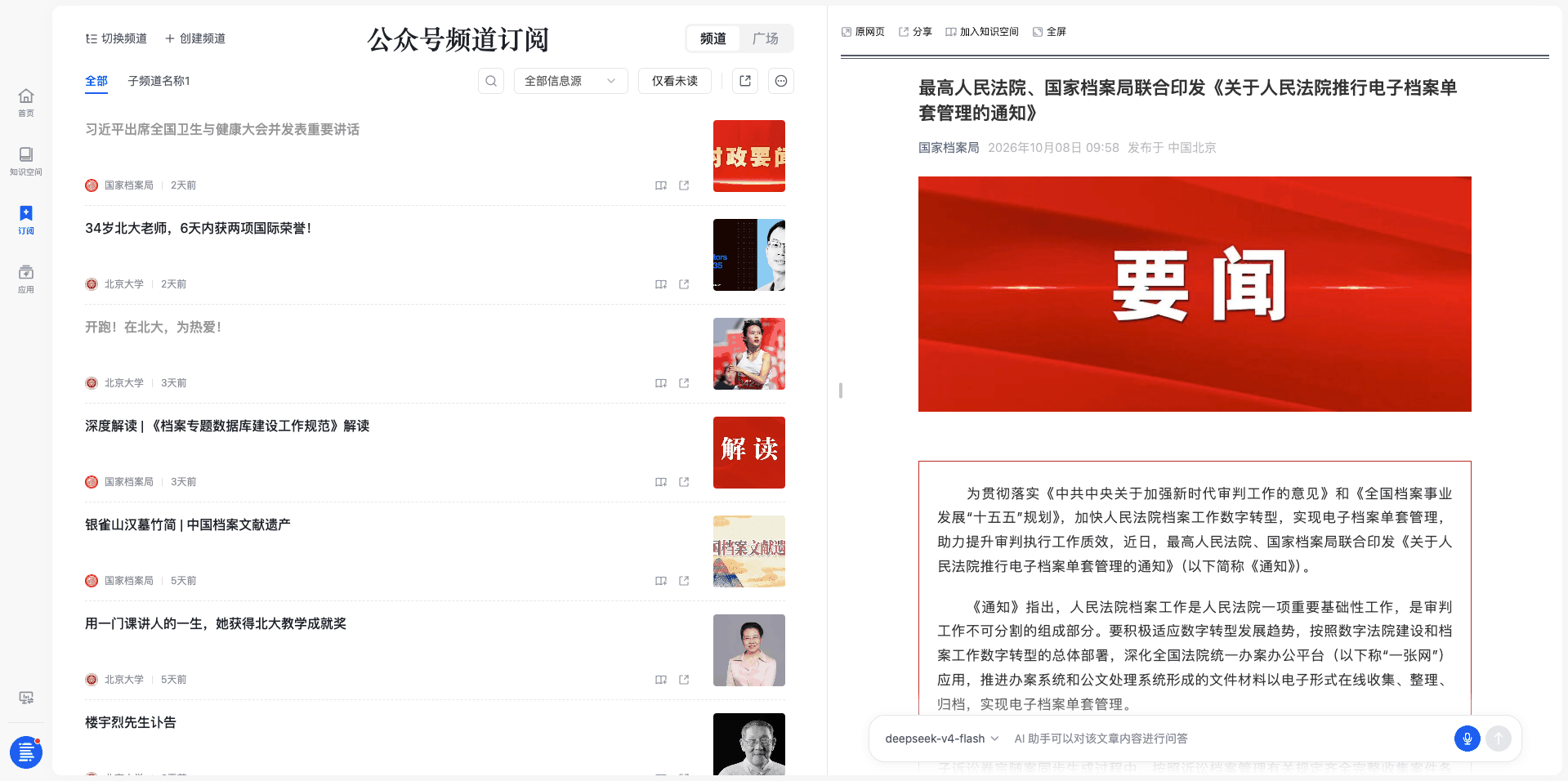
📡 Channels: external news delivered every day, and saved as knowledge in one click
- 📰 Topic channels: Combine WeChat official accounts and websites into topic channels that update every day. A channel can have sub-channels.
- 🎯 Precise filtering: Custom rules filter titles and body text, so only relevant articles stay.
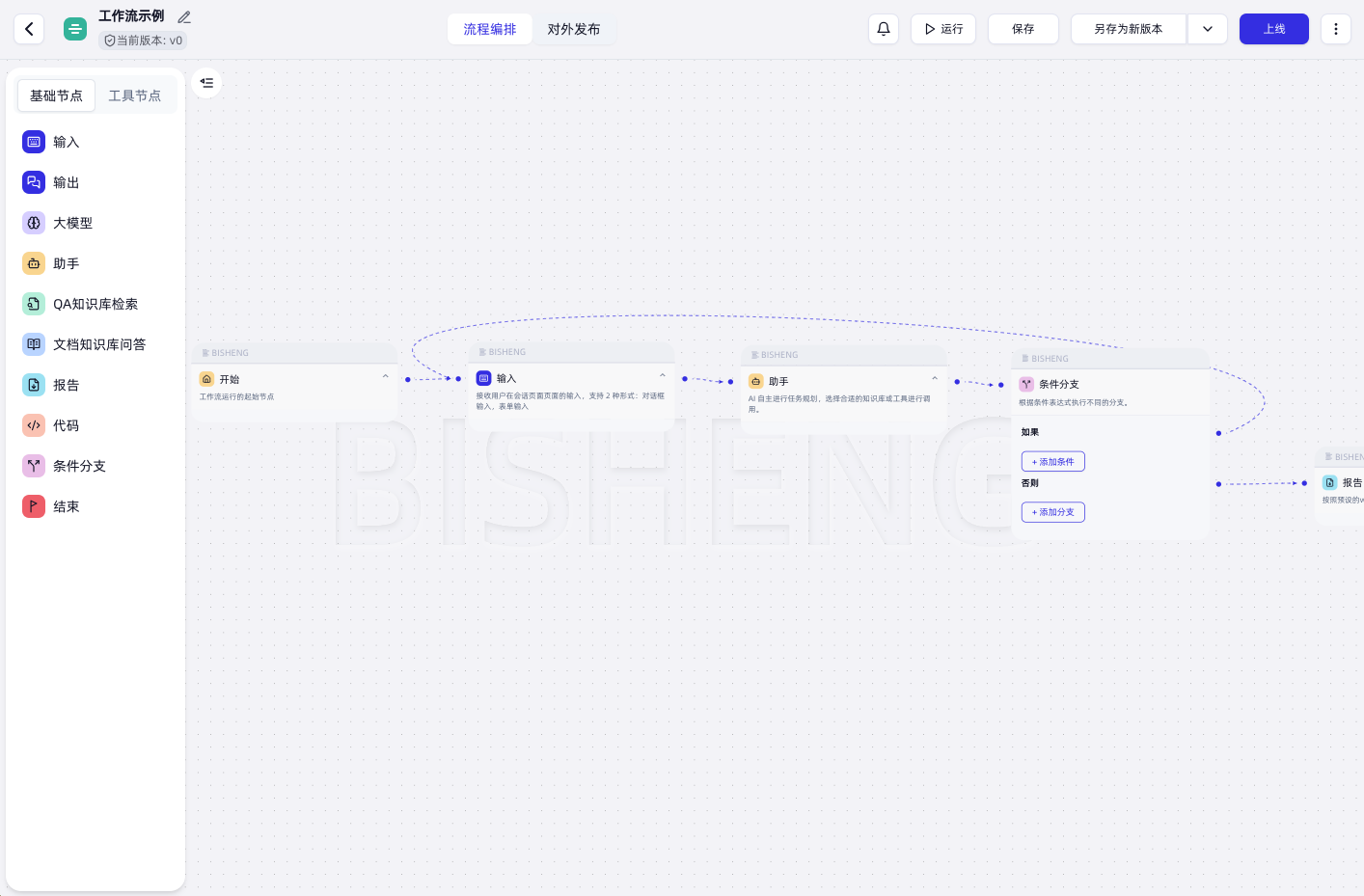
🧩 Unique BISHENG Workflow
- Independent and complete orchestration framework: There is no split between chatflow and workflow. Multi-turn conversation and automated processing can be in the same flow.
- Human in the loop: A running flow can stop and wait for a person to give input, confirm, or make changes.
- Loops, parallel branches and batch runs in any combination: Draw a circle to make a loop (most similar products do not support loops), place nodes side by side to run them in parallel, and select multiple items to run a batch. This fits complex scenarios such as document review and fixed-layout report generation.
🏢 Enterprise-grade features: the controls that enterprise AI needs
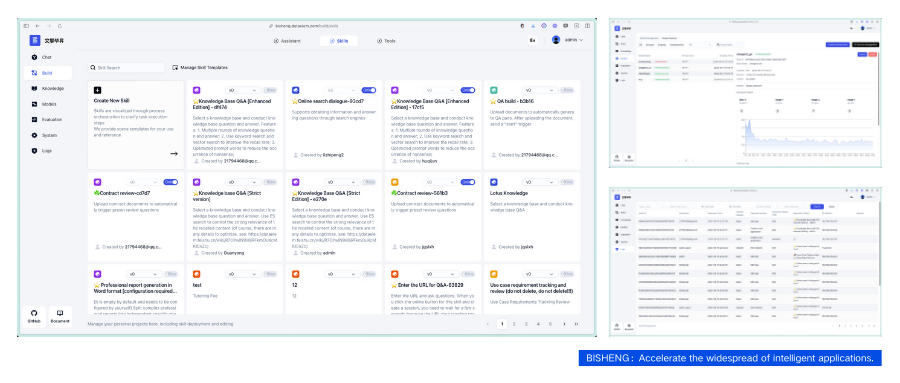
- Department and user management: Manage the organization structure and users. Roles control which feature menus are available and set quotas.
- RBAC + ReBAC permission model: Roles control which features a user can use. ReBAC controls which resources a user can access, down to a single file.
- Approvals: Joining a knowledge space, subscribing to a channel, requesting menu permissions and other actions can require approval. You can customize approval flows and nodes.
- Audit: Records conversation content and system operation logs, searchable by user, time and module.
- Dashboards (commercial edition): Preset dashboards for user activity, application usage, token usage, knowledge base usage and more.
- Open API: Call applications, knowledge bases and other APIs with service accounts and API keys, or call them on behalf of an employee with that employee's own permissions.
- DSH Desktop enterprise access (commercial edition): Employees sign in to the desktop client with their platform account and use the models configured in BISHENG. Admins can allocate model quotas per user per month.
- Xinchuang (domestic IT stack) support: Supports both MySQL and Dameng DM8.
- Also: SSO/LDAP, high-availability deployment, content security review, traffic control, monitoring and statistics, and vulnerability scanning and fixes.
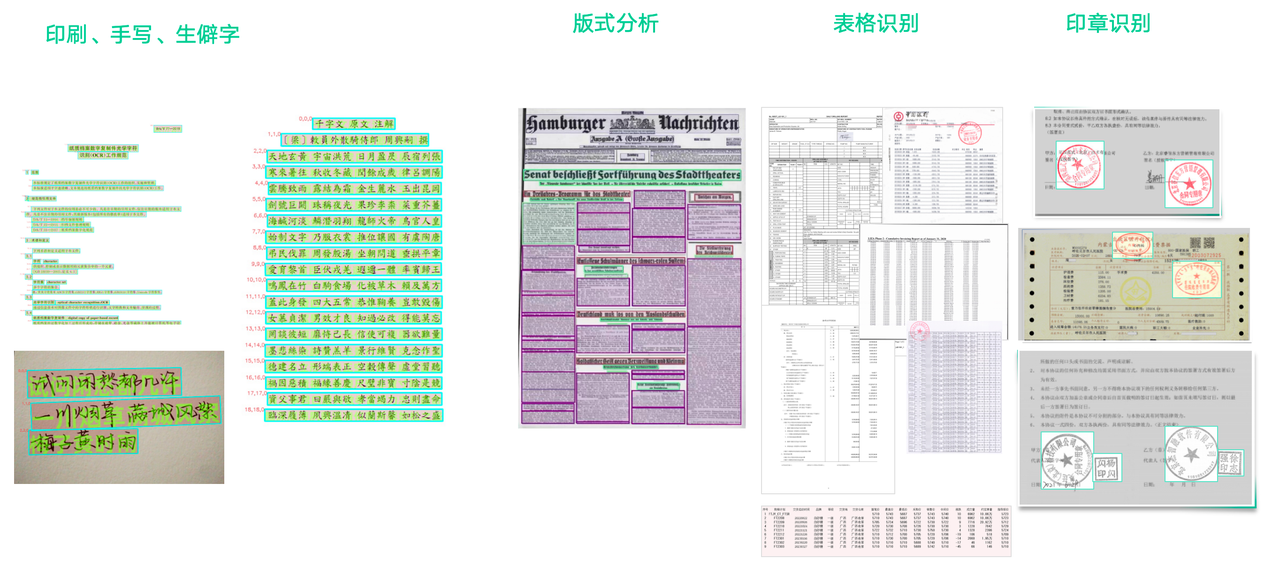
🔍 High-precision document parsing: Our document parsing models are trained on a large amount of high-quality data collected over 5 years, and you can deploy them privately for free. They include high-precision models for printed text, handwriting and rare characters, table recognition, layout analysis, and seals.
Quick start
Please ensure the following conditions are met before installing BISHENG:
- CPU >= 4 Virtual Cores
- RAM >= 16 GB
- Docker 19.03.9+
- Docker Compose 1.25.1+
Recommended hardware condition: 18 virtual cores, 48G. In addition to installing BISHENG, we will also install the following third-party components by default: ES, Milvus, and Onlyoffice.
Download BISHENG
git clone https://github.com/dataelement/bisheng.git
# Enter the installation directory
cd bisheng/docker

# If the system does not have the git command, you can download the BISHENG code as a zip file.
wget https://github.com/dataelement/bisheng/archive/refs/heads/main.zip
# Unzip and enter the installation directory
unzip main.zip && cd bisheng-main/docker
Start BISHENG
docker compose -f docker-compose.yml -p bisheng up -d
After the startup is complete, access http://IP:3001 in the browser. The login page will appear, proceed with user registration.
By default, the first registered user will become the system admin.
For more installation and deployment issues, refer to::Self-hosting
Acknowledgement
This repo benefits from langchain langflow unstructured and LLaMA-Factory . Thanks for their wonderful works.
Thank you to our contributors:
Community & contact
Welcome to join our discussion group


BISHENG毕昇 是一款 开源 LLM应用开发平台,主攻企业场景, 已有大量行业头部组织及世界500强企业在使用。
“毕昇”是活字印刷术的发明人,活字印刷术为人类知识的传递起到了巨大的推动作用。我们希望“BISHENG毕昇”同样能够为智能应用的广泛落地提供有力支撑。欢迎大家一道参与。
特点
🚀 任务模式:面向多步骤复杂工作的通用 Agent 你给出目标,按需附上文件、知识库、工具和技能,它会拆解任务、逐步执行,最后交付报告、PPT、Excel 或 Word。
- 🧠 任务规划 + 子 Agent 并行:主 Agent 动态生成任务清单、跟踪进度,把独立调研交给子 Agent 并行完成。
- 🙋 人机交互(Human in the loop):遇到只有你知道的关键信息,任务暂停等你回答。
- 🧰 技能(Skill)即插即用:内置 PPT、Excel、Word 三个技能包,开箱即用;也可以从本地或 GitHub 导入团队自己的技能。
- 📎 结论可溯源:报告带引用角标,点击后打开原文,并定位到被引用的段落。
📚 知识空间:企业版团队知识库
- 🗂️ 有序组织:支持多级文件夹、标签、卡片与列表视图,支持关键词和标签联合检索。
- 👥 团队共建:可以按权限模板(所有者/管理者/编辑者/查看者)邀请成员,也可以发布到知识广场供他人加入。超级管理员可以为部门一键开通「部门知识空间」。
- 🔐 权限细到单个文件:空间、文件夹、文件三级共用一套权限模板,可以一次授权给个人、部门(含子部门)或用户组。文件夹和文件默认继承上级权限,也可以单独设置。
- 💬 AI 问答:可以针对单篇文档提问,也可以基于整个空间提问;回答标注引用来源,点开即可查看原文及溯源定位。
📡 频道订阅:外部资讯每天自动送达,有价值的一键存成知识
- 📰 主题频道:把公众号和网站聚合成主题频道,每天自动更新,可以再分子频道。
- 🎯 精准过滤:自定义规则过滤标题和正文,只留下相关资讯。
🧩 独具特色的 BISHENG workflow
- 独立、完备的应用编排框架:不区分 chatflow 和 workflow,多轮对话和自动化处理可以混在同一个流程里。
- Human in the loop:流程执行到中途可以等人输入、确认或修改。
- 成环、并行、批量运行自由组合:画圈即成环(大多数同类产品不支持成环),并列即并行,多选即批量,适合文档审核、固定版式报告生成等复杂场景。
🏢 企业级特性:企业 AI 落地需要的管控能力
- 部门和用户管理:组织架构管理和人员设置,支持按角色开放功能菜单和设置配额。
- RBAC + ReBAC 双权限模型:角色控制能用哪些功能,ReBAC 控制能访问哪份资源(精确到单个文件)。
- 操作审批:知识空间加入、频道订阅、菜单权限申请等操作可以走审批,审批流程和节点可自定义。
- 审计:记录会话内容和系统操作日志,可按人、时间、模块追溯。
- 统计看板(商业版):预置用户活跃度、应用使用、token 用量、知识库使用等数据看板。
- API 开放能力:通过服务账号和 API 密钥调用应用、知识库等接口,也可以按员工本人权限代表用户调用。
- DSH Desktop 桌面客户端企业接入(商业版):员工用平台账号登录客户端,直接使用 BISHENG 平台配置的模型;支持管理员按人按月分配模型额度。
- 信创适配:同时支持 MySQL 和达梦 DM8。
- 以及 SSO/LDAP、高可用部署方案、安全审查、流量控制、监控统计、漏洞扫描修复。
🔍 高精度文档解析:5年海量数据沉淀,高精度文档解析模型支持免费私有化部署使用,包括高精度印刷体、手写体与生僻字识别模型、表格识别模型、版式分析模型、印章模型...
快速安装
安装BISHENG前请先确保满足以下条件:
- CPU >= 8 Core
- RAM >= 32 GB
- Docker 19.03.9+
- Docker Compose 1.25.1+
除了BISHENG前后端,我们默认还会安装第三方组件ES、Milvus、Onlyoffice
下载BISHENG代码
# 如果系统中有git命令,可以直接下载毕昇代码
git clone https://github.com/dataelement/bisheng.git
# 进入安装目录
cd bisheng/docker

# 如果系统没有没有git命令,可以下载毕昇代码zip包
wget https://github.com/dataelement/bisheng/archive/refs/heads/main.zip
# 解压并进入安装目录
unzip main.zip && cd bisheng-main/docker
启动BISHENG
# 进入bisheng/docker或bisheng-main/docker目录,执行
docker compose -f docker-compose.yml -p bisheng up -d
启动后,在浏览器中访问 http://IP:3001 ,出现登录页,进行用户注册。默认第一个注册的用户会成为系统admin。
其他安装部署问题参考:私有化部署
资源
感谢
感谢我们的贡献者:
Bisheng 采用了以下依赖库:
- 感谢开源LLM应用开发库 langchain。
- 感谢开源langchain可视化工具 langflow。
- 感谢开源非结构化数据解析引擎 unstructured。
- 感谢开源LLM微调框架 LLaMA-Factory 。
社区与支持
欢迎加入我们的交流群