iPolloWork
Enterprise-grade, local-first Agent Workbench for people and agent teams. A unified multi-engine workspace for Codex Harness, DeepSeek Harness, and OpenCode, with unified plugins and Skills, multi-agent projects and tasks, and editable code, documents, presentations, design, and video.
原始仓库简介 · 中文摘要待补充 · agent-collaboration / agent-skills / ai-agents / ai-work / claude-code / codex
README / 项目原文
iPolloWork







The enterprise-grade, local-first Agent Workbench for people and agent teams—one workspace for multiple agent engines, one unified system for plugins and Skills, multi-agent projects and tasks, and editable creation across code, documents, presentations, websites, design, and video.
https://github.com/user-attachments/assets/201b561a-22ec-4c8e-a4e8-f34172cf0aa3
iPolloWork is the unified workspace layer for the next agent-native way of working. It does not split projects or extensions by runtime: teams coordinate agents, tasks, schedules, plugins, Skills, tools, execution, and editable outputs from one control surface. Describe the outcome; agents plan and execute; your team reviews progress, approves actions, and keeps editing the result in the same place.
iPolloWork is not positioned as a replacement for a single coding agent. It connects Codex, DeepSeek Harness, OpenCode, and future agent runtimes through explicit compatibility boundaries while preserving the native strengths of each ecosystem. Coding is only the starting point: when the output is a deck, web page, visual design, or video, it remains editable instead of becoming a finished file or a chat transcript.
Join the official iPolloWork WeChat community
Scan with WeChat to join the official group for product updates and community discussions.

What makes it different
- One workbench across agent engines — use Codex, DeepSeek Harness, OpenCode, and future runtimes without rebuilding the project experience around each engine.
- One global extension system — install, enable, update, and uninstall portable plugins, Skills, agents, commands, services, and authorization once; optional engine-native bindings stay behind the same lifecycle.
- Project-native human-agent collaboration — give people and agents one shared project view for responsibilities, tasks, schedules, execution health, and results instead of scattering work across isolated chats.
- One editable production loop — move from code to documents, websites, presentations, design, and video while keeping text, images, layouts, timelines, and scenes editable after generation.
- Local and enterprise control — run locally, bring your own model or provider, review permissions and execution, and connect organization services only when a team needs them.
Agent runtime compatibility
OpenCode is the default local execution runtime today. Codex and DeepSeek Harness (DSH) are optional peer runtimes with native session and tool adapters. The ipollowork-ui-mcp control surface also lets external clients operate the desktop. These paths share the workbench while preserving each runtime's capabilities.
The collaboration model keeps iPolloWork as the project workspace: a task can delegate bounded work to DSH subagents when useful, then bring structured progress and results back into the same project. Each runtime retains its own agents, Skills, plugins, and execution model.
Run iPolloWork creative plugins directly in DeepSeek Harness
DeepSeek Harness users can install iPolloWork's native Design, PPT, and Video views into the DSH Web UI and start them from any project directory:


npx @deepseek-ai/dsh plugin --profile web add deepseek-idesign deepseek-ippt deepseek-ivideo
npx @deepseek-ai/dsh web
Open http://127.0.0.1:3080, start a conversation, and choose Design, PPT, or Video. If the dsh command is already installed, replace npx @deepseek-ai/dsh with dsh. DeepSeek Harness is currently a developer preview, so plugin compatibility follows its active release line.
Install iPolloWork
Download the desktop app
Official installers are published on GitHub Releases. If you prefer a manual download, choose the file that matches both your operating system and CPU:
| System | CPU | Installer to use |
|---|---|---|
| macOS | Apple Silicon (M-series) | ipollowork-mac-arm64-<version>.dmg |
| macOS | Intel | ipollowork-mac-x64-<version>.dmg |
| Windows | Intel/AMD 64-bit | ipollowork-win-x64-<version>.exe |
| Windows | ARM64 | ipollowork-win-arm64-<version>.exe |
| Linux | Intel/AMD 64-bit | ipollowork-linux-x64-<version>.AppImage |
| Linux | ARM64 | ipollowork-linux-arm64-<version>.AppImage |
The macOS .zip and Linux .tar.gz files are portable/update artifacts; most users should choose .dmg, .exe, or .AppImage. If the Releases page does not yet contain an installer for your system, run or package the app from source below.
Installation after downloading:
- macOS: open the
.dmg, then drag iPolloWork into Applications. - Windows: run the
.exeinstaller. A locally built, unsigned installer may trigger Microsoft Defender SmartScreen. - Linux: make the AppImage executable with
chmod +x ipollowork-*.AppImage, then run it. The.tar.gzpackage can be extracted and run without installation.
Requirements for source development and packaging
- Git
- Node.js 22 or newer
- pnpm 11, enabled through Corepack with
corepack enable - Bun 1.3.10 or newer, used to build the local Orchestrator sidecar
- macOS: Xcode Command Line Tools (
xcode-select --install) - Windows: Visual Studio 2022 Build Tools with Desktop development with C++ and the Windows SDK; use PowerShell or Command Prompt
- Linux: a standard Electron build environment with a C/C++ toolchain, Python 3,
pkg-config, and the desktop libraries required by Electron; the release build uses Ubuntu 22.04
OpenCode is downloaded and prepared as a separate sidecar during the first desktop build. iPolloWork does not fork or rewrite OpenCode, and OpenCode can continue to be upgraded independently.
Start from source
macOS and Linux
git clone https://github.com/Devin-AXIS/iPolloWork.git
cd iPolloWork
corepack enable
./ipollowork setup
./ipollowork dev
Windows PowerShell
git clone https://github.com/Devin-AXIS/iPolloWork.git
Set-Location iPolloWork
corepack enable
.\ipollowork.cmd setup
.\ipollowork.cmd dev
The setup command installs the locked workspace dependencies. The dev command prepares the OpenCode and Orchestrator sidecars, starts the UI, and opens the Electron desktop client. Development mode uses isolated iPolloWork/OpenCode state and does not overwrite the user's normal OpenCode configuration.
Development commands
| Purpose | macOS / Linux | Windows |
|---|---|---|
| Start desktop app | ./ipollowork dev |
.\ipollowork.cmd dev |
| Start browser UI only | ./ipollowork dev:ui |
.\ipollowork.cmd dev:ui |
| Connect local Cloud | ./ipollowork dev:cloud http://localhost:3100 |
.\ipollowork.cmd dev:cloud http://localhost:3100 |
| Type checks and desktop tests | ./ipollowork check |
.\ipollowork.cmd check |
| Production build | ./ipollowork build |
.\ipollowork.cmd build |
Windows development builds do not register the production ipollowork://
handler automatically. When testing Cloud sign-in through an external browser,
use the repository's protocol switcher and restore the production handler when
you finish. See Windows protocol switching.
Build and package
There are three different build levels:
| Command | Result |
|---|---|
build |
Compiles the production UI, server, Electron shell, and sidecars; does not create an installer |
package:dir |
Creates the fastest unpacked desktop app for local verification; does not change the release version |
package |
Runs checks, advances the client version, then creates native installer and portable/update artifacts for the current system and CPU without publishing them |
macOS and Linux
./ipollowork check
./ipollowork package:dir
./ipollowork package
Windows PowerShell
.\ipollowork.cmd check
.\ipollowork.cmd package:dir
.\ipollowork.cmd package
All outputs are written to apps/desktop/dist-electron/:
package is the local release command. It keeps the App, Desktop, Orchestrator, and Server versions in sync, and uses the sequence 0.1.0 through 0.99.0, then 1.0.0 (the source checkout starts at the unshipped baseline 0.0.0). Use ./ipollowork package --dry-run to inspect the next version, or --skip-check only when the checks have already passed. Local packaging never commits, tags, pushes, or publishes a release.
- macOS:
.dmg,.zip, and an unpacked.app - Windows: NSIS
.exeandwin-unpacked/ - Linux:
.AppImage,.tar.gz, andlinux-unpacked/
Local packaging targets the machine's current operating system and CPU architecture. Use the GitHub release workflow to produce the complete signed/notarized matrix for macOS ARM64/x64, Windows ARM64/x64, and Linux ARM64/x64. Local packages are unsigned unless the appropriate Apple or Windows signing credentials are supplied; they are suitable for development testing but should not be presented as official releases.
Connect to iPolloCloud
Start your local iPolloCloud control plane first, then run:
./ipollowork dev:cloud http://localhost:3100
This command creates an isolated development profile, points authentication and Cloud APIs at the supplied URL, and requires Cloud sign-in. It does not change the normal local iPolloWork profile. A remote or self-hosted Cloud URL works the same way:
./ipollowork dev:cloud https://cloud.example.com
Architecture boundary
Codex / MCP clients ── ipollowork-ui-mcp ──> iPolloWork desktop/UI
                                                   │
                                                   ├── local API ──> Engine Protocol ──> OpenCode (default)
                                                   │                               ├──> Codex (optional)
                                                   │                               └──> DeepSeek Harness (optional)
                                                   └── optional account/control requests ──> iPolloCloud
- Agent execution, task state, and streaming are normalized at the shared engine boundary while engine-native behavior remains inside its adapter.
- Portable Skills, plugins, MCP servers, and project capabilities use one lifecycle; engine-specific enhancements stay optional.
- Each conversation selects its execution engine and optional work template. Projects supply shared goals and resources. Templates provide examples, Skills and result criteria; each engine owns planning, subagents, coordination, checks and final results.
- Existing template role prompts and Skill references are projected into namespaced native OpenCode subagents and Codex role configuration. Built-in workers remain available; templates do not require a fixed worker count or execution order. Conversation-specific role edits remain scoped task guidance.
- iPolloWork displays native execution and scoped artifacts. It does not add hidden repair prompts, restart native agent work, or run a second delivery workflow in the client. Existing media and render tools remain available to the engine.
- iPolloCloud handles identity, organizations, entitlements, hosted worker lifecycle, administration, and commercial Apps.
- The Cloud connection is optional. Local iPolloWork works without an account or commercial service.
- OpenCode and DeepSeek Harness remain independent components and can continue to evolve without turning iPolloWork into a fork of either runtime.
Repository layout
apps/app— shared React user interfaceapps/desktop— Electron desktop shell and packagingapps/server— iPolloWork server APIapps/orchestrator— headless runtime orchestrationpackages— shared types, components, docs, and integrationsdocs— maintained engineering notes, platform guides, and generated reportsevals— executable product flows and validation toolingexamples— complete example plugin packagesexternal-plugins— independently released plugins for external agent hostspackaging— release and installer metadatascripts— development, build, audit, and release automationspecs— product and architecture specificationsvendor— pinned third-party source that is built as part of iPolloWork
Contributing
Read AGENTS.md, docs/governance.md, CONTRIBUTING.md, SECURITY.md, and
apps/app/src/react-app/ARCHITECTURE.md before making product changes. Run
the narrow relevant test first, followed by:
./ipollowork check
git diff --check
See CONTRIBUTING.md, CODE_OF_CONDUCT.md, and SECURITY.md for contribution, community, and security policies.
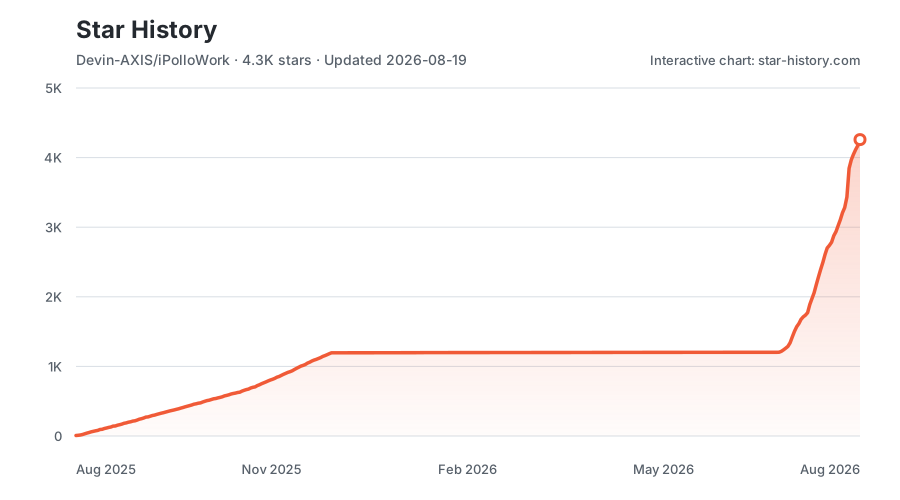
Star History
License
iPolloWork uses the iPolloWork Source Available License 1.0:
- Free only for individual personal self-use and for small internal use by fewer than three total users.
- Prior written authorization is required for any use by three or more users, regardless of whether the use is personal, internal, commercial, non-commercial, individual, or organizational.
- Prior written authorization is required for any sale, resale, paid service, SaaS, hosting, white-label distribution, marketplace use, or customer-facing use, regardless of whether it is done by an individual or a company.
- The iPolloWork name, logo, and product attribution must remain visible in user-facing frontend displays unless prior written authorization expressly permits different branding.
- Separately licensed third-party components and code previously released under MIT retain their original licenses and existing rights.
See LICENSE for the controlling terms and LICENSES/MIT.txt for the historical MIT notice. This is a source-available license, not an OSI-approved open-source license.
iPolloWork
面向人与智能体团队的企业级、本地优先 Agent Workbench:在一个工作空间内统一多引擎、统一插件与 Skills,管理多智能体项目和任务,并持续编辑代码、文档、演示稿、网站、设计和视频。
https://github.com/user-attachments/assets/201b561a-22ec-4c8e-a4e8-f34172cf0aa3
iPolloWork 是面向下一代 Agent 原生工作方式的统一工作台层。它不会按运行时割裂项目和扩展,而是把智能体、任务、日程、插件、Skills、工具、执行过程和可编辑成果放进同一个控制界面。你描述目标,智能体负责规划和执行;团队可以检查进度、批准操作,并在同一个地方继续编辑结果。
iPolloWork 不再把自己定义成某一个编程智能体的“平替”。它通过明确的兼容边界连接 Codex、DeepSeek Harness、OpenCode 和未来智能体运行时,同时保留各个生态自身的原生优势。编程只是起点:当结果变成演示稿、网页、视觉设计或视频时,它仍然可以继续编辑,而不是只留下一个成品文件或一段聊天记录。
加入 iPolloWork 官方微信群
使用微信扫描下方二维码,加入官方社区,获取产品动态并交流使用经验。
它真正解决的核心问题
- 多引擎,一个工作台 — 兼容 Codex、DeepSeek Harness、OpenCode 和未来运行时,不需要围绕每个引擎重新搭建项目体验。
- 统一的全局扩展系统 — 插件、Skills、智能体、命令、服务和授权只需安装、启用、更新或卸载一次;可选的引擎原生绑定仍归同一生命周期管理。
- 项目原生的人机协作 — 人与智能体围绕同一个项目查看职责、任务、日程、执行健康和成果,不再把工作拆散在彼此孤立的对话里。
- 一体化可编辑生产 — 从代码延伸到文档、网站、演示稿、设计和视频;生成之后,文字、图片、布局、时间线和画面仍能继续修改。
- 本地与企业可控 — 可以完全在本地运行、自选模型或服务商、逐项审核权限和执行;团队真正需要时再连接组织服务。
智能体运行时兼容
OpenCode 是目前默认的本地执行运行时。DeepSeek Harness(DSH) 已作为可选同级运行时和子代理委派目标接入;Codex 则通过 ipollowork-ui-mcp 控制界面接入。MCP 是这条接入路径使用的协议,不是与 Codex、DSH、OpenCode 并列的另一个智能体引擎。它们共享同一个工作台,但不会假装所有运行时都拥有完全相同的原生能力。
协作方式保持简单:iPolloWork 是项目工作台;需要时,一个任务可以把边界明确的工作交给 DSH 子代理,再把结构化进度和结果带回同一个项目。各运行时继续保留自己的智能体、Skills、插件和执行机制。
在 DeepSeek Harness 中直接启动 iPolloWork 创作插件
DeepSeek Harness 用户可以把 iPolloWork 的 Design、PPT 和 Video 原生视图安装到 DSH Web 界面,并从任意项目目录启动:
npx @deepseek-ai/dsh plugin --profile web add deepseek-idesign deepseek-ippt deepseek-ivideo
npx @deepseek-ai/dsh web
打开 http://127.0.0.1:3080,新建对话后选择 Design、PPT 或 Video。如果已经安装 dsh 命令,可以把 npx @deepseek-ai/dsh 直接替换成 dsh。DeepSeek Harness 目前仍处于开发者预览阶段,插件兼容性会跟随其活跃版本线。
安装 iPolloWork
下载桌面应用
正式安装包发布在 GitHub Releases。如果希望手动下载,请同时根据操作系统和 CPU 选择文件:
| 系统 | CPU | 选择的安装包 |
|---|---|---|
| macOS | Apple 芯片(M 系列) | ipollowork-mac-arm64-<version>.dmg |
| macOS | Intel | ipollowork-mac-x64-<version>.dmg |
| Windows | Intel/AMD 64 位 | ipollowork-win-x64-<version>.exe |
| Windows | ARM64 | ipollowork-win-arm64-<version>.exe |
| Linux | Intel/AMD 64 位 | ipollowork-linux-x64-<version>.AppImage |
| Linux | ARM64 | ipollowork-linux-arm64-<version>.AppImage |
macOS 的 .zip 和 Linux 的 .tar.gz 主要用于便携运行或更新;普通用户优先选择 .dmg、.exe 或 .AppImage。如果 Releases 暂时没有对应安装包,请按下方步骤从源码运行或自行打包。
- **macOS:**打开
.dmg,把 iPolloWork 拖入“应用程序”。 - **Windows:**运行
.exe。本地自行构建且未签名的安装包可能触发 Microsoft Defender SmartScreen。 - **Linux:**先运行
chmod +x ipollowork-*.AppImage,再打开 AppImage;也可以解压.tar.gz后直接运行。
源码开发和打包要求
- Git
- Node.js 22 或更高版本
- pnpm 11,运行
corepack enable启用 - Bun 1.3.10 或更高版本,用于构建本地 Orchestrator sidecar
- macOS:Xcode Command Line Tools(运行
xcode-select --install) - Windows:Visual Studio 2022 Build Tools,安装 Desktop development with C++ 和 Windows SDK;使用 PowerShell 或命令提示符
- Linux:标准 Electron 构建环境,包括 C/C++ 工具链、Python 3、
pkg-config和 Electron 所需桌面库;正式发布使用 Ubuntu 22.04
桌面端第一次构建时会下载并准备独立的 OpenCode sidecar。iPolloWork 不会 fork 或修改 OpenCode,OpenCode 可以继续独立升级。
从源码启动
macOS 和 Linux
git clone https://github.com/Devin-AXIS/iPolloWork.git
cd iPolloWork
corepack enable
./ipollowork setup
./ipollowork dev
Windows PowerShell
git clone https://github.com/Devin-AXIS/iPolloWork.git
Set-Location iPolloWork
corepack enable
.\ipollowork.cmd setup
.\ipollowork.cmd dev
setup 会安装锁定版本的依赖;dev 会准备 OpenCode 和 Orchestrator sidecar、启动 UI 并打开 Electron 客户端。开发模式使用隔离的 iPolloWork/OpenCode 数据,不会覆盖用户平时使用的 OpenCode 配置。
常用开发命令
| 用途 | macOS / Linux | Windows |
|---|---|---|
| 启动桌面客户端 | ./ipollowork dev |
.\ipollowork.cmd dev |
| 只启动浏览器 UI | ./ipollowork dev:ui |
.\ipollowork.cmd dev:ui |
| 连接本地 Cloud | ./ipollowork dev:cloud http://localhost:3100 |
.\ipollowork.cmd dev:cloud http://localhost:3100 |
| 类型检查和桌面测试 | ./ipollowork check |
.\ipollowork.cmd check |
| 生产构建 | ./ipollowork build |
.\ipollowork.cmd build |
构建和打包
三个命令的作用不同:
| 命令 | 产物 |
|---|---|
build |
编译生产 UI、Server、Electron 和 sidecar,但不生成安装包 |
package:dir |
生成免安装目录,速度最快,适合本地验证;不会修改正式版本号 |
package |
先执行检查、递增客户端版本号,再为当前系统和当前 CPU 生成原生安装包及便携/更新文件;不会发布 |
macOS 和 Linux
./ipollowork check
./ipollowork package:dir
./ipollowork package
Windows PowerShell
.\ipollowork.cmd check
.\ipollowork.cmd package:dir
.\ipollowork.cmd package
所有产物输出到 apps/desktop/dist-electron/:
package 是本地正式打包命令。它会同步 App、Desktop、Orchestrator 和 Server 的版本,并按 0.1.0 到 0.99.0、再到 1.0.0 的顺序递增(源码开发基线为未发行的 0.0.0)。可使用 ./ipollowork package --dry-run 查看下一个版本;仅在检查已经通过时才使用 --skip-check。本地打包不会自动提交、打 tag、推送或发布。
- macOS:
.dmg、.zip和免安装.app - **Windows:**NSIS
.exe和win-unpacked/ - Linux:
.AppImage、.tar.gz和linux-unpacked/
本地打包默认只针对当前操作系统和当前 CPU 架构。完整发布应使用 GitHub Release 工作流,分别生成 macOS ARM64/x64、Windows ARM64/x64 和 Linux ARM64/x64,并完成相应签名或公证。本地没有提供 Apple/Windows 签名凭据时产物不会签名,只适合开发测试,不应作为正式发行版。
连接 iPolloCloud
先启动本地 iPolloCloud,然后运行:
./ipollowork dev:cloud http://localhost:3100
该命令会使用隔离的开发配置连接 Cloud 登录和控制接口,不会覆盖用户正常的本地 iPolloWork/OpenCode 配置。远程或自建 Cloud 只需替换 URL。
架构边界
Codex / MCP 客户端 ── ipollowork-ui-mcp ──> iPolloWork 桌面/UI
                                                 │
                                                 ├── 本地 API ──> Engine Protocol ──> OpenCode(默认)
                                                 │                                  └──> DeepSeek Harness(可选)
                                                 └── 可选账号与控制请求 ──> iPolloCloud
- 智能体执行、任务状态和流式数据在统一引擎边界规范化,引擎原生行为仍留在各自适配器中。
- 可移植的 Skills、插件、MCP 服务和项目能力使用同一生命周期,引擎专属增强保持可选。
- Codex 当前通过 MCP 控制界面兼容接入,不会被误写成已经存在的 Codex 原生引擎适配器。
- Cloud 负责账号、组织、权益、托管 Worker 生命周期、管理后台和商业 App。
- 不连接 Cloud 时,iPolloWork 仍可完整本地运行。
- iPolloWork 不会 fork OpenCode 或 DeepSeek Harness,两者都可以继续独立演进。
Star 增长趋势
使用许可
- 仅个人自己使用免费;少于 3 名总用户的小规模内部使用免费。
- 3 名及以上用户的任何形式使用,不管个人、企业、内部、外部、商业或非商业,都必须先获得书面授权。
- 任何售卖、转售、收费服务、SaaS、托管、白标、市场分发或面向客户的使用,不管由个人还是企业提供,都必须先获得书面授权。
- 前台用户界面中必须保留 iPolloWork 名称、Logo 和产品归属展示,除非书面授权明确允许更换品牌。
- 第三方代码和历史上已经按 MIT 发布的部分继续保留原许可证和既有权利。
完整条款见 LICENSE。该协议属于源码可用协议,不是 OSI 认可的开源协议。完整工程结构和贡献方式请查看英文主文档。