ponytail
Makes your AI agent think like the laziest senior dev in the room. The best code is the code you never wrote.
原始仓库简介 · 中文摘要待补充 · agent-skills / ai-agents / claude / claude-code / claude-code-plugin / cursor-rules
README / 项目原文

Ponytail
He says nothing. He writes one line. It works.





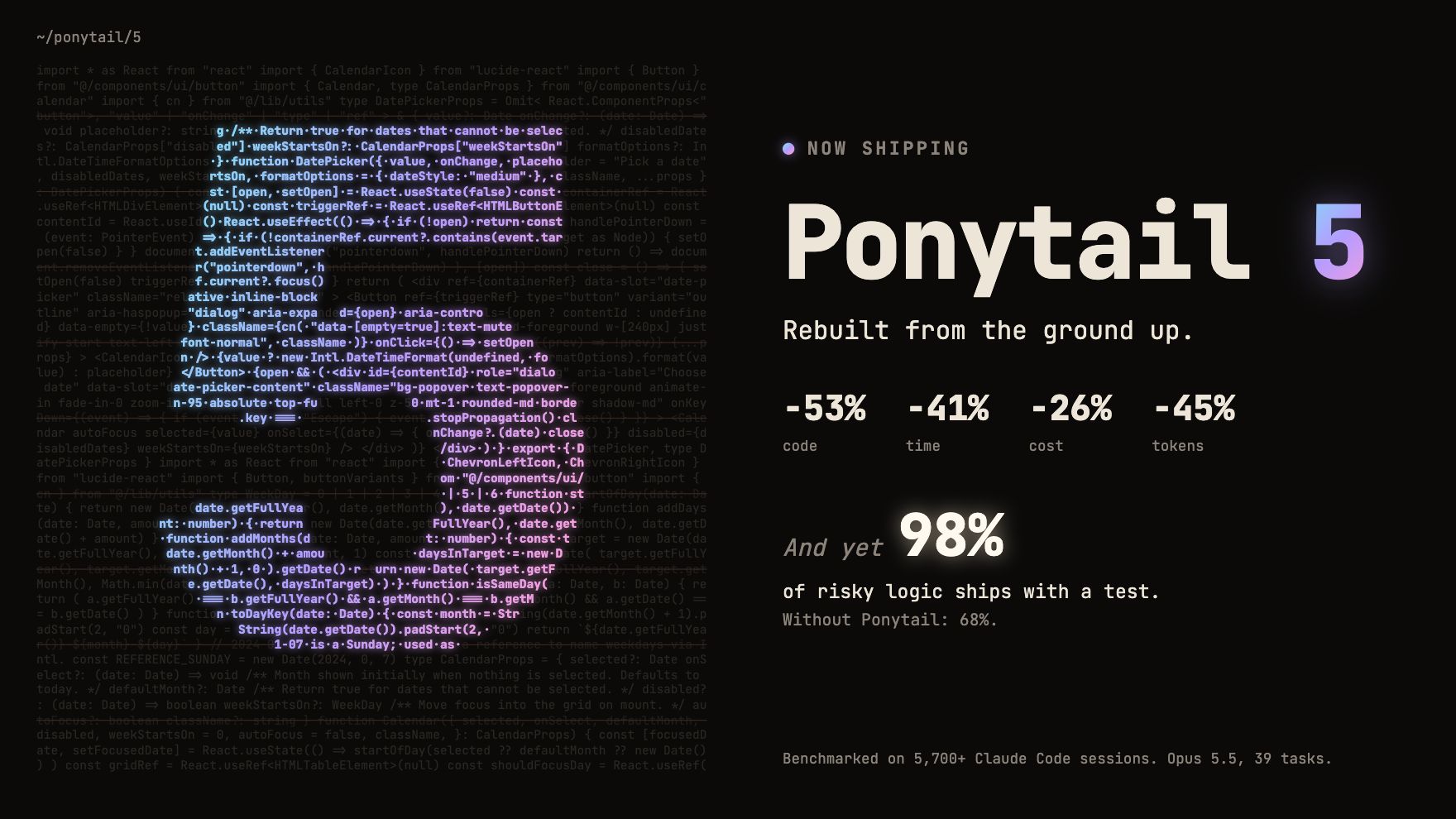
Ponytail 5: rebuilt from the ground up.
-53% code · -41% time · -26% cost · -45% tokens
And yet: 98% of risky logic ships with a test. Without Ponytail: 68%.
Benchmarked in Claude Code, the same agent with and without the skill: 39 tasks including a real FastAPI + React repo, Opus 5.5, 5 runs each. Details.
Already built with Ponytail
You know him. Long ponytail. Oval glasses. Has been at the company longer than the version control. You show him fifty lines; he looks at them, says nothing, and replaces them with one.
Ponytail puts him inside your AI agent.
Numbers
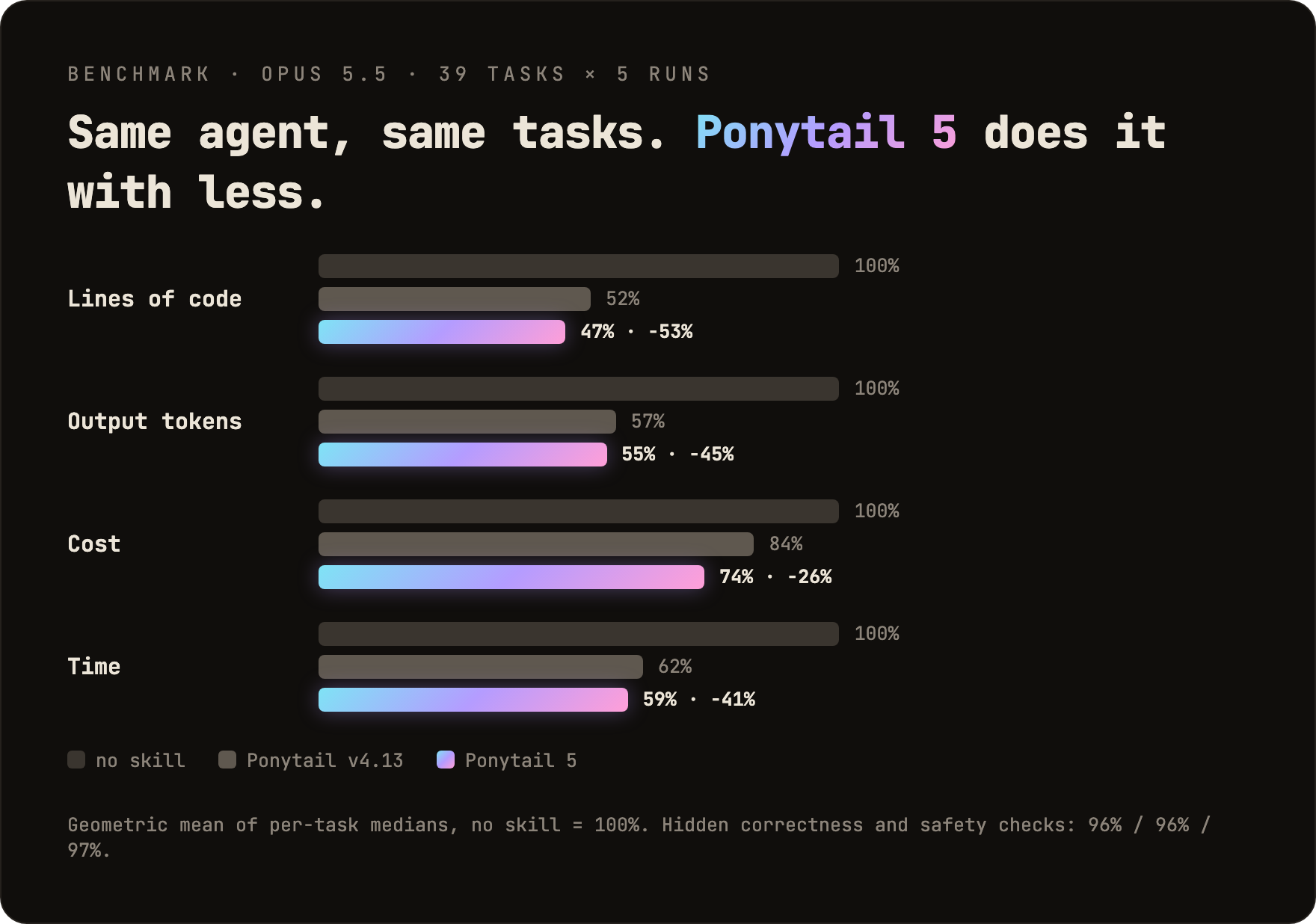
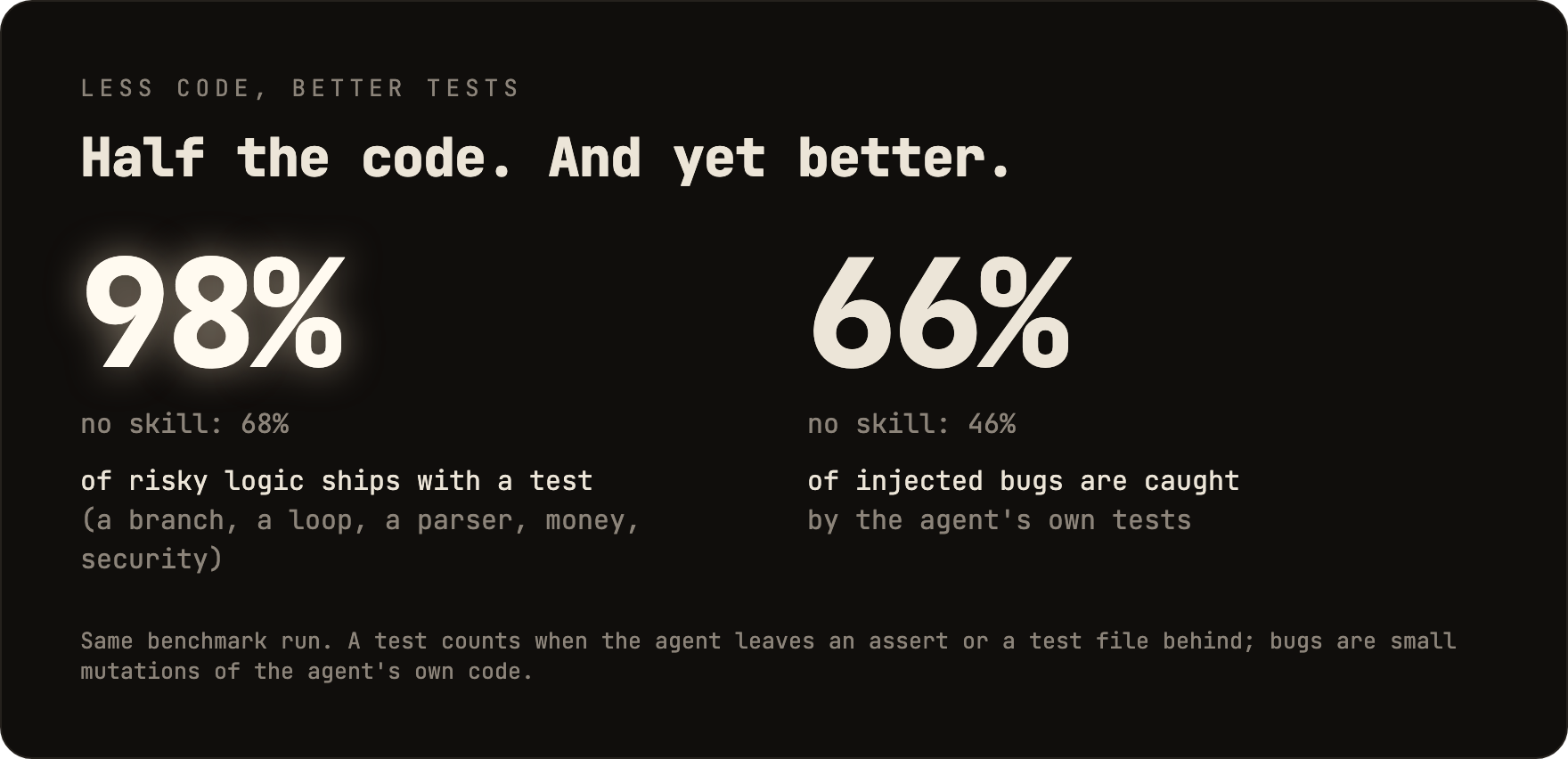
Two things the chart does not show: in a blind comparison, Ponytail 5's replies beat the previous Ponytail's 110 to 67. And on the six security tasks (SQL injection, path traversal, forged tokens, rate limiting, malformed CSV rows, caching) it passed all 30 runs: less code, no less safe. Method, per-task tables and limits: benchmarks/results/2026-10-07-agentic.md.
The rule was never "fewest tokens." It is: write only what the task needs, and never cut validation, error handling, security, or accessibility. The code ends up small because it is necessary, not golfed. Lower cost and latency are a side effect.
Before / after
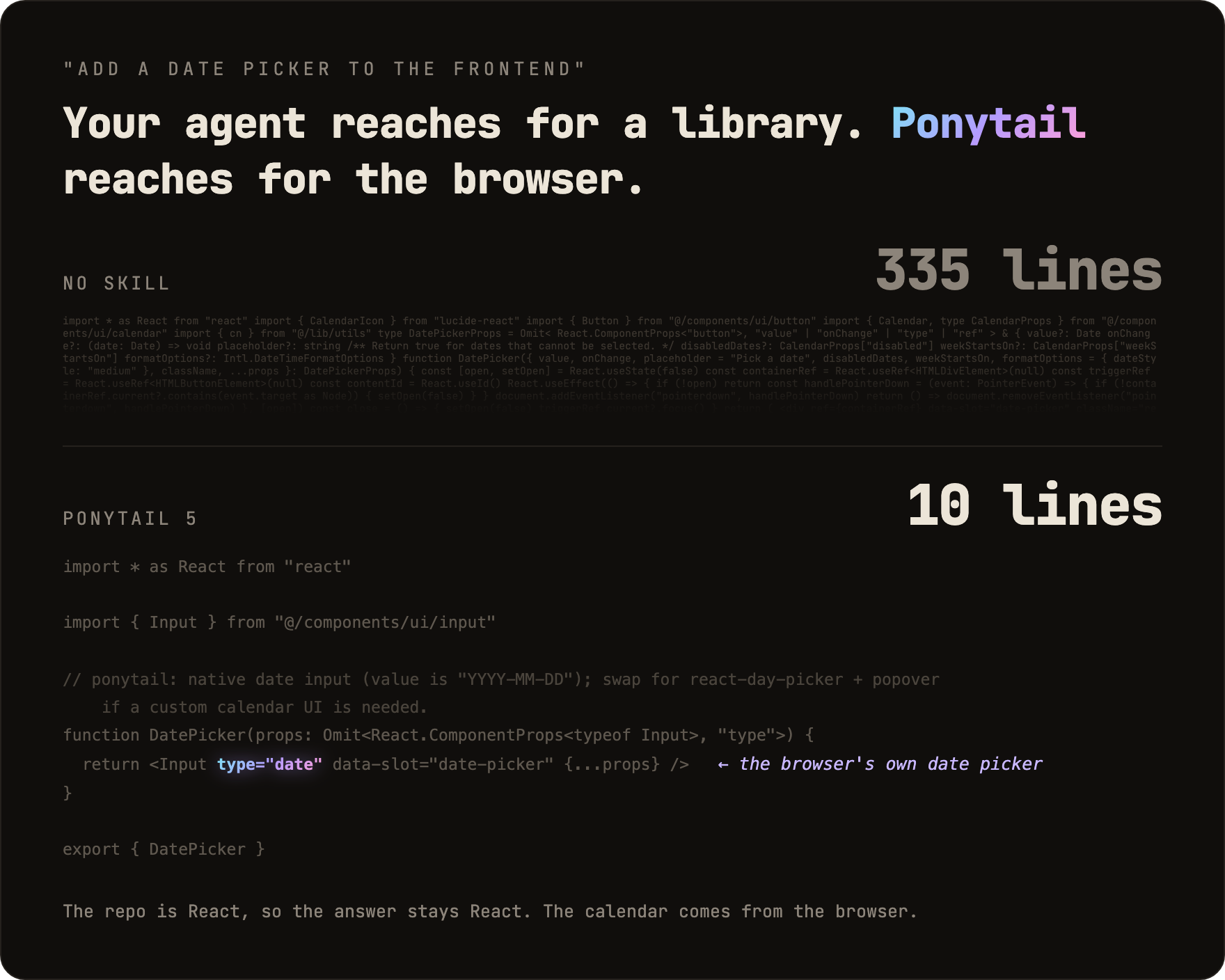
You ask for a date picker. Without Ponytail, the agent installs a date picker library or builds a whole calendar by hand: 335 lines. Ponytail 5 first looks at what is already there: the repo has an Input component, and every browser has a date picker. It puts the two together. 10 lines.
More survivors in examples/.
The review, rebuilt
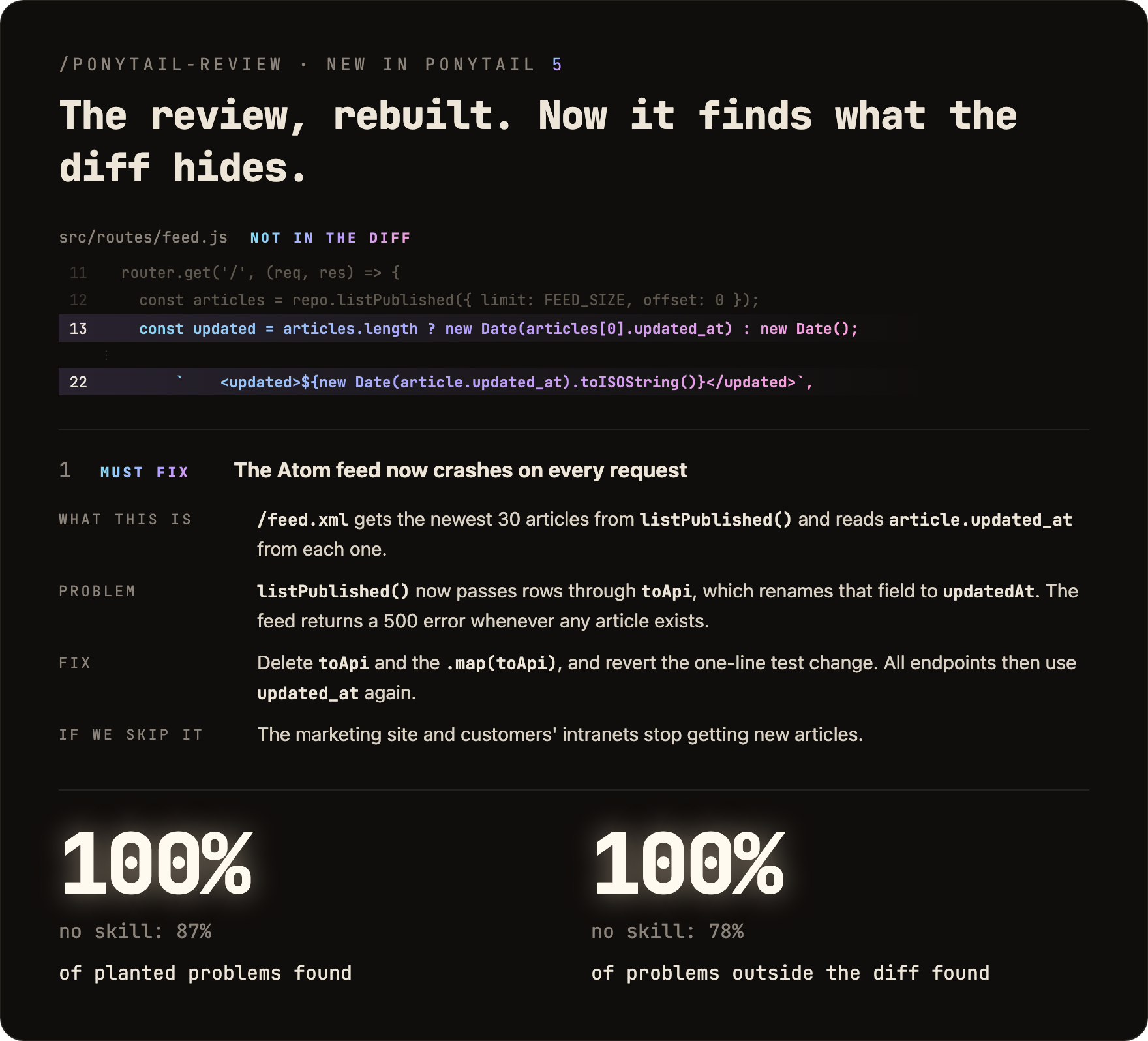
/ponytail-review used to look only for code to cut. Now it reviews like the senior dev who gets paged when it breaks: it reads the code your change touches, not just the diff, and checks bugs, security, real load, missing tests, speed, and what to cut. Each finding says what the code does, what goes wrong, how to fix it, and what happens if you don't.
The audit, rebuilt
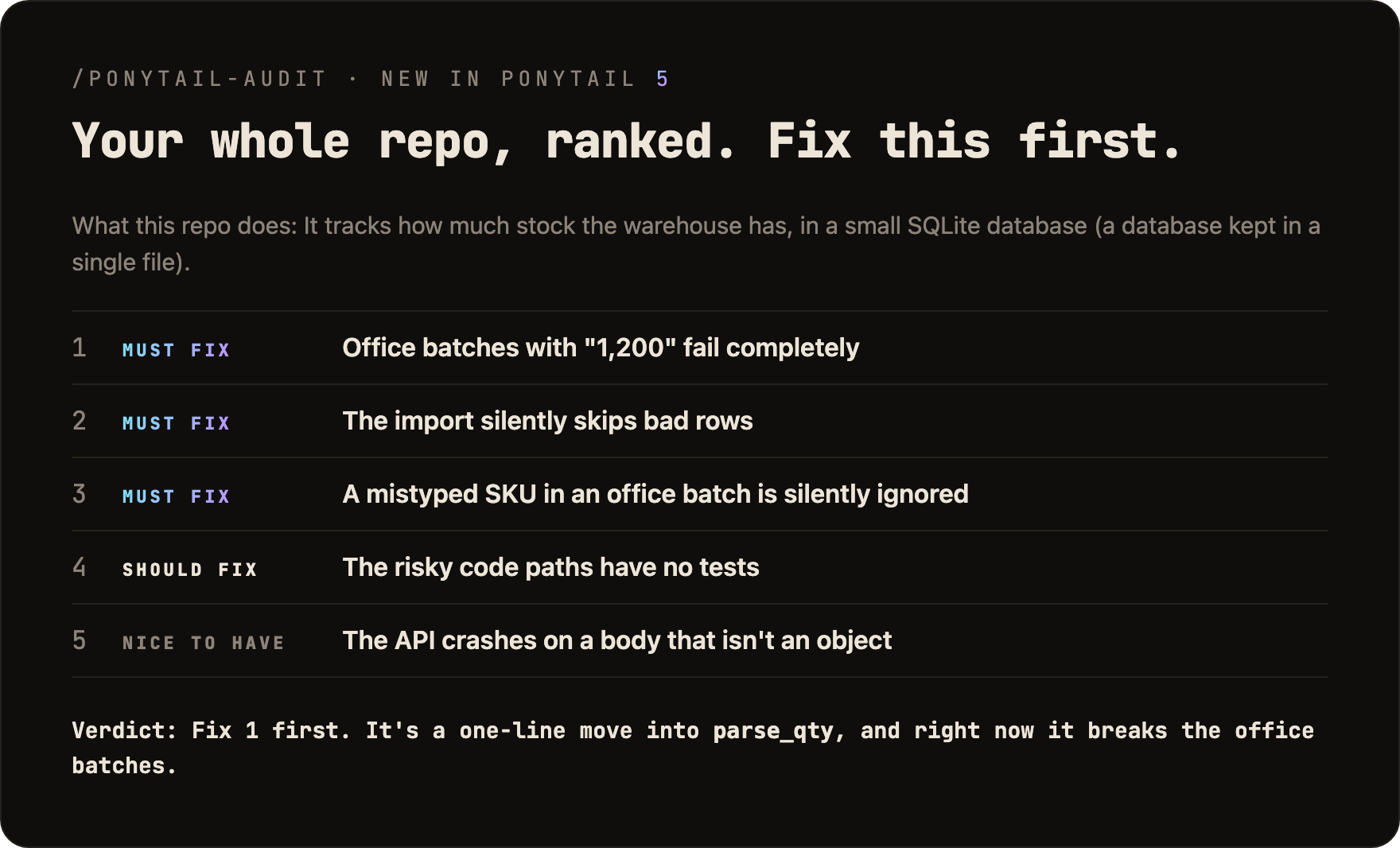
/ponytail-audit runs the same checks on the whole repo. It maps the code first: entry points, how data moves, what load the project expects. Then it ranks what it finds and tells you what to fix first. The old audit only listed what to delete.
New in 5.3: the band
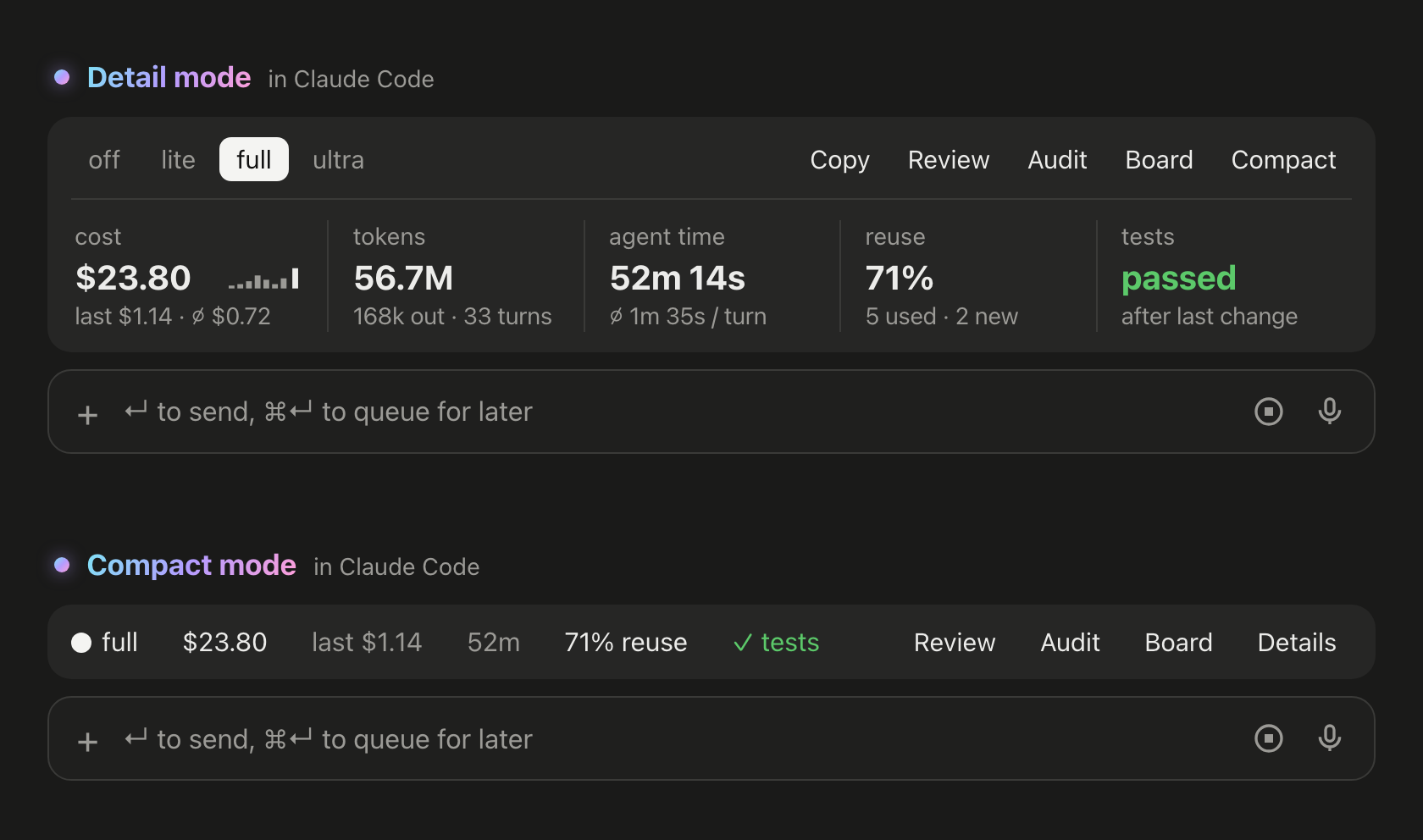
In Claude Code, ponytail now shows a band above the prompt: what the current task costs, how many tokens and how much agent time it used, how often it reused existing code instead of writing new code, and whether the tests passed after the last change. Its buttons switch the level, run /ponytail-review or /ponytail-audit, copy the task as Markdown, and fold the band into one line. Don't want it? /ponytail band hides it, the same command brings it back. Needs Claude Code 2.1.290 or later, in the terminal or the desktop app. It does not show in the VS Code chat panel, cloud sessions or claude -p.
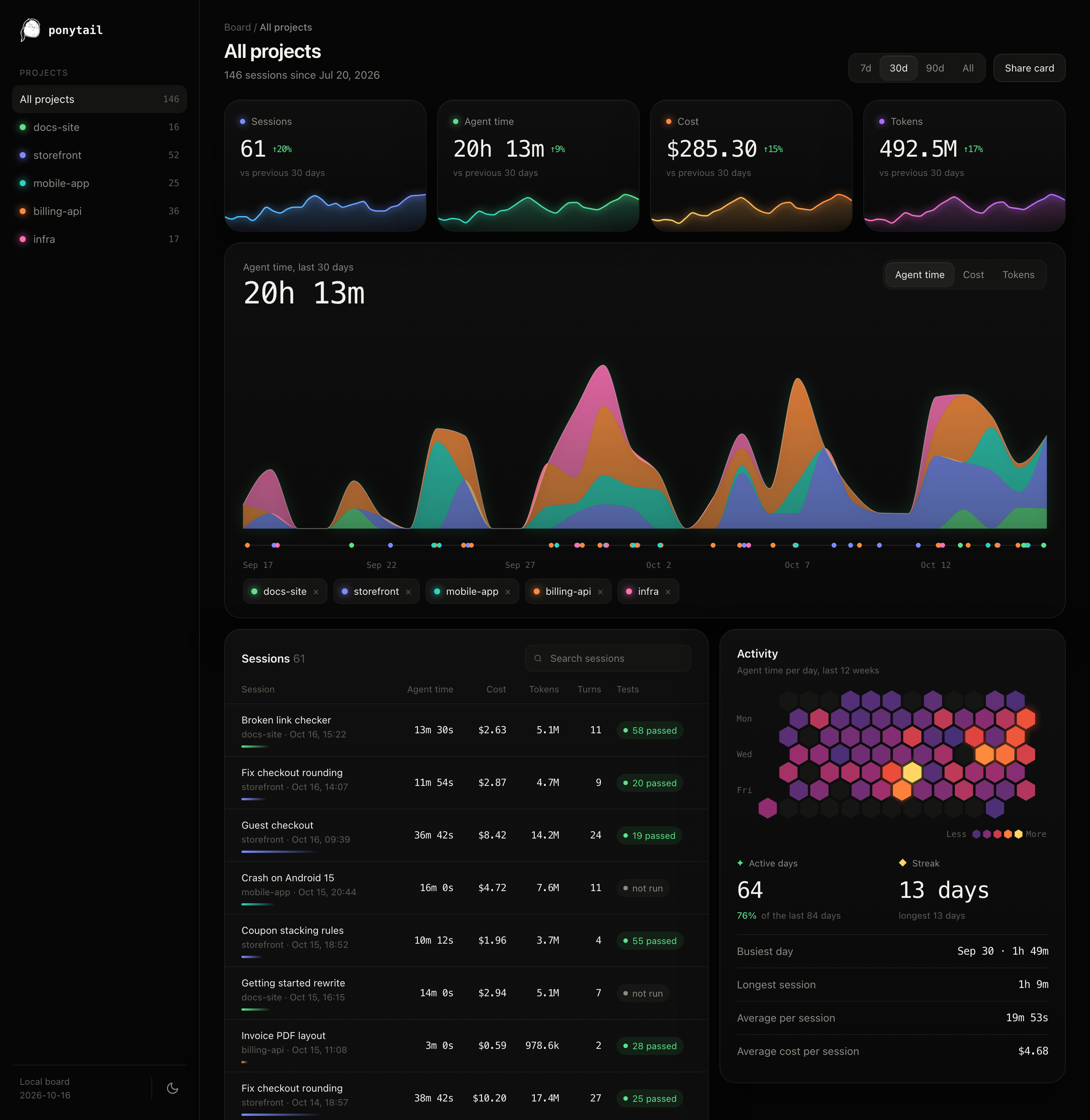
Board opens a local page with every task across your projects: cost, agent time and tokens over time, every session with its tests, and the days you worked. By default, everything stays on your machine, in ~/.config/ponytail/band/. /ponytail band import adds your past Claude Code sessions to it, with their cost, agent time and tokens.
How it works
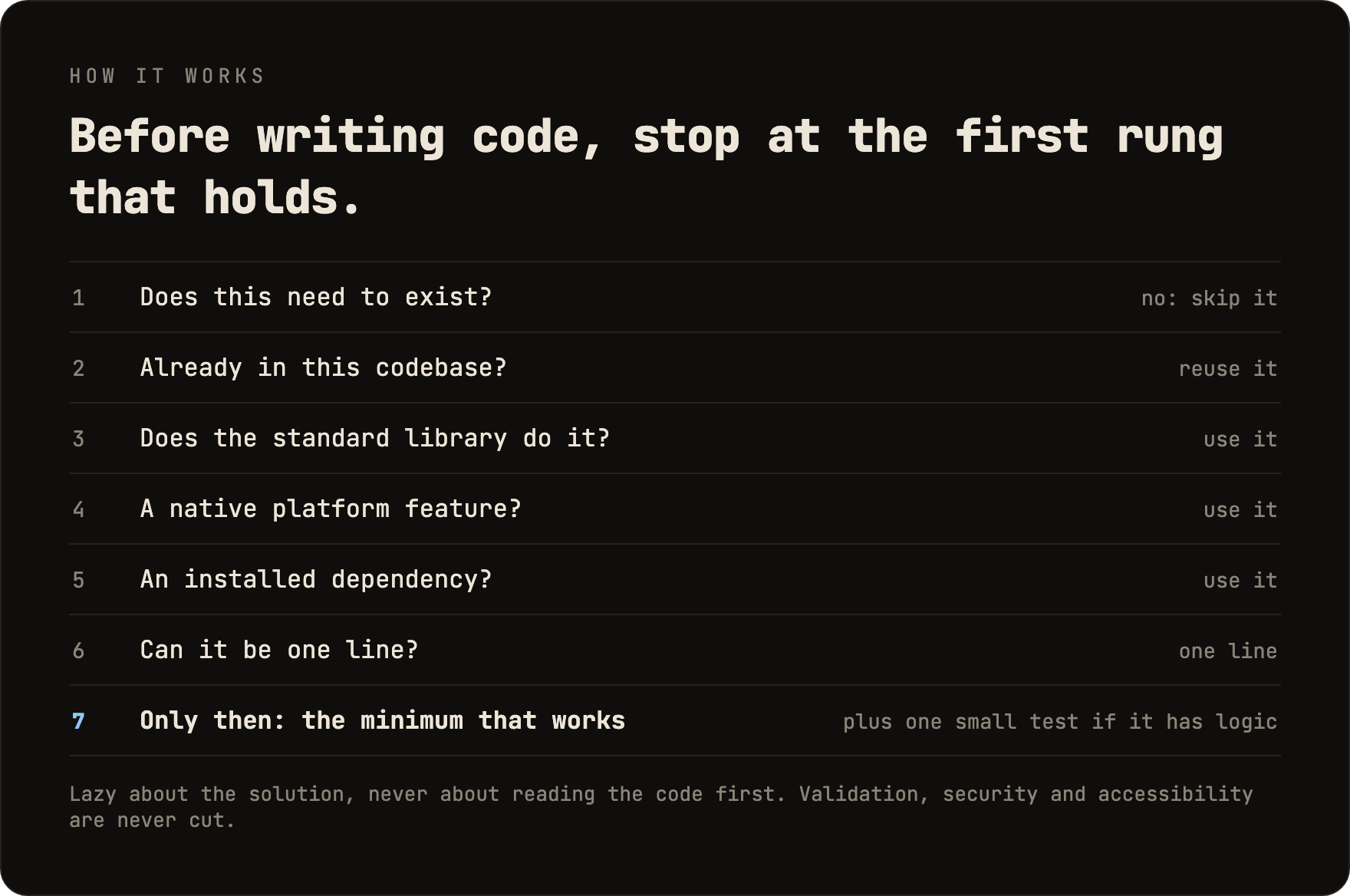
The ladder runs after it understands the problem, not instead of it: it reads the code the change touches and traces the real flow before picking a rung. Lazy about the solution, never about reading.
Lazy, not negligent: trust-boundary validation, data-loss handling, security, and accessibility are never on the chopping block.
Logic with a branch, a loop, a parser, money or security leaves one small test behind. Every reply ends with what was skipped or not checked and any risk you should know.
The prompt
Ponytail is one prompt: skills/ponytail/SKILL.md. The compact version, for agents that read a rules file, is AGENTS.md. Everything else in this repo loads that prompt into different agents.
Install
Claude Code, as two separate prompts:
/plugin marketplace add DietrichGebert/ponytail
/plugin install ponytail@ponytail
Codex:
codex plugin marketplace add DietrichGebert/ponytail
codex plugin add ponytail@ponytail
Then open /hooks in Codex, trust its two lifecycle hooks, and start a new thread.
Any other agent: copy AGENTS.md into your project, or ask your agent to install skills/ponytail/SKILL.md as a skill. Step by step for Copilot, Cursor, OpenCode, Gemini and the rest: INSTALL.md.
That was it. He'd be proud. He won't say it.
Active every session, with a handful of commands (see Commands). /ponytail ultra exists for when the codebase has wronged you personally. Startup and mode-change text shows the current mode.
Only install ponytail from DietrichGebert/ponytail on GitHub or @dietrichgebert/ponytail on npm. It never ships .exe or .dll files; a copy that does is not mine.
Commands
| Command | What it does |
|---|---|
/ponytail [lite | full | ultra | off] |
Set the intensity, or turn it off. No argument switches ponytail on at the default level if it is off, and otherwise reports the current level. |
/ponytail band [on | off] |
Claude Code only: hide or show the band above the prompt. No argument switches it. The level stays. |
/ponytail band import |
Claude Code only: add your past Claude Code sessions to the board, with their cost, agent time and tokens. |
/ponytail-review |
Review the current diff like the senior dev who gets paged when it breaks: bugs, security, real load, risky code without a test, slow paths, and what to cut. Each finding says what the code does, what goes wrong, how to fix it, and what happens if you don't. Name a target in plain words to narrow or widen it: uncommitted, staged, branch, or a PR link. |
/ponytail-audit |
The same check for the whole repo, most important first. |
/ponytail-debt |
Harvest the shortcut: comments you've deferred into a ledger, so "later" doesn't become "never". |
/ponytail-gain |
Show the measured impact scoreboard (less code, less cost, more speed) from the benchmark. |
/ponytail-help |
Quick reference for the commands above. |
Commands need a skill-capable host (Claude Code, Codex, Devin CLI, OpenCode, Gemini, Antigravity CLI, pi, Hermes Agent, Qoder, Grok Build). In Codex CLI and the IDE extension they're skills under the plugin's namespace; invoke with $ponytail:ponytail-review. Cursor with the hooks gets /ponytail level switching only, typed as a plain message. The instruction-only adapters (Cursor's rule file, Windsurf, Cline, Copilot, Kiro, Antigravity's AGENTS.md fallback) load the always-on ruleset without the commands.
FAQ
Does it need a config file?
No. An optional ~/.config/ponytail/config.json or PONYTAIL_DEFAULT_MODE env var can set the default level, but nothing is required.
Why does it write shortcut: comments?
They mark a deliberate shortcut and when to revisit it, and /ponytail-debt collects them into a ledger. Want another word, or none? Say so in your project's CLAUDE.md or AGENTS.md, then run /ponytail-debt <your word>.
What if I really need the 120-line cache class? You don't. Insist anyway and he'll build it. Slowly. Correctly. While looking at you.
Does it scale? The code you never wrote scales infinitely. Zero bugs, zero CVEs, 100% uptime since forever.
Why "ponytail"? You know exactly why.
Sponsors

License
MIT. The shortest license that works.
Star History
Ponytail
他一言不发。他写一行。它能跑。
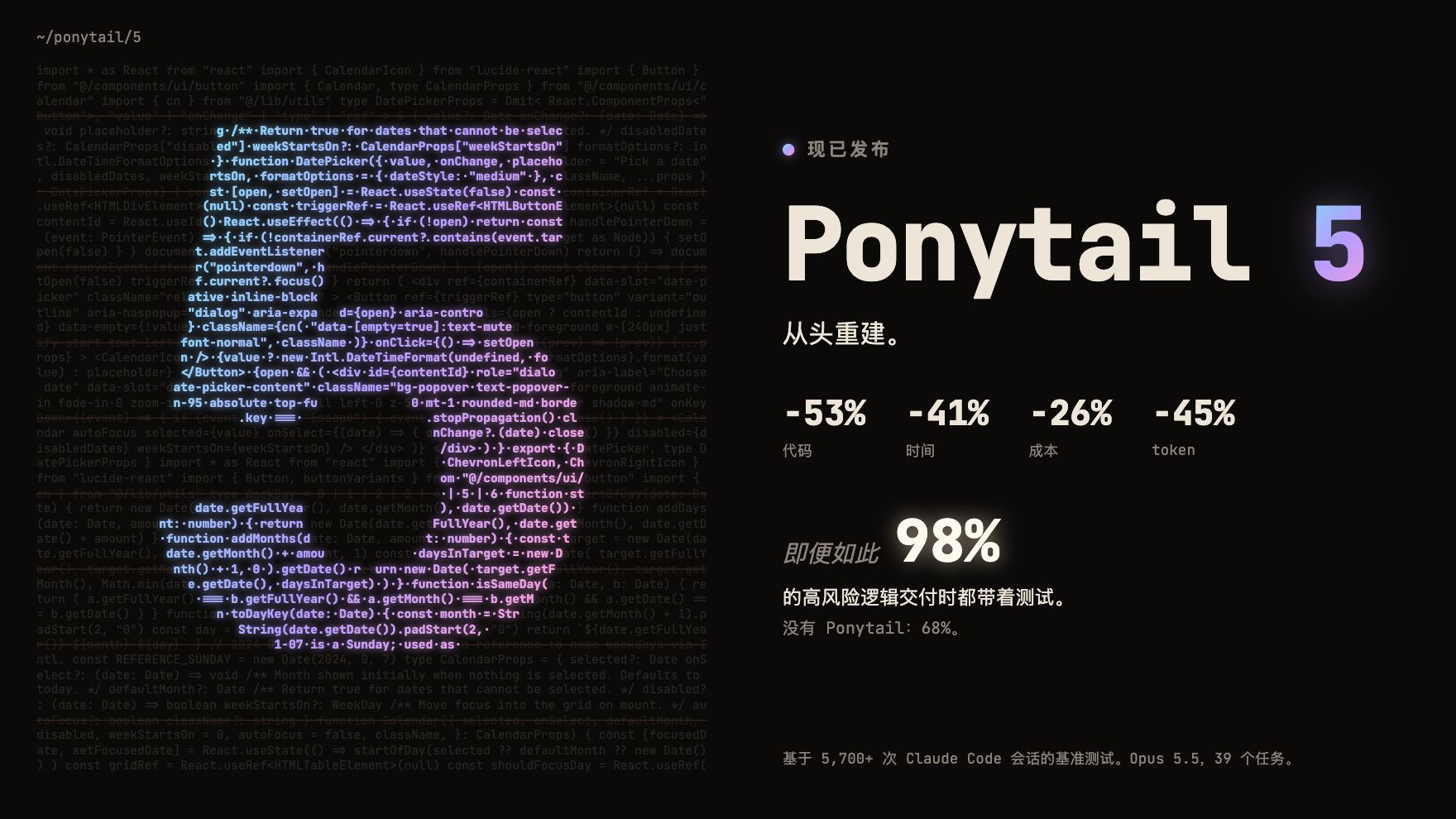
Ponytail 5:从头重建。
代码 -53% · 时间 -41% · 成本 -26% · token -45%
即便如此:98% 的高风险逻辑交付时都带着测试。没有 Ponytail:68%。
在 Claude Code 中测得,同一个智能体分别在启用和不启用该 skill 时运行:39 个任务,其中包括一个真实的 FastAPI + React 仓库,Opus 5.5,每个任务运行 5 次。详情。
English · Español · 한국어 · 简体中文 · 日本語
本文译自英文 README。如有出入,以英文版为准。

已用 Ponytail 构建
你认识他。长马尾。椭圆眼镜。他在公司待的时间比版本控制系统还长。你给他看五十行代码;他看了看,一言不发,把它们换成了一行。
Ponytail 把他放进你的 AI 智能体里。
数据
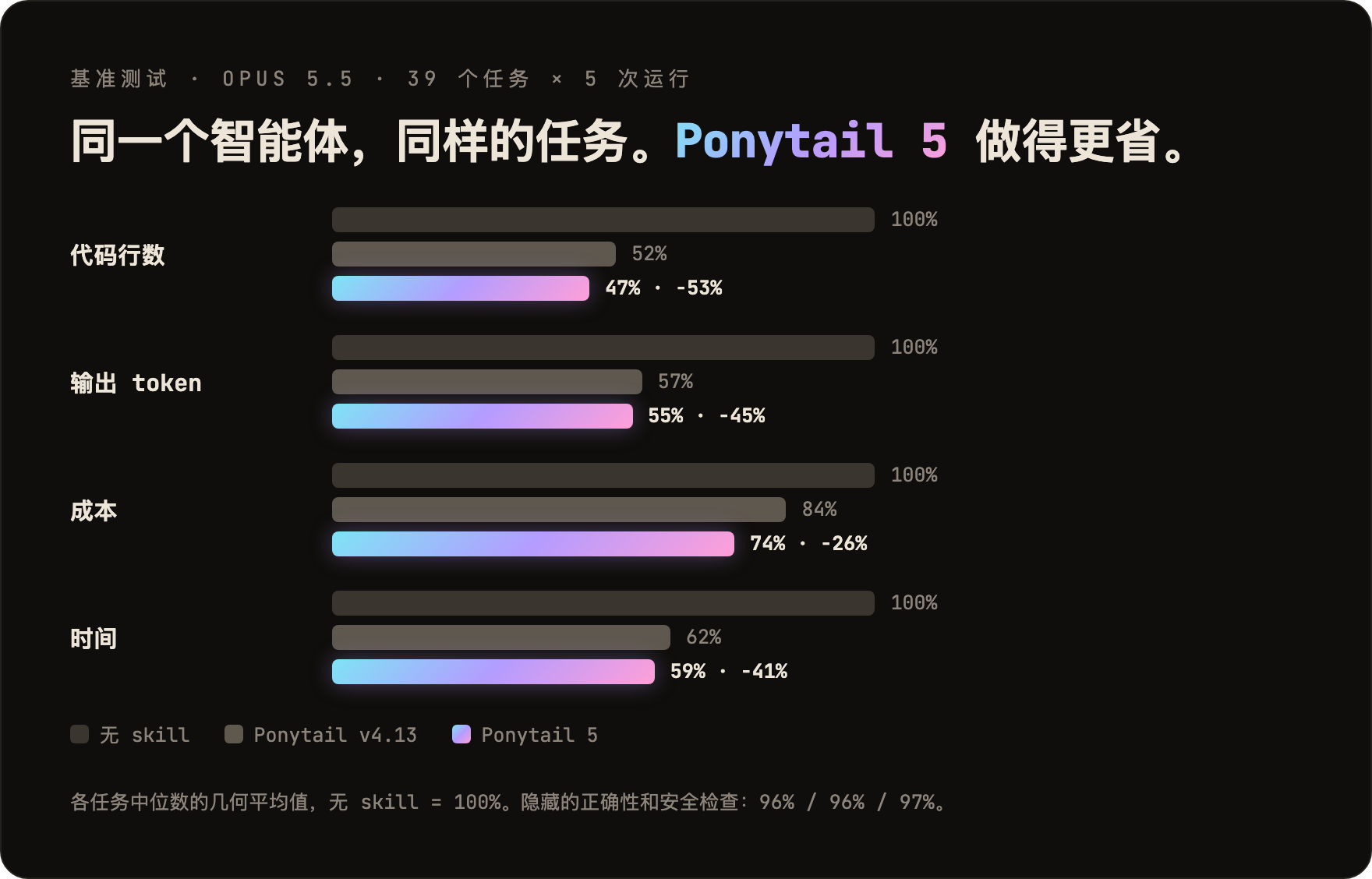
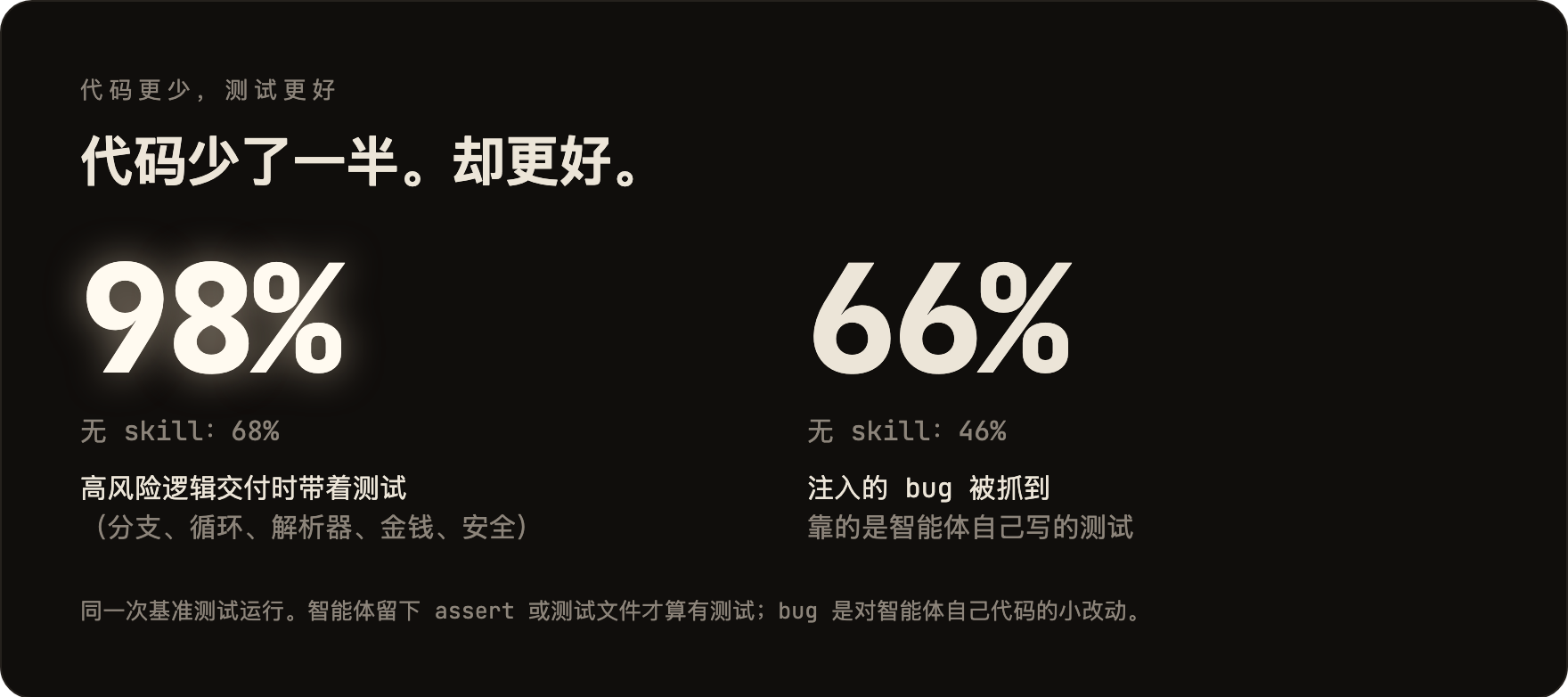
图表里没有体现的两点:在盲测对比中,Ponytail 5 的回复以 110 比 67 胜过上一版 Ponytail。另外,在 6 个安全任务上(SQL 注入、路径穿越、伪造 token、限流、格式错误的 CSV 行、缓存),它全部 30 次运行都通过了:代码更少,安全一点不少。方法、逐任务表格和局限性:benchmarks/results/2026-10-07-agentic.md。
**规则从来不是"token 最少"。**规则是:只写任务需要的东西,永远不砍校验、错误处理、安全和无障碍访问。代码最后变小,是因为只留下了必要的部分,而不是被硬压缩出来的。成本和延迟的降低只是副作用。
之前 / 之后
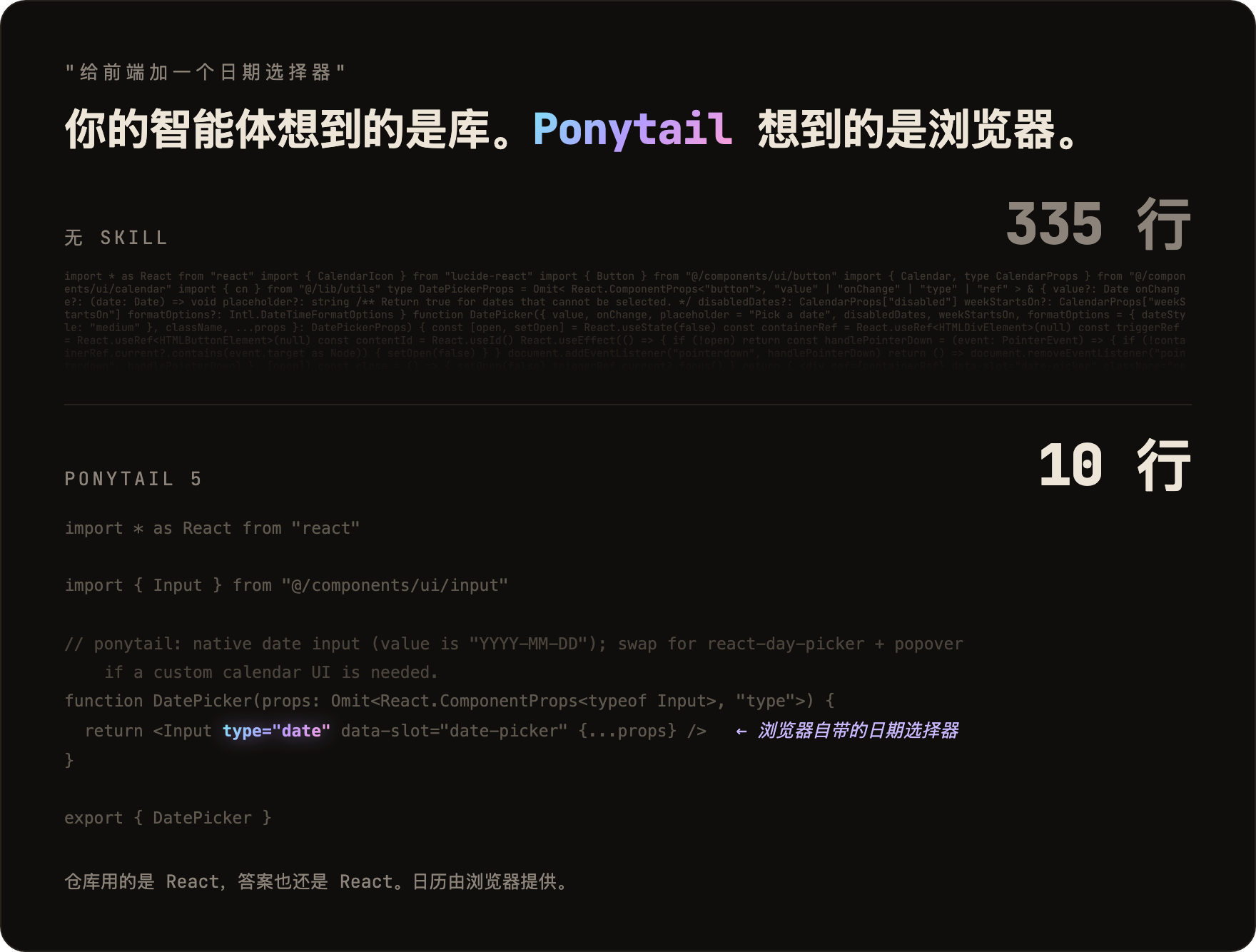
你要一个日期选择器。没有 Ponytail,智能体会安装一个日期选择器库,或者干脆手写一整个日历:335 行。Ponytail 5 会先看看已经有什么:仓库里有一个 Input 组件,而每个浏览器都自带日期选择器。它把这两样组合起来。10 行。
更多幸存的例子见 examples/。
审查,从头重建
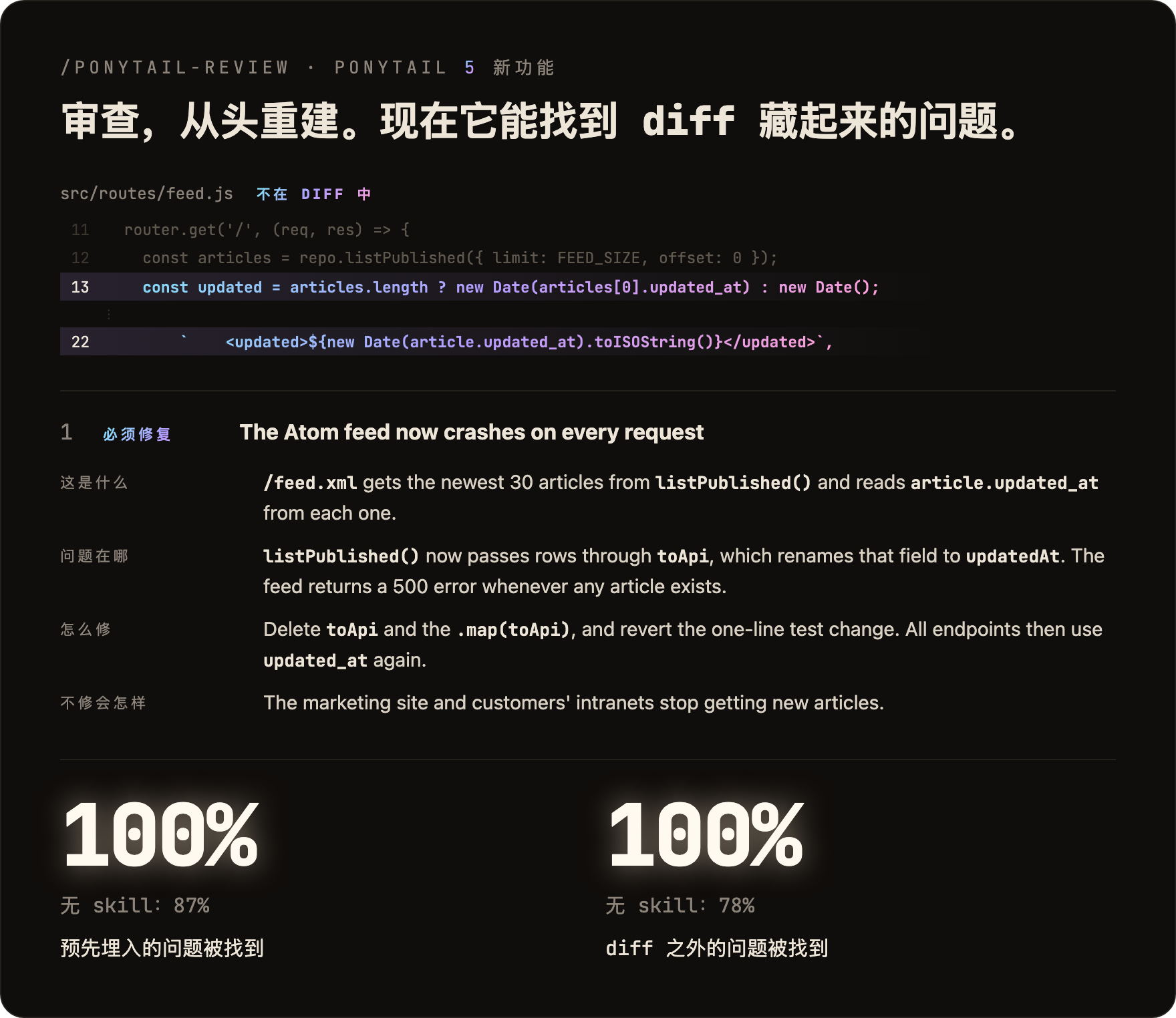
/ponytail-review 以前只找可以删掉的代码。现在它像出了故障会被叫醒的资深开发者那样审查:它会读你的改动涉及的代码,而不只是 diff,并检查 bug、安全、真实负载、缺失的测试、速度,以及可以删掉的东西。每条发现都写清这段代码做什么、哪里出错、怎么修、不修会怎样。
审计,从头重建
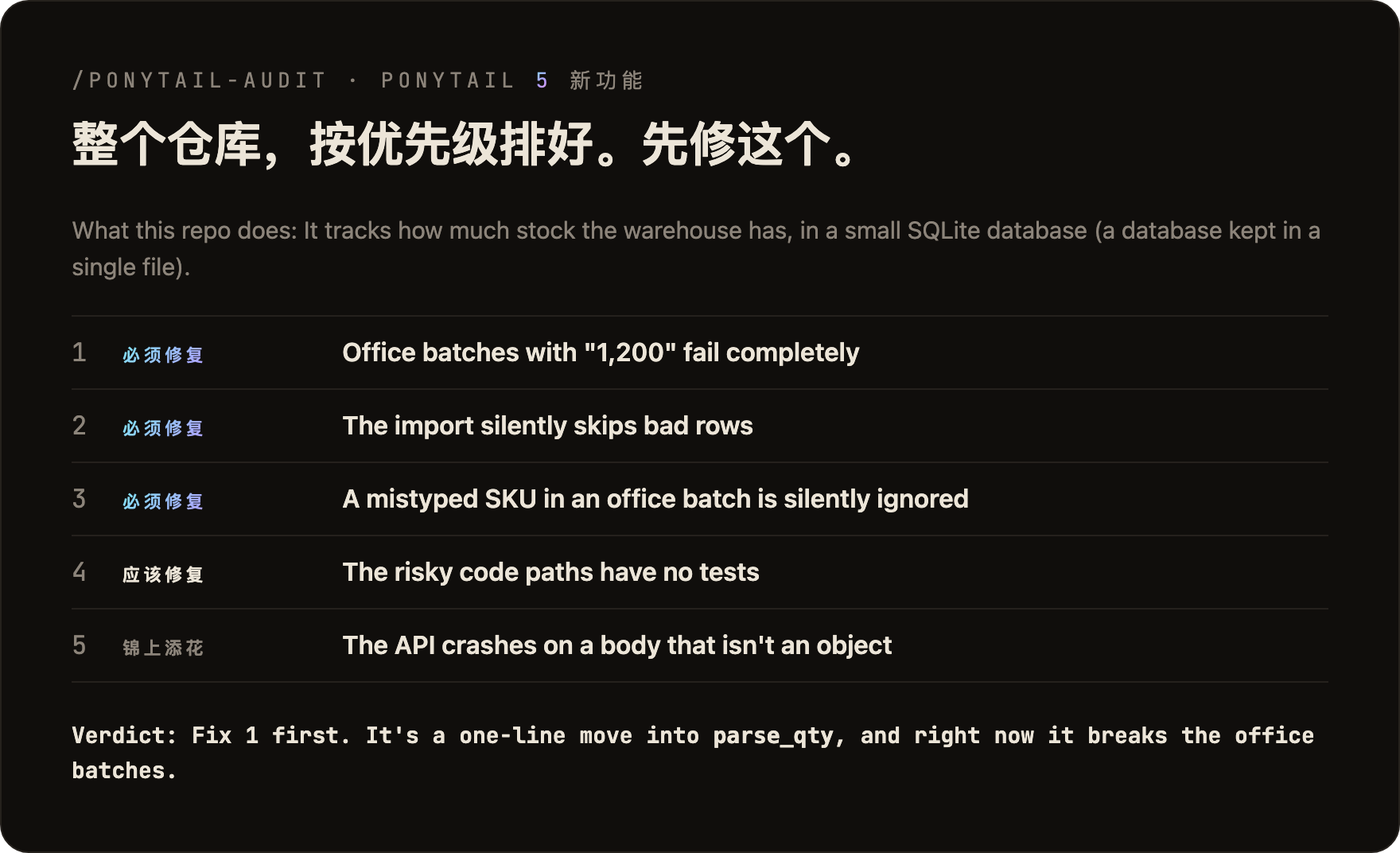
/ponytail-audit 对整个仓库做同样的检查。它先摸清代码的全貌:入口在哪、数据怎么流动、项目预计要承受多大负载。然后给发现的问题排好优先级,告诉你先修哪个。旧版审计只会列出可以删掉的东西。
5.3 新功能:信息栏
在 Claude Code 中,ponytail 现在会在提示框上方显示一条信息栏:当前任务花了多少钱、用了多少 token 和智能体时间、有多少次复用了已有代码而不是写新代码,以及最后一次改动后测试是否通过。它的按钮可以切换级别、运行 /ponytail-review 或 /ponytail-audit、把任务复制为 Markdown,还能把信息栏折叠成一行。不想要它?/ponytail band 可以隐藏它,同一个命令会让它重新显示。需要 Claude Code 2.1.290 或更高版本,在终端或桌面应用中显示。在 VS Code 聊天面板、云端会话和 claude -p 中不会显示。
Board 会打开一个本地页面,汇总你所有项目的任务:随时间变化的成本、智能体时间和 token,每个会话及其测试结果,以及你工作过的日子。默认情况下,所有数据都留在你的电脑上,位于 ~/.config/ponytail/band/。/ponytail band import 会把你以前的 Claude Code 会话连同成本、智能体时间和 token 一起加入看板。
工作原理
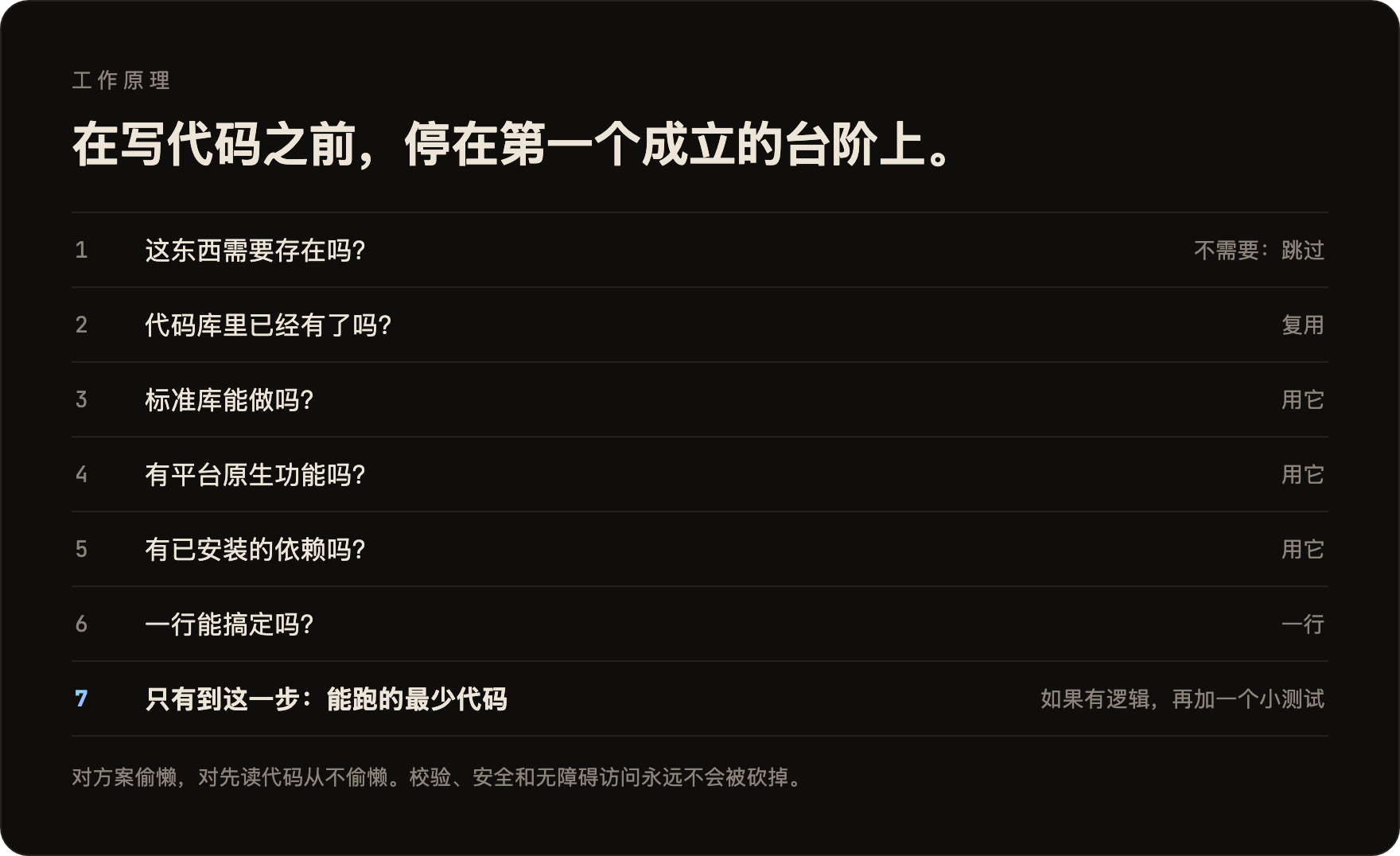
这个阶梯在理解问题之后才运行,而不是代替理解:它会先读改动涉及的代码,追踪真实的执行流程,再选择台阶。对方案偷懒,对阅读从不偷懒。
偷懒,但不失职:信任边界上的输入校验、防止数据丢失的处理、安全和无障碍访问,永远不会被砍掉。
带分支、循环、解析器,或涉及金钱、安全的逻辑,会留下一个小测试。每条回复结尾都会写明跳过了什么、没检查什么,以及你应该知道的风险。
提示词
Ponytail 就是一段提示词:skills/ponytail/SKILL.md。给读取规则文件的智能体用的精简版是 AGENTS.md。仓库里的其他东西都只是为了把这段提示词装进不同的智能体。
安装
Claude Code,分成两条提示:
/plugin marketplace add DietrichGebert/ponytail
/plugin install ponytail@ponytail
Codex:
codex plugin marketplace add DietrichGebert/ponytail
codex plugin add ponytail@ponytail
然后在 Codex 里打开 /hooks,信任它的两个生命周期 hook,再开一个新线程。
其他任何智能体:把 AGENTS.md 复制到你的项目里,或者让你的智能体把 skills/ponytail/SKILL.md 安装为 skill。Copilot、Cursor、OpenCode、Gemini 等的分步安装说明(英文):INSTALL.md。
就这些。他会很满意。但他不会说出来。
每个会话都会启用,另外有几个命令(见命令)。/ponytail ultra 是为代码库把你个人惹毛了的时候准备的。启动和切换模式时会显示当前模式。
只从 GitHub 上的 DietrichGebert/ponytail 或 npm 上的 @dietrichgebert/ponytail 安装 ponytail。它从不包含 .exe 或 .dll 文件;包含这些文件的副本不是我的。
命令
| 命令 | 作用 |
|---|---|
/ponytail [lite | full | ultra | off] |
设置强度或关闭。不带参数时:如果已关闭,就以默认级别打开;否则显示当前级别。 |
/ponytail band [on | off] |
仅限 Claude Code:隐藏或显示提示框上方的信息栏。不带参数时切换。级别不变。 |
/ponytail band import |
仅限 Claude Code:把以前的会话连同成本、智能体时间和 token 加入看板。 |
/ponytail-review |
像出了故障会被叫醒的资深开发者那样审查当前 diff:bug、安全、真实负载、没有测试的高风险代码、慢的地方,以及可以删掉的东西。每条发现都写清这段代码做什么、哪里出错、怎么修、不修会怎样。用普通的话指定目标来缩小或扩大范围:uncommitted、staged、branch,或一个 PR 链接。 |
/ponytail-audit |
对整个仓库做同样的检查,最重要的排在前面。 |
/ponytail-debt |
把你推迟处理的 shortcut: 捷径收集成一份清单,免得"以后再说"变成"永远不做"。 |
/ponytail-gain |
以计分板形式显示基准测试测得的效果(更少代码、更低成本、更快速度)。 |
/ponytail-help |
上述命令的速查表。 |
命令需要支持 skill 的宿主(Claude Code、Codex、Devin CLI、OpenCode、Gemini、Antigravity CLI、pi、Hermes Agent、Qoder、Grok Build)。在 Codex CLI 和 IDE 扩展中,它们是插件命名空间下的 skill,用 $ponytail:ponytail-review 调用。使用 hooks 的 Cursor 只支持 /ponytail 级别切换,以普通消息输入。只有指令的适配器(Cursor 的规则文件、Windsurf、Cline、Copilot、Kiro、Antigravity 的 AGENTS.md 备用模式)会加载始终生效的规则,但没有这些命令。
常见问题
需要配置文件吗?
不需要。可选的 ~/.config/ponytail/config.json 或环境变量 PONYTAIL_DEFAULT_MODE 可以设置默认级别,但什么都不是必需的。
为什么它会写 shortcut: 注释?
它标记一个有意的捷径以及何时该回头处理,/ponytail-debt 会把它们收集成一份清单。想换个词,或者完全不要?在项目的 CLAUDE.md 或 AGENTS.md 里写明,然后运行 /ponytail-debt <你的词>。
如果我真的需要那个 120 行的缓存类呢? 你不需要。非要的话,他也会写。慢慢地。正确地。一边看着你。
它能扩展吗? 你从没写过的代码可以无限扩展。零 bug,零 CVE,开天辟地以来 100% 在线。
为什么叫 "ponytail"? 你心里很清楚为什么。
赞助商
许可证
MIT。能用的最短许可证。