dingtalk-workspace-cli
DingTalk Workspace is an officially open-sourced cross-platform CLI tool from DingTalk. It unifies DingTalk’s full suite of product capabilities into a single package, is designed for both human users and AI agent scenarios.
原始仓库简介 · 中文摘要待补充 ·
README / 项目原文
DingTalk Workspace CLI (dws)
dws — DingTalk Workspace on the command line, built for humans and AI agents.





中文版 · English · Reference · Changelog
[!IMPORTANT] Co-creation Phase: This project accesses DingTalk enterprise data and requires enterprise admin authorization. Join the DingTalk DWS co-creation group for support and updates. See Getting Started below.

Table of Contents
Why dws?
- For humans —
--helpfor usage,--dry-runto preview requests,-f table/json/rawfor output formats. - For AI agents — structured JSON responses + built-in Agent Skills, ready out of the box.
- For enterprise admins — zero-trust architecture: OAuth device-flow auth + domain allowlisting + least-privilege scoping. Not a single byte can bypass authentication and audit.
Installation
macOS / Linux:
curl -fsSL https://raw.githubusercontent.com/DingTalk-Real-AI/dingtalk-workspace-cli/main/scripts/install.sh | sh
Linux binaries are linked against glibc (baseline 2.17). musl-based distributions such as Alpine are not supported; the installer detects them and stops instead of installing a binary that cannot start.
Windows (PowerShell):
irm https://raw.githubusercontent.com/DingTalk-Real-AI/dingtalk-workspace-cli/main/scripts/install.ps1 | iex
Skill mode: mono vs multi
The installer ships skills in one of two layouts. CLI commands (dws aitable ..., dws calendar ...) are identical in both modes — only the agent-side skill layout differs.
| Mode | What gets installed | Best for |
|---|---|---|
| multi (default) | Per-product skills (dingtalk-aitable, dingtalk-calendar, dingtalk-chat, ...) |
Single-product tasks; smaller context per call |
| mono (legacy) | One dws skill covering all products |
Cross-product workflows; single entry point |
Installs and upgrades default to
multi.monoremains available viaDWS_SKILL_MODE=monoordws skill setup --mode mono. File issues if you hit problems.
How to pick:
- Quick install (one-liner above): non-interactive, installs
multi. - TTY install (download then run):
curl -O .../install.sh && bash install.sh— prompts1) multi 2) mono(default 1). - Override via env:
curl -fsSL ... | DWS_SKILL_MODE=mono sh. - Switch later:
dws skill setup --mode mono(or--mode multi) — review the listed paths and confirm interactively.
Other install methods
npm (requires Node.js (npm/npx)):
npm install -g dingtalk-workspace-cli
Install only the CLI binary and skip all bundled Skill validation, extraction, Agent-directory updates, state writes, and user-cache refreshes:
DWS_NO_SKILLS=1 npm install -g dingtalk-workspace-cli
$env:DWS_NO_SKILLS = "1"
npm install -g dingtalk-workspace-cli
Without DWS_NO_SKILLS=1, npm keeps installing Skills as before. A failure
while refreshing the optional ~/.dws/skills cache is reported as a warning
after the CLI and Agent Skills are installed; run dws skill setup to refresh
Skills later.
Install the latest beta:
npm install -g dingtalk-workspace-cli@beta
Homebrew (macOS / Linux):
brew tap DingTalk-Real-AI/dingtalk-workspace-cli https://github.com/DingTalk-Real-AI/dingtalk-workspace-cli.git
brew install dingtalk-workspace-cli
The Formula lives in this repository, so the first
tapcommand must include the explicit repository URL. Afterwards, usebrew upgrade dingtalk-workspace-clinormally.
Install the keg-only Homebrew beta without replacing the stable Formula:
brew install dingtalk-workspace-cli-beta
$(brew --prefix dingtalk-workspace-cli-beta)/bin/dws version
To make the beta dws the default for the current shell, prepend $(brew --prefix dingtalk-workspace-cli-beta)/bin to PATH.
Pre-built binary: download from GitHub Releases.
macOS users: If you see "cannot be opened because Apple cannot check it for malicious software", run:
xattr -d com.apple.quarantine /path/to/dws
Build from source:
git clone https://github.com/DingTalk-Real-AI/dingtalk-workspace-cli.git
cd dingtalk-workspace-cli
go build -o dws ./cmd       # build to current directory
cp dws ~/.local/bin/         # install to PATH
Static endpoint data is generated from the Wukong baseline and committed in this
repository under internal/syncdata, so source builds do not require a sibling
data checkout.
Requires Go 1.26+. On supported macOS, Linux, and Windows amd64/arm64 hosts, the default CGO build includes the SafeChat backend without a build tag and therefore requires a working C compiler. Set
CGO_ENABLED=0only when a stub build is intentional. Usemake packagewith Docker to build all six release targets through the repository's pinned cross-compilation toolchain.
OpenHarmony build
The repository supports an openharmony/arm64 build with a Go 1.26.7
OpenHarmony toolchain. Every beta and stable release builds, self-signs,
verifies, and publishes dws-openharmony-arm64.tar.gz alongside the six
platform archives, and the binary has been validated on a HarmonyOS PC.
OHOS_GO=/path/to/openharmony-go \
  DWS_PACKAGE_VERSION=1.2.3 \
  ./scripts/dev/build-openharmony.sh

# Or create a self-signed package archive (dws-openharmony-arm64.tar.gz):
OHOS_GO=/path/to/openharmony-go \
  DWS_PACKAGE_VERSION=1.2.3 \
  ./scripts/dev/package-openharmony.sh
The build is CGO_ENABLED=0 and therefore keeps SafeChat unavailable. Runtime
native payloads are also unsupported on OpenHarmony. The script verifies the
resulting static AArch64 ELF and its Go build metadata; see
docs/openharmony.md for the complete boundary.
China mirror
For users in mainland China, the following channels avoid GitHub network issues. By default (without setting these environment variables) the installer pulls from GitHub.
1. Install script + pre-built binary (Gitee mirror):
Repository mirror: https://gitee.com/DingTalk-Real-AI/dingtalk-workspace-cli
curl -fsSL https://gitee.com/DingTalk-Real-AI/dingtalk-workspace-cli/raw/main/scripts/install.sh | DWS_GITEE_REPO=DingTalk-Real-AI/dingtalk-workspace-cli sh
With
DWS_GITEE_REPOset, the installer resolves the latest version and every release asset (binary, checksums, skills) from the Gitee API instead of GitHub. If it is unset, installation defaults to GitHub.
2. npm package (npmmirror mirror):
npm install -g dingtalk-workspace-cli --registry=https://registry.npmmirror.com
npmmirror automatically syncs public packages from the public npm registry, so this works directly in China.
3. Skills only (Gitee mirror):
curl -fsSL https://gitee.com/DingTalk-Real-AI/dingtalk-workspace-cli/raw/main/scripts/install-skills.sh | DWS_GITEE_REPO=DingTalk-Real-AI/dingtalk-workspace-cli sh
With
DWS_GITEE_REPOset,install-skills.shresolves the version and skills package from Gitee; it also auto-falls back to the Gitee mirror when GitHub is unreachable.
Upgrade
Requires v1.0.7 or later. For earlier versions, please re-run the install script to upgrade.
DWS 默认通过 npm Registry 查询发行版本。官方开源版独立二进制从同版本 GitHub Release 下载当前平台归档和技能包,校验后自更新,无需安装 npm;npm、pnpm 和 Homebrew 安装交由对应包管理器升级。详见版本来源与升级方式。
dws upgrade                    # interactive upgrade to latest version
dws upgrade --check            # check for new versions without installing
dws upgrade --list             # list stable release versions
dws upgrade --beta             # upgrade to the latest beta pre-release
dws upgrade --check --beta     # check the beta track without installing
dws upgrade --list --beta      # list beta pre-release versions
dws upgrade --version v1.0.7   # upgrade to a specific version
dws upgrade --version v1.0.8-beta.1  # upgrade to a specific beta version
dws upgrade --rollback         # rollback to the previous version
dws upgrade -y                 # skip confirmation prompt
dws upgrade 默认选择正式渠道;--beta 选择 npm 的 beta 渠道。显式配置的 GitHub 升级来源仍使用原有协议。
auth status、version 和 --version 也会显示版本检查结果;未知命令或参数报错时,发现新版会提示升级。检查不会自动安装软件,详见版本检查与升级提示。
Six-channel post-release verification
Maintainers and release validators can run the release-quality smoke checks for curl, PowerShell, npm stable, npm beta, Homebrew, and dws upgrade:
git clone https://github.com/DingTalk-Real-AI/dingtalk-workspace-cli.git /tmp/dws-verify
cd /tmp/dws-verify/verify
bash verify-all-channels.sh
The verifier uses isolated directories and does not replace the dws on the current PATH. It reports PASS, FAIL, and SKIP; a platform skip is not a pass and must be covered on the matching host. See verify/README.md for the platform matrix.
How it works
独立二进制的升级分为准备和替换两阶段:
- 准备 — 官方开源版下载同版本的当前平台归档和技能包,强制验证大小、SHA256 及新二进制版本。自定义 Registry 保留完整 npm 包及完整性校验。验证失败时不替换现有安装。
- Apply — only after all preparations succeed, the binary is replaced and skills are flattened into the canonical
~/.agents/skillsroot. Agents classified by the pinned compatibility registry as supporting the universal root read it directly; other detected Agents receive links to the canonical copy, with a direct-copy fallback when links are unavailable. Older DWS-managed agent-specific copies are backed up and retired so the same Skill is not discovered twice.
独立二进制升级保留自动备份和 dws upgrade --rollback。包管理器安装的回退由对应管理器处理;npm/pnpm 没有 --skip-skills 参数,但可设置 DWS_NO_SKILLS=1 仅安装 CLI 二进制。Homebrew 捆绑技能,使用 dws skill setup 安装到 Agent 目录。
| Flag | Description |
|---|---|
--check |
Check for updates without installing |
--list |
List available stable release versions with changelogs |
--beta |
Use the beta pre-release track for upgrade, --check, or --list |
--version |
Upgrade to a specific version (e.g. v1.0.7 or v1.0.8-beta.1) |
--rollback |
Rollback to the previous backed-up version |
--force |
Force reinstall even if already on the latest version |
--skip-skills |
Skip skill package update |
-y |
Skip confirmation prompt |
Getting Started
dws auth login            # browser opens automatically
dws auth login --device   # for headless environments (Docker, SSH, CI)
Select your organization and authorize. That's it.
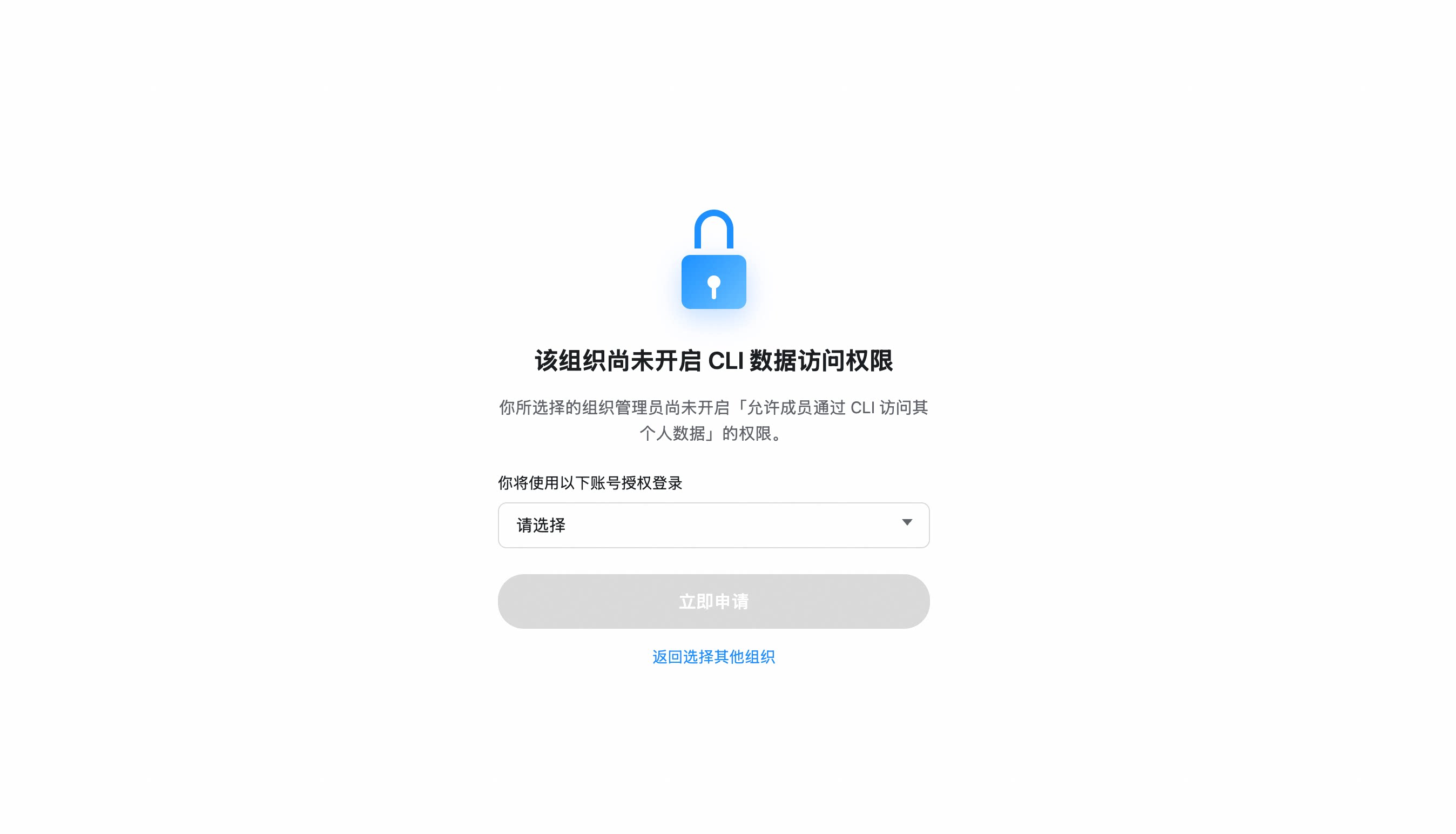
If your organization hasn't enabled CLI access, you'll be prompted to send an access request to your admin. Once approved, re-run
dws auth login.
Organization hasn't enabled CLI access?
- After selecting your organization, click "Apply Now" to notify the admin
- The admin receives a request card and can approve with one click
- Once approved, re-run
dws auth login
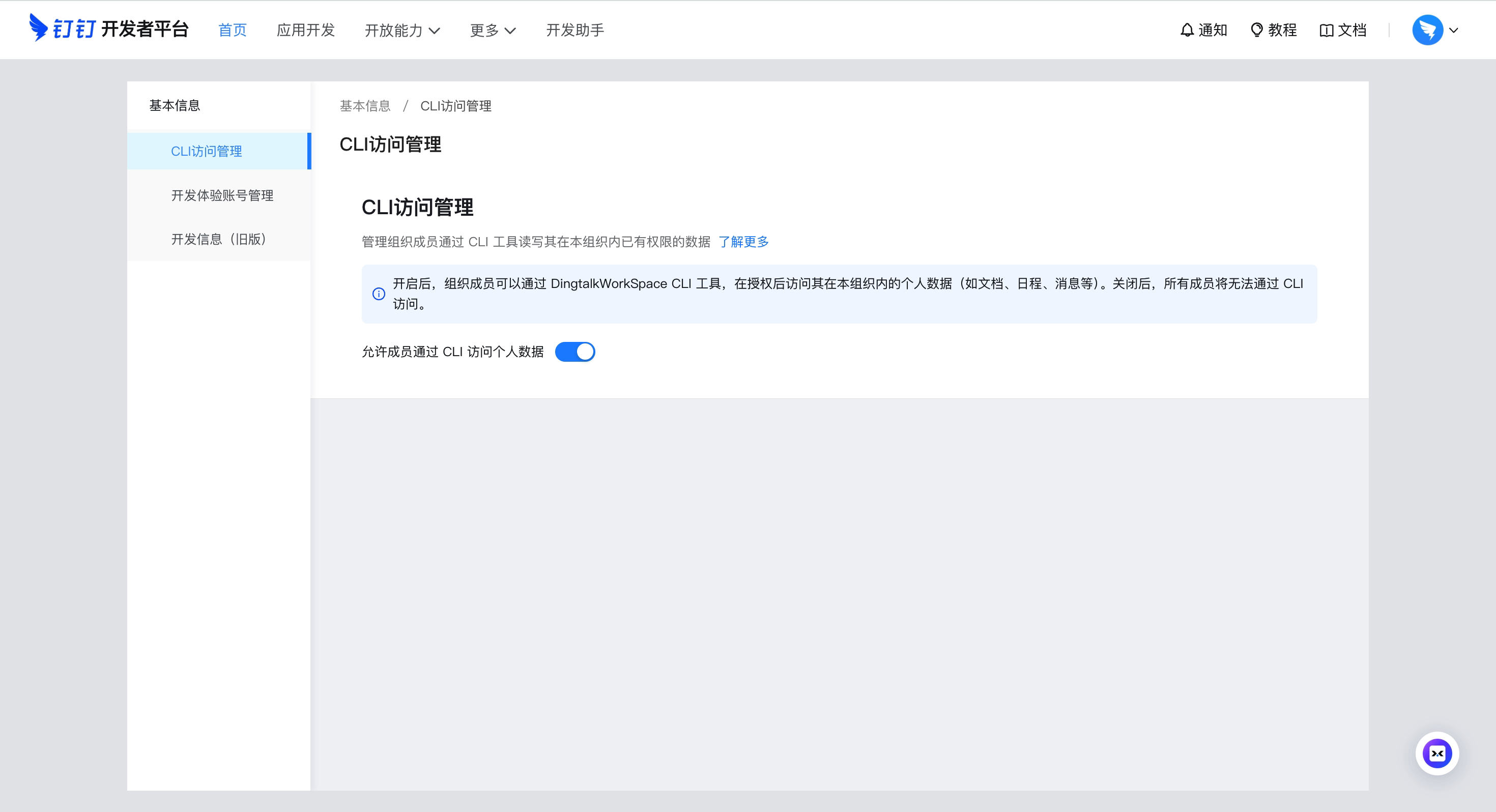
Admin: Enable CLI access for your organization
Go to Developer Platform → "CLI Access Management" → Enable.
Custom App mode (CI/CD, ISV integration)
For enterprise-managed scenarios, create your own DingTalk app:
- Open Platform Console → Create App
- Security Settings → Add redirect URLs:
http://127.0.0.1,https://login.dingtalk.com - Publish the app
- Login:
dws auth login --client-id <your-app-key> --client-secret <your-app-secret>
Credentials are securely persisted after first login (Keychain). Subsequent runs auto-refresh tokens.
Multiple organizations (profiles)
dws can stay logged in to several DingTalk accounts at once, including multiple accounts in the same organization. A profile is uniquely identified by corpId:userId; the current profile decides which identity a command runs as.
Business commands automatically check and refresh local OAuth credentials as needed;
there is no need to run auth status before each request. auth status retains
refresh, migration and repair behavior and may wait for the authentication lock.
For concurrent polling, use dws auth status --readonly --format json (optionally with
--profile): it reads a local snapshot without the authentication lock, network
validation, refresh, migration or credential writes. System Keychain reads can
still wait. Both modes use the same output fields. A read-only result with a
non-empty reason is inconclusive and must not be treated as a confirmed logout;
local_state_requires_repair signals migration/repair and local_state_unreadable
signals a failed local read. Use auth status without --readonly with the same
profile for refresh or repair. Read-only mode never reports a refresh and may
report an expired access token that normal mode would refresh.
Concurrent updates may yield an older snapshot or an inconclusive result.
In both modes, authenticated is true when either the access or refresh
credential is valid; token_valid separately describes access-token usability.
dws auth login                              # add or refresh one account
dws profile list                            # list every logged-in account
dws profile switch <corpId:userId>          # persistently switch; use - to toggle back
dws profile switch "<corpName>:<userName>"  # friendly input; names must be unique
dws --profile <corpId> contact user search --query "..."        # use that org's explicitly recorded current account
dws --profile <corpId:userId> contact user search --query "..." # use one exact account without changing the default
Selectors support corpId:userId, corpId:userName, corpName:userId, and corpName:userName. Friendly names are input aliases only; use the stable profile value returned by profile list for automation. Duplicate organization or account names fail with explicit corpId:userId candidates. If an organization has multiple accounts but no recorded current account, --profile <corpId> fails instead of choosing the first or most recently used account.
currentProfile, previousProfile, and per-organization defaults are stored as exact identities. primaryProfile remains in JSON only for compatibility and is not used for selection. profile list reads status and expiry from each real identity Token without refreshing it. auth logout --profile <corpId> removes all local accounts in that organization; an exact selector or local profile name removes one account.
Cross-org reads are orchestrated by the agent rather than a built-in --all-orgs: list profiles, group by corpId, and use the unique isOrgCurrent=true account for each organization. If a multi-account organization has no default, ask the user to choose an account first. Writes default to the current account — confirm both organization and account before cross-org writes.
On macOS, transient or unclassified Keychain read failures block a new OAuth login rather than risking a mixed Keychain/file-DEK state. A confirmed missing DEK or ciphertext/DEK mismatch is preserved through authorization and replaced only for the slots targeted by the fresh login. If normal terminal commands can still read the login while a sandbox using DWS_DISABLE_KEYCHAIN=1 cannot, migrate the legacy and profile auth entries without exposing tokens:
env -u DWS_DISABLE_KEYCHAIN dws auth migrate-keychain --to file-dek --dry-run --format json
env -u DWS_DISABLE_KEYCHAIN dws auth migrate-keychain --to file-dek --yes --format json
DWS_DISABLE_KEYCHAIN=1 dws auth status --format json
The migration validates every selected auth ciphertext before writing, ignores unrelated application secrets, and can be rerun after an interrupted commit. If validation identifies genuinely damaged ciphertext, remove only the affected account with dws auth logout --profile <corpId:userId>, or all accounts in one organization with --profile <corpId>, then log in again. Use dws auth reset only when you intend to discard every local profile.
Migrate auth between Linux sandboxes
Copying only ~/.dws/app.json does not carry the refresh token; access tokens expire after ~2 hours. Use the official export/import flow:
# Sandbox A (already logged in)
dws auth export -o /tmp/dws-auth.tar.gz
# Or for copy/paste: dws auth export --base64 -o /tmp/dws-auth.b64

# Sandbox B
dws auth import -i /tmp/dws-auth.tar.gz
# Or: dws auth import -i /tmp/dws-auth.b64 --base64
dws auth status   # confirm "Refresh Token: valid"
The bundle includes the encrypted keychain under ~/.local/share/dws-cli (with auth-token.enc and dek) plus required ~/.dws config files.
Windows export and import are intentionally rejected before credentials or
bundles are read: Windows stores credentials as DPAPI-protected HKCU Registry
values, and the current file-DEK bundle has no safe DPAPI-to-portable conversion.
Quick Start
dws contact user search --query "engineering"      # search contacts
dws calendar event list                            # list today's calendar events
dws doc search --query "quarterly"                 # search DingTalk Docs
dws whiteboard +query --node "<whiteboard-node-id>" --view summary --format json  # inspect a whiteboard
dws minutes list mine                              # list AI meeting notes I created
dws drive list                                     # list DingTalk drive files
dws todo task create --title "Quarterly report" --executors "<your-userId>"   # create a todo (replace <your-userId>)
dws todo task list --dry-run                       # preview without executing
Full command list:
docs/command-index.md— all commands with descriptions and when-to-use guidance.
Whiteboards
Use dws whiteboard for standalone whiteboards and whiteboards embedded in documents: query content, create / update with OpenNodes, preview changes with +diff, render local SVG previews, and manage personal / team templates or use public templates.
dws whiteboard --help
dws whiteboard render --source @whiteboard.json --output ./whiteboard-preview.svg --format json
dws whiteboard +diff --help
dws whiteboard template personal list --format json
dws whiteboard template team list --template-workspace "<workspace-id>" --page-all --format json
dws whiteboard template public list --query "retrospective" --format json
whiteboard.json is an OpenNodes source file. SVG rendering is a local preview; review its fidelity and warnings, then confirm the current preview before creating the whiteboard. Use +diff to inspect the proposed update before +update. For template save / create commands, --dry-run performs an optional server-side preflight without saving a template or creating a whiteboard.
See the whiteboard reference, Diff guide, and SVG preview guide.
Using with Agents
dws is designed as an AI-native CLI. Complete Installation and Getting Started first, then install Agent Skills:
npx skills add DingTalk-Real-AI/dingtalk-workspace-cli -g
The installer first shows the plan — which skills, which target directories, and how existing same-named skills will be handled — and asks for confirmation before writing anything. dws skill setup remains the power-user / China / upgrade path. See Agent Skills.
Agent Invocation Patterns
# Use --yes to skip confirmation prompts (required for agents)
dws todo task create --title "Review PR" --executors "<your-userId>" --yes

# Use --dry-run to preview operations (safe execution)
dws contact user search --query "engineering" --dry-run

# Use --jq to extract precisely (save tokens)
dws contact user get-self --jq '.result[0].orgEmployeeModel | {name: .orgUserName, dept: .depts[0].deptName, userId}'
Command Help and Schema
Use Cobra help and Schema for different parts of the command contract:
dws <path> --helpis the source of truth for whether a command exists and which flags the binary accepts.dws schema "<path>" --compactis the normative Agent view for command selection, CLI parameters and constraints, risk, and confirmation; use a full leaf with a narrow--jqprojection for mapping or provenance audits.- If Help and Schema disagree, treat it as contract drift: pass only flags accepted by Cobra and use the more conservative safety semantics.
- Schema describes commands; it does not read or search DingTalk business data. Execute the real product command after discovery.
# Confirm that the command exists and inspect accepted flags
dws aitable record query --help

# Discover within a product, then inspect the selected leaf contract
dws schema aitable --compact
dws schema "aitable record query" --compact

# Execute the real business query
dws aitable record query --base-id BASE_ID --table-id TABLE_ID --limit 10
dws schema --all exports the complete contract for tooling, CI, audits, and compatibility baselines. Agents should query progressively with --compact; its positive field allowlist prevents new full/audit fields from silently expanding Agent context.
Agent Skills
npx skills add DingTalk-Real-AI/dingtalk-workspace-cli -g
This discovers skills/multi/dingtalk-*/SKILL.md (catalog layout, three levels under skills/, the depth npx skills add already walks) and installs dingtalk-calendar, dingtalk-chat, … into the agent directories vercel-labs/skills already knows: project .agents/skills/ by default, user-global .agents/skills with -g, plus links into ~/.cursor/skills, ~/.claude/skills, and the other registered homes.
Without -y, the installer lists the skills, target directories, and existing same-named content handling for confirmation before it writes. Keep that prompt for interactive and first-time global installs. -y exists for automation only: add it after the user has explicitly confirmed the install targets and overwrite behavior — this path does not maintain dws skill setup's ownership, backup, or mono↔multi mutual-exclusion cleanup state, so a skipped prompt can replace user files without consent.
The all-in-one mono skill (skills/mono, frontmatter name dws) is marked metadata.internal: true, so it is not a default installable skill. Agents therefore do not double-route between dws and the per-product skills.
dws skill setup remains the power-user / China / upgrade path. It still owns Gitee fallback, upgrade-time skill refresh, ownership in ~/.dws/skills-state.json, and mono↔multi mutual-exclusion cleanup.
The repo ships two source trees:
skills/multi/— per-product skills (dingtalk-aitable/,dingtalk-calendar/,dingtalk-chat/, ...), each with its ownSKILL.md. Default for bothnpx skills addanddws skill setup.skills/mono/— single-skill layout (oneSKILL.md+references/products/), legacy. Hidden fromnpx skills add. Still installed bydws skill setup --mode monoand the curl / zip installers.
Leaf safety/parameters/selection prose for Schema generation come from ProductDecl / ContractFinal declarations in Go. The former internal/cli/schema_hints/ HintFile tree is fully retired and must not reappear.
After installing, AI tools like Claude Code / Cursor can operate DingTalk directly through natural language.
China users:
npx skills addclones from GitHub. Preferdws skill setupor prefixDWS_GITEE_REPOoninstall-skills.sh— see China mirror.
Power-user / China / upgrade: dws skill setup
# Interactive: prompts for mode + target agents
dws skill setup

# Preview the exact directories that mono setup would back up and replace
dws skill setup --mode mono --target all --dry-run

# Run interactively and confirm the listed directories
dws skill setup --mode mono --target all

# Preview, then install multi skills to a single agent home with interactive confirmation
dws skill setup --mode multi --target cursor --dry-run
dws skill setup --mode multi --target cursor

# Point at a local source (an extracted dws-skills.zip root, its multi/ directory, or a source checkout), preview first
DWS_SKILL_SOURCE=/absolute/path/to/extracted-dws-skills dws skill setup --mode multi --dry-run
DWS_SKILL_SOURCE=/absolute/path/to/extracted-dws-skills dws skill setup --mode multi
| Flag | Values | Description |
|---|---|---|
--mode |
mono | multi |
Skill layout; defaults to interactive prompt |
--target |
all | claude | cursor | codex | zcode | opencode | qoder |
Where to install; all covers every detected agent home, including ZCode at ~/.zcode/skills |
--source |
path | Local source directory (overrides bundled skills); accepts a mode directory, an extracted dws-skills.zip root, or a source checkout containing skills/ |
--yes |
— | Scripting-only: skip the confirmation prompt. Removals are still backed up to ~/.dws/skill-backups/ first |
The setup command can remove the opposite-mode layout (
dws/for multi, DWS-managed multi Skills for mono) and stale managed Skills not in the bundle. DWS records ownership, installer version, source, and content digest centrally in~/.dws/skills-state.json(or$DWS_CONFIG_DIR/skills-state.json). Exact official names shipped before the centralized state remain a frozen migration list. Adingtalk-*prefix alone never authorizes cleanup, so other same-prefix market/user Skills are preserved. Every removal is previewed before confirmation and preserved under~/.dws/skill-backups/<timestamp>/; a directory that cannot be backed up is never removed. In a non-interactive shell, first run--dry-runand inspect its output; only then may the caller explicitly choose the scripting-only confirmation bypass.
After a multi setup or upgrade, DWS stores the official bundle snapshot and centralized ownership metadata in ~/.dws/skills-state.json (or $DWS_CONFIG_DIR/skills-state.json). Every upgrade installs and overwrites the complete bundled Skill set from that release. Deleting or excluding a bundled Skill is not sticky: the next upgrade restores it. dws upgrade --force additionally allows reinstalling the current CLI version when no newer version is available.
Env vars: DWS_NO_SKILLS=1 (npm, install.sh, and install.ps1; skips the complete Skill path), DWS_SKILL_MODE=mono|multi (also honored by install.sh / install.ps1), DWS_SKILL_SOURCE=<path>.
What's included (mono layout):
| Component | Path | Description |
|---|---|---|
| Master Skill | skills/mono/SKILL.md |
Intent routing, decision tree, safety rules, error handling |
| Product references | skills/mono/references/products/*.md |
Per-product command reference (aitable, chat, calendar, etc.) |
| Intent guide | skills/mono/references/intent-guide.md |
Disambiguation for confusing scenarios (e.g. report vs todo) |
| Global reference | skills/mono/references/global-reference.md |
Auth, output formats, global flags |
| Error codes | skills/mono/references/error-codes.md |
Error codes + debugging workflows |
| Ready-made scripts | skills/mono/scripts/*.py |
13 batch operation scripts (see below) |
Ready-made scripts — 13 Python scripts for common multi-step workflows
| Script | Description |
|---|---|
calendar_schedule_meeting.py |
Create event + add participants + find & book available meeting room |
calendar_free_slot_finder.py |
Find common free slots across multiple people, recommend best meeting time |
calendar_today_agenda.py |
View today/tomorrow/this week's schedule |
import_records.py |
Batch import records from CSV/JSON into AITable |
bulk_add_fields.py |
Batch add fields to an AITable data table |
upload_attachment.py |
Upload attachment to AITable attachment field |
todo_batch_create.py |
Batch create todos from JSON (with priority, due date, executors) |
todo_daily_summary.py |
Summarize today/this week's incomplete todos |
todo_overdue_check.py |
Scan overdue todos and output overdue list |
contact_dept_members.py |
Search department by name and list all members |
attendance_my_record.py |
View my attendance records for today/this week/specific date |
attendance_team_shift.py |
Query team shift schedules and attendance statistics |
report_inbox_today.py |
View today's received reports with details |
ISV Integration: Author your own Agent Skills and orchestrate them with dws skills for cross-product workflows: ISV Skill → dws Skill → DingTalk Open Platform API (enforced auth + full audit).
Features
Personal Event Subscription — real-time DingTalk messages for event-driven agents
dws event consume subscribes as the currently logged-in user over a managed Stream WebSocket and emits each event as one NDJSON line on stdout. The 28-event public catalog covers scoped and all one-to-one/group messages, specified senders, read/recall/reaction events, group lifecycle events, seven OA approval task/instance events, one VoIP invitation event, three Todo task lifecycle events, and the interactive-card callback event.
The default ndjson, json, and pretty output preserves the transport envelope (type, event_type, string data, and headers) for existing scripts; compact retains its existing processor. Add --flatten to emit the stable top-level business fields used by Agent workflows. --format controls JSON serialization; --flatten controls the data structure and cannot be combined with -f raw or --debug-raw-events.
Prerequisite: run
dws auth login. Personal identity is resolved from the OAuth token and cannot be supplied through command-line identity flags.
For an event-focused installation, use the official convenience installer:
curl -fsSL https://raw.githubusercontent.com/DingTalk-Real-AI/dingtalk-workspace-cli/main/scripts/install-event.sh | sh

# Or install the standalone multi skill from an existing dws installation
dws skill setup --mode multi -s event
# Inspect the public personal event catalog and schema
dws event list
dws event schema user_im_message_receive_o2o --flatten
dws event list --category oa
dws event schema user_oa_approval_task_created --flatten
dws event list --category card
dws event schema user_card_action_triggered --flatten
dws event list --category todo
dws event schema user_todo_task_create --flatten

# Listen for messages that mention the current user
dws event +listen-im --kind at-me -f ndjson

# Listen for messages from a specified sender
dws event +listen-im --kind sender --user <userId> -f ndjson

# Listen by openDingtalkId (external contact, bot, or cross-organization identity)
dws event +listen-im --kind sender --open-dingtalk-id <openDingtalkId> -f ndjson

# Listen for messages in a specified group
dws event +listen-im --kind group --chat-id <openConversationId> -f ndjson

# Listen for all one-to-one or all group messages
dws event +listen-im --kind all-direct -f ndjson
dws event +listen-im --kind all-group -f ndjson

# Listen for a specified group's title changes, member changes, or disband event
dws event consume user_im_group_updated --group <openConversationId> --flatten -f ndjson
dws event consume user_im_group_member_added --group <openConversationId> --flatten -f ndjson
dws event consume user_im_group_member_exited --group <openConversationId> --flatten -f ndjson
dws event consume user_im_group_disbanded --group <openConversationId> --flatten -f ndjson

# Listen for messages, reads, and recalls from the same sender in one process
dws event +listen-im --kind sender --user <userId> \
  --events message,read,recall -f ndjson

# Listen for all seven public OA approval events in one process
dws event consume \
  user_oa_approval_task_created \
  user_oa_approval_task_finished \
  user_oa_approval_task_redirected \
  user_oa_approval_instance_started \
  user_oa_approval_instance_cc \
  user_oa_approval_instance_terminated \
  user_oa_approval_instance_finished \
  --flatten -f ndjson

# Listen for Todo create/update/delete events where the current user is an executor
dws event consume \
  user_todo_task_create \
  user_todo_task_update \
  user_todo_task_delete \
  --role-types executor \
  --flatten -f ndjson

# Listen for interactive-card callbacks; the schema documents reviewed fields while preserving extensions
dws event consume user_card_action_triggered --flatten -f ndjson

# Inspect local consumers and cancel a subscription
dws event status
dws event stop <subscribe_id>
The structured interactive-card context is at payload.body.actionData.context. Join questions[].id to answers[question_id], then resolve IDs in selected through the same question's options[].id; an empty selected is a valid no-selection state. JSON strings in body.context are compatibility fallbacks, and every payload level continues to preserve unknown fields.
For one-to-one and specified-sender events, use exactly one target identity: --user for an internal userId, or --open-dingtalk-id for an openDingtalkId. The CLI does not infer or convert between these identity types.
| Feature | Details |
|---|---|
| Managed lifecycle | consume creates or reuses the personal subscription; stop cancels it and cleans local state |
| Shared connection | Consumers for the same user share one local bus and cloud connection |
| Multi-event process | One consume process can listen for compatible events for the same target while retaining one subscription per event |
| Subscription isolation | Normal consumers match both event type and subscribe_id |
| Agent-friendly output | Stream events are written to stdout as NDJSON; status and diagnostics use stderr |
| Observability | status shows remote subscriptions, the personal bus, and local consumers |
| Cross-platform | Unix Socket on macOS/Linux, Windows Named Pipe on Windows |
See skills/multi/dingtalk-event/SKILL.md for the Agent workflow and supported event parameters.
Raw API Access — call App Token-capable server-side DingTalk OpenAPIs directly
dws api lets you call server-side DingTalk OpenAPIs that support an internal-app App Token, without an SDK. Tokens are automatically acquired and refreshed.
Prerequisite: Provide one complete custom-app Client ID/Client Secret pair through one-shot flags, environment variables, or app config saved by a successful login (see Custom App mode). MCP default-credential login alone does not support Raw API calls.
Client ID and Client Secret are resolved only as one complete pair, in this order: complete --client-id/--client-secret > complete DWS_CLIENT_ID/DWS_CLIENT_SECRET > complete app config. A half-configured source fails explicitly and is never combined with another source. Flags/env used directly by dws api are one-shot and do not persist the App Secret; flags/env used by a successful dws auth login are persisted as that exact pair for OAuth refresh and later Raw API calls. The acquired App Token is cached under app-token:<clientID>; the hidden --token accepts a temporary caller-supplied App Token and neither persists nor refreshes it.
Client Secrets use the canonical Keychain slot appsecret:<clientID>, distinct from OAuth User Tokens and App Tokens. Existing plaintext app config and historical client-secret:<clientID> entries are migrated automatically. If the old and new slots disagree, DWS fails closed and asks for a new login instead of guessing.
# Login (first time only)
dws auth login --client-id <APP_KEY> --client-secret <APP_SECRET>

# Or use one environment pair; a complete env pair overrides app config atomically
export DWS_CLIENT_ID=<APP_KEY>
export DWS_CLIENT_SECRET=<APP_SECRET>

# === api.dingtalk.com ===

# List all enterprise apps
dws api GET /v1.0/microApp/allApps

# Search users (POST + JSON body)
dws api POST /v1.0/contact/users/search \
  --data '{"queryWord":"engineering","offset":0,"size":10}'

# === oapi.dingtalk.com ===

# Get user details (use --base-url to specify domain)
dws api POST /topapi/v2/user/get \
  --base-url https://oapi.dingtalk.com \
  --data '{"userid":"<USER_ID>"}'

# Or use the full URL directly
dws api POST https://oapi.dingtalk.com/topapi/v2/user/get \
  --data '{"userid":"<USER_ID>"}'

# === General ===
dws api GET /v1.0/microApp/allApps --dry-run             # preview request
dws api GET /v1.0/microApp/allApps --jq '.appList | length'  # jq filtering

# Read a JSON body from a file (--params also accepts @file; use - for stdin)
dws api POST https://oapi.dingtalk.com/topapi/v2/department/listsubid \
  --data @department-request.json --dry-run

# Stream one multipart file; top-level --data fields become text form fields; review a dry-run first
dws api POST https://oapi.dingtalk.com/media/upload \
  --data '{"type":"image"}' --file media=./demo.png --dry-run
| Feature | Details |
|---|---|
| Dual-form auto-detection | Automatically selects api.dingtalk.com (header auth) or oapi.dingtalk.com (query-param auth) based on URL |
| Automatic token management | App-level accessToken is fetched on first call, cached while valid, auto-refreshed on expiry |
| Domain allowlist | Only api.dingtalk.com and oapi.dingtalk.com permitted — prevents token leakage |
| Auto-pagination | --page-all iterates all pages. --page-limit caps the maximum (default 10, set to 0 for unlimited, hard cap at 500 to prevent infinite loops) |
| Secure transport | HTTPS/443 and same-origin HTTPS redirects only; bounded JSON/error reads and streamed atomic binary downloads |
| Agent discovery | When product commands do not cover an API, the bundled misc/mono Skill follows https://open.dingtalk.com/llms.txt to the official endpoint docs; raw api remains excluded from Agent Schema |
dws api automatically uses only an internal-app App Token. It does not read OAuth User Tokens and does not expose --as user / --user. Prefer an existing DWS product command; use this escape hatch only for an uncovered internal-app server OpenAPI. Review a dry-run and confirm before create, update, delete, revoke, or send operations.
Smart Input Correction — auto-corrects common AI model parameter mistakes
Built-in pipeline engine that normalizes flag names, splits sticky arguments, and fuzzy-matches typos:
# Naming convention auto-conversion (camelCase / snake_case / UPPER -> kebab-case)
dws aitable record query --baseId BASE_ID --tableId TABLE_ID         # auto-corrected to --base-id --table-id

# Sticky argument splitting
dws contact user search --query "engineering" --timeout30           # auto-split to --timeout 30

# Fuzzy flag name matching
dws aitable record query --base-id BASE_ID --tabel-id TABLE_ID       # --tabel-id -> --table-id

# Value normalization (boolean / number / date / enum)
# "yes" -> true, "1,000" -> 1000, "2024/03/29" -> "2024-03-29", "ACTIVE" -> "active"
| Agent Output | dws Auto-Corrects To |
|---|---|
--userId |
--user-id |
--limit100 |
--limit 100 |
--tabel-id |
--table-id |
--USER-ID |
--user-id |
--user_name |
--user-name |
jq Filtering & Field Selection — fine-grained output control to reduce token consumption
# Built-in jq expressions
dws aitable record query --base-id BASE_ID --table-id TABLE_ID --jq '.invocation.params'
dws schema "dev app create" --jq '.parameters'

# Return only specific fields
dws aitable record query --base-id BASE_ID --table-id TABLE_ID --fields invocation,response
Schema Introspection — Agent command discovery and execution contracts
dws schema aitable --compact                            # discover product commands
dws schema "aitable record query" --compact             # view the selected Agent leaf contract
dws schema "aitable record query" --jq '[.parameters | to_entries[] | select(.value.required)]' # view required fields
dws schema --all                                        # full export for CI/audit/baselines
Pipe & File Input — read flag values from files or stdin
# Read message body from a file
dws chat message send-by-bot --robot-code BOT_CODE --group GROUP_ID \
  --title "Weekly Report" --text @report.md

# Pipe content via stdin
cat report.md | dws chat message send-by-bot --robot-code BOT_CODE --group GROUP_ID \
  --title "Weekly Report"

# Read from stdin explicitly
dws chat message send-by-bot --robot-code BOT_CODE --group GROUP_ID \
  --title "Weekly Report" --text @-
Note:
@is treated as the@<path>file-injection prefix only when the next character is an ASCII path-shaped character (A-Z/a-z/0-9/.///~/_/-), or@-for stdin. Chat-bot payloads like--text "@所有人 周报"or--text "@张三 看一下"pass through unchanged, so literal mentions reach the API as-is.
DingTalk bot — connect a robot to your local AI
dws dev connect bridges a DingTalk robot to a local AI CLI (Claude Code / Codex / opencode / Qoder / Gemini / Pi, or any tool via --agent-cmd): @-mention the bot in a chat and it answers using your local agent, keeping per-conversation multi-turn memory.
dws dev connect --channel auto --unified-app-id <unifiedAppId>
--unified-app-idresolvesclientSecretat runtime viadev app credentials get, so the secret never appears in argv (ps/ journald / shell history). The legacy--robot-client-id <id> --robot-client-secret <secret>still works but the CLI will warn you.
In-chat session commands (send the bare command as the whole message — no agent turn, no tokens):
| Command | Effect |
|---|---|
/new (aliases /start, /reset) |
Start a fresh session; the previous one is left intact (resumable where the agent supports it) |
/clear |
Wipe the current session — disposed through the agent's real session op (opencode issues DELETE /session/:id); channels whose agent exposes no delete primitive fall back to a reset |
See docs/robot-quickstart.md for the full 4-step walkthrough (install → create robot → connect → add to a group).
Key Services
| Service | Command | Capabilities |
|---|---|---|
| Contact | contact |
Look up users, departments, labels, roster profiles and dismissals; create enterprises and enterprise accounts; invite employees |
| Chat / IM | chat (im) |
Send / reply / search messages, group & member management, bot & webhook messaging, reactions, recall |
| Calendar | calendar |
Events CRUD, attendees, meeting rooms, free/busy & time suggestions |
| Todo | todo |
Create / list / update / complete tasks and comments |
| Approval | oa |
Approve / reject / revoke / transfer; query pending / initiated / CC instances and forms |
| Attendance | attendance |
Clock-in records, shifts, summaries, group rules (read-only) |
| Ding | ding |
Send / recall DING messages |
| Report | report |
Create / submit logs, inbox & outbox, templates, statistics |
| AI Tables | aitable |
Bases / tables / records / fields / views, permissions & roles, automation, charts & dashboards, import / export |
| Doc | doc |
Search / read / write docs, block-level editing, comments, permissions, media, up / download |
| Whiteboard | whiteboard |
Standalone / embedded whiteboards: query, create / update, Diff, local SVG previews, personal / team templates |
| Drive | drive |
List / search / download, folders, upload, copy / move / rename, permissions |
| Minutes | minutes |
AI meeting notes: list, summary / keywords / transcription / todos, mind map, speakers, tags |
mail |
Mailboxes, KQL search, read / send, drafts, folders, templates, contacts | |
| Sheet | sheet |
Online spreadsheets: worksheet & range read / write, filters, conditional format, images, CSV |
| Wiki | wiki |
Knowledge bases: spaces, members, node tree, docs & files |
| DevDoc | devdoc |
Search the Open Platform docs and diagnose API errors |
| AI Search | aisearch |
Enterprise people search by name / dept / role / duty / supervisor / phone / job-number |
| Live | live |
List my live streams |
| Raw API | api |
Call App Token-capable server-side DingTalk OpenAPIs directly, with managed app-level token |
Full command listing with usage scenarios:
docs/command-index.md. Rundws --helpfor the top-level tree, ordws <service> --helpfor any service's subcommands.
Note on
chat bot: bot capabilities (send-by-bot/recall-by-bot/add-bot/send-by-webhook/ bot search) are merged into the relevantchatsubtrees (e.g.dws chat message send-by-bot,dws chat group members add-bot) so the agent-facing command surface stays flat and discoverable. There is no longer a separate top-levelbotproduct.
Coming soon
conference(video meetings)- Multi-skill mode (default) — per-product skills under
skills/multi/; installs and upgrades default to it,dws skill setup --mode monoswitches back after interactive confirmation
Security by Design
dws treats security as a first-class architectural concern, not an afterthought. Credentials never touch disk, tokens never leave trusted domains, permissions never exceed grants, operations never escape audit — every API call must pass through DingTalk Open Platform's authentication and audit chain, no exceptions.
For Developers
| Mechanism | Details |
|---|---|
| Encrypted token storage | PBKDF2 + AES-256-GCM encryption, keyed by device physical MAC address; cross-platform Keychain/DPAPI integration provides additional protection — tokens cannot be decrypted on another machine |
| Input security | Path traversal protection (symlink resolution + working directory containment), CRLF injection blocking, Unicode visual spoofing filtering — prevents AI Agents from being tricked by malicious instructions |
| Domain allowlist | DWS_TRUSTED_DOMAINS defaults to *.dingtalk.com; bearer tokens are never sent to non-allowlisted domains |
| HTTPS enforced | All requests require TLS; HTTP only permitted for loopback during development |
| Dry-run preview | --dry-run shows call parameters without executing, preventing accidental mutations |
| Zero credential persistence | Client ID / Secret used in memory only — never written to config files or logs |
For Enterprise Admins
| Mechanism | Details |
|---|---|
| OAuth device-flow auth | Users must authenticate through an admin-authorized DingTalk application |
| Least-privilege scoping | CLI can only invoke APIs granted to the application — no privilege escalation |
| Allowlist gating | Admin confirmation required during co-creation phase; self-service approval planned |
| Full-chain audit | Every data read/write passes through the DingTalk Open Platform API — enterprise admins can trace complete call logs in real time; no anomalous operation can hide |
For ISVs
| Mechanism | Details |
|---|---|
| Tenant data isolation | Operates under authorized app identity; cross-tenant access is impossible |
| Skill sandbox | Agent Skills are Markdown documents (SKILL.md) — prompt descriptions only, no arbitrary code execution |
| Zero blind spots | Every API call during ISV–dws skill orchestration is forced through DingTalk Open Platform authentication — full call chain is traceable with no bypass path |
Found a vulnerability? Report via GitHub Security Advisories. See SECURITY.md.
Reference & Docs
- International DingTalk (
.io) guide — international login, domestic/international profile switching, isolated testing, and troubleshooting - Command Index — every runtime command with description and when-to-use guidance
- Reference — environment variables, exit codes, output formats, shell completion
- Architecture — static endpoint pipeline, command surface, transport layer
- Open Platform App Command Routing — yulan dev app command design, MCP overlay, permission flow, and Agent routing
- Changelog — release history and migration notes
Contributing
See CONTRIBUTING.md for build instructions, testing, and development workflow.
License
Apache-2.0
DingTalk Workspace CLI (dws)
dws — 钉钉工作台命令行工具,为人类和 AI Agent 而生。
[!IMPORTANT] 钉钉 DWS CLI 已全面开放,欢迎使用:本项目涉及钉钉企业数据访问,需企业管理员授权后方可使用。欢迎加入钉钉 DWS 共创群获取支持与最新动态。详见下方 开始使用。
为什么选择 dws?
- 为人类而设计 —
--help查看用法,--dry-run预览请求,-f table/json/raw切换格式。 - 为 AI Agent 而设计 — 结构化 JSON 响应 + 内置 Agent Skills,开箱即用。
- 为企业管理员而设计 — 零信任架构:OAuth 设备流认证 + 域名白名单 + 权限最小化。没有一个字节能绕过安全鉴权和审计。
安装
macOS / Linux:
curl -fsSL https://raw.githubusercontent.com/DingTalk-Real-AI/dingtalk-workspace-cli/main/scripts/install.sh | sh
Linux 产物链接 glibc(基线 2.17)。不支持 musl 发行版(如 Alpine),安装脚本会识别并提前中止,而不是装上一个无法启动的二进制。
Windows(PowerShell):
irm https://raw.githubusercontent.com/DingTalk-Real-AI/dingtalk-workspace-cli/main/scripts/install.ps1 | iex
Skill 模式:mono 与 multi
安装时可以选择两种 skill 组织方式。两种模式下 CLI 命令完全一样(dws aitable ... / dws calendar ...),区别只在 Agent 那边读到的 skill 文档结构。
| 模式 | 安装内容 | 适合场景 |
|---|---|---|
| multi(默认) | 按产品拆分的独立 skill(dingtalk-aitable / dingtalk-calendar / dingtalk-chat ...) |
单产品任务;每次召唤上下文更小 |
| mono(legacy) | 一个 dws skill,覆盖全部产品 |
跨产品组合操作;单一入口召唤 |
安装与升级默认均为 multi。mono 仍可通过
DWS_SKILL_MODE=mono或dws skill setup --mode mono使用。问题请提 issue 反馈。
怎么选:
- 快速安装(上方一行 curl):非交互,默认装
multi。 - TTY 安装(先下载再执行):
curl -O .../install.sh && bash install.sh,会弹出1) multi 2) mono选项(默认 1)。 - 环境变量覆盖:
curl -fsSL ... | DWS_SKILL_MODE=mono sh。 - 装完之后再切换:
dws skill setup --mode mono(或--mode multi),核对列出的路径后交互确认。
其他安装方式
npm(需要 Node.js(npm/npx)):
npm install -g dingtalk-workspace-cli
安装最新 beta:
npm install -g dingtalk-workspace-cli@beta
Homebrew(macOS / Linux):
brew tap DingTalk-Real-AI/dingtalk-workspace-cli https://github.com/DingTalk-Real-AI/dingtalk-workspace-cli.git
brew install dingtalk-workspace-cli
Formula 与代码位于同一个仓库,因此首次
tap需要显式指定仓库 URL。后续可直接使用brew upgrade dingtalk-workspace-cli。
安装 Homebrew beta(keg-only,不覆盖稳定版):
brew install dingtalk-workspace-cli-beta
$(brew --prefix dingtalk-workspace-cli-beta)/bin/dws version
如需让 beta 的 dws 成为当前 shell 默认版本,将 $(brew --prefix dingtalk-workspace-cli-beta)/bin 放到 PATH 最前面。
预编译二进制文件:从 GitHub Releases 下载。
macOS 用户注意:如果提示“无法打开,因为 Apple 无法检查其是否包含恶意软件”,请执行:
xattr -d com.apple.quarantine /path/to/dws
从源码构建:
git clone https://github.com/DingTalk-Real-AI/dingtalk-workspace-cli.git
cd dingtalk-workspace-cli
go build -o dws ./cmd       # 编译到当前目录
cp dws ~/.local/bin/         # 安装到 PATH
需要 Go 1.26+。在支持的 macOS、Linux、Windows amd64/arm64 平台上,默认 CGO 构建无需 build tag 即包含 SafeChat 后端,因此本机构建需要可用的 C 编译器。 只有明确需要 stub 时才设置
CGO_ENABLED=0。使用make package和 Docker 可通过仓库固定的交叉编译工具链构建全部六个平台产物。 静态端点数据由悟空基线生成并提交在本仓库internal/syncdata,源码构建不需要额外 checkout 数据仓库。
OpenHarmony 构建
本仓库支持通过 Go 1.26.7 OpenHarmony 工具链构建 openharmony/arm64 目标。
每次 beta 与正式发布都会构建、自签、校验并随六个平台归档一同发布
dws-openharmony-arm64.tar.gz,该二进制已在 HarmonyOS PC 上完成真机验证。
OHOS_GO=/path/to/openharmony-go \
  DWS_PACKAGE_VERSION=1.2.3 \
  ./scripts/dev/build-openharmony.sh

# 或生成自签名归档包 (dws-openharmony-arm64.tar.gz):
OHOS_GO=/path/to/openharmony-go \
  DWS_PACKAGE_VERSION=1.2.3 \
  ./scripts/dev/package-openharmony.sh
该构建固定使用 CGO_ENABLED=0,因此 SafeChat 不可用;OpenHarmony 也不支持
runtime 原生 payload。脚本会校验生成的静态 AArch64 ELF 及 Go 构建元数据,
完整边界请参见 docs/openharmony.md。
国内加速安装
国内用户可使用以下通道,避免 GitHub 网络问题。默认(不设置这些环境变量)走 GitHub。
1. 安装脚本 + 预编译二进制(Gitee 镜像):
仓库镜像地址:https://gitee.com/DingTalk-Real-AI/dingtalk-workspace-cli
curl -fsSL https://gitee.com/DingTalk-Real-AI/dingtalk-workspace-cli/raw/main/scripts/install.sh | DWS_GITEE_REPO=DingTalk-Real-AI/dingtalk-workspace-cli sh
设置
DWS_GITEE_REPO后,安装脚本会改从 Gitee API 解析最新版本和各个 release 产物(二进制、校验和、skills 包),而不是走 GitHub。不设置时默认从 GitHub 安装。
2. npm 包(npmmirror 镜像):
npm install -g dingtalk-workspace-cli --registry=https://registry.npmmirror.com
npmmirror 会自动同步公网 npm 的公开包,国内可直接使用。
3. 单独安装 Skills(Gitee 镜像):
curl -fsSL https://gitee.com/DingTalk-Real-AI/dingtalk-workspace-cli/raw/main/scripts/install-skills.sh | DWS_GITEE_REPO=DingTalk-Real-AI/dingtalk-workspace-cli sh
同样设置
DWS_GITEE_REPO,install-skills.sh会从 Gitee 解析版本和 skills 包;GitHub 不可达时也会自动回退到 Gitee 镜像。
升级
需要 v1.0.7 及以上版本。更早版本请重新执行安装脚本进行升级。
dws 默认通过 npm Registry 查询发行版本。官方开源版独立安装从同版本 GitHub Release 下载当前平台归档和技能包,强制校验大小、SHA256 和二进制版本,支持自动备份;npm/pnpm/Homebrew 安装交给原包管理器。详见版本来源与升级方式。
dws upgrade                    # 交互式升级到最新版本
dws upgrade --check            # 仅检查是否有新版本
dws upgrade --list             # 列出正式 release 版本
dws upgrade --beta             # 升级到最新 beta 预发布版本
dws upgrade --check --beta     # 仅检查 beta 轨道是否有新版本
dws upgrade --list --beta      # 列出 beta 预发布版本
dws upgrade --version v1.0.7   # 升级到指定版本
dws upgrade --version v1.0.8-beta.1  # 升级到指定 beta 版本
dws upgrade --rollback         # 回滚到上一版本
dws upgrade -y                 # 跳过确认直接升级
默认情况下,dws upgrade 选择 npm 正式版渠道;显式传入 --beta 时选择 npm beta 渠道。平台下载始终绑定同一个精确版本。显式 GitHub 配置保留原有协议。
六渠道发布后验证
维护者和验证同学可按发版质量保障 SOP,对 curl、PowerShell、npm stable、npm beta、Homebrew、dws upgrade 执行安装与冒烟验证:
git clone https://github.com/DingTalk-Real-AI/dingtalk-workspace-cli.git /tmp/dws-verify
cd /tmp/dws-verify/verify
bash verify-all-channels.sh
脚本使用隔离目录,不会替换当前 PATH 中的 dws;输出 PASS、FAIL、SKIP 汇总。跨平台渠道必须由对应平台补测,SKIP 不计为通过。验证范围和平台矩阵见 verify/README.md。
工作原理
升级过程采用两阶段原子流程,确保一致性:
- 准备阶段 — 将平台对应的二进制文件和技能包下载到临时目录,校验 SHA256 校验和,解压并验证所有文件。任何步骤失败则立即中止,不会修改现有安装。
- 执行阶段 — 仅在所有准备工作成功后,替换二进制文件并将技能包平铺到已检测到的具体 Agent 目录(例如
~/.codex/skills/dingtalk-chat、~/.claude/skills/dingtalk-chat)。只有未检测到具体 Agent 时才使用~/.agents/skills;检测到具体 Agent 后会备份迁走旧的 DWS 通用副本,避免同一 Skill 被重复发现。
每次升级前自动备份当前版本,可通过 dws upgrade --rollback 随时回滚。
| Flag | 说明 |
|---|---|
--check |
仅检查更新,不安装 |
--list |
列出正式 release 版本及更新日志 |
--beta |
对 upgrade、--check、--list 使用 beta 预发布轨道 |
--version |
升级到指定版本(如 v1.0.7 或 v1.0.8-beta.1) |
--rollback |
回滚到上一个备份版本 |
--force |
强制重新安装,即使已是最新版本 |
--skip-skills |
跳过技能包更新 |
-y |
跳过确认提示 |
开始使用
dws auth login            # 自动唤起浏览器
dws auth login --device   # 无浏览器环境(Docker、SSH、CI)
选择组织并授权即可。
如果组织尚未开启 CLI 访问权限,系统会引导你向管理员发送申请。审批通过后重新执行
dws auth login即可。
组织未开启 CLI 访问权限?
- 选择组织后,点击「立即申请」通知管理员
- 管理员收到申请卡片,一键审批
- 审批通过后,重新执行
dws auth login
自建应用模式(CI/CD、ISV 集成)
企业自主管控场景,可创建自有钉钉应用:
- 开放平台应用开发后台 → 创建应用
- 安全设置 → 添加重定向 URL:
http://127.0.0.1,https://login.dingtalk.com - 发布应用
- 登录:
dws auth login --client-id <your-app-key> --client-secret <your-app-secret>
首次登录后凭证安全存储(Keychain),后续自动刷新 Token。
多组织(profile)
dws 可以同时登录多个钉钉账号,同一组织也能保留多个账号。一个 profile 由 corpId + userId 唯一确定。
业务命令会检查本地 OAuth token 并按需自动刷新,无需先执行认证状态查询。
dws auth status 保留刷新、迁移和修复能力,可能等待认证锁。
并发轮询请使用 dws auth status --readonly --format json(支持 --profile):只读本地快照,不获取认证锁、不刷新、不迁移或写入凭证;系统 Keychain 读取仍可能等待。
两种模式返回相同字段,但只读模式不会报告刷新成功,可能返回普通模式会刷新掉的过期 token 状态。
只读结果的 reason 非空时表示无法判断,不能仅凭 authenticated: false 当作已确认未登录;local_state_requires_repair 表示需要迁移或修复,local_state_unreadable 表示读取失败。
需要刷新或修复时使用相同 profile 运行 auth status(不加 --readonly)。
两种模式的 authenticated 判断一致:access token 或 refresh token 任一个有效即为已认证;token_valid 单独表示 access token 是否可用。
本地快照不验证服务端状态,并发更新时可能读到旧值或无法确定的结果。
dws auth login                              # 新增或刷新一个账号
dws profile list                            # 列出全部账号,profile 字段是稳定的 corpId:userId
dws profile switch <corpId:userId>          # 持久切换账号;用 - 切回上一个
dws profile switch "组织名:用户名"          # 名称输入要求唯一
dws --profile <corpId> contact user search --query "..."        # 使用该组织明确记录的当前账号
dws --profile <corpId:userId> contact user search --query "..." # 单次精确指定账号,不改默认账号
支持 corpId:userId、corpId:userName、corpName:userId、corpName:userName。名称只用于输入,自动化应使用 profile list 返回的稳定 profile。组织名或用户名重名时会列出候选并报错;同组织多账号但没有明确当前账号时,只传组织也会报错,不会选择第一项或最近使用账号。
currentProfile、previousProfile 和组织默认账号都保存精确身份。primaryProfile 只为 JSON 兼容保留,不再参与选择。profile list 直接读取各身份 Token 计算状态和到期时间,不触发刷新。auth logout --profile <corpId> 退出该组织全部账号;精确选择器或本地 profile 名只退出一个账号。
跨组织读取由 agent 编排,而非内置 --all-orgs:先 dws profile list,每个组织使用唯一的 isOrgCurrent=true 账号;若多账号组织没有默认账号,先让用户指定账号。写操作默认只在当前账号执行——跨组织写之前先确认目标组织和账号。
macOS 下,瞬态或未分类的 Keychain 读取失败仍会拒绝新的 OAuth 登录,避免把系统 Keychain 和 file-DEK 写成混合状态。已确认的 DEK 缺失或密文/DEK 不匹配会保留到授权完成,并且只替换本次新登录实际写入的 token slot。如果普通终端仍能读取登录态、只有设置 DWS_DISABLE_KEYCHAIN=1 的沙箱读不到,可在不暴露 token 的情况下迁移 legacy 与各 profile 的认证条目:
env -u DWS_DISABLE_KEYCHAIN dws auth migrate-keychain --to file-dek --dry-run --format json
env -u DWS_DISABLE_KEYCHAIN dws auth migrate-keychain --to file-dek --yes --format json
DWS_DISABLE_KEYCHAIN=1 dws auth status --format json
迁移会先验证全部认证密文再写入、忽略无关的应用密钥;提交中断后可安全重跑。如果预检确认是密文本身损坏,优先使用 dws auth logout --profile <corpId:userId> 只清理受影响账号;只有确认要丢弃全部本地 profile 时才用 dws auth reset。
沙箱间迁移登录态(Linux)
仅拷贝 ~/.dws/app.json 无法带走 refresh token;access token 约 2 小时后会失效。请使用官方导出/导入:
# A 沙箱(已登录)
dws auth export -o /tmp/dws-auth.tar.gz
# 或便于分片复制:dws auth export --base64 -o /tmp/dws-auth.b64

# B 沙箱
dws auth import -i /tmp/dws-auth.tar.gz
# 或:dws auth import -i /tmp/dws-auth.b64 --base64
dws auth status   # 确认 Refresh Token: 有效
包内包含 ~/.local/share/dws-cli 加密 keychain(含 auth-token.enc 与 dek)及 ~/.dws 必要配置。
快速开始
dws contact user search --query "悟空"             # 搜索联系人
dws calendar event list                            # 查看今天的日程
dws doc search --query "季度"                      # 搜索钉钉文档
dws whiteboard +query --node "<白板节点ID>" --view summary --format json  # 查询白板概况
dws minutes list mine                              # 列出我创建的 AI 听记
dws drive list                                     # 列出钉盘文件
dws todo task create --title "季度汇报" --executors "<your-userId>"   # 创建待办(请替换为真实 userId)
dws todo task list --dry-run                       # 预览操作但不执行
完整命令列表:
docs/command-index.md— 全部命令,带描述和使用场景。
白板
使用 dws whiteboard 操作独立白板和文档内嵌白板:查询内容、通过 OpenNodes 创建/更新、使用 +diff 预览变更、生成本地 SVG 预览,以及管理个人/团队模板或使用公共模板。
dws whiteboard --help
dws whiteboard render --source @whiteboard.json --output ./whiteboard-preview.svg --format json
dws whiteboard +diff --help
dws whiteboard template personal list --format json
dws whiteboard template team list --template-workspace "<团队空间ID>" --page-all --format json
dws whiteboard template public list --query "复盘" --format json
whiteboard.json 为 OpenNodes 源文件。SVG 是本地预览,需要查看还原程度和警告,并确认当前预览后再创建白板;更新前使用 +diff 检查拟写入内容,再执行 +update。模板 save/create 命令的 --dry-run 是可选的服务端预检,不实际保存模板或创建白板。
在 Agent 中使用
dws 是为 AI Agent 设计的 CLI 工具。请先完成安装和开始使用,然后安装 Agent Skills:
npx skills add DingTalk-Real-AI/dingtalk-workspace-cli -g
安装器会先展示计划——安装哪些 skill、写入哪些目标目录、如何处理已存在的同名 skill——并在写入前请求确认。dws skill setup 仍是进阶用户 / 国内 / 升级路径。详见 Agent Skills。
Agent 调用模式
# 使用 --yes 跳过确认提示(Agent 必须)
dws todo task create --title "Review PR" --executors "<your-userId>" --yes

# 使用 --dry-run 预览操作(安全执行)
dws contact user search --query "张三" --dry-run

# 使用 --jq 精确提取(节省 token)
dws contact user get-self --jq '.result[0].orgEmployeeModel | {name: .orgUserName, dept: .depts[0].deptName, userId}'
命令帮助与 Schema
命令帮助和 Schema 分别负责命令契约的不同部分:
dws <path> --help是命令是否存在、当前二进制接受哪些 flags 的事实源。dws schema "<path>" --compact是 Agent 选命令、CLI 参数与约束、风险和确认语义的规范视图;映射或 provenance 审计使用 full leaf 配合--jq精确投影。- Help 与 Schema 冲突时视为契约漂移:执行只传 Cobra 接受的参数,安全语义取更保守值。
- Schema 只描述命令,不读取或搜索钉钉业务数据;发现命令后仍需执行真实产品命令。
# 确认命令存在并查看当前接受的 flags
dws aitable record query --help

# 先在产品内发现命令,再查看选中 leaf 的契约
dws schema aitable --compact
dws schema "aitable record query" --compact

# 执行真实业务查询
dws aitable record query --base-id BASE_ID --table-id TABLE_ID --limit 10
dws schema --all 会完整导出命令契约,供工具、CI、审计和兼容性基线使用。Agent 应使用 --compact 渐进查询;该视图采用正向字段白名单,full 新增的审计字段不会自动进入 Agent 上下文。
Agent Skills
npx skills add DingTalk-Real-AI/dingtalk-workspace-cli -g
该命令发现 skills/multi/dingtalk-*/SKILL.md(skills/ 下三层的目录布局,正是 npx skills add 已支持的扫描深度),并把 dingtalk-calendar、dingtalk-chat 等安装到 vercel-labs/skills 已识别的 Agent 目录:默认是项目 .agents/skills/,加 -g 则装到用户全局 .agents/skills,并链接到 ~/.cursor/skills、~/.claude/skills 等已登记的 Agent home。
不带 -y 时,安装器会先列出要安装的 skill、目标目录以及对已存在同名内容的处理方式,经确认后才写入。交互式安装和首次全局安装请保留该确认。-y 仅用于自动化场景:只有在用户明确确认了安装目标与覆盖行为之后才应加上——该路径不维护 dws skill setup 的所有权、备份与 mono↔multi 互斥清理状态,跳过确认可能在未经用户同意的情况下替换用户文件。
一体式 mono skill(skills/mono,frontmatter 名为 dws)标了 metadata.internal: true,不是默认可安装 skill,因此 Agent 不会在 dws 与各产品 skill 之间双重路由。
dws skill setup 仍是进阶用户 / 国内 / 升级路径:负责 Gitee 回退、升级时刷新 skill、~/.dws/skills-state.json 所有权,以及 mono↔multi 互斥清理。
仓库仍保留两棵源树:
skills/multi/— 每个产品一个独立 skill(dingtalk-aitable//dingtalk-calendar//dingtalk-chat/...),每个 skill 自带SKILL.md。npx skills add与dws skill setup的默认源。skills/mono/— 单 skill 布局(一个SKILL.md+references/products/),legacy。对npx skills add隐藏;dws skill setup --mode mono以及 curl / zip 安装器仍会安装它。
Schema 生成的叶子 safety/参数/选型文案由 Go 中的 ProductDecl / ContractFinal 声明驱动。原 internal/cli/schema_hints/ HintFile 目录已完全退役,不得重新引入。
安装之后,Claude Code / Cursor 等 AI 工具就能通过自然语言直接操作钉钉。
国内用户:
npx skills add从 GitHub clone。请优先用dws skill setup,或给install-skills.sh加上DWS_GITEE_REPO,见 国内加速安装。
进阶用户 / 国内 / 升级:dws skill setup
# 交互式:提示选模式 + 目标 Agent
dws skill setup

# 先预览 mono setup 将备份和替换的精确目录
dws skill setup --mode mono --target all --dry-run

# 交互执行并确认列出的目录
dws skill setup --mode mono --target all

# 先预览,再交互确认装到某一个 Agent home
dws skill setup --mode multi --target cursor --dry-run
dws skill setup --mode multi --target cursor

# 指定本地源目录(支持 dws-skills.zip 解压根目录、其 multi/ 目录或源码仓库根目录),先预览
DWS_SKILL_SOURCE=/绝对路径/dws-skills-解压目录 dws skill setup --mode multi --dry-run
DWS_SKILL_SOURCE=/绝对路径/dws-skills-解压目录 dws skill setup --mode multi
| 参数 | 取值 | 说明 |
|---|---|---|
--mode |
mono | multi |
skill 布局,不指定则交互式询问 |
--target |
all | claude | cursor | codex | zcode | opencode | qoder |
安装目标;all 表示铺到检测到的具体 Agent home(ZCode 为 ~/.zcode/skills),仅在未检测到具体 Agent 时回退到 ~/.agents/skills |
--source |
路径 | 本地源目录(覆盖内置 skills);支持模式目录、dws-skills.zip 解压根目录或包含 skills/ 的源码仓库根目录 |
--yes |
— | 仅供脚本使用:跳过确认提示。删除操作仍会先备份到 ~/.dws/skill-backups/ |
setup 命令可能移除对面模式残留(装 multi 删
dws/,装 mono 清理统一状态中登记或属于状态上线前精确官方名称集合的 multi Skill)以及不在 bundle 内的过期受管 Skill。DWS 在~/.dws/skills-state.json(或$DWS_CONFIG_DIR/skills-state.json)集中记录所有权、安装版本、来源和内容摘要。仅有dingtalk-*前缀不能触发清理,因此其他同前缀市场/用户 Skill 会保留。所有删除都会先列入确认预览,并备份到~/.dws/skill-backups/<时间戳>/;备份失败的目录会保留原样、绝不删除。非交互环境应先用--dry-run核对输出,再由调用方显式决定是否使用仅供脚本的确认跳过参数。
multi setup 或 upgrade 后,DWS 会把官方 bundle 快照和统一所有权元数据写入 ~/.dws/skills-state.json(或 $DWS_CONFIG_DIR/skills-state.json)。每次 upgrade 都会安装并覆盖该版本的全部预制 Skill;手工删除或通过 setup 排除预制 Skill 不会永久保留,下次 upgrade 会恢复。dws upgrade --force 还允许在没有新版本时重装当前 CLI 版本。
环境变量:DWS_SKILL_MODE=mono|multi(install.sh / install.ps1 也认)、DWS_SKILL_SOURCE=<路径>。
包含内容(mono 布局):
| 组件 | 路径 | 说明 |
|---|---|---|
| 主 Skill | skills/mono/SKILL.md |
意图路由、决策树、安全规则、错误处理 |
| 产品参考 | skills/mono/references/products/*.md |
各产品命令详细参考(aitable、chat、calendar 等) |
| 意图指南 | skills/mono/references/intent-guide.md |
易混淆场景消歧(如 report vs todo) |
| 全局参考 | skills/mono/references/global-reference.md |
认证、输出格式、全局 flag |
| 错误码 | skills/mono/references/error-codes.md |
错误码 + 调试流程 |
| 现成脚本 | skills/mono/scripts/*.py |
13 个批量操作脚本(见下方) |
现成脚本 — 13 个 Python 脚本,覆盖常见多步工作流
| 脚本 | 说明 |
|---|---|
calendar_schedule_meeting.py |
一键创建日程 + 添加参与者 + 搜索并预定空闲会议室 |
calendar_free_slot_finder.py |
查询多人共同空闲时段,推荐最佳会议时间 |
calendar_today_agenda.py |
查看今天/明天/本周的日程安排 |
import_records.py |
从 CSV/JSON 批量导入记录到 AI 表格 |
bulk_add_fields.py |
批量添加字段到 AI 表格数据表 |
upload_attachment.py |
上传附件到 AI 表格 attachment 字段 |
todo_batch_create.py |
从 JSON 文件批量创建待办(含优先级、截止时间、执行者) |
todo_daily_summary.py |
汇总今天/本周未完成的待办 |
todo_overdue_check.py |
扫描已过截止时间但未完成的待办,输出逾期清单 |
contact_dept_members.py |
按部门名称搜索并列出所有成员 |
attendance_my_record.py |
查看我今天/本周/指定日期的考勤记录 |
attendance_team_shift.py |
查询团队成员本周排班和出勤统计 |
report_inbox_today.py |
查看今天收到的日志列表及详情 |
ISV 集成:编写您自己的 Agent Skill,与 dws 内置 Skill 搭配构建跨产品工作流:ISV Skill → dws Skill → 钉钉开放平台 API(强制鉴权 + 全链路审计)。
功能特性
个人事件订阅 — 实时接收钉钉消息,驱动事件触发的 Agent
dws event consume 使用当前 OAuth 登录用户建立托管的 Stream WebSocket 长连接,并把每条事件以 NDJSON 一行输出到 stdout。当前 28 个公开事件覆盖指定范围和全量单聊/群消息、指定发送人、已读/撤回/表情回应、群生命周期、七个 OA 审批任务/实例事件、一个 VoIP 通话邀请事件、三个待办生命周期事件,以及互动卡片回调事件。
默认 ndjson、json、pretty 输出保留兼容 transport envelope(type、event_type、字符串 data、headers),compact 继续沿用原 processor。Agent 或新脚本显式加 --flatten 后,输出稳定的顶层业务字段。--format 控制 JSON 序列化,--flatten 控制数据结构,且不能与 -f raw 或 --debug-raw-events 同时使用。
前置条件:先运行
dws auth login。个人身份从 OAuth token 解析,不允许通过命令行伪造。
只需要 event 能力时,可以使用官方便捷安装脚本:
curl -fsSL https://raw.githubusercontent.com/DingTalk-Real-AI/dingtalk-workspace-cli/main/scripts/install-event.sh | sh

# 或在已有 dws 环境中安装独立的 multi skill
dws skill setup --mode multi -s event
# 查看公开个人事件目录和 schema
dws event list
dws event schema user_im_message_receive_o2o --flatten
dws event list --category oa
dws event schema user_oa_approval_task_created --flatten
dws event list --category card
dws event schema user_card_action_triggered --flatten
dws event list --category todo
dws event schema user_todo_task_create --flatten

# 监听当前用户被 @ 的消息
dws event +listen-im --kind at-me -f ndjson

# 监听指定发送人的消息
dws event +listen-im --kind sender --user <userId> -f ndjson

# 使用 openDingtalkId 监听外部联系人、机器人或跨组织身份
dws event +listen-im --kind sender --open-dingtalk-id <openDingtalkId> -f ndjson

# 监听指定群的消息
dws event +listen-im --kind group --chat-id <openConversationId> -f ndjson

# 监听所有单聊或所有群消息
dws event +listen-im --kind all-direct -f ndjson
dws event +listen-im --kind all-group -f ndjson

# 监听指定群标题变更、成员进退群或群解散
dws event consume user_im_group_updated --group <openConversationId> --flatten -f ndjson
dws event consume user_im_group_member_added --group <openConversationId> --flatten -f ndjson
dws event consume user_im_group_member_exited --group <openConversationId> --flatten -f ndjson
dws event consume user_im_group_disbanded --group <openConversationId> --flatten -f ndjson

# 一个进程监听同一发送人的消息、已读和撤回
dws event +listen-im --kind sender --user <userId> \
  --events message,read,recall -f ndjson

# 一个进程监听全部七个公开 OA 审批事件
dws event consume \
  user_oa_approval_task_created \
  user_oa_approval_task_finished \
  user_oa_approval_task_redirected \
  user_oa_approval_instance_started \
  user_oa_approval_instance_cc \
  user_oa_approval_instance_terminated \
  user_oa_approval_instance_finished \
  --flatten -f ndjson

# 监听当前用户作为执行者的待办创建、更新和删除事件
dws event consume \
  user_todo_task_create \
  user_todo_task_update \
  user_todo_task_delete \
  --role-types executor \
  --flatten -f ndjson

# 监听互动卡片回调;Schema 描述已评审字段并保留未知扩展
dws event consume user_card_action_triggered --flatten -f ndjson

# 查看本地 consume,并取消指定订阅
dws event status
dws event stop <subscribe_id>
互动卡片的结构化操作上下文位于 payload.body.actionData.context。通过 questions[].id 关联 answers[question_id],再按同一问题的 options[].id 解析 selected 中的选项 ID;空 selected 是合法未选择状态。body.context 中的 JSON 字符串仅作兼容回退,所有 payload 层级仍保留未知字段。
单聊和指定发送人事件必须且只能选择一种目标身份:企业内部 userId 使用 --user,openDingtalkId 使用 --open-dingtalk-id。CLI 不会自动猜测或转换身份类型。
| 特性 | 说明 |
|---|---|
| 自动编排 | consume 创建或复用个人订阅,stop 取消订阅并清理本地状态 |
| 共享连接 | 同一用户的多个 consumer 共享本地 bus 和云端长连接 |
| 多事件进程 | 同一目标的兼容事件可由一个 consume 进程监听,每个事件仍有独立订阅 |
| 订阅隔离 | 正常 consumer 同时按事件类型和 subscribe_id 匹配 |
| Agent 友好输出 | Stream 事件写入 stdout,连接状态和诊断信息写入 stderr |
| 状态可观测 | status 同时显示服务端订阅、personal bus 和本地 consumers |
| 跨平台 | macOS/Linux 使用 Unix Socket,Windows 使用 Named Pipe |
Agent 工作流和事件参数详见 skills/multi/dingtalk-event/SKILL.md。
Raw API 调用 — 直接调用支持 App Token 的钉钉服务端 OpenAPI
dws api 让你直接调用支持企业内部应用 App Token 的钉钉服务端 OpenAPI,无需 SDK,Token 自动获取和刷新。
前置条件:必须提供一对完整的自有应用 Client ID/Client Secret,可来自本次 flags、环境变量或成功登录后保存的 app config(见自建应用模式)。仅通过 MCP 默认凭证登录不支持 Raw API 调用。
Client ID/Client Secret 必须来自同一完整凭证对,优先级为:完整 --client-id/--client-secret > 完整 DWS_CLIENT_ID/DWS_CLIENT_SECRET > 完整 app config。任一来源只提供一项都会明确失败,不会与其他来源拼接。直接用于 dws api 的 flags/env 仅对本次调用生效,不持久化 AppSecret;成功执行 dws auth login 时使用的 flags/env 则会按实际使用的完整 pair 持久化,供 OAuth 刷新和后续 Raw API 使用。获取到的 App Token 会按 app-token:<clientID> 缓存;隐藏 --token 仅临时使用调用方提供的 App Token,不持久化、不自动刷新。
Client Secret 统一使用 Keychain 槽位 appsecret:<clientID>,与 OAuth User Token、App Token 完全隔离。历史明文 app config 和 client-secret:<clientID> 会自动迁移;新旧槽位值不一致时 fail closed,要求重新登录,不猜测正确值。
# 登录(仅首次)
dws auth login --client-id <APP_KEY> --client-secret <APP_SECRET>

# 或使用一对环境变量,完整 env pair 会整体覆盖 app config
export DWS_CLIENT_ID=<APP_KEY>
export DWS_CLIENT_SECRET=<APP_SECRET>

# === api.dingtalk.com ===

# 获取企业所有应用列表
dws api GET /v1.0/microApp/allApps

# 搜索用户 (POST + JSON body)
dws api POST /v1.0/contact/users/search \
  --data '{"queryWord":"张三","offset":0,"size":10}'

# === oapi.dingtalk.com ===

# 获取用户详情(使用 --base-url 指定域名)
dws api POST /topapi/v2/user/get \
  --base-url https://oapi.dingtalk.com \
  --data '{"userid":"<USER_ID>"}'

# 也可以直接使用完整 URL
dws api POST https://oapi.dingtalk.com/topapi/v2/user/get \
  --data '{"userid":"<USER_ID>"}'

# === 通用功能 ===
dws api GET /v1.0/microApp/allApps --dry-run             # 预览请求
dws api GET /v1.0/microApp/allApps --jq '.appList | length'  # jq 过滤

# 从文件读取 JSON body(--params 也支持 @file;也可用 - 从 stdin 读取)
dws api POST https://oapi.dingtalk.com/topapi/v2/department/listsubid \
  --data @department-request.json --dry-run

# 单文件流式 multipart 上传;--data 顶层字段转为文本 form field;先 dry-run 核对
dws api POST https://oapi.dingtalk.com/media/upload \
  --data '{"type":"image"}' --file media=./demo.png --dry-run
| 特性 | 说明 |
|---|---|
| 双形态自动识别 | 根据 URL 自动选择 api.dingtalk.com(Header 认证)或 oapi.dingtalk.com(Query 参数认证) |
| Token 自动管理 | 首次调用自动获取应用级 accessToken,有效期内缓存,过期自动刷新 |
| 域名白名单 | 仅允许 api.dingtalk.com 和 oapi.dingtalk.com,防止 Token 泄露 |
| 自动分页 | --page-all 自动遍历所有分页。--page-limit 控制翻页上限(默认 10,设为 0 不限制,硬上限 500 防止死循环) |
| 安全传输 | 仅允许 HTTPS/443 和同源 HTTPS 重定向;JSON/错误响应有限读取,二进制流式原子下载 |
| Agent 发现 | 现有产品命令未覆盖时,内置 misc/mono Skill 指导 Agent 从 https://open.dingtalk.com/llms.txt 分层定位官方接口;Raw api 本身不进入 Agent Schema |
dws api 只自动使用企业内部应用的 App Token,不读取 OAuth User Token,也不提供 --as user / --user。优先使用已有 DWS 产品命令;只有未封装的企业内部应用服务端 OpenAPI 才使用 Raw 逃生舱。写、删、撤销等操作须在 dry-run 核对并确认后执行。
智能输入纠错 — 自动修正 AI 模型常见的参数错误
内置 Pipeline 纠错引擎,支持命名风格转换、粘连参数拆分、拼写模糊匹配:
# 命名风格自动转换 (camelCase / snake_case / UPPER → kebab-case)
dws aitable record query --baseId BASE_ID --tableId TABLE_ID         # 自动纠正为 --base-id --table-id

# 粘连参数自动拆分
dws contact user search --query "张三" --timeout30                  # 自动拆分为 --timeout 30

# 拼写错误模糊匹配
dws aitable record query --base-id BASE_ID --tabel-id TABLE_ID       # --tabel-id → --table-id

# 参数值归一化 (布尔 / 数字 / 日期 / 枚举)
# "yes" → true, "1,000" → 1000, "2024/03/29" → "2024-03-29", "ACTIVE" → "active"
| Agent 输出 | dws 自动纠正为 |
|---|---|
--userId |
--user-id |
--limit100 |
--limit 100 |
--tabel-id |
--table-id |
--USER-ID |
--user-id |
--user_name |
--user-name |
jq 过滤 & 字段筛选 — 精确控制输出,减少 token 消耗
# 内置 jq 表达式
dws aitable record query --base-id BASE_ID --table-id TABLE_ID --jq '.invocation.params'
dws schema "dev app create" --jq '.parameters'

# 只返回指定字段
dws aitable record query --base-id BASE_ID --table-id TABLE_ID --fields invocation,response
Schema 自省 — Agent 命令发现与执行契约
dws schema aitable --compact                            # 发现产品命令
dws schema "aitable record query" --compact             # 查看 Agent leaf 契约
dws schema "aitable record query" --jq '[.parameters | to_entries[] | select(.value.required)]' # 定向查看必填字段
dws schema --all                                        # CI/审计/基线的全量导出
管道 & 文件输入 — 从文件或 stdin 读取 flag 值
# 从文件读取消息内容
dws chat message send-by-bot --robot-code BOT_CODE --group GROUP_ID \
  --title "周报" --text @report.md

# 通过管道传入内容
cat report.md | dws chat message send-by-bot --robot-code BOT_CODE --group GROUP_ID \
  --title "周报"

# 显式从 stdin 读取
dws chat message send-by-bot --robot-code BOT_CODE --group GROUP_ID \
  --title "周报" --text @-
说明:
@仅在其后是 ASCII 路径前缀字符(A-Z/a-z/0-9/.///~/_/-)或@-(stdin)时,才会被识别为@<path>文件注入语法。--text "@所有人 周报"/--text "@张三 看一下"这类机器人消息中的字面@提及会原样透传到 API。
钉钉机器人 —— 把机器人接到你本地的 AI
dws dev connect 把一个钉钉机器人接到本地 AI CLI(Claude Code / Codex / opencode / Qoder / Gemini,或用 --agent-cmd 接任意工具):群里 @ 机器人提问,它用你本地的 agent 回答,按会话保留多轮上下文。
dws dev connect --channel auto --robot-client-id <id> --robot-client-secret <secret>
聊天里的会话指令(整条消息就是指令时生效,不消耗一次 AI 调用):
| 指令 | 作用 |
|---|---|
/new(别名 /start、/reset) |
开启新会话;旧会话保留(agent 支持的话仍可回溯) |
/clear |
清空当前会话 —— 调 agent 真实会话原语真删(opencode 走 DELETE /session/:id);驱动接口没有删除原语的渠道退化为重置 |
完整四步教程见 docs/robot-quickstart.md(装工具 → 建机器人 → 接上 AI → 拉进群)。
核心服务
| 服务 | 命令 | 能力 |
|---|---|---|
| 通讯录 | contact |
按姓名 / 手机号 / 工号查人,部门、角色标签、花名册与离职;创建企业、企业账号及邀请员工 |
| 群聊 | chat(im) |
发送 / 回复 / 搜索消息,群与成员管理,机器人与 Webhook 发消息,表情反应,撤回 |
| 日历 | calendar |
日程 CRUD、参与者、会议室、闲忙与时间建议 |
| 待办 | todo |
创建 / 列表 / 修改 / 完成待办及评论 |
| 审批 | oa |
同意 / 拒绝 / 撤销 / 转交,查待办 / 已发起 / 抄送及表单 |
| 考勤 | attendance |
打卡记录、排班、考勤摘要、考勤组规则(只读) |
| DING | ding |
发送 / 撤回 DING 消息 |
| 日志 | report |
创建 / 提交日志,收发件箱,模版,统计 |
| AI 表格 | aitable |
Base / 数据表 / 记录 / 字段 / 视图,权限与角色,自动化,图表与仪表盘,导入导出 |
| 文档 | doc |
搜索 / 读写文档,块级编辑,评论,权限,媒体,上传 / 下载 |
| 白板 | whiteboard |
独立/内嵌白板:查询、创建/更新、Diff、本地 SVG 预渲染、个人/团队模板 |
| 钉盘 | drive |
列表 / 搜索 / 下载,文件夹,上传,复制 / 移动 / 重命名,权限 |
| AI 听记 | minutes |
听记列表、摘要 / 关键词 / 转写 / 待办、思维导图、发言人、标签 |
| 邮箱 | mail |
邮箱、KQL 搜索、读 / 发、草稿、文件夹、模版、联系人 |
| 在线电子表格 | sheet |
在线表格:工作表与区域读写、筛选、条件格式、图片、CSV |
| 知识库 | wiki |
知识库:空间、成员、节点树、文档与文件 |
| 开发者文档 | devdoc |
搜索开放平台文档并排查 API 错误 |
| AI 搜问 | aisearch |
企业人员搜索:按姓名 / 部门 / 角色 / 职责 / 上下级 / 手机号 / 工号 |
| 直播 | live |
查看我的直播列表 |
| Raw API | api |
直接调用支持 App Token 的钉钉服务端 OpenAPI,自动管理应用级 Token |
完整命令清单(带描述与使用场景):
docs/command-index.md。运行dws --help查看顶层命令树,或dws <service> --help查看任一服务的子命令。
关于
chat bot:机器人能力(send-by-bot/recall-by-bot/add-bot/send-by-webhook/ bot 搜索)已合并到对应的chat子树下(例如dws chat message send-by-bot、dws chat group members add-bot),保持 agent 视角下的命令面扁平易发现。不再有独立的顶层bot产品。
即将推出
conference(视频会议)- 多 skill 模式(默认)— 每产品一个独立 skill,位于
skills/multi/,安装与升级默认启用;dws skill setup --mode mono交互确认后可切回单 skill
安全设计
dws 从架构层面将安全作为一等公民,而非事后补丁。凭证不落盘、Token 不出域、权限不越界、操作不脱审 — 每一次 API 调用都必须经过钉钉开放平台的鉴权和审计链路,无例外。
开发者安全机制
| 机制 | 说明 |
|---|---|
| Token 加密存储 | PBKDF2(600,000 次迭代 + SHA-256)+ AES-256-GCM 加密,密钥绑定设备物理 MAC 地址;macOS 集成系统 Keychain、Windows 集成 DPAPI 提供额外保护,跨设备无法解密 |
| 输入安全防护 | 路径遍历防护(符号链接解析 + 工作目录约束)、CRLF 注入拦截、Unicode 视觉欺骗字符过滤,防止 AI Agent 被恶意指令诱导 |
| 域名白名单 | DWS_TRUSTED_DOMAINS 默认仅信任 *.dingtalk.com,Bearer Token 不会发送到非白名单域 |
| 并发安全 | 双层锁机制(进程内 + 跨进程文件锁)保障 Token 刷新原子性,适配高并发 MCP Server 场景 |
| 数据完整性 | 所有配置写入采用原子操作(temp + fsync + rename),确保进程中断时数据不损坏 |
| HTTPS 强制 | 除 loopback 开发调试外,所有请求强制 TLS |
| Dry-run 预览 | --dry-run 展示调用参数但不执行,防止误操作生产数据 |
| 凭证零落盘 | Client ID / Secret 仅在内存中使用,不写入配置文件或日志 |
企业管理员安全机制
| 机制 | 说明 |
|---|---|
| OAuth 设备流认证 | 用户必须通过管理员授权的钉钉应用认证,未授权应用无法获取 Token |
| 权限最小化 | CLI 仅能调用管理员授予该应用的 API 权限范围,无法越权 |
| 白名单准入 | 共创阶段需管理员主动确认开通,后续支持自助审批 |
| 操作全链路审计 | 每一次数据读写都经过钉钉开放平台 API,企业管理员可在管理后台实时追溯完整调用日志,任何异常操作无处隐藏 |
ISV / 企业服务商安全机制
| 机制 | 说明 |
|---|---|
| 租户数据隔离 | 以已授权应用身份调用 API,不同租户数据严格隔离 |
| Skill 沙箱 | Agent Skills 是 Markdown 文档(SKILL.md),仅提供 prompt 描述,不执行任意代码 |
| 集成链路零盲区 | ISV Skill 与 dws Skill 联调时,每一次 API 调用都强制经过钉钉开放平台鉴权,完整调用链路可追溯,不存在绕过审计的旁路 |
发现安全漏洞?请通过 GitHub Security Advisories 报告,详见 SECURITY.md。
参考与文档
- 国际版(
.io)使用手册 — 国际版登录、国内/国际 profile 切换、隔离验证与排障 - 命令索引 — 全部运行时命令,带描述与使用场景
- 参考手册 — 环境变量、退出码、输出格式、Shell 补全
- 架构设计 — 静态端点管道、命令面、Transport 层
- 开放平台应用指令设计 — yulan dev app 应用侧命令、MCP overlay、权限流程与 Agent 路由
- 更新日志 — 版本历史与迁移说明
贡献指南
参见 CONTRIBUTING.md 了解构建、测试和开发工作流。
许可证
Apache-2.0