md
带有 AI 助手的微信 Markdown 编辑器,支持公众号排版、自定义主题、内容管理与多图床,适合整理和发布公众号文章。
中文简介经编辑校订 · 公众号排版 / Markdown / AI 助手
README / 项目原文

微信 Markdown 编辑器


中文 | English
项目介绍
Markdown 文档自动即时渲染为微信图文,让你不再为公众号排版发愁。只需掌握基本的 Markdown 语法,即可生成样式简洁、美观大方的微信图文。
如果这个项目对你有帮助,欢迎点个 Star ⭐️,我们会持续维护与迭代。
在线编辑器
推荐使用 Chrome 浏览器以获得最佳体验。
为何开发这款编辑器
现有的开源微信 Markdown 编辑器普遍存在样式繁杂、排版需反复调整的问题。本项目致力于提供一个更简洁、易用的编辑器,让内容创作者专注于写作本身,而非排版细节。
欢迎随时提交 PR 参与共建,也欢迎在 Discussions 中分享你的想法。
功能特性
- 支持标准 Markdown 语法及数学公式(KaTeX)
- 支持 Mermaid 图表、PlantUML、GFM 警告块
- 支持 Ruby 注音扩展,格式兼容
[文字]{注音}与[文字]^(注音) - 代码块提供多种高亮主题,可自定义主题色与 CSS 样式
- 内置本地草稿管理,支持内容自动保存
- 登录账户后可同步编辑器偏好(云同步说明)
- 支持多种图床(GitHub、阿里云、腾讯云、七牛云、MinIO、S3、Cloudflare R2 等)
- 支持文件导入与导出
- 集成主流 AI 模型(DeepSeek、OpenAI、通义千问、腾讯混元、火山方舟、302.AI 等),辅助内容创作
支持的图床服务
| # | 图床 | 使用时是否需要配置 | 备注 |
|---|---|---|---|
| 1 | 默认 | 否 | - |
| 2 | GitHub | 配置 Repo、Token 参数 |
如何获取 GitHub token? |
| 3 | 阿里云 | 配置 AccessKey ID、AccessKey Secret、Bucket、Region 参数 |
如何使用阿里云 OSS? |
| 4 | 腾讯云 | 配置 SecretId、SecretKey、Bucket、Region 参数 |
如何使用腾讯云 COS? |
| 5 | 七牛云 | 配置 AccessKey、SecretKey、Bucket、Domain、Region 参数 |
如何使用七牛云 Kodo? |
| 6 | MinIO | 配置 Endpoint、Port、UseSSL、Bucket、AccessKey、SecretKey 参数 |
如何使用 MinIO? |
| 7 | S3 协议 | 配置 Endpoint、Region、Bucket、AccessKey、SecretKey 参数 |
支持 AWS S3、Oracle、DigitalOcean 等兼容 S3 的存储服务 |
| 8 | 公众号 | 配置 appID、appsecret、代理域名 参数 |
如何使用公众号图床? |
| 9 | Cloudflare R2 | 配置 AccountId、AccessKey、SecretKey、Bucket、Domain 参数 |
如何使用 S3 API 操作 R2? |
| 10 | 又拍云 | 配置 Bucket、Operator、Password、Domain 参数 |
如何使用 又拍云? |
| 11 | Telegram | 配置 Bot Token、Chat ID 参数 |
如何使用 Telegram 图床? |
| 12 | Cloudinary | 配置 Cloud Name、API Key、API Secret 参数 |
如何使用 Cloudinary? |
| 13 | 自定义上传 | 是 | 如何自定义上传? |
产品演示
| 主题切换 | 图片上传 |
|---|---|
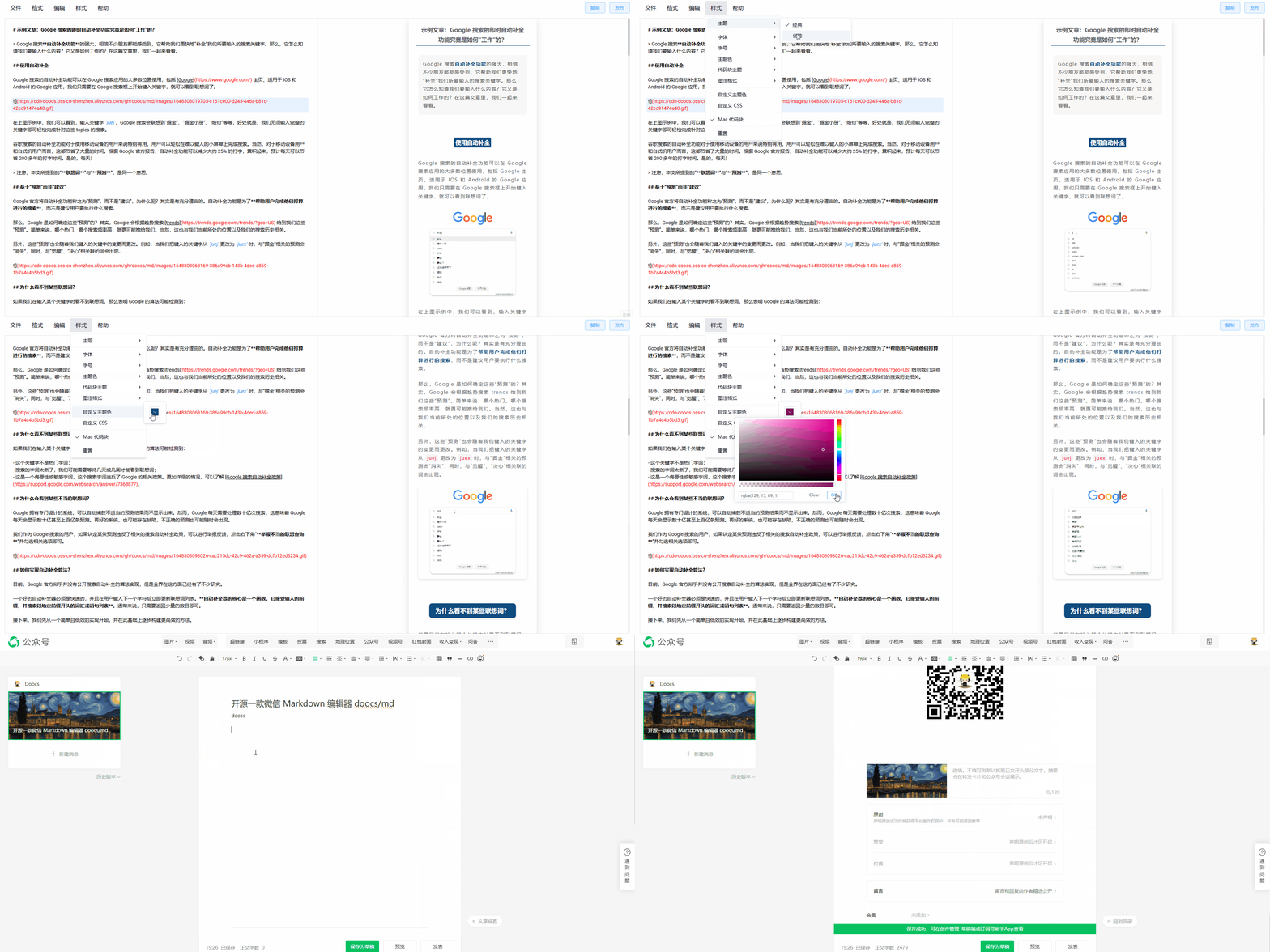 |
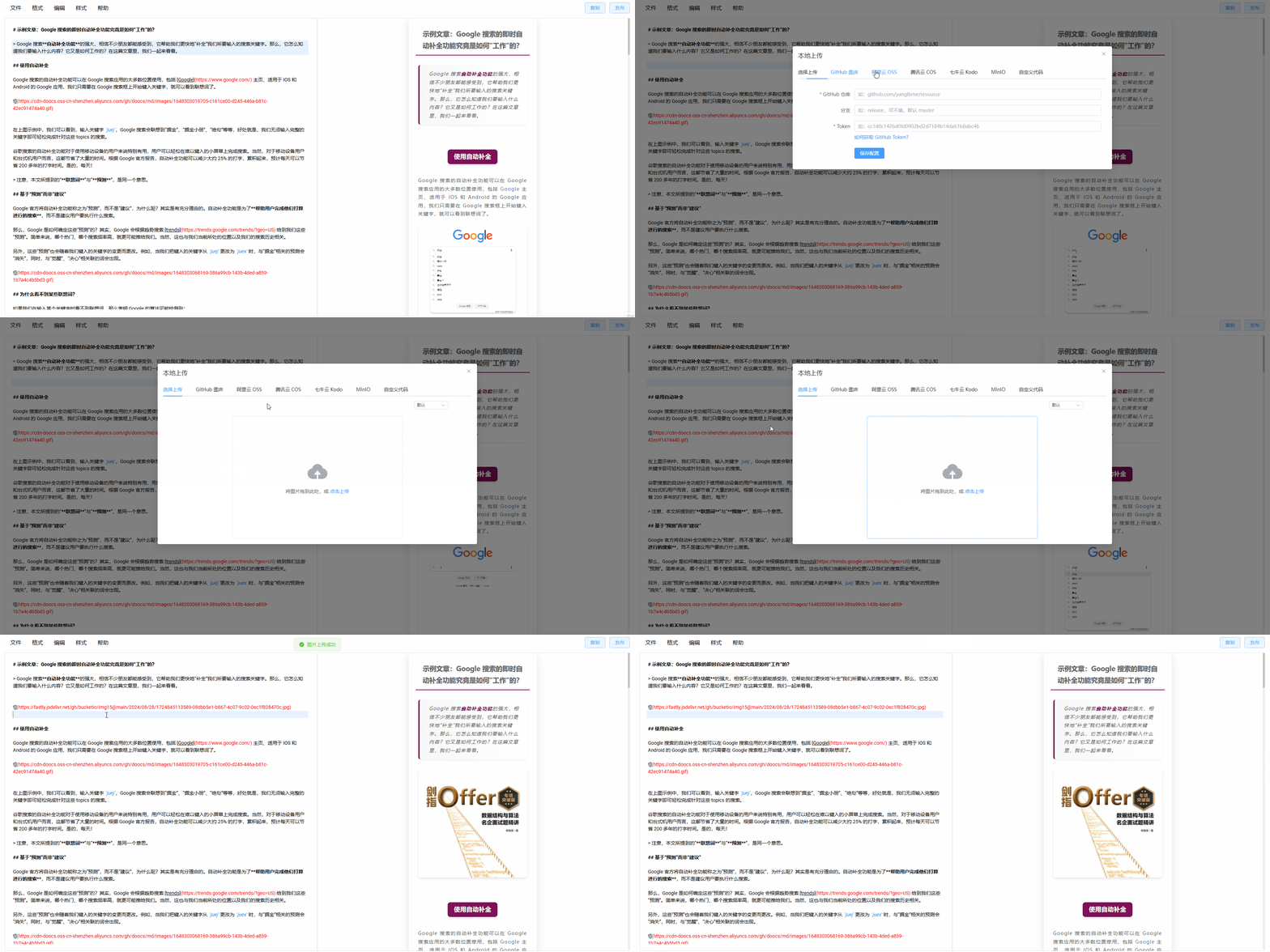 |
| 样式扩展 | 一键排版 |
|---|---|
 |
 |
开发与部署
# 安装 Node 版本
nvm i && nvm use

# 安装依赖
pnpm i

# 启动开发模式,访问 http://localhost:5173/md/
pnpm web dev

# 构建,部署在 /md 路径下
pnpm web build

# 构建,部署在根路径下
pnpm web build:h5-netlify

# Chrome 扩展开发模式
# 启动后在 chrome://extensions/ 开启开发者模式,加载 apps/web/.output/chrome-mv3-dev 目录
pnpm web ext:dev

# 打包 Chrome 扩展
pnpm web ext:zip

# 打包 Firefox 扩展,输出至 apps/web/.output/md-{version}-firefox.zip
pnpm web firefox:zip

# 打包 uTools 插件,输出至 apps/utools/release/md-utools-v{version}.zip
pnpm utools:package

# Cloudflare Workers 开发与部署
pnpm web wrangler:dev
pnpm web wrangler:deploy
私有化部署
方式一:npm cli
# 全局安装
npm i -g @doocs/md-cli

# 启动(默认端口 8800)
md-cli

# 指定端口启动
md-cli port=8899
支持的命令行参数:
port:监听端口,默认8800,端口被占用时自动随机选取spaceId:dcloud 服务空间配置clientSecret:dcloud 服务空间配置
方式二:Docker
docker run -d -p 8080:80 doocs/md:latest
启动后访问 http://localhost:8080 即可。Docker 镜像的更多信息,请参考 https://github.com/doocs/docker-md
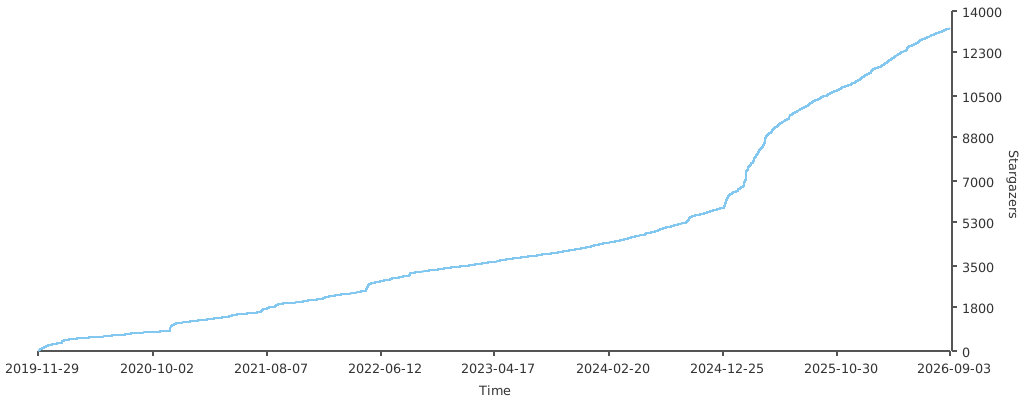
Star 趋势
谁在使用
请查看 USERS.md,了解使用本项目的公众号列表。
参与贡献
欢迎提交 PR 或 Issue,请参阅 CONTRIBUTING.md 了解贡献流程与规范。
支持我们
如果本项目对你有所帮助,欢迎通过以下方式支持我们持续维护。
 |
 |
反馈与交流
使用中遇到问题或有功能建议,欢迎在 Issues 中反馈。也可扫码加入微信交流群,若二维码失效,请添加好友并备注 md。
 |
 |
WeChat Markdown Editor
中文 | English
Overview
Instantly renders Markdown into WeChat-ready articles, so you never have to wrestle with formatting in the WeChat Official Account editor again. Standard Markdown syntax is all you need to produce clean, well-styled articles.
If this project is useful to you, a Star ⭐️ is always appreciated.
Online Editor
Chrome is recommended for the best experience.
Motivation
Most open-source WeChat Markdown editors suffer from overly complex styles that require manual tweaking after every paste. This project aims to provide a simpler, more focused editor so content creators can spend their time writing rather than fixing layout.
Pull requests are welcome. You can also share ideas in Discussions.
Features
- Standard Markdown syntax and math formulas (KaTeX)
- Mermaid diagrams, PlantUML, and GFM alert blocks
- Ruby annotation extension:
[text]{ruby}and[text]^(ruby)formats - Multiple code highlight themes; customizable theme colors and CSS
- Local draft management with auto-save
- Sync editor preferences after sign-in (cloud sync)
- Multiple image hosting options (GitHub, Alibaba Cloud OSS, Tencent COS, Qiniu, MinIO, S3, Cloudflare R2, and more)
- File import and export
- AI assistant integration (DeepSeek, OpenAI, Tongyi Qianwen, Tencent Hunyuan, Volcengine, 302.AI, etc.)
Supported Image Hosts
| # | Service | Configuration required | Notes |
|---|---|---|---|
| 1 | Default | No | - |
| 2 | GitHub | Repo, Token |
How to get a GitHub token |
| 3 | Alibaba Cloud OSS | AccessKey ID, AccessKey Secret, Bucket, Region |
Docs |
| 4 | Tencent COS | SecretId, SecretKey, Bucket, Region |
Docs |
| 5 | Qiniu Kodo | AccessKey, SecretKey, Bucket, Domain, Region |
Docs |
| 6 | MinIO | Endpoint, Port, UseSSL, Bucket, AccessKey, SecretKey |
Docs |
| 7 | S3-compatible | Endpoint, Region, Bucket, AccessKey, SecretKey |
Supports AWS S3, Oracle, DigitalOcean, and other S3-compatible storage |
| 8 | WeChat Official Account | appID, appsecret, proxy domain |
Tutorial |
| 9 | Cloudflare R2 | AccountId, AccessKey, SecretKey, Bucket, Domain |
S3 API docs |
| 10 | Upyun | Bucket, Operator, Password, Domain |
Docs |
| 11 | Telegram | Bot Token, Chat ID |
Usage guide |
| 12 | Cloudinary | Cloud Name, API Key, API Secret |
Docs |
| 13 | Custom upload | Yes | How to configure |
Demo
| Theme switching | Image upload |
|---|---|
|
|
| Style customization | One-click formatting |
|---|---|
|
|
Development & Build
# Install the required Node version
nvm i && nvm use

# Install dependencies
pnpm i

# Start the dev server, available at http://localhost:5173/md/
pnpm web dev

# Production build, served under /md/
pnpm web build

# Production build, served at the root path
pnpm web build:h5-netlify

# Chrome extension dev mode
# After starting, open chrome://extensions/, enable Developer mode,
# then load the unpacked extension from apps/web/.output/chrome-mv3-dev
pnpm web ext:dev

# Package the Chrome extension
pnpm web ext:zip

# Package the Firefox extension — output: apps/web/.output/md-{version}-firefox.zip
pnpm web firefox:zip

# Package the uTools plugin — output: apps/utools/release/md-utools-v{version}.zip
pnpm utools:package

# Cloudflare Workers development and deployment
pnpm web wrangler:dev
pnpm web wrangler:deploy
Self-hosting
Option 1: npm CLI
# Install globally
npm i -g @doocs/md-cli

# Start (default port: 8800)
md-cli

# Start with a custom port
md-cli port=8899
Supported CLI options:
port: Listening port. Defaults to8800; a random port is chosen if occupied.spaceId: dcloud service space IDclientSecret: dcloud service space secret
Option 2: Docker
docker run -d -p 8080:80 doocs/md:latest
Then open http://localhost:8080 in your browser. For more details on the Docker image, see https://github.com/doocs/docker-md.
Star History
Who's Using It
See USERS.md for a list of WeChat Official Accounts using this project.
Contributing
PRs and Issues are welcome. Please read CONTRIBUTING.md for the contribution workflow and guidelines.
Support
If this project has been helpful, you're welcome to support its continued development.
|
|
|
Feedback
For bug reports or feature requests, please open an Issue. You can also scan the QR code below to join the WeChat discussion group. If the QR code has expired, add the account as a friend with the note md.
|
|
|