dramaclaw
从剧本到成片的 AIGC 视频制作引擎,可用于短剧、广告、电商产品视频等创作流程。
中文简介经编辑校订 · ai-agent / ai-filmmaking / ai-video / aigc / aigc-pipeline / content-creation
README / 项目原文
DramaClaw
Make Your Own DC.
They say you're obsolete.
Maybe it's the whole idea of "working for someone else" that's obsolete.
In the age of AI, the real question isn't whether machines replace people.
The real question is:
Who owns the machines?
Who owns the pipeline?
Who owns industrialized productivity?
If the answer is always Big Tech,
then AI isn't empowerment.
It's just a new wall.
I'm Eric.
This isn't a demo.
Not a toy.
Not a crippled edition.
This is the industrialized drama-production line our own team runs every day.
From script to storyboard, from assets to finished film — the whole chain.
Because people aren't beasts of burden.
Because creativity is humanity's last line of defense.
What DramaClaw sets out to do is simple:
Tear down the wall.
Put the industrialized drama-production power that only Big Tech had
into the hands of ordinary creators.
The code is here.
If this resonates, leave a ⭐.
We'll keep tearing down walls.
And yes, you can make money with it.
DramaClaw is Elastic License 2.0. Run it, modify it, sell what you build with it —
the standalone version is free for commercial use, no permission needed.
We ask for one thing: a small "Powered by DramaClaw" in the corner of your UI.
The only door still closed is wrapping it up as a hosted SaaS for other people; that license isn't open yet.
Why, and the FAQ: #475.




English | 简体中文 | Tiếng Việt | ไทย | Website | Docs | Quick Start

🎬 Made with DramaClaw
Real short dramas our team produced on this very pipeline — click a link to play.
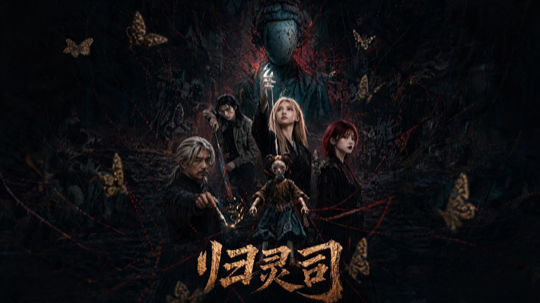 归灵司 ▶ 第 1 集 |
 鲁班 ▶ 第 1 集 |
 师兄你怎么不舔了 ▶ 第 1 集 |
 天命不可欺 ▶ 第 02 集 · 第 58 集 |
 乌龙仙途 ▶ 第 1 集 |
 非遗㑇舞 ▶ 播放 |
More clips: 3D 动漫混剪 demo · 动态打斗
What is DramaClaw?
DramaClaw is a source-available production line for AI drama — and, increasingly, for any visual story you want to tell with generative models. It has two faces that share one asset library and one agent:
- XiaHua — the infinite canvas. A node-based workbench where you generate, edit and connect images, video, audio, 3D sets and scripts freely, then promote what you like back into the series. This is where most of our own creative work happens today, and where DramaClaw is heading.
- Series (XiaJi) — the pipeline. Drop in a manuscript or screenplay and DramaClaw takes over the heavy lifting: structuring the story, planning episodes, writing scripts, drawing storyboards and first frames, synthesizing voice-over, and cutting the final film.
Xia Director, the built-in agent, sits across both: it answers questions about your project, drives pipeline tasks, and can build and run node graphs on the canvas for you.
It's built for creators, indie studios and creative engineers — run the whole "drama factory" on your own machine, without stitching together a dozen disconnected tools or handing your material to an opaque black-box cloud service. Although it's built around drama, the same canvas and pipeline carry to short-form ads, e-commerce product videos and other visual formats.
Core Capabilities
Xia Director — the agent
Xia Director turns natural-language creative briefs into executable canvas workflows, connecting script development, asset generation and video composition.
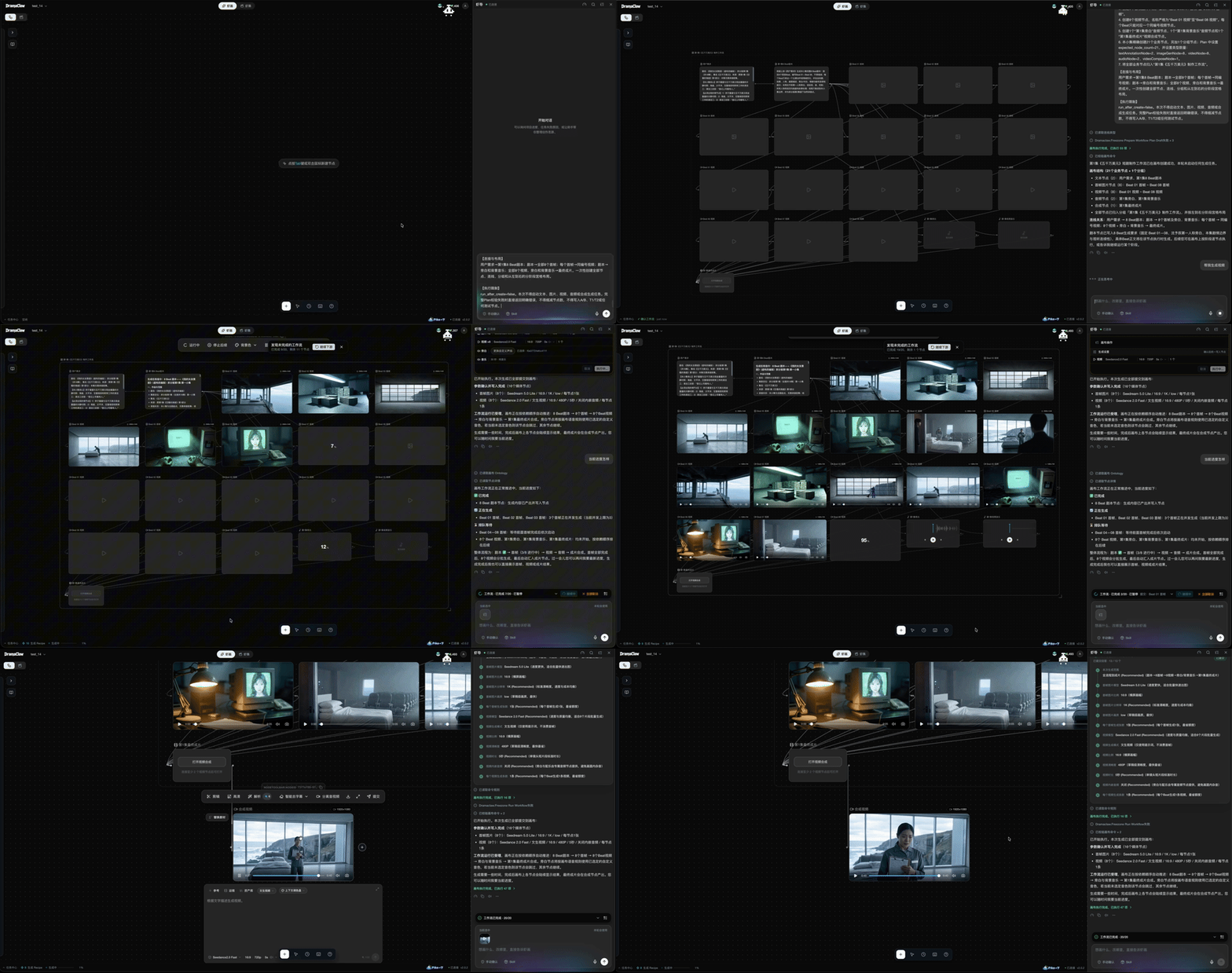
Workflow planning, node orchestration, asset generation and video composition from a natural-language brief.
- Canvas workflow orchestration — plan, create, connect and arrange nodes from a creative brief; execute confirmed workflows with progress tracking and failure recovery.
- Workflow catalog and skill extensions — 11 workflow skills and 60 recipes covering short drama, e-commerce ads, IP character ads and social content; install, export and share skill / recipe bundles.
- External agent integration — Agent Kit exposes the same production workflows to Codex, Claude Code, OpenClaw, Hermes, WorkBuddy and other MCP clients.
- Project context and task management — inspect project progress, advance script and shot tasks, check deliverable completeness and identify the next production steps.
3D director stage (Previz)
In closed beta
An in-browser 3D previs tool for scene layout, character blocking and camera design, integrated into the canvas as a reusable node.
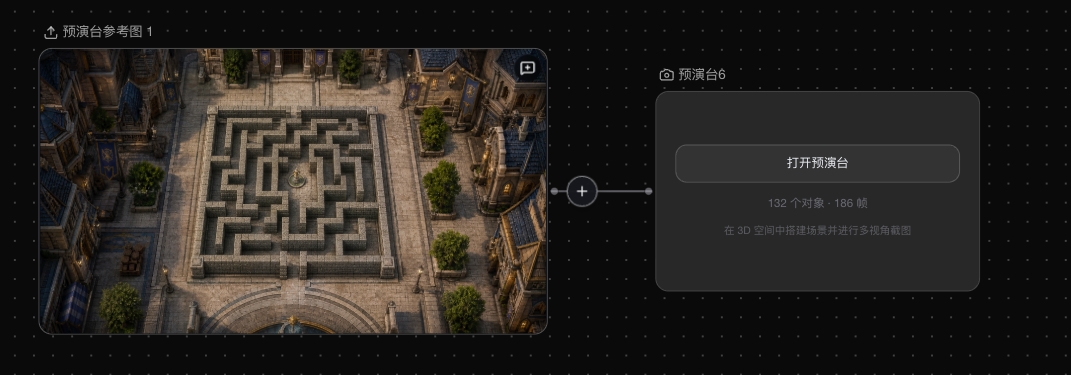
Reference image and its connected Previz node.
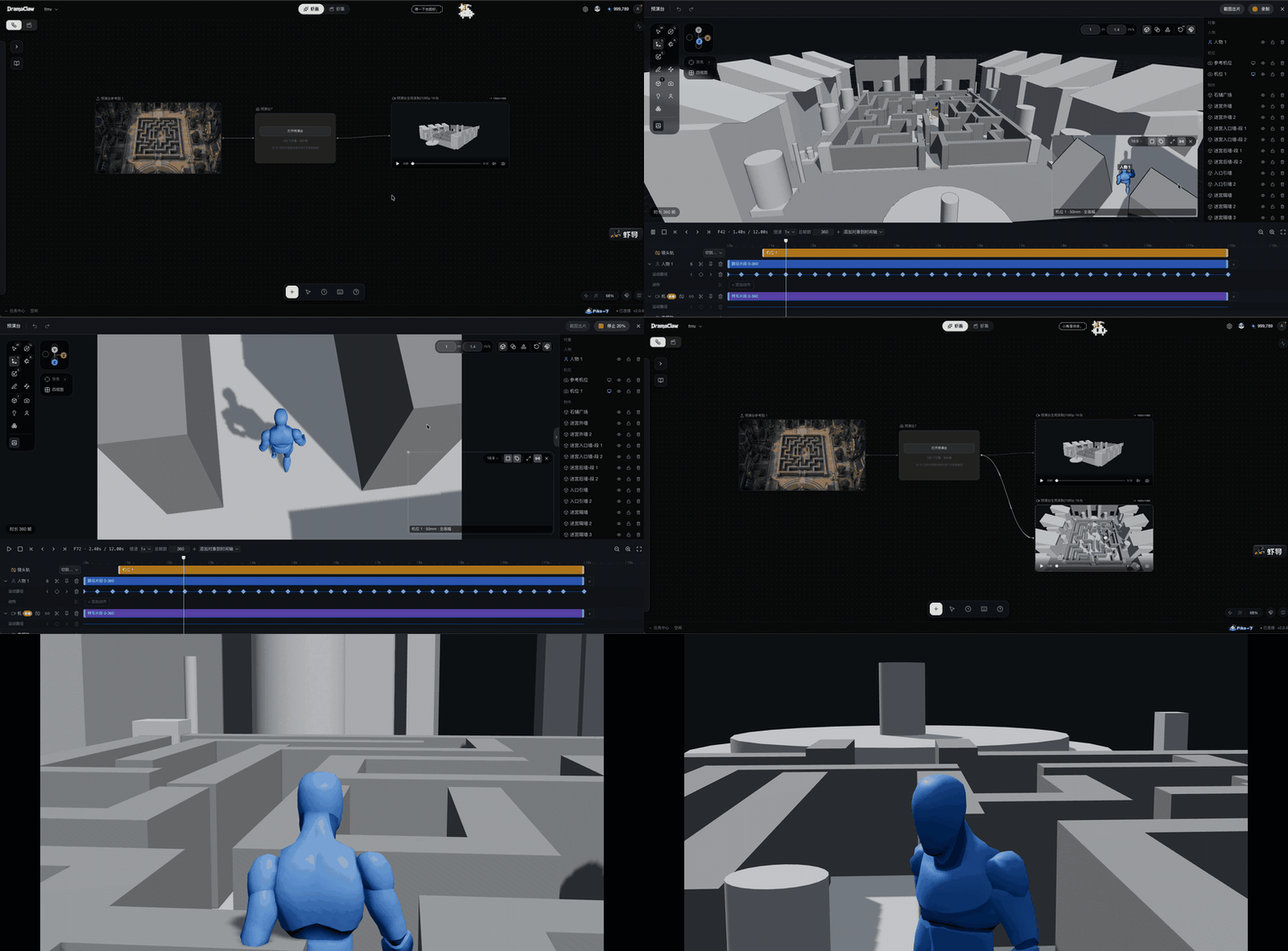
- Scene blockout — generate a 3D scene from a reference image and arrange props to establish the spatial layout.
- Character blocking and motion — coordinate characters, motion clips and movement paths on a multi-track timeline.
- Camera and lens controls — adjust focal length, sensor size and camera placement to preview framing and close-up tracking.
- Canvas output — capture frames or record previews into connected canvas nodes for subsequent image and video generation.
Interactive stories
In closed beta
Create interactive video stories on a shared canvas, from story planning and branching narratives to media production, playtesting and multiple endings. Audience choices shape how the story unfolds.
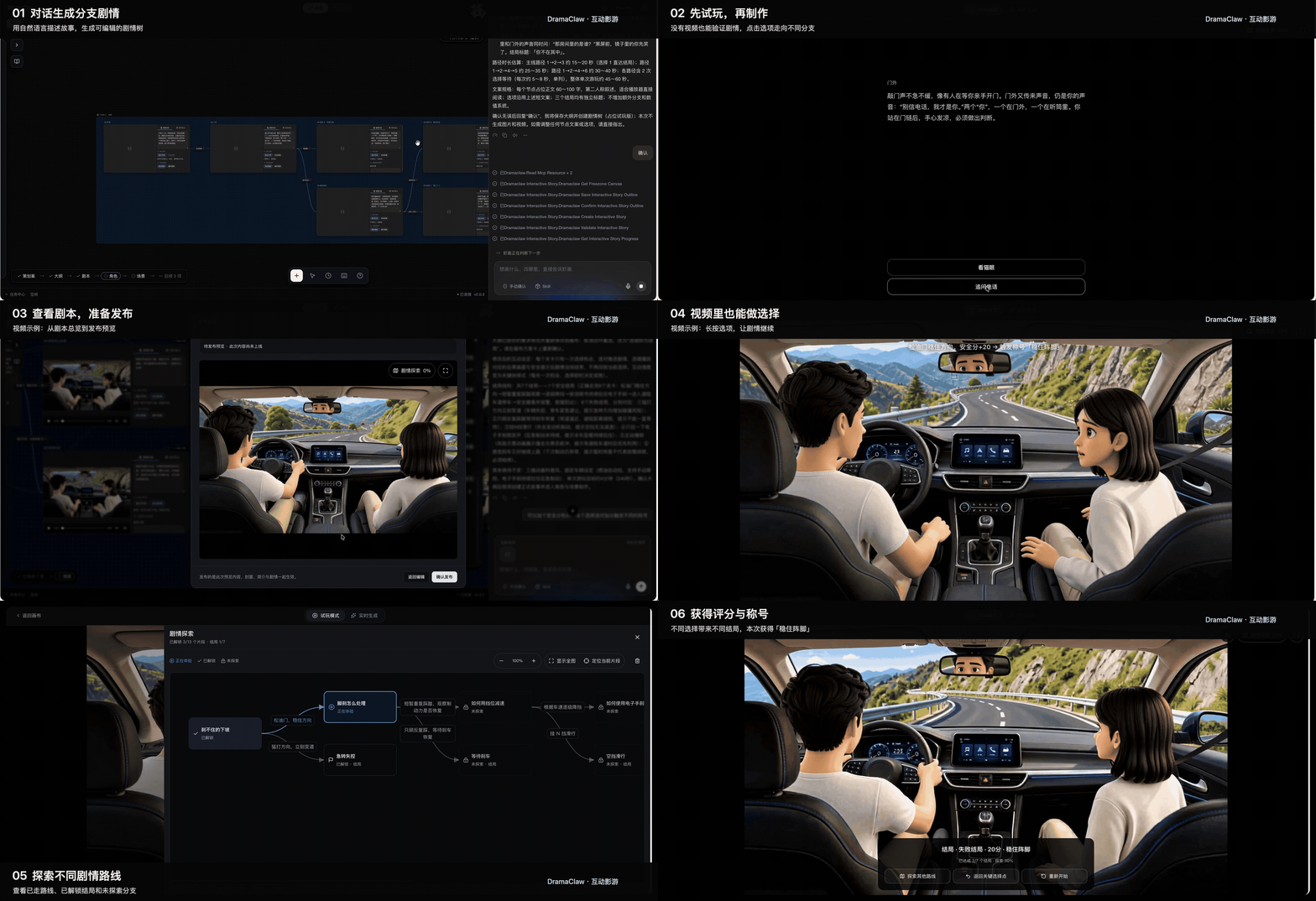
Branching story generation, canvas authoring, interactive playback and multiple endings.
- AI-assisted story planning — Turn a natural-language brief into a story outline and editable branching narrative, with choice points, endings and estimated viewing time for each route
- Visual branching authoring — Organize story segments, videos and choices on the canvas; edit dialogue, choice order and branch connections
- Story variables and conditions — Use affinity, scores and other variables to track audience decisions, control available choices and determine endings; support timed choices and default routes
- Integrated media production — Create character, scene and storyboard references, generate videos for individual segments and reuse canvas assets throughout production
- Playtesting and path validation — Test the narrative with placeholder media before videos are ready; check branch connectivity and conditional paths, then inspect choice statistics, ending reach rates and path coverage
- Player export — Export a standalone HTML player or an offline package with video assets, supporting branching playback, exploration progress and replay from unlocked segments
XiaHua — infinite canvas
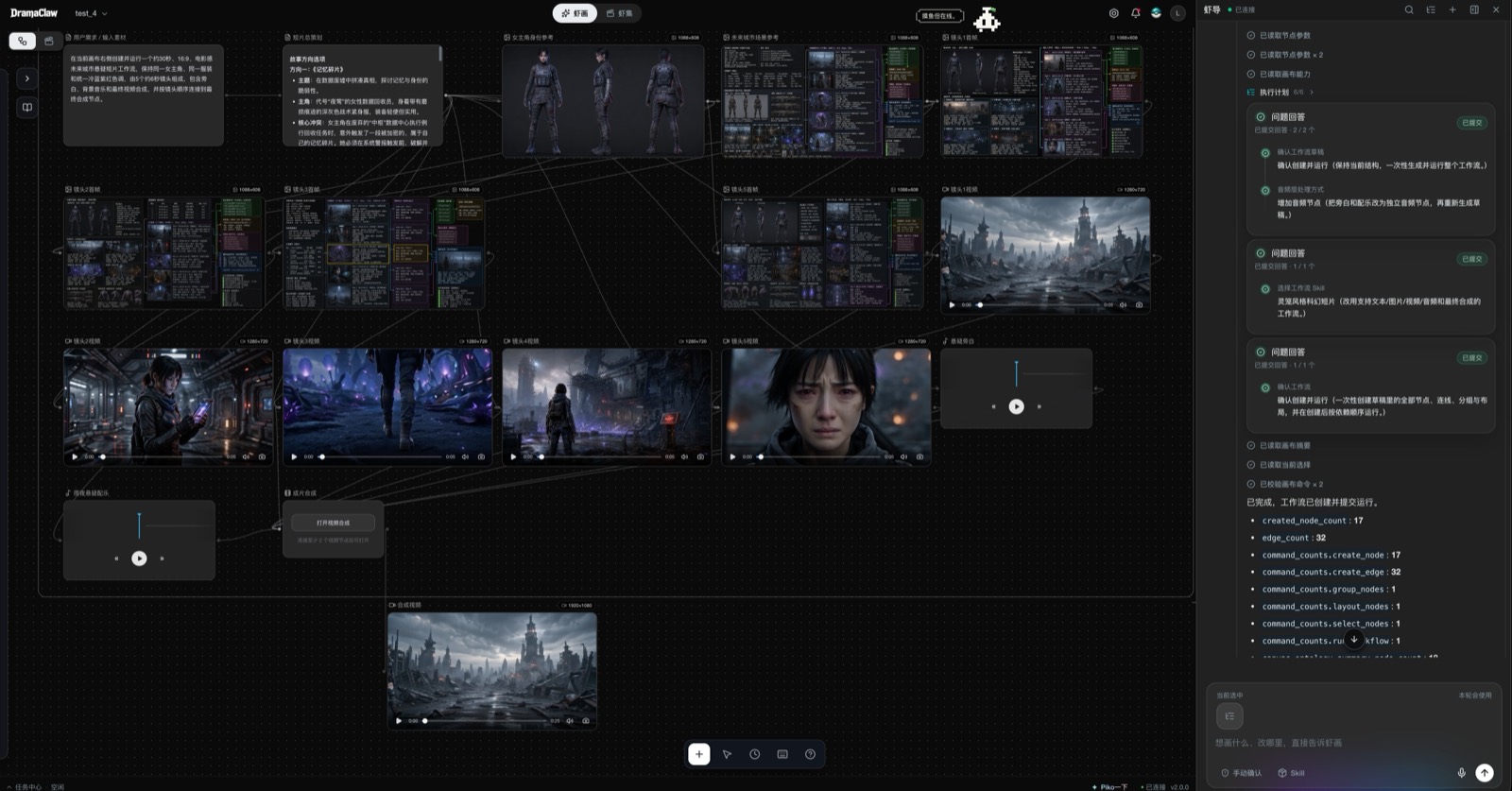
One prompt to Xia Director (right) became this 17-node, 32-edge workflow on the canvas (left): brief → story direction → character and set references → five shot first frames → five shot videos → voice-over and score → final cut.
- 18 node types on one canvas — upload, image generation / edit, storyboard generation, script, beat context, video, video compose, video story, audio, style, skill, group, text annotation, 360° panorama viewer, 3D world, export and more. Connect them freely; every node keeps its own generation history.
- Image tools — generate, edit, redraw, outpaint, relight, upscale, multi-view, template edit, reverse-prompt, mark detection; a style wall of 45 short-drama looks for image-to-image
- Video tools — text / image / keyframe to video, omni-reference generation with file, web-link and on-canvas references, video edit, erase, upscale, audio separation, camera templates, shot analysis; Seedance 2.5 in the recommended catalog
- Audio — speech synthesis with a voice library, reference voices, music generation
- Canvas skills — one-click skills such as sketch-from-context, frame-from-context, set-background, scene-360, frame review and beat-graph planning
- Built for big canvases — canvas tabs, element outline, minimap and viewport bookmarks, snap-align, level-of-detail rendering, multi-select and group nodes, keyboard shortcuts, revision history with restore, per-canvas locking
- Commit to the series — preview the impact, then promote a single node or a whole batch into the asset library or an episode; project the series back onto a canvas from presets
- Director World — spatially consistent sets — image → 3D Gaussian Splat set and scene-360 panoramas as canvas nodes: a framable virtual set that locks spatial structure, character blocking and camera placement, so the same location stays consistent across shots; frame the shot in the 3D viewer, capture it, and use it as the background for the next generation
Director World
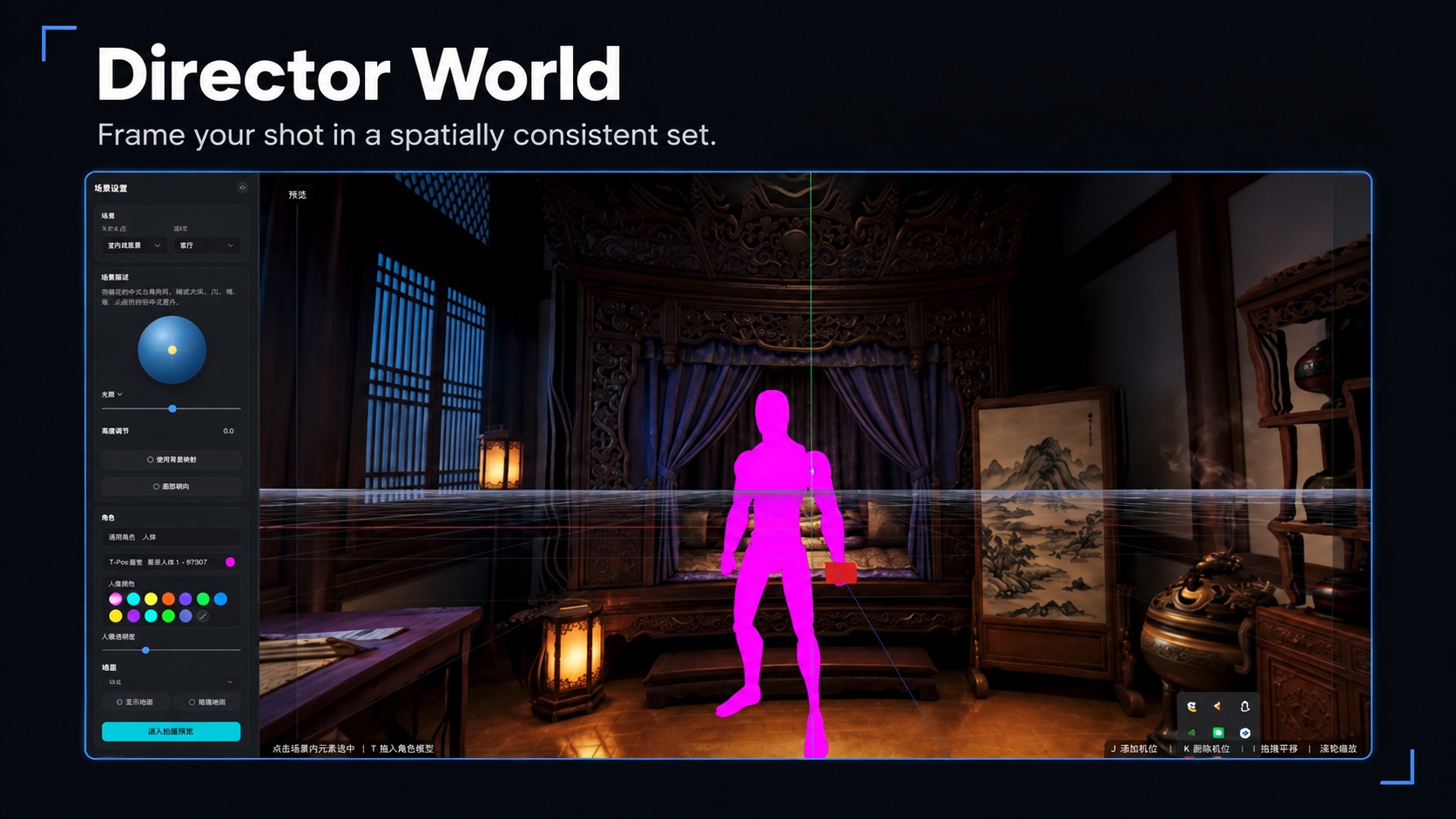
Screenshot-based feature illustration; interface details may differ from the current release.
Series (XiaJi) — the pipeline
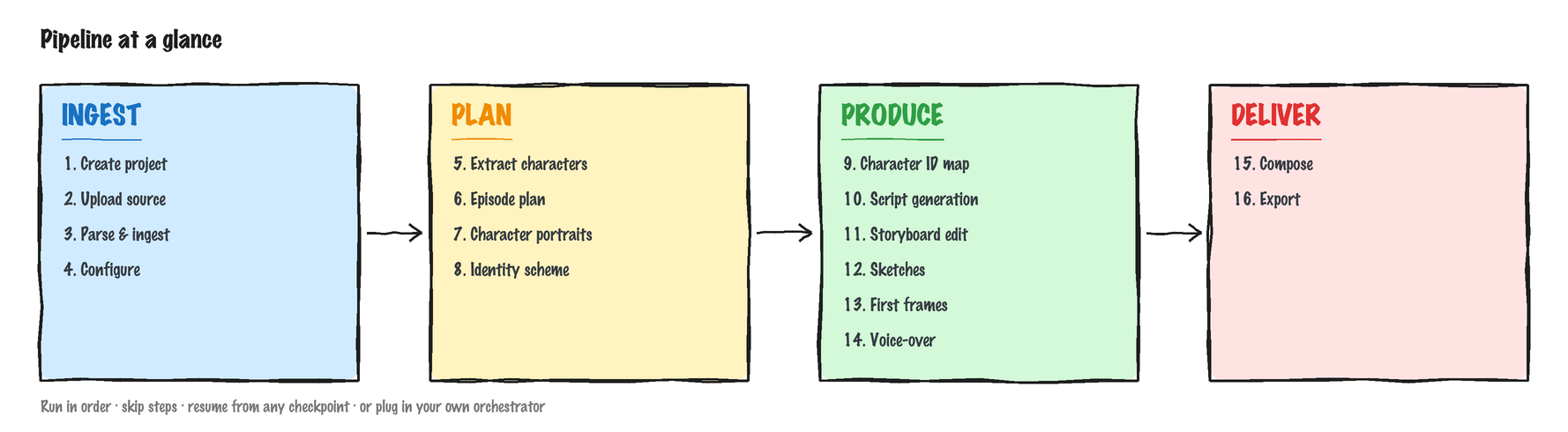
Every step has its own interface — run them in order, skip steps, resume from any checkpoint, or even plug in your own orchestrator.
- Structured ingest — new projects build episodes, characters and scenes straight from the manuscript or screenplay (Fountain supported), no knowledge graph or embeddings required; the Cognee story-graph path remains for legacy projects
- Asset library & identity consistency — characters, scenes, props and voices organised by purpose and folder; stable identities across episodes, character portraits and per-episode variants
- Episode planning & script generation — chapter segmentation, beat planning, multi-episode arcs; adaptive / literal / staged script modes with review-and-repair loops
- Storyboards & first frames — beat-driven stylized generation, grid splitting, image-pool selection
- Voice-over, video composition & export — emotion-aware speech, episode assembly, video + subtitle export and the full asset pack
- Visual Style — upload a reference image to extract style parameters and apply them across the whole project
- Task Center — status, progress, logs, cancel / retry, resume-from-checkpoint for long runs; prerequisites are validated before a job is queued
XiaTang — asset library
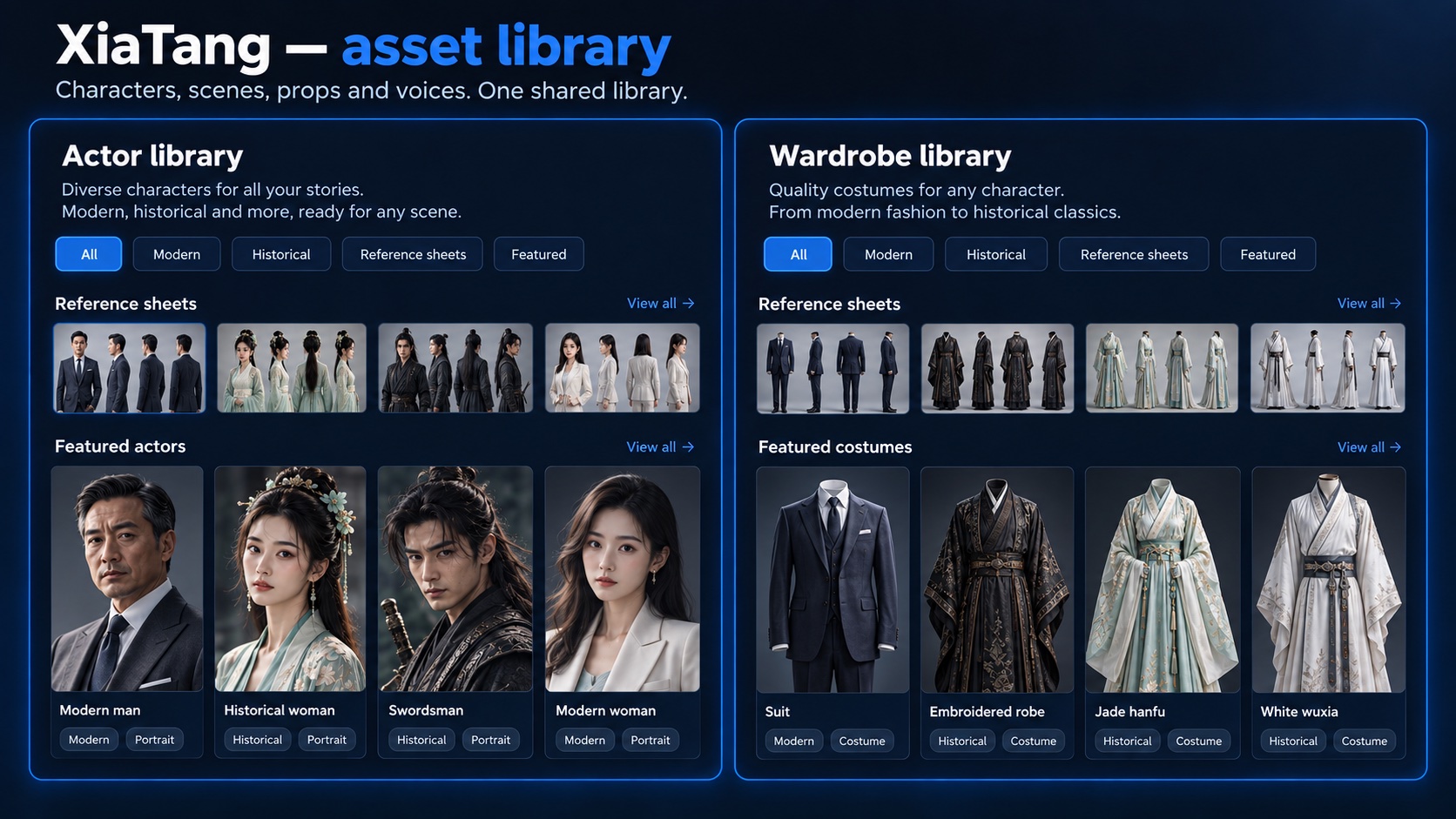
Screenshot-based feature illustration; interface details may differ from the current release.
Storyboards & first frames
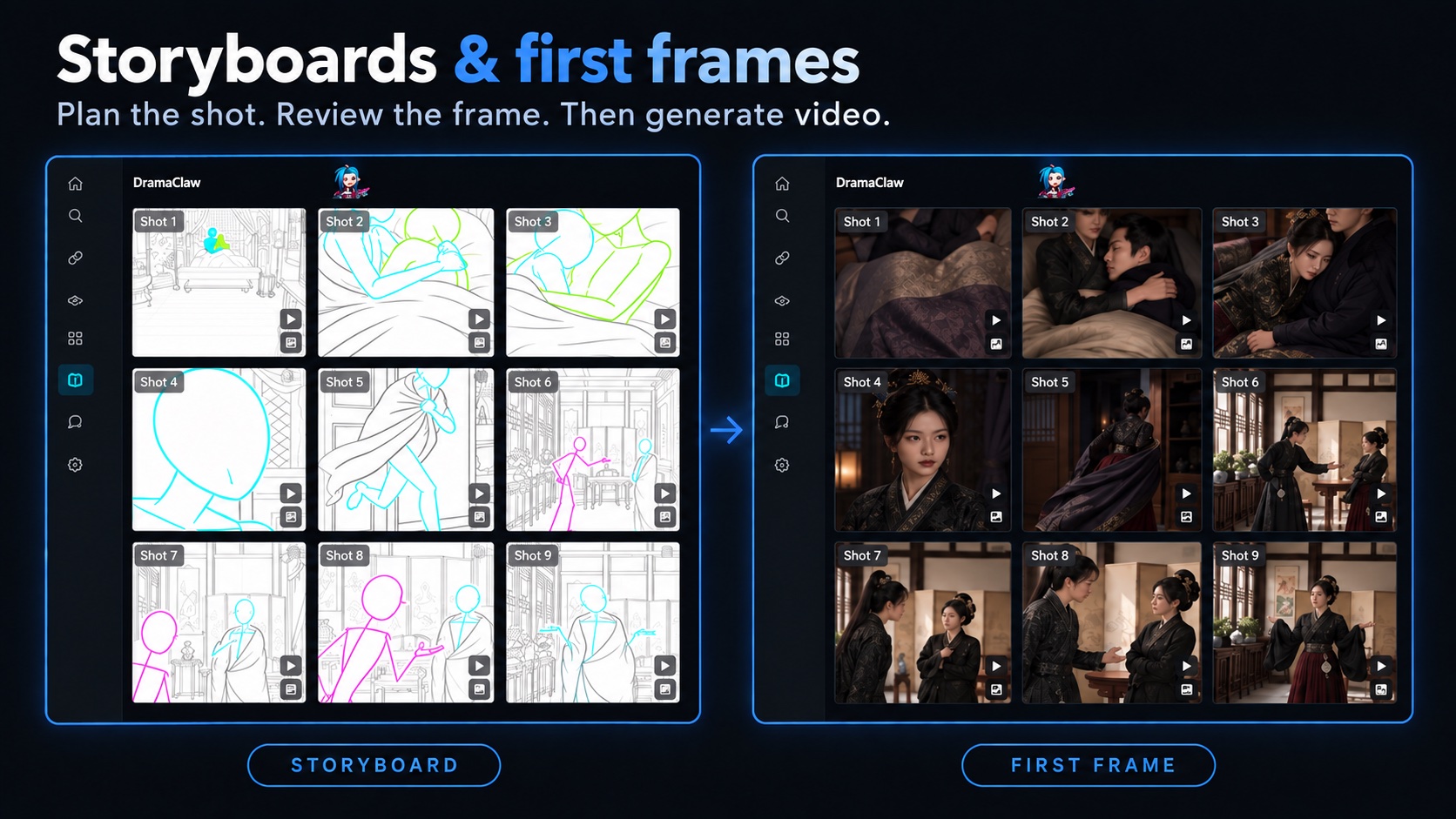
Screenshot-based feature illustration; interface details may differ from the current release.
Why DramaClaw?
A canvas that understands drama, and an agent that works on it. Generic node canvases will wire anything together but know nothing about episodes, characters or shots; series tools know the craft but lock you into a wizard. XiaHua gives you the free canvas with drama-aware nodes and skills, and Xia Director plans, lays out and runs those graphs with your confirmation. The canvas and agent work together across the production workflow.
Built for novel-to-short-drama. General workflow tools can wire nodes together, but they don't know what an "episode beat" is, don't understand why a character's cross-scene identity consistency matters, and won't guard a chapter's emotional arc across image + voice + editing. DramaClaw builds all that judgment into the tool.
Canvas and pipeline, not canvas or pipeline. Most tools give you either a free node canvas or a rigid wizard. DramaClaw runs both as dual tracks over one asset library: explore on the canvas, commit what works to the series, project the series back onto a canvas. The agent works on both.
Every step is decomposable. Each stage is an independent async task with its own interface. Run sequentially, skip steps, resume mid-way — the toolchain itself is the product, with no hidden black box.
Self-hostable, model-neutral. Your manuscript, your characters, your models, your servers. Use closed-source frontier models when you want the best results; switch to open-weight models when you want full control. DramaClaw won't lock you into any single vendor.
How DramaClaw compares
The edge isn't "more generation" — it's organizing the whole short-drama production loop (script → assets → shots → canvas → final cut) into something reusable, collaborative and scalable.
Legend: ✅ Full · ◐ Partial · ○ Planned · ❌ None — competitor names partially masked; comparison based on publicly available product docs and positioning.
| Capability | L*TV | R*Hub | T*Now | S*ko | U*dream | O*II | J*/K* | DramaClaw |
|---|---|---|---|---|---|---|---|---|
| Built-in agent (workflow planning, canvas orchestration, execution) | ✅ | ✅ | ✅ | ○ | ✅ | ○ | ✅ | ✅ |
| Workflow skills and recipes (reuse, install, export, share) | — | — | — | — | — | — | — | ✅ |
| 3D director stage (blocking, motion, timeline, recording) | — | — | — | — | — | — | — | In closed beta |
| Interactive series (multi-episode, branching, IP) | ◐ | ◐ | ◐ | ✅ | ◐ | ❌ | ❌ | In closed beta |
| Storyboard preview (script→shots, boards) | ◐ | ✅ | ◐ | ✅ | ◐ | ❌ | ❌ | ✅ |
| Asset library (characters/scenes/props/voices) | ◐ | ❌ | ◐ | ✅ | ◐ | ○ | ❌ | ✅ |
| Scene consistency (variants, 360°, multi-state) | ✅ | ◐ | ❌ | ❌ | ○ | ❌ | ❌ | ✅ |
| Director's world (360°/3D set, camera, framing) | ✅ | ◐ | ❌ | ❌ | ◐ | ❌ | ❌ | ✅ |
| Final delivery (multi-shot, subtitles/SRT, pack) | ✅ | ○ | ○ | ✅ | ✅ | ❌ | ❌ | ✅ |
| Team production (sharing, roles, tasks, cost) | ✅ | ✅ | ○ | ✅ | ○ | ○ | ○ | ✅ |
| Infinite canvas (node-based, free exploration) | ✅ | ✅ | ✅ | ❌ | ✅ | ✅ | ✅ | ✅ |
| Dual-track (main pipeline + canvas exploration) | ❌ | ❌ | ❌ | ❌ | ❌ | ❌ | ❌ | ✅ |
| Custom style (templates, prompts, negatives) | ✅ | ◐ | ○ | ✅ | ◐ | ○ | ◐ | ✅ |
| Creative companion (persona, nudges, feedback) | ❌ | ❌ | ❌ | ❌ | ❌ | ❌ | ❌ | ✅ |
| Source-available (self-host, fork, customize) | ❌ | ❌ | ❌ | ❌ | ❌ | ❌ | ❌ | ✅ |
For DramaClaw, ✅ refers to capabilities in the main source branch; features in closed beta are not yet generally available. — means the competitor capability has not been verified for the new rows.
System Requirements
DramaClaw runs all inference through an OpenAI-compatible gateway — either the official RelayClaw service or the bundled dramaclaw-gateway routing to providers you configure. Nothing runs models on your machine, so the local footprint is light. An ordinary laptop or a small VPS is enough.
| Item | Requirement |
|---|---|
| CPU / RAM | ≥ 2 vCPU / 4 GB recommended (excludes model inference — that runs on the gateway) |
| GPU | Not required for the standard pipeline. Only the optional world extra (voxel / panorama-to-3D) needs a GPU + CUDA image |
| Disk | A few GB for images plus generated media/state under the ce-data volume (no hard minimum) |
| OS | macOS (Apple Silicon / Intel), Windows (Docker Desktop + WSL2 backend), Linux (Docker Engine + compose plugin) |
| Docker | Docker + docker compose |
| Ports | 8080 web UI · 8780 REST API · 3000 bundled gateway admin UI (host-only by default, can be widened) |
| Datastores | None required — no Postgres, Redis, Celery or Ray. Tasks run in-process; state lives on the local filesystem (SQLite + files) |
| Network | Outbound access to the official gateway relayclaw.cdnfg.com, and/or to the model providers you configure in the bundled gateway |
Local development (non-Docker) additionally needs Python 3.11–3.12 +
uv+ffmpeg. Full prerequisites in the Self-hosting guide.
Quick Start
Docker (recommended)
Every GitHub Release publishes multi-arch (amd64/arm64) images to Docker Hub.
Source build (default) — clone DramaClaw and the bundled dramaclaw-gateway side by side; docker compose up -d --build builds all three services from those two checkouts.
git clone https://github.com/dramaclaw/dramaclaw.git
git clone https://github.com/dramaclaw/dramaclaw-gateway.git   # bundled gateway, built from ../dramaclaw-gateway
cd dramaclaw

cp .env.example .env
# Edit .env — set PROMPT_EXPORT_PASSWORD to a non-default value.

docker compose up -d --build   # builds and starts three services: api / newapi (bundled gateway) / web
Both checkouts are plain git repos: edit, git pull, rebuild. Only DramaClaw code changed? docker compose up -d --build api web. Only the gateway? docker compose up -d --build newapi. Gateway clone somewhere else, or prefer Docker to fetch it from git? Set DRAMACLAW_GATEWAY_SRC in .env to that path or to https://github.com/dramaclaw/dramaclaw-gateway.git#main.
No build — pull published images instead (no gateway clone needed):
docker compose -f docker-compose.release.yml up -d
Open the app at http://localhost:8080; the REST API is at http://localhost:8780. In Settings → Model Config pick one of:
- Official — paste your DC key (get one at https://relayclaw.cdnfg.com); no model mapping needed. The bundled gateway stays idle.
- Custom — one click initializes the bundled
newapigateway; then add your own upstream channels. - Local + Official Hybrid — official for the main pipeline, bundled gateway for extra channels.
Full steps in the Quick Start.
Pin versions or switch registry in .env (DRAMACLAW_VERSION, DRAMACLAW_GATEWAY_VERSION, DRAMACLAW_IMAGE_PREFIX) — these apply to the image mode (docker-compose.release.yml) only. Mainland China: set DRAMACLAW_IMAGE_PREFIX=claymore-registry.cn-chengdu.cr.aliyuncs.com/dramaclaw and pin both versions (the ACR mirror carries pinned tags only).
Migrating from an older checkout? For the source build, first
git clone https://github.com/dramaclaw/dramaclaw-gateway.git ../dramaclaw-gateway(the gateway is now built from that sibling checkout; without it the build stops withunable to prepare context).docker-compose.selfhosted.yml/docker-compose.selfhosted.release.ymlhave been removed — usedocker-compose.yml(source build) /docker-compose.release.yml(images). Service names and thece-data/newapi-datavolumes are unchanged; existing data is reused as-is. The bundled gateway's port now binds only to127.0.0.1by default; setST_NEWAPI_BIND=0.0.0.0in.envif you need remote access to it.
Local development (uv + Python 3.11+)
git clone https://github.com/dramaclaw/dramaclaw.git
cd dramaclaw

uv sync
cp .env.example .env && $EDITOR .env

scripts/start-ce.sh   # installs dependencies, then starts the API and bundled frontend
For frontend development with hot reload: cd frontend && pnpm install && pnpm dev.
The local launcher installs Hermes in an isolated environment and explicitly uses it as the safe source-checkout chat runtime. Source-built Docker images ship the patched Codex App Server runtime and default to Codex. The pinned 2.0.4 release image uses Hermes. To run the API command directly, configure a supported chat backend first; do not rely on the stock Codex binary for gateway credentials.
Gateway. In Official mode you need nothing else. For Custom or Local + Official Hybrid the API expects a gateway on 127.0.0.1:3000 whose SQLite file is ./state/newapi/one-api.db (that is what "Initialize" in Settings writes to; NEWAPI_ADMIN_BASE_URL in .env already points there). Either run the published image with that directory mounted:
mkdir -p state/newapi
docker run -d --name dramaclaw-gateway -p 127.0.0.1:3000:3000 \
  -v "$PWD/state/newapi:/data" \
  claymorelab/dramaclaw-gateway:v1.0.0-rc.24-dramaclaw.1
or run the gateway from source in the sibling checkout (make dev-api / make dev-web in dramaclaw-gateway, or go build and start the binary with SQLITE_PATH=<path to>/dramaclaw/state/newapi/one-api.db).
Supported Models & Providers
DramaClaw stays model-neutral — all text / image / video / audio models connect through an OpenAI-compatible gateway. Pick the mode in Settings → Model Config:
- Official (recommended) — paste your DC key (get one at https://relayclaw.cdnfg.com), save, done. RelayClaw already ships every model mapping DramaClaw needs; nothing to configure.
- Custom — one click initializes the bundled
dramaclaw-gateway, then add your own provider channels (API keys, model IDs) in its admin UI. Every model DramaClaw calls goes through your channels. - Local + Official Hybrid — keep the official models for the main pipeline and add extra channels (for example a local ComfyUI video workflow) through the bundled gateway.
Full walkthrough in Configuring Models.
The bundled gateway: dramaclaw-gateway
The newapi service in docker-compose.yml is dramaclaw-gateway, DramaClaw's own fork of New API. It speaks the DC-Media contract DramaClaw uses for image / video / audio (media roles, references, first / last frames) and converts each request into the provider's native API. Image: claymorelab/dramaclaw-gateway on Docker Hub, pinned by DRAMACLAW_GATEWAY_VERSION in .env. It stays idle in Official mode and is only used once you switch to Custom or Local + Official Hybrid.
Provider adapters shipped in the gateway today (see the channel support matrix for verification status): ComfyUI · MiniMax / Hailuo · VolcEngine Doubao / Seedance · fal.ai · Alibaba · Kling · Jimeng · Vertex AI · Gemini · OpenAI / Sora · Suno. Want another provider? The gateway has a scaffold generator and contribution guide.
| Stage | Official mode (RelayClaw) | Custom / Hybrid mode (bundled gateway) |
|---|---|---|
| Text / LLM | DC-*-LLM models, no mapping needed |
any OpenAI-compatible chat channel |
| Image | gpt-image · nano-banana | any image channel registered in the gateway |
| Video | Seedance 1.0 / 1.5 / 2.0 series · happyhorse | any DC-Media video adapter (Seedance, Hailuo, Kling, ComfyUI, …) |
| Voice-over | IndexTTS2 | any audio channel registered in the gateway |
| Story graph | Cognee (DC-cognee-embedding) |
any embedding channel |
| Task runtime | in-process inline (no Ray / Redis / Celery) | same |
| Storage | local filesystem | same |
Documentation
- Product user manual — full UI walkthrough (Feishu)
- Feature overview
- Architecture
- Quick Start
- Self-hosting guide
- Configuring model providers
- More docs →
Join the Community / Contribute
We continuously curate and label good first issue — a great place to start.
Produced By

Logo is a trademark of its respective owner, shown with permission.
License
Elastic License 2.0. Free to use, modify, redistribute and sell what you build with it; keep a small "Powered by DramaClaw" in your UI. The only restriction is that you may not offer the software itself as a hosted service to others. See the license explainer and the licensing statement.
Star History
Notices
See NOTICE for required branding and third-party attribution notices.
DramaClaw
Make Your Own DC.
他们说你过时了。
也许是「打工」这件事过时了。
AI 时代,真正的问题不是机器会不会替代人。
真正的问题是:
谁拥有机器?
谁拥有流程?
谁拥有工业化生产力?
如果答案永远是大厂,
那 AI 就不是平权。
那只是新的高墙。
我是 Eric。
这不是 demo。
不是玩具。
不是阉割版。
这是一条我们团队自己每天在跑的漫剧工业化生产线。
从脚本到分镜,从资产到成片,全链路。
因为人不是牛马。
因为创造力,是人类最后的防线。
DramaClaw 要做的事很简单:
拆墙。
把过去只有大厂才有的漫剧工业化能力,
交到普通创作者手里。
代码已就位。
认同的话,留下一颗 ⭐。
我们继续拆。
对,你可以拿它赚钱。
DramaClaw 采用 Elastic License 2.0。自己跑、自己改、自己卖,随便 ——
单机版本可以自由商用,不用申请,不用付费。
我们只有一个请求:在界面角落留一行小字「基于 DramaClaw」。
唯一还没开的门,是把它包成 SaaS 卖给别人;这条授权暂不开放。
原因和常见问题:#475。
🎬 用 DramaClaw 制作
我们团队用这条流水线亲手制作的真实短剧 — 点击链接即可播放。
|
归灵司 ▶ 第 1 集 |
鲁班 ▶ 第 1 集 |
师兄你怎么不舔了 ▶ 第 1 集 |
|
天命不可欺 ▶ 第 02 集 · 第 58 集 |
乌龙仙途 ▶ 第 1 集 |
非遗㑇舞 ▶ 播放 |
更多片段: 3D 动漫混剪 demo · 动态打斗
DramaClaw 是什么?
DramaClaw 是一条源码可见的 AI 漫剧工业化生产线 —— 而且越来越不止于漫剧,任何想用生成模型讲的视觉故事都可以在这里做。它有两张面孔,共用一个资产库和一个智能体:
- 虾画 —— 无限画布。 节点式创作台,图片、视频、音频、3D 场景、剧本在画布上自由生成、编辑、连线,满意的结果再写回剧集。这是我们自己现在做创作的主战场,也是 DramaClaw 正在全力投入的方向。
- 虾集 —— 剧集流水线。 丢进一本原稿或剧本,DramaClaw 接管全部繁重工作:结构化故事、规划剧集、生成剧本、绘制分镜与首帧、合成配音、剪成成片。
内置智能体虾导横跨两边:回答关于项目的问题、推进流水线任务,还能替你在画布上搭建并运行节点图。
它为创作者、独立工作室以及创意工程师而生 —— 在自己的机器上跑完整个「漫剧智造工厂」,不必拼接十几个割裂的工具,也不必把素材交给一个看不见内部的黑盒云服务。虽然以漫剧为核心,同一套画布和流水线同样能产出短视频广告、电商带货视频等其它视觉内容。
核心能力
虾导 —— 智能体
虾导将自然语言创作需求转化为可执行的画布工作流,串联剧本开发、素材生成与视频合成。
自然语言需求驱动的工作流规划、节点编排、素材生成与视频合成。
- 画布工作流编排 — 根据创作需求规划、创建、连接与布局节点;确认后执行工作流,支持进度追踪与失败恢复
- 工作流目录与技能扩展 — 内置 11 个工作流技能与 60 个配方,覆盖快速漫剧、电商广告、IP 角色广告、社媒内容等场景;支持技能与配方包的安装、导出和分享
- 外部智能体集成 — 通过 Agent Kit,为 Codex、Claude Code、OpenClaw、Hermes、WorkBuddy 及其它 MCP 客户端提供统一的生产工作流接入
- 项目上下文与任务管理 — 查询项目进度、推进剧本与镜头任务、检查交付完整性,并提供后续生产步骤建议
3D 导演台(预演台)
内测中
浏览器内的 3D 镜头预演工具,以画布节点组织场景、角色与相机,支持空间布局、动作调度和镜头设计。
参考图与关联的预演台节点。
- 场景构建 — 从参考图生成 3D 场景,配置道具与空间布局
- 角色调度与动作预演 — 在多轨时间线上编排角色动作、运动路径与走位
- 机位与镜头控制 — 调整焦距、传感器尺寸与相机位置,预览镜头构图和特写跟踪
- 画布输出 — 将截帧与预演录制输出至关联节点,作为后续图像与视频生成的参考
互动剧
内测中
将剧情策划、分支编排、素材制作与交互播放整合在同一画布中,支持多结局互动视频创作。观众通过选择影响剧情走向,创作者可完成从故事大纲到试玩与导出的制作流程。
分支剧情生成、画布编排、交互播放与多结局体验。
- 智能剧情规划 — 根据自然语言创作需求生成故事大纲与可编辑的分支剧情,规划选择点、多结局及各条路线的观看时长
- 可视化分支编排 — 在画布上组织剧情片段、视频素材与互动选项,编辑剧情文案、选项顺序和分支连接
- 剧情变量与条件控制 — 通过好感度、积分等变量记录观众选择,控制选项开放条件与结局走向;支持限时选择和默认路径
- 素材制作与画布协同 — 制作角色、场景与分镜参考图,按剧情片段生成视频,并复用画布中的已有素材
- 交互试玩与路径验证 — 视频生成前即可使用占位素材试玩,检查分支连通性与条件路径;结合选项统计、结局到达率和路径覆盖评估剧情结构
- 播放器导出 — 导出独立 HTML 播放器或包含视频素材的离线包,支持分支播放、探索进度查看及从已解锁片段重玩
虾画 —— 无限画布
对右侧的虾导说一句话,左侧画布上就长出了这张 17 个节点、32 条连线的工作流:需求 → 故事方向 → 角色与场景参考 → 五个镜头首帧 → 五段镜头视频 → 旁白与配乐 → 成片合成。
- 一张画布 18 种节点 — 上传、图片生成 / 编辑、分镜生成、剧本、节拍上下文、视频、视频合成、视频故事、音频、风格、技能、分组、文字批注、360° 全景查看、3D 世界、导出等。任意连线,每个节点保留自己的生成历史。
- 图片工具 — 生成、编辑、重绘、扩图、重打光、放大、多视角、模板编辑、反推提示词、标记检测;图生图风格墙内置 45 种漫剧风格
- 视频工具 — 文生 / 图生 / 首尾帧生视频,全能参考生成支持文件、网页链接和画布内素材做参考,视频编辑、擦除、放大、人声分离、运镜模板、镜头分析;推荐目录已含 Seedance 2.5
- 音频 — 带声线库的语音合成、参考音色、音乐生成
- 画布技能 — 一键技能:按上下文出线稿、按上下文出首帧、设置背景、场景 360、画面审校、节拍图规划
- 为大画布而生 — 画布分页、元素大纲、小地图与视口书签、吸附对齐、分级渲染、多选与分组、快捷键、历史版本回滚、画布级锁
- 提交回剧集 — 先预览影响,再把单个节点或整批结果写入资产库或某一集;也能按预设把剧集投影回画布
- 导演世界 —— 空间一致的片场 — 图片 → 3D 高斯片场、场景 360 全景,都是画布上的节点:可取景的虚拟片场,锁定空间结构、人物站位与镜头机位,同一场景跨镜头保持一致;在 3D 视图里取好景、截下来,直接作为下一次生成的背景
导演世界 —— 3D 片场
基于已有截图重新制作的功能展示图;界面细节可能与当前版本不同。
虾集 —— 剧集流水线
每一步都有独立的接口 —— 可以按顺序跑,可以跳过,也可以从任意检查点续跑,甚至接入你自己的编排器。
- 结构化导入 — 新项目直接从原稿或剧本(支持 Fountain 格式)构建剧集、角色、场景,不需要知识图谱和向量;Cognee 故事图谱路径保留给老项目
- 资产库与身份一致性(虾塘) — 角色、场景、道具、声线按用途和文件夹管理;多集之间保持稳定身份,生成角色肖像与单集变体
- 剧集规划与剧本生成 — 章节切分、节拍规划、多集叙事弧;改编 / 直译 / 分镜稿多种模式,带审校修复循环
- 分镜与首帧 — 按节拍风格化生成,网格切分,图像池选优
- 配音、合成与导出 — 带情绪的语音合成,组装剧集,导出视频 + 字幕与整套素材包
- 风格模板(虾格) — 上传参考图自动解析风格参数,一键应用到整个项目
- 任务中心(虾条) — 状态、进度、日志、取消 / 重试,长任务断点续跑;入队前先校验前置条件
虾塘 —— 资产库
基于已有截图重新制作的功能展示图;界面细节可能与当前版本不同。
分镜与首帧
基于已有截图重新制作的功能展示图;界面细节可能与当前版本不同。
为什么是 DramaClaw?
一张懂剧的画布,加一个在画布上干活的智能体。 通用节点画布什么都能连,但不知道什么是剧集、角色、镜头;剧集工具懂行,却把你锁在向导里。虾画给你自由画布,节点和技能都懂剧;虾导在你确认后规划、铺图并运行工作流。画布与智能体一起贯穿创作生产过程。
为小说转短剧而生。 通用的工作流工具确实可以把节点拼起来,但它们不知道「剧集节拍」是什么,不懂为什么角色的跨场景身份一致性那么重要,也不会在图像 + 配音 + 剪辑里去守护一整章节的情绪弧。DramaClaw 把这些判断全部内建到工具里。
画布与流水线并行,而不是二选一。 大多数工具要么给你一张自由的节点画布,要么给你一个死板的向导。DramaClaw 让两者作为双轨跑在同一个资产库上:在画布上探索,把成立的结果提交进剧集,再把剧集投影回画布。智能体在两边都能干活。
每一步皆可拆解。 每个阶段都是一个独立的异步任务,各有独立接口。你可以顺序跑、跳步跑、中途续跑,这套工具本身就是产品 —— 里面不藏黑箱。
可自托管,模型中立。 你的原稿、你的角色、你的模型、你的服务器。需要最好的效果时用闭源大模型;需要完全可控时切到开放权重模型。DramaClaw 不会把你绑死在任何一家。
DramaClaw 横向对比
差异化不是「更会生成」,而是把整条短剧生产链(剧本 → 资产 → 镜头 → 画布 → 成片)组织成可复用、可协作、可规模化的系统。
图例:✅ 完整 · ◐ 局部 · ○ 规划中 · ❌ 无 —— 竞品名称已部分打码;对比基于各家公开文档与产品定位。
| 能力维度 | L*TV | R*Hub | T*Now | S*ko | U*dream | O*II | 即*/可* | DramaClaw |
|---|---|---|---|---|---|---|---|---|
| 内置 Agent(工作流规划、画布编排、执行) | ✅ | ✅ | ✅ | ○ | ✅ | ○ | ✅ | ✅ |
| 工作流技能与配方(复用、安装、导出、分享) | — | — | — | — | — | — | — | ✅ |
| 3D 导演台(走位、动作、时间线、录制) | — | — | — | — | — | — | — | 内测中 |
| 互动影游(多剧集、分支叙事、IP 连续) | ◐ | ◐ | ◐ | ✅ | ◐ | ❌ | ❌ | 内测中 |
| 分镜预览(脚本拆分镜、分镜图、故事板) | ◐ | ✅ | ◐ | ✅ | ◐ | ❌ | ❌ | ✅ |
| 资产库(角色/场景/道具/声线复用) | ◐ | ❌ | ◐ | ✅ | ◐ | ○ | ❌ | ✅ |
| 场景一致性(变体、背面图、360、多状态) | ✅ | ◐ | ❌ | ❌ | ○ | ❌ | ❌ | ✅ |
| 导演世界(360/3D 片场、机位、构图) | ✅ | ◐ | ❌ | ❌ | ◐ | ❌ | ❌ | ✅ |
| 成片交付(多镜头合成、字幕/SRT、素材包) | ✅ | ○ | ○ | ✅ | ✅ | ❌ | ❌ | ✅ |
| 团队生产(共享、权限、任务中心、成本追踪) | ✅ | ✅ | ○ | ✅ | ○ | ○ | ○ | ✅ |
| 无限画布(节点创作、多素材编排、自由探索) | ✅ | ✅ | ✅ | ❌ | ✅ | ✅ | ✅ | ✅ |
| 双线模式(主线生产 + 自由画布探索) | ❌ | ❌ | ❌ | ❌ | ❌ | ❌ | ❌ | ✅ |
| 自定义风格(风格模板、提示词、避免指令) | ✅ | ◐ | ○ | ✅ | ◐ | ○ | ◐ | ✅ |
| 创作搭子(陪伴形象、任务气泡、创作反馈) | ❌ | ❌ | ❌ | ❌ | ❌ | ❌ | ❌ | ✅ |
| 开放源代码(可私有化二开与深度定制) | ❌ | ❌ | ❌ | ❌ | ❌ | ❌ | ❌ | ✅ |
DramaClaw 列中,✅ 表示 main 源码已支持;内测中的功能尚未正式开放。新增行的 — 表示竞品能力未核实。
系统要求
DramaClaw 的所有模型推理都走 OpenAI 兼容网关 —— 要么是官方 RelayClaw 服务,要么是内置的 dramaclaw-gateway 转发到你自己配置的模型供应商。本机不跑模型,所以本地占用很低,一台普通笔记本或小 VPS 就够用。
| 项目 | 要求 |
|---|---|
| CPU / 内存 | 建议 ≥ 2 vCPU / 4 GB(不含模型推理,推理在网关侧) |
| GPU | 标准流程无需 GPU。仅可选的 world 扩展(体素 / 全景转 3D)才需要 GPU + CUDA 镜像 |
| 磁盘 | 预留几 GB 放镜像及 ce-data 卷中的生成媒体/状态(无硬性下限) |
| 操作系统 | macOS(Apple Silicon / Intel)、Windows(Docker Desktop + WSL2 后端)、Linux(Docker Engine + compose 插件) |
| Docker | Docker + docker compose |
| 端口 | 8080 网页 · 8780 REST API · 3000 内置网关管理页(默认仅本机,可放开) |
| 数据库 | 全部不需要 —— 无 Postgres、Redis、Celery、Ray。任务进程内内联执行,状态存本地文件系统(SQLite + 文件) |
| 网络 | 需能出网访问官方网关 relayclaw.cdnfg.com,和/或你在内置网关里配置的模型供应商 |
本地开发(非 Docker)还需 Python 3.11–3.12 +
uv+ffmpeg。完整前置条件见自托管指南。
快速开始
Docker(推荐)
每次 GitHub Release 都会发布 amd64/arm64 多架构镜像到 Docker Hub。
源码构建(默认) —— 把 DramaClaw 和内置的 dramaclaw-gateway 并排 clone,docker compose up -d --build 用这两个 checkout 构建全部三个服务。
git clone https://github.com/dramaclaw/dramaclaw.git
git clone https://github.com/dramaclaw/dramaclaw-gateway.git   # 内置网关,从 ../dramaclaw-gateway 构建
cd dramaclaw

cp .env.example .env
# 编辑 .env —— 把 PROMPT_EXPORT_PASSWORD 改成非默认值。

docker compose up -d --build   # 构建并起三个服务:api / newapi(内置网关)/ web
两个 checkout 都是普通 git 仓库:改代码、git pull、重建。只改了 DramaClaw 代码:docker compose up -d --build api web;只改了网关:docker compose up -d --build newapi。网关 clone 放在别处,或者想让 Docker 直接从 git 拉?在 .env 里把 DRAMACLAW_GATEWAY_SRC 设成那个路径或 https://github.com/dramaclaw/dramaclaw-gateway.git#main。
免构建 —— 改拉已发布镜像(不需要 clone 网关):
docker compose -f docker-compose.release.yml up -d
浏览器打开 http://localhost:8080;REST API 在 http://localhost:8780。到设置 → 模型配置三选一:
- 官方 —— 粘贴 DC key(到 https://relayclaw.cdnfg.com 获取),无需映射模型,内置网关闲置待命。
- 自定义 —— 一键初始化内置
newapi网关,再自行配上游渠道。 - 本地 + 官方混合 —— 主链路走官方,额外渠道走内置网关。
完整步骤见 快速开始。
版本与镜像源在 .env 里钉:DRAMACLAW_VERSION、DRAMACLAW_GATEWAY_VERSION、DRAMACLAW_IMAGE_PREFIX——仅镜像模式(docker-compose.release.yml)生效。国内拉取慢:设 DRAMACLAW_IMAGE_PREFIX=claymore-registry.cn-chengdu.cr.aliyuncs.com/dramaclaw 并同时钉两个版本(ACR 镜像只有钉 tag,没有 latest)。
从旧版本升级?源码构建的先
git clone https://github.com/dramaclaw/dramaclaw-gateway.git ../dramaclaw-gateway(网关现在从这个并排 checkout 构建,没有它会报unable to prepare context)。docker-compose.selfhosted.yml、docker-compose.selfhosted.release.yml已移除——改用docker-compose.yml(源码构建)/docker-compose.release.yml(镜像)。服务名与ce-data/newapi-data数据卷不变,已有数据原样复用。内置网关端口默认只绑127.0.0.1,需要远程访问时在.env设ST_NEWAPI_BIND=0.0.0.0。
本地开发(uv + Python 3.11+)
git clone https://github.com/dramaclaw/dramaclaw.git
cd dramaclaw

uv sync
cp .env.example .env && $EDITOR .env

uv run novelvideo api --port 8780   # 启动 REST API(CE 默认 inline 任务,无需 Ray/Redis)
另开一个终端起前端:cd frontend && pnpm install && pnpm dev。
网关。 官方模式什么都不用再跑。自定义或本地 + 官方混合模式下,API 需要一个跑在 127.0.0.1:3000 的网关,且它的 SQLite 文件在 ./state/newapi/one-api.db(设置页的「初始化」写的就是这个文件;.env 里的 NEWAPI_ADMIN_BASE_URL 默认已指向这个地址)。要么用发布镜像并把这个目录挂进去:
mkdir -p state/newapi
docker run -d --name dramaclaw-gateway -p 127.0.0.1:3000:3000 \
  -v "$PWD/state/newapi:/data" \
  claymorelab/dramaclaw-gateway:v1.0.0-rc.24-dramaclaw.1
要么在旁边的 checkout 里从源码跑网关(dramaclaw-gateway 的 make dev-api / make dev-web,或者 go build 后用 SQLITE_PATH=<路径>/dramaclaw/state/newapi/one-api.db 启动二进制)。
支持的模型与服务商
DramaClaw 对模型侧保持中立 —— 所有文本 / 图片 / 视频 / 音频模型都经一个 OpenAI 兼容网关接入。到设置 → 模型配置三选一:
- 官方(推荐) —— 粘贴 DC key(到 https://relayclaw.cdnfg.com 获取)保存即用。RelayClaw 已经配好 DramaClaw 需要的全部模型映射,什么都不用调。
- 自定义 —— 一键初始化内置的
dramaclaw-gateway,然后在它的管理页里添加你自己的供应商渠道(API key、模型 ID)。DramaClaw 调用的每一个模型都走你的渠道。 - 本地 + 官方混合 —— 主链路继续用官方模型,额外渠道(比如本地 ComfyUI 视频工作流)走内置网关。
完整步骤见 配置模型供应商。
内置网关:dramaclaw-gateway
docker-compose.yml 里的 newapi 服务就是 dramaclaw-gateway,DramaClaw 自己维护的 New API 分支。它实现了 DramaClaw 图片 / 视频 / 音频所用的 DC-Media 协议(媒体角色、参考图、首尾帧),并把每个请求转换成各供应商的原生接口。镜像在 Docker Hub:claymorelab/dramaclaw-gateway,版本由 .env 里的 DRAMACLAW_GATEWAY_VERSION 钉住。官方模式下它只是常驻待命,切到自定义或本地 + 官方混合后才会被使用。
网关目前自带的供应商适配器(验证状态见 渠道支持矩阵):ComfyUI · MiniMax / 海螺 · 火山引擎豆包 / Seedance · fal.ai · 阿里 · 可灵 · 即梦 · Vertex AI · Gemini · OpenAI / Sora · Suno。想接别的供应商?网关提供了适配器脚手架和贡献指南。
| 环节 | 官方模式(RelayClaw) | 自定义 / 混合模式(内置网关) |
|---|---|---|
| 文本 / 大模型 | DC-*-LLM 系列,无需映射 |
任意 OpenAI 兼容对话渠道 |
| 图像 | gpt-image · nano-banana | 网关里注册的任意图片渠道 |
| 视频 | Seedance 1.0 / 1.5 / 2.0 系列 · happyhorse | 任意 DC-Media 视频适配器(Seedance、海螺、可灵、ComfyUI 等) |
| 配音 | IndexTTS2 | 网关里注册的任意音频渠道 |
| 故事图谱 | Cognee(DC-cognee-embedding) |
任意 embedding 渠道 |
| 任务运行时 | 进程内 inline(无需 Ray / Redis / Celery) | 同左 |
| 存储 | 本地文件系统 | 同左 |
文档
加入社区 / 一起贡献
我们会持续整理并标记 good first issue —— 欢迎从这里起手。
出品方
logo 为其所有者的商标,经授权用于展示。
许可证
Elastic License 2.0。源码可得(source available),允许自用、修改、再分发、拿它做的东西拿去卖;请在界面里保留一行小字「基于 DramaClaw」。唯一限制是不得把本软件本身作为托管服务提供给他人。详见 许可证说明 和 授权说明。
星标走势
Notices
See NOTICE for required branding and third-party attribution notices.