reelmimic
Show it a video you love. Get a new video in the same style. An AI crew (Claude Code or Codex) plans, builds and reviews it with you.
原始仓库简介 · 中文摘要待补充 · 2d-animation / ai-agents / ai-video / animation / claude-code / codex
README / 项目原文
[!NOTE] ⭐ Star and fork counts were reset to zero on October 20, 2026 because the repository was accidentally made private for a short time. The project is still actively maintained. Details in #115.

ReelMimic
Show it a video you love. Get a new video in the same style.





 |
 |
 |
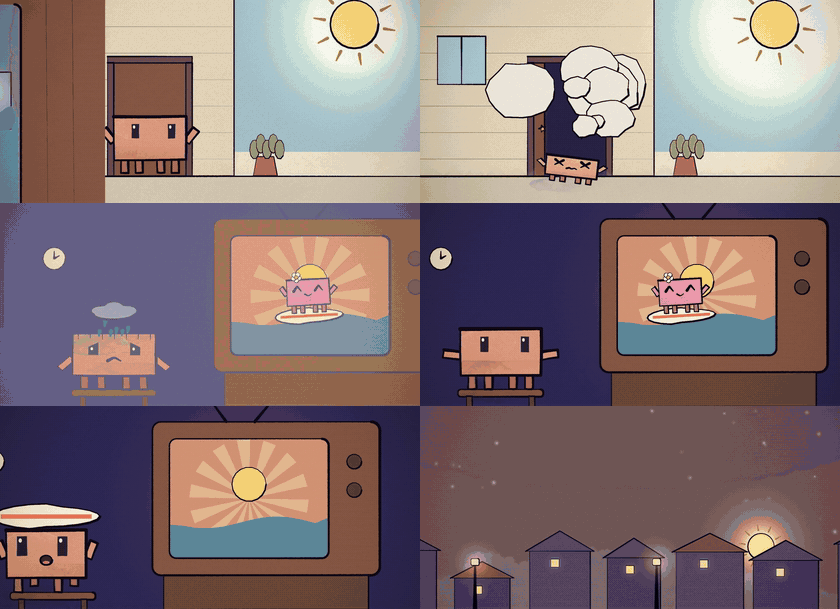
| Sugar Rush music video · hand-painted · 58 s |
Sunshine Boy music video · hand-painted · 63 s |
Bath Time narrated comic · 30 s |
Each one made with ReelMimic from a reference video and a one-line brief. Previews are silent, with the lyrics cropped out.
What is this?
Ever watched a video and thought "I want one in that style, but completely my own"?
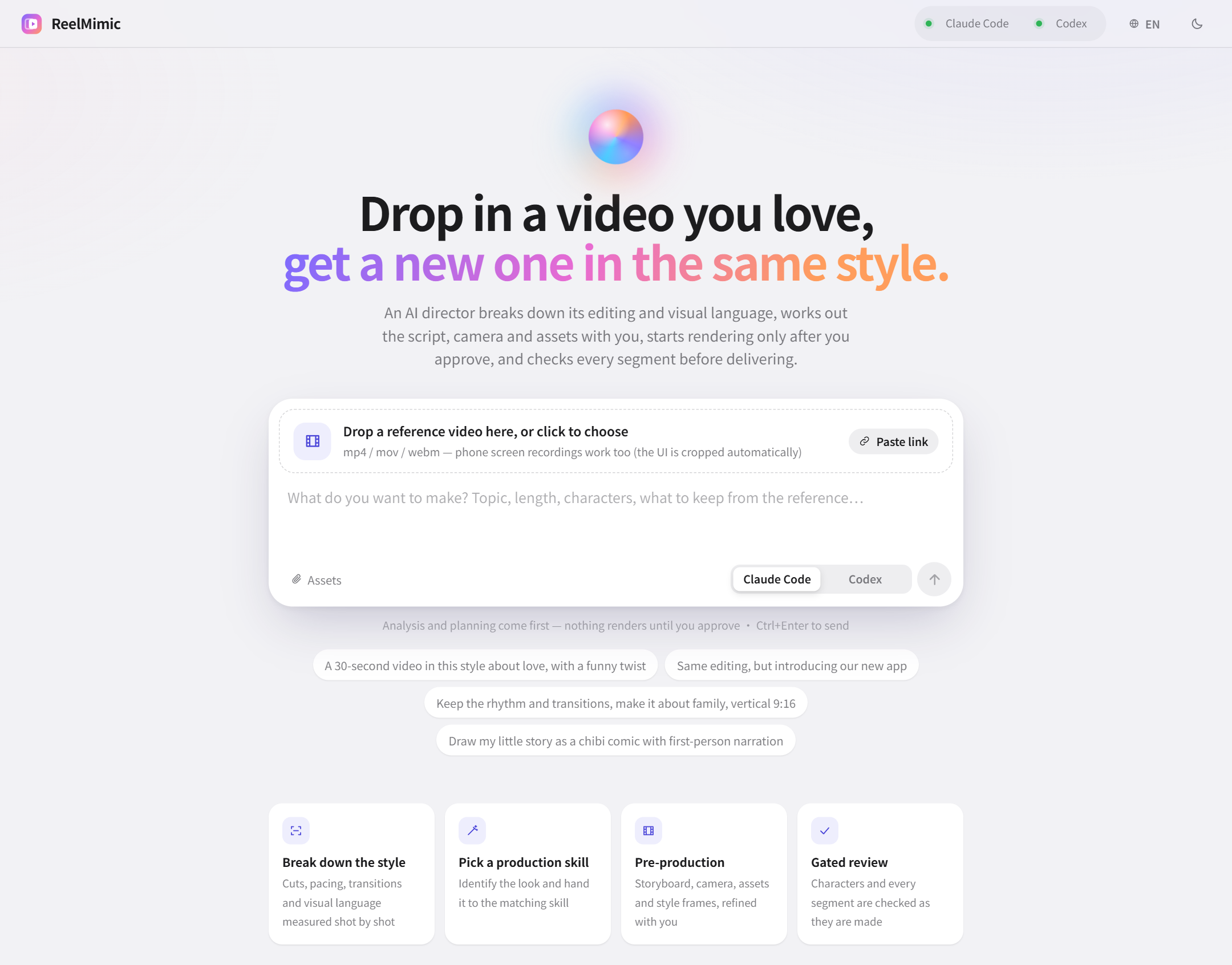
Just drop it into ReelMimic. A file, a phone recording or a YouTube link all work. Then tell it what you want to make.
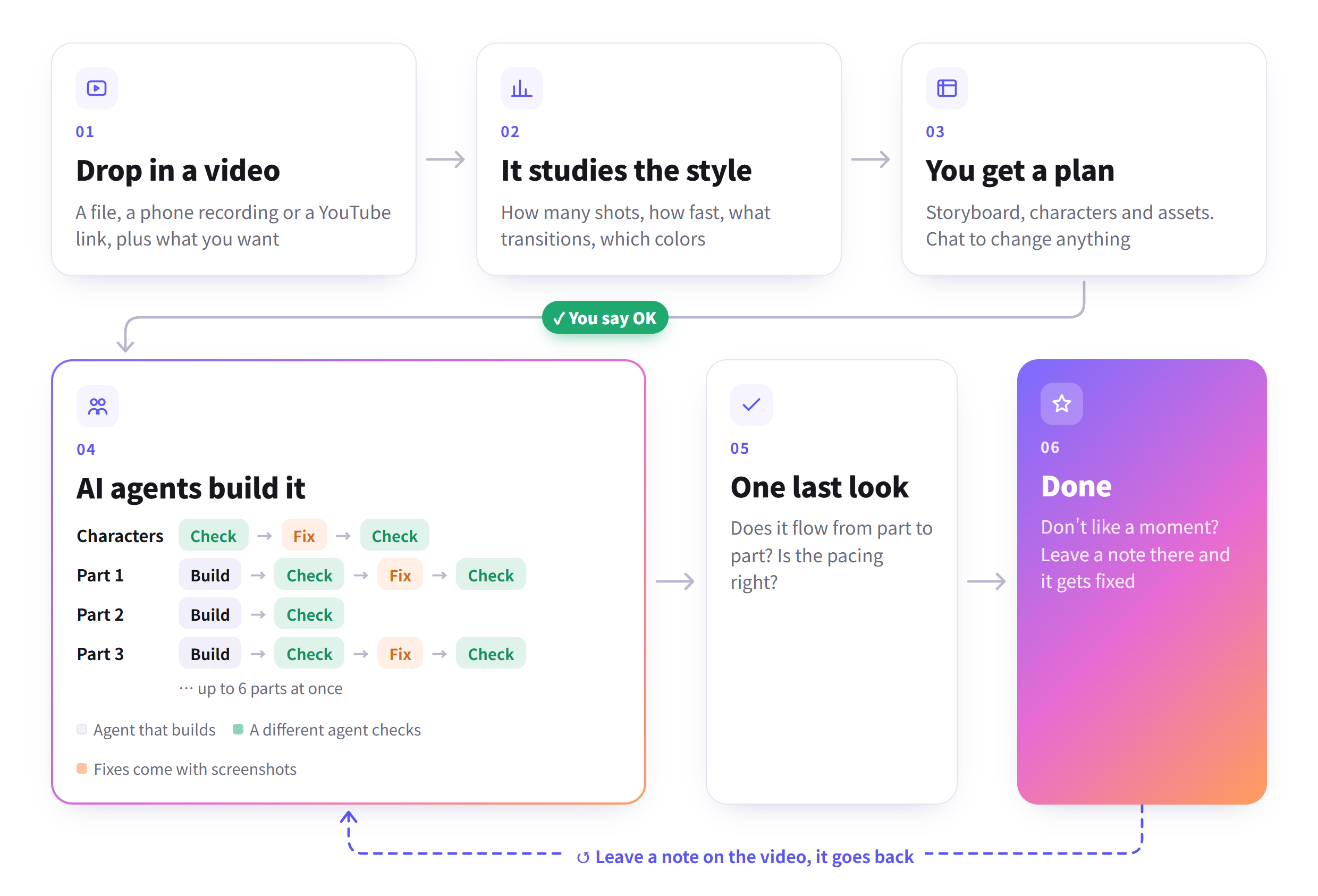
First it takes the reference apart: editing rhythm, shot lengths, transitions, framing, colors and camera moves. Then it puts together a plan for you to check. You can chat right next to it, change settings or add assets, and start when you're happy.
Once production starts, the work is split across several AI agents. Different parts of the video are made at the same time, and every shot is handed to a different agent to check. If something's wrong it goes back to be fixed, so it's not a one-shot generate-and-done.
ReelMimic learns how the reference was made. It doesn't carry over the original footage, characters or assets.
The whole thing runs on your own computer, with your own Claude Code or Codex.
What it does
- Breaks down the reference. Shot count, shot lengths, BPM, transitions, colors, framing and camera moves.
- Shows you the plan first. Storyboard, characters, assets and a few style frames. Chat about it until you like it, then approve.
- Several AI agents share the work. Up to 6 work on different parts of the video. Each finished shot goes to a new agent for review, so nobody grades their own work.
- Fixes need proof. Every fix comes with before and after screenshots, and the reviewer checks them.
- You can see what it's doing. What each agent is thinking, what it ran, which frames it looked at. The full log is there too.
- Comment right on the video. When it's done, scrub to any second and type a note. Send them all at once.
- New styles are just Markdown. One file per style, no code.
- Three languages. 繁體中文, English and 简体中文, switch in the top right.
Good to know
- 2D only, seven drawing engines: vector / motion graphics (built on HyperFrames), hand-painted watercolor (built on painted-animation), crayon picture book, pixel art, paper cut-out stop-motion, whiteboard doodle, and anime cel. The newer five are young and have had less real-world use than the first two. When a reference doesn't match a known style, it uses the closest engine and writes up a proposal for a new style.
- It takes a while. A 30–60 second video usually takes 1–3.5 hours after you approve the plan, depending on the length and the look. Watercolor and crayon are the slowest, because every frame is painted with brushes.
- It uses your AI plan. All the work runs through your Claude Code or Codex account, so it counts toward that account's usage. If you hit a limit, the job pauses and can pick up where it stopped.
- Tested mostly on Windows. macOS and Linux should work, but they've had less testing. Issues are welcome.
- No real people. It makes animation, not live-action footage of real people.
Roadmap
- More built-in characters and styles for each engine
- Save a newly discovered style from the web app, so the next similar reference matches it directly
- Faster watercolor rendering
Getting started
You'll need Node.js 22.18+, Python 3.10+, FFmpeg, Chrome, and either Claude Code or Codex CLI (logged in).
git clone https://github.com/edenfunf/reelmimic.git && cd reelmimic
./install.sh      # on Windows, double-click install.bat
./start.sh        # on Windows, double-click start.bat
Then open http://localhost:4318. The install script checks your setup and tells you if anything's missing. You can run
the check again any time with cd app && npm run doctor. Claude Code picks up the skills in this repo on its own, and
Codex reads AGENTS.md, so there's nothing else to set up.
Your first video
- On the home page, drop in a reference video or paste a link, say what you want, and pick Claude Code or Codex.
- Wait for the breakdown and the plan. If you want changes, say so in the chat on the right. Screenshots work too.
- If the plan asks you for something (lyrics, say), add it or skip it, then hit Approve and start.
- The Production line tab shows where each character and each part of the video is, with the review screenshots.
- When it's done, leave a note at whatever second looks off.
Settings
API keys and a few paths go in ~/.reelmimic/secrets.json. That file lives outside the repo, so it never gets
committed. See secrets.example.json for the format.
| Key | What it's for |
|---|---|
YATING_KEY |
Yating's Taiwanese Mandarin voices, for narration |
ELEVENLABS_API_KEY |
Optional ElevenLabs TTS for workflows using the shared audio engine; also install elevenlabs in ReelMimic's configured Python environment |
PIXABAY_KEY, FREESOUND_KEY |
More images, music and sound effects you're allowed to use (optional, Openverse works without a key) |
FFMPEG_DIR, CHROME_PATH, CODEX_BIN, PYTHON |
Where to find these tools if they're not on your PATH |
CODEX_SANDBOX |
Codex sandbox mode (default danger-full-access, like Claude Code with Bash allowed; workspace-write blocks the Chrome renderer) |
BUILDERS, MAX_AGENTS |
How many agents work on one video at once (default 6), and the limit across all projects (default 12) |
PORT |
Web port (default 4318) |
AGENTS_TTL_MS |
How long the detected Claude Code / Codex list is reused (default 300000 = 5 min; a missing agent is re-checked every 30 s; 0 re-checks on every request). Click the agent pill in the header to re-check now. A CLI installed into a new PATH folder still needs a server restart |
REELMIMIC_SECRETS |
Path to a different secrets file (legacy: CLONE_STUDIO_SECRETS) |
UPLOAD_POST_KEY, UPLOAD_POST_USER |
Optional. Post a finished video to TikTok, Instagram, YouTube and others with npm run post-video (see below); UPLOAD_POST_API overrides the API address |
Posting the finished video (optional)
ReelMimic never posts anything by itself. Once a project's final review is done and you're happy with the video, you can
send it to your social accounts through Upload-Post from the app/ folder:
npm run post-video -- <project id> --platforms tiktok,instagram,youtube              # dry run: shows what it would post
npm run post-video -- <project id> --platforms tiktok --at 2026-10-05T18:00 --tz Europe/Madrid --send
Without --send nothing leaves your computer. It only takes projects whose final review passed (--force to post one
that stopped with must-fix items left), uses the plan's title
unless you pass --title, and a rerun of the same video won't post it twice.
Docs
- Architecture: how the whole thing runs, where files go, how the AI plugs in
- Extending: adding styles, rendering engines, or another AI
- Contributing
- Troubleshooting: the setup problems the doctor detects, and their fixes
Ground rules
- It learns technique from the reference (pacing, framing, transitions, how the jokes land). It never reuses the footage, characters, logos or assets.
- Characters are original unless you bring your own designs, in which case it follows yours.
- Anything it finds online gets logged with its source, author and license. Unclear licenses are flagged.
- Lyrics only come from text you give it. It won't download commercial songs.
- What you do with the videos is up to you, so make sure you have the rights.
License
The code is MIT. Third-party skills and assets bundled here keep their own licenses, listed in THIRD_PARTY_NOTICES.md.
[!NOTE] ⭐ Star 与 Fork 数已于 2026 年 10 月 20 日清零,原因是仓库曾被误设为私有一小段时间。本项目仍在持续维护,详见 #115。
ReelMimic
丢一支你喜欢的视频,做一支一样风格的新视频。
|
|
|
| Sugar Rush MV · 手绘水彩 · 58 秒 |
阳光宅男 MV · 手绘水彩 · 63 秒 |
橘宝洗澡记 旁白漫画 · 30 秒 |
都是用 ReelMimic 做的:各给一支参考视频加一句需求。预览没有声音,也裁掉了歌词字幕。
这是什么
看到一支很喜欢的视频,想做一支同样风格、但内容完全是自己的?
把视频丢进 ReelMimic 就好。文件、手机录屏或 YouTube 链接都可以,再告诉它你想做什么。
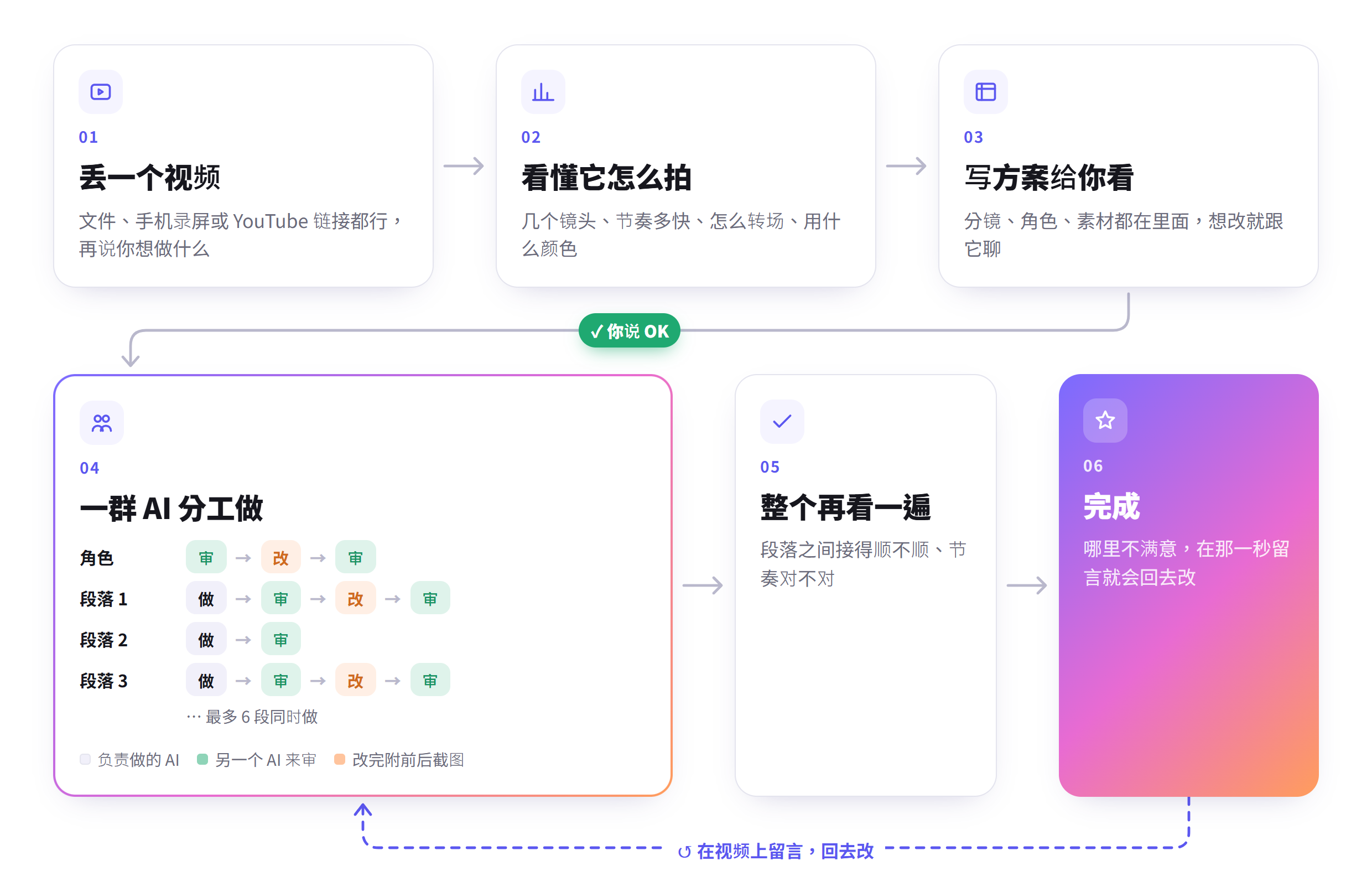
它会先把参考片拆开来看,像是剪辑节奏、镜头长度、转场、构图、配色和运镜,再整理成一份企划给你确认。你可以直接在旁边聊天、改设置、补素材,觉得可以了再开始做。
真正开始制作后,工作会拆给多个 AI 分工。不同段落可以同时进行,每一镜做完也会交给另一个 AI 检查,有问题就退回去改,不是生成一次就直接交差。
ReelMimic 学的是参考片的做法,不是把原本的画面、角色或素材搬过来。
整套流程都跑在你自己的电脑上,用你自己的 Claude Code 或 Codex。

可以做到什么
- 拆解参考片:镜头数量、镜头长度、BPM、转场、配色、构图和运镜都会整理出来。
- 先给你看企划:分镜、角色、素材、定调画面都在里面。想改就在旁边聊,改到满意再按核准。
- 多个 AI 分工:最多 6 个同时做不同段落。每做完一镜就换一个新的 AI 来审,不会自己审自己。
- 说修好要拿图来看:每个修正都附修改前后的截屏,审查的人对过才算数。
- 看得到它在干嘛:每个 AI 正在想什么、跑了什么、看了哪几格,画面上都有,也能打开完整 log。
- 直接在视频上留言:成片出来后,拉到哪一秒就在那一秒打字,写完一起送出。
- 加新风格不用写程序:一种风格就是一个 Markdown 档。
- 三种语言:繁中、英文、简中,右上角切换。
先说清楚
- 目前只做 2D,有七种画法: 矢量/动态图像(以 HyperFrames 为基础)、手绘水彩(以 painted-animation 为基础)、蜡笔绘本、像素风、剪纸定格、白板手绘、动漫赛璐璐。后面五种比较新,实际做片的次数比前两种少。参考片对不到已知风格时,会用最接近的画法做,并写一份新风格的建议。
- 需要一点时间。 30–60 秒的视频,企划核准后通常要 1–3.5 小时,看长度和画风。手绘水彩和蜡笔最慢,因为每一格都是用笔刷画出来的。
- 用的是你的 AI 额度。 所有工作都通过你的 Claude Code 或 Codex 账号跑,会算进那个账号的用量。额度用完时会暂停,之后可以从停下来的地方继续。
- 主要在 Windows 上测过。 macOS 和 Linux 应该可以用,但测得比较少,有问题欢迎开 issue。
- 不做真人。 它做的是动画,不会生成真实人物的实拍画面。
接下来
- 每种画法更多内置角色与风格
- 在网站上一键把新发现的风格存起来,下次遇到同类参考片就直接对到
- 让手绘水彩渲染更快
开始用
先装好这些:Node.js 22.18 以上、Python 3.10 以上、FFmpeg、Chrome,还有 Claude Code 或 Codex CLI 其中一个(要先登录)。
git clone https://github.com/edenfunf/reelmimic.git && cd reelmimic
./install.sh      # Windows 直接双击 install.bat
./start.sh        # Windows 直接双击 start.bat
打开 http://localhost:4318 就能用了。安装脚本会顺便检查环境,少了什么会跟你说;之后想再检查一次,跑 cd app && npm run doctor。
Claude Code 会自己读到 repo 里的 skills,Codex 会读 AGENTS.md,不用另外设置。
做第一支视频
- 在首页丢参考视频或贴链接,写你想做什么,选要用 Claude Code 还是 Codex。
- 等它拆解完、写好企划。有意见就在右边聊天框讲,也可以贴截屏。
- 企划里如果有要你给的东西(像歌词),给它或跳过,然后按「核准并开始生成」。
- 「生产线」分页可以看到每个角色、每一段做到哪、审查截屏长怎样。
- 做好之后觉得哪里不对,就直接在那一秒留言。
设置
密钥跟一些路径放在 ~/.reelmimic/secrets.json。这个档在 repo 外面,不会被 commit,格式可以照 secrets.example.json。
| 键 | 用来做什么 |
|---|---|
YATING_KEY |
雅婷的台湾华语语音,拿来配旁白 |
PIXABAY_KEY、FREESOUND_KEY |
可以找到更多能合法使用的图片、音乐、音效(没有也行,会用 Openverse) |
FFMPEG_DIR、CHROME_PATH、CODEX_BIN、PYTHON |
这些工具不在 PATH 上的话,在这里指定位置 |
CODEX_SANDBOX |
Codex 的沙盒模式(默认 danger-full-access,和 Claude Code 允许 Bash 时一样;workspace-write 会让 Chrome 渲染跑不起来) |
BUILDERS、MAX_AGENTS |
一支片同时几个 AI 在做(默认 6)、所有项目加起来最多几个(默认 12) |
PORT |
网站用的端口(默认 4318) |
AGENTS_TTL_MS |
检测到的 Claude Code / Codex 沿用多久(默认 300000 = 5 分钟;没检测到的每 30 秒重查;0 每次都查)。点右上角的 AI 状态可以立刻重查。装到新的 PATH 文件夹的话还是要重启服务器 |
文档
使用原则
- 参考片只学手法,像节奏、构图、转场、笑点怎么安排;画面、角色、Logo、素材都不会拿来用。
- 角色默认是原创的。你有自己的角色设计图,就照你的做。
- 网络上找来的素材会记下来源、作者跟授权,授权不清楚的会特别标出来。
- 歌词只用你给的文本,不会自己去下载商业歌曲。
- 做出来的视频要怎么用,请自己确认有没有权利。
授权
代码用 MIT 授权。里面附的第三方 skill 和素材照它们原本的授权,细节在 THIRD_PARTY_NOTICES.md。