Understand-Anything
Graphs that teach > graphs that impress. Turn any code into an interactive knowledge graph you can explore, search, and ask questions about. Works with Claude Code, Codex, Cursor, Copilot, Gemini CLI, and more.
原始仓库简介 · 中文摘要待补充 · antigravity-skills / business-knowledge / claude-code / claude-skills / codebase-analysis / codex
README / 项目原文
Understand Anything
Turn any codebase, knowledge base, or docs into an interactive knowledge graph you can explore, search, and ask questions about.
Works with Claude Code, Codex, Cursor, Copilot, Gemini CLI, and more.
Understand Anything. Understand Anyone.
AI should help people, not replace them.
English | 简体中文 | 繁體中文 | 日本語 | 한국어 | Español | Türkçe | Русский | Tiếng Việt



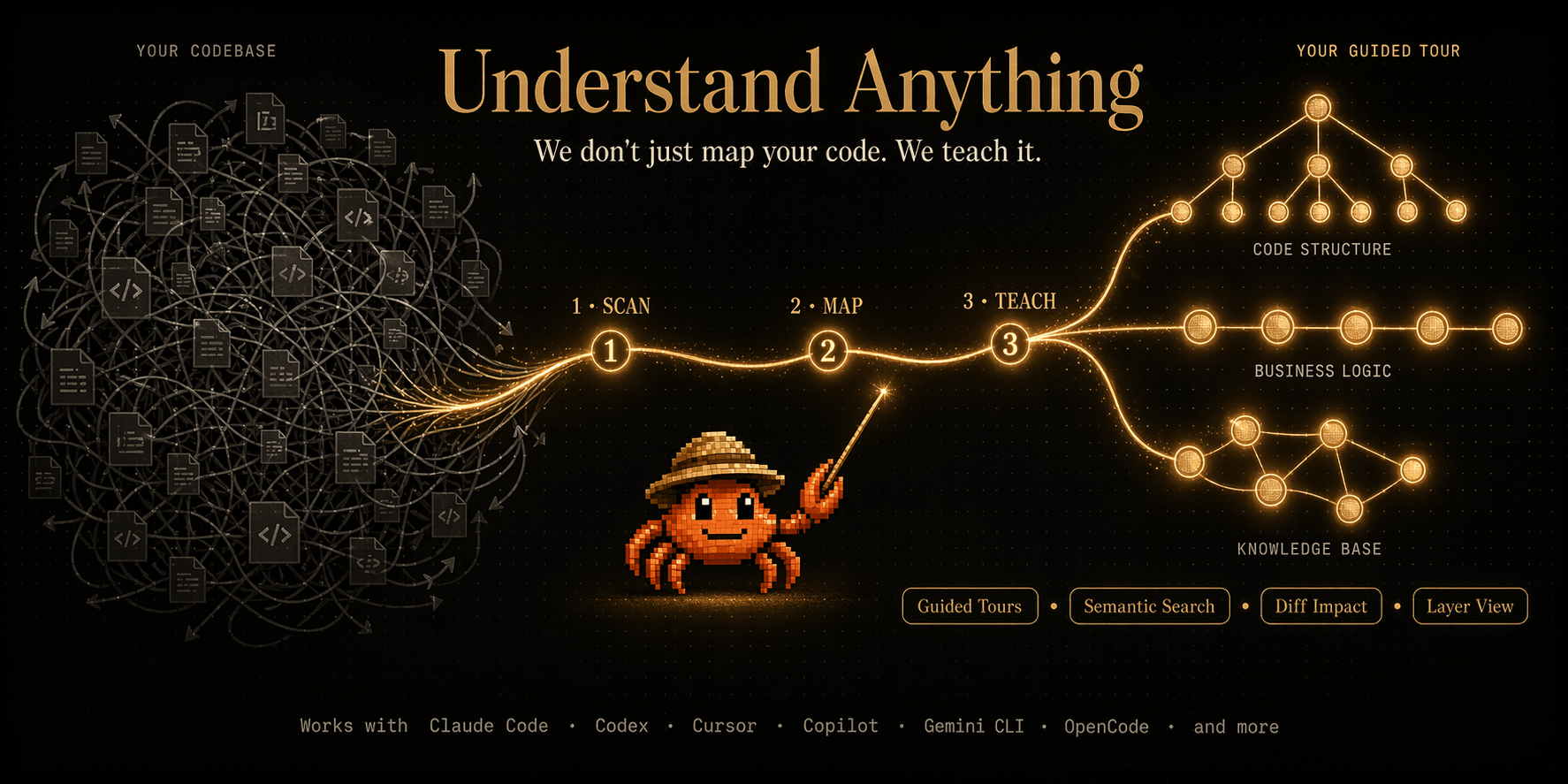
You just joined a new team. The codebase is 200,000 lines of code. Where do you even start?
Understand Anything is a Claude Code Plugin that analyzes your project with a multi-agent pipeline, builds a knowledge graph of every file, function, class, and dependency, then gives you an interactive dashboard to explore it all visually. Stop reading code blind. Start seeing the big picture.
The goal isn't a graph that wows you with how complex your codebase is — it's a graph that quietly teaches you how every piece fits together.
✨ Features
[!NOTE] Want to skip the reading? Try the live demo in our homepage — a fully interactive dashboard you can pan, zoom, search, and explore right in your browser.
Explore the structural graph
Navigate your codebase as an interactive knowledge graph — every file, function, and class is a node you can click, search, and explore. Select any node to see plain-English summaries, relationships, and guided tours.
Understand business logic
Switch to the domain view and see how your code maps to real business processes — domains, flows, and steps laid out as a horizontal graph.
Analyze knowledge bases
Point /understand-knowledge at a Karpathy-pattern LLM wiki and get a force-directed knowledge graph with community clustering. The deterministic parser extracts wikilinks and categories from index.md, then LLM agents discover implicit relationships, extract entities, and surface claims — turning your wiki into a navigable graph of interconnected ideas.
🧭 Guided ToursAuto-generated walkthroughs of the architecture, ordered by dependency. Learn the codebase in the right order. |
🔍 Fuzzy & Semantic SearchFind anything by name or by meaning. Search "which parts handle auth?" and get relevant results across the graph. |
📊 Diff Impact AnalysisSee which parts of the system your changes affect before you commit. Understand ripple effects across the codebase. |
🎭 Persona-Adaptive UIThe dashboard adjusts its detail level based on who you are — junior dev, PM, or power user. |
🏗️ Layer VisualizationAutomatic grouping by architectural layer — API, Service, Data, UI, Utility — with color-coded legend. |
📚 Language Concepts12 programming patterns (generics, closures, decorators, etc.) explained in context wherever they appear. |
🚀 Quick Start
1. Install the plugin
/plugin marketplace add Egonex-AI/Understand-Anything
/plugin install understand-anything
Using a local model? For privacy or enterprise setups, point your platform at a local model provider such as Ollama — follow their integration guide to change the model provider.
2. Analyze your codebase
/understand
A multi-agent pipeline scans your project, extracts every file, function, class, and dependency, then builds a knowledge graph saved to .ua/knowledge-graph.json. (Projects that already have a .understand-anything/ directory keep using it — it stays the data directory when present, so nothing needs migrating.)
Heads up on token usage: The initial
/understandanalyzes your whole codebase and can consume a significant number of tokens on large projects. We recommend running it on a token plan / subscription, or using a local model (see above) for initialization. Subsequent runs are incremental by default — only changed files are re-analyzed — so they use far fewer tokens.
Localized output: Use --language to generate content in your preferred language:
# Generate Chinese content (知识图节点描述和 Dashboard UI)
/understand --language zh

# Supported languages: en (default), zh, zh-TW, ja, ko, ru, vi
On the first run in a project — when you don't pass --language and no language is stored yet — /understand detects the language you're conversing in. If it isn't English, it asks you to confirm (or override) before generating; English conversations are unaffected. Your choice is saved to .ua/config.json and reused on every later run.
The --language parameter affects:
- Node summaries and descriptions in the knowledge graph
- Dashboard UI labels, buttons, and tooltips
- Guided tour explanations
3. Explore the dashboard
/understand-dashboard
An interactive web dashboard opens with your codebase visualized as a graph — color-coded by architectural layer, searchable, and clickable. Select any node to see its code, relationships, and a plain-English explanation.
4. Keep learning
# Ask anything about the codebase
/understand-chat How does the payment flow work?

# Analyze impact of your current changes
/understand-diff

# Deep-dive into a specific file or function
/understand-explain src/auth/login.ts

# Generate an onboarding guide for new team members
/understand-onboard

# Extract business domain knowledge (domains, flows, steps)
/understand-domain

# Analyze a Karpathy-pattern LLM wiki knowledge base
/understand-knowledge ~/path/to/wiki

# Re-run anytime — incremental by default (only re-analyzes changed files)
/understand

# Auto-update on every commit via a post-commit hook
/understand --auto-update

# Scope to a subdirectory (for huge monorepos)
/understand src/frontend
🌐 Multi-Platform Installation
Understand-Anything works across multiple AI coding platforms.
Claude Code (Native)
/plugin marketplace add Egonex-AI/Understand-Anything
/plugin install understand-anything
One-line install (Codex / OpenCode / OpenClaw / Antigravity / Gemini CLI / Pi Agent / Vibe CLI / VS Code Copilot / Hermes / Cline / KIMI CLI / Trae / Nanobot / Kiro)
macOS / Linux:
curl -fsSL https://raw.githubusercontent.com/Egonex-AI/Understand-Anything/main/install.sh | bash
# or skip the prompt by passing the platform:
curl -fsSL https://raw.githubusercontent.com/Egonex-AI/Understand-Anything/main/install.sh | bash -s codex
Windows (PowerShell):
iwr -useb https://raw.githubusercontent.com/Egonex-AI/Understand-Anything/main/install.ps1 | iex
The installer clones the repo to ~/.understand-anything/repo and creates the right symlinks for the chosen platform. Restart your CLI/IDE afterwards.
Note on invoking skills: the invocation prefix differs per platform. Most platforms use slash commands (
/understand), but Codex uses$instead — type$understand, not/understand. If neither prefix is recognized on your platform, just ask in plain language: "Use the understand skill to analyze this project."
- Supported
<platform>values:gemini,codex,opencode,pi,openclaw,antigravity,vibe,vscode,hermes,cline,kimi,trae,nanobot,kiro - Update later:
- macOS / Linux:
./install.sh --update - Windows:
& "$HOME/.understand-anything/repo/install.ps1" -Update
- macOS / Linux:
- Uninstall:
- macOS / Linux:
./install.sh --uninstall <platform> - Windows:
& "$HOME/.understand-anything/repo/install.ps1" -Uninstall <platform>
- macOS / Linux:
Cursor
Cursor auto-discovers the plugin via .cursor-plugin/plugin.json when this repo is cloned. No manual installation needed — just clone and open in Cursor.
If auto-discovery doesn't pick it up, install it manually: open Cursor Settings → Plugins, paste https://github.com/Egonex-AI/Understand-Anything into the search field, and add it from there.
VS Code + GitHub Copilot
VS Code with GitHub Copilot (v1.108+) auto-discovers the plugin via .copilot-plugin/plugin.json when this repo is cloned. No manual installation needed — just clone and open in VS Code.
For personal skills (available across all projects), run the install.sh above with the vscode platform.
Copilot CLI
copilot plugin install Egonex-AI/Understand-Anything:understand-anything-plugin
Kiro CLI / IDE
curl -fsSL https://raw.githubusercontent.com/Egonex-AI/Understand-Anything/main/install.sh | bash -s kiro
After installation:
- Kiro CLI:
kiro-cli chat --agent understand "Analyze this project" - Kiro IDE: The skills are symlinked into
~/.kiro/skills/and theunderstandagent is written to~/.kiro/agents/understand.json, so both are available after restarting the IDE.
For personal skills (available across all projects), run the install.sh above with the kiro platform.
Platform Compatibility
| Platform | Status | Install Method |
|---|---|---|
| Claude Code | ✅ Native | Plugin marketplace |
| Cursor | ✅ Supported | Auto-discovery |
| VS Code + GitHub Copilot | ✅ Supported | Auto-discovery |
| Copilot CLI | ✅ Supported | Plugin install |
| Codex | ✅ Supported | install.sh codex |
| OpenCode | ✅ Supported | install.sh opencode |
| OpenClaw | ✅ Supported | install.sh openclaw |
| Antigravity | ✅ Supported | install.sh antigravity |
| Gemini CLI | ✅ Supported | install.sh gemini |
| Pi Agent | ✅ Supported | install.sh pi |
| Vibe CLI | ✅ Supported | install.sh vibe |
| Hermes | ✅ Supported | install.sh hermes |
| Cline | ✅ Supported | install.sh cline |
| KIMI CLI | ✅ Supported | install.sh kimi |
| Trae | ✅ Supported | install.sh trae |
| Nanobot | ✅ Supported | install.sh nanobot |
| Kiro CLI / IDE | ✅ Supported | install.sh kiro |
📦 Share the Graph with Your Team
The graph is just JSON — commit it once, and teammates skip the pipeline. Good for onboarding, PR reviews, and docs-as-code.
Example: GoogleCloudPlatform/microservices-demo — Go / Java / Python / Node reference with a committed graph.
What to commit: everything in .ua/ except intermediate/ and diff-overlay.json (those are local scratch). (Legacy projects use .understand-anything/ — substitute that directory name below if it's the one present.)
.ua/intermediate/
.ua/diff-overlay.json
Keep it fresh: enable /understand --auto-update — a post-commit hook incrementally patches the graph so each commit lands with a matching graph. Or re-run /understand manually before releases.
Large graphs (10 MB+): track with git-lfs.
git lfs install
git lfs track ".ua/*.json"
git add .gitattributes .ua/
View the dashboard without Claude Code
Once a graph has been generated and committed, anyone on the team can open it with one command — no Claude Code, no LLM, no API key. Only Node.js (>= 18) is required:
npx https://github.com/Egonex-AI/Understand-Anything/releases/latest/download/understand-anything-viewer.tgz /path/to/analyzed/project
The terminal prints a tokenized URL (http://127.0.0.1:5173/?token=…) and opens the full interactive dashboard in your browser. The project directory (default: current directory) must contain the committed data directory (.ua/, or legacy .understand-anything/). Everything is served read-only from local disk — no LLM calls, no data leaves your machine.
Working from a clone instead? pnpm install && pnpm --filter @understand-anything/core build, then GRAPH_DIR=/path/to/analyzed/project pnpm dev:dashboard does the same via the Vite dev server.
🔧 Under the Hood
Tree-sitter + LLM hybrid
Static analysis and LLMs do what each does best:
- Tree-sitter (deterministic) — parses source into a concrete syntax tree and extracts structural facts: imports, exports, function/class definitions, call sites, inheritance. Pre-resolved into an
importMapduring the scan phase and passed to file-analyzers so they don't re-derive imports from source. Same input → same output, every run. Also powers fingerprint-based change detection for incremental updates. - LLM (semantic) — reads the parsed structure alongside the original source to produce what parsers can't: plain-English summaries, tags, architectural layer assignments, business-domain mapping, guided tours, language concept callouts.
This split is why the graph is reproducible on the structural side (the same code always yields the same edges) while still capturing intent on the semantic side (what a file is for, not just what it imports).
Multi-Agent Pipeline
The /understand command orchestrates 5 specialized agents, /understand-domain adds a 6th, and /understand-knowledge adds a 7th:
| Agent | Role | Used By |
|---|---|---|
project-scanner |
Discovers files, detects languages and frameworks | /understand |
file-analyzer |
Extracts functions, classes, imports; produces graph nodes and edges | /understand |
architecture-analyzer |
Identifies architectural layers | /understand |
tour-builder |
Generates guided learning tours | /understand |
graph-reviewer |
Validates graph completeness and referential integrity. Runs inline by default; use --review for full LLM review |
/understand |
domain-analyzer |
Extracts business domains, flows, and process steps | /understand-domain |
article-analyzer |
Extracts entities, claims, and implicit relationships from wiki articles | /understand-knowledge |
File analyzers run in parallel, up to 5 concurrent workers and 20–30 files per batch.
The pipeline also supports incremental updates: only files changed since the last run are re-analyzed.
🎥 Community
A community-made walkthrough by Better Stack.

Made a video, blog post, or tutorial? Open an issue or PR — happy to feature it here.
🤝 Contributing
Contributions are welcome! Here's how to get started:
- Fork the repository
- Create a feature branch (
git checkout -b feature/my-feature) - Run the tests (
pnpm --filter @understand-anything/core test) - Commit your changes and open a pull request
Please open an issue first for major changes so we can discuss the approach.
Stop reading code blind. Start understanding everything.
Star History
Thanks to everyone who's used and contributed — knowing this saves people time is what made it worth building.
MIT License © Yuxiang Lin and Infinite Universe, Inc.
Understand Anything
将任意代码库、知识库或文档转化为可探索、可搜索、可对话的交互式知识图谱
支持 Claude Code、Codex、Cursor、Copilot、Gemini CLI 等多平台。
Understand Anything. Understand Anyone.
AI 应该帮助人,而不是取代人。
English | 简体中文 | 繁體中文 | 日本語 | 한국어 | Español | Türkçe | Русский | Tiếng Việt


当你刚加入一个新团队,面对 20 万行代码,你从哪里开始?
Understand Anything 是一个 Claude Code Plugin,通过多智能体(multi-agent)架构分析你的项目,构建包含文件、函数、类以及依赖关系的知识图谱,并提供一个可视化交互界面,帮助你理解整个系统。不再”盲读代码”,而是从全局视角理解系统结构。
目标不是用代码库的复杂程度来惊艳你 —— 而是默默告诉你每一块是怎么拼在一起的。
✨ 核心功能
探索代码结构图
将你的代码库以交互式知识图谱的形式呈现——每个文件、函数和类都是可点击、可搜索、可探索的节点。选择任意节点即可查看通俗易懂的摘要、依赖关系和引导式学习路径。
理解业务逻辑
切换到领域视图,查看代码如何映射到真实的业务流程——以水平图的形式展示领域、流程和步骤。
分析知识库
将 /understand-knowledge 指向一个 Karpathy 模式的 LLM Wiki,即可获得带有社区聚类的力导向知识图谱。确定性解析器从 index.md 中提取 wikilinks 和分类,然后 LLM 代理发现隐式关系、提取实体并挖掘论断——将你的 wiki 转化为可导航的互联思想图谱。
🧭 引导式学习自动生成架构学习路径,按依赖顺序学习。 |
🔍 语义搜索支持模糊搜索 + 语义搜索,例如搜索"哪些部分处理身份验证?"即可在整个图中获取相关结果。 |
📊 变更影响分析提交更改前,查看更改会影响系统的哪些部分。了解更改对整个代码库的连锁反应。 |
🎭 用户角色自适应 UI根据用户类型(初级开发 / 项目经理 / 高级用户)调整其详细程度。 |
🏗️ 层级可视化按架构层级自动分组 — API,服务,数据,UI, 系统工具 — 并附有颜色编码图例。 |
📚 语言概念12 种编程模式(泛型、闭包、装饰器等)将在上下文中逐一解释。 |
🚀 快速开始
1. 安装插件
/plugin marketplace add Egonex-AI/Understand-Anything
/plugin install understand-anything
使用本地模型? 出于隐私或企业需求,可以将你的平台指向本地模型提供方,例如 Ollama —— 按照其集成指南更改模型提供方。
2. 分析你的代码库
/understand
多智能体(multi-agent)架构会:扫描你的项目,提取函数 / 类 / 依赖,构建知识图谱保存至.ua/knowledge-graph.json。(已经有 .understand-anything/ 目录的项目会继续使用它——存在时它仍是数据目录,因此无需迁移。)
关于 Token 消耗的提醒: 首次运行
/understand会分析整个代码库,在大型项目上可能消耗大量 token。建议在有 token 套餐 / 订阅的情况下运行,或在初始化时使用本地模型(见上文)。后续运行默认是增量式的——只重新分析变更过的文件——因此消耗的 token 大幅减少。
本地化输出: 使用 --language 参数生成中文内容:
# 生成中文内容(知识图节点描述和 Dashboard UI)
/understand --language zh

# 支持的语言:en(默认)、zh、zh-TW、ja、ko、ru、vi
--language 参数会影响:
- 知识图谱中的节点摘要和描述
- Dashboard UI 的标签、按钮和提示
- 导览路线的解释说明
3. 打开数据看板
/understand-dashboard
打开交互式网页数据看板,您的代码库将以图表形式呈现 — 按架构层级进行颜色编码,支持搜索和点击。选择任意节点即可查看其代码、关系以及简明易懂的解释。
4. 深度使用
# 询问任意代码库的问题
/understand-chat How does the payment flow work?

# 分析当前修改的影响
/understand-diff

# 深入理解某个文件
/understand-explain src/auth/login.ts

# 为新团队成员生成指南
/understand-onboard

# 提取业务领域知识(领域、流程、步骤)
/understand-domain

# 分析 Karpathy 模式的 LLM Wiki 知识库
/understand-knowledge ~/path/to/wiki

# 直接重跑即可 —— 默认增量更新,只分析变更的文件
/understand

# 安装 post-commit 钩子,每次提交自动增量更新
/understand --auto-update

# 大型 monorepo?把分析范围限定到某个子目录
/understand src/frontend
🌐 多平台支持
Understand-Anything 可在多个 AI 编码平台上运行。
Claude Code(原生)
/plugin marketplace add Egonex-AI/Understand-Anything
/plugin install understand-anything
一行命令安装(Codex / OpenCode / OpenClaw / Antigravity / Gemini CLI / Pi Agent / Vibe CLI / VS Code Copilot / Hermes / Cline / KIMI CLI / Trae / Nanobot / Kiro)
macOS / Linux:
curl -fsSL https://raw.githubusercontent.com/Egonex-AI/Understand-Anything/main/install.sh | bash
# 也可以直接传入平台名跳过交互提示:
curl -fsSL https://raw.githubusercontent.com/Egonex-AI/Understand-Anything/main/install.sh | bash -s codex
Windows(PowerShell):
iwr -useb https://raw.githubusercontent.com/Egonex-AI/Understand-Anything/main/install.ps1 | iex
安装脚本会将仓库克隆到 ~/.understand-anything/repo,并为所选平台创建相应的符号链接。安装完成后请重启 CLI 或 IDE。
关于技能调用方式: 不同平台的调用前缀不同。大多数平台使用斜杠命令(
/understand),但 Codex 使用$—— 请输入$understand,而不是/understand。如果两种前缀都不被识别,直接用自然语言请求即可:“使用 understand 技能分析这个项目”。
- 支持的
<platform>取值:gemini、codex、opencode、pi、openclaw、antigravity、vibe、vscode、hermes、cline、kimi、trae、nanobot、kiro - 后续更新:
./install.sh --update - 卸载:
./install.sh --uninstall <platform>
Cursor
克隆此仓库后,Cursor 会自动通过 .cursor-plugin/plugin.json文件发现插件。无需手动安装 — 只需克隆并在 Cursor 中打开即可。
若自动发现未生效,可手动安装:打开 Cursor Settings → Plugins,在搜索框中粘贴 https://github.com/Egonex-AI/Understand-Anything 并添加。
VS Code + GitHub Copilot
安装 GitHub Copilot 扩展(v1.108+)后,VS Code 会通过 .copilot-plugin/plugin.json 自动发现插件,克隆后直接在 VS Code 中打开即可,无需手动安装。
若需要在所有项目中使用(个人技能),运行上面的 install.sh 并选择 vscode 平台即可。
Copilot CLI
copilot plugin install Egonex-AI/Understand-Anything:understand-anything-plugin
Kiro CLI / IDE
curl -fsSL https://raw.githubusercontent.com/Egonex-AI/Understand-Anything/main/install.sh | bash -s kiro
安装完成后:
- Kiro CLI:
kiro-cli chat --agent understand "分析这个项目" - Kiro IDE:技能会被符号链接到
~/.kiro/skills/,understandagent 会被写入~/.kiro/agents/understand.json,重启 IDE 后两者均可使用。
若需要在所有项目中使用(个人技能),运行上面的 install.sh 并选择 kiro 平台即可。
多平台兼容
| 平台 | 状态 | 安装方式 |
|---|---|---|
| Claude Code | ✅ 原生 | 插件市场 |
| Cursor | ✅ 支持 | 自动发现 |
| VS Code + GitHub Copilot | ✅ 支持 | 自动发现 |
| Copilot CLI | ✅ 支持 | 插件安装 |
| Codex | ✅ 支持 | install.sh codex |
| OpenCode | ✅ 支持 | install.sh opencode |
| OpenClaw | ✅ 支持 | install.sh openclaw |
| Antigravity | ✅ 支持 | install.sh antigravity |
| Gemini CLI | ✅ 支持 | install.sh gemini |
| Pi Agent | ✅ 支持 | install.sh pi |
| Vibe CLI | ✅ 支持 | install.sh vibe |
| Hermes | ✅ 支持 | install.sh hermes |
| Cline | ✅ 支持 | install.sh cline |
| KIMI CLI | ✅ 支持 | install.sh kimi |
| Trae | ✅ 支持 | install.sh trae |
| Nanobot | ✅ 支持 | install.sh nanobot |
| Kiro CLI / IDE | ✅ 支持 | install.sh kiro |
📦 与团队共享知识图谱
图谱就是一份 JSON 文件——提交一次,团队成员就可以跳过整条流水线。适合新人上手、PR 评审和 docs-as-code 工作流。
示例: GoogleCloudPlatform/microservices-demo —— 包含已提交图谱的 Go / Java / Python / Node 多语言参考项目。
需要提交的内容: .ua/ 下的全部文件,除了 intermediate/ 和 diff-overlay.json(这些是本地临时文件)。(旧项目使用 .understand-anything/——如果存在的是该目录,请将下方的目录名替换为它。)
.ua/intermediate/
.ua/diff-overlay.json
保持最新: 启用 /understand --auto-update —— 一个 post-commit 钩子会增量更新图谱,每次提交都能得到匹配的图谱版本。也可以在发布前手动重跑 /understand。
大型图谱(10 MB 以上): 使用 git-lfs 跟踪。
git lfs install
git lfs track ".ua/*.json"
git add .gitattributes .ua/
无需 Claude Code 也能查看仪表盘
图谱生成并提交后,团队中的任何人只需一条命令即可打开它 —— 无需 Claude Code,无需 LLM,无需 API 密钥,只需要 Node.js(>= 18):
npx https://github.com/Egonex-AI/Understand-Anything/releases/latest/download/understand-anything-viewer.tgz /path/to/analyzed/project
终端会打印一个带令牌的 URL(http://127.0.0.1:5173/?token=…),并在浏览器中打开完整的交互式仪表盘。项目目录(默认:当前目录)必须包含已提交的数据目录(.ua/,或旧版 .understand-anything/)。所有内容都从本地磁盘以只读方式提供 —— 没有 LLM 调用,也不会有任何数据离开你的机器。
如果你是从克隆的仓库工作:先执行 pnpm install && pnpm --filter @understand-anything/core build,再运行 GRAPH_DIR=/path/to/analyzed/project pnpm dev:dashboard,即可通过 Vite 开发服务器实现同样的效果。
🔧 技术原理
Tree-sitter + LLM 混合分析
把确定性的事情交给静态分析,把需要语义理解的事情交给 LLM:
- Tree-sitter(确定性) —— 将源码解析为具体语法树,提取结构性事实:导入、导出、函数 / 类定义、调用点、继承关系。在 scan 阶段预先解析为
importMap并传给 file-analyzer,避免它们再从源码推导一次 import。同样的输入永远得到同样的输出,并作为增量更新的指纹基础。 - LLM(语义) —— 读取解析后的结构以及原始源码,生成解析器做不了的事:plain-English 摘要、标签、架构层归属、业务领域映射、引导路径、语言概念标注。
正因为这个分工,图谱在结构层面是可复现的(同样的代码总是产生同样的边),同时在语义层面又能捕捉意图(一个文件是「为了什么」存在,而不仅仅是它 import 了什么)。
多智能体架构
/understand 命令调用 5 个 agent,/understand-domain 额外增加第 6 个,/understand-knowledge 再增加第 7 个:
| Agent | 职责 |
|---|---|
project-scanner |
扫描项目文件,检测语言和框架 |
file-analyzer |
提取代码结构(函数、类和导入),生成图节点和边 |
architecture-analyzer |
识别架构层 |
tour-builder |
生成引导式学习路径 |
graph-reviewer |
验证图的完整性和引用完整性(默认内联运行;使用 --review 进行完整的 LLM 审查) |
domain-analyzer |
提取业务领域、流程和处理步骤(由 /understand-domain 使用) |
article-analyzer |
从 wiki 文章中提取实体、论断和隐式关系(由 /understand-knowledge 使用) |
文件分析器并行运行(最多 5 个并发,每批 20–30 个文件)。支持增量更新 — 仅重新分析自上次运行以来发生更改的文件。
🎥 社区
由 Better Stack 制作的社区视频教程。
写过视频、博客或教程?提个 issue 或 PR —— 我们很乐意把它放在这里。
🤝 贡献
欢迎贡献!以下是贡献指南:
- Fork 项目
- 新建分支 (
git checkout -b feature/my-feature) - 运行测试 (
pnpm --filter @understand-anything/core test) - 提交更改并创建一个PR请求
对于重大变更,请先提交 issue,以便我们讨论解决方案。
不再盲读代码,而是理解整个系统
Star 历史记录
感谢每一位使用过、贡献过的朋友 —— 知道它替你们省下了一些时间,就是当初做它最值得的理由。
MIT License © Yuxiang Lin and Infinite Universe, Inc.