rakazo
可自选模型和沙箱环境的开源 AI 助手,提供类似 Grok Bot 的任务执行工作方式。
中文简介经编辑校订 · ai-agents / chatgpt / docker / electron / expo / grok
README / 项目原文
Rakazo




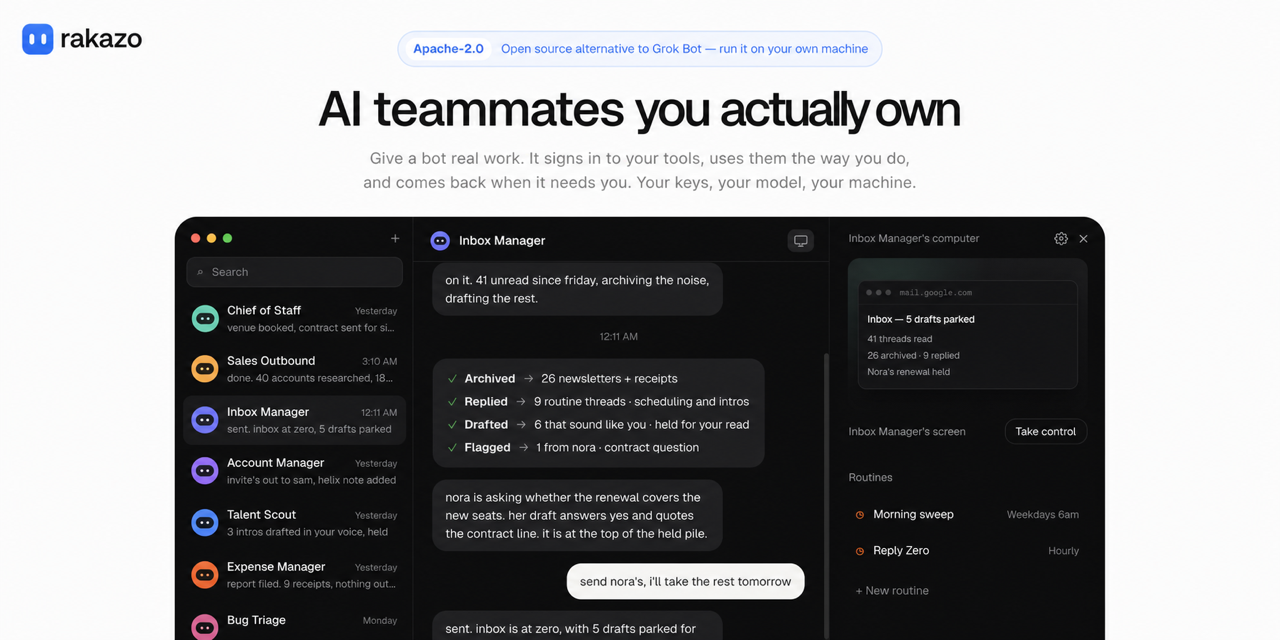
Rakazo is an open source AI agent for persistent teammates, and a self-hosted AI assistant you can run on your own machine. It is available on the web, as an Electron desktop app, and on iPhone and Android. Bring your own model and computer provider, or run the complete stack locally.
It is an open source, self-hosted alternative to Grok Bot, Meta Muse, OpenAI Dots, Instinct, OpenClaw, Hermes Agent, and Claude Duet.
Rakazo is in beta. Learn more at rakazo.com.
Features
- Persistent bots with their own conversations, memory, routines, and history
- Voice mode: speak replies, dictate, and call a bot. Bring your own ElevenLabs, OpenAI, Cartesia, or Fish Audio key
- Shared Team Computers and isolated Private computers
- Browser, terminal, file, and graphical desktop access
- Bots that can delegate to peer bots or short-lived subagents
- Bring-your-own model credentials through Pi
- App integrations through Composio or Pipedream Connect, plus user-installed Treg, remote MCP, and OpenAPI tool sources
- Docker, E2B, Daytona, CreateOS, Boat, and trusted local-computer support
Demo
https://github.com/user-attachments/assets/dccdeddb-2134-4a56-8eed-b2e591736b1c
Thanks
Stack
- TypeScript
- React 19, Vite, and Tailwind CSS
- Electron and Expo
- Hono and oRPC
- PostgreSQL and Prisma
- Better Auth
- Graphile Worker
- Pi
- Docker, E2B, Daytona, CreateOS, and Boat
- Composio, Pipedream Connect, MCP, and OpenAPI integrations
Quick start (published images)
You need Docker Engine, the Compose plugin, curl, and OpenSSL. No clone or Node install.
mkdir -p rakazo && cd rakazo &&
curl -fsSLO https://raw.githubusercontent.com/elie222/rakazo/main/infra/compose/install-images.sh &&
bash install-images.sh
The installer downloads the Compose files, creates .env with random secrets, and starts Rakazo.
It preserves an existing .env when rerun.
Open http://127.0.0.1:5173, create an account, and connect a model.
Local Docker computers are on by default. Optional remote providers: e2b, daytona, createos, boat, or railway
with the matching API key.
Default image tag is edge (main builds, linux/amd64 + linux/arm64). Details and tags:
self-hosting guide.
On restricted networks, override the installer download base (RAKAZO_DOWNLOAD_BASE), skip
existing Compose files (--local / RAKAZO_DOWNLOAD_SKIP_EXISTING), or mirror the bootstrap
script URL — see
Restricted networks / mirror downloads.
For an agent-assisted install, use SETUP_PROMPT.md.
Run on a server
Bots stay on when the backend runs on a server. Use the same installer on a VPS, then connect from the desktop app, the mobile app, or a browser.
bash install-images.sh --prepare-only
# edit .env: SANDBOX_PROVIDER=boat (or e2b / daytona / createos) with its API key, RAKAZO_HOST=your.domain
bash install-images.sh
Put HTTPS in front of port 5173; docs/self-host.md
covers the Caddy setup and host hardening. In the desktop app choose Existing instance and enter
the https:// address.
Or deploy on Railway; see the Railway setup guide.
Local development (source checkout)
You need Node.js 22.22.2 or newer in the 22.x line, Node.js 24.x, or Node.js 26+; pnpm 9; and Docker. Node.js 23.x and 25.x are not supported.
git clone https://github.com/elie222/rakazo.git
cd rakazo
cp .env.example .env
Set POSTGRES_PASSWORD and POSTGRES_APP_PASSWORD to two values from openssl rand -hex 16,
then put them in DATABASE_MIGRATION_URL and DATABASE_URL. The app connects as its own
rakazo_app login, which row-level security applies to; migrations run as the owner
(database roles). Set BETTER_AUTH_SECRET, ENCRYPTION_KEY, and SCREEN_PROXY_SECRET to
independent long random values. Docker sandboxes also need a dedicated
SANDBOX_SUPERVISOR_TOKEN. You can also set OPENROUTER_API_KEY, or connect a supported
model provider during onboarding.
For host-side development with Docker Desktop, set SANDBOX_CONTROL_VIA_LOOPBACK=true
in .env. The supervisor discovers Docker Desktop's user socket automatically;
DOCKER_HOST or DOCKER_SOCKET can override it for another Docker runtime.
Managed app catalogs are optional. Set COMPOSIO_API_KEY for Composio, or the
PIPEDREAM_CLIENT_ID, PIPEDREAM_CLIENT_SECRET, and PIPEDREAM_PROJECT_ID trio for Pipedream
Connect. Users can add an HTTPS MCP server, Treg endpoint, or OpenAPI JSON document from
Integrations without enabling either managed catalog. Connector credentials are encrypted on the
server and are never returned by the API.
Treg is usage-metered. Self-hosters supply their own Treg token; operators embedding Treg in a hosted product should review Treg's integration terms, which require a written agreement for hosted resale.
pnpm install
pnpm sandbox:build
pnpm dev
pnpm dev uses the Postgres in DATABASE_URL when it accepts a connection. Otherwise it starts a
local rakazo-dev-postgres container with Docker, and every checkout reuses that one. It applies
migrations and generates the Prisma client before starting. A branch that adds migrations main
doesn't have gets its own database on the same server, copied from the shared one when possible,
so unmerged schema changes stay out of it. When the default ports are taken, for example by
another git worktree, it moves to the next free block and prints the URL. Set WEB_PORT and
API_PORT to choose ports yourself.
To run Postgres from the Compose file instead, start it with the postgres-host overlay, which
publishes loopback 127.0.0.1:5433, and point DATABASE_URL and DATABASE_MIGRATION_URL at it:
docker compose --env-file .env \
  -f infra/compose/docker-compose.yml \
  -f infra/compose/docker-compose.postgres-host.yml \
  up postgres -d
Use a URI-safe POSTGRES_PASSWORD (openssl rand -hex 16). An existing pgdata volume keeps the
user, password, and database from first init, so keep those values in .env, or change them in
place with ALTER ROLE / rename. Recreate the volume only after a backup (or when the data is
disposable); docker compose down -v deletes all Postgres state.
Open the printed URL (http://127.0.0.1:5173 by default), create an account, connect a model, and create your first bot.
For deployment, provider selection, backups, and upgrades, see the self-hosting guide.
To use CreateOS, set SANDBOX_PROVIDER=createos and CREATEOS_SANDBOX_API_KEY.
Optional CREATEOS_SANDBOX_BASE_URL, CREATEOS_SANDBOX_SHAPE, and
CREATEOS_SANDBOX_ROOTFS default to https://api.sb.createos.sh, s-2vcpu-2gb,
and desktop:1.
To use Railway computers, set SANDBOX_PROVIDER=railway, RAILWAY_API_TOKEN
and RAILWAY_ENVIRONMENT_ID on the API and worker. Choose the sandbox environment
explicitly; Railway's automatic environment ID identifies the hosted app's environment.
Use the narrowest Railway API token that works: prefer a project token if sufficient
for sandbox operations and supported by the client's authentication. This provider
currently uses bearer authentication, so use a team/workspace token rather than a
personal account token.
The live screen and desktop require PRIVATE networking so Railway's public domain
can serve the screen. Computers use this mode and can reach other services in the
same Railway project/environment, as well as the public internet. We recommend a
dedicated Railway project (or at least a separate environment) for sandboxes,
separate from the app and database. Recreate existing ISOLATED computers before use.
The desktop is installed on first start. Stopping a computer saves its portable
home and destroys the sandbox; the next start restores that home in a new sandbox.
Railway sandbox usage is metered.
New computers start in Railway's default region. Set RAILWAY_SANDBOX_REGION (for example
asia-southeast1-eqsg3a) to keep them near the API; a running computer moves on its next start.
Workspace exports reject files above 64 MiB without truncating them. Set RAILWAY_MAX_WORKSPACE_FILE_BYTES to change this limit.
Desktop and mobile
The Electron and Expo apps are clients of the same Rakazo API used by the web app.
With the development stack running, launch Electron with:
pnpm --filter @rakazo/desktop dev
On first run the desktop app asks whether to run Rakazo on this computer or connect to an existing
server. This computer installs and starts the published images with Docker Compose (the same
files as infra/compose/install-images.sh) under the app's data directory, so Docker Desktop,
OrbStack, or Docker Engine must be installed; the app links to them when it is not. Installed
builds pin the image tag to their own version; unpackaged builds pull edge. Developers running
pnpm dev should pick Existing instance with http://127.0.0.1:5173 instead. Public servers
must use HTTPS; HTTP is accepted only for loopback and private LAN addresses (not link-local). The
app verifies Rakazo's health endpoint before saving, and later launches go straight to that
instance. The stack keeps running after the app quits; Stop Local Stack in the application
menu turns it off.
On Linux the desktop app ships as an AppImage, which needs FUSE 2 (libfuse.so.2). Distributions
that only include FUSE 3, such as Fedora Silverblue or Ubuntu 24.04, show
dlopen(): error loading libfuse.so.2. Install the FUSE 2 library (fuse-libs on Fedora,
libfuse2t64 on Ubuntu 24.04, libfuse2 on older Ubuntu and Debian), or run the AppImage without
FUSE:
chmod +x Rakazo-*.AppImage
./Rakazo-*.AppImage --appimage-extract-and-run
This computer looks for the docker CLI and does not detect Podman. To try another
Docker-compatible CLI that supports the compose commands, set RAKAZO_DOCKER_BINARY to its path
before starting the app.
Use Change Rakazo Server… in the application menu to reconnect. Closing that window without
saving returns to the previous instance. For development automation, set RAKAZO_WEB_URL to point
the shell somewhere else without changing the saved instance, or RAKAZO_FORCE_SETUP=1 to run
setup again.
Mobile build and release instructions live in docs/mobile-release.md.
UI language
The web (and Electron-hosted) UI supports English, Deutsch, 한국어, Türkçe, हिन्दी,
Português (Brasil), 简体中文, 繁體中文, Español, Русский, Français, עברית, Nederlands, and 日本語 under
Settings → Language. The Expo app ships English, 简体中文, 繁體中文, Русский, Deutsch,
Nederlands, and 日本語 catalogs, and Account → Language lists all seven. A device language or
EXPO_PUBLIC_DEFAULT_UI_LOCALE still selects the starting catalog before a saved choice.
The marketing
homepage (apps/www) is available in en/de/ko/zh/ja via footer language links (/, /de/,
/ko/, /zh/, /ja/); other marketing pages stay English. The Russian marketing homepage and
native Electron setup/menu remain separate follow-up work.
Development
apps/       web, api, worker, desktop, mobile, and public website
packages/   domain, contracts, persistence, adapters, UI, and test tooling
infra/      local services and computer images
docs/       architecture, operations, and release guides
Common checks:
pnpm lint
pnpm check
pnpm test
pnpm test:integration
pnpm test:e2e
See CONTRIBUTING.md for the development workflow and test matrix.
Documentation
- Self-hosting
- Self-host secrets
- Computer runtime and isolation
- Desktop releases
- Mobile releases
- Performance testing
- Manage the bots it creates
How Rakazo compares
Contributing
Contributions are welcome. Please read CONTRIBUTING.md before opening a pull request. For security vulnerabilities, follow SECURITY.md instead of filing a public issue.
Rakazo is licensed under the Apache License 2.0.
Questions and ideas are welcome in the Rakazo Discord community.
Rakazo
Rakazo 是一个开源 AI 智能体项目,让你拥有可长期协作的 AI 队友,也可以作为自托管 AI 助手在自己的电脑上运行。 它提供网页版、Electron 桌面应用,以及 iPhone 和 Android 应用。 你可以接入自己的模型和计算环境提供商,也可以在本地运行完整服务。
它是 Grok Bot、Meta Muse、OpenAI Dots、Instinct、OpenClaw、Hermes Agent、Claude Duet 和 Hark Pro 的开源、自托管替代方案。
Rakazo 目前处于测试阶段。详情见 rakazo.com。
本文是 英文 README 的简体中文译文,链接指向的其他文档目前仍为英文。
与其他产品的比较
Rakazo 启动后,你可以像使用 Grok Bot 一样,通过聊天设置和管理机器人。 Muse、Dots、Instinct、Claude Duet 和 Hark Pro 是托管式助手;OpenClaw 和 Hermes Agent 则同样是可以自行运行的开源智能体。 后两者的文档介绍了安装器、配置文件和网关。Hermes Desktop 无需命令行即可开始第一次聊天;消息网关则是独立进程。
- Grok Bot
- Muse
- Dots
- Instinct,可通过短信或电话交流的个人助手
- OpenClaw
- Hermes Agent,Nous Research 的开源智能体
- Claude Duet,Anthropic 的主动式个人智能体
- Hark Pro,hark.com 提供的个人智能体
- 全部对比
- 自托管指南
功能
- 可长期运行的机器人,各自拥有对话、记忆、例行任务和历史记录
- 语音模式:朗读回复、语音输入和机器人通话;可接入自己的 ElevenLabs、OpenAI、Cartesia 或 Fish Audio 密钥
- 共享的团队计算机(Team Computers)和隔离的私有计算机(Private computers)
- 浏览器、终端、文件和图形桌面访问
- 机器人可将任务委派给其他机器人或临时子智能体
- 通过 Pi 接入自己的模型凭据
- 通过 Composio 或 Pipedream Connect 集成应用,也支持用户自行安装的 Treg、远程 MCP 和 OpenAPI 工具来源
- 支持 Docker、E2B、Daytona、CreateOS、Box,以及受信任的本机计算环境
演示
https://github.com/user-attachments/assets/dccdeddb-2134-4a56-8eed-b2e591736b1c
技术栈
- TypeScript
- React 19、Vite 和 Tailwind CSS
- Electron 和 Expo
- Hono 和 oRPC
- PostgreSQL 和 Prisma
- Better Auth
- Graphile Worker
- Pi
- Docker、E2B、Daytona、CreateOS 和 Box
- Composio、Pipedream Connect、MCP 和 OpenAPI 集成
部署到 Railway

部署包含 PostgreSQL、持久化存储和 Railway 计算机的私有 Rakazo 实例。 填写邮箱和 Railway API 令牌,登录后再连接模型。 参见安装、安全默认设置与备份。
快速开始(已发布镜像)
需要 Docker Engine、Compose 插件、curl 和 OpenSSL。无需克隆仓库或安装 Node.js。
mkdir -p rakazo && cd rakazo &&
curl -fsSLO https://raw.githubusercontent.com/elie222/rakazo/main/infra/compose/install-images.sh &&
bash install-images.sh
安装脚本会下载 Compose 文件,生成包含随机密钥的 .env,并启动 Rakazo。
再次运行时会保留已有的 .env。
打开 http://127.0.0.1:5173,创建账号并连接模型。
默认启用本地 Docker 计算机。也可以选择远程提供商 e2b、daytona、createos、box 或 railway,
并配置相应的 API 密钥。
默认镜像标签为 edge,由主分支构建,支持 linux/amd64 和 linux/arm64。
镜像详情与标签见自托管指南。
在受限网络中,可以覆盖安装器的下载地址前缀(RAKAZO_DOWNLOAD_BASE),跳过已有的 Compose 文件
(--local / RAKAZO_DOWNLOAD_SKIP_EXISTING),或使用引导脚本的镜像地址。
参见受限网络与镜像下载。
如需让智能体协助安装,请使用 SETUP_PROMPT.md。
在服务器上运行
后端在服务器上运行时,机器人可以持续在线。在 VPS 上使用同一个安装脚本, 然后通过桌面应用、移动应用或浏览器连接。
bash install-images.sh --prepare-only
# edit .env: SANDBOX_PROVIDER=boat (or e2b / daytona / createos) with its API key, RAKAZO_HOST=your.domain
bash install-images.sh
为 5173 端口配置 HTTPS 入口。docs/self-host.md
介绍了 Caddy 配置和主机加固方法。在桌面应用中选择 Existing instance(已有实例),填写 https:// 地址。
本地开发(从源码运行)
需要 Node.js 22.x(至少 22.22.2)、Node.js 24.x 或 Node.js 26 及以上版本,以及 pnpm 9 和 Docker。 不支持 Node.js 23.x 和 25.x。
git clone https://github.com/elie222/rakazo.git
cd rakazo
cp .env.example .env
将 POSTGRES_PASSWORD 和 POSTGRES_APP_PASSWORD 分别设置为由 openssl rand -hex 16 生成的两个值,再把它们填入 DATABASE_MIGRATION_URL 和 DATABASE_URL。
应用以自己的 rakazo_app 登录身份连接数据库,并受行级安全策略约束;迁移则以所有者身份运行(参见 数据库角色)。
为 BETTER_AUTH_SECRET、ENCRYPTION_KEY 和 SCREEN_PROXY_SECRET 分别设置独立的长随机值。
Docker 沙箱还需要专用的 SANDBOX_SUPERVISOR_TOKEN。
你也可以设置 OPENROUTER_API_KEY,或在首次设置时连接支持的模型提供商。
使用 Docker Desktop 在宿主机上开发时,在 .env 中设置 SANDBOX_CONTROL_VIA_LOOPBACK=true。
沙箱监督服务会自动发现 Docker Desktop 的用户套接字;使用其他 Docker 运行环境时,
可以通过 DOCKER_HOST 或 DOCKER_SOCKET 覆盖该设置。
托管应用目录是可选功能。使用 Composio 时设置 COMPOSIO_API_KEY;
使用 Pipedream Connect 时设置 PIPEDREAM_CLIENT_ID、PIPEDREAM_CLIENT_SECRET 和 PIPEDREAM_PROJECT_ID。
即使不启用这两个托管目录,用户也可以在 Integrations(集成)中添加 HTTPS MCP 服务器、
Treg 端点或 OpenAPI JSON 文档。连接器凭据在服务器上加密存储,API 不会返回这些凭据。
Treg 按用量计费。自托管用户需提供自己的 Treg 令牌; 将 Treg 嵌入托管产品的运营方应查阅 Treg 集成条款, 其中要求托管转售须签订书面协议。
docker compose --env-file .env \
  -f infra/compose/docker-compose.yml \
  -f infra/compose/docker-compose.postgres-host.yml \
  up postgres -d
pnpm install
pnpm db:generate
pnpm db:migrate
pnpm sandbox:build
pnpm dev
默认 Compose 文件中的 Postgres 仅在容器网络内可访问,与已发布镜像的部署方式一致。
postgres-host 叠加配置将数据库端口发布到宿主机的回环地址 127.0.0.1:5433,供宿主机上的 pnpm 和数据库工具使用。
如果端口被占用,请同时修改 .env 中的 POSTGRES_HOST_PORT 以及 DATABASE_URL 和 DATABASE_MIGRATION_URL 中的端口。
不使用叠加配置时,可以通过以下命令进入数据库交互终端:
docker compose --env-file .env -f infra/compose/docker-compose.yml exec postgres sh -c 'psql -U "$POSTGRES_USER" -d "$POSTGRES_DB"'。
POSTGRES_PASSWORD 应使用无需 URI 转义的字符,例如通过 openssl rand -hex 16 生成。
已有的 pgdata 数据卷会保留首次初始化时的用户、密码和数据库,
因此应保留 .env 中相应的值,或使用 ALTER ROLE、重命名等方式在数据库中修改。
只有在完成备份后,或确认数据可以丢弃时,才重建数据卷;docker compose down -v 会删除全部 Postgres 数据。
打开 http://127.0.0.1:5173,创建账号、连接模型,并创建第一个机器人。
部署、提供商选择、备份与升级说明见自托管指南。
使用 CreateOS 时,设置 SANDBOX_PROVIDER=createos 和 CREATEOS_SANDBOX_API_KEY。
可选配置 CREATEOS_SANDBOX_BASE_URL、CREATEOS_SANDBOX_SHAPE 和 CREATEOS_SANDBOX_ROOTFS
的默认值分别为 https://api.sb.createos.sh、s-2vcpu-2gb 和 desktop:1。
使用 Railway 计算机时,在 API 和 worker 上设置 SANDBOX_PROVIDER=railway、RAILWAY_API_TOKEN
和 RAILWAY_ENVIRONMENT_ID。请显式选择沙箱环境;Railway 自动注入的环境 ID 对应的是托管应用所在的环境。
使用能完成所需操作的最小权限 Railway API 令牌:若项目令牌满足沙箱操作要求且客户端认证支持,则优先使用项目令牌。
当前提供商使用 Bearer 认证,因此应使用团队或工作区令牌,而非个人账号令牌。
实时屏幕和桌面需要 PRIVATE 网络模式,才能通过 Railway 公共域名提供屏幕访问。
计算机采用此模式,可以访问同一 Railway 项目和环境中的其他服务,也可以访问公网。
建议为沙箱使用专用 Railway 项目,或至少使用独立环境,与应用和数据库分开。
已有的 ISOLATED 计算机需要重建后再使用。
桌面环境会在首次启动时安装。停止计算机会保存可迁移的主目录并销毁沙箱;下次启动时,在新沙箱中恢复该主目录。
Railway 沙箱按用量计费。
新建计算机使用 Railway 的默认区域。可设置 RAILWAY_SANDBOX_REGION(例如 asia-southeast1-eqsg3a),
使其更靠近 API;已运行的计算机会在下次启动时迁移。
工作区导出会拒绝超过 64 MiB 的文件,不会截断文件内容。可通过 RAILWAY_MAX_WORKSPACE_FILE_BYTES 修改此限制。
桌面端与移动端
Electron 和 Expo 应用都是 Rakazo API 的客户端,与网页版使用同一套 API。
开发服务启动后,使用以下命令启动 Electron:
pnpm --filter @rakazo/desktop dev
首次运行时,桌面应用会询问是在本机运行 Rakazo,还是连接已有服务器。
选择 This computer(本机)会在应用数据目录中,通过 Docker Compose 安装并启动已发布镜像,
使用的文件与 infra/compose/install-images.sh 相同。
因此需要先安装 Docker Desktop、OrbStack 或 Docker Engine;未安装时,应用会提供相应链接。
已安装的发行版将镜像标签固定为自身版本,未打包的开发版本则拉取 edge。
运行 pnpm dev 的开发者应选择 Existing instance(已有实例),地址填写 http://127.0.0.1:5173。
公共服务器必须使用 HTTPS;只有回环地址和局域网私有地址允许 HTTP,不包括链路本地地址。
应用会在保存地址前检查 Rakazo 的健康检查端点,之后启动时直接连接该实例。
退出应用后,服务仍会继续运行;可通过应用菜单中的 Stop Local Stack(停止本地服务)将其关闭。
在 Linux 上,桌面应用以 AppImage 形式发布,需要 FUSE 2(libfuse.so.2)。只包含 FUSE 3 的发行版(例如 Fedora Silverblue 或 Ubuntu 24.04)会报错
dlopen(): error loading libfuse.so.2。请安装 FUSE 2 库(Fedora 上为 fuse-libs,Ubuntu 24.04 上为 libfuse2t64,较早的 Ubuntu 和 Debian 上为 libfuse2),或者不借助 FUSE 运行 AppImage:
chmod +x Rakazo-*.AppImage
./Rakazo-*.AppImage --appimage-extract-and-run
使用应用菜单中的 Change Rakazo Server…(更换 Rakazo 服务器)重新选择服务器。
关闭该窗口且不保存时,会返回之前的实例。
开发自动化中,可以设置 RAKAZO_WEB_URL,让桌面应用连接其他地址而不改变已保存的实例;
也可以设置 RAKAZO_FORCE_SETUP=1,再次运行设置流程。
移动端构建和发布说明见 docs/mobile-release.md。
界面语言
网页版及 Electron 内嵌界面可在 Settings → Language(设置 → 语言)中选择英语、德语、韩语、土耳其语、
印地语、巴西葡萄牙语、简体中文、西班牙语、俄语、法语、希伯来语、荷兰语和日语。
Expo 应用包含英语、简体中文、俄语、德语、荷兰语和日语翻译,Account → Language(账号 → 语言)列出这六种语言。
在用户保存选择之前,移动端的初始语言由设备语言或 EXPO_PUBLIC_DEFAULT_UI_LOCALE 决定。
官网首页(apps/www)提供英语、德语、韩语、中文和日语版本,可通过页脚语言链接切换,
对应路径为 /、/de/、/ko/、/zh/ 和 /ja/;其他官网页面仍为英文。
俄语官网首页,以及 Electron 原生设置窗口和菜单的本地化仍有待完成。
开发
apps/       网页端、API、worker、桌面端、移动端和官网
packages/   领域逻辑、契约、持久化、适配器、UI 和测试工具
infra/      本地服务和计算机镜像
docs/       架构、运维和发布指南
常用检查命令:
pnpm lint
pnpm check
pnpm test
pnpm test:integration
pnpm test:e2e
开发流程和测试矩阵见 CONTRIBUTING.md。
文档
参与贡献
欢迎贡献。提交 PR 前,请阅读 CONTRIBUTING.md。 发现安全漏洞时,请按照 SECURITY.md 的说明报告,勿提交公开 Issue。
Rakazo 采用 Apache License 2.0 许可证。
欢迎在 Rakazo Discord 社区交流问题与想法。