cc-switch
集中管理 Claude Code、Codex 等编程助手的服务商配置与相关工具设置。
中文简介经编辑校订 · ai-tools / claude-code / codex / desktop-app / grok / grokbuild
README / 项目原文
CC Switch
The All-in-One Manager for Claude Code, Claude Desktop, Codex, Gemini CLI, Grok Build, OpenCode, OpenClaw, Hermes Agent, Pi, MiniMax Code, Kimi Code & Oh My Pi
Switch API providers in one click and manage MCP, Skills, and Prompts in one place — no more hand-editing JSON / TOML / YAML config files.




🌐 The Only Official Website: ccswitch.io
English | 中文 | 日本語 | Deutsch | Changelog
Download · Quick Start · Features · FAQ · User Manual
❤️Sponsor
Click to collapse

Kimi K3 is Moonshot AI's most capable model and the world's first open 3T-class model. With 2.8 trillion parameters, native vision, and a 1-million-token context window, K3 delivers frontier performance across long-horizon coding, knowledge work, and reasoning. CC Switch makes it easy to configure and switch to Kimi across agentic tools.
Try a Kimi Code plan (中文站 | Global), or use the API through the Kimi Open Platform (中文站 | Global).
New user top-up bonus: register and complete your first top-up via the API links above to receive 10% of the amount as bonus API credit, up to CNY ¥1,000.
 |
Thanks to PackyCode for sponsoring this project! PackyCode is a reliable and efficient API relay service provider, offering relay services for Claude Code, Codex, Gemini, and more. PackyCode provides special discounts for our software users: register using this link and enter the "cc-switch" promo code during first recharge to get 10% off. |
 |
Thanks to APINEBULA for sponsoring this project! APINEBULA, an enterprise-grade AI aggregation platform under Galaxy Video Bureau, leverages extensive platform resources to provide developers, teams, and enterprises with stable, cost-effective access to large language model APIs. The platform integrates leading, full-powered models like Claude, GPT, and Gemini, allowing you to connect to the world's top AI models through a single API, with prices starting as low as 10% of the original cost. Designed for AI programming, Agent development, and business system integration, APINEBULA supports enterprise-grade high concurrency, formal contracts, corporate bank transfers, and invoicing services. APINEBULA provides special discounts for our software users: register using this link and enter the "ccswitch" promo code during your first recharge to get 10% off. |
 |
Thanks to AICodeMirror for sponsoring this project! AICodeMirror provides official high-stability relay services for Claude Code / Codex / Gemini CLI, with enterprise-grade concurrency, fast invoicing, and 24/7 dedicated technical support. Claude Code / Codex / Gemini official channels at 38% / 2% / 9% of original price, with extra discounts on top-ups! AICodeMirror offers special benefits for CC Switch users: register via this link to enjoy 20% off your first top-up, and enterprise customers can get up to 25% off! |
 |
Thanks to PatewayAI for sponsoring this project! PatewayAI is an API relay service provider built for heavy AI developers, focused on directly relaying official high-quality model APIs. It offers the full Claude lineup and the Codex series, 100% sourced from official channels — no dilution, no fakes, verification welcome. Billing is transparent and every token-level invoice can be audited line by line. It also supports enterprise-grade concurrency and provides a dedicated management platform for enterprise customers — formal contracts and invoicing are available; visit the official website for contact details. Register now via this link to receive $3 in trial credit. Top-ups go as low as 60% of the original price, with a two-way referral bonus of up to $150! |
 |
Thanks to hao.ai for sponsoring this project! hao.ai is a fast, stable unified LLM API gateway for developers and teams. With one API key and a unified interface, you can access GPT, Claude, xAI Grok, and other leading models, compatible with common protocols and SDKs such as OpenAI and Anthropic. The platform offers model routing, failover, team management, and complete request logs, with model prices as low as 15% of official reference prices, making it simpler, more stable, and cheaper to build AI applications. hao.ai offers CC Switch users a special perk: register via this link to get 5% bonus credit on your first order! |
 |
Thanks to Fenno.ai for sponsoring this project! Fenno.ai is a stable and efficient API relay service provider, currently focused on Codex relay. It is compatible with the OpenAI and Anthropic protocols and can be flexibly used from Codex, Claude Code, OpenCode, and other mainstream coding tools. It reliably supports enterprise-grade workloads of hundreds of billions of tokens per day, with corporate (B2B) settlement and invoicing for both domestic and overseas entities. Fenno.ai offers an exclusive benefit for CC Switch users: subscribe via this link to the $1.99 Trial Plan worth $50 in credits (valid for 7 days), and earn up to 20% in referral rewards — invite more, earn more! |
 |
Thanks to RunAPI for sponsoring this project! RunAPI is a high-performance and reliable AI model API gateway — one API key gives you access to 150+ mainstream models including OpenAI, Claude, Gemini, DeepSeek, and Grok, with prices as low as 10% of the official rate and excellent stability. It works seamlessly with Claude Code, OpenClaw, and other tools. Exclusive benefit for CC Switch users: register via this link and enjoy a 10% discount on your first top-up! |
 |
Thanks to DIT.ai for sponsoring this project! Same models. Often a much lower bill. One OpenAI-compatible API for 50+ models: GPT, Claude, Gemini, and more, with routing across 160+ providers to the best available price-to-quality option, typically 30–70% below official list pricing. Change your base URL and API key, keep your stack, and start calling. CC Switch users: register via this link and use code cc-switch for 30% off your welcome top-up. |
 |
Thanks to OpenModel for sponsoring this project! OpenModel offers client-specific discounts of up to 90% for Codex and 60% for Claude Code across supported models, helping developers cut API costs without changing how they work. Just connect your OpenModel API key and keep using Codex or Claude Code as usual — supported clients are detected automatically and discounted routes are applied with no extra parameters or manual routing required. You can also configure fallback behavior per API key, choosing whether to continue at standard pricing or stop when a discounted route is temporarily unavailable. CC Switch users can register via this link and use promo code "cc-switch" to get 10% off their first top-up. |
 |
Thanks to GrooRoute Pro for sponsoring this project! GrooRoute Pro is a reliable, smooth AI API relay platform with access to OpenAI, Claude, DeepSeek, and other mainstream models. Deployed on overseas servers, it lets you choose your own pricing-multiplier tier and offers both pay-as-you-go billing and subscription plans, so you can use it however suits you best — with stable routes and fast responses that make calling all kinds of AI capabilities easier. Exclusive benefit for CC Switch users: register via this link to get ¥5 in free trial credit! |
 |
Thanks to BuyToken for sponsoring this project! BuyToken offers relay services for Claude Code, Codex, DeepSeek, and more, with enterprise-grade concurrency and fast invoicing — built to be a stable, long-running service. BuyToken also offers CC Switch users a special deal: register via this link to get ¥3 in trial credit, plus 10% off your first top-up! |
 |
Thanks to V-API for sponsoring this project! V-API is a three-year-old brand dedicated to providing individuals, developers, and businesses with a stable, fast, and secure platform for high-quality LLM API services, with support for formal contracts and official invoices (general / special VAT). V-API offers CC Switch users a special deal: register via this link to get ¥2 off plus 10% off your first order! |
 |
Thanks to FluxA & Baidu AI Cloud for sponsoring this project! FluxA and Baidu AI Cloud jointly launched AgenticPlan, which gives AI agents the ability to buy, manage and use models, APIs and tools on their own. It includes Baidu Qianfan TokenPlan at up to 40% off, with access to flagship models such as DeepSeek V4, GLM 5.2 and Kimi, plus bonus FluxA AgentMarket API credits that unlock 13,000+ paid APIs for search, data scraping, social media, finance, crypto, image generation, video and more. With the user's authorization, an AI agent can also pay with the official Visa card to procure resources on its own, manage API keys, monitor usage and plan renewals — taking agents from "completing tasks autonomously" to genuinely "planning their own budget and completing tasks". Buy via this link! |
 |
Thanks to AIGoCode for sponsoring this project! AIGoCode is an all-in-one platform that integrates Claude Code, Codex, and the latest Gemini models, providing you with stable, efficient, and highly cost-effective AI coding services. The platform offers flexible subscription plans, zero risk of account suspension, direct access with no VPN required, and lightning-fast responses. AIGoCode has prepared a special benefit for CC Switch users: if you register via this link, you'll receive an extra 10% bonus credit on your first top-up! |
 |
Thanks to TeamoRouter for sponsoring this project! TeamoRouter is an enterprise-grade Agentic LLM gateway built for developers, AI teams, and businesses. Without requiring any subscriptions, it lets you access Claude Code, Codex, Gemini CLI, OpenAI Codex, and other popular AI agents through a single unified API, while offering API pricing at discounts of up to 90%. Unlike typical API relay services, TeamoRouter aggregates hundreds of official model providers and trusted infrastructure partners, including OpenAI, Anthropic, Vertex, Azure, and AWS bedrock. Every provider is verified for 100% Agent protocol compatibility, cache performance, and request traceability, ensuring stable quality instead of reverse-engineered or diluted endpoints. The platform delivers near-official TTFT, 99.6% SLA, enterprise-scale throughput up to 5,000 QPM, and industry-leading cache hit rates that dramatically reduce token costs for long-running agent workflows. TeamoRouter also offers enterprise features including centralized billing, team management, BYOK, smart routing, usage analytics, dynamic provider optimization, and dedicated support. For an even simpler experience, Teamo Desktop lets you use Claude Code, Codex, Gemini CLI, and other popular AI agents with one-click setup—no API key management or manual gateway configuration required. Register via this link as a new user to receive 10% off your first top-up. |
 |
Thanks to AICoding for sponsoring this project! AICoding — Global AI Model API Relay Service at Unbeatable Prices! Claude Code at 19% of original price, GPT at just 1%! Trusted by hundreds of enterprises for cost-effective AI services. Supports Claude Code, GPT, Gemini and major domestic models, with enterprise-grade high concurrency, fast invoicing, and 24/7 dedicated technical support. CC Switch users who register via this link get 10% off their first top-up! |
 |
Thanks to SubRouter for sponsoring this project! SubRouter is a marketplace and smart routing platform for AI service operators. Merchants can launch operating sites, publish packages, manage users, models, and pricing, while users discover services and access reliable AI models through one unified API. Register via this link! |
 |
Thanks to Shengsuanyun for sponsoring this project! Shengsuanyun is a super factory serving AI Native Teams — an industrial-grade AI task parallel execution platform. Its model marketplace aggregates Claude, ChatGPT, Gemini, and other domestic and international LLM and multimedia model capabilities with direct supply. Absolutely no reverse engineering or dilution — platform-wide model SLA availability reaches 99.7%, with monitoring dashboards showing green across the board. It also offers enterprise-grade custom gateways for fine-grained team cost and permission management, smart routing, security protection, and BYOK (Bring Your Own Key) hosting. The platform charges on a pay-per-use and tokens plan (coming soon) basis, with invoicing available. Register via this link as a new user to receive ¥10 in credits plus a 10% bonus on your first top-up. |
 |
Thanks to 88API Token Aggregation Platform for sponsoring this project! 88API is a one-stop multi-model API platform operated by a Hong Kong company, built mainly for developers, creators and AI application users. A unified interface gives access to text, image, speech and video models, covering common workflows such as AI coding, smart translation, content creation, voice-over, image generation and video generation. You can add it as a provider and switch to it right inside CC Switch. 88API supports major international payment methods, can issue invoices, and provides enterprise-grade stable service. Register via this link to receive exclusive bonus credits! |
 |
Thanks to APIKEY.FUN for sponsoring this project! APIKEY.FUN is a professional enterprise-grade AI relay platform dedicated to providing stable, efficient, and low-cost AI model API access for enterprises and individual developers. The platform supports popular mainstream models such as Claude, OpenAI, and Gemini, with prices as low as 7% of official rates. Register through this project's exclusive link to enjoy an exclusive offer of up to permanent 5% off top-ups. |
 |
Thanks to 9527CODE for sponsoring this project! 9527 CODE is an enterprise-grade, full-capability AI relay platform focused on stability and service quality, providing fast, stable, and high-quality relay services for Claude Code, Codex, and other mainstream AI models. It places greater emphasis on long-term stability, route quality, and sustained availability, offering enterprises and heavy AI users a stable and efficient one-stop model access solution. With one year of continuous operation, 99.9% service stability, and 7×24 human technical support. Register through this project's exclusive link; new users can contact customer service to receive trial credit, and referral cashback is unlimited! |
 |
Thanks to PPIO for sponsoring this project! PPIO is a leading independent Agentic Cloud provider in China, co-founded in 2018 by PPTV founder Yao Xin and former PPTV chief architect Wang Wenyu. A single API key gives you access to every flagship open-source model, including DeepSeek-V4-Flash, Kimi-K3, GLM-5.2, and MiniMax-M3; the enterprise Token Plan is available at up to 40% off and supports 200 seats, and the Fusion blended model matches Fable5 at one-tenth of the price. Register via this link and complete identity verification to receive a ¥10 credit voucher — invite friends to top up and earn up to 15% cashback on their spend. |
 |
Thanks to the open-source AI infrastructure project new-api for its strong support of this project! new-api is an open-source AI infrastructure project from QuantumNous and one of the leading unified LLM access-and-distribution projects by activity and adoption, focused on helping developers, teams, and enterprises build manageable, scalable AI service platforms at lower cost. As a fellow project rooted in the open-source ecosystem, new-api hopes to sponsor and support the continued growth of more outstanding open-source projects. 🌟 Star new-api to show your support: https://github.com/QuantumNous/new-api. Website: https://www.newapi.ai/. |
 |
Thanks to ClaudeCN for sponsoring this project! ClaudeCN is an enterprise-grade AI gateway platform operated by a registered company. It delivers high-availability commercial API access to popular models including Claude, GPT, and DeepSeek, and is built around formal enterprise procurement workflows — corporate bank transfers, signed contracts, and full compliance. Register via this link! |
 |
Thanks to Dola seed for sponsoring this project! Dola Seed 2.0 is a full‑modal general large model independently developed by ByteDance for the global market. Built on a unified multimodal architecture, it supports joint understanding and generation of text, images, audio, and video. It natively enables agent collaboration, with strong reasoning, long‑task execution, tool integration, and coding capabilities. It is widely applicable to smart cockpits, personal assistants, education, customer support, marketing, retail, and other scenarios. It excels in multimodal perception, end‑to‑end complex task delivery, stable interaction, and data security, and is readily accessible and deployable via the ModelArk platform. Register via this link to get 500,000 tokens of free inference quota per model. >>中国大陆地区的开发者请点击这里 |
 |
Thanks to SiliconFlow for sponsoring this project! SiliconFlow is a high-performance AI infrastructure and model API platform, providing fast and reliable access to language, speech, image, and video models in one place. With pay-as-you-go billing, broad multimodal model support, high-speed inference, and enterprise-grade stability, SiliconFlow helps developers and teams build and scale AI applications more efficiently. Register via this link and complete real-name verification to receive ¥16 in bonus credit, usable across models on the platform. SiliconFlow is also now compatible with OpenClaw, allowing users to connect a SiliconFlow API key and call major AI models for free. |
 |
Thanks to A6API for sponsoring this project! A6API is a one-stop AI model API aggregation platform covering Claude, GPT, Gemini, Codex, and other mainstream models. Multiple vendors can list their supply on the platform, so the same model can be quoted competitively by several upstream providers. Smart routing automatically picks the more stable, lower-priced route available and fails over automatically, helping you reduce failed requests, cut costs, and improve stability. Whether you are an individual developer, an AI product team, or a studio, you can integrate quickly through a unified interface — compatible with all formats, with low migration cost. New users who register via this link receive free trial credits: try it first, then use it at a low price. |
 |
Thanks to Compshare for sponsoring this project! Compshare is UCloud's AI cloud platform, providing stable and comprehensive domestic and international model APIs with just one key. Featuring cost-effective monthly and per-use domestic-model Coding Plan packages, alongside stable officially-relayed overseas models. Supports Claude Code, Codex, and API access. Enterprise-grade high concurrency, 24/7 technical support, and self-service invoicing. Users who register via this link will receive a free 5 CNY platform trial credit! |
 |
Thanks to CCSub for sponsoring this project! CCSub is a stable, affordable AI API relay platform — your drop-in replacement for a Claude.ai subscription. One API key gives you access to Claude Opus 4.8, Sonnet, Haiku, GPT-5, Gemini, and DeepSeek at roughly 30% of direct API cost, with no VPN required from anywhere in the world. Compatible with Claude Code, Codex, Cursor, Cline, Continue, Windsurf, and all major AI coding tools. Register via this link and get $5 free credit on sign-up. |
 |
Thanks to SSSAiCode for sponsoring this project! SSSAiCode is a stable and reliable API relay service, dedicated to providing stable, reliable, and affordable Claude and Codex model services, with same-day fast invoicing. SSSAiCode offers a special deal for CC Switch users: register via this link to enjoy $10 extra credit on every top-up! |
 |
Thanks to SoleAPI for supporting this project! SoleAPI is an AI model gateway for developers and enterprises: one API key gives you access to 30+ leading models including Claude, GPT and Gemini. It is natively compatible with the OpenAI and Anthropic protocols, so Claude Code, Codex, Cursor and your existing SDKs work by simply changing the Base URL. Requests are routed in real time by latency and upstream health, with millisecond-level automatic failover to backup channels, 99.99% service availability and 24/7 technical support. Every call lands on a single bill with per-request token and cost breakdowns you can inspect at any time. Sign up through this project's referral link to receive free trial credits, and earn ongoing cashback by inviting friends who top up! |
 |
Thanks to Micu API for sponsoring this project! Micu API is a global LLM relay service provider dedicated to delivering the best cost-performance ratio with high stability. Backed by a registered enterprise for core assurance, eliminating any risk of service discontinuation, with fast official invoicing support! We champion "zero cost to try": top up from as low as ¥1 with no minimum, and get fee-free refunds anytime! Micu API offers an exclusive deal for CC Switch users: register via this link and enter promo code "ccswitch" when topping up to enjoy a 10% discount! |
 |
Thank you to Right Code for sponsoring this project! Right Code reliably provides routing services for models such as Claude Code, Codex, and Gemini, with both pay-as-you-go and monthly subscription billing options available. Invoices are available upon top-up, and enterprise and team users can receive dedicated one-on-one support. Right Code also offers an exclusive discount for CC Switch users: register via this link, and with every top-up you will receive pay-as-you-go credit equivalent to 5% of the amount paid. |
 |
Thanks to Cubence for sponsoring this project! Cubence is a reliable and efficient API relay service provider, offering relay services for Claude Code, Codex, Gemini, and more with flexible billing options including pay-as-you-go and monthly plans. Cubence provides special discounts for CC Switch users: register using this link and enter the "CCSWITCH" promo code during recharge to get 10% off every top-up! |
 |
Thanks to Crazyrouter for sponsoring this project! Crazyrouter is a high-performance AI API aggregation platform — one API key for 300+ models including Claude Code, Codex, Gemini CLI, and more. All models at 55% of official pricing with auto-failover, smart routing, and unlimited concurrency. Crazyrouter offers an exclusive deal for CC Switch users: register via this link and contact customer support to claim $2 free credit, plus enter promo code `CCSWITCH` on your first top-up for an extra 30% bonus credit! |
 |
Thanks to DMXAPI for sponsoring this project! DMXAPI provides global large model API services to 200+ enterprise users. One API key for all global models. Features include: instant invoicing, unlimited concurrency, starting from $0.15, 24/7 technical support. GPT/Claude/Gemini all at 32% off, domestic models 20-50% off, Claude Code exclusive models at 66% off! Register here |
Why CC Switch?
AI coding tools like Claude Code, Codex, and Gemini CLI each have their own configuration format. Switching API providers means hand-editing JSON, TOML, YAML, or .env files, and MCP, Skills, and prompts have to be maintained separately in every tool.
CC Switch brings all of this into a single desktop app: pick a preset, enter your key, and switch in one click. Switching replaces only the connection details — endpoint, key, and model — so plugins, hooks, MCP, and comments you added yourself stay as they are.
- One App, Twelve Tools — Claude Code, Claude Desktop, Codex, Gemini CLI, Grok Build, OpenCode, OpenClaw, Hermes, Pi, MiniMax Code, Kimi Code, and Oh My Pi
- No More Manual Editing — 90+ provider presets including AWS Bedrock, NVIDIA NIM, and community relays
- Direct, Routing, or Aggregation — Your Choice — Direct connects the tool straight to the provider; Routing forwards requests through your machine, converting API formats and failing over automatically, so you can use GPT in Claude Code and Claude in Codex; Aggregation puts models from several providers into one model list in Claude Code or Codex, and each request goes to the provider of the model you pick
- Centralized MCP, Skills & Prompts — Add MCP servers and Skills once, then choose which tools to sync them to; prompts are maintained separately for each tool
- Sessions You Can Read — Turns each tool's session logs into a reading view: what each turn did, which files changed, and which step failed, all at a glance
- Usage & Quotas at a Glance — Track token usage and spending even without local routing; remaining subscription quota and account balances show right on provider cards and in the tray
- Cross-Platform — Native desktop app for Windows, macOS, and Linux, built with Tauri 2
Screenshots
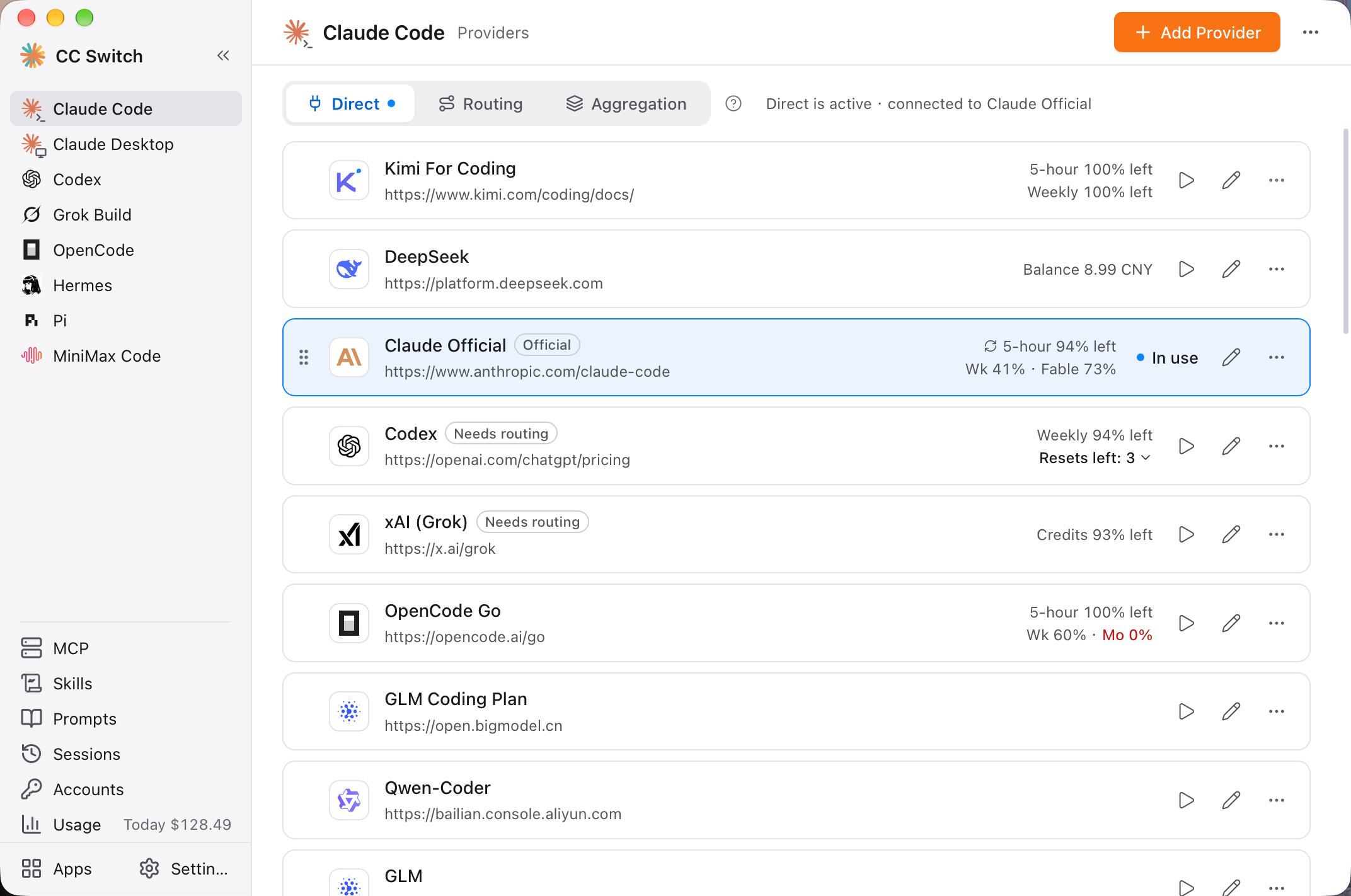 Main Interface |
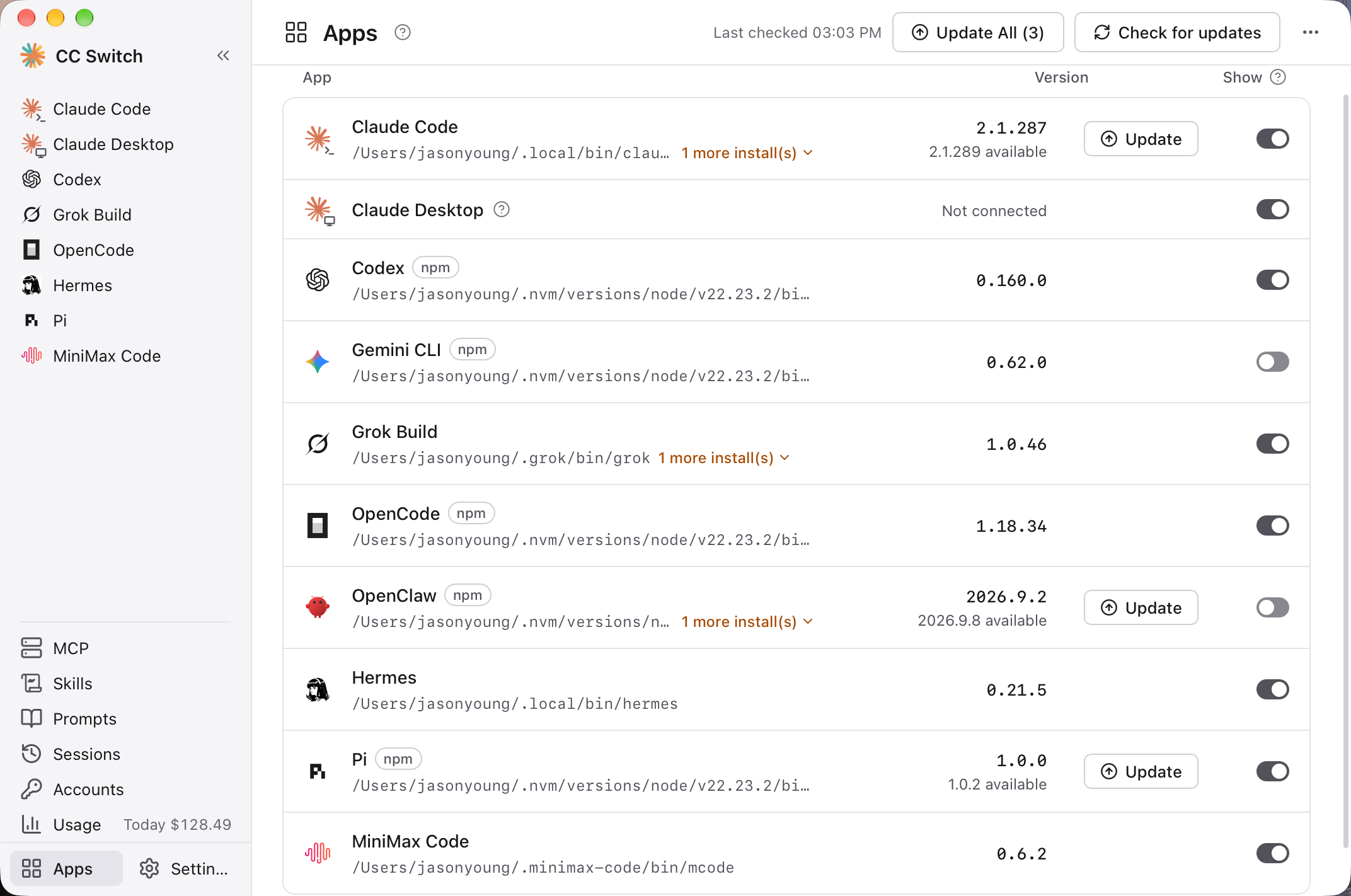 Apps Page |
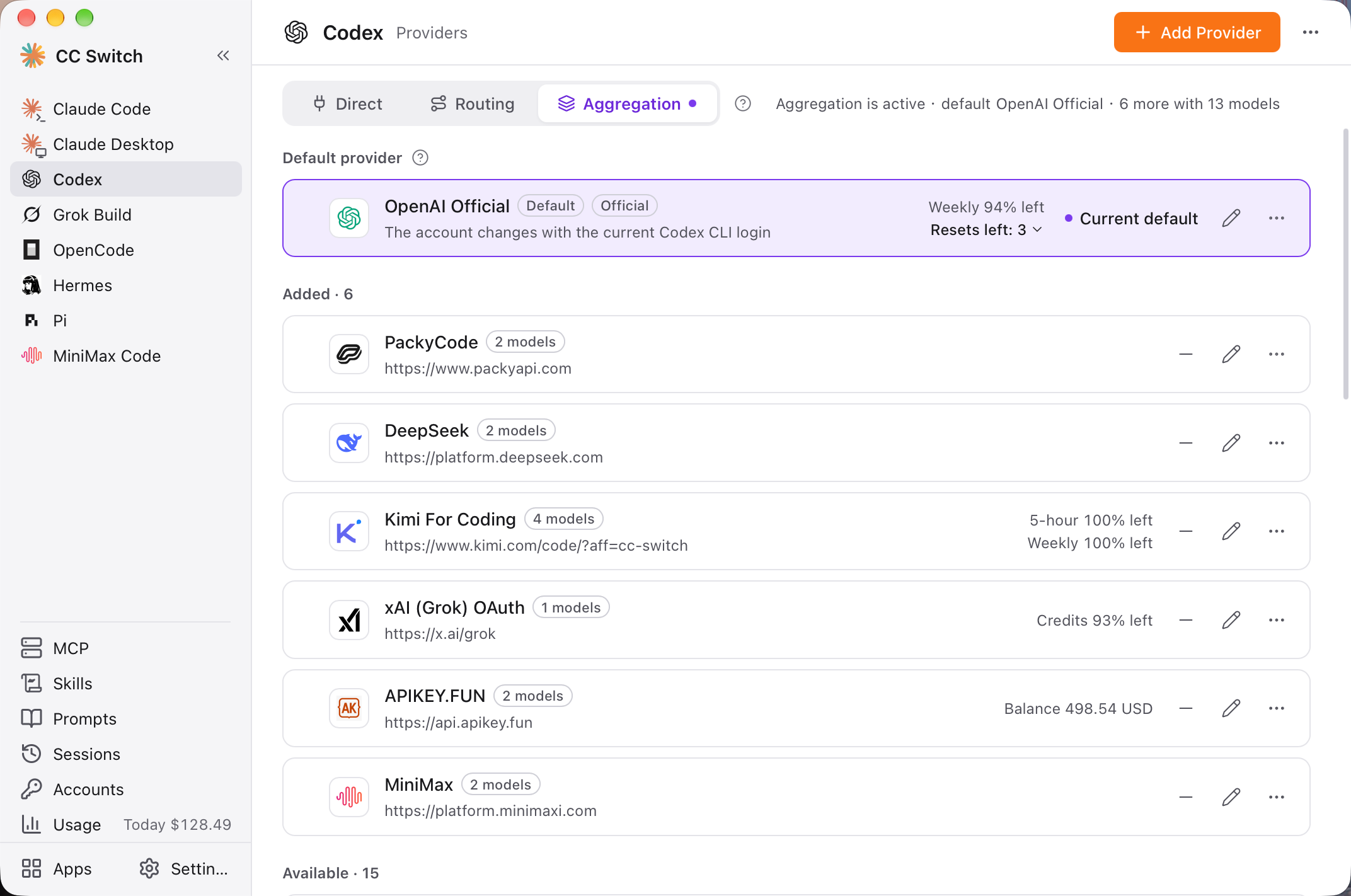 Aggregation Mode |
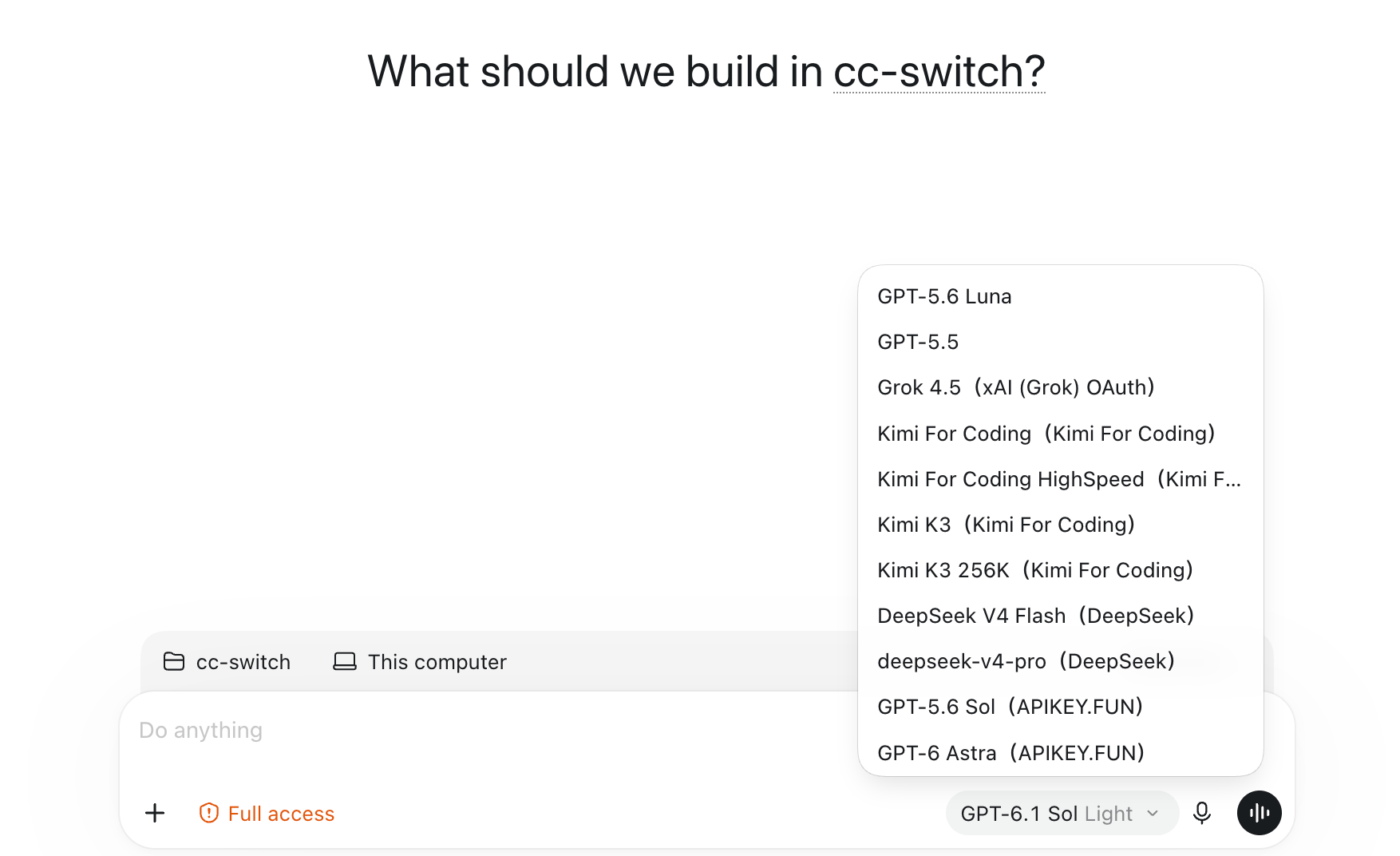 Aggregated Model List in Codex |
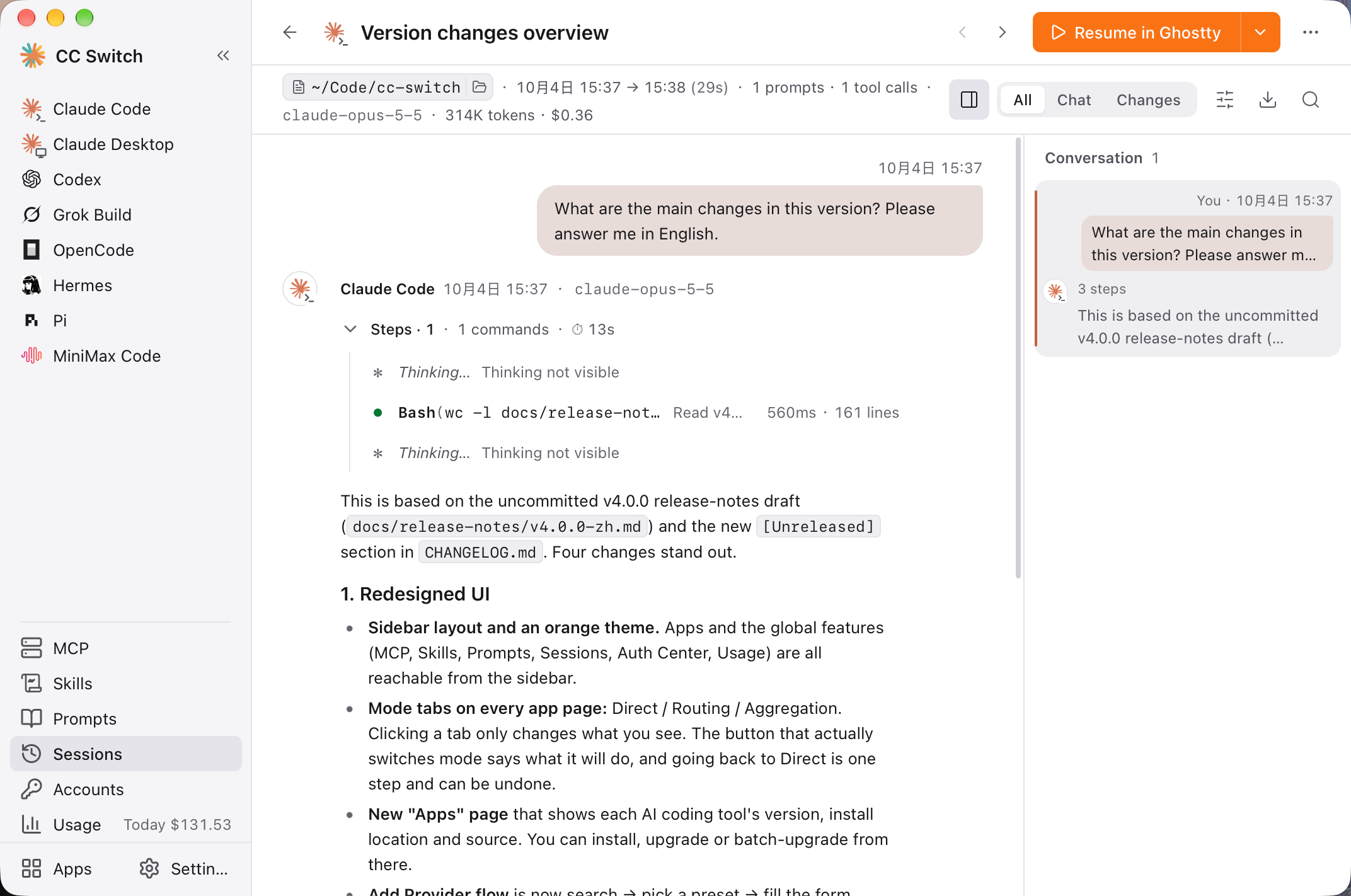 Session Reading View |
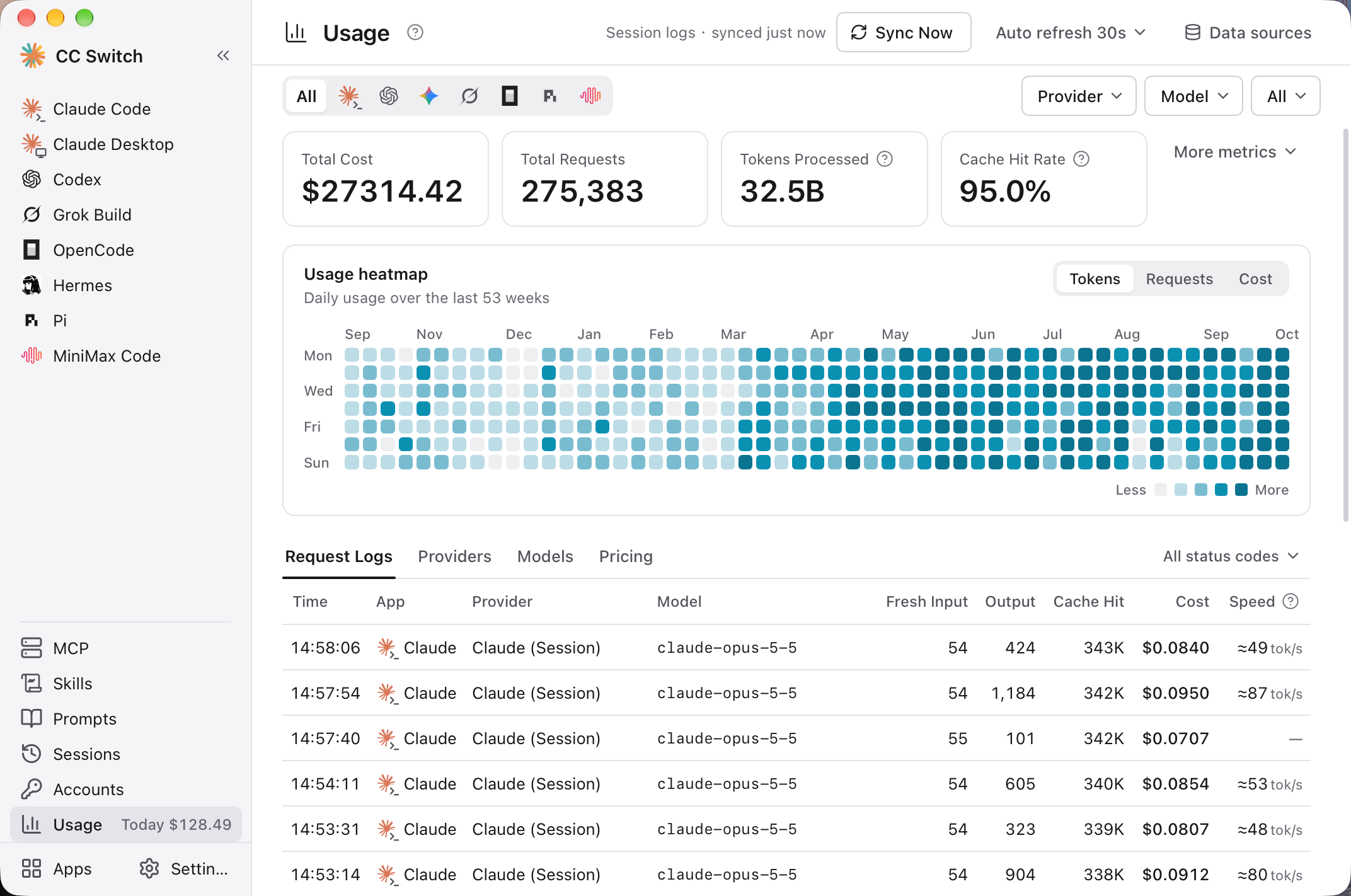 Usage |
Download & Installation
System Requirements
- Windows: Windows 10 and above
- macOS: macOS 12 (Monterey) and above
- Linux: x86_64 or ARM64 with glibc 2.35+ and WebKitGTK 4.1 — e.g. Ubuntu 22.04+, Debian 12+, and recent Fedora releases; RHEL / Rocky / Alma 8–9 are not supported yet
Windows Users
Download the latest CC-Switch-v{version}-Windows.msi installer or CC-Switch-v{version}-Windows-Portable.zip portable version from the Releases page. On Windows on ARM, download CC-Switch-v{version}-Windows-arm64.msi or CC-Switch-v{version}-Windows-arm64-Portable.zip.
macOS Users
Method 1: Install via Homebrew (Recommended)
brew install --cask cc-switch
Update:
brew upgrade --cask cc-switch
Method 2: Manual Download
Download CC-Switch-v{version}-macOS.dmg (recommended) or .zip from the Releases page. It's a Universal build that runs natively on both Apple Silicon and Intel Macs.
Note: CC Switch for macOS is code-signed and notarized by Apple. You can install and open it directly.
Arch Linux Users
Install via paru (Recommended)
paru -S cc-switch-bin
Linux Users
Download the latest Linux build from the Releases page:
CC-Switch-v{version}-Linux-x86_64.deb/-Linux-arm64.deb(Debian/Ubuntu)CC-Switch-v{version}-Linux-x86_64.rpm/-Linux-arm64.rpm(Fedora and other RPM distros that ship WebKitGTK 4.1)CC-Switch-v{version}-Linux-x86_64.AppImage/-Linux-arm64.AppImage(any distro meeting the requirements above)
Flatpak: Not included in official releases. You can build it yourself from the
.deb— seeflatpak/README.mdfor instructions.
Quick Start
Basic Usage
- Add Provider: Select the tool you want to manage in the sidebar, then click "+" (Add Provider) in the top-right corner of the page → Choose a preset or create a custom configuration
- Switch Provider:
- Main UI: Select provider → Click "Enable" (for OpenCode, OpenClaw, Hermes, MiniMax Code, and Kimi Code the button is "Add", and for Pi and Oh My Pi it's "Enable" / "Remove"; these seven are coexist-mode tools, so you can add several providers at once)
- System Tray: One row per tool showing "name · mode · provider · quota"; click a provider name in its submenu to switch (Claude Code, Claude Desktop, Codex, Gemini CLI, and Grok Build)
- Takes Effect: Claude Code needs no restart; for Codex, Gemini CLI, and Grok Build, restart your terminal or the CLI tool; for Claude Desktop, restart the app itself (see FAQ)
- Back to Official Login: Switch to the built-in official provider in the list (e.g. "Claude Official"), restart the tool, then follow its login/OAuth flow
- Routing & Aggregation (optional): The Claude Code, Codex, Gemini CLI, and Grok Build pages have "Direct" / "Routing" tabs at the top, and Claude Code and Codex also have "Aggregation". Clicking a tab only changes what you're looking at and doesn't touch your configuration; to actually switch, click "Start routing" or "Switch to Aggregation" on the page, and click "Back to direct" to return. Use Routing to use OpenAI- or Gemini-format providers in Claude Code, or Claude in Codex; use Aggregation to mix models from several providers in one model list
- Manage Tools: The "Apps" page in the sidebar shows each AI coding tool's version, install location, and source in one place; you can install, upgrade, or upgrade all, and choose which tools appear in the sidebar
MCP, Prompts, Skills, Projects & Sessions
- MCP: Click "MCP" in the sidebar → Add servers via templates or custom config (or "Import Existing") → Toggle sync for each tool
- Prompts: Click "Prompts" in the sidebar → Create prompts with the Markdown editor → Enable one to write it to that tool's prompt file
- Skills: Click "Skills" in the sidebar → "Discover Skills" → Search skills.sh or browse GitHub repos → One-click install to supported tools
- Projects: First turn on "Show project switcher" in "Settings → General", then on the Claude Code, Claude Desktop, or Codex page, open the project switcher at the top → "New project" to save the current configuration; later, pick it from the switcher to switch the whole setup at once
- Sessions: Click "Sessions" in the sidebar → Browse and search conversation history, open the reading view, or restore each tool's sessions
- Accounts: Click "Accounts" in the sidebar to sign in to GitHub Copilot, ChatGPT, xAI (Grok), and Kimi Code accounts and use your subscriptions as providers. Kimi Code supports multiple official accounts, each with separate credentials and a native provider; the first login uses Kimi's native default credential slot. Manage sign-in, reauthentication and sign-out here. Official Kimi OAuth nodes still present in the native configuration are protected on the provider page; saved profiles can be deleted after their native nodes are removed.
Note: On first launch, CC Switch automatically imports your existing Claude Code, Codex, Gemini CLI, and Grok Build configuration as a provider named
defaultand adds an official provider for each of these tools and Claude Desktop, so nothing you had configured is lost.
For detailed guides on every feature, check out the User Manual, covering provider management, MCP/Prompts/Skills, local routing & failover, and more.
Features
Full Changelog | v4.0 Release Notes
Supported Features by Tool
| Tool | Providers | Local Routing | Aggregation | Tray Switching | MCP | Skills | Prompts | Sessions | Usage Stats |
|---|---|---|---|---|---|---|---|---|---|
| Claude Code | Switch | ✓ | ✓ | ✓ | ✓ | ✓ | CLAUDE.md | ✓ | ✓ |
| Claude Desktop | Switch | Model Mapping only | – | ✓ | – | – | – | – | Model Mapping only |
| Codex | Switch | ✓ | ✓ | ✓ | ✓ | ✓ | AGENTS.md | ✓ | ✓ |
| Gemini CLI | Switch | ✓ | – | ✓ | ✓ | ✓ | GEMINI.md | ✓ | ✓ |
| Grok Build | Switch | ✓ | – | ✓ | ✓ | ✓ | AGENTS.md | ✓ | ✓ |
| OpenCode | Coexist | – | – | – | ✓ | ✓ | AGENTS.md | ✓ | ✓ |
| OpenClaw | Coexist | – | – | – | – | – | Workspace editor | ✓ | – |
| Hermes | Coexist | – | – | – | ✓ | ✓ | Memory | ✓ | – |
| Pi | Coexist | – | – | – | ✓ | ✓ | AGENTS.md, SYSTEM.md, prompt templates | ✓ | ✓ |
| MiniMax Code | Coexist | – | – | – | ✓ | ✓ | AGENTS.md | ✓ | ✓ |
| Kimi Code | Coexist | – | – | – | ✓ | ✓ | AGENTS.md | ✓ | ✓ |
| Oh My Pi | Coexist | – | – | – | ✓ | ✓ | AGENTS.md | ✓ | – |
- Switch: only one provider is active at a time; Coexist: multiple providers are written into the tool's own config at the same time, and you pick one inside the tool.
- Local Routing: CC Switch forwards requests on your machine and converts API formats; see Local Routing & Failover below. Claude Desktop providers can use "Direct" or "Model Mapping"; with "Model Mapping", requests go through local routing.
- Aggregation: Puts models from several providers into one model list and sends each request to the provider of the model you pick; see Aggregation Mode below.
- Sessions: Browse and search conversation history, open the reading view, and copy a resume command to continue a conversation (resuming OpenClaw and Hermes sessions isn't supported yet). Hermes shows only the 500 most recent sessions.
- Usage Stats: Without local routing, usage is collected from each tool's local session logs; requests that go through local routing are counted as well.
- The MCP, Skills, Prompts, and Sessions panels opened from the Claude Desktop page apply to Claude Code.
Provider Management
- 90+ provider presets — Pick a preset and enter your key to add a provider, or create a custom configuration. The add panel lets you search by name (including Chinese names) and domain, and a vendor's different plans and regions are merged into one row
- Key fields only — Switching replaces only the connection details such as the endpoint, key, and model; plugins, hooks, MCP, settings you added yourself, and comments stay as they are. The editor shows what the config file will look like after switching, and CC Switch automatically backs up each config file before rewriting it for the first time
- Projects — Save Claude Code's or Codex's current provider, MCP, Skills, and prompt files as a project (for Claude Desktop, only the provider is saved), then switch the whole setup in one click from the project switcher at the top of the page or from the tray; when you switch to another project, the current state is automatically saved back to the previous project. The project switcher is hidden by default; turn on "Show project switcher" in "Settings → General"
- Accounts (Beta) — Sign in to multiple GitHub Copilot, ChatGPT, and xAI (Grok) accounts under "Accounts" in the sidebar and use those subscriptions as providers in Claude Code, Claude Desktop, and Codex (everything except Codex's OpenAI Official has to be used in Routing mode). Using a subscription outside the official client may violate the vendor's terms of service; assess the risk yourself
- Third-party providers for Claude Desktop — Connect directly to Anthropic-compatible endpoints; for non-Claude models, choose "Model Mapping" to map tiers like Sonnet, Opus, and Haiku to the provider's actual models through local routing
- Universal providers — One config syncs to Claude Code, Codex, and Gemini CLI
- One-click switching, system tray quick switching (Claude Code, Claude Desktop, Codex, Gemini CLI, Grok Build), drag-and-drop sorting, import/export
Local Routing & Failover
- API format conversion — Local routing converts requests between Anthropic Messages, OpenAI Chat Completions, OpenAI Responses, and Gemini Native: Claude Code and Claude Desktop can use OpenAI- or Gemini-format providers, and Codex and Grok Build can use Chat Completions or Anthropic Messages providers
- Per-tool toggle — Claude Code, Codex, Gemini CLI, and Grok Build can each enter Routing mode separately: click "Start routing" on the "Routing" tab at the top of the page. In Routing mode, switching providers takes effect immediately for subsequent requests (Codex, Gemini CLI, and Grok Build may still need a restart if the switch changes the model). When you quit CC Switch, it writes the direct configuration back first and reconnects the next time it starts
- Auto-failover — Configure a failover queue for each tool; when a request fails, CC Switch automatically moves on to the next provider in the queue, backed by a circuit breaker and provider health monitoring
- Rectifier — Automatically fixes certain requests that some upstreams can't handle (e.g. Thinking signatures, or falling back when images aren't supported)
- Official providers (e.g. Claude Official) can't go through local routing (except Codex's OpenAI Official)
- The routing service's status, listen address, and failover settings are all in "Settings → Local routing"
- Guides: Using GPT in Claude Code · Using Claude in Codex
Aggregation Mode
- One model list, many providers — On the Claude Code or Codex page, switch to "Aggregation" and add a few providers; their models all appear in the client's model picker. Each request goes to the provider of the model you pick, with no need to switch in CC Switch
- Add and remove anytime — Click "Add" or "Remove" on a provider card, then pick one provider as the default; requests that don't name an aggregated model go to it. Codex's OpenAI Official can only be the default provider; Claude official subscriptions are currently unsupported in Aggregation
- Notes — Aggregation doesn't provide failover; Claude Code requires version 2.1.243 or later; Codex needs a restart after the aggregated list changes, while Claude Code doesn't. When you switch models within a session, the new model has to rebuild its prompt cache, so the first turn costs a bit more
- Much of Aggregation mode's design draws on opencodex — thanks to its author and contributors
- Documentation: Aggregation mode manual · Illustrated guide (Chinese)
MCP, Prompts & Skills
- Unified MCP panel — Manage all MCP servers in one place, choose which tools to sync each one to (Claude Code, Codex, Gemini CLI, Grok Build, OpenCode, Hermes, Pi, MiniMax Code, Kimi Code, Oh My Pi), import existing configs from each tool, and import via Deep Link
- Prompts — A per-tool prompt library with a Markdown editor; enabling a prompt writes it to that tool's prompt file (CLAUDE.md / AGENTS.md / GEMINI.md), and the file's existing content is saved back to the library first, so nothing is lost. Pi can also edit SYSTEM.md, APPEND_SYSTEM.md, and prompt templates
- Skills — Search skills.sh, or install in one click from GitHub repos or ZIP files; check for updates and update all in one click; sync to each tool automatically, via symlinks only, or via copies only; you can optionally store them in
~/.agents/skills - All three panels support search, and MCP and Skills can also be enabled or disabled all at once per tool; providers, MCP servers, and prompts are edited full-page in the content area, and you're warned before leaving with unsaved changes
Usage & Cost Tracking
- Usage dashboard — Works without local routing: by default it automatically scans each tool's local session logs and tracks requests, tokens, cache hit rate, output speed, and spending by provider and model, with trend charts, a full-year heatmap, and per-request logs
- Quotas & balances — Provider cards and the tray show what's left and the reset countdown, e.g. "5h 94% left": official subscription quotas (Claude, ChatGPT, Gemini, SuperGrok), Coding Plan 5-hour / weekly / monthly quotas (Kimi, Zhipu GLM, MiniMax, Volcengine Ark, etc.), and account balances (DeepSeek, OpenRouter, SiliconFlow, etc.); some need to be turned on first via "Configure usage query" on the provider card, and for other providers you can write a custom usage script. ChatGPT subscriptions also show remaining limit resets and the Codex Credits balance
- Custom pricing — Set per-model prices, or import them from models.dev
Session Manager & Workspace
- Session reading view — Parses each tool's session logs into structured content: text, thinking, tool calls, tool results, and images are shown separately; each turn of work collapses into a one-line summary (how many steps, how many files changed, how many failures), with failed steps marked in red; a conversation outline sits on the right, with in-session search, Markdown export, and copying a single turn or the whole conversation
- List & resume — Group by project or time, search titles, directories, messages, or session IDs, and delete in bulk; copy a resume command to continue a conversation, and on macOS resume in a terminal with one click
- Workspace editor (OpenClaw) — Edit agent files (AGENTS.md, SOUL.md, etc.) and daily memory
- Memory (Hermes) — Edit Hermes's MEMORY.md and USER.md
System & Platform
- Cloud sync — Sync across devices via WebDAV (Jianguoyun, Nextcloud, Synology NAS, etc.) or S3-compatible storage (AWS S3, Cloudflare R2, Alibaba Cloud OSS, Tencent Cloud COS, etc.); you can also put the CC Switch configuration directory in a cloud drive folder such as Dropbox, OneDrive, or iCloud
- CLI tool management — On the "Apps" page in the sidebar, see the current and latest versions of command-line tools like Claude Code and Codex, install, upgrade, or upgrade all in one click, and diagnose duplicate installations; on Windows it can also manage tools inside WSL (see FAQ)
- Deep Link (
ccswitch://) — Import providers, MCP servers, and prompts, or add skill repositories, in one click via a link; create links with the online generator; site owners who want an import button can follow the integration guide - Built-in utilities — Skip Claude Code's first-run confirmation, hide AI attribution, have the VS Code Claude Code extension follow CC Switch's provider switches, and more
- Dark / Light / System theme, auto-launch, auto-updater, atomic writes, auto-backups (see where every backup lives and how much space it takes in "Settings → Data"), i18n (zh/zh-TW/en/ja, plus community-translated Turkish)
FAQ
Which AI tools does CC Switch support?
CC Switch supports twelve tools: Claude Code, Claude Desktop, Codex, Gemini CLI, Grok Build, OpenCode, OpenClaw, Hermes, Pi, MiniMax Code, Kimi Code, Oh My Pi. Each tool has dedicated provider presets and configuration management; see Supported Features by Tool for what each one supports.
Do I need to restart the terminal after switching providers?
It depends on the tool:
- Claude Code: supports hot-switching of provider data — no restart needed.
- Codex, Gemini CLI, Grok Build: restart your terminal or the CLI tool for changes to take effect (CC Switch reminds you after switching). In Routing mode, requests go to the new provider immediately, but all three tools may still need a restart if the switch changes the model.
- Aggregation mode: changes to Claude Code's aggregated models take effect immediately; for Codex, entering or leaving Aggregation and changing the aggregated model list all require a full restart — see the next entry.
- Claude Desktop: fully quit and reopen Claude Desktop; when using "Model Mapping", also keep CC Switch running.
- OpenCode, OpenClaw, Hermes, Pi, MiniMax Code, Kimi Code, Oh My Pi: these are coexist-mode tools — clicking "Add" ("Enable" for Pi and Oh My Pi) writes the provider into the tool's own config alongside the others; you then pick the model you want inside the tool. Kimi Code also provides a "Switch" button to select a provider's model; models still referenced as primary or secondary models cannot be removed. See the Kimi Code integration guide (Chinese) for configuration and account details.
In Aggregation mode, why don't the aggregated models show up in Codex's /model?
Codex reads its model list only at startup. After entering or leaving Aggregation mode, adding or removing an aggregated provider, or changing a provider's aggregated models, fully restart Codex to see the new list:
- Codex CLI: Closing the terminal and running
codexagain isn't enough. Everycodexin every terminal shares one background daemon, and it has to be restarted to pick up the new list. When CC Switch detects that Codex is still using the old list, it shows a notice at the top of the Codex page; click "Restart Codex daemon" in the notice. Restarting interrupts any tasks running in the daemon. - Codex desktop app: Quit it completely and reopen it (press ⌘Q on macOS; closing the window isn't enough).
- Editor extensions: Reopen the editor window.
Claude Code isn't affected: changes to aggregated models take effect immediately.
Will switching providers change my plugins, hooks, or other settings?
No. When you switch providers for Claude Code, Codex, Gemini CLI, or Grok Build, CC Switch replaces only the key fields in the config file: the endpoint, key, model name, and API protocol (plus the reasoning effort for Codex and the auth method for Gemini CLI), along with a few compatibility options that belong to the provider (such as Claude Code's "Disable Artifact Tool" and the context window). Plugins, hooks, permissions, MCP, environment variables you added yourself, comments, and formatting all stay as they are and apply to every provider.
You can change these shared settings in the tool itself or by editing the config file by hand. You can also edit any provider in CC Switch: the editor shows "what the config file will look like after switching to this provider". When you save, the key fields are stored in that provider, and every other change is written to the config file and applies to every provider.
So the old "Common Config Snippet" is no longer needed, and its buttons have been removed. Settings that were in your snippet before the upgrade were already written into the config file when you switched, so they stay. Before CC Switch rewrites each config file for the first time, it also backs up the original to ~/.cc-switch/backups/live-first-write/.
I changed the model inside the tool — why does it go back after I switch away and back?
The model is a key field and belongs to the provider. A model you pick inside the tool (such as with /model in Claude Code) stays in effect until the next switch; when you switch, the model in the config file is replaced with the one saved in the target provider, and CC Switch doesn't save the model you picked back to the previous provider. To keep using a model long-term, edit that provider in CC Switch.
Older versions saved the whole config file back to the provider when you switched away. That no longer happens: it froze plugins and other shared settings into one provider, so they were lost when you switched to another one.
Why can't I delete the provider currently in use?
CC Switch follows a "minimal intrusion" design principle — even if you uninstall the app, your tools will continue to work normally.
So for tools that use one active provider at a time (Claude Code, Claude Desktop, Codex, Gemini CLI, Grok Build), the system always keeps one configuration in use, because deleting all configurations would make the corresponding tool unusable; to delete it, switch to another provider first. Likewise, the default provider in Aggregation mode can't be removed; make another provider the default first. Coexist-mode tools (OpenCode, OpenClaw, Hermes, Pi, and MiniMax Code) aren't subject to this restriction — you can delete any provider directly. If you rarely use a tool, you can hide it from the sidebar on the "Apps" page. To switch back to official login, see the next question.
How do I switch back to official login?
In CC Switch, the provider lists for Claude Code, Claude Desktop, Codex, Gemini CLI, and Grok Build each include a built-in official provider (Claude Official, Claude Desktop Official, OpenAI Official, Google Official, Grok Official); if you deleted it, add it back from the presets. After switching to the official provider, follow the tool's own login flow (e.g. /login in Claude Code, codex login for Codex), and then you can freely switch between the official provider and third-party providers.
For Codex, you can also sign in to multiple ChatGPT accounts inside CC Switch via "Sign in with ChatGPT" and choose an "Account to use" for each OpenAI Official card, so switching between multiple Plus, Pro, or Team accounts takes one click; cards set to "Follow Codex login" keep using the Codex CLI's own login.
Note: official subscriptions use the tool's own login and don't go through local routing. Official providers can't be selected in Routing mode (Codex's OpenAI Official cards are the exception); switch back to Direct first.
After I start routing, why does my config file point to 127.0.0.1?
In Routing mode, the tool's requests first go to CC Switch's local routing (http://127.0.0.1:15721 by default), and CC Switch then forwards them to the provider you selected. That's why the tool's config file only contains the local address and the placeholder key PROXY_MANAGED; for Claude Code, the model name is also written as a fixed alias such as claude-sonnet-5 (the /model menu still shows the real model name). The real provider address, key, and model are all stored in CC Switch. Aggregation mode works the same way.
In the request logs under "Usage" in the sidebar, you can see "requested model → actual model" for each request.
In Routing mode, switching changes the provider that routing uses; the provider you were using before you entered Routing stays the same and is labeled "Direct" on its card. When you click "Back to direct", the config file is written back to this direct provider's configuration. Quitting CC Switch also writes back the direct provider first, and it reconnects the next time CC Switch starts.
Can I use OpenAI-compatible APIs, Gemini, or local models in Claude Code?
Yes, but you need to use Routing. When editing the provider, set "Upstream Format" under "Advanced Options" to match the provider's API: choose "OpenAI Chat Completions" for services that only offer a Chat Completions endpoint (as many local model servers do), "OpenAI Responses API" for services that offer a Responses endpoint, and "Gemini Native generateContent" for Gemini. Then click "Start routing" on the "Routing" tab of the Claude Code page. Choosing the wrong format or not starting routing usually results in a 404 or 405 error.
Conversely, choosing "Anthropic Messages" as the "Upstream Format" in Codex or Grok Build lets you use Claude-format providers; this also requires Routing. See Using GPT in Claude Code and Using Claude in Codex for details.
"Connectivity check" passed, so why do requests still fail?
The "Connectivity check" on a provider card only checks whether the provider address is reachable; it doesn't send a real model request, so it can't verify whether the API key and model name are correct. When requests fail, check the key, model name, and upstream format; for requests that go through Routing, you can also see the exact error in the request logs under "Usage" in the sidebar.
Where is my data stored?
By default, everything is stored in the .cc-switch folder in your home directory (C:\Users\<user>\.cc-switch on Windows):
- Database:
cc-switch.db(SQLite — providers, MCP, prompts, Skills, projects, usage records, etc.) - Local settings:
settings.json(device-level settings such as each tool's config directory, backup policy, and cloud sync connection details) - Backups:
backups/(backed up automatically every 24 hours by default, keeping the 10 most recent; adjustable in "Settings → Data → Backup & Restore"; "Other Backups" below it lists the location and size of every other backup, which you can clean up by category) - Skills:
skills/(can be changed to~/.agents/skillsin Settings), synced to each tool via symlinks by default, falling back to copying if that fails - Skill Backups:
skill-backups/(created automatically before uninstalling or updating a skill, keeping the 20 most recent) - OAuth login credentials:
copilot_auth.json,codex_oauth_auth.json,xai_oauth_auth.json - Logs:
logs/cc-switch.logandcrash.log— please attach them when reporting an issue - Device state:
live-state.json(whether each tool is currently in Direct, Routing, or Aggregation mode, and what was last written),codex-login-stash.json(the official Codex login moved aside when you switch to a third-party provider, restored when you switch back to an official one) - Original config files:
backups/live-first-write/(each tool's config file as it was before CC Switch first rewrote it)
After you change "CC Switch Configuration Directory" in "Settings → Data → Location", all of the files above except settings.json, the device state, and the original config files are stored in the new directory. CC Switch doesn't move existing files automatically, so copy them over manually first. settings.json, the device state, and the original config files belong to this computer only: they always stay in the default directory and are not included in cloud sync.
How do I manage tools inside WSL on Windows?
CC Switch doesn't detect WSL automatically. In "Settings → App config", change the config directory for the corresponding tool to a path inside WSL, e.g. \\wsl.localhost\Ubuntu\home\<user>\.claude; after you save, CC Switch reads and writes the config inside WSL (supported for Claude Code, Codex, Gemini CLI, Grok Build, OpenCode, OpenClaw, Hermes, and Pi). Once this is set, the "Apps" page in the sidebar also detects and upgrades that tool in the corresponding WSL distribution.
Note: Routing and Aggregation write 127.0.0.1 as the address into the config. In WSL2's default NAT networking mode, 127.0.0.1 inside WSL can't reach local routing on Windows; switch WSL to mirrored networking mode instead.
Is there a command-line or headless version?
CC Switch itself only ships as a desktop app that requires a graphical interface (see Download & Installation for system requirements). For servers, SSH sessions, or machines without a desktop environment, we recommend the community-maintained CC Switch CLI: it offers both an interactive terminal UI (TUI) and a command-line mode, supports Claude Code, Codex, Gemini CLI, OpenCode, OpenClaw, Hermes, and Pi, and can be installed via Homebrew (brew install cc-switch-cli) or an install script.
By default, CC Switch CLI shares the ~/.cc-switch data directory with the desktop app and is compatible with the desktop app's WebDAV sync. The two projects are released separately, and the database version the CLI supports sometimes lags behind the desktop app; if you see a "database version is too new" message, upgrade the CLI or wait for it to catch up.
Linux (Wayland + NVIDIA): clicks don't register and the window black-screens on resize
The AppImage forces GDK_BACKEND=x11 (XWayland) to avoid a historical native-Wayland crash. On newer Wayland + NVIDIA setups this can leave the web content area unclickable (the title-bar buttons still work) and black-screen on resize. Launch with the opt-in escape hatch to switch back to native Wayland:
CC_SWITCH_GDK_BACKEND=wayland ./CC-Switch-*.AppImage
If you launch from a desktop icon, add it to the .desktop Exec= line (e.g. env CC_SWITCH_GDK_BACKEND=wayland /path/to/AppImage) or set it in your session environment. The variable is generic: on tiling Wayland compositors (sway/Hyprland) where clicks don't register, try CC_SWITCH_GDK_BACKEND=x11 instead. Leaving it unset keeps the default behavior.
For more questions, see the FAQ in the User Manual.
Contributing
Issues and suggestions are welcome! Before developing a new feature, please open an issue to discuss the approach first; feature PRs that aren't a good fit for the project may be closed.
For development setup, pre-submit checks, and architecture notes, see CONTRIBUTING.md; for usage questions, check SUPPORT.md first; report security vulnerabilities privately as described in SECURITY.md.
Tech stack: Tauri 2 · Rust · React 18 · TypeScript · SQLite
Star History
License
MIT © Jason Young
CC Switch
Claude Code、Claude Desktop、Codex、Gemini CLI、Grok Build、OpenCode、OpenClaw、Hermes Agent、Pi、MiniMax Code、Kimi Code、Oh My Pi 的全方位管理工具
一键切换 API 供应商,统一管理 MCP、Skills 与提示词,不用再手改 JSON / TOML / YAML 配置文件。
🌐 唯一官方网站:ccswitch.io
❤️赞助商
点击折叠
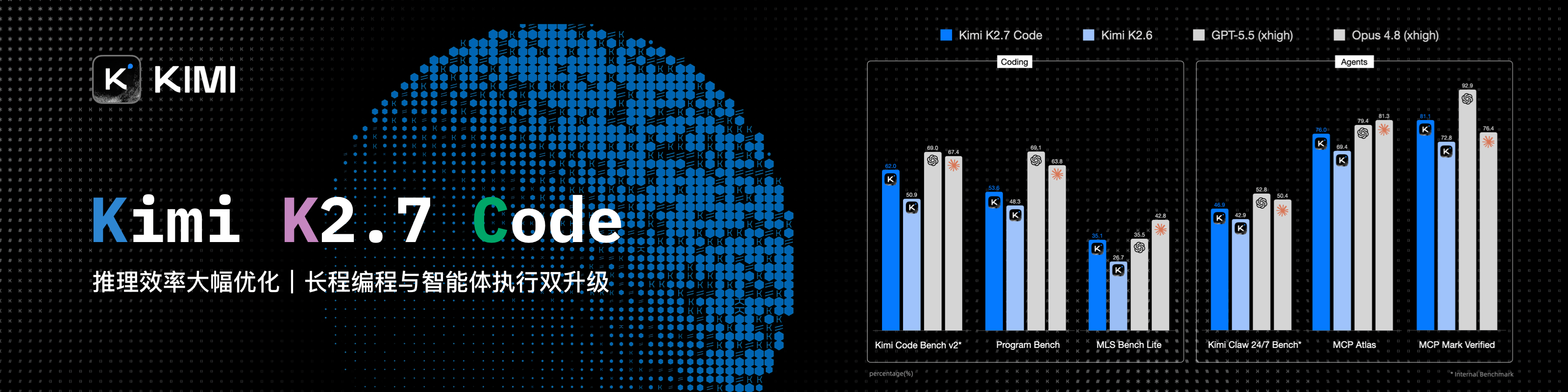
Kimi K3 是 Moonshot AI 迄今能力最强的模型,也是全球首个开源 3T 级模型。K3 拥有 2.8T 参数、原生视觉能力与 100 万 Token 上下文,在长程编码、知识工作和推理任务中展现前沿性能。使用 CC Switch,可以在各类 Agent 工具中便捷配置和切换 Kimi。
主要进行编程工作?可以试试 Kimi Code 订阅(中文站 | Global),或通过 Kimi 开放平台使用 API(中文站 | Global)。
新用户首充福利:通过上方 API 链接注册并完成首次充值,即可获赠充值金额 10% 的 API 额度,最高赠送 ¥1,000。
|
感谢 PackyCode 赞助了本项目!PackyCode 是一家稳定、高效的API中转服务商,提供 Claude Code、Codex、Gemini 等多种中转服务。PackyCode 为本软件的用户提供了特别优惠,使用此链接注册并在充值时填写"cc-switch"优惠码,首次充值可以享受9折优惠! |
|
感谢 APINEBULA 赞助本项目!APINEBULA 是银河录像局旗下的企业级 AI 聚合平台,背靠大平台资源,面向开发者、团队与企业用户提供稳定、高性价比的大模型 API 接入服务。平台聚合 Claude、GPT、Gemini 等主流满血模型,一个接口,接入全球顶尖 AI 大模型,各大模型价格低至 1 折起,支持企业级高并发、正式合同、对公打款与开票服务,适合 AI 编程、Agent 开发、业务系统集成等多种场景!使用此链接注册并在充值时填写 "ccswitch" 优惠码可享九折优惠! |
|
感谢 AICodeMirror 赞助了本项目!AICodeMirror 提供 Claude Code / Codex / Gemini CLI 官方高稳定中转服务,支持企业级高并发、极速开票、7×24 专属技术支持。 Claude Code / Codex / Gemini 官方渠道低至 3.8 / 0.2 / 0.9 折,充值更有折上折!AICodeMirror 为 CCSwitch 的用户提供了特别福利,通过此链接注册的用户,可享受首充8折,企业客户最高可享 7.5 折! |
|
感谢 PatewayAI 赞助了本项目!PatewayAI 是一家面向重度 AI 开发者、专注官方直连高品质模型 API 中转服务商。提供 Claude 全系列与 Codex 系列模型,100% 官方源直供,不掺假不注水,欢迎检验。计费透明,Token 级账单可逐笔核验。 同时支持企业级高并发,并为企业客户提供了专业的管理平台,企业客户可签订正式合同并开具发票,更多详情进入官网获取联系方式。 现在通过此链接注册即送 $3 试用额度,用户充值低至 6 折,邀请好友双向赠送,邀请奖励可达 $150! |
|
感谢 hao.ai 赞助了本项目!hao.ai 是面向开发者与团队的高速、稳定大模型统一 API 网关。通过一个 API Key 和统一接口,即可接入 GPT、Claude、xAI Grok 等主流模型,兼容 OpenAI、Anthropic 等常用协议与 SDK。平台提供模型路由、故障回退、团队管理及完整调用日志,模型价格低至官方参考价的 1.5 折,帮助用户更简单、更稳定、更低成本地构建 AI 应用。hao.ai 为 CC Switch 用户提供了特别福利,通过此链接注册的用户,首单可享受 5% 赠送额度! |
|
感谢 Fenno.ai 赞助了本项目!Fenno.ai 是一家稳定、高效的 API 中转服务商,目前主要提供 Codex 中转服务,兼容 OpenAI 及 Anthropic 协议,可灵活接入 Codex、Claude Code、OpenCode 等主流编程工具,可稳定支撑千亿 Token/日的企业级调用需求,支持国内及海外主体公对公结算、开票。Fenno.ai 为 CC Switch 的用户提供了专属福利:通过此链接即可订阅 1.99 刀/50 刀额度的 Trial 计划(有效期 7 天),邀请好友最高可享 20% 奖励,多邀多得! |
|
感谢 RunAPI 赞助本项目!RunAPI 是高效稳定的 AI 模型 API 中转平台,一个 API Key 即可访问 OpenAI、Claude、Gemini、DeepSeek、Grok 等 150+ 主流模型,低至 1 折,极其稳定,可以无缝兼容 Claude Code、OpenClaw 等工具。RunAPI为CC switch的用户提供了特别福利,使用此链接注册并首次充值即可享受10%的优惠折扣! |
|
感谢 DIT.ai 赞助了本项目!同样的模型,更低的账单,一个 OpenAI 兼容 API 即可调用 GPT、Claude、Gemini 等 50 多个模型,并在 160 多家供应商之间路由到性价比最优的选项,价格通常比官方定价低 30–70%。只需更换 Base URL 和 API Key,即可在保留现有技术栈的情况下开始调用。CC Switch 用户通过此链接注册并使用优惠码 cc-switch,新人首充可享 7 折! |
|
感谢 OpenModel 赞助本项目!OpenModel 为 Codex 和 Claude Code 提供客户端专属折扣,所支持的模型通过 Codex 调用最高优惠 90%、通过 Claude Code 调用最高优惠 60%,帮助开发者在不改变工作方式的前提下降低 API 成本。只需填入 OpenModel API Key,像往常一样继续使用 Codex 或 Claude Code,系统会自动识别所支持的客户端并应用折扣路由,无需额外参数或手动路由。你还可以为每个 API Key 单独设置回退策略:折扣路由暂时不可用时,选择按标准价格继续调用或直接停止。CC Switch 用户通过此链接注册,并使用优惠码 "cc-switch",即可享受首次充值九折优惠! |
|
感谢 GrooRoute Pro 赞助了本项目!GrooRoute Pro 是可靠流畅的 AI API 中转服务平台,接入 OpenAI、Claude、DeepSeek 等多款主流大模型。平台采用海外服务器部署,支持倍率档位自选,兼具按量计费与订阅套餐两种方案,多种使用方式灵活可选,线路稳定、响应迅速,让使用者可以更轻松便捷地调用各类 AI 能力。GrooRoute Pro 为 CC Switch 用户准备了专属福利,点击此链接注册即可获得免费 5 元体验额度! |
|
感谢 BuyToken 赞助了本项目!BuyToken 提供 Claude Code / Codex / DeepSeek 等各类中转服务,支持企业级并发、可极速开票,做的就是稳定长久站。本站也为 CC Switch 的用户提供了特别优惠,使用此链接注册,可得 3 元体验额度,并且通过本站充值的用户,首充 9 折! |
|
感谢 V-API 赞助了本项目!V-API 三年老品牌,致力于为个人、开发者和企业提供稳定、快速、安全的高品质的大语言模型 API 服务平台,支持合同签约、正规开票(普票 / 专票)。V-API 为 CC Switch 的用户提供了特别优惠,使用此链接注册的用户,可享受首单减 2 元和 9 折优惠! |
|
感谢 FluxA & Baidu AI Cloud 赞助了本项目! FluxA 与百度智能云联合推出 AgenticPlan,为 AI Agent 提供自主购买/管理/使用模型、API、工具的能力。内含百度千帆 TokenPlan,低至6折,可使用 DeepSeek V4、GLM 5.2、Kimi 等旗舰模型,并获赠 FluxA AgentMarket API的调用额度,解锁搜索、数据抓取、社交媒体、金融、加密、生图、视频等 13000+ 付费 API。 在用户授权下,AI Agent 还可借助官方的Visa卡支付自主采购资源、管理 API Key、监控用量并规划续费,帮助 Agent 从「自主完成任务」升级为真正能够「自主规划预算,完成任务」。通过此链接购买! |
|
感谢 AIGoCode 赞助了本项目!AIGoCode 是一个集成了 Claude Code、Codex 以及 Gemini 最新模型的一站式平台,为你提供稳定、高效且高性价比的AI编程服务。本站提供灵活的订阅计划,零封号风险,国内直连,无需魔法,极速响应。AIGoCode 为 CC Switch 的用户提供了特别福利,通过此链接注册的用户首次充值可以获得额外10%奖励额度! |
|
感谢 TeamoRouter 赞助本项目!TeamoRouter 是一款面向开发者、AI 团队和企业的企业级 Agentic LLM 网关。无需任何订阅,你就可以通过一个统一 API 访问 Claude Code、Codex、Gemini CLI、OpenAI Codex 以及其他热门 AI Agent,同时享受最高可达 90% 折扣的 API 价格。 不同于常见的 API 中转服务,TeamoRouter 聚合了数百家官方模型提供商和可信基础设施合作伙伴,包括 OpenAI、Anthropic、Vertex、Azure 和 AWS Bedrock。每个提供商都经过验证,确保 100% 兼容 Agent 协议,并具备可靠的缓存性能和请求可追踪性,从而提供稳定质量,而不是反向工程或缩水后的接口。平台提供接近官方水平的 TTFT、99.6% SLA、最高 5,000 QPM 的企业级吞吐量,以及行业领先的缓存命中率,可大幅降低长时间运行的 Agent 工作流中的 token 成本。 TeamoRouter 还提供企业级功能,包括集中账单、团队管理、BYOK、智能路由、用量分析、动态提供商优化和专属支持。为了获得更简单的使用体验,Teamo Desktop 支持你一键使用 Claude Code、Codex、Gemini CLI 和其他热门 AI Agent,无需管理 API Key,也无需手动配置网关。新用户通过此链接注册,首次充值可享受 10% 折扣。 |
|
感谢 AICoding 赞助了本项目!AICoding —— 全球大模型 API 超值中转服务!Claude Code 1.9 折,GPT 0.1 折,已为数百家企业提供高性价比 AI 服务。支持 Claude Code、GPT、Gemini 及国内主流模型,企业级高并发、极速开票、7×24 专属技术支持,通过此链接 注册的 CC Switch 用户,首充可享受九折优惠! |
|
感谢 SubRouter 赞助本项目!SubRouter 是面向 AI 服务经营者的公开市场与智能路由平台。商家可快速开通独立经营站,发布套餐、管理用户与模型价格;用户可在市场发现服务,并通过统一 API 获得稳定高效的模型调用。通过此链接注册! |
|
感谢胜算云赞助了本项目!胜算云是专为AI Native Teams服务的超级工厂,工业级AI任务并行执行平台,模型商城集采直供聚合接入了Claude、Chatgpt、Gemini等海内外LLM及图片视频多媒体模型算力,绝无逆向掺水、全站模型SLA可用性高达99.7%、监测接口日常全绿。更有企业级专属定制网关,实现团队精细化成本与权限管控,智能路由+安全防护+BYOK企业自带密钥托管。平台按量及tokens plan(即将上线)计费,可开票,使用此链接注册新用户可获10元模力及首充10%赠送。 |
 |
感谢 88API Token聚合平台赞助了本项目!88API 是一家由香港企业运营并且主要面向开发者、创作者与 AI 应用用户的一站式多模型 API 平台,通过统一接口接入文本、图片、语音和视频模型,覆盖 AI 编程、智能翻译、内容创作、配音、图像生成、视频生成等常见工作流。可以直接在 CC Switch 中完成 Provider 添加并切换,支持国际主流付款方式,可提供发票,提供企业级稳定服务。通过此链接注册可以获取专属赠送额度! |
|
感谢 APIKEY.FUN 赞助本项目!APIKEY.FUN 是一家专业的企业级 AI 中转站,致力于为企业和个人开发者提供稳定、高效、低成本的 AI 模型 API 接入服务。平台支持 Claude、OpenAI、Gemini 等主流热门模型,价格低至官方原价的 7%。通过本项目专属链接注册,还可享受最高 充值永久 95 折 专属优惠。 |
|
感谢 9527CODE 赞助本项目!9527 CODE 是专注于稳定性与服务质量的企业级满血 AI 中转平台,为 Claude Code、Codex 等主流 AI 模型提供高速、稳定、高质量的中转服务。更重视长期稳定、线路质量与持续可用性。面向企业及高强度 AI 用户,提供稳定、高效的一站式模型接入方案。持续运营一年,服务稳定性达 99.9%,提供 7×24 小时人工技术支持。通过本项目专属链接注册,新人福利联系客服赠送体验额度,拉新返现无上限! |
|
感谢 PPIO 赞助了本项目!PPIO 是国内领先的独立 Agentic Cloud 服务商,由 PPTV 创始人姚欣和前 PPTV 首席架构师王闻宇于 2018 年联合创立。PPIO 支持一个 API key 调用 DeepSeek-V4-Flash、Kimi-K3、GLM-5.2、MiniMax-M3 等所有旗舰开源模型;企业 Token Plan 最低 6 折接入,支持 200 席位;Fusion 融合模型以 1/10 的价格比肩 Fable5。通过此链接注册并完成实名认证,即可获得 ¥10 元代金券,邀请好友充值还可获得最高 15% 充值返利。 |
|
感谢开源 AI 基础设施项目 new-api 对本项目的鼎力支持!new-api 是由 QuantumNous(锟腾科技)推出的开源 AI 基础设施项目,也是活跃度与使用规模领先的大模型统一接入与分发项目之一,专注于帮助开发者、团队和企业以更低成本构建可管理、可扩展的 AI 服务平台。作为同样扎根开源生态的项目,new-api 希望通过赞助支持更多优秀开源项目持续发展。🌟 欢迎 Star 支持 new-api:https://github.com/QuantumNous/new-api,官网:https://www.newapi.ai/。 |
|
感谢 ClaudeCN 赞助本项目!ClaudeCN 由是一家实体企业运营的企业级AI中转平台。平台可提供高可用性的商用API服务,提供Claude、GPT、Deepseek等热门模型,支持企业采购流程,可对公打款、签约,服务合规有保障。点击此链接注册! |
 |
感谢火山方舟 Agent Plan 模型赞助了本项目!方舟 Agent Plan 模型订阅套餐集成了包含 Doubao-Seed、Doubao-Seedance、Doubao-Seedream 等在内的字节跳动自研 SOTA 级模型,覆盖文本、代码、图像、视频等多模态任务。最新支持 MiniMax-M3、DeepSeek-V4 系列、GLM-5.1、Doubao-Seed-2.0 系列、Kimi-K2.6 等模型,工具不限。超全模态模型与 Harness 升级一步到位,深度支持 Agent 框架与 AI 编程工具。一次订阅,可以为不同任务切换合适的 AI 引擎。方舟 Coding Plan 为 CC Switch 的用户提供了专属福利:通过此链接订阅方舟 Coding Plan,新客户首两个月享 2.5 折优惠,再用专属邀请码 6J6FV5N2 领取奖励叠加 9.5 折,低至 9.4 元/月!>>For developers outside Mainland China, please click here |
 |
感谢硅基流动赞助了本项目!硅基流动是一个高性能 AI 基础设施与模型 API 平台,一站式提供语言、语音、图像、视频等多模态模型的快速、可靠访问。平台支持按量计费、丰富的多模态模型选择、高速推理和企业级稳定性,帮助开发者和团队更高效地构建和扩展 AI 应用。通过此链接注册并完成实名认证,即可获得 ¥16 奖励金,可在平台内跨模型使用。硅基流动现已兼容 OpenClaw,用户可接入硅基流动 API Key 免费调用主流 AI 模型。 |
 |
感谢 A6API 赞助本项目!A6API 是一站式 AI 模型 API 聚合平台,覆盖 Claude、GPT、Gemini、Codex 等主流模型,支持多商家入驻供货,同一个模型可由多个上游商家竞争报价。平台通过智能路由自动优选更稳定、更低价的可用线路,并支持失败自动切换,帮助用户减少请求失败、降低调用成本、提升使用稳定性。无论你是开发者、AI 产品团队还是工作室,都可以通过统一接口快速接入,兼容所有格式,迁移成本低,使用更省心。新用户通过 此链接 注册即可获得免费体验额度,先试再用,低价开用。 |
|
感谢优云智算赞助了本项目!优云智算是UCloud旗下AI云平台,提供稳定、全面的国内外模型API,仅一个key即可调用。主打包月、按次的高性价比 国模Coding Plan套餐,同时提供官转稳定海外模型。支持接入 Claude Code、Codex 及 API 调用。支持企业高并发、7*24技术支持、自助开票。通过此链接注册的用户,可得免费5元平台体验金! |
|
感谢 CCSub 赞助本项目!CCSub 是稳定、实惠的 AI API 中转平台,是 Claude Code 官方订阅的超强平替。一个 API Key 即可调用 Claude Opus 4.8、Sonnet 4.6、Haiku 4.5、GPT-5、Gemini、DeepSeek 全系列模型,价格约为官方直连的 1/3,全球直连无需梯子。兼容 Claude Code、Codex、Cursor、Cline、Continue、Windsurf 等所有主流 AI 编程工具。通过此链接注册即送 $5 体验额度! |
|
感谢 SSSAiCode 赞助了本项目!SSSAiCode 是一家稳定可靠的API中转站,致力于提供稳定、可靠、平价的Claude、CodeX模型服务,支持当日快速开票,SSSAiCode为本软件的用户提供特别优惠,使用此链接注册每次充值均可享受10$的额外奖励! |
|
感谢 SoleAPI 对本项目的支持!SoleAPI 是一个面向开发者与企业的 AI 模型网关,一个 API Key 直达 Claude、GPT、Gemini 等 30+ 主流模型。原生兼容 OpenAI 与 Anthropic 协议,只需替换 Base URL 即可无缝接入 Claude Code、Codex、Cursor 等编码工具与现有 SDK。平台基于延迟与健康度实时智能选路,上游异常毫秒级自动切换备用渠道,服务可用性 99.99%,并提供 7×24 小时技术支持;所有调用一张账单,逐请求的 Token 与费用透明可查。通过本项目专属链接注册即送体验额度,邀请好友充值可持续获得返现奖励! |
|
感谢 米醋API 赞助了本项目!米醋API 是一家致力于提供极致性价比与高稳定性的全球大模型中转服务商。米醋API 背后有实体企业做核心保障,杜绝跑路风险,支持极速正规开票!我们主打“试错零成本”:1 元起充低门槛,0 手续费随时退款!米醋API 为本软件的用户提供了特别优惠,使用此链接注册并在充值时填写"ccswitch"优惠码可享九折优惠! |
|
感谢 Right Code 赞助了本项目!Right Code 稳定提供 Claude Code、Codex、Gemini 等模型的中转服务,并可选按量、包月两种计费模式。充值即可开票,企业、团队用户一对一对接。同时为 CC Switch 的用户提供了特别优惠:通过此链接注册,每次充值均可获得实付金额5%的按量额度! |
|
感谢 Cubence 赞助本项目!Cubence 是一家可靠高效的 API 中继服务提供商,提供对 Claude Code、Codex、Gemini 等模型的中继服务,并提供按量、包月等灵活的计费方式。Cubence 为 CC Switch 的用户提供了特别优惠:使用 此链接 注册,并在充值时输入 "CCSWITCH" 优惠码,每次充值均可享受九折优惠! |
|
感谢 Crazyrouter 赞助了本项目!Crazyrouter 是一个高性能 AI API 聚合平台——一个 API Key 即可访问 300+ 模型,包括 Claude Code、Codex、Gemini CLI 等。全部模型低至官方定价的 55%,支持自动故障转移、智能路由和无限并发。Crazyrouter 为 CC Switch 用户提供了专属优惠:通过此链接注册后联系客服即可领取 $2 免费额度,首次充值时输入优惠码 `CCSWITCH` 还可获得额外 30% 奖励额度! |
 |
感谢 DMXAPI(大模型API)赞助了本项目! DMXAPI,一个Key用全球大模型。 为200多家企业用户提供全球大模型API服务。· 充值即开票 ·当天开票 ·并发不限制 ·1元起充 · 7x24 在线技术辅导,GPT/Claude/Gemini全部6.8折,国内模型5~8折,Claude Code 专属模型3.4折进行中!点击这里注册 |
为什么选择 CC Switch?
Claude Code、Codex、Gemini CLI 等 AI 编程工具各有各的配置格式。换一个 API 供应商,就得手动改 JSON、TOML、YAML 或 .env 文件;MCP、Skills 和提示词也要在每个工具里分别维护。
CC Switch 把这些工作集中到一个桌面应用里:选一个预设、填入 Key,一键即可切换。切换时只替换地址、Key、模型这几项连接信息,你自己加的插件、Hook、MCP 和注释都原样保留。
- 一个应用,十二个工具 — Claude Code、Claude Desktop、Codex、Gemini CLI、Grok Build、OpenCode、OpenClaw、Hermes、Pi、MiniMax Code、Kimi Code、Oh My Pi
- 告别手动编辑 — 90+ 供应商预设,包括 AWS Bedrock、NVIDIA NIM 和社区中转服务
- 直连、路由、聚合,按需选择 — 直连是工具直接连供应商;路由经本机转发,能转换接口格式、自动故障转移,让 Claude Code 用 GPT、Codex 用 Claude;聚合把多家供应商的模型放进 Claude Code 或 Codex 的同一个模型列表,选哪个模型,请求就发给哪一家
- MCP、Skills 与提示词集中管理 — MCP 和 Skills 添加一次,按工具勾选同步;提示词按工具分别维护
- 会话读得懂 — 把各工具的会话记录整理成阅读页:每一轮做了什么、改了哪些文件、哪一步失败了,一目了然
- 用量与额度一目了然 — 不开本地路由也能统计 Token 用量和花费;供应商卡片和托盘上直接显示订阅额度剩余量与账户余额
- 跨平台 — 基于 Tauri 2 构建的原生桌面应用,支持 Windows、macOS 和 Linux
界面预览
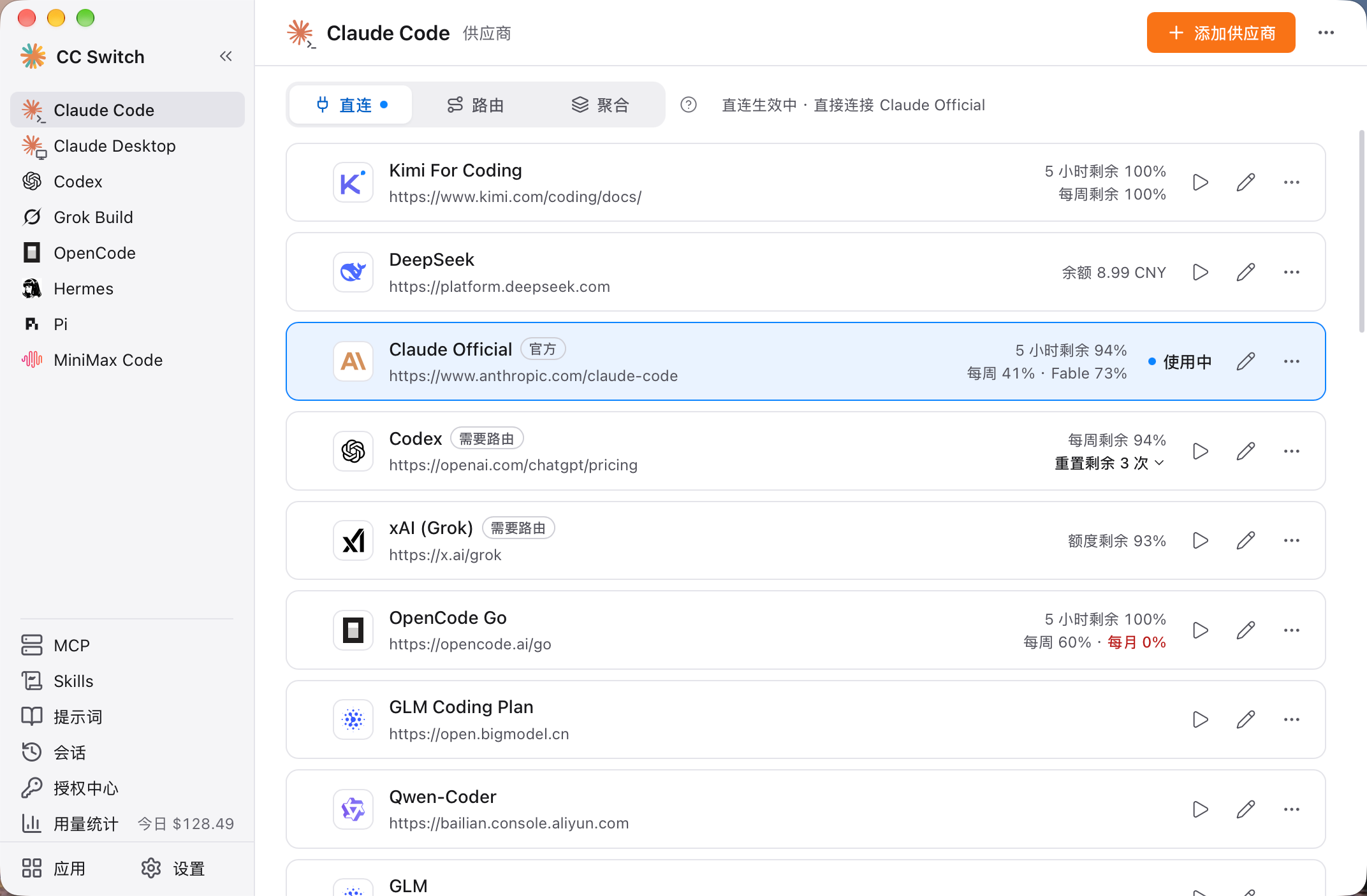 主界面 |
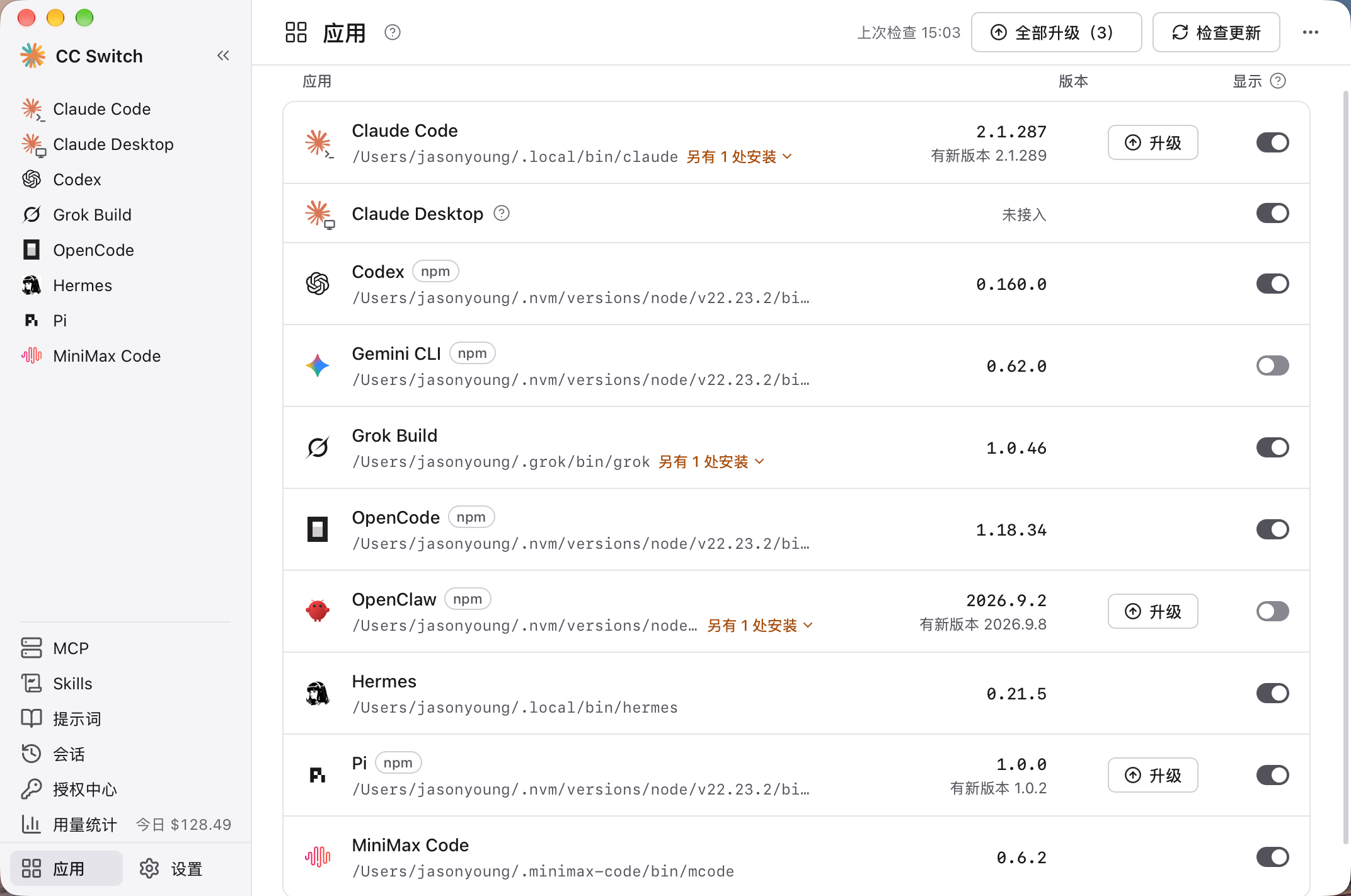 应用页 |
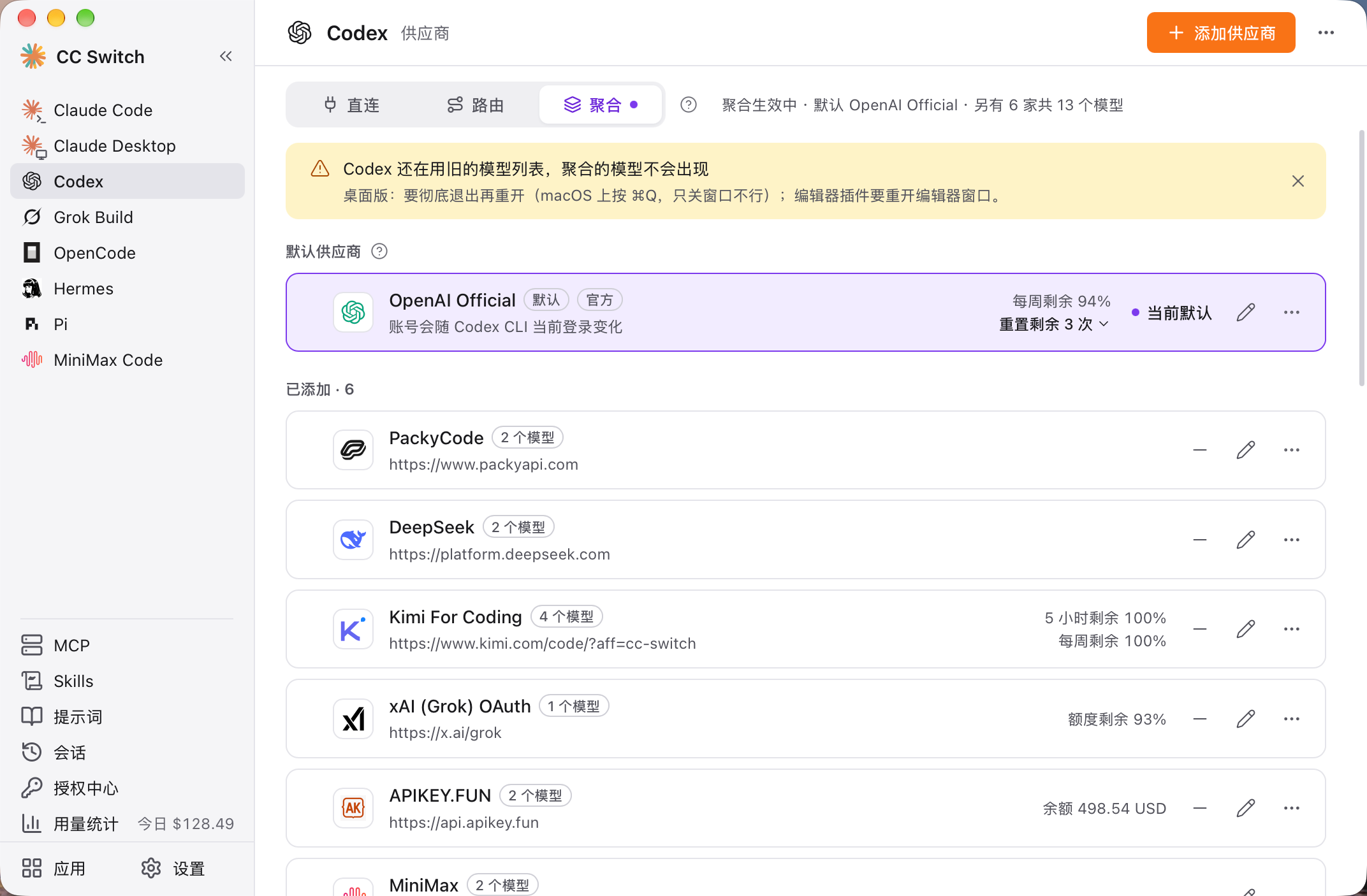 聚合模式 |
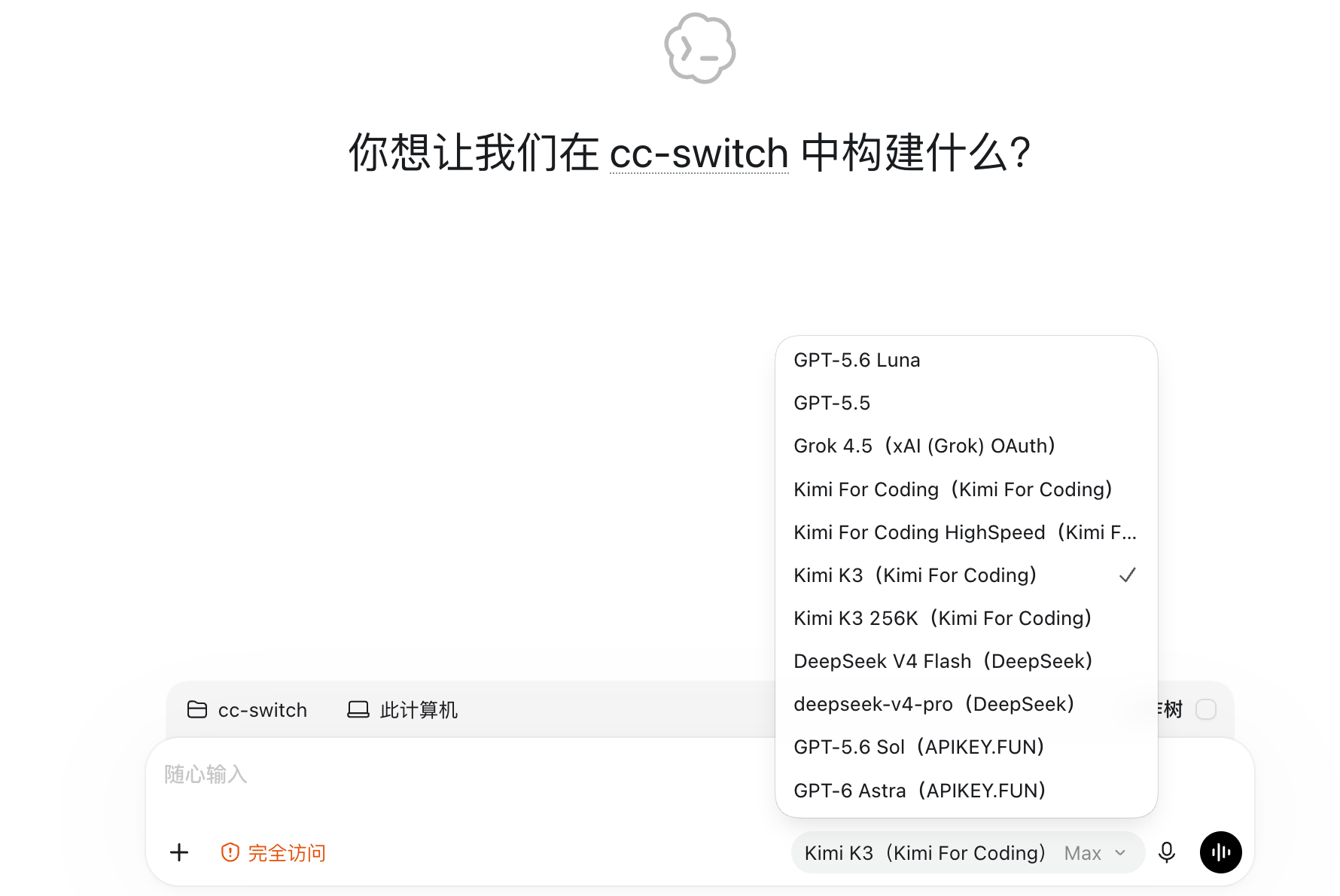 Codex 里的聚合模型列表 |
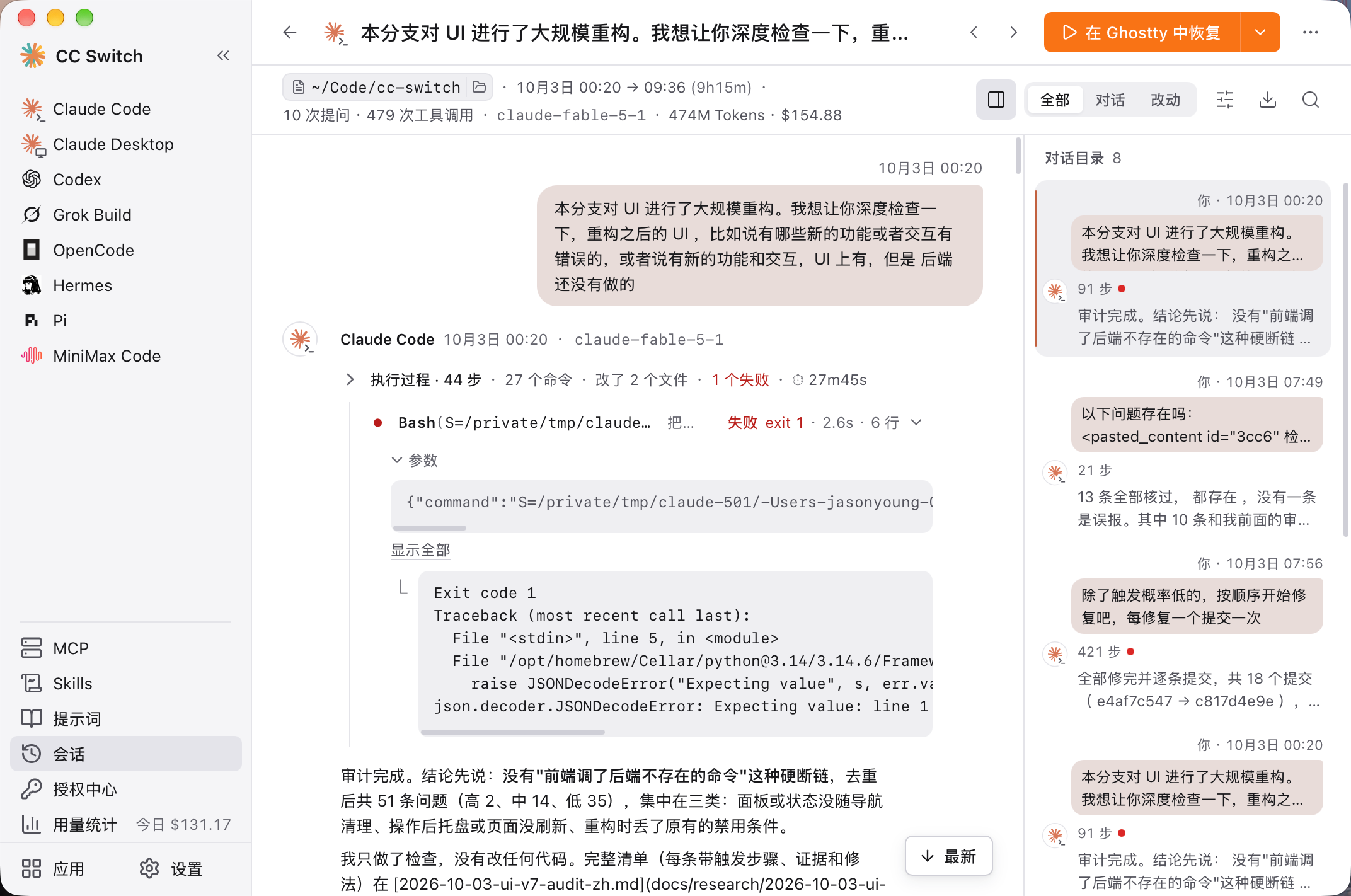 会话阅读页 |
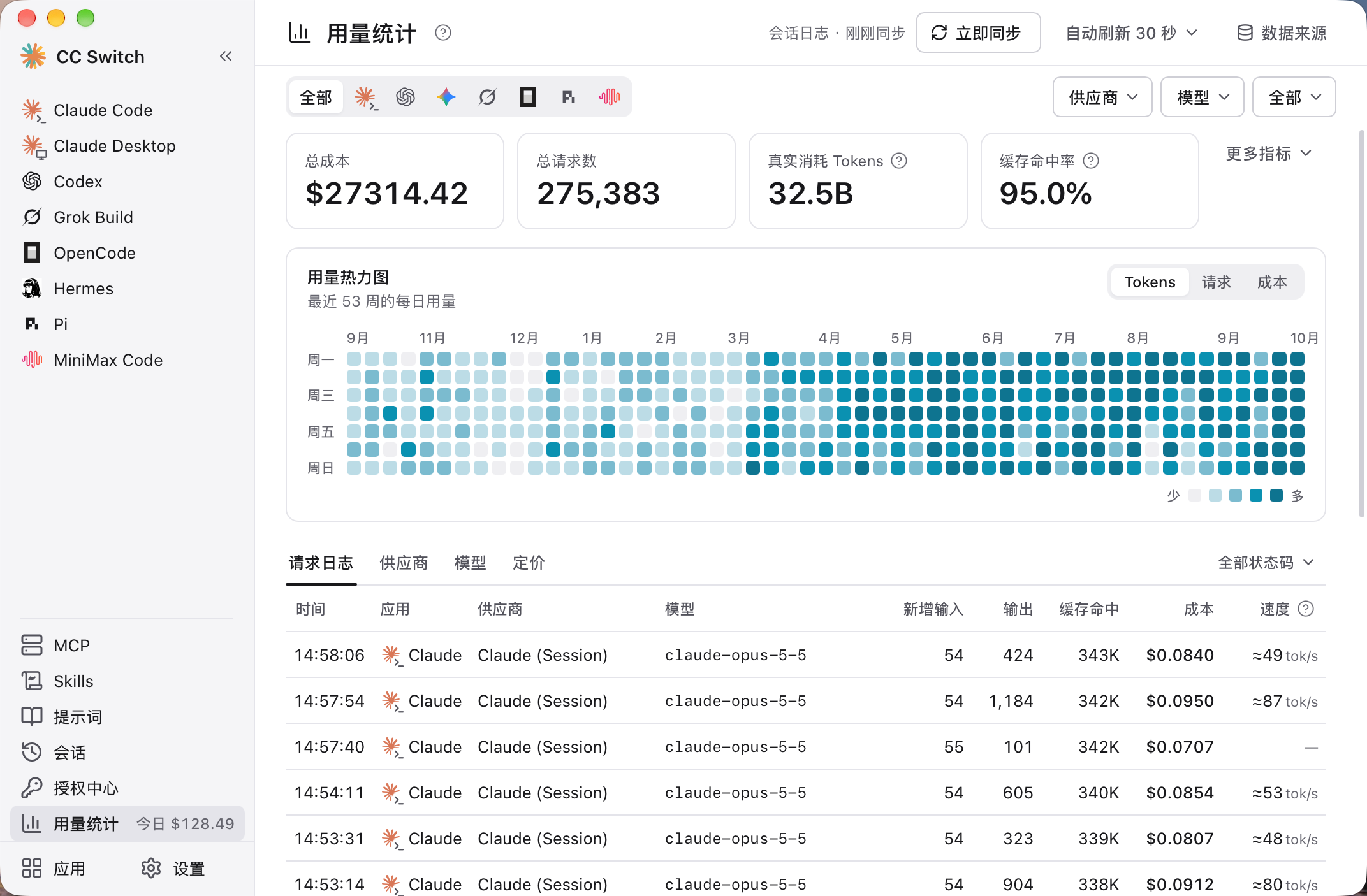 用量统计 |
下载安装
系统要求
- Windows:Windows 10 及以上
- macOS:macOS 12 (Monterey) 及以上
- Linux:x86_64 或 ARM64,需要 glibc 2.35+ 和 WebKitGTK 4.1,例如 Ubuntu 22.04+、Debian 12+ 及较新的 Fedora;RHEL / Rocky / Alma 8–9 暂不支持
Windows 用户
从 Releases 页面下载最新版本的 CC-Switch-v{版本号}-Windows.msi 安装包或 CC-Switch-v{版本号}-Windows-Portable.zip 绿色版。ARM 版 Windows 请下载 CC-Switch-v{版本号}-Windows-arm64.msi 或 CC-Switch-v{版本号}-Windows-arm64-Portable.zip。
macOS 用户
方式一:通过 Homebrew 安装(推荐)
brew install --cask cc-switch
更新:
brew upgrade --cask cc-switch
方式二:手动下载
从 Releases 页面下载 CC-Switch-v{版本号}-macOS.dmg(推荐)或 .zip。这是 Universal 通用包,Apple Silicon 和 Intel Mac 均可原生运行。
注意:CC Switch macOS 版本已通过 Apple 代码签名和公证,可直接安装打开。
Arch Linux 用户
通过 paru 安装(推荐)
paru -S cc-switch-bin
Linux 用户
从 Releases 页面下载最新版本的 Linux 安装包:
CC-Switch-v{版本号}-Linux-x86_64.deb/-Linux-arm64.deb(Debian/Ubuntu)CC-Switch-v{版本号}-Linux-x86_64.rpm/-Linux-arm64.rpm(Fedora 等提供 WebKitGTK 4.1 的 RPM 发行版)CC-Switch-v{版本号}-Linux-x86_64.AppImage/-Linux-arm64.AppImage(满足上述系统要求的发行版)
Flatpak:官方 Release 不包含 Flatpak 包。如需使用,可从
.deb自行构建 — 参见flatpak/README.md。
快速开始
基本使用
- 添加供应商:在侧栏选中要管理的工具,点击页面右上角的“+”(添加供应商)→ 选择预设或创建自定义配置
- 切换供应商:
- 主界面:选择供应商 → 点击“启用”(OpenCode、OpenClaw、Hermes、MiniMax Code、Kimi Code 的按钮为“添加”,Pi 和 Oh My Pi 为“启用 / 移除”;这七个是共存式工具,可以同时添加多个供应商)
- 系统托盘:每个工具一行,显示“名称 · 模式 · 供应商 · 额度”,在子菜单里直接点击供应商名称(支持 Claude Code、Claude Desktop、Codex、Gemini CLI、Grok Build)
- 生效方式:Claude Code 无需重启;Codex、Gemini CLI、Grok Build 需重启终端或对应的 CLI 工具;Claude Desktop 需重启应用本身(详见常见问题)
- 恢复官方登录:切换到列表中自带的官方供应商(如“Claude Official”),重启工具后按照其登录/OAuth 流程操作
- 路由与聚合(可选):Claude Code、Codex、Gemini CLI、Grok Build 的页面顶部有「直连 / 路由」标签,Claude Code 和 Codex 还有「聚合」。点标签只是切换查看的内容,不会改动配置;真正切换要点页面上的“开始路由”或“切换到聚合模式”,回到直连点“回到直连”。想在 Claude Code 里使用 OpenAI 或 Gemini 格式的供应商,或在 Codex 里使用 Claude,用路由;想在同一个模型列表里混用多家供应商的模型,用聚合
- 管理工具:侧栏的「应用」页集中显示每个 AI 编程工具的版本、安装位置和来源,可以安装、升级或全部升级,也可以选择哪些工具显示在侧栏
MCP、提示词、Skills、项目与会话
- MCP:点击侧栏的“MCP” → 通过模板或自定义配置添加服务器(或“导入已有”)→ 切换各工具的同步开关
- 提示词:点击侧栏的“提示词” → 使用 Markdown 编辑器创建提示词 → 启用后写入该工具的提示词文件
- Skills:点击侧栏的“Skills” →“发现技能” → 搜索 skills.sh 或浏览 GitHub 仓库 → 一键安装到支持的工具
- 项目:先在「设置 → 通用」里打开“显示项目切换”,然后在 Claude Code、Claude Desktop 或 Codex 页面,打开顶部的项目切换器 →“新建项目”,把当前配置保存下来,之后从切换器里选择即可整套切换
- 会话:点击侧栏的“会话” → 浏览、搜索会话历史,打开阅读页,或恢复各工具的会话
- 授权中心:点击侧栏的“授权中心”,登录 GitHub Copilot、ChatGPT、xAI(Grok)、Kimi Code 账号,把订阅当作供应商使用。Kimi Code 支持同时保存多个官方账号,每个账号使用独立凭据和原生供应商,首个登录沿用 Kimi 原生默认凭据槽位,在此添加、重新登录和退出账号。仍在原生配置中的 Kimi 官方 OAuth 节点在供应商页受到保护;原生节点被移除后,可以删除留下的档案。
注意:首次启动时,CC Switch 会自动把 Claude Code、Codex、Gemini CLI、Grok Build 的现有配置导入为名为
default的供应商,并为这几个工具和 Claude Desktop 添加官方供应商,原有配置不会丢失。
各项功能的详细用法请查阅 用户手册,涵盖供应商管理、MCP/提示词/Skills、本地路由与故障转移等全部功能。
功能特性
各工具支持的功能
| 工具 | 供应商 | 本地路由 | 聚合 | 托盘切换 | MCP | Skills | 提示词 | 会话 | 用量统计 |
|---|---|---|---|---|---|---|---|---|---|
| Claude Code | 切换 | ✓ | ✓ | ✓ | ✓ | ✓ | CLAUDE.md | ✓ | ✓ |
| Claude Desktop | 切换 | 模型映射时 | – | ✓ | – | – | – | – | 模型映射时 |
| Codex | 切换 | ✓ | ✓ | ✓ | ✓ | ✓ | AGENTS.md | ✓ | ✓ |
| Gemini CLI | 切换 | ✓ | – | ✓ | ✓ | ✓ | GEMINI.md | ✓ | ✓ |
| Grok Build | 切换 | ✓ | – | ✓ | ✓ | ✓ | AGENTS.md | ✓ | ✓ |
| OpenCode | 共存 | – | – | – | ✓ | ✓ | AGENTS.md | ✓ | ✓ |
| OpenClaw | 共存 | – | – | – | – | – | 工作区编辑器 | ✓ | – |
| Hermes | 共存 | – | – | – | ✓ | ✓ | 记忆管理 | ✓ | – |
| Pi | 共存 | – | – | – | ✓ | ✓ | AGENTS.md、SYSTEM.md、提示词模板 | ✓ | ✓ |
| MiniMax Code | 共存 | – | – | – | ✓ | ✓ | AGENTS.md | ✓ | ✓ |
| Kimi Code | 共存 | – | – | – | ✓ | ✓ | AGENTS.md | ✓ | ✓ |
| Oh My Pi | 共存 | – | – | – | ✓ | ✓ | AGENTS.md | ✓ | – |
- 切换:同一时间只启用一个供应商;共存:多个供应商同时写入工具自身的配置,在工具里选择使用。
- 本地路由:由 CC Switch 在本机转发请求并转换接口格式,见下方本地路由与故障转移。Claude Desktop 的供应商可选“直连”或“模型映射”,选“模型映射”时经本地路由转发。
- 聚合:把多家供应商的模型放进同一个模型列表,按所选模型分发请求,见下方聚合模式。
- 会话:浏览、搜索会话历史,打开阅读页,复制恢复命令继续对话(OpenClaw、Hermes 的会话暂不支持恢复)。Hermes 只显示最近 500 个会话。
- 用量统计:不开本地路由时,从各工具的本地会话记录统计;经本地路由的请求也会计入。
- 在 Claude Desktop 页面打开的 MCP、Skills、提示词和会话面板,作用于 Claude Code。
供应商管理
- 90+ 供应商预设 — 选择预设、填入 Key 即可添加,也可以创建自定义配置。添加面板支持按中文名和域名搜索,同一家的不同套餐和地区合并成一行
- 只改关键字段 — 切换时只替换请求地址、Key、模型等连接信息,插件、Hook、MCP、你自己加的设置和注释都原样保留;编辑器底部显示切换后配置文件的样子,CC Switch 第一次改写配置文件前会自动备份原文件
- 项目 — 把 Claude Code 或 Codex 当前的供应商、MCP、Skills 和提示词文件保存为一个项目(Claude Desktop 只保存供应商),之后在页面顶部的项目切换器或托盘里一键整套切换;切到其他项目时,当前状态会自动存回原项目。项目切换器默认隐藏,在「设置 → 通用」里打开“显示项目切换”
- 授权中心(Beta) — 在侧栏的「授权中心」里登录多个 GitHub Copilot、ChatGPT、xAI(Grok)账号,把订阅当作供应商用在 Claude Code、Claude Desktop 和 Codex 中(除 Codex 的 OpenAI Official 外,都需要在路由模式下使用)。在官方客户端以外使用订阅可能违反厂商的服务条款,请自行评估风险
- Claude Desktop 接入第三方 — 可以直连 Anthropic 兼容端点;非 Claude 模型选“模型映射”,经本地路由把 Sonnet、Opus、Haiku 等档位映射到供应商的实际模型
- 通用供应商 — 一份配置同步到 Claude Code、Codex 和 Gemini CLI
- 一键切换、系统托盘快速切换(Claude Code、Claude Desktop、Codex、Gemini CLI、Grok Build)、拖拽排序、导入导出
本地路由与故障转移
- 接口格式转换 — 本地路由在 Anthropic Messages、OpenAI Chat Completions、OpenAI Responses 和 Gemini Native 之间转换请求格式:Claude Code 和 Claude Desktop 可以使用 OpenAI 或 Gemini 格式的供应商,Codex 和 Grok Build 可以使用 Chat Completions 或 Anthropic Messages 格式的供应商
- 按工具开启 — Claude Code、Codex、Gemini CLI、Grok Build 可以分别进入路由模式:在页面顶部的「路由」标签里点“开始路由”。路由模式下,切换供应商会立即作用于后续请求(如果切换改变了模型,Codex、Gemini CLI 和 Grok Build 仍可能需要重启)。退出 CC Switch 时会先写回直连配置,下次启动再接上
- 自动故障转移 — 为每个工具配置故障转移队列,请求失败时按队列顺序自动改用下一个供应商,配合熔断器和供应商健康监控
- 整流器 — 自动修正部分上游不兼容的请求(如 Thinking 签名、不支持图片时降级)
- 官方供应商(如 Claude Official)不能走本地路由(Codex 的 OpenAI Official 除外)
- 路由服务的状态、监听地址和故障转移参数集中在「设置 → 本地路由」
- 使用攻略:在 Claude Code 中使用 GPT · 在 Codex 中使用 Claude
聚合模式
- 一个模型列表,多家供应商 — 在 Claude Code 或 Codex 的页面切到「聚合」,添加几家供应商,它们的模型会同时出现在客户端的模型选择器里;选哪个模型,请求就发给哪一家,不用回到 CC Switch 切换
- 随时添加和移除 — 在供应商卡片上点“添加”或“移除”,再选一家作为默认供应商,没有指定聚合模型的请求都交给它;Codex 的 OpenAI Official 只能作为默认供应商;聚合模式暂不支持 Claude 官方订阅
- 注意 — 聚合不提供故障转移;Claude Code 需要 2.1.243 或更新版本;Codex 的聚合列表变化后需要重启,Claude Code 不需要。同一会话里换模型后,新模型要重新建立提示词缓存,第一轮费用会高一些
- 聚合模式的许多设计参考了 opencodex,感谢作者和贡献者
- 使用攻略:聚合模式图文指南 · 聚合模式手册
MCP、提示词与 Skills
- 统一 MCP 面板 — 一处管理所有 MCP 服务器,按工具勾选同步(Claude Code、Codex、Gemini CLI、Grok Build、OpenCode、Hermes、Pi、MiniMax Code、Kimi Code、Oh My Pi),支持从各工具导入现有配置,支持 Deep Link 导入
- 提示词 — 按工具分别管理的提示词库,使用 Markdown 编辑器;启用后写入该工具的提示词文件(CLAUDE.md / AGENTS.md / GEMINI.md),启用前会先把文件里原有的内容存回提示词库,不会丢失。Pi 还可以编辑 SYSTEM.md、APPEND_SYSTEM.md 和提示词模板
- Skills — 搜索 skills.sh,或从 GitHub 仓库、ZIP 文件一键安装;检查更新并一键全部更新;同步到各工具的方式可选自动、只用软链接或只用复制,存储位置可选
~/.agents/skills - 三个面板都支持搜索,MCP 和 Skills 还可以按工具一键全部启用或停用;供应商、MCP 和提示词都在内容区整页编辑,有未保存的修改时离开会先提醒
用量与成本追踪
- 用量仪表盘 — 不开本地路由也能统计:默认自动扫描各工具的本地会话记录,按供应商和模型统计请求数、Token、缓存命中率、输出速度和花费,提供趋势图、全年热力图和逐条请求日志
- 额度与余额 — 供应商卡片和托盘上直接显示剩余量和重置倒计时,比如“5 小时剩余 94%”:官方订阅额度(Claude、ChatGPT、Gemini、SuperGrok)、Coding Plan 的 5 小时 / 周 / 月额度(Kimi、智谱 GLM、MiniMax、火山方舟等)和账户余额(DeepSeek、OpenRouter、硅基流动等),部分需要先在供应商卡片的“配置用量查询”里开启;其他供应商可以写自定义用量脚本。ChatGPT 订阅还会显示剩余重置次数和 Codex Credits 余额
- 自定义定价 — 按模型设置单价,可以从 models.dev 导入
会话管理器与工作区
- 会话阅读页 — 把各工具的会话记录解析成结构化内容:正文、思考、工具调用、工具结果和图片分开呈现;每一轮工作折叠成一行摘要(多少步、改了几个文件、几处失败),失败步骤标红;右侧是对话目录,支持会话内查找、导出 Markdown、复制单轮或整段对话
- 列表与恢复 — 按项目或时间分组,搜索标题、目录、消息或会话 ID,支持批量删除;复制恢复命令继续对话,macOS 上可以一键在终端中恢复
- 工作区编辑器(OpenClaw)— 编辑 Agent 文件(AGENTS.md、SOUL.md 等)和每日记忆
- 记忆管理(Hermes)— 编辑 Hermes 的 MEMORY.md 和 USER.md
系统与平台
- 云同步 — 通过 WebDAV(坚果云、Nextcloud、群晖 NAS 等)或 S3 兼容存储(AWS S3、Cloudflare R2、阿里云 OSS、腾讯云 COS 等)在多台设备之间同步;也可以把 CC Switch 配置目录放到 Dropbox、OneDrive、iCloud 等网盘文件夹中
- CLI 工具管理 — 在侧栏的「应用」页查看 Claude Code、Codex 等命令行工具的当前版本和最新版本,一键安装、升级或全部升级,并诊断重复安装;Windows 上还能管理 WSL 里的工具(见常见问题)
- Deep Link(
ccswitch://)— 通过链接一键导入供应商、MCP 服务器和提示词,或添加技能仓库。用 在线生成器 生成链接;站长想在网站上放导入按钮,见 站长接入指南 - 小工具 — 跳过 Claude Code 初次安装确认、隐藏 AI 署名、让 VS Code 的 Claude Code 插件随本软件切换供应商等
- 深色 / 浅色 / 跟随系统主题、开机自启、自动更新、原子写入、自动备份(「设置 → 数据」里可以看到所有备份的位置和占用空间)、国际化(简中/繁中/英/日,另有社区翻译的土耳其语)
常见问题
CC Switch 支持哪些 AI 工具?
CC Switch 支持十二个工具:Claude Code、Claude Desktop、Codex、Gemini CLI、Grok Build、OpenCode、OpenClaw、Hermes、Pi、MiniMax Code、Kimi Code、Oh My Pi。每个工具都有专属的供应商预设和配置管理,各自支持哪些功能见各工具支持的功能。
切换供应商后需要重启终端吗?
视工具而定:
- Claude Code:支持供应商数据的热切换,无需重启。
- Codex、Gemini CLI、Grok Build:需要重启终端或 CLI 工具才能生效(切换成功后会有提示)。路由模式下,请求会立即转发到新供应商;但如果切换改变了模型,这三个工具仍可能需要重启。
- 聚合模式:Claude Code 的聚合模型改动立即生效;Codex 进入或退出聚合、改动聚合模型列表后都要彻底重启,见下一条。
- Claude Desktop:需要完全退出并重新打开 Claude Desktop;使用“模型映射”时,还需要保持 CC Switch 运行。
- OpenCode、OpenClaw、Hermes、Pi、MiniMax Code、Kimi Code、Oh My Pi:这些是共存式工具,点击“添加”(Pi 和 Oh My Pi 为“启用”)会把供应商写入工具自身的配置、与其他供应商共存,之后在工具里选择要使用的模型即可。Kimi Code 还提供“切换”按钮选择供应商的模型;主模型或子代理模型池仍引用的模型不能移除。配置与账号详情见 Kimi Code 接入说明。
Codex 聚合模式下,/model 里看不到聚合的模型?
Codex 只在启动时读取模型列表。进入或退出聚合模式、添加或移除聚合的供应商、改动某家的聚合模型之后,都要彻底重启 Codex 才能看到新的列表:
- Codex CLI:只关掉终端重开
codex不够。所有终端里的codex共用一个后台守护进程,要重启它才会读到新列表。CC Switch 检测到 Codex 还在用旧列表时,会在 Codex 页面顶部提示,点提示里的“重启 Codex 守护进程”即可。重启会中断守护进程里正在运行的任务。 - Codex 桌面版:要彻底退出后重新打开(macOS 上按 ⌘Q,只关窗口不行)。
- 编辑器插件:重开编辑器窗口。
Claude Code 不受影响,聚合模型改动立即生效。
切换供应商会改掉我的插件、Hook 等设置吗?
不会。Claude Code、Codex、Gemini CLI、Grok Build 切换供应商时,CC Switch 只替换配置文件里的关键字段:请求地址、Key、模型名和接口协议(Codex 还包括推理档位,Gemini CLI 还包括认证方式),以及少数跟着供应商走的兼容选项(如 Claude Code 的“禁用 Artifact 工具”、上下文窗口)。插件、Hook、权限、MCP、你自己加的环境变量、注释和排版都原样保留,对所有供应商生效。
这些共享设置可以直接在工具里改,或手动编辑配置文件;也可以在 CC Switch 里编辑任意一个供应商:编辑框显示的是“切到这个供应商之后配置文件的样子”,保存时关键字段存进这个供应商,其余改动写进配置文件,对所有供应商生效。
所以以前的“通用配置片段”已经不需要了,相关按钮已移除。升级前片段里的设置在切换时早已写进配置文件,会继续保留。CC Switch 第一次改写每个配置文件之前,还会把原文件备份到 ~/.cc-switch/backups/live-first-write/。
在工具里换了模型,切走再切回来怎么又变回去了?
模型属于关键字段,归供应商所有。在工具里换的模型(如 Claude Code 的 /model)会一直生效到下次切换;切换时,配置文件里的模型会换成目标供应商保存的那个,CC Switch 不会把你在工具里换的模型存回原来的供应商。想长期使用某个模型,请在 CC Switch 里编辑这个供应商。
旧版本会在切走时把整份配置文件存回供应商,现在不再这样做:那样会把插件等共享设置冻结进某一个供应商,切到别的供应商时就丢了。
为什么总有一个正在使用的供应商无法删除?
本软件的设计原则是“最小侵入性”,即使卸载本软件,也不会影响应用的正常使用。
所以对于同一时间只启用一个供应商的工具(Claude Code、Claude Desktop、Codex、Gemini CLI、Grok Build),系统总会保留一个正在使用的配置,因为如果将所有配置全部删除,该应用将无法正常使用;想删它,先切换到别家。聚合模式下的默认供应商同样不能移除,先把别家设为默认。OpenCode、OpenClaw、Hermes、Pi、MiniMax Code 等共存式工具不受此限制,可以直接删除任意供应商。如果你不常用某个工具,可以在侧栏的「应用」页里把它从侧栏隐藏。如果你想切换回官方登录,可以参考下条。
如何切换回官方登录?
Claude Code、Claude Desktop、Codex、Gemini CLI、Grok Build 的供应商列表里都自带一个官方供应商(Claude Official、Claude Desktop Official、OpenAI Official、Google Official、Grok Official),如果删掉了,可以从预设里重新添加。切换到官方供应商后,按照工具自身的登录流程操作(如 Claude Code 的 /login、Codex 的 codex login),之后便可以在官方供应商和第三方供应商之间随意切换。
Codex 还可以在 CC Switch 里用“使用 ChatGPT 登录”登录多个 ChatGPT 账号,再为每张 OpenAI Official 卡片选择“使用的账号”,多个 Plus、Pro 或 Team 账号之间一键切换;选择“跟随 Codex 登录”的卡片则沿用 Codex CLI 自己的登录。
注意:官方订阅用的是工具自己的登录,不经过本地路由。路由模式下不能切换到官方供应商(Codex 的 OpenAI Official 卡片除外),先回到直连即可。
开始路由后,配置文件里的地址为什么变成了 127.0.0.1?
路由模式下,工具的请求会先发到 CC Switch 的本地路由(默认 http://127.0.0.1:15721),再由 CC Switch 转发给你选中的供应商。所以工具的配置文件里只有本地地址和占位密钥 PROXY_MANAGED;Claude Code 的模型名还会写成 claude-sonnet-5 之类的固定别名(/model 菜单里仍显示真实模型名)。真实的供应商地址、密钥和模型都保存在 CC Switch 里。聚合模式同样如此。
在侧栏「用量统计」的请求日志里可以看到每条请求的“请求模型 → 实际模型”。
路由模式下,切换的是路由使用的供应商,进入路由前在用的供应商保持不变,卡片上标“直连”。点“回到直连”后,配置文件会写回这个直连供应商的配置。退出 CC Switch 时也会先写回直连供应商,下次启动再重新接上。
能在 Claude Code 里使用 OpenAI 兼容接口、Gemini 或本地模型吗?
可以,但需要使用路由。编辑供应商时,在“高级选项”的“上游格式”里选择和供应商一致的接口格式:只提供 Chat Completions 接口的服务(很多本地模型服务都是这样)选“OpenAI Chat Completions”,提供 Responses 接口的选“OpenAI Responses API”,Gemini 选“Gemini Native generateContent”。然后在 Claude Code 页面的「路由」标签里点“开始路由”。格式选错或没有开始路由,通常会报 404 或 405 错误。
反过来,在 Codex 或 Grok Build 的“上游格式”里选“Anthropic Messages”,就能使用 Claude 格式的供应商,同样需要路由。详见在 Claude Code 中使用 GPT 和 在 Codex 中使用 Claude。
“检测连通”通过了,为什么请求还是失败?
供应商卡片上的“检测连通”只检查供应商地址能不能连上,不会发送真实的模型请求,所以验证不了 API Key 和模型名是否正确。请求失败时,请检查 Key、模型名和上游格式;经过路由的请求,还可以在侧栏「用量统计」的请求日志里查看具体报错。
我的数据存储在哪里?
默认都在用户主目录下的 .cc-switch 文件夹(Windows 为 C:\Users\<用户名>\.cc-switch):
- 数据库:
cc-switch.db(SQLite — 供应商、MCP、提示词、Skills、项目、用量记录等) - 本地设置:
settings.json(设备级设置,如各工具的配置目录、备份策略、云同步连接信息) - 备份:
backups/(默认每 24 小时自动备份一次、保留最近 10 个,可在「设置 → 数据 → 备份与恢复」中调整;下方的“其他备份”列出其余备份的位置和大小,可以按类别清理) - Skills:
skills/(可在设置中改为~/.agents/skills),默认通过软链接同步到各工具,失败时改为复制 - 技能备份:
skill-backups/(卸载或更新技能前自动创建,保留最近 20 个) - OAuth 登录凭据:
copilot_auth.json、codex_oauth_auth.json、xai_oauth_auth.json - 日志:
logs/cc-switch.log和crash.log,反馈问题时请附上 - 本机状态:
live-state.json(各工具当前是直连、路由还是聚合,上一次写入了什么)、codex-login-stash.json(切到第三方时被移走的 Codex 官方登录,切回官方时还原) - 配置文件原件:
backups/live-first-write/(CC Switch 第一次改写各工具配置文件之前的原文件)
在「设置 → 数据 → 存储位置」里修改“CC Switch 配置目录”后,除 settings.json、本机状态和配置文件原件以外的上述文件都改为存放在新目录。CC Switch 不会自动搬运已有文件,需要先手动复制过去。settings.json、本机状态和配置文件原件只属于这台电脑,始终在默认目录,也不参与云同步。
在 Windows 上怎么管理 WSL 里的工具?
CC Switch 不会自动识别 WSL。请在「设置 → 应用配置」里,把对应工具的配置目录改成 WSL 里的路径,例如 \\wsl.localhost\Ubuntu\home\<用户名>\.claude,保存后 CC Switch 就会读写 WSL 里的配置(Claude Code、Codex、Gemini CLI、Grok Build、OpenCode、OpenClaw、Hermes、Pi 支持设置)。设置之后,侧栏的「应用」页也会在对应的 WSL 发行版里检测和升级该工具。
注意:路由和聚合写入配置的地址是 127.0.0.1。WSL2 默认的 NAT 网络模式下,WSL 里的 127.0.0.1 连不到 Windows 上的本地路由,需要改用 WSL 的 mirrored 网络模式。
有命令行版本或无界面版本吗?
CC Switch 本身只提供需要图形界面的桌面版(系统要求见下载安装)。在服务器、SSH 远程或没有桌面环境的机器上,推荐使用社区维护的 CC Switch CLI:它提供交互式终端界面(TUI)和命令行两种用法,支持 Claude Code、Codex、Gemini CLI、OpenCode、OpenClaw、Hermes、Pi,可以通过 Homebrew(brew install cc-switch-cli)或安装脚本安装。
CC Switch CLI 默认与桌面版共用数据目录 ~/.cc-switch,也兼容桌面版的 WebDAV 同步。两个项目分别发版,CLI 版支持的数据库版本有时会落后于桌面版;遇到“数据库版本过新”的提示时,请升级 CLI 版,或等它跟进更新。
Linux(Wayland + NVIDIA):网页内容点不动、缩放后黑屏
AppImage 会强制 GDK_BACKEND=x11(走 XWayland)以规避历史上的原生 Wayland 崩溃。但在较新的 Wayland + NVIDIA 环境下,这会导致网页内容区点不动(标题栏按钮仍可点)、窗口缩放后黑屏。可用内置的逃生开关切回原生 Wayland:
CC_SWITCH_GDK_BACKEND=wayland ./CC-Switch-*.AppImage
如果你是从桌面图标启动的,请把它写进 .desktop 的 Exec= 行(如 env CC_SWITCH_GDK_BACKEND=wayland /path/to/AppImage),或在会话环境中设置。该变量是通用的:在 tiling Wayland 合成器(sway/Hyprland)下若出现点击失效,可反过来设 CC_SWITCH_GDK_BACKEND=x11。不设置则保持默认行为。
更多问题请查看用户手册中的常见问题。
贡献
欢迎提交 Issue 反馈问题和建议!新功能开发前,请先开 Issue 讨论实现方案,不适合项目的功能性 PR 有可能会被关闭。
开发环境、提交前检查和架构说明见 CONTRIBUTING.md;使用问题请先看 SUPPORT.md;安全漏洞请按 SECURITY.md 私下报告。
技术栈:Tauri 2 · Rust · React 18 · TypeScript · SQLite
Star History
License
MIT © Jason Young