FireRed-OpenStoryline
FireRed-OpenStoryline is an AI video editing agent that transforms manual editing into intention-driven directing through natural language interaction, LLM-powered planning, and precise tool orchestration. It facilitates transparent, human-in-the-loop creation with reusable Style Skills for consistent, professional storytelling.
原始仓库简介 · 中文摘要待补充 · agent / chatbot / langchain / mcp / skills / video
README / 项目原文








FireRed-OpenStoryline turns complex video creation into natural, intuitive conversations. Designed with both accessibility and enterprise-grade reliability in mind, FireRed-OpenStoryline makes video creation easy and friendly to beginners and creative enthusiasts alike.
Deriving from the saying "A single spark can start a prairie fire", the name FireRed represents our vision: to spread our SOTA capabilities—honed in real-world scenarios—like sparks across the wilderness, igniting the imagination of developers worldwide to reshape the future of AI together.
✨ Key Features
- 🌐 Smart Media Search & Organization: Automatically searches online and downloads images and video clips that match your requirements. Performs clip segmentation and content understanding based on your thematic media.
- ✍️ Intelligent Script Generation: Combines user themes, visual understanding, and emotion recognition to automatically construct storylines and context-aware narration. Features built-in Few-shot style transfer capabilities, allowing users to define specific copy styles (e.g., product reviews, casual vlogs) via reference text, achieving precise replication of tone, rhythm, and sentence structure.
- 🎵 Intelligent Music, Voiceover & Font Recommendations: Supports personal playlist imports and auto-recommends BGM based on content and mood, featuring smart beat-syncing. Simply describe the desired tone—e.g., "Restrained," "Emotional," or "Documentary-style"—and the system matches suitable voiceovers and fonts to ensure a cohesive aesthetic.
- 💬 Conversational Refinement: Rapidly cut, swap, or resequence clips. Edit scripts and fine-tune visual details—including color, font, stroke, and position. All edits are performed exclusively via natural language prompts with immediate results.
- ⚡Editing Skill Archiving: Save your complete editing workflow as a custom Skill. Simply swap the media and apply the corresponding Skill to instantly replicate the style, enabling efficient batch creation.
NEWS
- 🎬 2026-04-02: Added the AI Transition Generation feature, which automatically creates transition shots based on the ending frame of one clip, the opening frame of the next, and a natural-language description, making scene transitions smoother and the narrative more coherent.
- 🚀 2026-03-22: Introduced an ASR-based rough cut skill for speech videos, enabling automatic removal of filler words, disfluencies, and repeated sentences, with timestamp-aligned segmentation for cleaner and more efficient speech editing workflows.
- 🔥 2026-03-12: Integrated with OpenClaw, adding two OpenClaw Skills —
openstoryline-installandopenstoryline-use— covering the initial installation/first-run workflow and the actual usage workflow, respectively. Also added Skill usage instructions for Claude Code, making it easier for Claude Code to install and invoke the project in accordance with the repository guidelines. - 2026-02-10: FireRed-OpenStoryline was officially open-sourced.
⚠️ Note: AI transitions rely on third-party AIGC video generation services, and the cost is relatively high. Due to variations in source material quality, prompts, and model performance, the generated results are somewhat unpredictable. It is recommended to enable this feature only when needed.
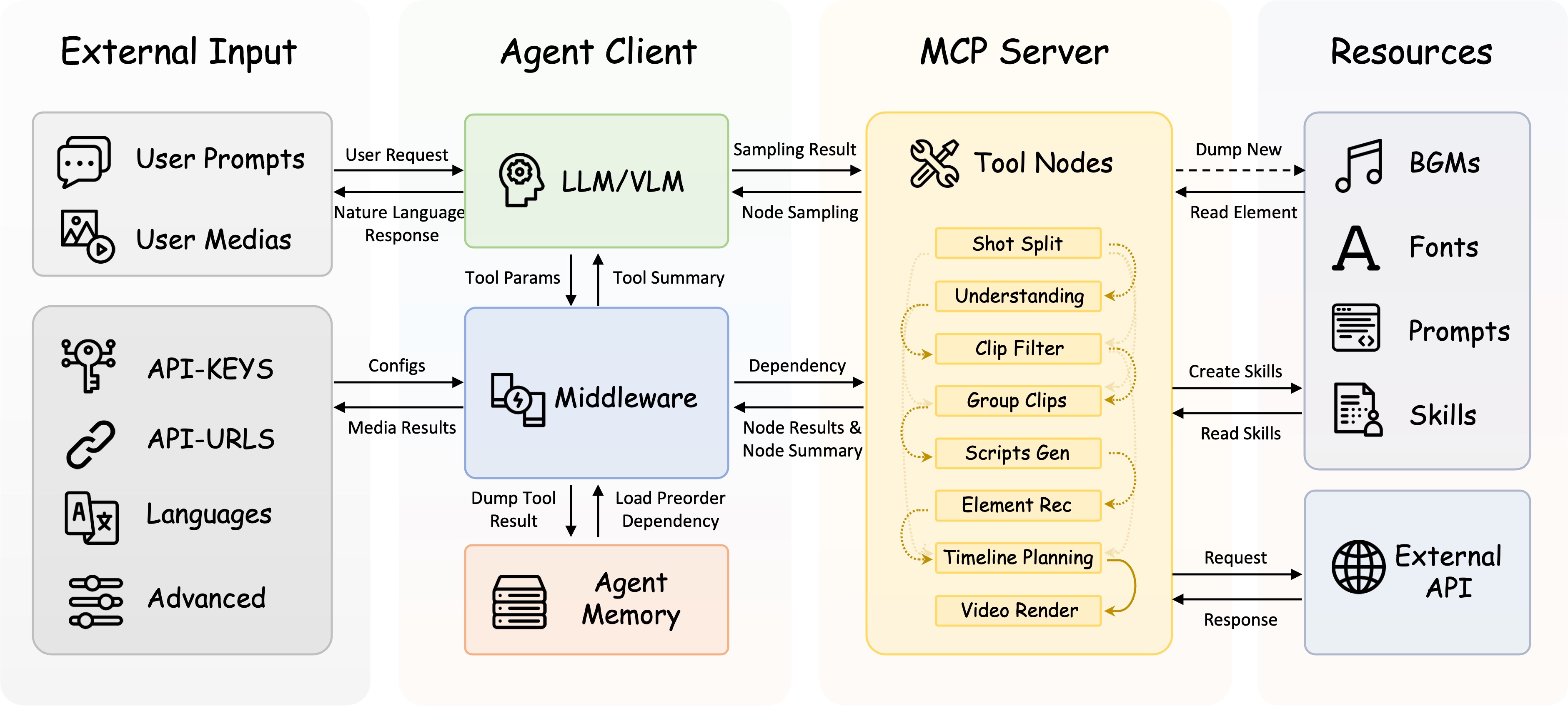
🏗️ Architecture
✨ Demo
| Zhongcao Style | Humorous Style | Product Picks | Artistic Style |
| Unboxing | Talking Pet | Travel Vlog | Year-in-Review |
🎨 Effects Note: Due to licensing restrictions on open-source assets, the elements (fonts/music) in the first row represent only basic effects. We highly recommend following the Custom Asset Library Tutorial to unlock commercial-grade fonts, music, and VFX for significantly better video quality.
⚠️ Quality Note: To save space in the README, the demo videos are heavily compressed. The actual output retains the original resolution by default and supports custom dimensions.
In the Demo: The first row shows default open-source assets (Restricted Mode); the second row shows Xiaohongshu App "AI Clip" asset library effects. 👉 Click to view tutorial
⚖️ Disclaimer: User footage and brand logos shown in the demos are for technical demonstration purposes only. Ownership belongs to the original creators. Please contact us for copyright concerns.
🤖 Use Through an Agent
FireRed-OpenStoryline supports usage through Agent Skills. We provide two Skills:
openstoryline-install: for installation, configuration, and first-run verification.openstoryline-use: for starting the service and running the actual video editing workflow.
OpenClaw
Just tell OpenClaw: “I want to try OpenStoryline. Help me install the required Skills,” and it will automatically trigger the installation. If the installation runs into problems, use the following commands to install them manually:
openclaw skills install openstoryline-install
openclaw skills install openstoryline-use
If your current OpenClaw version does not support openclaw skills install, or if installation still fails, you can use ClawHub instead:
npx clawhub install openstoryline-install
npx clawhub install openstoryline-use
Once installed, you only need to send your media assets to OpenClaw, and it can help you complete the entire process from installing FireRed-OpenStoryline to generating the final video.
Claude Code
This repository comes with built-in Claude Code Skills. If you start Claude Code from the root directory of this repository, you can use the project-level Skills included in the repo directly. Claude Code can then help you install and use FireRed-OpenStoryline.
/openstoryline-install
/openstoryline-use
If you want to install these two Skills into your own global Claude Code configuration, run:
mkdir -p ~/.claude/skills
cp -R .claude/skills/openstoryline-install ~/.claude/skills/
cp -R .claude/skills/openstoryline-use ~/.claude/skills/
Other Compatible Agents (Experimental)
These Skills are based on an open Agent Skills format, so in theory they can also be installed into other compatible agents. For example, you can install them into Codex via the Skills CLI:
npx skills add FireRedTeam/FireRed-OpenStoryline --skill openstoryline-install --agent codex
npx skills add FireRedTeam/FireRed-OpenStoryline --skill openstoryline-use --agent codex
Or use the commands below with the --global flag to install these Skills into the user-level directory so they are available across projects:
npx skills add FireRedTeam/FireRed-OpenStoryline --skill openstoryline-install --global
npx skills add FireRedTeam/FireRed-OpenStoryline --skill openstoryline-use --global
📦 Install
1. Clone repository
# If git is not installed, refer to the official website for installation: https://git-scm.com/install/
# Or manually download the code
git clone https://github.com/FireRedTeam/FireRed-OpenStoryline.git
cd FireRed-OpenStoryline
2. Create a virtual environment
Install Conda according to the official guide (Miniforge is recommended, it is suggested to check the option to automatically configure environment variables during installation): https://docs.conda.io/projects/conda/en/latest/user-guide/install/index.html
# Recommended python>=3.11
conda create -n storyline python=3.11
conda activate storyline
3. 📦 Resource Download & Installation
3.1 Automatic Installation (Linux and macOS only)
sh build_env.sh
3.2 Manual Installation
A. MacOS or Linux
Step 1: Install wget (if not already installed)
# MacOS: If you haven't installed Homebrew yet, please install it first: https://brew.sh/
brew install wget

# Ubuntu/Debian
sudo apt-get install wget

# CentOS
sudo yum install wget
Step 2: Download Resources
chmod +x download.sh
./download.sh
Step 3: Install Dependencies
pip install -r requirements.txtIf you plan to use
storyline.local_asr, make suretorchaudiois installed in the same environment.
B. Windows
Step 1: Prepare Directory: Create a new directory named
resourcein the project root directory.Step 2: Download and Extract:
Download Models (models.zip) -> Extract to the
.storylinedirectory.Download Resources (resource.zip) -> Extract to the
resourcedirectory.
Step 3: Install Dependencies:
pip install -r requirements.txtIf you plan to use
storyline.local_asr, make suretorchaudiois installed in the same environment.
🚀 Quick Start
Note: Before starting, you need to configure the API-Key in config.toml first. For details, please refer to the documentation API-Key Configuration
1. Start the MCP Server
MacOS or Linux
PYTHONPATH=src python -m open_storyline.mcp.server
Windows
$env:PYTHONPATH="src"; python -m open_storyline.mcp.server
2. Start the conversation interface
Method 1: Command Line Interface
python cli.pyMethod 2: Web Interface
uvicorn agent_fastapi:app --host 127.0.0.1 --port 8005
🐳 Docker
Pull the Image
# Pull image from Docker Hub official repository
# Recommended for users outside China
docker pull openstoryline/openstoryline:v1.0.1

# Pull image from Alibaba Cloud Container Registry
# Recommended for users in China (faster and more stable)
docker pull crpi-6knxem4w8ggpdnsn.cn-shanghai.personal.cr.aliyuncs.com/openstoryline/openstoryline:v1.0.1
Start the Container
docker run \
  -v $(pwd)/config.toml:/app/config.toml \
  -v $(pwd)/outputs:/app/outputs \
  -v $(pwd)/run.sh:/app/run.sh \
  -p 7860:7860 \
  openstoryline/openstoryline:v1.0.1
After starting, access the Web interface at http://0.0.0.0:7860
📁 Project Structure
FireRed-OpenStoryline/
├── 🎯 src/open_storyline/           Core application
│   ├── mcp/                         🔌 Model Context Protocol
│   ├── nodes/                       🎬 Video processing nodes
│   ├── skills/                      🛠️ Agent skills library
│   ├── storage/                     💾 Agent Memory
│   ├── utils/                       🧰 Helper utilities
│   ├── agent.py                     🤖 Build Agent
│   └── config.py                    ⚙️ Configuration management
├── 📚 docs/                         Documentation
├── 🐳 Dockerfile                    Docker Configuration
├── 💬 prompts/                      LLM prompt templates
├── 🎨 resource/                     Static resources
│   ├── bgms/                        Background music library
│   ├── fonts/                       Font files
│   ├── script_templates/            Video script templates
│   └── unicode_emojis.json          Emoji list
├── 🔧 scripts/                      Utility scripts
├── 🌐 web/                          Web interface
├── 🚀 agent_fastapi.py              FastAPI server
├── 🖥️ cli.py                        Command-line interface
├── ⚙️ config.toml                   Main configuration file
├── 🚀 build_env.sh                  Environment Build Script
├── 📥 download.sh                   Resource downloader
├── 📦 requirements.txt              Runtime dependencies
└── ▶️ run.sh                        Launch script
📚 Documentation
📖 Tutorial Index
- API Key Configuration - How to configure and manage API keys
- Usage Tutorial - Common use cases and basic operations
- FAQ - Frequently asked questions
TODO
- Add the function of voiceover type video editing.
- Add support for voice cloning
- Add more transition/filter/effects effects functions.
- Add image/video generation and editing capabilities.
- GPU-accelerated rendering and highlight selection.
Acknowledgements
This project is built upon the following excellent open-source projects:
Core Dependencies
- MoviePy - Video editing library
- FFmpeg - Multimedia framework
- LangChain - A framework that provides pre-built Agents
📄 License
This project is licensed under the Apache License 2.0 - see the LICENSE file for details.
⭐ Star History
FireRed-OpenStoryline 将复杂的视频创作转化为自然直观的对话体验。兼顾易用性和企业级可靠性,让视频创作对初学者和创意爱好者都变得简单友好。
FireRed,字面意思红色的火苗,取自“星星之火,可以燎原”。我们将这团火苗取名为 FireRed,就是希望将我们在真实场景中打磨出的 SOTA 能力,像火种一样撒向旷野,点燃全球开发者的想象力,共同改变这个 AI 的世界。
✨ 核心特性
- 🌐 智能素材搜索与整理: 自动在线搜索并下载符合你需求的图片和视频片段。基于用户主题素材进行片段拆分与内容理解。
- ✍️ 智能文案生成: 结合用户主题、画面理解与情绪识别,自动构建故事线及契合的旁白。内置少样本(Few-shot)仿写能力,支持通过输入参考文本(如种草测评、日常碎碎念等)定义文案风格,实现语感、节奏与句式的精准复刻。
- 🎵 智能推荐音乐、配音与字体:支持导入私有歌单,根据视频内容和情绪自动推荐背景音乐并智能卡点。只需描述"克制一点","偏情绪化","像纪录片旁白"等风格,系统即可匹配合适的配音与字体,保证整体风格协调统一。
- 💬 对话式精修:支持快速删减、替换或重组片段;修改任意字幕文案;调整文字颜色、字体、描边、位置等视觉元素——所有操作均通过自然语言完成,即改即得。
- ⚡ 剪辑技能沉淀: 可一键保存为专属剪辑Skill,记录完整的剪辑逻辑。下次只需更换素材并选择对应Skill,即可快速复刻同款风格,实现高效批量生产。
NEWS
- 🎬 2026-04-02:新增 AI 转场生成 功能,支持基于相邻片段的首尾画面与自然语言描述自动生成过渡镜头,让镜头衔接更自然、叙事更连贯。
- 🚀 2026-03-22:新增基于ASR的口播视频粗剪Skill,支持自动去除口头禅、语气词和重复表达,并结合时间戳进行精准切分,提升口播类视频的剪辑效率与成片质量。
- 🔥 2026-03-12:接入OpenClaw,新增
openstoryline-install与openstoryline-use两个 OpenClaw Skills,分别覆盖安装首跑与实际使用流程;添加面向 Claude Code 的 Skill 使用说明,方便 Claude Code 依据仓库规范完成安装与调用。 - 2026-2-10:FireRed-OpenStoryline 正式开源。
⚠️ 注意:AI 转场依赖第三方 AIGC 视频生成服务,成本相对较高。受素材质量、提示词和模型波动影响,生成结果存在一定随机性,建议按需开启。
🏗️ 架构
✨ 演示案例
| 种草视频 | 幽默有趣 | 好物分享 | 文艺风格 |
| 开箱视频 | 宠物说话 | 旅行Vlog | 年终总结 |
🎨 效果说明:受限于开源素材的版权协议,第一行默认演示中的元素(字体/音乐)仅为基础效果。强烈建议接入自建元素库教程,解锁商用级字体、音乐、特效等,可实现显著优于默认效果的视频质量。
⚠️ 画质注:受限于README展示空间,演示视频经过极限压缩。实际运行默认保持原分辨率输出,支持自定义尺寸。
Demo中:第一行为默认开源素材效果(受限模式),第二行为小红书App「AI剪辑」元素库效果。👉 点击查看体验教程
⚖️ 免责声明:演示中包含的用户自摄素材及品牌标识仅作技术能力展示,版权归原作者所有。如有侵权请联系删除。
🤖 通过 Agent 使用
FireRed-OpenStoryline 支持通过 Agent Skills 使用。 我们提供了两个 Skills:
openstoryline-install:用于安装、配置与首跑验证。openstoryline-use:用于启动服务并执行实际视频剪辑流程。
OpenClaw
直接告诉OpenClaw:“我想体验 openstoryline,帮我安装相关 Skills”,即可自动触发安装。 如果安装遇到问题,使用下面的命令手动安装:
openclaw skills install openstoryline-install
openclaw skills install openstoryline-use
如果你的 OpenClaw 版本不支持 openclaw skills install,或者安装仍然失败,可以改用 ClawHub:
npx clawhub install openstoryline-install
npx clawhub install openstoryline-use
安装后,只需要将素材发给 OpenClaw,它就可以帮你完成从安装 FireRed-OpenStoryline 到成片的整个过程。
Claude Code
本仓库内置了 Claude Code Skills。
如果你在仓库根目录启动 Claude Code,可直接使用仓库中的项目级 Skills,Claude Code 可以帮你完成 FireRed-OpenStoryline 的安装与使用。
/openstoryline-install
/openstoryline-use
如果你想把这两个 Skills 安装到你自己的 Claude Code 全局配置中,可执行:
mkdir -p ~/.claude/skills
cp -R .claude/skills/openstoryline-install ~/.claude/skills/
cp -R .claude/skills/openstoryline-use ~/.claude/skills/
其他兼容 Agent(实验性)
这些 Skills 基于开放的 Agent Skills 格式,理论上也可安装到其他兼容的 agent 中。 例如,可通过 Skills CLI 安装到 Codex:
npx skills add FireRedTeam/FireRed-OpenStoryline --skill openstoryline-install --agent codex
npx skills add FireRedTeam/FireRed-OpenStoryline --skill openstoryline-use --agent codex
或者使用下面的命令,选择 --global 参数将此技能安装到用户级目录,跨项目可用:
npx skills add FireRedTeam/FireRed-OpenStoryline --skill openstoryline-install --global
npx skills add FireRedTeam/FireRed-OpenStoryline --skill openstoryline-use --global
📦 安装
1. 克隆仓库
# 如果没有安装git,参考官方网站进行安装:https://git-scm.com/install/
# 或手动打包下载,并解压
git clone https://github.com/FireRedTeam/FireRed-OpenStoryline.git
cd FireRed-OpenStoryline
2. 创建虚拟环境
按照官方指南安装 Conda(推荐Miniforge,安装过程中建议勾选上自动配置环境变量):https://docs.conda.io/projects/conda/en/latest/user-guide/install/index.html
# 要求python>=3.11
conda create -n storyline python=3.11
conda activate storyline
3. 资源下载与依赖安装
3.1 一键安装(仅支持Linux和MacOS)
sh build_env.sh
3.2 手动安装
A. MacOS 或 Linux
Step 1: 安装 wget(如果尚未安装)
# MacOS: 如果你还没有安装 Homebrew,请先安装:https://brew.sh/
brew install wget

# Ubuntu/Debian
sudo apt-get install wget

# CentOS
sudo yum install wget
Step 2: 下载资源
chmod +x download.sh
./download.sh
Step 3: 安装依赖
pip install -r requirements.txt如果你计划使用
storyline.local_asr,请确认当前环境已安装torchaudio。
B. Windows
Step 1: 准备目录:在项目根目录下新建目录
resource。Step 2: 下载并解压:
下载模型 (models.zip) -> 解压至
.storyline目录。下载资源 (resource.zip) -> 解压至
resource目录。
Step 3: 安装依赖:
pip install -r requirements.txt如果你计划使用
storyline.local_asr,请确认当前环境已安装torchaudio。
🚀 快速开始
注意:在开始之前,您需要先在 config.toml 中配置 API-Key。详细信息请参阅文档 API-Key 配置
1. 启动 MCP 服务器
MacOS or Linux
PYTHONPATH=src python -m open_storyline.mcp.server
Windows
$env:PYTHONPATH="src"; python -m open_storyline.mcp.server
2. 启动对话界面
方式 1:命令行界面
python cli.py方式 2:Web 界面
uvicorn agent_fastapi:app --host 127.0.0.1 --port 7860
🐳 Docker 部署
如果未安装 Docker,请先安装 https://www.docker.com/products/docker-desktop/
拉取镜像
# 从 Docker Hub 官方仓库拉取镜像
# 推荐海外用户使用
docker pull openstoryline/openstoryline:v1.0.1

# 从阿里云容器镜像服务拉取镜像
# 推荐国内用户使用(速度更快,更稳定)
docker pull crpi-6knxem4w8ggpdnsn.cn-shanghai.personal.cr.aliyuncs.com/openstoryline/openstoryline:v1.0.1
启动镜像
docker run \
  -v $(pwd)/config.toml:/app/config.toml \
  -v $(pwd)/outputs:/app/outputs \
  -v $(pwd)/run.sh:/app/run.sh \
  -p 7860:7860 \
  openstoryline/openstoryline:v1.0.1
启动后访问Web界面 http://0.0.0.0:7860
📁 项目结构
FireRed-OpenStoryline/
├── 🎯 src/open_storyline/           核心应用
│   ├── mcp/                         🔌 模型上下文协议
│   ├── nodes/                       🎬 视频处理节点
│   ├── skills/                      🛠️ Agent 技能库
│   ├── storage/                     💾 Agent 记忆系统
│   ├── utils/                       🧰 工具函数
│   ├── agent.py                     🤖 Agent 构建
│   └── config.py                    ⚙️ 配置管理
├── 📚 docs/                         文档
├── 🐳 Dockerfile                    Docker 配置
├── 💬 prompts/                      LLM 提示词模板
├── 🎨 resource/                     静态资源
│   ├── bgms/                        背景音乐库
│   ├── fonts/                       字体文件
│   ├── script_templates/            视频脚本模板
│   └── unicode_emojis.json          Emoji 列表
├── 🔧 scripts/                      工具脚本
├── 🌐 web/                          Web 界面
├── 🚀 agent_fastapi.py              FastAPI 服务器
├── 🖥️ cli.py                        命令行界面
├── ⚙️ config.toml                   主配置文件
├── 🚀 build_env.sh                  环境构建脚本
├── 📥 download.sh                   资源下载脚本
├── 📦 requirements.txt              运行时依赖
└── ▶️ run.sh                        启动脚本
📚 文档
📖 教程索引
TODO
- 添加口播类型视频剪辑功能
- 添加音色克隆功能
- 添加更多的转场/滤镜/特效功能
- 添加图像/视频生成和编辑能力
- 支持GPU渲染和高光裁切
致谢
本项目基于以下优秀的开源项目构建:
核心依赖
📄 License
This project is licensed under the Apache License 2.0 - see the LICENSE file for details.
⭐ Star History