graphify
Turn any codebase, with its docs, SQL schemas, configs, and PDFs, into a queryable knowledge graph. A /graphify skill for Claude Code, Cursor, Codex, and Gemini CLI: local deterministic AST parsing, every edge explained, no vector store.
原始仓库简介 · 中文摘要待补充 · ai-agents / antigravity / ast / claude-code / code-analysis / code-search
README / 项目原文

Read this in other languages
English | 简体中文 | 日本語 | 한국어 | Deutsch | Français | Español | हिन्दी | Português | Русский | العربية | فارسی | Italiano | Polski | Nederlands | Türkçe | Українська | Tiếng Việt | Bahasa Indonesia | Svenska | Ελληνικά | Română | Čeština | Suomi | Dansk | Norsk | Magyar | ภาษาไทย | Oʻzbekcha | 繁體中文 | Filipino | עברית










Cut agent token spend by 80%. Graphify Cloud is always-on memory that governs your agents, keeps code quality high, and proves correctness with formal verification. Start a free 14-day trial →
Type /graphify in your AI coding assistant and it maps your entire project (code, docs, PDFs, images, videos) into a knowledge graph you can query instead of grepping through files.
- Code maps for free, fully local. Code is parsed with tree-sitter AST: deterministic, no LLM, nothing leaves your machine. (Docs, PDFs, images and video use your assistant's model, or a configured API key, for a semantic pass.)
- Every edge is explained. Each connection is tagged
EXTRACTED(explicit in the source) orINFERRED(resolved by graphify), so you can tell what was read directly from what was inferred. - Not a vector index. No embeddings, no vector store: a real graph you traverse. Ask a question, trace the path between two things, or explain one concept.
[!NOTE] Want this always-on? Graphify Cloud keeps the graph live across your entire SDLC: monorepo and cross-repo support, formal verification, and code review with a bird's-eye view of your SDLC, plus connectors for Sentry, Jira, and more so incidents and tickets sit in the same graph as your code. Start a free 14-day trial at app.graphify.com.
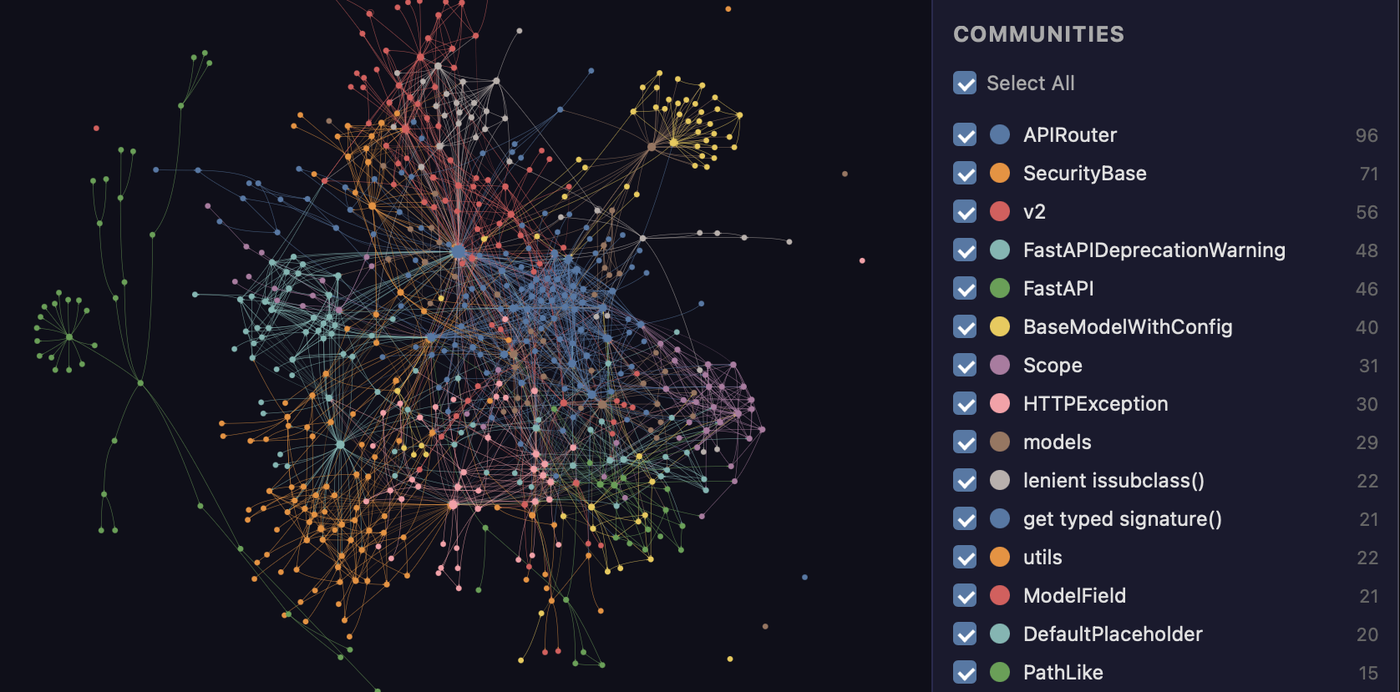
The FastAPI codebase mapped by graphify. Every node is a concept, colors are detected communities, and the whole thing is clickable in graph.html.
Get started (30 seconds). Needs Python 3.10+ and uv (or pipx):
uv tool install graphifyy      # install the CLI (or: pipx install graphifyy)
graphify install               # detects your assistant and registers the skill
Then, in your AI assistant:
/graphify .
That's it. You get three files:
graphify-out/
├── graph.html       open in any browser: click nodes, filter, search
├── GRAPH_REPORT.md  the highlights: key concepts, surprising connections, suggested questions
└── graph.json       the full graph: query it anytime without re-reading your files
The persisted graph includes graph.schema_version so integrations can detect
incompatible format changes, plus graph.graphify_version identifying the
Graphify release that produced it.
One install, any assistant, any OS. Claude Code, Cursor, Codex, Gemini CLI, GitHub Copilot, and 20+ more, on macOS, Linux, and Windows: pick your platform.
See it in action
Once the graph is built you query it instead of reading files. Real output, graphify run on the FastAPI codebase shown above:
$ graphify explain "APIRouter"
Node: APIRouter
  Source:    routing.py L2210
  Community: 2
  Degree:    47

Connections (47):
  --> RequestValidationError [uses] [INFERRED]
  --> Dependant [uses] [INFERRED]
  --> .get() [method] [EXTRACTED]
  <-- __init__.py [imports] [EXTRACTED]
  ...

$ graphify path "FastAPI" "ModelField"
Shortest path (3 hops):
  FastAPI --uses--> DefaultPlaceholder <--references-- get_request_handler() --references--> ModelField
Every edge carries a confidence tag (EXTRACTED = explicit in the source, INFERRED = derived by resolution), so you can tell what was read directly from what was inferred. graphify query "<question>" returns a scoped subgraph for a plain-language question, and graphify path A B traces how any two things connect.
What it does
What you get out of the box:
| Capability | What you get |
|---|---|
| God nodes | The most-connected concepts, so you see what everything flows through |
| Communities | The graph split into subsystems (Leiden), with LLM-free labels |
| Cross-file links | calls / imports / inherits / mixes_in resolved across ~40 languages via tree-sitter AST |
| Query, path, explain | Ask a question, trace the path between two things, or explain one concept, all against graph.json |
| Rationale + doc refs | # NOTE: / # WHY: comments and ADR/RFC citations become first-class nodes linked to the code |
| Beyond code | Docs, PDFs, images, and video/audio all map into the same graph |
| Local-first | Code is parsed locally with tree-sitter (no LLM, nothing leaves your machine); only the semantic pass over docs/media calls a backend, and only if you configure one |
[!TIP] Running this across many repos or a monorepo? Graphify Cloud does it continuously and cuts agent token spend by 80%, with cross-repo links, SDLC-wide code review, formal verification, and Sentry/Jira connectors. Start a free 14-day trial →
Benchmarks: 0.497 recall@10, 0 LLM credits
| Benchmark | Metric | graphify | Field |
|---|---|---|---|
| LOCOMO (n=300) | recall@10 | 0.497 | mem0 0.048, supermemory 0.149 |
| LOCOMO (n=300) | QA accuracy | 45.3% | supermemory 49.7%, mem0 27.3% |
| LongMemEval-S (n=50) | QA accuracy | 76% | tied with dense RAG |
| ERPNext cross-tool (n=6) | key-fact coverage | 82.0% | grep/read baseline 70.8% |
| Graph build | LLM credits | 0 | per-token for most systems |
Every system ran on the same harness with the same model and budgets, scored by a judge blind-validated against a second judge (90.6% agreement, Cohen's kappa 0.81). Full per-system tables, the code-intelligence result, and reproduction commands: BENCHMARKS.md.
Documentation
Full guides and reference live at docs.graphify.com:
- Quickstart: build your first graph
- CLI reference: every command and flag
- Ask better graph questions: querying patterns
- Configuration: environment variables and tuning
- Supported inputs: languages and file types
- Team workflows and PR review
- Troubleshooting and How it works
Prerequisites
| Requirement | Minimum | Check | Install |
|---|---|---|---|
| Python | 3.10+ | python --version |
python.org |
| uv (recommended) | any | uv --version |
curl -LsSf https://astral.sh/uv/install.sh | sh |
| pipx (alternative) | any | pipx --version |
pip install pipx |
macOS quick install (Homebrew):
brew install python@3.12 uv
Windows quick install:
winget install astral-sh.uv
Ubuntu/Debian:
sudo apt install python3.12 python3-pip pipx
# or install uv:
curl -LsSf https://astral.sh/uv/install.sh | sh
Install
[!IMPORTANT] Official package: The PyPI package is
graphifyy(double-y). Othergraphify*packages on PyPI are not affiliated. The CLI command is stillgraphify.
The official source repository is Graphify-Labs/graphify.
The two-command quickstart is at the top of this README. This section covers the install methods, project-scoped installs, and every supported platform.
Install methods (pick one):
uv tool install graphifyy   # recommended, isolated env (if 'graphify' isn't found after, run: uv tool update-shell)
pipx install graphifyy      # alternative
pip install graphifyy       # may need PATH setup, see Troubleshooting below
Then run graphify install once. It detects which assistant you run and registers the skill, so there is no per-assistant setup. Open your AI assistant and type /graphify .
To install the assistant skill into the current repository instead of your user
profile, add --project:
graphify install --project
graphify install --project --platform codex
Project-scoped installs write under the current directory, for example
.claude/skills/graphify/SKILL.md or .agents/skills/graphify/SKILL.md (plus a
references/ sidecar the skill loads on demand), and
print a git add hint for files that can be committed.
Per-platform commands that support project-scoped installs accept the same flag,
for example graphify claude install --project or graphify codex install --project.
[!TIP] Hitting
command not found, apip-on-Mac/Windows issue, PowerShell quoting,uvxusage, git-hook PATH quirks, or strict mode? See Installation and Troubleshooting.
Pick your platform (20+ assistants, click to expand)
| Platform | Install command |
|---|---|
| Claude Code (Linux/Mac) | graphify install |
| Claude Code (Windows) | graphify install (auto-detected) or graphify install --platform windows |
| CodeBuddy | graphify install --platform codebuddy |
| Codex | graphify install --platform codex |
| OpenCode | graphify install --platform opencode |
| Kilo Code | graphify install --platform kilo |
| GitHub Copilot CLI | graphify install --platform copilot |
| VS Code Copilot Chat | graphify vscode install |
| Aider | graphify install --platform aider |
| OpenClaw | graphify install --platform claw |
| Factory Droid | graphify install --platform droid |
| Trae | graphify install --platform trae |
| Trae CN | graphify install --platform trae-cn |
| Gemini CLI | graphify install --platform gemini |
| Hermes | graphify install --platform hermes |
| Kimi Code | graphify install --platform kimi |
| Amp | graphify amp install |
| Agent Skills (cross-framework) | graphify install --platform agents (alias --platform skills) |
| Kiro IDE/CLI | graphify kiro install |
| Pi coding agent | graphify install --platform pi, plus graphify pi guard install for the native guard |
| Cursor | graphify cursor install |
| Devin CLI | graphify devin install |
| Google Antigravity | graphify antigravity install |
| Google Antigravity (Windows) | graphify antigravity install (auto-detected on Windows) |
Codex users also need multi_agent = true under [features] in ~/.codex/config.toml for parallel extraction. CodeBuddy uses the same Agent tool and PreToolUse hook mechanism as Claude Code. Factory Droid uses the Task tool for parallel subagent dispatch. OpenClaw and Aider use sequential extraction (parallel agent support is still early on those platforms). Trae uses the Agent tool for parallel subagent dispatch and does not support PreToolUse hooks, so AGENTS.md is the always-on mechanism.
--platform agents (alias --platform skills) targets the generic cross-framework Agent-Skills locations: the spec's user-global ~/.agents/skills/ (read by npx skills and spec-compliant frameworks) for a global install, and ./.agents/skills/ for a project (--project) install. The bare graphify install stays single-platform (Claude Code) by design: use the named agents platform when you want the skill discoverable by any framework that reads .agents/skills.
Pi has no PreToolUse hook, so graphify pi guard install registers a native Pi extension (via Pi's own pi install <package directory>) that runs the installed graphify hook-guard before Pi's read, grep, find and search-style bash calls. Fresh/stale graph decisions and the GRAPHIFY_HOOK_STRICT=1 once-per-session indexed-read denial come from that same policy, so Pi matches Claude Code's hook behavior; guidance arrives as a <system-reminder source="graphify"> steering message. It needs Pi 0.58.4 or newer: earlier versions let a steering message skip the rest of a parallel tool-call batch. The package ships inside the Graphify installation, so install Graphify persistently (uv tool install graphifyy or pipx install graphifyy, not uvx), restart Pi after installing or upgrading, and remove it with graphify pi guard uninstall. Only local file targets are inspected; the hook needs graphify on an absolute PATH entry outside the project, is bounded to a two-second, 256 KiB-in/64 KiB-out call, and fails open. The same package also loads in Oh My Pi: omp plugin install "$(graphify pi guard path)". The registered path contains the Python version and venv, so re-run graphify pi guard install after changing either, and remove the old entry with pi remove <old path>.
Codex uses
$graphifyinstead of/graphify.
Optional extras (install only what you need)
| Extra | What it adds | Install |
|---|---|---|
pdf |
PDF extraction | uv tool install "graphifyy[pdf]" |
office |
.docx and .xlsx support |
uv tool install "graphifyy[office]" |
google |
Google Sheets rendering | uv tool install "graphifyy[google]" |
video |
Video/audio transcription (faster-whisper + yt-dlp) | uv tool install "graphifyy[video]" |
mcp |
MCP stdio server | uv tool install "graphifyy[mcp]" |
watch |
Auto-rebuild on file changes (graphify watch) |
uv tool install "graphifyy[watch]" |
neo4j |
Neo4j push support | uv tool install "graphifyy[neo4j]" |
falkordb |
FalkorDB push support | uv tool install "graphifyy[falkordb]" |
svg |
SVG graph export | uv tool install "graphifyy[svg]" |
leiden |
Leiden community detection (graspologic on Python < 3.13; native backend on 3.13+) | uv tool install "graphifyy[leiden]" |
ollama |
Ollama local inference | uv tool install "graphifyy[ollama]" |
openai |
OpenAI / OpenAI-compatible APIs | uv tool install "graphifyy[openai]" |
gemini |
Google Gemini API | uv tool install "graphifyy[gemini]" |
anthropic |
Anthropic Claude API (--backend claude, uses ANTHROPIC_API_KEY) |
uv tool install "graphifyy[anthropic]" |
bedrock |
AWS Bedrock (uses IAM, no API key) | uv tool install "graphifyy[bedrock]" |
azure |
Azure OpenAI Service (--backend azure, uses AZURE_OPENAI_API_KEY + AZURE_OPENAI_ENDPOINT) |
uv tool install "graphifyy[openai]" |
sql |
SQL schema extraction | uv tool install "graphifyy[sql]" |
postgres |
Live PostgreSQL introspection (--postgres DSN) |
uv tool install "graphifyy[postgres]" |
dm |
BYOND DreamMaker .dm/.dme AST extraction (may need a C compiler + python3-dev if no wheel matches your platform) |
uv tool install "graphifyy[dm]" |
terraform |
Terraform / HCL .tf/.tfvars/.hcl AST extraction |
uv tool install "graphifyy[terraform]" |
pascal |
Pascal / Delphi .pas/.dpr/.dpk/.inc AST extraction (more accurate calls/inherits edges; falls back to a regex extractor when absent) |
uv tool install "graphifyy[pascal]" |
ocaml |
OCaml .ml/.mli AST extraction |
uv tool install "graphifyy[ocaml]" |
commonlisp |
Common Lisp .lisp/.cl/.lsp/.asd AST extraction |
uv tool install "graphifyy[commonlisp]" |
robot |
Robot Framework .robot/.resource extraction (suites, test cases, keywords, keyword-call and resource/library import edges) |
uv tool install "graphifyy[robot]" |
chinese |
Chinese query segmentation (jieba) | uv tool install "graphifyy[chinese]" |
all |
Everything above | uv tool install "graphifyy[all]" |
Make your assistant always use the graph
Run this once in your project after building a graph:
Run graphify <platform> install once in your project, for example graphify claude install or graphify codex install (or graphify install --platform <name>).
This writes a small config file that tells your assistant to consult the knowledge graph for codebase questions, preferring scoped queries like graphify query "<question>" over reading the full report or grepping raw files.
- Hook platforms (Claude Code, Gemini CLI): a hook fires automatically before search-style tool calls (and, on Claude Code, before reading source files one by one via the Read/Glob tools) and nudges your assistant toward the graph path.
- Instruction-file platforms (Codex, OpenCode, Cursor, etc.): persistent instruction files (
AGENTS.md,.cursor/rules/, etc.) provide the same query-first guidance.
GRAPH_REPORT.md is still available for broad architecture review.
Exactly which files each platform writes (CodeBuddy's CODEBUDDY.md + PreToolUse hooks, Codex's AGENTS.md, Kilo's native .kilo plugin, Cursor's alwaysApply rule, and so on) is covered in Always-on setup.
To remove graphify from all platforms at once: graphify uninstall (add --purge to also delete graphify-out/). Or use the per-platform command (e.g. graphify claude uninstall).
CLI skills or MCP instructions?
The instructions installed by graphify install and those supplied with a Graphify MCP connection describe different ways to query a graph:
| Setup | Guidance to use | Query access |
|---|---|---|
| Local CLI and installed assistant skill | The platform instructions written by graphify install |
Run graphify query, graphify path, and graphify explain against the local graph (graphify-out/ by default). |
| Connected Graphify MCP server | The connection's instructions and the tools listed by that server | Call the listed MCP tools against the graph served by that connection. Tool names and descriptions come from the server. |
Both encourage scoped graph queries before broad source searches. Choose the instructions that match the tools your assistant can actually access; neither block establishes a universal precedence rule for your assistant's instruction files. If you use both integrations, identify which graph each queries and choose a primary query path instead of copying two unconditional instruction blocks into AGENTS.md.
graphify install installs the local assistant integration; it does not establish an MCP connection. An MCP client does not need to run local CLI queries to use its connected server. A locally hosted server still needs its own Graphify installation and graph, while a hosted connection may serve a graph that is not present in the client's working directory. If the expected tools are missing, check the relevant CLI installation or MCP connection rather than treating the other setup's instructions as interchangeable.
What's in the report
GRAPH_REPORT.md summarizes the god nodes, communities, and key paths for broad architecture review. How the graph is built and what it contains: How graphify works.
What files it handles: ~40 languages
graphify parses ~40 programming languages locally with tree-sitter AST, and maps docs, PDFs, images, and audio/video through an optional semantic pass. Full list: Supported inputs.
Common commands
/graphify .                        # build graph for current folder
/graphify ./docs --update          # re-extract only changed files
/graphify . --cluster-only         # rerun clustering without re-extracting
/graphify . --cluster-only --resolution 1.5      # more granular communities
/graphify . --cluster-only --exclude-hubs 99     # suppress utility super-hubs from god-node rankings
/graphify . --no-viz               # skip the HTML, just the report + JSON
/graphify . --wiki                 # build a markdown wiki from the graph
graphify export callflow-html      # Mermaid architecture/call-flow HTML (auto-regenerates on every git commit if hook is installed)

/graphify query "what connects auth to the database?"
/graphify path "UserService" "DatabasePool"
/graphify explain "RateLimiter"

/graphify add https://arxiv.org/abs/1706.03762   # fetch a paper and add it
/graphify add <youtube-url>                       # transcribe and add a video

graphify hook install              # auto-rebuild on commit + branch checkout (run `graphify update .` after `git pull`: see "Recommended workflow" below)
graphify merge-graphs a.json b.json              # combine two graphs

graphify prs                       # PR dashboard: CI state, review status, worktree mapping
graphify prs 42                    # deep dive on PR #42 with graph impact
graphify prs --triage              # AI ranks your review queue (uses whatever backend is configured)
graphify prs --conflicts           # PRs sharing graph communities: merge-order risk
See the full command reference below.
Labeling and rendering limits
--batch-size: 100 communities per labeling call by default, sized for a ~16k-token context (~150 tokens/community). Use--batch-size 40for an 8k window. Context overflow is not split-retried; failed batches keep hub-derived names.--missing-only:label --missing-onlykeeps existing labels and names only unnamed /Community Nentries. Uselabel(full relabel) to refresh names after the community set changes..graphify_labels.json.sig: records the community membership signature; labels survive a re-cluster only while it matches.export html: 5,000-node default; above it graphify renders an aggregated community view. Use--node-limit N.GRAPHIFY_VIZ_NODE_LIMIT/.graphifyrcviz_node_limit=Napply tocluster-only,update,watch, and hooks, notexport html.- Leiden fallback: without the
leidenextra, clustering silently uses networkx Louvain. Switching later reshuffles every community, so plan a full relabel.
Ignoring files
graphify honors .gitignore and supports --exclude patterns and a project .graphifyignore. Details: Configuration.
Project configuration
Create a .graphifyrc in the scan root for settings that belong to the project rather than to one run. One key=value per line; lines beginning with # are comments.
Ambiguous extensions. Some extensions mean different languages in different projects: .inc is PHP on pfSense, Pascal in a Delphi tree, SQL or assembly elsewhere; .h is C or C++; .m is Objective-C or MATLAB. graphify has to pick one global default, and when it picks wrong the file does not fail: it parses as the wrong language and yields a handful of incidental nodes, so the graph looks populated while the real symbols are missing. Declare what the extension means in your repo:
# .graphifyrc
# A language name:
language.inc=php
# Or an extension graphify already knows:
language.tpl=.ts
# Baked into the git hooks (see Team setup):
viz_node_limit=0
The declaration flows through classification, extractor selection, grammar and resolution, imports, graphify watch, and the AST cache (a file re-parsed under a different language never reuses the old entry), and the same .graphifyrc is read by extract, update, the hooks, the MCP server, and the /graphify skill. A typo is reported once on stderr and the scan continues with the defaults. How declarations interact with caching, incremental rebuilds, and import resolution: Configuration.
Team setup
Commit or share the graph so your whole team queries the same context, and review pull requests with graph context. See Share context with your team and Review pull requests.
Using the graph directly
Beyond your AI assistant, query graph.json straight from the CLI with graphify query, graphify path, and graphify explain. A name that matches several nodes is refused with the candidates listed rather than guessed. Scripts can read the outcome from the exit code: 0 an answer, 3 an ambiguous name, 4 no matching node. See Ask better graph questions and the query reference.
Environment variables
Backends, API keys, hook behavior, and tuning are controlled by environment variables. Full table: Configuration.
- Claude CLI model:
GRAPHIFY_CLAUDE_CLI_MODELoverrides the model for theclaude-clibackend (default: Opus).haikuorsonnetare usually enough for community naming; the semantic extraction pass benefits from a larger model.
Privacy
- Code files: processed locally via tree-sitter. Nothing leaves your machine. A code-only corpus requires no API key:
graphify extractruns fully offline. On a mixed repo, add--code-onlyto index just the code and skip the docs/PDFs/images that would otherwise need an LLM. - Video / audio: transcribed locally with faster-whisper. Nothing leaves your machine.
- Docs, PDFs, images: sent to your AI assistant for semantic extraction (via the
/graphifyskill, using whatever model your IDE session runs). Headlessgraphify extractrequiresGEMINI_API_KEY/GOOGLE_API_KEY(Gemini),MOONSHOT_API_KEY(Kimi),ANTHROPIC_API_KEY(Claude),OPENAI_API_KEY(OpenAI),DEEPSEEK_API_KEY(DeepSeek), a running Ollama instance (OLLAMA_BASE_URL), AWS credentials via the standard provider chain (Bedrock - no API key needed, uses IAM), or theclaudeCLI binary (Claude Code - no API key needed, uses your Claude subscription). The--dedup-llmflag uses the same key. - Data residency:
graphify extractauto-detects which provider to use based on which API key is set (priority: Gemini → Kimi → Claude → OpenAI → DeepSeek → Azure → Bedrock → Ollama). When it auto-detects, it prints the exact environment variable that chose the provider, so a run is never a surprise. To choose explicitly, pass--backend, or setGRAPHIFY_BACKEND=<name>; setGRAPHIFY_BACKEND=noneto disable all LLM backends (semantic extraction and theclaude -plabeling fallback) and keep a code-only graph. For code with data-residency requirements, useGRAPHIFY_BACKEND=ollama/--backend ollama(fully local). Kimi (MOONSHOT_API_KEY) routes to Moonshot AI servers in China. - No telemetry, no usage tracking, no analytics.
- Query logging: every
graphify query,graphify path,graphify explain, and MCPquery_graphcall is logged to~/.cache/graphify-queries.login JSON Lines format (timestamp, question, corpus, nodes returned, duration). Full subgraph responses are not stored by default. SetGRAPHIFY_QUERY_LOG_DISABLE=1to opt out, orGRAPHIFY_QUERY_LOG=/dev/nullto silence without disabling the code path.
Troubleshooting
Common install and extraction issues and their fixes: Troubleshooting.
Full command reference
Every command and flag, with examples: CLI reference.
Learn more
- docs.graphify.com: full documentation: guides, command reference, and integrations
- How it works: the extraction pipeline, community detection, confidence scoring, benchmarks
- ARCHITECTURE.md: module breakdown, how to add a language
- Optional integrations: Docker MCP Toolkit + SQLite
- The Memory Layer: the book on the ideas behind graphify, the architecture end to end
Graphify Cloud
Graphify Cloud is the always-on layer built on top of graphify. Instead of a graph you rebuild on demand per folder, it keeps one live graph across your entire software development lifecycle:
- 80% fewer tokens: always-on memory means your agents stop re-reading and re-explaining the codebase every session.
- Monorepo and cross-repo: one connected graph across every service and repository, not a graph per folder.
- Formal verification: check architectural and dependency invariants against the live graph.
- Code review with a bird's-eye view of your SDLC: see how a change ripples across the whole system before you merge.
- SDLC connectors: pull in Sentry, Jira, and more, so incidents, tickets, and code live in one graph.
- Always-on: updates continuously in the background across code, docs, and meetings.
Start a free 14-day trial at app.graphify.com →
Contributing
Contributions are welcome. See CONTRIBUTING.md for the development setup, the test and CI-parity commands, the git workflow, and what makes a strong contribution (worked examples and extraction bug reports are the most useful). Architecture and how to add a language: ARCHITECTURE.md.
New here? Say hi on Discord or in GitHub Discussions.
Contributors
Made with contrib.rocks.
Translations
The README is available in 32 languages. Use the language switcher at the top of this file to read it in yours, or browse docs/translations/. To improve a translation or add a new one, open a pull request against the matching file there.
Building on graphify
Building something in the graphify ecosystem? That is encouraged. If your project uses "graphify" in its name (for example graphify-dashboard or graphify-action), please add a short note to your README clarifying that it is community-built and not affiliated with or endorsed by Graphify Labs. "graphify" and the graphify logo are marks of Graphify Labs; please do not use them in a way that implies official status.
Community and links




Read this in other languages
English | 简体中文 | 日本語 | 한국어 | Deutsch | Français | Español | हिन्दी | Português | Русский | العربية | فارسی | Italiano | Polski | Nederlands | Türkçe | Українська | Tiếng Việt | Bahasa Indonesia | Svenska | Ελληνικά | Română | Čeština | Suomi | Dansk | Norsk | Magyar | ภาษาไทย | Oʻzbekcha | 繁體中文 | Filipino | עברית
将代理的 token 花费削减 80%。 Graphify Cloud 是常驻在线的记忆层,为你的代理提供治理、保持高代码质量,并以形式化验证证明正确性。开始 14 天免费试用 →
在你的 AI 编码助手中输入 /graphify,它就会把你的整个项目(代码、文档、PDF、图片、视频)映射成一张知识图谱,让你可以用查询取代逐文件 grep。
- 代码映射免费,完全在本地进行。 代码以 tree-sitter AST 解析:具确定性、不使用 LLM、没有任何东西离开你的机器。(文档、PDF、图片与视频会使用你助手的模型,或你所配置的 API key,进行一次语义处理。)
- 每条边都有解释。 每个连接都会被标记为
EXTRACTED(源代码中明确存在)或INFERRED(由 graphify 推断得出),所以你能分辨哪些是直接读到的、哪些是推断出来的。 - 不是向量索引。 没有嵌入、没有向量存储:这是一张你可以真正遍历的图。问一个问题、追踪两个事物之间的路径,或解释某一个概念。
[!NOTE] 想让它常驻在线吗? Graphify Cloud 会在你整个 SDLC 中保持图谱实时更新:支持 monorepo 与跨 repo、形式化验证,以及以鸟瞰视角审视 SDLC 的代码审查,还有 Sentry、Jira 等连接器,让事故与工单和你的代码落在同一张图谱中。在 app.graphify.com 开始 14 天免费试用。
由 graphify 映射出的 FastAPI 代码库。每个节点都是一个概念,颜色代表检测到的社区,而整张图在 graph.html 中都可点击。
开始使用(30 seconds)。需要 Python 3.10+ 与 uv(或 pipx):
uv tool install graphifyy      # install the CLI (or: pipx install graphifyy)
graphify install               # detects your assistant and registers the skill
然后,在你的 AI 助手中:
/graphify .
就这样。你会得到三个文件:
graphify-out/
├── graph.html       open in any browser: click nodes, filter, search
├── GRAPH_REPORT.md  the highlights: key concepts, surprising connections, suggested questions
└── graph.json       the full graph: query it anytime without re-reading your files
持久化的图谱包含 graph.schema_version,让集成方可以检测不兼容的格式变更,另外还有 graph.graphify_version,用来标识生成它的 Graphify 版本。
一次安装,适用任何助手、任何操作系统。 Claude Code、Cursor、Codex、Gemini CLI、GitHub Copilot,以及 20+ 更多,涵盖 macOS、Linux 与 Windows:挑选你的平台。
实际演示
图谱建好后,你就用查询取代读文件。这是真实输出,graphify 在上面展示的 FastAPI 代码库上运行:
$ graphify explain "APIRouter"
Node: APIRouter
  Source:    routing.py L2210
  Community: 2
  Degree:    47

Connections (47):
  --> RequestValidationError [uses] [INFERRED]
  --> Dependant [uses] [INFERRED]
  --> .get() [method] [EXTRACTED]
  <-- __init__.py [imports] [EXTRACTED]
  ...

$ graphify path "FastAPI" "ModelField"
Shortest path (3 hops):
  FastAPI --uses--> DefaultPlaceholder <--references-- get_request_handler() --references--> ModelField
每条边都带有一个置信度标记(EXTRACTED = 源代码中明确存在,INFERRED = 由解析推导得出),所以你能分辨哪些是直接读到的、哪些是推断出来的。graphify query "<question>" 会针对一个以自然语言表达的问题返回一个限定范围的子图,而 graphify path A B 则会追踪任意两个事物如何相连。
它能做什么
你开箱即得的内容:
| 能力 | 你会得到什么 |
|---|---|
| God nodes | 连接数最多的概念,让你看出一切都流经哪里 |
| Communities | 将图谱拆分为子系统(Leiden),并附上不需 LLM 的标签 |
| Cross-file links | calls / imports / inherits / mixes_in 通过 tree-sitter AST 在 ~40 languages 间解析 |
| Query, path, explain | 问一个问题、追踪两个事物之间的路径,或解释某一个概念,全都针对 graph.json 进行 |
| Rationale + doc refs | # NOTE: / # WHY: 注释以及 ADR/RFC 引用会成为一等节点,并链接到代码 |
| Beyond code | 文档、PDF、图片以及视频/音频都会映射进同一张图谱 |
| Local-first | 代码在本地以 tree-sitter 解析(不使用 LLM,没有任何东西离开你的机器);只有针对文档/媒体的语义处理会调用后端,而且仅在你有配置时 |
[!TIP] 要在许多 repo 或 monorepo 上运行吗?Graphify Cloud 会持续不断地执行此事,并将代理的 token 花费削减 80%,提供跨 repo 链接、覆盖整个 SDLC 的代码审查、形式化验证,以及 Sentry/Jira 连接器。开始 14 天免费试用 →
基准测试:0.497 recall@10,0 LLM credits
| Benchmark | Metric | graphify | Field |
|---|---|---|---|
| LOCOMO (n=300) | recall@10 | 0.497 | mem0 0.048, supermemory 0.149 |
| LOCOMO (n=300) | QA accuracy | 45.3% | supermemory 49.7%, mem0 27.3% |
| LongMemEval-S (n=50) | QA accuracy | 76% | tied with dense RAG |
| ERPNext cross-tool (n=6) | key-fact coverage | 82.0% | grep/read baseline 70.8% |
| Graph build | LLM credits | 0 | per-token for most systems |
每个系统都在同一个测试框架上、使用相同的模型与预算运行,并由一位评审评分,该评审经过与第二位评审盲测验证(90.6% agreement,Cohen's kappa 0.81)。完整的逐系统表格、代码智能结果,以及复现命令:BENCHMARKS.md。
文档
完整的指南与参考文档位于 docs.graphify.com:
- Quickstart:构建你的第一张图谱
- CLI reference:每一个命令与标志
- Ask better graph questions:查询模式
- Configuration:环境变量与调优
- Supported inputs:语言与文件类型
- Team workflows 与 PR review
- Troubleshooting 与 How it works
前置条件
| 需求 | 最低版本 | 检查 | 安装 |
|---|---|---|---|
| Python | 3.10+ | python --version |
python.org |
| uv (recommended) | any | uv --version |
curl -LsSf https://astral.sh/uv/install.sh | sh |
| pipx (alternative) | any | pipx --version |
pip install pipx |
macOS 快速安装(Homebrew):
brew install python@3.12 uv
Windows 快速安装:
winget install astral-sh.uv
Ubuntu/Debian:
sudo apt install python3.12 python3-pip pipx
# or install uv:
curl -LsSf https://astral.sh/uv/install.sh | sh
Install
[!IMPORTANT] 官方包: PyPI 包是
graphifyy(双 y)。PyPI 上其他的graphify*包与本项目无关。CLI 命令仍然是graphify。
官方源代码仓库是 Graphify-Labs/graphify。
两个命令的快速上手位于本 README 的最上方。本节涵盖安装方式、以项目为范围的安装,以及每一个支持的平台。
安装方式(择一):
uv tool install graphifyy   # recommended, isolated env (if 'graphify' isn't found after, run: uv tool update-shell)
pipx install graphifyy      # alternative
pip install graphifyy       # may need PATH setup, see Troubleshooting below
然后运行一次 graphify install。它会检测你运行的是哪个助手并注册该技能,因此不需要针对每个助手单独配置。打开你的 AI 助手并输入 /graphify .
若要把助手技能安装到当前仓库,而不是你的用户配置文件,请加上 --project:
graphify install --project
graphify install --project --platform codex
以项目为范围的安装会写入当前目录之下,例如 .claude/skills/graphify/SKILL.md 或 .agents/skills/graphify/SKILL.md(外加一个技能会按需加载的 references/ 附属文件),并会针对可提交的文件打印一条 git add 提示。支持以项目为范围安装的各平台命令都接受同一个标志,例如 graphify claude install --project 或 graphify codex install --project。
[!TIP] 遇到
command not found、Mac/Windows 上的pip问题、PowerShell 引号问题、uvx用法、git-hook 的 PATH 怪象,或严格模式吗?请见 Installation 与 Troubleshooting。
Pick your platform (20+ assistants, click to expand)
| Platform | Install command |
|---|---|
| Claude Code (Linux/Mac) | graphify install |
| Claude Code (Windows) | graphify install (auto-detected) or graphify install --platform windows |
| CodeBuddy | graphify install --platform codebuddy |
| Codex | graphify install --platform codex |
| OpenCode | graphify install --platform opencode |
| Kilo Code | graphify install --platform kilo |
| GitHub Copilot CLI | graphify install --platform copilot |
| VS Code Copilot Chat | graphify vscode install |
| Aider | graphify install --platform aider |
| OpenClaw | graphify install --platform claw |
| Factory Droid | graphify install --platform droid |
| Trae | graphify install --platform trae |
| Trae CN | graphify install --platform trae-cn |
| Gemini CLI | graphify install --platform gemini |
| Hermes | graphify install --platform hermes |
| Kimi Code | graphify install --platform kimi |
| Amp | graphify amp install |
| Agent Skills (cross-framework) | graphify install --platform agents (alias --platform skills) |
| Kiro IDE/CLI | graphify kiro install |
| Pi coding agent | graphify install --platform pi, plus graphify pi guard install for the native guard |
| Cursor | graphify cursor install |
| Devin CLI | graphify devin install |
| Google Antigravity | graphify antigravity install |
Codex 用户还需要在 ~/.codex/config.toml 的 [features] 下设置 multi_agent = true 以进行并行提取。CodeBuddy 使用与 Claude Code 相同的 Agent tool 与 PreToolUse hook 机制。Factory Droid 使用 Task tool 进行并行子代理派发。OpenClaw 与 Aider 使用顺序提取(这些平台上的并行代理支持仍处于早期阶段)。Trae 使用 Agent tool 进行并行子代理派发,且不支持 PreToolUse hook,因此 AGENTS.md 是常驻在线的机制。
--platform agents(别名 --platform skills)会指向通用的跨框架 Agent-Skills 位置:规范中以用户为全局的 ~/.agents/skills/(由 npx skills 与符合规范的框架读取)用于全局安装,而 ./.agents/skills/ 用于项目(--project)安装。裸运行的 graphify install 按设计保持单一平台(Claude Code):当你希望该技能可被任何读取 .agents/skills 的框架发现时,请使用具名的 agents 平台。
Pi 没有 PreToolUse hook,因此 graphify pi guard install 会注册一个原生 Pi 扩展(通过 Pi 自己的 pi install <package directory>),它会在 Pi 的 read、grep、find 以及搜索式 bash 调用之前运行已安装的 graphify hook-guard。新鲜/陈旧图谱的判定,以及 GRAPHIFY_HOOK_STRICT=1 每会话一次的已索引读取拒绝,都来自同一套策略,因此 Pi 与 Claude Code 的 hook 行为一致;指引会以 <system-reminder source="graphify"> 引导消息送达。它需要 Pi 0.58.4 或更新版本:较早的版本会让一条引导消息跳过并行工具调用批次中其余的部分。该包随附在 Graphify 安装中,因此请持久安装 Graphify(uv tool install graphifyy 或 pipx install graphifyy,而非 uvx),在安装或升级后重启 Pi,并以 graphify pi guard uninstall 移除它。只有本地文件目标会被检查;该 hook 需要 graphify 位于项目外部的绝对 PATH 条目上,被限定在两秒、256 KiB 输入/64 KiB 输出的调用范围内,并会在失败时放行。同一个包也会加载到 Oh My Pi:omp plugin install "$(graphify pi guard path)"。所注册的路径包含 Python 版本与 venv,因此在变更任一者之后请重新运行 graphify pi guard install,并以 pi remove <old path> 移除旧条目。
Codex 使用
$graphify而非/graphify。
Optional extras (install only what you need)
| Extra | What it adds | Install |
|---|---|---|
pdf |
PDF extraction | uv tool install "graphifyy[pdf]" |
office |
.docx and .xlsx support |
uv tool install "graphifyy[office]" |
google |
Google Sheets rendering | uv tool install "graphifyy[google]" |
video |
Video/audio transcription (faster-whisper + yt-dlp) | uv tool install "graphifyy[video]" |
mcp |
MCP stdio server | uv tool install "graphifyy[mcp]" |
neo4j |
Neo4j push support | uv tool install "graphifyy[neo4j]" |
falkordb |
FalkorDB push support | uv tool install "graphifyy[falkordb]" |
svg |
SVG graph export | uv tool install "graphifyy[svg]" |
leiden |
Leiden community detection (graspologic on Python < 3.13; native backend on 3.13+) | uv tool install "graphifyy[leiden]" |
ollama |
Ollama local inference | uv tool install "graphifyy[ollama]" |
openai |
OpenAI / OpenAI-compatible APIs | uv tool install "graphifyy[openai]" |
gemini |
Google Gemini API | uv tool install "graphifyy[gemini]" |
anthropic |
Anthropic Claude API (--backend claude, uses ANTHROPIC_API_KEY) |
uv tool install "graphifyy[anthropic]" |
bedrock |
AWS Bedrock (uses IAM, no API key) | uv tool install "graphifyy[bedrock]" |
azure |
Azure OpenAI Service (--backend azure, uses AZURE_OPENAI_API_KEY + AZURE_OPENAI_ENDPOINT) |
uv tool install "graphifyy[openai]" |
sql |
SQL schema extraction | uv tool install "graphifyy[sql]" |
postgres |
Live PostgreSQL introspection (--postgres DSN) |
uv tool install "graphifyy[postgres]" |
dm |
BYOND DreamMaker .dm/.dme AST extraction (may need a C compiler + python3-dev if no wheel matches your platform) |
uv tool install "graphifyy[dm]" |
terraform |
Terraform / HCL .tf/.tfvars/.hcl AST extraction |
uv tool install "graphifyy[terraform]" |
pascal |
Pascal / Delphi .pas/.dpr/.dpk/.inc AST extraction (more accurate calls/inherits edges; falls back to a regex extractor when absent) |
uv tool install "graphifyy[pascal]" |
ocaml |
OCaml .ml/.mli AST extraction |
uv tool install "graphifyy[ocaml]" |
commonlisp |
Common Lisp .lisp/.cl/.lsp/.asd AST extraction |
uv tool install "graphifyy[commonlisp]" |
robot |
Robot Framework .robot/.resource extraction (suites, test cases, keywords, keyword-call and resource/library import edges) |
uv tool install "graphifyy[robot]" |
chinese |
Chinese query segmentation (jieba) | uv tool install "graphifyy[chinese]" |
all |
Everything above | uv tool install "graphifyy[all]" |
让你的助手始终使用图谱
在构建图谱之后,在你的项目中运行一次这个:
在你的项目中运行一次 graphify <platform> install,例如 graphify claude install 或 graphify codex install(或 graphify install --platform <name>)。
这会写入一个小型配置文件,告诉你的助手在回答代码库问题时去查询知识图谱,偏好像 graphify query "<question>" 这类限定范围的查询,而非读取整份报告或 grep 原始文件。
- Hook 平台(Claude Code、Gemini CLI):一个 hook 会在搜索式工具调用之前(在 Claude Code 上,还会在通过 Read/Glob 工具逐一读取源文件之前)自动触发,将你的助手推向图谱路径。
- 指令文件平台(Codex、OpenCode、Cursor 等):持久化的指令文件(
AGENTS.md、.cursor/rules/等)提供相同的「查询优先」指引。
GRAPH_REPORT.md 仍可用于广泛的架构审查。
各平台究竟会写入哪些文件(CodeBuddy 的 CODEBUDDY.md + PreToolUse hooks、Codex 的 AGENTS.md、Kilo 的原生 .kilo 插件、Cursor 的 alwaysApply 规则等),在 Always-on setup 中有说明。
若要一次从所有平台移除 graphify:graphify uninstall(加上 --purge 也会删除 graphify-out/)。或使用各平台的命令(例如 graphify claude uninstall)。
用 CLI 技能还是 MCP 说明?
由 graphify install 安装的指令,与随 Graphify MCP 连接所提供的指令,描述的是查询图谱的不同方式:
| Setup | Guidance to use | Query access |
|---|---|---|
| 本地 CLI 与已安装的助手技能 | 由 graphify install 写入的平台指令 |
对本地图谱(默认为 graphify-out/)运行 graphify query、graphify path 与 graphify explain。 |
| 已连接的 Graphify MCP 服务器 | 该连接的指令与该服务器所列出的工具 | 针对该连接所服务的图谱调用所列出的 MCP 工具。工具名称与说明来自该服务器。 |
两者都鼓励在广泛的源代码搜索之前先进行限定范围的图谱查询。请选择与你助手实际可访问之工具相符的指令;两个区块都没有为你助手的指令文件建立一条普适的优先级规则。如果你同时使用这两种集成,请辨明各自查询的是哪张图谱,并选定一条主要查询路径,而不是把两个无条件的指令区块都复制进 AGENTS.md。
graphify install 安装的是本地助手集成;它并不会建立 MCP 连接。一个 MCP 客户端不需要运行本地 CLI 查询即可使用其所连接的服务器。本地托管的服务器仍需要它自己的 Graphify 安装与图谱,而托管的连接所服务的图谱可能并不存在于客户端的工作目录中。如果预期的工具不见了,请检查相关的 CLI 安装或 MCP 连接,而不是把另一种设置的指令当成可互换的来用。
报告里有什么
GRAPH_REPORT.md 汇总了 god nodes、社区与关键路径,供广泛的架构审查之用。图谱如何构建以及它包含什么:How graphify works。
它能处理哪些文件:~40 languages
graphify 在本地以 tree-sitter AST 解析 ~40 programming languages,并通过一次可选的语义处理映射文档、PDF、图片与音频/视频。完整清单:Supported inputs。
常用命令
/graphify .                        # build graph for current folder
/graphify ./docs --update          # re-extract only changed files
/graphify . --cluster-only         # rerun clustering without re-extracting
/graphify . --cluster-only --resolution 1.5      # more granular communities
/graphify . --cluster-only --exclude-hubs 99     # suppress utility super-hubs from god-node rankings
/graphify . --no-viz               # skip the HTML, just the report + JSON
/graphify . --wiki                 # build a markdown wiki from the graph
graphify export callflow-html      # Mermaid architecture/call-flow HTML (auto-regenerates on every git commit if hook is installed)

/graphify query "what connects auth to the database?"
/graphify path "UserService" "DatabasePool"
/graphify explain "RateLimiter"

/graphify add https://arxiv.org/abs/1706.03762   # fetch a paper and add it
/graphify add <youtube-url>                       # transcribe and add a video

graphify hook install              # auto-rebuild on commit + branch checkout (run `graphify update .` after `git pull`: see "Recommended workflow" below)
graphify merge-graphs a.json b.json              # combine two graphs

graphify prs                       # PR dashboard: CI state, review status, worktree mapping
graphify prs 42                    # deep dive on PR #42 with graph impact
graphify prs --triage              # AI ranks your review queue (uses whatever backend is configured)
graphify prs --conflicts           # PRs sharing graph communities: merge-order risk
请见下方的完整命令参考。
忽略文件
graphify 会遵循 .gitignore,并支持 --exclude 模式以及项目级别的 .graphifyignore。细节:Configuration。
项目配置
在扫描根目录创建一个 .graphifyrc,用来存放属于项目而非单次运行的设置。每行一个 key=value;以 # 开头的行是注释。
有歧义的扩展名。 有些扩展名在不同项目中代表不同语言:.inc 在 pfSense 上是 PHP、在 Delphi 树中是 Pascal、在别处则是 SQL 或汇编;.h 是 C 或 C++;.m 是 Objective-C 或 MATLAB。graphify 必须选定一个全局默认值,而当它选错时,文件并不会失败:它会以错误的语言解析并产生少数附带的节点,因此图谱看起来像是有内容,但真正的符号却缺失了。请声明该扩展名在你 repo 中的含义:
# .graphifyrc
# A language name:
language.inc=php
# Or an extension graphify already knows:
language.tpl=.ts
# Baked into the git hooks (see Team setup):
viz_node_limit=0
这项声明会贯穿分类、提取器选择、文法与解析、导入、graphify watch 以及 AST 缓存(在不同语言下重新解析的文件绝不会重用旧条目),而 extract、update、hooks、MCP 服务器以及 /graphify 技能都会读取同一份 .graphifyrc。输入错误会在 stderr 上被报告一次,然后扫描会以默认值继续进行。声明如何与缓存、增量重建以及导入解析交互:Configuration。
团队设置
提交或分享图谱,让你的整个团队查询相同的上下文,并在有图谱上下文的情况下审查 pull request。请见 Share context with your team 与 Review pull requests。
直接使用图谱
除了你的 AI 助手之外,你也可以用 graphify query、graphify path 与 graphify explain 直接从 CLI 查询 graph.json。一个符合多个节点的名称会被拒绝,并列出候选项而非擅自猜测。脚本可以从退出码读取结果:0 代表有答案,3 代表名称有歧义,4 代表没有符合的节点。请见 Ask better graph questions 与 query reference。
环境变量
后端、API key、hook 行为与调优都由环境变量控制。完整表格:Configuration。
隐私
- 代码文件:通过 tree-sitter 在本地处理。没有任何东西离开你的机器。纯代码的语料不需要 API key:
graphify extract会完全离线运行。在混合的 repo 上,加上--code-only就能只索引代码,并跳过那些原本会需要 LLM 的文档/PDF/图片。 - 视频 / 音频:以 faster-whisper 在本地转录。没有任何东西离开你的机器。
- 文档、PDF、图片:会送往你的 AI 助手做语义提取(通过
/graphify技能,使用你 IDE 会话所运行的任何模型)。无头的graphify extract需要GEMINI_API_KEY/GOOGLE_API_KEY(Gemini)、MOONSHOT_API_KEY(Kimi)、ANTHROPIC_API_KEY(Claude)、OPENAI_API_KEY(OpenAI)、DEEPSEEK_API_KEY(DeepSeek)、一个运行中的 Ollama 实例(OLLAMA_BASE_URL)、通过标准提供者链获取的 AWS 凭证(Bedrock,不需 API key,使用 IAM),或是claudeCLI 二进制文件(Claude Code,不需 API key,使用你的 Claude 订阅)。--dedup-llm标志使用同一把 key。 - 数据驻留:
graphify extract会根据设置了哪一把 API key 自动检测要使用哪个提供者(优先级:Gemini → Kimi → Claude → OpenAI → DeepSeek → Azure → Bedrock → Ollama)。对于有数据驻留要求的代码,请使用--backend ollama(完全在本地)或传入一个明确的--backend标志。Kimi(MOONSHOT_API_KEY)会路由到位于中国的 Moonshot AI 服务器。 - 没有遥测,没有使用情况追踪,没有分析。
- 查询日志:每一次
graphify query、graphify path、graphify explain以及 MCPquery_graph调用都会以 JSON Lines 格式记录到~/.cache/graphify-queries.log(时间戳、问题、语料、返回的节点、耗时)。完整的子图响应默认不会被存储。设置GRAPHIFY_QUERY_LOG_DISABLE=1以退出,或设置GRAPHIFY_QUERY_LOG=/dev/null以在不停用代码路径的情况下静音。
疑难解答
常见的安装与提取问题及其修正:Troubleshooting。
完整命令参考
每一个命令与标志,附带示例:CLI reference。
了解更多
- docs.graphify.com:完整文档:指南、命令参考与集成
- How it works:提取流程、社区检测、置信度评分、基准测试
- ARCHITECTURE.md:模块拆解、如何新增一种语言
- Optional integrations:Docker MCP Toolkit + SQLite
- The Memory Layer:这本书讲述 graphify 背后的构想,以及端到端的架构
Graphify Cloud
Graphify Cloud 是构建在 graphify 之上、常驻在线的那一层。它不是一张你按文件夹、按需重建的图,而是在你整个软件开发生命周期中保持一张实时的图:
- 减少 80% 的 token:常驻在线的记忆层意味着你的代理不再在每个会话都重新读取与重新解释代码库。
- Monorepo 与跨 repo:一张横跨每一个服务与仓库的连通图,而不是每个文件夹一张图。
- 形式化验证:针对实时的图检查架构与依赖不变式。
- 以鸟瞰视角审视 SDLC 的代码审查:在你合并之前,就看出一项变更如何在整个系统中扩散。
- SDLC 连接器:拉入 Sentry、Jira 等,让事故、工单与代码存在于同一张图中。
- 常驻在线:在后台横跨代码、文档与会议持续更新。
在 app.graphify.com 开始 14 天免费试用 →
贡献
欢迎贡献。请见 CONTRIBUTING.md 以了解开发环境设置、测试与 CI-parity 命令、git 工作流,以及什么构成一次出色的贡献(可运行的示例与提取错误报告是最有用的)。架构与如何新增一种语言:ARCHITECTURE.md。
刚来吗?在 Discord 或 GitHub Discussions 打声招呼。
贡献者
Made with contrib.rocks.
翻译
本 README 提供 32 种语言版本。请使用本文件最上方的语言切换器以你的语言阅读,或浏览 docs/translations/。若要改善某个翻译或新增一个翻译,请针对那里对应的文件开启一个 pull request。
基于 graphify 构建
在 graphify 生态系中打造某些东西吗?这是受到鼓励的。如果你的项目在名称中使用「graphify」(例如 graphify-dashboard 或 graphify-action),请在你的 README 中加上一条简短说明,阐明它是社区打造、与 Graphify Labs 并无关联也未获其背书。「graphify」与 graphify 标志是 Graphify Labs 的标记;请勿以暗示官方身份的方式使用它们。
社区与链接