MoneyPrinterTurbo
利用 AI 大模型和自动化工作流,根据主题或关键词一键生成高清短视频。Generate HD short videos from a topic or keyword with an automated AI workflow.
中文简介经编辑校订 · ai-video-generator / content-creation / ffmpeg / instagram-reels / llm / python
README / 项目原文
MoneyPrinterTurbo 💸
一站式 AI 短视频生成工具
只需提供视频主题或关键词,即可自动生成视频脚本、匹配素材、生成字幕和背景音乐,并合成高清短视频。




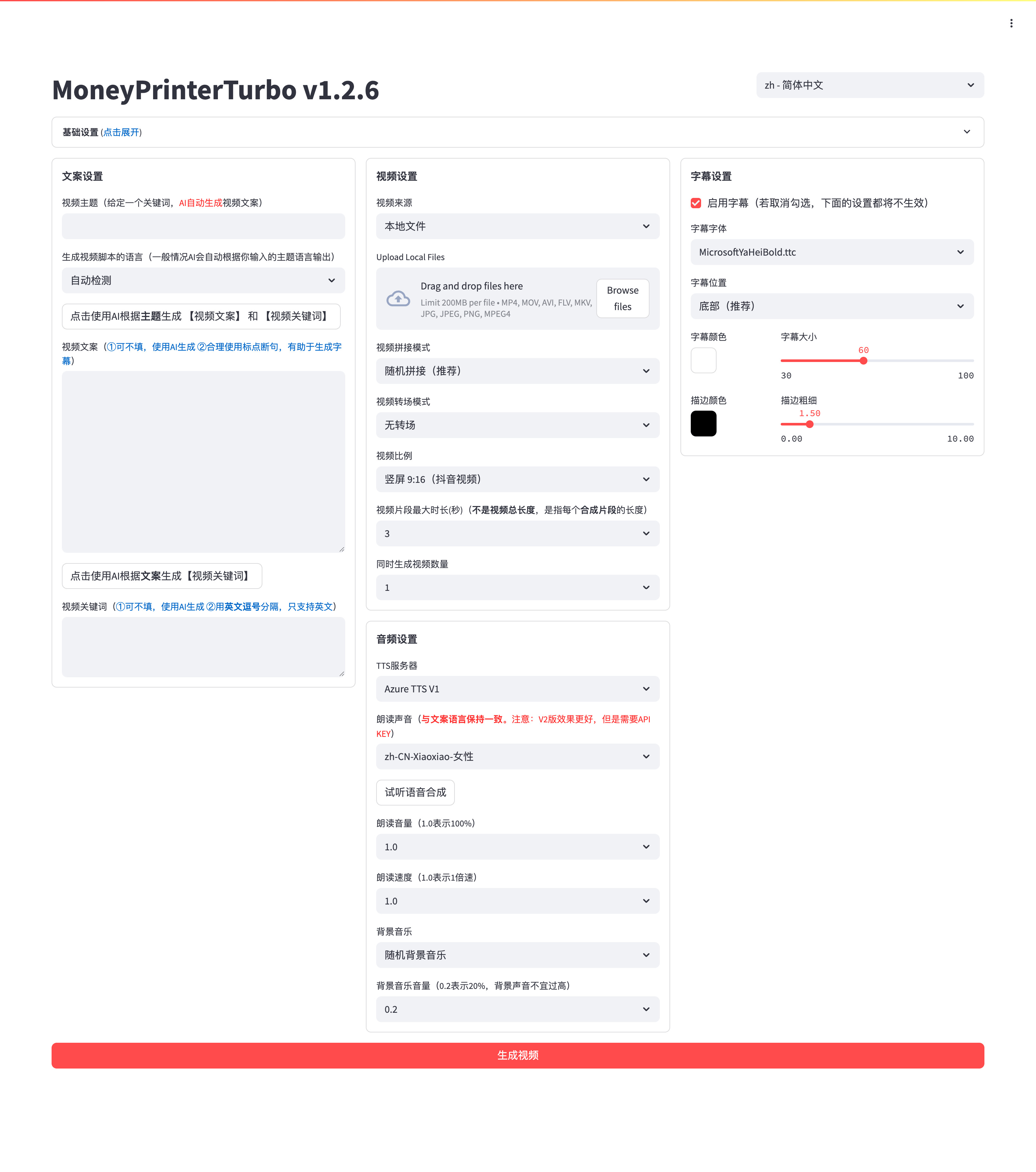
界面预览 🖥️
WebUI
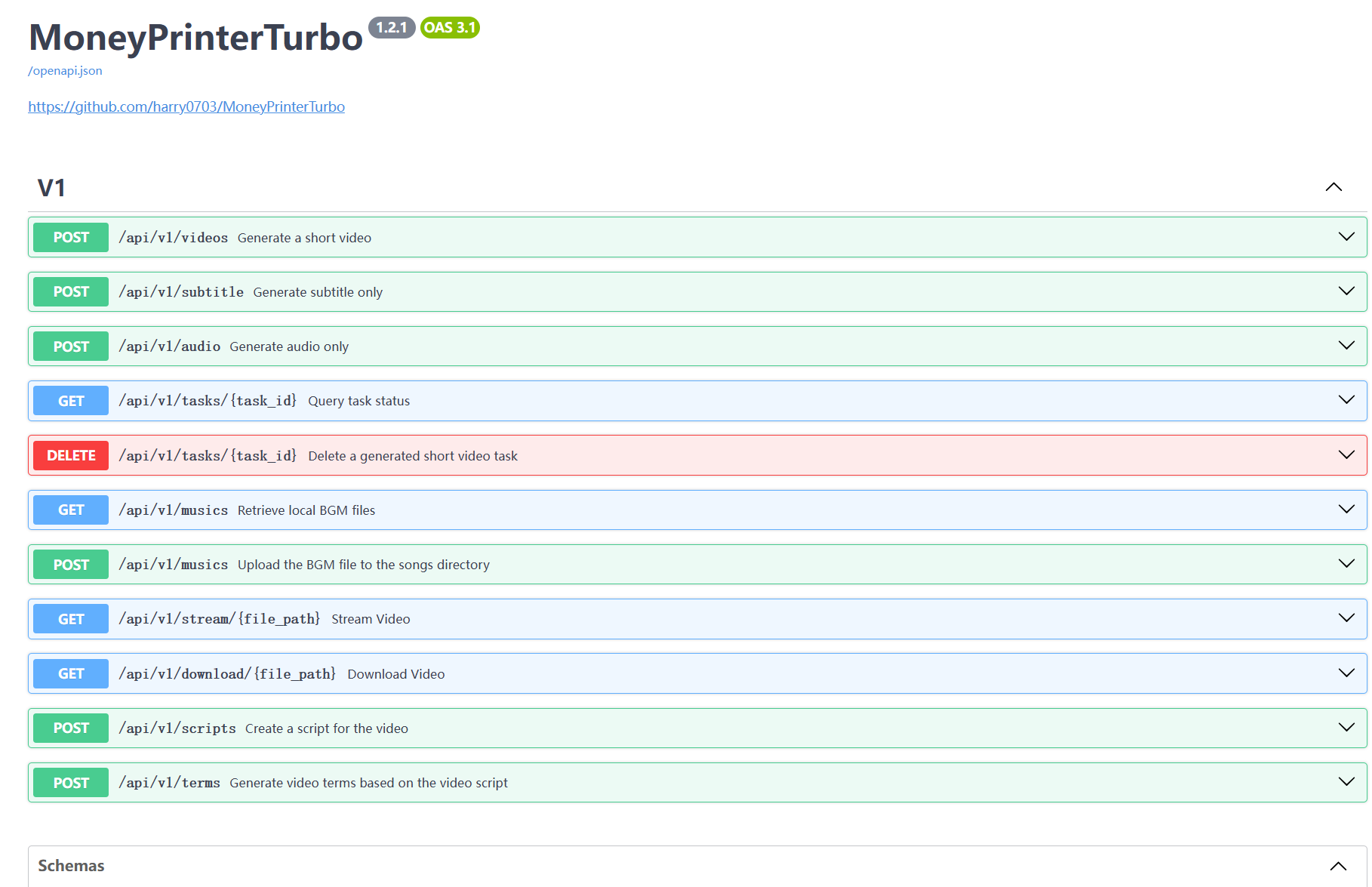
API
特别感谢 ❤️
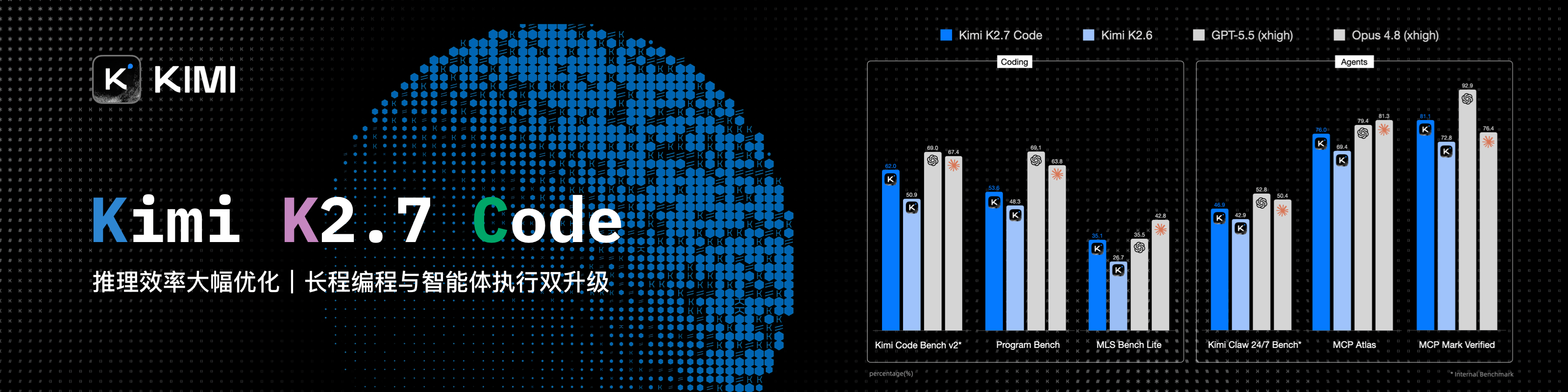
感谢 Kimi 赞助本项目!Kimi K3 是 Moonshot AI 迄今能力最强的模型,也是全球首个开源 3T 级模型,拥有原生视觉能力与 100 万 Token 上下文,在知识工作、推理和长周期任务中展现前沿性能。在 MoneyPrinterTurbo 中,K3 能直接驱动视频创作,不仅撰写视频文案,还会提炼素材搜索关键词、决定成片画面;对内容理解越准确,匹配到的素材就越贴题。
MoneyPrinterTurbo 用户专属优惠:新用户通过专属链接注册,首次成功充值可获充值金额 10% 的 API 额度,最高赠送 ¥1000。活动截至 2026 年 12 月 31 日。前往 Kimi 开放平台(中文站|Global)体验 API。
 火山引擎 |
感谢字节火山引擎赞助本项目!火山方舟 Agent/Coding Plan 国模套餐首购 9.9,支持 GLM-5.3、Kimi-K3、DeepSeek、MiniMax、Doubao 等,注册免费领 2500w Token,统一 API,适配编码与智能体开发。立即前往 |
|
感谢 APIMart 赞助了本项目!APIMart 是专注 AI 图片/视频生成的低价 API 平台,GPT-Image-2 低至 $0.006/张,1 美元可出图 160+ 张。图片、视频一套异步 API 通吃,换模型不改代码;提交任务拿 ID,通过轮询或回调获取结果,支持万张级批量生成。按量付费、无月费,通过此注册链接注册即可开用。 |
 秘塔科技 |
MiniMax H3 视频生成 API|秘塔科技 秘塔科技提供高性价比的 MiniMax H3 视频生成服务:768P 仅 0.09 元/秒,2K 仅 0.15 元/秒。支持原生 2K、音画同步,API 兼容 OpenAI 协议,同时支持 ComfyUI,无需自行部署 GPU。 🎁 通过 MoneyPrinterTurbo专属链接注册,即可领取赠送额度及专属优惠。 |
 Infistar.cc 无限星河 |
感谢 Infistar.cc 无限星河 赞助本项目!Infistar.cc 提供高性价比的大模型 API 服务:大模型低至官方 0.1 折,AI 生图低至 ¥0.06/张。 一个 API Key,覆盖文案、图片与视频创作,支持 GPT、Claude、Gemini、DeepSeek、通义千问、可灵等主流模型,无需分组。 全模型支持验真,价格透明,正规备案,人民币实时计费,支持对公发票。 🎁 MPT 专属福利:通过专属链接注册即送 $5 体验额度,并享首充特惠。 |
|
感谢 OfoxAI 赞助本项目!MoneyPrinterTurbo 已集成 Ofox 多模型文生视频,配置 API Key 即可使用。Seedance、MiniMax H3、Wan 生成视频素材,GPT Image 2.5、Seedream 制作封面配图,GPT、Claude、Gemini、DeepSeek 打磨脚本、辅助开发。一个 Key,文本、图像、视频共用余额;提供 OpenAI 兼容接口及 Anthropic、Gemini 原生接口。按量付费、价格公开、官方渠道接入,稳定高速不限量,前往 OfoxAI 查看模型与价格。 |
 胜算云 |
感谢胜算云对本项目的赞助!胜算云是面向 AI 原生团队的模型 API 聚合平台,汇集 Claude、ChatGPT、Gemini 等海内外大语言模型及多媒体模型,支持统一接入与按量调用。 平台坚持合规 API 服务,杜绝逆向工程和资源稀释。此外平台提供企业级定制网关,包括团队成本与权限管理、智能路由、安全防护及 BYOK 密钥托管,并提供发票服务。 🎁新用户通过此链接注册,即可领取 10 元 Token 体验额度。 |
 星图 AstraFlow |
感谢 星图 AstraFlow 赞助本项目!点击领取 50 元算力金 🎬 视频模型一站式调用:聚合 MiniMax-H3,Seedance-2.5 等主流视频生成模型,文案生成 + 视频生成一个平台全搞定,无需多端注册、多处对接 🚀 200+ 大模型一键调用,新模型当日上架:聚合 DeepSeek V4.1、Kimi K3、Qwen 3.8 Max、GLM 5.3 等 200+ 主流大模型,新模型上线当天即可接入 💰 UCloud 上市公司出品,调用计费透明可控:按 Key 级别计费,调用明细全程可查 🎁 MoneyPrinterTurbo 用户专属福利:通过专属推广链接注册,即享新用户赠送额度,开箱即用! |
 RunningHub API |
感谢 RunningHub API 赞助本项目! • Seedance 满血版 API 接入全网骨折价,在线工具低至 0.21元/秒,节省 60%-80%成本! • 超稳定高并发高折扣,随用随充按需弹性付费,不捆绑不排队不抽卡 • 无限画布、ComfyUI、Agent 等在线工具从剧本到成片全链路制作 • 一站式接入LLM API、多模态API、工作流API、Al应用 • 400+ 主流模型(支持国际版权限)8000+版本任选 • 数千家企业信赖,500万C端月活验证 折扣与免费测试可联系 zhenyuedong@haima.me,或查看模型与接口。 |
 录咖 AI |
感谢 录咖(AI 智能多媒体服务平台) 基于本项目提供免费的 AI 视频生成器,无需部署,在线即可使用,对新手更加友好。 |
 佐糖 |
感谢 佐糖 对本项目的支持与赞助!佐糖提供丰富的在线图像处理工具,操作简单,帮助用户轻松完成各类图片处理。 |
作者的另一个开源项目:MangoDisk ⭐
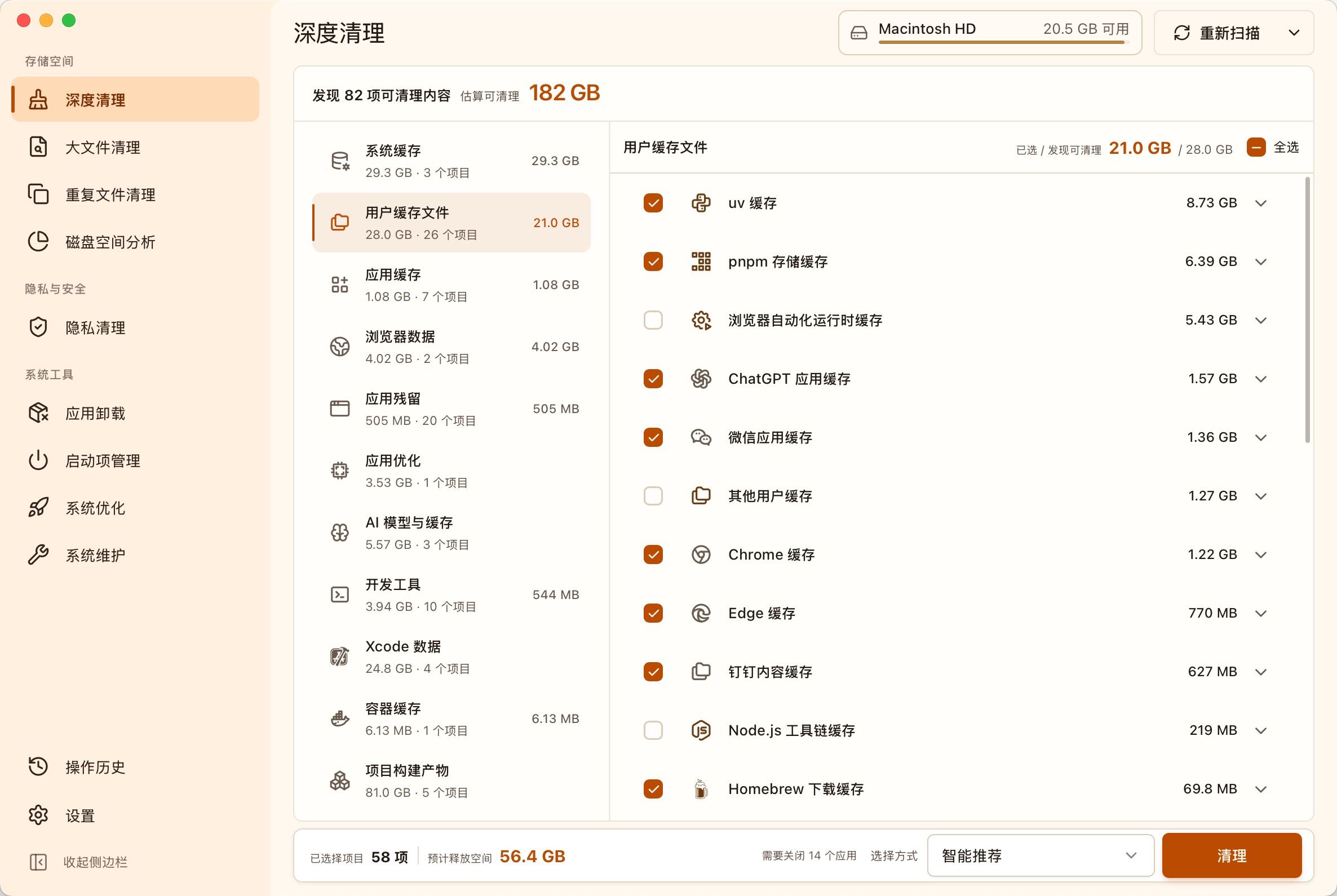
面向 macOS 和 Windows 的开源磁盘清理、空间分析与系统优化工具
一站式清理缓存、大文件、重复文件和应用残留,并提供磁盘空间分析、应用卸载、启动项管理、系统优化与维护
访问 MangoDisk 官网 · 查看 GitHub 开源项目
功能特性 🎯
创作入口与工作流
- 提供 AI Agent、WebUI、API 和 CLI 四种使用方式,既能快速上手,也能接入自动化流程
- 从主题自动完成脚本、配音、素材、字幕、配乐和剪辑,也支持在每个环节使用自定义内容
- 支持 批量生成多条成片、任务历史记录,以及生成设置与 API Key 的导入、导出和恢复
脚本与模型服务
- 支持 AI 自动生成或改写 多语言视频脚本,也可以直接使用自定义脚本
- 支持 Kimi / Moonshot AI、OpenAI、Anthropic Claude、Google Gemini、DeepSeek、阿里云通义千问、Microsoft Azure OpenAI、火山引擎方舟、xAI Grok、MiniMax 和 小米 MiMo 等主流模型服务
- 兼容 胜算云、APIMart、Cloudflare AI Gateway、魔搭 ModelScope、AIHubMix、AIML API、EvoLink、OpenRouter、API Route、Ollama、Claude Code 订阅、OneAPI、LiteLLM、Groq 和 Pollinations AI 等统一网关、聚合平台和本地运行环境
视频与图片素材
- 支持上传自己的 本地图片和视频,也可从 Pexels(免费)、Pixabay(免费) 和 Coverr 获取高清库存素材
- 支持 秘塔 MiniMax H3 文生视频,可生成
768P/2K、4~15 秒的原始素材,并适配9:16、16:9和1:1三种画幅 - 支持 胜算云 AI 视频,可生成多段 AI 视频素材,并沿用项目的配音、字幕和剪辑流程合成成片
- 原生接入 火山引擎方舟 Seedance,可根据脚本片段生成连贯的视频画面
- 支持 WaveSpeed AI 文生视频,可根据脚本关键词快速生成原创素材
- 支持 OFox 多模型文生视频,一个 API Key 即可调用 Seedance、Wan 等模型
- 通过异步 MuAPI 文生视频接口生成 3~12 秒 AI 视频素材,并支持配置 Endpoint、画幅、分辨率和轮询参数
- 支持 OpenAI 兼容文生图,可连接云端服务或自定义图片网关,并将生成图片转换为动态视频片段
- 支持调整片段时长、画面适配方式和素材匹配顺序,以适配不同画幅和叙事节奏
配音、字幕与配乐
- 支持自动配音、上传配音和无配音三种方式,并提供音色试听与完整配音预览
- 集成 Edge TTS(免费、无需 API Key)、Azure Speech、SiliconFlow、Google Gemini、小米 MiMo、MiniMax、ElevenLabs、Chatterbox、Kokoro、Fish Audio 和 ModelBest VoxCPM 等配音服务
- 支持自动生成字幕,可调整字体、位置、颜色、大小、描边和背景样式
- 支持随机、本地及 AI 生成背景音乐,并可独立控制音量
成片与发布
- 支持竖屏
9:16(1080×1920)、横屏16:9(1920×1080)和方形1:1(1080×1080) - 支持一键 跨平台发布,生成完成后可自动上传至 TikTok、Instagram 和 YouTube Shorts
作品展示 🎬
以下示例均由 MoneyPrinterTurbo 实际生成。
竖屏 9:16
 城市醒来的时刻 中文 · 14 秒 |
 清洁能源的未来 中文 · 24 秒 |
 为什么我们仍要探索太空 中文 · 27 秒 |
 一粒种子的旅程 中文 · 44 秒 |
 The Future of Everyday Robotics English · 21 sec |
 Small Habits, Lasting Change English · 19 sec |
 Making Space for Creative Work English · 20 sec |
 The Science Inside Coffee English · 23 sec |
横屏 16:9
 深海里的微光 中文 · 23 秒 |
 阅读如何塑造我们 中文 · 23 秒 |
 一杯手冲咖啡的细节 中文 · 23 秒 |
 春天适合出发 中文 · 14 秒 |
 Why Ocean Conservation Matters English · 25 sec |
 Designing More Sustainable Cities English · 27 sec |
 What Mountains Teach Us English · 18 sec |
 A Brief History of Human Flight English · 59 sec |
配置要求 📦
- 建议系统:Windows 10、macOS 11.0 或更高版本,以及主流 Linux 发行版
- 本地部署需要 Python 3.11 或更高版本,推荐使用 Python 3.11
- GPU 不是必需项,但如果你希望本地转录、更快的视频处理或更顺畅的批量生成体验,建议使用带显存的独立显卡
| 项目 | 最低配置 | 推荐配置 | 理想配置 |
|---|---|---|---|
| CPU | 4 核 | 6 到 8 核 | 8 核及以上 |
| RAM | 4 GB | 8 GB | 16 GB 及以上 |
| GPU | 非必须 | 4 GB 显存及以上 | 8 GB 显存及以上 |
- 如果你主要依赖云端 LLM、云端 TTS 和在线素材源,CPU 与内存比 GPU 更重要
- 如果你启用
faster-whisper、批量生成或更重的本地处理链路,GPU 会明显提升速度
快速开始 🚀
推荐使用方式
- 不想手动安装和配置:直接使用 AI Agent 生成视频
- 已有 Python 环境,想直接安装使用:通过 pip 安装官方包
- Windows 用户:优先使用一键启动包,适合快速体验
- 需要源码部署或二次开发:使用
uv管理环境和依赖 - 想要隔离运行环境:优先使用 Docker 部署
使用 AI Agent 生成视频
如果你的 AI Agent 支持读取 Skill 文档并操作本地终端,可以直接发送下面这段话。Agent 会自动完成安装、配置和视频生成;只有缺少必要的 API Key 时才会向你询问,完成后会返回生成的视频文件路径。目前支持 macOS 和 Windows。
使用这个 Skill:https://raw.githubusercontent.com/harry0703/MoneyPrinterTurbo/main/docs/skill/SKILL.md
帮我生成一个主题为“人工智能如何改变普通人的日常生活”的视频。
在 Google Colab 中运行
免去本地环境配置,点击直接在 Google Colab 中快速体验 MoneyPrinterTurbo

Windows 一键启动包
下载一键启动包,解压直接使用(路径不要有 中文、特殊字符、空格)
请在页面下方的 Assets 区域下载
.7z压缩包。GitHub 自动生成的Source code (zip)/Source code (tar.gz)只是源码,解压后只有webui.bat, 不含start.bat和update.bat。
下载后,建议先双击执行 update.bat 更新到最新代码,然后双击 start.bat 启动
启动后,会自动打开浏览器(如果打开是空白,建议换成 Chrome 或者 Edge 打开)
安装部署 📥
通过 pip 安装官方包
官方 PyPI 包名为 mpt,由 harry0703 维护。
PyPI 上名为 MoneyPrinterTurbo 的包由第三方维护。
无需克隆仓库,需要 Python 3.11 或更高版本,推荐使用 Python 3.11。
① 创建并激活虚拟环境
macOS / Linux:
python3 -m venv .venv
source .venv/bin/activate
Windows PowerShell:
python -m venv .venv
.venv\Scripts\Activate.ps1
② 安装并启动
python -m pip install mpt
mpt webui
WebUI 会自动打开浏览器。指定端口且不自动打开浏览器时,运行
mpt webui --port 8503 --headless;使用 CLI 生成视频前,可查看 mpt cli --help。
③ 配置服务与管理文件
首次启动会自动创建 config.toml。使用在线模型、素材或语音服务前,请在 WebUI
基础设置中填写相应的 API Key。安装版默认将配置和生成文件保存在:
| 系统 | 数据目录 |
|---|---|
| macOS | ~/Library/Application Support/MoneyPrinterTurbo |
| Windows | %LOCALAPPDATA%\MoneyPrinterTurbo |
| Linux | ~/.local/share/MoneyPrinterTurbo,或 $XDG_DATA_HOME/MoneyPrinterTurbo |
可在启动前设置 MPT_HOME 更改目录,生成的视频位于其中的 storage/tasks 下。
后续升级时,在已激活的虚拟环境中运行 python -m pip install --upgrade mpt。
源码部署前提条件
- 本地部署需要 Python 3.11 或更高版本
- Windows 用户建议避免使用包含中文、特殊字符或空格的项目路径
① 克隆代码
git clone https://github.com/harry0703/MoneyPrinterTurbo.git
② 首次配置
首次启动时,项目会根据 config.example.toml 自动创建 config.toml,无需手动创建配置文件。使用云端大模型、在线素材或 AI 视频等服务前,请在 WebUI 的基础设置中填写对应的 API Key。
Docker 部署 🐳
① 启动 Docker
如果尚未安装 Docker,请先下载并安装 Docker Desktop。
Windows 用户可以参考微软的文档:
cd MoneyPrinterTurbo
docker compose -f docker-compose.release.yml up
默认推荐使用
docker-compose.release.yml,它会直接拉取 GitHub Container Registry 上的预构建镜像:ghcr.io/harry0703/moneyprinterturbo:latest。 如果你需要本地重新构建镜像,可以继续使用docker compose up。 首次启动前,请将config.example.toml复制为config.toml,供容器挂载使用。
② 访问 WebUI
打开浏览器,访问 http://127.0.0.1:8501
③ 访问 API 文档
打开浏览器,访问 http://127.0.0.1:8080/docs 或者 http://127.0.0.1:8080/redoc
API 默认仅允许同源网页访问。只有独立网页前端需要从其他来源直接调用 API 时,才应通过环境变量
CORS_ALLOWED_ORIGINS配置可信来源,例如http://localhost:3000,https://frontend.example.com。curl、Postman、n8n 和其他服务端调用不受 CORS 限制。
手动部署 📦
视频教程
① 创建虚拟环境
推荐使用 uv 管理 Python 环境和依赖。项目支持 Python 3.11 或更高版本,以下示例使用 Python 3.11。
git clone https://github.com/harry0703/MoneyPrinterTurbo.git
cd MoneyPrinterTurbo
uv python install 3.11
uv sync --frozen
如果你暂时不使用 uv,也可以继续使用 venv + pip
python3.11 -m venv .venv
source .venv/bin/activate
pip install -r requirements.txt
说明:
pyproject.toml是主依赖定义文件uv.lock是锁文件,建议默认执行uv sync --frozenrequirements.txt仅保留给旧的pip安装方式兼容使用
② 启动 WebUI 🌐
注意需要到 MoneyPrinterTurbo 项目 根目录 下执行以下命令
Windows
.\webui.bat
在 CMD 中也可以执行 webui.bat。
webui.bat 会优先使用项目 .venv 或一键包内置 Python;如果没有找到项目 Python,但已安装 uv,会自动切换为 uv run streamlit。
如需允许局域网内其他设备访问 WebUI,可以先执行 set MPT_WEBUI_HOST=0.0.0.0,再运行 webui.bat。
macOS 或 Linux
sh webui.sh
脚本会自动使用项目虚拟环境或 uv,并选择可用的本地端口。如需允许局域网内其他设备访问,可以执行:
MPT_WEBUI_HOST=0.0.0.0 sh webui.sh
启动后,会自动打开浏览器(如果打开是空白,建议换成 Chrome 或者 Edge 打开)
③ 启动 API 服务 🚀
uv run python main.py
如果你已经手动激活了虚拟环境,也可以直接执行:
python main.py
④ 纯命令行方式(无浏览器)⌨️
如果你无法使用浏览器或端口转发,可以直接在命令行生成视频。最简单的完整视频生成命令如下:
uv run python cli.py --video-subject "人工智能如何改变日常生活"
字幕样式和配音参数按以下优先级取值:命令行显式参数 > config.toml 中
[ui] 保存的 WebUI 设置 > 内置默认值。其余生成设置(如背景音乐、视频数量、
段落数量等)不会自动沿用 WebUI 的保存值。若 WebUI 中选择了上传自备音频,
命令行需要显式传入 --custom-audio-file,因为音频路径不会被保存。
如需查看完整命令、参数说明和使用方法,可以执行:
uv run python cli.py --help
如需顺序执行多个任务,可通过 --batch-file 提供 UTF-8 JSON 数组或 JSONL
清单。CLI 参数作为全局默认值,每个对象可覆盖 VideoParams 字段:
uv run python cli.py --batch-file ./tasks.json --stop-at video
清单最多包含 100 个任务且不超过 1 MiB。所有条目会在第一个任务启动前完成 参数与本地文件预检;单个任务运行失败不会阻止后续条目,结束后会输出统一的 JSON 汇总。清单中的相对自定义音频与本地素材路径以清单目录为基准。
配音、字幕与配乐 🎙️
语音合成
WebUI 中的 Azure TTS V1 基于 Edge TTS,免费且无需 API Key。项目同时支持 Azure TTS V2、SiliconFlow TTS、Google Gemini TTS、小米 MiMo TTS、MiniMax TTS、ElevenLabs TTS、自托管 Chatterbox TTS、自托管 Kokoro TTS、Fish Audio TTS、ModelBest VoxCPM TTS,以及无配音模式。
可直接在 WebUI 中选择 Provider 和音色,并按照界面提示填写所需凭据。Edge TTS 不需要 API Key;Azure TTS V2 及其他云端服务需要对应平台的凭据。Edge TTS 音色可查看:音色列表。
ModelBest VoxCPM 需要填写 API Key 和支持 speech_synthesis 的模型 ID。服务以 SSE 返回 WAV 音频,项目会自动转换为视频流水线使用的 MP3。除了普通文本合成,还可以上传参考音频复刻说话人音色;开启“保留参考音频的节奏与情绪”后,默认复用这段音频并要求填写其准确逐字稿,也可另选一段节奏与情绪示范,通过 prompt_audio 和 prompt_text 延续演绎。WebUI 可使用本地 Whisper 自动生成可编辑的逐字稿草稿。上传文件最大 20 MiB,转换后的单个 WAV 最大 5 MiB。参考素材仅用于当前浏览器会话和任务,不写入配置、预设、任务历史或日志。
字幕生成
当前支持两种字幕生成方式:
- edge:使用 TTS 时间戳生成字幕,速度快,不需要 GPU,默认使用该模式。
- whisper:使用本地
faster-whisper转写音频,适用于需要更准确字幕时间轴的场景。首次使用时需要下载模型。
在 config.toml 中修改 subtitle_provider 即可切换模式。Whisper 默认使用约 3 GB 的 large-v3;如需更小、更快的模型,可以使用约 1.6 GB 的 large-v3-turbo:
[app]
subtitle_provider = "whisper"

[whisper]
model_size = "large-v3-turbo"
首次使用 Whisper 时,程序会自动从 Hugging Face 下载模型。如果当前网络无法自动下载,可以从 Hugging Face 手动下载
whisper-large-v3。
下载并解压后,将整个目录放到 .\MoneyPrinterTurbo\models,最终路径应为 .\MoneyPrinterTurbo\models\whisper-large-v3:
MoneyPrinterTurbo
  ├─models
  │   └─whisper-large-v3
  │          config.json
  │          model.bin
  │          preprocessor_config.json
  │          tokenizer.json
  │          vocabulary.json
背景音乐
用于视频的背景音乐,位于项目的 resource/songs 目录下。
当前项目里面放了一些默认的音乐,来自于 YouTube 视频,如有侵权,请删除。
字幕字体
用于视频字幕的渲染,位于项目的 resource/fonts 目录下,你也可以放进去自己的字体。
常见问题 🤔
RuntimeError: No ffmpeg exe could be found
通常情况下,ffmpeg 会被自动下载,并且会被自动检测到。 但是如果你的环境有问题,无法自动下载,可能会遇到如下错误:
RuntimeError: No ffmpeg exe could be found.
Install ffmpeg on your system, or set the IMAGEIO_FFMPEG_EXE environment variable.
此时可以从 gyan.dev 下载 FFmpeg。解压后,将 ffmpeg_path 设置为实际安装路径即可。
[app]
# 请根据你的实际路径设置,注意 Windows 路径分隔符为 \\
ffmpeg_path = "C:\\Users\\harry\\Downloads\\ffmpeg.exe"
OSError: [Errno 24] Too many open files
这个问题是由于系统打开文件数限制导致的,可以通过修改系统的文件打开数限制来解决。
查看当前限制
ulimit -n
如果过低,可以调高一些,比如
ulimit -n 10240
Whisper 模型下载失败
LocalEntryNotFoundError: Cannot find an appropriate cached snapshot folder for the specified revision on the local disk and
outgoing traffic has been disabled.
To enable repo look-ups and downloads online, pass 'local_files_only=False' as input.
或者
An error occurred while synchronizing the model Systran/faster-whisper-large-v3 from the Hugging Face Hub:
An error happened while trying to locate the files on the Hub and we cannot find the appropriate snapshot folder for the
specified revision on the local disk. Please check your internet connection and try again.
Trying to load the model directly from the local cache, if it exists.
反馈建议 📢
- 可以提交 issue 或者 pull request。
许可证 📝
点击查看 LICENSE 文件
MoneyPrinterTurbo 💸
An All-in-One AI Short Video Generator
Provide a video topic or keyword, and MoneyPrinterTurbo will generate the script, match footage, create subtitles and background music, and produce an HD short video.
Screenshots 🖥️
WebUI

API
Special Thanks ❤️

Thanks to Kimi for sponsoring this project! Kimi K3 is Moonshot AI's most capable model and the world's first open 3T-class model. With native vision and a 1-million-token context window, K3 delivers frontier performance across knowledge work, reasoning, and long-horizon tasks. Within MoneyPrinterTurbo, K3 powers video creation by writing scripts and extracting the search keywords that determine the final footage—the better it understands the content, the more relevant the results.
Exclusive offer for MoneyPrinterTurbo users: new users who register through the dedicated link receive bonus API credit equal to 10% of their first successful top-up, up to CNY 1,000. The offer ends December 31, 2026. Visit the Kimi Open Platform (中文站 | Global) to try the API.
 BytePlus ModelArk |
Thanks to ByteDance VolcEngine for sponsoring this project! VolcEngine Ark's Agent/Coding Plan for leading Chinese models starts at CNY 9.9 for first-time buyers and supports GLM-5.3, Kimi-K3, DeepSeek, MiniMax, Doubao, and more. New users receive 25 million free tokens. One unified API is designed for coding and agent development. Visit now |
|
|
Thanks to APIMart for sponsoring this project! APIMart is a low-cost API platform for AI image & video generation — GPT-Image-2 from $0.006/image, 160+ images per dollar. One async API covers both image and video—switch models without changing code. Submit a task, get an ID, and fetch results via polling or callback. Batch tens of thousands of images without timeouts. Pay-as-you-go with no monthly fee — sign up here to get started. |
|
Metaso |
MiniMax H3 Video Generation API by Metaso Metaso offers a cost-effective MiniMax H3 video generation service: 768p for just CNY 0.09 per second and 2K for CNY 0.15 per second. It supports native 2K output, synchronized audio and video, an OpenAI-compatible API, and ComfyUI—all without requiring you to deploy or manage GPUs. 🎁 Sign up through the exclusive MoneyPrinterTurbo link to receive bonus credits and special offers. |
|
Infistar.cc |
Thanks to Infistar.cc for sponsoring this open-source project! Infistar.cc offers cost-effective AI API access: LLMs from 1% of official rates and AI image generation from CNY 0.06 per image. One API key for text, image, and video creation, with access to leading models including GPT, Claude, Gemini, DeepSeek, Qwen, and Kling—no separate API groups required. Authenticity checks for every model, transparent pricing, an ICP filing in China, real-time billing in CNY, and business invoices available. 🎁 Exclusive MPT offer: register through our dedicated link to receive $5 in trial credits and a special first-top-up offer. |
|
|
Thanks to OfoxAI for sponsoring this project! MoneyPrinterTurbo already supports Ofox multi-model text-to-video generation—just configure your API key to get started. Create video assets with Seedance, MiniMax H3, and Wan; design cover images with GPT Image 2.5 and Seedream; and refine scripts or build applications with GPT, Claude, Gemini, and DeepSeek. One key and a shared balance for text, image, and video models, with OpenAI-compatible endpoints and native Anthropic and Gemini interfaces. Pay-as-you-go billing, transparent pricing, and official model-provider channels deliver stable, high-speed, unlimited access. Explore OfoxAI models and pricing. |
|
Shengsuan Cloud |
Thanks to Shengsuan Cloud for sponsoring this project! Shengsuan Cloud is an API aggregation platform for AI-native teams, providing unified, usage-based access to leading language and multimodal models including Claude, ChatGPT, and Gemini. The platform focuses on compliant API services and also offers enterprise gateways with team cost and permission management, intelligent routing, security controls, BYOK credential management, and invoice support. 🎁 New users who register through this link can receive CNY 10 in trial credits. |
|
AstraFlow |
Thanks to AstraFlow for sponsoring this project! Claim CNY 50 in compute credits. 🎬 One platform for leading video models: access MiniMax-H3, Seedance-2.5, and more. Generate scripts and videos in one place, without separate accounts or integrations. 🚀 200+ AI models, with new models available on release day: access DeepSeek V4.1, Kimi K3, Qwen 3.8 Max, GLM 5.3, and more through a single platform. 💰 Built by publicly listed UCloud, with transparent billing and cost control: track costs by API key and view detailed usage records. 🎁 Exclusive offer for MoneyPrinterTurbo users: register through our referral link to receive new-user credits and get started right away! |
|
RunningHub API |
Thanks to RunningHub API for sponsoring this project! Access 400+ leading AI models via API—including Seedance, Kling, MiniMax, Nano Banana, Veo, and more—at highly competitive prices. High-concurrency support · Free API testing · End-to-end encryption For discounts and free testing, contact zhenyuedong@haima.me, or test the API for free. |
|
RecCloud |
Thanks to RecCloud, an AI-powered multimedia platform, for offering a free AI Video Generator based on this project. Use it online with no deployment required—a beginner-friendly way to get started. |
|
Picwish |
Thanks to Picwish for supporting and sponsoring this project! Picwish offers a wide range of easy-to-use online image editing tools to help users handle everyday image editing tasks with ease. |
Another Open-Source Project from the Creator: MangoDisk ⭐

An open-source disk cleaner, storage analyzer, and system optimizer for macOS and Windows
Clean caches, large files, duplicates, and app leftovers; analyze disk usage; manage apps and startup items; and maintain your system.
Visit the MangoDisk Website · View on GitHub
Features 🎯
Creation Workflows
- Use AI Agent, WebUI, API, or CLI workflows for quick creation or automated production
- Go from a topic to script, voiceover, footage, subtitles, music, and editing automatically, while retaining control over every stage
- Generate multiple output variants in batches, review task history, and import or export generation settings and API keys
Scripts and Model Providers
- Generate or rewrite multilingual video scripts with AI, or supply a complete custom script
- Use leading providers including Kimi / Moonshot AI, OpenAI, Anthropic Claude, Google Gemini, DeepSeek, Alibaba Cloud Qwen, Microsoft Azure OpenAI, ByteDance VolcEngine Ark, xAI Grok, MiniMax, and Xiaomi MiMo
- Connect through Shengsuan Cloud, APIMart, Cloudflare AI Gateway, Alibaba ModelScope, AIHubMix, AIML API, EvoLink, OpenRouter, API Route, Ollama, Claude Code subscription, OneAPI, LiteLLM, Groq, Pollinations AI, and other compatible gateways or local runtimes
Video and Image Footage
- Upload your own local images and videos, or get HD stock footage from Pexels (free), Pixabay (free), and Coverr
- Generate
768Por2Ksource footage with Metaso MiniMax H3, with 4–15 second clips in9:16,16:9, or1:1 - Create multiple AI video clips with Shengsuan Cloud AI Video, then combine them with the project's voiceover, subtitle, and editing workflow
- Use the native Volcano Engine Ark Seedance integration to generate cohesive visuals from individual script segments
- Turn script keywords into original video footage with WaveSpeed AI
- Access Seedance, Wan, and other text-to-video models through OFox with a single API key
- Generate 3–12 second AI video materials through the asynchronous MuAPI text-to-video API, with configurable endpoint, aspect ratio, resolution, and polling
- Connect OpenAI-compatible text-to-image services or custom image gateways and turn generated images into animated video clips
- Adjust clip duration, frame fitting, and material order to suit different aspect ratios and storytelling styles
Voiceover, Subtitles, and Background Music
- Choose automatic voiceover, uploaded audio, or no voiceover, with voice samples and full narration previews
- Use Edge TTS (free, no API key required), Azure Speech, SiliconFlow, Google Gemini, Xiaomi MiMo, MiniMax, ElevenLabs, Chatterbox, Kokoro, Fish Audio, ModelBest VoxCPM, and other voice services
- Generate subtitles and configure their font, position, color, size, outline, and background style
- Use random, local, or AI-generated background music with independent volume control
Output and Publishing
- Export portrait
9:16 (1080×1920), landscape16:9 (1920×1080), or square1:1 (1080×1080)videos - Publish completed videos directly to TikTok, Instagram, and YouTube Shorts
Gallery 🎬
All examples below were generated with MoneyPrinterTurbo.
Portrait 9:16
When the City Wakes Chinese · 14 sec |
The Future of Clean Energy Chinese · 24 sec |
Why We Still Explore Space Chinese · 27 sec |
A Seed's Journey Chinese · 44 sec |
The Future of Everyday Robotics English · 21 sec |
Small Habits, Lasting Change English · 19 sec |
Making Space for Creative Work English · 20 sec |
The Science Inside Coffee English · 23 sec |
Landscape 16:9
Light in the Deep Ocean Chinese · 23 sec |
How Reading Shapes Us Chinese · 23 sec |
The Details of Pour-Over Coffee Chinese · 23 sec |
Spring Is Made for Travel Chinese · 14 sec |
Why Ocean Conservation Matters English · 25 sec |
Designing More Sustainable Cities English · 27 sec |
What Mountains Teach Us English · 18 sec |
A Brief History of Human Flight English · 59 sec |
System Requirements 📦
- Recommended platforms: Windows 10+, macOS 11+, or a mainstream Linux distribution
- Local deployment requires Python 3.11 or later; Python 3.11 is recommended
- A GPU is not required, but it is recommended if you want faster local transcription, faster video processing, or smoother batch generation
| Item | Minimum | Recommended | Optimal |
|---|---|---|---|
| CPU | 4 cores | 6 to 8 cores | 8+ cores |
| RAM | 4 GB | 8 GB | 16+ GB |
| GPU | Not required | 4+ GB VRAM | 8+ GB VRAM |
- If you mainly rely on cloud LLMs, cloud TTS, and online material sources, CPU and RAM matter more than GPU
- If you use
faster-whisper, batch generation, or heavier local processing, a GPU will improve throughput noticeably
Quick Start 🚀
Recommended Paths
- If you do not want to install or configure the project manually: generate videos with an AI Agent
- If you already have Python and want a direct installation: install the official package with pip
- Windows users: use the one-click package first for the fastest local trial
- For source deployment or development: use
uvto manage the environment and dependencies - If you want a more isolated runtime: use Docker deployment
Generate Videos with an AI Agent
If your AI Agent can read Skill documents and operate a local terminal, send it the prompt below. The Agent will install and configure MoneyPrinterTurbo, generate the video, and return the video file path. It will ask only for required API keys that are not already configured. This workflow currently supports macOS and Windows.
Use this Skill: https://raw.githubusercontent.com/harry0703/MoneyPrinterTurbo/main/docs/skill/SKILL.md
Create a video with the topic "How AI is changing everyday life."
Run in Google Colab
Want to try MoneyPrinterTurbo without setting up a local environment? Run it directly in Google Colab!
Windows
Download the latest Windows one-click package from GitHub Releases, then extract it directly.
Download the
.7zarchive from the Assets section of that page. The auto-generatedSource code (zip)/Source code (tar.gz)archives contain source code only: after extracting them you getwebui.batbut nostart.batorupdate.bat.
After downloading, it is recommended to double-click update.bat first to update to the latest code, then double-click start.bat to launch
After launching, the browser will open automatically (if it opens blank, it is recommended to use Chrome or Edge)
macOS / Linux
Use the local setup or Docker instructions below.
Installation & Deployment 📥
Install the Official Package with pip
The official PyPI package is mpt,
maintained by harry0703. The MoneyPrinterTurbo package on PyPI is maintained by a third party.
No repository clone is needed. Requires Python 3.11 or later; Python 3.11 is recommended.
① Create and activate a virtual environment
macOS / Linux:
python3 -m venv .venv
source .venv/bin/activate
Windows PowerShell:
python -m venv .venv
.venv\Scripts\Activate.ps1
② Install and start
python -m pip install mpt
mpt webui
The WebUI opens in your browser automatically. Use mpt webui --port 8503 --headless
to select a port without opening a browser. For CLI video generation, see mpt cli --help.
③ Configure services and find your files
The application creates config.toml on first launch. Add the required API keys
for online models, footage, or speech services in the WebUI basic settings.
The installed application stores configuration and generated files here by default:
| System | Data directory |
|---|---|
| macOS | ~/Library/Application Support/MoneyPrinterTurbo |
| Windows | %LOCALAPPDATA%\MoneyPrinterTurbo |
| Linux | ~/.local/share/MoneyPrinterTurbo, or $XDG_DATA_HOME/MoneyPrinterTurbo |
Set MPT_HOME before launch to choose another directory. Generated videos are under
storage/tasks in that directory. To upgrade, activate your virtual environment and
run python -m pip install --upgrade mpt.
Source Deployment Prerequisites
- Local deployment requires Python 3.11 or later
- On Windows, avoid project paths containing non-ASCII characters, special characters, or spaces
① Clone the Project
git clone https://github.com/harry0703/MoneyPrinterTurbo.git
② Complete the Initial Setup
On first launch, the project creates config.toml from config.example.toml, so you do not need to create the file manually. Before using cloud LLMs, online footage, or AI video services, add the corresponding API keys in the WebUI basic settings.
Docker Deployment 🐳
① Launch the Docker Container
If Docker is not installed, download and install Docker Desktop first. If you are using a Windows system, please refer to Microsoft's documentation:
cd MoneyPrinterTurbo
docker compose -f docker-compose.release.yml up
The recommended default is
docker-compose.release.yml, which pulls the prebuilt image from GitHub Container Registry:ghcr.io/harry0703/moneyprinterturbo:latest. If you need to build the image locally, you can still rundocker compose up. Before the first start, copyconfig.example.tomltoconfig.tomlso it can be mounted into the containers.
② Access the WebUI
Open your browser and visit http://127.0.0.1:8501
③ Access the API Documentation
Open your browser and visit http://127.0.0.1:8080/docs or http://127.0.0.1:8080/redoc
The API allows same-origin browser access by default. Set the
CORS_ALLOWED_ORIGINSenvironment variable only when a separate browser frontend must call the API directly from another origin, for examplehttp://localhost:3000,https://frontend.example.com. CORS does not affect curl, Postman, n8n, or other server-side clients.
Manual Deployment 📦
① Create a Python Virtual Environment
Use uv to manage the Python environment and dependencies. The project supports Python 3.11 or later; the example below uses Python 3.11.
git clone https://github.com/harry0703/MoneyPrinterTurbo.git
cd MoneyPrinterTurbo
uv python install 3.11
uv sync --frozen
If you are not using uv yet, you can still use venv + pip.
python3.11 -m venv .venv
source .venv/bin/activate
pip install -r requirements.txt
Notes:
pyproject.tomlis now the primary dependency manifest.uv.lockpins the resolved environment, souv sync --frozenis recommended by default.requirements.txtis kept only for legacypip-based installation.
② Launch the WebUI 🌐
Note that you need to execute the following commands in the root directory of the MoneyPrinterTurbo project
Windows
.\webui.bat
You can also run webui.bat in CMD.
webui.bat prefers the project .venv or bundled Python from the portable package. If no project Python is found but uv is installed, it automatically falls back to uv run streamlit.
To allow other devices on your LAN to access the WebUI, run set MPT_WEBUI_HOST=0.0.0.0 before running webui.bat.
macOS or Linux
sh webui.sh
The script automatically uses the project virtual environment or uv and selects an available local port. To allow access from other devices on your LAN, run:
MPT_WEBUI_HOST=0.0.0.0 sh webui.sh
After launching, the browser will open automatically
③ Launch the API Service 🚀
uv run python main.py
If you have already activated the virtual environment manually, you can still run:
python main.py
④ Pure CLI Mode (No Browser) ⌨️
If you cannot use a browser or port forwarding, generate videos directly from the command line. The simplest complete generation command is:
uv run python cli.py --video-subject "How AI is changing everyday life"
Subtitle style and voiceover options resolve in this order: explicit CLI option >
saved [ui] value in config.toml > built-in default. Other generation settings,
such as background music, video count, and paragraph count, are not inherited from
the WebUI. If the WebUI is set to use uploaded audio, pass --custom-audio-file
explicitly, since the uploaded path is not persisted.
For the complete command reference, parameter descriptions, and usage instructions, run:
uv run python cli.py --help
To run several tasks sequentially, pass a UTF-8 JSON array or JSONL manifest. CLI
options act as defaults, and each object overrides fields from VideoParams:
[
  { "video_subject": "How solar panels work" },
  { "video_subject": "How wind turbines work", "video_aspect": "16:9" }
]
uv run python cli.py --batch-file ./tasks.json --stop-at video
The manifest is resolved from the current working directory. Relative
custom_audio_file and local video_materials[].url values inside it are resolved
from the manifest's directory; file paths supplied as CLI defaults keep their normal
current-working-directory semantics. A manifest is limited to 100 tasks and 1 MiB.
All entries are validated before the first task starts, tasks continue after an
individual runtime failure, and the command prints one JSON summary when finished.
The summary contains total, succeeded, failed, and tasks; each task entry has
index, task_id, status, result, failed_stage, and error.
Voiceover, Subtitles, and Background Music 🎙️
Voice Synthesis
ElevenLabs speech speed depends on the selected model. The default eleven_multilingual_v2 accepts 0.7×–1.2×; select eleven_v3 for the wider 0.25×–4.0× REST range. MoneyPrinterTurbo reports unsupported selections before sending a generation request and preserves the selected rate without clamping. Non-default speeds on eleven_v4/eleven_v4_turbo are unsupported. Other model IDs use a conservative 0.7×–1.2× validation range; this does not guarantee that every model supports the speed setting. If the provider returns invalid_voice_settings, generation stops without retrying and shows its explanation. The live v2/v3 validation reported by the maintainer takes precedence over the broader range described in the official voice-settings reference.
Azure TTS V1 in the WebUI is powered by Edge TTS and is free to use without an API key. MoneyPrinterTurbo also supports Azure TTS V2, SiliconFlow TTS, Google Gemini TTS, Xiaomi MiMo TTS, MiniMax TTS, ElevenLabs TTS, self-hosted Chatterbox TTS, self-hosted Kokoro TTS, Fish Audio TTS, ModelBest VoxCPM TTS, and a no-voice mode.
Select a provider and voice in the WebUI, then follow the on-screen instructions for any required credentials. Edge TTS does not require an API key; Azure TTS V2 and other cloud providers require credentials from their respective platforms. See the available Edge TTS voices in the voice list.
ModelBest VoxCPM requires an API key and a model ID with the speech_synthesis capability. Its SSE response streams WAV audio, which MoneyPrinterTurbo automatically converts to the MP3 used by the video pipeline. In addition to standard text-to-speech, the WebUI can clone speaker identity from optional reference audio. High-fidelity delivery reuses that clip with its exact transcript by default, or accepts a separate performance example, and sends prompt_audio plus prompt_text to continue its pacing, emotion, and pronunciation. The WebUI can use the local Whisper configuration to create an editable transcript draft. Uploads are limited to 20 MiB and each converted WAV to 5 MiB. Reference material is scoped to the current browser session and task and is not written to configuration, presets, task history, or logs.
Subtitle Generation
Two subtitle generation modes are available:
- edge: Uses TTS timestamps, runs quickly without a GPU, and is the default mode.
- whisper: Uses local
faster-whispertranscription when a more accurate subtitle timeline is needed. The model is downloaded on first use.
Set subtitle_provider in config.toml to switch modes. Whisper uses the approximately 3 GB large-v3 model by default. To use the smaller and faster, approximately 1.6 GB large-v3-turbo model:
[app]
subtitle_provider = "whisper"

[whisper]
model_size = "large-v3-turbo"
On first use, Whisper automatically downloads the model from Hugging Face. If the automatic download fails, download
whisper-large-v3manually from Hugging Face.
After extracting the model, place the entire directory in .\MoneyPrinterTurbo\models. The final path should be .\MoneyPrinterTurbo\models\whisper-large-v3:
MoneyPrinterTurbo
  ├─models
  │   └─whisper-large-v3
  │          config.json
  │          model.bin
  │          preprocessor_config.json
  │          tokenizer.json
  │          vocabulary.json
Background Music
Background music for videos is located in the project's resource/songs directory.
The current project includes some default music from YouTube videos. If there are copyright issues, please delete them.
Subtitle Fonts
Fonts for rendering video subtitles are located in the project's resource/fonts directory, and you can also add your
own fonts.
Common Questions 🤔
RuntimeError: No ffmpeg exe could be found
Normally, ffmpeg will be automatically downloaded and detected. However, if your environment has issues preventing automatic downloads, you may encounter the following error:
RuntimeError: No ffmpeg exe could be found.
Install ffmpeg on your system, or set the IMAGEIO_FFMPEG_EXE environment variable.
In this case, download FFmpeg from gyan.dev, extract it, and set ffmpeg_path to
the actual installation path.
[app]
# Please set according to your actual path, note that Windows path separators are \\
ffmpeg_path = "C:\\Users\\harry\\Downloads\\ffmpeg.exe"
OSError: [Errno 24] Too many open files
This issue is caused by the system's limit on the number of open files. You can solve it by modifying the system's file open limit.
Check the current limit:
ulimit -n
If it's too low, you can increase it, for example:
ulimit -n 10240
Whisper model download failed
LocalEntryNotFoundError: Cannot find an appropriate cached snapshot folder for the specified revision on the local disk and
outgoing traffic has been disabled.
To enable repo look-ups and downloads online, pass 'local_files_only=False' as input.
or
An error occurred while synchronizing the model Systran/faster-whisper-large-v3 from the Hugging Face Hub:
An error happened while trying to locate the files on the Hub and we cannot find the appropriate snapshot folder for the
specified revision on the local disk. Please check your internet connection and try again.
Trying to load the model directly from the local cache, if it exists.
Solution: See how to download the model manually from Hugging Face
Feedback & Suggestions 📢
- You can submit an issue or a pull request.
License 📝
Click to view the LICENSE file
Editable local video projects
Use revision-aware local projects to replace prepared scene media, compare revisions and rebuild only affected stages. The opt-in CLI preserves verified artifacts and the last successful export; it makes no provider calls or automatic posts.