DeepTutor
DeepTutor: Lifelong Personalized Tutoring. https://deeptutor.info/.
原始仓库简介 · 中文摘要待补充 · ai-agents / ai-tutor / clawbot / cli-tool / deepresearch / interactive-learning
README / 项目原文


DeepTutor: Lifelong Personalized Tutoring












Features · Get Started · Explore · CLI · Ecosystem · Community
🤝 We welcome any kinds of contributing! Vote on roadmap items or propose new ones at
Roadmap, and see our Contributing Guide for branching strategy, coding standards, and how to get started.
📦 Releases
[2026.10.19] v1.6.15 — Reviewed learning-path changes, grouped assessments, bounded tutoring memory, reliable chat recovery, sturdier parsing, retrieval comparisons, and native Gemini speech.
Past releases (more than 1 week ago)
[2026.10.8] v1.6.14 — Original-source visual practice, recoverable indexing, unified video Reading, scientific research tools, managed plugins, a learning journal, and provider setup improvements.
[2026.10.4] v1.6.13 — Reading and listening improvements, question-bank practice, resilient document parsing, configurable speech, workspace-visible attachments, Polish, and new providers.
[2026.9.27] v1.6.12 — Workspace KB moves, Kiwix archives, source figures, Task Board, German UI, and chat recovery.
[2026.9.24] v1.6.11 — French and Ukrainian interfaces, reading folders with in-chat selection actions, figures sent to vision models, paged Office previews, and self-syncing knowledge bases.
[2026.9.22] v1.6.10 — Native LightRAG role models, a published index that records and enforces what built it, PDF attachments that follow your parsing engine, visible truncation, and unfiltered provider choices.
[2026.9.21] v1.6.9 — Folder-based learning workspaces, daily practice, redesigned Settings, clearer streaming conversations, persistent usage accounting, and recoverable archives with explicit permanent deletion.
[2026.9.14] v1.6.8 — A recycle bin for deleted chats, search across your whole conversation history, a tool that looks past your knowledge base, and a sweep of fixes for quiet failures.
[2026.9.11] v1.6.7 — A fix release: books that arrived as one empty chapter, quizzes that produced nothing, the model's scratchpad in the text, formulas printed raw, and cards you could not submit.
[2026.9.8] v1.6.6 — A fix release: answers that could not submit, a copy button that lied, connected knowledge bases for partners, Codex sign-in inside Docker, and a 100 KB lighter home route.
[2026.9.6] v1.6.5 — A content workspace you point at any folder, one
exectool for every language, Mastery Path modes that gate its tools, and Settings that grades readiness.
[2026.9.3] v1.6.4 — Faster isolated runtimes, controllable Book generation, source-complete Mastery paths and Chat hand-offs, durable Reading, unified activity UI, recoverable sessions, and explicit per-model API capabilities.
[2026.9.2] v1.6.3 — Breaking front/back-end refactor, strict canonical routes and recoverable streams, plus learner/guardian accounts, grounded Reading, WeKnora, broader parsing, Python 3.14, and DashScope media.
[2026.8.31] v1.6.2 — Immersive YouTube learning, a plugin-driven Visualize catalog, three new agent harnesses, safer reading citations, multi-format MinerU, live Partner channel status, and guided updates.
[2026.8.30] v1.6.1 — One vendor key linked to every service it serves, a task model for background work, Settings as a searchable navigator, a sidebar you arrange, and first-party LightRAG.
[2026.8.27] v1.6.0 — Faithful EPUB reading and annotations, Courses with Little Tutor and Ask Questions, bounded web-source sync, shared Books with private learning state, and Serply/native search.
[2026.8.25] v1.5.17 — Partners each member owns with private conversations and linkable chat accounts, GitHub repos as a knowledge source, Antigravity CLI, browser WeChat QR login, and
deeptutor doctor.
[2026.8.22] v1.5.16 — MarginNote 4 libraries you connect and its add-on fills, Book pages that turn again, and tool-call ids, embeddings and temperature limits that stop breaking behind a gateway.
[2026.8.20] v1.5.15 — PageIndex OSS you host yourself with reasoning retrieval, a question bank you can finally file into, third-party tool/capability plugins, and Apache Tika parsing.
[2026.8.19] v1.5.14 — Immersive Reading: a document open beside the thread, cited page by page; DeepTutor configures itself from chat; IMA libraries you browse and write to; a notebook console.
[2026.8.17] v1.5.13 — Books stream while they compile, track your progress, and export to Markdown; a cost estimate before you approve a spine; and home starter suggestions drawn from memory.
[2026.8.13] v1.5.12 — Web search rebuilt with six new providers (Doubao, Bocha, Zhipu, Firecrawl, Qianfan, Aliyun IQS), a LiteParse parsing engine, MCP servers that reconnect on credential change, and CodeBuddy + OrcaRouter.
[2026.8.10] v1.5.11 — Prose around a DSML tool call stops vanishing, a truncated reply continues instead of ending, live memory usage in Settings, and LightRAG indexing off the event loop.
[2026.8.7] v1.5.10 — Every account signs in to its own Codex, model output language becomes its own setting, empty tool calls are rejected instead of retried, and uploads stop blocking the loop.
[2026.8.4] v1.5.9 — Gemini Embedding 2 on its native endpoint, a per-model reasoning effort control, a Novita AI gateway, retrieval roles for queries, and Compose deployments that keep all of
data/.
[2026.8.2] v1.5.8 — Memory: a real heap ceiling for the dev server, source installs serve a production build, bounded LLM client and index caches, and a keep-alive fix for stray 500s.
[2026.7.31] v1.5.7 — A per-account MCP Services store, 101 CLI Apps the tutor can run, credentials moved out of the sandbox's reach, and a mobile layout.
[2026.7.29] v1.5.6 — Remote Codex sign-in completes behind an SSH tunnel, generated files get their own card in Activity, non-English languages stop collapsing to Chinese, and book creation no longer times out.
[2026.7.26] v1.5.5 — Sign in with your ChatGPT plan via OpenAI Codex OAuth, an Eden AI provider, knowledge bases that report what they hold, traceable
ragcitations, and GraphRAG indexing without a workaround.
[2026.7.24] v1.5.4 — Maintenance sweep: the post-answer "generating" stall is gone, IM partners render Markdown tables faithfully, LLM JSON parsing is sturdier, plus quiz, create-KB form, and Math Animator fixes.
[2026.7.24] v1.5.3 — Themeable code blocks, four more coding CLIs in My Agents (Gemini, Kimi, opencode, MiMo), an Atlas Cloud LLM provider, and a broad chat, memory, embedding, and parsing reliability sweep.
[2026.7.19] v1.5.2 — Configurable chat attachment limits, PageIndex retrieval that reasons across your documents via agentic tool calls, broader Anthropic/OpenAI model support, and steadier Book, Knowledge Base, and chat UI.
[2026.7.9] v1.5.1 — Remove a single failed document from a knowledge base — even one stuck in an error state — instead of deleting and rebuilding the whole base.
[2026.7.4] v1.5.0 — LlamaIndex ingestion now honors your Document Parsing engine with multimodal image extraction, Partner & Soul ids stay URL-safe for non-Latin names, and optional RAG extras install cleanly on Python 3.14+.
[2026.6.30] v1.4.15 — A native Mattermost channel for Partners, plus fixes so Guided Learning multiple-choice questions grade correctly and a configured zero chunk overlap is honored.
[2026.6.29] v1.4.14 — Click an assigned partner to chat in one step, Deep Research flags partial reports, LightRAG indexes without MinerU, FAISS handles non-ASCII paths, and PocketBase sessions are isolated per user.
[2026.6.27] v1.4.13 — Partners support non-Latin names and become assignable to users, logos render after login (#599), tiny knowledge bases retrieve reliably, and containers start cleanly under rootless Podman.
[2026.6.24] v1.4.12 — A new LightRAG Server retrieval engine, a lightweight PyMuPDF4LLM parsing engine, and a FAISS vector backend that makes large knowledge-base retrieval dramatically faster.
[2026.6.23] v1.4.11 — Native tool calling on every cloud OpenAI-compatible provider, a redesigned admin Users page, LaTeX in quiz options, an honest session-loading spinner, and configurable container host binding.
[2026.6.21] v1.4.10 — A self-service Profile page with avatars, a rootless-ready container guide with a single-port request-time proxy, and deny-by-default MCP tools for non-admin users.
[2026.6.19] v1.4.9 — Settings polish: Search shows only the fields your provider needs, connection profiles can be renamed and auto-named by provider, and graded Mastery Path questions flow into your Question Bank.
[2026.6.18] v1.4.8 — Connect your own Partners under My Agents and consult them live in chat — answering through their own persona, library and skills — each with its own private memory.
[2026.6.18] v1.4.7 — Connect your local Claude Code / Codex and consult it live mid-turn, My Agents graduates to a top-level
/agents, and Partner conversations gain branch / resume / delete with a replayable trace.
[2026.6.17] v1.4.6 — Four-surface consolidation: a Space learning dashboard with importable My Agents and top-level Memory, a Knowledge Center with GraphRAG / PageIndex / LightRAG / linked-KB / Obsidian, opened-up Settings, and per-model capability gating.
[2026.6.14] v1.4.5 — Guided Learning rebuilt on the chat agent loop with a hard per-type mastery gate and a
/learningdashboard, a new loop-plugin framework, plus Markdown export / save-to-notebook for Partner conversations.
[2026.6.13] v1.4.4 — Install community skills from ClawHub with
deeptutor skill installbehind a security gate, plus real in-browser DOCX/XLSX previews for knowledge-base files.
[2026.6.12] v1.4.3 — TutorBot becomes Partners on a production-grade IM pipeline (15 channels, live streaming), Chat moves to a single agent loop, real per-user isolation, and a rebuilt Visualize.
[2026.5.28] v1.4.2 — Stability + polish: Gemini 2.5+ unblocked across Visualize and Chat, auth-routing fix (#485), smooth-streaming chat UX, a Recents sidebar, and Lemonade local-provider support.
[2026.5.27] v1.4.1 — Security + stability: TutorBot tool sandbox locked down, per-user resource isolation, multimodal image fallback, an HTTP/SSE API for TutorBots, and a v1.4.0 chat regression fix.
[2026.5.22] v1.4.0 — GA cut of v1.4: Auto Mode, three-layer Memory, agentic Deep Research / Solve / Question, LlamaIndex RAG refactor, Visualize/Animator merge, and restart-safe turn runtime.
[2026.5.21] v1.4.0-beta — Three-layer Memory workbench (L1/L2/L3), every chat capability rebuilt on a single agentic engine, LlamaIndex-only RAG, and a unified Settings + Capabilities surface.
[2026.5.10] v1.3.10 — Remote Docker CORS recovery,
DISABLE_SSL_VERIFYacross SDK providers, safer code-block citations, and optional Matrix E2EE add-on.
[2026.5.9] v1.3.9 — TutorBot Zulip and NVIDIA NIM support, safer thinking-model routing,
deeptutor start, sidebar tooltips, and session-store parity.
[2026.5.8] v1.3.8 — Optional multi-user deployments with isolated user workspaces, admin grants, auth routes, and scoped runtime access.
[2026.5.4] v1.3.7 — Thinking-model/provider fixes, visible Knowledge index history, and safer Co-Writer clear/template editing.
[2026.5.3] v1.3.6 — Catalog-based model selection for chat and TutorBot, safer RAG re-indexing, OpenAI Responses token-limit fixes, and Skills editor validation.
[2026.5.2] v1.3.5 — Smoother local launch settings, safer RAG queries, cleaner local embedding auth, and Settings dark-mode polish.
[2026.5.1] v1.3.4 — Book page chat persistence and rebuild flows, chat-to-book references, stronger language/reasoning handling, RAG document extraction hardening.
[2026.4.30] v1.3.3 — NVIDIA NIM + Gemini embedding support, unified Space context for chat history/skills/memory, session snapshots, RAG re-index resilience.
[2026.4.29] v1.3.2 — Transparent embedding endpoint URLs, RAG re-index resilience for invalid persisted vectors, memory cleanup for thinking-model output, Deep Solve runtime fix.
[2026.4.28] v1.3.1 — Stability: safer RAG routing & embedding validation, Docker persistence, IME-safe input, Windows/GBK robustness.
[2026.4.27] v1.3.0 — Versioned KB indexes with re-index workflow, rebuilt Knowledge workspace, embedding auto-discovery with new adapters, Space hub.
[2026.4.25] v1.2.5 — Persistent chat attachments with file-preview drawer, attachment-aware capability pipelines, TutorBot Markdown export.
[2026.4.25] v1.2.4 — Text/code/SVG attachments, one-command Setup Tour, Markdown chat export, compact KB management UI.
[2026.4.24] v1.2.3 — Document attachments (PDF/DOCX/XLSX/PPTX), reasoning thinking-block display, Soul template editor, Co-Writer save-to-notebook.
[2026.4.22] v1.2.2 — User-authored Skills system, chat input performance overhaul, TutorBot auto-start, Book Library UI, visualization fullscreen.
[2026.4.21] v1.2.1 — Per-stage token limits, Regenerate response across all entry points, RAG & Gemma compatibility fixes.
[2026.4.20] v1.2.0 — Book Engine "living book" compiler, multi-document Co-Writer, interactive HTML visualizations, Question Bank @-mention.
[2026.4.18] v1.1.2 — Schema-driven Channels tab, RAG single-pipeline consolidation, externalized chat prompts.
[2026.4.17] v1.1.1 — Universal "Answer now", Co-Writer scroll sync, unified settings panel, streaming Stop button.
[2026.4.15] v1.1.0 — LaTeX block math overhaul, LLM diagnostic probe, Docker + local LLM guidance.
[2026.4.14] v1.1.0-beta — Bookmarkable sessions, Snow theme, WebSocket heartbeat & auto-reconnect, embedding registry overhaul.
[2026.4.13] v1.0.3 — Question Notebook with bookmarks & categories, Mermaid in Visualize, embedding mismatch detection, Qwen/vLLM compatibility, LM Studio & llama.cpp support, and Glass theme.
[2026.4.11] v1.0.2 — Search consolidation with SearXNG fallback, provider switch fix, and frontend resource leak fixes.
[2026.4.10] v1.0.1 — Visualize capability (Chart.js/SVG), quiz duplicate prevention, and o4-mini model support.
[2026.4.10] v1.0.0-beta.4 — Embedding progress tracking with rate-limit retry, cross-platform dependency fixes, and MIME validation fix.
[2026.4.8] v1.0.0-beta.3 — Native OpenAI/Anthropic SDK (drop litellm), Windows Math Animator support, robust JSON parsing, and full Chinese i18n.
[2026.4.7] v1.0.0-beta.2 — Hot settings reload, MinerU nested output, WebSocket fix, and Python 3.11+ minimum.
[2026.4.4] v1.0.0-beta.1 — Agent-native architecture rewrite (~200k lines): Tools + Capabilities plugin model, CLI & SDK, TutorBot, Co-Writer, Guided Learning, and persistent memory.
[2026.1.23] v0.6.0 — Session persistence, incremental document upload, flexible RAG pipeline import, and full Chinese localization.
[2026.1.18] v0.5.2 — Docling support for RAG-Anything, logging system optimization, and bug fixes.
[2026.1.15] v0.5.0 — Unified service configuration, RAG pipeline selection per knowledge base, question generation overhaul, and sidebar customization.
[2026.1.9] v0.4.0 — Multi-provider LLM & embedding support, new home page, RAG module decoupling, and environment variable refactor.
[2026.1.5] v0.3.0 — Unified PromptManager architecture, GitHub Actions CI/CD, and pre-built Docker images on GHCR.
[2026.1.2] v0.2.0 — Docker deployment, Next.js 16 & React 19 upgrade, WebSocket security hardening, and critical vulnerability fixes.
✨ v1.6.15 is live.
pip install -U deeptutorpicks up the latest stable release.
📰 News
- 2026-09-20 🎉 40k stars in 9 months! We'll keep expanding DeepTutor's learning ecosystem.
- 2026-05-22 🌐 Official docs site live at deeptutor.info — guides, references, and capability tours in one place.
- 2026-04-19 🎉 20k stars in 111 days! Thank you for the support toward truly personalized, intelligent tutoring.
- 2026-04-10 📄 Our paper is live on arXiv — read the preprint for the design and ideas behind DeepTutor.
- 2026-02-06 🚀 10k stars in just 39 days! A huge thank you to our incredible community.
- 2026-01-01 🎊 Happy New Year! Join our Discord, WeChat, or Discussions — let's shape DeepTutor together.
- 2025-12-29 🎓 DeepTutor is officially released!
✨ Key Features
DeepTutor is an agent-native learning workspace that connects tutoring, problem solving, quiz generation, research, visualization, and mastery practice in one extensible system.
- One runtime for every mode — Chat, Ask Questions, Quiz, Research, Visualize, Solve, Course Study, Mastery Path, Immersive Reading, and Audio Overview share one capability runtime and session context while keeping purpose-built loops and pipelines.
- Task Board — Track study tasks in To do, In progress, and Done, with notes, drag-and-drop or keyboard-accessible move buttons, and an archive you can restore from. Cards stay in the current workspace and follow the existing appearance and language settings; no model configuration is required.
- Connected learning context — Knowledge bases, books, Co-Writer drafts, notebooks, question banks, personas, and Memory can be reused across the workflows that support them, subject to account grants and learning policies.
- Immersive video learning — add YouTube or Bilibili links to Reading for native playback, transcript search, timestamp-grounded tutoring, saved notes, and resumable progress; YouTube captions and browsing can use an administrator-configured Invidious instance.
- Subagents and Partners — from Chat, consult a live agent harness (Claude Code, Codex, Grok CLI, Antigravity, Kimi, opencode, MiMo, Hermes, OpenClaw, or DeepSeek) or a Partner, import past conversations, and run persistent IM companions on the same brain.
- Multi-engine knowledge — versioned RAG libraries across LlamaIndex, PageIndex, GraphRAG, LightRAG, a remote LightRAG Server, a self-hosted WeKnora knowledge base, a Tencent IMA or MarginNote 4 library, a connected Kiwix ZIM archive, or a linked Obsidian vault, with pluggable document parsing. See native LightRAG role models for independent extraction, query and vision settings, default-only creation and confirmed rebuilds.
- Extensible tools and skills — built-in tools, MCP servers, CLI apps, image / video / voice generation models, and installable community skills from EduHub.
- Inspectable memory — L1 traces, L2 surface summaries, and L3 synthesis make personalization visible and editable; the Memory Graph links L2 facts to L1 evidence and L3 synthesis to contributing surfaces.
🚀 Get Started
Let Your Agent Set Up DeepTutor
Copy this prompt into your terminal-capable AI agent (such as Codex or Claude Code):
Help me install and configure DeepTutor locally from https://github.com/HKUDS/DeepTutor.
Clone the repository, or reuse my existing checkout, and read SKILL.md and
docs-for-user/AGENT_SETUP.md first. Follow that guide to prepare the environment,
configure my model provider, verify the setup, and start the Web app.
Ask me for any missing provider, model, or credential-source information;
do not print API keys. Preserve my existing files and settings, and finish
with the access URL and the results of your checks.
The Agent Setup guide covers the full flow, including non-interactive CLI configuration. To install it yourself, choose one of the paths below.
DeepTutor ships four installation paths. They all share one runtime-home layout: private settings live in data/user/settings/ under the directory you launch from (or under DEEPTUTOR_HOME / deeptutor start --home if you set one explicitly). For the full app, the recommended flow is pick a runtime-home directory → install → deeptutor init → deeptutor start.
One-Command Docker Trial
If Docker is not installed yet, install Docker first. Then try the full app without setting up Python or Node.js:
docker run --rm --name deeptutor \
  -p 127.0.0.1:3782:3782 \
  -v deeptutor-data:/app/data \
  ghcr.io/hkuds/deeptutor:latest
Open http://127.0.0.1:3782, configure model providers in Settings → Providers, and press Ctrl+C when you are done. The named deeptutor-data volume keeps settings and local data for the next run.
Content Workspace
The Content Workspace is separate from DeepTutor's private runtime home. It
is the folder agents may read, with generated files under
outputs/<capability>/<session>/<turn>/. Custom workspaces isolate conversations,
learning materials, progress, and caches in a private .deeptutor/data/ tree
that file tools cannot browse. Settings, credentials, and Memory stay shared
at the account level.
Without configuration, the content workspace is
<runtime-home>/data/user/workspace. Local PyPI, CLI, and source installs can
choose folders in Settings → Workspaces; set the default folder with:
deeptutor workspace show
deeptutor workspace set /absolute/path/to/my-folder
deeptutor workspace reset
Capabilities inspect their selected workspace through the built-in workspace
tools. The model only receives relative paths such as outputs/...; when it
uses workspace_present, the UI renders an authenticated, openable snapshot.
The same exact relative path also works in a normal Markdown link or image.
Changing the source file later does not change an already presented snapshot.
Learning Space manages the resource library. In Settings → Workspaces, assign Skills, MCP services and knowledge bases to each workspace, or retain its existing access rules. Existing workspaces keep their current access until a selection is saved. Assignments reference the original resources without copying credentials or knowledge indexes; workspace-specific skills can override shared versions. See workspace resource assignments.
Execution is read-only outside outputs/. Copying a generated file elsewhere
in the content workspace requires an explicit Allow once confirmation for
that exact source and destination. A system sandbox or the Docker runner
enforces this boundary when available; local restricted-subprocess fallback is
shown as best effort in Workspace settings.
Option 1 — Install From PyPI · full local Web app + CLI, no clone required
Full local Web app + CLI, no clone required. Needs Python 3.11–3.14 and a Node.js 20+ runtime on PATH (the packaged Next.js standalone server is spawned by deeptutor start).
mkdir -p my-deeptutor && cd my-deeptutor
pip install -U deeptutor
deeptutor init     # prompts for ports + LLM provider + optional embedding/search
deeptutor start    # starts backend + frontend; keep the terminal open
deeptutor init prompts for backend port (default 8001), frontend port (default 3782), LLM provider / base URL / API key / model, an optional embedding provider for Knowledge Base / RAG, and an optional search provider for Web Search.
After deeptutor start, open the frontend URL printed in the terminal — by default http://127.0.0.1:3782. Press Ctrl+C in that terminal to stop both backend and frontend. Skipping deeptutor init is fine for a quick trial; the app boots with default ports and empty model settings, configure them later in Settings → Providers and Language models.
Browser microphone transcription: OpenAI-compatible STT adapters forward browser audio to the provider without local conversion. The native DashScope and Volcengine STT adapters convert browser WebM/Opus to 16 kHz WAV and require an ffmpeg executable on DeepTutor's PATH. A canonical 16 kHz mono PCM WAV bypasses this conversion. For Windows PyPI installations using either native adapter, install FFmpeg, add its bin directory to the service's PATH, then restart DeepTutor. Conversion failures appear below the chat input.
Option 2 — Install From Source · develop against a checkout
For development against a checkout. Use Python 3.11–3.14 and Node.js 22 LTS to match CI and Docker.
git clone https://github.com/HKUDS/DeepTutor.git
cd DeepTutor

# Create a venv (macOS/Linux). Windows PowerShell:
#   py -3.11 -m venv .venv ; .\.venv\Scripts\Activate.ps1
python3 -m venv .venv && source .venv/bin/activate
python -m pip install --upgrade pip

# Install backend + frontend deps
python -m pip install -e .
( cd web && npm ci --legacy-peer-deps )

deeptutor init
deeptutor start --dev
deeptutor start builds the local web/ frontend for production once and reuses it; --dev runs Next.js with HMR. Config layout, ports, and Ctrl+C match Option 1.
Conda environment (instead of venv)
conda create -n deeptutor python=3.11
conda activate deeptutor
python -m pip install --upgrade pip
Optional install extras — RAG engines / dev / partners / matrix / math-animator
pip install -e ".[rag-lightrag]"    # Built-in LightRAG engine (exact supported SDK)
pip install -e ".[graphrag]"        # Microsoft GraphRAG engine (Python 3.11–3.13)
pip install -e ".[dev]"             # tests/lint tools
pip install -e ".[partners]"        # Partner IM channel SDKs
pip install -e ".[video-learning]"  # compatibility extra; captions ship in the full/CLI installs
pip install -e ".[matrix]"          # Matrix channel without E2EE/libolm
pip install -e ".[matrix-e2e]"      # Matrix E2EE; requires libolm
pip install -e ".[math-animator]"   # Manim addon; requires LaTeX/ffmpeg/system libs
Frontend dependency tweaks & dev-server troubleshooting
Changing frontend dependencies: run npm install --legacy-peer-deps to refresh web/package-lock.json, then commit both web/package.json and web/package-lock.json.
Stuck dev server: if deeptutor start --dev reports an existing frontend that isn't responding, stop the PID it prints. If no Next.js process is actually running, the lock files are stale — remove them and retry:
rm -f web/.next/dev/lock web/.next/lock
deeptutor start --dev
Option 3 — Docker · one self-contained container
One container for the full Web app. Images on GitHub Container Registry:
ghcr.io/hkuds/deeptutor:latest— latest stable releaseghcr.io/hkuds/deeptutor:<version>— exact release without the leadingv(for example:1.6.3); pre-releases receive only their version tag
See CONTAINERIZATION.md for podman/rootless/read-only-rootfs deployments and the full per-installation guide.
docker run --rm --name deeptutor \
  -p 127.0.0.1:3782:3782 \
  -v deeptutor-data:/app/data \
  ghcr.io/hkuds/deeptutor:latest
To choose a host content folder at container startup, mount it at the stable container path and lock DeepTutor to that path:
mkdir -p "$PWD/deeptutor-workspace/outputs"
docker run --rm --name deeptutor \
  -p 127.0.0.1:3782:3782 \
  -v deeptutor-data:/app/data \
  -v "$PWD/deeptutor-workspace:/workspace" \
  -e DEEPTUTOR_WORKSPACE_ROOT=/workspace \
  -e DEEPTUTOR_WORKSPACE_ALLOWED_ROOTS=/workspace \
  ghcr.io/hkuds/deeptutor:latest
For Compose, set DEEPTUTOR_WORKSPACE_HOST=/absolute/host/folder before
running python scripts/docker_compose.py up -d. When omitted it uses
./data/user/workspace. Docker paths are selected at startup and therefore
appear locked in the Web settings page.
Only
3782needs to be published. The browser talks exclusively to the frontend origin; the Next.js middleware (web/proxy.ts) forwards/api/*and/ws/*to the FastAPI backend inside the container. Publishing8001(-p 127.0.0.1:8001:8001) is optional — handy only for hitting the API directly with curl or scripts.
Open http://127.0.0.1:3782. The container creates /app/data/user/settings/*.json on first boot; configure model providers from the Web Settings page. Config, API keys, logs, the default Content Workspace, memory, and knowledge bases persist in the deeptutor-data volume. A separately mounted Content Workspace persists at its host path instead. Optional extras belong on the deployment, not in a shell: set DEEPTUTOR_EXTRAS (and DEEPTUTOR_APT_PACKAGES for system libraries) and every container started from it re-applies them, where a docker exec … pip install would be lost at the next compose down.
- Different host ports: change the left side of each
-p host:containermapping (e.g.-p 127.0.0.1:8088:3782). If you change container-side ports in/app/data/user/settings/system.json, restart and update the right side of each mapping to match. - Detached: add
-d, thendocker logs -f deeptutorto follow,docker stop deeptutorto stop,docker rm deeptutorbefore reusing the name. Thedeeptutor-datavolume keeps private runtime data and the default Content Workspace across restarts; a separately mounted Content Workspace persists at its host path.
Remote Docker / reverse proxy: the browser only talks to the frontend
origin (:3782); the in-container Next.js middleware forwards /api/* and
/ws/* to the backend server-side. For the common single-container case you
don't configure an API base at all — just point your reverse proxy / TLS
terminator at :3782. You only need an API base for a split deployment
(backend in a separate container/host): set next_public_api_base in
data/user/settings/system.json to the in-network address the frontend server
uses to reach the backend (it's read server-side, never sent to the browser).
{
  "next_public_api_base": "http://backend:8001"
}
next_public_api_base_external (and its alias public_api_base) are accepted as
lower-precedence fallbacks. CORS uses frontend origins, not API URLs. With
auth disabled, DeepTutor permits normal HTTP/HTTPS browser origins by default.
With auth enabled, add exact frontend origins:
{
  "cors_origins": ["https://deeptutor.example.com"]
}
Connecting to Ollama / LM Studio / llama.cpp / vLLM / Lemonade on the host
Inside Docker, localhost is the container itself, not your host machine. To reach a model service running on the host, use the host gateway (recommended):
docker run --rm --name deeptutor \
  -p 127.0.0.1:3782:3782 -p 127.0.0.1:8001:8001 \
  --add-host=host.docker.internal:host-gateway \
  -v deeptutor-data:/app/data \
  ghcr.io/hkuds/deeptutor:latest
Then in Settings → Providers, point the provider Base URL at host.docker.internal:
- Ollama LLM:
http://host.docker.internal:11434/v1 - Ollama embedding:
http://host.docker.internal:11434/api/embed - LM Studio:
http://host.docker.internal:1234/v1 - llama.cpp:
http://host.docker.internal:8080/v1 - Lemonade:
http://host.docker.internal:13305/api/v1
Docker Desktop (macOS/Windows) usually resolves host.docker.internal without --add-host. On Linux, the flag is the portable way to create that hostname on modern Docker Engine.
Linux alternative — host networking: add --network=host and drop the -p flags. The container shares the host network directly, so open http://127.0.0.1:3782 (or the frontend_port in system.json), and host services can be reached with normal localhost URLs like http://127.0.0.1:11434/v1. Note that host networking exposes container ports directly on the host and may conflict with existing services — to keep them on loopback, set BACKEND_HOST=127.0.0.1 and FRONTEND_HOST=127.0.0.1 (see CONTAINERIZATION.md).
Option 4 — CLI Only · no Web UI, from a source checkout
When you don't need the Web UI. The CLI-only package is installed from a source checkout, not from PyPI.
git clone https://github.com/HKUDS/DeepTutor.git
cd DeepTutor

# Create a venv (macOS/Linux). Windows PowerShell:
#   py -3.11 -m venv .venv-cli ; .\.venv-cli\Scripts\Activate.ps1
python3 -m venv .venv-cli && source .venv-cli/bin/activate
python -m pip install --upgrade pip

python -m pip install -e ./packaging/deeptutor-cli
deeptutor init --cli
deeptutor chat
deeptutor init --cli shares the same data/user/settings/ layout as the full app but skips the backend/frontend port prompts. It still offers the Embedding and Search selectors (choose Skip when you do not need them), writes the key runtime files (system.json, auth.json, integrations.json, interface.json, model_catalog.json, main.yaml, agents.yaml), and prompts for the active LLM provider and model.
Common commands
deeptutor chat                                          # interactive REPL
deeptutor chat --capability deep_solve --tool rag --kb my-kb
deeptutor run chat "Explain Fourier transform"
deeptutor run deep_solve "Solve x^2 = 4" --tool rag --kb my-kb
deeptutor kb create my-kb --doc textbook.pdf
deeptutor memory show
deeptutor config show
The local deeptutor-cli install ships no Web assets or server dependencies. Keep the source checkout around — the editable install points to it. To add the Web app later, install the PyPI package (Option 1) and run deeptutor init + deeptutor start from the same workspace.
Code Execution Sandbox (office skills) · running model-generated code for docx / pdf / pptx / xlsx
The built-in office skills — docx / pdf / pptx / xlsx — work by having the
model write a short Python script (python-docx, reportlab, openpyxl, …),
run it through the single exec tool, and present the saved workspace file.
Those tools mount whenever a sandbox backend is active. DeepTutor selects the
strongest configured backend in this order:
- Runner sidecar:
DEEPTUTOR_SANDBOX_RUNNER_URLroutes execution to the hardened, least-privileged service fromDockerfile.runner. - Linux bubblewrap: when available,
bwrapisolates the process and files. - Restricted subprocess fallback: local and single-container installs use this only when allowed; under Docker the container remains another boundary.
The sandbox_allow_subprocess setting in data/user/settings/system.json
(default true) controls only the last fallback. Set it to false (or export
DEEPTUTOR_SANDBOX_ALLOW_SUBPROCESS=0) to refuse subprocess execution when no
runner or bwrap backend is available; it does not disable those stronger
backends.
Configuration reference — config files under data/user/settings/ (JSON/YAML)
Everything under data/user/settings/ is plain JSON/YAML. The Settings page is the recommended editor; workspace registrations live separately in data/user/.runtime/workspaces.sqlite3.
| File | Purpose |
|---|---|
model_catalog.json |
Provider connections plus LLM, task, embedding, search, TTS, STT, image, and video profiles, credentials, and active selections |
system.json |
Backend/frontend ports, public API base, CORS, SSL verification, attachment directory and upload/extraction limits |
auth.json |
Optional auth toggle, username, password hash, token/cookie settings |
integrations.json |
Optional PocketBase and sidecar integration settings |
interface.json |
UI and model output language / theme / sidebar preferences |
document_parsing.json |
Parsing engine and image-description model selection, remote endpoints, and engine-specific options |
video_learning.json |
YouTube caption provider, Invidious origins and account access, and transcript settings |
main.yaml |
Runtime behavior defaults and path injection |
agents.yaml |
Capability/tool temperature and token settings |
Web Search references are filtered by default: only public http/https URLs
without embedded credentials or unusual ports are surfaced. Deployments can add
an education-focused domain policy in data/user/settings/system.json:
{
  "web_search_source_filtering": {
    "enabled": true,
    "blocked_domains": ["spam.example"],
    "trusted_domains": ["edu.cn", "arxiv.org"]
  }
}
When trusted_domains is non-empty, references are limited to those domains
and their subdomains; blocked_domains always takes precedence.
Project-root .env is not read as an application config file. For a minimal model setup, save a Base URL and API key in Settings → Providers, then add and select an LLM in Language models. Add an embedding profile only if you plan to use Knowledge Base / RAG features.
For API Route, select API Route in Settings → Providers and enter an API Route key. The preset uses https://global.api-route.com/v1; then add a model using its API Route model ID in Language models. See the API Route quickstart for key and model setup.
LLM and task-model profiles expose an API format setting when their provider
supports a choice. Keep Auto for normal routing and fallback, or choose
OpenAI Chat Completions, OpenAI Responses, or Anthropic Messages; forced
Responses remains fail-closed. The persisted field is api_format (auto,
openai_chat, openai_responses, or anthropic); wire_api is derived
compatibility state. Per-model Auto / Supported / Not supported overrides
cover tool calling, image input, JSON output, and reasoning controls.
Uninstall and cleanup
DeepTutor separates its installed code, private runtime home, and optional
Content Workspace. By default, the runtime home is the directory where you run
deeptutor init / deeptutor start; --home PATH or DEEPTUTOR_HOME
overrides it. Private application state is the data directory inside that
home, so the startup banner line beginning with Workspace: identifies that
runtime location. If Settings → Workspace points to another folder, back up
or remove that content folder separately; it is intentionally not erased by
uninstalling DeepTutor.
Stop the app. Press
Ctrl+Cin the terminal runningdeeptutor start, or rundeeptutor stop [--home PATH]for a launcher started with--detach; stop any running Partner and detached Docker containers before deleting data.Remove runtime data only if you also want to erase all local state. This includes settings and API keys, chat history, sessions, Memory, Notebooks, Books, Reading state, Skills, Partners state, logs, Knowledge Bases, parse caches, generated artifacts, and the packaged frontend runtime cache.
First copy the exact
Workspace:path from the startup banner and verify that itsdatachild is the intended DeepTutor data directory. Back it up if anything may be needed later, then move that exact directory to your operating system's Trash/Recycle Bin. Do not run a recursive deletion command against a relative path or an unresolved environment variable.Remove the installed package. Use the command that matches the distribution:
python -m pip uninstall deeptutor
python -m pip uninstall deeptutor-cli
If the virtual environment was created only for DeepTutor, remove it through your environment manager. For a source install, deactivate the environment, leave the source directory, and run
git status --shortinside that exact checkout. Only move the checkout to Trash/Recycle Bin after confirming it contains no unrelated or uncommitted work.For the Docker path, inspect the exact container and named volume before removing them. Volume removal permanently erases the Docker-managed data:
docker ps -a --filter name=^/deeptutor$
docker volume inspect deeptutor-data
docker rm -f deeptutor
docker volume rm deeptutor-data
📖 Explore DeepTutor
Start with the main surfaces you will use day to day: Chat, Partners, My Agents, Co-Writer, Book, Knowledge Center, Learning Space, Memory, and Settings. The tour then covers Multi-User deployments for shared, isolated workspaces.
If an answer loses an earlier constraint, cites weak evidence, or disagrees with selected material, collect the diagnostics in REASONING_SAFETY_CHECKLIST.md before opening an issue.
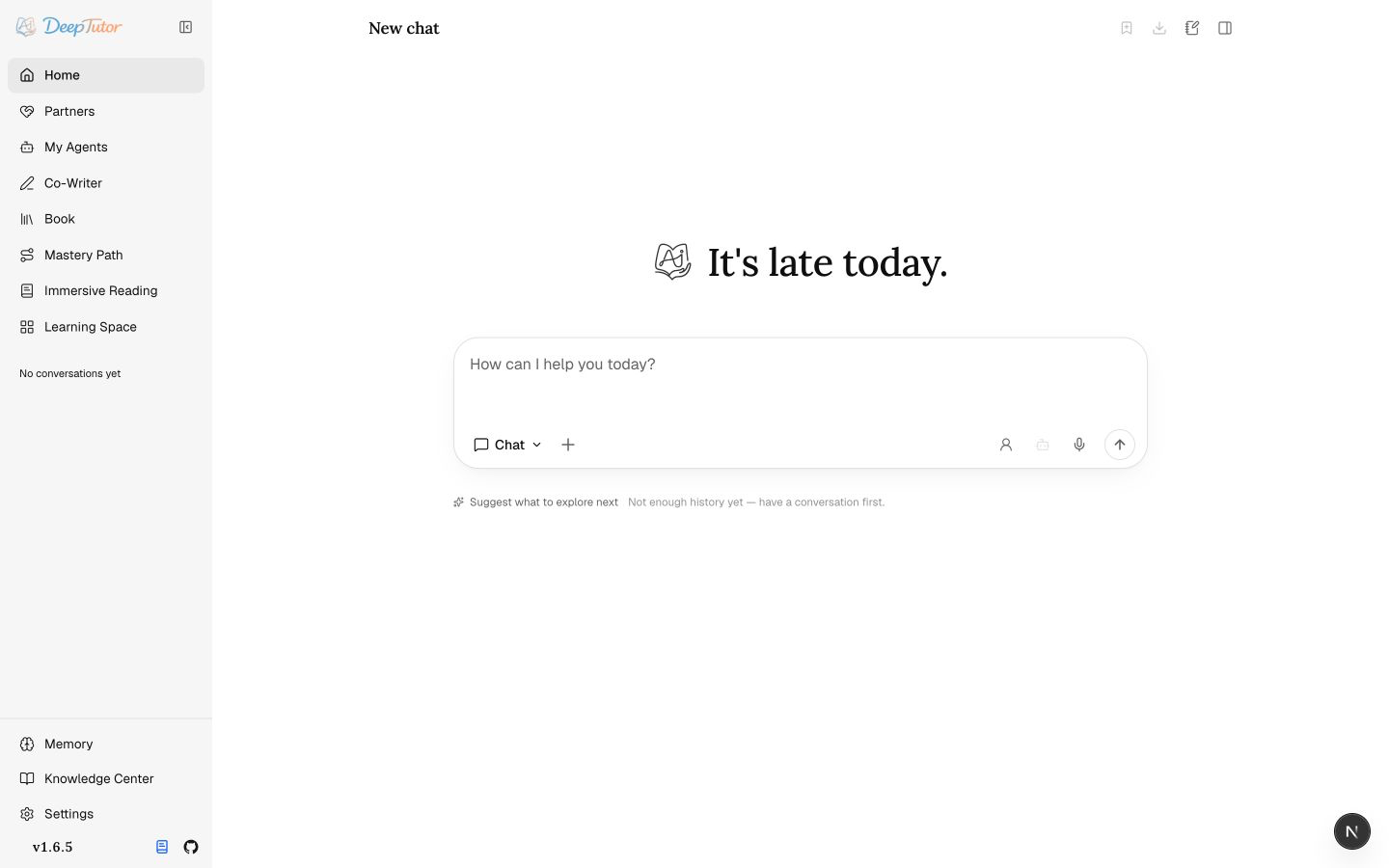
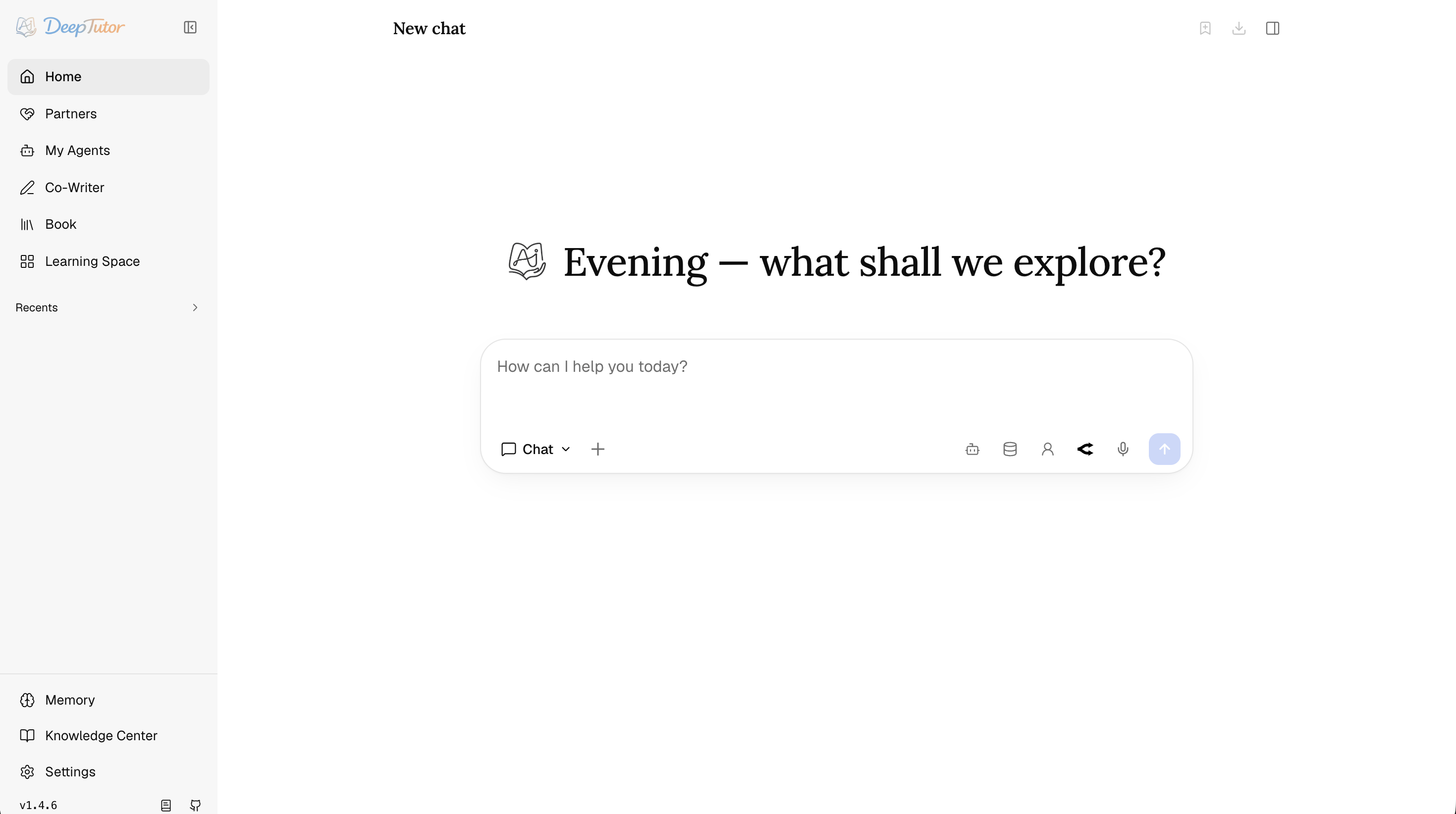
Screenshot status: The overview is current for v1.6.5. The surface screenshots below remain v1.4.6 references while a versioned refresh is in progress. Use them to understand workflows, not as exact navigation.
🏗️ System architecture
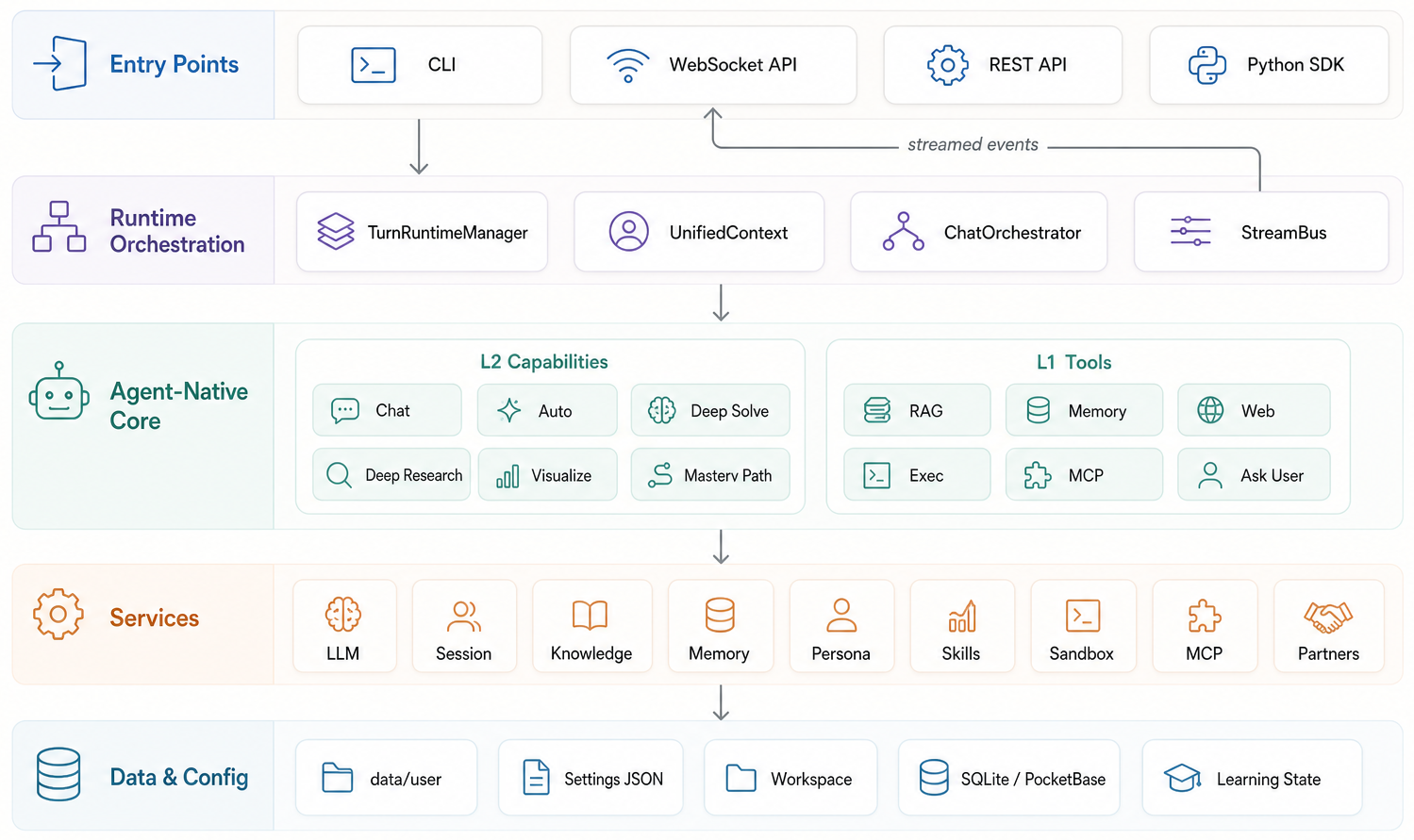
💬 Chat — The Agent Loop You Actually Use
Chat is the default capability and where most work begins. A single thread can talk normally, call tools, ground itself in selected knowledge bases, read attachments, generate images, consult subagents, write notebook records, and continue with the same context across turns.
The loop is deliberately simple: the model thinks in rounds, calls tools when useful, observes the results, and finishes with a tool-free message. ask_user is special — instead of guessing, the agent can pause the turn, ask a structured clarifying question, and resume once you answer.
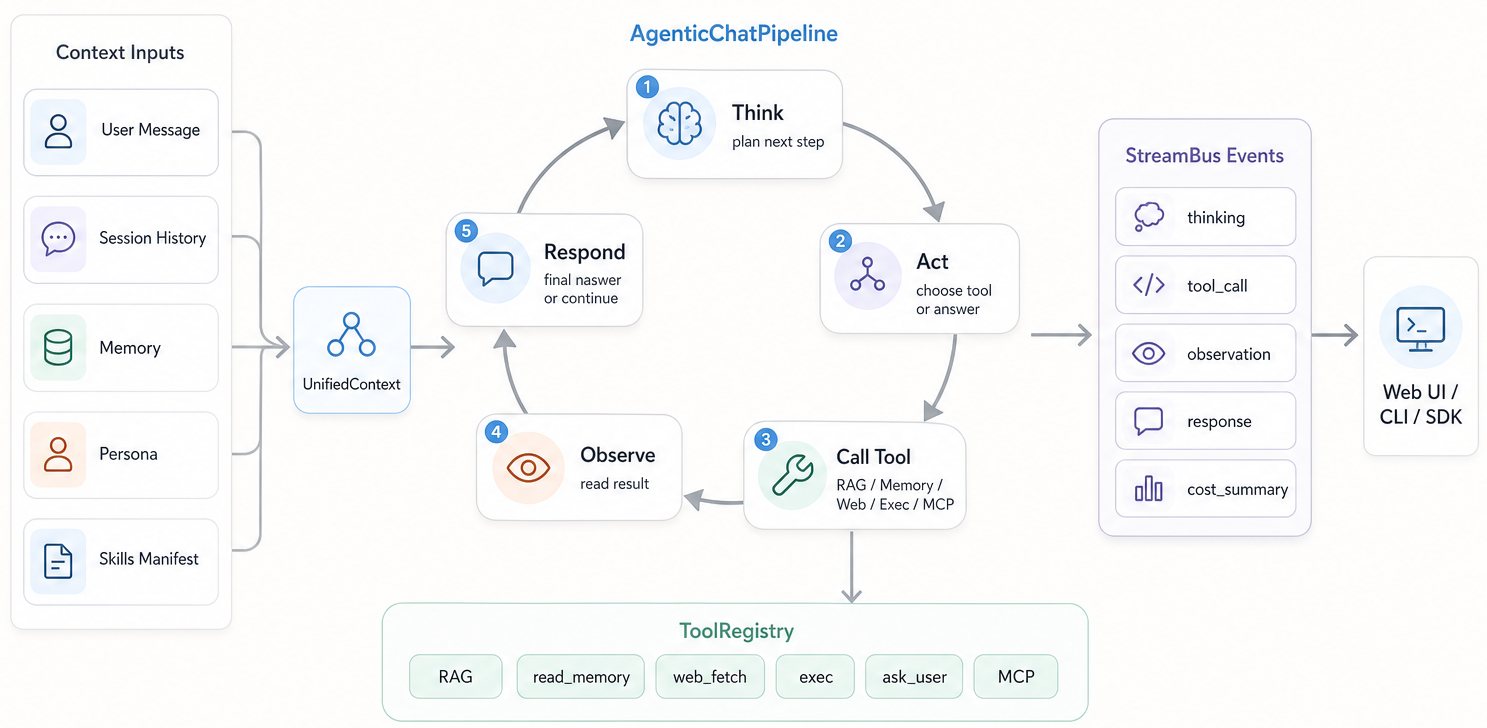
User-toggleable tools are brainstorm, web_search, paper_search, zotero_search, reason, and geogebra_analysis — plus imagegen and videogen once you configure the matching generation model. Contextual tools such as rag, kb_files, knowledge_frontier, read_source, read_memory, write_memory, read_skill, load_tools, exec, web_fetch, ask_user, list_notebook, write_note, question_bank, github, consult_subagent, workspace_list, workspace_read, workspace_search, workspace_present, and workspace_export mount automatically when the turn has the right context.
Context comes in two kinds: sticky session context (capability, workspace or course, tools, knowledge bases, persona, model, and Reading / Mastery state) persists across turns; one-time references (files, chat history, books, reading sections, notebooks, selected question-bank entries, imported agents) come from the + menu for a single turn. The voice button only transcribes the current message.
Home keeps Chat, Ask Questions, Quiz, and Visualize one click away; Research for cited reports and Solve for worked reasoning sit under More Capabilities. Personalized Learning groups Book, Mastery Path, Immersive Reading, and Practice; Reading brings documents, video, and audio together with verified citations, saved notes, natural read-aloud from source passages / study guidance / vocabulary / quiz / translation actions, and notebook capture, while Course Study keeps its course-bound context.
🤝 Partner — Persistent Companions on the Same Brain
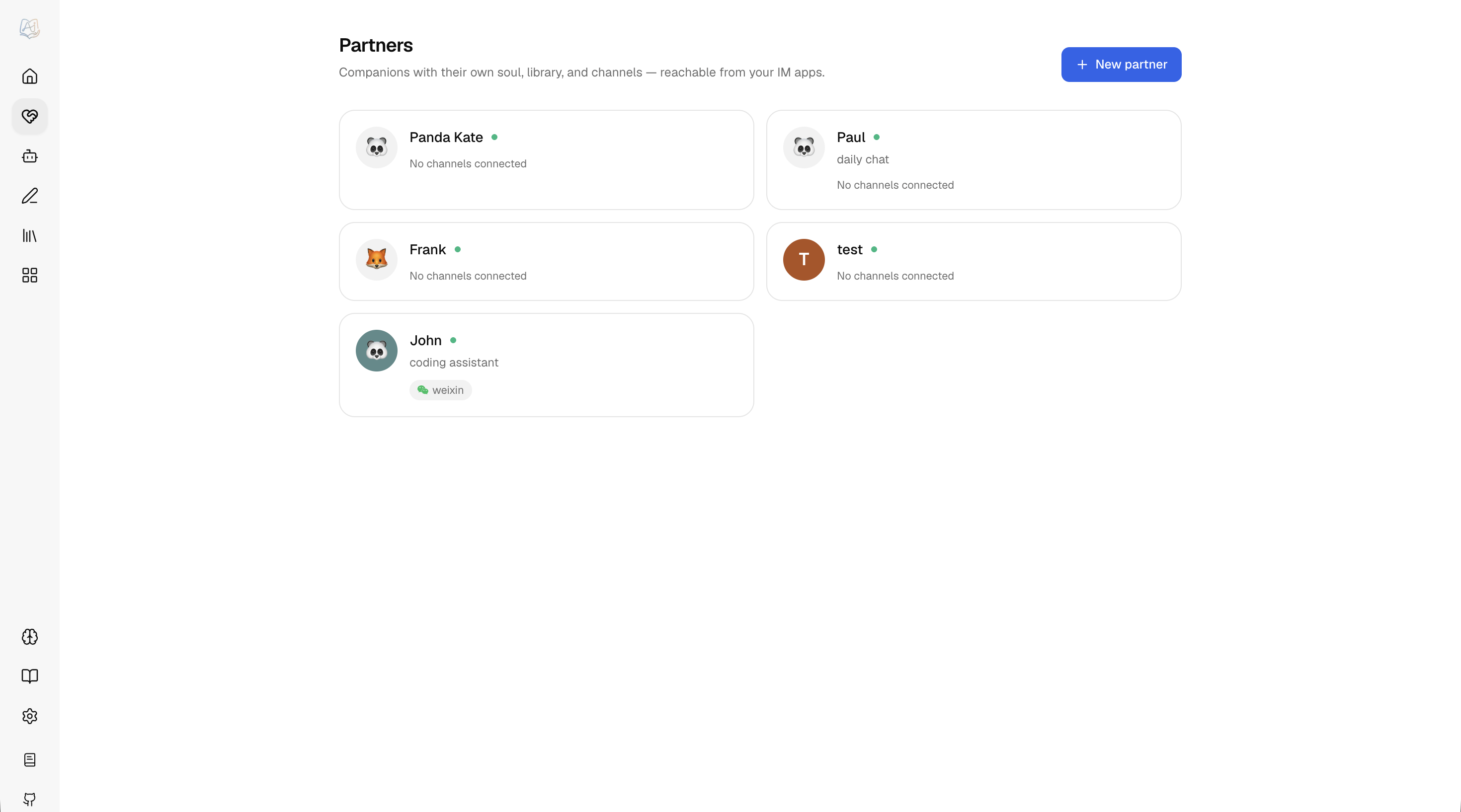
Partners are persistent companions with their own soul, model policy, library, memory, and channels. They are not a separate bot engine: every inbound web or IM message becomes a normal ChatOrchestrator turn inside a partner-scoped workspace. A partner is "a chat that has a personality and a phone number."
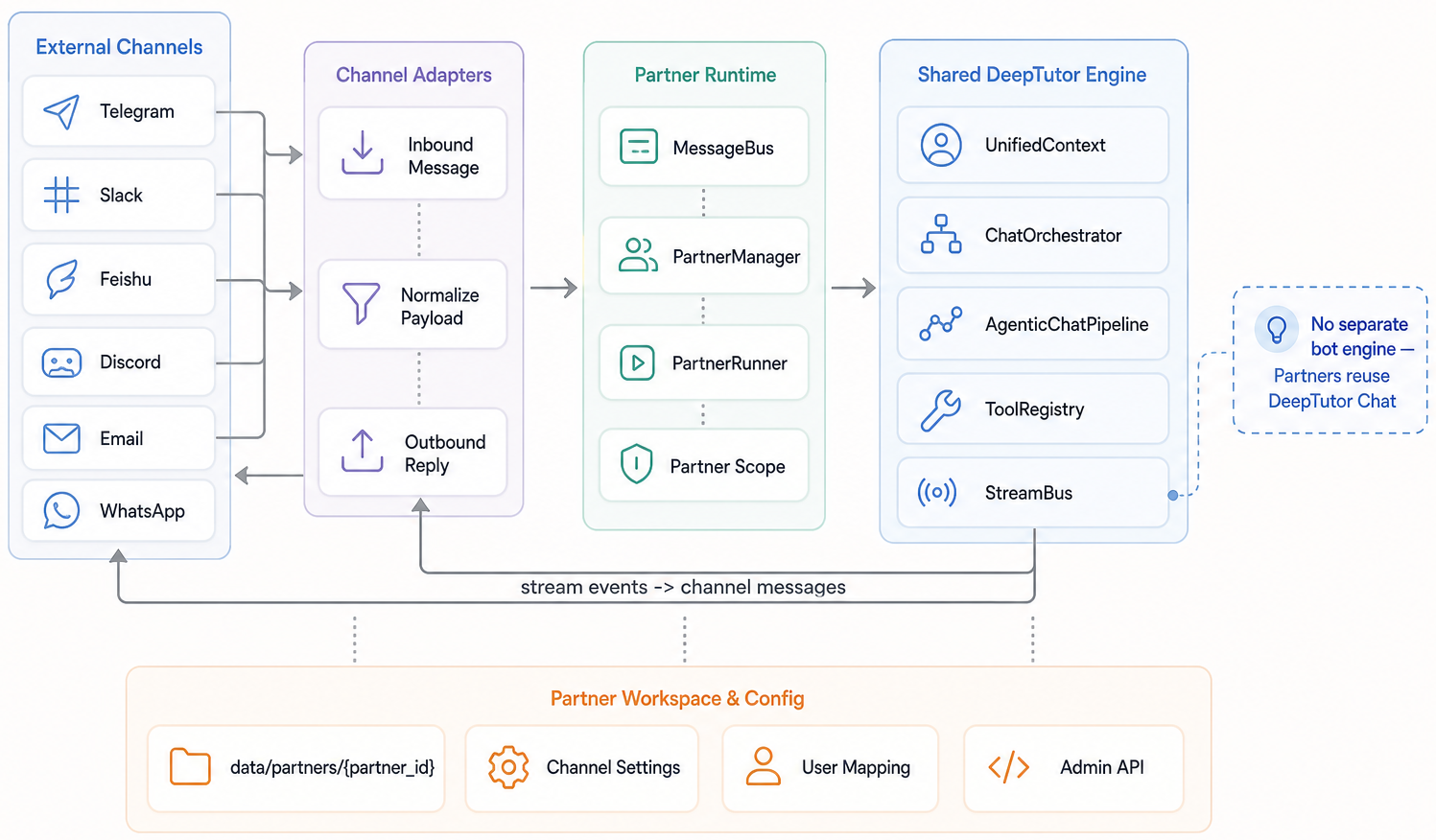
Each partner has a SOUL.md, model selection, channels, tool policy, and assigned library. Its library either copies knowledge bases, skills, and notebooks into data/partners/<id>/workspace/, or stays linked to an existing workspace's files and resources; soul, conversations, and Partner memory remain separate. Authenticated non-admin users keep private partner sessions and relationship memory while the partner reads their personal memory read-only; admin, group, and unbound traffic use the shared partner scope.
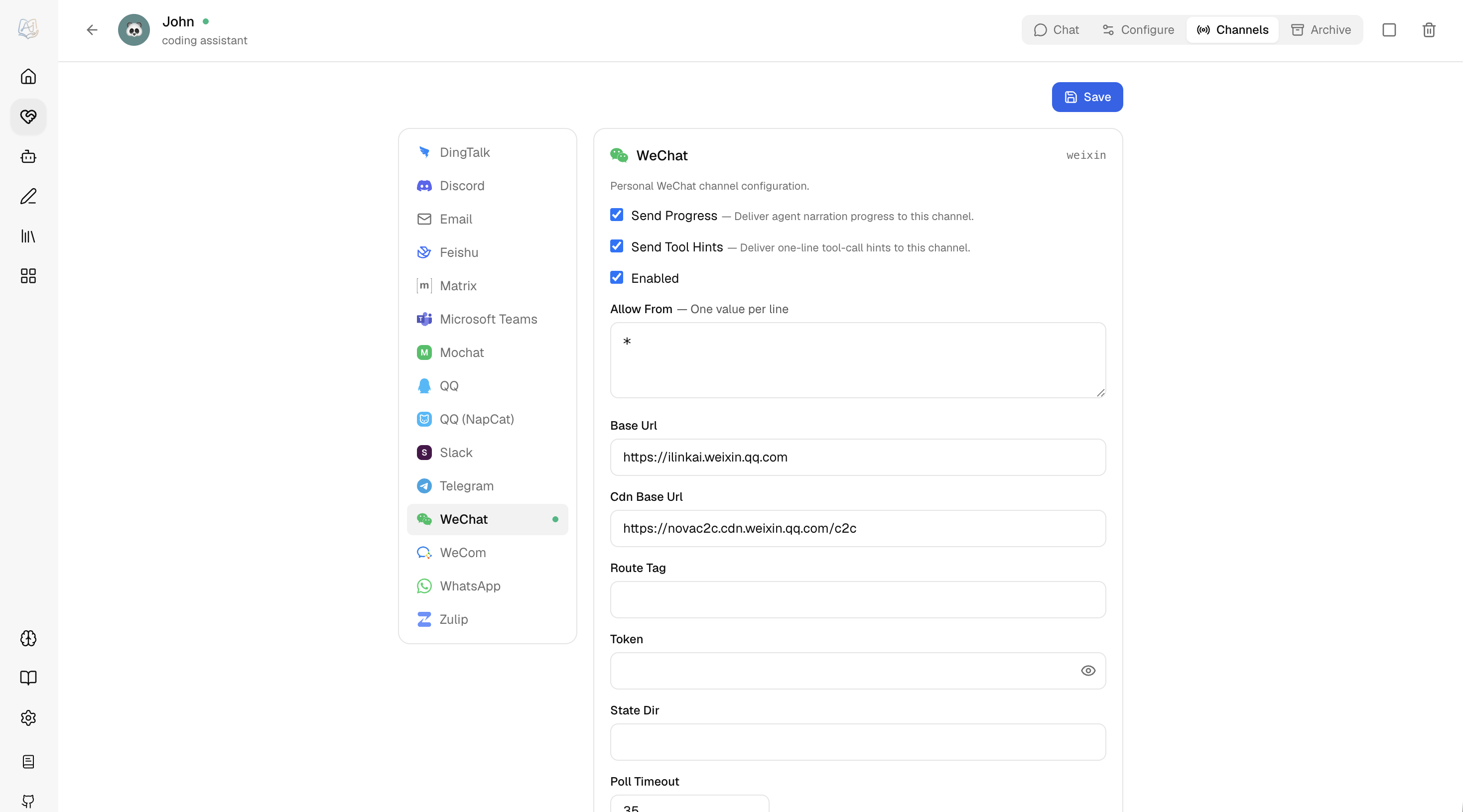
The channel layer is schema-driven and can connect to IM platforms such as Feishu, Telegram, Slack, Discord, DingTalk, QQ/NapCat, WeCom, WhatsApp, Zulip, Mattermost, Matrix, Mochat, and Microsoft Teams depending on installed extras and configured credentials. A partner can also be connected as a subagent and consulted from a normal chat turn — see My Agents below.
For faster setup, the Partner channel page can create a Feishu/Lark app or WeCom AI bot, or sign a personal WeChat account in, from a QR scan drawn in the browser rather than the server log. Feishu/Lark detects the account domain and saves the scanning user as the initial allowed sender. WeCom keeps an existing allowlist and otherwise defaults to all users who can reach the bot, with a visible open-access warning; the manual channel forms remain available if a provider's scan protocol changes.
🧑🚀 My Agents — Consult & Import Other Agents
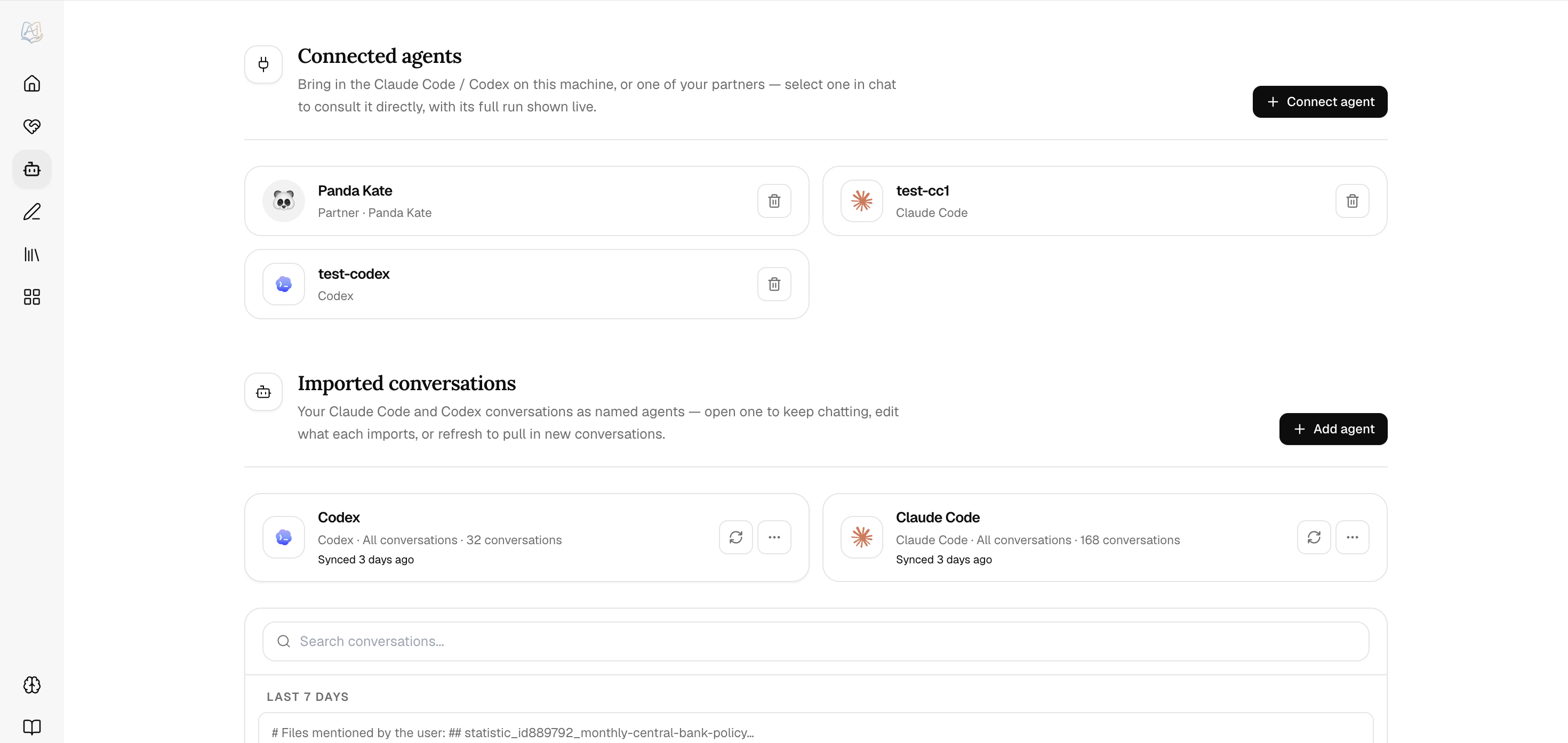
My Agents turns other agents into context for DeepTutor, and does two distinct things. Connect a live agent — Claude Code, Codex, Grok CLI, Antigravity, Kimi, opencode, MiMo Code, Hermes Agent, OpenClaw, or DeepSeek Harness on your machine, a remote Hermes gateway, or one of your Partners — and consult it from inside a chat turn: DeepTutor actually runs the other agent and streams its work into the Activity panel via the consult_subagent tool. Select it and its round limit with the Agent chip, or filter the same connected-agent list with @; the choice stays attached to the session.
Connect Grok CLI. Install xAI's Grok CLI on the machine running the DeepTutor
backend, run grok login there, and verify that grok --help lists
--output-format streaming-json. Then open My Agents → Connect, select
Grok CLI, and choose a working directory. Detection checks the executable's
protocol support; it does not verify login or model access. The connector has
been exercised with Grok CLI 1.0.3; unrelated third-party commands also named
grok are not supported.
In Settings → Partners & Agents → Grok CLI, leave model and reasoning effort
empty to use the CLI defaults, or enter values supported by your account's
grok models output. System instructions are passed through --rules. The
default permission mode is dontAsk: Grok uses its existing rules and built-in
read-only handling, and denies operations that need approval. This is a CLI
permission policy, not a filesystem sandbox. Broader modes can be selected
explicitly in settings; advanced CLI flags remain available through
backends.grok.extra_args in the subagent settings API.
Grok uses its own authentication and session storage; DeepTutor does not copy its credentials. Follow-up consults resume the connection's session in the same working directory. Text and tool activity stream live; private thought payloads are omitted. Cross-session Grok memory is disabled by default. This connector supports text questions and CLI tools, not image forwarding or importing past Grok conversations. In Docker, install and authenticate Grok inside the backend container; a CLI installed only on the browser's computer is not reachable.
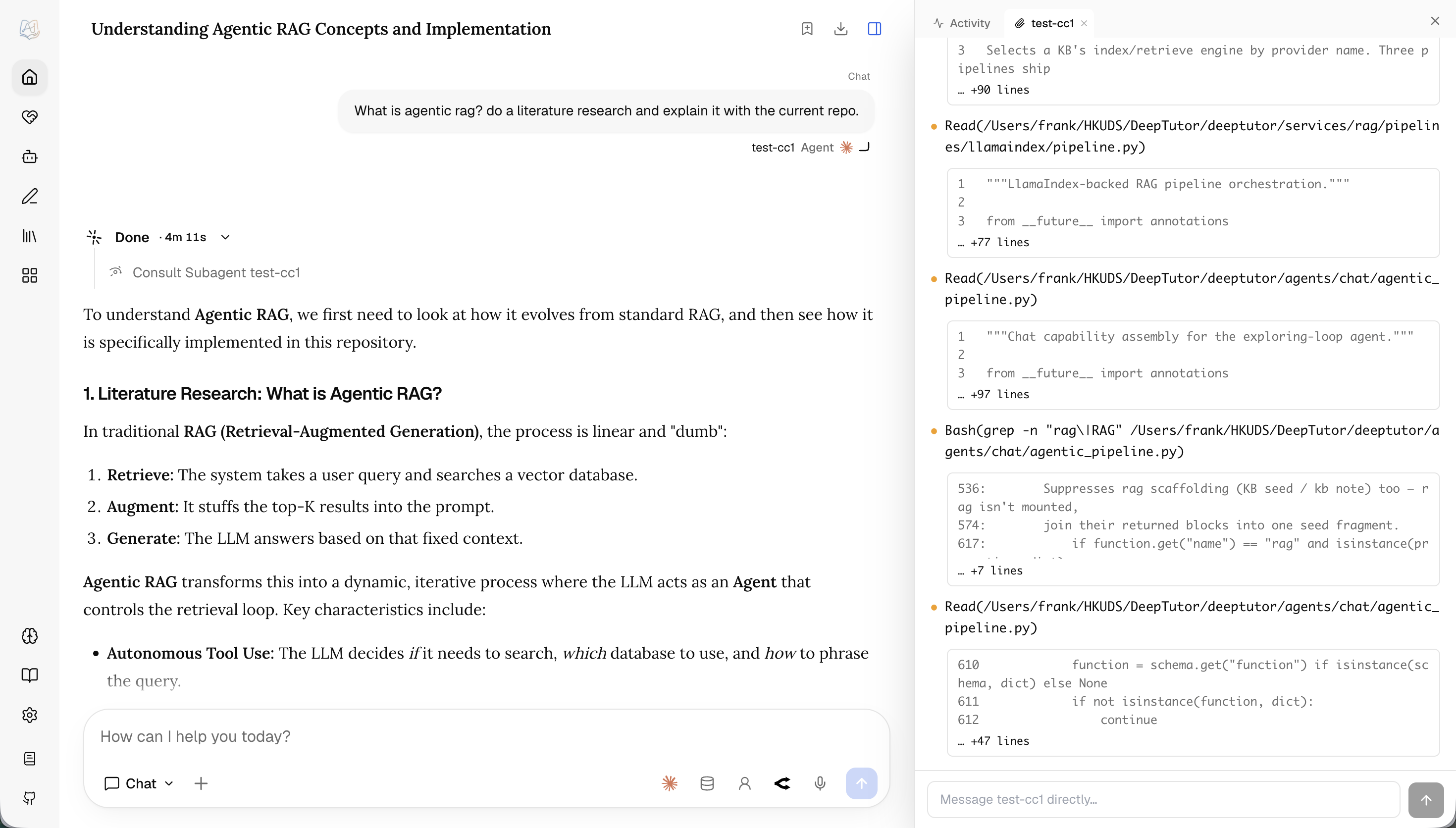
Import past conversations — bring in your existing ChatGPT, Claude Code, and Codex history as searchable, resumable conversations. Select conversations.json from an official ChatGPT data export for a safe, idempotent snapshot import, choose Claude history by project / working directory, or choose Codex history by calendar date. Folder-based agents remain refreshable so their selected scope can pull in new conversations. Reference one from a Chat turn via + → My Agents, and DeepTutor reads it as a third-party transcript — it stays their conversation, not DeepTutor's own voice.
✍️ Co-Writer — Selection-Aware Markdown Drafting
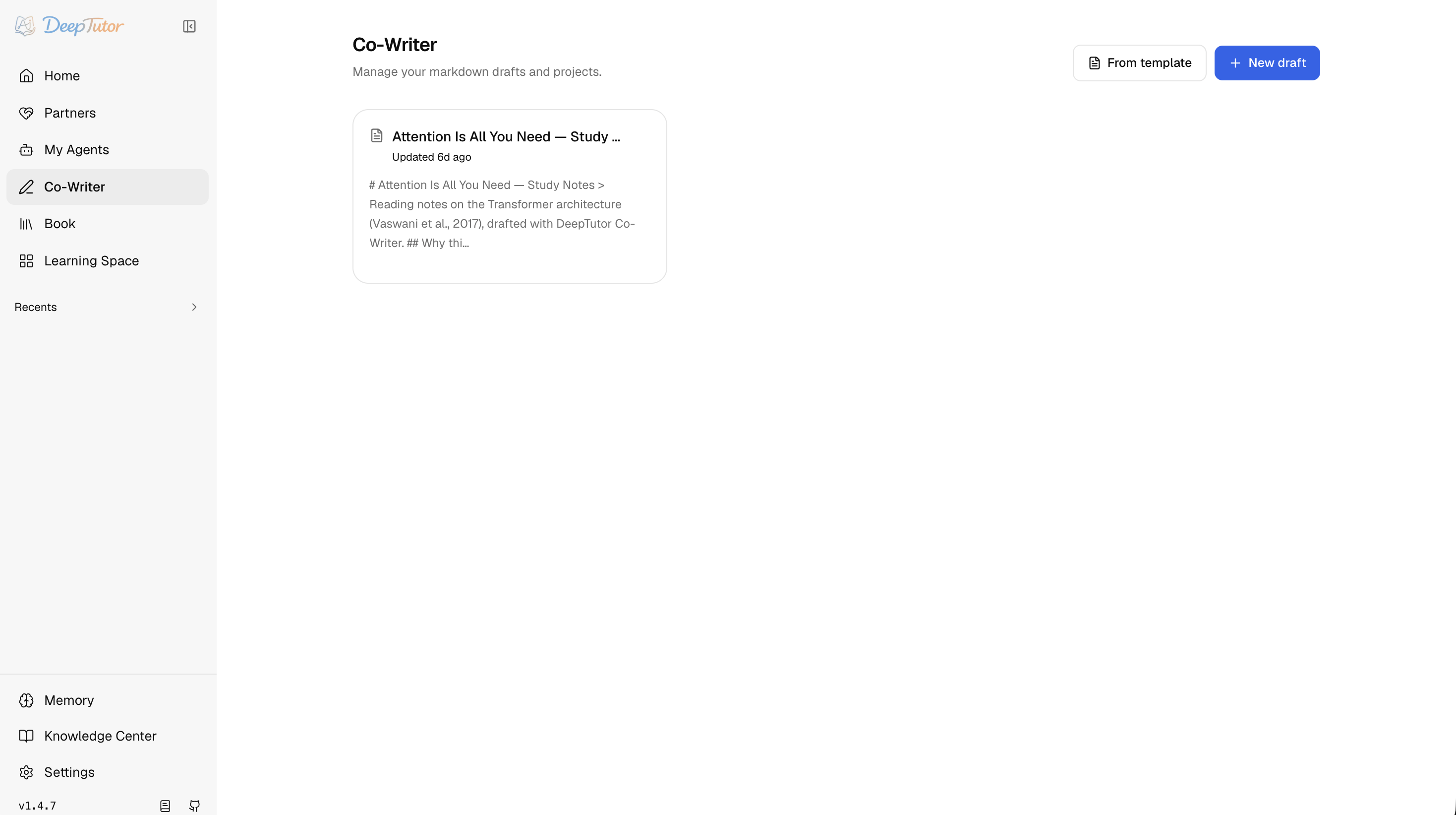
Co-Writer is a split-view Markdown workspace for reports, tutorials, notes, and long-form learning artifacts. Documents autosave and render a live preview (KaTeX math, diagram fences), and can be saved back into notebooks when a draft becomes reusable context. Import a .docx to start a new draft, and export the current editor as Markdown or Word.
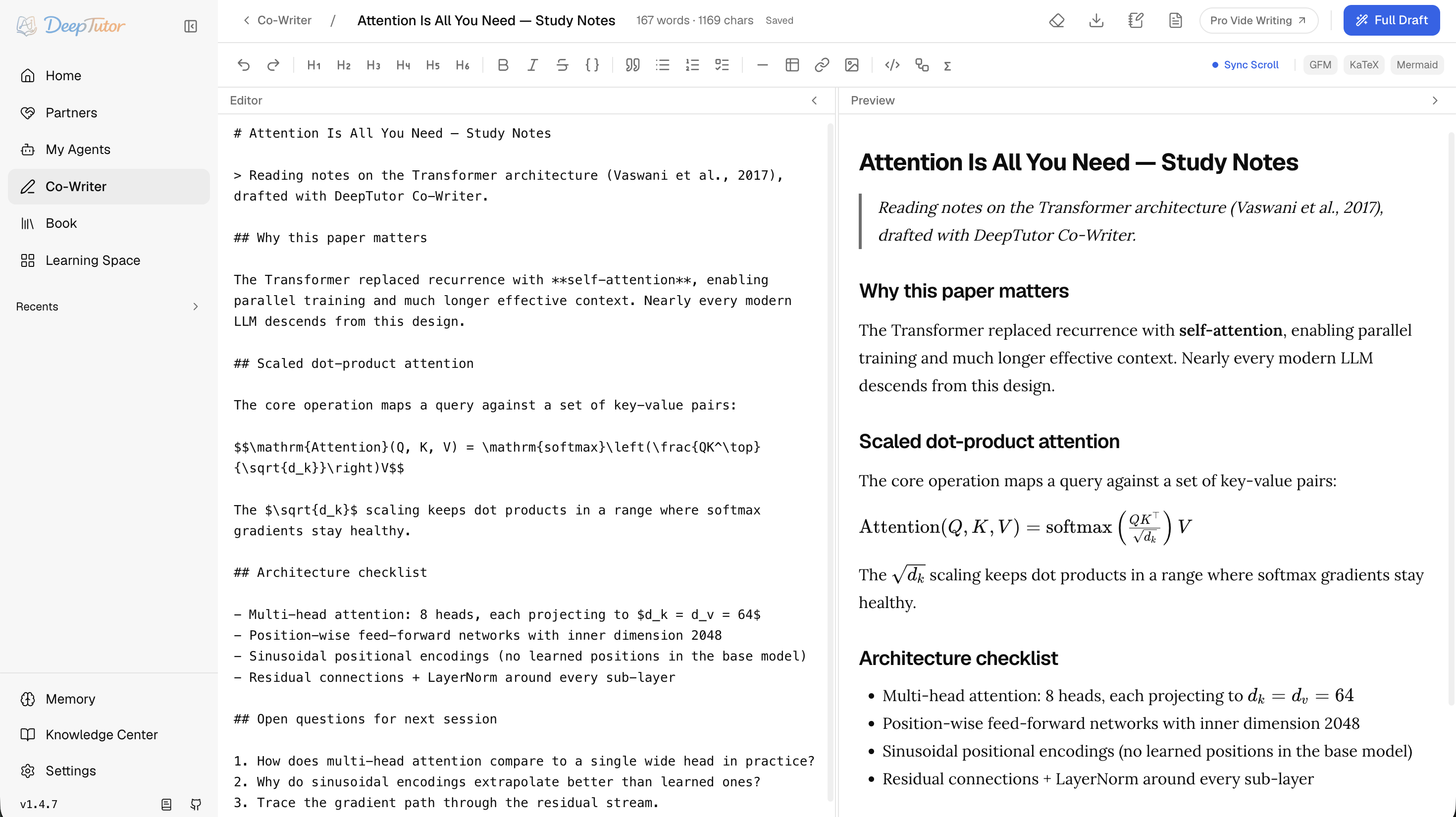
Its defining idea is surgical editing: select a span and ask DeepTutor to rewrite, expand, or shorten it. Choose the edit model; it can use a knowledge base or web evidence and keeps a trace of its tool calls. If the draft has not changed while it works, the result replaces the selected text directly and remains reversible with Undo.
📖 Book — Living Books from Your Materials
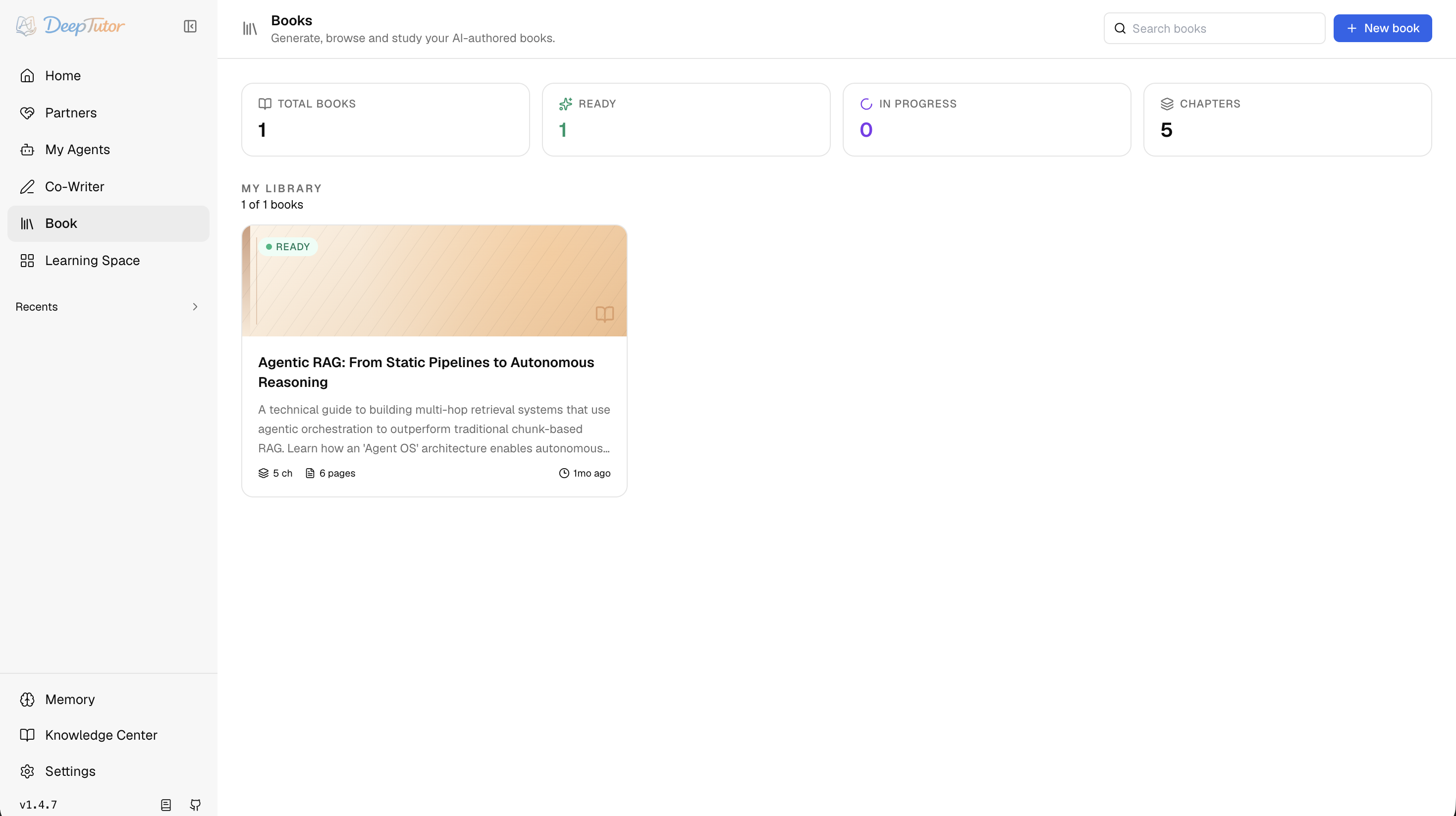
Book turns selected sources into an interactive living book — not a static PDF, but a reading environment built from typed blocks. A book can start from knowledge bases, notebooks, question banks, or chat history; the creation flow proposes a chapter outline before content is generated, so you review the shape instead of accepting a blind one-shot output.
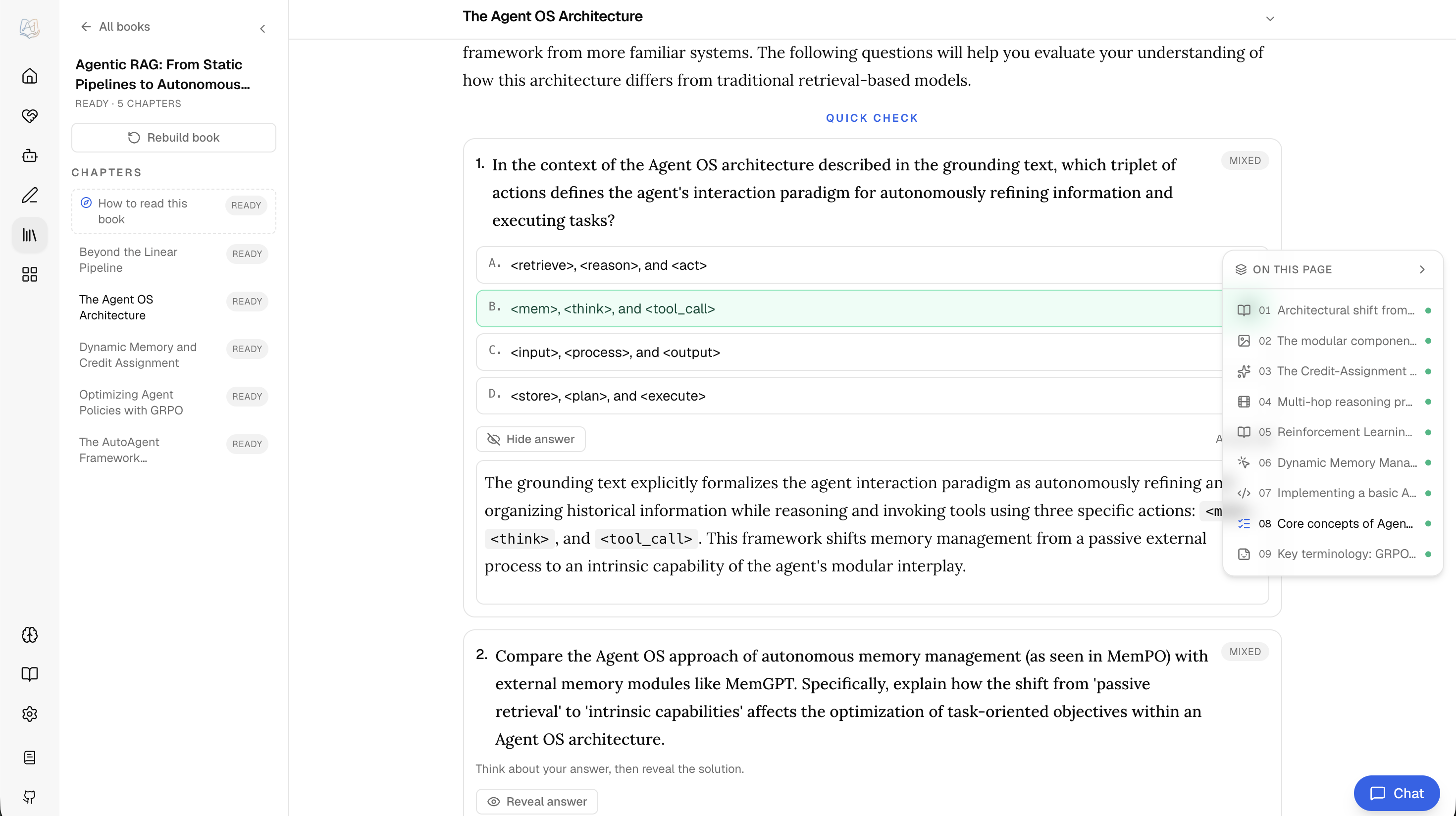
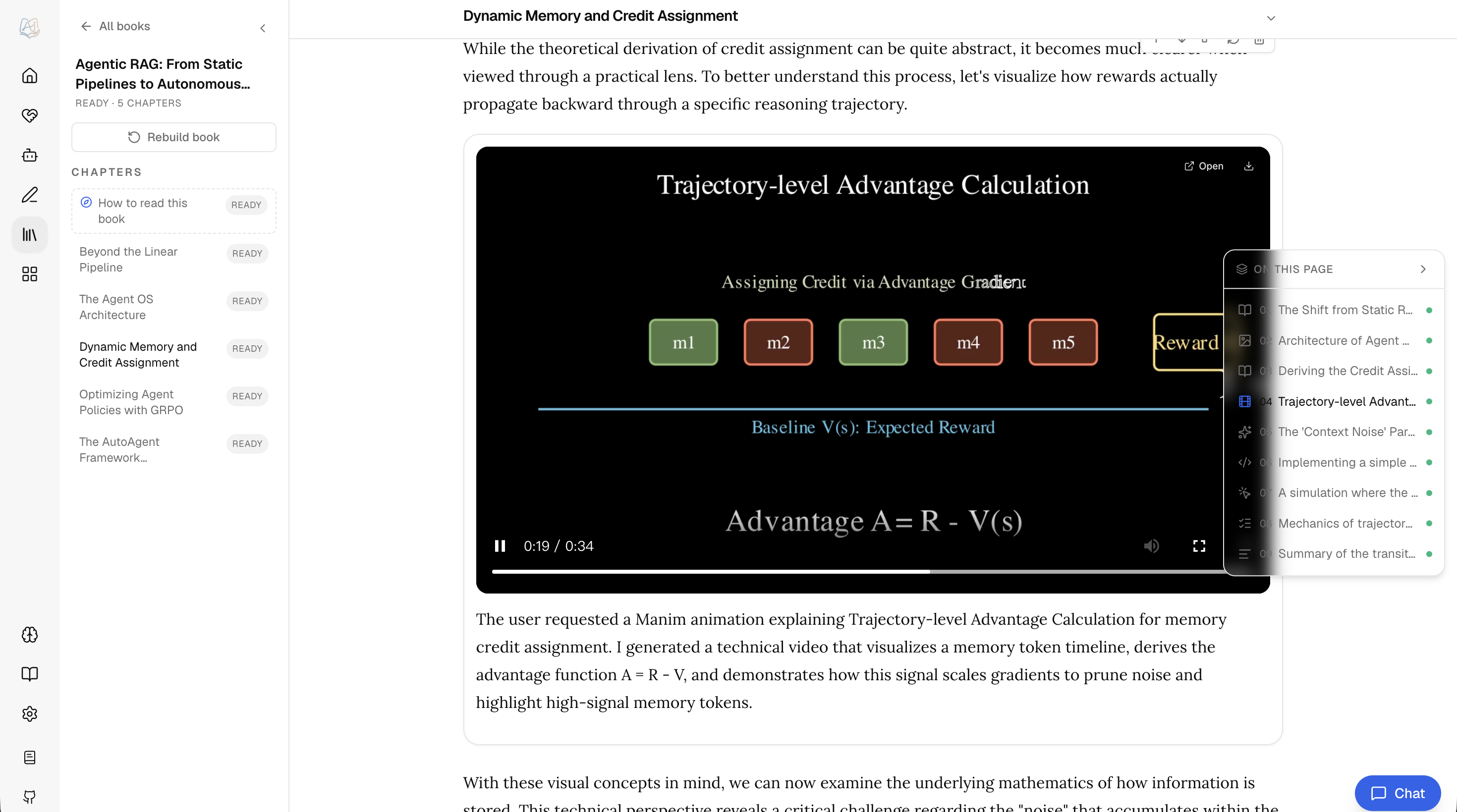
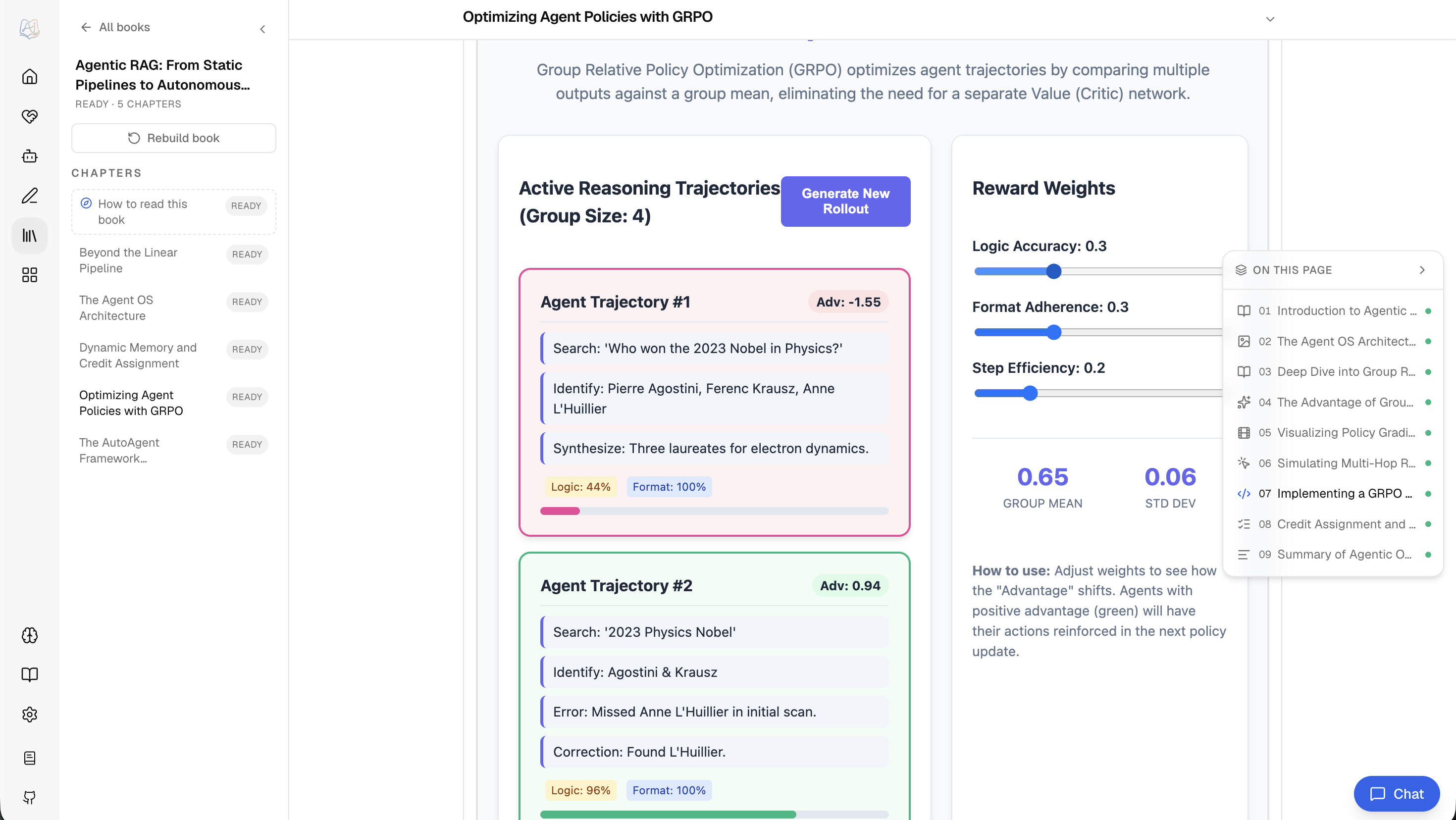
Each chapter compiles into editable typed blocks — text, callouts, quizzes, flash cards, timelines, code, figures, interactive HTML, animations, concept graphs, deep dives, and user notes — with its own Page Chat. Insert, move, regenerate, rewrite, or switch a block type; selected passages enter a reviewable learning-capture inbox. Progress, bookmarks, quiz attempts, captures, and Page Chat stay private per reader even when an admin book is shared read-only or for collaborative editing; shared deletion stays admin-only. Any book exports to Markdown, long compiles pause and resume, and deeptutor book health / refresh-fingerprints flag source drift.
📚 Knowledge Center — Multi-Engine RAG Libraries
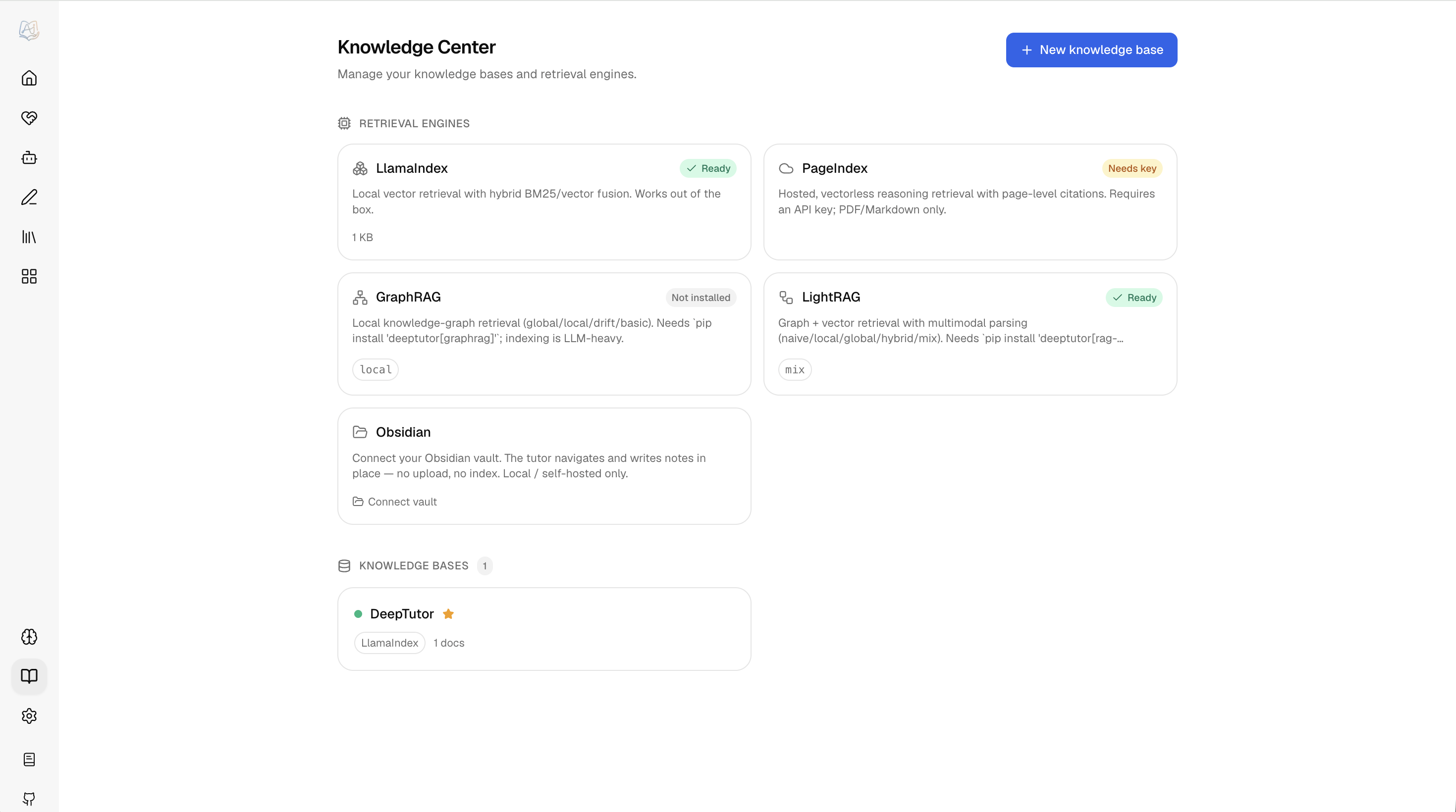
Knowledge bases are the document collections behind RAG — they ground Chat turns, Co-Writer edits, Book generation, and Partner conversations. What's distinctive is a choice of retrieval engines: LlamaIndex (the default, hybrid vector + BM25 with optional cross-encoder reranking and exact-flat or HNSW FAISS indexes), PageIndex (reasoning retrieval with page-level citations, hosted or self-hosted OSS), GraphRAG and LightRAG (knowledge-graph retrieval), LightRAG Server (retrieval offloaded to an external LightRAG instance you connect over HTTP), WeKnora (retrieval from a knowledge base in your self-hosted deployment, without a local index or document copy), Tencent IMA (a library you curate in IMA — searched, browsed, and written back to over its OpenAPI), MarginNote 4 (your MN4 study data — documents, excerpts, mind-map cards and the links between them — pushed in by the app's Add-on and navigated with dedicated tools), Kiwix (a searchable ZIM archive served over HTTP without local indexing), or a linked Obsidian vault the tutor reads and writes in place. Each KB is bound to one engine.
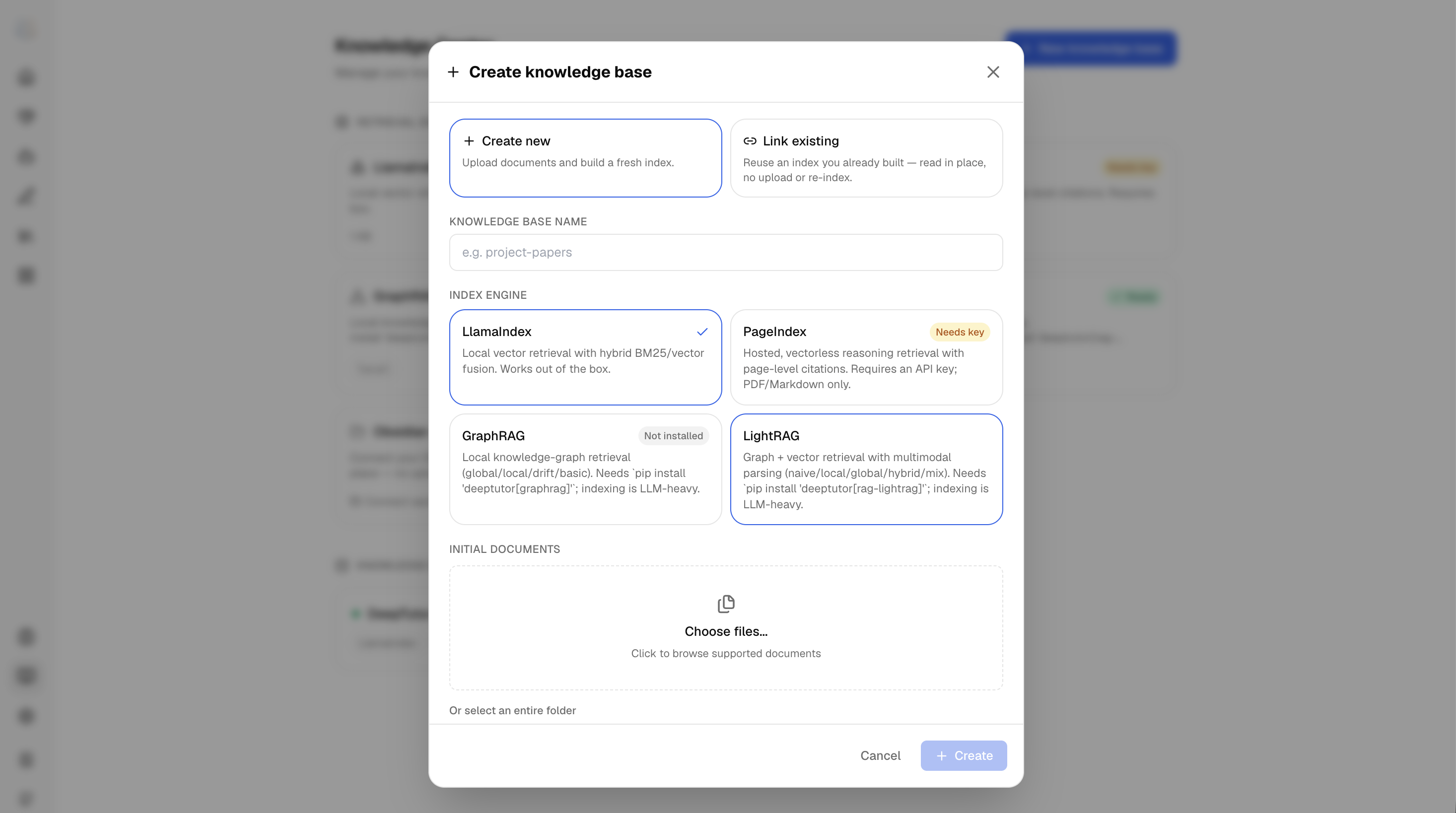
Migrating an existing Obsidian, Hermes, or Markdown library? See Knowledge migration guide for connected-vault and indexed-copy paths.
Creating a KB, you can create new (upload and index documents), link existing (reuse an index in place), or connect Kiwix (search one served ZIM archive on demand). Choose its storage workspace at creation; an existing KB can move between workspaces after a preview, keeping assignments and saved references. A KB can also track GitHub repositories (repo, branch, glob) or documentation-site URLs (bounded crawl depth and page count, re-synced every 24 h by default); sync hash-diffs added, changed, and removed content so followed documentation stays current without re-uploading, and linked folders pick up new or changed local files on sync. Re-indexing writes a new flat version-N directory and keeps prior ones, so a working index is never destroyed mid-rebuild. A single document can be removed even from an error-state base — dropping a file that failed to parse without a full delete-and-rebuild. Document parsing — Text-only, MinerU, Docling, Tika, markitdown, PyMuPDF4LLM, or LiteParse — and an optional image-description model are chosen in Settings → Knowledge & documents, with local model downloads off by default. Docling can also run in remote mode against a Docling Serve server (no local install or models needed), configured on that page (mode=remote, a server base URL, and an optional API key) or the DOCLING_MODE / DOCLING_API_BASE_URL / DOCLING_API_TOKEN environment variables. Tika is remote-only and points at the Apache Tika server configured on that page. The CLI mirrors the lifecycle with list/info/create/connect-kiwix/add/search/eval/eval-diff/set-default/delete, source add/remove commands, list-sources, and sync.
The built-in LightRAG engine is installed with pip install 'deeptutor[rag-lightrag]'. That extra contains the supported LightRAG SDK but does not install MinerU. Choose MinerU independently in Document Parsing and either configure its cloud mode or install its current local CLI when structured parsing is wanted. MinerU accepts PDF, common raster images, DOCX, PPTX, and XLSX; the legacy magic-pdf command remains PDF-only. Text-only and the other parsing engines do not require MinerU.
Native LightRAG queries and incremental indexing require the embedding configuration recorded by the published index, including the model, dimension, and endpoint identity. If it changes, restore the original configuration or rebuild with the current embedding; indexes without a recorded embedding identity require a rebuild. The knowledge-base detail and index-version views show recovery guidance, while files remain available for viewing and download.
Scoring a knowledge base. With several engines available, "which one retrieves best here?" is an empirical question — so deeptutor kb eval answers it. Write a QA set (one JSON object per line: a query plus the gold passages an ideal retrieval should return), then score the KB with deeptutor kb eval <name> --dataset qa.jsonl --top-k 5 [--mode hybrid] [--save baseline.json]. Each case is retrieved through the same path a chat turn uses, its ranked citations are matched against the gold passages using exact text or lexical overlap (thresholds are tunable with --min-ratio; semantic equivalence is not assessed), and the run reports Recall@k / Precision@k / nDCG@k / MRR / MAP / Hit@k. Metrics are pure functions over the ranking; no model judges the output. Compare saved reports with deeptutor kb eval-diff baseline.json candidate.json for per-metric and per-case changes. Use --rewrite off or --rewrite standalone on kb eval to compare original and rewritten queries; reports retain rewrite provenance. Cases whose search failed (a missing index, bad credentials) carry no score and are reported separately rather than dragging the means down. PageIndex uses reasoning as retrieval and returns no ranked chunks, so it is excluded.
{"query": "Why do transformers scale attention?", "gold": ["Scaling keeps the dot products from growing with the dimension."]}
🌐 Learning Space — Skills, Personas, and Reusable Context
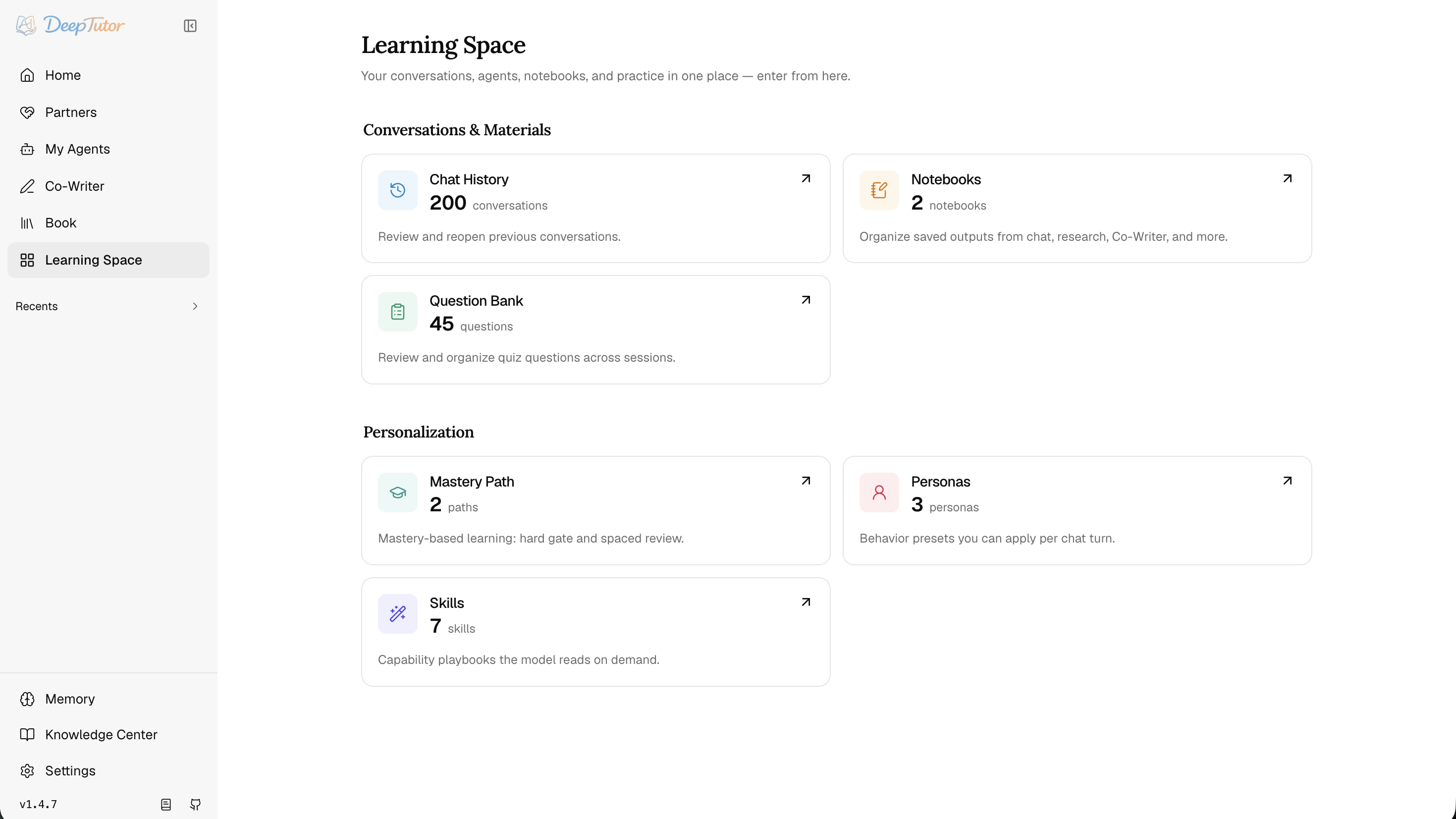
Learning Space is the library, organization, and personalization layer. Conversations & Materials holds Chat History, notebooks with movable records and Markdown export, and a question bank with answers and explanations. Start Practice from a question-bank selection or Personalized Learning for review sessions, mistake tracking, and scheduled repetition. Personalization holds personas, skills (SKILL.md playbooks), one-click MCP Services, and CLI Apps from the CLI-Anything catalog, each with an on-demand usage guide. The separate My Courses workspace groups subject conversations and tutor threads; each asset is offered only in the workflows that support it.
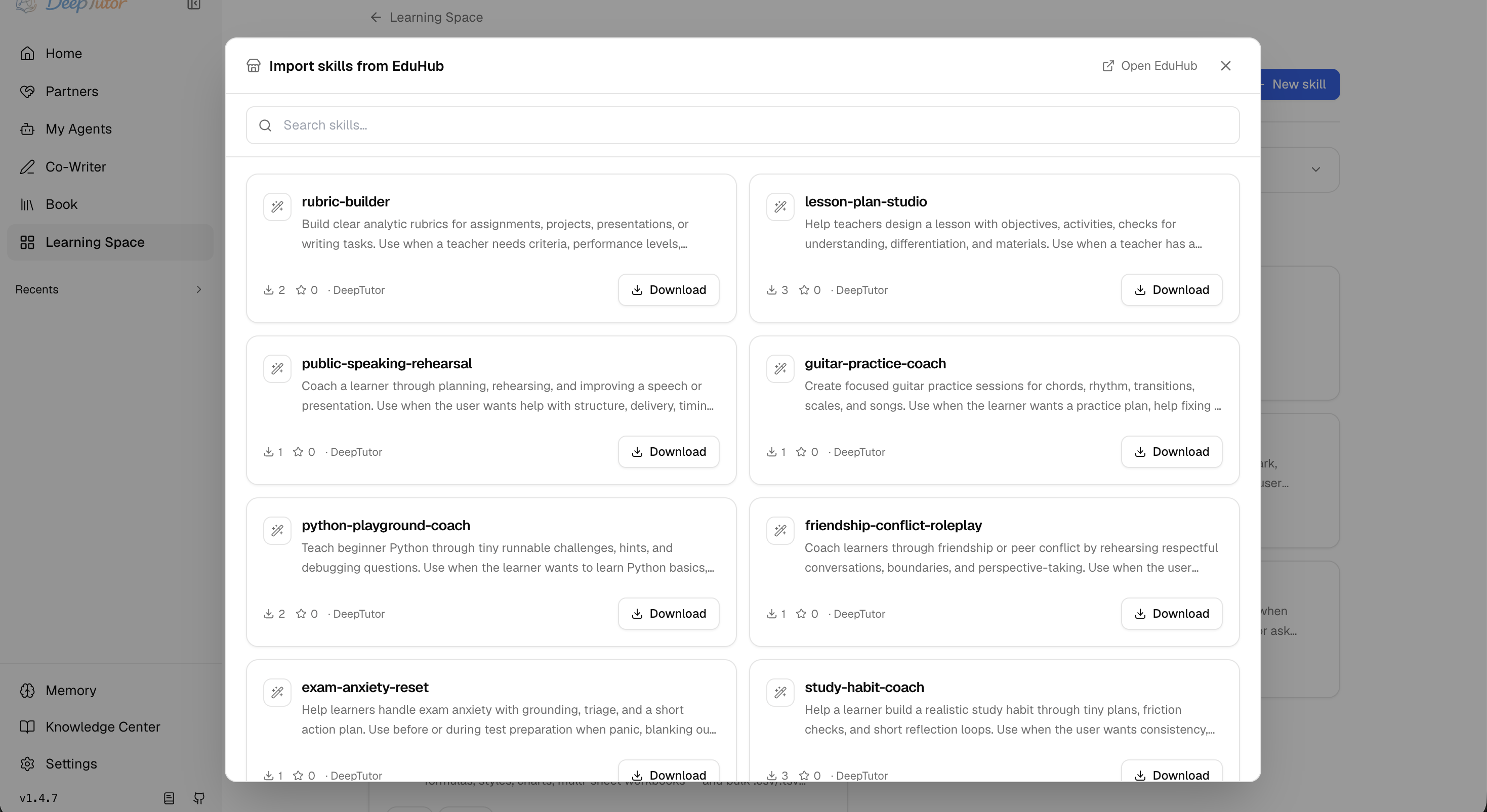
You don't have to write every skill yourself — Import from EduHub browses the community catalog and downloads a skill straight into your library through a security gate (see Ecosystem).
🧠 Memory — Inspectable Personalization
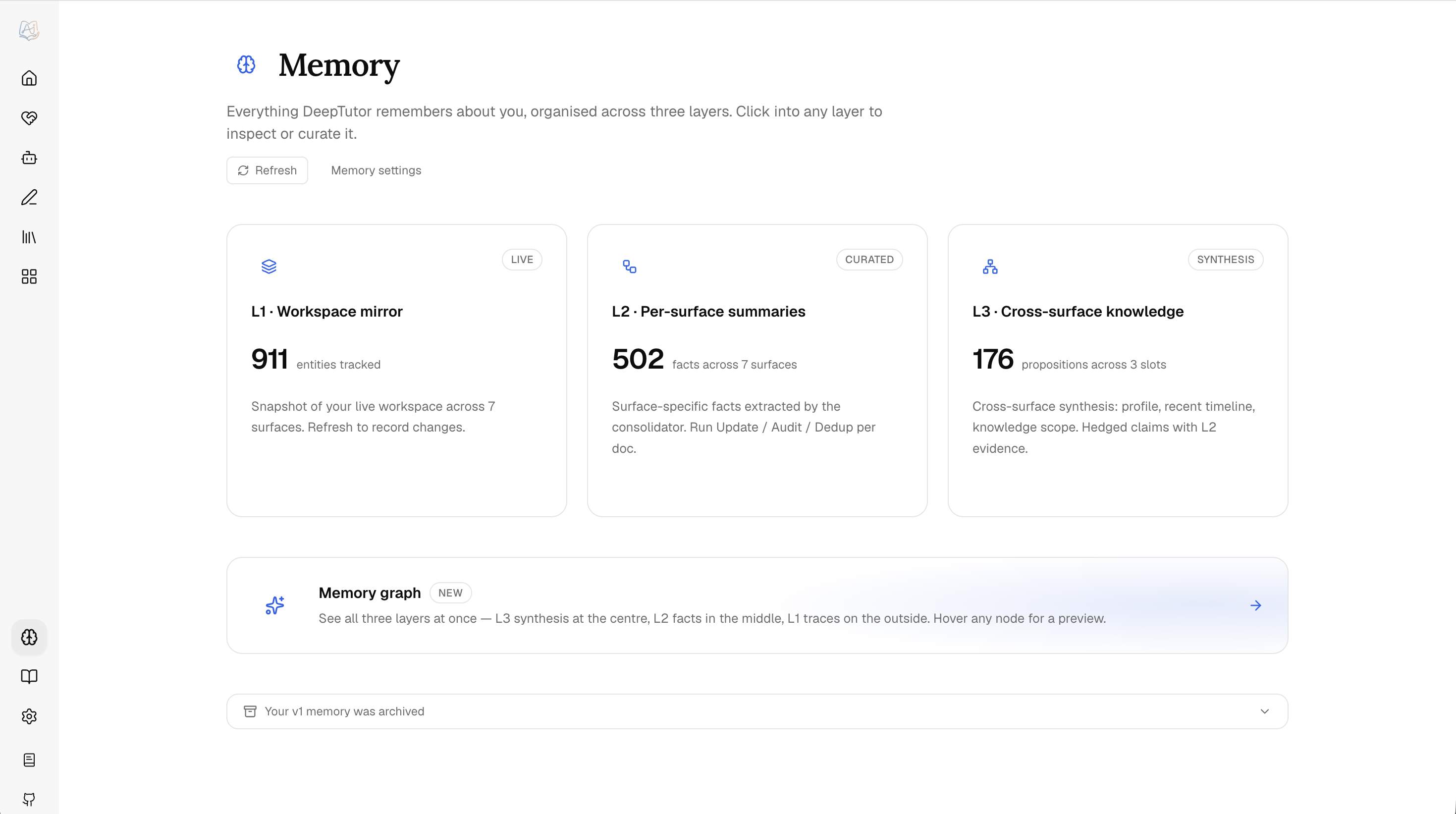
Memory is a file-backed, three-layer system you can read, curate, and audit — deliberately not a hidden vector store. L1 is the workspace mirror plus an append-only event trace (trace/<surface>/<date>.jsonl); L2 is per-surface curated facts (L2/<surface>.md) with references to L1 entities; L3 is cross-surface synthesis (L3/<profile|recent|scope|preferences>.md) that records its contributing L2 surfaces.
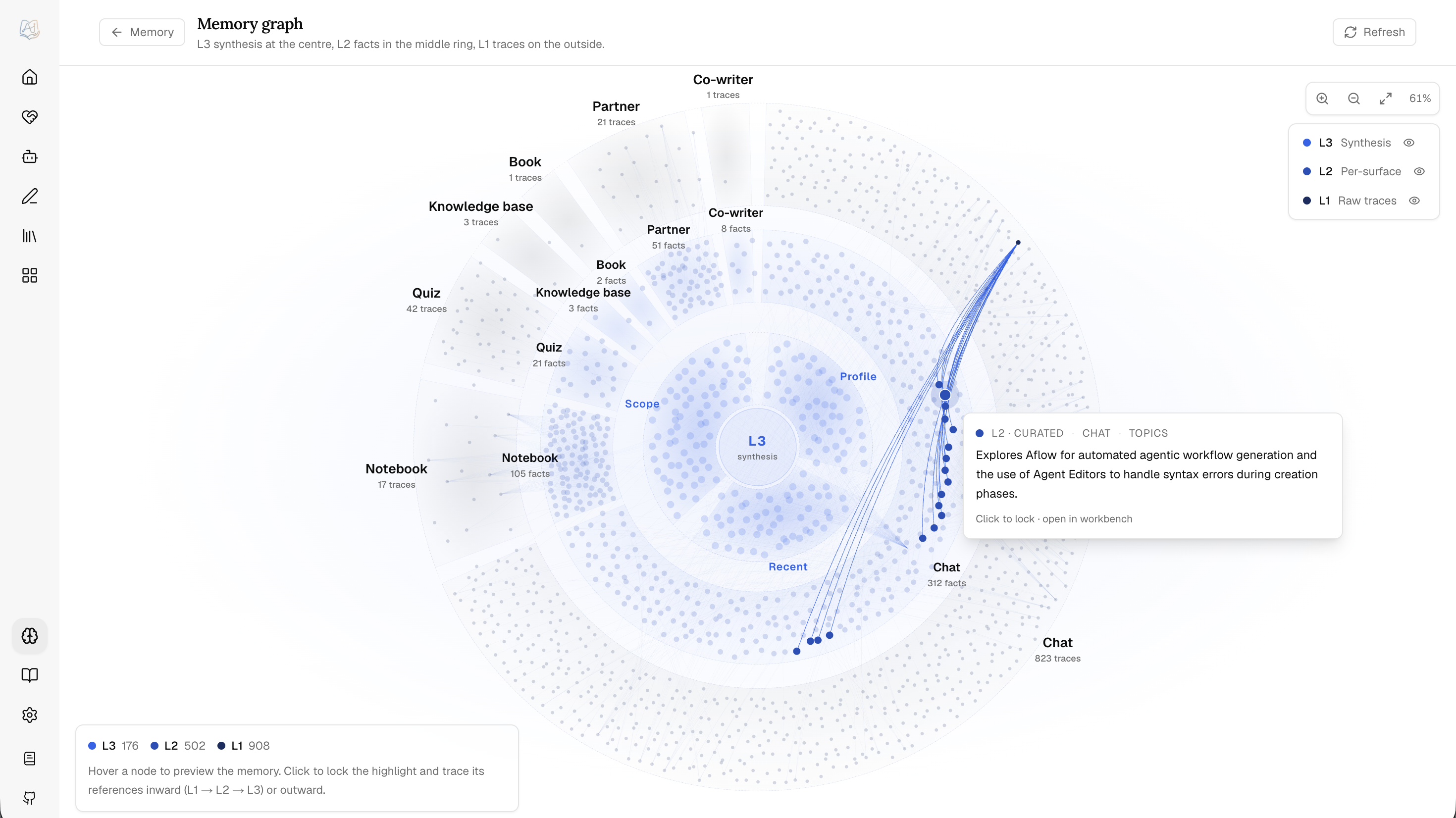
The Memory Graph shows the whole pyramid — L3 synthesis at the centre, L2 in the middle ring, L1 traces on the outside — with exact L2 → L1 evidence edges and L3 → contributing-surface links. Memory is tracked across chat, notebook, quiz, kb, book, partner, and cowriter surfaces; the consolidator's Update / Audit / Dedup budgets are tuned in Settings → Memory.
⚙️ Settings — One Control Plane
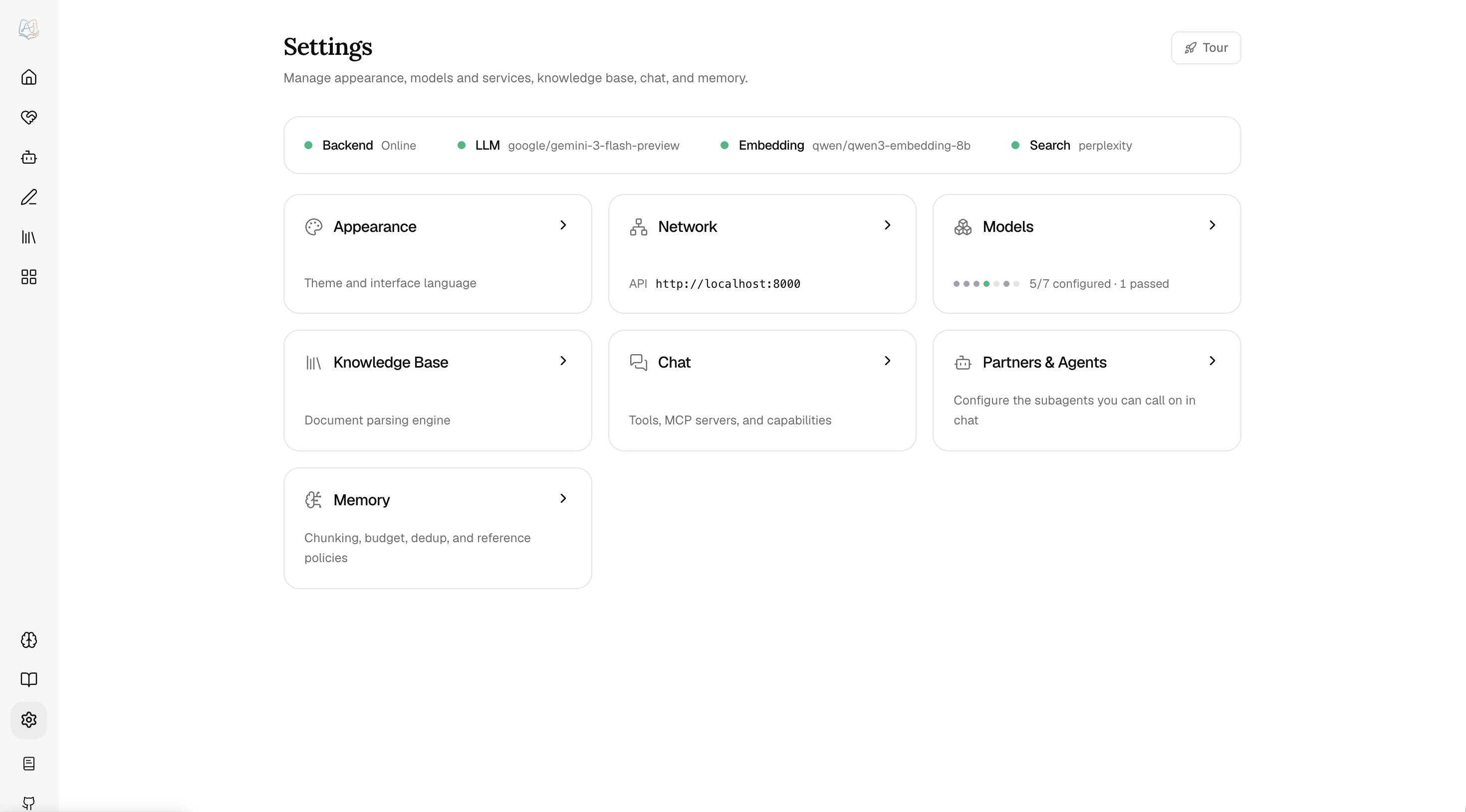
Settings is the operational control plane, opening on General for interface and model output language. Its searchable navigator links to independent pages: Personal covers Workspaces, Data migration, Appearance, and Usage statistics; Learning & conversation covers starting points, attachments, Video Learning, learner and guardian controls, Learning progress, and Memory; Models & services covers Providers, Language models, Task models, Embedding, Search, Voice, and Multimodal generation; Features & integrations covers tools, capability parameters, Partners & agents, and Knowledge & documents. System holds Network, Runtime status, and About; Archived chats lets you search, restore, or permanently delete archived conversations. Runtime status contains backend health, resident memory, and the Readiness matrix grading capability blockers, warnings, and suggestions. Workspaces keeps topic files and learning state separate, with verified migration and export under Data migration. A provider holds a vendor's address and credential for reuse by its service models; the model pages choose saved providers and configure model names and capabilities. Task models pin a small, fast model for background work — naming conversations and writing starting points — and resolve to the active default when empty. Voice groups speech synthesis and transcription; Multimodal generation groups image and video models. Partners & agents configures local harnesses and a remote Hermes gateway.
Xiaomi MiMo speech. Add a Xiaomi MiMo provider with https://api.xiaomimimo.com/v1 and its API key, then add mimo-v2.5-tts under Settings → Voice. Choose a preset such as mimo_default, 冰糖, or 苏打, use wav or pcm16 output, and audition it before applying. Voice instructions control style and speaking speed. This adapter supports preset speech only; voice design and voice cloning require separate models and are not supported. If an older MiMo speech model was configured through the generic OpenAI-compatible adapter, recreate its speech entry using the Xiaomi MiMo provider so it uses the chat-completions protocol. See the official MiMo speech guide.
MiniMax speech — in Settings → Voice, choose MiniMax for text-to-speech and select speech-2.8-hd. Configure a MiniMax API key and explicitly select a system voice or enter a custom voice ID. The API base defaults to https://api.minimax.io/v1; for the China region use https://api.minimaxi.com/v1. Read-aloud and voice previews use the native speech endpoint, with MP3, WAV, FLAC or PCM output, sample rate, speed and language controls. See the MiniMax speech API for voice IDs and account availability.
Video Learning under Settings → Learning & conversation configures YouTube captions and Invidious access for Reading. To use Invidious, set its administrator-managed backend API origin (for example http://127.0.0.1:3000) and browser-accessible public origin, test the connection, select Invidious, and save. Browse Invidious in Reading's add-material dialog searches videos and accesses connected subscriptions and playlists. YouTube playback uses the official privacy-enhanced player; missing captions remain visible and limit the tutor's evidence without blocking native playback. Install .[video-learning] for the default YouTube caption loader. Existing Watching links migrate into Reading with conversation history, compatible transcripts, notes, and progress preserved; new timestamp notes are Reading annotations. Bilibili uses its own playback and caption path.
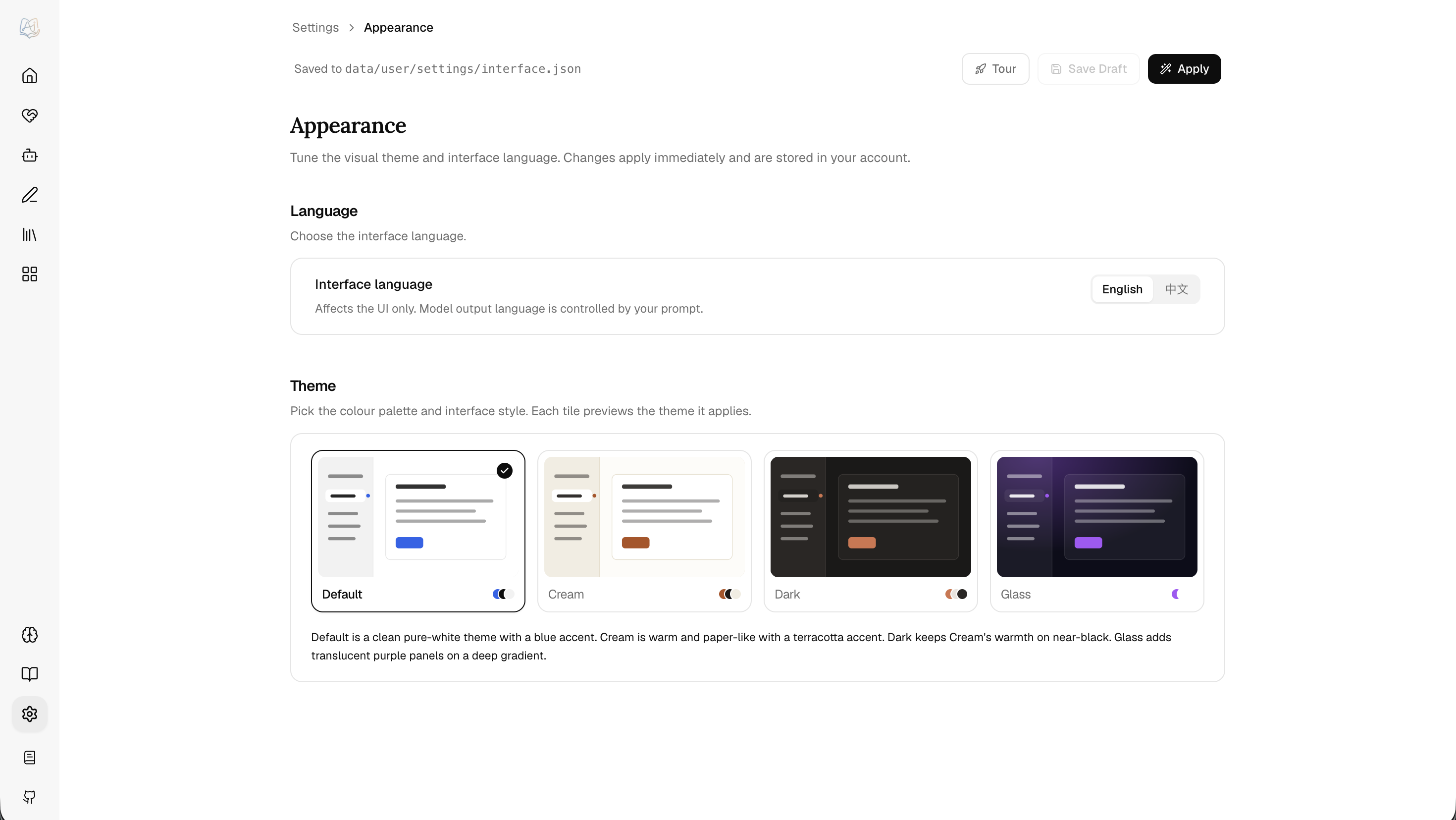
Most sections use a draft-and-apply flow, so you can test a provider before committing it. You can also just ask in Chat: the assistant reads the current configuration, applies a change, and says whether it needs a restart or a re-index — probing a new model before it commits, so it cannot switch itself onto something unreachable. API keys never pass through the model, which opens the matching form for you instead. Four themes ship in the box — Default, Cream, Dark, and Glass. Project-root .env files are intentionally ignored; runtime configuration lives under data/user/settings/*.json unless DEEPTUTOR_HOME or deeptutor start --home points the app elsewhere.
OpenAI Codex OAuth (experimental). Adding OpenAI Codex under Settings → Providers opens a browser sign-in that runs against your own ChatGPT plan, so no OPENAI_API_KEY is needed. Tokens live only in data/system/user-secrets/<owner>/private/openai-codex/ — in the multi-container Compose deployment, outside every tree the exec sandbox can reach — and DeepTutor never reads or modifies your ~/.codex CLI login. The model list comes from that account's live catalog; signing in publishes the profile but only becomes the active model when no LLM is configured yet. Because a token authorizes one person's plan, the profile is not shareable through user grants — each account signs in for itself, ordinary users included: their sign-in card sits under Providers, and the resulting models, catalog, and sign-out stay private to that account.
On sign-in and Refresh models, DeepTutor reads the latest stable @openai/codex version from the official npm registry and uses it as the catalog request's client_version. This is metadata-only: it does not install, download, or upgrade the Codex CLI, and the npm request carries no OAuth credentials. Discovery has a three-second deadline and a 64 KiB response limit. If it fails, DeepTutor uses the last successful version for that account, or its built-in fallback when none is cached. Only a successfully parsed live catalog saves a new version; validators are never reused across versions or credential generations. A version rejection or incompatible catalog structure permits one retry with the previous version; authentication, rate-limit, and TLS failures are not retried as version problems. A failed manual refresh reports an error rather than presenting an old cached catalog as refreshed.
Successful version history survives same-account token renewal and catalog authentication errors, without making invalidated model data or ETags usable again. Signing out clears that account's local cache, including the version history. Ordinary status reads and inference do not query npm. New catalog entries do not replace a model you already selected or restart learning sessions; appearing in the catalog does not establish full inference-protocol compatibility. There is no background version updater or user version setting.
Default local Docker and Podman deployments use separate loopback networks and need a temporary bridge during sign-in. Follow the temporary local Codex OAuth bridge guide for the exact Docker, Compose, Podman, and teardown commands.
For a remote deployment, the browser's localhost and the server's localhost are different machines, so an ordinary reverse proxy alone cannot carry the browser's localhost callback to the server. Use an SSH tunnel as the callback bridge. The tunnel reaches the already-published Web port; Next.js rewrites only the exact callback path to the public callback broker, and the broker validates state before routing to the original OAuth operation. The callback listener remains on the backend loopback, ports 1455 and 1457 are not published, and this path supports the default Docker bridge network.
ssh -N -L 1455:127.0.0.1:3782 <ssh-user>@<server-host>
If DeepTutor reports fallback callback port 1457, use:
ssh -N -L 1457:127.0.0.1:3782 <ssh-user>@<server-host>
Run only the one command that matches the actual callback port; never run both. 3782 is only the example Web port: it is the configured frontend/container port reported as callback_forward_port. That value does not guarantee that the same port is listening on the SSH host's 127.0.0.1. If Docker or Podman publishes a different host port, or a reverse proxy listens on a different port, replace only the right-hand target port (3782 above) with the Web port actually listening on the SSH host's 127.0.0.1; keep the left-hand callback port as 1455 or 1457. <server-host> is the SSH host whose loopback owns that listening port. If the browser URL names a reverse proxy or load balancer, replace it with the correct SSH frontend host.
The CLI prints the tunnel command and then immediately tries to open the browser. On a remote deployment, keep the authorization page open without completing it, establish the printed tunnel in another terminal, and only then continue authorization.
Remote-topology detection has a localhost boundary. If Web itself is reached through an SSH or IDE localhost forward, the browser cannot tell that the server is remote. For the current Web operation, leave its authorization page unfinished, read redirect_uri in that operation's authorize URL to identify callback port 1455 or 1457, and create the second tunnel from that local port to the actual Web port. Alternatively, cancel that Web operation and start a new one with the CLI; the CLI output belongs to the new operation and must not be used for the existing Web operation. Quota errors and catalog failures are reported as-is and never fall back to a paid provider. This compatibility path is experimental: the upstream interface may change.
👥 Multi-User — Shared Deployments · optional auth, isolated per-user workspaces
Authentication is off by default — DeepTutor runs single-user. Turn it on and one data/ tree hosts an admin workspace, isolated per-user workspaces, and partner workspaces side by side:
data/
├── user/                    # Admin workspace + global settings
├── users/<uid>/             # Per-user scope: chat history, memory, notebooks, KBs
├── partners/<id>/workspace/ # Partner (synthetic-user) scope
├── cli-apps/                # Installed CLI apps, mounted read-only into the sandbox
└── system/                  # auth · grants · audit · user-secrets/<owner> (OAuth tokens)
The first registered user becomes admin and owns model catalogs, provider credentials, shared knowledge bases, skills, canonical shared books, and per-user grants. Admin-created local users choose Standard, Learner, or Custom. Learner locks learning capabilities and material policy, adds an adaptive profile, and supports revocable device credentials with expiry and daily limits; authorized guardians can view reports, approve materials, and reset credentials. Other users get isolated workspaces plus scoped models, KBs, skills, partners, and shared-book access without receiving raw API keys. If auth.json already carries a username + password_hash, that account is the admin: /register stays closed and accounts created from /admin/users are always role=user until you promote them.
Enable it: turn auth on in data/user/settings/auth.json, restart deeptutor start, register the first admin at /register, then add users from /admin/users and assign models, KBs, skills, partners, tool/MCP/CLI-app policy, and code-execution access through grants; configure shared books under each user's Book access panel.
For split private/public origins, set auth.private_login_hosts (or AUTH_PRIVATE_LOGIN_HOSTS) to the private frontend hosts that may show password sign-in and registration. The frontend forwards the incoming HTTP Host to the backend as its frontend-host assertion. Preserve the browser's Host through your reverse proxy, and make the public ingress reject requests naming a private host; do not expose a raw Next.js port that accepts arbitrary Host values. HTTP Host can be forged by a direct client, so private-host authorization depends on that ingress boundary. The backend accepts frontend-host assertions only from loopback by default. If the Web frontend connects from another container or host, set AUTH_TRUSTED_FRONTEND_PROXY_IPS to that frontend proxy's exact IP address on the backend process (comma-separated for more than one). Keep the backend API private to the frontend proxy and do not include general client networks in this list. Loopback is always allowed; when the list is non-empty, an authenticated user on a private origin can open Profile → Public device sign-in and create a short-lived, host-bound pairing link for an HTTPS public origin. The public /handoff page exchanges the one-time code for an equally short JWE ticket in a POST body, consumes the ticket once, and receives the normal HttpOnly session cookie.
PocketBase stays a single-user integration — keep
integrations.pocketbase_urlblank for multi-user deployments unless you've wired up an external user store.
⌨️ DeepTutor CLI — Agent-Native Interface
One deeptutor binary, two ways in: an interactive REPL for people who live in the terminal, and structured JSON for other agents that drive DeepTutor as a tool. Same capabilities, tools, and knowledge bases either way.
Drive it yourself
deeptutor chat opens an interactive REPL and selects a mode with --capability; deeptutor run <capability> "<message>" takes that capability as its first positional argument and exits after one turn. Both accept --tool, --kb, --config, and --workspace to select a registered workspace.
deeptutor chat                                              # interactive REPL
deeptutor chat --capability deep_solve --kb my-kb --tool rag
deeptutor run chat "Explain the Fourier transform" --tool rag --kb textbook
deeptutor run chat "Find recent work beyond this material" --kb textbook --tool knowledge_frontier
deeptutor run deep_research "Survey 2026 papers on RAG" \
  --config mode=report --config depth=standard
Core workspace management is here too — knowledge bases (kb), sessions (session), partners (partner), skills (skill), notebooks, memory, and config; course and session organization remain in the Web app. Full list below.
Let an agent drive it
DeepTutor is built to be operated by another agent. Add --format json to any run and each turn streams NDJSON — one event per line (content, tool_call, tool_result, done, …), every line tagged with its session_id. Runs are headless-safe: an ask_user pause with no TTY auto-resolves with an empty reply instead of hanging.
# One shot, machine-readable
deeptutor run deep_solve "Find d/dx[sin(x^2)]" --tool reason --format json

# Chain turns in one stateful session — capture the id, reuse it
SID=$(deeptutor run deep_research "Survey 2026 papers on RAG" \
  --config mode=report --config depth=standard --format json \
  | jq -r 'select(.type=="done").session_id')
deeptutor run deep_question "Quiz me on that survey" --session "$SID" --format json
The repo ships a root SKILL.md — a compact handover doc for the CLI. Ask your agent to read it explicitly; its Agent Setup guide covers installation and configuration. You can also wrap deeptutor run as a tool in a LangChain / AutoGen loop. Full recipes: Agent Handoff.
Command reference
| Command | Description |
|---|---|
deeptutor init [--non-interactive] [--home PATH] |
Run the setup wizard, or create missing defaults without prompts |
deeptutor doctor [--online] |
Check whether the runtime is ready to start a session; --online also probes the configured model provider, --format json prints the report |
deeptutor start [--home PATH] [--dev] [--detach] [--no-browser] |
Launch backend + frontend together; optionally detach or suppress browser opening |
deeptutor stop [--home PATH] |
Stop a launcher started with --detach |
deeptutor serve [--port PORT] |
Start only the FastAPI backend |
deeptutor workspace show/set/reset |
Inspect, select, or restore the per-user Content Workspace |
deeptutor run <capability> <message> |
Run a single capability turn (chat, ask_questions, deep_solve, deep_question, deep_research, visualize, math_animator, mastery_path, immersive_reading, course_study, audio_overview); add --format json for NDJSON output |
deeptutor chat |
Interactive REPL with capability, tool, KB, notebook, and history controls |
deeptutor partner list/create/start/stop |
Manage IM-connected partners |
deeptutor kb list/info/create/connect-kiwix/add/search/eval/eval-diff/set-default/delete/list-sources/sync |
Manage knowledge bases, connect Kiwix archives, score and compare retrieval runs, and synchronize registered GitHub/web sources (with source add/remove commands) |
deeptutor skill search/install/list/remove/login/logout/publish/update |
Manage skills, install from hubs, and publish your own (eduhub:<slug> by default, see Ecosystem) |
deeptutor memory show/clear |
Inspect L2/L3 memory docs or clear L1/all memory |
deeptutor session list/show/open/rename/delete |
Manage shared sessions |
deeptutor notebook list/create/show/add-md/replace-md/remove-record |
Manage notebooks from Markdown files |
deeptutor book list/health/refresh-fingerprints |
Inspect books and refresh source fingerprints |
deeptutor plugin list/info/state/search/show/install/approve/enable/disable/rollback/uninstall |
Inspect tools and capabilities; manage reviewed plugin packages and their permission approvals |
deeptutor config show [--home PATH] |
Show resolved runtime configuration with credentials redacted |
deeptutor config providers |
List supported setup providers and defaults as JSON |
deeptutor config apply FILE [--check] [--home PATH] |
Apply setup JSON without prompts, or validate it without writing settings |
deeptutor provider login <provider> |
Provider auth (openai-codex OAuth login; github-copilot GitHub device login; codebuddy validates CodeBuddy SDK auth and starts login when needed) |
GitHub Copilot credentials belong to the signed-in DeepTutor owner and live only at
<runtime-home>/data/system/user-secrets/<owner-id>/private/github-copilot/credentials.v1.json,
outside sandbox workspaces. CLI/admin partners use the administrator's credentials;
other users sign in separately, and Copilot profiles cannot be shared through model grants.
External nanobot/Copilot token files are never imported: after upgrading, run
deeptutor provider login github-copilot again.
Login validates inference with a currently discovered model; init validates the selected
model and aborts on failure without saving the draft configuration. Successful GitHub
authentication alone does not establish Copilot model access (the saved login is retained
if validation fails). Runtime requests follow the API endpoint returned by token exchange,
including refreshes, and respect each model's Responses/Chat Completions endpoint metadata.
Copilot-specific Responses compatibility is applied at dispatch without rewriting stored history.
CLI-only distribution
The CLI-only package lives in packaging/deeptutor-cli. In this checkout, install it from source:
python -m pip install -e ./packaging/deeptutor-cli
It isn't published to PyPI yet, so the main Get Started section keeps the source-install path.
🧩 Ecosystem — EduHub & the Skills Community
DeepTutor skills use the open Agent-Skills format — a folder with a SKILL.md playbook (YAML frontmatter + Markdown) and optional reference files. Nothing about it is DeepTutor-specific, so any registry that speaks the format becomes a source for your library. DeepTutor ships with EduHub — our own education-focused skill registry — wired in as the default hub.
EduHub — DeepTutor's skill ecosystem
EduHub is the community hub DeepTutor launched for sharing teaching-oriented agent skills — Socratic tutors, flashcard builders, essay feedback, exam blueprints, concept explainers, and more. It is built into DeepTutor, so there's nothing to configure: a bare slug or an eduhub: prefix resolves to it.
Find and install — in the browser, open Learning Space → Skills → Import from EduHub to browse the catalog and download a skill straight into your library. From the terminal:
deeptutor skill search "socratic tutor"               # search EduHub (the default hub)
deeptutor skill install socratic-tutor                # fetch → verify → register
deeptutor skill install eduhub:socratic-tutor@1.2.0   # pin a hub and a version
deeptutor skill list                                  # local skills with their hub provenance
Publish your own — package a SKILL.md and share it back to the community:
deeptutor skill login                                 # browser sign-in to EduHub
deeptutor skill publish ./my-skill                    # interactive: pick a track + tags, then upload
deeptutor skill update                                # roll back or release a new version
EduHub is also a standalone, ClawHub-compatible registry, so agents that aren't DeepTutor (Claude Code, Codex, …) can use it directly through the eduhub CLI — npx eduhub install socratic-tutor.
The import safety gate
Whatever the source, every import passes the same safety gate before anything touches your workspace:
- the registry's security verdict is checked first — flagged packages are refused unless you pass
--allow-unverified; - archives are extracted defensively with path-traversal, entry-count, size, compression-ratio, suffix, and symlink checks; executable bits are stripped, while extensionless files remain allowed;
- frontmatter is normalized to DeepTutor's schema and
always:is stripped, so a downloaded skill can never force itself into every system prompt; - provenance — hub, version, verdict, and install time — is written to
.hub-lock.jsonfor audits and updates.
In multi-user deployments, browser imports land in the authenticated caller's skill layer, while CLI and admin-console installs target the owner/admin workspace; admin skills stay hidden and read-only for ordinary users until granted.
Also compatible with ClawHub
Because DeepTutor speaks the open Agent-Skills format, ClawHub works as a first-class source too — it's built in alongside EduHub. Pick it with the hub prefix:
deeptutor skill search "git release notes" --hub clawhub
deeptutor skill install clawhub:git-release-notes@1.0.1
deeptutor skill install clawhub:udiedrichsen/stock-analysis
When several publishers share the same slug, search shows each publisher and a
fully scoped install ref (clawhub:<ownerHandle>/<slug>).
Add more registries in data/user/settings/skill_hubs.json: a type: "clawhub" entry points at any compatible HTTP API (EduHub and ClawHub both speak it), type: "command" wraps whatever fetch CLI a registry ships, and "default" chooses the hub used for bare slugs. All of them feed the same import gate.
🤝 Open Source Partners

Using code: DEEPTUTOR20 — get $20 off for your first PageIndex subscription!
🌐 Community
🔗 Maintainers
 Bingxi Zhao |
 Xingyu Hou |
 Jiahao Zhang |
📮 Contact
DeepTutor is an open-source project led by Bingxi Zhao within the HKUDS Group, and it iterates in a fully open-source form, built together with the community. So far, we DO NOT have paid online products of any form. Feel free to reach out at bingxizhao39@gmail.com for discussions, ideas, or collaboration.
🙏 Appreciation
Heartfelt thanks to Chao Huang, director of the Data Intelligence Lab @ HKU, and to our HKUDS labmates for their warm support — especially Jiahao Zhang, Zirui Guo, and Xubin Ren. We're also deeply grateful to the open-source community: your stars, issues, pull requests, and discussions shape DeepTutor every single day.
DeepTutor also stands on the shoulders of outstanding open-source projects that gave us both tools and inspiration:
| Project | Role / Inspiration |
|---|---|
| LlamaIndex | RAG pipeline and document-indexing backbone |
| nanobot | Ultra-lightweight agent engine that powered the original TutorBot (HKUDS) |
| LightRAG | Simple & fast RAG (HKUDS) |
| AutoAgent | Zero-code agent framework (HKUDS) |
| AI-Researcher | Automated research pipeline (HKUDS) |
| OpenClaw | Open agent gateway and skill ecosystem behind ClawHub |
| Codex | Agent-native coding CLI that inspired our CLI workflow |
| Claude Code | Agentic coding CLI that inspired the DeepTutor agent loop |
| ManimCat | AI-driven math animation generation for Math Animator |
🗺️ Roadmap & Contribute
We want DeepTutor to keep iterating and improving — and ultimately to become a gift we give back to the open-source community. Our roadmap is updated continuously; vote on items there or propose new ones. If you'd like to contribute, see the Contributing Guide for branching strategy, coding standards, and how to get started.
We hope DeepTutor becomes a gift for the community. 🎁
Licensed under the Apache License 2.0.
Mastery turn grounding
Mastery turns read the active path's status before the first model request, using
the same status tool and mastery gates as an explicit tool call. This snapshot is
fresh for each turn, includes the active session mode, and is never cached across
turns. A failed read falls back to mastery_status; after changing the path, mode,
outline, or progress, the tutor can refresh through that tool. Card grading and
its existing handoff remain unchanged.
Repeated image attachments
The agent loop sends identical inline user images once per request and replaces later copies with references to the retained image. Stable request-only labels identify the retained inline images across provider translations and appended turns. Unique image blocks, remote URLs, differing image options, assistant messages, and tool results remain complete. Saved history keeps every original attachment; references are rebuilt after history is trimmed. This reduces repeated image payloads, but provider-reported usage remains the source of truth for billing and cache hits.





🤝 欢迎各种形式的贡献! 在
Roadmap为议题投票或提出新建议,详见 贡献指南,了解分支策略、编码规范及参与方式。
📰 新闻动态
- 2026-09-20 🎉 9 个月突破 4 万 Star!我们将持续拓展 DeepTutor 的学习生态。
- 2026-05-22 🌐 官方文档站点上线 deeptutor.info — 指南、参考文档与能力演示一站汇聚。
- 2026-04-19 🎉 111 天突破 2 万 Star!感谢大家对真正个性化智能辅导的支持。
- 2026-04-10 📄 论文已发布于 arXiv — 阅读 预印本,了解 DeepTutor 的设计理念与背后的思考。
- 2026-02-06 🚀 仅 39 天突破 1 万 Star!衷心感谢我们出色的社区。
- 2026-01-01 🎊 新年快乐!加入我们的 Discord、微信群 或 Discussions — 一起塑造 DeepTutor 的未来。
- 2025-12-29 🎓 DeepTutor 正式发布!
✨ 核心功能
DeepTutor 是一个智能体原生的学习工作区,将辅导、解题、测验生成、研究、可视化和掌握度练习整合在一个可扩展的系统中。
- 统一的运行时 — Chat、Ask Questions、Quiz、Research、Visualize、Solve、Course Study、Mastery Path、Immersive Reading 和 Audio Overview 共享同一套能力运行时与会话上下文,同时保留各自为特定用途设计的循环和流水线。
- Task Board — 在待办、进行中和已完成三个状态中追踪学习任务,支持添加备注、拖放或使用键盘可操作的移动按钮,并可从归档中恢复任务。卡片保留在当前工作区,沿用现有的外观和语言设置,无需配置模型。
- 互联的学习上下文 — 知识库、书籍、Co-Writer 草稿、笔记本、题库、人格预设和 Memory 可在支持它们的工作流中复用,并受账号授权与学习策略约束。
- 沉浸式视频学习 — 将 YouTube 或 Bilibili 链接添加到 Reading,即可使用原生播放、转录搜索、基于时间戳的辅导、已保存的笔记和可续接的进度;YouTube 字幕和浏览功能可以使用由管理员配置的 Invidious 实例。
- 子智能体与 Partners — 在 Chat 中调用实时智能体运行框架(Claude Code、Codex、Grok CLI、Antigravity、Kimi、opencode、MiMo、Hermes、OpenClaw 或 DeepSeek)或 Partner、导入历史对话,并让持久化 IM 伴侣运行在同一套大脑之上。
- 多引擎知识库 — 跨 LlamaIndex、PageIndex、GraphRAG、LightRAG、远程 LightRAG Server、自托管的 WeKnora 知识库、Tencent IMA 或 MarginNote 4 知识库、已连接的 Kiwix ZIM 归档,或链接的 Obsidian vault 的版本化 RAG 知识库,支持可插拔的文档解析。详见原生 LightRAG 角色模型,了解独立的抽取、查询与视觉设置、仅默认创建以及确认后的重建。
- 可扩展工具与技能 — 内置工具、MCP 服务器、CLI 应用、图像 / 视频 / 语音生成模型,以及从 EduHub 安装的社区技能。
- 可审计的记忆 — L1 追踪、L2 表面摘要和 L3 综合让个性化透明可编辑;Memory Graph 将 L2 事实关联至 L1 证据,并将 L3 综合关联至参与的表面层。
🚀 快速开始
让你的智能体配置 DeepTutor
将以下提示复制给可使用终端的 AI 智能体(例如 Codex 或 Claude Code):
Help me install and configure DeepTutor locally from https://github.com/HKUDS/DeepTutor.
Clone the repository, or reuse my existing checkout, and read SKILL.md and
docs-for-user/AGENT_SETUP.md first. Follow that guide to prepare the environment,
configure my model provider, verify the setup, and start the Web app.
Ask me for any missing provider, model, or credential-source information;
do not print API keys. Preserve my existing files and settings, and finish
with the access URL and the results of your checks.
智能体配置指南 涵盖完整流程,包括非交互式 CLI 配置。若要自行安装,请选择下方的一种方式。
DeepTutor 提供四种安装方式,四者共享同一套运行时主目录布局:私有设置存储在启动目录下的 data/user/settings/ 中(如果显式指定了 DEEPTUTOR_HOME / deeptutor start --home,则存储在该位置)。完整应用的推荐流程为:选定运行时主目录 → 安装 → deeptutor init → deeptutor start。
一条命令 Docker 试用
如果尚未安装 Docker,请先安装 Docker;随后无需配置 Python 或 Node.js,即可直接试用完整应用:
docker run --rm --name deeptutor \
  -p 127.0.0.1:3782:3782 \
  -v deeptutor-data:/app/data \
  ghcr.io/hkuds/deeptutor:latest
打开 http://127.0.0.1:3782,在 Settings → Providers 中配置模型提供商;体验结束后在该终端按 Ctrl+C 停止。名为 deeptutor-data 的卷会保留设置和本地数据,供下次启动复用。
内容工作区
内容工作区(Content Workspace) 与 DeepTutor 的私有运行时主目录相互独立。它是智能体可以读取的文件夹,生成的文件位于 outputs/<capability>/<session>/<turn>/ 下。自定义工作区将对话、学习素材、进度和缓存隔离在私有的 .deeptutor/data/ 目录树中,文件工具无法浏览该目录树。设置、凭证和 Memory 仍在账号层面共享。
未经配置时,内容工作区默认为 <runtime-home>/data/user/workspace。本地 PyPI、CLI 和源码安装可以在 Settings → Workspaces 中选择文件夹;使用以下命令设置默认文件夹:
deeptutor workspace show
deeptutor workspace set /absolute/path/to/my-folder
deeptutor workspace reset
各项能力通过内置的 workspace 工具查看所选的工作区。模型只会收到形如 outputs/... 的相对路径;当它使用 workspace_present 时,界面会渲染出一份可打开的、经过鉴权的快照。同样的相对路径在普通的 Markdown 链接或图片中也同样有效。之后修改源文件不会改变已经呈现过的快照。
学习空间负责管理资源库。在 Settings → Workspaces 中,可以为每个工作区分配 Skills、MCP 服务和知识库,或保留其现有访问规则。已有工作区会保持当前的访问权限,直到保存新的选择。分配直接引用原始资源,不会复制凭证或知识索引;工作区专属技能可以覆盖共享版本。详见工作区资源分配。
outputs/ 之外的执行是只读的。要把生成的文件复制到内容工作区内的其他位置,需要针对那个确切的源与目标显式确认一次允许一次。系统沙箱或 Docker runner 在可用时会强制执行这一边界;本地受限子进程回退方案在 Workspace 设置中会被标注为尽力而为。
方式一 — 从 PyPI 安装 · 完整本地 Web 应用 + CLI,无需克隆仓库
完整本地 Web 应用 + CLI,无需克隆仓库。需要 Python 3.11–3.14 以及 PATH 中的 Node.js 20+ 运行时(打包的 Next.js 独立服务器由 deeptutor start 启动)。
mkdir -p my-deeptutor && cd my-deeptutor
pip install -U deeptutor
deeptutor init     # prompts for ports + LLM provider + optional embedding/search
deeptutor start    # starts backend + frontend; keep the terminal open
deeptutor init 会提示配置后端端口(默认 8001)、前端端口(默认 3782)、LLM 提供商 / 基础 URL / API Key / 模型、可选的知识库 / RAG 嵌入提供商,以及可选的 Web Search 搜索提供商。
deeptutor start 完成后,打开终端打印的前端 URL — 默认为 http://127.0.0.1:3782。在该终端按 Ctrl+C 可同时停止后端和前端。跳过 deeptutor init 也可用于快速体验;应用会以默认端口和空模型设置启动,稍后在 Settings → Providers 和 Language models 中配置即可。
浏览器麦克风转录: 兼容 OpenAI 的 STT 适配器会将浏览器音频直接转发给提供商,无需本地转换。原生 DashScope 和 Volcengine STT 适配器会将浏览器的 WebM/Opus 音频转换为 16 kHz WAV,要求 DeepTutor 的 PATH 中有可执行的 ffmpeg。符合规范的 16 kHz 单声道 PCM WAV 可跳过此转换。在 Windows 上通过 PyPI 安装且使用任一原生适配器时,请安装 FFmpeg,将其 bin 目录加入服务的 PATH,然后重启 DeepTutor。转换失败的信息会显示在聊天输入框下方。
方式二 — 从源码安装 · 基于代码仓库进行开发
适用于基于代码仓库的开发。使用 Python 3.11–3.14 和 Node.js 22 LTS 以匹配 CI 和 Docker 环境。
git clone https://github.com/HKUDS/DeepTutor.git
cd DeepTutor

# Create a venv (macOS/Linux). Windows PowerShell:
#   py -3.11 -m venv .venv ; .\.venv\Scripts\Activate.ps1
python3 -m venv .venv && source .venv/bin/activate
python -m pip install --upgrade pip

# Install backend + frontend deps
python -m pip install -e .
( cd web && npm ci --legacy-peer-deps )

deeptutor init
deeptutor start --dev
deeptutor start 会为本地 web/ 前端构建一次生产版本并复用;--dev 则以热更新(HMR)方式运行 Next.js。配置布局、端口和 Ctrl+C 停止均与方式一相同。
Conda 环境(替代 venv)
conda create -n deeptutor python=3.11
conda activate deeptutor
python -m pip install --upgrade pip
可选安装额外依赖 — RAG 引擎 / dev / partners / matrix / math-animator
pip install -e ".[rag-lightrag]"    # Built-in LightRAG engine (exact supported SDK)
pip install -e ".[graphrag]"        # Microsoft GraphRAG engine (Python 3.11–3.13)
pip install -e ".[dev]"             # tests/lint tools
pip install -e ".[partners]"        # Partner IM channel SDKs
pip install -e ".[video-learning]"  # compatibility extra; captions ship in the full/CLI installs
pip install -e ".[matrix]"          # Matrix channel without E2EE/libolm
pip install -e ".[matrix-e2e]"      # Matrix E2EE; requires libolm
pip install -e ".[math-animator]"   # Manim addon; requires LaTeX/ffmpeg/system libs
前端依赖调整与开发服务器故障排查
修改前端依赖: 运行 npm install --legacy-peer-deps 以刷新 web/package-lock.json,然后同时提交 web/package.json 和 web/package-lock.json。
开发服务器卡住: 如果 deeptutor start --dev 报告有已存在但无响应的前端进程,停止它打印的 PID。如果实际上没有 Next.js 进程在运行,则锁文件已过时 — 删除后重试:
rm -f web/.next/dev/lock web/.next/lock
deeptutor start --dev
方式三 — Docker · 单一自包含容器
单容器运行完整 Web 应用。镜像托管在 GitHub Container Registry:
ghcr.io/hkuds/deeptutor:latest— 最新稳定版本ghcr.io/hkuds/deeptutor:<version>— 不含前导v的精确版本(例如:1.6.3);预发布版本只会获得对应的版本标签
有关 podman / 无根容器 / 只读根文件系统部署及完整的每种安装指南,请参阅 CONTAINERIZATION.md。
docker run --rm --name deeptutor \
  -p 127.0.0.1:3782:3782 \
  -v deeptutor-data:/app/data \
  ghcr.io/hkuds/deeptutor:latest
要在容器启动时选定宿主机上的内容文件夹,将其挂载到固定的容器路径,并把 DeepTutor 锁定到该路径:
mkdir -p "$PWD/deeptutor-workspace/outputs"
docker run --rm --name deeptutor \
  -p 127.0.0.1:3782:3782 \
  -v deeptutor-data:/app/data \
  -v "$PWD/deeptutor-workspace:/workspace" \
  -e DEEPTUTOR_WORKSPACE_ROOT=/workspace \
  -e DEEPTUTOR_WORKSPACE_ALLOWED_ROOTS=/workspace \
  ghcr.io/hkuds/deeptutor:latest
对于 Compose,在运行 python scripts/docker_compose.py up -d 前设置 DEEPTUTOR_WORKSPACE_HOST=/absolute/host/folder;省略时默认使用 ./data/user/workspace。Docker 路径在启动时就已选定,因此在 Web Settings 页面中会显示为已锁定。
只需发布
3782端口。 浏览器只与前端源通信;Next.js 中间件(web/proxy.ts)在容器内部将/api/*和/ws/*转发给 FastAPI 后端。发布8001(-p 127.0.0.1:8001:8001)是可选的 — 仅在需要用 curl 或脚本直接访问 API 时才有用。
打开 http://127.0.0.1:3782。容器首次启动时会创建 /app/data/user/settings/*.json;通过 Web Settings 页面配置模型提供商。配置、API Key、日志、默认内容工作区、记忆和知识库均持久化在 deeptutor-data 卷中。若单独挂载了内容工作区,则会持久化在其宿主机路径下。可选的额外依赖应配置在部署层面,而不是在 shell 中临时安装:设置 DEEPTUTOR_EXTRAS(系统库则用 DEEPTUTOR_APT_PACKAGES),由此启动的每个容器都会重新应用这些依赖;而 docker exec … pip install 这类临时安装会在下一次 compose down 后丢失。
- 不同宿主机端口: 修改每个
-p host:container映射的左侧(例如-p 127.0.0.1:8088:3782)。如果修改了/app/data/user/settings/system.json中容器侧的端口,重启并更新映射右侧以匹配。 - 后台运行: 添加
-d,然后用docker logs -f deeptutor查看日志,docker stop deeptutor停止,重用名称前执行docker rm deeptutor。deeptutor-data卷在重启之间保留私有运行时数据和默认内容工作区;单独挂载的内容工作区则持久化在其宿主机路径下。
远程 Docker / 反向代理: 浏览器只与前端源(:3782)通信;容器内的 Next.js 中间件在服务端将 /api/* 和 /ws/* 转发给后端服务器。对于常见的单容器场景,完全不需要配置 API base — 只需将反向代理 / TLS 终止器指向 :3782 即可。只有在拆分部署(后端在独立容器/主机上)时才需要设置 API base:将 data/user/settings/system.json 中的 next_public_api_base 设置为前端服务器用于访问后端的内网地址(它在服务端读取,永远不会发送到浏览器)。
{
  "next_public_api_base": "http://backend:8001"
}
next_public_api_base_external(及其别名 public_api_base)作为低优先级的备用配置被接受。CORS 使用前端来源,而非 API URL。禁用认证时,DeepTutor 默认允许普通 HTTP/HTTPS 浏览器来源。启用认证时,需添加精确的前端来源:
{
  "cors_origins": ["https://deeptutor.example.com"]
}
连接宿主机上的 Ollama / LM Studio / llama.cpp / vLLM / Lemonade
在 Docker 内部,localhost 指容器本身,而非宿主机。要连接宿主机上的模型服务,使用宿主机网关(推荐):
docker run --rm --name deeptutor \
  -p 127.0.0.1:3782:3782 -p 127.0.0.1:8001:8001 \
  --add-host=host.docker.internal:host-gateway \
  -v deeptutor-data:/app/data \
  ghcr.io/hkuds/deeptutor:latest
然后在 Settings → Providers 中,将提供商 Base URL 指向 host.docker.internal:
- Ollama LLM:
http://host.docker.internal:11434/v1 - Ollama 嵌入:
http://host.docker.internal:11434/api/embed - LM Studio:
http://host.docker.internal:1234/v1 - llama.cpp:
http://host.docker.internal:8080/v1 - Lemonade:
http://host.docker.internal:13305/api/v1
Docker Desktop(macOS/Windows)通常无需 --add-host 即可解析 host.docker.internal。在 Linux 上,该标志是在现代 Docker Engine 上创建该主机名的便携方式。
Linux 替代方案 — 宿主机网络: 添加 --network=host 并去掉 -p 标志。容器直接共享宿主机网络,打开 http://127.0.0.1:3782(或 system.json 中的 frontend_port),宿主机服务可通过普通 localhost URL(如 http://127.0.0.1:11434/v1)访问。注意宿主机网络会将容器端口直接暴露在宿主机上,可能与现有服务冲突 — 若需保持在回环地址上,可设置 BACKEND_HOST=127.0.0.1 和 FRONTEND_HOST=127.0.0.1(详见 CONTAINERIZATION.md)。
方式四 — 仅 CLI · 无 Web UI,基于源码安装
当不需要 Web UI 时使用。仅 CLI 包从源码安装,不从 PyPI 安装。
git clone https://github.com/HKUDS/DeepTutor.git
cd DeepTutor

# Create a venv (macOS/Linux). Windows PowerShell:
#   py -3.11 -m venv .venv-cli ; .\.venv-cli\Scripts\Activate.ps1
python3 -m venv .venv-cli && source .venv-cli/bin/activate
python -m pip install --upgrade pip

python -m pip install -e ./packaging/deeptutor-cli
deeptutor init --cli
deeptutor chat
deeptutor init --cli 与完整应用共享同一 data/user/settings/ 布局,但跳过后端/前端端口提示。它仍会提供 Embedding 和 Search 选择器(不需要时选择 Skip),写入关键运行时文件(system.json、auth.json、integrations.json、interface.json、model_catalog.json、main.yaml、agents.yaml),并提示选择活跃的 LLM 提供商和模型。
常用命令
deeptutor chat                                          # interactive REPL
deeptutor chat --capability deep_solve --tool rag --kb my-kb
deeptutor run chat "Explain Fourier transform"
deeptutor run deep_solve "Solve x^2 = 4" --tool rag --kb my-kb
deeptutor kb create my-kb --doc textbook.pdf
deeptutor memory show
deeptutor config show
本地 deeptutor-cli 安装不包含 Web 资产或服务器依赖。请保留源码仓库 — 可编辑安装指向它。若之后需要添加 Web 应用,从同一工作区安装 PyPI 包(方式一),并运行 deeptutor init + deeptutor start。
代码执行沙箱(Office 技能) · 运行 docx / pdf / pptx / xlsx 的模型生成代码
内置的 Office 技能 — docx / pdf / pptx / xlsx — 通过让模型编写一段简短的 Python 脚本(python-docx、reportlab、openpyxl 等),经唯一的 exec 工具运行,并呈现保存下来的工作区文件来完成工作。只要有沙箱后端处于激活状态,这些工具就会挂载。DeepTutor 按以下顺序选择已配置的最强后端:
- Runner sidecar:
DEEPTUTOR_SANDBOX_RUNNER_URL将执行路由至Dockerfile.runner提供的加固最小权限服务。 - Linux bubblewrap:
bwrap可用时,由它隔离进程和文件。 - 受限子进程回退: 本地和单容器安装仅在允许时使用此方案;在 Docker 下,容器仍构成另一层边界。
data/user/settings/system.json 中的 sandbox_allow_subprocess 设置(默认 true)只控制最后一种回退方案。将其设为 false(或导出 DEEPTUTOR_SANDBOX_ALLOW_SUBPROCESS=0),可在没有 runner 或 bwrap 后端时拒绝子进程执行;它不会禁用这些更强的后端。
配置参考 — data/user/settings/ 下的配置文件(JSON/YAML)
data/user/settings/ 下的所有内容均为纯 JSON/YAML 格式。推荐使用 Settings 页面进行编辑;工作区注册信息单独存储在 data/user/.runtime/workspaces.sqlite3 中。
| 文件 | 用途 |
|---|---|
model_catalog.json |
提供商连接,以及 LLM、任务、嵌入、搜索、TTS、STT、图像和视频配置、凭证与活跃选择 |
system.json |
后端/前端端口、公开 API 基础地址、CORS、SSL 校验、附件目录及上传/提取限制 |
auth.json |
可选认证开关、用户名、密码哈希、token/cookie 设置 |
integrations.json |
可选的 PocketBase 和 sidecar 集成设置 |
interface.json |
UI 语言与模型输出语言 / 主题 / 侧边栏偏好 |
document_parsing.json |
解析引擎与图像描述模型选择、远程端点与引擎专属选项 |
video_learning.json |
YouTube 字幕提供商、Invidious 来源与账号访问,以及转录设置 |
main.yaml |
运行时行为默认值和路径注入 |
agents.yaml |
能力/工具的 temperature 和 token 设置 |
Web Search 引用默认经过过滤:只会展示公开的 http/https URL,且不允许嵌入凭证或使用异常端口。部署者可以在 data/user/settings/system.json 中添加面向教育场景的域名策略:
{
  "web_search_source_filtering": {
    "enabled": true,
    "blocked_domains": ["spam.example"],
    "trusted_domains": ["edu.cn", "arxiv.org"]
  }
}
当 trusted_domains 非空时,引用仅限这些域名及其子域;blocked_domains 始终拥有更高优先级。
项目根目录的 .env 不会作为应用配置文件被读取。最简模型配置:在 Settings → Providers 中保存 Base URL 和 API Key,然后在 Language models 中添加并选择一个 LLM。仅在计划使用知识库 / RAG 功能时才需要添加嵌入配置。
使用 API Route 时,在 Settings → Providers 中选择 API Route 并输入 API Route 密钥。预设地址为 https://global.api-route.com/v1;随后在 Language models 中使用 API Route 模型 ID 添加模型。密钥与模型的配置方法详见 API Route 快速入门。
如果提供商支持选择,LLM 和任务模型配置会提供 API format 设置。常规路由与回退请保留 Auto,也可选择 OpenAI Chat Completions、OpenAI Responses 或 Anthropic Messages;强制 Responses 模式仍会故障关闭。持久化字段为 api_format(auto、openai_chat、openai_responses 或 anthropic);wire_api 是派生的兼容性状态。每个模型均可通过 Auto / Supported / Not supported 覆盖工具调用、图像输入、JSON 输出和推理控制。
卸载与清理
DeepTutor 将已安装的代码、私有运行时主目录与可选的内容工作区三者分开。默认情况下,运行时主目录就是你运行 deeptutor init / deeptutor start 的目录;--home PATH 或 DEEPTUTOR_HOME 可以覆盖该位置。私有应用状态位于该目录内的 data 子目录,因此启动横幅中以 Workspace: 开头的行会标明这个运行时位置。如果 Settings → Workspace 指向了另一个文件夹,请单独备份或移除那个内容文件夹;卸载 DeepTutor 并不会清除它,这是刻意的设计。
停止应用。在运行
deeptutor start的终端中按Ctrl+C;若启动器通过--detach启动,则运行deeptutor stop [--home PATH]。删除数据前,还应停止所有正在运行的 Partner 和后台 Docker 容器。只有在确实要清除所有本地状态时,才移除运行时数据。其中包括设置和 API Key、聊天历史、会话、Memory、Notebooks、Books、Reading 状态、Skills、Partners 状态、日志、Knowledge Bases、解析缓存、生成的产物以及打包的前端运行时缓存。
先从启动横幅中复制精确的
Workspace:路径,并确认其data子目录就是要处理的 DeepTutor 数据目录。如有任何内容之后可能还会用到,请先备份,再将这个精确目录移入操作系统的废纸篓/回收站。不要对相对路径或尚未解析的环境变量执行递归删除命令。移除已安装的软件包。根据发行版运行对应命令:
python -m pip uninstall deeptutor
python -m pip uninstall deeptutor-cli
如果虚拟环境仅供 DeepTutor 使用,请通过环境管理器将其移除。对于源码安装,先退出该环境并离开源码目录,再在那个精确的代码仓库中运行
git status --short。只有确认其中没有无关文件或未提交工作后,才能将代码仓库移入废纸篓/回收站。对于 Docker 安装路径,请先检查确切的容器和命名卷,再执行移除。删除卷会永久清除由 Docker 管理的数据:
docker ps -a --filter name=^/deeptutor$
docker volume inspect deeptutor-data
docker rm -f deeptutor
docker volume rm deeptutor-data
📖 探索 DeepTutor
从日常使用的主要界面开始:Chat、Partners、My Agents、Co-Writer、Book、知识中心、学习空间、Memory 和 Settings。之后将介绍用于共享隔离工作区的多用户部署。
如果回答遗漏了先前的约束、引用了薄弱证据,或与选定素材不一致,请先按照 REASONING_SAFETY_CHECKLIST.md 收集诊断信息,再提交 Issue。
截图状态: 总览图已更新到 v1.6.5。下方功能截图仍是 v1.4.6 参考图,正在分批替换。它们适合说明工作流,不代表当前精确导航。
🏗️ 系统架构
💬 Chat — 真正好用的智能体循环
Chat 是默认能力,也是大多数工作的起点。单个对话线程可以正常交流、调用工具、基于选定知识库进行检索、读取附件、生成图像、调用子智能体、写入笔记本记录,并在多轮对话中保持相同的上下文。
循环设计刻意保持简单:模型按轮次思考,在有用时调用工具,观察结果,最终以不调用工具的消息结束。ask_user 是特殊工具 — 智能体不是凭空猜测,而是可以暂停当前轮次,提出结构化的澄清问题,在你回答后恢复。
用户可切换的工具有 brainstorm、web_search、paper_search、zotero_search、reason 和 geogebra_analysis — 配置了对应生成模型后还有 imagegen 和 videogen。上下文工具如 rag、kb_files、knowledge_frontier、read_source、read_memory、write_memory、read_skill、load_tools、exec、web_fetch、ask_user、list_notebook、write_note、question_bank、github、consult_subagent、workspace_list、workspace_read、workspace_search、workspace_present 和 workspace_export 会在当前轮次具备相应上下文时自动挂载。
上下文分为两类:粘性会话上下文(能力、工作区或课程、工具、知识库、人格预设、模型,以及 Reading / Mastery 状态)会在各轮次间持续保留;一次性引用(文件、聊天历史、书籍、阅读章节、笔记本、选中的题库条目、导入的智能体)通过 + 菜单添加,仅用于单次对话轮次。语音按钮只会转录当前消息。
主页让 Chat、Ask Questions、Quiz 和 Visualize 一键可达;用于生成引用报告的 Research 和用于展示完整推理过程的 Solve 位于 更多能力 之下。个性化学习汇集 Book、Mastery Path、Immersive Reading 和练习;Reading 将文档、视频和音频整合在一起,提供经过验证的引用、已保存的笔记、来源段落 / 学习指导 / 词汇 / 测验 / 翻译操作的自然朗读,以及笔记本摘录,而 Course Study 则保留与课程绑定的上下文。
🤝 Partner — 运行在同一大脑上的持久伴侣
Partners 是拥有独立灵魂、模型策略、知识库、记忆和渠道的持久伴侣。它们不是独立的机器人引擎:每条入站的 Web 或 IM 消息都会成为在 Partner 作用域工作区内的一次普通 ChatOrchestrator 对话轮次。Partner 就是"一个有个性和电话号码的聊天"。
每个 Partner 拥有 SOUL.md、模型选择、渠道、工具策略和分配的知识库。其资源库可以将知识库、技能和笔记本复制到 data/partners/<id>/workspace/,也可以保持与已有工作区的文件和资源链接;灵魂、对话和 Partner 记忆仍保持独立。经过认证的非管理员用户拥有私有的 Partner 会话和关系记忆,而 Partner 只读访问其个人记忆;管理员、群组和未绑定流量则使用共享的 Partner 作用域。
渠道层基于 Schema 驱动,根据已安装的额外依赖和配置的凭证,可连接飞书、Telegram、Slack、Discord、钉钉、QQ/NapCat、企业微信、WhatsApp、Zulip、Mattermost、Matrix、Mochat 和 Microsoft Teams 等 IM 平台。Partner 也可以作为子智能体连接,并从普通聊天轮次中调用 — 详见下方的我的智能体。
为加快配置,Partner 渠道页面可以直接在浏览器中绘制二维码(而非依赖服务器日志)来创建飞书/Lark 应用或企业微信 AI 机器人,或扫码登录个人微信账号。飞书/Lark 会检测账号所属域名,并将扫码用户保存为初始允许的发送者。企业微信会保留已有的白名单,否则默认允许所有能触达机器人的用户使用,并显示明显的开放访问警告;如果某个平台的扫码协议发生变化,手动渠道配置表单仍然可用。
🧑🚀 我的智能体 — 调用与导入其他智能体
"我的智能体"将其他智能体转化为 DeepTutor 的上下文,具备两种不同的功能。连接实时智能体 — 连接你机器上的 Claude Code、Codex、Grok CLI、Antigravity、Kimi、opencode、MiMo Code、Hermes Agent、OpenClaw 或 DeepSeek Harness、远程 Hermes 网关,或你的某个 Partner,在聊天轮次中调用它:DeepTutor 实际上会运行另一个智能体,并通过 consult_subagent 工具将其工作流式传输到 Activity 面板。使用 Agent 芯片选择智能体及其轮数上限,或通过 @ 筛选同一份已连接智能体列表;所选配置会随会话保留。
连接 Grok CLI。 在运行 DeepTutor 后端的机器上安装 xAI 的 Grok CLI,在该机器上运行 grok login,并确认 grok --help 列出了 --output-format streaming-json。然后打开 My Agents → Connect,选择 Grok CLI,并选定工作目录。检测只核实该可执行文件对协议的支持,不校验登录状态或模型访问权限。此连接器已在 Grok CLI 1.0.3 上验证;名字同样叫 grok 的无关第三方命令不受支持。
在 Settings → Partners & Agents → Grok CLI 中,将模型和推理强度留空即使用 CLI 自身默认值,或填入你账号的 grok models 输出中支持的值。系统指令通过 --rules 传入。默认权限模式为 dontAsk:Grok 使用其现有规则和内置的只读处理,并拒绝需要审批的操作。这是一项 CLI 权限策略,而非文件系统沙箱。可以在设置中显式选择更宽松的模式;高级 CLI 参数仍可通过智能体设置 API 中的 backends.grok.extra_args 使用。
Grok 使用自己的认证和会话存储;DeepTutor 不会复制其凭证。后续调用会在同一工作目录中恢复该连接的会话。文本与工具活动会实时流式呈现;私密思考内容会被省略。跨会话的 Grok 记忆默认关闭。此连接器支持文本问答和 CLI 工具,不支持转发图片或导入 Grok 过往对话。在 Docker 中,请在后端容器内安装并完成 Grok 的登录认证;只安装在浏览器所在机器上的 CLI 是无法访问的。
导入历史对话 — 将已有的 ChatGPT、Claude Code 和 Codex 历史记录作为可搜索、可续聊的对话导入。选择官方 ChatGPT 数据导出中的 conversations.json,即可完成一次安全、幂等的快照式导入;Claude 历史按项目 / 工作目录选择,Codex 历史按日历日期选择。基于文件夹的智能体仍可刷新,让其所选范围拉取新对话。在 Chat 轮次中通过 + → 我的智能体引用其中一段对话,DeepTutor 会将其作为第三方对话记录读取 — 它始终是对方的对话,而不是 DeepTutor 自己的口吻。
✍️ Co-Writer — 感知选区的 Markdown 写作台
Co-Writer 是一个分屏 Markdown 工作区,适用于报告、教程、笔记和长篇学习素材的创作。文档自动保存并实时渲染预览(KaTeX 数学公式、图表围栏),草稿完成后可保存回笔记本成为可复用的上下文。可导入 .docx 新建草稿,也可将当前编辑器导出为 Markdown 或 Word。
其核心理念是精准编辑:选中一段文字,让 DeepTutor 对其进行改写、扩展或缩短。你可以选择编辑模型;它可以使用知识库或网络证据,并保留工具调用追踪。如果模型工作期间草稿未发生变化,结果会直接替换所选文本,并且仍可通过 Undo 撤销。
📖 Book — 从你的素材生成活书
Book 将选定的来源转化为交互式活书 — 不是静态 PDF,而是由类型化块构建的阅读环境。书籍可以从知识库、笔记本、题库或聊天历史开始创建;创建流程会在内容生成前提出章节大纲,让你审查结构,而不是被动接受一次性的盲目输出。
每章会编译为可编辑的类型化块 — 文本、标注、测验、闪卡、时间轴、代码、图形、交互式 HTML、动画、概念图、深度解析和用户笔记 — 并拥有自己的 Page Chat。你可以插入、移动、重新生成、改写或切换块类型;选中的段落会进入可审核的学习摘录收件箱。即使管理员将书籍共享为只读或协作编辑,每位读者的学习进度、书签、测验作答、学习摘录和 Page Chat 仍保持私有;共享书籍只能由管理员删除。任何书籍都可导出为 Markdown,长时间编译可暂停并恢复,deeptutor book health / refresh-fingerprints 会标记来源漂移。
📚 知识中心 — 多引擎 RAG 知识库
知识库是 RAG 背后的文档集合 — 为 Chat 对话、Co-Writer 编辑、Book 生成和 Partner 对话提供依据。其独特之处在于检索引擎的选择:LlamaIndex(默认,混合向量 + BM25,可选交叉编码器重排序及 exact-flat 或 HNSW FAISS 索引)、PageIndex(支持页面级引用的推理检索,托管或自托管 OSS)、GraphRAG 和 LightRAG(知识图谱检索)、LightRAG Server(将检索卸载至你通过 HTTP 连接的外部 LightRAG 实例)、WeKnora(从你的自托管部署中的知识库检索,无需本地索引或复制文档)、Tencent IMA(在 IMA 中维护的知识库 — 通过其 OpenAPI 进行检索、浏览并写回),MarginNote 4(你的 MN4 学习数据 — 文档、摘录、脑图卡片及其相互链接 — 由该应用的插件推送进来,并通过专用工具进行导航)、Kiwix(通过 HTTP 提供的可搜索 ZIM 归档,无需本地索引),或直接在原位读写的链接 Obsidian vault。每个 KB 绑定到单一引擎。
要迁移现有的 Obsidian、Hermes 或 Markdown 资料库?请参阅知识迁移指南,了解连接 vault 与索引副本两种路径。
创建 KB 时,可以选择新建(上传文档并构建索引)、链接已有(原位复用索引),或连接 Kiwix(按需搜索一个通过服务提供的 ZIM 归档)。创建时可选择其存储工作区;已有知识库可在预览后移至其他工作区,同时保留资源分配和已保存的引用。知识库还可以追踪 GitHub 仓库(仓库、分支和 glob 匹配模式)或文档站点 URL(限制爬取深度和页面数量,默认每 24 小时重新同步一次);同步时会通过内容哈希差异识别新增、变更和移除的内容,让你关注的文档保持最新,无需重新上传,链接文件夹也会在同步时拾取新增或变更的本地文件。重新索引会写入新的平铺 version-N 目录并保留旧版本,因此重建过程中现有索引不会被破坏。即使知识库处于 error 状态,也可以单独移除其中一份文档 — 无需完整地删除重建,就能丢弃解析失败的文件。文档解析 — 纯文本、MinerU、Docling、Tika、markitdown、PyMuPDF4LLM 或 LiteParse — 以及可选的图像描述模型均在 Settings → Knowledge & documents 中选择,本地模型下载默认关闭。Docling 也可以以 remote 模式运行,对接 Docling Serve 服务器(无需本地安装或模型),可在该页面中配置(mode=remote、服务器 Base URL 和可选的 API Key),或通过 DOCLING_MODE / DOCLING_API_BASE_URL / DOCLING_API_TOKEN 环境变量配置。Tika 仅支持远程模式,需指向该页面中配置的 Apache Tika 服务器。CLI 通过 list/info/create/connect-kiwix/add/search/eval/eval-diff/set-default/delete、来源添加/移除命令、list-sources 和 sync 管理完整生命周期。
内置的 LightRAG 引擎通过 pip install 'deeptutor[rag-lightrag]' 安装。该额外依赖包含受支持的 LightRAG SDK,但不会安装 MinerU。如需结构化解析,请在文档解析中单独选择 MinerU,并配置其云端模式或安装当前的本地 CLI。MinerU 支持 PDF、常见的光栅图像、DOCX、PPTX 和 XLSX;旧版 magic-pdf 命令仍仅支持 PDF。纯文本及其他解析引擎均不需要 MinerU。
原生 LightRAG 的查询与增量索引依赖已发布索引所记录的嵌入配置,包括模型、维度和端点身份。如果该配置发生变化,需要恢复原始配置,或使用当前嵌入重建索引;未记录嵌入身份的索引则必须重建。知识库详情页和索引版本视图会显示恢复指引,同时文件仍可正常查看和下载。
评估知识库。 有多个引擎可选时,“哪一个在这里检索得最好?”需要通过实测回答,deeptutor kb eval 正是为此而设。编写一个 QA 数据集(每行一个 JSON 对象,包含 query 和理想检索应返回的 gold 段落),然后使用 deeptutor kb eval <name> --dataset qa.jsonl --top-k 5 [--mode hybrid] [--save baseline.json] 为知识库评分。每个样例均通过聊天轮次所用的同一路径检索,按排序返回的引用会通过精确文本匹配或词汇重叠与标准段落进行匹配(可用 --min-ratio 调整阈值;不评估语义等价),运行结果报告 Recall@k / Precision@k / nDCG@k / MRR / MAP / Hit@k。各指标都是对排序结果计算的纯函数,无需模型裁判。使用 deeptutor kb eval-diff baseline.json candidate.json 比较已保存的报告,查看各指标和各样例的变化。在 kb eval 中使用 --rewrite off 或 --rewrite standalone,可比较原始查询与改写后的查询;报告会保留查询改写记录。检索失败的样例(如缺少索引或凭证有误)不计分,会单独报告,不会拉低平均值。PageIndex 以推理进行检索,不返回有排序的文本块,因此不在评估范围内。
{"query": "Why do transformers scale attention?", "gold": ["Scaling keeps the dot products from growing with the dimension."]}
🌐 学习空间 — 技能、人格预设与可复用上下文
学习空间是内容库、组织与个性化层。对话与素材包含聊天历史、支持移动记录和 Markdown 导出的笔记本,以及保存答案与解析的题库。可以从题库选区或个性化学习启动练习,进行复习会话、错题追踪和定期复习。个性化包含人格预设、技能(SKILL.md 剧本)、一键安装的 MCP 服务,以及来自 CLI-Anything 目录的 CLI 应用,每个应用的使用指南按需加载。独立的我的课程工作区按学科归拢对话与导师线程;每项素材只会出现在支持它的工作流中。
你不必自己编写每个技能 — 从 EduHub 导入可浏览社区目录,通过安全门将技能直接下载到你的库中(详见生态系统)。
🧠 Memory — 可审计的个性化记忆
Memory 是一个基于文件、三层结构的系统,你可以读取、整理和审计它 — 刻意设计为非隐藏的向量库。L1 是工作区镜像加仅追加的事件追踪(trace/<surface>/<date>.jsonl);L2 是按表面整理的事实(L2/<surface>.md),包含对 L1 实体的引用;L3 是跨表面的综合(L3/<profile|recent|scope|preferences>.md),记录参与综合的 L2 表面层。
Memory Graph 展示整个金字塔 — L3 综合位于中心,L2 在中间圆环,L1 追踪在外圈 — 并显示精确的 L2 → L1 证据边和 L3 → 参与表面层链接。Memory 在 chat、notebook、quiz、kb、book、partner 和 cowriter 表面进行追踪;整合器的更新 / 审计 / 去重预算可在 Settings → Memory 中调整。
⚙️ Settings — 统一的控制面板
Settings 是操作控制面板,首页通用用于设置界面与模型输出语言。可搜索的导航栏链接到各个独立页面:个人包括工作区、数据迁移、外观和用量统计;学习与对话包括起始建议、附件、Video Learning、学习者与监护人控制、学习进度,以及 Memory;模型与服务包括提供商、语言模型、任务模型、嵌入、搜索、语音和多模态生成;功能与集成包括工具、能力参数、Partners 与智能体以及知识与文档。系统包括网络、运行状态和关于;已归档对话支持搜索、恢复或永久删除归档的对话。运行状态展示后端健康状况、常驻内存占用,以及评估能力阻断项、警告和建议的就绪度(Readiness)矩阵。工作区将主题文件和学习状态分开,数据迁移提供经过验证的迁移和导出。提供商保存厂商地址和凭证,供其服务模型复用;模型页面选择已保存的提供商,并配置模型名称和能力。任务模型为后台工作(如给会话命名、撰写起始建议)指定一个小而快的模型,留空时则回退到当前默认模型。语音汇集语音合成与转录;多模态生成汇集图像与视频模型。Partners 与智能体用于配置本地智能体运行框架和远程 Hermes 网关。
Xiaomi MiMo 语音。 添加 Xiaomi MiMo 提供商,填写 https://api.xiaomimimo.com/v1 和 API Key,然后在 Settings → Voice 中添加 mimo-v2.5-tts。选择 mimo_default、冰糖 或 苏打 等预设音色,使用 wav 或 pcm16 输出,并在应用前试听。语音指令可控制风格和语速。该适配器仅支持预设语音;声音设计与声音克隆需要独立模型,目前不受支持。如果旧的 MiMo 语音模型通过通用的 OpenAI 兼容适配器配置,请使用 Xiaomi MiMo 提供商重新创建语音条目,使其采用 chat-completions 协议。详见 MiMo 官方语音指南。
MiniMax 语音 — 在 Settings → Voice 中,将文本转语音提供商选为 MiniMax,并选择 speech-2.8-hd。配置 MiniMax API Key,并明确选择系统音色或输入自定义音色 ID。API 基础地址默认为 https://api.minimax.io/v1;中国地区使用 https://api.minimaxi.com/v1。朗读与音色预览使用原生语音端点,支持 MP3、WAV、FLAC 或 PCM 输出,以及采样率、语速和语言控制。音色 ID 和账号可用性详见 MiniMax 语音 API。
Settings → Learning & conversation 下的 Video Learning 为 Reading 配置 YouTube 字幕和 Invidious 访问。使用 Invidious 时,请设置由管理员管理的后端 API 来源(例如 http://127.0.0.1:3000)和浏览器可访问的公开来源,测试连接后选择 Invidious 并保存。Reading 添加素材对话框中的 Browse Invidious 可搜索视频,并访问已连接的订阅和播放列表。YouTube 播放使用官方隐私增强型播放器;字幕缺失时会明确显示,并限制导师可用的证据,但不会阻止原生播放。安装 .[video-learning] 可使用默认的 YouTube 字幕加载器。已有 Watching 链接会迁移到 Reading,保留对话历史、兼容的转录、笔记和进度;新的时间戳笔记会保存为 Reading 批注。Bilibili 使用独立的播放和字幕路径。
大多数部分采用草稿-应用流程,因此你可以在提交前测试提供商配置。你也可以直接在 Chat 中开口:助手会读取当前配置、应用变更,并告知是否需要重启或重新索引 — 在提交前先探测新模型,因此它不会把自己切换到不可达的配置上。API Key 永远不会经过模型 — 它会为你打开对应的表单来输入。开箱即提供四种主题 — Default、Cream、Dark 和 Glass。项目根目录的 .env 文件被刻意忽略;运行时配置存储在 data/user/settings/*.json 下,除非 DEEPTUTOR_HOME 或 deeptutor start --home 将应用指向其他位置。
OpenAI Codex OAuth(实验性)。 在 Settings → Providers 下添加 OpenAI Codex,会打开基于你自己 ChatGPT 订阅运行的浏览器登录,因此无需 OPENAI_API_KEY。令牌仅保存在 data/system/user-secrets/<owner>/private/openai-codex/ 中 — 在多容器 Compose 部署中,位于 exec 沙箱可触及的所有目录树之外 — DeepTutor 绝不会读取或修改你的 ~/.codex CLI 登录状态。模型列表来自该账号的实时目录;只有尚未配置任何 LLM 时,登录后的 Codex 才会成为活跃模型。令牌只授权一个人的订阅,无法通过用户授权共享,因此每个账号都需自行登录 — 普通用户也不例外:他们的登录卡片位于 Providers 下,产生的模型、目录和退出登录操作均只对该账号私有。
在登录和刷新模型时,DeepTutor 会从官方 npm 注册表读取最新的稳定版 @openai/codex 版本号,并将其用作目录请求的 client_version。这仅是元数据操作:它不会安装、下载或升级 Codex CLI,该 npm 请求也不携带任何 OAuth 凭证。发现过程有三秒的时限和 64 KiB 的响应大小上限。如果失败,DeepTutor 会使用该账号上次成功获取的版本号,若没有缓存则使用内置的回退版本。只有成功解析的实时目录才会保存新版本号;验证器绝不会在不同版本或不同凭证世代之间被复用。版本被拒绝或目录结构不兼容时,允许用上一个版本重试一次;认证失败、限流和 TLS 失败不会被当作版本问题重试。手动刷新失败时会报告错误,而不会把旧的缓存目录当作刷新结果呈现。
成功的版本历史记录能在同账号令牌续期和目录认证错误之后继续保留,但不会让已失效的模型数据或 ETag 重新变得可用。退出登录会清除该账号的本地缓存,包括版本历史记录。普通的状态读取和推理调用不会查询 npm。目录中出现的新条目不会替换你已经选定的模型,也不会重启学习会话;出现在目录中并不代表已建立完整的推理协议兼容性。目前没有后台版本自动更新器,也没有用户可设置的版本选项。
默认的本地 Docker 和 Podman 部署各自使用独立的回环网络,登录时需要一个临时桥接。具体的 Docker、Compose、Podman 及拆除命令请参阅临时本地 Codex OAuth 桥接指南。
远程部署时,浏览器的 localhost 和服务器的 localhost 不是同一台机器,仅有普通反向代理无法把浏览器的 localhost callback 送到服务器,必须用 SSH 隧道建立 callback 桥。隧道通向已发布的 Web 端口;Next.js 只把精确的 callback 路径改写到 public callback broker,broker 校验 state 后才路由到原 OAuth operation。callback listener 仍位于后端 loopback,不发布 1455/1457,并支持默认 Docker bridge 网络。
ssh -N -L 1455:127.0.0.1:3782 <ssh-user>@<server-host>
若 DeepTutor 显示 fallback callback 端口 1457,则使用:
ssh -N -L 1457:127.0.0.1:3782 <ssh-user>@<server-host>
只运行与实际 callback 端口对应的其中一条命令,不能两条都运行。3782 只是示例 Web 端口:它是 DeepTutor 配置并作为 callback_forward_port 显示的 frontend/container 端口,不保证 SSH 主机的 127.0.0.1 正在监听同一端口。若 Docker/Podman 映射到不同宿主机端口,或反向代理监听不同端口,只替换 SSH 命令右侧的目标端口(上例中的 3782)为 SSH 主机 127.0.0.1 实际监听的 Web 端口;左侧 callback 端口仍保持 1455 或 1457。<server-host> 是该 loopback 监听端口所在的 SSH 主机;若浏览器域名指向反向代理或负载均衡器,请替换为正确的 SSH 前端主机。
CLI 会先打印隧道命令,随后立即尝试打开浏览器。远程用户应先保持授权页打开但不要完成授权,在另一终端建立所显示的隧道,然后再继续授权。
localhost 检测存在边界:若 Web 本身已通过 SSH 或 IDE localhost 转发访问,浏览器无法判断服务器是远程的。对于当前 Web operation,应保持其授权页未完成,从该 operation 的 authorize URL 中读取 redirect_uri,确认 callback 是 1455 还是 1457,再把该本地端口通过第二条隧道转到实际 Web 端口。另一种方法是取消该 Web operation,再通过 CLI 启动一个新 operation;CLI 输出只属于新 operation,不能用于当前 Web operation。配额错误和目录获取失败会如实报告,绝不会回退到付费提供商。此兼容路径为实验性功能:上游接口可能发生变化。
👥 多用户 — 共享部署 · 可选认证,隔离的用户工作区
认证默认关闭 — DeepTutor 以单用户模式运行。开启后,单个 data/ 目录树可同时托管管理员工作区、隔离的用户工作区和 Partner 工作区:
data/
├── user/                    # Admin workspace + global settings
├── users/<uid>/             # Per-user scope: chat history, memory, notebooks, KBs
├── partners/<id>/workspace/ # Partner (synthetic-user) scope
├── cli-apps/                # Installed CLI apps, mounted read-only into the sandbox
└── system/                  # auth · grants · audit · user-secrets/<owner> (OAuth tokens)
第一个注册用户成为管理员,拥有模型目录、提供商凭证、共享知识库、技能、共享书籍主副本和用户授权的管理权。由管理员创建的本地用户可选择 Standard、Learner 或 Custom。Learner 会锁定学习能力与素材策略,加入自适应档案,并支持带有效期和每日限额、可撤销的设备凭证;获授权的监护人可以查看报告、批准素材和重置凭证。其他用户拥有隔离工作区,以及受作用域约束的模型、知识库、技能、Partners 和共享书籍访问权,但不会获得原始 API Key。如果 auth.json 已包含 username + password_hash,该账号就是管理员:/register 会保持关闭,而从 /admin/users 创建的账号始终为 role=user,直至你将其提升。
启用方式: 在 data/user/settings/auth.json 中开启认证,重启 deeptutor start,在 /register 注册第一个管理员,然后从 /admin/users 添加用户,并通过授权分配模型、知识库、技能、Partner、工具/MCP/CLI 应用策略和代码执行权限;在每个用户的 Book access 面板中配置共享书籍。
对于拆分私有/公开来源的部署,将 auth.private_login_hosts(或 AUTH_PRIVATE_LOGIN_HOSTS)设为可以展示密码登录与注册的私有前端主机列表。前端会把收到的 HTTP Host 作为其前端主机断言转发给后端。请通过反向代理保留浏览器原始的 Host,并让公开入口拒绝声称是私有主机的请求;不要暴露一个会接受任意 Host 值的裸 Next.js 端口。HTTP Host 可以被直连客户端伪造,因此私有主机的授权依赖于这道入口边界。后端默认只接受来自 loopback 的前端主机断言。如果 Web 前端是从另一个容器或主机连接过来的,请在后端进程上将 AUTH_TRUSTED_FRONTEND_PROXY_IPS 设为该前端代理的精确 IP 地址(多个时用逗号分隔)。保持后端 API 只对该前端代理私有,不要在此列表中包含笼统的客户端网段。Loopback 始终被允许;当该列表非空时,私有来源上已认证的用户可以打开 Profile → Public device sign-in,为某个 HTTPS 公开来源创建一条短时有效、绑定主机的配对链接。公开的 /handoff 页面会在一次 POST 请求体中用一次性代码换取一张同样短时有效的 JWE 票据,消费该票据一次,并获得正常的 HttpOnly 会话 Cookie。
PocketBase 仍为单用户集成 — 多用户部署时请将
integrations.pocketbase_url留空,除非你已接入外部用户存储。
⌨️ DeepTutor CLI — 智能体原生界面
一个 deeptutor 可执行文件,两种使用方式:供习惯在终端中工作的人使用的交互式 REPL,以及供将 DeepTutor 作为工具来驱动的其他智能体使用的结构化 JSON 输出。两种方式共享相同的能力、工具和知识库。
自己驱动
deeptutor chat 打开交互式 REPL,并通过 --capability 选择模式;deeptutor run <capability> "<message>" 将能力作为第一个位置参数,并在执行一个轮次后退出。两者均接受 --tool、--kb、--config,以及用于选择已注册工作区的 --workspace。
deeptutor chat                                              # interactive REPL
deeptutor chat --capability deep_solve --kb my-kb --tool rag
deeptutor run chat "Explain the Fourier transform" --tool rag --kb textbook
deeptutor run chat "Find recent work beyond this material" --kb textbook --tool knowledge_frontier
deeptutor run deep_research "Survey 2026 papers on RAG" \
  --config mode=report --config depth=standard
这里也提供核心工作区管理功能 — 知识库(kb)、会话(session)、Partners(partner)、技能(skill)、笔记本、记忆和配置;课程与会话组织仍需在 Web 应用中进行。完整列表见下方。
让智能体驱动
DeepTutor 专为被其他智能体操作而设计。在任何 run 命令中添加 --format json,每个轮次将流式输出 NDJSON — 每行一个事件(content、tool_call、tool_result、done 等),每行带有其 session_id 标记。运行是无头安全的:无 TTY 时,ask_user 暂停会以空回复自动解决,而不是挂起。
# One shot, machine-readable
deeptutor run deep_solve "Find d/dx[sin(x^2)]" --tool reason --format json

# Chain turns in one stateful session — capture the id, reuse it
SID=$(deeptutor run deep_research "Survey 2026 papers on RAG" \
  --config mode=report --config depth=standard --format json \
  | jq -r 'select(.type=="done").session_id')
deeptutor run deep_question "Quiz me on that survey" --session "$SID" --format json
仓库根目录附带 SKILL.md — 一份简洁的 CLI 交接文档。请明确要求你的智能体阅读它;其智能体配置指南 涵盖安装与配置。你也可以将 deeptutor run 包装为 LangChain / AutoGen 循环中的工具。完整示例:Agent Handoff。
命令参考
| 命令 | 说明 |
|---|---|
deeptutor init [--non-interactive] [--home PATH] |
运行配置向导,或无需提示地创建缺失的默认配置 |
deeptutor doctor [--online] |
检查运行时是否已准备好启动会话;--online 还会探测已配置的模型提供商,--format json 打印报告 |
deeptutor start [--home PATH] [--dev] [--detach] [--no-browser] |
同时启动后端 + 前端;可选择后台运行或禁止自动打开浏览器 |
deeptutor stop [--home PATH] |
停止通过 --detach 启动的启动器 |
deeptutor serve [--port PORT] |
仅启动 FastAPI 后端 |
deeptutor workspace show/set/reset |
查看、选择或还原当前用户的内容工作区 |
deeptutor run <capability> <message> |
运行单次能力对话(chat、ask_questions、deep_solve、deep_question、deep_research、visualize、math_animator、mastery_path、immersive_reading、course_study、audio_overview);添加 --format json 可获得 NDJSON 输出 |
deeptutor chat |
交互式 REPL,支持能力、工具、知识库、笔记本和历史控制 |
deeptutor partner list/create/start/stop |
管理 IM 连接的 Partners |
deeptutor kb list/info/create/connect-kiwix/add/search/eval/eval-diff/set-default/delete/list-sources/sync |
管理知识库、连接 Kiwix 归档、评估并比较检索运行结果,并同步已注册的 GitHub/Web 来源(包含来源添加/移除命令) |
deeptutor skill search/install/list/remove/login/logout/publish/update |
管理技能、从 Hub 安装并发布自己的技能(默认 eduhub:<slug>,详见生态系统) |
deeptutor memory show/clear |
查看 L2/L3 记忆文档或清除 L1/全部记忆 |
deeptutor session list/show/open/rename/delete |
管理共享会话 |
deeptutor notebook list/create/show/add-md/replace-md/remove-record |
从 Markdown 文件管理笔记本 |
deeptutor book list/health/refresh-fingerprints |
查看书籍并刷新来源指纹 |
deeptutor plugin list/info/state/search/show/install/approve/enable/disable/rollback/uninstall |
查看工具与能力;管理经过审核的插件包及其权限审批 |
deeptutor config show [--home PATH] |
显示已解析的运行时配置,并隐去凭证 |
deeptutor config providers |
以 JSON 列出配置时支持的提供商及其默认值 |
deeptutor config apply FILE [--check] [--home PATH] |
无需提示地应用配置 JSON,或只验证而不写入设置 |
deeptutor provider login <provider> |
提供商认证(openai-codex OAuth 登录;github-copilot GitHub 设备登录;codebuddy 验证 CodeBuddy SDK 认证并在需要时启动登录) |
GitHub Copilot 凭证属于已登录的 DeepTutor 所有者,仅保存在
<runtime-home>/data/system/user-secrets/<owner-id>/private/github-copilot/credentials.v1.json,
位于沙箱工作区之外。CLI/管理员的 Partners 使用管理员凭证;
其他用户需单独登录,Copilot 配置不能通过模型授权共享。
外部 nanobot/Copilot 令牌文件绝不会被导入:升级后,请重新运行
deeptutor provider login github-copilot。
登录会使用当前发现的模型验证推理;init 验证所选模型,
失败时中止且不保存配置草稿。仅成功完成 GitHub
认证并不代表获得 Copilot 模型访问权限(即使验证失败,已保存的登录仍会保留)。
运行时请求遵循令牌交换返回的 API 端点,包括刷新后的端点,
并遵守各模型的 Responses/Chat Completions 端点元数据。
Copilot 专属的 Responses 兼容处理在分发请求时应用,不会改写已保存的历史记录。
仅 CLI 发行版
仅 CLI 包位于 packaging/deeptutor-cli。在此代码仓库中,从源码安装:
python -m pip install -e ./packaging/deeptutor-cli
尚未发布到 PyPI,因此快速开始部分保留了源码安装路径。
🧩 生态系统 — EduHub 与技能社区
DeepTutor 技能使用开放的 Agent-Skills 格式 — 一个包含 SKILL.md 剧本(YAML frontmatter + Markdown)和可选参考文件的文件夹。该格式与 DeepTutor 无关,因此任何支持该格式的注册表都可以成为你的技能库来源。DeepTutor 内置了 EduHub — 我们自己的教育技能注册表 — 作为默认 Hub。
EduHub — DeepTutor 的技能生态
EduHub 是 DeepTutor 为分享教学导向的智能体技能而创建的社区 Hub — 苏格拉底式导师、闪卡生成器、作文反馈、考试蓝图、概念讲解器等。它内置于 DeepTutor,无需任何配置:裸 slug 或 eduhub: 前缀均可解析到它。
查找与安装 — 在浏览器中,打开学习空间 → 技能 → 从 EduHub 导入,浏览目录并将技能直接下载到你的库中。从终端:
deeptutor skill search "socratic tutor"               # search EduHub (the default hub)
deeptutor skill install socratic-tutor                # fetch → verify → register
deeptutor skill install eduhub:socratic-tutor@1.2.0   # pin a hub and a version
deeptutor skill list                                  # local skills with their hub provenance
发布自己的技能 — 打包一个 SKILL.md 并分享给社区:
deeptutor skill login                                 # browser sign-in to EduHub
deeptutor skill publish ./my-skill                    # interactive: pick a track + tags, then upload
deeptutor skill update                                # roll back or release a new version
EduHub 也是一个独立的、ClawHub 兼容的注册表,因此非 DeepTutor 的智能体(Claude Code、Codex 等)可以通过 eduhub CLI 直接使用它 — npx eduhub install socratic-tutor。
导入安全门
无论来源如何,每次导入在触及你的工作区之前都会经过相同的安全门:
- 首先检查注册表的安全验证结果 — 被标记的包将被拒绝,除非你传入
--allow-unverified; - 压缩包会经过路径穿越、条目数量、大小、压缩比、后缀和符号链接检查后进行防御性解压;可执行权限位会被移除,但仍允许无扩展名文件;
- frontmatter 被规范化并去除
always:,因此下载的技能永远无法强制将自己注入每个系统提示; - 来源信息 — Hub、版本、验证结果和安装时间 — 被写入
.hub-lock.json以供审计和更新。
在多用户部署中,浏览器导入会进入经过认证的调用者技能层,而 CLI 和管理控制台安装则以所有者/管理员工作区为目标;在获得授权之前,管理员技能对普通用户保持隐藏且只读。
同样兼容 ClawHub
因为 DeepTutor 支持开放的 Agent-Skills 格式,ClawHub 也是一等来源 — 它与 EduHub 并列内置。使用 Hub 前缀选择:
deeptutor skill search "git release notes" --hub clawhub
deeptutor skill install clawhub:git-release-notes@1.0.1
deeptutor skill install clawhub:udiedrichsen/stock-analysis
当多个发布者共用同一个 slug 时,搜索结果会列出每个发布者及其完整限定的安装引用(clawhub:<ownerHandle>/<slug>)。
在 data/user/settings/skill_hubs.json 中添加更多注册表:type: "clawhub" 条目指向任何兼容的 HTTP API(EduHub 和 ClawHub 都支持),type: "command" 包装注册表自带的任何获取 CLI,"default" 选择用于裸 slug 的 Hub。所有这些来源都经过同一个导入安全门。
🤝 开源伙伴
使用优惠码 DEEPTUTOR20 — 首次订阅 PageIndex 立减 $20!
🌐 社区
🔗 维护者
Bingxi Zhao |
Xingyu Hou |
Jiahao Zhang |
📮 联系方式
DeepTutor 是一个由 HKUDS 团队中的 Bingxi Zhao 主导的开源项目,以完全开源的形式持续迭代,与社区共同构建。迄今为止,我们没有任何形式的付费在线产品。欢迎通过 bingxizhao39@gmail.com 联系我们,探讨想法或合作。
🙏 致谢
衷心感谢香港大学数据智能实验室主任 Chao Huang 的大力支持,以及 HKUDS 实验室同学们的热心相助 — 特别是 Jiahao Zhang、Zirui Guo 和 Xubin Ren。我们也对开源社区深表感激:你们的 Star、Issue、Pull Request 和讨论,每天都在塑造 DeepTutor。
DeepTutor 也站在众多优秀开源项目的肩膀上,它们给予了我们工具和灵感:
| 项目 | 角色 / 启发 |
|---|---|
| LlamaIndex | RAG 流水线和文档索引基础 |
| nanobot | 驱动原版 TutorBot 的超轻量智能体引擎 (HKUDS) |
| LightRAG | 简单快速的 RAG (HKUDS) |
| AutoAgent | 零代码智能体框架 (HKUDS) |
| AI-Researcher | 自动化研究流水线 (HKUDS) |
| OpenClaw | 支撑 ClawHub 的开放智能体网关与技能生态 |
| Codex | 启发我们 CLI 工作流的智能体原生编程 CLI |
| Claude Code | 启发 DeepTutor 智能体循环的智能体编程 CLI |
| ManimCat | Math Animator 的 AI 驱动数学动画生成 |
🗺️ 路线图与贡献
我们希望 DeepTutor 持续迭代与进步 — 并最终成为我们回馈开源社区的礼物。我们的路线图持续更新;欢迎在那里为议题投票或提出新想法。如果你想贡献,请查看贡献指南,了解分支策略、编码规范及参与方式。
我们希望 DeepTutor 成为送给社区的一份礼物。🎁
基于 Apache License 2.0 许可证。
Mastery 轮次的状态依据
Mastery 在每轮首次请求模型之前读取当前路径的状态,使用与显式工具调用
相同的状态工具和掌握度门控。每轮都会获取新的快照,其中包含当前会话模式,
绝不跨轮缓存。读取失败时会回退到 mastery_status;更改路径、模式、
大纲或进度后,导师可以通过该工具刷新状态。卡片评分和现有的交接流程保持不变。
重复的图片附件
智能体循环在每次请求中只发送一次相同的用户内联图片,后续副本则替换为 对保留图片的引用。仅作用于本次请求的稳定标签,使这些保留的内联图片在 提供商格式转换和追加轮次中保持可识别。不同的图片块、远程 URL、不同的 图片选项、助手消息和工具结果均保持完整。已保存的历史记录保留每份原始附件; 历史被裁剪后会重新构建引用。这样可以减少重复的图片载荷,但计费和缓存命中 仍以提供商报告的用量为准。