ppt-master
AI turns documents or topics into real, native PowerPoint decks—with native shapes, transitions and animations, data-backed charts and tables on demand, audio narration from speaker notes, and support for your own .pptx templates. · by Hugo He
中文简介经编辑校订 · ai-agent / aippt / office / powerpoint / powerpoint-generation / ppt
README / 项目原文
PPT Master — AI generates native PowerPoint from any document



English | 中文
💼 I'm open to new opportunities. Investment background (CPA · CPV · Consulting Engineer), also building AI tools and open source. Happy to talk about any opportunity: heyug3@gmail.com · hehugo.com.
🆕 I built a construction project economic evaluation site: cs.hehugo.com (in Chinese) — the wind, solar and storage templates are now open to everyone; just register and use them (a comparable module in one commercial package sells for ¥100,000).
❤️ Sponsors
This project is kept free and open source with the support of Kimi, PackyCode, APIKEY.FAN, RunAPI and other sponsors.
Click to collapse

Thanks to Kimi for sponsoring this project! Kimi K3 is the world's first open 3T-class model, featuring native vision and a 1-million-token context window. With PPT Master, K3 can understand source materials such as PDFs, DOCX files, and web pages, identify key points, structure the narrative, and generate a natively editable PPTX that you can continue refining in PowerPoint.
Try a Kimi Code plan (中文站 | Global), or access the API through the Kimi Open Platform (中文站 | Global).
 |
Thanks to PackyCode for sponsoring this project! PackyCode is a reliable and efficient API relay service provider, offering relay services for Claude Code, Codex, Gemini, and more. PackyCode provides special discounts for our project users: register using this link and enter the promo code ppt-master during recharge to get 10% off. |
 |
Thanks to APIKEY.FAN for sponsoring this project! APIKEY.FAN is a professional enterprise-grade AI relay service committed to stable, efficient, and low-cost AI access for businesses and developers. The platform supports mainstream models including Claude, OpenAI, and Gemini, with prices as low as 7% of official rates. Register through our dedicated link for an exclusive perk: up to 5% off on top-ups, permanently. |
 |
Thanks to RunAPI for sponsoring this project! RunAPI is an efficient and stable API platform — a single API Key gives you access to 150+ leading models, including OpenAI, Claude, Gemini, DeepSeek, and Grok, at prices as low as 10% of official rates, with exceptional stability and seamless compatibility with tools like Claude Code. RunAPI offers an exclusive perk for PPT Master users: register and contact an administrator via our dedicated link to claim ¥7 in free credit. |
Editable is already table stakes — what sets PPT Master apart is native depth. It hands you a real PowerPoint: slide masters, native shapes, data-backed charts and tables — not flat text boxes, and not a filled-in template. It also does more than lay slides out nicely — it reasons the argument into shape first, then designs; and that native depth keeps converging with PowerPoint itself, adding more of its native capabilities release after release. In form, it's a workflow that runs inside any agent-capable AI tool: hand the AI your topic or material, and it generates on your machine — your data stays local, no platform or model lock-in. How it works and where the limits are → Product Positioning.
Quick Start · Live Demo · Examples · FAQ · Roadmap
 Pixel Art — Chinese breakfast atlas: AI sprite sheets, HUD panels, Morph and 8-bit sound cues |
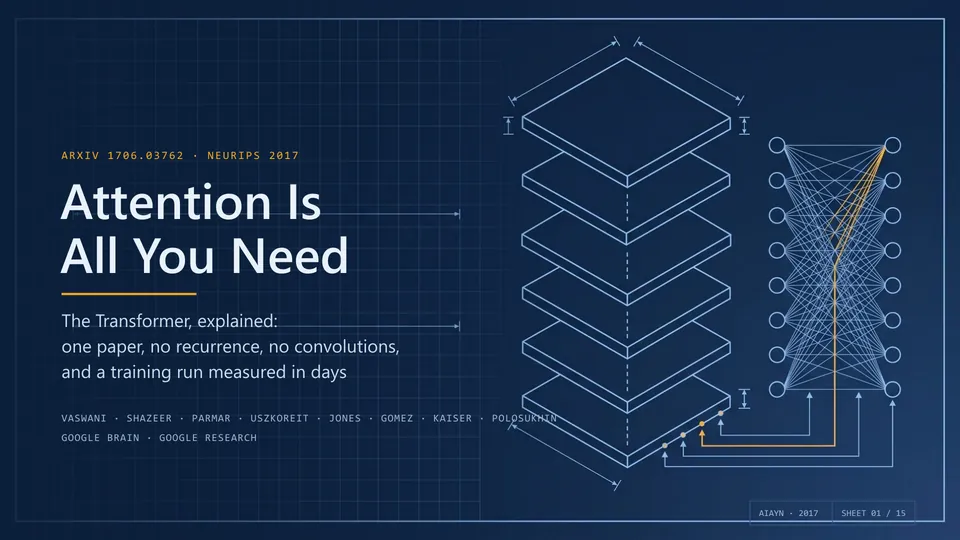 Technical Blueprint — Transformer paper walkthrough: diagrams, native formulas, notes and animations |
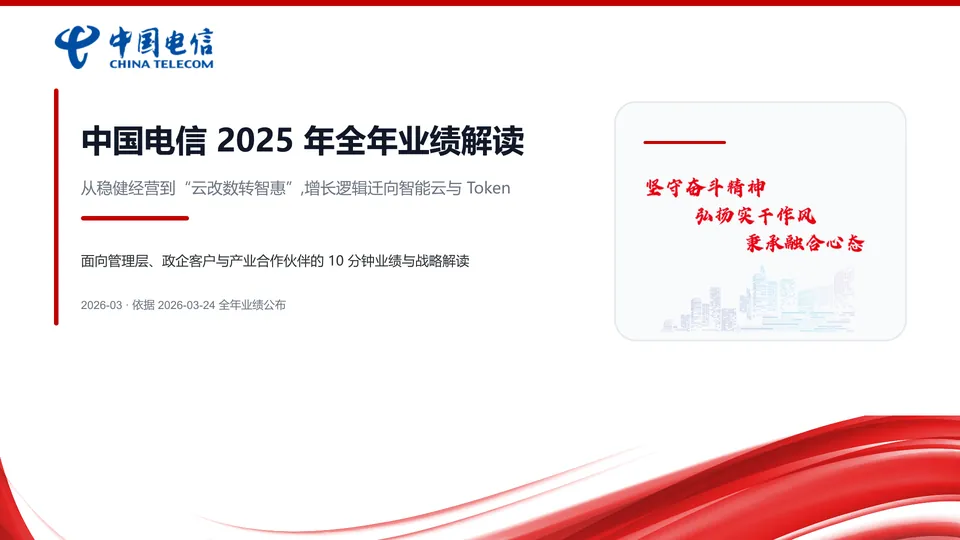 Brand Template — China Telecom 2025 results on the company's own deck template, with a native-chart export |
Every example is a single pass with no manual polish; downloading a .pptx and opening it in PowerPoint is the fastest way to see what it can really do.
Flip through all examples online → · Source repository · Why PPT Master?
Product Positioning
Editable is now table stakes — the real question is how much of PowerPoint you actually get. PPT Master delivers PowerPoint's native object model itself, and in depth: native shapes and connectors with working adjustment handles, data-backed charts and tables on demand, and the full text / picture / fill / effect model — click any element and keep editing it as a native PowerPoint object; and through the template / structured route, it can hand you a deck with real slide masters and layouts (p:sldMaster / p:sldLayout inheritance).
And that depth is a direction of travel, not a fixed checklist. PPT Master's north star is to keep converging with PowerPoint itself: an ongoing effort to build and integrate more of PowerPoint's native capabilities, release after release, closing the gap between what an AI can generate for you and what you could build by hand in PowerPoint. The PowerPoint ↔ SVG Mapping Guide is the honest, feature-by-feature record of how far that reaches today — and SmartArt is a deliberate omission, not a gap.
In form, it's a workflow (a "skill") that runs inside any agent-capable AI tool: tell it in chat — "make a deck from this PDF" — and it runs the workflow on your machine and exports a natively editable .pptx. No coding on your side; you do exactly three things — install Python, install an AI tool, drop in your material.
Generating a new deck from source documents is the main pipeline, but not the only route. PPT Master can also distill reusable brand / style / layout / deck templates from your references, fill an existing .pptx with new content while preserving its design, and add native transitions, animations, and narration to a finished deck — each route with an explicit contract for what gets preserved. How to use each capability → Getting Started.
On top of that native depth, this form comes with three promises:
- Transparent, predictable cost — free and open source; the only cost is your AI model usage, with no PPT subscription on top
- Data stays local — apart from AI model calls and the search, image, and speech services you choose to enable, the entire pipeline runs on your machine
- No platform lock-in — any agent-capable AI IDE can drive it; Claude, GPT, Gemini, Kimi, and other models all work
Why you'd choose it, and where it isn't the right fit → Why PPT Master; the long-term capability boundaries behind these promises → Project Positioning.
[!IMPORTANT]
This is a tool, not a wishing well
harness + model = agent— PPT Master only owns the workflow; the model sets the ceiling. Recommended: Kimi K3 (or Claude) with a large context window (~1M tokens) + AI image generation (gpt-image-2or Googlegemini-nano-banana-2.1); other models can run the pipeline, with a quality gap.And don't expect a finished, perfect deck in one shot. The tool's value is taking most of the tedious work off your plate; the polishing that's left is yours — a natively editable deck exists precisely so you can keep working on it, not a flat image you can't touch. The cheaper the model, the more there is to do; if results disappoint, upgrade the model first, then check your usage against Getting Started and the example projects.
Built by Hugo He
I'm a finance professional (CPA · CPV · Consulting Engineer (Investment)) who regularly reviews and edits presentation decks. I wanted AI-generated slides to remain editable in PowerPoint, not flattened into images — so I built this.
Knowing how to use Python and AI agents will matter more and more, and this project is also meant to show how far you can go with just those two things. There's a learning curve if you're starting cold, but it's the curve worth climbing — making a deck is just the excuse; what I'm really pushing is Python and agents.
You Might Also Like
ResearchStudio-
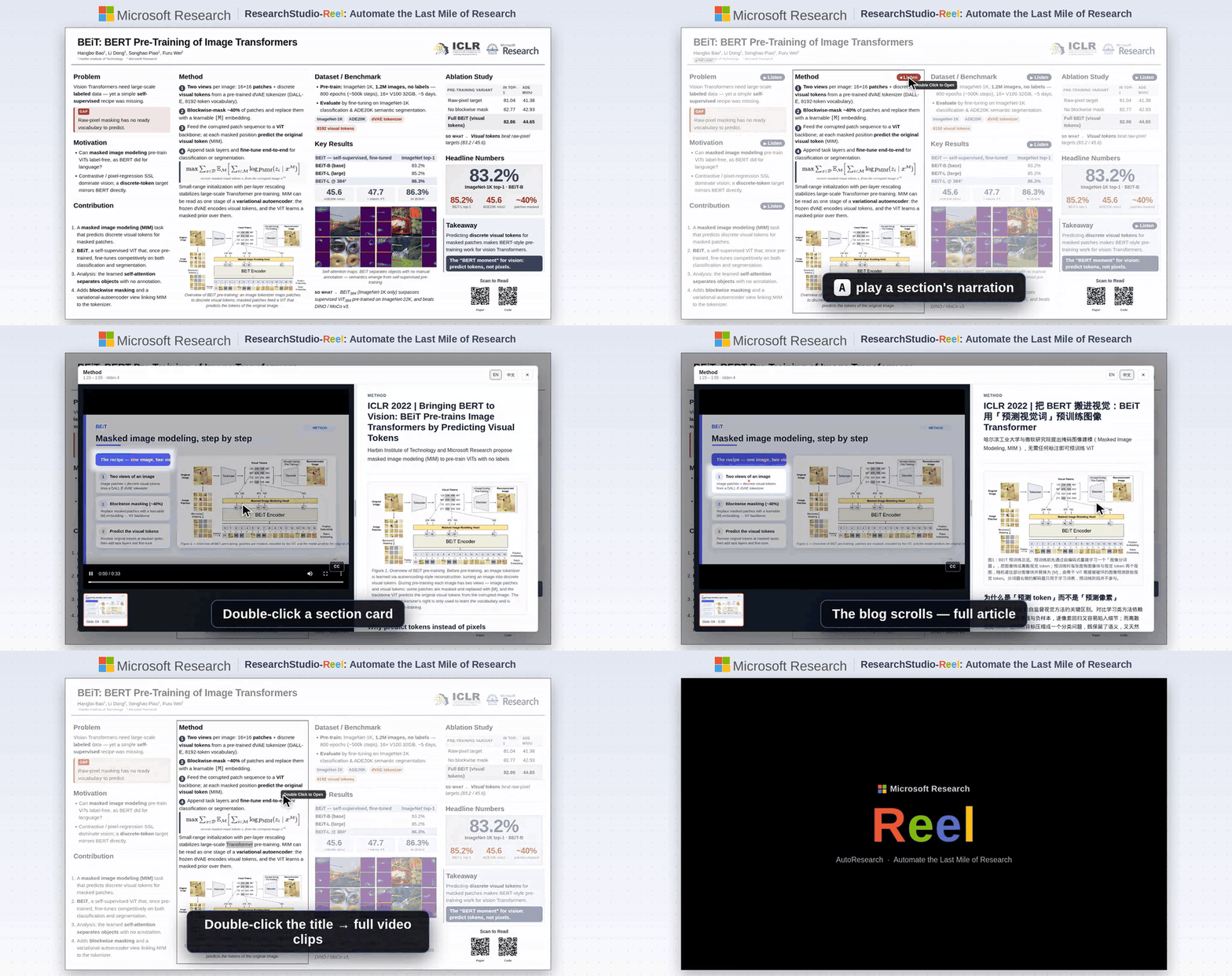
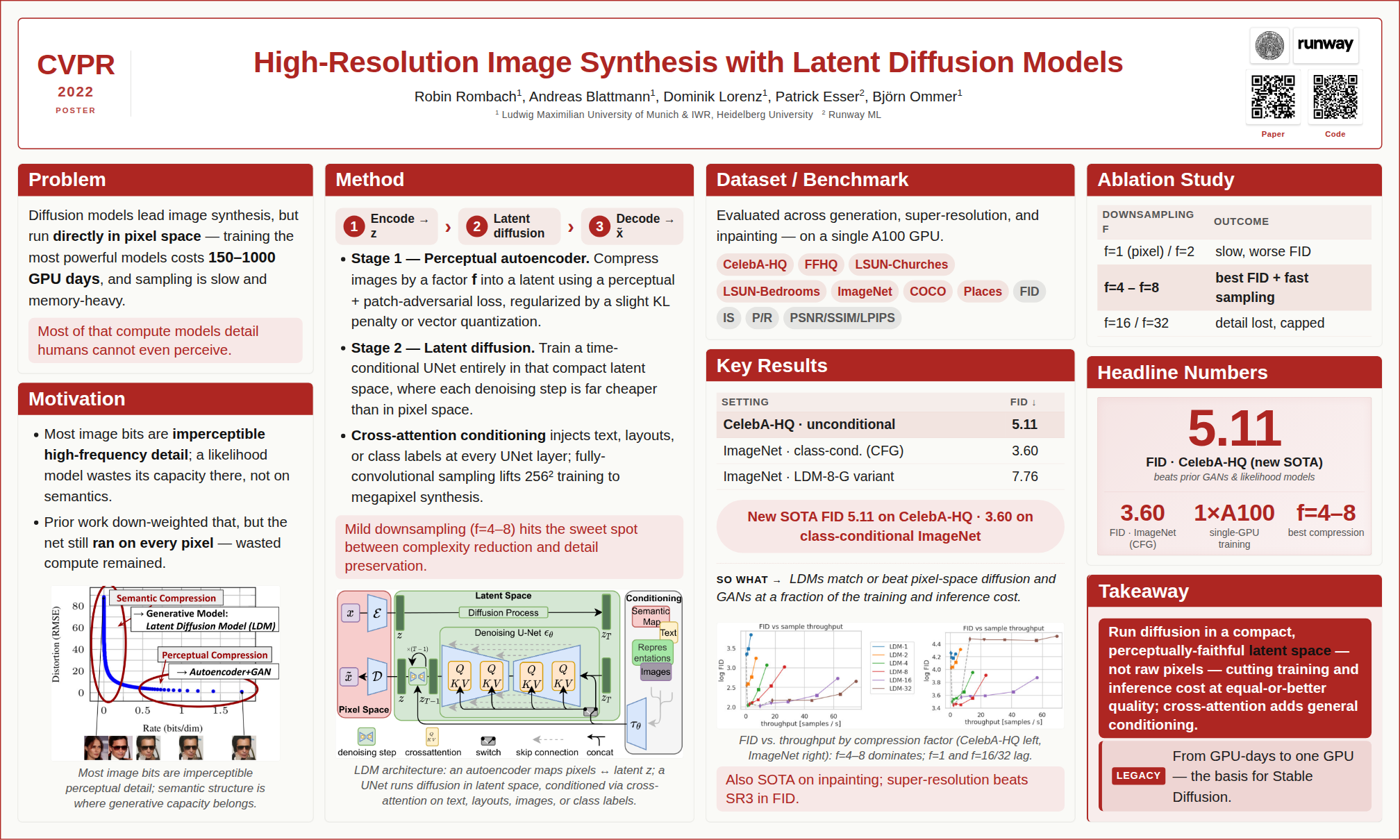
A Microsoft open-source project I recently joined — from paper to talk video, poster, and blog, automating the last mile of research dissemination.
📦 Repo: microsoft/ResearchStudio · 📄 Paper: arXiv:2607.04438
|
|
BibTeX — if you use ResearchStudio-Reel in your research
@article{xiao2026researchstudioreel,
  title   = {ResearchStudio-Reel: Automate the Last Mile of Research from Paper to Poster, Video, and Blog},
  author  = {Lingao Xiao and Yalun Dai and Yangyu Huang and Qihao Zhao and Wenshan Wu and Hugo He and Ruishuo Chen and Jin Jiang and Qianli Ma and Jiahuan Zhang and Xin Zhang and Ying Xin and Yang Ou and Yan Xia and Scarlett Li and Longbo Huang and Zhipeng Zhang and Yang He and Yap Kim Hui and Yan Lu},
  journal = {arXiv preprint arXiv:2607.04438},
  year    = {2026},
  url     = {https://arxiv.org/abs/2607.04438}
}
Quick Start
1. Prerequisites
All you need to install is Python 3.10+. Everything else comes with one line — pip install -r requirements.txt — after you download the project in Step 3.
Windows — see the dedicated step-by-step guide ⚠️
Windows requires a few extra steps (PATH setup, execution policy, etc.). We wrote a step-by-step guide specifically for Windows users:
📖 Windows Installation Guide — from zero to a working presentation in 10 minutes.
Quick version: download Python from python.org → check "Add to PATH" during install → done; dependencies are installed in Step 3.
macOS / Linux — install and go
# macOS
brew install python

# Ubuntu / Debian
sudo apt install python3 python3-pip
Edge-case fallback — 99% of users don't need this
Pandoc — only needed for legacy document formats: .doc, .odt, .rtf, .tex, .rst, .org, or .typ. .docx, .html, .epub, .ipynb are handled natively by Python — no pandoc required.
# macOS
brew install pandoc

# Ubuntu / Debian
sudo apt install pandoc
2. Pick an Agent
PPT Master runs in any tool with agent capability — read/write files, execute commands, and sustain multi-turn conversation.
Never used one of these? Don't worry — in this project they play exactly one role: an AI chat window that can read and write files. Pick any tool from the table, install it, and you'll only ever use its chat panel. No coding involved.
Author's pick: Claude Code — the environment this project is developed and tested on most thoroughly, as the CLI or the VS Code / JetBrains extension.
| Type | Examples | Notes |
|---|---|---|
| IDE-native agent | • VS Code architecture (VS Code itself, plus forks & derivatives): Cursor, Trae, Codebuddy IDE, Windsurf, etc. • Other architectures: Zed, etc. |
Editor with a built-in agent |
| IDE plugin / extension | Claude Code (VS Code / JetBrains extension), GitHub Copilot, Cline, etc. | Installed inside hosts like VS Code or JetBrains |
| CLI agent | Claude Code CLI, Codex CLI, Gemini CLI, etc. | Runs in the terminal; suits scripting, remote, or server use |
Model recommendation: for the best results, use Kimi K3 (or Claude) to drive the pipeline, paired with AI image generation —
gpt-image-2(OpenAI) orgemini-nano-banana-2.1(Google). Kimi Code, the project sponsor, is a great pick for pay-as-you-go access.
🔑 Want to use Claude / GPT / Gemini but don't have access yet? Project sponsors PackyCode, APIKEY.FAN and RunAPI offer pay-as-you-go access to Claude, GPT, Gemini and more — no subscription required, with exclusive discounts for our users (details at the top of this page).
🔀 Juggling several providers? Once you hold keys from more than one of them, cc-switch — a cross-platform desktop app — lets you one-click switch API providers for Claude Code, Codex, Gemini CLI and more, no manual config editing.
3. Set Up
Option A — Git clone (recommended; requires Git installed): the preferred path, since a clone can pull the latest version at any time.
git clone https://github.com/hugohe3/ppt-master.git
cd ppt-master
Then install dependencies:
pip install -r requirements.txt
Option B — Download ZIP (no Git required; best for a quick trial): click Code → Download ZIP on the GitHub page, then unzip, and install dependencies with pip install -r requirements.txt. A ZIP has no Git history, so it can't git pull — see Updating Later. If that download is too large or fails, grab the skill-only package ppt-master-skill-*.zip (~56 MB, fully functional but without the bundled example decks) from the Releases page instead.
Updating Later
Git clone installs:
python3 skills/ppt-master/scripts/update_repo.py
The script pulls the latest version and syncs Python dependencies when requirements.txt changes.
Download ZIP installs:
ZIP folders do not include Git history, so they cannot run git pull. To update, download the latest ZIP, unzip it into a new folder, copy your old .env and projects/ folder into the new folder, then run:
pip install -r requirements.txt
Option C — Skill marketplace: the repo ships
.claude-plugin/marketplace.json, so it can be installed through the Claude Code plugin marketplace ecosystem:# Cross-agent CLI (Claude Code, Cursor, Codex, etc.) npx skills add hugohe3/ppt-master # Or inside Claude Code /plugin marketplace add hugohe3/ppt-master /plugin install ppt-master@ppt-masterBoth install paths above only fetch the skill files (not the full repo); you still need to
pip install -r requirements.txtfrom the installed location for the post-processing scripts to run.
4. Create
First, open the project folder in your agent: the goal is to point the AI at the ppt-master directory you unzipped / cloned in the previous step. In an IDE-type tool, use File → Open Folder — the AI chat panel is usually in the sidebar; in a CLI agent, cd ppt-master first, then launch it. Everything from here on happens in the chat.
Provide source materials (recommended): Place your PDF, DOCX, images, or other files in the projects/ directory, then tell the AI chat panel which files to use. The quickest way to get the path: right-click the file in your file manager or IDE sidebar → Copy Path (or Copy Relative Path) and paste it directly into the chat.
You: Please create a PPT from projects/q3-report/sources/report.pdf
Paste content directly: You can also paste text content straight into the chat window and the AI will generate a PPT from it.
You: Please turn the following into a PPT: [paste your content here...]
By default—unless you explicitly request quick generation—the AI first confirms the design spec:
AI:  Sure. Let's confirm the design spec:
     [Template] B) Free design
     [Format]   PPT 16:9
     [Pages]    8-10 pages
     ...
The AI handles everything — content analysis, visual design, SVG generation, and PPTX export.
Quick generation (skip the confirmation round trip): say so explicitly and the AI goes straight to authoring and export.
You: Quickly generate a 5-page deck from projects/q3-report/sources/report.pdf — no need to confirm with me
Whatever you state explicitly is followed; whatever you leave unspecified the agent decides on its own instead of asking. It still converts sources, fills factual gaps, applies the shared visual baseline, and uses images/icons/native shapes/charts/tables/PowerPoint-native inline or block formulas as needed — it drops interaction and durable planning, not presentation capability. It is one-pass and non-resumable, and there is no svg_final/ preview. Full guide → Quick mode.
Output: the deck lands in
exports/<name>_<timestamp>.pptxas natively editable DrawingML; the default flow also writes self-contained page previews tosvg_final/. Charts and tables ship as editable shapes by default; pass--native-charts-and-tablesfor data-backed PowerPoint Chart / Table objects with Edit Data, saved as a separate_native_charts_tables.pptx. Formulas compile to editable OMML for PowerPoint 2010+. Backups, notes, animation and narration switches, and the non-PowerPoint boundaries → FAQ.
Already have a
.pptxyou want to reuse? Give the AI the deck and material and ask it to "fill this deck with the new content" — Edit Native PPTX keeps the design and unchanged pages byte-for-byte, edits chosen pages, supports selection/reordering, and can add notes or narration. See the FAQ and workflow.
Something went wrong? If the AI loses context, ask it to read
skills/ppt-master/SKILL.md; for everything else, check the FAQ — it covers model selection, layout issues, export problems, and more. Continuously updated from real user reports.
5. Image Acquisition (Optional)
Two paths for non-user images, mixable per image in the same deck:
A) AI generation — use the agent host's native image tool when available, or image_gen.py with IMAGE_BACKEND plus the provider's *_API_KEY. Host-native generation needs no separate provider image API key; ask the agent to use its own image tool. Run python3 skills/ppt-master/scripts/image_gen.py --list-backends for the configured-provider path. gpt-image-2 is currently the best default.
B) Web image search — image_search.py. Zero-config works; configure PEXELS_API_KEY / PIXABAY_API_KEY (both free) for consistently higher-quality results:
- Without keys, search uses Openverse / Wikimedia Commons only — useful as a fallback, but image quality can be uneven because many results are ordinary user uploads
- With keys, the default provider chain also appends Pexels / Pixabay, which materially improves modern stock photography, people, workplace, lifestyle, and illustration coverage
- Licensing is handled automatically: CC0, Public Domain, Pexels / Pixabay no-attribution licenses, CC BY, and CC BY-SA are all considered together, and Executor adds a small inline credit whenever the selected image requires attribution. Use
--strict-no-attributiononly when a slide cannot tolerate any credit line - For high-impact covers, product shots, portraits, and branded scenes, prefer this order: user-provided high-resolution assets / AI generation > web search with Pexels / Pixabay keys > zero-config web search
The API keys above all live in .env. Clone installs can use cp .env.example .env; skill marketplace installs should use a persistent user config:
mkdir -p ~/.ppt-master
cp /path/to/installed/ppt-master/.env.example ~/.ppt-master/.env
PPT Master reads the current process environment first, then the first .env found in this order: current working directory, skill directory (e.g. ~/.agents/skills/ppt-master/.env), clone repo root, ~/.ppt-master/.env.
Full reference:
image-generator.md(AI) ·image-searcher.md(web).
Documentation
| Document | Description | |
|---|---|---|
| 📘 | Getting Started | First deck in 3 steps, plus how to use templates, live preview, animations, narration, voice cloning (new users start here) |
| 🆚 | Why PPT Master | Why choose it, and where it's not the right fit |
| 🧭 | Project Positioning | Long-term positioning, product promises, and capability boundaries |
| 🪟 | Windows Installation | Step-by-step setup guide for Windows users |
| 📖 | SKILL.md | Core workflow and rules |
| 📐 | Canvas Formats | PPT 16:9, Xiaohongshu, WeChat, and 10+ formats |
| 🛠️ | Scripts & Tools | All scripts and commands |
| 💼 | Examples | All example projects |
| 🏗️ | Technical Design | Architecture, design philosophy, why SVG |
| ❓ | FAQ | Model selection, cost, layout troubleshooting, custom templates |
Full documentation index → docs/
Contributing
See CONTRIBUTING.md for how to get involved.
License
Acknowledgments
SVG Repo · Tabler Icons · Simple Icons · Phosphor Icons · Robin Williams (CRAP principles)
See third-party icon notices for pinned versions, licenses, attribution, compatibility overlays, and trademark boundaries.
The optional PDF converter depends on PyMuPDF, which is licensed under AGPL-3.0 rather than MIT; it is only needed for PDF sources. See conversion.md before redistributing a bundle that includes it.
Related Tools
cc-switch — one-click switching of API providers across Claude Code / Codex / Gemini CLI and more.
Contact & Collaboration
Looking to collaborate, integrate PPT Master into your workflow, or just have questions?
- 💬 Questions & sharing — GitHub Discussions
- 🐛 Bug reports & feature requests — GitHub Issues
Star History
Sponsors & Support
PPT Master is currently built and maintained primarily by me. Every new template, bug fix, and documentation update takes ongoing resources — currently shared by the sponsors and individual supporters below.
Corporate sponsors


Want to appear here? → — placements, audience and rates.
Individual support
If PPT Master has been helpful to you, individual support of any amount helps keep the project moving and free.


Made with ❤️ by Hugo He — if this project helps you, please give it a ⭐ and consider sponsoring.
Official distribution: GitHub (primary) · AtomGit (mirror). Redistributions on other platforms are unofficial. MIT licensed — attribution required.
PPT Master — AI 生成原生 PowerPoint,支持任意文档输入
English | 中文
💼 我正在寻找新的发展机会。 投融资背景(CPA · CPV · 咨询工程师),也做 AI 工具与开源产品,各类机会都欢迎交流:heyug3@gmail.com,更多见 hehugo.com。
🆕 我做了一个建设项目经济评价网站:cs.hehugo.com——风光储模板现已向所有用户开放,注册即可使用(某商业软件同类模块售价 10 万元)。
❤️ 赞助
本项目由 Kimi、PackyCode、APIKEY.FAN、RunAPI 等赞助方支持,得以持续免费开源。
点击收起
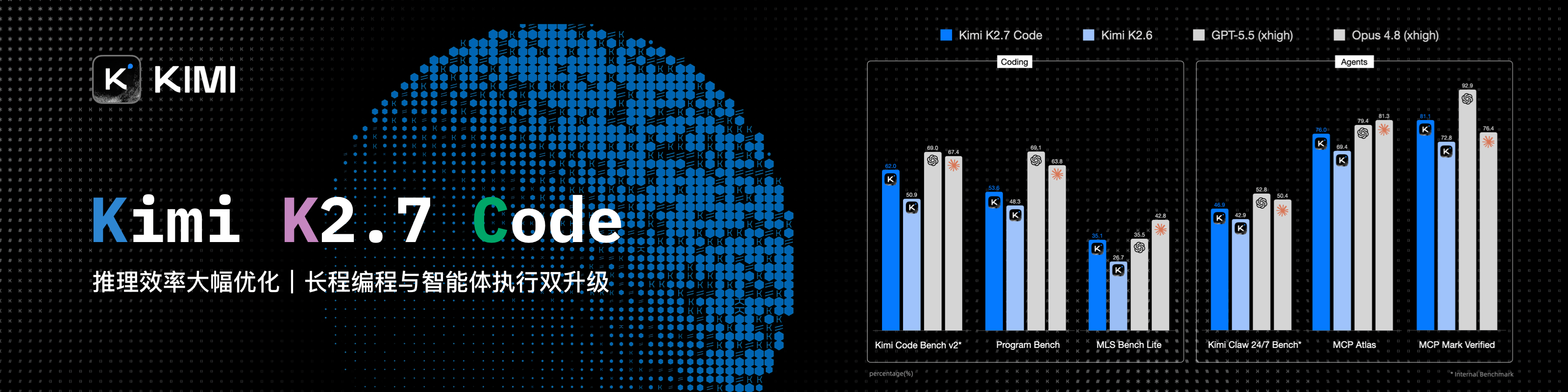
感谢 Kimi 赞助本项目!Kimi K3 是全球首个开源 3T 级模型,拥有原生视觉能力与 100 万 Token 上下文。搭配 PPT Master,K3 可以理解 PDF、DOCX、网页等原始资料,提炼重点、规划演示逻辑,并生成可在 PowerPoint 中继续修改的原生可编辑 PPTX。
立即体验 Kimi Code(中文站|Global),或通过 Kimi 开放平台(中文站|Global)使用 API。
|
感谢 PackyCode 赞助了本项目!PackyCode 是一家稳定、高效的 API 中转服务商,提供 Claude Code、Codex、Gemini 等多种中转服务。PackyCode 为本项目的用户提供了特别优惠,使用此链接注册并在充值时填写"ppt-master"优惠码,可以享受 9 折优惠。 |
|
感谢 APIKEY.FAN 赞助了本项目!APIKEY.FAN 是一家专业的企业级 AI 中转站,致力于为企业和开发者提供稳定、高效、低成本的 AI 中转服务。平台支持 Claude、OpenAI、Gemini 等主流热门模型,价格低至官方原价的 7%。通过本项目专属链接注册,还可享受最高 永久充值 95 折 专属优惠。 |
|
感谢 RunAPI 赞助了本项目!RunAPI 是一个高效稳定的 API 平台,一个 API Key 即可访问 OpenAI、Claude、Gemini、DeepSeek、Grok 等 150+ 主流模型,价格低至官方原价的 1 折,极其稳定,可无缝兼容 Claude Code 等工具。RunAPI 为 PPT Master 用户提供专属福利:通过本项目专属链接注册并联系管理员,即可领取 ¥7 的免费额度。 |
可编辑早已是及格线——真正拉开差距的是原生深度。 PPT Master 交给你的是一份真正的 PowerPoint:母版、原生形状、数据驱动的图表与表格,而不是一堆扁平文本框,也不是套模板填空的结果。它还不止把幻灯片排得好看——先替你把逻辑理顺,再谈视觉;而这份原生深度在持续向 PowerPoint 本身靠拢,逐版本补齐更多原生能力。形态上,它是一套在有 Agent 能力的 AI 工具里运行的工作流:把你的主题或材料交给 AI,就在你本机生成,数据不出本地,不锁定任何平台和模型。工作原理与能力边界 → 产品定位。
快速开始 · 在线预览 · 示例下载 · 常见问题 · 路线图
|
像素风 — 中国早餐图鉴:AI 像素元素表切片、HUD 面板、Morph 转场与 8-bit 音效 |
技术蓝图 — Transformer 论文深读:结构图、原生公式、备注与动画 |
品牌模板 — 套用中国电信自有 Deck 模板的业绩汇报,另附原生图表导出版 |
每份示例都是一次性生成、未经精修;下载任意一份 .pptx 在 PowerPoint 里打开,是感受真实产出水平最快的方式。
在线翻看全部示例 → · 示例仓库 · 为什么选 PPT Master?
产品定位
可编辑如今只是及格线——真正要紧的是你能拿到多少 PowerPoint。 PPT Master 交付的是 PowerPoint 的原生对象模型本身,而且有深度:带调节手柄的原生形状与连接符、按需的数据驱动图表与表格、完整的文本 / 图片 / 填充 / 效果,点开任意元素都作为原生 PowerPoint 对象继续编辑;走模板 / 结构化路线时,它还能为你产出带真正母版与版式(p:sldMaster / p:sldLayout 继承)的 deck。
而且这份深度是一个前进方向,不是一张固定清单。 PPT Master 的北极星是持续向 PowerPoint 本身靠拢:不断开发、集成更多 PowerPoint 原生能力,一个版本接一个版本,缩小「AI 能替你生成的」和「你在 PowerPoint 里手工能做出的」之间的差距。PowerPoint ↔ SVG 映射指南 逐条、诚实地记录了这份能力今天覆盖到哪——SmartArt 是刻意的排除,不是缺口。
形态上,它是一套在有 Agent 能力的 AI 工具里运行的工作流(一个 "skill"):你在对话框里说"用这份 PDF 做一份 PPT",它就按流程在你本机生成、导出原生可编辑的 .pptx。你不写任何代码,只做三件事——装 Python、装一个 AI 工具、把材料放进来。
从源材料生成新 deck 是主管线,但不是唯一路线:PPT Master 还能从你的参考资料中提炼可复用的品牌 / 风格 / 版式 / 成品模板,把新内容填进你已有的 .pptx 并保留其设计,或为成品 deck 追加原生转场、动画和旁白——每条路线都有明确的保留契约。每项能力怎么用 → 快速入门。
在这份原生深度之上,这个形态还带来三个承诺:
- 成本透明可控 — 工具免费开源,唯一成本是你自己的 AI 模型用量,不在此之外增加任何订阅费用
- 数据不出本地 — 除与 AI 模型的对话及你主动启用的搜索、生图、语音服务外,全流程在你的电脑上完成
- 不锁定平台 — 任何具备 agent 能力的 AI IDE 均可驱动;Claude、GPT、Gemini、Kimi 等模型均可使用
为什么选它、以及它不适合的场景 → 为什么选 PPT Master;这些承诺背后的长期能力边界 → 项目定位与能力边界。
[!IMPORTANT]
这是一个工具,不是一个许愿池
harness + model = agent——PPT Master 只负责工作流,产出上限由模型决定。推荐 Kimi K3(或 Claude)大上下文窗口(~100 万 token)+ AI 生图(gpt-image-2或 Googlegemini-nano-banana-2.1);其他模型能跑通流程,但有质量差距。也别指望一把就拿到完美成品。它的价值是帮你把大部分枯燥的活儿干掉,剩下的打磨交给你——做原生可编辑的 PPT,本就是为了让你接着改,而不是甩给你一张改不动的图。模型越便宜,要补的人工就越多;效果不理想,先升级模型,再对照快速入门和示例工程检查用法。
关于作者
我是何雨果(Hugo He),投融资领域从业者(注册会计师 · 资产评估师 · 咨询工程师(投资)),工作中经常审阅和修改 PPT。我希望 AI 生成的幻灯片仍然能在 PowerPoint 里继续编辑,而不是被压成一张张图片——所以做了这个。
未来,使用 Python 和 AI agent 的能力会越来越重要,这个项目也想展示:仅凭这两样,你能走多远。零基础上手有一段学习曲线,但走完这段,你就接上了未来——做 PPT 只是个借口,我真正想推广的是 Python 和 agent。
你可能也感兴趣
ResearchStudio-
微软开源项目,我最近也参与其中——从论文到演讲视频、海报与博客,自动化科研传播的最后一公里。
📦 仓库:microsoft/ResearchStudio · 📄 论文:arXiv:2607.04438
|
|
|
BibTeX —— 如果你在研究中使用了 ResearchStudio-Reel
@article{xiao2026researchstudioreel,
  title   = {ResearchStudio-Reel: Automate the Last Mile of Research from Paper to Poster, Video, and Blog},
  author  = {Lingao Xiao and Yalun Dai and Yangyu Huang and Qihao Zhao and Wenshan Wu and Hugo He and Ruishuo Chen and Jin Jiang and Qianli Ma and Jiahuan Zhang and Xin Zhang and Ying Xin and Yang Ou and Yan Xia and Scarlett Li and Longbo Huang and Zhipeng Zhang and Yang He and Yap Kim Hui and Yan Lu},
  journal = {arXiv preprint arXiv:2607.04438},
  year    = {2026},
  url     = {https://arxiv.org/abs/2607.04438}
}
快速开始
1. 前置条件
只需安装 Python 3.10+。 其余依赖在第 3 步下载好项目后,用一行 pip install -r requirements.txt 装齐。
Windows — 请看专门的手把手安装指南 ⚠️
Windows 需要一些额外步骤(PATH 设置、执行策略等)。我们为 Windows 用户写了一份手把手安装指南:
📖 Windows 安装指南 — 从零到跑通第一份 PPT,10 分钟搞定。
简要流程:从 python.org 下载 Python → 安装时勾选 "Add to PATH" → 完成,依赖安装见第 3 步。
macOS / Linux — 安装即用
# macOS
brew install python

# Ubuntu / Debian
sudo apt install python3 python3-pip
边缘场景备用方案 — 99% 的用户用不到
Pandoc — 只在需要转小众格式时才装:.doc、.odt、.rtf、.tex、.rst、.org、.typ。.docx、.html、.epub、.ipynb 已由 Python 原生处理,不需要 pandoc。
# macOS
brew install pandoc

# Ubuntu / Debian
sudo apt install pandoc
2. 选择一个 Agent
PPT Master 在任何具备 agent 能力(可读写文件、执行命令、持续多轮对话)的工具里都能跑。
没用过这类工具也不用担心:它们在本项目里只扮演一个角色——一个能读写文件的 AI 聊天窗口。从下表任选一款装好即可,全程只用它的聊天面板,不需要写任何代码。
作者最推荐:Claude Code ——本项目开发与测试最充分的环境,CLI 与 VS Code / JetBrains 扩展均可。
| 类型 | 代表工具 | 说明 |
|---|---|---|
| IDE 内置 agent | • VS Code 架构(含 VS Code 本体及分支与衍生):Cursor、Trae、Codebuddy IDE、Windsurf 等 • 其他架构:Zed 等 |
编辑器原生集成 agent |
| IDE 插件 / 扩展 | Claude Code(VS Code / JetBrains 扩展)、GitHub Copilot、Cline、通义灵码 等 | 装在 VS Code / JetBrains 等宿主里使用 |
| CLI agent | Claude Code CLI、Codex CLI、Gemini CLI 等 | 终端里运行,适合脚本化 / 远程 / 服务器场景 |
模型推荐:追求最佳效果,语言模型选 Kimi K3(或 Claude)驱动流程,搭配 AI 生图 ——
gpt-image-2(OpenAI)或gemini-nano-banana-2.1(Google)。本项目赞助商 Kimi Code 支持按量调用,很适合上手。
🔑 想用 Claude / GPT / Gemini 但还没有渠道? 本项目赞助商 PackyCode、APIKEY.FAN 与 RunAPI 均支持按量调用 Claude、GPT、Gemini 等主流模型,无需订阅、支持国内支付,并为本项目用户提供专属优惠(详情见页首)。
🔀 手上有多个渠道? 拿到多家的 API Key 后,cc-switch(跨平台桌面应用)可以一键切换 Claude Code、Codex、Gemini CLI 等工具的 API 供应商,免去手动改配置。
3. 配置项目
方式 A — Git clone(推荐;需先安装 Git):首选这种方式,因为 clone 可以随时拉取最新版本。
# GitHub
git clone https://github.com/hugohe3/ppt-master.git
# AtomGit(中国大陆地区网速更快)
git clone https://atomgit.com/hugohe3/ppt-master.git
cd ppt-master
然后安装依赖:
pip install -r requirements.txt
方式 B — 下载 ZIP(无需安装 Git,适合快速体验):
GitHub → Code → Download ZIP · AtomGit → 克隆/下载 → 下载ZIP(中国大陆地区访问 GitHub 下载不便时用这个,网速更快);解压后同样用 pip install -r requirements.txt 装依赖。ZIP 没有 Git 历史,不能自动 git pull(更新见下)。
如果完整仓库下载失败、或嫌体积太大,可以改到 Releases 页面下载纯技能包 ppt-master-skill-*.zip(约 56 MB,功能完整,但不含内置示例 deck)。
日常更新
Git clone 安装:
python3 skills/ppt-master/scripts/update_repo.py
脚本会拉取最新版;如果 requirements.txt 有变化,会自动同步 Python 依赖。
下载 ZIP 安装:
ZIP 目录没有 Git 历史,不能自动 git pull。更新时请重新下载最新版 ZIP,解压到新目录,然后把旧目录里的 .env 和 projects/ 复制过去,再执行:
pip install -r requirements.txt
方式 C — Skill marketplace:仓库已添加
.claude-plugin/marketplace.json元数据,可通过 Claude Code plugin marketplace 生态一行安装:# 跨 agent CLI(Claude Code、Cursor、Codex 等) npx skills add hugohe3/ppt-master # 或在 Claude Code 内 /plugin marketplace add hugohe3/ppt-master /plugin install ppt-master@ppt-master上述两种安装方式都只会拉取 skill 文件本身(不含完整仓库),后处理脚本仍需在安装目录跑
pip install -r requirements.txt。
4. 开始创作
先在 Agent 里打开项目文件夹: 目标是让 AI 工作在上一步解压 / 克隆出来的 ppt-master 目录里——IDE 类工具通过菜单 文件 → 打开文件夹(File → Open Folder)打开它,AI 聊天面板通常在侧边栏;CLI 类工具先 cd ppt-master 再启动。之后的一切都在聊天里完成。
提供原始材料(推荐): 将 PDF、DOCX、图片等文件放入 projects/ 目录下,在 AI 聊天面板中告诉它使用哪些文件。获取路径的最快方式:在文件管理器或 IDE 侧边栏中右键文件 → 复制路径(Copy Path / Copy Relative Path),直接粘贴进聊天框。
你:请用 projects/q3-report/sources/report.pdf 这份文件生成一份 PPT
直接输入内容: 也可以把文字内容直接粘贴进聊天窗口,AI 会根据这些内容生成 PPT。
你:请根据以下内容制作成 PPT:[粘贴你的文字内容...]
默认流程下(除非显式要求快速生成),AI 会先确认设计规范:
AI:好的,先确认设计规范:
   [模板] B) 自由设计
   [格式] PPT 16:9
   [页数] 8-10 页
   ...
AI 全程处理——内容分析、视觉设计、SVG 生成、PPTX 导出。
快速生成(跳过来回确认): 显式说明即可,AI 直接进入创作与导出。
你:用 projects/q3-report/sources/report.pdf 快速生成一份 5 页 PPT,不用跟我确认
你明确提的照做,你没提的由 AI 直接定,不再回来问你。它仍会转换来源、补齐事实、应用共享视觉基线,并按需使用图片 / 图标 / 原生形状 / 图表 / 表格 / PowerPoint 原生行内或块级公式——省掉的是交互与持久规划,不是 PPT 能力。它是不可续接的一次性生成,也不会产生 svg_final/ 预览。完整说明 → 快速模式。
输出说明: 成品保存为
exports/<name>_<timestamp>.pptx,是可直接编辑的原生 DrawingML;默认流程还会在svg_final/生成自包含的页面预览。图表和表格默认导出为可逐形状编辑的对象;加--native-charts-and-tables可得到带数据源、支持编辑数据的 PowerPoint 原生 Chart / Table 对象,另存为_native_charts_tables.pptx。公式编译为 PowerPoint 2010+ 可编辑的 OMML。备份、备注 / 动画 / 旁白开关,以及非 PowerPoint 客户端的边界 → 常见问题。
已有一份想复用的
.pptx? 把 deck 连同素材给 AI,说「套模板」即可——Edit Native PPTX 会保留原设计,逐字节保留未改页面,只编辑选中页面,支持选页/重排,并可添加讲稿或旁白。详见 常见问题 与 工作流。
遇到问题? AI 迷失上下文时,让它先读
skills/ppt-master/SKILL.md;其他问题查看 常见问题 — 涵盖模型选择、排版问题、导出异常等,基于真实用户反馈持续更新。
5. 图片获取(可选)
非用户自带图片有两条路径,可在同一份 deck 里按图混用:
A) AI 生图 — Agent host 提供原生生图工具时可直接使用;也可通过 image_gen.py 配置 IMAGE_BACKEND 和供应商 *_API_KEY。host-native 生图不需要另配供应商生图 API Key,直接要求 Agent 使用自身生图工具即可。python3 skills/ppt-master/scripts/image_gen.py --list-backends 查看供应商后端清单。gpt-image-2 目前综合质量最佳。
B) 网络图片搜索 — image_search.py。零配置可用;建议配置 PEXELS_API_KEY / PIXABAY_API_KEY(都免费申请)以获得稳定的高质量结果:
- 不配置时只使用 Openverse / Wikimedia Commons,适合作为兜底,但容易出现构图随意、清晰度不稳定的图片
- 配置后默认搜索链会追加 Pexels / Pixabay,现代商业摄影、人物、办公、生活方式和插画类图片质量明显更稳定
- 许可自动处理:默认把 CC0、公有领域、Pexels / Pixabay 免署名许可、CC BY、CC BY-SA 一起纳入候选;选中需署名的图片时,Executor 会在该幻灯片自动添加小字署名。只有明确不能出现署名时,才使用
--strict-no-attribution限制为免署名图片 - 对视觉要求高的封面、产品图、人物图和品牌场景,优先级建议:用户自带高清素材 / AI 生图 > 配置 Pexels / Pixabay 的网络搜索 > 零配置网络搜索
上面提到的 API Key 统一通过 .env 配置。clone 安装可以用 cp .env.example .env;skill marketplace 安装建议使用持久的用户级配置:
mkdir -p ~/.ppt-master
cp /path/to/installed/ppt-master/.env.example ~/.ppt-master/.env
PPT Master 会优先读取当前进程环境变量,然后按顺序读取第一个存在的 .env:当前工作目录、skill 安装目录(如 ~/.agents/skills/ppt-master/.env)、clone 仓库根目录、~/.ppt-master/.env。
完整说明:
image-generator.md(AI)·image-searcher.md(网络)。
文档导航
| 文档 | 说明 | |
|---|---|---|
| 📘 | 快速入门 | 三步做出第一份 deck,外加模板、实时预览、动画、旁白、声音复刻的用法(新用户从这里开始) |
| 🆚 | 为什么选 PPT Master | 为什么选它、以及它不适合的场景 |
| 🧭 | 项目定位与能力边界 | 长期定位、产品承诺与能力边界 |
| 🪟 | Windows 安装指南 | Windows 用户手把手安装教程 |
| 📖 | SKILL.md | 核心流程与规则 |
| 📐 | 画布格式 | PPT 16:9、小红书、朋友圈等 10+ 种格式 |
| 🛠️ | 脚本与工具 | 所有脚本和命令 |
| 💼 | 示例 | 所有示例项目 |
| 🏗️ | 技术路线 | 架构、设计哲学、为什么选 SVG |
| ❓ | 常见问题 | 模型选择、费用、排版问题排查、自定义模板 |
完整文档索引 → docs/zh/
贡献
详见 CONTRIBUTING.md(英文)。
开源协议
致谢
SVG Repo · Tabler Icons · Simple Icons · Phosphor Icons · Robin Williams(CRAP 设计原则)
固定版本、许可证、署名、兼容层与商标边界详见第三方图标说明。
可选的 PDF 转换器依赖 PyMuPDF,其许可证为 AGPL-3.0 而非 MIT,仅处理 PDF 源时才需要安装。若要连同依赖一起再分发,请先阅读 conversion.md 中的说明。
相关工具
cc-switch —— 一键切换 Claude Code / Codex / Gemini CLI 等工具的 API 供应商。
联系与合作
欢迎合作交流、将 PPT Master 集成到你的工作流,或者单纯提问:
- 💬 提问与分享 — GitHub Discussions
- 🐛 Bug 反馈与功能建议 — GitHub Issues
Star History
赞助与支持
PPT Master 目前主要由我开发维护。每个新模板、Bug 修复、文档更新都需要持续的资源投入,目前由以下赞助方和个人支持者共同分担。
企业赞助方
想出现在这里?→ —— 展示位置、受众数据与价格。
个人赞助
如果 PPT Master 帮到了你,任何金额的个人赞助都能帮助项目持续更新、保持免费开源。

Made with ❤️ by 何雨果 Hugo He — 如果这个项目对你有帮助,请给一个 ⭐,也欢迎赞助支持。
官方发布渠道:GitHub(主仓库)· AtomGit(镜像)。其他平台转发版本均为非官方版本。MIT 协议,使用需保留署名。