ragflow
RAGFlow is a leading open-source Retrieval-Augmented Generation (RAG) engine that fuses cutting-edge RAG with Agent capabilities to create a superior context layer for LLMs
原始仓库简介 · 中文摘要待补充 · agent-harness / agentic-ai / agentic-nagive / agentic-retrieval / agentic-search / ai
README / 项目原文




-DFE0E5)







Cloud | Documentation | Roadmap | Discord
📕 Table of Contents
💡 What is RAGFlow?
RAGFlow is a leading open-source Retrieval-Augmented Generation (RAG) engine that fuses cutting-edge RAG with Agent capabilities to create a superior context layer for LLMs. It offers a streamlined RAG workflow adaptable to enterprises of any scale. Powered by a converged context engine and pre-built agent templates, RAGFlow enables developers to transform complex data into high-fidelity, production-ready AI systems with exceptional efficiency and precision.
🎮 Get Started
Try our cloud service at https://cloud.ragflow.io.
For local deployment, see Local Deployment.


🔥 Latest Updates
- 2026-09-29 RAGFlow 1.0.0-rc1 released.
- 2026-09-10 Added website content ingestion through sitemaps.
- 2026-08-19 Introduced Knowledge Compilation to generate Wikis, Graphs, Trees, PageIndex, Mind Maps, Timelines, and Skills at the document and dataset levels.
- 2026-08-19 Introduced Agentic RAG with Low, Medium, High, and Ultra thinking modes.
- 2026-07-02 Added Google BigQuery data source ingestion and incremental synchronization.
See the full release notes for more updates.
🎉 Stay Tuned
⭐️ Star our repository to stay up-to-date with exciting new features and improvements! Get instant notifications for new releases! 🌟
🌟 Key Features
🍭 "Quality in, quality out"
- Deep document understanding-based knowledge extraction from unstructured data with complicated formats.
- Finds "needle in a data haystack" of literally unlimited tokens.
🍱 Template-based chunking
- Intelligent and explainable.
- Plenty of template options to choose from.
🧩 Knowledge Compilation
- Compile content at the document and dataset levels into structured knowledge artifacts.
- Use compilation templates to generate Wikis, Graphs, Trees, PageIndex, Mind Maps, Timelines, and Skills for different knowledge organization and reuse needs.
- Configure compilation models and processing rules, and view, update, and regenerate knowledge artifacts.
🧠 Agentic Retrieval
- Perform multi-step retrieval for complex questions: the model analyzes the question and, when needed, breaks it down, retrieves knowledge, and verifies evidence.
- Gather more complete context through multiple rounds of retrieval and reasoning to help generate well-grounded answers.
- Choose Low, Medium, High, or Ultra thinking modes to control retrieval and reasoning depth according to question complexity.
🌱 Grounded citations with reduced hallucinations
- Visualization of text chunking to allow human intervention.
- Quick view of the key references and traceable citations to support grounded answers.
🍔 Compatibility with heterogeneous data sources
- Supports Word documents, PowerPoint presentations, Excel spreadsheets, TXT files, images, PDFs, scanned copies, structured data, web pages, and more.
🛀 Automated and effortless RAG workflow
- Streamlined RAG orchestration catered to both personal and large businesses.
- Configurable LLMs as well as embedding models.
- Multiple recall paired with fused re-ranking.
- Intuitive APIs for seamless integration with business.
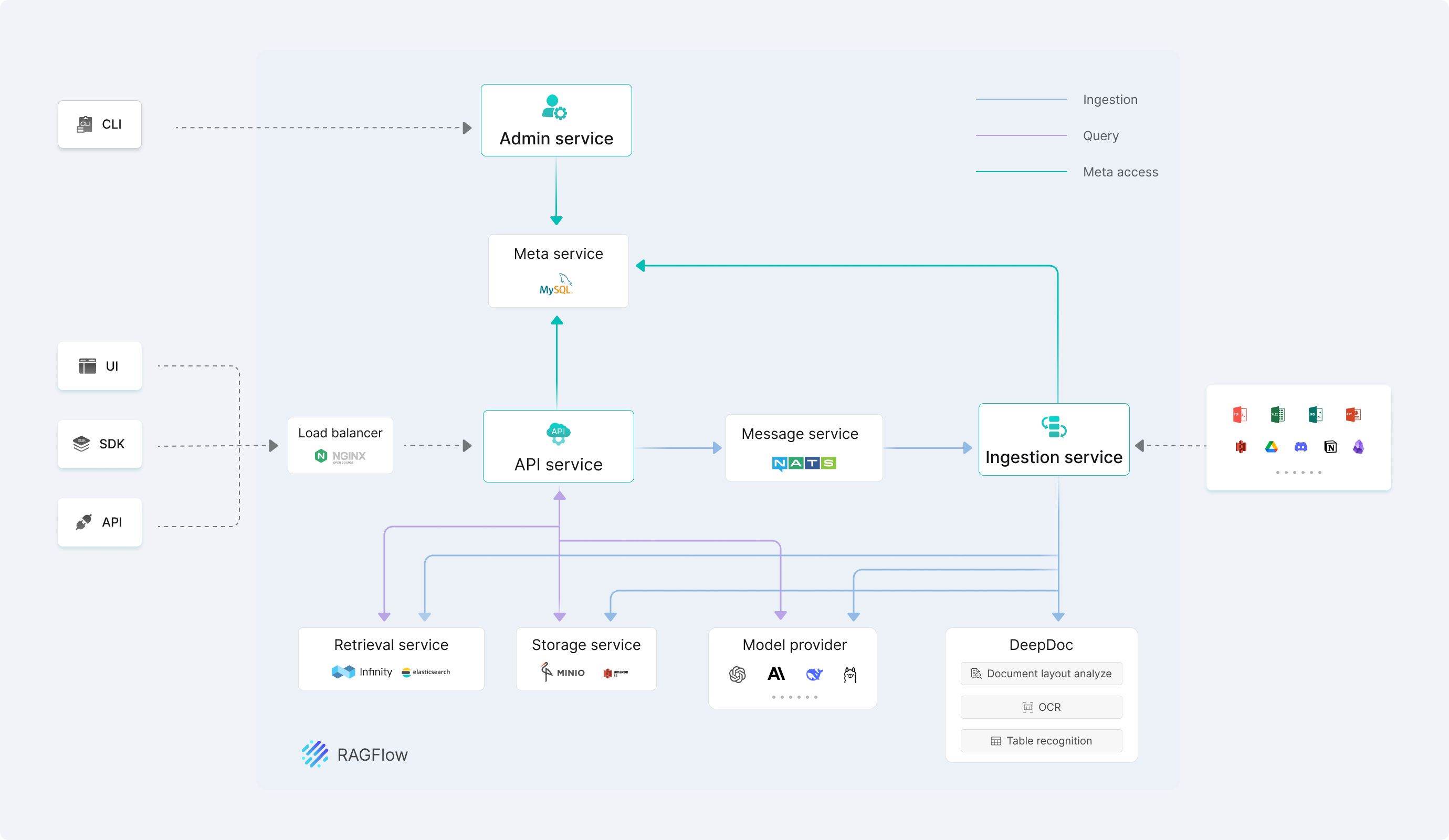
🔎 System Architecture
🏠 Local Deployment
Local deployment supports both Docker deployment and launching from source. Docker is suitable for quick evaluation, integration testing, and production deployment, while launching from source is intended for RAGFlow development and debugging. Docker deployment does not require a Go compiler. Launching from source requires the Go version specified in go.mod; frontend development additionally requires Node.js and npm.
🐳 Docker Deployment
📝 Docker Deployment Prerequisites
- Recommended starting configuration: 4 CPU cores, 16 GB RAM, and 50 GB of available disk space. Actual requirements depend on the document engine, data volume, parsing tasks, and concurrency. Local models and other optional components may require additional resources.
- Docker ≥ 24.0.0, Docker Compose ≥ v2.26.1.
[!TIP] If you have not installed Docker on your local machine (Windows, macOS, or Linux), see Install Docker Engine.
🚀 Start up the server
If using Elasticsearch, set
vm.max_map_counton the Docker host to at least 262144. This step is usually unnecessary with Infinity:To check the value of
vm.max_map_count:sysctl vm.max_map_countIf you use Elasticsearch and the value is below 262144, reset it:
# In this case, we set it to 262144:
sudo sysctl -w vm.max_map_count=262144
This change will be reset after a system reboot. To ensure your change remains permanent, add or update the
vm.max_map_countvalue in /etc/sysctl.conf accordingly:vm.max_map_count=262144Clone the repository:
git clone https://github.com/infiniflow/ragflow.gitCheck out the release tag and start the server with Docker Compose:
Enter the Docker deployment directory.
cd ragflow/dockerCheck out the
v1.0.0-rc2release tag.git checkout v1.0.0-rc2Start the RAGFlow services and their dependencies.
docker compose -f docker-compose.yml up -dWith the default MySQL configuration, the image entrypoint runs database migrations before starting Admin, Syncer, Ingestor, API, and other services.
In the RAGFlow open-source 1.0 release, DeepDoc uses CPU inference for layout analysis, OCR, and table recognition.
Check the server status after startup:
Use
docker psto check the dependency services. After the dependencies showhealthyand the RAGFlow container remains running, use the HTTP endpoint to determine whether RAGFlow is ready. The RAGFlow container itself does not define a Compose healthcheck.curl -f http://localhost/api/v1/system/healthzAfter receiving an HTTP 200 response, open the Web UI. If you changed
SVR_WEB_HTTP_PORT, replace the port in the health-check URL accordingly.If startup fails, inspect the container logs:
docker logs --tail 50 ragflow-cpuIn your web browser, enter the IP address of your server and log in to RAGFlow.
With the default settings, you only need to enter
http://IP_OF_YOUR_MACHINE(sans port number), because the default HTTP serving port80can be omitted when using the default configuration.After signing in, add an LLM, embedding, and reranker on the model provider page, including the model name, service address, and API key.
For details, see llm_api_key_setup.
The show is on!
See the Quickstart guide for details.
⚙️ Docker Configuration and Adjustment
Docker deployment uses docker/.env and docker/docker-compose.yml. Configure the image, ports, passwords, document engine, and model image source as described in the Docker configuration guide. For platform support (note that macOS is not currently supported), see the Go Docker image build and platform support guide. To build the Docker image from source, see the Go Docker image build and platform support guide.
For document-engine changes, configuration updates, restarting services, and retaining or removing existing data, follow the Docker configuration guide.
🔨 Launch from Source
📝 Source Build Prerequisites
Clone the repository and install the Go version specified in
go.mod(currently Go 1.27), Clang 20, LLD 20, CMake ≥ 4.0, and PCRE2 development files. Go services depend on CGO and native static libraries; build.sh sets the required build parameters.git clone https://github.com/infiniflow/ragflow.git cd ragflowRun the dependency download script once to prepare everything the local Go server needs to build, run, parse documents and count tokens (
download_dev_deps.pyfetches the native static libraries and the runtime resources — cl100k vocabulary, DeepDoc.ortweights, embedding tokenizer assets):uv run tools/scripts/download_dev_deps.pyThis is the local-dev one-stop: after one run the environment is ready, and already-present files are skipped so re-running never re-downloads. The image-facing counterpart
deps/download_deps.pyfetches the same runtime resources PLUS the stagehand server binary (used by the Browser component) and skips the native.afiles — run it only when building the dependency image or in CI, not for local development.download_dev_deps.pypulls and unpacks pdfium, pdf_oxide, office_oxide, and onnxruntime under~/ragflow-native-libs, and writes the cl100k vocabulary, DeepDoc models, and embedding tokenizer assets underdeps/. It is a Python script;uv runinstalls its declared dependencies (requestsandhuggingface-hub) automatically. Skip this step if you have prepared the same resources by other means. When started from the repository root, Go services automatically findinternal/rag/res/deepdoc; to start from another directory, setDEEPDOC_MODEL_DIRto its absolute path.Build the services:
./build.sh --allStart the local dependency services and make sure the hosts and ports in conf/service_conf.yaml point to addresses accessible from the host. If using Elasticsearch, first set
vm.max_map_counton the Docker host to at least262144.sudo sysctl -w vm.max_map_count=262144 docker compose --env-file docker/.env -f docker/docker-compose-base.yml up -d --wait es01 mysql minio nats kvrocksMigrate the database:
./bin/ragflow_server --migrateStart the four services in four separate terminals:
Terminal 1: start Admin on port
9381../bin/ragflow_server --admin./bin/ragflow_server --ingestorTerminal 3: start Syncer.
./bin/ragflow_server --syncerTerminal 4: start API on port
9380../bin/ragflow_server --apiThe startup modes work as follows:
--migrate: Runs database migrations and exits when complete.--admin: Starts the Admin service for management and initialization operations.--ingestor: Starts the Ingestor service for data ingestion and parsing tasks.--syncer: Starts the Syncer service for external data source synchronization tasks.--api: Starts the API service for the Web UI and SDKs.
Only when developing the frontend, install Node.js and npm, then start the React frontend:
cd web
npm install
After the services start, confirm that the API is ready:
curl -f http://127.0.0.1:9380/api/v1/system/healthzAn HTTP 200 response indicates that the API is responding. See Launch Service from Source for complete frontend and DeepDoc verification steps.
See Launch Service from Source for details.
📚 Documentation
📜 Roadmap
See the RAGFlow Roadmap 2026.
🏄 Community
🙌 Contributing
RAGFlow flourishes via open-source collaboration. In this spirit, we embrace diverse contributions from the community. If you would like to be a part, review our Contribution Guidelines first.


Cloud | Document | Roadmap | Discord
💡 RAGFlow 是什么?
RAGFlow 是一款领先的开源检索增强生成(RAG)引擎,通过融合前沿的 RAG 技术与 Agent 能力,为大型语言模型提供卓越的上下文层。它提供可适配任意规模企业的端到端 RAG 工作流,凭借融合式上下文引擎与预置的 Agent 模板,助力开发者以极致效率与精度将复杂数据转化为高可信、生产级的人工智能系统。
🎮 快速开始
请登录网址 https://cloud.ragflow.io 体验云服务。
如果想在本地部署,请参阅本地部署。
🔥 近期更新
- 2026-09-30 发布 RAGFlow 1.0.0-rc1。
- 2026-09-10 支持通过 Sitemap 接入网站内容。
- 2026-08-19 推出知识编译,支持在文档级和知识库级生成 Wiki、Graph、Tree、PageIndex、Mind Map、Timeline 及 Skills。
- 2026-08-19 推出 Agentic RAG,支持 Low、Medium、High、Ultra 四种思考模式。
- 2026-07-02 支持 Google BigQuery 数据源接入与增量同步。
更多更新请参阅完整发布记录。
🎉 关注项目
⭐️ 点击右上角的 Star 关注 RAGFlow,可以获取最新发布的实时通知!🌟
🌟 主要功能
🍭 "Quality in, quality out"
- 基于深度文档理解,能够从各类复杂格式的非结构化数据中提取真知灼见。
- 真正在无限上下文(token)的场景下快速完成大海捞针测试。
🍱 基于模板的文本切片
- 不仅仅是智能,更重要的是可控可解释。
- 多种文本模板可供选择。
🧩 知识编译(Knowledge Compilation)
- 支持文档级和知识库级编译,将原始内容组织为结构化的知识产物。
- 通过编译模板生成 Wiki、Graph、Tree、PageIndex、Mind Map、Timeline 及 Skills,满足不同的知识组织和复用需求。
- 支持配置编译模型与处理规则,并查看、更新和重新生成知识产物。
🧠 Agentic Retrieval
- 面向复杂问题进行多步检索:模型会分析问题,并在需要时执行问题拆解、知识检索和证据核验。
- 通过多轮检索与推理获取更完整的上下文,帮助生成有依据的回答。
- 支持 Low、Medium、High、Ultra 思考模式,可按问题复杂度控制检索和推理深度。
🌱 有理有据、最大程度降低幻觉(hallucination)
- 文本切片过程可视化,支持手动调整。
- 有理有据:答案提供关键引用的快照并支持追根溯源。
🍔 兼容各类异构数据源
- 支持丰富的文件类型,包括 Word 文档、PPT、Excel 表格、TXT 文件、图片、PDF、影印件、复印件、结构化数据、网页等。
🛀 全程无忧、自动化的 RAG 工作流
- 自动化的 RAG 工作流可以支持从个人应用乃至超大型企业的各类生态系统。
- 大语言模型 LLM 以及向量模型均支持配置。
- 基于多路召回、融合重排序。
- 提供易用的 API,可以轻松集成到各类企业系统。
🔎 系统架构
🏠 本地部署
本地部署提供 Docker 部署和源码启动两种方式:Docker 适合快速体验、集成测试和生产部署;源码启动适合 RAGFlow 开发和调试。Docker 部署无需安装 Go 编译器,源码启动需要安装 go.mod 指定版本的 Go 编译器;前端开发还需要 Node.js 和 npm。
🐳 Docker 部署
📝 Docker 部署前提条件
- 建议起步配置:4 核 CPU、16 GB 内存和 50 GB 可用磁盘。实际资源需求取决于文档引擎、数据规模、解析任务和并发量;启用本地模型或其他额外组件时,请同时满足相应组件的资源要求。
- Docker ≥ 24.0.0,Docker Compose ≥ v2.26.1。
⚠️ 提示: 如果你尚未在本机安装 Docker(Windows、macOS 或 Linux),可以参考 Install Docker Engine 自行安装。
🚀 启动服务器
如果使用 Elasticsearch,将 Docker 宿主机的
vm.max_map_count设置为至少 262144。使用 Infinity 时则不需要执行此步骤:如需确认
vm.max_map_count的大小:sysctl vm.max_map_count如果使用 Elasticsearch 且
vm.max_map_count的值小于 262144,可以进行重置:# 这里我们设为 262144: sudo sysctl -w vm.max_map_count=262144你的改动会在下次系统重启时被重置。如果希望做永久改动,还需要在 /etc/sysctl.conf 文件里把
vm.max_map_count的值再相应更新一遍:vm.max_map_count=262144克隆仓库:
git clone https://github.com/infiniflow/ragflow.git切换到发布标签并使用 Docker Compose 启动服务器:
进入仓库中的 Docker 部署目录。
cd ragflow/docker切换到
v1.0.0-rc2发布标签。git checkout v1.0.0-rc2在启动 RAGFlow 服务及其依赖服务。
docker compose -f docker-compose.yml up -d💡 镜像下载提示: 如果无法从默认仓库拉取镜像,请先在
docker/.env中将RAGFLOW_IMAGE设置为以下镜像源之一,并保留v1.0.0-rc2标签:- 华为云:
swr.cn-north-4.myhuaweicloud.com/infiniflow/ragflow:v1.0.0-rc2 - 阿里云:
registry.cn-hangzhou.aliyuncs.com/infiniflow/ragflow:v1.0.0-rc2
默认 MySQL 配置下,镜像入口会先执行数据库迁移,再启动 Admin、Syncer、Ingestor 和 API 等服务。
RAGFlow 开源版 1.0 的 DeepDoc 版面分析、OCR 和表格识别使用 CPU 推理。
- 华为云:
服务器启动成功后再次确认服务器状态:
使用
docker ps检查依赖服务状态;依赖服务显示healthy且 RAGFlow 容器持续运行后,通过 HTTP 接口判断 RAGFlow 是否就绪(RAGFlow 容器本身未定义 Compose healthcheck):curl -f http://localhost/api/v1/system/healthz返回 HTTP 200 后,再访问 Web 页面。如果修改了
SVR_WEB_HTTP_PORT,请将健康检查地址中的端口替换为对应值。如果服务启动异常,再查看对应容器日志:
docker logs --tail 50 ragflow-cpu在你的浏览器中输入你的服务器对应的 IP 地址并登录 RAGFlow。
上面这个例子中,您只需输入 http://IP_OF_YOUR_MACHINE 即可:未改动过配置则无需输入端口(默认的 HTTP 服务端口 80)。
登录 RAGFlow 后,在模型提供商页面添加 LLM、Embedding 和 Reranker,并填写对应的模型名称、服务地址和 API key。
好戏开始,接着奏乐接着舞!
详情请见 快速入门指南。
⚙️ Docker 配置与调整
Docker 部署使用 docker/.env 和 docker/docker-compose.yml。镜像、端口、密码、文档引擎及模型镜像源请按Docker 配置说明修改;平台支持(注意:macOS 暂不受支持)请参阅Go Docker 镜像构建与平台支持指南。源码构建 Docker 镜像请参阅Go Docker 镜像构建与平台支持指南。
切换文档引擎、修改配置后重启服务,以及保留或清理已有数据的操作,也请按照上述 Docker 配置文档执行。
🔨 以源代码启动
📝 源码启动前提条件
克隆仓库,并安装
go.mod中指定版本的 Go 编译器(当前为 Go 1.27)、Clang 20、LLD 20、CMake ≥ 4.0、PCRE2 开发文件 CGO 依赖的静态库;build.sh 会设置所需的构建参数。git clone https://github.com/infiniflow/ragflow.git cd ragflow运行依赖下载脚本,准备 Go 构建所需链接的原生静态库(
download_dev_deps.py)与后端运行时加载的模型/分词器资源(download_deps.py):uv run tools/scripts/download_dev_deps.py uv run deps/download_deps.pydownload_dev_deps.py拉取并解压 pdfium、pdf_oxide、office_oxide、onnxruntime 等到~/ragflow-native-libs;download_deps.py拉取 cl100k 词表、DeepDoc 模型与 embedding 分词器资源到deps/。两个脚本均为 Python 脚本,uv run会自动安装其声明的依赖(requests,模型与分词器下载还需huggingface-hub)。如果已通过其他方式准备好相同资源,可跳过这一步。Go 服务从仓库根目录启动时会自动查找internal/rag/res/deepdoc;如需从其他目录启动,请将DEEPDOC_MODEL_DIR设为该目录的绝对路径。编译:
./build.sh --all启动本地依赖服务,并确认 conf/service_conf.yaml 中的主机与端口对应宿主机可访问的地址。如果使用 Elasticsearch,还需先将 Docker 主机的
vm.max_map_count设为至少262144。sudo sysctl -w vm.max_map_count=262144 docker compose --env-file docker/.env -f docker/docker-compose-base.yml up -d --wait es01 mysql minio nats kvrocks数据迁移:
./bin/ragflow_server --migrate启动 4 个终端分别启动 4 个服务:
终端 1:启动 Admin,监听端口
9381。./bin/ragflow_server --admin./bin/ragflow_server --ingestor终端 3:启动 Syncer。
./bin/ragflow_server --syncer终端 4:启动 API,监听端口
9380。./bin/ragflow_server --api各启动参数的作用如下:
--migrate:执行数据库迁移,完成后即可退出。--admin:启动 Admin 服务,负责管理和初始化操作。--ingestor:启动 Ingestor 服务,负责数据摄取和解析任务。--syncer:启动 Syncer 服务,负责外部数据源的数据同步任务。--api:启动 API 服务,为 Web 和 SDK 提供 API 接口。
仅在前端开发时安装 Node.js 和 npm,然后启动 React 前端:
cd web
npm install
服务启动后,运行下面命令来确认 API 服务已就绪:
curl -f http://127.0.0.1:9380/api/v1/system/healthz返回 HTTP 200 表示 API 可以正常响应。前端 和 DeepDoc 的完整验证步骤请参阅从源代码启动服务。
详情请见 从源代码启动服务。
📚 技术文档
📜 路线图
详见 RAGFlow Roadmap 2026 。
🏄 开源社区
🙌 贡献指南
RAGFlow 只有通过开源协作才能蓬勃发展。秉持这一精神,我们欢迎来自社区的各种贡献。如果您有意参与其中,请查阅我们的贡献者指南。
🤝 商务合作
👥 加入社区
扫二维码添加 RAGFlow 小助手,进 RAGFlow 交流群。