yovoice
本地 AI 音频与音乐工作室,支持语音合成、声音克隆、带歌词歌曲和多轨配乐创作。
中文简介经编辑校订 · ai-music / audio / desktop-app / local-ai / macos / mcp
README / 项目原文
yovoice
Give your words a voice. Compose your ideas into songs.










English · 简体中文
Website · CLI & Agent Skill · API / MCP Deployment · Development
yovoice is an open-source, local-first audio and music creation studio for macOS, Windows and Linux.
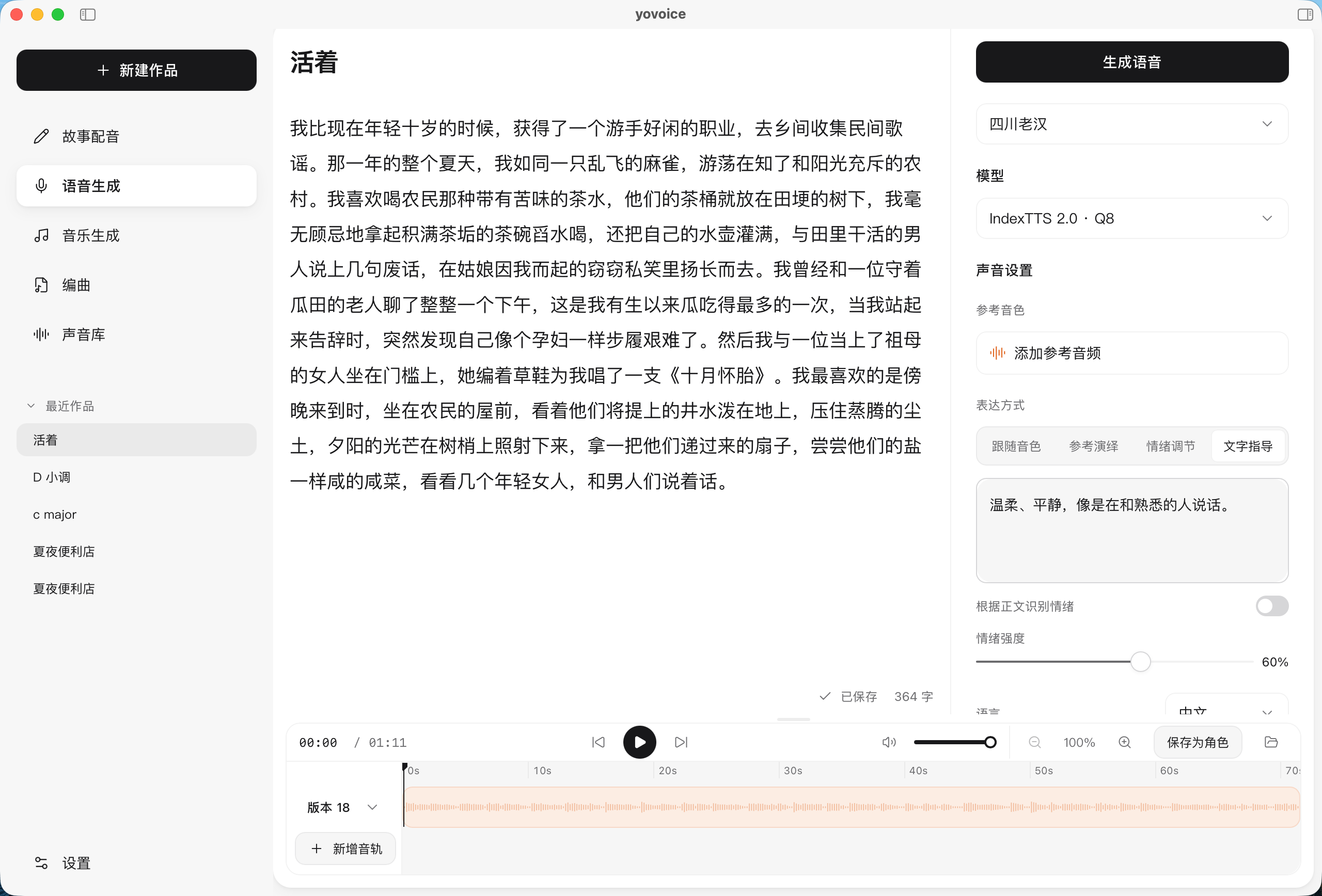
Turn text into expressive speech, natural cloned voices, complete vocal songs, and multi-track scores right on your machine. Featuring zero-shot voice cloning, emotional performance controls, AI music generation with lyrics, and General MIDI score arranging—all running 100% locally with zero cloud API calls, zero per-character fees, and zero Python environment headaches.
Why yovoice?
- 🔒 100% Local Privacy: Runs entirely on your local GPU/CPU. Your manuscripts, reference voices, and creations never leave your computer.
- 💸 Zero Recurring Fees: Say goodbye to per-character/per-minute meters and expensive cloud voice/music subscriptions.
- ⚡ Native C++ Performance (No Python Hell): Powered by audio.cpp v0.9.3. Ships with bundled Windows CUDA 12.4/13.3 runtimes and native macOS Metal support. Double-click and create—no Conda or PyTorch conflicts.
- 🎛️ Creator Workstation: Multi-take versioning for side-by-side comparison, waveform trimming, timeline scrolling, and clean stems/MIDI export.
- 🤖 MCP & AI Agent Ecosystem: Chat with DeepSeek, Qwen, Claude, OpenAI, or local Ollama to create and edit works end to end. Includes a native Model Context Protocol (MCP) server for Cursor and Claude Code.
Features
- Speech, voice design and cloning — clone a reference voice, design a voice from a description, adjust emotion and delivery, and edit takes on a timeline.
- Story dubbing — import text or subtitle files, assign a character to each line, and generate line by line.
- Music — write a style and lyrics with section markers, then generate songs or instrumentals with ACE-Step 1.5, or songs and score-based instrumentals with YuE2, or instrumental music and sound effects from an English description with Stable Audio 3; the playback page syncs lyrics to the vocals.
- Score — write parts by bar and beat, import MIDI or let an Agent compose, render with a General MIDI sound font, and export MIDI and stems. See Score.
- Optional AI service — the built-in assistant panel chats with DeepSeek, Qwen, Kimi, OpenAI, Anthropic, Ollama or any compatible API and acts on your works: it writes arrangements and lyrics, edits text, assigns voices and starts generation; keys stay on this computer. See AI service.
- 12 interface languages — English, 简体中文, 繁體中文, 日本語, 한국어, Español, Français, Deutsch, Português (Brasil), Русский, Italiano and Tiếng Việt; switch anytime in Settings, no restart needed.
Supported Models
| Use | Models |
|---|---|
| Voice cloning and emotion | IndexTTS 2.0 / 2.5, Qwen3-TTS Base |
| Voice design and cloning | VoxCPM2, OmniVoice, Qwen3-TTS VoiceDesign, Breeze TTS 2 |
| Built-in voices | Kokoro-82M, Qwen3-TTS CustomVoice |
| Songs and instrumentals | ACE-Step 1.5 Turbo / XL Turbo, YuE2 3B |
| Instrumentals and sound effects | Stable Audio 3 Small Music / Small SFX / Medium |
All models are downloaded inside the App or with the CLI. See model selection for file sizes, hardware requirements, inputs and examples. OmniVoice, YuE2 and Breeze TTS 2 weights are restricted to non-commercial use; Stable Audio 3 is free below USD 1M annual revenue under the Stability AI Community License.
Installation
Choose the package for your platform from the repository’s Releases tab or visit the official website.
| Platform | Package | Install |
|---|---|---|
| macOS 14+ · Apple Silicon | .dmg |
Open the disk image and drag yovoice to Applications |
| Windows 10/11 · x64 | -setup.exe |
Run the installer, then open yovoice from the Start menu |
| Windows 10/11 · x64 · NVIDIA GPU | -cuda12.4-setup.exe |
Bundles the CUDA 12.4 runtime; works with older GPUs and drivers and uses the GPU from first launch |
| Windows 10/11 · x64 · NVIDIA GPU | -cuda13.3-setup.exe |
Bundles the CUDA 13.3 runtime; needs a newer driver, smaller download |
| Linux · x64 (Debian/Ubuntu) | -linux-x64.deb |
sudo apt install ./yovoice-<version>-linux-x64.deb, then open yovoice from the application menu |
| Linux · x64 (other distributions) | -linux-x64.tar.gz |
Extract and run ./install.sh to add yovoice to the application menu for the current user |
The Windows installer downloads and installs WebView2 Runtime if needed. Models are downloaded inside the app; uninstalling preserves user data in ~/.yovoice.
On Linux the app needs WebKitGTK 4.1 (libwebkit2gtk-4.1-0 on Debian/Ubuntu, webkit2gtk4.1 on Fedora, webkit2gtk-4.1 on Arch); the .deb installs it automatically. Linux runs on the CPU out of the box, and a Vulkan GPU runtime can be downloaded in Settings → Inference engine. The Linux app doesn't update itself yet; download new versions from Releases.
Check for updates from the app menu on macOS or Windows. Updates are also checked and downloaded in the background; restart to install when ready. Windows updates download only the app (-update.exe) and keep the installed runtime; when a release recommends a newer runtime you can upgrade it in Settings → Inference engine.
Quick Start
- Set up a model. Download a model in Settings (e.g. Kokoro-82M for fast narration, or VoxCPM2 for cloning).
- Create a project. Choose Story dubbing, Speech generation, Music, or Score.
- Add content. Enter text, lyrics, or notes, then pick a character and adjust style.
- Generate audio. Select Generate, then preview, compare takes, edit, and export.
CLI & Agent Skill
Give your agent the yovoice Skill link and ask it to install the Skill and set up the local CLI, engine, and model:
Install this Skill and set up yovoice for local speech generation: https://github.com/leemysw/yovoice/tree/main/skills/yovoice
Then describe what you want:
Read narration.txt using voice.wav as the reference voice, with a calm delivery, and save it as narration.wav.
The agent runs the standalone CLI without opening the desktop app. See the CLI guide for details.
Run yovoice serve to provide an authenticated HTTP API and MCP inference service for other machines. See the API / MCP deployment guide for deployment and client examples.

Development
make install
make app-run
See the development guide for prerequisites. It also covers browser preview, tests, and project structure. For how the processes and packages fit together, see Architecture.
Community
Scan the QR code with WeChat to join the yovoice user group. If the code has expired, open an issue and we will post a new one.

Contributing
Bug reports, feature suggestions, and pull requests are welcome. Include your platform, model, and steps to reproduce when reporting a problem. Run make check before submitting code changes.
Acknowledgements
- audio.cpp by ShugoAI — the local audio inference engine.
- VoxCPM — voice design and cloning models, licensed under Apache-2.0.
- IndexTTS — the speech synthesis models behind yovoice.
- OmniVoice — voice design and cloning models.
- Qwen3-TTS — voice cloning, built-in voices, and text-guided voice design.
- ACE-Step — music generation from style prompts and lyrics.
- YuE — full vocal song generation from lyrics.
- Stable Audio 3 by Stability AI — instrumental music and sound effects from text. Powered by Stability AI.
- Breeze TTS 2 — Chinese and English voice design and cloning.
- go-meltysynth, MuseScore General, GeneralUser GS and SGM-V2.01 by David Shan — the SoundFont synthesizer and sound fonts behind score rendering.
- Kokoro — lightweight speech synthesis with built-in voices: Kokoro-82M and Kokoro-82M-v1.1-zh.
Star History
License
Apache-2.0. Dependencies retain their original licenses; IndexTTS models are covered separately by their model license.
yovoice
把文字,变成有情绪的声音
English · 简体中文
官方网站 · CLI 与 Agent Skill · API / MCP 部署 · 开发指南
yovoice 是一款适用于 macOS、Windows 和 Linux 的开源、本地优先(Local-first)声音与音乐创作工作台。
在本地将文字转化为自然逼真的语音、整首带人声歌曲或多轨乐谱。支持零样本音色克隆、情绪风格控制、带歌词人声的 AI 音乐生成、多轨 MIDI 编曲渲染与音频工程管理。完全在本地运行,无云端 API 调用,无按字/按秒扣费开销,无需复杂的 Python 环境配置,让旁白、配音、有声内容与音乐创作更自主、更私密、更低成本。
为什么选择 yovoice?
- 🔒 100% 本地离线与数据隐私:所有模型均在本地显卡/CPU 推理,文本稿件和声音样本永远不会上传到第三方云端。
- 💸 零按字/按秒扣费:无需订阅昂贵的云端 API(告别 ElevenLabs、Suno、商用配音会员计费)。
- ⚡ 原生 C++ 极速引擎,免配 Python:基于 audio.cpp v0.9.3 原生构建,支持 macOS Metal 与 Windows NVIDIA CUDA 12.4/13.3 开箱即用,告别 Conda 与 PyTorch 依赖地狱。
- 🎛️ 全流程专业创作流:多版本试听对比(Takes)、多轨时间轴吸附裁剪、General MIDI 音色库本地渲染与分轨导出(Stems)。
- 🤖 原生 MCP 与 AI Agent 协创:接入 DeepSeek、通义千问、Claude、OpenAI 或本地 Ollama,用对话完成写歌写谱到生成的全流程,并提供 Model Context Protocol (MCP) 服务,支持在 Cursor 或 Claude Code 中直接调用。
功能
- 语音、声音设计与克隆 — 克隆参考音色、用文字设计声音、调整情绪与演绎,并在音轨上剪辑各个版本。
- 故事配音 — 导入文本或字幕文件,为每句台词分配角色并逐句生成。
- 音乐生成 — 写下风格和带段落标记的歌词,用 ACE-Step 1.5 生成歌曲或纯音乐,或用 YuE2 生成歌曲和按谱演奏的纯音乐,或用 Stable Audio 3 根据英文描述生成纯音乐与音效;播放页按人声同步歌词。
- 编曲 — 按小节和拍写声部,或导入 MIDI、交给 Agent 写谱,用 General MIDI 音色库渲染,导出 MIDI 和分轨。详见编曲。
- 可选 AI 服务 — 内置助手面板通过 DeepSeek、通义千问、Kimi、OpenAI、Anthropic、Ollama 或任意兼容接口对话创作:写谱写词、改台词、配音色、发起生成;密钥只保存在本机。详见AI 服务。
- 12 种界面语言 — 简体中文、繁體中文、English、日本語、한국어、Español、Français、Deutsch、Português (Brasil)、Русский、Italiano 和 Tiếng Việt,可在设置中随时切换,无需重启。
支持模型
| 用途 | 模型 |
|---|---|
| 音色克隆与情绪控制 | IndexTTS 2.0 / 2.5、Qwen3-TTS Base |
| 声音设计与克隆 | VoxCPM2、OmniVoice、Qwen3-TTS VoiceDesign、Breeze TTS 2 |
| 内置音色 | Kokoro-82M、Qwen3-TTS CustomVoice |
| 歌曲与纯音乐 | ACE-Step 1.5 Turbo / XL Turbo、YuE2 3B |
| 纯音乐与音效 | Stable Audio 3 Small Music / Small SFX / Medium |
所有模型都在 App 内或通过 CLI 下载。文件大小、硬件要求、输入要求与示例见模型选择。OmniVoice、YuE2 和 Breeze TTS 2 的权重仅限非商业用途;Stable Audio 3 采用 Stability AI 社区许可,年收入低于 100 万美元可免费使用。
安装
在仓库的 Releases 页面选择对应平台的安装包,或访问官方网站。
| 平台 | 安装包 | 安装方式 |
|---|---|---|
| macOS 14+ · Apple Silicon | .dmg |
打开磁盘映像,将 yovoice 拖入 Applications |
| Windows 10/11 · x64 | -setup.exe |
运行安装向导,安装后从开始菜单打开 |
| Windows 10/11 · x64 · NVIDIA 显卡 | -cuda12.4-setup.exe |
内置 CUDA 12.4 内核,兼容较旧的显卡与驱动,首次启动即用 GPU |
| Windows 10/11 · x64 · NVIDIA 显卡 | -cuda13.3-setup.exe |
内置 CUDA 13.3 内核,需要较新的驱动,安装包更小 |
| Linux · x64(Debian/Ubuntu) | -linux-x64.deb |
sudo apt install ./yovoice-<版本>-linux-x64.deb,安装后从应用菜单打开 |
| Linux · x64(其他发行版) | -linux-x64.tar.gz |
解压后运行 ./install.sh,为当前用户添加到应用菜单 |
Windows 安装器会在缺少时联网安装 WebView2 Runtime。模型在应用内下载。卸载应用保留 ~/.yovoice 中的作品和模型。
Linux 版需要 WebKitGTK 4.1(Debian/Ubuntu 为 libwebkit2gtk-4.1-0,Fedora 为 webkit2gtk4.1,Arch 为 webkit2gtk-4.1),.deb 会自动安装。Linux 开箱使用 CPU,可在 设置 → 推理引擎 中下载 Vulkan GPU 内核。Linux 版暂不支持自动更新,请从 Releases 下载新版本。
macOS 和 Windows 均支持在应用菜单中检查更新,也会自动检查并后台下载;下载完成后可选择重启安装。Windows 自动更新只下载应用本体(-update.exe),保留已安装的内核;新版本推荐更高的内核时,可在 设置 → 推理引擎 中选择升级。
快速上手
- 准备模型。 在设置中下载所需模型(例如轻量朗读用 Kokoro-82M,声音克隆用 VoxCPM2)。
- 新建作品。 选择“故事配音”、“语音生成”、“音乐生成”或“编曲”。
- 填写内容。 输入文字、歌词或音符,选择角色并调整风格。
- 生成音频。 点击“生成”,试听对比多版本(Takes)、编辑并导出。
CLI 与 Agent Skill
将 yovoice Skill 链接发给 Agent,让它安装 Skill,并准备本地 CLI、引擎和模型:
安装这个 Skill,并帮我配置好 yovoice 本地语音生成环境:https://github.com/leemysw/yovoice/tree/main/skills/yovoice
之后直接描述需求:
用 voice.wav 的音色朗读 narration.txt,语气平静,保存为 narration.wav。
Agent 通过独立 CLI 完成配音,无需打开桌面应用。详细用法见 CLI 指南。
运行 yovoice serve 可为其他机器提供带认证的 HTTP API 与 MCP 推理服务,支持上传参考音频与生成 WAV。部署和调用示例见API / MCP 部署指南。
开发
make install
make app-run
环境要求见开发指南,其中也介绍了浏览器预览、测试和项目结构。进程与各包如何协作见架构。
交流群
使用微信扫码加入 yovoice 用户交流群。二维码过期时,欢迎提交 Issue,我们会及时更新。
参与贡献
欢迎提交问题、功能建议和 Pull Request。报告问题时,请附上操作系统、模型及复现步骤;提交代码前运行 make check。
鸣谢
- audio.cpp — ShugoAI 开发的本地音频推理引擎。
- VoxCPM — 声音设计与克隆模型,Apache-2.0 许可。
- IndexTTS — 为 yovoice 提供语音合成模型。
- OmniVoice — 声音设计与音色克隆模型。
- Qwen3-TTS — 支持音色克隆、内置音色与文字设计声音。
- ACE-Step — 根据风格描述与歌词生成音乐。
- YuE — 根据歌词生成整首带人声歌曲。
- Stable Audio 3(Stability AI)— 根据文字生成纯音乐与音效。Powered by Stability AI。
- Breeze TTS 2 — 中英文声音设计与音色克隆。
- go-meltysynth、MuseScore General、GeneralUser GS 与 David Shan 的 SGM-V2.01 — 编曲渲染使用的 SoundFont 合成器与音色库。
- Kokoro — 使用内置音色的轻量语音合成模型:Kokoro-82M 与 Kokoro-82M-v1.1-zh。
Star History
开源协议
Apache-2.0。依赖组件保留各自的许可证,IndexTTS 模型单独遵循其模型使用许可协议。