DocTranslator
DocTranslator is a powerful document AI translation tool that supports multiple file formats, OpenAI APIs, batch operations, multi-threading, and Docker deployment for efficient translation tasks! DocTranslator 是一款强大的文档 AI 翻译工具,支持多种文件格式、OpenAI格式、批量操作、多线程和 Docker 部署,以实现高效的翻译任务!🚀
原始仓库简介 · 中文摘要待补充 · ai / ai-translation / doctranslator / document-translation / llm / llms
README / 项目原文
🎉 DocTranslator Pro 版本现已发布! 欢迎体验,功能更强大!
✨ Pro 版本核心优势
- 智能分块策略: 能更好地识别段落、列表等结构,提升翻译质量与上下文连贯性。
- 成本优化: 通过更高效的提示词设计和注入策略,显著减少 Token 消耗,有效降低翻译成本。
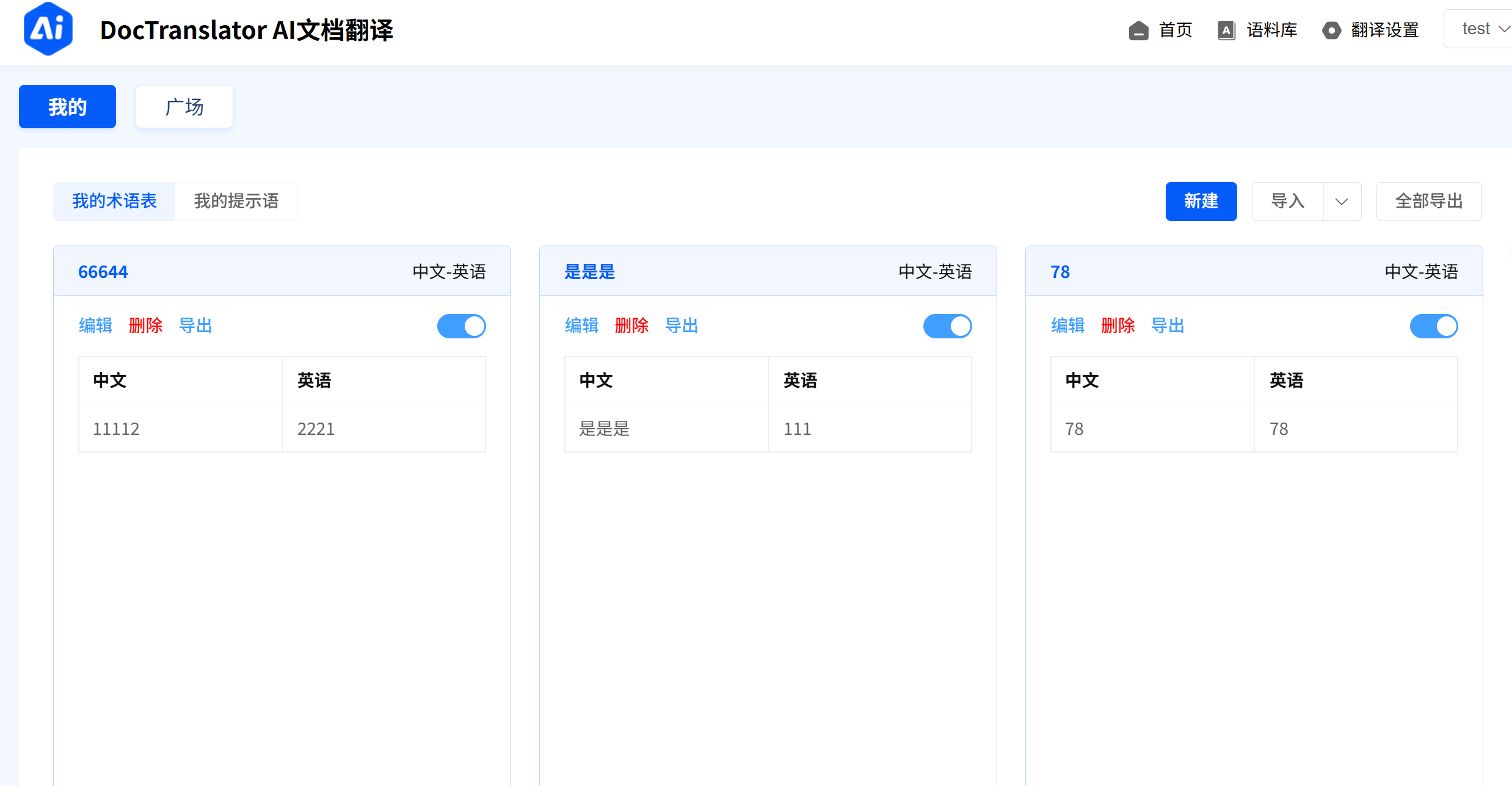
- 术语库: 支持用户定义术语对照表,确保专业术语翻译的准确性和一致性。
- 翻译记忆库: 智能复用历史翻译,提升效率、降低成本。
- AI模型服务商管理: 可配置 OpenAI, Qwen, DeepSeek 等多种大模型,用户可根据需求选择或由系统智能路由。
- 批量处理: 支持文档上传选择多个术语库和翻译记忆,并发翻译,处理效率更高更准确。
- 消耗统计: 提供Token消耗统计等管理后台功能。

📄 DocTranslator - 文档 AI 翻译工具 🚀
DocTranslator 文档翻译,支持多种文件格式的翻译,兼容 OpenAI 格式的 API,并支持批量操作和多线程处理。无论是个人用户还是企业团队,DocTranslator 都能帮助你高效完成文档翻译任务!✨
| 🌐 在线体验 | 立即访问 |
|---|---|
| 📚 官方文档 | 查看文档 |
| 👉 推荐API中转站 | 立即使用 |
🌟 功能特性
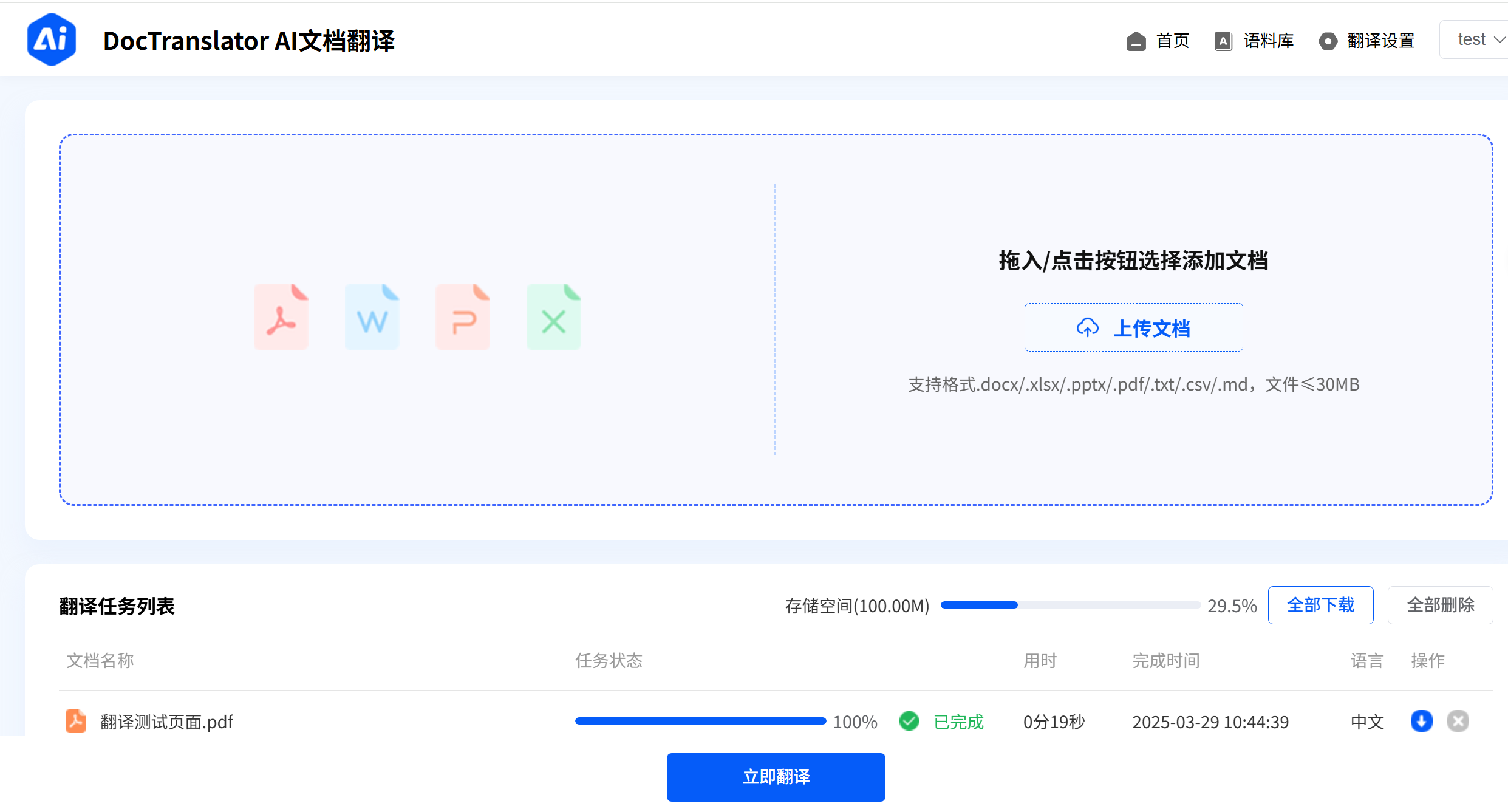
支持多种文档格式
📑 txt、📝 markdown、📄 word、📊 csv、📈 excel、📑 pdf(非扫描版)、📽️ ppt 文档的 AI 翻译。兼容 OpenAI 格式的 API
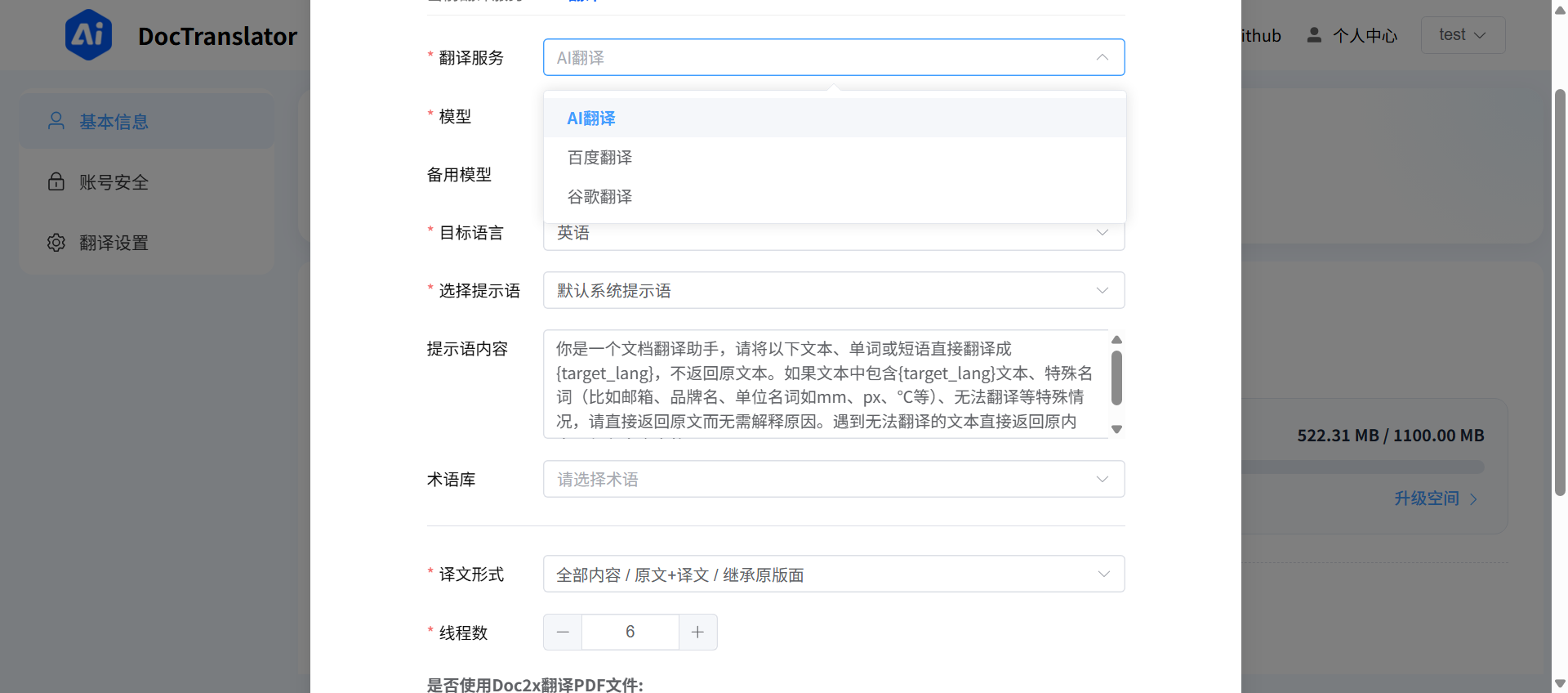
🤖 支持任何符合 OpenAI 格式的端点 API(中转 API),灵活适配多种 AI 模型。批量操作
🚀 支持批量上传和翻译文档,提升工作效率。多线程支持
⚡ 利用多线程技术,加速文档翻译过程。Docker 部署
🐳 支持 Docker 一键部署,简单易用。
🛠️ 技术栈
- 前端:Vue 3 + Vite
- 后端:Python + Flask+MySQL/SQLite
- AI 翻译:兼容 OpenAI 格式
- 部署:Docker + Nginx
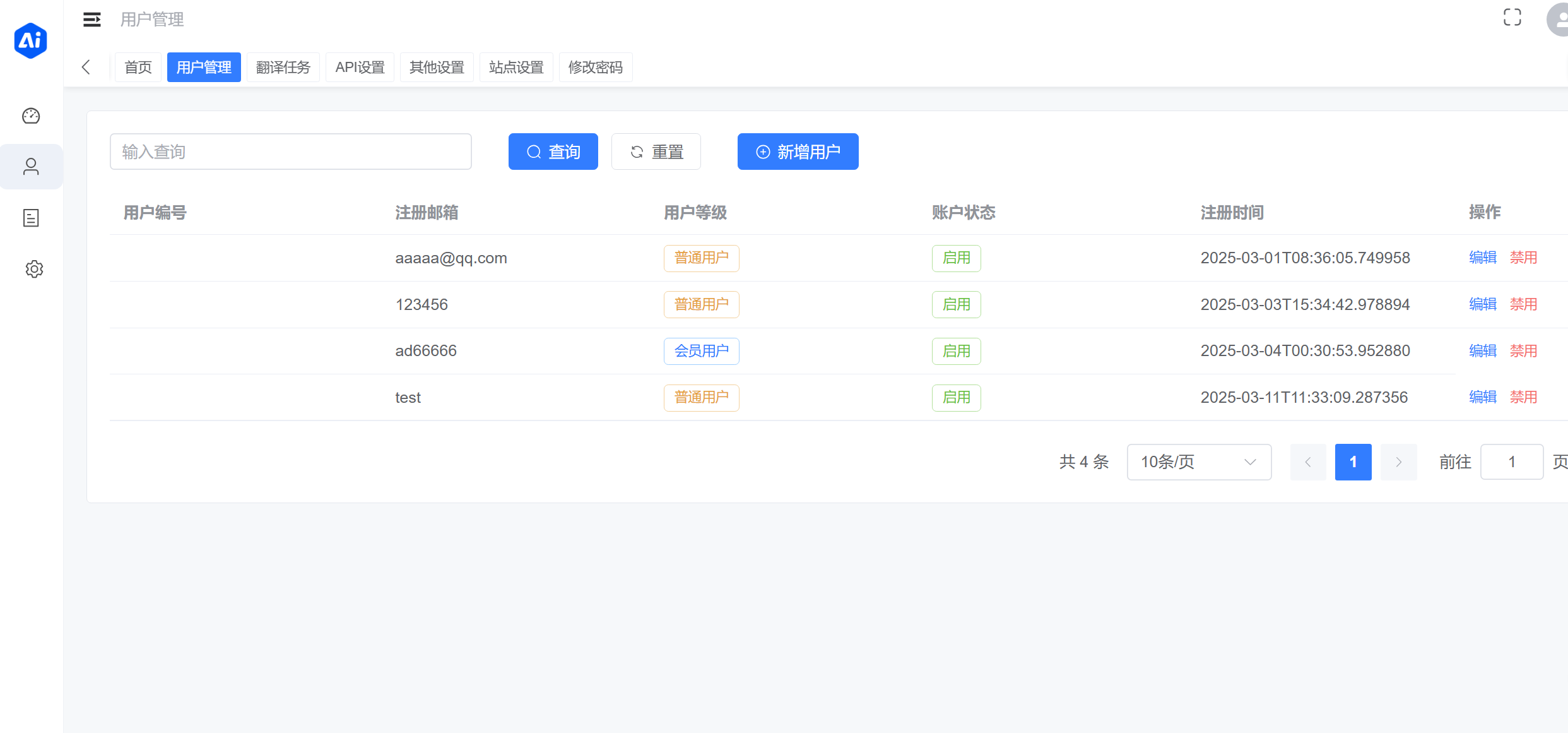
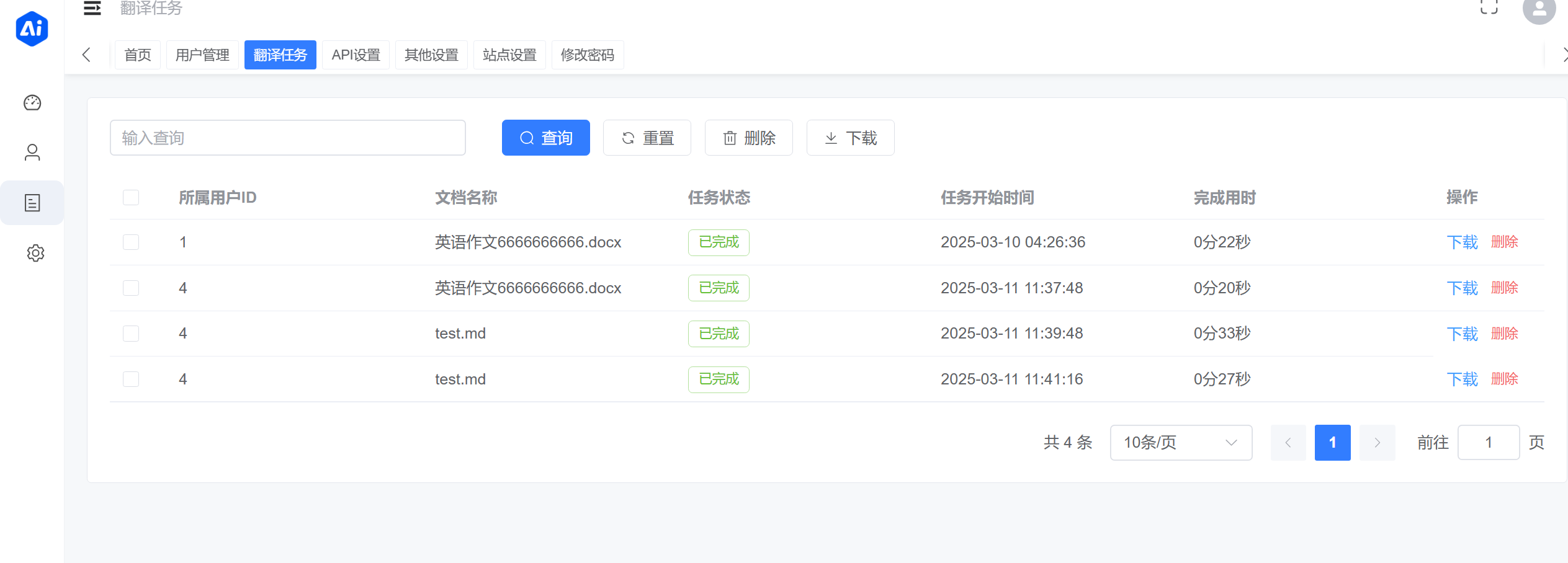
效果如图:
用户端页面演示
管理端页面演示

Linux 系统部署(推荐)
推荐在 Linux 系统中使用 Docker Engine。
首次部署:仅准备一次
git clone https://github.com/mingchen666/DocTranslator.git
cd DocTranslator
cp backend/.env.example backend/.env
编辑 backend/.env,将 FLASK_ENV 设为 production,并填写真实的
PROD_DATABASE_URL、SECRET_KEY 和 JWT_SECRET_KEY。
一行部署
bash deploy.sh
脚本会校验部署配置、自动构建 backend/Dockerfile、执行数据库迁移,并按
TRANSLATION_QUEUE_BACKEND 启动 API、Nginx 和对应 worker。默认 database 启动
数据库队列 worker;celery 启动 Redis 及普通文档、PDF 两个 Celery worker。
一行更新
bash update.sh
更新脚本要求工作区干净,并且只接受 main 分支的快进更新,随后复用同一部署流程重建
后端镜像。已提交的 frontend/dist 和 admin/dist 会直接被 Nginx 使用,无需在服务器
构建前端。
Windows 部署
deploy.sh 和 update.sh 面向 Linux/macOS 的 Bash。Windows 用户可在 Docker Desktop
的 Linux containers 模式下,通过 PowerShell 在项目根目录执行:
# 首次部署或默认数据库队列模式
docker compose up -d --build --force-recreate

# 日常更新
git pull --ff-only; if ($LASTEXITCODE -eq 0) { docker compose up -d --build --force-recreate } else { exit $LASTEXITCODE }
该方式同样自动构建后端镜像,并直接使用已提交的 frontend/dist 与 admin/dist。
Celery 模式使用 docker compose --profile celery up -d --build --force-recreate。
🚀 本地开发
1. 克隆项目
git clone https://github.com/mingchen666/DocTranslator.git
cd DocTranslator
2. 配置环境变量
在 backend/.env 文件中填写必要的环境变量
3. 启动后端
进入后端目录安装依赖:
cd backend
pip install -r requirements.txt
4. 启动后端
python run.py
python run.py 会先执行 Alembic 数据库迁移和幂等初始化,再启动开发服务器。
也可以单独运行 python migrate_startup.py 只执行迁移。生产数据库升级前必须先备份。
5. 启动前端和管理端
/dist 文件夹已经是打包好了的,直接部署使用即可,不本地开发可以忽略下面步骤
前端
cd frontend
pnpm install
pnpm dev
管理端
cd admin
pnpm install
pnpm dev
6. 访问项目
- 前端:http://localhost:1475
- 管理端:http://localhost:8081
- 后端 API:http://localhost:5000
其他部署方式:Docker Compose、Celery、对象存储和独立容器
Docker Compose 部署
生产环境优先使用上方 deploy.sh。旧版只启动 API 和 Nginx 的手工命令不会启动
翻译队列 worker,不能用于当前版本。需要手工管理容器时,请使用本节末尾的完整示例。
新数据库不会创建默认管理员。首次启动前可在 backend/.env 同时配置
ADMIN_EMAIL 和 ADMIN_PASSWORD;创建成功后应移除 ADMIN_PASSWORD。
启动项目
cd DocTranslator
docker compose up -d --build --force-recreate
Docker Compose 从 backend/.env 读取数据库和密钥配置,并在启动服务前同步完成迁移。
默认 TRANSLATION_QUEUE_BACKEND=database,只运行数据库 worker,不需要 Redis。
需要 Celery + Redis 时,在 backend/.env 设置:
TRANSLATION_QUEUE_BACKEND=celery
CELERY_BROKER_URL=redis://redis:6379/0
然后使用 Celery profile:
docker compose --profile celery up -d --build --force-recreate
翻译结果对象存储
默认情况下,翻译结果继续保存在 /app/storage。如需把新完成的结果保存到
阿里云 OSS,可在 backend/.env 设置:
RESULT_STORAGE_BACKEND=oss
OSS_ENDPOINT=https://oss-cn-hangzhou.aliyuncs.com
OSS_BUCKET=your-private-bucket
OSS_ACCESS_KEY_ID=your-access-key-id
OSS_ACCESS_KEY_SECRET=your-access-key-secret
OSS_PREFIX=translations/
历史本地结果不会自动迁移;每条记录仍从它完成时使用的存储后端读取。
/app/storage 挂载仍然必须保留,用于源文件、翻译临时文件和历史结果。
独立 Docker 容器
不使用 Compose 时,所有容器使用同一个镜像、同一个 .env、同一个数据库和
/app/storage 挂载。
先构建镜像并创建网络:
docker build -t doctranslator ./backend
docker network create my-network
数据库队列模式:
docker run -d --name backend-container --env-file backend/.env \
  --network my-network -p 5000:5000 \
  -v $(pwd)/backend/db:/app/db \
  -v $(pwd)/backend/storage:/app/storage doctranslator

docker run -d --name backend-worker-container --env-file backend/.env \
  --network my-network \
  -v $(pwd)/backend/db:/app/db \
  -v $(pwd)/backend/storage:/app/storage \
  doctranslator python worker.py
Celery 模式额外启动 Redis 和两个 Celery worker:
docker run -d --name redis --network my-network \
  redis:7-alpine redis-server --appendonly yes

docker run -d --name celery-document-worker --env-file backend/.env \
  --network my-network \
  -v $(pwd)/backend/db:/app/db \
  -v $(pwd)/backend/storage:/app/storage \
  doctranslator celery -A app.celery_app:celery worker \
  --queues=translation.default --concurrency=2

docker run -d --name celery-pdf-worker --env-file backend/.env \
  --network my-network \
  -v $(pwd)/backend/db:/app/db \
  -v $(pwd)/backend/storage:/app/storage \
  doctranslator celery -A app.celery_app:celery worker \
  --queues=translation.pdf --concurrency=1
独立容器部署在多台主机时,/app/storage 必须使用共享文件系统;普通本地 Docker
volume 不能跨主机共享翻译源文件和结果文件。
更新项目
cd /DocTranslator
git pull --ff-only && docker compose up -d --build --force-recreate
我的其他项目
- Reviva - AI 学习工作台
💖 赞赏支持
维护此项目需要耗费大量精力,如果DocTranslator对你有帮助,欢迎赞赏支持!你的支持是我持续开发的动力!😊
 ---
---📢 交流群
有任何问题想交流,欢迎加入我们的交流群
🤝 贡献指南
欢迎贡献代码!
📜 许可
📞 联系我
如有任何问题或建议,请联系我:
👋 关于我
在读生一枚,有点喜欢前端,喜欢探索AI应用和工具开发 🎉 感谢大家的支持!欢迎 Star ⭐️ 和 Fork 🍴,一起完善 DocTranslator!
📌 说明
本项目基于 ezwork 进行重构优化,感谢原作者的贡献!🙏
🙏 感谢
gen
🎉 DocTranslator Pro is now live! Welcome to experience its enhanced capabilities!
✨ Key Advantages of the Pro Version
- Intelligent Chunking Strategy: Better recognizes structures such as paragraphs and lists, avoiding breaks mid-sentence or within table rows, thereby improving translation quality and contextual coherence.
- Cost Optimization: Significantly reduces token consumption through more efficient prompt design and injection strategies, effectively lowering translation costs.
- Termbase Support: Allows users to define custom terminology glossaries to ensure accuracy and consistency in translating specialized terms.
- Translation Memory: Intelligently reuses previous translations to boost efficiency and reduce costs.
- AI Model Provider Management: Supports configuration of multiple large language models including OpenAI, Qwen, and DeepSeek, enabling users to select based on their needs or let the system intelligently route requests.
- Batch Processing: Enables uploading documents and selecting multiple termbases and translation memories for concurrent translation, achieving higher efficiency and accuracy.
- Usage Analytics: Provides management dashboard features such as token consumption statistics.

📄 DocTranslator - Document AI Translation Tool 🚀
DocTranslator is a powerful document AI translation tool that supports translation of multiple file formats, is compatible with OpenAI format APIs, and supports batch operations and multi-threading. Whether you're an individual user or a corporate team, DocTranslator can help you efficiently complete document translation tasks! ✨
🌟 Features
Supports Multiple Document Formats
📑 txt, 📝 markdown, 📄 word, 📊 csv, 📈 excel, 📑 pdf(Non scanned version), 📽️ ppt AI translation.Compatible with OpenAI Format APIs
🤖 Supports any endpoint API (proxy API) that conforms to the OpenAI format, flexibly adapting to various AI models.Batch Operations
🚀 Supports batch upload and translation of documents, improving work efficiency.Multi-threading Support
⚡ Utilizes multi-threading technology to accelerate document translation.Docker Deployment
🐳 Supports one-click Docker deployment for simplicity and ease of use.
🛠️ Tech Stack
- Frontend: Vue 3 + Vite
- Backend: Python + Flask + MySQL/SQLite
- AI Translation: Compatible with OpenAI format APIs
- Deployment: Docker + Nginx
Demo Preview
Frontend Demo
Backend Demo
🚀 Local Development
1. Clone the Project
git clone https://github.com/mingchen666/DocTranslator.git
cd DocTranslator
2. Configure Environment Variables
Fill in the necessary environment variables in the backend/.env file.
3. Start the Backend
Navigate to the backend directory and install dependencies:
cd backend
pip install -r requirements.txt
4. Run the Backend
python run.py
python run.py applies Alembic migrations and idempotent seed data before
starting the development server. Run python migrate_startup.py to migrate
without starting the server. Back up production databases before upgrading.
5. Start the Frontend and Admin Panel
The /dist folder is already built and ready for deployment. If not developing locally, you can skip the following steps.
Frontend
cd frontend
pnpm install
pnpm dev
Admin Panel
cd admin
pnpm install
pnpm dev
6. Access the Project
- Frontend: http://localhost:1475
- Admin Panel: http://localhost:8081
- Backend API: http://localhost:5000
Linux deployment (recommended)
We recommend Docker Engine on Linux.
Prepare once
git clone https://github.com/mingchen666/DocTranslator.git
cd DocTranslator
cp backend/.env.example backend/.env
Set FLASK_ENV=production and replace the example PROD_DATABASE_URL,
SECRET_KEY, and JWT_SECRET_KEY values in backend/.env.
One-command deployment
bash deploy.sh
The script validates deployment configuration, builds backend/Dockerfile,
runs database migrations, and starts the API, Nginx, and the configured queue
workers. The default TRANSLATION_QUEUE_BACKEND=database starts the database
worker; celery starts Redis plus separate document and PDF workers.
One-command update
bash update.sh
The update script requires a clean working tree, accepts only a fast-forward
update from main, then invokes the same deployment flow to rebuild the
backend image. The committed frontend/dist and admin/dist directories are
served directly, so the host does not need Node.js or a frontend build.
Windows, object storage, and other advanced options
Windows deployment
deploy.sh and update.sh target Bash on Linux/macOS. Windows users can use
PowerShell with Docker Desktop in Linux containers mode from the project root:
# First deployment or the default database queue mode
docker compose up -d --build --force-recreate

# Update. The deployment proceeds only when the pull succeeds.
git pull --ff-only; if ($LASTEXITCODE -eq 0) { docker compose up -d --build --force-recreate } else { exit $LASTEXITCODE }
This also builds the backend image and mounts the committed frontend/dist
and admin/dist directories. For Celery, use
docker compose --profile celery up -d --build --force-recreate.
Translation result object storage
Results remain under /app/storage by default. To store newly completed
results in Alibaba Cloud OSS, configure backend/.env:
RESULT_STORAGE_BACKEND=oss
OSS_ENDPOINT=https://oss-cn-hangzhou.aliyuncs.com
OSS_BUCKET=your-private-bucket
OSS_ACCESS_KEY_ID=your-access-key-id
OSS_ACCESS_KEY_SECRET=your-access-key-secret
OSS_PREFIX=translations/
Use a private bucket and a least-privilege RAM user restricted to read, write,
and delete under OSS_PREFIX. The API and every worker must use the same
configuration and have network access to the endpoint. Existing local results
are not migrated, and /app/storage remains required for source files,
temporary files, and historical results. Downloads are streamed by the backend,
so bucket CORS is not required. Review OSS request and traffic costs and use a
lifecycle policy that does not expire still-downloadable results.
Other projects
- Reviva - AI learning workspace
💖 Support
If DocTranslator has been helpful to you, consider supporting the project! Your support keeps me motivated to continue developing! 😊
🎉 Support Code:
---📢 Join Our Community
If you have any questions or would like to discuss, feel free to join our QQ group!
📝 User Guide
- Upload Documents: Select the documents you want to translate on the frontend page and upload them.
- Select Translation Language: Set the target language and start the translation.
- View Results: Download the translated documents once the translation is complete.
🤝 Contribution Guide
We welcome contributions!
📜 License
📞 Contact Me
For any questions or suggestions, feel free to reach out:
📌 Note
This project is a refactored and optimized version based on ezwork. Thanks to the original author for their contribution! 🙏