LobsterAI
桌面 AI Agent,可执行数据分析、幻灯片、文档和视频等任务,并支持从微信、飞书等渠道发送指令。
中文简介经编辑校订 · agent / ai-agent / ai-assistant / automation / autonomous-agents / chatbot
README / 项目原文
LobsterAI
The open-source desktop AI agent that does real work on your computer.
Describe a task in plain language. LobsterAI reads your files, runs tools, drives a browser,
edits Office documents, and hands back finished work — at your desk or from your phone.





English · 简体中文
Download · Quick start · Features · Build from source · Community
Why LobsterAI
Most AI assistants stop at an answer. LobsterAI is built to finish the job.
- It works where your work lives. Point it at a folder and it reads spreadsheets, writes documents, runs scripts, and browses the web, asking before anything sensitive.
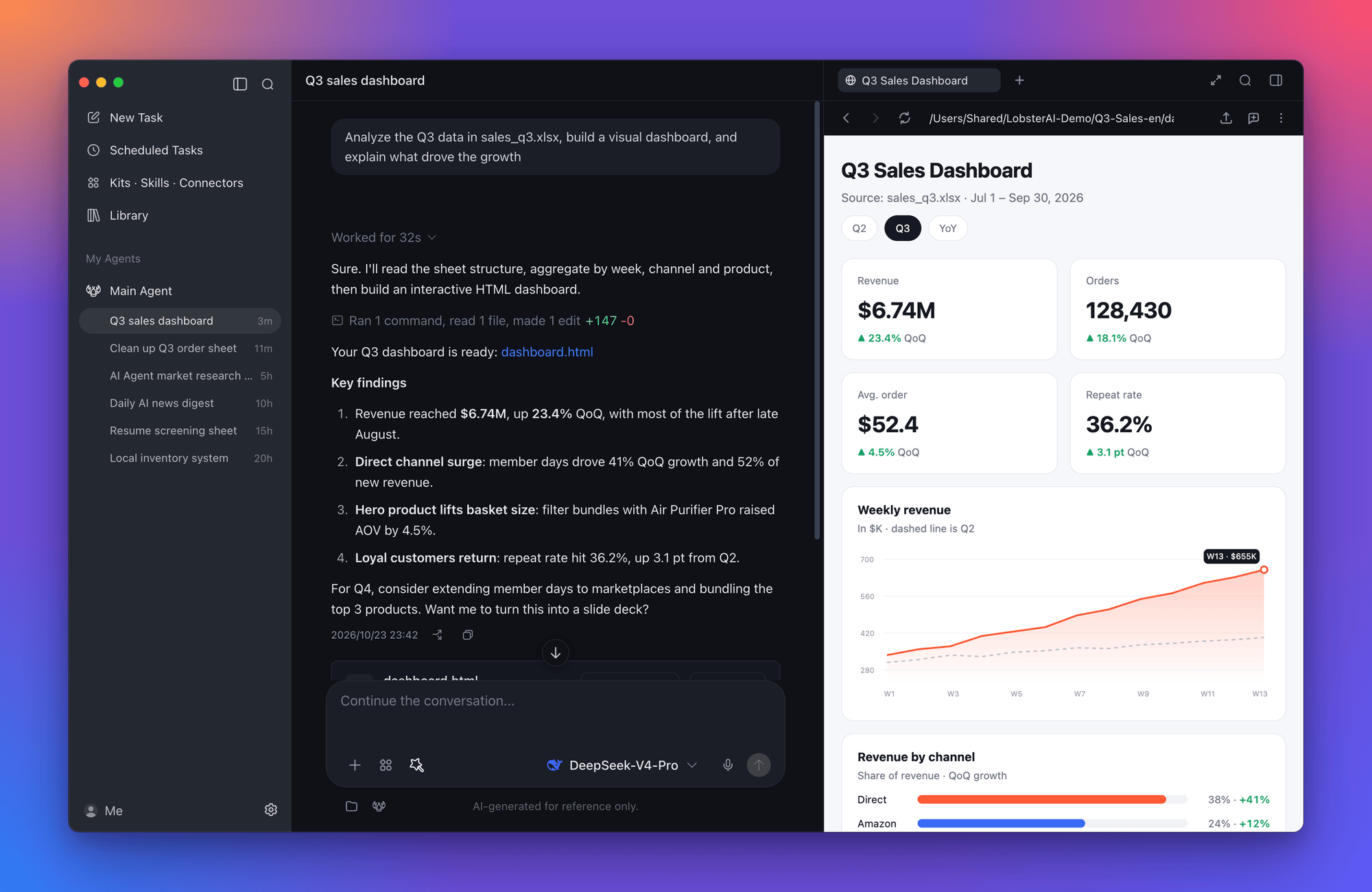
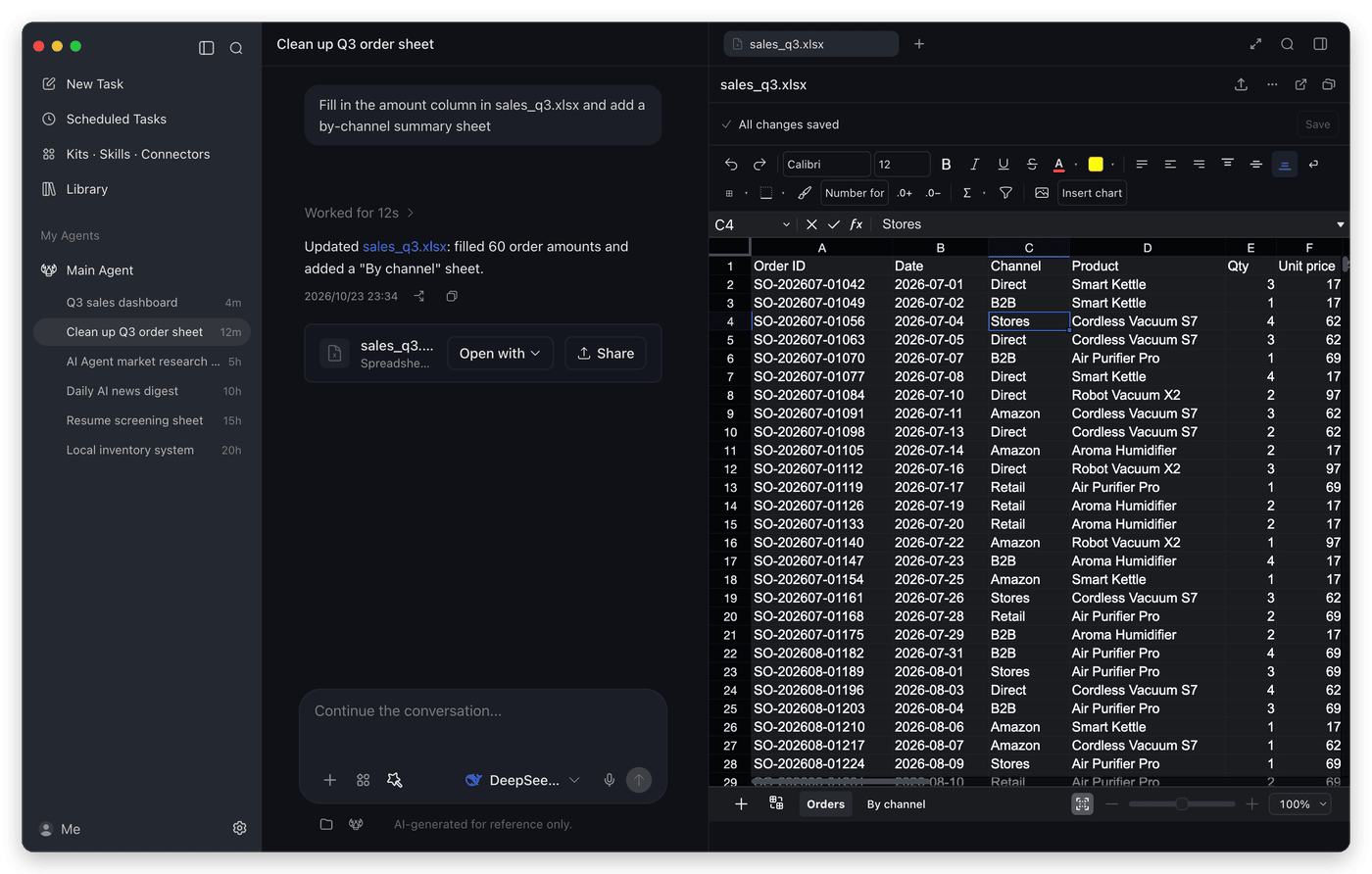
- You see the result, not just a reply. Web pages, charts, images, videos, PDFs, and Word, Excel, and PowerPoint files open in a side panel, ready to edit or share.
- It keeps working when you step away. Schedule recurring jobs, or message your desktop agent from WeChat, Feishu, DingTalk, Telegram, and more.
- It's yours. MIT-licensed, with sessions stored locally. Sign in to use the built-in models, or bring your own API keys.
Built by NetEase Youdao, LobsterAI is the first open-source desktop-grade agent from a major Chinese tech company.
Features
Native Office editing |
Kits, skills, and connectors |
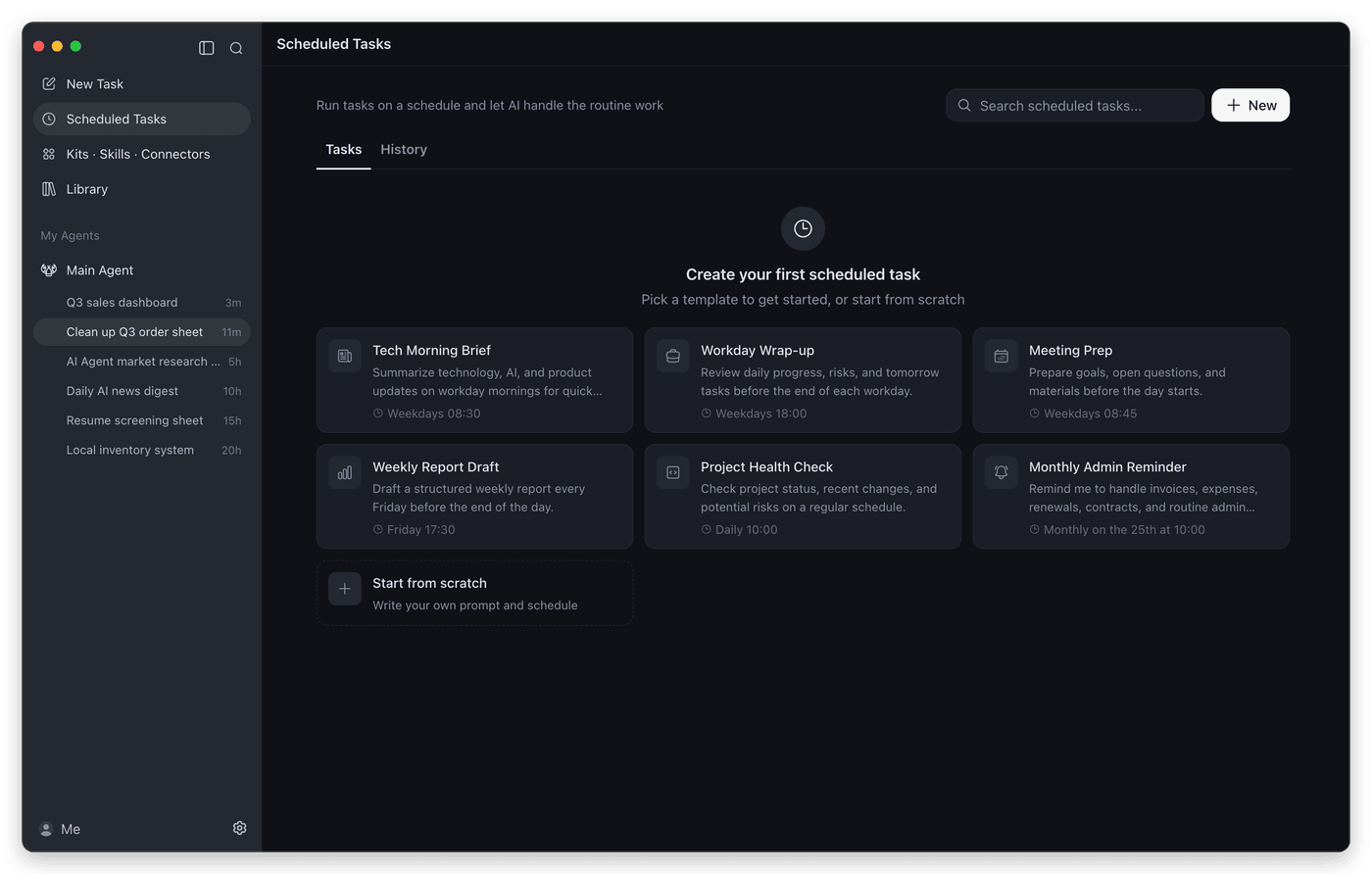
Scheduled tasks |
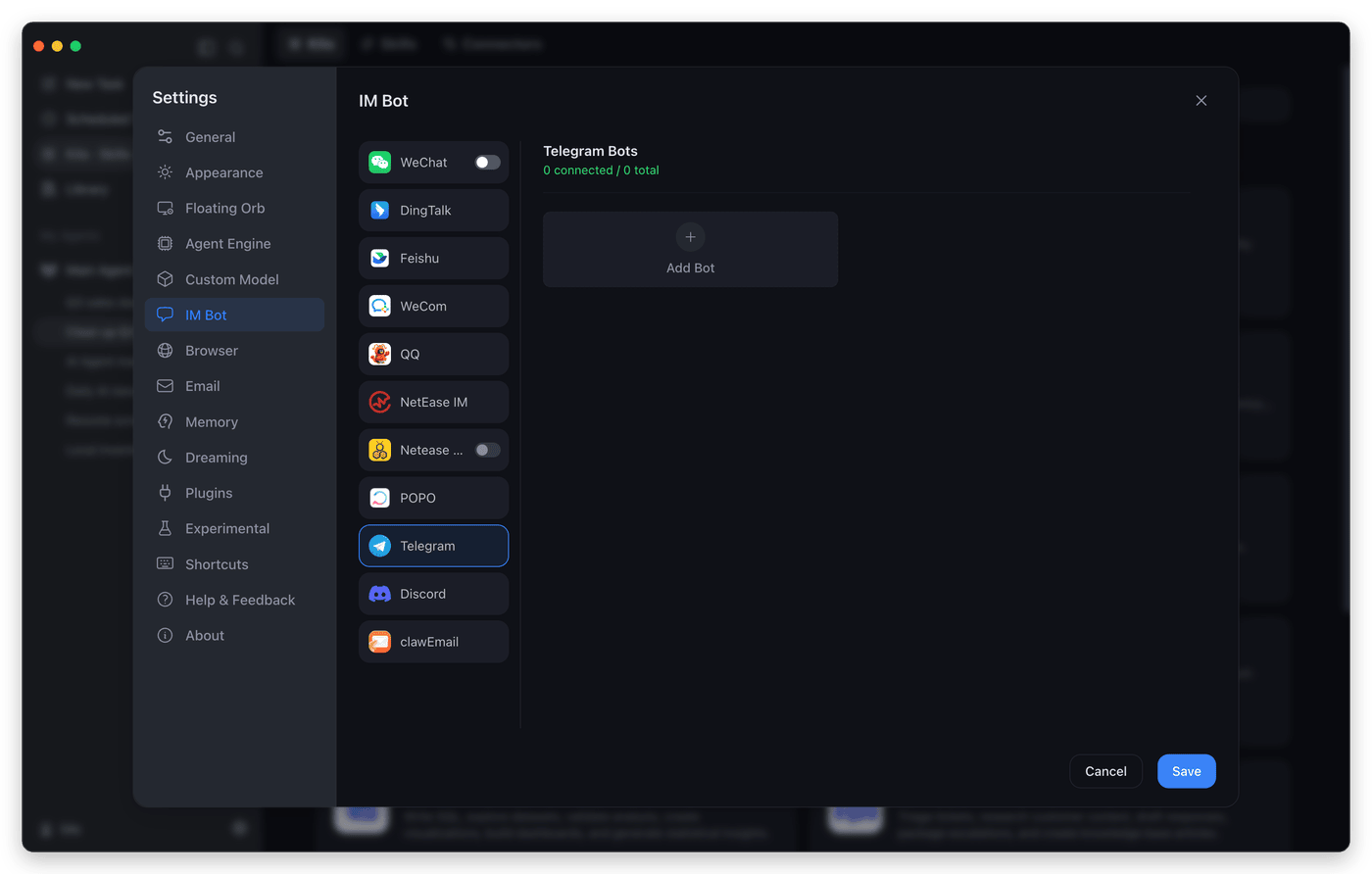
Message it from anywhere |
Everything in the box
| Capability | What you get |
|---|---|
| Cowork sessions | Long-running tasks on local projects with streaming progress, a tool timeline, session forks, and approval prompts before file, shell, or network actions. |
| Artifacts and sharing | Live previews for HTML, SVG, Mermaid, images, video, Markdown, code, PDF, and Office files. Edit images in place and share results as a link. |
| Built-in browser | An in-app browser the agent can drive, with tabs, saved logins, and passkey support, for research and web workflows. |
| Computer use | Let the agent operate desktop apps on Windows x64 and macOS 13 or later. |
| Multiple agents | Create agents with their own identity, model, skills, and working folder, add ready-made experts from the Expert Plaza, and bind agents to chat channels. |
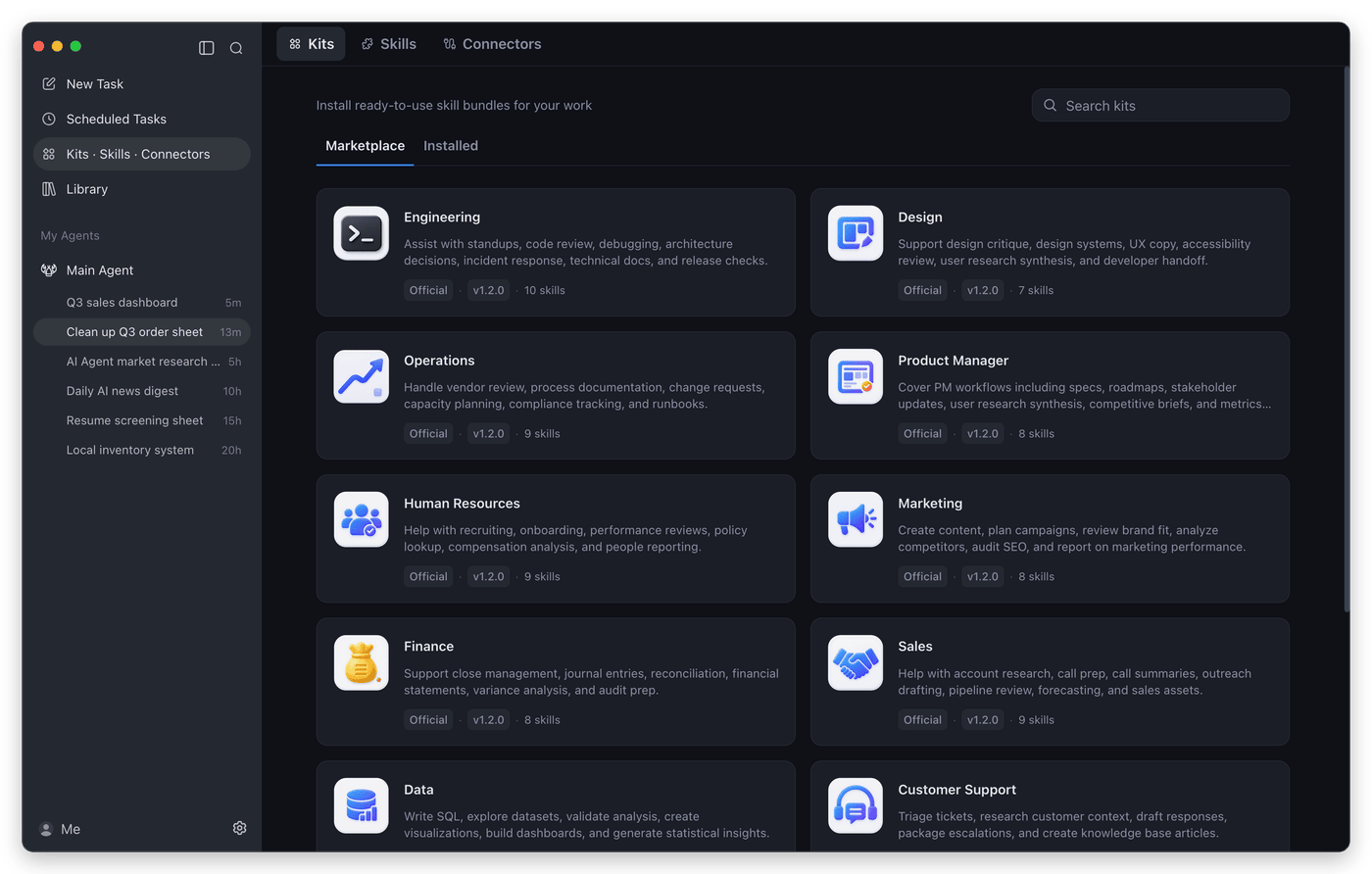
| Skills | Built-in skills for documents, spreadsheets, slides, PDFs, web search, browser automation, image and video generation, stock research, writing, email, and more. See SKILLs/. |
| MCP connectors | Add local or remote MCP servers from the marketplace, sign in with OAuth, and choose which tools each server exposes. |
| IM channels | WeChat, WeCom, DingTalk, Feishu/Lark, QQ, NetEase IM, NetEase Bee, POPO, Telegram, Discord, and email. Multi-instance platforms can route each bot to a different agent. |
| Desktop companion | A floating orb for quick tasks, screenshots, and actions on selected text, such as translating or reading aloud. |
| Memory and Dreaming | Durable memory files, plus optional scheduled "Dreaming" runs that consolidate what the agent learned, so preferences carry across sessions. |
| Models | Built-in models (DeepSeek, GLM, Kimi, Qwen, MiniMax, and more) after sign-in, or your own keys for OpenAI, Anthropic, Gemini, xAI, OpenRouter, Ollama, LM Studio, and any OpenAI-compatible endpoint. |
| Library | Every file your agents create, collected in one place across sessions, both local and shared. |
Things to try
| Scenario | Example prompt |
|---|---|
| Build a local tool | "I still track inventory and sales in Excel. Build a local inventory system that records purchases and sales, calculates stock and profit, and opens in my browser." |
| Analyze local data | "Use product-growth.xlsx to build a visual dashboard and summarize the main growth drivers." |
| Make a deck | "Research the AI agent market and turn the findings into a presentation." |
| Check a web dashboard | "Open the ads dashboard every morning, check spend and conversion anomalies, and summarize likely causes." |
| Screen documents | "Turn the resumes in this folder into a screening sheet and shortlist the strongest candidates against the JD." |
| Run scheduled work | "Every weekday at 9 AM, collect yesterday's AI news and send me a concise digest." |
Quick start
- Install LobsterAI. Download it from the official website, or get the latest release directly: macOS (Apple Silicon) · macOS (Intel) · Windows x64
- Choose a model. Sign in to use the built-in models, or add your own API key under Settings → Custom Model.
- Give it a task. Pick a working folder, describe what you want, and approve actions as it works. Generated files open in the side panel.
- Go further. Install kits from Kits · Skills · Connectors, set up recurring work in Scheduled Tasks, or connect a chat app under Settings → IM Bot.
How it works
flowchart LR
  subgraph App["LobsterAI desktop app (Electron)"]
    UI["Renderer<br/>React · Redux · Tailwind<br/>sessions · artifacts · Office editors"]
    Main["Main process<br/>Cowork sessions · permissions · SQLite<br/>skills · MCP · IM · scheduler"]
    UI <-->|"preload IPC"| Main
  end
  Main <-->|"config sync · events"| Gateway["OpenClaw gateway<br/>bundled agent runtime"]
  Gateway --> Models["LLM providers"]
  Gateway --> Tools["Local tools<br/>files · shell · browser<br/>computer use · MCP servers"]
  Chat["Chat apps<br/>WeChat · Feishu · DingTalk · Telegram …"] <--> Gateway
- Cowork is LobsterAI's product layer. It owns sessions, messages, permissions, artifacts, agents, and IM bindings, and stores them locally in SQLite.
- OpenClaw is the agent runtime underneath. LobsterAI ships a pinned build, renders its config from app state, and translates its events into the Cowork stream.
- The renderer is sandboxed with context isolation and talks to the main process only through the preload IPC bridge.
Build from source
Requirements: Node.js >=24.15.0 <25, npm >=11.17.0 <12, git, and pnpm.
git clone https://github.com/netease-youdao/LobsterAI.git
cd LobsterAI
npm install

# First run: fetches the pinned OpenClaw version into ../openclaw, builds the runtime, and starts the app
npm run electron:dev:openclaw

# Later runs, once the runtime exists
npm run electron:dev
CONTRIBUTING.md covers tests, linting, runtime options, packaging installers, and the project layout.
Security and privacy
- Sessions, messages, and settings are stored locally in
lobsterai.sqliteunder the app's user data directory. Agent memory and runtime state live alongside it underopenclaw/. - File operations, shell commands, and network access are permission-gated, and the agent asks before it acts.
- Renderer windows run with context isolation, sandboxing, and no Node.js integration.
Community
Join the WeChat group for help, feedback, and release news. You can also follow @LobsterAIYoudao on X.

Report bugs and request features through GitHub Issues.
Contributing
Contributions are welcome. Read CONTRIBUTING.md to set up your environment, and look for good first issues to get started.
Star history
License
MIT © NetEase Youdao
LobsterAI
开源的桌面级 AI Agent,在你的电脑上把活真正干完。
用一句话描述任务,LobsterAI 会读取文件、调用工具、操作浏览器、编辑 Office 文档,
最后把做好的成果交给你。坐在电脑前可以用,出门在外也能用手机远程指挥。

English · 简体中文
下载 · 快速上手 · 功能 · 从源码构建 · 社区
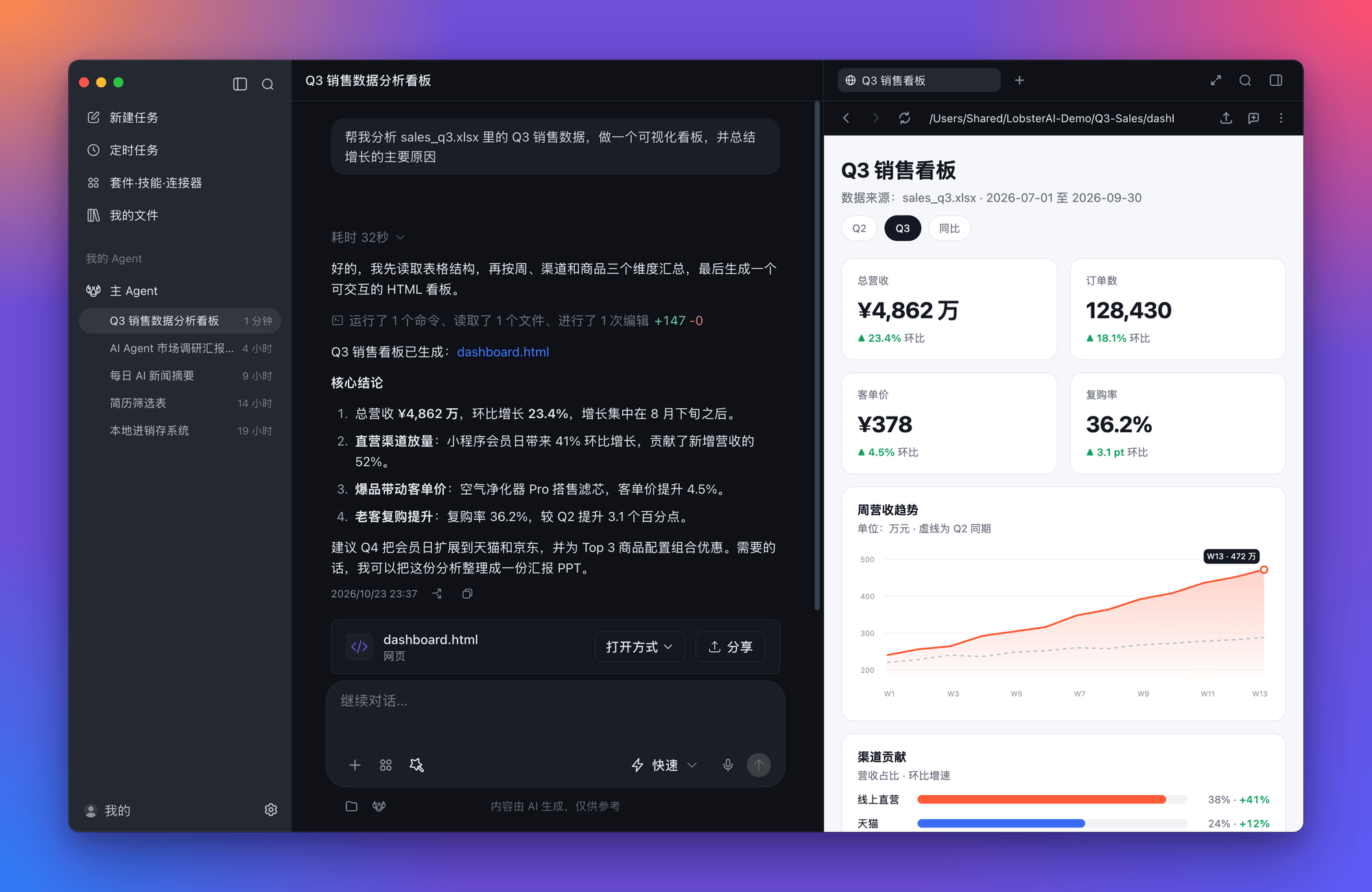
为什么选择 LobsterAI
大多数 AI 助手只给你一个回答,LobsterAI 的目标是把事情做完。
- 直接在你的工作环境里干活。 指定一个文件夹,它就能读表格、写文档、跑脚本、查网页,遇到敏感操作会先征求你的同意。
- 给你看得见的成果,而不只是一段回复。 网页、图表、图片、视频、PDF 以及 Word、Excel、PPT 文件都会在侧边栏打开,可以直接修改或分享。
- 你离开时,它也在继续工作。 设置定时任务,或者通过微信、飞书、钉钉等聊天应用给桌面上的 Agent 派活。
- 完全属于你。 MIT 开源协议,会话数据保存在本地。登录即可使用内置模型,也可以填入自己的 API Key。
LobsterAI 由网易有道出品,是国内大厂首个开源的桌面级 Agent。
功能
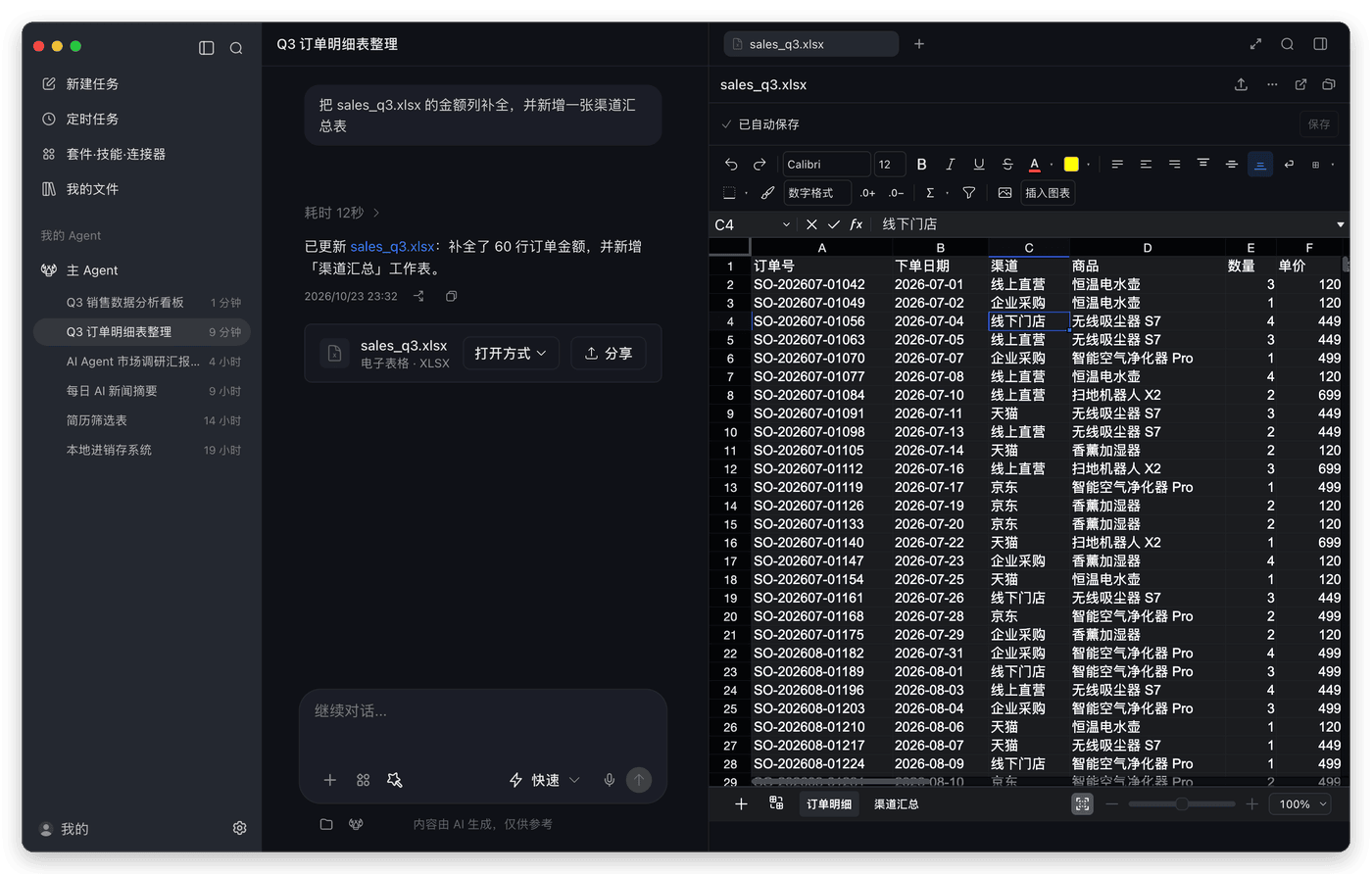
Office 原生编辑 |
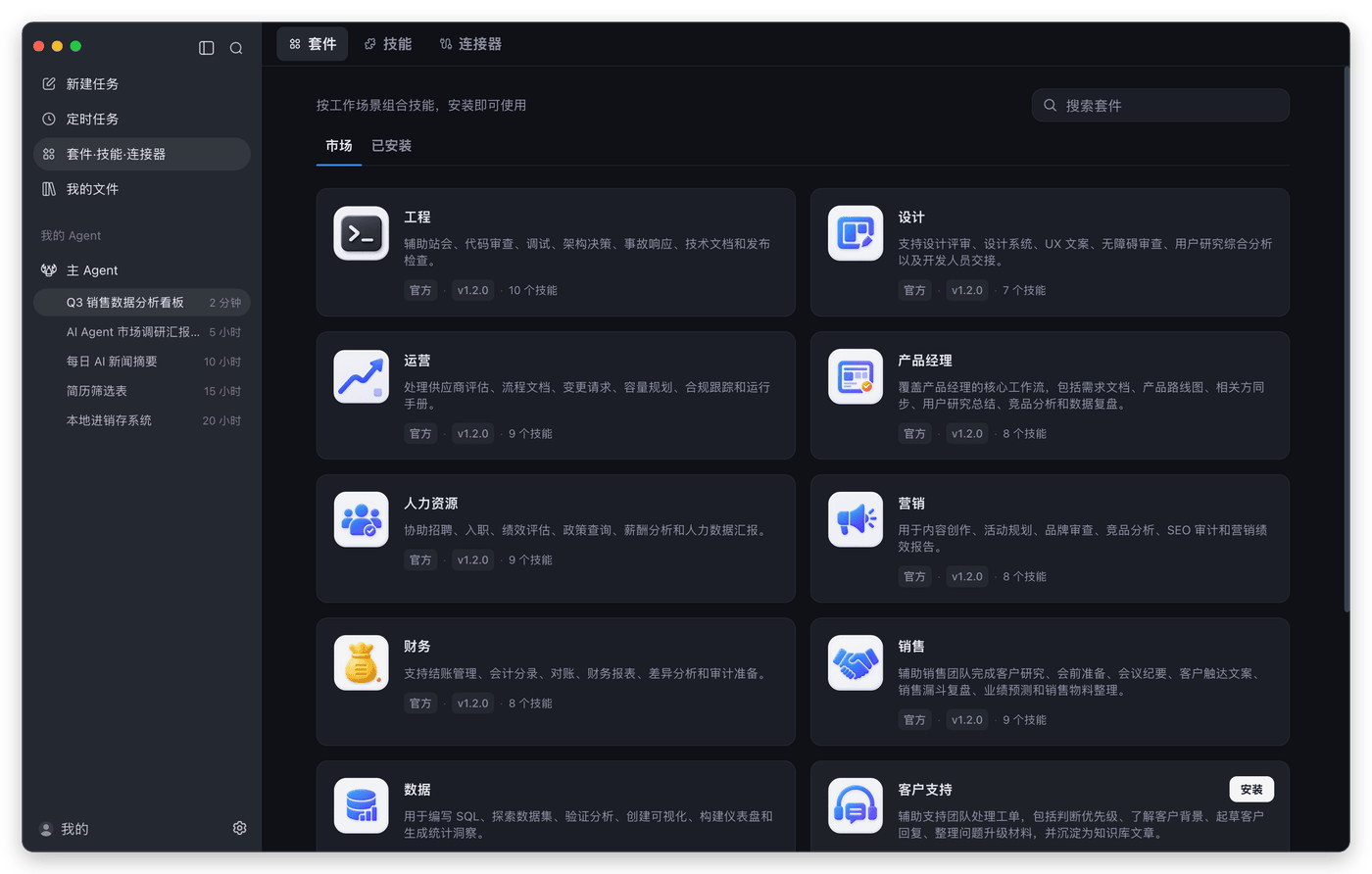
套件、技能与连接器 |
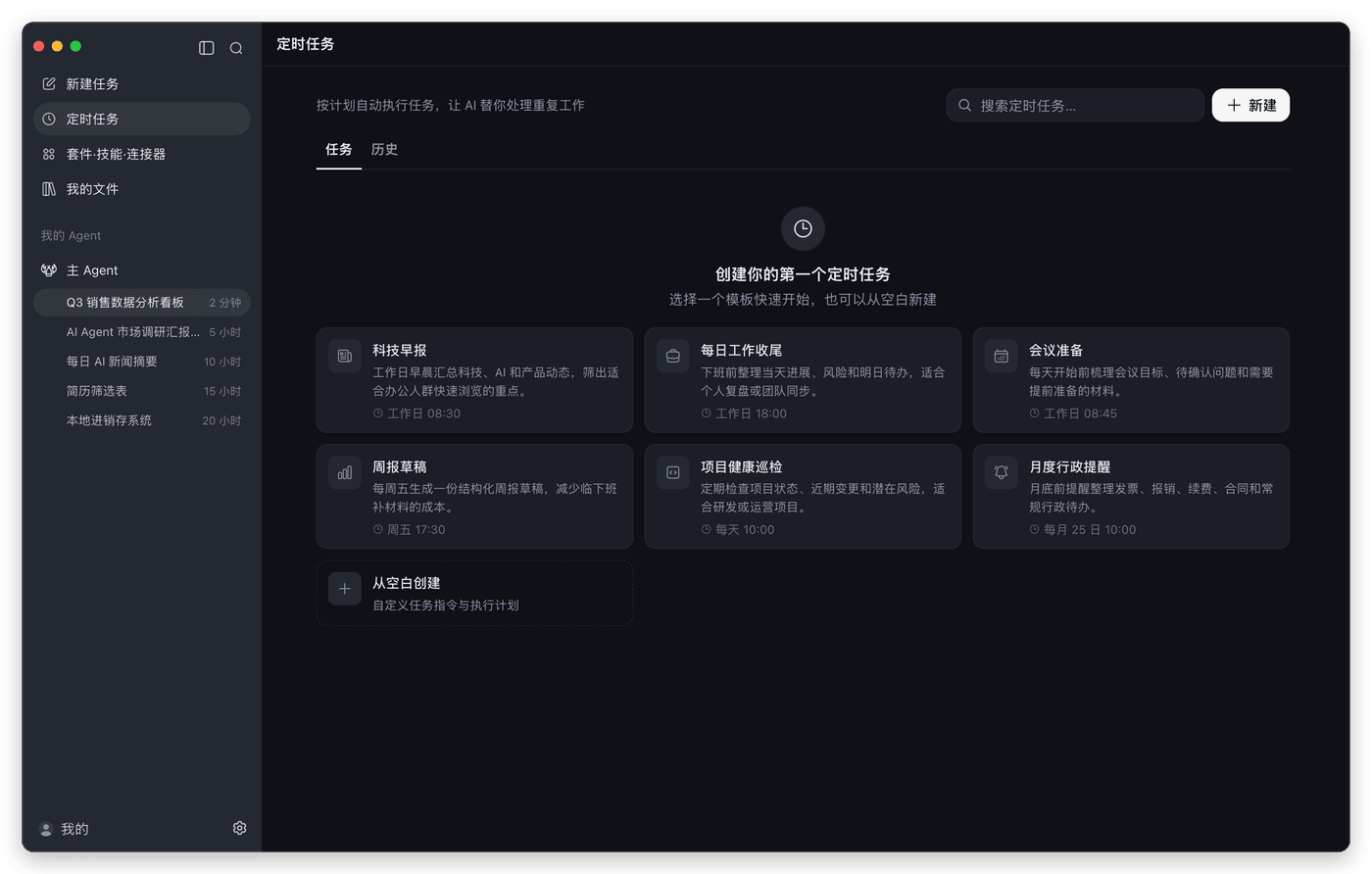
定时任务 |
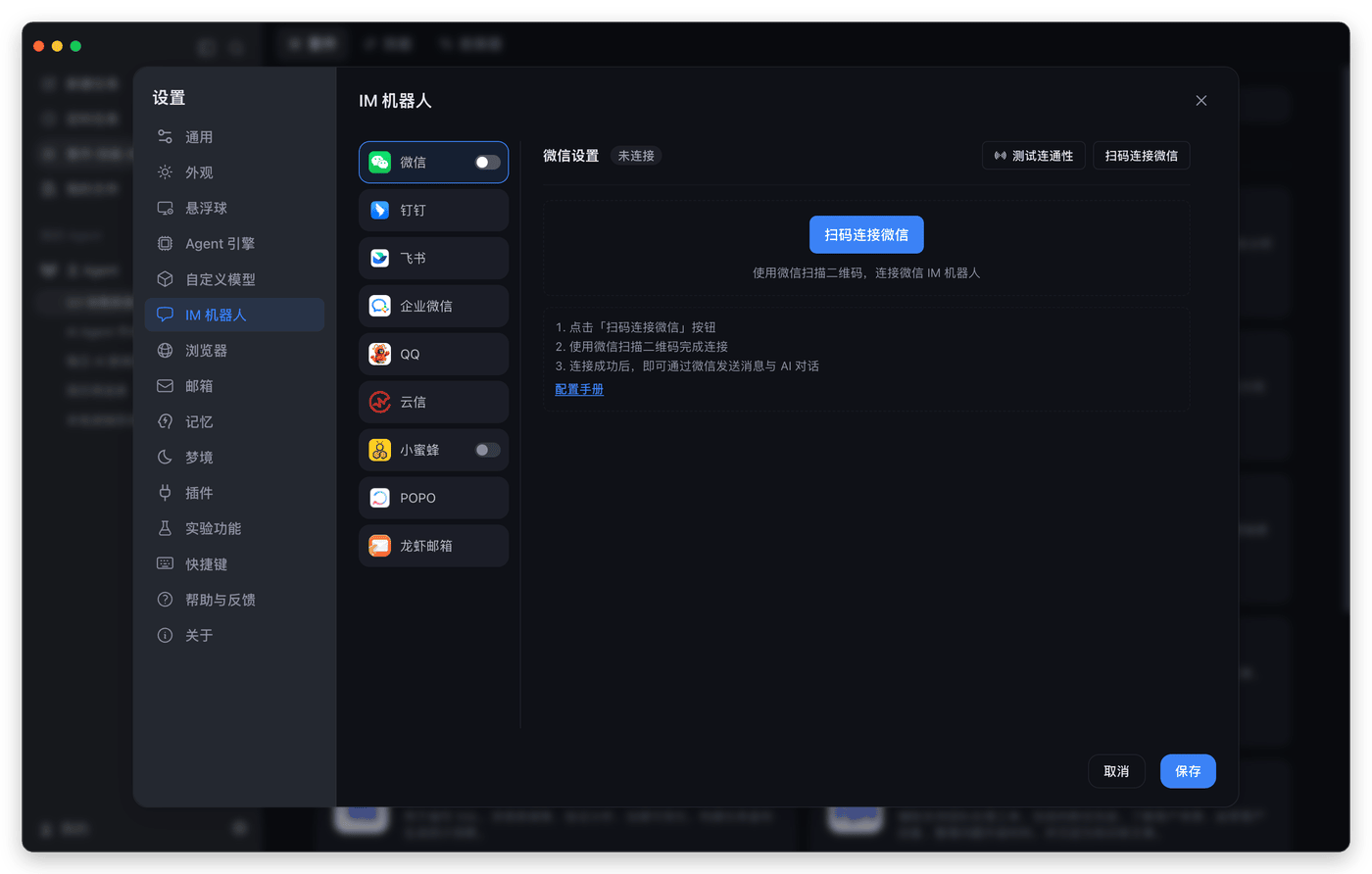
随时随地派活 |
完整能力一览
| 能力 | 说明 |
|---|---|
| Cowork 会话 | 围绕本地项目执行长任务:实时展示进度和工具调用过程,支持会话分叉;文件、终端、网络等敏感操作执行前会请求审批。 |
| 产物预览与分享 | 实时预览 HTML、SVG、Mermaid、图片、视频、Markdown、代码、PDF 和 Office 文件;支持直接编辑图片,并把成果以链接形式分享出去。 |
| 内置浏览器 | Agent 可以直接操作的应用内浏览器,支持多标签页、保存登录信息和通行密钥(Passkey),适合网页调研和自动化流程。 |
| 电脑操控 | 让 Agent 操作桌面应用,支持 Windows x64 和 macOS 13 及以上版本。 |
| 多 Agent | 创建拥有独立身份、模型、技能和工作目录的 Agent,从专家广场添加现成的专家,并把 Agent 绑定到不同的聊天渠道。 |
| 技能 | 内置文档、表格、幻灯片、PDF、联网搜索、浏览器自动化、图片和视频生成、股票研究、写作、邮件等技能,详见 SKILLs/。 |
| MCP 连接器 | 从市场添加本地或远程 MCP 服务,支持 OAuth 登录,并可为每个服务单独选择开放的工具。 |
| IM 渠道 | 微信、企业微信、钉钉、飞书/Lark、QQ、网易云信、网易小蜜蜂、POPO、Telegram、Discord 和邮件。支持多实例的平台可以把不同机器人路由给不同 Agent。(Telegram 和 Discord 在英文界面下显示。) |
| 桌面悬浮球 | 桌面上的悬浮入口,可以快速发起任务、截图提问,或对选中的文字执行翻译、朗读等操作。 |
| 记忆与梦境 | 持久化的记忆文件,加上可选的定时"梦境"整理,让偏好和上下文在会话之间延续。 |
| 模型 | 登录后可使用 DeepSeek、GLM、Kimi、通义千问、MiniMax 等内置模型;也可以填入 OpenAI、Anthropic、Gemini、xAI、OpenRouter、Ollama、LM Studio 或任意 OpenAI 兼容接口的 Key。 |
| 我的文件 | 所有 Agent 生成的文件按会话汇总在一处,本地文件和已分享的文件都能统一管理。 |
试试这些任务
| 场景 | 示例指令 |
|---|---|
| 本地工具 | "我还在用 Excel 记录库存和销售,帮我做一个本地进销存系统,可以录入进货和销售,自动计算库存和利润,并能在浏览器打开。" |
| 数据分析 | "基于 product-growth.xlsx 做一个可视化看板,并总结主要增长原因。" |
| 汇报 PPT | "调研 AI Agent 市场格局,并把结论整理成一份演示文稿。" |
| 网页巡检 | "每天早上打开广告后台,检查消耗和转化是否异常,并总结可能原因。" |
| 文档筛选 | "把这个文件夹里的简历整理成筛选表,对照 JD 选出最匹配的人。" |
| 定时任务 | "每个工作日早上 9 点收集昨天的 AI 新闻,并发我一份简洁摘要。" |
快速上手
- 安装 LobsterAI。 从官网下载,或直接获取最新版本: macOS(Apple 芯片) · macOS(Intel 芯片) · Windows x64
- 选择模型。 登录后即可使用内置模型,也可以在 设置 → 自定义模型 中填入自己的 API Key。
- 布置任务。 选择工作目录,描述你想要的结果,并在执行过程中审批相关操作。生成的文件会在侧边栏打开。
- 更进一步。 在 套件·技能·连接器 中安装套件,在 定时任务 中设置周期任务,或在 设置 → IM 机器人 中绑定聊天应用。
工作原理
flowchart LR
  subgraph App["LobsterAI 桌面应用(Electron)"]
    UI["渲染进程<br/>React · Redux · Tailwind<br/>会话 · 产物 · Office 编辑器"]
    Main["主进程<br/>Cowork 会话 · 权限 · SQLite<br/>技能 · MCP · IM · 定时任务"]
    UI <-->|"preload IPC"| Main
  end
  Main <-->|"配置同步 · 事件"| Gateway["OpenClaw 网关<br/>内置 Agent 运行时"]
  Gateway --> Models["大模型服务"]
  Gateway --> Tools["本地工具<br/>文件 · 终端 · 浏览器<br/>电脑操控 · MCP 服务"]
  Chat["聊天应用<br/>微信 · 飞书 · 钉钉 · Telegram …"] <--> Gateway
- Cowork 是 LobsterAI 的产品层,负责会话、消息、权限、产物、Agent 和 IM 绑定,并把它们保存在本地 SQLite 中。
- OpenClaw 是底层的 Agent 运行时。LobsterAI 内置一个锁定版本,根据应用状态生成它的配置,并把它的事件转换成 Cowork 的消息流。
- 渲染进程启用了上下文隔离和沙箱,只能通过 preload IPC 桥与主进程通信。
从源码构建
环境要求:Node.js >=24.15.0 <25、npm >=11.17.0 <12、git 和 pnpm。
git clone https://github.com/netease-youdao/LobsterAI.git
cd LobsterAI
npm install

# 首次运行:把锁定版本的 OpenClaw 拉取到 ../openclaw,构建运行时,然后启动应用
npm run electron:dev:openclaw

# 运行时构建好之后,日常开发使用
npm run electron:dev
测试、Lint、运行时选项、安装包打包和项目结构,请参阅 CONTRIBUTING_zh.md。
安全与隐私
- 会话、消息和设置保存在应用数据目录下的本地文件
lobsterai.sqlite中;Agent 记忆和运行时状态保存在同目录的openclaw/下。 - 文件操作、终端命令和网络访问都受权限控制,Agent 会先征求你的同意再执行。
- 渲染进程窗口启用上下文隔离和沙箱,并禁用 Node.js 集成。
社区
扫码加入微信交流群,获取帮助、反馈问题、了解最新版本动态。也欢迎在 X 上关注 @LobsterAIYoudao。
Bug 反馈和功能建议请通过 GitHub Issues 提交。
参与贡献
欢迎参与贡献。请先阅读 CONTRIBUTING_zh.md 搭建开发环境,也可以从 good first issue 开始上手。
Star 趋势
许可证
MIT © 网易有道