html-anything
✨ The agentic HTML editor — your local AI agent writes the HTML, you ship it. 🚀 75 Skills × 9 Surfaces (magazine · deck · poster · XHS / tweet · prototype · data report · Hyperframes) 🛡️ Sandboxed preview · 📤 1-click to WeChat / X / Zhihu / HTML / PNG 🔑 Zero API key — Claude Code / Cursor / Codex / Gemini / Copilot / OpenCode / Qwen / Aider.
原始仓库简介 · 中文摘要待补充 · agent-skills / agentic / ai-agents / ai-design / ai-editor / byok
README / 项目原文
HTML Anything
From the team behind Open Design — 40k★ · 200+ contributors, production-grade and iterating faster. html-anything is the focused agent-era HTML editor; if it clicks for you, Open Design is where the same team ships at scale.
Live page: open-design.ai/html-anything/ — overview, surface modes, and showcase before you clone.
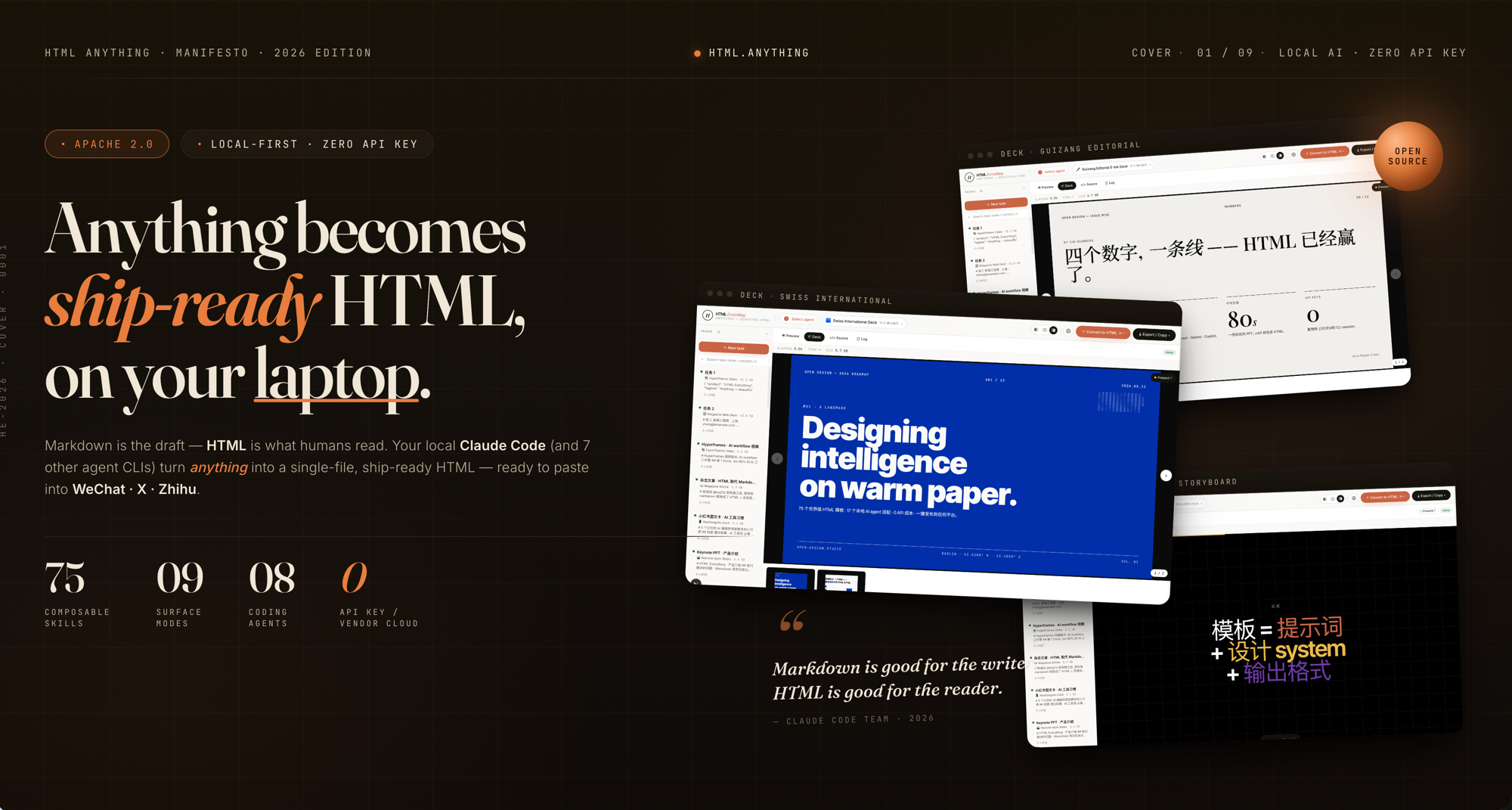
Markdown is the draft. HTML is what humans read. Your local agent writes it. The agentic HTML editor — in the agentic era, you don't hand-edit docs anymore, so the output format should be what the reader actually wants: HTML. Local-first, zero API key, reuses the CLI session you already have logged in — 9 coding-agent CLIs auto-detected on your
PATH(Claude Code · Cursor Agent · Codex · Gemini CLI · GitHub Copilot CLI · OpenCode · Qwen Coder · Aider · IBM Bob), driven by 75 composable skill templates across 9 deliverable surfaces (magazine articles · keynote decks · résumés · posters · Xiaohongshu cards · tweet cards · web prototypes · data reports · Hyperframes videos). One-click export to WeChat / X / Zhihu, or download.html/.png.












English · 简体中文
Showcase
The eight skills that surface at the top of the picker's Featured / 推荐 group — sorted by their recommended: rank in SKILL.md frontmatter (lower = higher). Each ships a real example.html you can open straight from the repo, no auth, no setup.
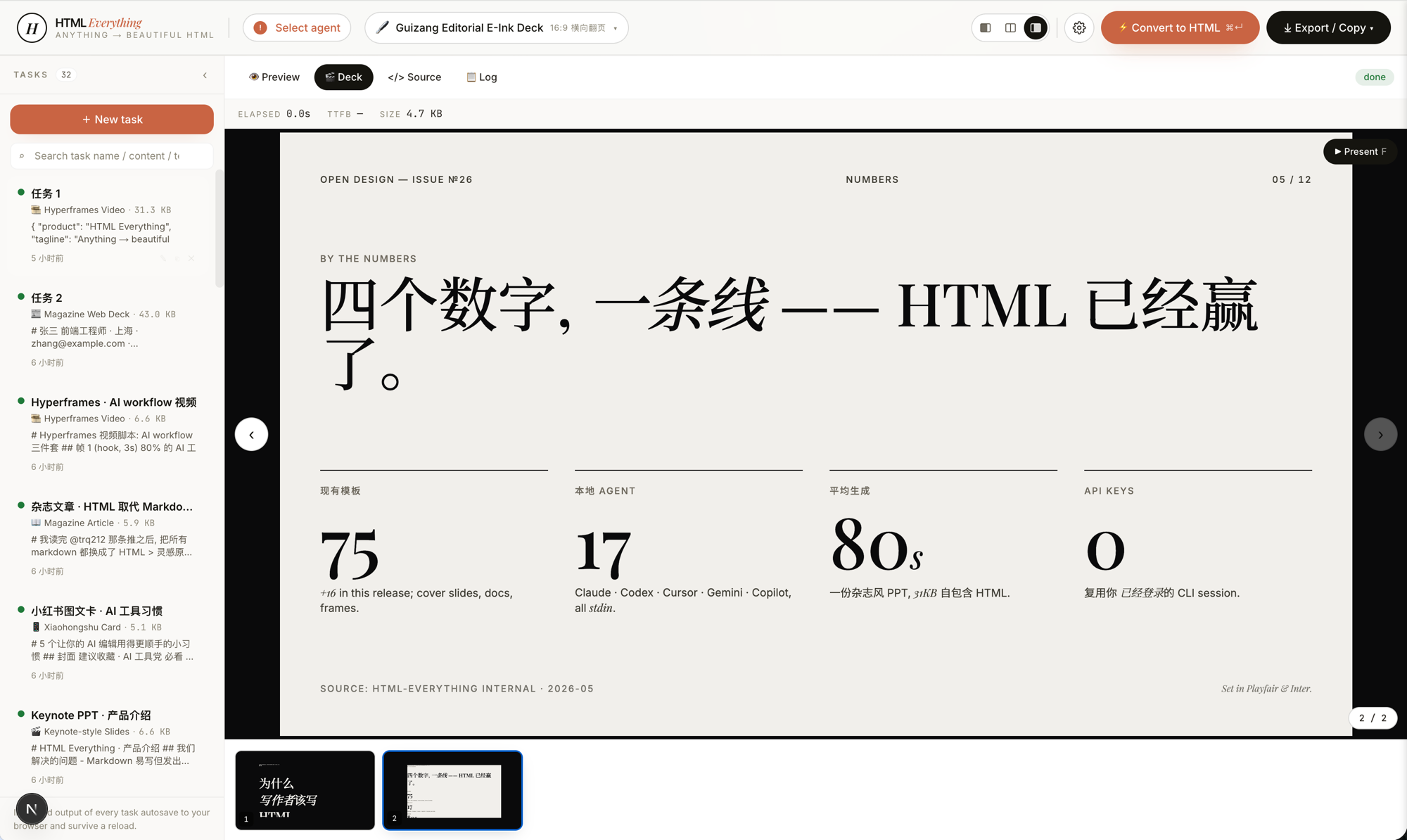 deck-guizang-editorial · deck · recommended: 1Magazine × e-ink editorial deck, inspired by op7418/guizang-ppt-skill — 10 locked layouts × 5 palettes (Ink / Indigo Porcelain / Forest Ink / Kraft / Dune). Reads like a printed art-zine, not a slide deck.
|
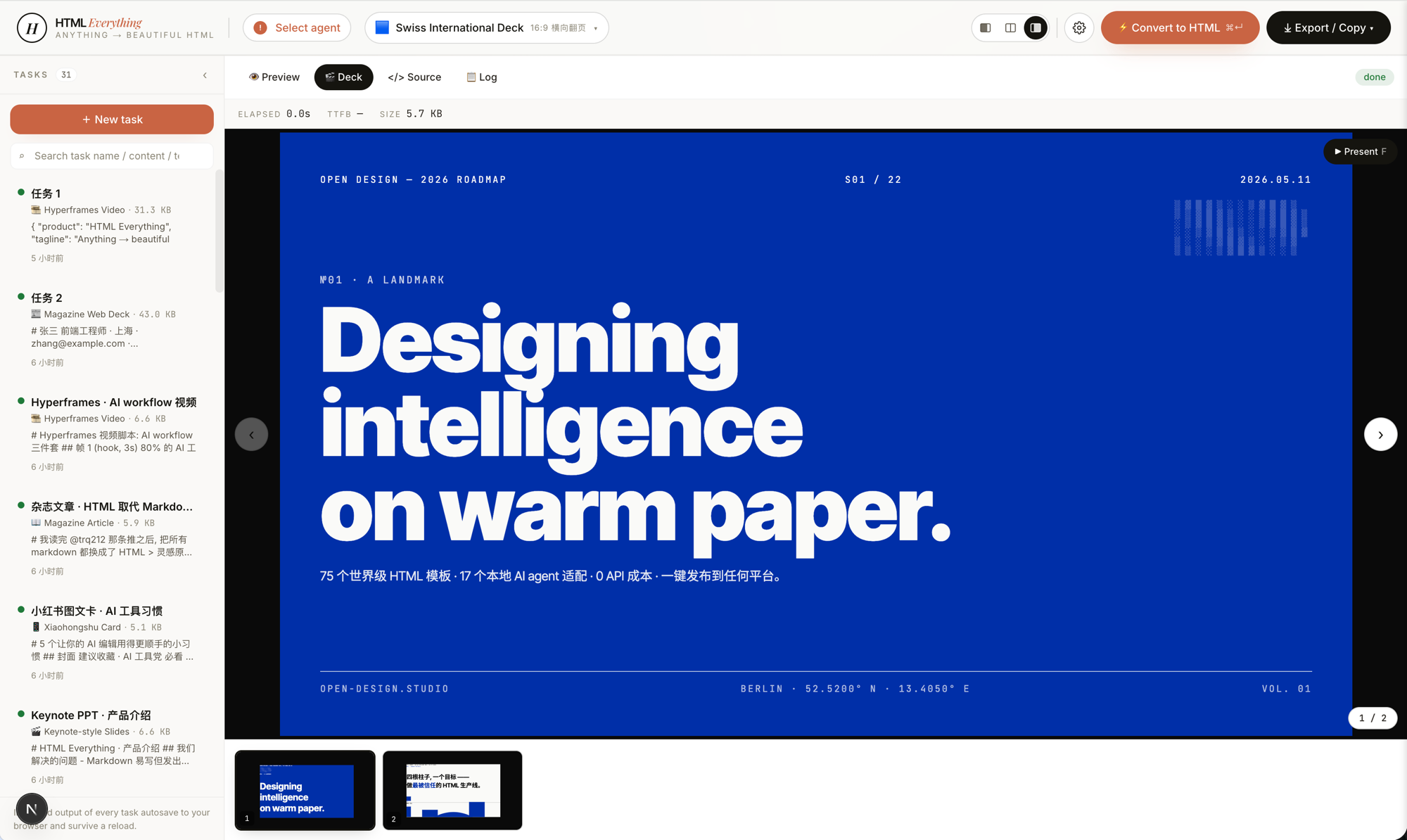 deck-swiss-international · deck · recommended: 2Swiss International deck — 16-column grid + one saturated accent (Klein Blue / Lemon / Mint / Safety Orange) across 22 locked layouts. Cold, rational, institutional. The deck that reads "a designer made this" the moment it opens. |
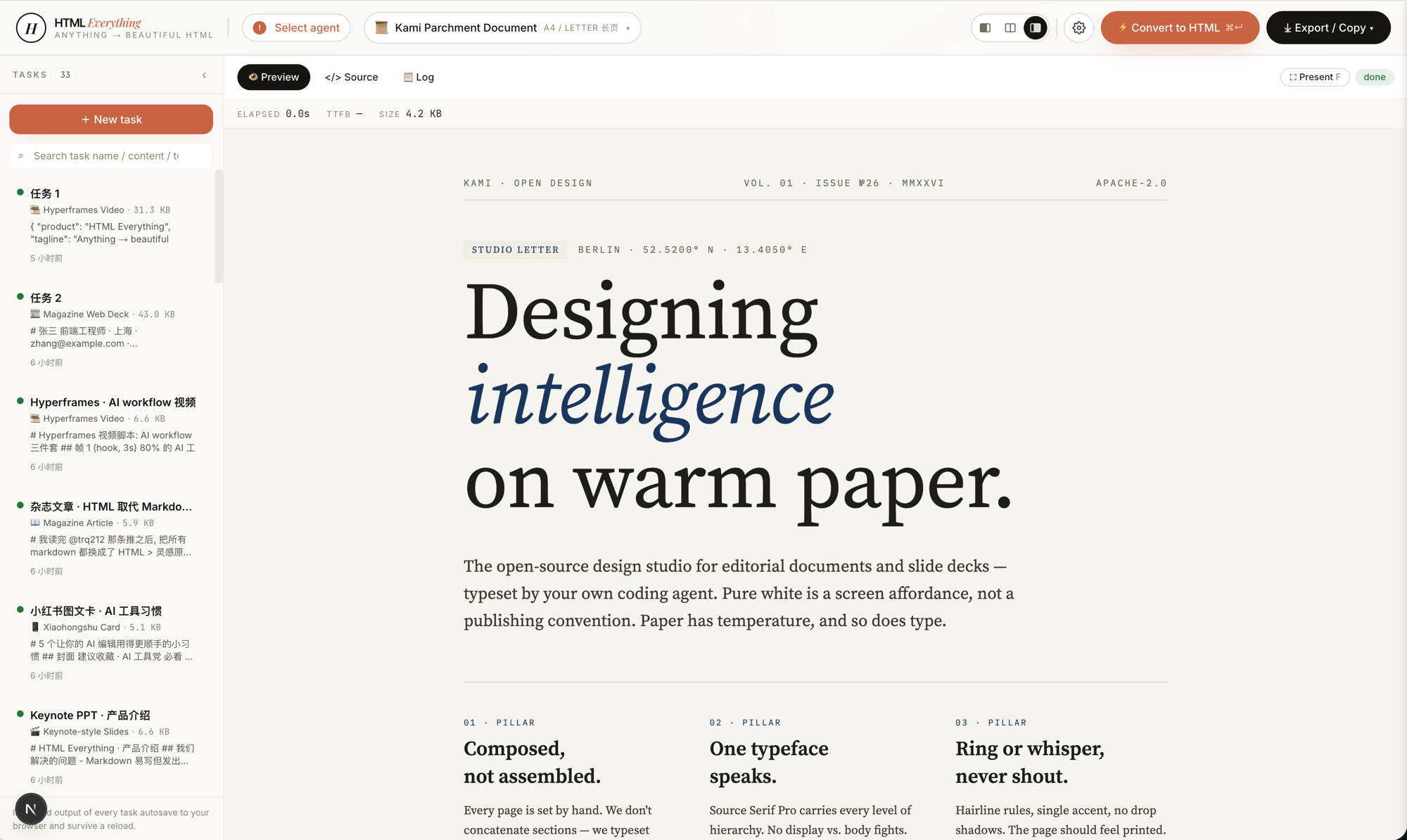 doc-kami-parchment · doc · recommended: 3Warm-parchment editorial document, inspired by tw93/kami. #f5f4ed ground + ink-blue accent + single serif voice — a noticeably calmer reading surface than plain-white markdown for long essays, reports, and one-pagers.
|
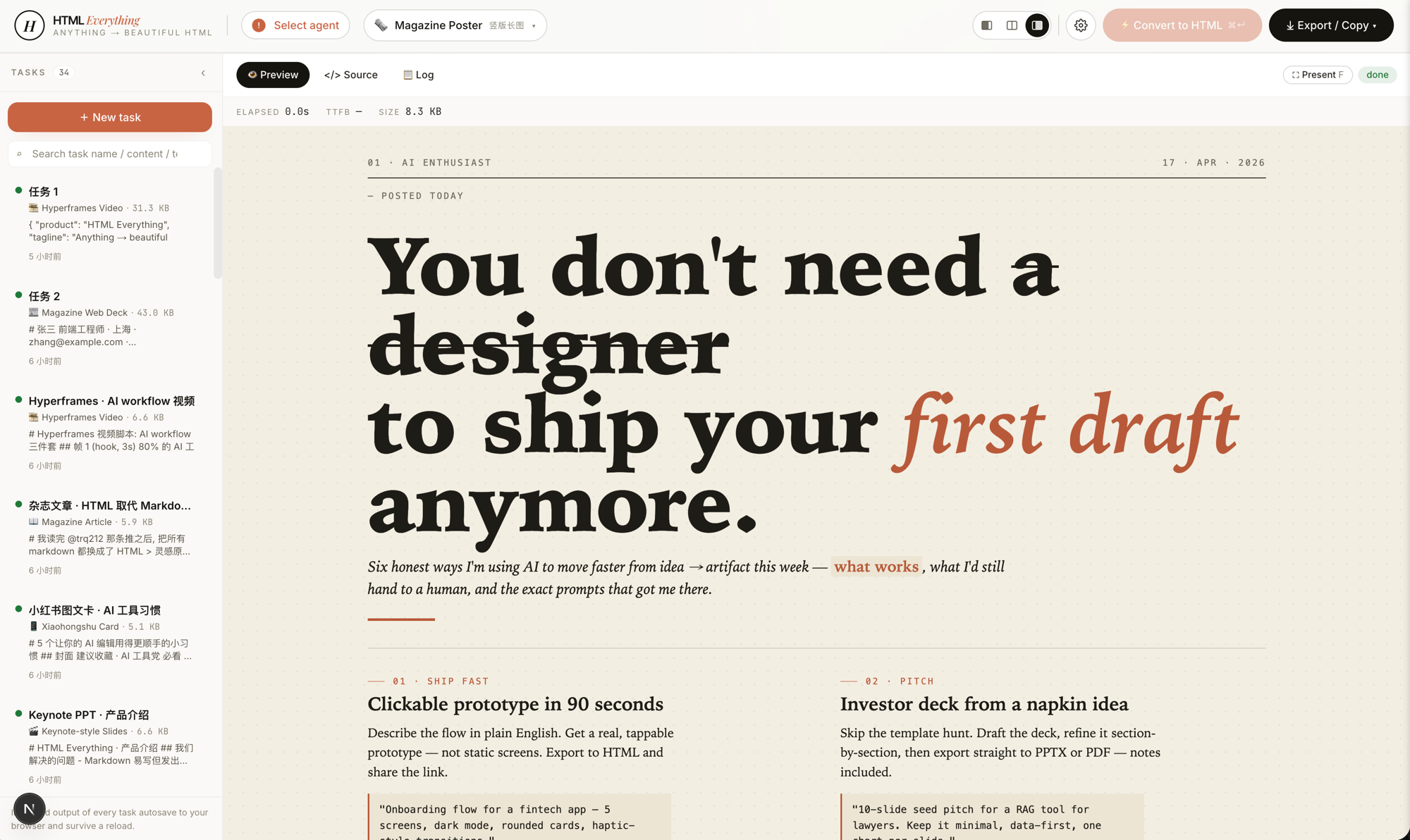 magazine-poster · poster · recommended: 4Newsprint Sunday-paper poster — oversized serif headline, two-column body, six numbered sections, dot-pattern cream ground. Reads like a printed broadsheet, not a webpage. |
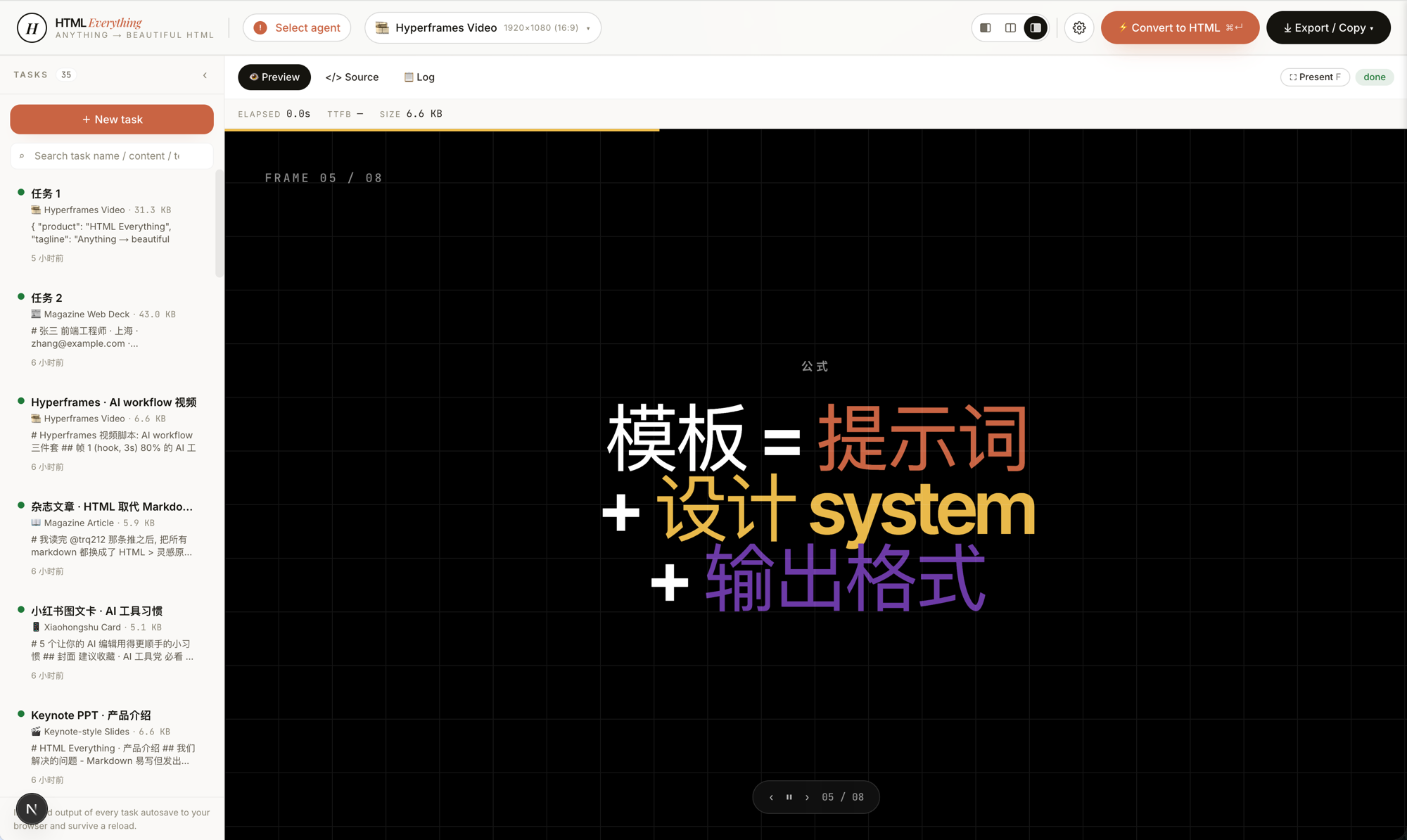 video-hyperframes · frame / video · recommended: 5Hyperframes / Remotion-compatible storyboard — 6–10 sequential 1920×1080 frames with hidden duration + transition markers and an auto-play script. Hand straight to heygen-com/hyperframes or Remotion to render .mp4.
|
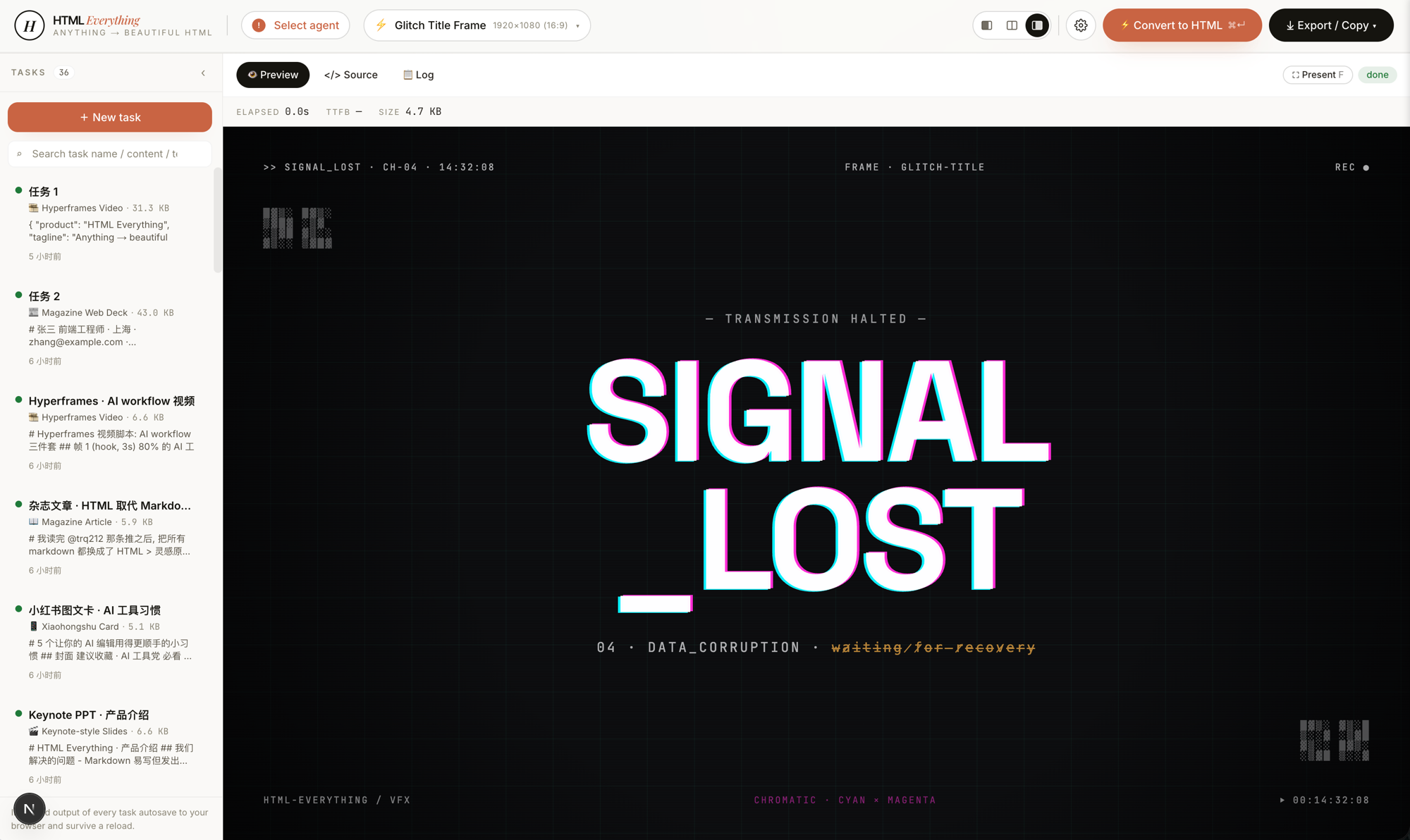 frame-glitch-title · frame · recommended: 6Glitch title frame — cyan/magenta chromatic offset, CRT scanlines, corrupted-data subtitle, ASCII noise in the corners. Cyberpunk hero card or video transition. |
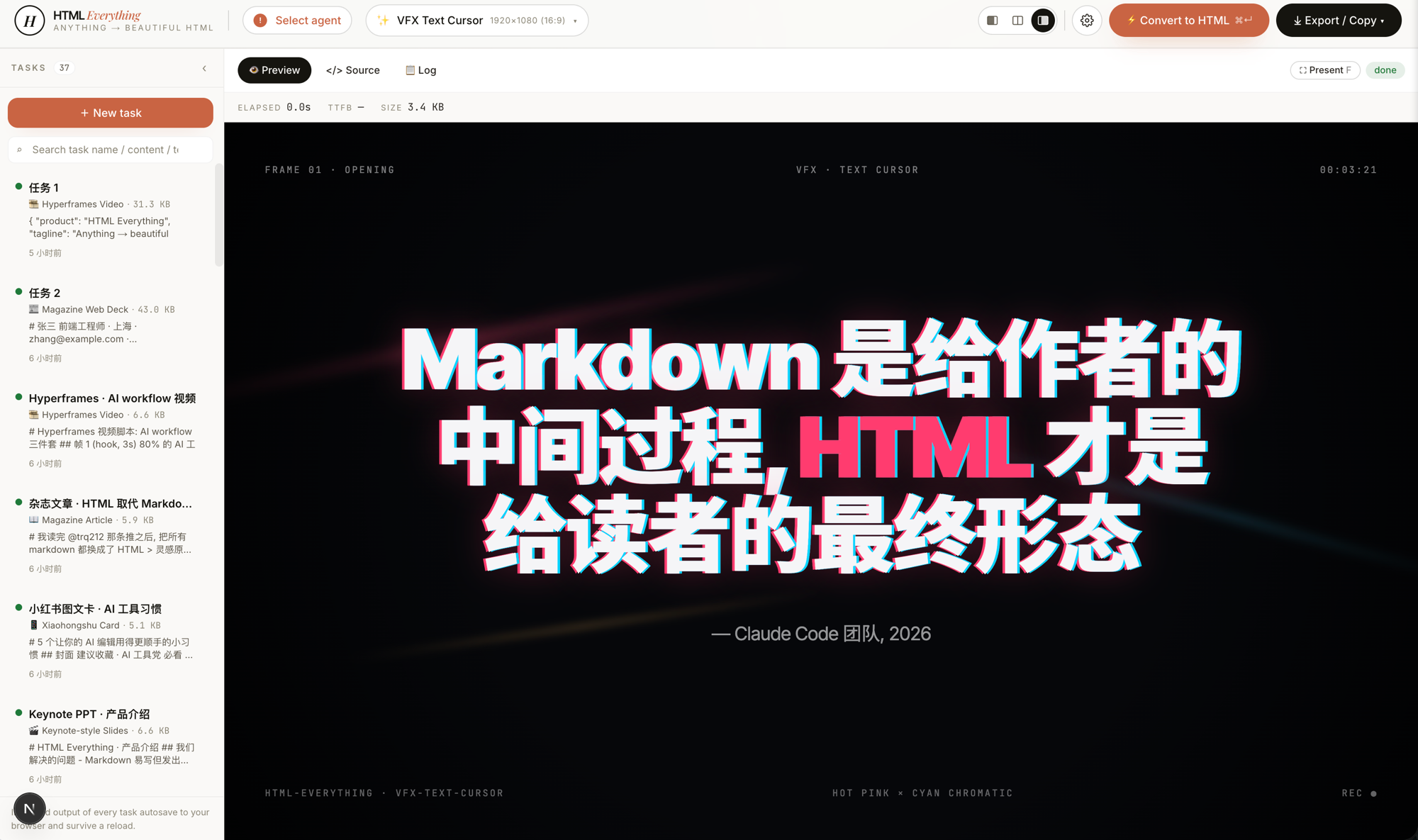 vfx-text-cursor · vfx · recommended: 7VFX text-cursor opener — a cursor "types" across the canvas, each character revealed with a hot-pink × cyan chromatic trail and directional light leaks. Drop in a quote, get a film-grade opening frame. |
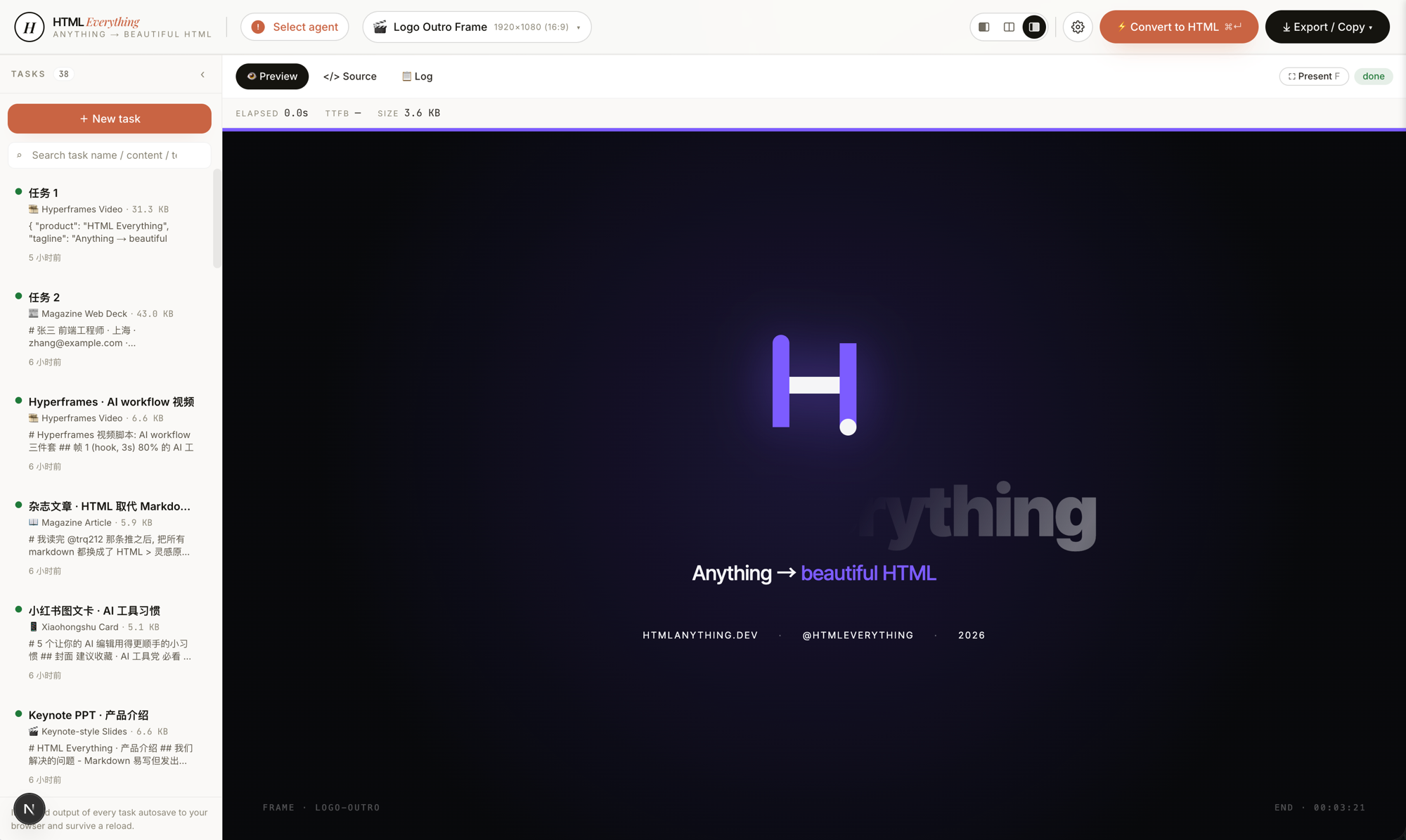 frame-logo-outro · frame · recommended: 8Logo outro frame — logo assembles piece-by-piece with glow bloom, tagline rises, CTA appears. The closing card for a product reveal or brand film. |
The full skill catalog (organized by mode) is in Skills below.
Why this exists
Anthropic's Claude Code team announced they stopped writing internal docs in Markdown — they ship HTML now. The argument is simple:
| Markdown | HTML |
|---|---|
| Good for the writer | Good for the reader |
| Layout limited to the renderer | Layout is yours |
| Looks ugly screenshotted into a tweet | Already looks like a designed image |
| Has to be re-flowed for WeChat / Zhihu / newsletter | One-click format conversion |
HTML is the final form for humans. Markdown is just an intermediate state during writing.
But "writing HTML" used to mean writing CSS, picking type scales, snapping to a grid, doing responsive — most users won't, designers won't bother, writers don't have the patience. So what we built: after you press ⌘+Enter, your local AI agent turns any input (Markdown / CSV / Excel / JSON / SQL / raw notes) into a ship-ready single-file HTML in seconds, then one-click sends it to WeChat / X / Zhihu / anywhere. "Ship-ready" is the bar — when generation finishes, the artifact is what your audience actually sees. No "I'll touch it up later" pass.
We stand on four open-source shoulders:
nexu-io/open-design— the agent-detection layer, the design-system model, and theSKILL.mdprotocol.next/src/lib/agents/andnext/src/lib/templates/skills/*mirror this architecture directly.mdnice/markdown-nice— proof thatjuice-inlined CSS pastes cleanly into WeChat and Zhihu without per-platform manual fix-up.gcui-art/markdown-to-image— the iframe → high-DPI PNG export path.alchaincyf/huashu-md-html— the anti-AI-slop discipline that maps into the hard constraints inside everySKILL.md(CJK-first font stack, 8 px baseline grid, contrast ≥ 4.5, must-use-real-data rule).
At a glance
| What you get | |
|---|---|
| Coding-agent CLIs (8) | Claude Code · Cursor Agent · OpenAI Codex · Gemini CLI · GitHub Copilot CLI · OpenCode · Qwen Coder · Aider — scanned on startup across PATH (including ~/.local/bin, ~/.bun/bin, /opt/homebrew/bin, ~/.npm-global/bin — directories a GUI-launched Node process normally misses), swap from the top-bar picker. |
| Zero API key | We reuse the session you already have logged in via claude login · cursor login · gemini auth. Your existing subscription does the work; marginal cost is $0. |
| 75 skill templates | prototype (web / SaaS landing / dashboard / data report) · deck (20 keynote skills incl. Swiss International, Guizang Editorial, XHS Pastel, Hermes Cyber, Replit, Magazine Web…) · frame (10 Hyperframes video frames — liquid hero, NYT data chart, sticky-note flowchart, glitch title, cinema light-leak, macOS notification, logo outro…) · social (X / Xiaohongshu / Spotify / Reddit cards) · office (PM spec · eng runbook · finance report · HR onboarding · invoice · OKRs · weekly update · meeting notes · kanban) · doc (Kami warm-parchment editorial) · mockup (3D device frame) · vfx (text-cursor effect). |
| 9 surface modes | 📖 magazine article · 🎬 keynote deck · 📄 résumé · 🖼️ poster · 📱 Xiaohongshu card · 🐦 tweet card · 🛠️ web prototype · 📊 data report · 🎞️ Hyperframes video. Each has multiple skills you can pick from. |
| One-click export | juice inlines CSS → WeChat paste with zero re-formatting · modern-screenshot renders the iframe to a 2× PNG → ClipboardItem → drop straight into the tweet composer · <mjx-container> → data-eeimg placeholder → Zhihu equations render automatically · standalone .html download · high-DPI .png download. |
| Streaming render | POST /api/convert over SSE. The agent's stdout JSON-line stream is parsed for text deltas → server-sent events → client appends → iframe srcdoc updates live. Waiting for an AI generation looks like watching it type in real time. |
| Sandboxed preview | <iframe sandbox="allow-scripts allow-same-origin">. User-emitted HTML runs in an isolated origin — Tailwind CDN / Google Fonts / inline scripts work, but cookies and localStorage are quarantined from the host. |
| Format auto-detect | The editor accepts Markdown / CSV / TSV / JSON / SQL / plain text. papaparse + xlsx parse tabular data in the browser — nothing is uploaded. |
| Deployable to | Local (pnpm -F @html-anything/next dev) · Vercel for the web layer (the agent always stays on your laptop). |
| License | Apache-2.0 |
Demo
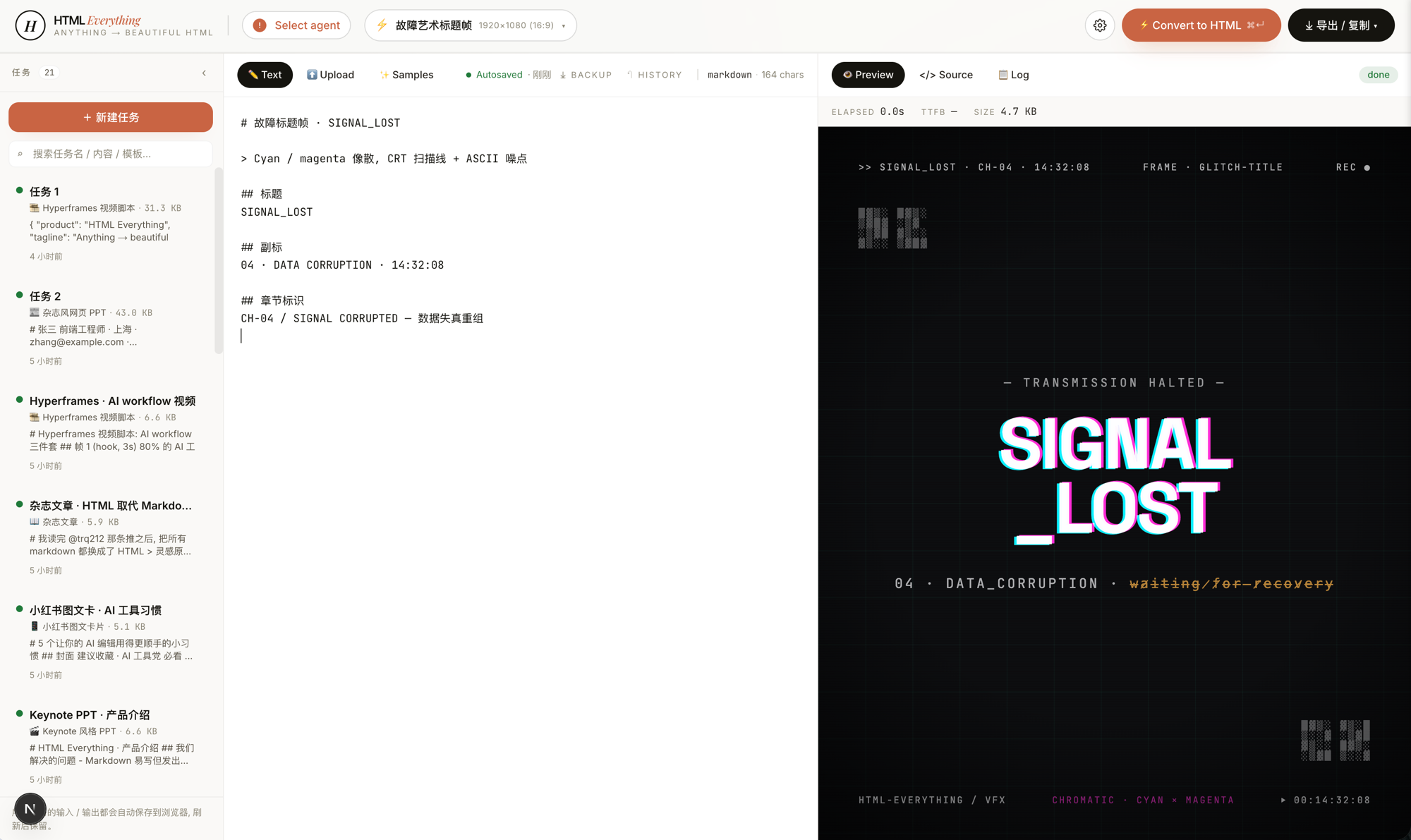 Entry view — the top bar shows your installed CLIs, the left pane is the editor, the middle is the template + design-system picker, the right is a live iframe preview. The same surface produces magazines, decks, posters, web prototypes, and Hyperframes frame scripts. |
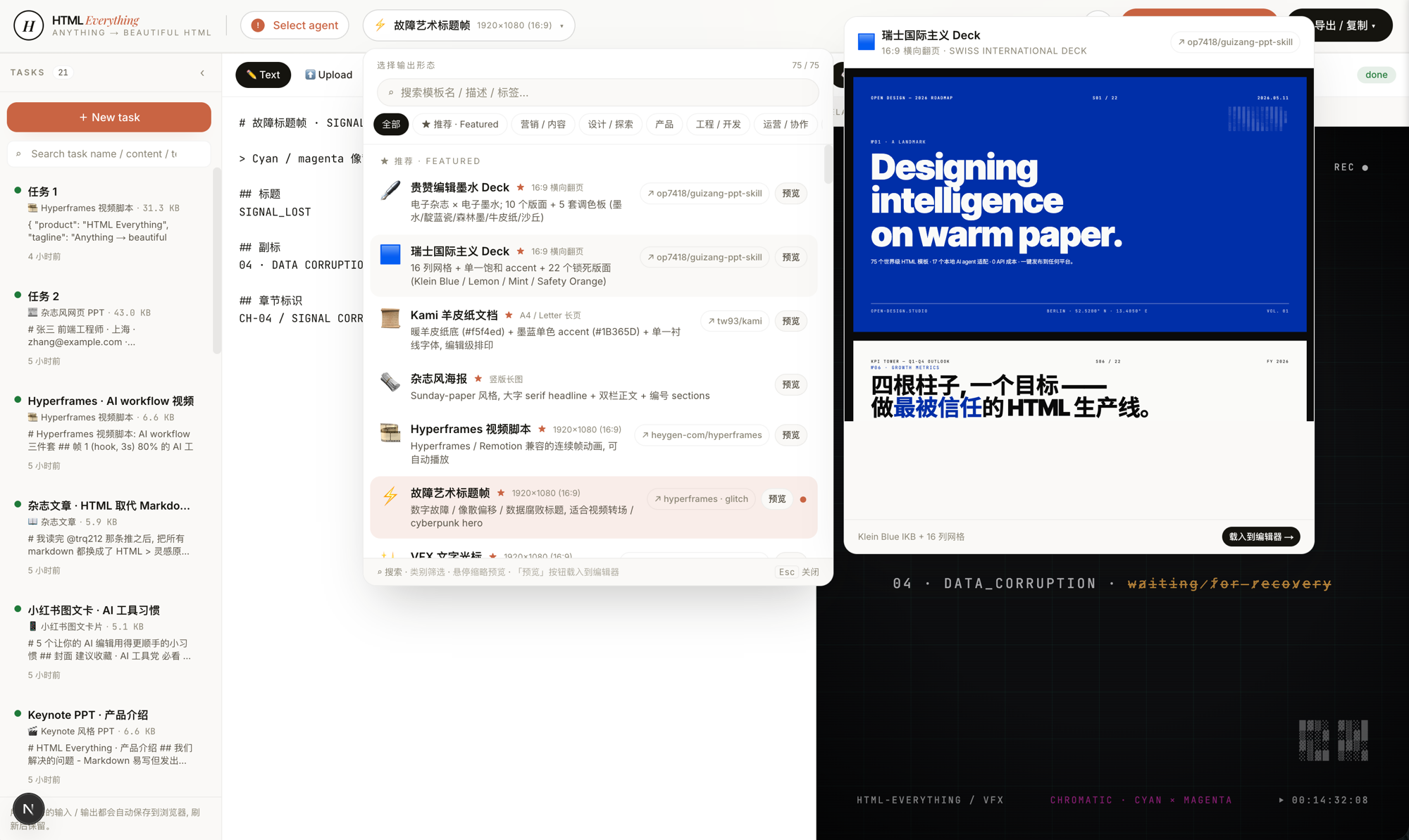 75 templates, searchable and filterable — pick by mode (prototype / deck / frame / social / office / doc) × scenario (design / marketing / engineering / product / personal). Every skill ships an example.html you can open straight from the repo to see what the agent will produce.
|
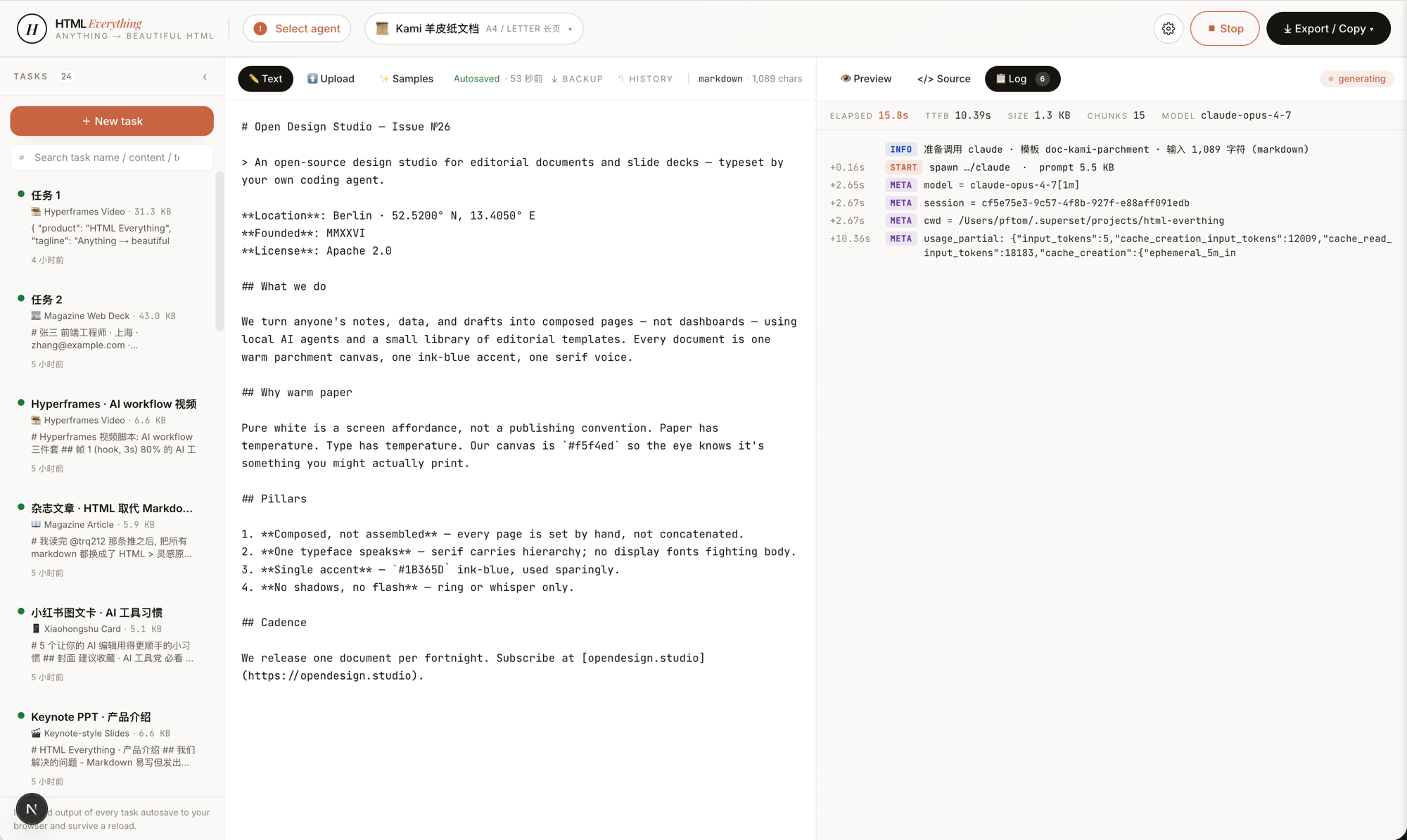 SSE streaming — agent stdout JSON-line is parsed for text deltas, appended into the iframe srcdoc in real time. You watch the page render line by line. Don't like where it's going? Interrupt and re-prompt — no wasted full generation.
|
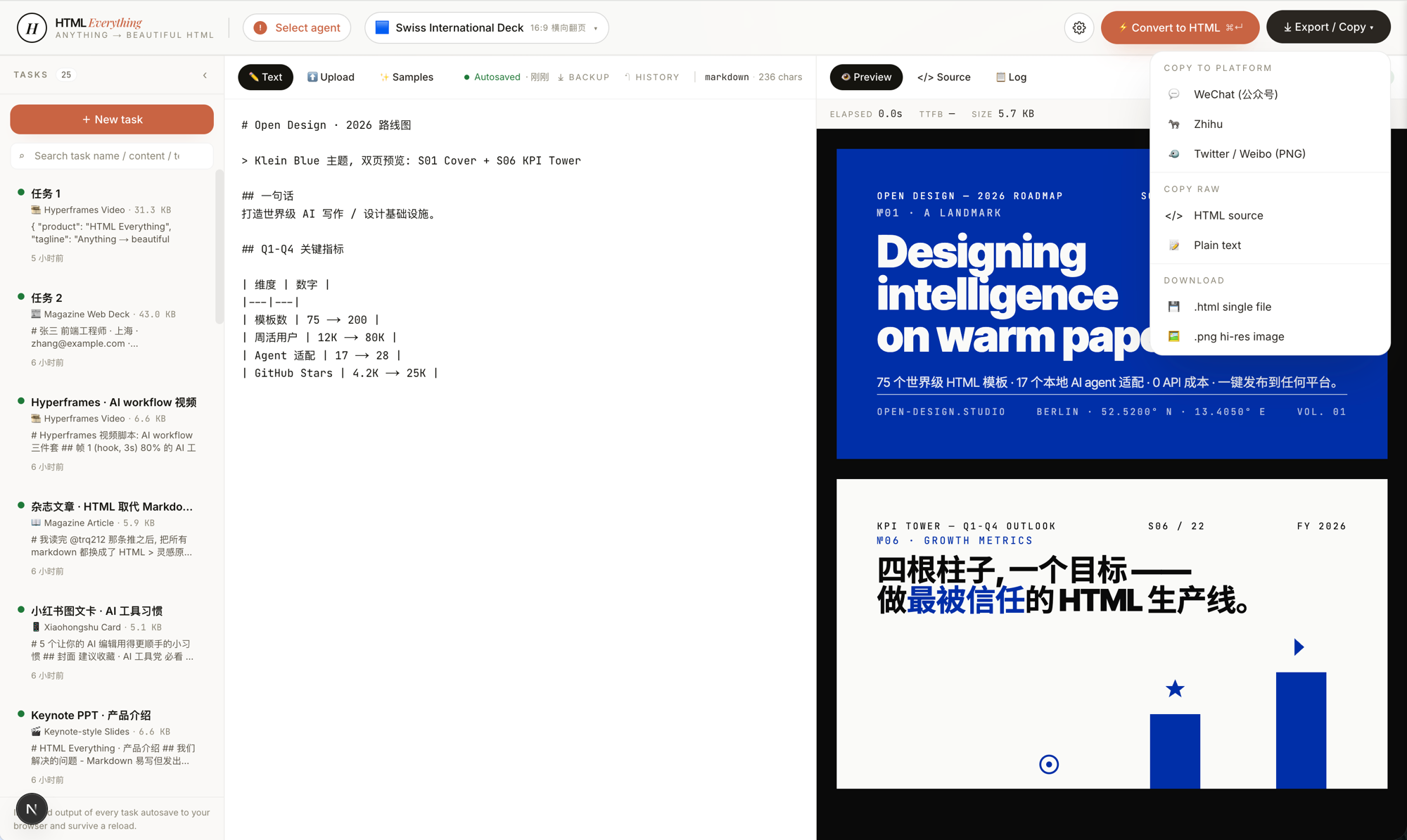 One-click export — WeChat (juice-inlined CSS) · X / Weibo / Xiaohongshu (modern-screenshot → 2× PNG → ClipboardItem) · Zhihu (LaTeX image placeholders) · download .html · download .png. Paste straight in, no second pass of manual formatting.
|
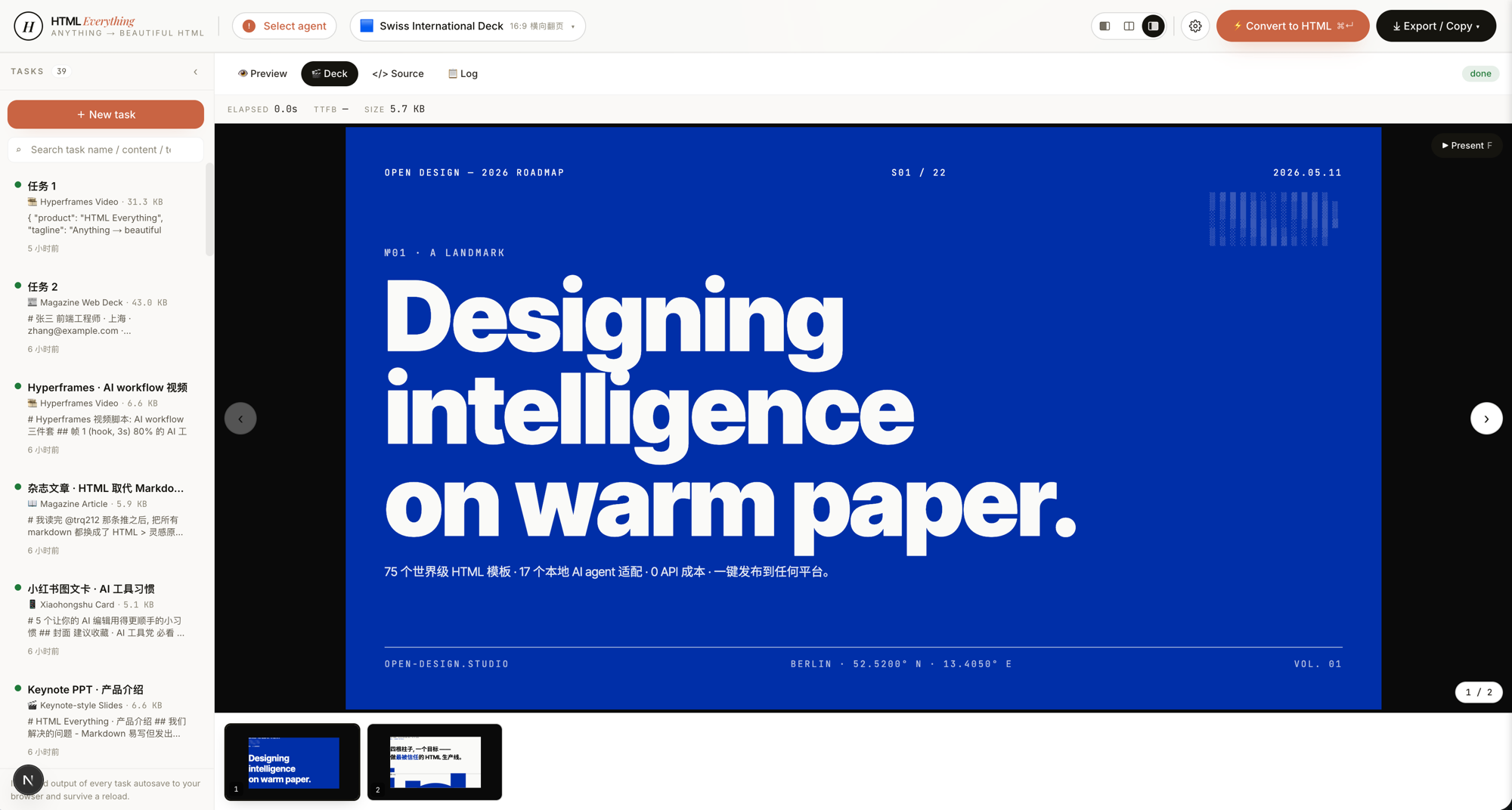 Deck mode — 20 keynote skills, including Swiss International (Helvetica grid maximalism), Guizang Editorial (magazine ink), Open Slide Canvas (1920×1080 agent-native), Magazine Web, XHS Pastel, Hermes Cyber, Replit Style. ←/→ to navigate slides, presenter notes, PDF export. |
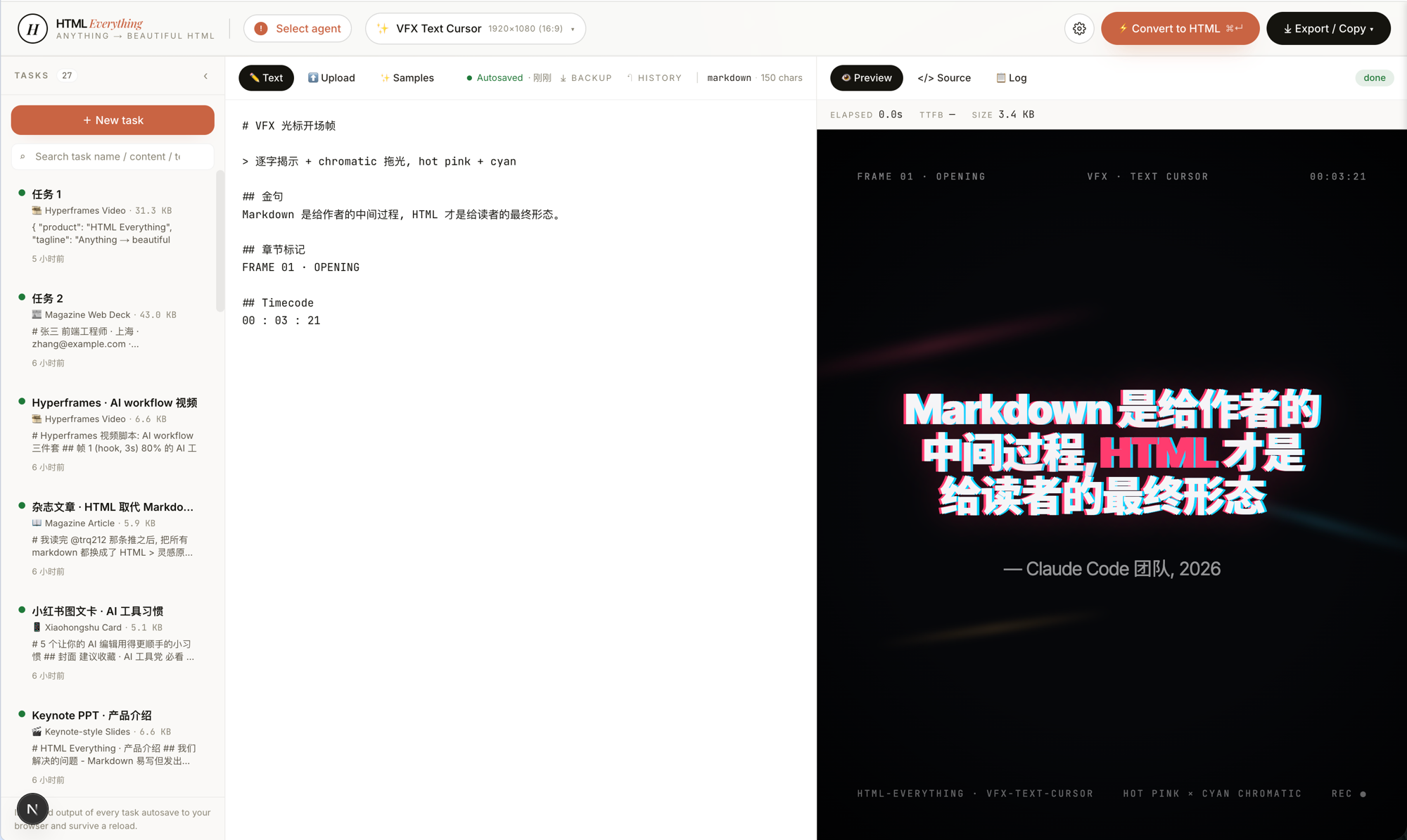 Hyperframes frames — 10 motion frame scripts (liquid hero, NYT data chart, sticky-note flowchart, glitch title, cinema light-leak, macOS notification, brand logo outro, text-cursor VFX, 3D device mockup, …) conforming to heygen-com/hyperframes; hand off straight to Remotion to render .mp4.
|
Quickstart
git clone https://github.com/nexu-io/html-anything
cd html-anything
pnpm install
pnpm -F @html-anything/next dev
# → http://localhost:3000
Open the browser → the top bar auto-detects whichever coding-agent CLI you already have signed in → pick a template → paste content → ⌘+Enter.
No API key required. We reuse the session you already have logged in (Claude / Cursor / Codex / Gemini / Copilot subscriptions all work).
Workspace
This repo is a small pnpm workspace:
next/is the complete Next app (@html-anything/next).e2e/is the browser-test package (@html-anything/e2e) and the only source of truth for Playwright cases.- root owns CI, docs, and
scripts/guard.ts; rootpackage.jsonintentionally does not proxy app or e2e commands.
Run package commands from the repo root:
pnpm exec tsx scripts/guard.ts
pnpm -F @html-anything/next dev
pnpm -F @html-anything/next typecheck
pnpm -F @html-anything/next test
pnpm -F @html-anything/next build
pnpm -F @html-anything/e2e typecheck
pnpm -F @html-anything/e2e test
Supported coding agents
On startup we scan PATH (including ~/.local/bin, ~/.bun/bin, /opt/homebrew/bin, ~/.npm-global/bin — directories normally missed by GUI-launched Node) and surface every CLI we recognize:
| Agent | Detection binary | Invocation |
|---|---|---|
| Claude Code | claude |
claude -p --output-format stream-json |
| OpenAI Codex | codex |
codex exec --json --sandbox workspace-write |
| Cursor Agent | cursor-agent |
cursor-agent --print --output-format stream-json --force --trust |
| Gemini CLI | gemini |
gemini --output-format stream-json --yolo |
| GitHub Copilot CLI | copilot |
copilot --allow-all-tools --output-format json |
| OpenCode | opencode-cli / opencode |
opencode run --format json --dangerously-skip-permissions - |
| Qwen Coder | qwen |
qwen --yolo - |
| Aider | aider |
aider --no-pretty --no-stream --yes-always --message-file - |
| IBM Bob | bob |
bob --output-format stream-json --hide-intermediary-output |
The detection strategy and per-CLI adapter shape are borrowed directly from
nexu-io/open-designandmultica-ai/multica: one privileged process spawns CLIs, JSON-line is the wire protocol, every CLI gets a thin adapter innext/src/lib/agents/argv.ts.
If you've already done claude login / cursor login / gemini auth in your terminal, HTML Anything reuses that session. No second copy of the API key required.
Community integrations
Floatboat
Floatboat is available as an in-app community integration. Install the html-anything Combo Skill from the Floatboat Combo Skill Store, then use it inside Floatboat.
|
In-app workflow — Review the task context, HTML Anything workspace, and generated page side by side in Floatboat. |
Deliverable preview — Turn a brief into a polished HTML page and review the result in Floatboat. |
Skills
75 skills under next/src/lib/templates/skills/, each a folder following the Claude Code SKILL.md convention plus an extended frontmatter (mode · scenario · surface · preview · design_system).
The two axes the picker uses:
- mode —
prototype(web / SaaS landing / dashboard / data report / résumé / doc) ·deck(20 horizontal-swipe presentations) ·frame(10 Hyperframes motion frames) ·social(4 social-card formats) ·office(PM / engineering / finance / HR / operations document surfaces). - scenario —
design·marketing·engineering·product·finance·hr·sale·personal. Used to group skills in the picker.
Web prototypes & marketing pages (prototype mode)
| Skill | Best for | Output |
|---|---|---|
prototype-web |
Generic web prototype (default) | Single-page HTML, 1440×900 desktop |
saas-landing |
SaaS landing page | Hero / features / pricing / CTA |
waitlist-page |
Waitlist / early-access page | Minimal form + social proof |
pricing-page |
Pricing page | Multi-tier comparison tables |
dashboard |
Admin / analytics console | Sidebar + dense data layout |
docs-page |
Technical documentation | 3-column docs layout |
blog-post |
Long-form blog post | Editorial layout |
mobile-app |
iOS / Android prototype | iPhone 15 Pro chrome |
mobile-onboarding |
App onboarding flow | Splash · value · sign-in trio |
gamified-app |
Gamified app | Quest · XP · level trio |
dating-web |
Dating / matchmaking dashboard | Left rail · KPIs · 30-day chart |
magazine-poster |
Single-page magazine poster | 1080×1920 |
poster-hero |
Marketing poster | Single-page display poster |
web-proto-editorial |
Editorial-style web | Serif display + grid |
web-proto-brutalist |
Brutalist web | Hard edges, black & white, anti-grid |
web-proto-soft |
Soft / warm web | Soft shadows, rounded, warm palette |
article-magazine |
Long-form magazine article | A4 / long-page |
digital-eguide |
Digital e-guide | Cover + lesson spread |
resume-modern |
Minimal résumé | A4 210×297mm |
email-marketing |
Brand product-launch email | Center single-column, table fallback |
wireframe-sketch |
Hand-drawn wireframe | Early-pass ideation |
Decks (deck mode, 20 skills)
| Skill | Best for |
|---|---|
deck-swiss-international |
Swiss International deck |
deck-guizang-editorial |
Editorial-ink deck (from op7418/guizang-ppt-skill) |
deck-open-slide-canvas |
1920×1080 agent-native canvas (from 1weiho/open-slide) |
deck-magazine-web |
Magazine-style web deck |
deck-hermes-cyber |
Hermes Cyber neon-luxe |
deck-replit |
Replit-style product walkthrough |
deck-xhs-pastel |
Xiaohongshu pastel deck |
deck-xhs-white |
Xiaohongshu pure-white deck |
deck-xhs-post |
Xiaohongshu single-post deck |
deck-tech-sharing |
Tech-sharing deck |
deck-product-launch |
Product-launch event deck |
deck-pitch |
Investor pitch |
deck-blueprint |
Blueprint / roadmap |
deck-presenter-mode |
Speaker-notes-aware |
deck-course-module |
Course module deck |
deck-dir-key-nav |
Directional key-nav deep browse |
deck-graphify-dark |
Dark, data-graphic-heavy deck |
deck-obsidian-claude |
Obsidian / Claude-flavored notes |
deck-safety-alert |
Incident / safety briefing |
deck-simple |
Minimal horizontal-swipe deck |
Hyperframes video frames & VFX & device mockups (frame / vfx / mockup, 12 skills)
| Skill | Best for |
|---|---|
frame-liquid-bg-hero |
Liquid background hero |
frame-data-chart-nyt |
NYT-style data chart |
frame-flowchart-sticky |
Sticky-note flowchart |
frame-glitch-title |
Glitch title card |
frame-light-leak-cinema |
Cinema light-leak |
frame-macos-notification |
macOS notification toast |
frame-logo-outro |
Brand logo outro |
motion-frames |
Generic motion-design frame |
video-hyperframes |
Hyperframes frame-script schema |
sprite-animation |
Pixel / 8-bit animation |
vfx-text-cursor |
Text-cursor VFX |
mockup-device-3d |
3D device-frame mockup |
Frame scripts conform to the
heygen-com/hyperframesspec and hand off straight toremotion-dev/remotionto render.mp4.
Social share cards (social mode)
| Skill | Best for |
|---|---|
social-x-post-card |
X / Twitter quote card (1600×900) |
social-spotify-card |
Spotify-Wrapped style card |
social-reddit-card |
Reddit thread card |
social-carousel |
3-card 1080×1080 carousel |
card-xiaohongshu |
Xiaohongshu image-with-text card |
card-twitter |
Twitter pull-quote card |
social-media-dashboard |
Social-ops dashboard |
social-media-matrix |
Multi-platform content matrix |
For source-backed X / Twitter cards, capture the tweet text, author, reply
counts, likes, views, media URLs, and thread context with
TweetClaw, then paste that packet
into social-x-post-card
or card-twitter. Keep HTML
Anything responsible for visual rendering and export; keep scraping, approval,
and publishing in your own workflow.
Office & operations (office / doc mode)
| Skill | Scenario | Best for |
|---|---|---|
doc-kami-parchment |
personal | Warm-parchment editorial doc (from tw93/kami) |
pm-spec |
product | PM spec doc + decision log |
team-okrs |
product | OKR scoresheet |
meeting-notes |
operation | Meeting decision log |
weekly-update |
operation | Team weekly cadence |
kanban-board |
operation | Board snapshot |
eng-runbook |
engineering | Incident runbook |
finance-report |
finance | Exec finance summary |
invoice |
finance | Single-page invoice |
hr-onboarding |
hr | Role onboarding plan |
data-report |
finance / product | CSV/Excel → visual data report |
live-dashboard |
operation | Live data dashboard |
flowai-team-dashboard |
operation | Team workflow dashboard |
ppt-keynote |
personal | Generic Keynote-style deck |
Adding a skill takes one folder. Copy a similar skill, edit its SKILL.md frontmatter, restart pnpm -F @html-anything/next dev, the picker shows it. See CONTRIBUTING.md for the bar a skill PR has to clear before we merge.
Six load-bearing ideas
1 · We don't ship an agent. Yours is good enough.
On boot the browser calls /api/agents. The server scans PATH — including the dirs a GUI-launched Node usually misses (~/.local/bin, ~/.bun/bin, /opt/homebrew/bin, ~/.npm-global/bin) — and surfaces whichever CLIs it finds. Each CLI has one adapter (argv + stdin protocol + stream parser) in next/src/lib/agents/argv.ts. The whole detection model is borrowed directly from nexu-io/open-design and multica-ai/multica: one privileged process spawns CLIs, JSON-line is the wire protocol.
2 · Skills are folders, not plugins.
Following Claude Code's SKILL.md convention — SKILL.md + assets/ + references/ + example.html. Drop a folder into next/src/lib/templates/skills/, restart pnpm -F @html-anything/next dev, the picker shows it. deck-guizang-editorial is vendored directly from op7418/guizang-ppt-skill with original LICENSE and authorship preserved.
3 · Hard constraints stop the model from freestyling.
Every template hardcodes:
- CJK-first font stack —
Noto Sans/Serif SC/ source-han for Chinese,Inter/Manropefor Latin. - 8 px baseline grid — every spacing, line-height, font-size is a multiple of 8.
- Rounded corners · soft shadow · no pure black / pure white — visual de-slop-ification.
- Color contrast ≥ 4.5, every interactive element has a real
:focusstate. - Must use the user's real data, no lorem ipsum.
The discipline is lifted from alchaincyf/huashu-design's Junior-Designer mode + anti-AI-slop checklist. Constraints belong in the prompt — every SKILL.md writes them in.
4 · Streaming render = watch the AI draw.
POST /api/convert is SSE. The agent's stdout is line-delimited JSON; the server pulls out the text deltas and re-emits them as SSE events; the client appends to the iframe's srcdoc. The whole experience is the same as watching the agent type in a terminal, except the artifact is HTML, not Markdown. Interrupt at any time — you're not paying for a whole generation you don't want.
5 · One-click export = zero second-pass formatting.
- WeChat MP —
juiceinlines CSS +data-toolmarkers → paste into the editor, styles survive end to end. - X / Weibo / Xiaohongshu —
modern-screenshotrenders the iframe to a 2× PNG →ClipboardItem→ drop straight into the composer. - Zhihu — same as above, plus
<mjx-container>is replaced withdata-eeimgLaTeX-image placeholders (Zhihu won't render KaTeX live — math has to be an image). - Download
.html/ download.png— self-contained single file, shareable anywhere.
Mechanically inspired by mdnice/markdown-nice and gcui-art/markdown-to-image.
6 · Sandboxed iframe = secure + isolated.
User-emitted HTML always renders inside <iframe sandbox="allow-scripts allow-same-origin">. Third-party scripts (Tailwind CDN, Google Fonts, custom animations) still execute, but cookies and localStorage stay in the iframe's own origin — the host page is never poisoned. Opening devtools only shows the iframe's DOM, so the debugging experience matches a standalone HTML file.
Architecture
┌─────────────────────── Browser (Next.js 16) ──────────────────────┐
│  Editor / upload · top-bar agent picker · template picker · iframe │
└─────────────┬──────────────────────────────────┬──────────────────┘
              │ ⌘+Enter                            │
              ▼                                    ▼
     ┌─────────────────────┐            ┌──────────────────────┐
     │  GET /api/agents    │            │  POST /api/convert   │
     │  scan PATH, list    │            │  SSE — spawn CLI     │
     │  installed CLIs     │            │  pipe stdin / stdout │
     └─────────────────────┘            └──────────┬───────────┘
                                                   │ spawn + stdin pipe
                                                   ▼
                                ┌────────────────────────────────────┐
                                │  Your local coding-agent CLI       │
                                │  claude / codex / cursor-agent /   │
                                │  gemini / copilot / opencode /     │
                                │  qwen / aider                      │
                                │  → reuses your existing session    │
                                └────────────────────────────────────┘
                                                   │
                                                   ▼
                                stdout JSON-line ──► SSE event
                                                   │
                                                   ▼
                              iframe srcdoc append (live)
                                                   │
                              ⌘+C copy → ClipboardItem
                              ⌘+S download → .html / .png
| Layer | Stack |
|---|---|
| Frontend | Next.js 16 App Router + Turbopack · React 19 · Tailwind v4 · zustand state |
| Server routes | GET /api/agents (detection) · POST /api/convert (SSE streaming spawn) |
| Agent transport | child_process.spawn · one stdin/stdout adapter per CLI (next/src/lib/agents/argv.ts) |
| Browser-side processing | juice (CSS inlining) · modern-screenshot (PNG export) · xlsx / papaparse (spreadsheet parsing) · marked + highlight.js (Markdown-compatible input) · dompurify (XSS defense) |
| Preview sandbox | iframe[sandbox="allow-scripts allow-same-origin"] + srcdoc |
| Export targets | .html standalone · .png high-DPI · ClipboardItem (text/html + image/png) · WeChat-compatible inlined CSS |
| Deploy | Local pnpm -F @html-anything/next dev · Vercel one-click for the web layer (agent stays local) |
Export targets
| Platform | Implementation | Paste behavior |
|---|---|---|
| WeChat MP | juice inlines CSS + data-tool markers |
Paste into editor, zero re-formatting |
| Zhihu | Same as WeChat + <mjx-container> → data-eeimg LaTeX image placeholder |
Equations render after upload |
| X / Weibo / Xiaohongshu | modern-screenshot → 2× PNG → ClipboardItem |
Drop straight into the composer |
Download .html |
Single-file, inlined assets | Open anywhere with a browser |
Download .png |
High-DPI screenshot | Share anywhere |
Roadmap
- Multi-template compare preview — generate four candidates of the same brief, pick the best one
- Hyperframes → mp4 — one-click hand-off of frame scripts to Remotion for real video output
- Shared design systems — interop with
nexu-io/open-designDESIGN.mdassets - Template marketplace — community-contributed prompts & examples
- Browser extension — select on any page → convert to HTML template
- History / version diff / IndexedDB archive
- More export targets — WeChat Channels · Douyin captions · Notion · Linear · Telegraph
Status
Early but real. The closed loop — detect agent → pick skill → SSE stream → sandboxed iframe preview → one-click export — runs end-to-end against all 8 CLIs listed above. The skill library and the SKILL.md hard-constraints are where most of the leverage lives, and both are stable. The picker UX, design-system metadata, and the multi-template compare flow ship daily. If something looks broken on your machine, open an issue with the agent CLI you were using and the input — those are the bug reports that move things forward fastest.
| Surface | State |
|---|---|
| Agent detection (8 CLIs) | ✅ stable |
| Skill registry + picker (75 skills) | ✅ stable |
| SSE streaming render | ✅ stable |
| Sandboxed iframe preview | ✅ stable |
One-click WeChat / X / Zhihu / .html / .png export |
✅ stable |
| CSV / Excel / JSON / SQL format auto-detect | ✅ stable |
| Multi-template compare (generate 4, pick 1) | 🛠 in progress |
Hyperframes → .mp4 one-click handoff to Remotion |
🛠 in progress |
| Browser extension (select on any page → convert) | ⏳ planned |
| History / version diff / IndexedDB archive | ⏳ planned |
Skill marketplace (install <github-repo>) |
⏳ planned |
Security
The Next API surface is the local-only side of the app — /api/convert spawns the user's coding-agent CLI with maximally permissive flags, /api/deploy writes credentialed config to disk. Both are intended for a single operator on a single machine. To prevent a malicious page from DNS-rebinding attacker.example to 127.0.0.1 and POSTing into those routes through the user's browser, every /api/* request is gated on a Host-header allowlist in next/src/middleware.ts.
| Setting | When to use |
|---|---|
| Default (no env vars set) | The common case — next dev / next start on your own machine. 127.0.0.1, localhost, and ::1 Host headers (any port) are accepted. Everything else gets a 403 { "error": "Host not allowed" }. |
HTML_ANYTHING_ALLOWED_HOSTS=daemon.mirage.local,html-anything.lan |
LAN / mDNS setup — you're reaching the app from another device on the same network and the browser dials a non-loopback hostname. Comma-separated; port-insensitive; case-insensitive. The default loopback set is still accepted on top of this. |
HTML_ANYTHING_ALLOW_ANY_HOST=1 |
Reverse-proxy mode — Caddy / nginx / Cloudflare Tunnel is terminating the public hostname and forwarding to the app. The proxy is now responsible for Host policy. Loudly insecure if you set this without a trusted proxy in front, so it is not the default. |
Set the env var in whatever environment file your launcher reads (e.g. next/.env.local). The middleware is pinned to the Node runtime (export const runtime = "nodejs" in next/src/middleware.ts) so process.env is read per-request — Edge middleware can inline process.env.* at build time, which would silently break operator overrides set after next build. The validation is unit-tested in next/src/lib/security/host-validation.test.ts and the loopback-still-works dev path is exercised in the Playwright spec at e2e/ui/host-validation.spec.ts.
Contributing
Issues, PRs, new skills, new agent adapters, new export targets, and translations are all welcome. The highest-leverage contributions are usually one folder, one Markdown file, or one PR-sized adapter — small surface area, big leverage. Pick the slot that matches what you want to add:
- Add a skill — drop a folder into
next/src/lib/templates/skills/withSKILL.md+example.html(+ optionalassets/andreferences/). The picker auto-discovers it afterpnpm -F @html-anything/next devrestart. TheSKILL.mdfrontmatter has to setmode·scenario·surface·preview·design_system— copy a neighbour and edit. - Wire up a new coding-agent CLI — one entry in
next/src/lib/agents/argv.tscovering: detection binary, argv builder, stdin/stdout protocol, stream parser. Detection is exercised bynext/src/app/api/agents/and the spawn loop bynext/src/app/api/convert/. - Add an export target — drop a module under
next/src/lib/export/(next towechat.ts/image.ts/clipboard.ts) and add the button to the export menu. WeChat Channels · Douyin captions · Notion · Linear · Telegraph · RSS are all open. - Sharpen a
SKILL.md— strengthen the hard-constraints (CJK font stack, 8 px baseline, contrast ≥ 4.5, must-use-real-data), add a 5-dimensional self-critique, swap in a better palette. Anti-AI-slop discipline is the most underrated PR shape we accept. - Translations & docs —
README.zh-CN.mdandCONTRIBUTING.zh-CN.mdare kept in parallel with the English files; please update both.
Full walkthrough, bar-for-merging, code style, and what we don't accept → CONTRIBUTING.md (简体中文).
References & lineage
Every external project this repo borrows from — what we take from each, and where it lands in the tree.
| Project | Role here |
|---|---|
nexu-io/open-design |
The agent-detection layer, the DESIGN.md design-system schema, and the SKILL.md skill protocol. next/src/lib/agents/argv.ts and next/src/lib/templates/skills/ mirror this architecture verbatim. |
multica-ai/multica |
Daemon-and-runtime architecture: one privileged process spawns CLIs, JSON-line is the wire protocol, every CLI gets a thin per-adapter shape. |
alchaincyf/huashu-design |
Anti-AI-slop discipline — Junior-Designer mode, 5-step brand-asset protocol, contrast-≥-4.5 / 8 px baseline-grid / must-use-real-data rules. Hard-coded into every SKILL.md frontmatter. |
alchaincyf/huashu-md-html |
Proof that end-to-end WeChat / Zhihu paste-compatibility is solvable. Reference for next/src/lib/export/wechat.ts. |
mdnice/markdown-nice |
juice-inlined-CSS pipeline → WeChat / Zhihu paste with zero re-formatting. Drives next/src/lib/export/wechat.ts. |
mdnice/markdown-resume |
A4-formatted résumé inspiration → resume-modern. |
gcui-art/markdown-to-image |
iframe → high-DPI PNG export, replicated with modern-screenshot in next/src/lib/export/image.ts. |
op7418/guizang-ppt-skill |
Magazine-ink editorial deck integrated verbatim as deck-guizang-editorial and the Swiss variant deck-swiss-international. Original LICENSE + authorship preserved. |
tw93/kami |
Warm-parchment monochrome editorial document system → doc-kami-parchment. |
1weiho/open-slide |
1920×1080 agent-native canvas convention → deck-open-slide-canvas. |
heygen-com/hyperframes |
Frame-script schema for the entire frame-* / vfx-* / mockup-* / social-* family. Output hands straight off to Remotion to render .mp4. |
remotion-dev/remotion |
Target renderer for Hyperframes frame scripts. |
jimliu/baoyu-skills |
Practical skills collection — reference catalog for picker categorization. |
Each bundled upstream skill retains its original LICENSE and authorship inside its own next/src/lib/templates/skills/<skill>/ folder.
Stay in the loop
Follow @nexudotio on X for release notes, new skills, and the occasional behind-the-scenes thread on what's shipping next. The HTML Anything Discord channel is where demos, template requests, export/debugging questions, and bigger community conversations happen — run by the upstream open-design team.
Contributors
Thanks to everyone who has filed an issue, opened a PR, or added a skill / agent adapter / export target. Every real contribution counts, and the wall below is the easiest way to say so out loud.
If you've shipped your first PR — welcome. The good-first-issue / help-wanted labels are the entry point.
Star History
If the curve bends up, that's the signal we look for. ★ this repo to push it.
License
Apache-2.0 © 2026 HTML Anything contributors. See LICENSE.
Bundled work retains its original license and authorship attribution — see the per-skill LICENSE / README.md inside each next/src/lib/templates/skills/<skill>/ folder for what it inherits from upstream.
HTML Anything
来自 Open Design 团队 —— 40k★ · 200+ 贡献者,更生产级、迭代更快。html-anything 是聚焦在 agent 时代 HTML 编辑器这一刀的专项; 如果你喜欢这个味道, 同一拨人做的 Open Design 是它在更大规模上的形态, 顺手也看看。
项目主页: open-design.ai/html-anything/ —— 不用 clone 也能先看看 HTML Anything 长什么样、能干啥。
Markdown 是草稿, HTML 才是给人读的成品 —— 让本地 agent 直接写 HTML。 Agent 时代的 HTML 编辑器 —— 既然你已经不亲手改文档、全都让 Claude 改了, 那 agent 的输出就该是读者真正想看的 HTML, 而不是中间态的 markdown。本地优先、零 API Key、复用你已经登录好的 CLI session —— 9 个 coding-agent CLI 在
PATH上自动识别(Claude Code · Cursor Agent · Codex · Gemini CLI · GitHub Copilot CLI · OpenCode · Qwen Coder · Aider · IBM Bob),驱动 75 套 skill 模板 和 9 类可交付场景(杂志文章 · Keynote PPT · 简历 · 海报 · 小红书 · 推特卡 · Web 原型 · 数据报告 · Hyperframes 视频)。一键复制到公众号 / 推特 / 知乎,或者下载.html/.png。
English · 简体中文
🎨 看看效果
picker 顶部 推荐 / Featured 分组里默认置顶的 8 个 skill —— 对应 SKILL.md frontmatter 里的 recommended: 字段,数字越小排得越靠前。每个都附 example.html,repo 里双击就能看效果,不用登录、不用启服。
deck-guizang-editorial · deck · recommended: 1编辑墨水 PPT,灵感来自 op7418/guizang-ppt-skill —— 10 套锁死版面 × 5 套调色板(墨水 / 靛蓝瓷 / 森林墨 / 牛皮纸 / 沙丘),纸感印刷质感,开起来像一本电子杂志而不是 PPT。
|
deck-swiss-international · deck · recommended: 2瑞士国际主义 PPT —— 16 列网格 + 单一饱和 accent(Klein Blue / Lemon / Mint / Safety Orange),22 套锁死版面。冷静、理性、学院派,开会时让人觉得 "这一定是 designer 做的"。 |
doc-kami-parchment · doc · recommended: 3暖羊皮纸 + 墨蓝单色 editorial 文档系统,灵感来自 tw93/kami。#f5f4ed 底色 + 单一衬线字体,长报告、读书笔记、one-pager、简历都能套,比纯白 markdown 高一个量级。
|
magazine-poster · poster · recommended: 4报纸风长图海报 —— 巨字 serif headline + 双栏正文 + 6 个编号小节 + cream 纸感底色,开起来像一份印好的 Sunday paper,不是网页。 |
video-hyperframes · frame / video · recommended: 5Hyperframes / Remotion 兼容的视频脚本 —— 6–10 个连续 1920×1080 帧,自带 duration / transition 注释和自动播放脚本。直接交给 heygen-com/hyperframes 或 Remotion 渲 .mp4。
|
frame-glitch-title · frame · recommended: 6故障艺术标题帧 —— cyan / magenta 像散偏移 + CRT 扫描线 + 数据腐败副标 + 角落 ASCII 噪点。Cyberpunk hero 或视频转场用。 |
vfx-text-cursor · vfx · recommended: 7VFX 文字光标开场 —— 光标在画布上"打字",每个字带 hot pink × cyan 像散拖尾 + 定向光斑。丢一句金句进去,就是电影级的视频片头。 |
frame-logo-outro · frame · recommended: 8品牌 Logo 收尾帧 —— Logo 分块装配 + glow bloom + tagline 上浮 + CTA。产品发布或品牌片的片尾闭幕镜头。 |
完整 skill 目录(按 mode 分类)见下方 🎨 Skills 章节。
🤔 为什么做这个?
Claude Code 团队成员发了一条推:他们已经不用 markdown 写文档了,全部改成 HTML。理由很简单 ——
| Markdown | HTML |
|---|---|
| 给作者爽 | 给读者爽 |
| 排版受模板限制 | 排版无限自由 |
| 截图发推丑得离谱 | 直接是好看的图 |
| 二次粘贴公众号要重排 | 一键格式转换 |
HTML 是面向人的最终形态,Markdown 只是一段写作中的中间过程。
但 "写 HTML" 在过去意味着写 CSS、调字号、对齐网格、做响应式 —— 普通用户不会,设计师懒得,作者更没耐心。我们做的事情,是让 AI 在你按下 ⌘+Enter 之后,把任何输入(Markdown / CSV / Excel / JSON / SQL / 草稿…)立刻变成一份可交付的 HTML,然后一键去到公众号 / 推特 / 知乎 / 任何地方。所谓 "可交付":生成完就是受众实际看到的样子,不再需要 "我先这样、待会再调"。
我们站在四个开源项目的肩膀上:
nexu-io/open-design—— Agent 检测层 + 设计 system 思路 + Skills protocol;本仓库的next/src/lib/agents/和next/src/lib/templates/skills/*直接借鉴这套模型。mdnice/markdown-nice——juice内联 CSS、公众号 / 知乎兼容粘贴的可行性证明。gcui-art/markdown-to-image—— iframe → 高 DPI PNG 的截图导出路径。alchaincyf/huashu-md-html—— 反 AI-slop 的话术 / 设计哲学,对应我们模板里的硬约束(中文优先字体、8px 基线网格、对比 ≥ 4.5、必须用真实数据)。
一览
| 你会拿到什么 | |
|---|---|
| 本地 coding-agent CLI(8 个) | Claude Code · Cursor Agent · OpenAI Codex · Gemini CLI · GitHub Copilot CLI · OpenCode · Qwen Coder · Aider —— 启动时扫描 PATH(含 ~/.local/bin · ~/.bun/bin · /opt/homebrew/bin · ~/.npm-global/bin 这些 GUI 启动会漏掉的目录),顶栏一键切换。 |
| 零 API Key | 直接复用你已经在终端登录好的 claude login · cursor login · gemini auth session。订阅复用 = 0 边际成本。 |
| Skill 模板(75 套) | prototype(web / SaaS landing / dashboard / 数据报告) · deck(20 套 keynote PPT,含 Swiss International、Guizang Editorial、XHS Pastel、Hermes Cyber、Replit、Magazine Web 等) · frame(10 套 Hyperframes 视频帧:液态背景、NYT 数据图表、贴纸流程图、像素故障字幕、电影漏光、macOS 通知、品牌片尾…) · social(X / 小红书 / Spotify / Reddit 卡片) · office(PM 规格书 · 工程 runbook · 财务报告 · HR onboarding · 发票 · OKR · 周报 · 会议纪要 · 看板) · doc(Kami 暖羊皮纸 editorial) · mockup(3D 设备模型) · vfx(文本光标)。 |
| 9 类输出场景 | 📖 杂志文章 · 🎬 Keynote PPT · 📄 极简简历 · 🖼️ 营销海报 · 📱 小红书图文卡 · 🐦 推特分享卡 · 🛠️ Web 产品原型 · 📊 数据可视化报告 · 🎞️ Hyperframes 视频。每一类都有可挑选的具体 skill。 |
| 一键发布 | juice 内联 CSS → 公众号粘贴 0 调整 · modern-screenshot 2× PNG → 拖入推文 · <mjx-container> → data-eeimg 占位 → 知乎公式自动渲染 · 单文件 .html 下载 · 高 DPI .png 下载。 |
| 流式渲染 | POST /api/convert 走 SSE,agent stdout 的 JSON-line 流式抽出 text → 客户端 append → iframe srcdoc 实时刷新。等待时间 = 看 AI 现场写代码的体验。 |
| 沙箱预览 | iframe[sandbox="allow-scripts allow-same-origin"],用户 HTML 隔离运行,宿主页面不受污染。 |
| 格式自动识别 | 编辑器一栏,粘 Markdown / CSV / TSV / JSON / SQL / 纯文本都识别,papaparse + xlsx 在浏览器端解析,不上传服务器。 |
| 部署 | 本地 pnpm -F @html-anything/next dev / Vercel 一键部署 web 层(agent 永远跑在本地)。 |
| License | Apache-2.0 |
Demo
|
主界面 —— 顶栏自动识别你已装的 CLI,左侧粘内容,中间挑模板和设计 system,右侧 iframe 实时预览。同一个面板搞定杂志、PPT、海报、Web 原型、Hyperframes 帧脚本。 |
75 套模板可搜索可筛选 —— 按 mode(prototype / deck / frame / social / office / doc)与 scenario(design / marketing / engineering / product / personal)二维筛。每套模板都附 example.html,双击直接看效果。
|
|
SSE 流式 —— agent 的 stdout JSON-line 流式抽出文本,append 进 iframe srcdoc。你能看着它一行一行写出来,不满意可以中途打断重发,不浪费一整次生成。
|
一键发布到平台 —— 微信公众号(juice 内联 CSS)· 推特 / 微博 / 小红书(modern-screenshot 渲染成 2× PNG,写进 ClipboardItem)· 知乎(公式占位)· 下载 .html · 下载 .png。粘贴即用,0 二次排版。
|
|
Deck 模式 —— 20 套 PPT skill,含 Swiss International(瑞士国际主义)· Guizang Editorial(编辑墨水)· Open Slide Canvas(1920×1080 agent-native)· Magazine Web · XHS Pastel · Hermes Cyber · Replit Style 等。←/→ 切页,支持演讲者备注与打印 PDF。 |
Hyperframes 视频帧 —— 10 套帧脚本(液态背景 hero · NYT 数据图表 · 贴纸流程图 · 像素故障标题 · 电影漏光 · macOS 通知 · 品牌 logo 片尾 · 文本光标 VFX · 3D 设备模型 …)符合 heygen-com/hyperframes 规范,可直送 Remotion 渲染 mp4。 |
⚡ 30 秒上手
git clone https://github.com/nexu-io/html-anything
cd html-anything
pnpm install
pnpm -F @html-anything/next dev
# → http://localhost:3000
打开浏览器 → 顶栏会自动列出你电脑上已经登录好的本地 code agent → 选一个模板 → 粘贴内容 → ⌘+Enter
无需 API Key。我们直接复用你已经在用的 Claude / Cursor / Codex 订阅,0 边际成本。
Workspace
这个仓库是一个很小的 pnpm workspace:
next/是完整 Next 应用(@html-anything/next)。e2e/是浏览器测试包(@html-anything/e2e),也是 Playwright 用例的唯一真相源。- 根目录只负责 CI、文档和
scripts/guard.ts;根package.json有意不代理 app 或 e2e 命令。
从仓库根目录运行 package 命令:
pnpm exec tsx scripts/guard.ts
pnpm -F @html-anything/next dev
pnpm -F @html-anything/next typecheck
pnpm -F @html-anything/next test
pnpm -F @html-anything/next build
pnpm -F @html-anything/e2e typecheck
pnpm -F @html-anything/e2e test
🧠 自动识别本地 agent
进入主页时,我们扫描你的 PATH(包括 ~/.local/bin、~/.bun/bin、/opt/homebrew/bin、~/.npm-global/bin 等通过 GUI 启动会被过滤掉的目录),检测以下 CLI:
| Agent | 检测命令 | 调用方式 |
|---|---|---|
| Claude Code | claude |
claude -p --output-format stream-json |
| OpenAI Codex | codex |
codex exec --json --sandbox workspace-write |
| Cursor Agent | cursor-agent |
cursor-agent --print --output-format stream-json --force --trust |
| Gemini CLI | gemini |
gemini --output-format stream-json --yolo |
| GitHub Copilot CLI | copilot |
copilot --allow-all-tools --output-format json |
| OpenCode | opencode-cli / opencode |
opencode run --format json --dangerously-skip-permissions - |
| Qwen Coder | qwen |
qwen --yolo - |
| Aider | aider |
aider --no-pretty --no-stream --yes-always --message-file - |
| IBM Bob | bob |
bob --output-format stream-json --hide-intermediary-output |
这一层的设计直接借鉴了
nexu-io/open-design和multica-ai/multica的 agent 检测策略:唯一被 spawn 子进程的进程是 server route,业务进程不直接 spawn;CLI 的 stdin / stdout 用 JSON-line 协议复用,每个 CLI 一个轻 adapter,统一在next/src/lib/agents/argv.ts。
只要你已经在终端里登录过对应的 CLI(例如 claude login、cursor login),HTML Anything 直接复用同一个 session,不要求你再贴一遍 API Key。
🤝 社区集成
Floatboat
Floatboat 可作为应用内社区集成使用。请先在 Floatboat Combo Skill Store 安装 html-anything Combo Skill,再在 Floatboat 应用内使用该 Skill。
|
端内工作流 —— 在 Floatboat 中并排查看任务上下文、HTML Anything 工作区与生成页面。 |
成品预览 —— 将任务需求转化为可阅读的 HTML 页面,并在 Floatboat 中查看结果。 |
🎨 Skills
75 套 skill 在 next/src/lib/templates/skills/ 下开箱即用。 每个 skill 是一个文件夹,遵循 Claude Code SKILL.md 约定 + 扩展 frontmatter(mode · scenario · surface · preview · design_system)。
picker 用两个维度组织:
- mode ——
prototype(web / SaaS landing / dashboard / 数据报告 / 简历 / 文档) ·deck(20 套幻灯片 skill) ·frame(10 套 Hyperframes 视频帧脚本) ·social(4 套社交平台分享卡) ·office(PM / 工程 / 财务 / HR / 行政 表格化文档)。 - scenario ——
design/marketing/engineering/product/finance/hr/sale/personal,用于在 picker 里分组展示。
完整 skill 目录(按 mode 分类)请见 English README,结构一一对应,链接也都是同一个 repo path。新增 skill 只需要 fork 一个 skill 文件夹、改 SKILL.md frontmatter、重启 dev server,picker 里就会出现;merge 标准见 CONTRIBUTING.zh-CN.md。
制作有真实来源的 X / Twitter 卡片时,先用
TweetClaw 收集推文正文、作者、
回复数、点赞数、浏览量、媒体链接和对话串上下文。再把这份素材交给
social-x-post-card 或
card-twitter。HTML Anything
只负责视觉渲染和导出。抓取、审批和发布仍由你的工作流负责。
六个核心想法
1 · 我们不发 agent,你装的就够好
主界面进来时,浏览器调 /api/agents,server 端扫一遍 PATH(含 GUI 启动会丢的 ~/.local/bin · ~/.bun/bin · /opt/homebrew/bin · ~/.npm-global/bin),识别到哪些 CLI 在场,就把哪些放进顶栏。每个 CLI 对应一个 adapter(参数 + stdin 协议 + 输出解析器),在 next/src/lib/agents/argv.ts 里集中维护。整套思路直接借鉴 nexu-io/open-design 和 multica-ai/multica 的 agent-detection 模型。
2 · Skills 是文件夹,不是插件
遵循 Claude Code SKILL.md 约定 —— SKILL.md + assets/ + references/ + example.html。drop 一个文件夹到 next/src/lib/templates/skills/,重启 dev server,picker 里就出现。deck-guizang-editorial 直接 vendor 自 op7418/guizang-ppt-skill(保留原始 LICENSE 与署名)。
3 · 强制约束让 AI 不再 freestyle
每个模板都硬编码了:
- 中文优先字体栈:
Noto Sans/Serif SC/ 思源黑体;英文用Inter/Manrope。 - 8 px 基线网格:所有间距、行高、字号都是 8 的倍数。
- 圆角 / 投影 / 不用纯黑纯白 —— 视觉上去 AI-slop 化。
- 颜色对比 ≥ 4.5,重要交互必有
:focus态。 - 必须使用用户提供的真实数据,禁止 lorem ipsum。
灵感来自 alchaincyf/huashu-design 的 "Junior-Designer mode" + 反 AI-slop checklist。约束就是 prompt 的一部分,写进每个 SKILL.md。
4 · 流式渲染 = 看着 AI 现场画
POST /api/convert 走 SSE。Agent 的 stdout 是一行行 JSON-line,server 抽出其中的 text 字段,作为 SSE event 推下去,客户端 append 进 iframe[srcdoc]。整个过程跟在终端里看 AI 写代码一模一样,只不过最终产物是好看的 HTML 而不是 markdown。不满意可以打断,不浪费一整次 token。
5 · 一键发布到平台 = 0 二次排版
- 微信公众号:
juice内联 CSS +data-tool标记 → 粘进编辑器直接显示,不丢样式。 - 推特 / 微博 / 小红书:
modern-screenshot把 iframe 渲染成 2× PNG →ClipboardItem→ 直接粘到推文 / 图床。 - 知乎:同上 +
<mjx-container>→data-eeimgLaTeX 图占位(知乎不支持 KaTeX 直渲,必须转成图)。 - 下载
.html/ 下载.png:自包含单文件,任意分享。
实现思路参考自 mdnice/markdown-nice 和 gcui-art/markdown-to-image。
6 · 沙箱 iframe = 安全 + 隔离
用户输出的 HTML 总是放进 iframe[sandbox="allow-scripts allow-same-origin"] 里。第三方脚本可以跑(Tailwind CDN / Google Fonts / 用户自定义动效),但 cookie 和 localStorage 走 iframe 自己的 origin,不污染宿主页面。打开 devtools 也只看 iframe 自己的 DOM,调试体验和写一个独立 HTML 文件一致。
架构
┌─────────────────────── Browser (Next.js 16) ──────────────────────┐
│  Editor / 上传 · 顶栏 agent picker · 模板 picker · iframe 预览       │
└─────────────┬──────────────────────────────────┬──────────────────┘
              │ ⌘+Enter                            │
              ▼                                    ▼
     ┌─────────────────────┐            ┌──────────────────────┐
     │  GET /api/agents    │            │  POST /api/convert   │
     │  扫 PATH 检测 CLI    │            │  SSE 流式调用 agent   │
     └─────────────────────┘            └──────────┬───────────┘
                                                   │ spawn + stdin pipe
                                                   ▼
                                ┌────────────────────────────────────┐
                                │  你本地的 code agent                │
                                │  claude / codex / cursor-agent /   │
                                │  gemini / copilot / opencode /     │
                                │  qwen / aider                      │
                                │  → 复用你已登录的 session           │
                                └────────────────────────────────────┘
                                                   │
                                                   ▼
                                stdout JSON-line ──► SSE event
                                                   │
                                                   ▼
                              iframe srcdoc append(实时刷新)
                                                   │
                              ⌘+C 复制 → ClipboardItem
                              ⌘+S 下载 → .html / .png
| 层 | 技术栈 |
|---|---|
| Frontend | Next.js 16 App Router + Turbopack · React 19 · Tailwind v4 · zustand 全局状态 |
| Server routes | GET /api/agents(检测) · POST /api/convert(SSE 流式 spawn) |
| Agent transport | child_process.spawn · 每个 CLI 一个 stdin/stdout adapter(next/src/lib/agents/argv.ts) |
| 浏览器端处理 | juice(CSS 内联) · modern-screenshot(PNG 截图) · xlsx / papaparse(CSV/Excel 解析) · marked + highlight.js(markdown 兼容输入) · dompurify(XSS 防御) |
| 预览沙箱 | iframe[sandbox="allow-scripts allow-same-origin"] + srcdoc |
| 导出 | .html 单文件 · .png 高 DPI · ClipboardItem 富文本 / image/png · 微信兼容 inline CSS |
| 部署 | 本地 pnpm -F @html-anything/next dev · Vercel 一键 web 层(agent 永远跑本地) |
一键发布到平台
| 平台 | 实现 | 粘贴效果 |
|---|---|---|
| 微信公众号 | juice 内联 CSS + data-tool 标记 |
0 调整,直接显示 |
| 知乎 | 同上 + <mjx-container> → data-eeimg LaTeX 图占位 |
公式自动渲染 |
| 推特 / 微博 / 小红书 | modern-screenshot 把 iframe 渲染成 2× PNG → ClipboardItem |
直接粘到推文 |
下载 .html |
单文件,双击打开 | 任意分享 |
下载 .png |
高 DPI 截图 | 任意分享 |
🛣️ Roadmap
- 多模板比较预览 —— 同一份内容生成 4 张候选,选最美的一张落地
- Hyperframes → mp4 —— 一键把帧脚本送进 Remotion 渲真视频
- 共享设计 system —— 与
nexu-io/open-design互通DESIGN.md资产 - 模板市场 —— 社区贡献你的提示词与示例
- 浏览器扩展 —— 选中网页内容 → 一键转 HTML 模板
- 历史记录 / 版本对比 / IndexedDB 存档
- 更多平台导出适配 —— 微信视频号 · 抖音字幕 · Notion · Linear · Telegraph
📍 进度
早期但能用。识别 agent → 选 skill → SSE 流式渲染 → sandboxed iframe 预览 → 一键导出 —— 这条闭环已经跑通,8 个 CLI 全都能驱动。Skill 库和 SKILL.md 里的硬约束是这套东西最值钱的部分,这两块都稳定了。Picker UX、design-system 元数据、多模板对比流程还在每天迭代。如果你本机上跑出毛病了,提 issue 时附上你用的是哪个 agent CLI + 输入内容,这种 issue 推进最快。
| 模块 | 状态 |
|---|---|
| Agent 自动识别(8 个 CLI) | ✅ 稳定 |
| Skill 注册表 + picker(75 个 skill) | ✅ 稳定 |
| SSE 流式渲染 | ✅ 稳定 |
| Sandboxed iframe 预览 | ✅ 稳定 |
一键复制到公众号 / 推特 / 知乎 / .html / .png |
✅ 稳定 |
| CSV / Excel / JSON / SQL 格式自动识别 | ✅ 稳定 |
| 多模板对比(同一份生成 4 张,选 1 张落地) | 🛠 进行中 |
Hyperframes → .mp4 一键交给 Remotion 渲视频 |
🛠 进行中 |
| 浏览器扩展(选中网页 → 转 HTML 模板) | ⏳ 计划中 |
| 历史记录 / 版本对比 / IndexedDB 存档 | ⏳ 计划中 |
Skill 市场(install <github-repo>) |
⏳ 计划中 |
🤝 贡献
欢迎 issue、PR、新 skill、新 agent 适配、新平台导出、翻译。最高杠杆的贡献往往就是一个文件夹、一份 Markdown、或者一段 PR-sized adapter —— 面积小、影响大。按你想加的东西对号入座:
- 新 skill —— 在
next/src/lib/templates/skills/加一个文件夹,带SKILL.md+example.html(可选assets/和references/)。pnpm -F @html-anything/next dev重启后 picker 自动发现。SKILL.mdfrontmatter 必须设mode·scenario·surface·preview·design_system—— 抄一个邻居改就行。 - 新 coding-agent CLI 适配 —— 在
next/src/lib/agents/argv.ts加一行,覆盖:识别用的 binary 名字、argv 拼装、stdin/stdout 协议、流式 parser。检测路径走next/src/app/api/agents/,spawn 走next/src/app/api/convert/。 - 新平台导出 —— 在
next/src/lib/export/加一个模块(放在wechat.ts/image.ts/clipboard.ts隔壁),并在导出菜单里加按钮。微信视频号 · 抖音字幕 · Notion · Linear · Telegraph · RSS 都是空位。 - 打磨某个
SKILL.md—— 加强硬约束(CJK 字体栈、8 px 基线、对比度 ≥ 4.5、必须用真实数据),加一段五维自检,换一套更合适的调色板。反 AI-slop 这类 PR 是我们最看重的形态。 - 翻译与文档 ——
README.md和CONTRIBUTING.md都和中文版并行维护,改一边请同步另一边。
完整的贡献流程、合并门槛、代码规范、以及我们不接受的 PR 类型 → CONTRIBUTING.zh-CN.md(English)。
📚 References & Lineage(依赖与渊源)
这个 repo 借鉴的所有外部项目 —— 每一个我们都拿了什么、对应落到哪个目录。
| 项目 | 在这里的角色 |
|---|---|
nexu-io/open-design |
Agent 识别层、DESIGN.md 设计 system schema、SKILL.md 协议都来自这里。next/src/lib/agents/argv.ts 和 next/src/lib/templates/skills/ 直接镜像了它的架构。 |
multica-ai/multica |
Daemon-and-runtime 架构:一个特权进程 spawn 各家 CLI、JSON-line 做线协议、每个 CLI 一个薄 adapter。 |
alchaincyf/huashu-design |
反 AI-slop 设计哲学 —— Junior-Designer 工作流、五步品牌资产协议、对比度 ≥ 4.5 / 8 px 基线 / 必须用真实数据。这些硬约束直接写进了每一个 SKILL.md frontmatter。 |
alchaincyf/huashu-md-html |
公众号 / 知乎复制端到端兼容性的可行性证明。next/src/lib/export/wechat.ts 的参考实现。 |
mdnice/markdown-nice |
juice 内联 CSS 链路 → 公众号 / 知乎粘贴零调整。驱动 next/src/lib/export/wechat.ts。 |
mdnice/markdown-resume |
A4 简历版式的灵感来源 → resume-modern。 |
gcui-art/markdown-to-image |
iframe → 高 DPI PNG 截图路径,用 modern-screenshot 复刻在 next/src/lib/export/image.ts。 |
op7418/guizang-ppt-skill |
编辑墨水 PPT 原封不动接入 deck-guizang-editorial 和瑞士国际主义变体 deck-swiss-international。原 LICENSE + 作者署名保留。 |
tw93/kami |
暖羊皮纸 + 墨蓝单色 editorial 文档系统 → doc-kami-parchment。 |
1weiho/open-slide |
1920×1080 agent-native canvas 规范 → deck-open-slide-canvas。 |
heygen-com/hyperframes |
整个 frame-* / vfx-* / mockup-* / social-* 家族遵循的帧脚本 schema。输出可以直接交给 Remotion 渲 .mp4。 |
remotion-dev/remotion |
Hyperframes 帧脚本的目标渲染器。 |
jimliu/baoyu-skills |
实用 skills 集合 —— picker 分类参考目录。 |
每一个 vendor 进来的 upstream skill 都在 next/src/lib/templates/skills/<skill>/ 里保留了原始 LICENSE 和作者署名。
📣 关注我们
X 上关注 @nexudotio,看版本发布、新 skill、新 design system,以及偶尔的 behind-the-scenes 线程。HTML Anything Discord 频道 用来展示 demo、提模板需求、排查导出/agent 问题,也承接更长篇的社区讨论 —— 由上游 open-design 团队维护。
👥 贡献者
感谢每一个提 issue、开 PR、加 skill / agent 适配 / 导出适配的人。下面这面墙是我们能想到最直观的感谢方式。
如果你刚刚开第一个 PR —— 欢迎。good-first-issue / help-wanted 标签是最好的切入口。
⭐ Star History
曲线往上翘,就是我们要找的信号。点个 ★ 推一把。
📄 License
Apache-2.0 © 2026 HTML Anything 贡献者。详见 LICENSE。
vendor 进来的第三方作品保留原始 LICENSE 与署名 —— 每个 next/src/lib/templates/skills/<skill>/ 文件夹里若存在 LICENSE / README.md,以它为准。