my-wiki
Local-first AI knowledge app and Agent Skill with evidence-backed Wiki, an interactive knowledge universe, Viki Q&A, and shareable knowledge galaxies.
原始仓库简介 · 中文摘要待补充 · agent-skills / ai-agents / ai-assistant / claude-code / codex / document-processing
README / 项目原文
My Wiki








My Wiki 是一个可直接交给 AI Agent 使用的本地优先知识管理项目。项目主体提供 CLI、可视化知识宇宙、知识维护和 Viki 问答;仓库内另带一个可单独安装的轻量 Skill,用于让其他工作区中的 Agent 调用已安装项目。
网页、PDF、扫描件、图片、Office 文档、聊天记录和官方资料里有大量有价值的信息,但它们通常散落在不同位置,很难持续整理,更难在以后准确复用。
My Wiki 让本地 AI Agent 负责知识的完整生命周期:保存 Reference 与 original,提取可读正文,蒸馏原子 Concept,建立关系与证据链接,回答问题,维护知识健康,并通过网页把知识呈现为可以探索和操作的知识宇宙。
默认不需要云数据库、向量数据库、Obsidian 或付费 API。知识以 Markdown、原始文件、快照和图片保存在你控制的本地文件夹中。
项目主体与 Skill 分离
My Wiki 的运行主体位于仓库根目录。把仓库作为 Agent 工作区打开后,Agent 可依据 AGENTS.md 直接运行 CLI、Dashboard、测试和容器部署,不需要先安装 Skill。
my-wiki-skill/ 是项目的一部分,但只是可选适配层。它可以单独安装到 Codex、Claude Code、OpenCode 等客户端;使用时会定位已注册的 My Wiki 项目。Skill 不再复制应用代码,也不保存知识库。若项目主体或本地知识库尚未建立,Agent 会先征得用户确认,再代为安装项目并初始化独立 vault。
my-wiki/
  AGENTS.md          Agent 打开项目时的入口说明
  scripts/           CLI 与知识维护主体
  assets/dashboard/  网页应用与本地服务
  deploy/            独立部署方案
  tests/             项目测试
  my-wiki-skill/     可单独安装的轻量 Agent 适配层
| 使用入口 | 需要全局 Skill | 需要项目主体 | 说明 |
|---|---|---|---|
Codex/OpenCode 直接打开 my-wiki 项目 |
否 | 是 | Agent 读取根目录 AGENTS.md 和仓库内工作流 |
| Dashboard、Viki 与网页维护 | 否 | 是 | Viki 支持本地 Agent 或 API 直连;修复、蒸馏调用已登录的本地 Agent CLI |
| 从知识库目录或其他项目中调用 My Wiki | 是 | 是 | Skill 负责发现或在确认后补齐项目与 vault |
全局 Skill 不是 Dashboard 或 CLI 的运行依赖。只在 My Wiki 项目中工作时,无需把它安装到 Codex 或 OpenCode 的全局 Skill 目录。
My Wiki 由两个相互配合的使用界面组成,共享同一个本地知识库:
| Agent 项目 / 可选 Skill | 知识宇宙网页前端 | |
|---|---|---|
| 适合场景 | 在 Codex、Claude Code、OpenCode 等客户端中直接聊天 | 浏览、比较、维护和可视化操作知识 |
| 主要交互 | 用自然语言让 Agent 入库、维护、检索和回答 | 用鼠标探索图谱、上传资料、处理队列、询问 Viki |
| 知识范围 | Concept、Reference、图片、original 和本地文件 | 知识宇宙、知识星系、Concept 星球与参考证据层 |
| Agent 能力 | 使用当前 Agent 客户端执行完整工作流 | 调用已登录的本地 Codex、OpenCode、Qoder 或 Claude CLI |
| 数据位置 | 你指定的本地知识库目录 | 同一个本地知识库目录 |
你可以只使用其中一种,也可以在聊天和网页之间随时切换。两种方式读写的是同一套知识,不需要同步两份数据。
三种使用方式
1. 把项目作为 Agent 工作区打开
克隆并注册项目后,用 Codex、Claude Code、OpenCode 等 Agent 直接打开项目目录,然后说人话:
在 D:\Knowledge\Personal 创建一个 My Wiki 知识库并设为默认。
把这篇文章入库:https://example.com/article
把这个 PDF 和其中的重要图片保存到知识库。
维护知识库。
根据本地知识回答这个问题,并展示相关证据图片。
Agent 会自动定位知识库,保存 Reference、original 和附件,创建或更新原子 Concept,维护双向关系,并优先用 Concept 回答、再回到 Reference 核实重要结论。你不需要记忆一套 CLI。
2. 在其他工作区中通过 Skill 使用
安装仓库中的 my-wiki-skill/ 后,Agent 可以从其他项目调用同一套 My Wiki 主体和本地知识库。Skill 只负责工作流、项目发现与引导安装;项目或 vault 缺失时,它会在用户确认后补齐,而不会把主体或知识内容复制进 Skill 目录。
3. 打开知识宇宙网页前端
对 Agent 说:
打开知识宇宙。
打开 My Wiki 前端。
打开知识图谱。
Agent 会启动本地网页应用。你可以:
- 在知识宇宙中观察多个知识星系及其交会;
- 进入知识星系,查看 Concept 星球关系网络;隐藏星系不会出现在宇宙图谱和概览统计中;
- 打开 Concept 页面,继续进入它背后的 Reference 证据层;
- 搜索 Concept、关系和来源,而不破坏当前图谱层级;
- 双击 Concept 或 Reference 进入内置 Markdown 工作台,在渲染阅读、源码编辑和实时渲染编辑间切换;文档大纲、公式/表格工具、图片选择、粘贴与拖入都直接作用于受控的本地 Markdown 与
references/assets/,不引入第二套笔记数据库; - 从“文档库”查看
references/originals/中的全部原件,按知识星系浏览、搜索与下载;支持列表、小/中/大图标视图并记住选择。勾选原件可移动或下载,单个文件直接下载,多个文件打包 ZIP(保留虚拟目录、自动处理重名,单批最多 1000 个文件、2 GB); - 文档库最外层单击或勾选星系后可导出、隐藏/显示、重命名或删除,双击进入星系;新增星系、导入星系和添加知识统一放在图标工具栏,悬停或键盘聚焦显示名称。星系管理统一从文档库进入,不再保留单独的“知识星系”管理界面。删除须输入星系名称确认,归档后可从文档库的星系回收站恢复或永久删除;隐藏仅影响知识宇宙显示,文档库仍可管理隐藏星系;
- 导出星系先弹窗确认,再显示扫描、整理、校验和、压缩及 OKF 检查的阶段进度。可收起弹窗让后台继续,浏览文档或添加知识不受影响;右下角任务入口可重新打开进度,完成后下载
.mywiki知识包; - 在星系内新建、重命名和移动虚拟文件夹。整理记录保存在
.my-wiki/originals-drive.json,不移动实际原件、不改变证据路径。星系顶层结构由知识库决定;尚未分类的原件显示在“未分类资料”,不会新增图谱星系。下载缓存位于.my-wiki/downloads/,下次打包时清理超过 24 小时的旧缓存; - 首页外观按钮可切换浅色、深色或跟随系统,默认随系统变化,手动选择保存在当前浏览器;
- 文档库支持按名称、修改时间、大小升序或降序排列,也可按文件类型筛选。图标视图显示图片缩略图、PDF 首页及 Markdown、文本、HTML、DOCX、PPTX、XLSX 的正文预览;不支持的格式仍可下载。服务启动后后台预制预览,每分钟检查新增或修改的文件,结果缓存在
.my-wiki/library-previews/。后台最多使用一个预览工作进程,浏览请求优先,不调用 OCR 或 Agent、不改动原件; - 预览快照持久保存在服务端,更新网页或重启服务不会清空它们。浏览器还缓存已下载的预览;刷新后通过带鉴权的 ETag 校验复用未变化内容,返回 304 时不重复下载。原件变化会生成新的快照与校验标识;
- 文档库索引缓存在
.my-wiki/library-index.json,读取时通过文件元数据检测新增、修改、删除及星系变更。首页图谱使用压缩的轻量传输,概念正文按需读取;后台轮询校验版本,不重复下载未变化的完整图谱; - 在文档库中“添加知识”:输入网页链接、上传单个或多个文件、选择或拖入整个文件夹,以及上传 Markdown + 图片 ZIP 图文包。文件与文件夹共用“上传文件”标签,整夹选择会二次确认文件数量,并过滤
.DS_Store等系统文件; - 查看统一维护队列:“添加知识”中的原 Inbox 标签改为维护队列,与宇宙界面使用同一份上传、提取、修复、蒸馏状态。分片上传时即显示进度,排队和失败均可见;批量维护会依据每条状态自动选择动作。本地提取使用独立的 2 个并发槽位,Agent 修复/蒸馏使用另一组 2 个并发槽位,同一 Reference 不会重复执行;
- 在文档库中勾选一个原件,点击更新版本并上传同类型文件。旧原件、Reference 正文、附件和提取报告会先归档到
.my-wiki/document-history/,当前原件和 Reference 路径保持不变,新文件自动提取并重新进入维护队列。历史版本可单独下载原件或完整证据 ZIP;从历史版本恢复会归档当前版本、创建新版本,复用已完成且无需跟进的提取证据,但必须重新蒸馏;未完成或需要跟进的历史证据仍会重新提取。归档带校验和及中断恢复记录,不覆盖历史文件;仍被其他知识引用的共享附件会保留当前副本; - 版本采用完整快照而非差异补丁,按原件路径的哈希分组:
current.json记录当前版本,每个历史版本用独立 UUID 目录保存manifest.json和files/。首次更新时归档 v1,新文件成为 v2;恢复 v1 会继续创建 v3,而非倒退版本号。只有更新原件或恢复历史版本会创建版本,日常正文编辑、修复和蒸馏不单独创建版本;其最新证据在下次更新时归档; - 查看大文件与知识包进度:分片上传、逐页 OCR 和分批 MinerU 显示实际字节或页数,单进程提取、导入预览与最终写入显示当前处理阶段;
- 使用 Viki 基于 Concept、Reference 和相关图片进行问答;可限定一个或多个知识星系,按需开启联网补充,并查看引用证据;
- 在 Viki 中管理多个本地会话、暂停当前请求、进入全屏、复制回答,并把整个会话导出为 Markdown/ZIP 图文包或快速笔记;执行方式/模型切换从下一轮生效,不会中断当前回答;
- Viki 可选 OpenCode Server、DeepSeek API 或腾讯云 Token Plan 内置只读 Agent,共用真实流式通道;其他 CLI 保持完整回答模式。各 API Key 独立保存在服务端,修复/蒸馏仍使用独立的 CLI 设置。配置、安全边界与对照测试见 Viki 执行方式;
- 使用快速笔记创建、导入、编辑和删除本地 Markdown/ZIP 图文笔记,保存后可选择进入正常入库与维护流程;
- 新增、重命名、隐藏/显示或删除知识星系,并可导出单个星系、预览及导入别人分享的
.mywiki知识包;删除前会把完整星系移入.my-wiki/trash/galaxies/,可从网页回收站恢复或永久删除。共享 Concept 与证据不会被误删,也不会生成Uncategorized星系。
网页前端默认只监听 127.0.0.1。日常通过 Agent 入库或维护时不会自动启动它;只有你明确要求打开知识宇宙、前端或 Dashboard 时才会启动。需要公网访问时,可在本机端口前接 Cloudflare Tunnel,并启用应用内 GitHub-only OAuth。服务端只放行指定 GitHub 账号,验证通过后显示与本地一致的同一份知识库。配置方法见 assets/dashboard/README.md。
在另一台电脑使用 Skill
远程模式只需要 Node.js 18+ 和新版 Skill,不需要安装项目主体、OCR 环境或创建本地知识库:
node <skill-directory>/scripts/my-wiki.mjs remote connect
node <skill-directory>/scripts/my-wiki.mjs search "查询内容"
node <skill-directory>/scripts/my-wiki.mjs capture --file /path/to/document.pdf
没有保存远程授权时,普通 My Wiki 请求默认操作本机。首次连接请明确告诉 Agent:“连接远程知识库”“连接远程服务”“连接公网知识库”或“连接公网服务”;仅说“连接 mywiki”不会自动发起公网登录。远程连接使用已保存的服务地址,没有配置时使用 https://my-wiki.cloud,也可指定自己的服务。
已有有效授权则直接连接;否则打开浏览器,仅服务端 GitHub 白名单内的账号可以登录并自动授权 CLI,无需复制令牌。公开仓库和安装 Skill 不代表获得公网访问权。管理员可在网页的 GitHub 访问白名单中添加或移除成员;成员访问同一份知识库,不创建独立用户库。设备凭据有效期为 90 天,支持独立撤销,保存在用户目录而非项目或 Skill 中。保存授权后默认走远程;remote off 或显式 --local 可返回本地模式。此版支持检索、阅读、下载证据、分片上传、查看提取任务和带版本检查的已有正文编辑;完整蒸馏提交及管理操作尚未开放。详见 远程 Skill 使用说明。
从资料到可复用知识
网页 / PDF / 扫描件 / 图片 / Office 文档 / 外部平台
                         |
                         v
                 Reference 证据层
              原文、original、图片、元数据
                         |
                     AI Agent
              蒸馏、关联、核实、维护、修复
                         |
                         v
                   原子 Concept 页面
             概念、方法、API、实体、流程
                         |
          +--------------+--------------+
          v                             v
     有依据的知识问答               知识宇宙网页
My Wiki 不是给每份文档生成一段摘要。一份 Reference 可以更新多个长期 Concept,一个 Concept 也可以综合多份 Reference。只有 Concept 已建立、双向证据关系闭合、后续事项处理完成,一份 Reference 的 workflow_status 才会变为 processed。
这种结构让知识可以被反复使用:今天保存的资料可以更新已有 Concept,明天的新问题可以复用这些 Concept,重要结论仍然能一路回到原文、图片或 PDF 核实。
探索知识宇宙
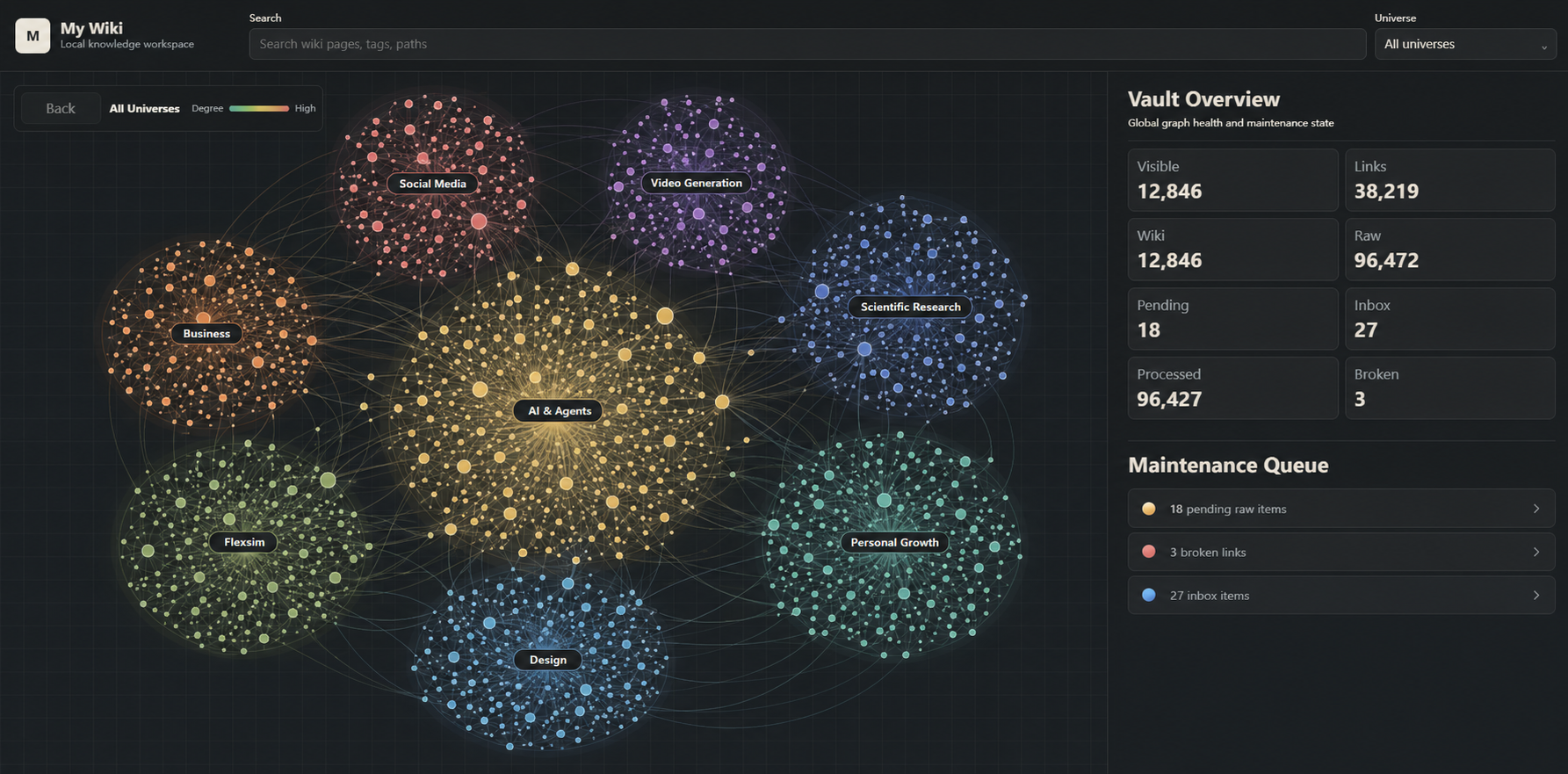
- 知识宇宙:整个知识库的全局视图,展示多个知识星系以及它们通过共同 Concept 形成的联系。
- 知识星系:一组成体系、可以独立理解和复用的知识集合,例如 FlexSim、Agent 开发或项目经验。
- Concept 星球:一篇原子 Concept,表达一个概念、方法、实体、流程或可长期复用的结论。
- 参考证据层:支撑某篇 Concept 的网页、Markdown、PDF、图片和其他 Reference。
图谱不是额外维护的一套数据库。它直接从 Concept 与 Reference 的关系生成,知识发生变化时,运行中的前端会自动刷新。
分享和复用知识星系
知识星系可以导出为单个 .mywiki 知识包。它不是只有几篇摘要,而是一套带证据的知识集合,包含:
- 这个星系的 Concept Markdown;
- Concept 关联的 Reference Markdown;
- 可用的来源 URL;
- 相关图片与图像索引;
- Reference 明确引用的网页快照、PDF 和其他 original。
接收方可以先预览重复项、重命名和冲突,再确认导入自己的知识宇宙。即使原始资料没有 URL,例如本地 PDF,知识包仍然可以保留完整证据。
你既可以在网页中导入和导出,也可以直接告诉 Agent:
把“FlexSim”知识星系导出成知识包。
预览导入这个 flexsim.mywiki 知识包。
确认导入,并把星系名改成“仿真工程”。
这使 My Wiki 不只是个人资料整理工具,也可以成为可传播、可验证、可继续维护的知识生态基础。
Open Knowledge Format v0.2
Concept 默认采用 Google Open Knowledge Format v0.2 可消费的 Markdown 表达:标准 YAML frontmatter、draft|stable|deprecated 生命周期、结构化来源对象、标准 Markdown 关系链接和按来源 ID 连接的证据脚注。My Wiki 的知识星系、别名和证据闭环字段作为 OKF 允许的扩展键保留;系统不会把“已经蒸馏”冒充为人工验证。
# 审计当前 Concept 的 OKF v0.2 兼容性
npm run wiki -- okf-audit

# 预览旧知识页的迁移数量;--apply 会先备份 concepts/ 再转换
npm run wiki -- okf-migrate
npm run wiki -- okf-migrate --apply

# 导出全部知识或单个知识星系为独立 OKF directory bundle
npm run wiki -- export-okf
npm run wiki -- export-okf --galaxy "AI" --output /path/to/ai-okf
.mywiki 是经过 OKF v0.2 审计的可移植知识星系包:包内直接采用 index.md、log.md、concepts/、references/ 布局,并在清单中保留星系名、工作流状态、校验和与冲突处理等 My Wiki 扩展。解包后的知识内容可被通用 OKF 消费者读取,My Wiki 则额外恢复可继续维护的证据闭环。
为什么选择 My Wiki
- 本地优先:Markdown、原件、网页快照和图片都在你控制的目录中。
- Agent 自动维护:短指令即可完成入库、蒸馏、链接、检查和修复。
- 结论可追溯:Concept 结论回链 Reference,重要信息可以核实到原文与图片。
- 面向复用而非堆积:资料被整理成原子 Concept 和关系,而不是只进入一个搜索黑盒。
- 网页应用可操作:不仅看图谱,还能添加资料、处理维护队列、问 Viki、导入和导出知识星系。
- 支持多种本地文档:文本 PDF、扫描 PDF、图片、DOCX、PPTX、XLSX、文件夹批次和 ZIP 图文包。
- 质量感知的 PDF 解析:逐页检查乱码、稀疏文本和公式版面风险;中文 OCR 会清理逐字空格,低质量页面不会静默进入维护。
- 失败不会伪装成功:空内容、低置信度或不完整解析会锁定为
needs-followup,不会被当成已读资料。 - 开放且可迁移:Wiki 可审计并导出为 OKF v0.2,知识也可用任意 Markdown 编辑器打开或接入 Obsidian、RAG 和其他 Agent 工具。
- 零成本起步:只需要 Node.js 和一个已经可用的本地 Agent 客户端。
统一文档提取与验收
My Wiki 自己定义文档 IR、逐页质量门禁和验收报告,外部解析器不能自行宣布资料可维护。每次本地文档提取都会在知识库的 .my-wiki/extractions/ 写入一份可读的 *.report.json 和压缩的 *.document.json.gz;Raw frontmatter 记录两者路径。报告统一汇总页覆盖、版面/OCR 质量、公式、编码和本地附件门禁,只有通过硬门禁的证据才能进入蒸馏。
推荐工具链分工如下:
- MinerU 是中文扫描件、公式与表格密集技术 PDF 的主解析器。
- Docling 提供统一结构、阅读顺序、表格和元素级页码/bounding box provenance,也是 Office、OpenDocument 和 EPUB 的首选解析器。
- My Wiki 内置的 Agent 视觉修复器借鉴 doc7 的页级视觉重建思路:将中央门禁标出的风险页渲染为图片,交给现有 OpenCode 或 Codex CLI 的多模态模型。结果必须明显优于原页才会替换,并记录 provider、模型与被拒绝页,不需要安装 doc7。
- PDF.js/Tesseract 是无高保真引擎时的降级路径,不能覆盖已经实际运行但失败的 MinerU 或 Docling 结果。
安装 uv 后,在 macOS、Windows 或 Linux 项目目录运行:
npm run document:setup
npm run document:doctor
该命令安装项目验证过的 MinerU 与 Docling;模型文件由各引擎首次使用时下载。疑难页视觉修复复用已经登录的 OpenCode/Codex CLI 与其中可用的多模态模型,不安装额外文档 CLI。npm run pdf:setup 仍保留为只安装 MinerU 的兼容命令。
自动 PDF 路由默认先用 MinerU;仅当 MinerU 不可用时尝试 Docling,再降级到 PDF.js/Tesseract。可用 MY_WIKI_PDF_ENGINE=mineru|docling|pdfjs|tesseract 强制指定。风险页视觉修复默认复用可用的 OpenCode/Codex,可用 MY_WIKI_VISUAL_REPAIR_MODE=off|auto|required、MY_WIKI_VISUAL_REPAIR_PROVIDER、MY_WIKI_VISUAL_REPAIR_MODEL 和 MY_WIKI_VISUAL_REPAIR_MAX_PAGES 控制。超过 512 页的 PDF 默认按 64 页分批运行 MinerU,再恢复连续页码和图片命名空间;MY_WIKI_MINERU_BATCH_THRESHOLD_PAGES 和 MY_WIKI_MINERU_BATCH_PAGES 可调整批次。
完整的 IR、路由、报告字段和验收规则见 docs/document-extraction.md。
最终写入 Raw 的 ## Capture 正文还会执行编码完整性门禁。任何 U+FFFD 替换字符都会按页记录并将 Raw 锁定为 needs-followup;捕获、重提取、Agent 修复、维护预检和 lint 都会重复验证,避免后续写回造成的乱码沿用旧质量分数。
与 RAG、LLM + Obsidian 的区别
My Wiki 重点解决知识进入检索之前的整理层:把原始资料变成可读、有关系、能核实、可维护的长期知识。
| My Wiki | 传统 RAG | LLM + Obsidian | |
|---|---|---|---|
| 开始使用 | 克隆 Agent 项目并建立独立本地知识库;Skill 按需安装 | 搭建切片、Embedding、召回、存储和服务 | 安装编辑器和插件,再设计提示词与笔记规范 |
| 主要存储 | Markdown、原始文件、快照和本地图片 | 向量索引加外部原文存储 | Markdown Vault |
| 谁来整理 | Agent 维护 Reference、原子 Concept、关系和健康状态 | 流水线索引文本切片,可读知识通常另做 | 通常由用户手工整理,LLM 提供辅助 |
| 可追溯性 | Concept 与 Reference 双向链接并可自动检查 | 取决于检索元数据和应用设计 | 可以做到,但依赖用户习惯 |
| 网页能力 | 内置知识宇宙、录入、维护、Viki 和知识包交换 | 通常需要单独开发应用 | 主要是编辑器内的笔记浏览与插件能力 |
| 分享单元 | 带 Concept、Reference、图片和 original 的知识星系 | 索引或应用特定的数据包 | 文件夹或整个 Vault |
| 更适合 | 个人、团队和项目知识的长期管理与复用 | 大规模语义检索和生产服务 | 人工写作、链接和浏览笔记 |
My Wiki 不排斥 RAG 或 Obsidian。你可以用 Obsidian 打开同一个知识库,也可以在规模真正需要时,把已经整理干净的 Concept 与 Reference 交给 RAG。
快速开始
需要 Node.js 18+ 和 npm。先安装并注册项目主体:
git clone https://github.com/NimaChu/my-wiki.git
cd my-wiki
npm run setup
npm run wiki -- init /path/to/my-vault --name personal --use
之后可以直接把 my-wiki 项目目录作为 Agent 工作区打开。项目命令也可独立运行:
npm run wiki -- status
npm run dashboard:open
需要在其他工作区中通过自然语言调用 My Wiki 时,再安装轻量 Skill:
npm run skill:install
# 或安装发布版 Skill
npx my-wiki-skill@latest
npm run setup:all 可以一次注册当前项目并安装仓库内的 Skill。国内网络安装发布版 Skill 时可使用 npx --registry=https://registry.npmmirror.com my-wiki-skill@latest。
安装器会自动探测常见 Agent Skill 目录:
| Agent 客户端 | 默认 Skill 目录 | 安装支持 |
|---|---|---|
| Claude Code | ~/.claude/skills |
自动探测或 --target claude |
| Codex | ~/.codex/skills |
自动探测或 --target codex |
| OpenCode | ~/.config/opencode/skills |
自动探测或 --target opencode |
| OpenClaw | ~/.openclaw/workspace/skills |
自动探测或 --target openclaw |
| Hermes Agent | ~/.hermes/skills |
自动探测或 --target hermes |
其他兼容 SKILL.md 的 Agent |
由宿主决定 | 使用 --dir <Skill目录> |
安装 Skill 后需新开或刷新 Agent 会话。Skill 会调用已注册的项目主体;找不到项目或默认知识库时,它会先请求确认,再完成安装或初始化,不会把知识写进 Skill 或源码仓库。
本地知识库结构
知识库可以放在电脑任意位置,与项目主体和 Skill 安装目录完全分离:
my-vault/
  index.md                 OKF 知识入口
  log.md                   OKF 更新日志
  concepts/                可长期复用的原子 Concept 页面
  references/
    sources/               原始证据的 Markdown Reference
    assets/                每篇来源独立保存的图片与图像索引
    originals/             网页快照、PDF、Office 文档和其他原件
  templates/               当前知识库使用的 Markdown 模板
  .my-wiki/                本地缓存、运行状态、导入导出记录
Concept.status 与 Reference.status 使用 OKF 生命周期 draft | stable | deprecated。My Wiki 的维护流程单独写入 Reference 的扩展字段 workflow_status: inbox | needs-followup | processed | stale,两者不再复用同一个 status。
网页与 Agent 使用相同的本地解析质量门槛。文本 PDF 会逐页提取,扫描件和图片会本地 OCR,DOCX、PPTX、XLSX 会转换为结构化 Markdown;原文件始终保留在 references/originals/。
代码仓库和 npm Skill 包不包含你的知识库、本地 MCP 凭据或运行日志。知识库是否备份、同步、加密或始终留在一台电脑上,由你决定。
可选能力
- Obsidian:可以作为同一套 Markdown 知识库的人工编辑器,但 My Wiki 不依赖它。
- Firecrawl MCP:增强动态或难抓取网页的入库能力;完整托管爬取可能需要 Firecrawl 认证。
- IMA 和其他外部平台:用户确认并授权后,把资料迁移为本地 Reference,再走同一套维护流程。
- RAG:未来需要 Embedding 和生产级检索时再接入,不必放弃已有的 Concept 与 Reference。
开源许可证
My Wiki 源码使用 MIT License。Dashboard 内置宠物资源保留各自的作者和许可说明,详见 宠物资源说明。
My Wiki
My Wiki is a local-first knowledge project that an AI agent can use directly. The project provides the CLI, visual knowledge universe, maintenance workflows, and grounded Viki Q&A. A separate lightweight Skill adapter lets agents in other workspaces call an installed project.
Useful knowledge is scattered across webpages, PDFs, scans, images, Office documents, conversations, and reference manuals. Saving those files is easy. Keeping them organized, connected, verifiable, and reusable over time is much harder.
My Wiki gives a local AI agent responsibility for the whole knowledge lifecycle: preserve References and originals, extract readable content, distill atomic Concepts, maintain relationships and evidence links, answer questions, repair the knowledge base, and present it through an interactive web application.
No hosted database, vector database, Obsidian installation, or paid API is required by default. Knowledge stays in Markdown, snapshots, original files, and images inside folders you control.
Project And Skill Are Separate
The runnable My Wiki application lives at the repository root. Open the repository as an Agent workspace and the Agent can follow AGENTS.md to use the CLI, Dashboard, tests, and container deployment without installing a Skill first.
my-wiki-skill/ is an optional adapter shipped as part of the project. It can be installed independently into Codex, Claude Code, OpenCode, and other clients, but it contains no application or Dashboard code. If the project or local vault is missing, the Agent first asks for confirmation, then installs the project and initializes a separate vault on the user's behalf.
my-wiki/
  AGENTS.md          entry instructions when an Agent opens the project
  scripts/           CLI and knowledge-maintenance application
  assets/dashboard/  web application and local service
  deploy/            standalone deployment options
  tests/             project tests
  my-wiki-skill/     independently installable Agent adapter
| Entry point | Global Skill required | Project required | How it works |
|---|---|---|---|
Open the my-wiki project in Codex/OpenCode |
No | Yes | The Agent reads root AGENTS.md and the bundled workflow docs |
| Dashboard, Viki, and web maintenance | No | Yes | The backend invokes an authenticated local Agent CLI directly |
| Call My Wiki from a vault or another project | Yes | Yes | The Skill discovers or, after confirmation, provisions the project and vault |
The global Skill is not a runtime dependency of the Dashboard or CLI. Users who always work inside the My Wiki project do not need to install it globally for Codex or OpenCode.
My Wiki provides two interfaces over the same local knowledge vault:
| Agent Project / Optional Skill | Knowledge Universe Web App | |
|---|---|---|
| Best for | Conversational work inside Codex, Claude Code, OpenCode, and similar clients | Visual exploration, comparison, maintenance, and direct knowledge operations |
| Main interaction | Ask the agent to capture, maintain, search, and answer | Browse graphs, upload sources, process the queue, and ask Viki |
| Knowledge surface | Concepts, References, images, originals, and local files | Knowledge universe, galaxies, Concept planets, and Reference evidence views |
| Agent execution | Uses the current Agent client and its tools | Calls an authenticated local Codex, OpenCode, Qoder, or Claude CLI |
| Data location | A local vault at any path you choose | The same local vault |
Use either interface on its own or move between chat and the browser whenever useful. There is no second database to synchronize.
Three Ways To Use My Wiki
1. Open The Project As An Agent Workspace
Clone and register the project, open its directory in Codex, Claude Code, OpenCode, or another Agent, then speak naturally:
Create a My Wiki vault at D:\Knowledge\Personal and make it the default.
Save this article to my knowledge base: https://example.com/article
Capture this PDF and preserve its important images.
Maintain the knowledge base.
Answer this question from my local knowledge and show the relevant evidence images.
The agent resolves the active vault, preserves References, originals, and attachments, creates or updates atomic Concepts, maintains reciprocal links, and answers from Concepts while following evidence back to References when verification matters. You do not need to memorize a separate CLI.
2. Use The Skill From Another Workspace
Install my-wiki-skill/ when an Agent working elsewhere should call the same My Wiki application and local vault. The Skill provides workflow guidance, project discovery, and confirmed provisioning. Missing project or vault layers are created only after user approval and never embedded inside the Skill directory.
3. Open The Knowledge Universe Web App
Tell the agent:
Open the knowledge universe.
Open the My Wiki frontend.
Open the knowledge graph.
The agent starts the local web application. From there you can:
- see the full knowledge universe, its galaxies, and where they intersect;
- enter one galaxy and inspect its Concept network; hidden galaxies are excluded from both the universe and overview totals;
- read a Concept and drill into every Reference supporting it;
- search Concepts, relationships, and sources without losing the current graph level;
- open a Concept or Reference in the built-in Markdown workspace with rendered reading, source editing, live rendered editing, tables, formulas, and local image insertion;
- enter a webpage URL or upload files, folders, and Markdown-plus-images ZIP bundles;
- see uploads immediately in one processing queue with extraction progress and failures, then independently repair or distill each Reference; extraction and Agent maintenance use separate two-task lanes;
- ask Viki questions grounded in selected knowledge galaxies, References, and useful images, with optional web search and visible citations;
- keep multiple local Viki conversations, pause a request, use a full-screen chat, copy an answer, or export a conversation as Markdown, an image ZIP, or a quick note;
- create, import, edit, delete, and optionally capture local Markdown or image-ZIP quick notes;
- add, rename, hide, export, import, or delete a knowledge galaxy. Deletion first moves a complete package into
.my-wiki/trash/galaxies/, where it can be restored or permanently removed without deleting shared knowledge or creating anUncategorizedgalaxy.
The frontend binds to 127.0.0.1 by default. Routine capture and maintenance through an Agent do not start it. It opens only when you explicitly ask for the knowledge universe, frontend, graph, or Dashboard. For an isolated public demo, use the Apple Container deployment behind a Cloudflare Tunnel.
From Sources To Reusable Knowledge
Webpages / PDFs / scans / images / Office files / external platforms
                              |
                              v
                      Reference evidence layer
                    originals, images, metadata
                              |
                          AI agent
                  distill, link, verify, repair
                              |
                              v
                       atomic Concepts
                 concepts, methods, APIs, entities
                              |
               +--------------+--------------+
               v                             v
         grounded answers            knowledge universe
My Wiki does not create one disposable summary per document. One Reference can update several durable Concepts, and one Concept can synthesize evidence from many References. A Reference's workflow_status becomes processed only after useful Concept targets exist, reciprocal evidence links close, and follow-up work is resolved.
That structure makes knowledge reusable. A Reference captured today can improve an existing Concept, a question tomorrow can reuse it, and important claims still lead back to the original text, image, or PDF.
Explore The Knowledge Universe
- Knowledge universe: the global vault view, showing multiple galaxies and the shared Concepts that connect them.
- Knowledge galaxy: a coherent body of knowledge that can be understood and reused as a unit, such as FlexSim, Agent Development, or project experience.
- Concept planet: one atomic Concept describing a concept, method, entity, process, or durable conclusion.
- Reference evidence layer: the webpages, Markdown, PDFs, images, and other References supporting a Concept.
The graph is not a second database. It is generated directly from Concept and Reference relationships, and a running frontend refreshes as the vault changes.
Share And Reuse Knowledge Galaxies
A knowledge galaxy can be exported as one .mywiki package. It is not merely a set of summaries. It is an evidence-backed knowledge collection containing:
- the galaxy's Concept Markdown;
- Reference Markdown linked by those Concepts;
- available source URLs;
- related images and image indexes;
- webpage snapshots, PDFs, and other originals explicitly referenced by those References.
Recipients preview duplicates, renames, and conflicts before confirming an import into their own knowledge universe. Evidence remains complete even when an original source, such as a local PDF, has no URL.
Import and export from the web app, or ask an agent:
Export the "FlexSim" knowledge galaxy as a knowledge package.
Preview importing this flexsim.mywiki package.
Import it and rename the galaxy to "Simulation Engineering".
This lets My Wiki support a broader knowledge ecosystem: coherent knowledge can be shared, inspected, verified, extended, and maintained by another user's agent.
Open Knowledge Format v0.2
Concepts use Markdown consumable by Google Open Knowledge Format v0.2: standard YAML frontmatter, the draft | stable | deprecated lifecycle, structured sources, Markdown relationship links, and source-ID evidence footnotes. Galaxies and My Wiki's evidence-closure fields remain valid extension keys; successful distillation is never presented as human verification.
# Audit the current vault for OKF v0.2 compatibility
npm run wiki -- okf-audit

# Preview or apply migration of legacy knowledge pages
npm run wiki -- okf-migrate
npm run wiki -- okf-migrate --apply

# Export all knowledge or one galaxy as an OKF directory bundle
npm run wiki -- export-okf
npm run wiki -- export-okf --galaxy "AI" --output /path/to/ai-okf
A .mywiki file is an audited, portable galaxy package with the native index.md, log.md, concepts/, and references/ layout. Generic OKF consumers can read the unpacked knowledge; My Wiki additionally restores workflow state, checksums, evidence closure, and conflict handling.
Why My Wiki
- Local first: Markdown, originals, webpage snapshots, and images stay in folders you control.
- Agent maintained: short natural-language requests drive capture, distillation, linking, checks, and repairs.
- Evidence backed: Concept conclusions link to References, including useful images and original files.
- Designed for reuse: sources become atomic Concepts and relationships instead of disappearing into a retrieval black box.
- An operational web app: add sources, process maintenance queues, ask Viki, and exchange knowledge galaxies, not just view a graph.
- Broad local-document support: text PDFs, scanned PDFs, images, DOCX, PPTX, XLSX, folder batches, and ZIP bundles.
- Quality-aware document extraction: My Wiki owns one document IR and page-level acceptance gate; MinerU handles Chinese technical PDFs, Docling contributes structure and provenance, and a configured multimodal Agent CLI can repair only the pages identified by deterministic checks.
- Failure stays visible: empty, partial, unsupported, or low-confidence extraction is locked as
needs-followupinstead of pretending capture succeeded. - Portable by design: move or back up the vault, open it in any Markdown editor, or connect Obsidian and RAG later.
- Zero-cost starting point: begin with Node.js and an available local Agent client rather than a cloud infrastructure stack.
My Wiki, RAG, Or LLM + Obsidian?
My Wiki focuses on the organization layer before retrieval: turning source material into readable, connected, verifiable, and maintainable knowledge.
| My Wiki | Traditional RAG | LLM + Obsidian | |
|---|---|---|---|
| Getting started | Clone the Agent project and create a separate local vault; install the Skill only when useful | Build chunking, embeddings, retrieval, storage, and services | Install an editor and plugins, then define prompts and note conventions |
| Main storage | Markdown, originals, snapshots, and local images | Vector index plus an external source store | Markdown vault |
| Who organizes it | The agent maintains References, atomic Concepts, links, and health | The pipeline indexes chunks; readable synthesis is usually separate | Usually the user, with LLM assistance |
| Traceability | Concept and Reference links are reciprocal and automatically checkable | Depends on retrieval metadata and application design | Possible, but depends on user discipline |
| Web experience | Built-in universe, capture, maintenance, Viki, and package exchange | Usually requires a separately developed application | Primarily editor-based browsing and plugins |
| Shareable unit | A galaxy containing Concepts, References, images, and originals | An index or application-specific dataset | A folder or whole vault |
| Best fit | Long-term personal, team, and project knowledge management | Large-scale semantic retrieval and production services | Hands-on writing, linking, and note browsing |
My Wiki does not oppose RAG or Obsidian. Open the same vault in Obsidian whenever useful, and feed its clean Concepts and References into RAG when scale actually requires it.
Quick Start
Requires Node.js 18+ and npm. Install and register the runnable project first:
git clone https://github.com/NimaChu/my-wiki.git
cd my-wiki
npm run setup
npm run wiki -- init /path/to/my-vault --name personal --use
You can now open the my-wiki directory directly as an Agent workspace or run the project CLI:
npm run wiki -- status
npm run dashboard:open
Install the lightweight Skill only when another workspace should call My Wiki:
npm run skill:install
# Or install the published Skill adapter
npx my-wiki-skill@latest
npm run setup:all registers the current project and installs the bundled Skill in one step. Networks using npmmirror can install the published adapter with npx --registry=https://registry.npmmirror.com my-wiki-skill@latest.
The installer detects common Agent Skill roots:
| Agent client | Default Skill root | Installer support |
|---|---|---|
| Claude Code | ~/.claude/skills |
Auto-detect or --target claude |
| Codex | ~/.codex/skills |
Auto-detect or --target codex |
| OpenCode | ~/.config/opencode/skills |
Auto-detect or --target opencode |
| OpenClaw | ~/.openclaw/workspace/skills |
Auto-detect or --target openclaw |
| Hermes Agent | ~/.hermes/skills |
Auto-detect or --target hermes |
Other SKILL.md-compatible agents |
Host-defined | Use --dir <skills-root> |
After installing the Skill, open or refresh the Agent session. The adapter calls the registered project; if the project or default vault is missing, it asks for confirmation before installing or initializing it and never writes knowledge into the Skill or source repository.
Local Vault Structure
The vault can live anywhere on the computer and remains separate from both the runnable project and the installed Skill:
my-vault/
  index.md                 OKF knowledge entry point
  log.md                   OKF update log
  concepts/                durable atomic Concept pages
  references/
    sources/               source evidence as Markdown References
    assets/                source images and image indexes
    originals/             webpage snapshots, PDFs, Office files, and originals
  templates/               Markdown templates used by this vault
  .my-wiki/                local cache, runtime state, and package records
Concept.status and Reference.status use the OKF lifecycle draft | stable | deprecated. My Wiki tracks maintenance separately with workflow_status: inbox | needs-followup | processed | stale on References.
The web app and Agent capture use the same extraction quality gate. Text PDFs are extracted page by page, scans and images use local OCR, and DOCX, PPTX, and XLSX become structured Markdown. Every original remains in references/originals/.
The code repository and npm Skill package contain no personal vault, MCP credentials, or runtime logs. You decide whether a vault is backed up, synchronized, encrypted, or kept on one machine.
Optional Capabilities
- Obsidian: use it as a human editor for the same Markdown vault; My Wiki does not depend on it.
- Firecrawl MCP: improve capture for rendered or difficult webpages; full hosted crawling may require Firecrawl authentication.
- IMA and other external platforms: after user confirmation and authorization, migrate material into local References before using the same maintenance workflow.
- RAG: add embeddings and production retrieval later without discarding the readable Concept and Reference layers.
License
My Wiki source code is released under the MIT License. Bundled Dashboard pet assets retain their own attribution and license terms; see the pet asset notice.