deepseek-harness-desktop
Open-source Windows desktop client and GUI for DeepSeek Harness — zero-setup installer with Codex, plugins, skills, SSH, mobile remote access, and 11 skins.
原始仓库简介 · 中文摘要待补充 · ai-agent / ai-coding-assistant / codex / deepseek / deepseek-harness / desktop-app
README / 项目原文
DeepSeek Harness Desktop
中文 | English
项目由 ningbai牛逼 维护:如果 DeepSeek Harness Desktop 对你有帮助,欢迎在爱发电支持 ningbai牛逼。你的支持将用于服务器、测试环境和后续维护。
扫码支持:

DeepSeek Harness Desktop 用户交流群
QQ 群:1105158177
欢迎加入社群交流:
- 使用与配置交流
- 插件与 Skills 分享
- 模型配置与使用经验
- 自动化玩法
- 主题与桌宠
- 新版本体验与功能建议
GitHub 下载速度较慢?
群内会同步提供最新版安装包,也可以直接交流安装与使用问题。
DeepSeek Harness Desktop 是社区维护的开源 AI 编程桌面客户端。
DeepSeek 官方尚未正式发布独立 Desktop 产品;本项目把公开的官方 DSH Runtime、Web UI 与官方仓库中的 Desktop 能力边界 融合为 Windows、macOS 与 Linux 桌面应用,并在独立社区宿主中补齐插件、Skills、任务自动化、Git、远程开发和桌面体验。它不是 DeepSeek 官方客户端,也不使用或覆盖未来官方 Desktop 的应用身份、数据目录与更新源。
支持 Windows 10 / 11 x64;同时提供 macOS 13+ Apple Silicon arm64 Preview 与 Linux x64 Preview。项目采用 BSD-3-Clause 许可证。
安装包已包含 Node.js 与 DSH;Windows 同时内置 Git,macOS 与 Linux 的 Git 操作需要系统安装 Git。
5.1.0:三端同版,完整输出与简洁设置
5.1.0 正式 Release 于 2026-10-25 15:09:51 UTC 发布,使用官方 NPM Runtime/SDK 0.2.1-rc.2 与 Electron 44.0.0,不修改官方源码。正式标签运行 40199647851 在 eb1223ddfee78eccadd76d8022501cd1806d9d3d 三端与 publish 全成功。五个公开安装文件已独立下载,字节、SHA-256、GitHub digest 与合并清单一致;Windows updater SHA-512 和 manifest 也已验证。
- 消费确认与流式背压保留完整输出和历史;异步资源读取与 HMR 重扫保留授权、缓存及取消清理语义,不宣称普遍性能百分比。
- 安装目录逐项校验,注册表失败逐项恢复;技能市场首次启用需确认,反馈、翻译、自动更新及项目布局扫描默认关闭,来源替换采用可恢复事务。确认不是执行沙箱。
- 无框拓展坞保留 15 个导航、搜索、控件、高级详情、关键风险提示、选中态与键盘焦点;仅独立设置窗口不挂载浮动宠物,主会话宠物与保存配置保留。
- Windows core 28/28、packaged-full 44/44,无豁免;真实 Setup 新装、4.3.0/5.0.0/5.0.1 分别升级、同版覆盖、重启、卸载与旧 provider/会话数据保全通过。默认官方皮肤、侧栏折叠、模型接入、Skills、托盘及既有入口保留。
Windows Desktop 单测 1943/1943、零跳过;macOS/Linux 各 1906 通过、37 项既有平台跳过、零失败(总计各 1943),scripts 三端均 213/213。三端均未签名,macOS 未公证且要求 arm64/macOS 13+,macOS/Linux 为 Preview;Linux 本版仅 Ubuntu 22.04 原生 Runner 验证,不借用 Ubuntu 24 历史结果。同号 5.1.0 本地内测包须手动下载正式包覆盖,不承诺同号自动更新。三端公开载荷的正式 telemetry 配置已核实,匿名统计和 opt-out 政策不变;未提交生产事件或验证生产入库。
5.1.0 双语发布说明 · 三端实际资产清单 · 最终 Windows 截图来源
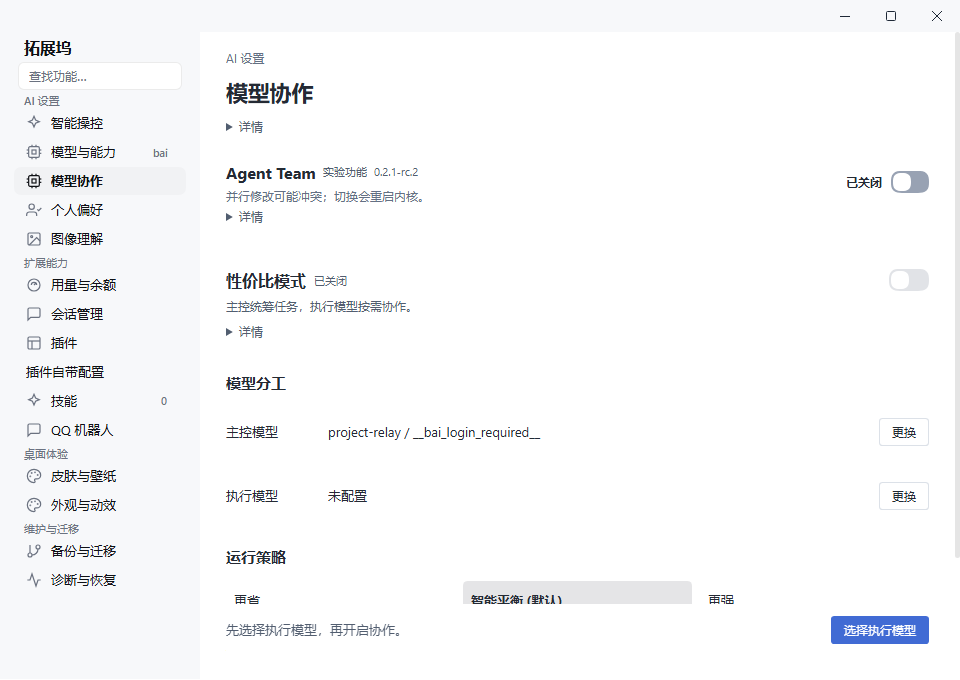
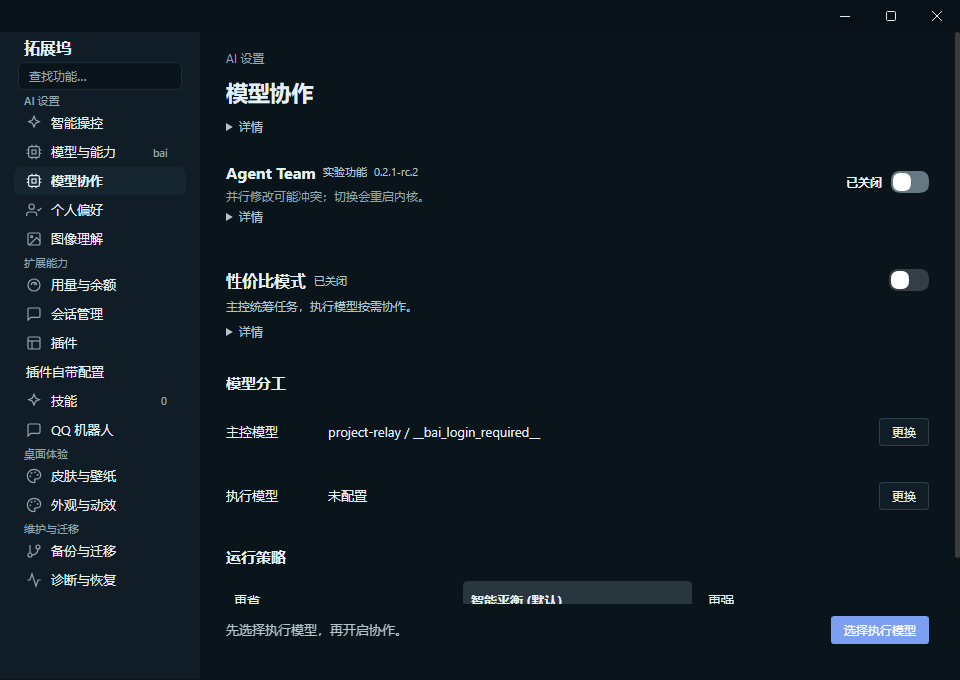
以下原图来自正式标签 Windows 隔离 QA:主界面是实际主 WebContents,Dock 是宿主与子视图同窗原生采集,无 diagnostic 合成或模拟模型会话。未配置模型不代表已授权;Dock 图保留真实滚动截断,不表示全部控件同时可见,也不代表 macOS/Linux 截图、真人付费或断电回滚验收。
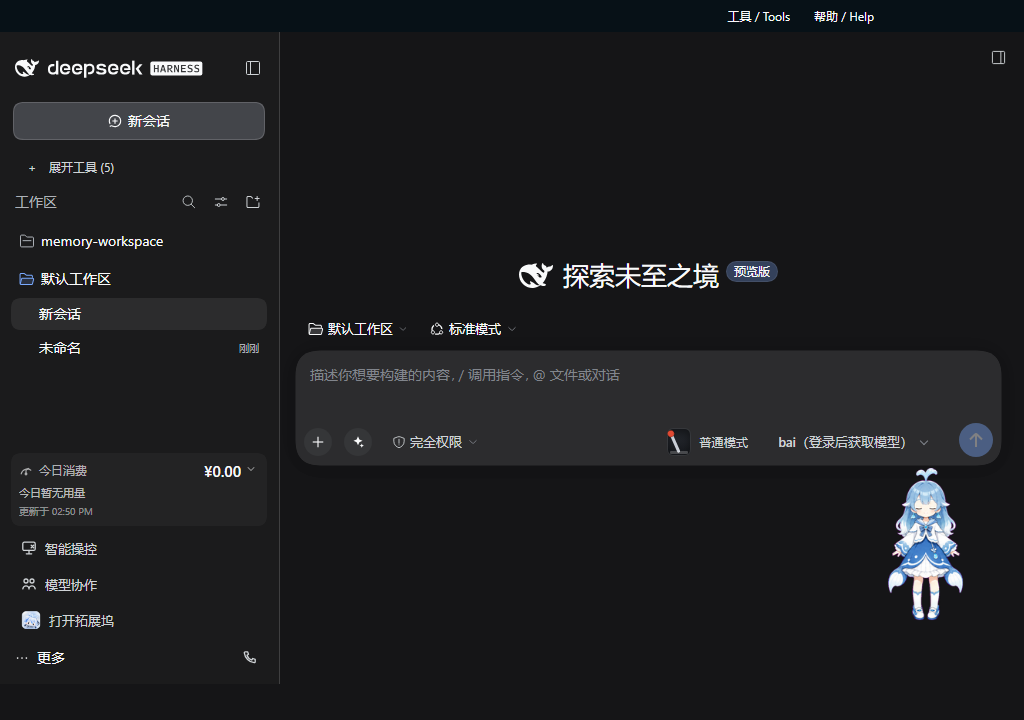
| 浅色简洁设置,未配置状态 | 暗色简洁设置,真实滚动位置 |
|---|---|
 |
 |
5.0.1:输出更顺,侧栏更清楚,三端同版
5.0.1 正式安装包已在 Windows x64、macOS arm64 Preview、Linux x64 Preview 同版发布。官方 NPM Runtime 保持 0.2.0-rc.2;三端原生验证、打包和启动冒烟通过,Windows 源码回归 27/27、完整打包回归 43/43。隔离 Runner 验证真实新装、4.3.0 和 5.0.0 覆盖升级、同版重装及重启数据保全;不是所有历史版本或物理设备验收。
- 默认更清爽:新用户使用官方原生皮肤,升级保留已有皮肤、背景和明确保存的设置,15 款内置皮肤仍可选择。
- 流式输出减负:文本和 Markdown 更新避开重复侧栏扫描,完整保留中文、代码、工具结果与轮次导航,不靠截断内容提速。
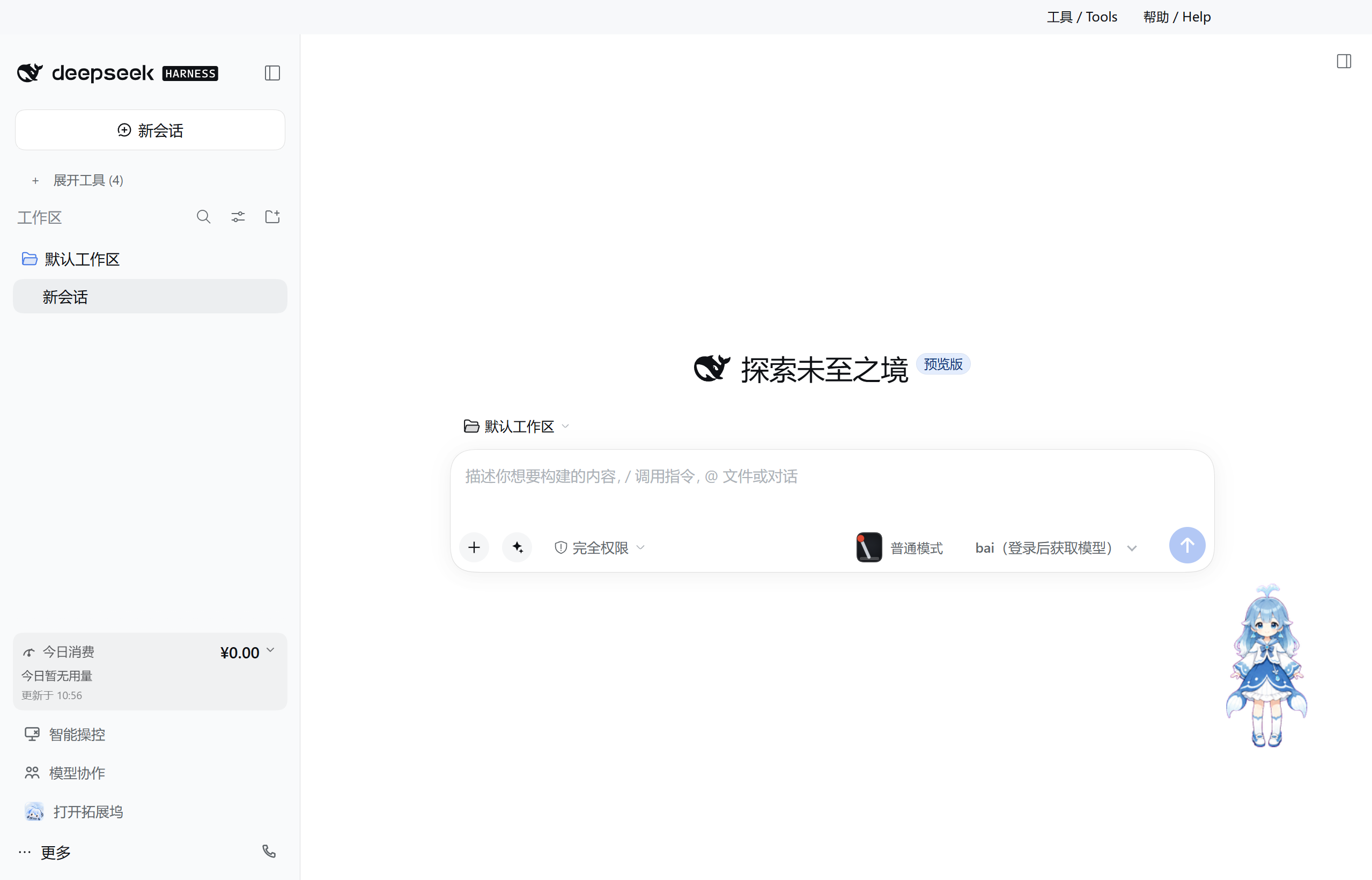
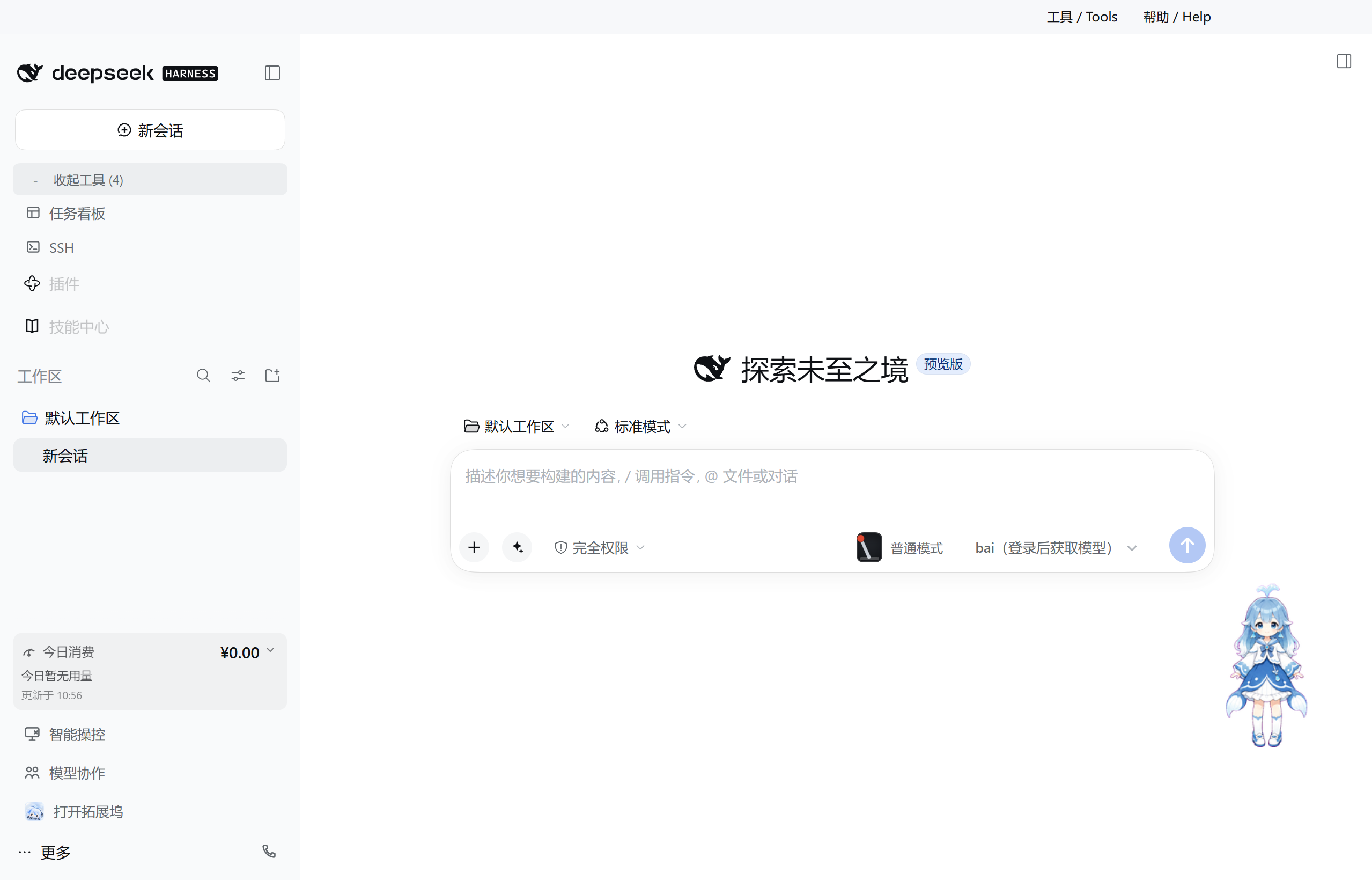
- 侧栏让出空间:工具支持折叠、键盘展开与重启恢复;仅保留底部拓展坞入口和今日消费,工作区及会话列表继续可用。
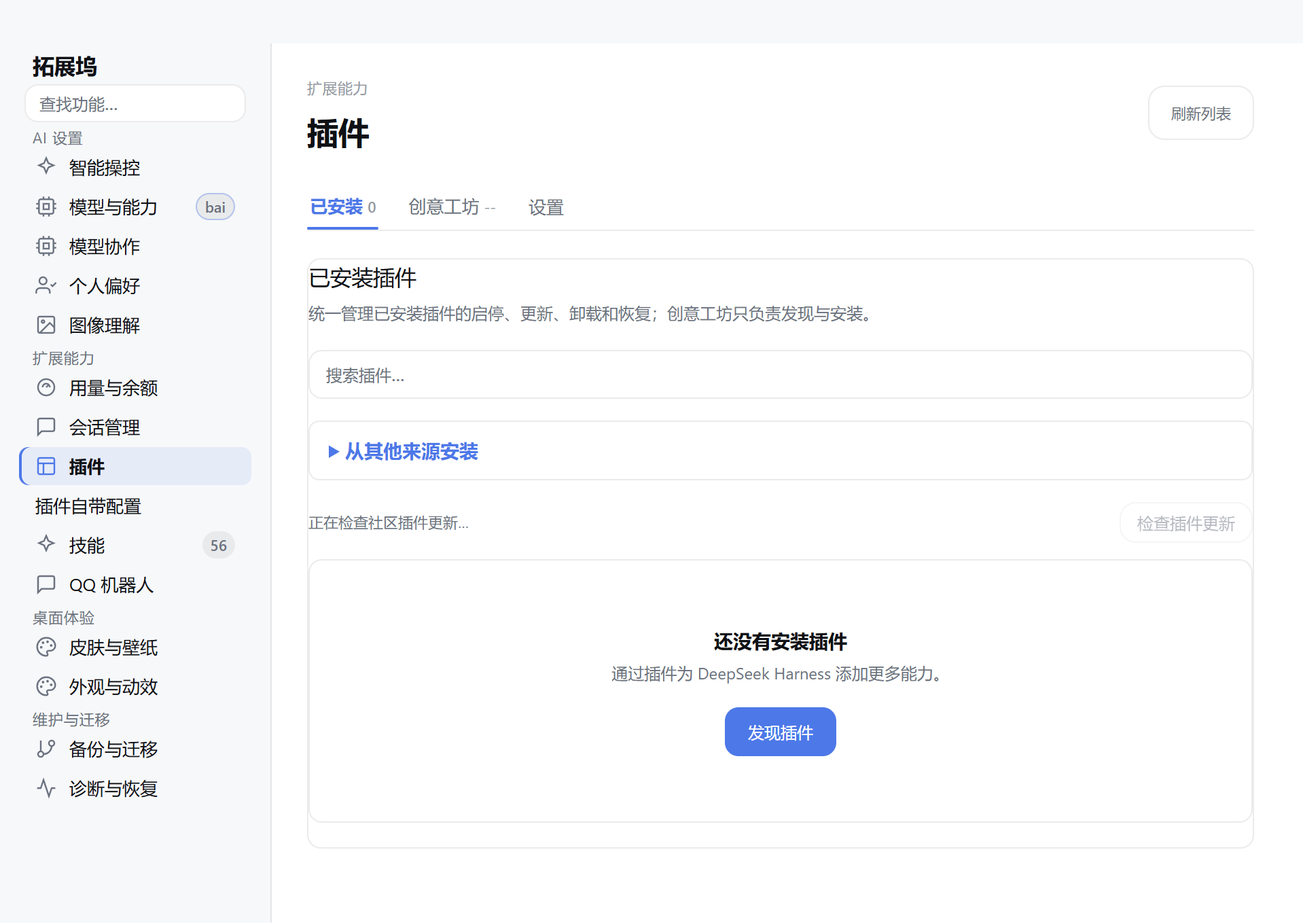
- 暗色拓展坞可读:纯色面板替代玻璃效果,暖导航清除旧配色;15 个入口、功能搜索和键盘焦点保留,上下文提示避免反复闪动。
- 后台与升级更可靠:菜单支持最小化到托盘、恢复和明确退出;Windows 升级识别原安装目录,事务备份、失败回滚及新旧模型配置保全继续提供。
- 完整工作台与隐私:模型协作、Skills、插件详情配置、第三方 API、bai 授权和历史会话保护继续可用;匿名埋点不采集用户正文或凭据。
三端均未签名,macOS 未公证。请核对同 Release 的 SHA-256;5.0.1 发布说明与实际资产清单记录边界。截图来自同发布提交的候选包 Windows 隔离验收;配置页由真实窗口与内嵌 WebContents 同步采集合成,不注入用户对话,不代表 macOS/Linux 截图或物理设备验收。
| 官方默认皮肤与折叠侧栏 | 展开工具仍可访问 |
|---|---|
 |
 |
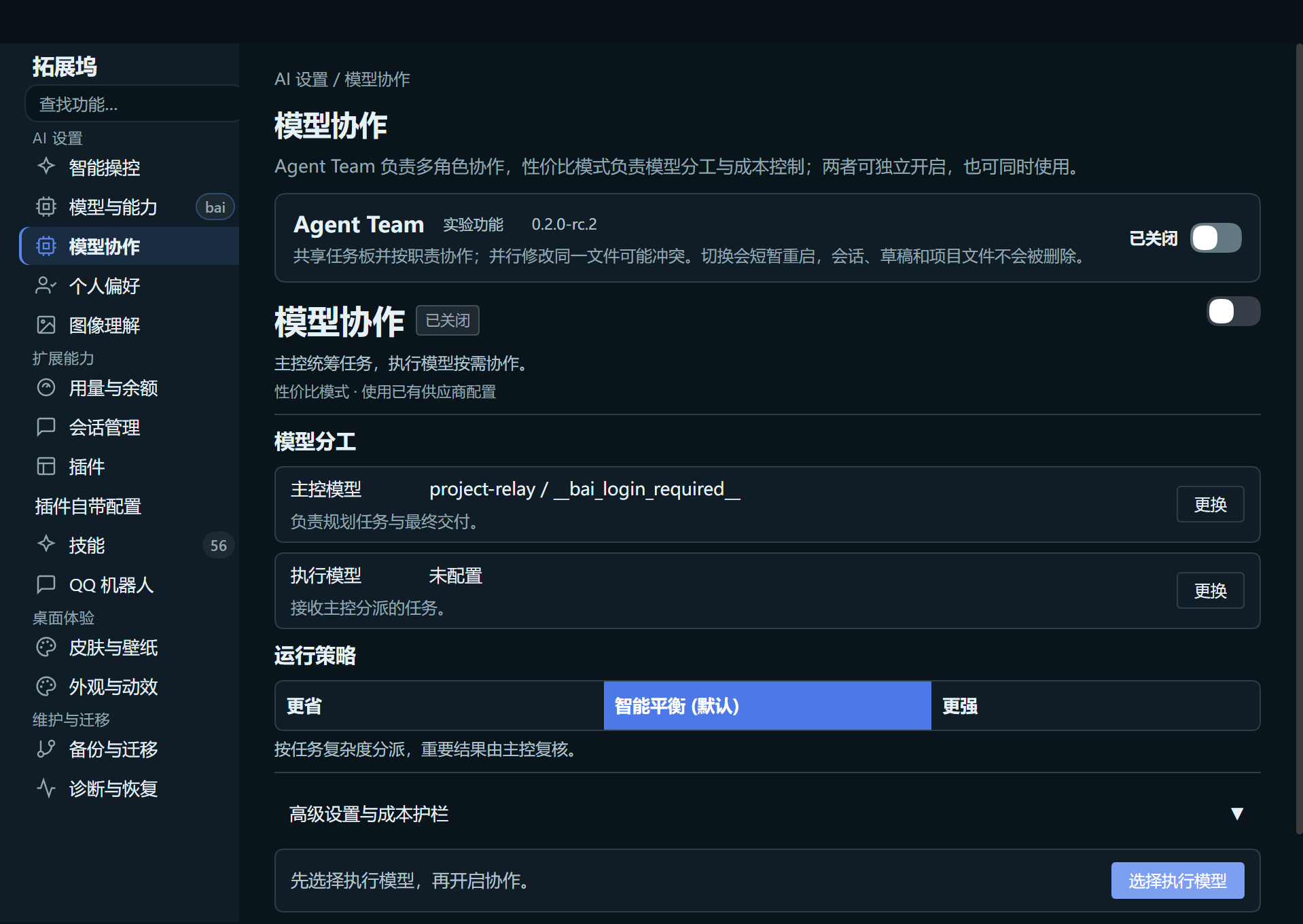
| 暗色模型协作 | 插件中心 |
 |
 |
5.0.0:稳定升级,三端同版
5.0.0 锁定官方 NPM DSH 0.2.0-rc.2,使用公开 dsh-web-all@0.4.4 与 Desktop 专有适配,不修改官方源码。Windows x64、macOS arm64、Linux x64 已同版发布,三端原生门禁通过;Windows 完整打包回归 40/40,并在隔离 Runner 验证真实新装、4.3.0 覆盖升级及重启。macOS/Linux 仍为 Preview;三端未签名,macOS 未公证。下载按同目录 SHA-256 核验,升级前保留重要数据备份。
- 会话更可靠:认证分片承载长历史与工具结果,覆盖 A→B→A 切换及重启恢复;超限明确报错,不静默截断,也不自动上传旧会话。
- 升级保护数据:覆盖安装使用事务备份与失败回滚;保全 Profile 中新旧模型、插件配置及用户开关,恢复插件详情配置、Skills 与用量统计入口。
- 模型接入更省步骤:bai 登录后优先选择真实目录中的
deepseek-flash,定期更新目录;缺少授权或密钥失效时引导浏览器登录,不自动充值、付费或重发消息。第三方 API 仍可独立接入。 - 工作台完整保留:任务看板、Git、文件交付、模型协作、桌宠、15 套皮肤、SSH 与远程访问继续提供;恢复 4.4.0 品牌图标。
- 终端与操控边界清楚:保留 PowerShell、PowerShell 7、WSL、CMD 选择;Agent WSL 独立审批,Browser Use 和 Computer Use 默认关闭,启停失败恢复原配置。
- 三端与隐私:统一版本,分别使用原生 Runner 验收;安装包不签名,macOS 不公证。官方包包含匿名使用统计,不采集会话、代码、路径、截图或凭据,开发与测试版本默认断开。
上游同步记录 · 升级与回滚 · 5.0.0 发布说明
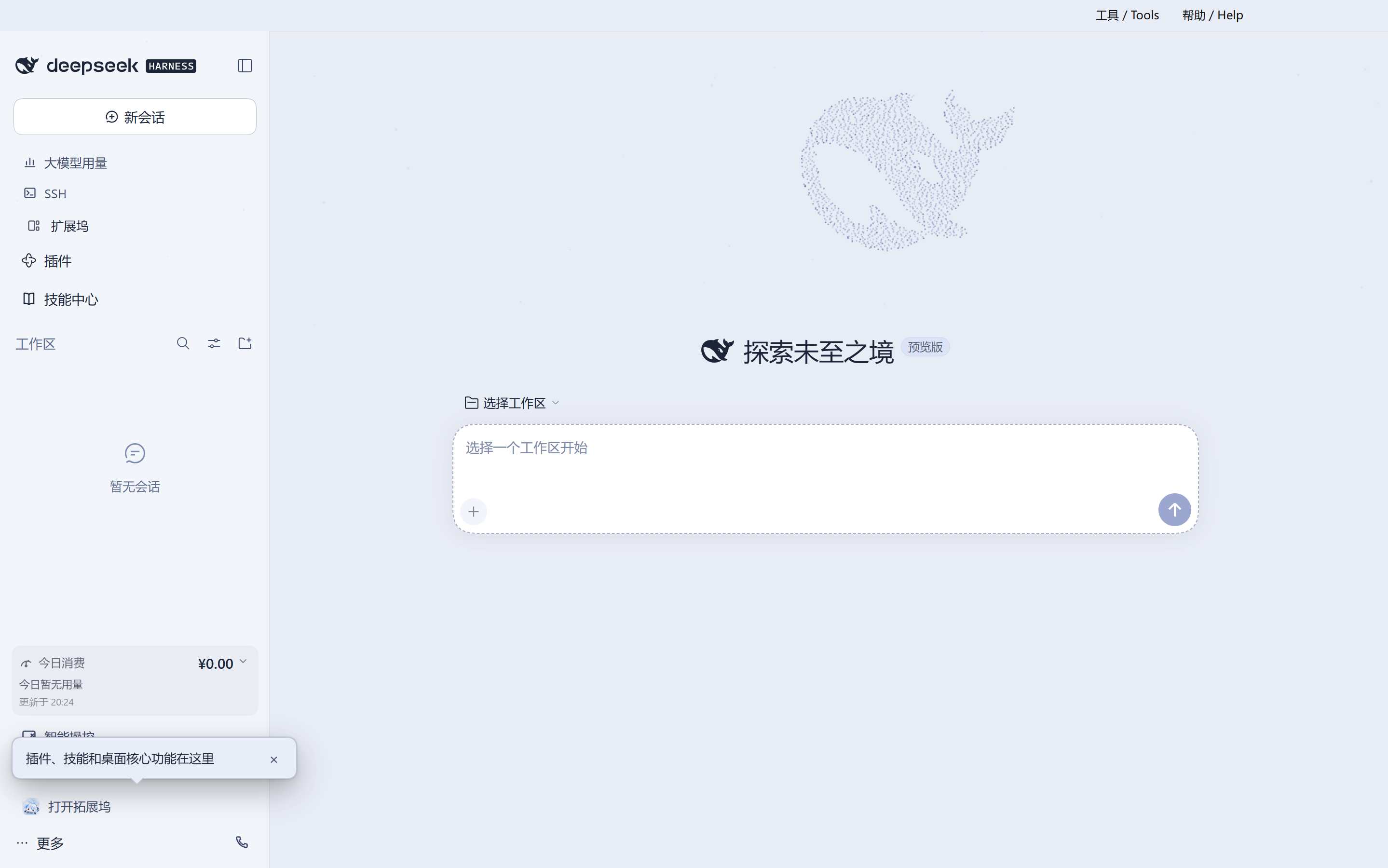
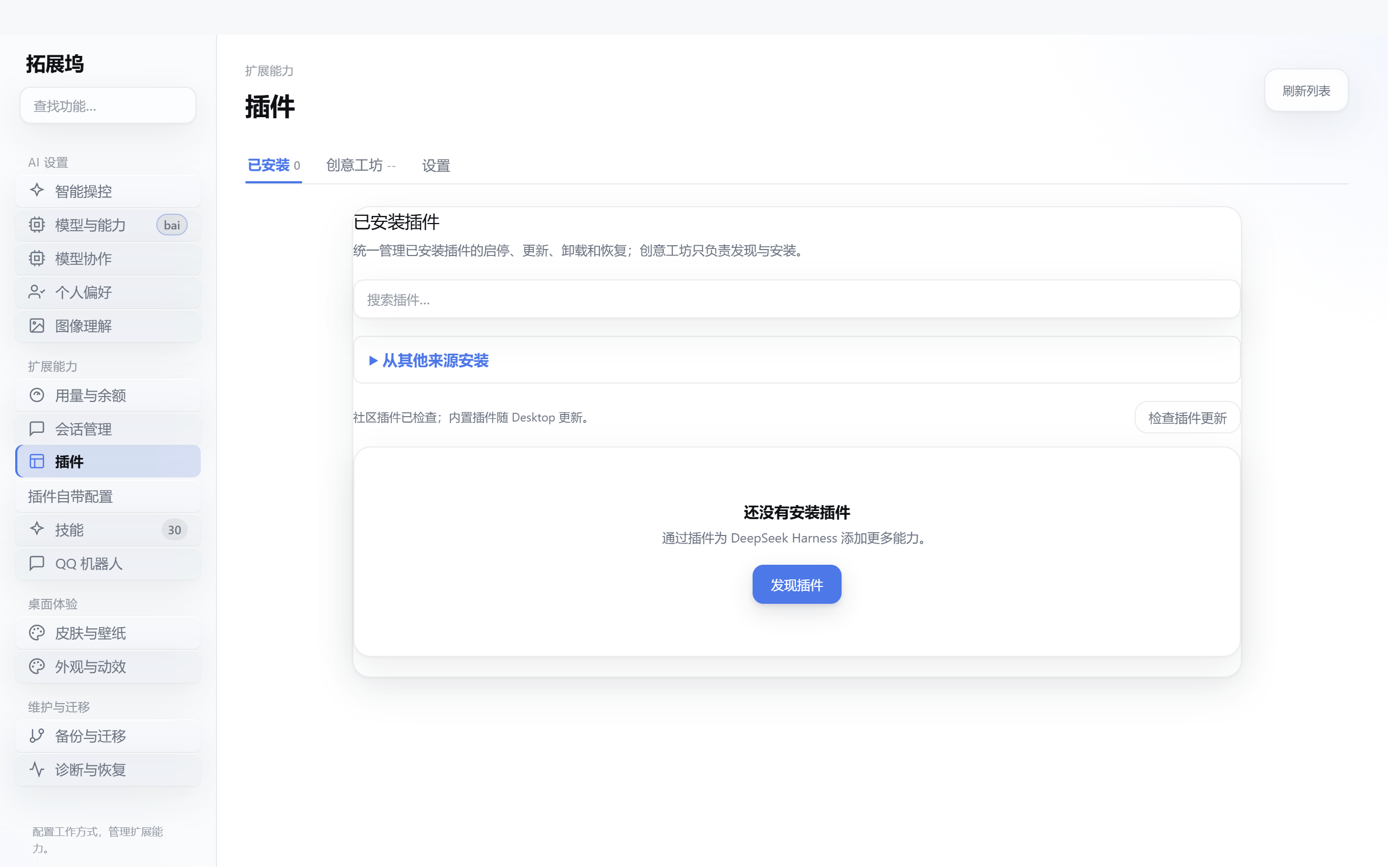
以下为 5.0.0 Windows 隔离运行界面,不代表 macOS 或 Linux 已验收;扩展坞配置页由真实窗口与内嵌 WebContents 采集合成,无注入用户数据。
| 主界面 | 扩展坞插件中心 |
|---|---|
 |
 |
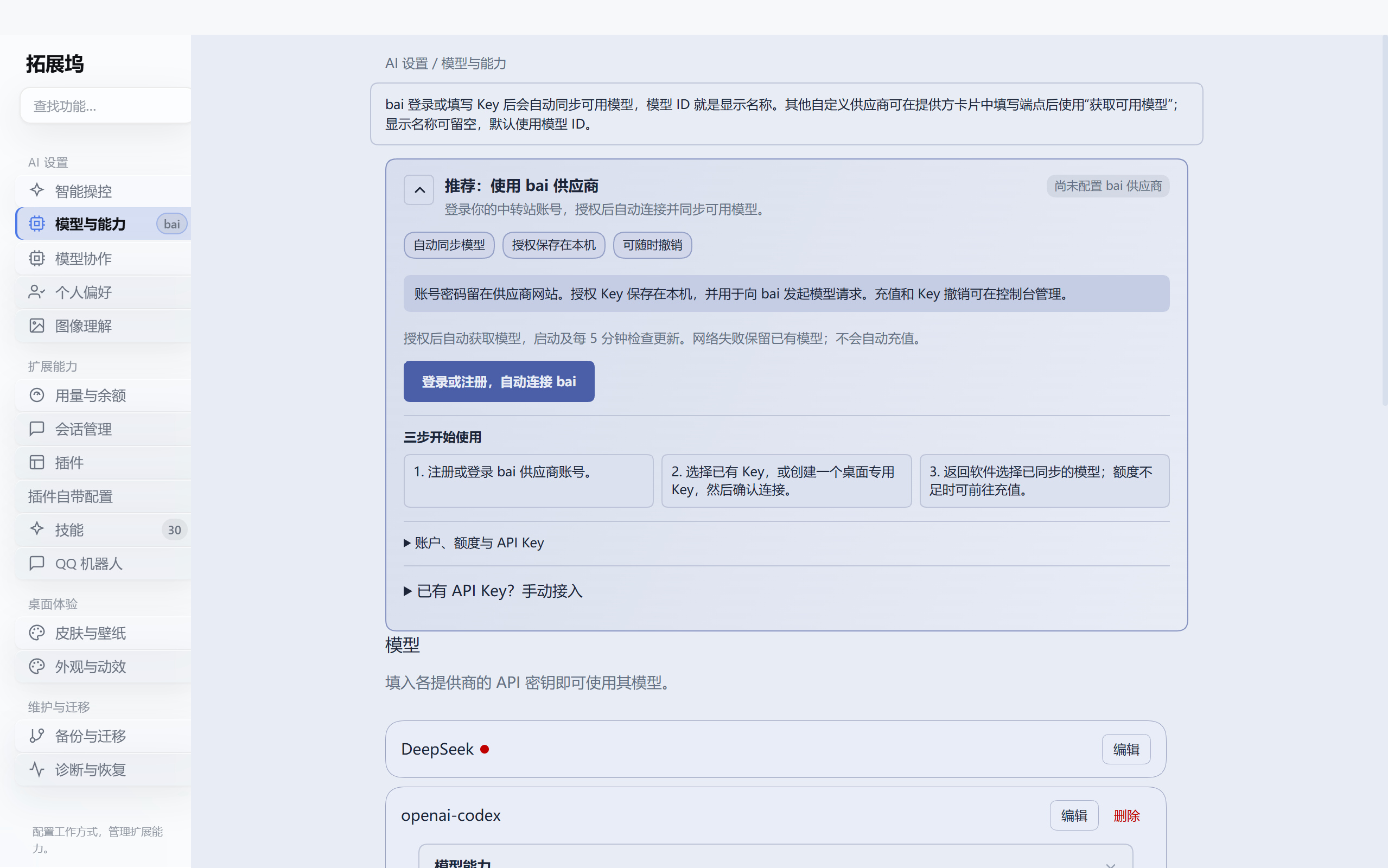
| 模型接入与 bai 授权 | Skills 与统一发现 |
 |
 |
4.1.0:让 DeepSeek 操作浏览器和电脑
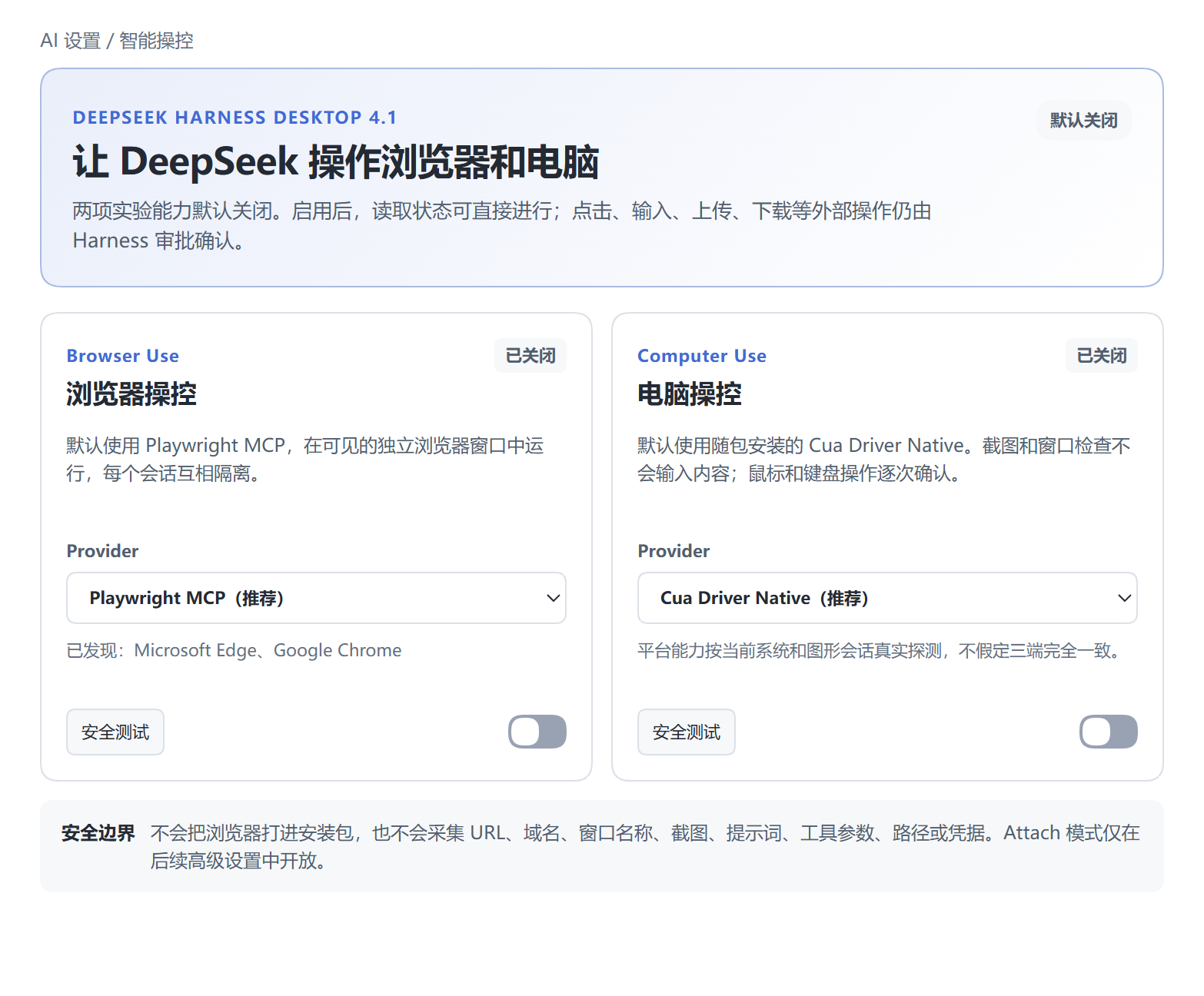
4.1.0 引入智能操控。Windows x64 为正式版,macOS arm64 与 Linux x64 为 Preview;三端全部通过后才会进入同一个 GitHub Release。
- Browser Use:默认使用官方 Playwright MCP,在可见、隔离的系统浏览器会话中执行;自动发现 Chrome、Edge 或 Chromium,点击、输入、上传和下载仍需审批。
- Computer Use:默认使用随包安装的 Cua Driver Native,外置 MCP 可作为隔离回退;截图和窗口枚举可观察,鼠标键盘操作逐次确认,连续启动失败自动进入安全模式。
- DSH 0.1.6 破坏性更新适配:精确锁定
@deepseek-ai/dsh@0.1.6-alpha.1,完成 Agent、Session、PTC、Workflow、Sandbox 与 Agent Team 新契约迁移。 - 3.5/4.0 数据事务继承:会话与长上下文、Workspace、模型、凭据引用、Skills、插件、皮肤、桌宠与协作设置在修改前备份,失败回滚,原始 Session 日志不被无备份改写。
- 埋点保持克制:新增的操控事件仅使用固定结果词表,不采集 URL、域名、窗口名称、截图、Prompt、工具参数、路径或凭据,详见 隐私政策。
持续提供的核心能力
- 性价比模式 V2:专家主控模型负责理解、拆解、派发、复核和汇总,副模型 / 子代理只处理被派发的局部任务;首次选择会自动引导配置。
- 大模型用量看板:实时展示余额、输入/输出 Token、上下文、缓存、请求耗时与费用;峰值采用严格滚动 1 秒算法,不再把一次 usage 汇总事件误当作瞬时速率。
- Claude Code / Codex 项目导入:只读发现项目和历史会话,预览后导入 Harness 工作区;敏感信息脱敏,历史工具调用不会重新执行。
- 启动与插件稳定性继续加固:启动阶段可见、事务修复可回滚、第三方插件错误隔离,原有 DSH Home 与插件直接延续。
模型协作、Skills 与模型接入
以下为 5.0.0 Windows 隔离运行截图,展示模型协作、Skills 与模型接入;不代表 macOS/Linux 的实际界面或正式安装验收。
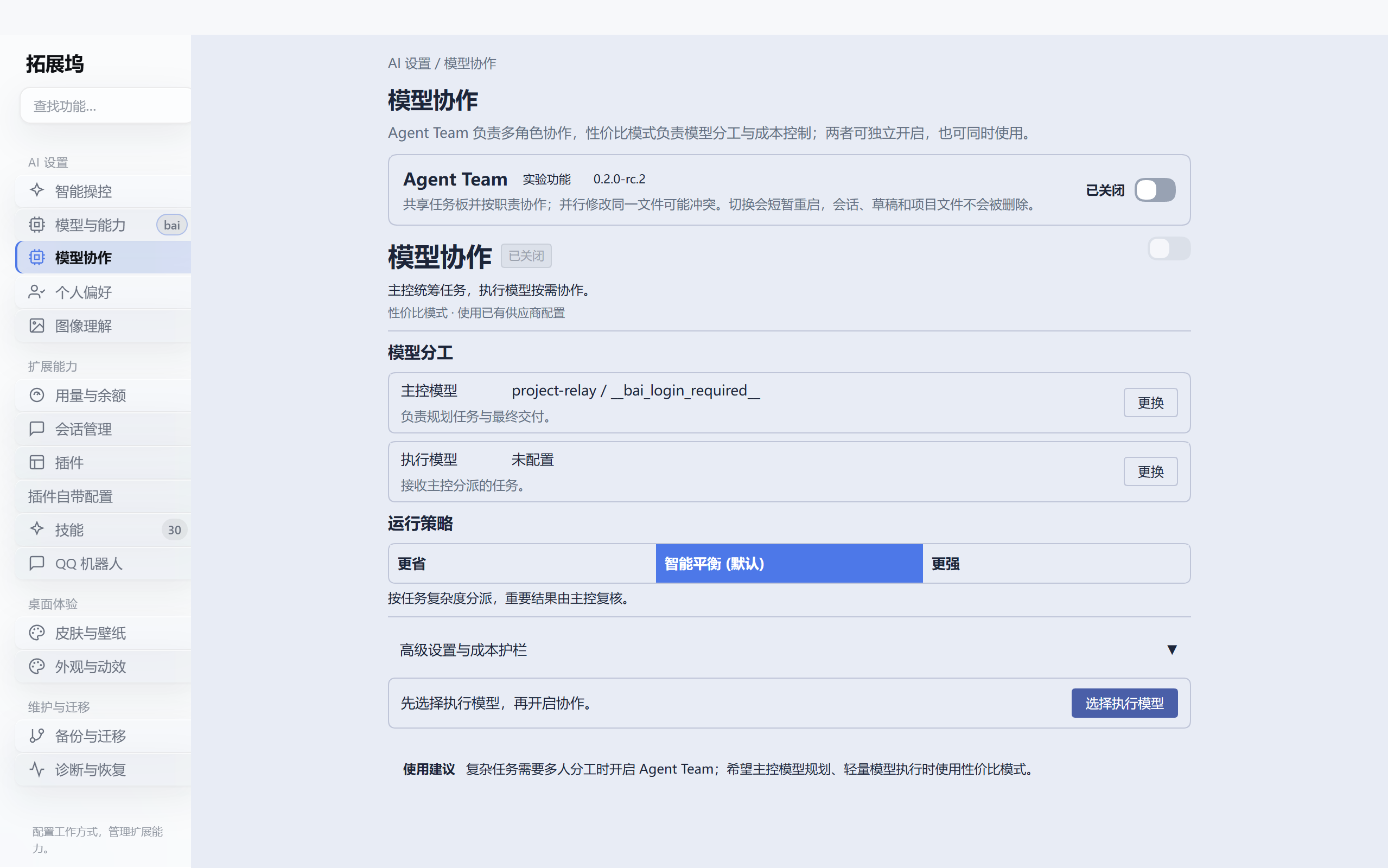
模型协作:Agent Team 与性价比模式放在同一处
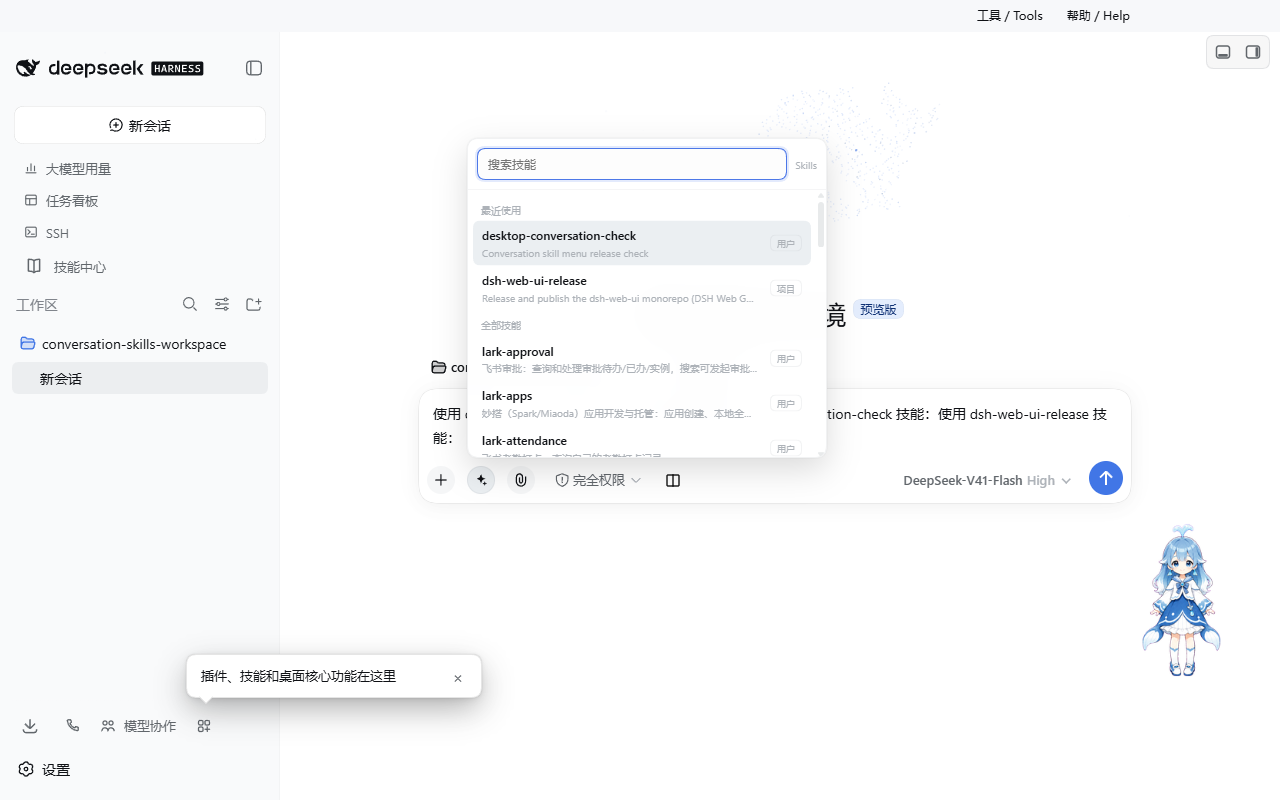
会话侧栏的“模型协作”会直接打开唯一的拓展坞窗口并进入协作页。Agent Team 负责多角色协作,性价比模式负责主控与执行模型分工;两者互不排斥,可独立开启或同时使用。
Skills:会话菜单与技能中心使用同一目录
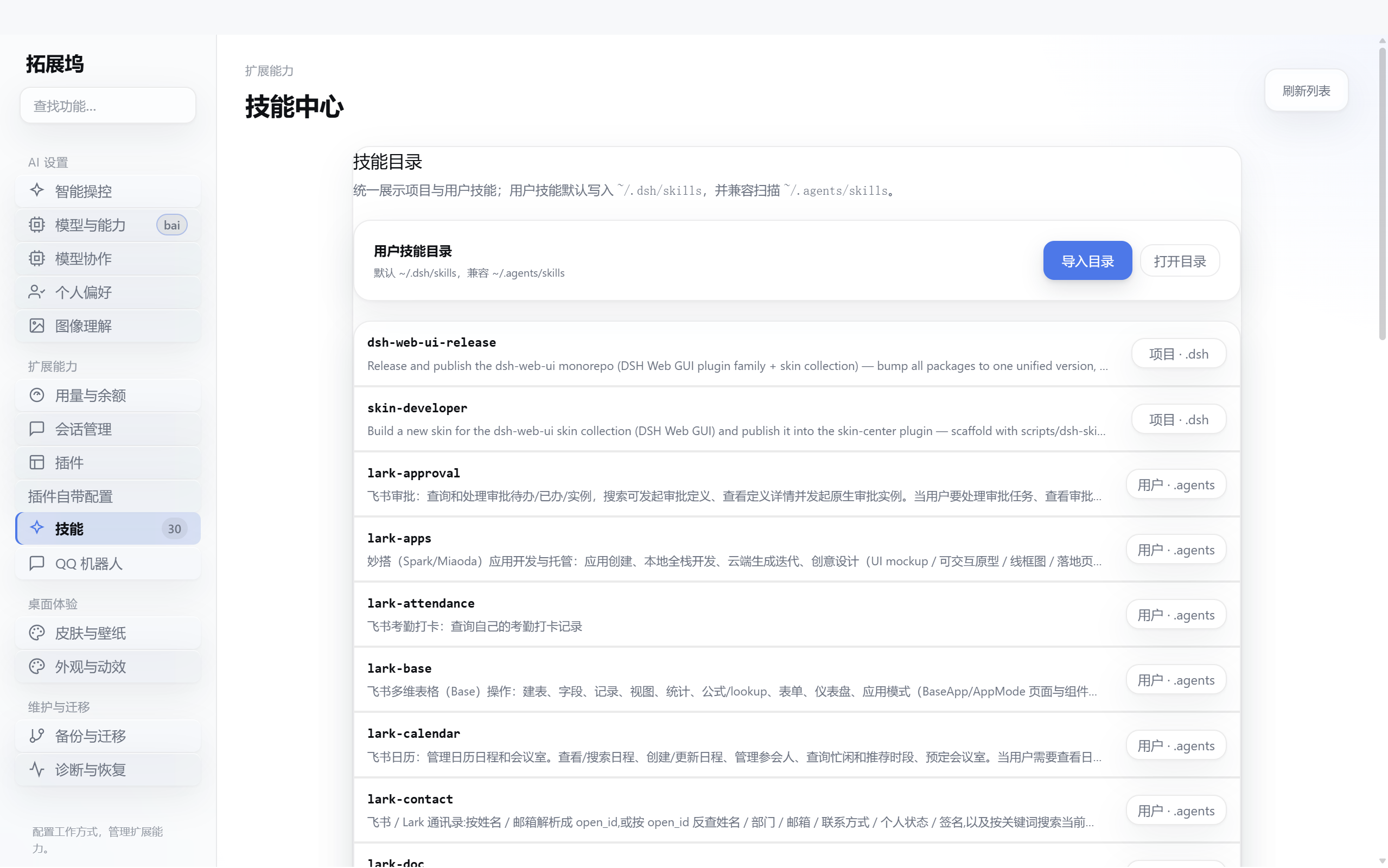
4.0 统一扫描项目 .dsh/skills、用户 DSH Skills 与用户 Agents Skills。会话输入框可搜索并插入技能,技能中心显示相同来源及作用域,不再出现“侧栏能看到、技能中心看不到”的路径分裂。
bai 供应商:在模型入口中统一优先显示
聊天模型、模型设置以及协作页的主控与执行模型选择器共用排序规则:用户手动置顶优先,其次是 bai 供应商,再保留其余供应商的既有顺序。
详细边界见 桌面架构与能力、升级与回滚指南 和 5.0.0 发布说明。
为什么选择 DeepSeek Harness Desktop
开箱即用
下载安装 EXE 后即可启动完整 Harness 环境。
无需手动准备 Node.js、Git、pnpm 或 DSH Runtime,桌面端会统一管理所需组件与运行环境。
完整 AI 编程工作台
在一个桌面应用中完成:
- AI 对话与代码修改
- 项目文件浏览与编辑
- Git / SCM 操作
- Markdown、HTML、代码、Diff、PDF、Office 等文件预览
- 模型切换与推理强度调整
- Skills 与插件调用
- Agent 任务执行
- Token 与性能统计
- 多项目开发工作流
Skills 与插件生态
支持多种扩展方式:
- DSH Skills
- Agents Skills
- 项目 Skills
- 社区 DSH Bundle
- 插件市场
- 桌面扩展
可以直接在 Harness 中搜索、安装和使用扩展能力,将自己的开发工具逐步组合成一套完整工作流。
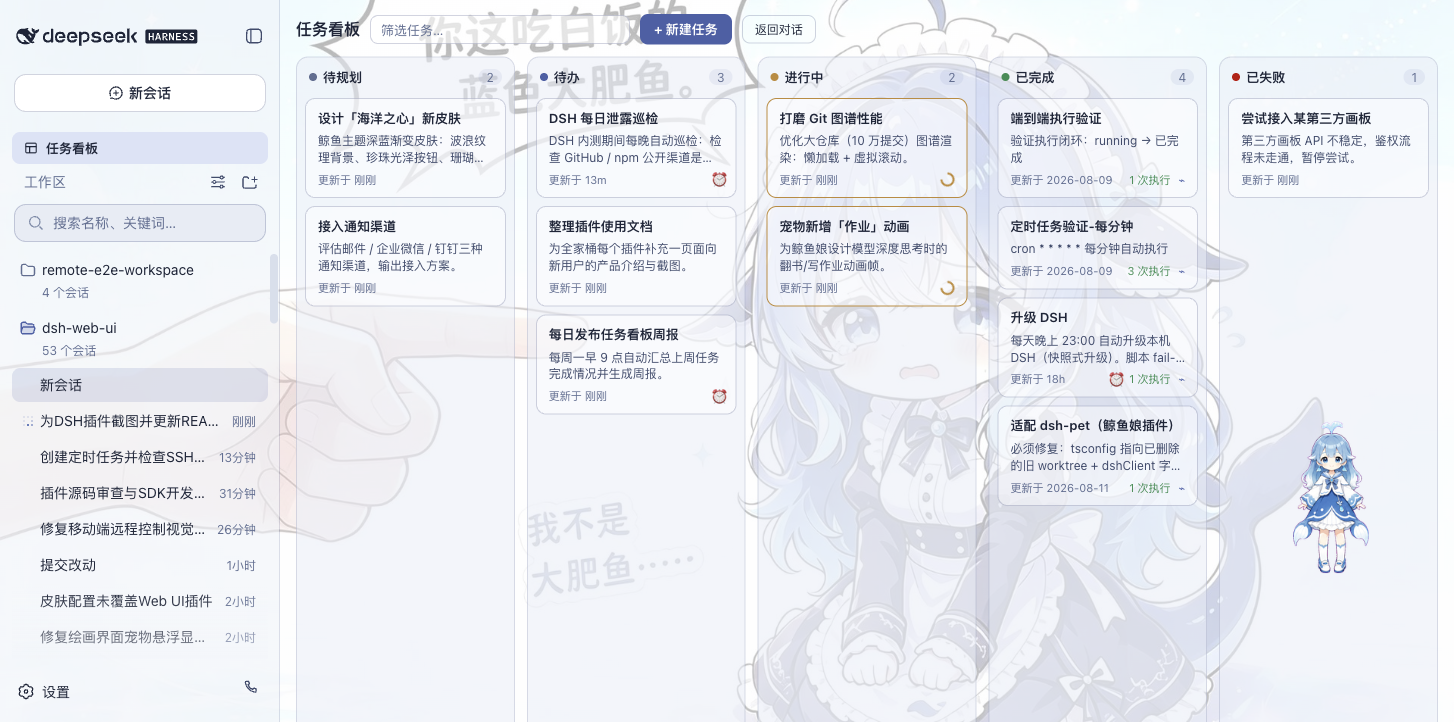
任务看板与自动化
内置任务看板,可以管理:
待规划 → 待办 → 进行中 → 已完成 / 已失败
任务可以交给真实 DSH Agent Session 执行,并记录 Task Run 与 Evidence,方便查看结果和继续处理。
同时支持定时任务与后台调度,适合周期性的开发、维护和自动化工作。
远程开发
桌面版不仅可以操作本机项目,也支持远程开发场景:
- 手机远程控制
- SSH
- Web Terminal
- SFTP
- 端口转发
- 多主机集群执行
- QQ Bot 接入
可以从电脑、手机或聊天工具连接自己的 Harness 工作环境。
个性化桌面体验
除了开发能力,Desktop 还提供完整的桌面化体验:
- 多套主题皮肤
- 全页粒子主题
- 鲸鱼娘桌宠
- 独立窗口
- 窗口状态保存
- 桌面通知
- 托盘能力
- Stable / Beta 更新频道
Harness AI 编程工作台
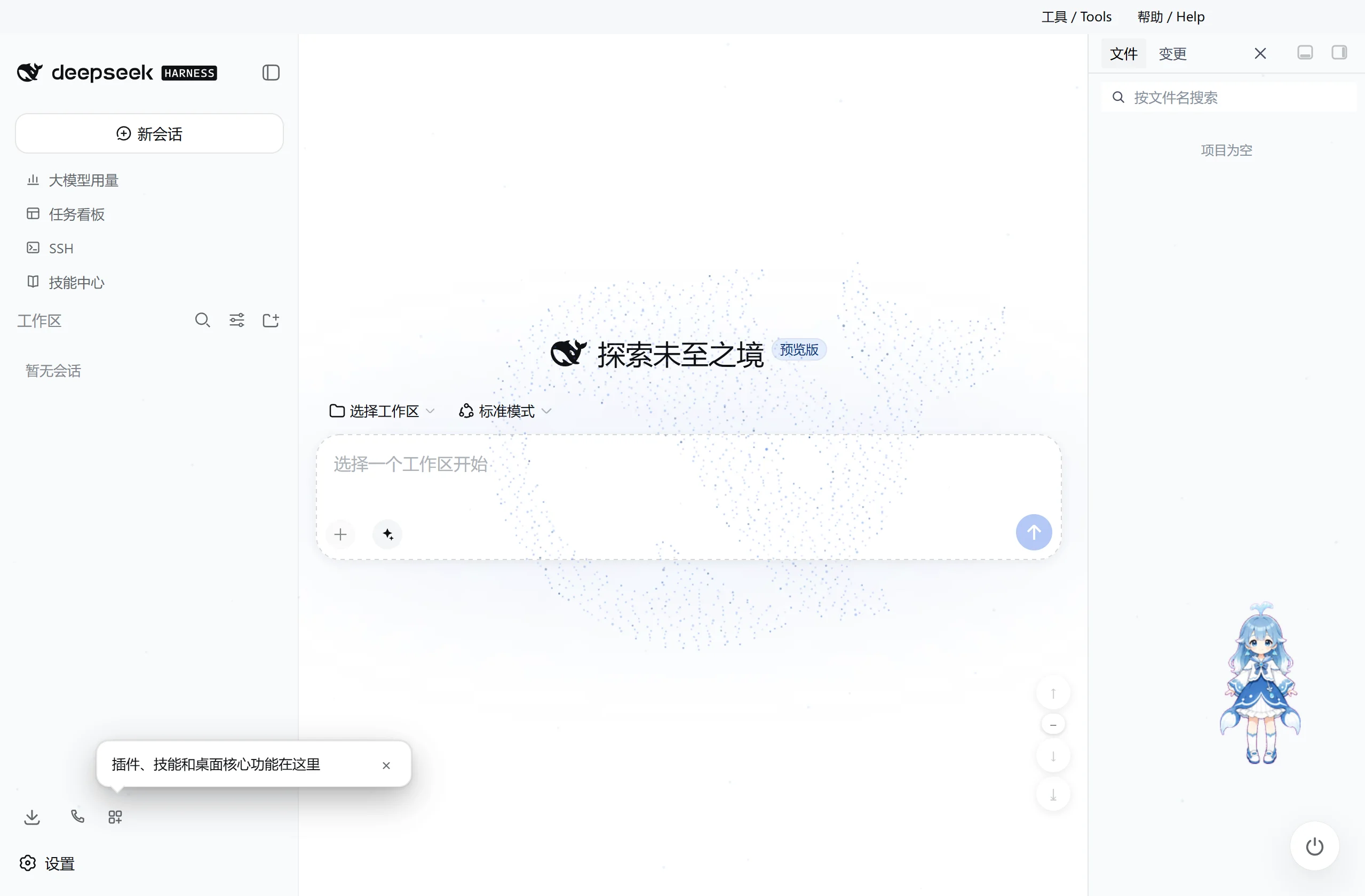
桌面版直接运行 DeepSeek Harness Web Surface,并由桌面宿主管理本地 DSH Runtime。
在同一个窗口中即可完成 AI 对话、代码修改、文件管理、Git 操作、任务执行、模型切换和插件扩展。
Skills 与插件
输入框可以直接搜索并插入已安装 Skills。
扩展坞支持:
- 社区 DSH Bundle
- 插件市场
- 项目 Skills
- DSH Skills
- Agents Skills
桌面版使用独立的 desktop profile,不会覆盖已有 DSH 配置。
插件安装、更新以及运行时生命周期均由桌面宿主统一管理。
Codex 模型与推理强度
3.0.9 使用 DSH RC.1 内置的 llm-pi-ai/openai-codex 官方授权流程完成 ChatGPT OAuth,并在 Harness 中使用支持的 OpenAI Codex 模型;不再加载会与原生 Provider 冲突的旧 dsh-codex-connect 插件。设置页的「ChatGPT 登录」一次点击启动 OAuth,并由系统浏览器继续;授权 grant 只由官方凭据服务读写并保存在本机 DSH Home,前端只读取"是否已登录",不会收到 access token 或 refresh token。它不会默认替换当前模型、接管全局搜索或启用远程图片工具。
模型切换时,桌面端会根据模型实际能力展示可用的推理强度档位,并自动处理对应配置。
任务看板与自动化
通过任务看板统一管理 Agent 工作。
| 多列任务看板 | 任务详情与定时执行 |
|---|---|
 |
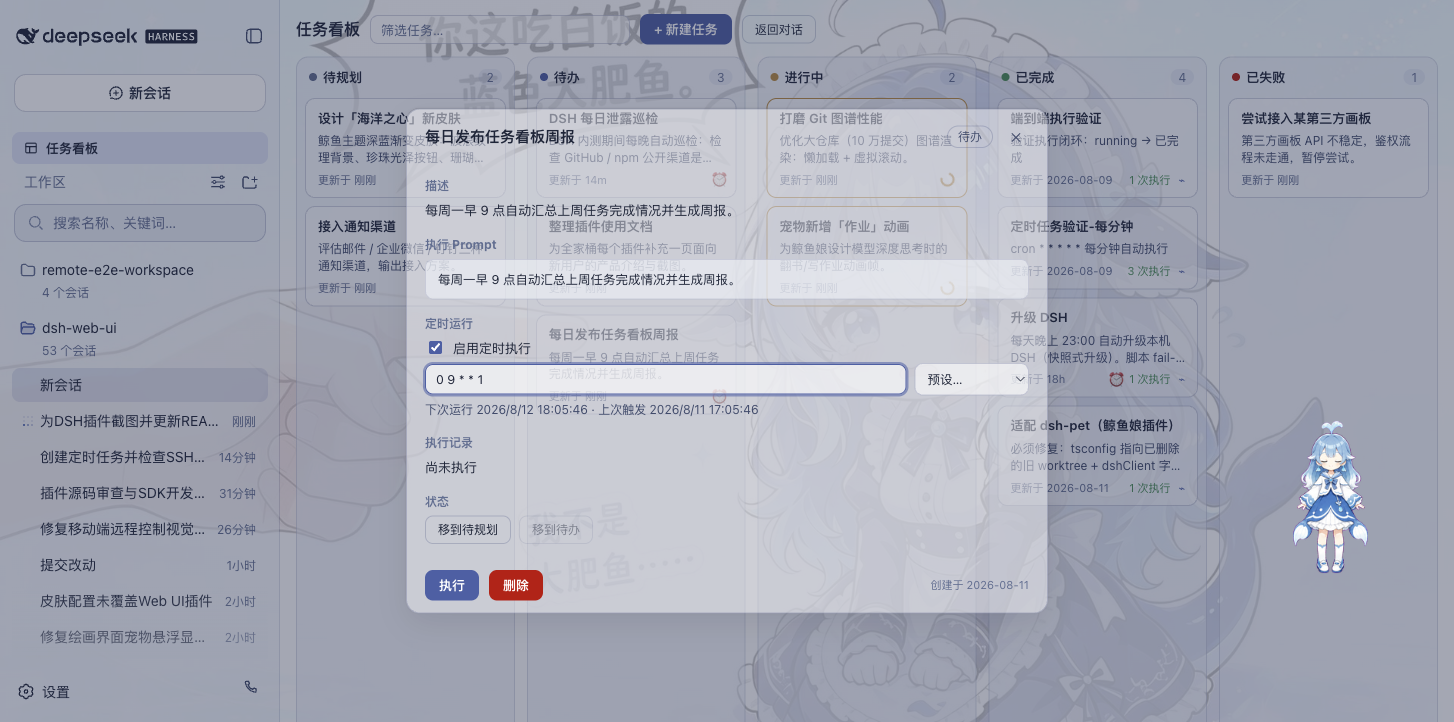 |
任务可以直接交给 DSH Agent Session 执行,并保存 Task Run 与 Evidence。
除了手动任务之外,还支持定时任务和后台调度,可以用于周期性开发、信息处理和维护工作。
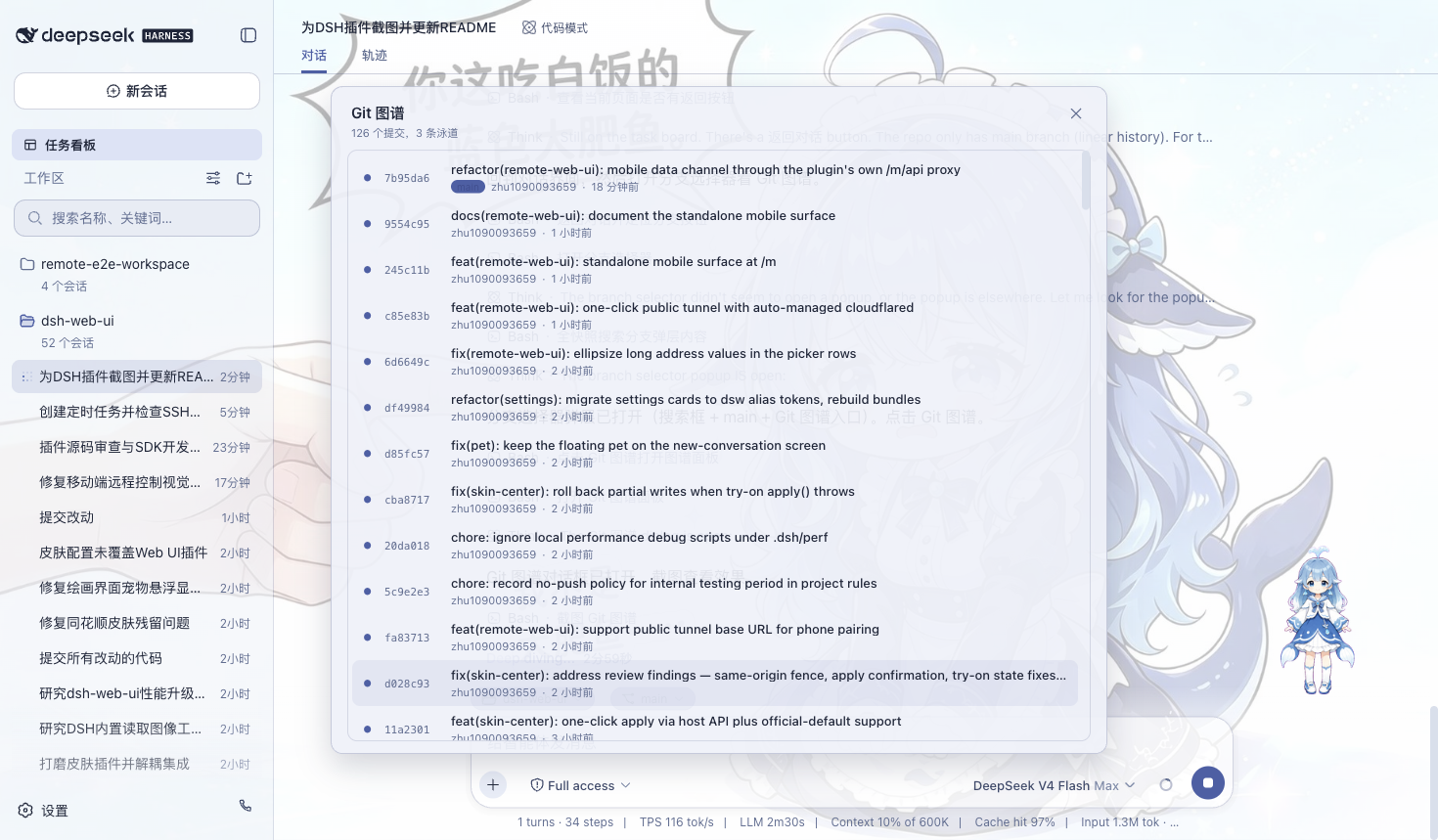
Git 图谱
通过分支选择器和 Git 图谱查看分支关系、Commit 历史、当前仓库状态和分支泳道,帮助快速理解项目变化和代码提交历史。
文件、预览与 SCM
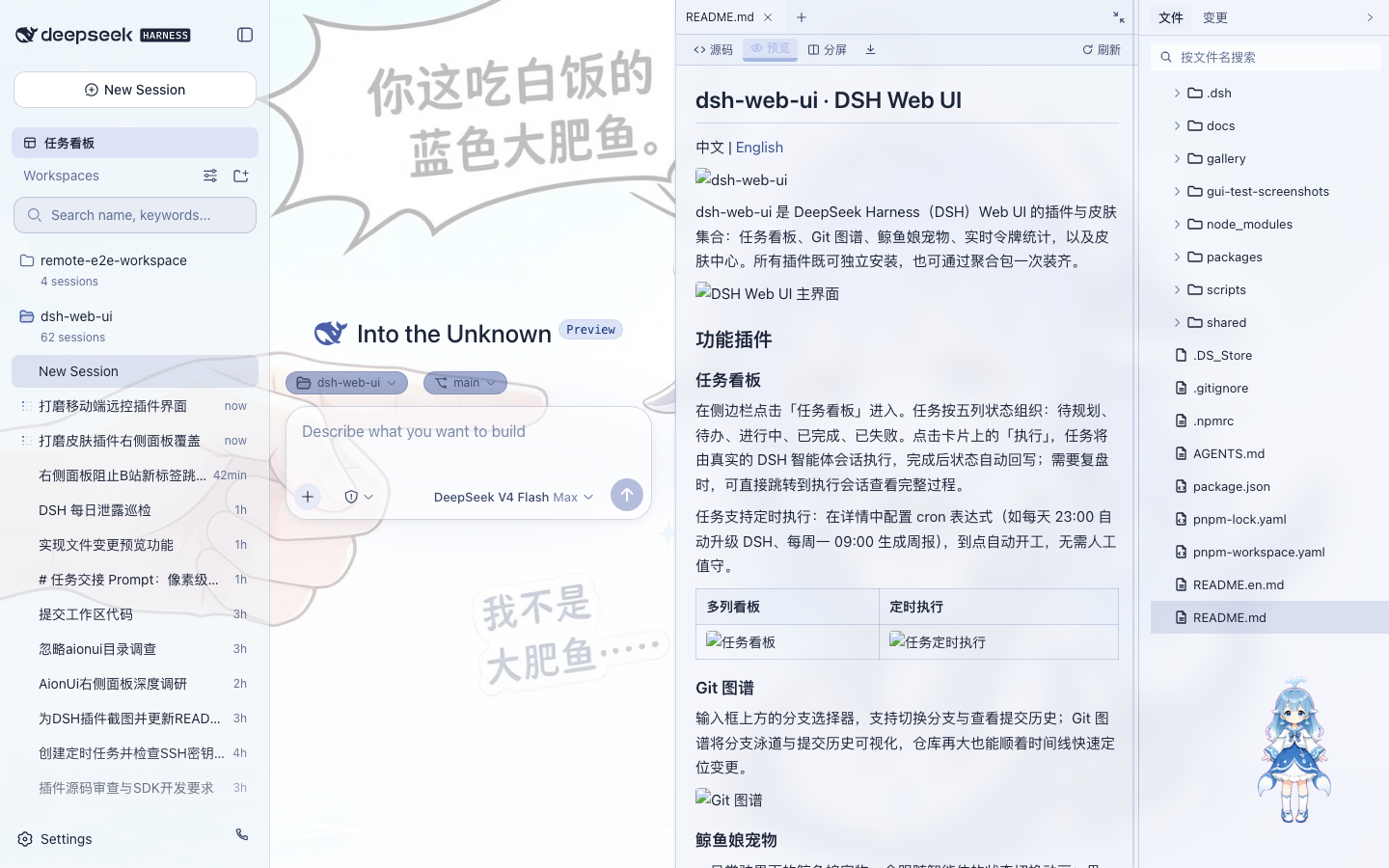
项目会话右侧提供完整工作面板:
- 文件树:浏览和搜索工作区文件
- 文件预览:Markdown、HTML、代码、Diff、CSV、PDF、Office、图片和文本
- 编辑与保存:源码 / 预览切换以及分屏操作
- Git 变更:查看真实 SCM 状态并执行 Stage / Unstage / Discard
- 可调布局:记录不同项目的面板宽度和折叠状态
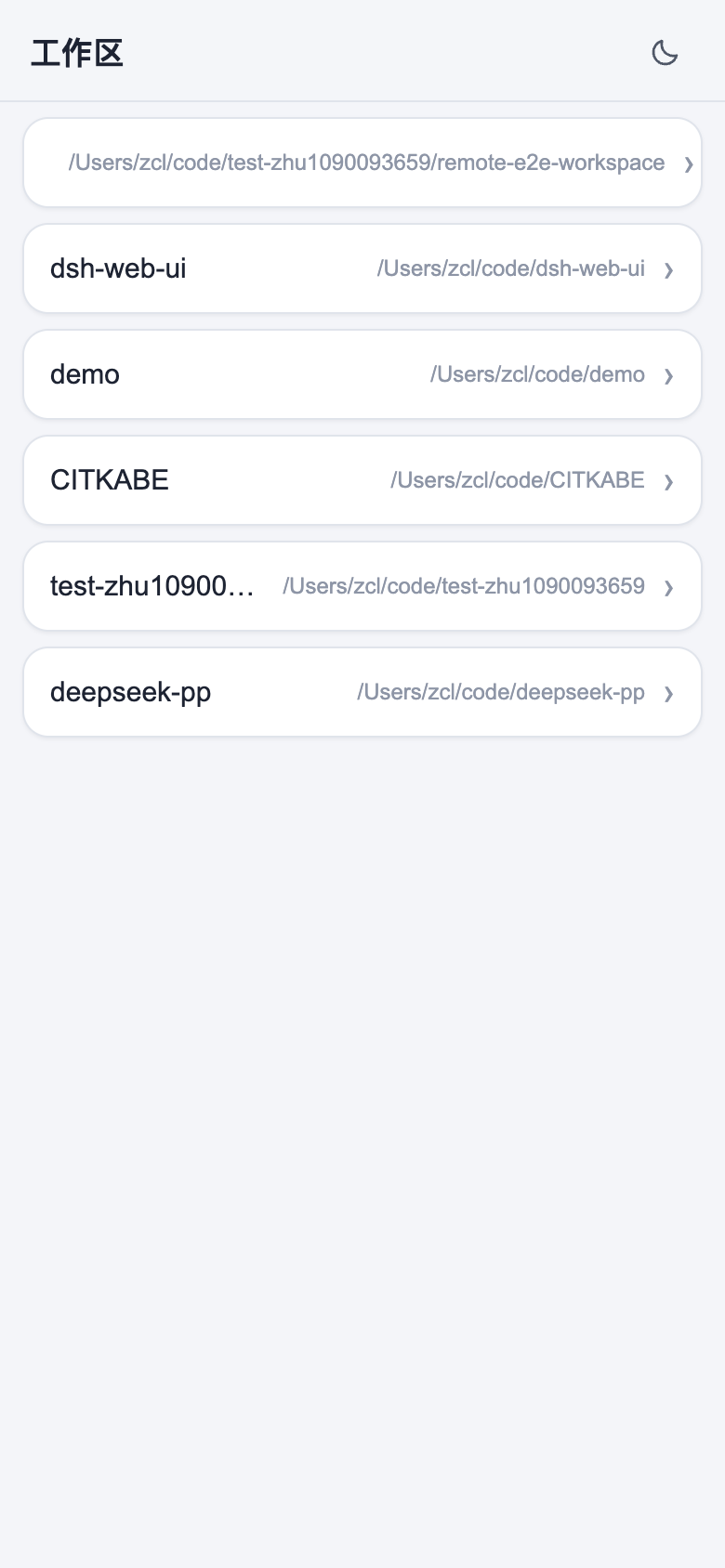
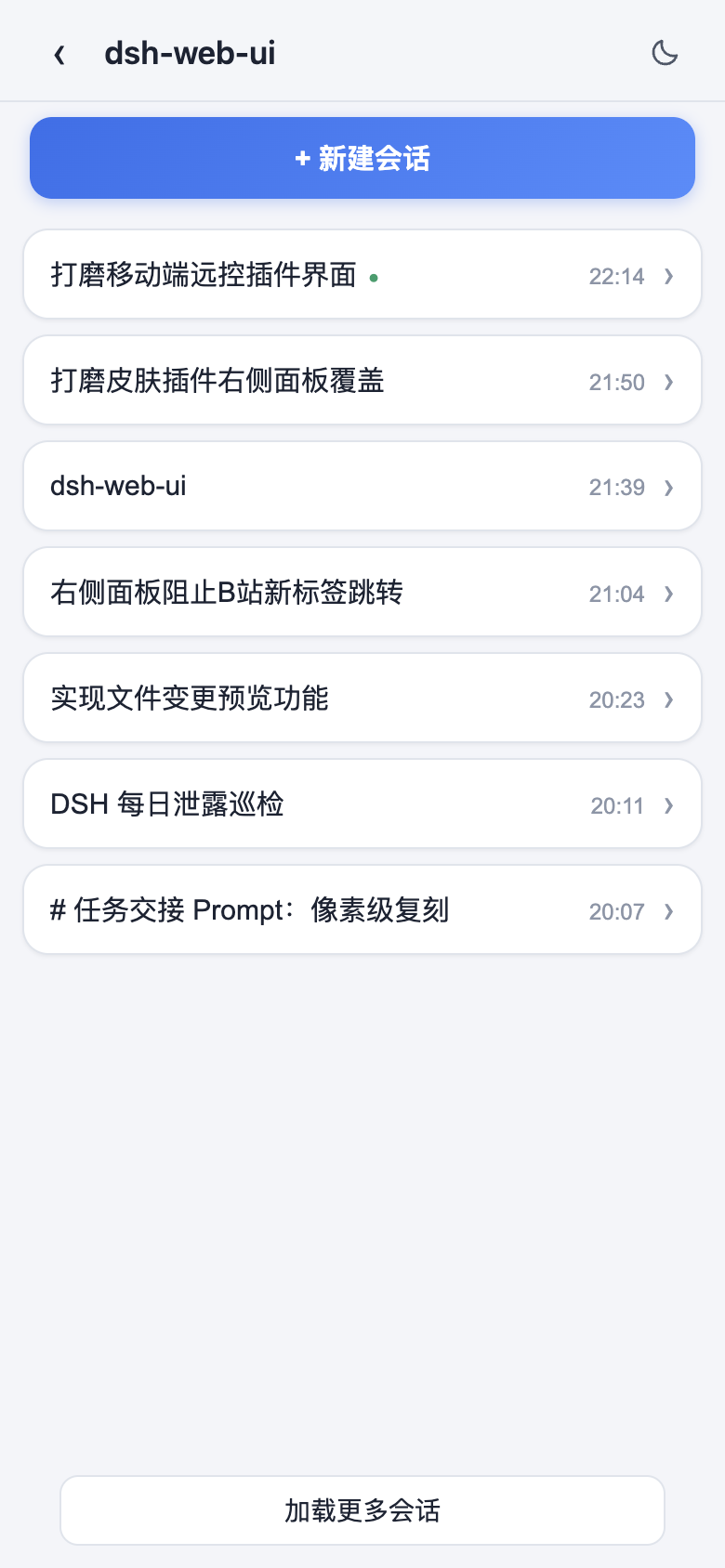
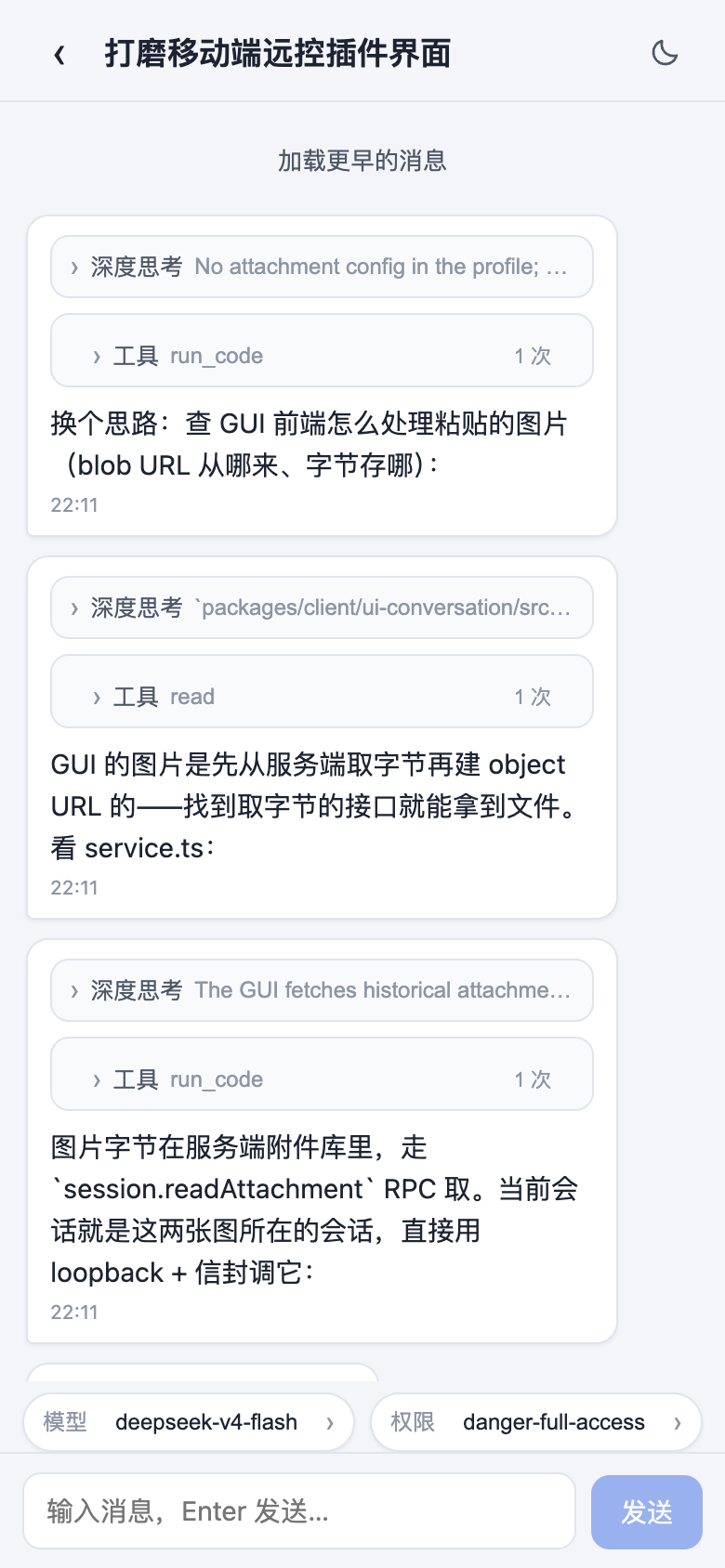
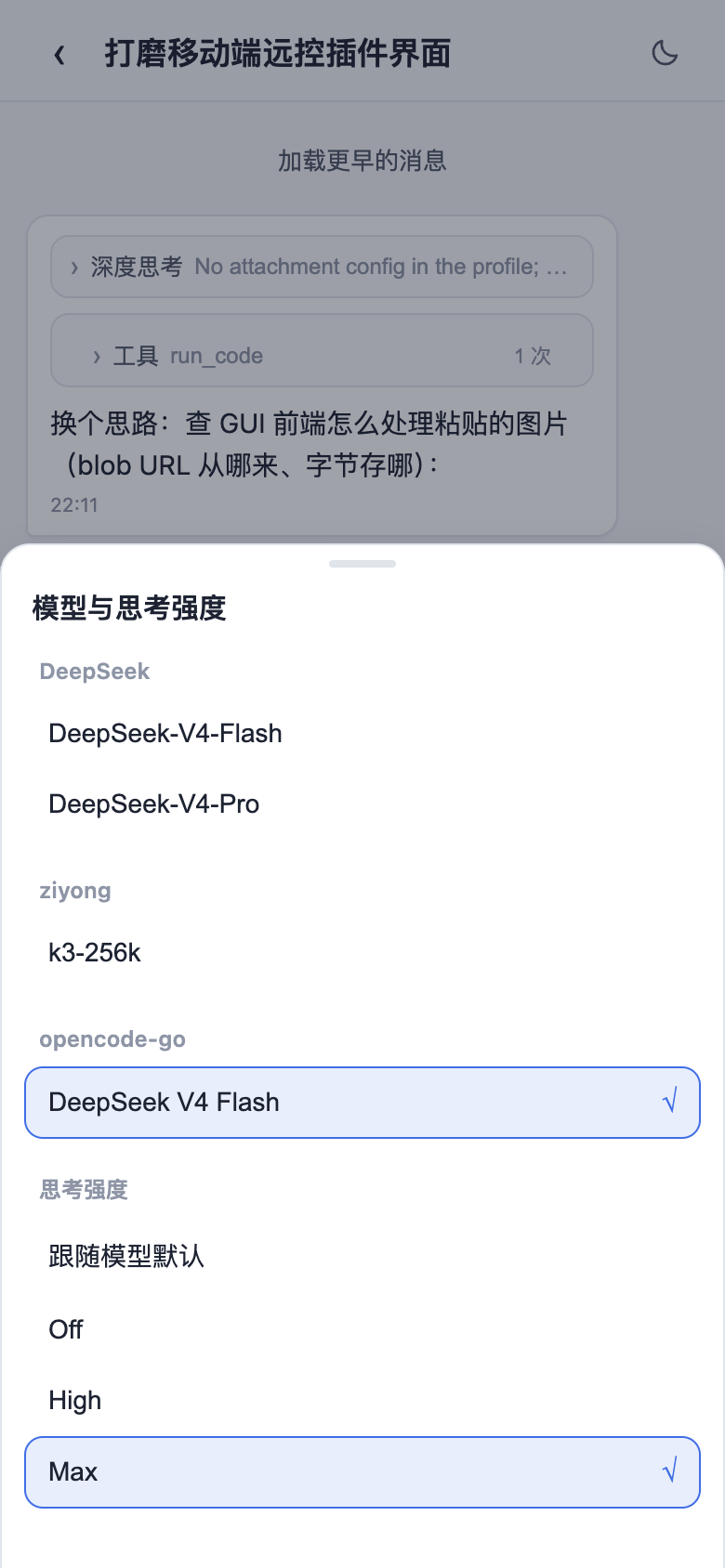
手机远程控制
通过桌面端二维码即可连接当前 Harness 工作区。
手机端可以查看工作区、新建和查看会话、收发消息、切换模型、调整思考强度,并与桌面端保持同步。
默认可以在局域网环境使用,也可以根据需要启用公网隧道。
| 工作区列表 | 会话列表 |
|---|---|
 |
 |
| 移动端聊天 | 模型与思考强度 |
 |
 |
SSH 远程开发
侧边栏内置 SSH 面板,可以直接管理远程服务器,并与 Agent 共用连接配置。
支持:
- Web Terminal
- SFTP 上传 / 下载
- 本地端口转发
- 多主机集群执行
- 从
~/.ssh/config导入主机 - 在 Agent 对话中直接调用已配置的远程主机
让 Harness 不仅能操作本机项目,也可以直接参与服务器和远程开发环境中的工作。
QQ Bot 接入
桌面版集成腾讯 QQ Bot Connector。
可以通过扩展坞扫码完成连接,让 QQ 私聊和群聊与本机 Harness 联动。
连接信息由桌面宿主管理,无需手动修改复杂配置文件。
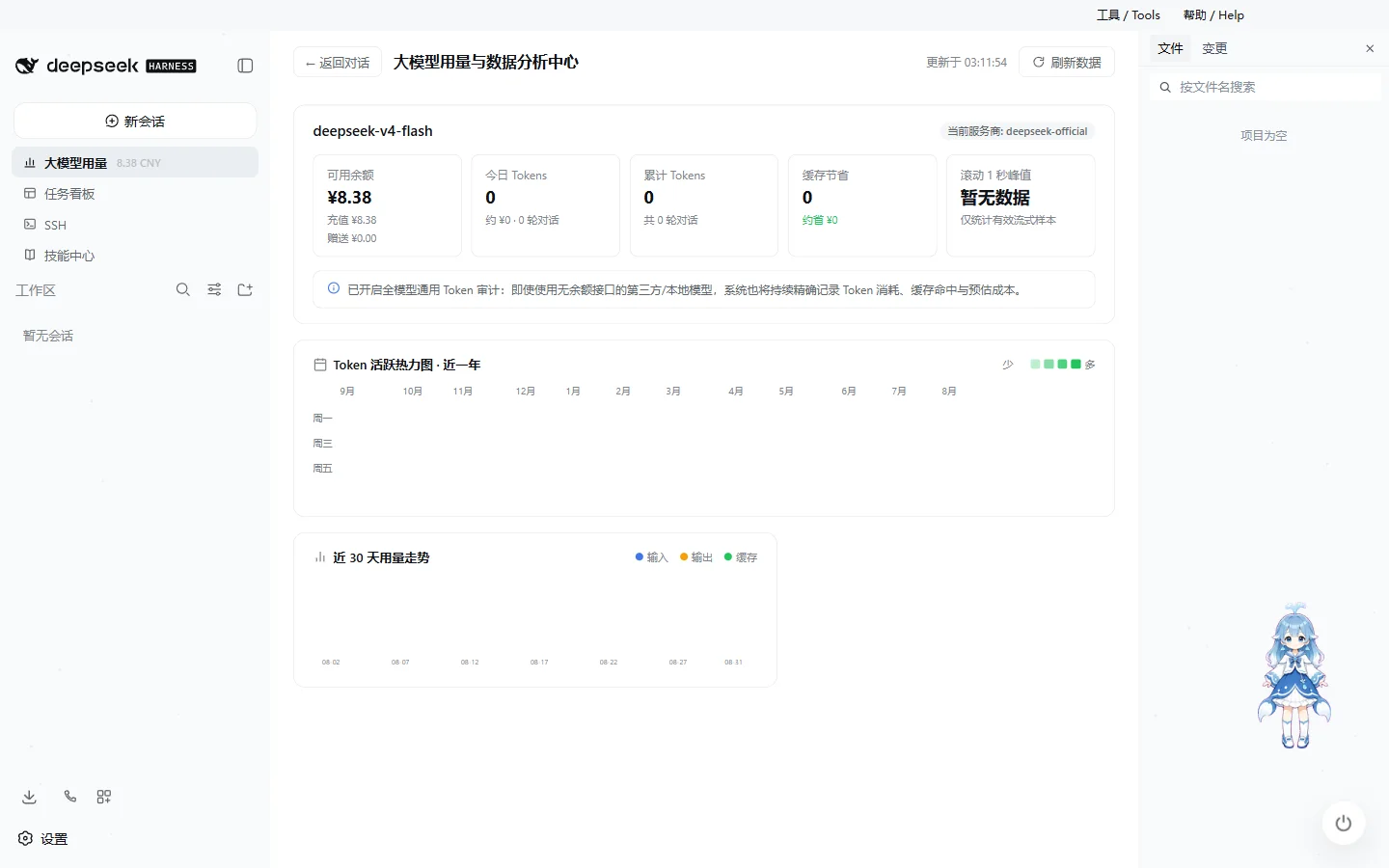
大模型用量看板与性能统计
输入区域下方可以实时查看:
- 滚动 1 秒生成速度与步骤内峰值
- LLM 请求耗时
- 上下文占用
- Cache 命中率
- Input Token
- Output Token
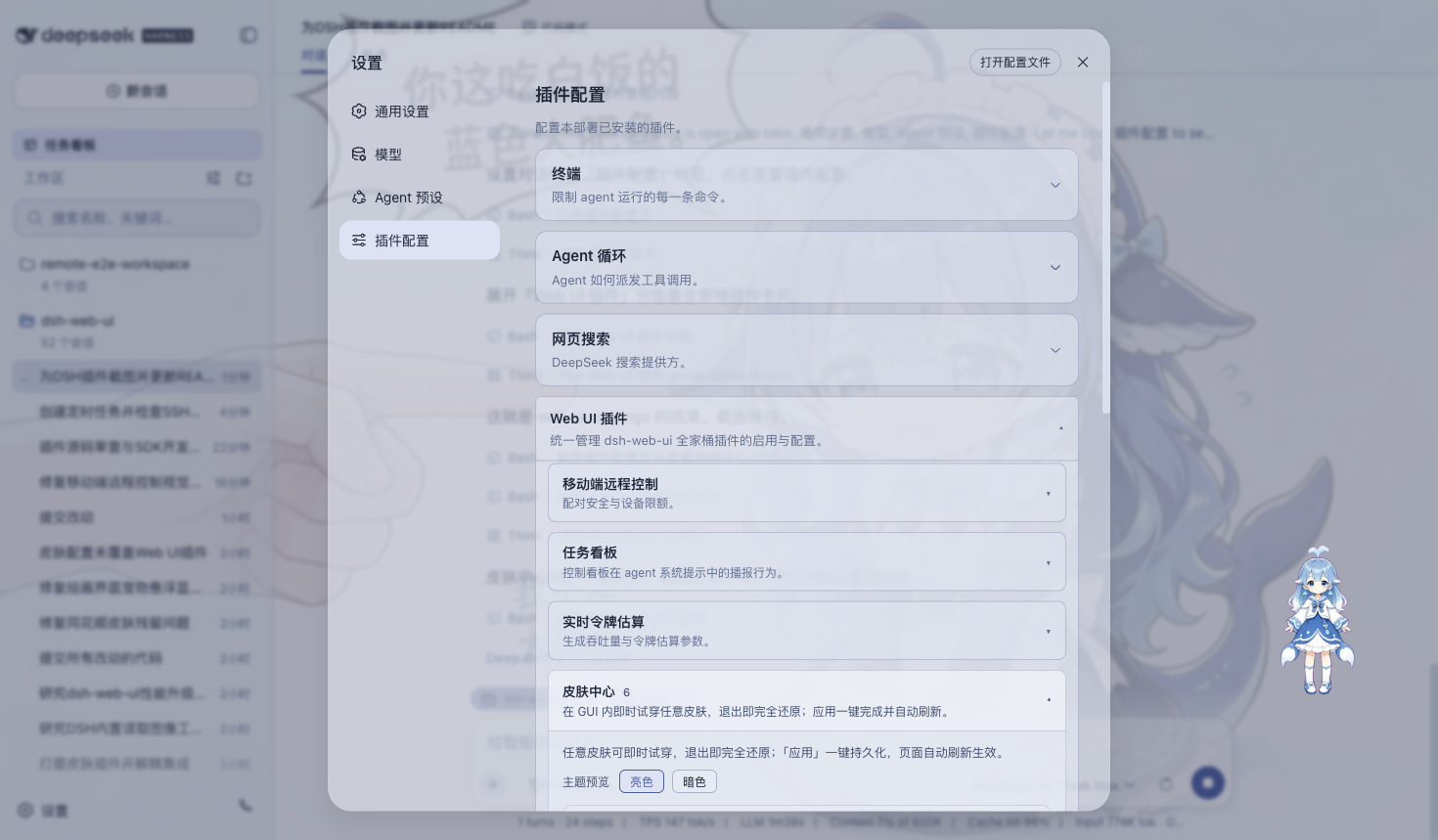
主题与皮肤
桌面版内置多套主题,并支持先预览、再应用。
当前包括 Harbor、Windows XP / Luna、Minecraft 方块世界、Blue Fantasy、鲸吟、初音未来、Trading Terminal、QQ 怀旧主题等风格。
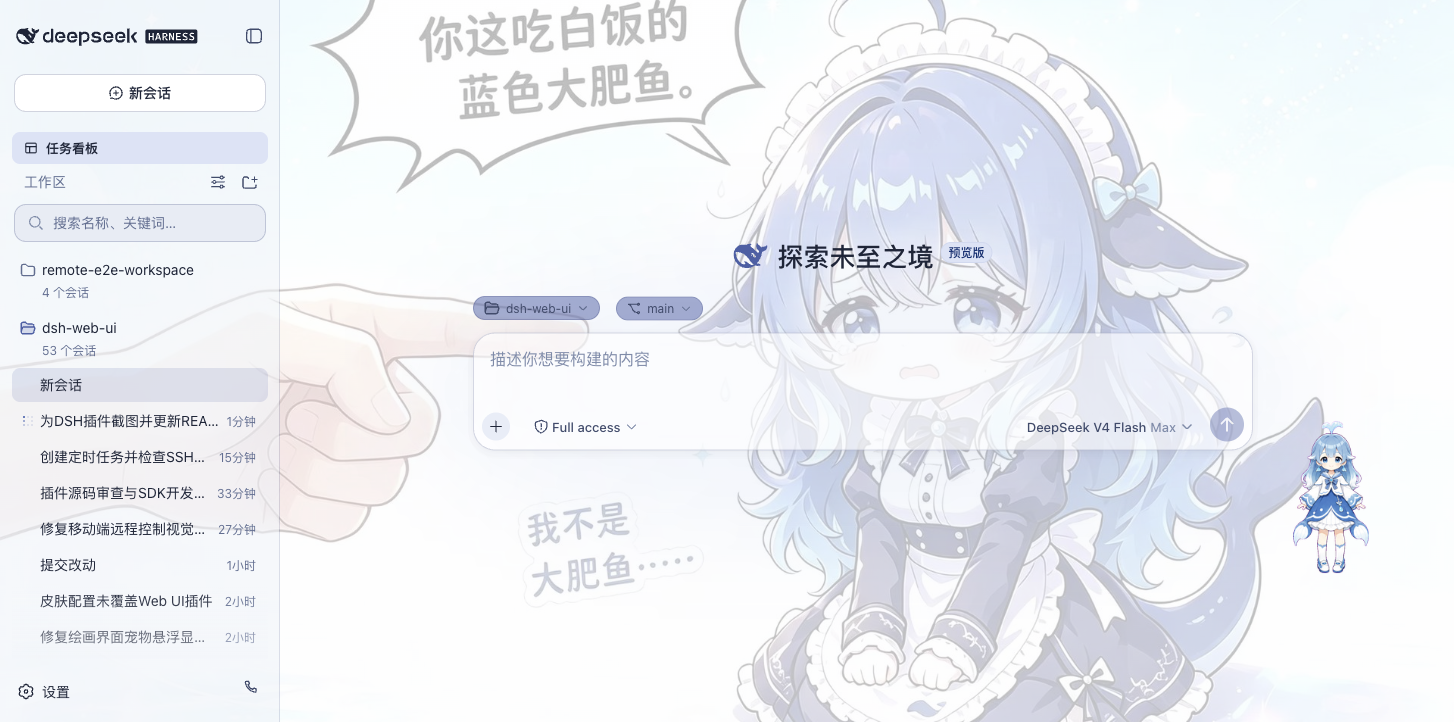
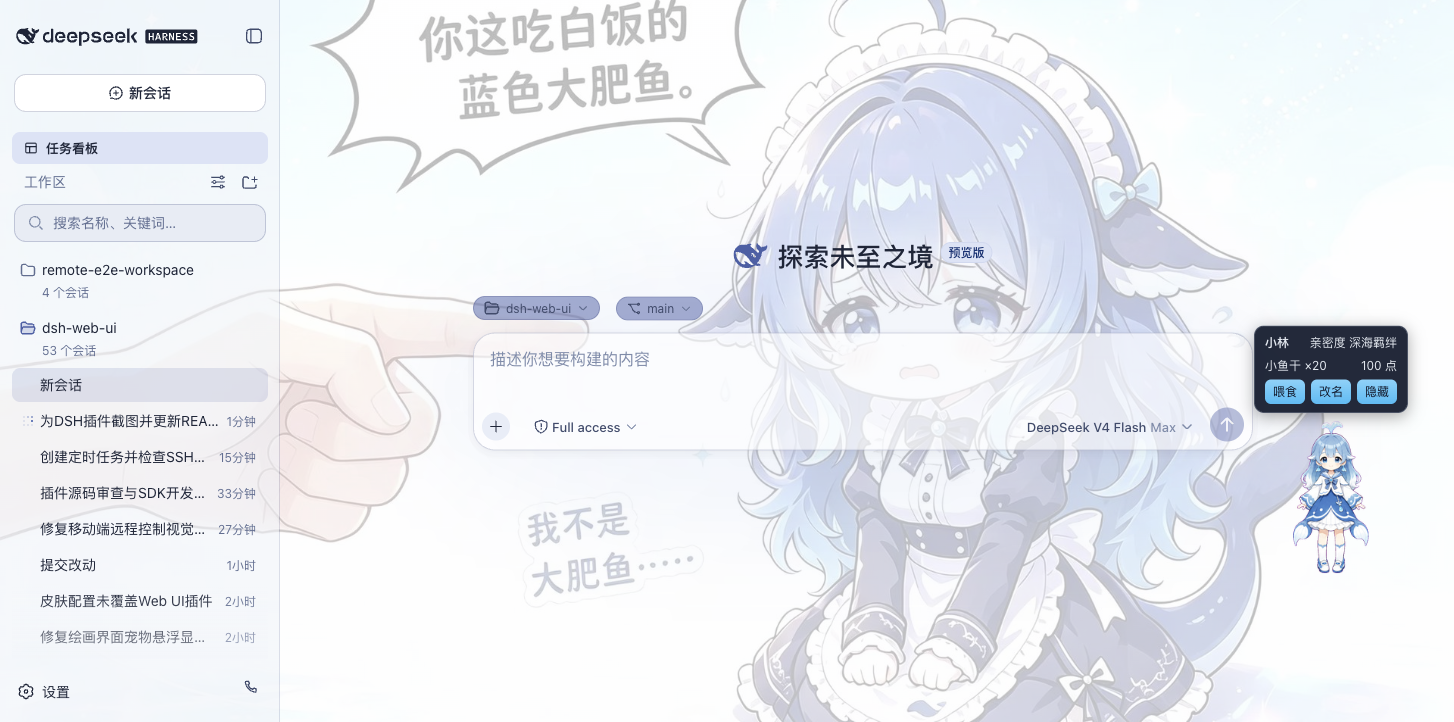
鲸鱼娘桌宠
内置鲸鱼娘桌宠。
桌宠会根据 Agent 的思考、工作、等待和完成状态自动切换不同动画,同时支持互动、命名、拖拽和隐藏。
| 陪伴工作 | 互动面板 |
|---|---|
 |
 |
全页粒子主题
粒子鲸鱼主题不仅可以显示在启动页面,也可以直接应用到 Harness 主界面,并根据输入、弹窗、后台状态和系统「减少动态效果」设置自动调整视觉效果。
下载与安装
Windows
- 打开 GitHub Releases。
- 下载
DeepSeek-Harness-Desktop-Setup-<版本号>-x64.exe。 - 运行安装程序完成安装。
- 启动 DeepSeek Harness Desktop。
Windows 安装包已经包含 DSH、桌面插件、皮肤、pnpm、MinGit 与所需原生依赖,不需要额外安装 Node.js 或 Git。
macOS 未签名预览(Apple Silicon)
只提供 arm64;5.1.0 因 Electron 44 要求 macOS 13 Ventura 及以上,此下限不代表所有系统版本已实测,也不改写 5.0.1 历史验收。下载 .dmg 或 .zip 后把应用放到 /Applications,用 xattr 去掉隔离属性;macOS 15 起没有「右键打开」。预览版没有自动更新,mac 端使用系统 Git。完整步骤见 macOS 未签名预览版安装说明。
Linux x64 预览
提供 AppImage 与 DEB。AppImage 需要执行权限,DEB 可通过系统软件包管理器安装;需要图形会话、系统 Git 及可用沙箱,不应以关闭沙箱的方式处理启动失败。预览版手动更新,实体桌面安装与操作体验仍需用户验收。完整步骤见 Linux x64 Preview 安装说明。
如果 GitHub 下载速度较慢,也可以加入页面顶部的用户交流群获取同步提供的安装包。
更新
DeepSeek Harness Desktop 支持应用内版本检查,发现新版本后可以查看更新内容并选择升级。
提供两个更新频道:
- Stable:默认频道,适合绝大多数用户。
- Beta:用于体验较新的功能,需要用户主动切换。
升级过程中会尽可能保留已有 DSH_HOME、Desktop Profile、社区 Bundle、Skills、皮肤配置与桌宠状态。
更多信息:
安全与隐私
DeepSeek Harness Desktop 默认尽可能将用户数据和运行环境保留在本机。
主要设计包括:
- DSH Runtime 默认监听本机回环地址
- 桌面主界面与扩展能力采用独立权限边界
- 外部链接通过系统浏览器打开
- OAuth、QQ Bot 等凭据保存在本机
- 遥测默认关闭
- 诊断信息只有在用户主动操作时才会导出
- 导出的诊断信息会对 Token、Secret、Cookie、路径、Prompt、Session 和 Tool Result 等内容进行脱敏
文档
开源与版权
本项目采用 BSD-3-Clause 许可证开源。
- 本项目代码及内置功能插件、主题皮肤与桌面端均遵循 BSD-3-Clause 开源协议。
- 迁入与引用的第三方代码及环境依赖均保留其原始开源许可证与作者署名。
Star History
友情链接
本项目积极参与并认可 LINUX DO 社区。
让 DeepSeek Harness 成为 Windows、macOS 与 Linux 上可以每天使用的 AI 编程桌面工作台。
如果你喜欢这个项目,欢迎点一个 Star。
DeepSeek Harness Desktop
中文 | English
Maintained by ningbai牛逼: If DeepSeek Harness Desktop helps you, consider supporting ningbai牛逼 on Afdian. Your support helps fund servers, testing, and continued maintenance.
Scan to support the project:
DeepSeek Harness Desktop Community
QQ Group: 1105158177
Join the community to discuss:
- Usage and configuration
- Plugins and Skills
- Model setup and usage tips
- Automation workflows
- Themes and desktop pets
- New releases and feature suggestions
GitHub downloads slow in your region?
The community group also provides synchronized copies of the latest installer and a place to get help with installation and usage.
DeepSeek Harness Desktop is a community-maintained, open-source AI coding desktop client.
DeepSeek has not yet released a standalone official Desktop product. This project combines the public official DSH Runtime, Web UI, and the Desktop boundaries visible in the official repository into Windows, macOS and Linux desktop applications, then adds community plugins, Skills, task automation, Git, remote development, and desktop integration. It is not an official DeepSeek client and does not reuse or overwrite a future official Desktop identity, data directory, protocol, or update feed.
Supports Windows 10 / 11 x64, with macOS 13+ Apple Silicon arm64 Preview and Linux x64 Preview builds. It is released under the BSD-3-Clause license.
Packages include Node.js and DSH. Windows also bundles Git; macOS and Linux Git operations require system Git.
Product Site · Download Latest · Documentation · Changelog
5.1.0: one release across three platforms, complete output and simpler settings
The formal 5.1.0 Release was published on 2026-10-25 at 15:09:51 UTC with official NPM Runtime/SDK 0.2.1-rc.2 and Electron 44.0.0, without modifying official sources. Tag run 40199647851 passed all three platforms and publication at eb1223ddfee78eccadd76d8022501cd1806d9d3d. All five public installers were independently downloaded and matched actual sizes, SHA-256, GitHub digests and the combined receipt; Windows updater SHA-512 and manifest were also verified.
- Consumer acknowledgements and streaming backpressure retain complete output/history. Async resource reads and HMR rescans preserve authorization, caching and cancellation cleanup, without general percentage speedup claims.
- Installation directories are validated individually, with per-entry registry recovery. First-use market activation requires consent; feedback, translation, automatic updates and project-layout scanning default off, and source replacement uses recoverable transactions. Consent is not an execution sandbox.
- Frameless Dock settings retain 15 destinations, search, controls, advanced details, critical risk notices, selection and keyboard focus. Only dedicated settings windows exclude the floating pet; the main conversation pet and saved configuration remain.
- Windows core passed 28/28 and packaged-full 44/44 without waivers. Real Setup verified fresh installation, separate 4.3.0/5.0.0/5.0.1 upgrades, overlays, restart, uninstall and old provider/session preservation. Official defaults, collapsible tools, model access, Skills, tray behavior and existing entries remain.
Windows Desktop tests passed 1943/1943 with zero skips; macOS/Linux each passed 1906 with 37 existing platform skips and zero failures out of 1943. Scripts passed 213/213 on all three. All packages are unsigned; macOS is unnotarized on arm64/macOS 13+, and macOS/Linux remain Preview. Linux 5.1.0 native evidence is Ubuntu 22.04 only, not historical Ubuntu 24 results. Same-version 5.1.0 beta users must manually download and overlay the formal package; same-version auto-update is not promised. Formal telemetry configuration was verified in all three public payloads, retaining anonymous opt-out metrics; production events were not submitted and ingestion was not verified.
5.1.0 bilingual release notes · Actual three-platform assets · Final Windows screenshot provenance
The originals below come from isolated Windows formal-tag QA: main UI is a real main-WebContents capture, and Dock captures include host and child in the same native window. No diagnostic composites or simulated-model conversations are used. Unconfigured models do not imply authentication. Dock images retain real scroll-edge clipping, not all controls simultaneously visible; these are not macOS/Linux, real paid-flow or power-loss rollback acceptance.
| Light settings, unconfigured state | Dark settings, actual scroll position |
|---|---|
|
|
5.0.1: lighter streaming, clearer sidebars, one release across three platforms
5.0.1 installation packages are published together for Windows x64, macOS arm64 Preview and Linux x64 Preview. Official NPM Runtime remains 0.2.0-rc.2. Native verification, packaging and smoke passed on all three platforms; Windows source regression passed 27/27 and full packaged regression passed 43/43. Disposable Runners verified real fresh installation, 4.3.0 and 5.0.0 overlay upgrades, same-version reinstall and data-preserving relaunch, not every historical version or physical device.
- Clean defaults: new profiles use the official appearance; upgrades preserve existing skins, backgrounds and explicit preferences. All 15 bundled skins remain selectable.
- Lighter streaming: text and Markdown updates avoid repeated sidebar scans while retaining complete Chinese text, code, tool output and turn navigation, never truncating content for speed.
- More sidebar space: tools collapse, expand by keyboard and restore after restart. The footer Dock and Today spending are the sole primary shortcuts, keeping workspaces and conversations accessible.
- Readable dark Dock: opaque panels replace glass effects and warm navigation clears stale palettes. All 15 destinations, feature search and keyboard focus remain; context tooltips avoid repeated flicker.
- Background operation and reliable upgrades: the menu supports tray minimization, restoration and explicit exit. Windows upgrades recognize the existing directory, retaining backups, rollback and old/new model providers.
- Complete workbench and privacy: collaboration, Skills, plugin-detail configuration, independent third-party APIs, bai authorization and history protection remain available. Anonymous metrics exclude user content and credentials.
All packages are unsigned; macOS is unnotarized. Verify the same Release's SHA-256. 5.0.1 release notes and the actual asset receipt define the boundaries. Screenshots use the same-release-commit candidate in isolated Windows acceptance. Configuration images combine simultaneous real host and embedded WebContents captures without injecting user conversations; they are not macOS/Linux screenshots or physical-device acceptance.
| Official appearance and collapsed tools | Expanded tools remain accessible |
|---|---|
|
|
| Dark Model Collaboration | Plugin center |
|
|
5.0.0: reliable upgrades, one version across three platforms
5.0.0 pins the official NPM DSH 0.2.0-rc.2 and uses the public dsh-web-all@0.4.4 carrier with Desktop-owned adaptations, without changing official source. Windows x64, macOS arm64 and Linux x64 are released together after native platform gates passed. Windows passed all 40 packaged regression suites and disposable-runner production Setup checks for fresh installation, 4.3.0 overlay upgrade and relaunch. macOS/Linux remain Preview; all packages are unsigned and macOS is unnotarized. Verify downloads against the same release's SHA-256 receipt and back up important data before upgrading.
- Reliable conversations: authenticated fragmentation carries long histories and tool results across A-to-B-to-A navigation and restart. Limits fail explicitly; history is neither silently truncated nor automatically uploaded.
- Protected upgrades: overlay installation uses transactional backup and rollback. Old and newly added providers, plugin configuration and user disable choices survive Profile refresh; plugin detail options, Skills and usage navigation remain available.
- Simpler model access: bai authorization prefers
deepseek-flashfrom the real directory and refreshes that directory periodically. Missing authorization or rejected keys offer browser sign-in, without automatic top-ups, paid calls or message retries. Independent third-party APIs remain supported. - Preserved workbench: Task Board, Git, file delivery, model collaboration, pets, 15 skins, SSH and remote access remain available, alongside the restored 4.4.0 branding icon.
- Clear terminal and control boundaries: PowerShell, PowerShell 7, WSL and CMD remain selectable. Agent WSL requires separate approval; Browser Use and Computer Use default off and restore configuration after failed transitions.
- Three platforms and privacy: native Runners validate each platform independently. Packages are unsigned and macOS is unnotarized. Official packages include anonymous usage metrics, never conversations, code, paths, screenshots or credentials; development and test builds remain disconnected.
Upstream sync ledger · Upgrade and Rollback · 5.0.0 release notes
These are isolated 5.0.0 Windows runtime captures, not macOS or Linux acceptance. Dock configuration images combine the real window and embedded WebContents captures without injecting user data.
| Main window | Extension Dock plugins |
|---|---|
|
|
| Model access and bai authorization | Skills and shared discovery |
|
|
4.1.0: let DeepSeek control the browser and computer
4.1.0 introduced Smart Control. Windows x64 is stable; macOS arm64 and Linux x64 are Preview builds. One GitHub Release is created only after all three platform jobs pass.
- Browser Use defaults to the official Playwright MCP in a visible, isolated system-browser session and discovers Chrome, Edge, or Chromium. Clicks, typing, uploads, and downloads remain approval-gated.
- Computer Use defaults to the bundled Cua Driver Native provider, with an external MCP fallback. Observation is separated from per-action approval, and repeated native startup failure recovers through safe mode.
- Breaking DSH 0.1.6 compatibility exact-pins
@deepseek-ai/dsh@0.1.6-alpha.1and adapts Agent, Session, PTC, Workflow, Sandbox, and Agent Team contracts. - Transactional 3.5/4.0 migration preserves sessions and long context, workspaces, models, credential references, Skills, plugins, themes, pet settings, and collaboration settings, with backup and rollback.
- Privacy-bounded metrics use only fixed outcome vocabularies and exclude URLs, domains, window names, screenshots, prompts, tool arguments, paths, and credentials.
Smart Control guide · 4.1.0 release record
Continuing core capabilities
- Value Mode V2: An expert controller model understands, decomposes, delegates, reviews, and synthesizes work while a subagent worker model handles bounded subtasks; first selection opens setup guidance.
- Large-Model Usage Dashboard: Balance, input/output tokens, context, cache, latency, cost, and generation speed are visible; peak speed uses a strict rolling one-second algorithm instead of treating one aggregate usage event as instantaneous throughput.
- Claude Code / Codex Project Import: Read-only discovery of projects and historical sessions, preview before import, centralized redaction, and non-executable historical tool calls.
- More reliable startup and plugins: Visible startup phases, transactional repair with rollback, and SafePluginBoundary isolation while existing DSH Home data and plugins continue to load directly.
Full Release Notes · Changelog · Upgrade and Rollback
Model collaboration, Skills, and model access
The screenshots below are isolated 5.0.0 Windows runtime captures, not macOS/Linux screenshots or production installation acceptance.
Model collaboration: Agent Team and Value Mode in one place
The session sidebar opens the existing Extension Dock window directly on Model Collaboration. Agent Team handles multi-role coordination, while Value Mode separates controller and worker models. They remain independent and may be enabled separately or together.
Skills: one directory model across the conversation and Skill Center
Desktop 4 scans project .dsh/skills, user DSH Skills, and user Agents Skills through one discovery contract. The composer can search and insert the same skills shown by Skill Center, including their source and scope.
bai provider: consistently promoted in model entry points
The chat picker, model settings, and collaboration controller/worker pickers share one ordering rule: user-pinned models first, then bai, followed by the existing provider order.
See Desktop architecture and capabilities, Upgrade and Rollback, and the 5.0.0 release notes for the implementation boundaries.
Why DeepSeek Harness Desktop
Ready to Use
Install the EXE and launch a complete Harness environment.
There is no need to manually prepare Node.js, Git, pnpm, or the DSH Runtime. The desktop app manages the required components and runtime environment for you.
Complete AI Coding Workspace
Use one desktop app for:
- AI conversations and code changes
- Project file browsing and editing
- Git / SCM operations
- Markdown, HTML, code, Diff, PDF, Office, and other file previews
- Model switching and reasoning-effort controls
- Skills and plugin usage
- Agent task execution
- Token and performance statistics
- Multi-project development workflows
Skills and Plugin Ecosystem
Supports multiple extension paths:
- DSH Skills
- Agents Skills
- Project Skills
- Community DSH Bundles
- Plugin Marketplace
- Desktop extensions
Search, install, and use extensions directly inside Harness to build a development workflow that fits your needs.
Task Board and Automation
The built-in Task Board organizes work as:
Planned → Todo → In Progress → Completed / Failed
Tasks can be executed through real DSH Agent Sessions and record Task Runs plus Evidence for later review and continuation.
Scheduled tasks and background execution are also supported for recurring development, maintenance, and automation workflows.
Remote Development
The desktop app can work with both local and remote environments through:
- Mobile remote control
- SSH
- Web Terminal
- SFTP
- Port forwarding
- Multi-host cluster execution
- QQ Bot integration
You can connect to your Harness workspace from a PC, phone, or chat client.
Personalized Desktop Experience
Beyond coding features, Desktop also includes:
- Multiple themes and skins
- Full-page particle themes
- Whale-girl desktop pet
- Dedicated desktop windows
- Window-state persistence
- Desktop notifications
- System tray integration
- Stable / Beta update channels
Harness AI Coding Workspace
The desktop app runs the DeepSeek Harness Web Surface directly while the desktop host manages the local DSH Runtime.
In one window, you can handle AI conversations, code changes, file management, Git operations, task execution, model switching, and plugin extensions.
Skills and Plugins
Search and insert installed Skills directly from the conversation input.
Extension Dock supports:
- Community DSH Bundles
- Plugin Marketplace
- Project Skills
- DSH Skills
- Agents Skills
The desktop app uses an isolated desktop profile and does not overwrite an existing DSH setup.
Plugin installation, updates, and runtime lifecycle are managed by the desktop host.
Codex Models and Reasoning Effort
3.0.9 uses the official llm-pi-ai/openai-codex authorization flow built into DSH RC.1 to complete ChatGPT OAuth and enable supported OpenAI Codex models inside Harness; it no longer loads the legacy dsh-codex-connect plugin that conflicts with native providers. The "ChatGPT Login" action in Settings starts OAuth with one click and continues in the system browser; the grant is only read or written by the official credential service and stays in the local DSH Home, so the frontend only learns whether you are signed in and never receives an access token or refresh token. It does not replace your current model by default, take over global search, or enable remote image tools.
When switching models, the desktop app shows the reasoning-effort levels supported by the active model and automatically handles valid configuration.
Task Board and Automation
Use the Task Board to manage Agent work in one place.
| Board | Task details and scheduling |
|---|---|
|
|
Tasks can be executed through DSH Agent Sessions and save Task Run and Evidence records.
In addition to manual tasks, scheduled tasks and background execution can be used for recurring development, information processing, and maintenance workflows.
Git Graph
Use the branch selector and Git graph to inspect branch relationships, commit history, repository status, and branch lanes at a glance.
Files, Preview, and SCM
Project conversations include a complete right-side workspace:
- File tree: browse and search workspace files
- File preview: Markdown, HTML, code, Diff, CSV, PDF, Office, images, and text
- Edit and save: source / preview switching and split-view workflows
- Git changes: inspect real SCM state and run Stage / Unstage / Discard
- Adjustable layout: panel width and collapsed state can persist per project
Mobile Remote Control
Scan the desktop QR code to connect a phone to the current Harness workspace.
The mobile interface can browse workspaces, create and view sessions, send and receive messages, switch models, adjust reasoning effort, and stay synchronized with the desktop app.
It works over the local network by default and can optionally use a public tunnel when needed.
| Workspaces | Sessions |
|---|---|
|
|
| Mobile chat | Model and reasoning effort |
|
|
SSH Remote Development
The built-in SSH panel can manage remote servers directly and share connection settings with the Agent.
Supported capabilities include:
- Web Terminal
- SFTP upload / download
- Local port forwarding
- Multi-host cluster execution
- Importing hosts from
~/.ssh/config - Using configured remote hosts directly from Agent conversations
Harness can therefore work with remote servers and development environments as well as local projects.
QQ Bot Integration
The desktop app integrates the Tencent QQ Bot Connector.
Bind it from Extension Dock by scanning a QR code, then connect QQ direct messages and group chats to the local Harness instance.
Connection information is managed by the desktop host without requiring manual configuration-file editing.
Large-Model Usage Dashboard and Performance Statistics
The input area can display:
- Rolling one-second generation speed and per-step peak
- LLM request latency
- Context usage
- Cache hit rate
- Input Tokens
- Output Tokens
Themes and Skins
The desktop app includes multiple themes with preview-before-apply support.
Available styles include Harbor, Windows XP / Luna, Minecraft-inspired, Blue Fantasy, Whale Song, Miku, Trading Terminal, QQ nostalgia, and more.
Whale-girl Desktop Pet
The built-in whale-girl desktop pet changes animations based on Agent states such as thinking, working, waiting, and completion.
It also supports interaction, naming, dragging, and hiding.
| Companion mode | Interaction panel |
|---|---|
|
|
Full-page Particle Theme
The particle-whale theme can be applied not only to the startup page but also to the main Harness interface, automatically adjusting visual effects around input state, dialogs, background activity, and the system reduced-motion preference.
Download and Install
Windows
- Open GitHub Releases.
- Download
DeepSeek-Harness-Desktop-Setup-<version>-x64.exe. - Run the installer.
- Launch DeepSeek Harness Desktop.
The Windows installer already includes DSH, desktop plugins, skins, pnpm, MinGit, and the required native dependencies. Separate Node.js or Git setup is not required.
macOS unsigned preview (Apple Silicon)
arm64 only. Desktop 5.1.0 requires macOS 13 Ventura or later because of Electron 44; this floor does not establish testing on every supported OS version or rewrite historical 5.0.1 acceptance. After downloading the .dmg or .zip, move the app to /Applications and clear quarantine with xattr. macOS 15 no longer has Right-click > Open. Preview builds have no auto-update and use system Git. Full steps: macOS unsigned preview install guide.
Linux x64 preview
AppImage and DEB are available. AppImage needs execute permission; DEB can be installed through the system package manager. A graphical session, system Git and a working sandbox are required; do not disable the sandbox to work around startup failures. Preview updates are manual, and physical-desktop installation and usability remain user-acceptance work. Full steps: Linux x64 Preview install guide.
If GitHub downloads are slow in your region, you can also join the community group at the top of this page to get the synchronized installer.
Updates
DeepSeek Harness Desktop supports in-app update checks. When a new version is available, you can review the release information and choose whether to upgrade.
Two update channels are available:
- Stable: the default channel and the best choice for most users.
- Beta: opt-in access to newer features.
Upgrades are designed to preserve existing DSH_HOME, Desktop Profile, community Bundles, Skills, skin configuration, and desktop-pet state whenever possible.
More information:
Security and Privacy
DeepSeek Harness Desktop is designed to keep user data and the runtime environment local whenever possible.
Key behaviors include:
- DSH Runtime listens on loopback by default
- The main desktop surface and extension capabilities use separate permission boundaries
- External links open in the system browser
- OAuth, QQ Bot, and other credentials stay local
- Telemetry is disabled by default
- Diagnostic information is exported only when the user explicitly requests it
- Exported diagnostics redact sensitive content such as Tokens, Secrets, Cookies, paths, Prompts, Sessions, and Tool Results
Documentation
- Desktop technical guide
- Compatibility policy
- Runtime support policy
- Upgrade and rollback
- Maintainer release workflow
- Changelog
Open Source and Licensing
This project is open-sourced under the BSD-3-Clause license.
- Project source code, bundled plugins, themes, and the desktop client follow the BSD-3-Clause license.
- Imported third-party code and dependencies retain their original licenses and attribution notices.
Star History
Links
This project actively participates in and supports the LINUX DO community.
Make DeepSeek Harness an AI coding workspace you can use every day on Windows, macOS and Linux.
If you like this project, consider giving it a Star.