Paradev
Paradev (formerly Superset) is an agentic IDE to orchestrate 100+ coding agents in parallel. Run any agent with your own subscription.
原始仓库简介 · 中文摘要待补充 · ade / agent / agent-orchestration / ai-agents / ai-coding / claude-code
README / 项目原文
Paradev
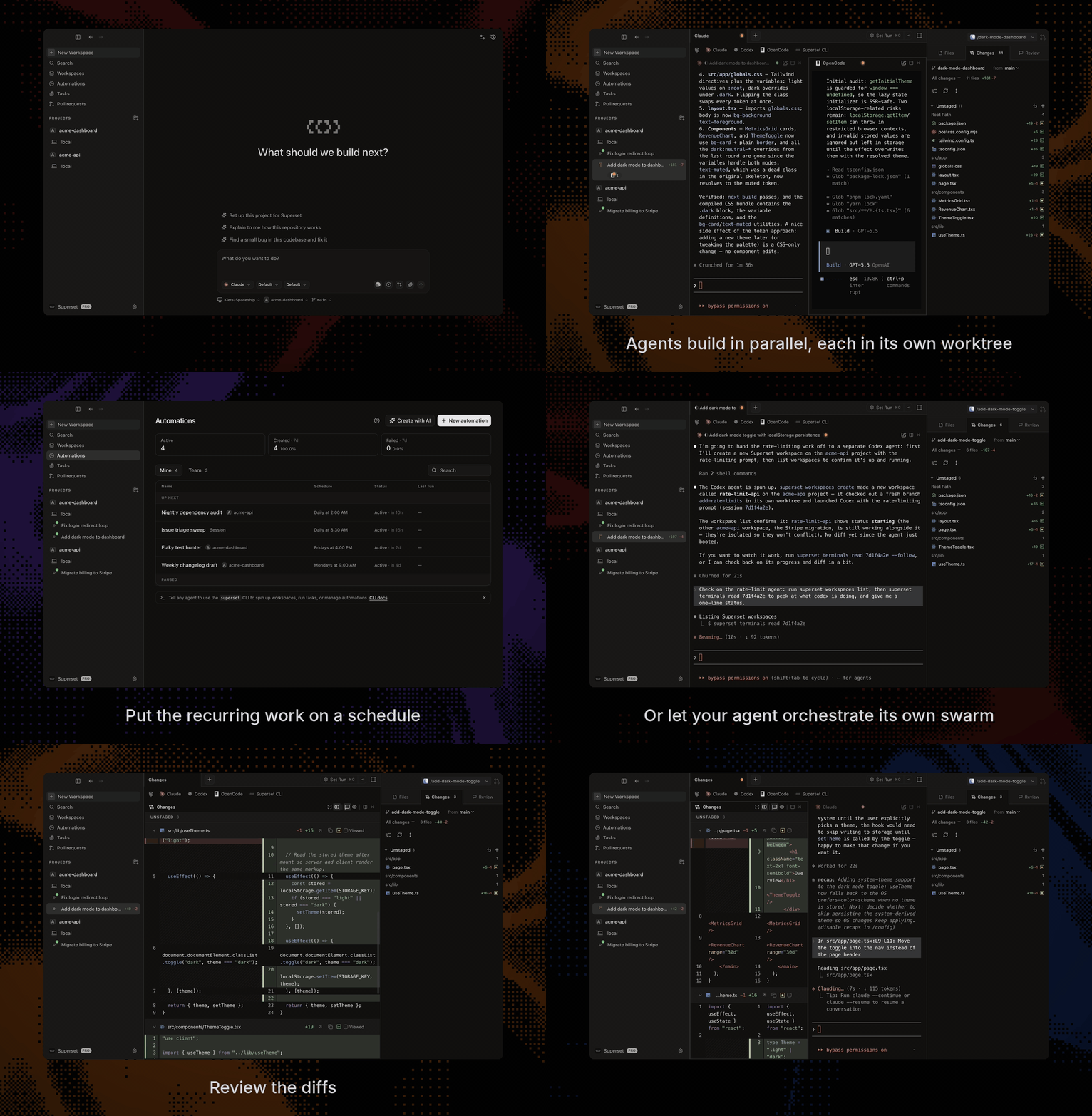
Run Claude Code, Codex, or another CLI agent with terminals, code review, and browser previews in one workspace.
Download for macOS • Documentation • Changelog • Discord
Documentation for agents
The docs are available as a Markdown index linking to individual pages, or one full-text file.
Install
Download the desktop app:
- macOS: Apple Silicon (.dmg) · Intel (.dmg)
- Linux: x64 AppImage (experimental; macOS is the primary target)
- Windows: not yet available
- All builds
All you need installed is Git. gh is optional and enables the PR workflows; Paradev offers to install it for you.
Start with one task
- Install Paradev and add a repository from your computer or clone one.
- Create a workspace, choose your CLI agent, and describe a small change you want to make.
- Inspect its patch in Changes, run the relevant tests, and preview your app in the browser pane before committing.
For a walkthrough of workspace creation and review, see Your First Parallel Session.
Review and revise
- Change your app's UI. Use Design in the browser pane to select an element and send your requested change to an agent with element context. Walkthrough · Design Mode docs
- Ask an agent to fix a PR. Open Pull requests → Code, select diff lines, and send feedback to a running or new agent session. Posting to GitHub is optional. Walkthrough · PR docs
- Review a report with your team. Ask an agent to publish a Page. Teammates pin comments, and a watching agent can revise it at the same link. Keep its host and session running for feedback delivery. Walkthrough · Pages docs
See the diff viewer and browser previews
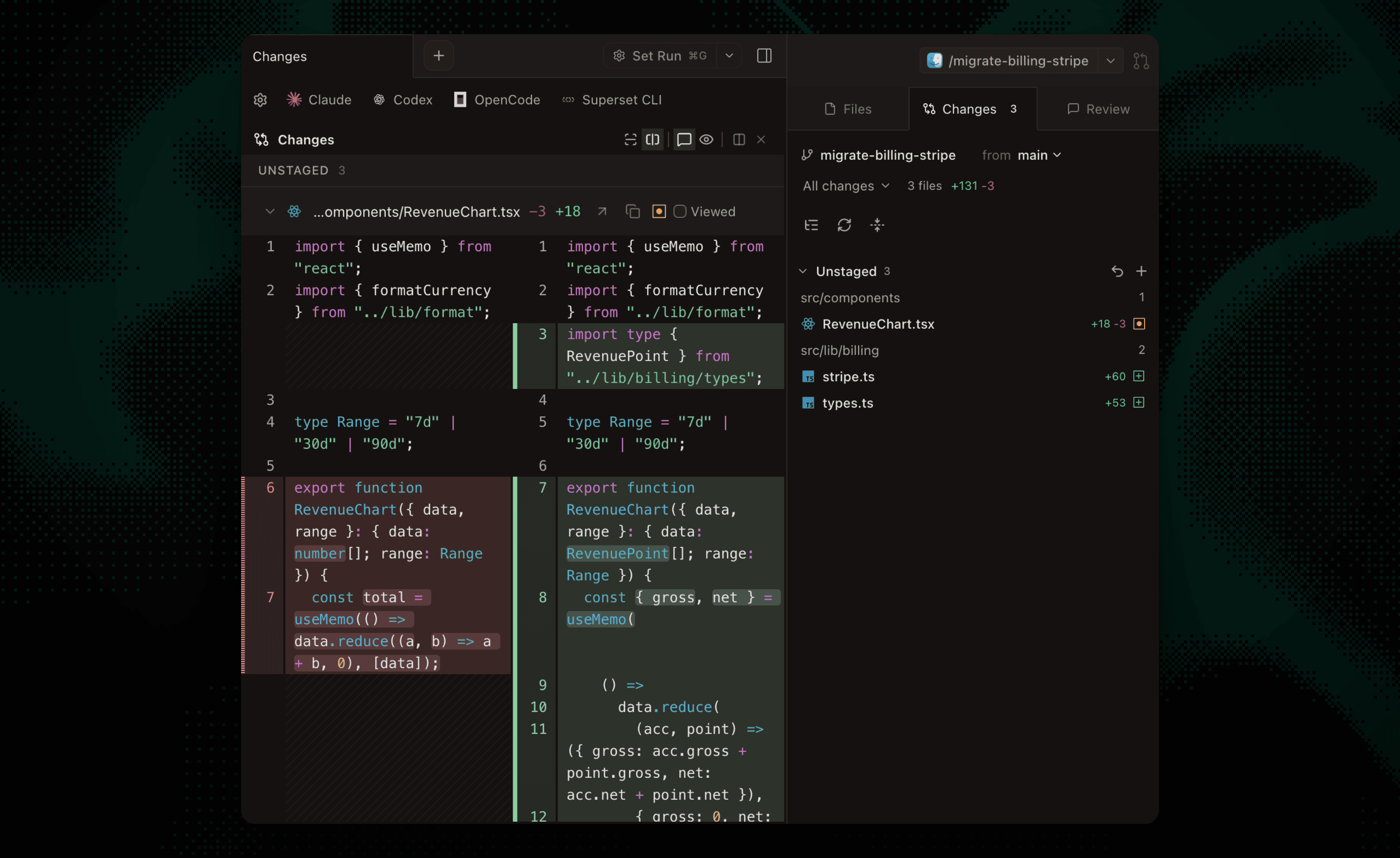
Built-in Diff Viewer
Inspect, comment on, and edit agent changes without leaving the app, then commit and push when it's ready.
In-App Browser & Ports
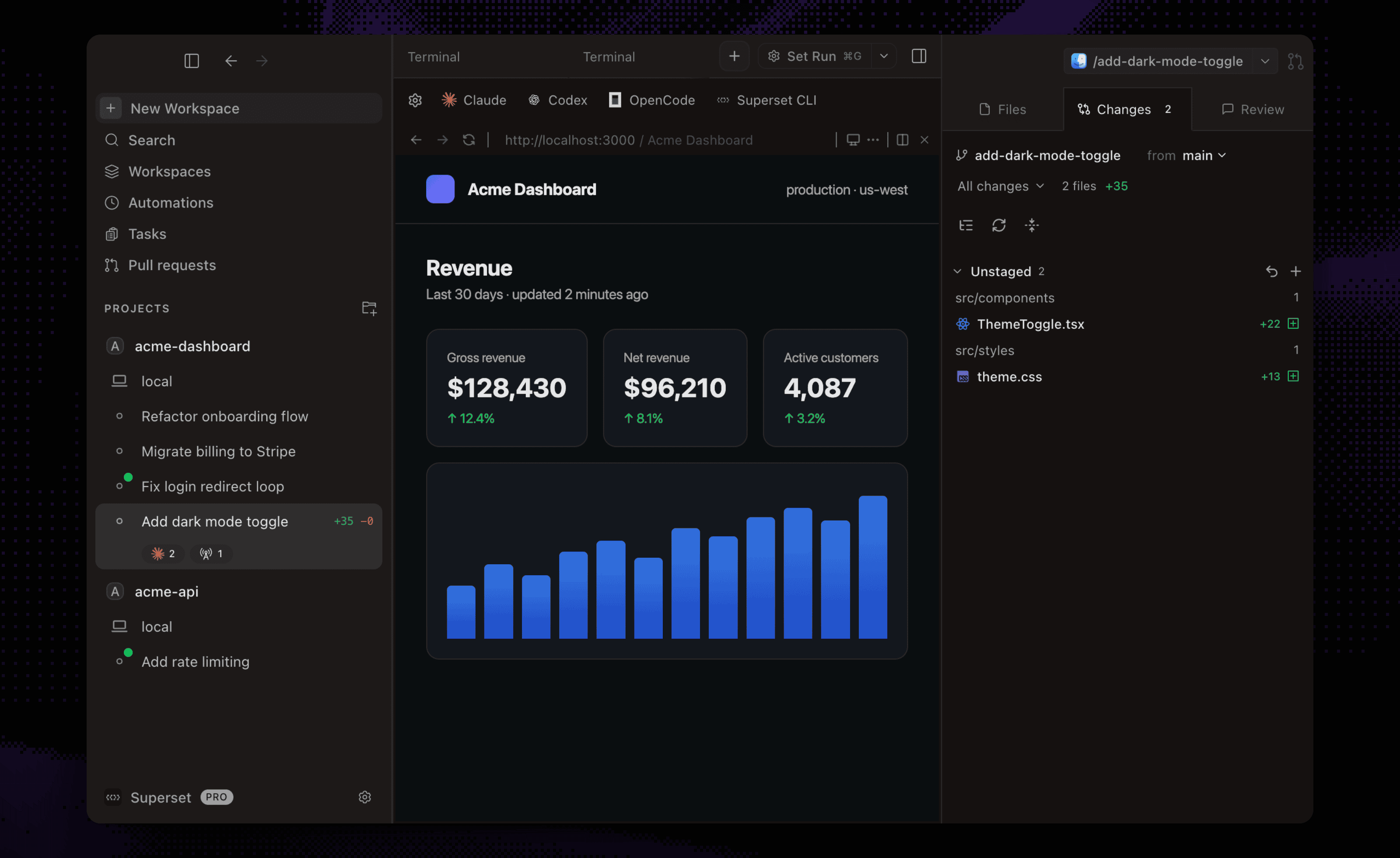
Preview running dev servers in a browser pane. Ports are detected per workspace, so every worktree gets its own preview.
Run independent tasks
Give each task a Git worktree with its own branch and terminals. Worktrees separate working files; they do not sandbox processes or prevent merge conflicts.
Workspace docs · Terminal docs · Agent status
See workspaces, monitoring, terminals, and the command palette
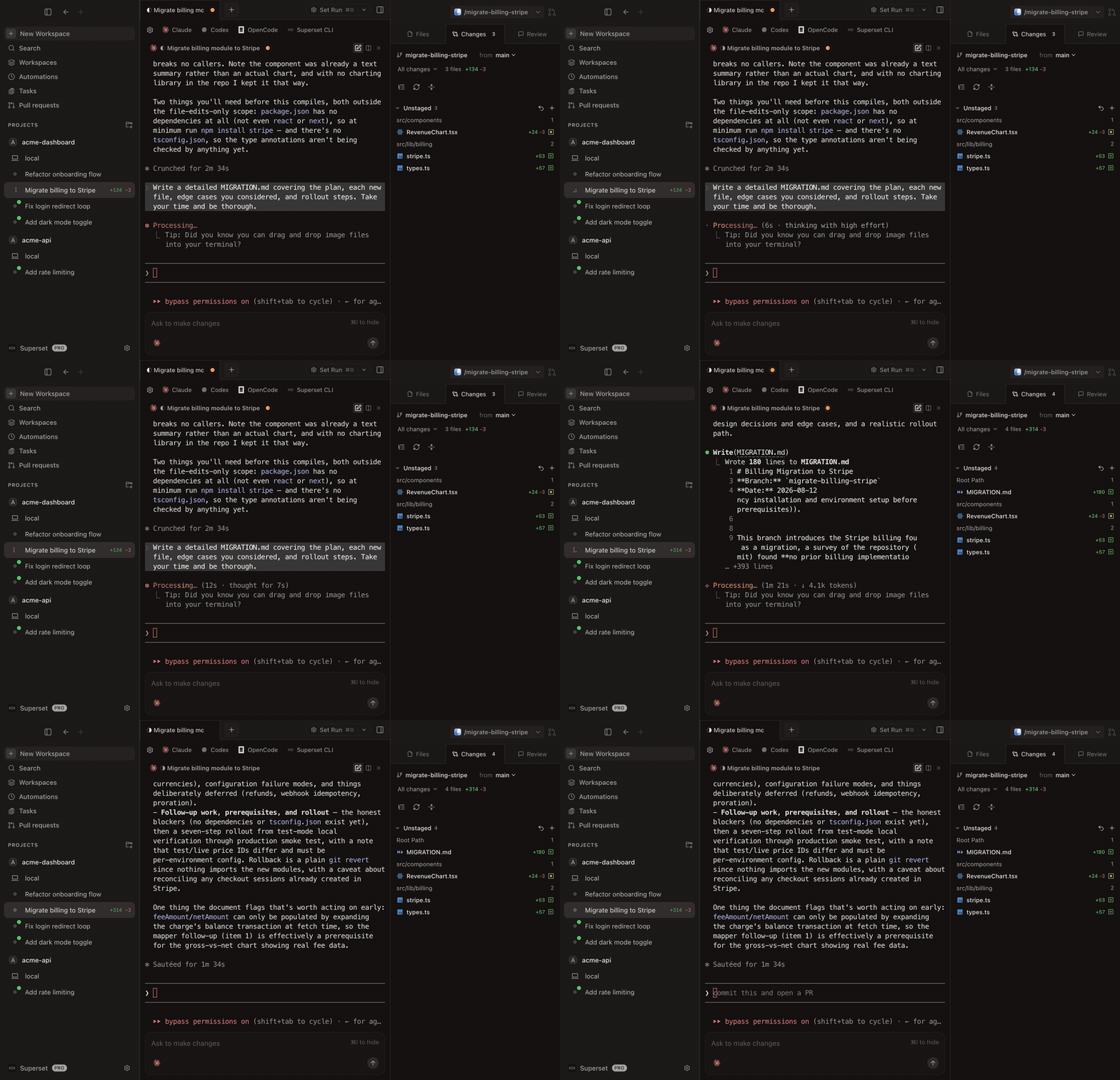
Parallel Workspaces
Review each result before merging, or try two approaches to the same problem and keep the one you prefer.
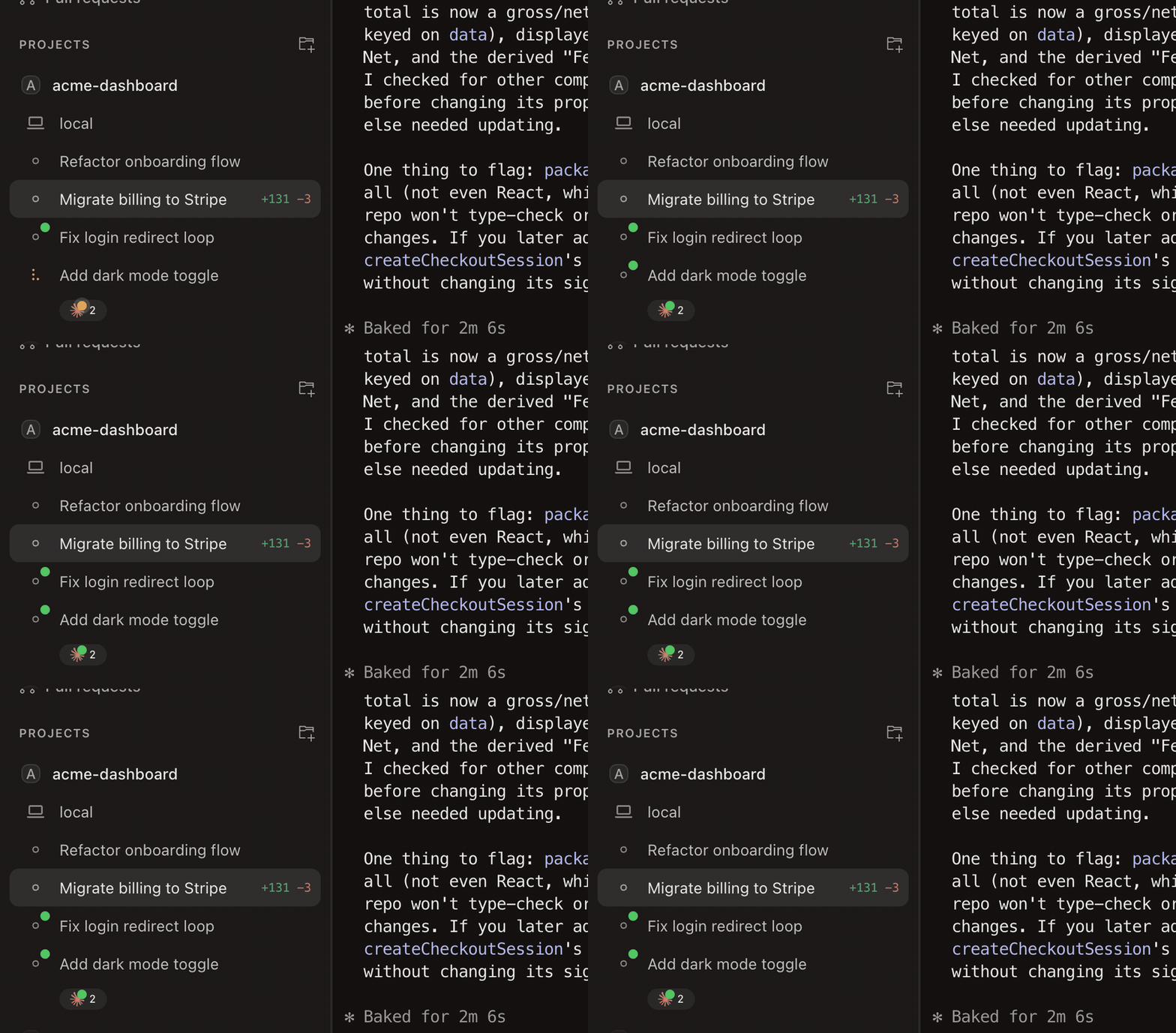
Agent Monitoring
Track every agent from the sidebar, with working indicators, completion chimes, and dock badges when one needs your attention.
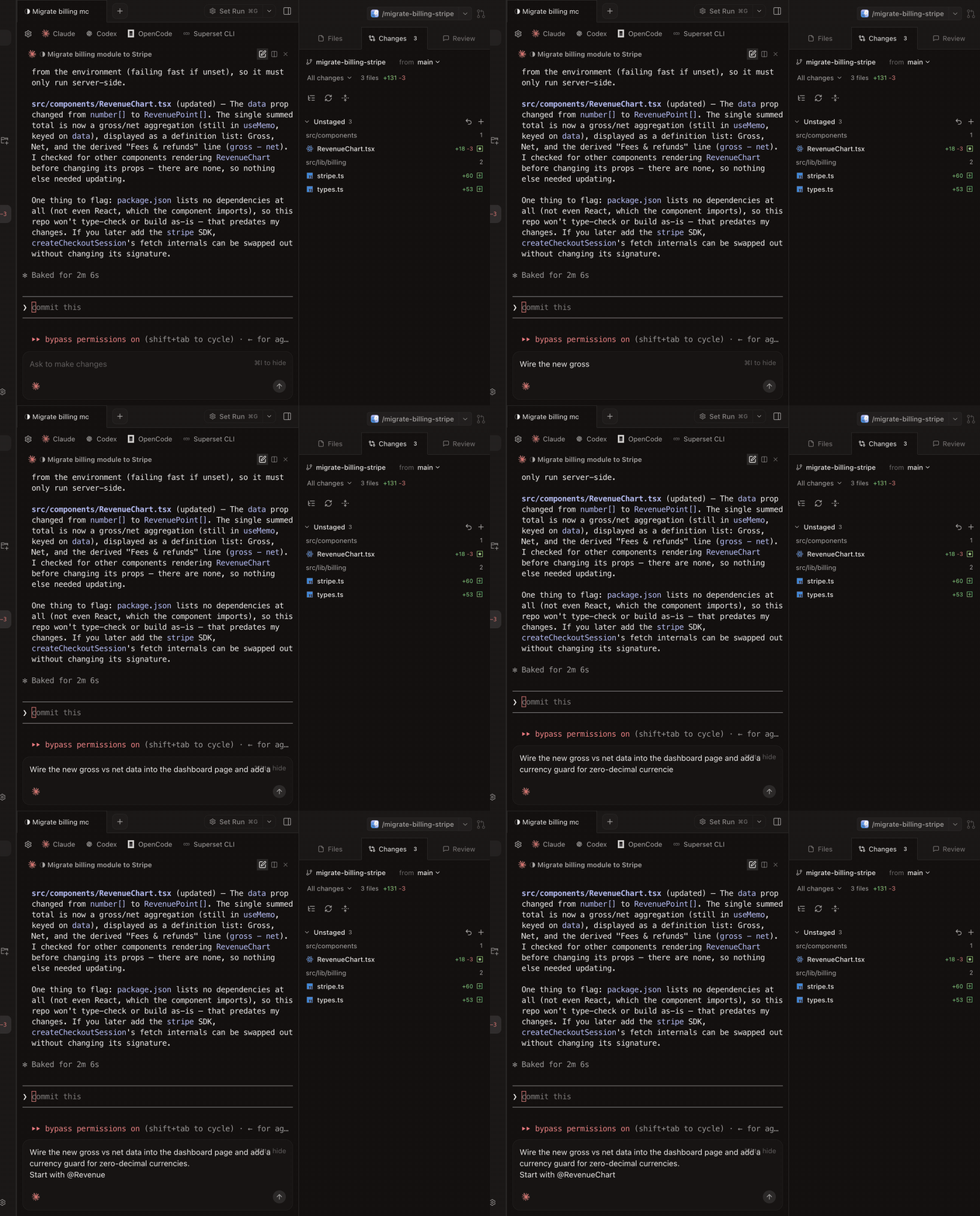
Built-in Terminal
Tabs, infinite splits, presets, and persistent sessions that survive restarts. Press ⌘I for a rich prompt editor with multiline editing and @-file mentions.
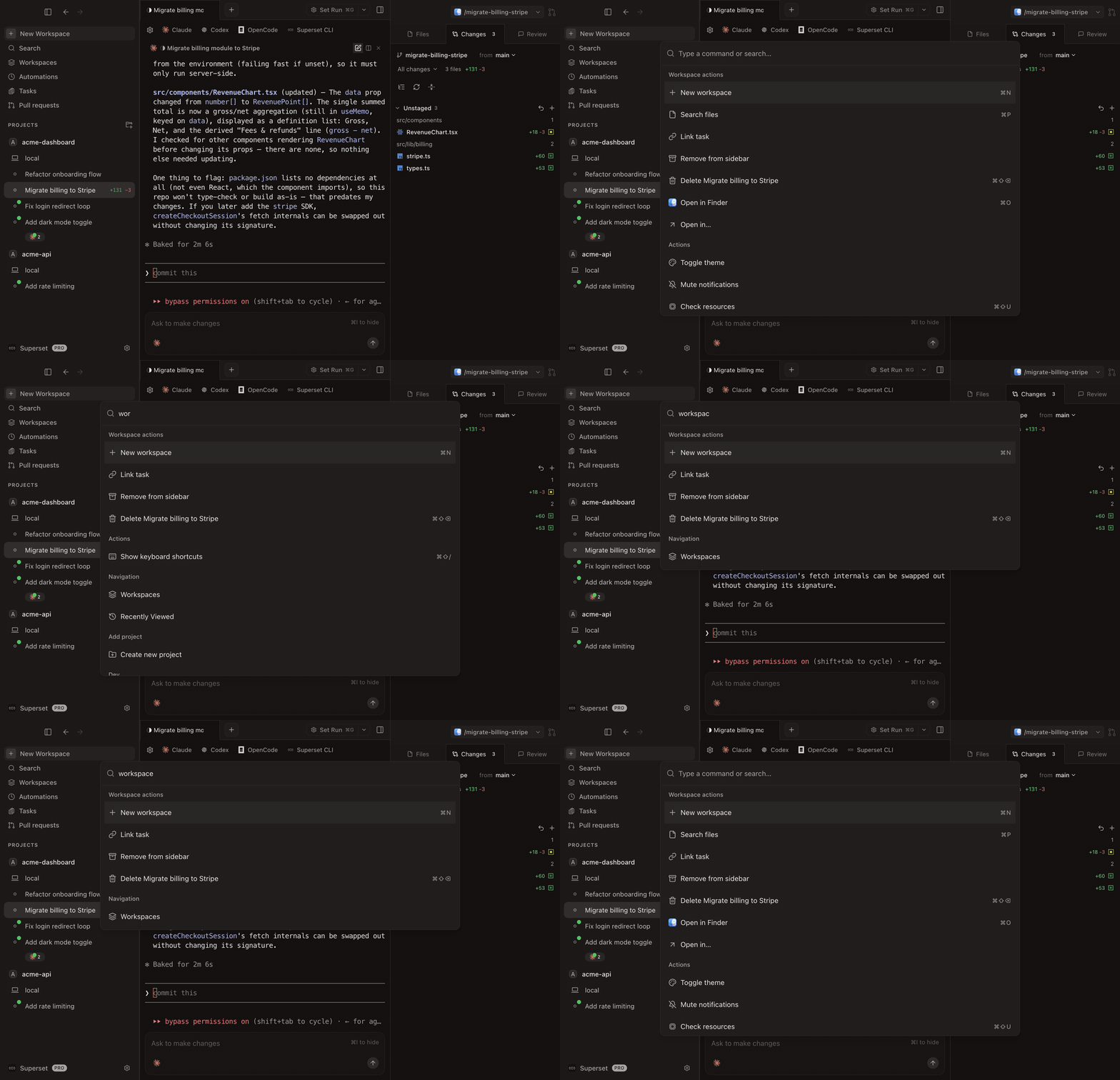
Command Palette
Jump to any workspace, action, or setting from one search box.
Work across devices and on a schedule
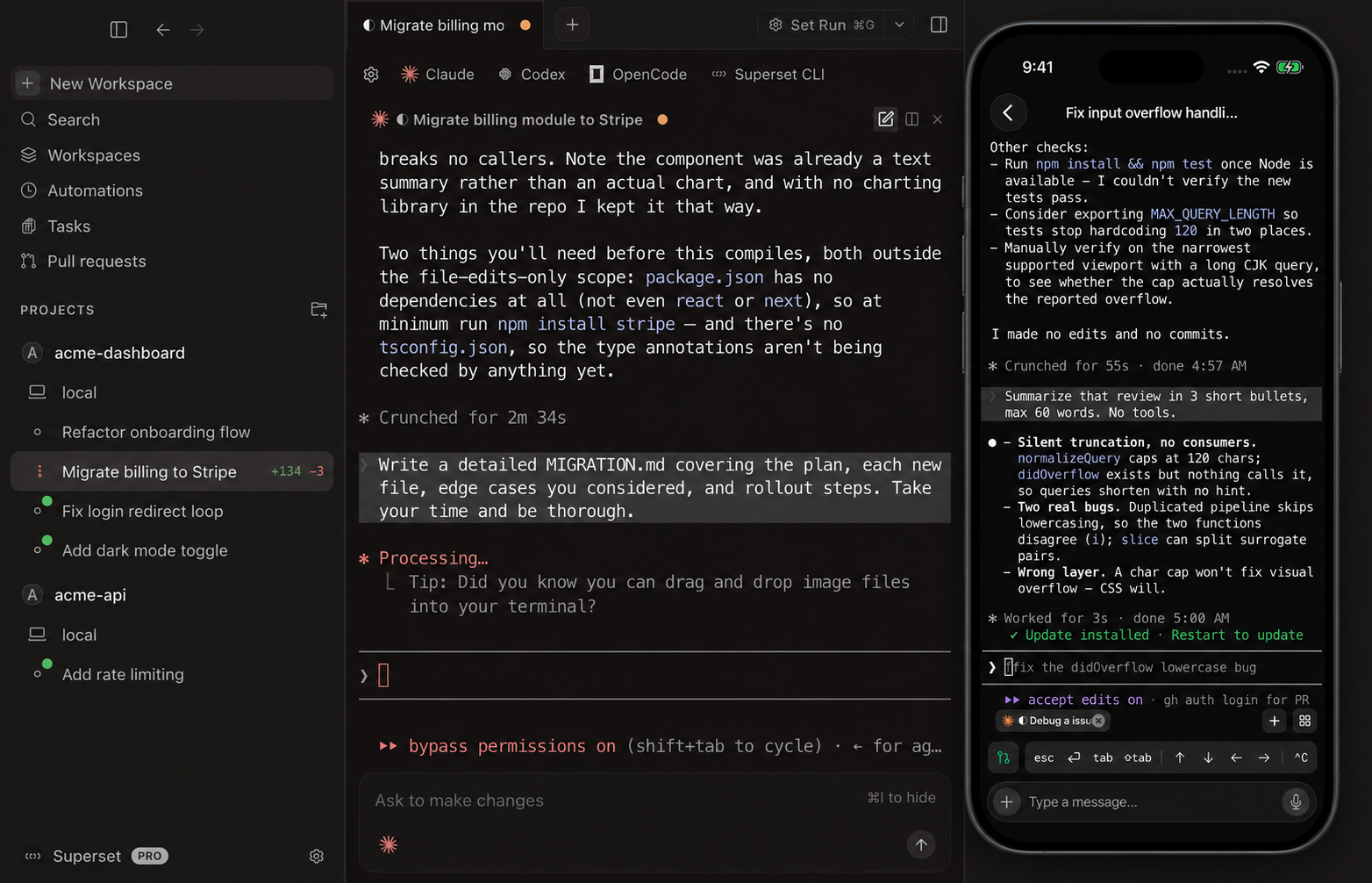
Connect another machine to reach its workspaces remotely, or schedule an agent to work on a recurring task. The CLI, SDK, and MCP server also let agents and scripts manage workspaces.
Mobile supports iPhone and iPad and requires Paradev Pro and iOS 26 or iPadOS 26 or later. Use cloud workspaces without keeping your own computer connected. To reach workspaces on your own computer, enable Remote Access and keep that host awake and online.
Remote access · Automations · iPhone and iPad · CLI
See mobile, automations, remote access, and the CLI
Paradev for iPhone and iPad
Control Claude Code, Codex, and other terminal agents in cloud workspaces or on your connected computer. Pick up the same workspaces and terminal sessions, send follow-up prompts, review diffs, and merge PRs from your iPhone or iPad.
Download on the App Store • Learn more →
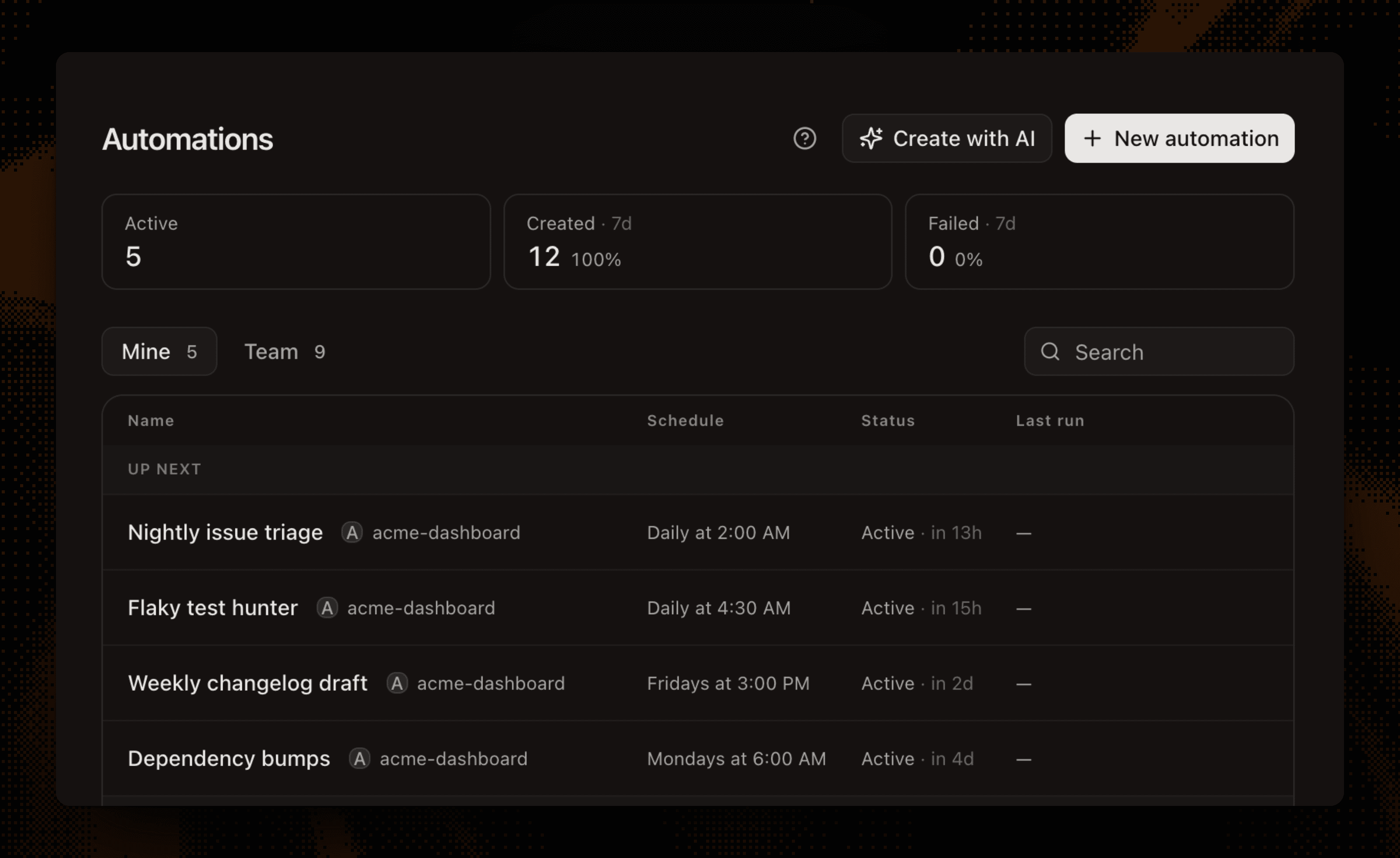
Automations
Run agent sessions on a schedule or when something happens: review a PR when you're asked, triage a new Sentry issue, pick up a bug report from Slack, draft the weekly changelog.
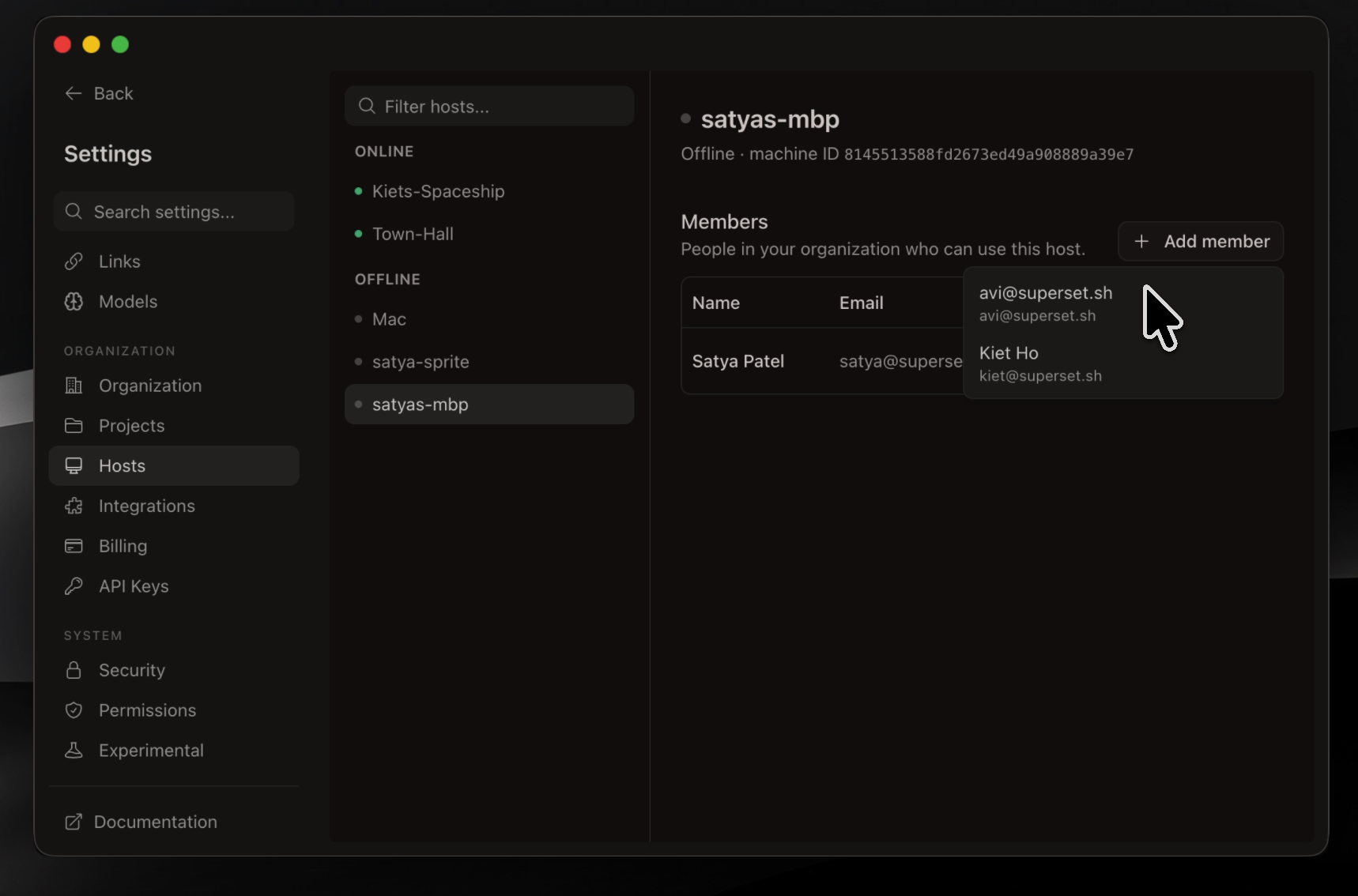
Remote Access
Connect another machine and reach its workspaces from anywhere: the desktop app, the CLI, or your phone. Wake offline hosts with a custom command.
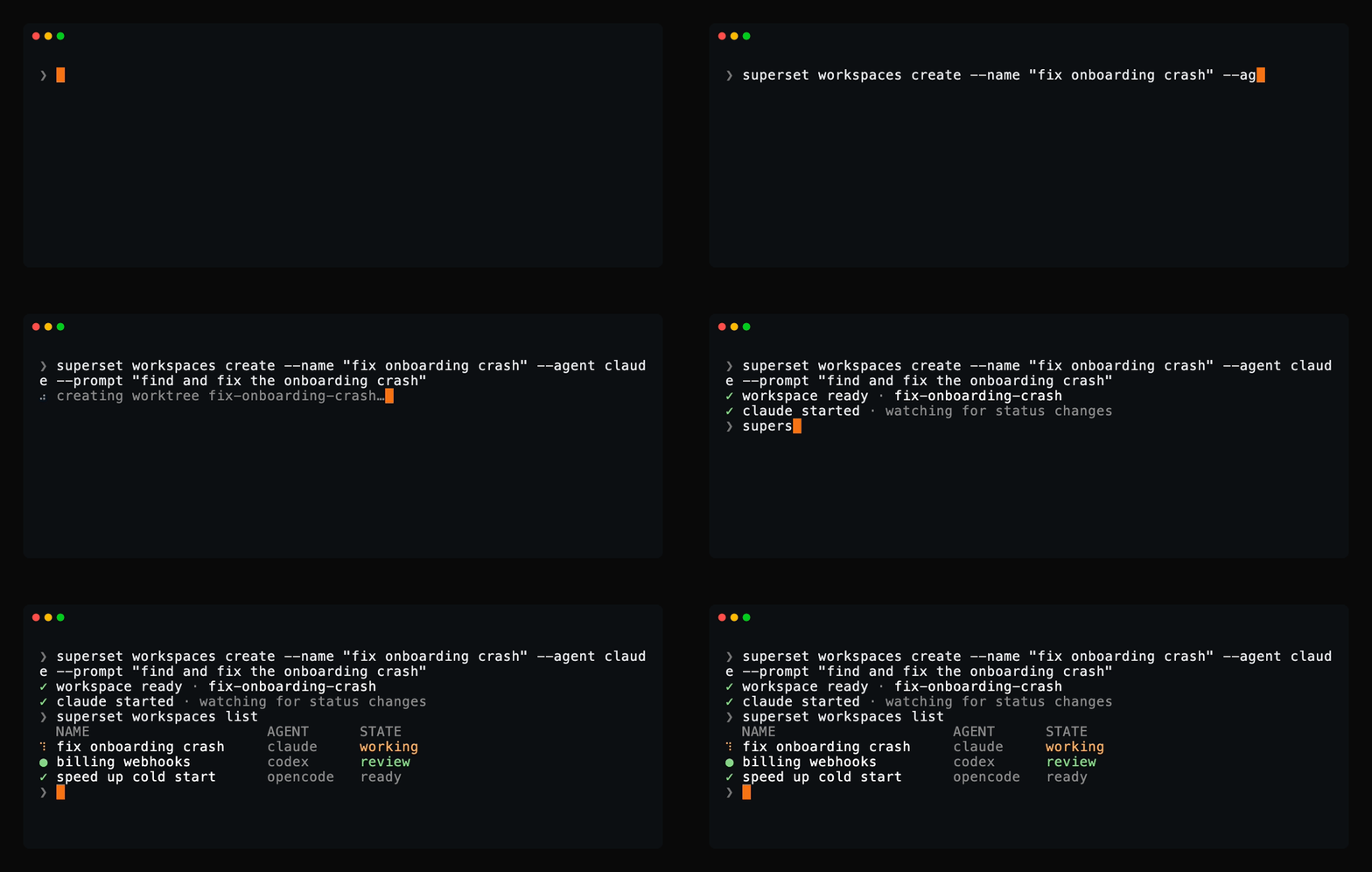
Paradev CLI
Script it from any shell: create workspaces, launch agents, read their terminals, and manage automations with a single binary. If an agent can run a command, it can drive Paradev.
Customize your workflow
- Built-in skills: agents come pre-loaded with
superset:*skills (orchestrate parallel agents, schedule automations, file feedback, diagnose issues), provisioned automatically at launch - Workspace setup scripts: automate env setup, dependency installs, and dev servers per workspace
- Terminal presets: save agent and shell layouts and open them with one keystroke
- Slack & Linear: spin up workspaces from Slack messages or Linear issues
- Open in your IDE: one-click handoff to Cursor, VS Code, or any editor
- Custom themes: build, edit, and import theme files
- Keyboard shortcuts: every action is remappable via Settings → Keyboard Shortcuts (⌘/)
- Bring your own providers: connect OpenRouter, Bedrock, Vertex, or Vercel AI Gateway
- And many more: we ship daily, so this list is perpetually behind. The changelog is the real feature list.
Supported Agents
Keep your existing agent subscriptions.
Use Claude Code, Codex, OpenCode, Cursor Agent, or another CLI coding agent.
Browse supported agents
| Agent | Status |
|---|---|
 Amp Code Amp Code |
Fully supported |
 Antigravity CLI Antigravity CLI |
Fully supported |
 Claude Code Claude Code |
Fully supported |
 OpenAI Codex CLI OpenAI Codex CLI |
Fully supported |
 Cursor Agent Cursor Agent |
Fully supported |
 Droid Droid |
Fully supported |
 fx fx |
Fully supported |
 Gemini CLI Gemini CLI |
Fully supported |
 GitHub Copilot GitHub Copilot |
Fully supported |
 Grok Grok |
Fully supported |
 Hermes Hermes |
Fully supported |
 Muse Code Muse Code |
Fully supported |
 Devin Devin |
Fully supported |
 Kimi Code Kimi Code |
Fully supported |
 Kiro Kiro |
Fully supported |
 Mastra Code Mastra Code |
Fully supported |
 Mistral Vibe Mistral Vibe |
Fully supported |
 Oh My Pi Oh My Pi |
Fully supported |
 OpenCode OpenCode |
Fully supported |
| Pi |
Fully supported |
 Polygraph Polygraph |
Fully supported |
| Any other CLI agent | Works without configuration |
Agents get more than a terminal:
- Model picker: choose a model and reasoning effort when you launch an agent
- Per-agent settings: tune launch commands, prompt templates, and model overrides in Settings → Agents
- Custom agents: add any terminal agent with its own icon and it works like a built-in
- Built-in chat: talk to models in a chat pane, with inline tool approvals and plan review
More Than a Desktop App
Every surface talks to the same workspaces, so you can start a task in the app and check on it from anywhere.
| Surface | What you get |
|---|---|
| Desktop App | The full IDE: terminals, diff viewer, in-app browser, automations |
| CLI | A single superset binary to manage workspaces, agents, terminals, and hosts from any shell |
| TypeScript SDK | Drive Paradev programmatically with @superset_sh/sdk from Node, Bun, or Deno |
| MCP Server | Let Claude Code, Codex, Cursor, and other agents create and manage workspaces themselves |
The CLI comes bundled with the desktop app, or install it standalone:
curl -fsSL https://paradev.com/cli/install.sh | sh
# or
brew install paradevai/tap/superset
Development
Want to hack on Paradev or contribute a PR? Clone the repository, add it to the installed Paradev app, and create a workspace for your change:
git clone https://github.com/paradevai/paradev.git
Then run the development setup from that workspace terminal:
./.superset/setup.local.sh
bun run dev
Run setup.local.sh once in every new worktree. It configures workspace-specific
app identity and ports so the development desktop app can run alongside the
installed Paradev app and other development worktrees.
No Neon account or third-party credentials are needed. setup.local.sh brings
up a local Postgres + neon-proxy + Redis stack via Docker and seeds a dev account.
Sign in with the "Sign in as dev" button (or admin@local.test / supersetdev).
Prereqs for building from source (to use Paradev, install the app instead): Bun v1.4.3+ (pinned in .bun-version), docker, jq, and gh (brew install jq gh).
See DEVELOPMENT.md for the full guide: what the setup script does, manual setup against real services, common commands, troubleshooting, and how to build the desktop app. Contribution process lives in CONTRIBUTING.md.
Configuration
Configure workspace setup, teardown, and run scripts in .superset/config.json. See full documentation.
{
  "setup": ["./.superset/setup.sh"],
  "teardown": ["./.superset/teardown.sh"],
  "run": ["./.superset/run.sh"]
}
Tech Stack
Browse the implementation stack


Private by Default
- Explicit Connections: you choose which agents, providers, and integrations to connect.
Contributing
We welcome contributions! See CONTRIBUTING.md for how to get set up and open a PR. Bugs and feature requests go in issues.





🌐 Read this in other languages
English | 日本語 | 简体中文 | 繁體中文 | 한국어 | Français | Español | Deutsch | Português | Italiano | Русский | Türkçe | Polski | Nederlands | Bahasa Indonesia | Čeština | Tiếng Việt
Community
Join the Paradev community to get help, share feedback, and connect with other users:
- Discord: chat with the team and community
- Twitter: follow for updates and announcements
- GitHub Issues: report bugs and request features
- GitHub Discussions: ask questions and share ideas
Team



License & what's free forever
The desktop app is free forever. Running agents in parallel on your own machine will never require payment. Anything we charge for will be an optional service on top.
The whole app is in this repo under the Elastic License 2.0: use it, fork it, modify it, self-host it for your team. The only thing off the table is repackaging Paradev itself as a service you sell to others.
并行运行 100+ 个编码智能体
🌐 其他语言版本
English | 日本語 | 简体中文 | 繁體中文 | 한국어 | Français | Español | Deutsch | Português | Italiano | Русский | Türkçe | Polski | Nederlands | Bahasa Indonesia | Čeština | Tiếng Việt
本文档是英文版 README 的翻译,内容以英文版为准。
Claude Code、Codex 或任何 CLI 智能体,各自运行在独立的 worktree 中。
把时间花在交付上,而不是等待上。
下载 macOS 版 • 文档 • 更新日志 • Discord
零切换成本,编码快 10 倍
Paradev 在相互隔离的 git worktree 中并行运行基于 CLI 的编码智能体,并内置终端、审查和在编辑器中打开的工作流。
- 同时运行多个智能体,没有上下文切换的开销
- 将每个任务隔离在独立的 git worktree 中,智能体之间互不干扰
- 在一个地方监控所有智能体,需要你介入时会收到通知
- 快速审查和编辑更改,使用内置的差异查看器和编辑器
- 在任何需要的地方打开工作区,一键交接到你的编辑器或终端
- 随时随地访问你的工作区,通过远程主机、CLI、SDK 或 MCP
少等待,多交付。
功能
并行工作区一次运行 100+ 个编码智能体,每个都在自己的 git worktree 中,拥有独立的分支、终端和环境。比较结果,合并最优方案。 |
|
智能体监控从侧边栏跟踪每个智能体,配有工作指示器、完成提示音,以及需要你介入时的 Dock 徽标。 |
|
内置终端标签页、无限分屏、预设,以及在重启后依然保留的持久会话。按 ⌘I 打开富文本提示词编辑器,支持多行编辑和 @ 文件提及。 |
|
内置差异查看器无需离开应用即可检查、评论和编辑智能体的更改,准备就绪后提交并推送。 |
|
应用内浏览器与端口在浏览器窗格中预览正在运行的开发服务器。端口按工作区检测,每个 worktree 都有自己的预览。 |
|
自动化按计划运行智能体会话:夜间分诊 issue、起草每周更新日志、保持依赖最新。 |
|
远程访问连接另一台机器,随时随地访问它的工作区:桌面应用、CLI 或手机。用自定义命令唤醒离线主机。 |
|
Paradev CLI在任何 shell 中编写脚本:用单个二进制文件创建工作区、启动智能体、读取它们的终端、管理自动化。只要智能体能运行命令,它就能驱动 Paradev。 |
|
命令面板在一个搜索框中跳转到任何工作区、操作或设置。 |
|
开箱即用的还有:
- 内置技能:智能体预装
superset:*技能(编排并行智能体、安排自动化、提交反馈、诊断问题),启动时自动配置 - 模型选择器与自定义智能体:启动时选择模型和推理力度,并可为任何终端智能体添加专属图标
- 工作区设置脚本:按工作区自动化环境配置、依赖安装和开发服务器
- 终端预设:保存智能体和 shell 布局,一键打开
- Slack 与 Linear:从 Slack 消息或 Linear issue 直接创建工作区
- 在你的 IDE 中打开:一键交接到 Cursor、VS Code 或任何编辑器
- 自定义主题:构建、编辑和导入主题文件
- 键盘快捷键:每个操作都可通过设置 → 键盘快捷键(⌘/)重新映射
- 自带提供商:连接 OpenRouter、Bedrock、Vertex 或 Vercel AI Gateway
- 还有更多:我们每天发布新版本,这份列表永远落后于实际。真正的功能列表是更新日志。
支持的智能体
Paradev 适用于任何基于 CLI 的编码智能体,包括:
| 智能体 | 状态 |
|---|---|
| Amp Code |
完全支持 |
| Antigravity CLI |
完全支持 |
| Claude Code |
完全支持 |
| OpenAI Codex CLI |
完全支持 |
| Cursor Agent |
完全支持 |
| Droid |
完全支持 |
| fx |
完全支持 |
| Gemini CLI |
完全支持 |
| GitHub Copilot |
完全支持 |
| Grok |
完全支持 |
| Hermes |
完全支持 |
| Muse Code |
完全支持 |
| Devin |
完全支持 |
| Kimi Code |
完全支持 |
| Kiro |
完全支持 |
| Mastra Code |
完全支持 |
| Mistral Vibe |
完全支持 |
| Oh My Pi |
完全支持 |
| OpenCode |
完全支持 |
| Pi |
完全支持 |
| Polygraph |
完全支持 |
| 任何其他 CLI 智能体 | 无需配置即可使用 |
只要能在终端里运行,就能在 Paradev 上运行
智能体得到的不只是一个终端:
- 模型选择器:启动智能体时选择模型和推理力度
- 按智能体设置:在设置 → 智能体中调整启动命令、提示词模板和模型覆盖
- 自定义智能体:添加任何终端智能体并配上专属图标,它就像内置的一样工作
- 状态与通知:工作指示器、完成提示音,以及智能体需要你时的 Dock 徽标
- 内置聊天:在聊天窗格中与模型对话,支持内联工具批准和计划审查
不只是一个桌面应用
每个界面都连接到同样的工作区,你可以在应用里开始一个任务,然后在任何地方查看进展。
| 界面 | 你能得到什么 |
|---|---|
| 桌面应用 | 完整的 IDE:终端、差异查看器、应用内浏览器、自动化 |
| CLI | 单个 superset 二进制文件,在任何 shell 中管理工作区、智能体、终端和主机 |
| TypeScript SDK | 通过 @superset_sh/sdk 在 Node、Bun 或 Deno 中以编程方式驱动 Paradev |
| MCP 服务器 | 让 Claude Code、Codex、Cursor 等智能体自己创建和管理工作区 |
CLI 随桌面应用一起提供,也可以独立安装:
curl -fsSL https://paradev.com/cli/install.sh | sh
# or
brew install paradevai/tap/superset
iOS 应用即将推出,让你可以在手机上查看你的智能体。
安装
下载桌面应用:
- macOS:Apple Silicon (.dmg) · Intel (.dmg)
- Linux:x64 AppImage(实验性;macOS 是主要目标平台)
- Windows:暂不可用
- 所有构建版本
你只需要安装 Git。gh 是可选的,用于解锁 PR 工作流;Paradev 会主动提议为你安装。
开发
想折腾 Paradev 或贡献一个 PR?克隆仓库,把它添加到已安装的 Paradev 应用中,然后为你的更改创建一个工作区:
git clone https://github.com/paradevai/paradev.git
然后在该工作区的终端中运行开发环境设置:
./.superset/setup.local.sh
bun run dev
在每个新 worktree 中运行一次 setup.local.sh。它会配置工作区专属的应用标识和端口,让开发版桌面应用可以与已安装的 Paradev 应用及其他开发 worktree 并行运行。
无需 Neon 账号或第三方凭据。setup.local.sh 会通过 Docker 启动本地 Postgres + Electric 栈并植入一个开发账号。用 "Sign in as dev" 按钮(或 admin@local.test / supersetdev)登录即可。
前置条件:Bun v1.4.3+(固定在 .bun-version 中)、docker、jq 和 caddy,bun dev 会将 caddy 作为本地 HTTPS 代理运行(brew install jq caddy && caddy trust)。
完整指南见 DEVELOPMENT.md:设置脚本做了什么、针对真实服务的手动设置、常用命令、故障排查,以及如何构建桌面应用。贡献流程见 CONTRIBUTING.md。
配置
在 .superset/config.json 中配置工作区的设置、清理和运行脚本。参见完整文档。
{
  "setup": ["./.superset/setup.sh"],
  "teardown": ["./.superset/teardown.sh"],
  "run": ["./.superset/run.sh"]
}
键盘快捷键可通过设置 → 键盘快捷键(⌘/)自定义;参见完整快捷键列表。
技术栈
默认私密
- 源码可见:完整源码以 Elastic License 2.0(ELv2)许可发布在 GitHub 上。
- 显式连接:由你决定连接哪些智能体、提供商和集成。
贡献
我们欢迎贡献!参见 CONTRIBUTING.md 了解如何搭建环境并提交 PR。Bug 和功能请求请提交到 issues。
社区
加入 Paradev 社区,获取帮助、分享反馈,并与其他用户交流:
- Discord:与团队和社区聊天
- Twitter:关注以获取更新和公告
- GitHub Issues:报告 bug 和请求功能
- GitHub Discussions:提问和分享想法
团队
许可与永久免费的部分
**桌面应用永久免费。**在你自己的机器上并行运行智能体永远不需要付费。我们收费的任何东西都会是在此之上的可选服务。
整个应用都在这个仓库中,采用 Elastic License 2.0 许可:使用它、fork 它、修改它、为你的团队自托管它,都可以。唯一不允许的,是把 Paradev 本身重新打包成服务卖给他人。