SwanLab
⚡️SwanLab - an open-source, modern-design AI training tracking and visualization tool. Supports Cloud / Self-hosted use. Integrated with PyTorch / Transformers / verl / LLaMA Factory / ms-swift / Ultralytics / MMEngine / Keras etc.
原始仓库简介 · 中文摘要待补充 · ai-infra / data-science / deep-learning / llm / logging / machine-learning
README / 项目原文

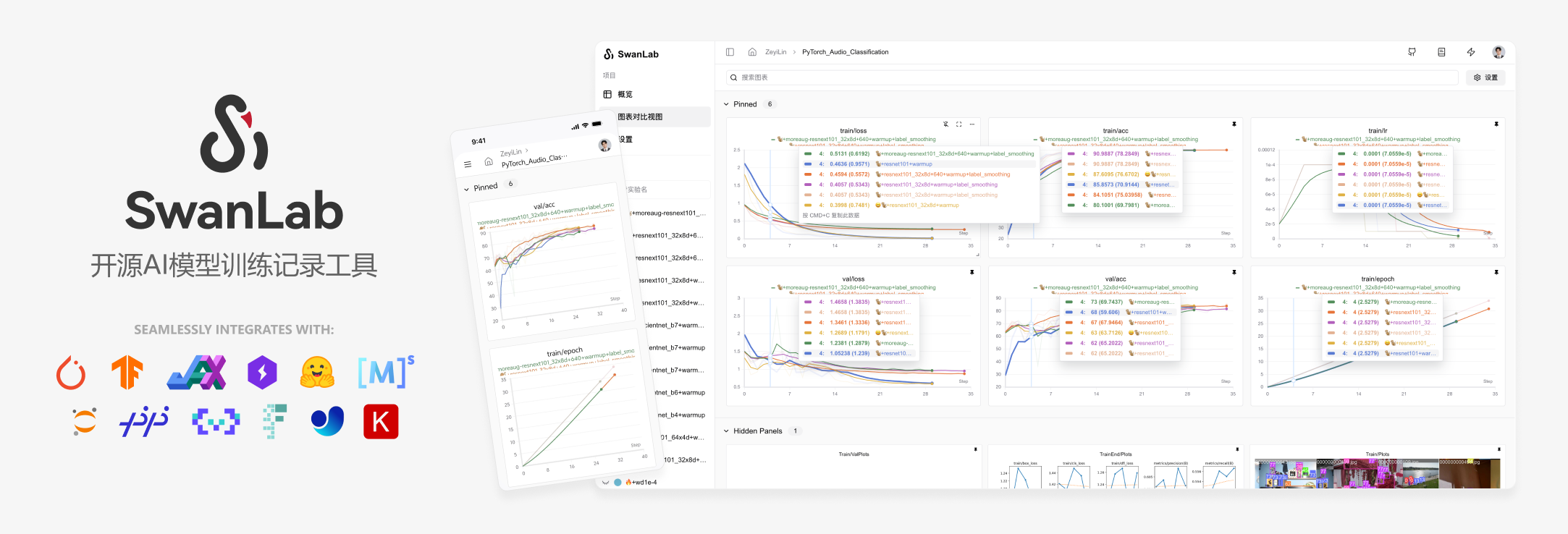
一个专业、现代化设计的AI训练分析平台
面向模型训练团队,与50+主流框架集成,与你的实验代码轻松结合
🔥SwanLab 在线版 · 📃 文档 · 报告问题 · 建议反馈 · 更新日志 ·  基线社区 · SKILL






👋 加入我们的微信群

目录
🌟 最近更新
2026.06.16: 🔥 新增 HTML 图表,支持嵌入LLM Vibe Coding 生成页面;Kubenetes 部署 Prometheus + Grafana 方案 上线;
2026.06.05: ⚡️ 重构版 SDK(v0.8.0)上线,大幅提升了指标记录性能,配合大规模训练体验更佳; SwanLab CLI 与 Skill 上线,面向 AutoResearch范式;
2026.05.18:📒 日志支持全局筛选,快速在全局找到你需要的日志片段;新增图表复制功能;图表搜索上线历史记录功能;图表详情新增相对时间显示;
2026.04.28:🪨 项目置顶上线,将团队最关心的项目卡片放到最显眼的位置;优化了在Hover折线图时指标看板的显示效果;
2026.03.25:📊 实验置顶上线,一键将最好的实验固定在到最好找的位置;Baseline对比功能上线,支持将实验们和baseline对比并显示差异百分比,加速找到最佳参数组合;
https://github.com/user-attachments/assets/964380e0-feb2-480d-b1ca-eba1be239ebb
2026.03.19:📊 新增实验复制功能,支持将创建实验副本到不同项目、团队下;parallel模式上线,支持在不同进程同时记录指标到同一实验下;实验ID现在可以自定义了;
2026.02.06: 🔥 swanlab.Api已正式上线,提供更强大的、面向对象式的开放API接口,文档;ECharts.Table支持CSV下载;现在支持将图表一键置于分组首位了;
完整更新日志
2026.01.28:⚡️ LightningBoard V2上线,进一步提升仪表盘性能;
2026.01.16:⚡️ LightningBoard(闪电看板)V1 现已上线,专为超大图表数量级场景打造;新增图表嵌入链接,现在可以把你的图表嵌入到在线文档当中(如Notion、飞书云文档等);
2026.01.02:🥳 新增对AMD ROCm与天数智芯Iluvatar GPU的硬件监控支持;SDK增加心跳包特性,实现更稳健的端云连接;
2025.12.15:🎉 SwanLab Kubernetes版 现已发布!部署文档;NVIDIA NeMo RL 框架已集成SwanLab,文档;
2025.12.01:🕰 新增折线图详细信息展示,鼠标悬浮在折线图上时,单击Shift将开启详细模式,支持显示当前log点的时间;📊 图表分组支持MIN/MAX区域范围显示;
2025.11.17:📊 全局图表配置增加X轴数据源选择、悬停模式功能,增加图表分析体验;增加
SWANLAB_WEBHOOK功能;文档2025.11.06:🔪 实验分组上线,支持对大批量实验进行分组管理;工作区页面升级,支持快捷在多个组织下切换;大幅优化了折线图的渲染性能;swanlab.init上线
group与job_type参数;2025.10.15:📊折线图配置支持X轴数据源选择;侧边栏支持显示表格视图中Pin的列,增强实验数据对齐能力;
2025.09.22:📊全新UI上线;表格视图支持全局排序和筛选;数据层面统一表格视图与图表视图;
2025.09.12:🔢支持创建标量图,灵活显示实验指标的统计值;组织管理页面大升级,提供更强大的权限控制与项目管理能力;
2025.08.19:🤔更强大的图表渲染性能与低侵入式加载动画,让研究者更聚焦于实验分析本身;集成优秀的MLX-LM、SpecForge框架,提供更多场景的训练体验;
2025.08.06:👥训练轻协作上线,支持邀请项目协作者,分享项目链接与二维码;工作区支持列表视图,支持显示项目Tags;
2025.07.29:🚀侧边栏支持实验筛选、排序;📊表格视图上线列控制面板,能够方便地实现列的隐藏与显示;🔐多API Key管理上线,让你的数据更安全;swanlab sync提高了对日志文件完整性的兼容,适配训练崩溃等场景;新图表-PR曲线、ROC曲线、混淆矩阵上线,文档;
2025.07.17:📊更强大的折线图配置,支持灵活配置线型、颜色、粗细、网格、图例位置等;📹支持swanlab.Video数据类型,支持记录与可视化GIF格式文件;全局图表仪表盘支持配置Y轴与最大显示实验数;
2025.07.10:📚更强大的文本视图,支持Markdown渲染与方向键切换,可由
swanlab.echarts.table与swanlab.Text创建,Demo2025.07.06:🚄支持resume断点续训;新插件文件记录器;集成ray框架,文档;集成ROLL框架,感谢@PanAndy,文档
2025.06.27:📊支持小折线图局部放大;支持配置单个折线图平滑;大幅改进了图像图表放大后的交互效果;
2025.06.20:🤗集成accelerate框架,PR,文档,增强分布式训练中的实验记录体验;
2025.06.18:🐜集成AREAL框架,感谢@xichengpro,PR,文档;🖱支持鼠标Hover到侧边栏实验时,高亮相应曲线;支持跨组对比折线图;支持设置实验名裁剪规则;
2025.06.11:📊支持 swanlab.echarts.table 数据类型,支持纯文本图表展示;支持对分组进行拉伸交互,以增大同时显示的图表数量;表格视图增加 指标最大/最小值 选项;
2025.06.08:♻️支持在本地存储完整的实验日志文件,通过 swanlab sync 上传本地日志文件到云端/私有化部署端;硬件监控支持海光DCU;
2025.06.01:🏸支持图表自由拖拽;支持ECharts自定义图表,增加包括柱状图、饼状图、直方图在内的20+图表类型;硬件监控支持沐曦GPU;集成 PaddleNLP 框架;
2025.05.25:日志支持记录标准错误流,PyTorch Lightning等框架的打印信息可以被更好地记录;硬件监控支持摩尔线程;新增运行命令记录安全防护功能,API Key将被自动隐藏;
2025.05.14:支持实验Tag;支持折线图Log Scale;支持分组拖拽;大幅度优化了大量指标上传的体验;增加
swanlab.OpenApi开放接口;2025.05.09:支持折线图创建;配置图表功能增加数据源选择功能,支持单张图表显示不同的指标;支持生成训练项目GitHub徽章;
2025.04.23:支持折线图编辑,支持自由配置图表的X、Y轴数据范围和标题样式;图表搜索支持正则表达式;支持昆仑芯XPU的硬件检测与监控;
2025.04.11:支持折线图局部区域选取;支持全局选择仪表盘折线图的step范围;支持一键隐藏全部图表;
2025.04.08:支持swanlab.Molecule数据类型,支持记录与可视化生物化学分子数据;支持保存表格视图中的排序、筛选、列顺序变化状态;
2025.04.07:我们与 EvalScope 完成了联合集成,现在你可以在EvalScope中使用SwanLab来评估大模型性能;
2025.03.30:支持swanlab.Settings方法,支持更精细化的实验行为控制;支持寒武纪MLU硬件监控;支持 Slack通知、Discord通知;
2025.03.21:🎉🤗HuggingFace Transformers已正式集成SwanLab(>=4.50.0版本),#36433;新增 Object3D图表 ,支持记录与可视化三维点云,文档;硬件监控支持了 GPU显存(MB)、磁盘利用率、网络上下行 的记录;
2025.03.12:🎉🎉SwanLab私有化部署版现已发布!!🔗部署文档;SwanLab 已支持插件扩展,如 邮件通知、飞书通知
2025.03.09:支持实验侧边栏拉宽;新增外显 Git代码 按钮;新增 sync_mlflow 功能,支持与mlflow框架同步实验跟踪;
2025.03.06:我们与 DiffSynth Studio 完成了联合集成,现在你可以在DiffSynth Studio中使用SwanLab来跟踪和可视化Diffusion模型文生图/视频实验,使用指引;
2025.03.04:新增 MLFlow转换 功能,支持将MLFlow实验转换为SwanLab实验,使用指引;
2025.03.01:新增 移动实验 功能,现在可以将实验移动到不同组织的不同项目下了;
2025.02.24:我们与 EasyR1 完成了联合集成,现在你可以在EasyR1中使用SwanLab来跟踪和可视化多模态大模型强化学习实验,使用指引
2025.02.18:我们与 Swift 完成了联合集成,现在你可以在Swift的CLI/WebUI中使用SwanLab来跟踪和可视化大模型微调实验,使用指引。
2025.02.16:新增 图表移动分组、创建分组 功能。
2025.02.09:我们与 veRL 完成了联合集成,现在你可以在veRL中使用SwanLab来跟踪和可视化大模型强化学习实验,使用指引。
2025.02.05:
swanlab.log支持嵌套字典 #812,适配Jax框架特性;支持name与notes参数;2025.01.22:新增
sync_tensorboardX与sync_tensorboard_torch功能,支持与此两种TensorBoard框架同步实验跟踪;2025.01.17:新增
sync_wandb功能,文档,支持与Weights & Biases实验跟踪同步;大幅改进了日志渲染性能2025.01.11:云端版大幅优化了项目表格的性能,并支持拖拽、排序、筛选等交互
2025.01.01:新增折线图持久化平滑、折线图拖拽式改变大小,优化图表浏览体验
2024.12.22:我们与 LLaMA Factory 完成了联合集成,现在你可以在LLaMA Factory中使用SwanLab来跟踪和可视化大模型微调实验,使用指引。
2024.12.15:硬件监控(0.4.0) 功能上线,支持CPU、NPU(Ascend)、GPU(Nvidia)的系统级信息记录与监控。
2024.11.26:环境选项卡-硬件部分支持识别华为昇腾NPU与鲲鹏CPU;云厂商部分支持识别青云基石智算。
👋🏻 什么是SwanLab
SwanLab 是一款AI训练分析与指标观测平台,面向模型训练团队,提供训练可视化、自动日志记录、超参数记录、实验对比、多人协同等功能,帮助团队快速发现训练问题,加速模型迭代。
在SwanLab上,研究者能基于直观的可视化图表发现训练问题,对比多个实验找到研究灵感,并通过在线网页的分享与基于组织的多人协同训练,打破团队沟通的壁垒,提高组织训练效率。
https://github.com/user-attachments/assets/7965fec4-c8b0-4956-803d-dbf177b44f54
以下是其核心特性列表:
1. 📊 实验指标与超参数跟踪: 极简的代码嵌入您的机器学习 pipeline,跟踪记录训练关键指标
☁️ 支持云端使用(类似Weights & Biases),随时随地查看训练进展。手机看实验的方法
📝 支持超参数记录、指标总结、表格分析
🌸 可视化训练过程: 通过UI界面对实验跟踪数据进行可视化,可以让训练师直观地看到实验每一步的结果,分析指标走势,判断哪些变化导致了模型效果的提升,从而整体性地提升模型迭代效率。
支持的元数据类型:标量指标、图像、音频、文本、视频、3D点云、生物化学分子、Echarts自定义图表...
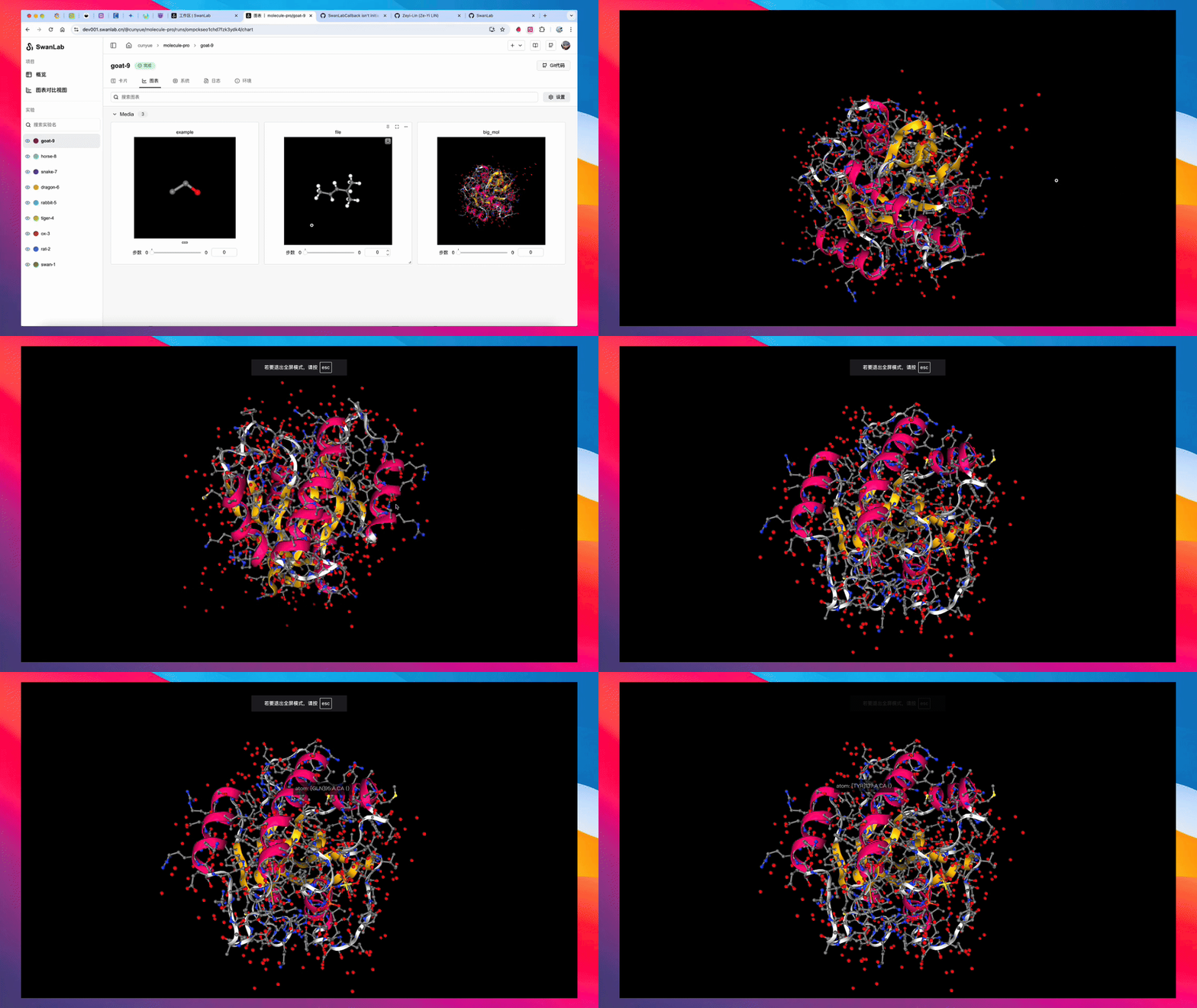
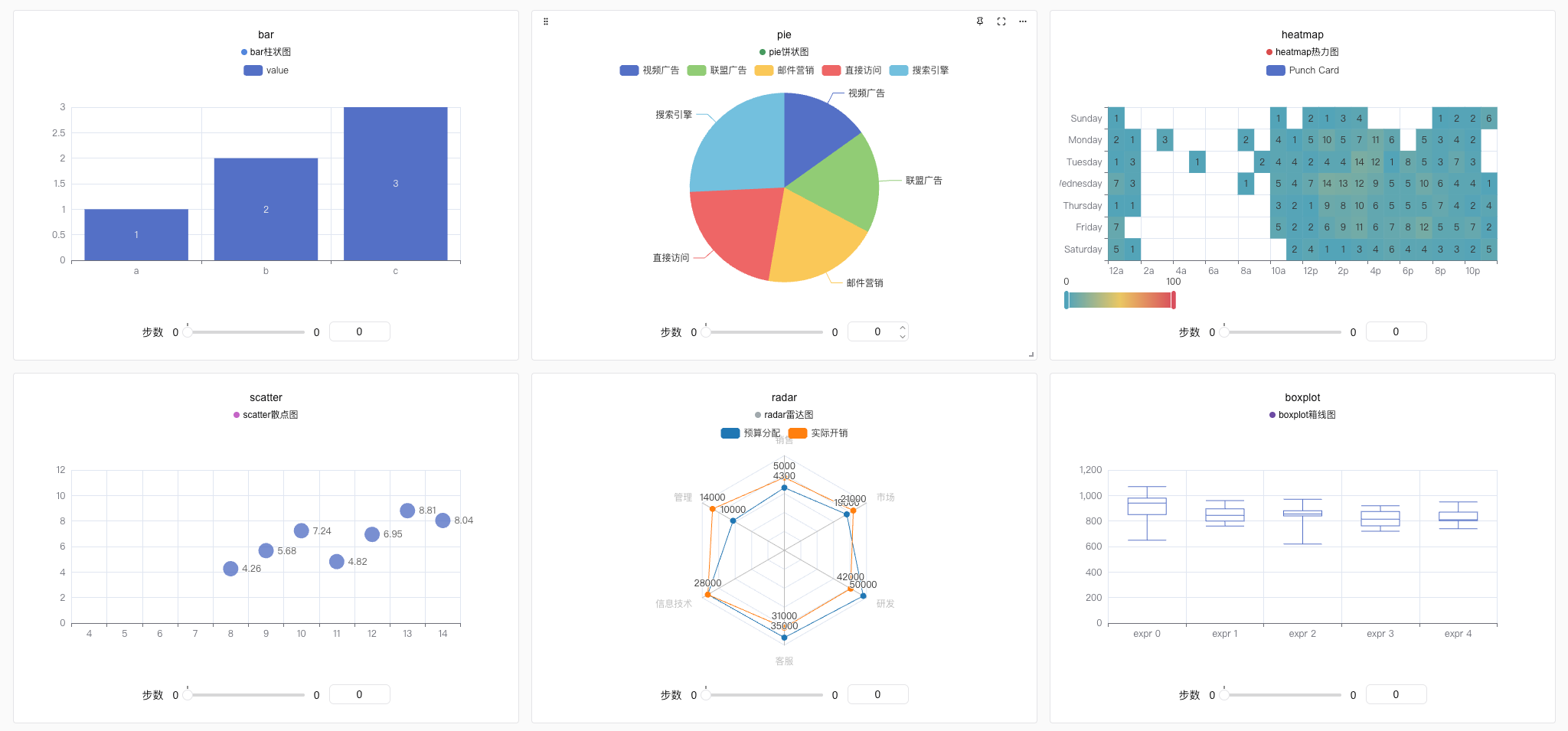
- 支持的图表类型:折线图、媒体图(图像、音频、文本、视频)、3D点云、生物化学分子、柱状图、散点图、箱线图、热力图、饼状图、雷达图、自定义图表...
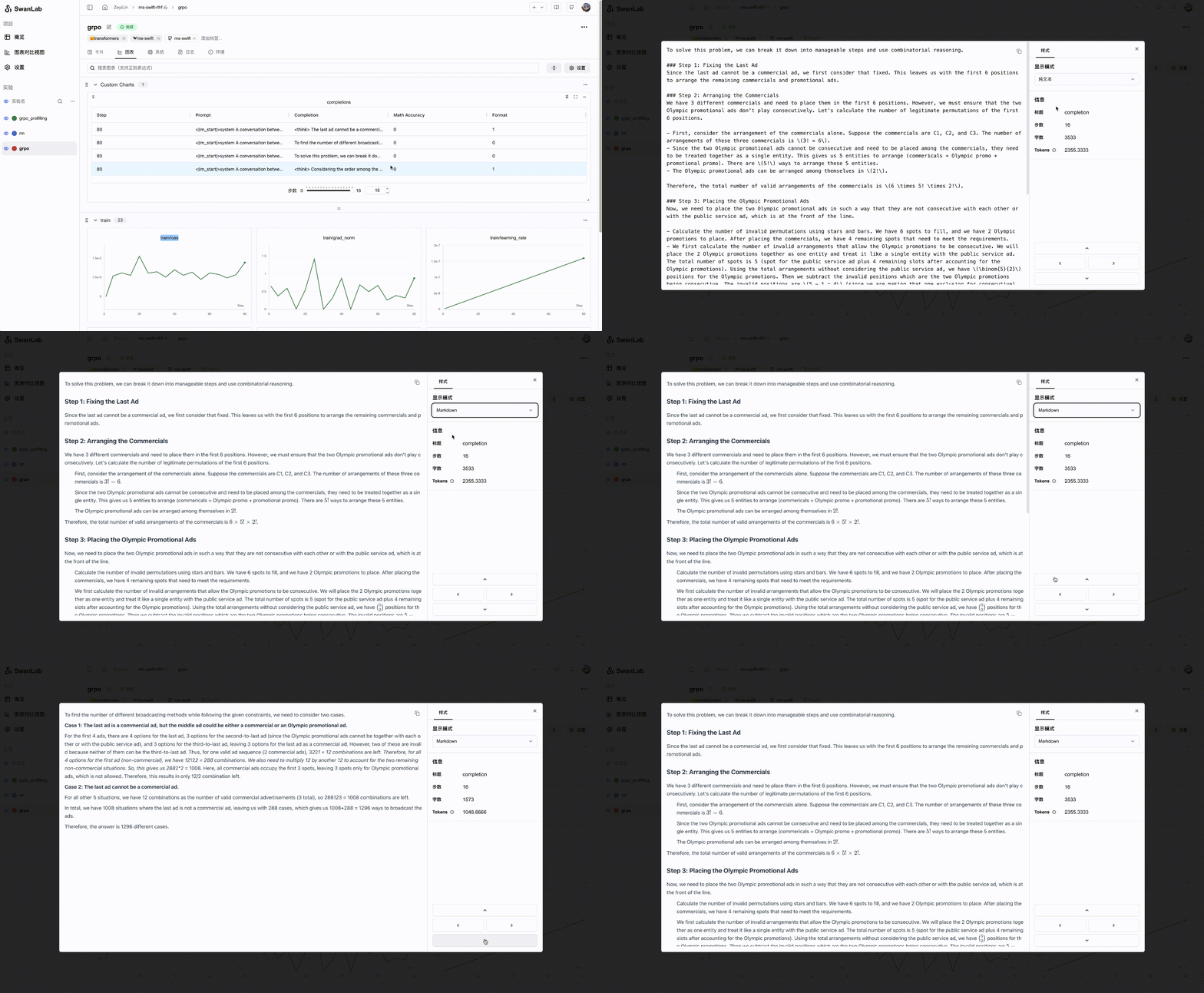
- LLM生成内容可视化组件:为大语言模型训练场景打造的文本内容可视化图表,支持Markdown渲染
后台自动记录:日志logging、硬件环境、Git 仓库、Python 环境、Python 库列表、项目运行目录
断点续训记录:支持在训练完成/中断后,补充新的指标数据到同个实验中
2. ⚡️ 全面的框架集成: PyTorch、🤗HuggingFace Transformers、PyTorch Lightning、🦙LLaMA Factory、MMDetection、Ultralytics、PaddleDetetion、LightGBM、XGBoost、Keras、Tensorboard、Weights&Biases、Swift、XTuner、Stable Baseline3、Hydra 在内的 30+ 框架

3. 💻 硬件监控: 支持实时记录与监控CPU、NPU(昇腾Ascend)、GPU(英伟达Nvidia)、AMD(AMD ROCm)、MLU(寒武纪Cambricon)、XLU(昆仑芯Kunlunxin)、DCU(海光DCU)、MetaX GPU(沐曦XPU)、Moore Threads GPU(摩尔线程)、Iluvatar GPU(天数智芯)、内存的系统级硬件指标
4. 📦 实验管理: 通过专为训练场景设计的集中式仪表板,通过整体视图速览全局,快速管理多个项目与实验
5. 🆚 比较结果: 通过在线表格与对比图表比较不同实验的超参数和结果,挖掘迭代灵感
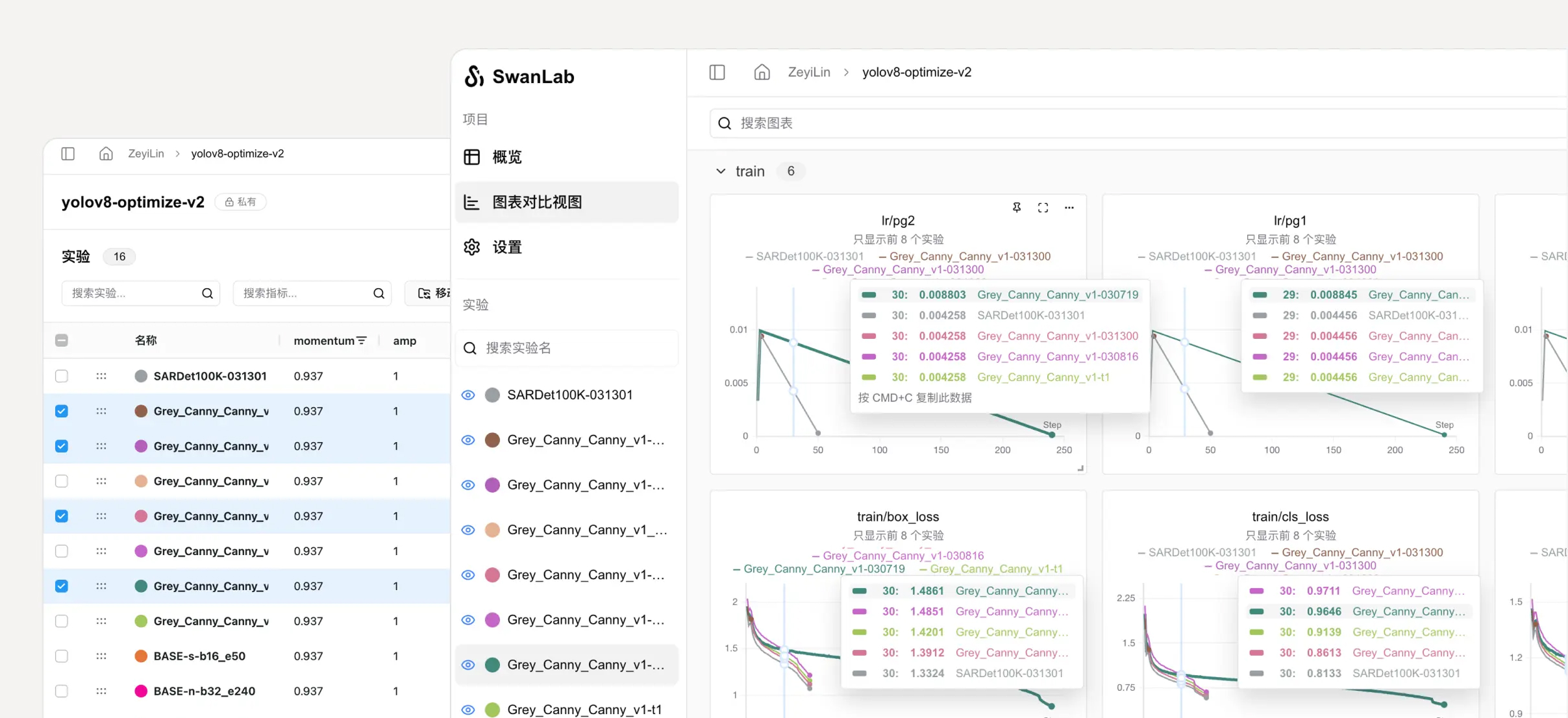
6. 👥 在线协作: 您可以与团队进行协作式训练,支持将实验实时同步在一个项目下,您可以在线查看团队的训练记录,基于结果发表看法与建议
7. ✉️ 分享结果: 复制和发送持久的 URL 来共享每个实验,方便地发送给伙伴,或嵌入到在线笔记中
8. 💻 支持自托管: 支持离线环境使用,自托管的社区版同样可以查看仪表盘与管理实验,使用攻略
9. 🔌 插件拓展: 支持通过插件拓展SwanLab的使用场景,比如 飞书通知、Slack通知、CSV记录器等
[!IMPORTANT]
收藏项目,你将从 GitHub 上无延迟地接收所有发布通知~ ⭐️

📃 在线演示
来看看 SwanLab 的在线演示:
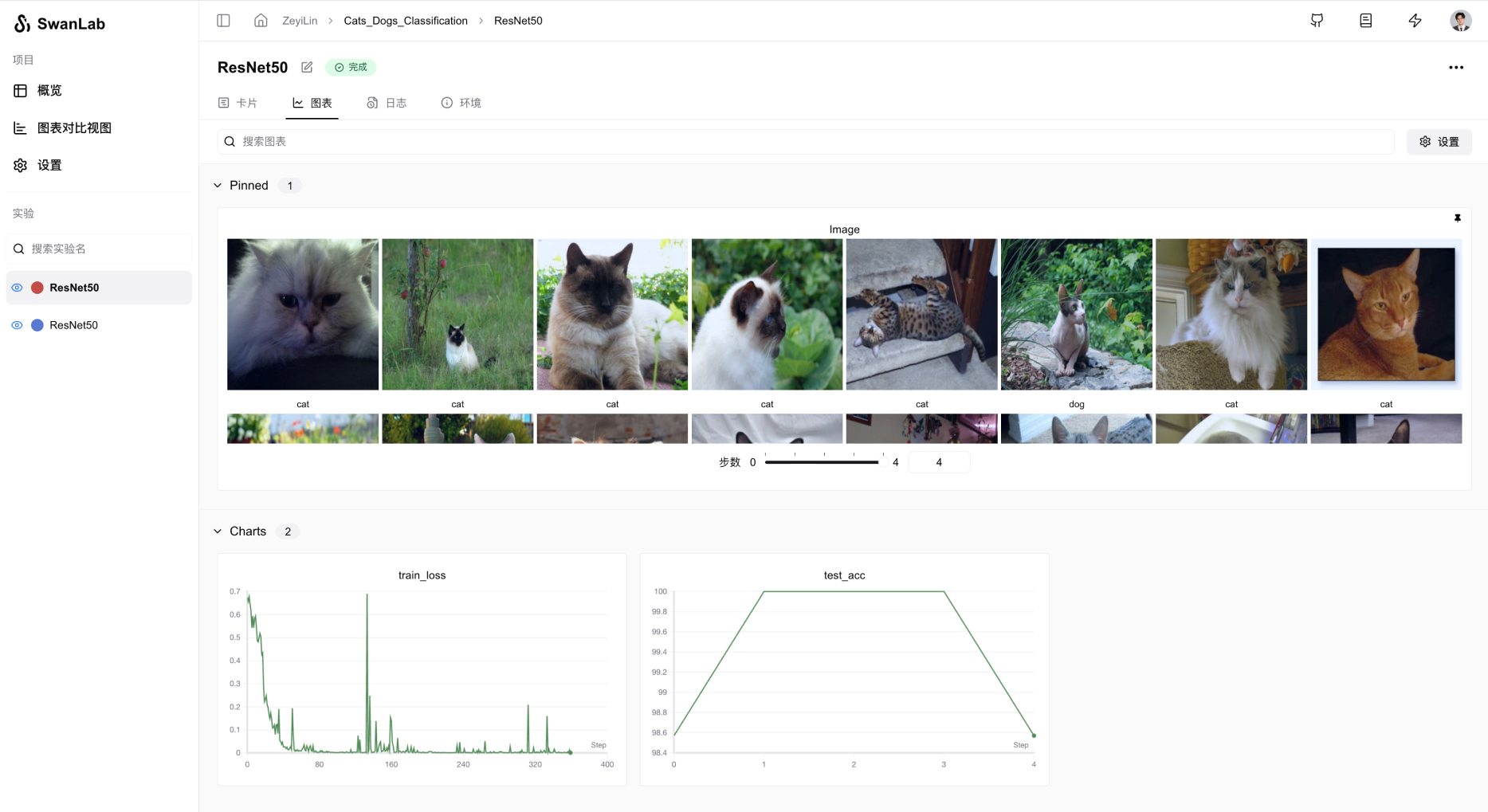
| ResNet50 猫狗分类 | Yolov8-COCO128 目标检测 |
|---|---|
 |
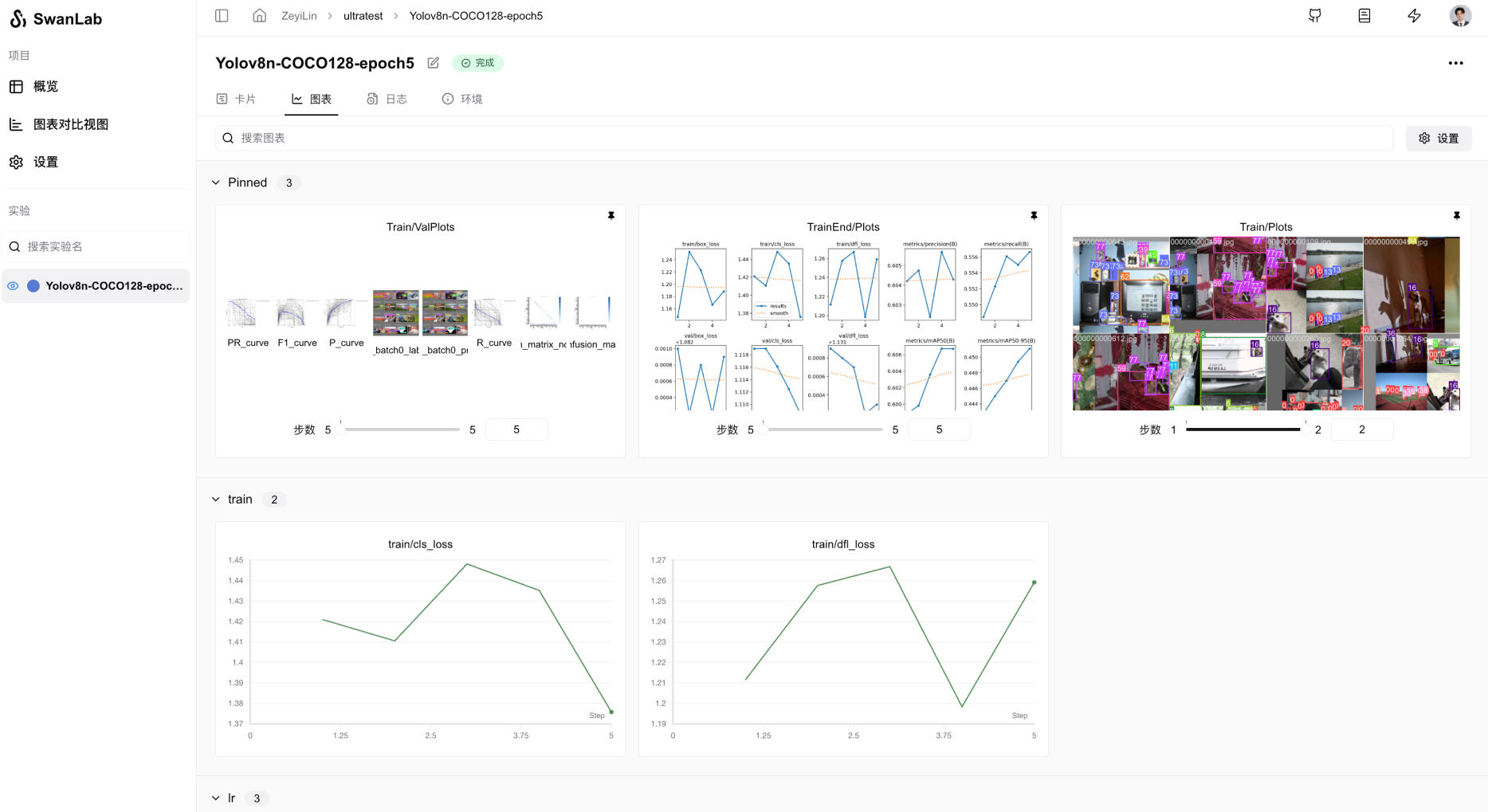 |
| 跟踪一个简单的 ResNet50 模型在猫狗数据集上训练的图像分类任务。 | 使用 Yolov8 在 COCO128 数据集上进行目标检测任务,跟踪训练超参数和指标。 |
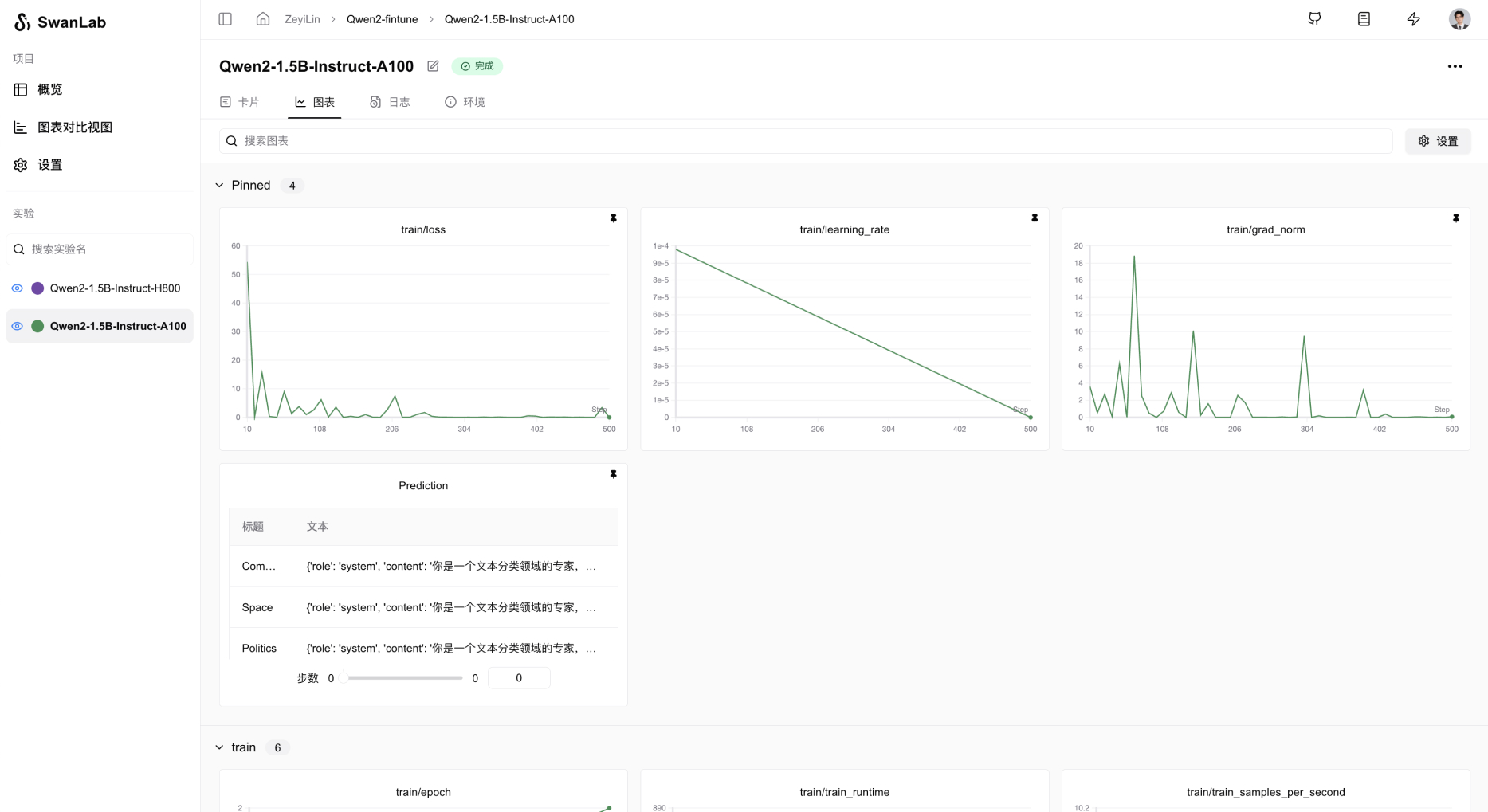
| Qwen2 指令微调 | LSTM Google 股票预测 |
|---|---|
 |
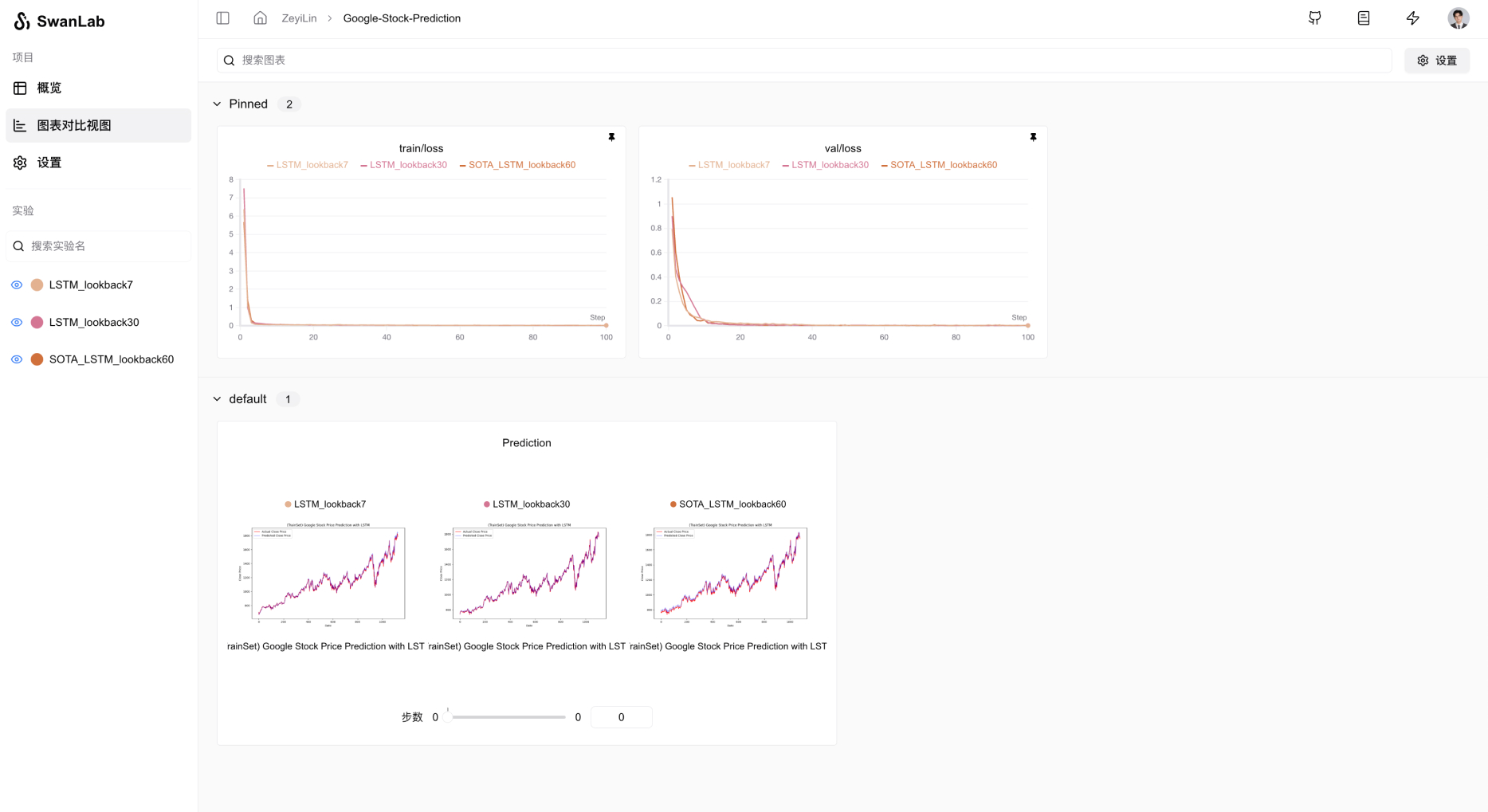 |
| 跟踪 Qwen2 大语言模型的指令微调训练,完成简单的指令遵循。 | 使用简单的 LSTM 模型在 Google 股价数据集上训练,实现对未来股价的预测。 |
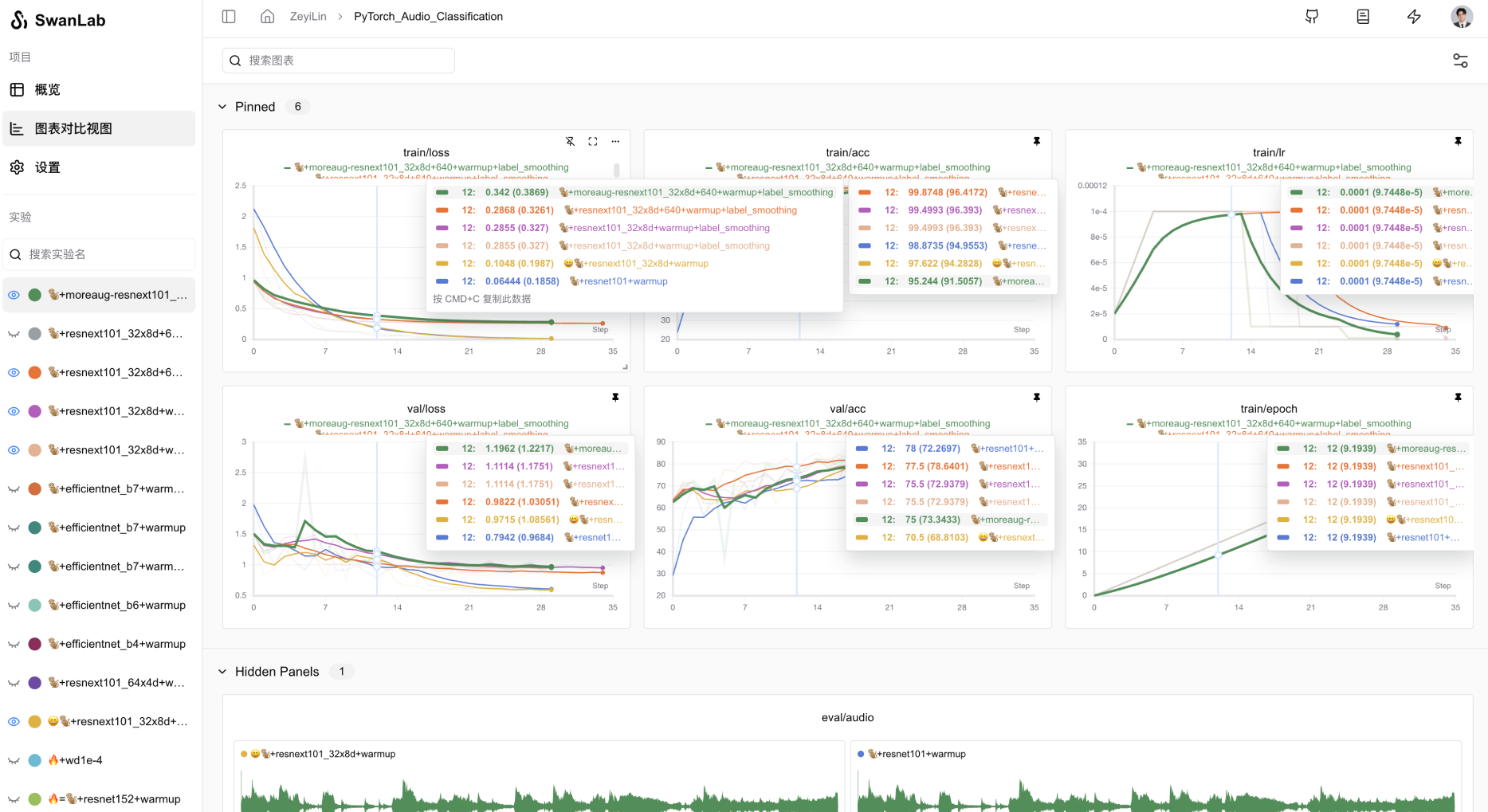
| ResNeXt101 音频分类 | Qwen2-VL COCO数据集微调 |
|---|---|
 |
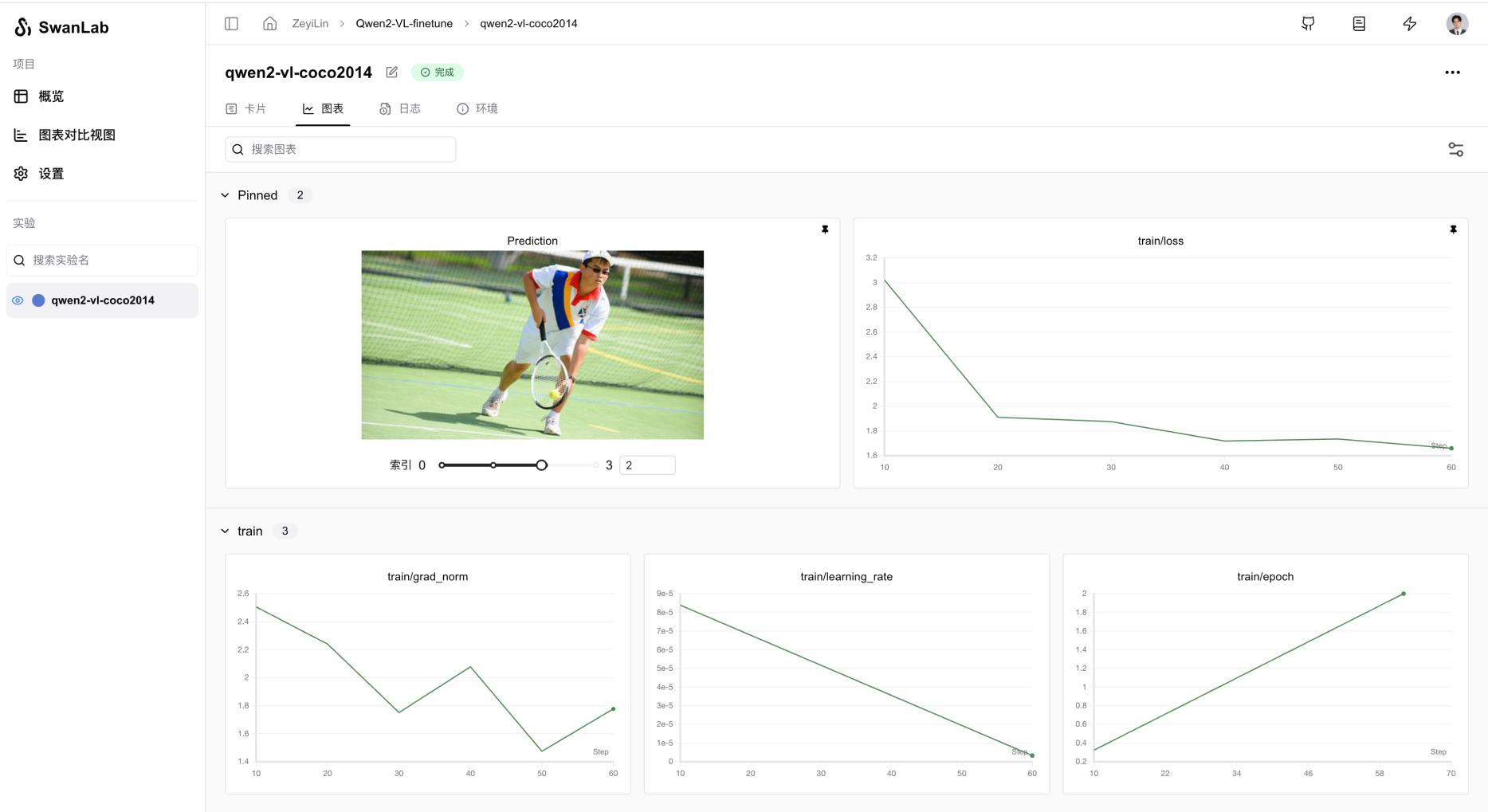 |
| 从ResNet到ResNeXt在音频分类任务上的渐进式实验过程 | 基于Qwen2-VL多模态大模型,在COCO2014数据集上进行Lora微调。 |
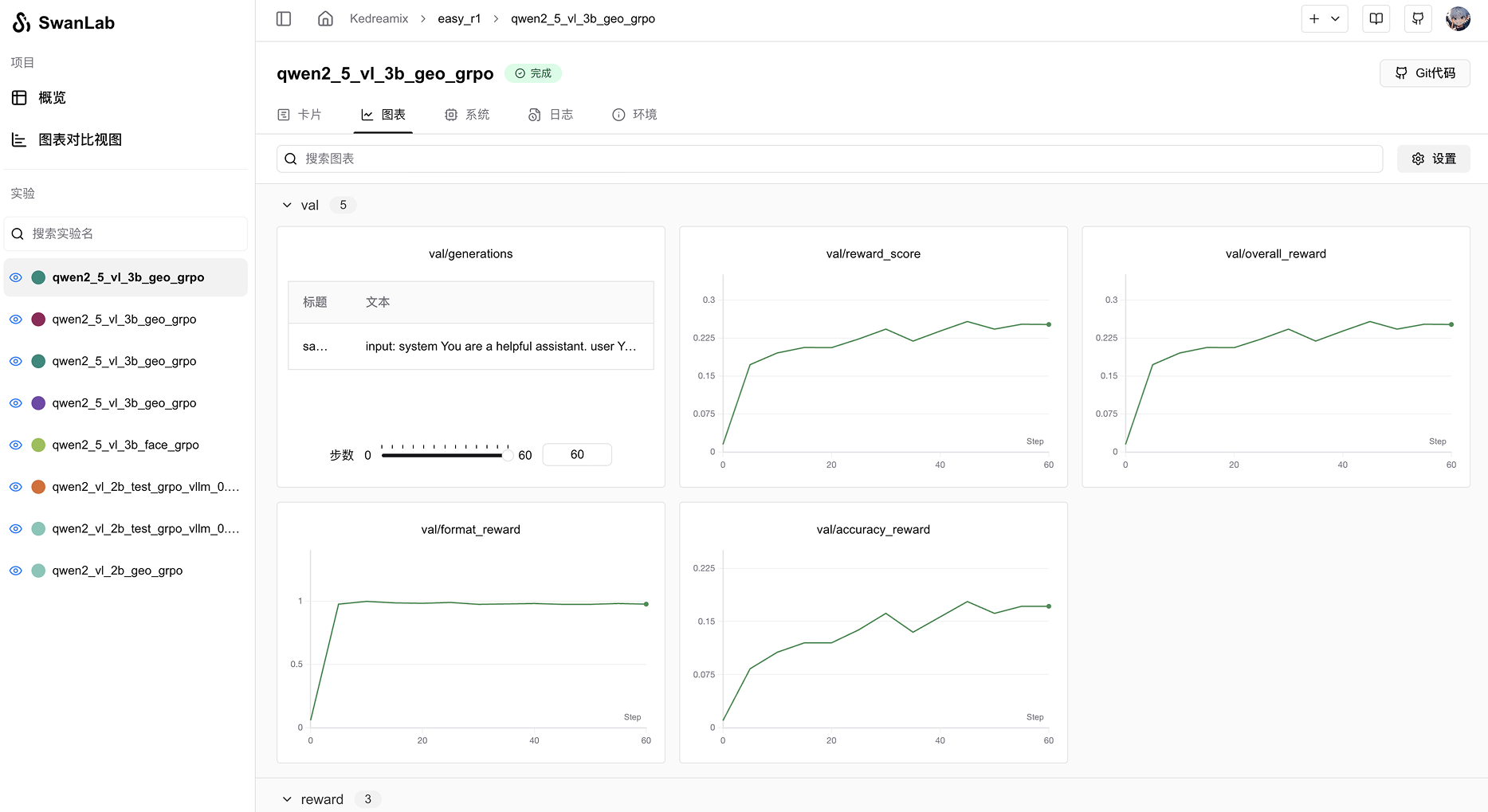
| EasyR1 多模态LLM RL训练 | Qwen2.5-0.5B GRPO训练 |
|---|---|
 |
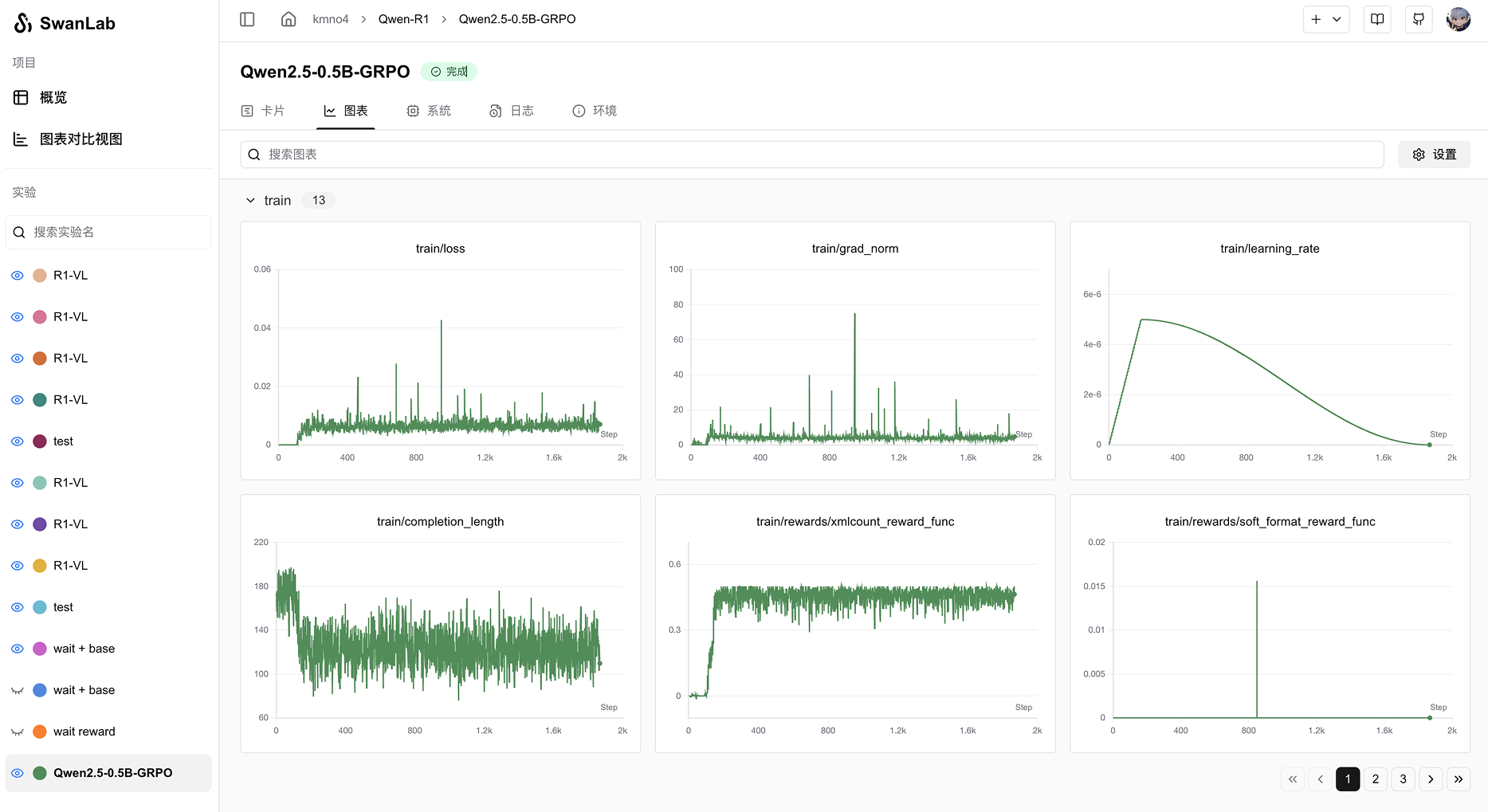 |
| 使用EasyR1框架进行多模态LLM RL训练 | 基于Qwen2.5-0.5B模型在GSM8k数据集上进行GRPO训练 |
🏁 快速开始
1.安装
pip install swanlab
源码安装
如果你想体验最新的特性,可以使用源码安装。
# 方式一
git clone https://github.com/SwanHubX/SwanLab.git
pip install -e .

# 方式二
pip install git+https://github.com/SwanHubX/SwanLab.git
2.登录并获取 API Key
swanlab login
出现提示时,输入您的 API Key,按下回车,完成登陆。
3.将 SwanLab 与你的代码集成
import swanlab

# 初始化一个新的swanlab实验
swanlab.init(
    project="my-first-ml",
    config={"learning-rate": 0.003},
)

# 记录指标
for i in range(10):
    swanlab.log({"loss": i, "acc": i})
大功告成!前往SwanLab查看你的第一个 SwanLab 实验。
💻 自托管
自托管社区版支持离线查看 SwanLab 仪表盘。
详细部署文档见:
🔥 实战案例
使用SwanLab的优秀教程开源项目:
- happy-llm:从零开始的大语言模型原理与实践教程
- self-llm:《开源大模型食用指南》针对中国宝宝量身打造的基于Linux环境快速微调(全参数/Lora)、部署国内外开源大模型(LLM)/多模态大模型(MLLM)教程
- Minimind:🚀🚀 「大模型」2小时完全从0训练26M的小参数GPT!
- unlock-deepseek:DeepSeek 系列工作解读、扩展和复现
- Qwen3-SmVL: 将SmolVLM2的视觉头与Qwen3-0.6B模型进行了拼接微调
- OPPO/Agent_Foundation_Models: 通过多Agent蒸馏和Agent RL的端到端Agent基础模型。
- Tree-GRPO: [ICLR 2026] 树搜索在LLM Agent RL中的应用
- FIPO: This code implements the algorithm of FIPO, a value-free RL recipe for eliciting deeper reasoning from a clean base model.
- llm-agent-rl-lab: Reproducing and studying RL algorithms for LLM agents, including PPO, GRPO, GSPO, DAPO, OPD and beyond.


使用SwanLab的优秀论文:
- Accelerating AlphaZero Training for Connect6 via Behavioral Cloning Initialization and Prior Action Masking in Resource-Constrained Environments
- SeePhys Pro: Diagnosing Modality Transfer and Blind-Training Effects in Multimodal RLVR for Physics Reasoning
- MemFactory: Unified Inference & Training Framework for Agent Memory
- ILL: A Lightweight Large Language Model for Legal and Courtroom Assistance
- Retrieval, Reward, and Training Protocols: What Matters in Training Search Agents?
- MolAct: An Agentic RL Framework for Molecular Editing and Property Optimization
- CQLLM: A Framework for Generating CodeQL Security Vulnerability Detection Code Based on Large Language Model
- Animation Needs Attention: A Holistic Approach to Slides Animation Comprehension with Visual-Language Models
- Efficient Model Fine-Tuning with LoRA for Biomedical Named Entity Recognition
- SpectrumWorld: Artificial Intelligence Foundation for Spectroscopy
- CodeBoost: Boosting Code LLMs by Squeezing Knowledge from Code Snippets with RL
- A Joint Classification Method for Traditional Chinese Medicine Diseases and Syndromes Based on BertChinese-RCNNATTN
- A Gradient-Norm-Aware Optimizer for Symmetry-Preserving and Stable Deep Learning
- TrafficBM: A Dual-Modality Pre-Training Framework for Network Traffic Classification
- Using Human Cumulative Prospect Theory to Understand Large Language Models Decision-Making
- BiPACE: Bisimulation-Guided Policy Optimization with Action Counterfactual Estimation for LLM Agents
教程文章:
- MNIST手写体识别
- FashionMNIST服装分类
- Cifar10图像分类
- Resnet猫狗分类
- Yolo目标检测
- UNet医学影像分割
- 音频分类
- DQN强化学习-推车倒立摆
- LSTM Google股票预测
- BERT文本分类
- Stable Diffusion文生图微调
- LLM预训练
- GLM4指令微调
- Qwen下游任务训练
- NER命名实体识别
- Qwen3医学模型微调
- Qwen2-VL多模态大模型微调实战
- GRPO大模型强化学习
- Qwen3-SmVL-0.6B多模态模型训练
- LeRobot 具身智能入门
- GLM-4.5-Air-LoRA 及 SwanLab 可视化记录
- RAG怎么做?SwanLab文档助手方案开源了
🌟如果你有想收录的教程,欢迎提交PR!
🎮 硬件记录
SwanLab会对AI训练过程中所使用的硬件信息和资源使用情况进行记录,下面是支持情况表格:
| 硬件 | 信息记录 | 资源监控 | 脚本 |
|---|---|---|---|
| 英伟达GPU | ✅ | ✅ | nvidia.py |
| AMD GPU | ✅ | ✅ | amd.py |
| 昇腾NPU | ✅ | ✅ | ascend.py |
| 寒武纪MLU | ✅ | ✅ | cambricon.py |
| 昆仑芯XPU | ✅ | ✅ | kunlunxin.py |
| 摩尔线程GPU | ✅ | ✅ | moorethreads.py |
| 沐曦GPU | ✅ | ✅ | metax.py |
| 天数智芯GPU | ✅ | ✅ | iluvatar.py |
| 海光DCU | ✅ | ✅ | hygon.py |
| CPU | ✅ | ✅ | cpu.py |
| 内存 | ✅ | ✅ | memory.py |
如果你希望记录其他硬件,欢迎提交Issue与PR!
🚗 框架集成
将你最喜欢的框架与 SwanLab 结合使用!
下面是我们已集成的框架列表,欢迎提交 Issue 来反馈你想要集成的框架。
基础框架
LLM训练框架
- HuggingFace Transformers
- LLaMA Factory
- MS-Swift
- Unsloth
- MLX-LM
- Torchtune
- PaddleNLP
- Sentence Transformers
- XTuner
- OpenMind
LLM强化学习框架
机器人框架
文生图/视频训练框架
深度学习框架
计算机视觉
机器学习框架
评估框架
传统强化学习框架
其他框架:
🔌 插件与API
欢迎通过插件来拓展SwanLab的功能,增强你的实验管理体验!
开放接口:
🆚 与熟悉的工具的比较
Tensorboard vs SwanLab
☁️ 支持在线使用: 通过 SwanLab 可以方便地将训练实验在云端在线同步与保存,便于远程查看训练进展、管理历史项目、分享实验链接、发送实时消息通知、多端看实验等。而 Tensorboard 是一个离线的实验跟踪工具。
👥 多人协作: 在进行多人、跨团队的机器学习协作时,通过 SwanLab 可以轻松管理多人的训练项目、分享实验链接、跨空间交流讨论。而 Tensorboard 主要为个人设计,难以进行多人协作和分享实验。
💻 持久、集中的仪表板: 无论你在何处训练模型,无论是在本地计算机上、在实验室集群还是在公有云的 GPU 实例中,你的结果都会记录到同一个集中式仪表板中。而使用 TensorBoard 需要花费时间从不同的机器复制和管理 TFEvent 文件。
💪 更强大的表格: 通过 SwanLab 表格可以查看、搜索、过滤来自不同实验的结果,可以轻松查看数千个模型版本并找到适合不同任务的最佳性能模型。 TensorBoard 不适用于大型项目。
Weights and Biases vs SwanLab
Weights and Biases 是一个必须联网使用的闭源 MLOps 平台
SwanLab 不仅支持联网使用,也支持开源、免费、自托管的版本
👥 社区
周边仓库
- self-hosted:私有化部署脚本仓库
- SwanLab-Docs:官方文档仓库
- SwanLab-Dashboard:离线看板仓库,存放了由
swanlab watch打开的轻量离线看板的web代码
社区与支持
- GitHub Issues:使用 SwanLab 时遇到的错误和问题
- 电子邮件支持:反馈关于使用 SwanLab 的问题
- 微信交流群:交流使用 SwanLab 的问题、分享最新的 AI 技术
SwanLab README 徽章
如果你喜欢在工作中使用 SwanLab,请将 SwanLab 徽章添加到你的 README 中:
、
[](your experiment url)
[](your experiment url)
更多设计素材:assets
在论文中引用 SwanLab
如果您发现 SwanLab 对您的研究之旅有帮助,请考虑以下列格式引用:
@software{Zeyilin_SwanLab_2023,
  author = {Zeyi Lin, Shaohong Chen, Kang Li, Qiushan Jiang, Zirui Cai,  Kaifang Ji and {The SwanLab team}},
  doi = {10.5281/zenodo.11100550},
  license = {Apache-2.0},
  title = {{SwanLab}},
  url = {https://github.com/swanhubx/swanlab},
  year = {2023}
}
为 SwanLab 做出贡献
考虑为 SwanLab 做出贡献吗?首先,请花点时间阅读 贡献指南。
同时,我们非常欢迎通过社交媒体、活动和会议的分享来支持 SwanLab,衷心感谢!
Contributors

📃 协议
本仓库遵循 Apache 2.0 License 开源协议
Star History
An Professional, Modern-Designed AI Training Analysis Platform
For Model Training Teams, Integrated with 50+ Leading AI Training Frameworks, Easily Combined with Your Experimental Code
🔥SwanLab Online · 📃 Documentation · Report Issues · Feedback · Changelog · SKILL
👋 Join our WeChat Group
Table of Contents
- 🌟 Recent Updates
- 👋🏻 What is SwanLab
- 📃 Online Demo
- 🏁 Quick Start
- 💻 Self-Hosting
- 🔥 Tutorials
- 🚗 Framework Integration
- 🔌 Plugins
- 🎮 Hardware Monitoring
- 🆚 Comparison with Familiar Tools
- 👥 Community
- 📃 License
🌟 Recent Updates
2026.06.16: 📊 Added HTML charts, supporting pages embedded after LLM Vibe Coding; the Kubernetes deployment Prometheus log monitoring solution is now available;
2026.06.05: ⚡️ The refactored SDK (v0.8.0) is now available, significantly improving metric logging performance for large-scale training; SwanLab CLI and Skill are now available for the AutoResearch paradigm;
2026.05.18: 📒 Logs now support global filtering, so you can quickly find the log snippets you need across the entire workspace; added chart copy feature; chart search now includes search history; chart details now show relative time;
2026.04.28: 🪨 Project Pinning is now live — place the projects your team cares about most in the most prominent spot; improved the metric panel display when hovering over line charts;
2026.03.25: 📊 Experiment Pinning is now live — pin your best experiments to the most accessible position with one click; Baseline comparison is now available, supporting comparison of experiments against a baseline with percentage difference display, accelerating the search for optimal parameters;
https://github.com/user-attachments/assets/964380e0-feb2-480d-b1ca-eba1be239ebb
2026.03.19: 📊 Added experiment duplication feature, supporting the creation of experiment copies to different projects and teams; parallel mode is now available, supporting multiple processes recording metrics to the same experiment at the same time; experiment ID can now be customized;
2026.02.06: 🔥swanlab.Api is now available, providing a more powerful, object-oriented open API interface, documentation; ECharts.Table supports CSV download; now supports one-click placement of charts at the top of sections;
Full Changelog
2026.01.28: ⚡️ LightningBoard V2 is now available, significantly improving dashboard performance;
2026.01.16: ⚡️ LightningBoard (Lightning Dashboard) V1 is now available, designed for extremely large chart number scenarios; added chart embedding link, now you can embed your charts into online documents (such as Notion, Lark, etc.);
2026.01.02: 🥳 Added support for AMD ROCm and Iluvatar GPU hardware monitoring; SDK added heartbeat package feature, implementing more robust cloud/offline connection;
2025.12.15: 🎉 Kubernetes Version of SwanLab is now available! Deployment Documentation; NVIDIA NeMo RL framework is now integrated with SwanLab, documentation;
2025.12.01: 🕰 Added detailed line chart information display, when hovering over the line chart, clicking Shift will activate Detailed Mode, allowing the display of the log point time; 📊 Chart grouping supports MIN/MAX area range display;
2025.11.17: 📊 Global chart configuration now supports X-axis data source selection and hover mode functionality, enhancing chart analysis experience; added
SWANLAB_WEBHOOKfunctionality, documentation2025.11.06: 🔪 Experiment Grouping is live — supports grouping management for large batches of experiments; Workspace page upgraded to allow quick switching between multiple organizations; significantly improved line-chart rendering performance;
swanlab.initnow supportsgroupandjob_typeparameters;2025.10.15: 📊 Line chart configuration now supports X-axis data source selection; sidebar now supports displaying pinned columns in table view, enhancing experiment data alignment capabilities;
2025.09.22: 📊 New UI launched; table view now supports global sorting and filtering; unified data level for table view and chart view.
2025.09.12: 🔢 Added support for scalar chart, flexibly displaying the statistical values of experiment indicators; organization management page has been upgraded, providing more powerful permission control and project management capabilities;
2025.08.19: 🤔 Optimized chart rendering performance, allowing researchers to focus more on experiment analysis; integrated excellent MLX-LM and SpecForge frameworks, providing more training scenarios;
2025.08.06: 👥 Training Collaboration is now available, supporting inviting project collaborators, sharing project links and QR codes; the workspace now supports list view, and project Tags are now displayed;
2025.07.29: 🚀 Added support for experiment filtering and sorting in the sidebar; 📊 Added column control panel to the table view, allowing easy hiding and displaying of columns; 🔐 Added support for managing multiple API Keys, making your data more secure; swanlab sync now supports training crash log files; PR curve, ROC curve, confusion matrix are now available, documentation;
2025.07.17: 📊 Added support for line chart configuration, supporting flexible configuration of line type, color, thickness, grid, legend position, etc.; 📹 Added support for swanlab.Video data type, supporting recording and visualizing GIF format files; Global chart dashboard now supports configuring Y-axis and maximum number of experiments displayed.
2025.07.10: 📚 Added support for text view, supporting Markdown rendering and direction key switching, which can be created by
swanlab.echarts.tableandswanlab.Text, Demo2025.07.06: 🚄 Added support for resume training; new plugin File Logger; integrated ray framework, documentation; integrated ROLL framework, thanks to @PanAndy, documentation
2025.06.27: Added support for small line chart zooming; added support for configuring single line chart smoothing; significantly improved the interaction effect of image charts after zooming.
2025.06.20: 🤗 Integrated the accelerate framework, PR, documentation, enhancing the experience of recording and analyzing experiments in distributed training.
2025.06.18: 🐜 Integrated the AREAL framework, thanks to @xichengpro, PR, documentation; 🖱 Added support for highlighting corresponding curves when hovering the mouse over sidebar experiments; Added support for cross-group comparison line charts; Added support for setting experiment name trimming rules;
2025.06.11: 📊 Added support for swanlab.echarts.table data type, supporting pure text chart display; added support for stretch interaction for groups, allowing more charts to be displayed at the same time; added maximum/minimum value options for table views;
2025.06.08: ♻️ Added support for storing complete experiment log files locally and uploading them to the cloud/private deployment via swanlab sync; Hardware monitoring now supports Hygon DCU;
2025.06.01: 🏸 Added support for chart free dragging; added support for ECharts custom chart; added support for PaddleNLP framework; hardware monitoring supports MetaX GPU;
2025.05.25: Logging now supports capturing the standard error stream, allowing better recording of output from frameworks like PyTorch Lightning; hardware monitoring now includes support for Moore Threads; added a security feature for logging runtime commands, where API Keys will be automatically hidden.
2025.05.14: Added support for experiment tags; added support for Log Scale for line charts; added support for group dragging; significantly optimized the experience of uploading a large number of metrics.
2025.05.09: Added support for line chart creation; enhanced the chart configuration feature with data source selection, enabling a single chart to display different metrics; introduced the ability to generate GitHub badges for training projects.
2025.04.23: Added support for editing line charts, allowing free configuration of X and Y axis data ranges and title styles; chart search now supports regular expressions; added hardware detection and monitoring for Kunlun Core XPU.
2025.04.11: Added support for local selection for line charts; supports the step range of the current graph.
2025.04.08: Added support for the swanlab.Molecule data type, enabling recording and visualization of biochemical molecular data; also supports saving the state of sorting, filtering, and column order changes in table views.
2025.04.07: We completed joint integration with EvalScope. Now you can use SwanLab in EvalScope to evaluate LLM performance.
2025.03.30: Added support for the swanlab.Settings method, enabling more precise control over experiment behavior; added support for Cambricon MLU hardware monitoring; integrated Slack notifications and Discord notifications.
2025.03.21: 🎉🤗 HuggingFace Transformers has officially integrated SwanLab (version >=4.50.0), #36433; Added Object3D chart support, now you can track and visualize 3D point clouds, docs; Hardware monitoring supports the recording of GPU memory (MB), disk utilization, and network sent and received.
2025.03.12: 🎉🎉 The Privatized Deployment Edition of SwanLab is now available!! 🔗 Deployment Documentation; SwanLab now supports plugin extensions, such as Email Notification and Lark Notification.
2025.03.09: Added experiment sidebar width support; added external Git code button; added sync_mlflow feature, supporting synchronization with mlflow framework.
2025.03.06: We completed integration with DiffSynth Studio. Now you can use SwanLab in DiffSynth Studio to track and visualize Diffusion model text-to-image/video experiments. Usage Guide
2025.03.04: Added MLFlow feature, supporting conversion of MLFlow experiments to SwanLab experiments. Usage Guide
2025.03.01: Added move experiment feature, now you can move experiments to different projects in different organizations.
2025.02.24: We completed integration with EasyR1. Now you can use SwanLab in EasyR1 to track and visualize large model fine-tuning experiments. Usage Guide.
2025.02.18: We completed integration with Swift. Now you can use SwanLab in Swift's CLI/WebUI to track and visualize large model fine-tuning experiments. Usage Guide.
2025.02.16: Added chart moving group and create group features.
2025.02.09: We completed integration with veRL. Now you can use SwanLab in veRL to track and visualize large model reinforcement learning experiments. Usage Guide.
2025.02.05:
swanlab.logsupports nested dictionaries #812, adapting Jax framework features; supportsnameandnotesparameters.2025.01.22: Added
sync_tensorboardXandsync_tensorboard_torchfeatures, supporting synchronization of experiment tracking with these two TensorBoard frameworks.2025.01.17: Added
sync_wandbfeature, docs, supporting synchronization with Weights & Biases experiment tracking; significantly improved log rendering performance.2025.01.11: The cloud version enhanced project table performance with drag-and-drop, sorting, and filtering support.
2025.01.01: Added persistent smoothing for line charts and drag-to-resize functionality for line charts, improving chart browsing experience.
2024.12.22: We completed integration with LLaMA Factory. Now you can use SwanLab in LLaMA Factory to track and visualize large model fine-tuning experiments. Usage Guide.
2024.12.15: Hardware Monitoring (0.4.0) is now available, supporting system-level information recording and monitoring for CPU, NPU (Ascend), and GPU (Nvidia).
2024.12.06: Added integration with LightGBM and XGBoost; increased the limit for single-line log length.
2024.11.26: Environment tab - Hardware section now supports identifying Huawei Ascend NPU and Kunpeng CPU; cloud provider section now supports identifying QingCloud Jishi Computing.
👋🏻 What is SwanLab
SwanLab is an open-source, lightweight AI model training tracking and visualization tool, providing a platform for tracking, recording, comparing, and collaborating on experiments.
SwanLab is designed for AI researchers, offering a friendly Python API and a beautiful UI interface, and providing features such as training visualization, automatic logging, hyperparameter recording, experiment comparison, and multi-user collaboration. With SwanLab, researchers can identify training issues through intuitive visual charts, compare multiple experiments to find research inspiration, and break down team communication barriers through online web sharing and multi-user collaborative training within organizations, improving organizational training efficiency.
https://github.com/user-attachments/assets/7965fec4-c8b0-4956-803d-dbf177b44f54
Here is a list of its core features:
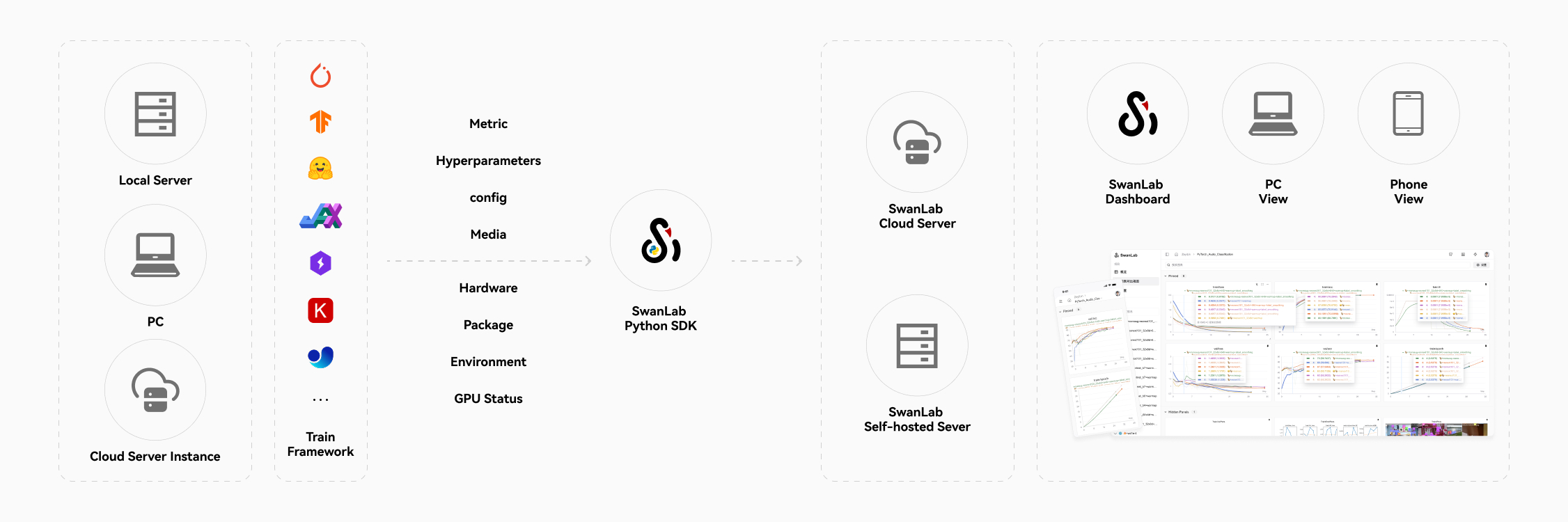
1. 📊 Experiment Metrics and Hyperparameter Tracking: Minimal code integration into your machine learning pipeline to track and record key training metrics.
- ☁️ Supports cloud usage (similar to Weights & Biases), allowing you to check training progress anytime, anywhere. How to view experiments on mobile.
- 🌸 Visualizing the Training Process: By visualizing experiment tracking data through the UI interface, trainers can intuitively observe the results at each step of the experiment, analyze metric trends, and determine which changes led to improved model performance—ultimately enhancing the overall efficiency of model iteration.
Supports hyperparameter recording and table display.
Supported metadata types: Scalar metrics, images, audio, text, 3D point clouds, biological chemical molecules, Echarts custom chart...
Resume Training Record: Supports recording new metrics data to the same experiment after training is completed/interrupted.
- Supported chart types: Line charts, media charts (images, audio, text, 3D point clouds, biological chemical molecules), Bar charts, Scatter charts, Box plots, Heat maps, Pie charts, Radar charts, Custom charts...
- Text Chart: A text chart for large language model training, supporting Markdown rendering.
- Automatic background logging: Logging, hardware environment, Git repository, Python environment, Python library list, project runtime directory.
2. ⚡️ Comprehensive Framework Integration: PyTorch, 🤗HuggingFace Transformers, PyTorch Lightning, 🦙LLaMA Factory, MMDetection, Ultralytics, PaddleDetection, LightGBM, XGBoost, Keras, Tensorboard, Weights&Biases, Swift, XTuner, Stable Baseline3, Hydra, and more, totaling 30+ frameworks.
3. 💻 Hardware Monitoring: Supports real-time recording and monitoring of system-level hardware metrics for CPU, NPU (Ascend), GPU (Nvidia), AMD (ROCm), MLU (Cambricon), XLU (Kunlunxin), DCU (Hygon), MetaX GPU (Moxing), Moore Threads GPU (Moore Threads), Iluvatar GPU (Iluvatar), and memory.
4. 📦 Experiment Management: Through a centralized dashboard designed for training scenarios, quickly overview and manage multiple projects and experiments.
5. 🆚 Result Comparison: Compare hyperparameters and results of different experiments through online tables and comparison charts to uncover iteration insights.
6. 👥 Online Collaboration: Collaborate with your team on training, supporting real-time synchronization of experiments under a single project. You can view team training records online and provide feedback and suggestions based on results.
7. ✉️ Share Results: Copy and send persistent URLs to share each experiment, easily send to partners, or embed in online notes.
8. 💻 Self-Hosting Support: Supports offline usage, and the self-hosted community edition also allows viewing dashboards and managing experiments.
9. 🔌 Plugin Extensions: Supports extending SwanLab's usage scenarios through plugins, such as Lark Notifications, Slack Notifications, CSV Logger, etc.
[!IMPORTANT]
Star the project to receive all release notifications from GitHub without delay ~ ⭐️
📃 Online Demo
Check out SwanLab's online demos:
| ResNet50 Cat-Dog Classification | Yolov8-COCO128 Object Detection |
|---|---|
|
|
| Track a simple ResNet50 model training on a cat-dog dataset for image classification. | Use Yolov8 on the COCO128 dataset for object detection, tracking training hyperparameters and metrics. |
| Qwen2 Instruction Fine-Tuning | LSTM Google Stock Prediction |
|---|---|
|
|
| Track Qwen2 large language model instruction fine-tuning for simple instruction following. | Use a simple LSTM model on Google stock price dataset to predict future stock prices. |
| ResNeXt101 Audio Classification | Qwen2-VL COCO Dataset Fine-Tuning |
|---|---|
|
|
| Progressive experimental process from ResNet to ResNeXt on audio classification tasks. | Fine-tune Qwen2-VL multimodal large model on COCO2014 dataset using Lora. |
| EasyR1 multimodal LLM RL Training | Qwen2.5-0.5B GRPO Training |
|---|---|
|
|
| Use EasyR1 framework for multimodal LLM RL training | Fine-tune Qwen2.5-0.5B model on GSM8k dataset using GRPO. |
🏁 Quick Start
1. Installation
pip install swanlab
Install from Source
If you want to experience the latest features, you can install from the source code.
# Method 1
git clone https://github.com/SwanHubX/SwanLab.git
pip install -e .

# Method 2
pip install git+https://github.com/SwanHubX/SwanLab.git
2. Login and Get API Key
Register for free at SwanLab.
Log in, and copy your API Key from User Settings > API Key.
Open the terminal and enter:
swanlab login
When prompted, enter your API Key, press Enter, and complete the login.
3. Integrate SwanLab with Your Code
import swanlab

# Initialize a new SwanLab experiment
swanlab.init(
    project="my-first-ml",
    config={"learning-rate": 0.003},
)

# Log metrics
for i in range(10):
    swanlab.log({"loss": i, "acc": i})
Done! Head over to SwanLab to view your first SwanLab experiment.
💻 Self-Hosted
The self-hosted community edition supports offline viewing of the SwanLab dashboard.
Detailed deployment documentation:
- 🔗 Kubernetes Deployment Documentation
- 🔗 Docker Deployment Documentation
- 🔗 Migration from Docker to Kubernetes Documentation
🔥 Tutorials
Excellent Open-Source Tutorial Projects Using SwanLab:
- happy-llm: A tutorial on the principles and practice of large language models from scratch.
- self-llm: "A Cookbook for Open-Source Large Models" - A tutorial tailored for Chinese users on quickly fine-tuning (full-parameter/LoRA) and deploying domestic and international open-source Large Language Models (LLMs) / Multi-modal Large Models (MLLMs) in a Linux environment.
- Minimind: 🌏 Train a 26M-parameter GPT from scratch in just 2h!
- unlock-deepseek: Interpretation, extension, and reproduction of the DeepSeek series of works.
- Qwen3-SmVL: The visual head of SmolVLM2 was concatenated and fine-tuned with the Qwen3-0.6B model.
- OPPO/Agent_Foundation_Models: Chain-of-Agents: A chain-of-agents model through multi-agent distillation and agent RL.
- Tree-GRPO: [ICLR 2026] Tree Search for LLM Agent Reinforcement Learning
- llm-agent-rl-lab: Reproducing and studying RL algorithms for LLM agents, including PPO, GRPO, GSPO, DAPO, OPD and beyond.
Excellent Research Papers Using SwanLab:
- Accelerating AlphaZero Training for Connect6 via Behavioral Cloning Initialization and Prior Action Masking in Resource-Constrained Environments
- SeePhys Pro: Diagnosing Modality Transfer and Blind-Training Effects in Multimodal RLVR for Physics Reasoning
- MemFactory: Unified Inference & Training Framework for Agent Memory
- ILL: A Lightweight Large Language Model for Legal and Courtroom Assistance
- Retrieval, Reward, and Training Protocols: What Matters in Training Search Agents?
- MolAct: An Agentic RL Framework for Molecular Editing and Property Optimization
- CQLLM: A Framework for Generating CodeQL Security Vulnerability Detection Code Based on Large Language Model
- Animation Needs Attention: A Holistic Approach to Slides Animation Comprehension with Visual-Language Models
- Efficient Model Fine-Tuning with LoRA for Biomedical Named Entity Recognition
- SpectrumWorld: Artificial Intelligence Foundation for Spectroscopy
- CodeBoost: Boosting Code LLMs by Squeezing Knowledge from Code Snippets with RL
- A Joint Classification Method for Traditional Chinese Medicine Diseases and Syndromes Based on BertChinese-RCNNATTN
- A Gradient-Norm-Aware Optimizer for Symmetry-Preserving and Stable Deep Learning
- TrafficBM: A Dual-Modality Pre-Training Framework for Network Traffic Classification
- Using Human Cumulative Prospect Theory to Understand Large Language Models Decision-Making
- BiPACE: Bisimulation-Guided Policy Optimization with Action Counterfactual Estimation for LLM Agents
Tutorial Articles:
- MNIST Handwritten Digit Recognition
- FashionMNIST Apparel Classification
- CIFAR-10 Image Classification
- ResNet Cat vs. Dog Classification
- YOLO Object Detection
- U-Net Medical Image Segmentation
- Audio Classification
- DQN Reinforcement Learning - CartPole
- LSTM Google Stock Price Prediction
- BERT Text Classification
- Stable Diffusion Text-to-Image Fine-Tuning
- LLM Pre-training
- GLM4 Instruction Fine-Tuning
- Qwen Downstream Task Training
- NER (Named Entity Recognition)
- Qwen3 Medical Model Fine-Tuning
- Qwen2-VL Multimodal Large Model Fine-Tuning in Practice
- GRPO Large Model Reinforcement Learning
- Training the Qwen3-SmVL-0.6B Multimodal Model
- Getting Started with Embodied AI using LeRobot
- GLM-4.5-Air-LoRA and SwanLab Visualization
- How to do RAG? SwanLab Document Assistant Solution Released
🚗 Framework Integration
Use your favorite frameworks with SwanLab!
Below is a list of frameworks we have integrated. Feel free to submit an Issue to request integration for your desired framework.
Basic Frameworks
LLM Training Frameworks
- HuggingFace Transformers
- LLaMA Factory
- MS-Swift
- Unsloth
- MLX-LM
- Torchtune
- PaddleNLP
- Sentence Transformers
- XTuner
- OpenMind
LLM Reinforcement Learning Frameworks
Robot Frameworks
Text-to-Image/Video Training Frameworks
Deep Learning Frameworks
Computer Vision Frameworks
Machine Learning Frameworks
Evaluation Frameworks
Traditional Reinforcement Learning Frameworks
Other Frameworks:
🔌 Plugins
Enhance your experiment management experience by extending SwanLab's functionality through plugins!
- Customize Your Plugin
- Email Notification
- Lark Notification
- DingTalk Notification
- WXWork Notification
- Discord Notification
- Slack Notification
- Bark Notification
- CSV Logger
🎮 Hardware Monitoring
SwanLab records the hardware information and resource usage during AI training. Below is a table of supported hardware:
| Hardware | Info Logging | Resource Monitoring | Script |
|---|---|---|---|
| NVIDIA GPU | ✅ | ✅ | nvidia.py |
| AMD GPU | ✅ | ✅ | amd.py |
| Ascend NPU | ✅ | ✅ | ascend.py |
| Cambricon MLU | ✅ | ✅ | cambricon.py |
| Kunlunxin XPU | ✅ | ✅ | kunlunxin.py |
| MooreThread GPU | ✅ | ✅ | moorethreads.py |
| MetaX GPU | ✅ | ✅ | metax.py |
| Iluvatar GPU | ✅ | ✅ | iluvatar.py |
| Hygon DCU | ✅ | ✅ | hygon.py |
| CPU | ✅ | ✅ | cpu.py |
| Memory | ✅ | ✅ | memory.py |
If you wish to document other hardware, feel free to submit an Issue or PR!
🆚 Comparison with Familiar Tools
Tensorboard vs SwanLab
☁️ Online Support: SwanLab allows convenient cloud-based synchronization and storage of training experiments, enabling remote viewing of training progress, managing historical projects, sharing experiment links, sending real-time notifications, and multi-device experiment viewing. Tensorboard, on the other hand, is an offline experiment tracking tool.
👥 Multi-User Collaboration: SwanLab facilitates multi-user, cross-team machine learning collaboration by easily managing team training projects, sharing experiment links, and enabling cross-space discussions. Tensorboard is primarily designed for individual use, making multi-user collaboration and experiment sharing difficult.
💻 Persistent, Centralized Dashboard: Regardless of where you train your models—on a local computer, a lab cluster, or a public cloud GPU instance—your results are recorded in the same centralized dashboard. TensorBoard requires time-consuming copying and management of TFEvent files from different machines.
💪 More Powerful Tables: SwanLab tables allow you to view, search, and filter results from different experiments, making it easy to review thousands of model versions and identify the best-performing models for different tasks. TensorBoard is not suitable for large-scale projects.
Weights and Biases vs SwanLab
Weights and Biases is a closed-source MLOps platform that requires an internet connection.
SwanLab not only supports online usage but also offers an open-source, free, self-hosted version.
👥 Community
Repositories
- self-hosted: The repository for private deployment scripts.
- SwanLab-Docs: The official documentation repository.
- SwanLab-Dashboard: The offline dashboard repository, which contains the web code for the lightweight offline dashboard opened by
swanlab watch.
Community and Support
- GitHub Issues: Errors and issues encountered while using SwanLab.
- Email Support: Feedback and questions about using SwanLab.
- WeChat Group: Discuss SwanLab usage and share the latest AI technologies.
SwanLab README Badge
If you enjoy using SwanLab in your work, please add the SwanLab badge to your README:
、
[](your experiment url)
[](your experiment url)
More design materials: assets
Citing SwanLab in Papers
If you find SwanLab helpful in your research journey, please consider citing it in the following format:
@software{Zeyilin_SwanLab_2023,
  author = {Zeyi Lin, Shaohong Chen, Kang Li, Qiushan Jiang, Zirui Cai,  Kaifang Ji and {The SwanLab team}},
  doi = {10.5281/zenodo.11100550},
  license = {Apache-2.0},
  title = {{SwanLab}},
  url = {https://github.com/swanhubx/swanlab},
  year = {2023}
}
Contributing to SwanLab
Considering contributing to SwanLab? First, take a moment to read the Contribution Guide.
We also greatly appreciate support through social media, events, and conference sharing. Thank you!
Contributors
📃 License
This repository is licensed under the Apache 2.0 License.