archify
Turn any idea, plan, or codebase into a beautiful interactive diagram. An agent skill for Claude Code, Codex, and more.
原始仓库简介 · 中文摘要待补充 · agent-skills / ai-agents / architecture-diagram / claude-code / claude-skills / codex
README / 项目原文
Turn anything you want to understand, plan, or share into an interactive visual.
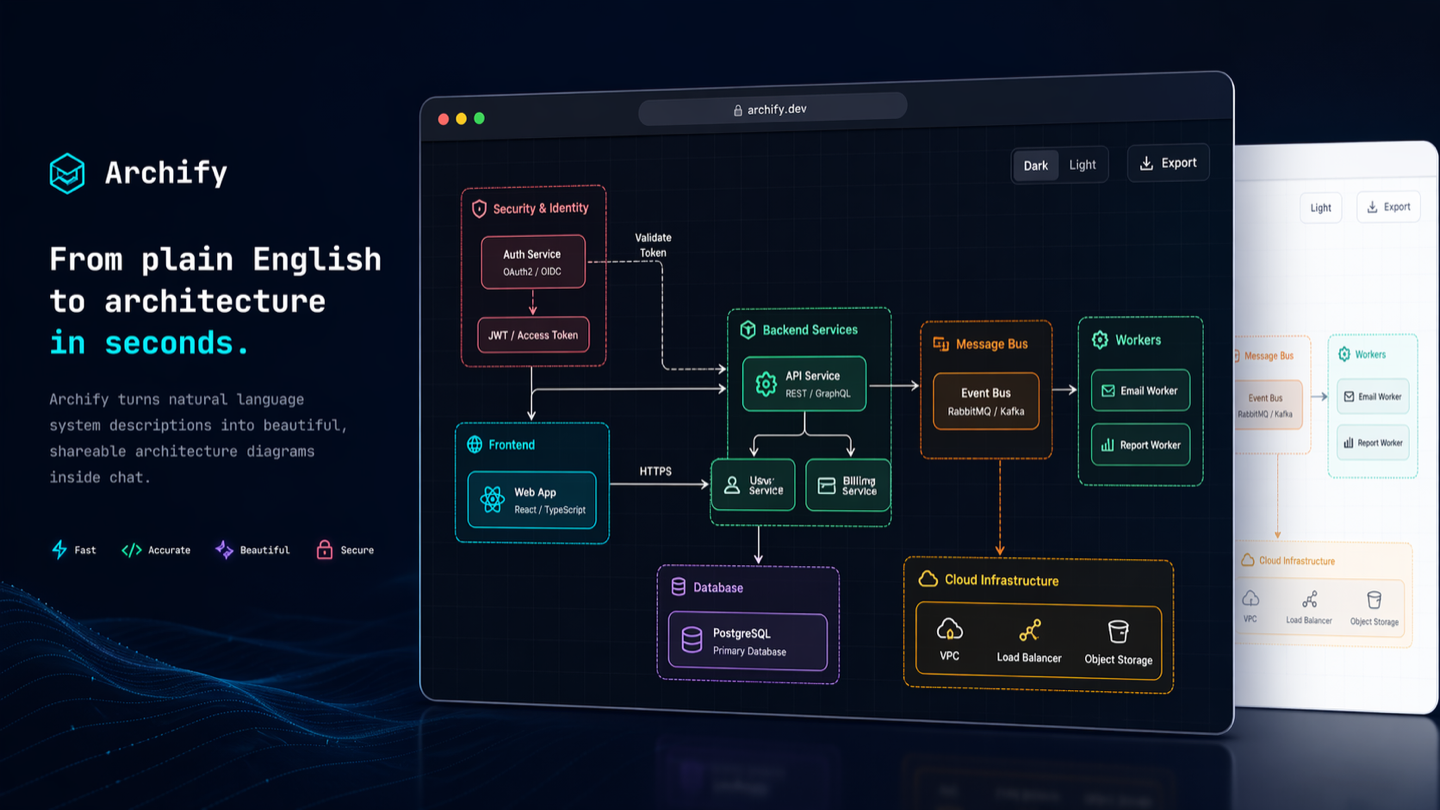
Official channels: archify.si · GitHub
Archify is free and open source. Third-party online services and paid plans are operated by their respective providers and do not represent Archify. Service details →
Start with an idea, a question, or a plan. Describe it to your AI agent, and Archify turns it into an interactive HTML you can explore, customize, and share. From travel itineraries and learning maps to complex systems—make it your own.
See what the community is creating—and imagine what you could make next.
Live demos · Get started · Scenario guide · Community · 简体中文 · 日本語 · 한국어










❤️ Partners & sponsors: Kimi Work · Supercode · OpenLux
See Archify in action
https://github.com/user-attachments/assets/78570807-ba1d-4737-953f-55504a378a87
One sentence. Your repo, mapped. Watch the 35-second demo: explore the diagram, follow source links, and trace a path. Try the interactive examples ↗
Install, then describe your idea
Works with Cursor, Claude Code, Codex CLI, and OpenCode. See installation options below for additional integrations.
npx skills add tt-a1i/archify -g
Send this to your agent:
Use Archify to diagram a web request: Browser calls the API,
the API checks Redis, and a cache miss queries PostgreSQL and fills the cache.
Then continue: “Add authentication”, “Highlight the cache-miss path”, or “Switch to the light theme”.
No repository is required: start with a description, or ask your agent to read a repository for a source-backed architecture diagram.
Choose your agent · Installation details and update checks · Create and check diagrams with your agent
Ask a question, get a one-page answer
Not every answer is one diagram. Ask your agent to answer as a page and Archify builds an explainer: the conclusion first, then one panel per question, with tables, steps, charts, code and validated diagrams.
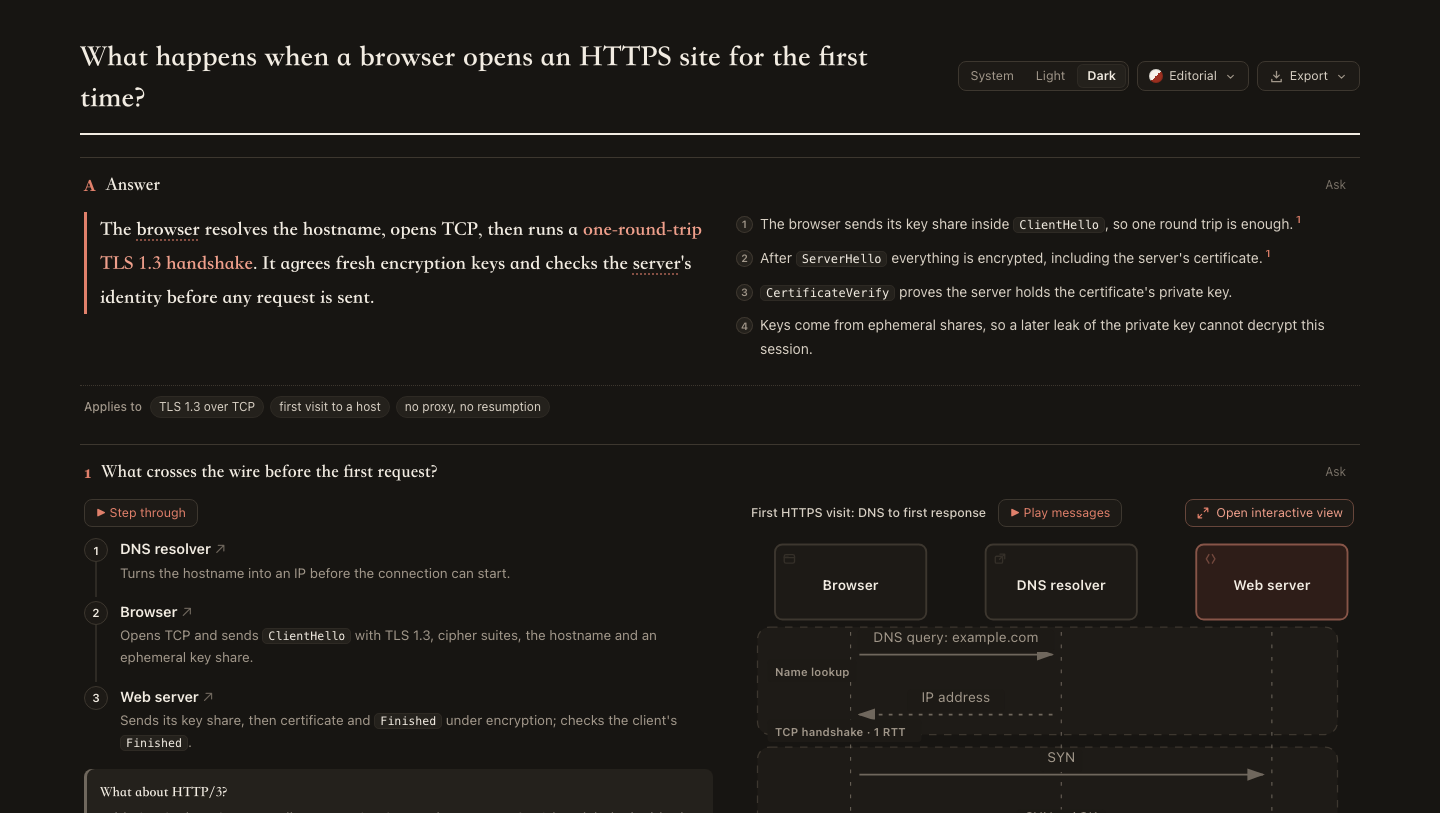
- Conclusion first. The answer and its reasons lead; every panel takes one question.
- Diagrams that explain. Steps sit beside the diagram they walk through and light its parts as you read. Click any node to open the full interactive view.
- Easy to check. Claims cite numbered sources; repository excerpts are pinned to a commit and open in a source card.
- Easy to share. One HTML file with four styles and light or dark themes. Export a PNG, WebP or JPG long image, or print to PDF. Ask about any panel to get a follow-up your agent can use to revise just that panel.
Use Archify to answer as one page: our API's P99 went from 80 ms to 600 ms
while the mean barely moved. What is the likely cause, and how should we investigate?
Live examples: First HTTPS visit · P99 latency (Chinese) · How Archify finalize keeps the last good file, read from this repository (Chinese) · First rental checklist (Chinese)
❤️ Sponsors
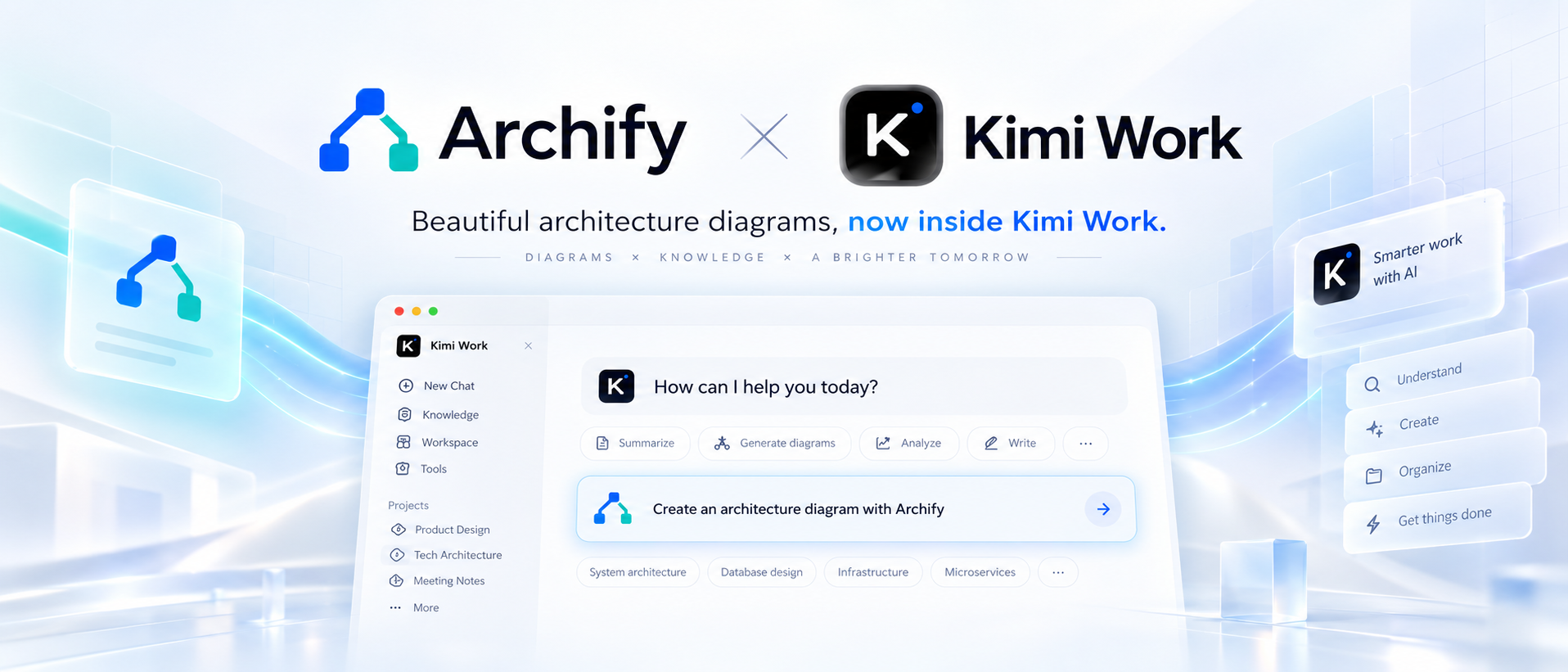
Archify × Kimi Work. Find Archify in the Kimi Work plugin store as Interactive Architecture Diagram. Describe your system in one sentence to create an interactive diagram. Try it in Kimi Work →
 supercode.sh |
Supercode sponsors Archify and enhances Codex and Cursor with token optimization, curated Skills, and spec-driven development. Archify is featured as a Supercode Editor’s Choice skill. |
 OpenLux |
Thank you to OpenLux for sponsoring this project! OpenLux is an all-in-one AI platform for businesses, bringing together leading AI models from major providers worldwide. With fast, reliable service and responsive technical support, OpenLux offers base pricing for Claude, OpenAI, and Gemini models as low as 8.82%, 4%, and 8% of official rates, respectively. Exclusive offer for Archify users: Sign up through our referral link and enjoy up to 7.5% off credit top-ups! Get started with OpenLux → |
 PackyCode |
Access leading AI models through PackyCode with one API endpoint and one API key. Enjoy automatic failover and dedicated high-speed routes for Codex and Claude Code. Get started with $1 in free credits, a discount on your first top-up, and savings of up to 80% on eligible routes. Pay in RMB with no currency conversion markups or extra top-up fees. Get started with PackyCode → |
 AICodeMirror |
Thank you to AICodeMirror for sponsoring Archify! AICodeMirror provides API relay services for Claude, Codex, and Gemini, with enterprise-grade concurrency, invoice issuance, and 24/7 technical support. Codex pricing starts at 7% of standard rates, with additional top-up discounts. Exclusive offer for Archify users: Register through our referral link to receive 20% off your first top-up. Try AICodeMirror → |
 Infistar.cc |
Thank you to Infistar.cc for sponsoring Archify! One API key covers text, image, and video creation with GPT, Claude, Gemini, DeepSeek, Qwen, Kling, and other models, without switching groups. Model API pricing starts at 1% of official rates, and AI images start at ¥0.06 each. Exclusive offer for Archify users: Sign up through our referral link for $5 in trial credits and a special offer on your first top-up. Try Infistar → |
 EverMind · Raven | EverMind sponsors Archify and builds memory infrastructure for agents. Its Raven harness supports Archify as a Skill for verified, interactive system maps. |
Want to sponsor Archify? Contact us by email.
Show what matters
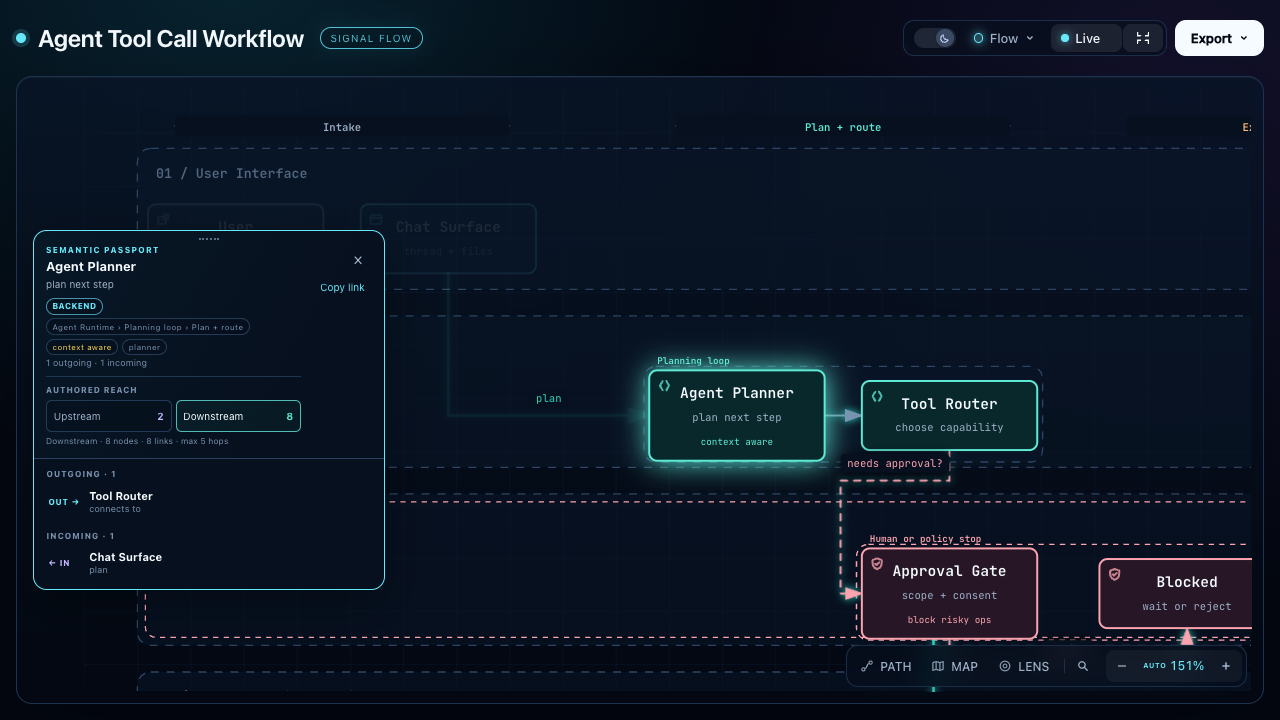
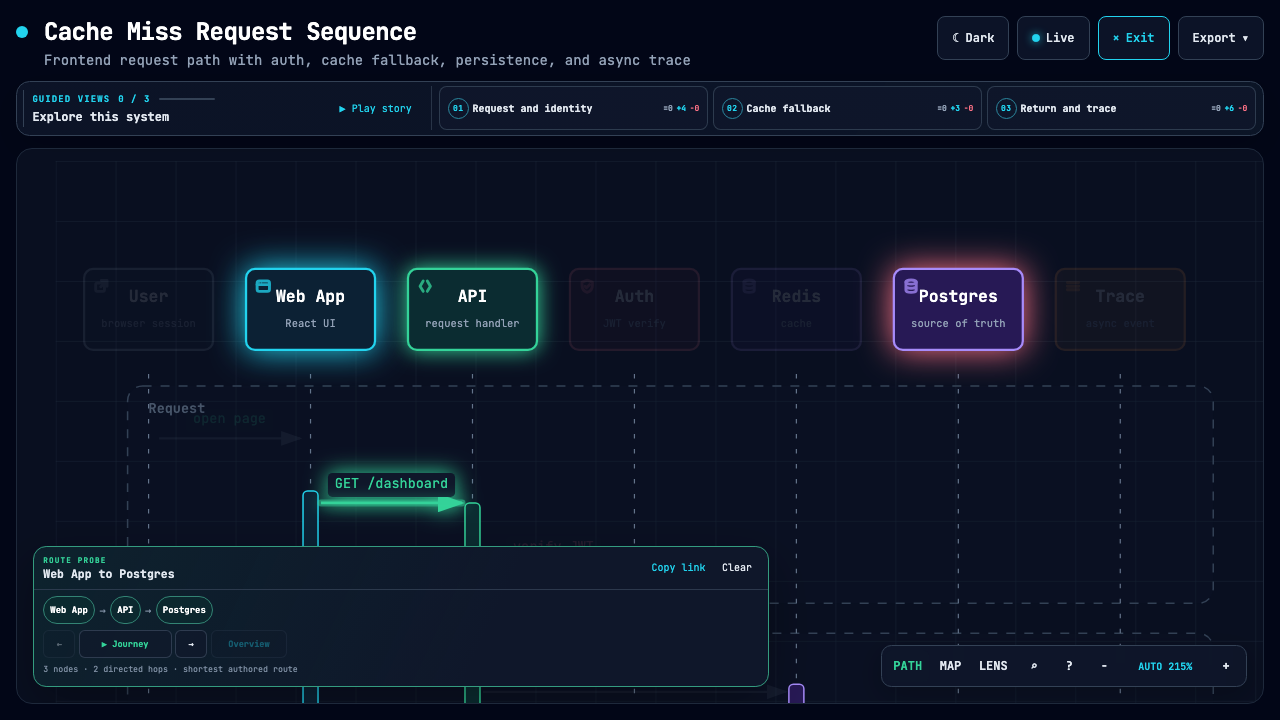
| Explain an agent workflow | Follow a cache miss | Explore service relationships |
|---|---|---|
 |
 |
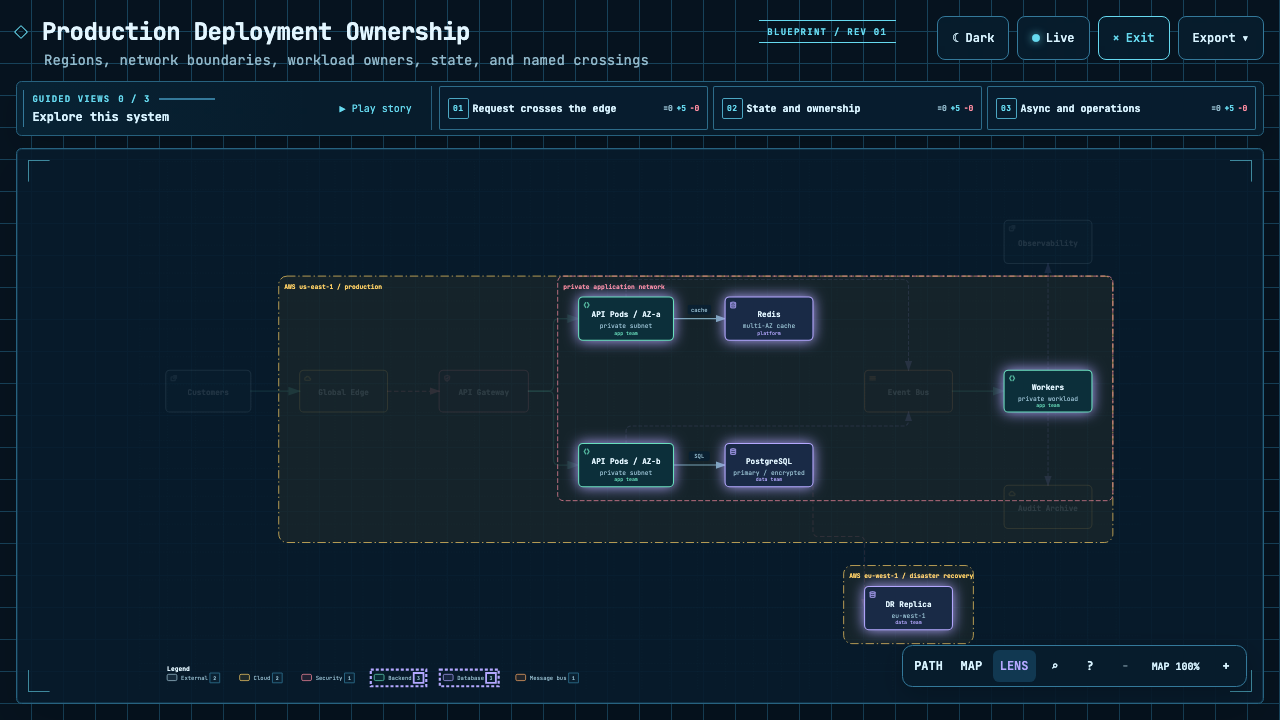 |
| Trace everything downstream of one step. | Highlight the path from web app to database. | Focus on authored backend and database connections. |
The Proof Lab contains all 11 checked-in scenarios, their JSON sources, and validation receipts.
Understand a real repository
CODE → DIAGRAM · A source-backed system map
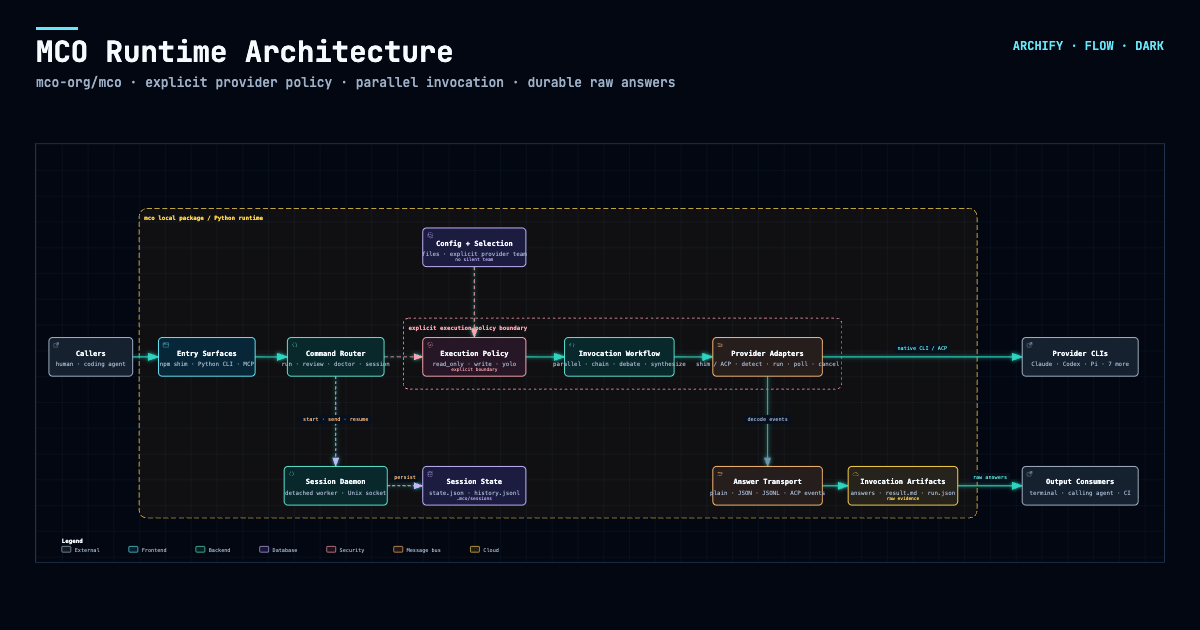
Archify traced mco-org/mco at 9f1a1cf and produced this checked map. Open it ↗ · trace reach ↗ · typed source
Easy to extend. More ways to make it yours.
COMMUNITY STORIES · Selected examples shared by users
Keep building after the diagram is generated. Archify is open source and its output is standalone HTML. Ask your agent to adapt it, connect useful links, or add interactions for your own workflow. Community creations already span team collaboration, travel planning, legal citation checks, contract review, and incident retrospectives. These are just a few examples.
One user started with a hand-drawn multi-agent architecture, turned it into an interactive diagram, then added a Kimi execution pool through conversation. Others asked their agent to read a project and brought the resulting architecture into Feishu or DingTalk for team discussion.
Another user turned a Shanghai CityWalk guide into a four-day itinerary: switch between days, inspect a stop, and jump to Amap, Xiaohongshu, or Dianping. The author also added arrival check-ins and stop notes, turning the itinerary into a small tool to use during the trip. These extensions were added by the community author for this particular artifact.
▶ Explore the interactive Shanghai CityWalk
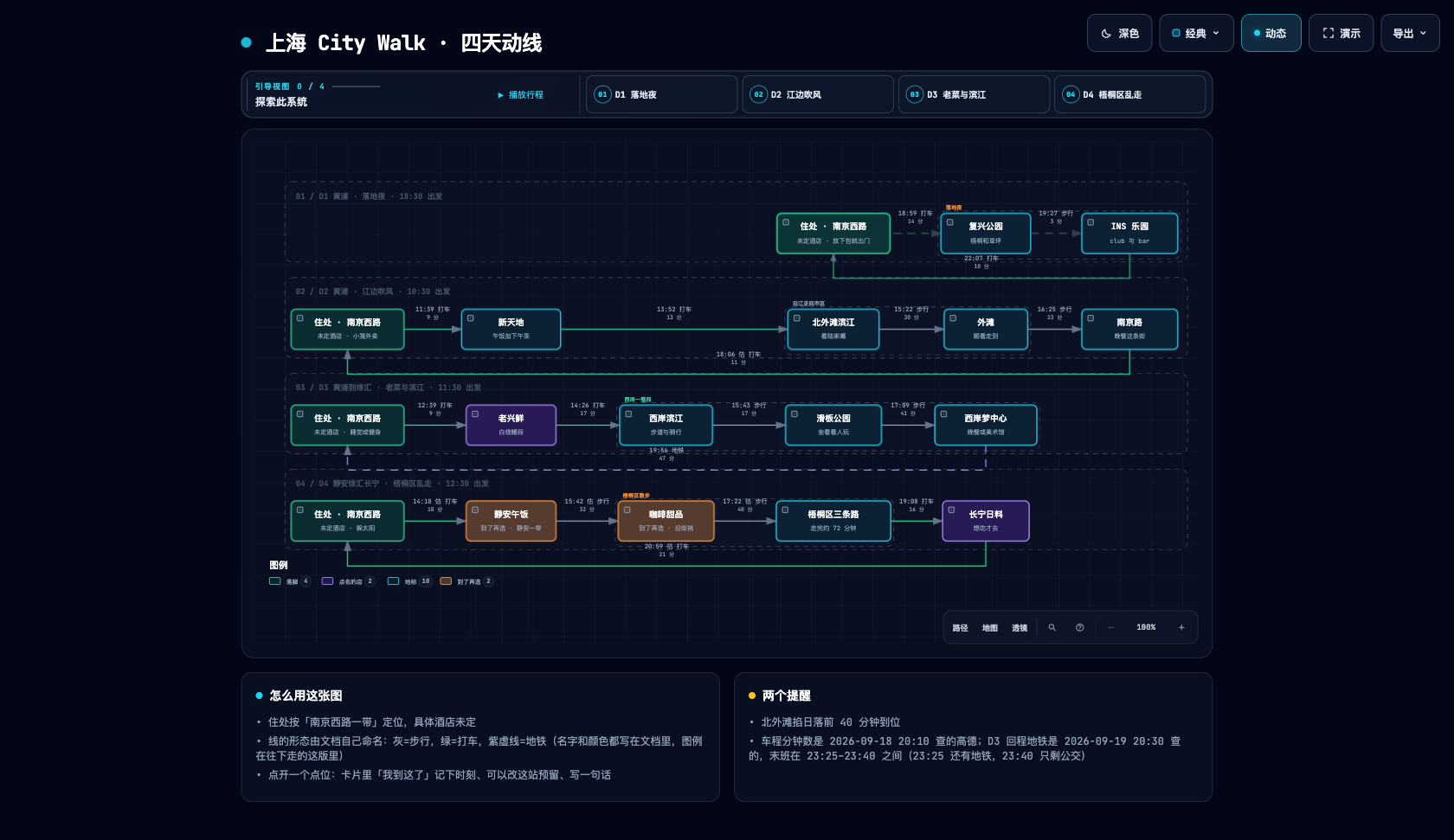
▶ Try the interactive version · Switch between D1–D4 and click a place to explore.
Community artifact · Shanghai CityWalk · Four days of routes and place links
Download it. Open it. Explore it.
The output is a self-contained HTML file. Download it and open it in your browser to use the node details and path exploration included in that artifact. No Archify installation is needed to view it. Send the HTML to someone else and the interactions go with it; external websites and map links need a network connection.
Explore the Shanghai CityWalk ↗ · Download HTML ↓
Try switching between D1–D4, opening a place card, or following a map link. Times and place information reflect the author's original itinerary.
Community and recognition
- #1 on GitHub Trending's weekly, all-language repository list. Ranking screenshot published by the creator on September 1, 2026, with all languages and “This week” selected.
- Featured and interviewed by QbitAI. Project feature · The developer's story.
- Shared with developer communities. midudev's post.
A selection of public coverage, community shares, and historical milestones. Follow the links for dates and sources.
Preview
Themes, exports, and share cards
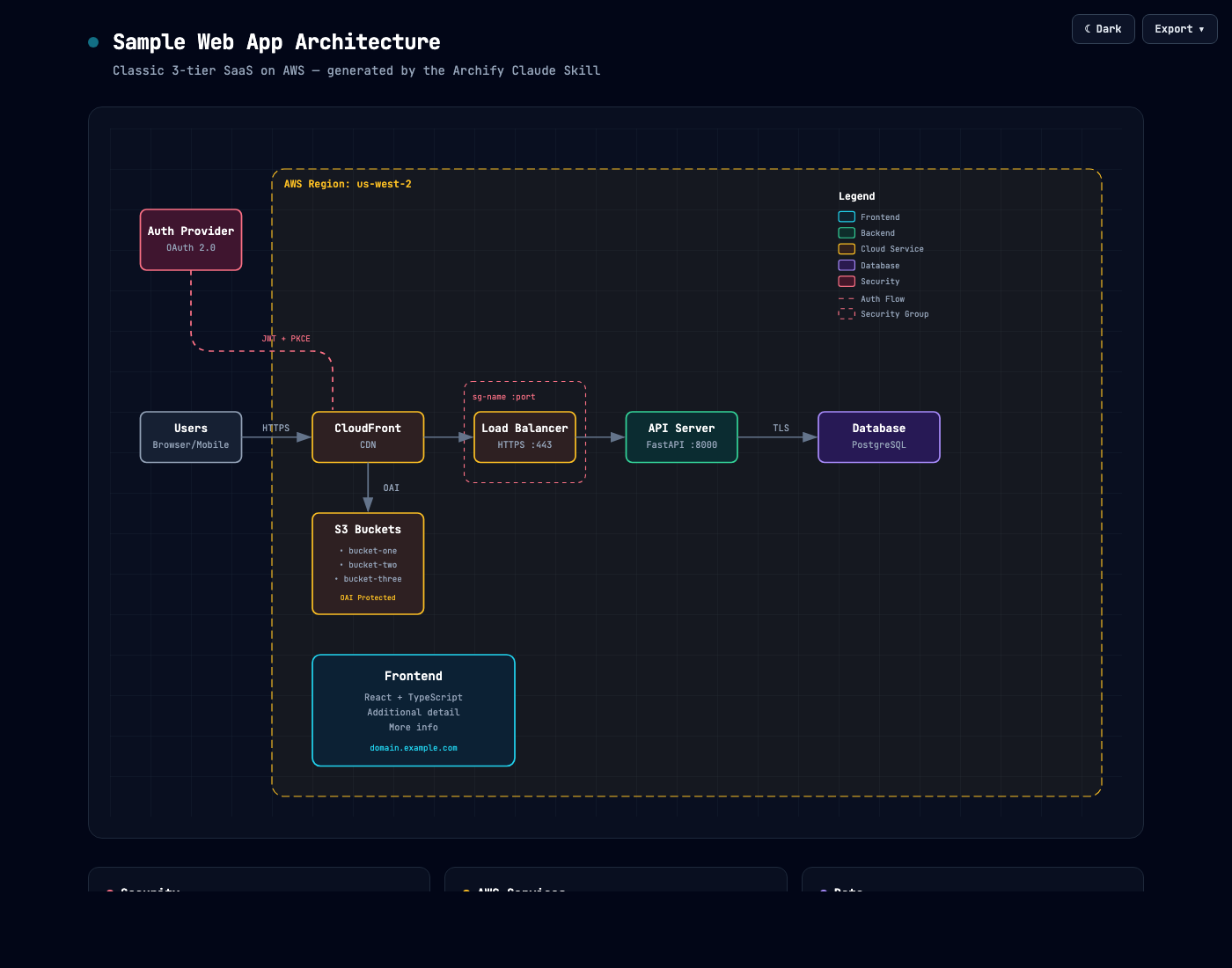
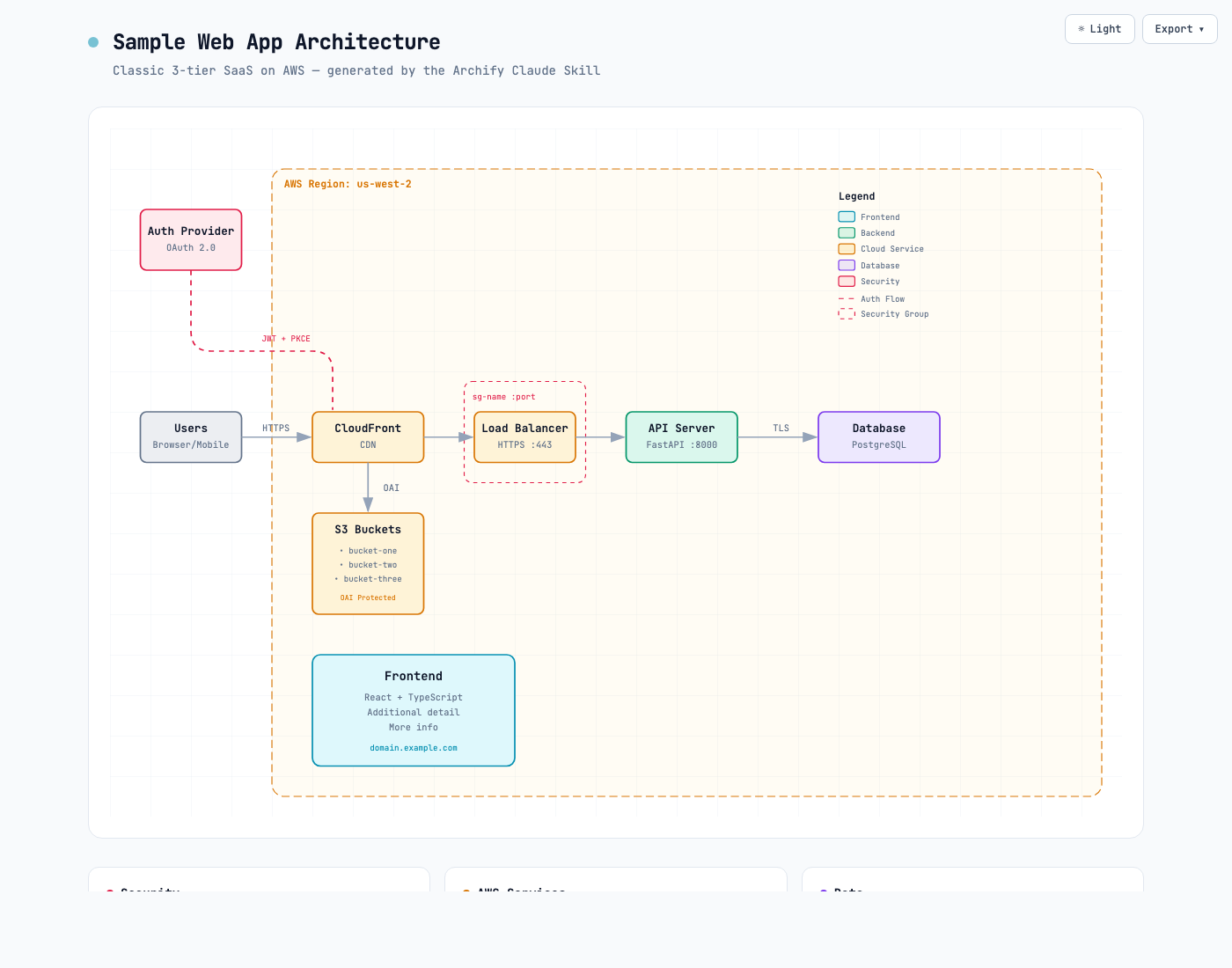
Same diagram, two themes, one click to switch:
| Dark | Light |
|---|---|
 |
 |
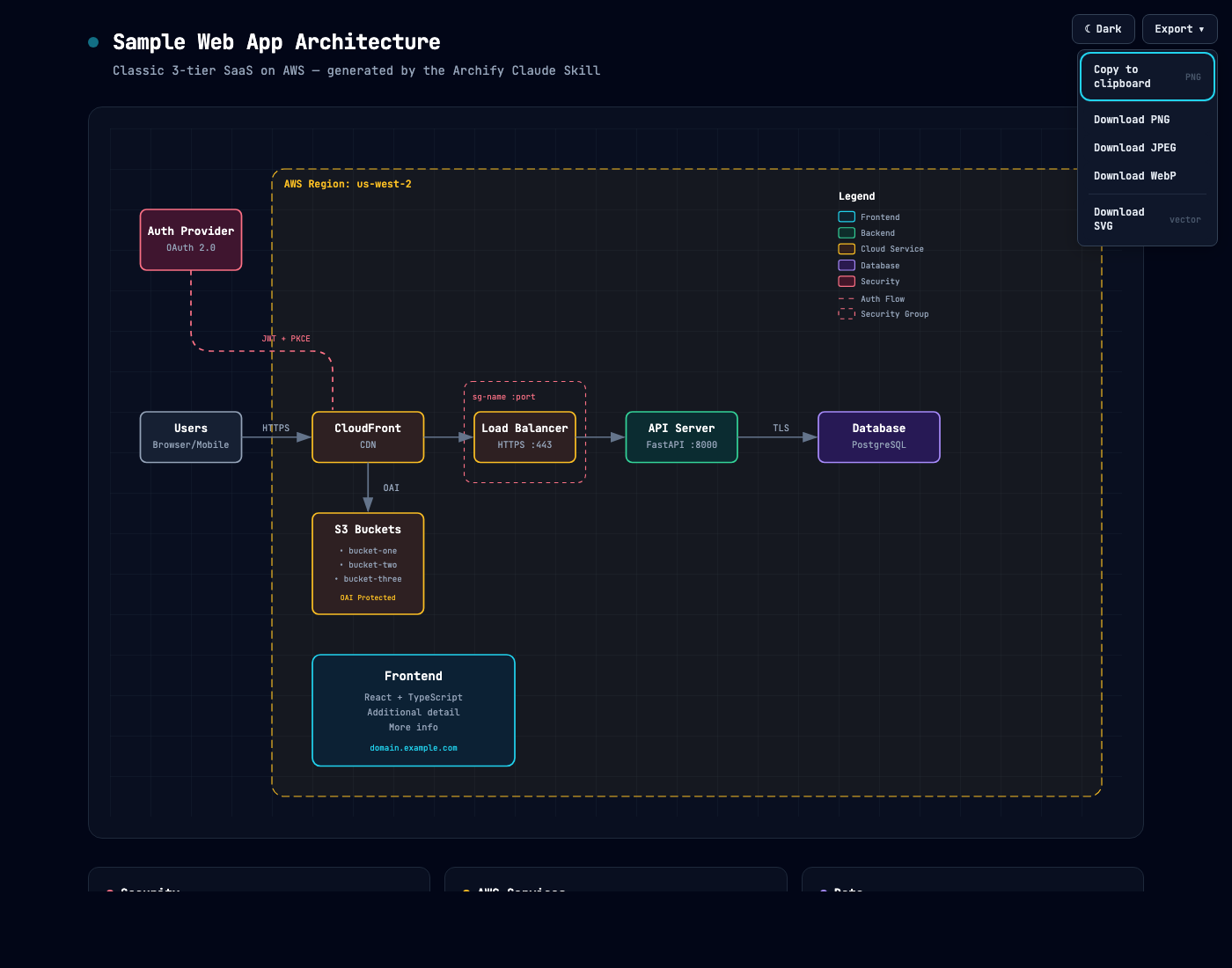
The Export menu copies PNG to the clipboard and downloads static or motion formats:
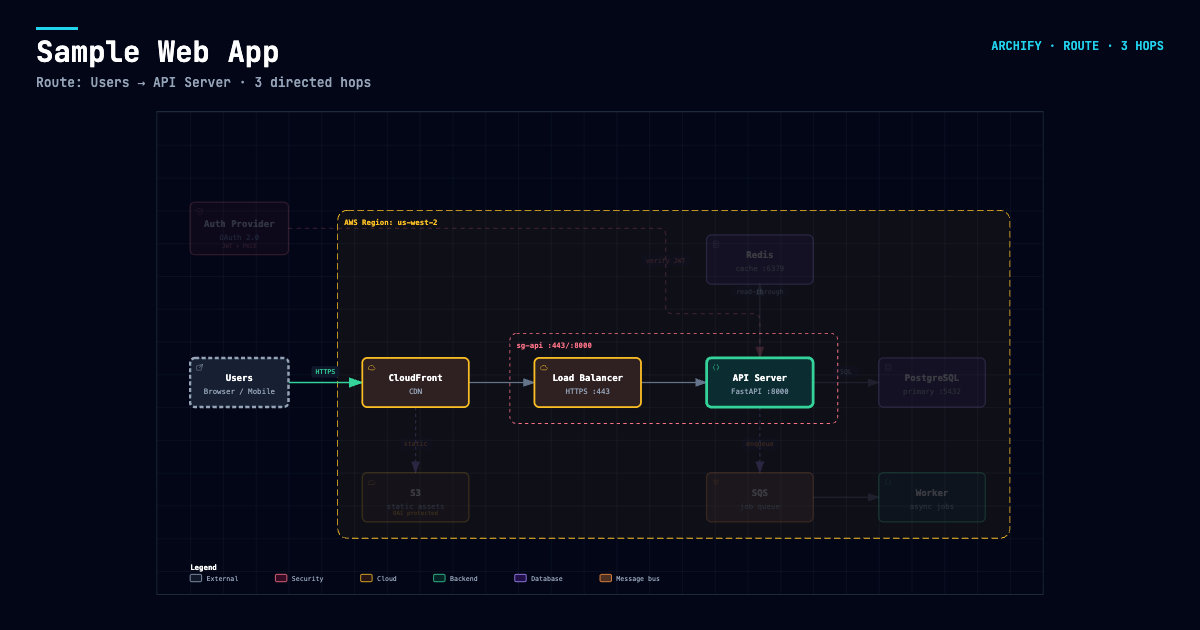
After tracing a route, Export → Route Share Card downloads that authored path as a 1200×630 PNG with the full diagram retained for context.
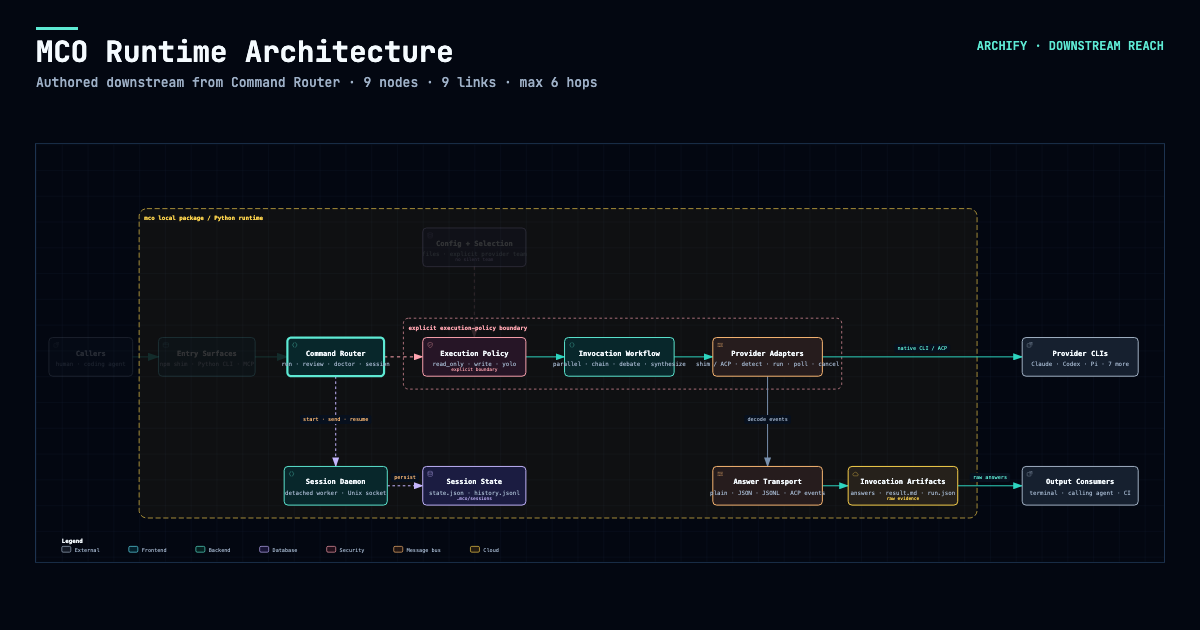
After tracing authored Upstream or Downstream reach, Export → Reach Share Card captures that exact reading without claiming runtime impact.
Open examples/web-app.html locally to try the complete viewer.
Quick start
Current stable version: v3.2.0. See Changelog.
1. Install
npx skills add tt-a1i/archify -g
More installation options and update-check details
For an explicit, non-interactive Cursor install:
npx -y skills add tt-a1i/archify --skill archify --agent cursor --global --copy --yes
To try without installing:
npx skills use tt-a1i/archify@archify --agent codex
DSH community opt-in: dsh plugin --profile web add @tt-a1i/archify-dsh@1.0.0
The agent switcher covers cursor, codex, claude-code, and opencode.
Archify may GET the fixed stable manifest solely to show an optional reminder; it never downloads or installs updates. Successful checks wait about 24 hours (±20%); active use retries failures after 6, then 24 hours. The server sees normal HTTP metadata (IP and time), but receives no version, Agent, project data, prompts, account/device ID, or ETag. You decide whether and when to update. Set ARCHIFY_UPDATE_CHECK_DISABLED=1 to disable networking and reminder-state writes.
Stay updated
- Get release notifications: select Watch → Custom → Releases at the top of this GitHub repository. Starring the project does not subscribe you to release notifications.
- See what changed: Release notes.
- Use a feed reader: Subscribe to the release feed.
Installations with the update checker also check for newer stable releases during diagram delivery and can show a reminder. Older installations without the checker need a manual update to gain this feature. You choose whether and when to upgrade; Archify never installs updates automatically.
2. Start from a description — no repository required
Use Archify to draw: Browser -> API -> Redis cache -> PostgreSQL fallback.
For source evidence, open a repository and ask:
Analyze this repository, then use archify to create a high-level runtime architecture diagram.
Show 8–12 core components, one primary path, external dependencies, and trust boundaries.
Put supporting detail in cards instead of adding more edges.
3. Refine in chat
Continue with focused requests such as add Redis, move auth to the left, or highlight the rollback path. Archify keeps the typed source available for targeted iteration.
Choose the right diagram
Ten diagram types, architecture comparisons, and examples
| Type | Best for | Include in your prompt |
|---|---|---|
| Architecture | Components, services, storage, boundaries | Scope, core components, primary path |
| Workflow | CI/CD, approvals, tool calls, runbooks | Participants, order, branches, exceptions |
| Sequence | API calls, cache fallback, auth, async traces | Callers, callees, returns, timing |
| Data Flow | Pipelines, lineage, PII, consumers | Sources, transforms, stores, boundaries |
| Lifecycle | States, retries, waits, terminal outcomes | States, events, retry and cancellation paths |
| ERD | Database schemas: tables, columns, keys, cardinality | Tables, every column with its type, primary/foreign/unique keys, relationship cardinality |
| Class | Classes, interfaces, selected members, type relationships | Types, key members, inheritance and implementations, composition, dependencies |
| Tree | Single-parent hierarchies: repositories, modules, capability breakdowns | Root, levels, what each branch contains |
| Timeline | When things happened: incident reviews, release histories | Timestamps with time zone, events, source lanes, whether times are observed or illustrative |
| Waterfall | Where the time went in one request or agent run | Spans, start times and durations, nesting, whether timings are measured or illustrative |
Architecture's optional deployment-ownership profile fails closed when authored owners, region placement, private database scope, or named crossings are missing; it is never implicit and does not inspect live infrastructure. See the checked deployment proof.
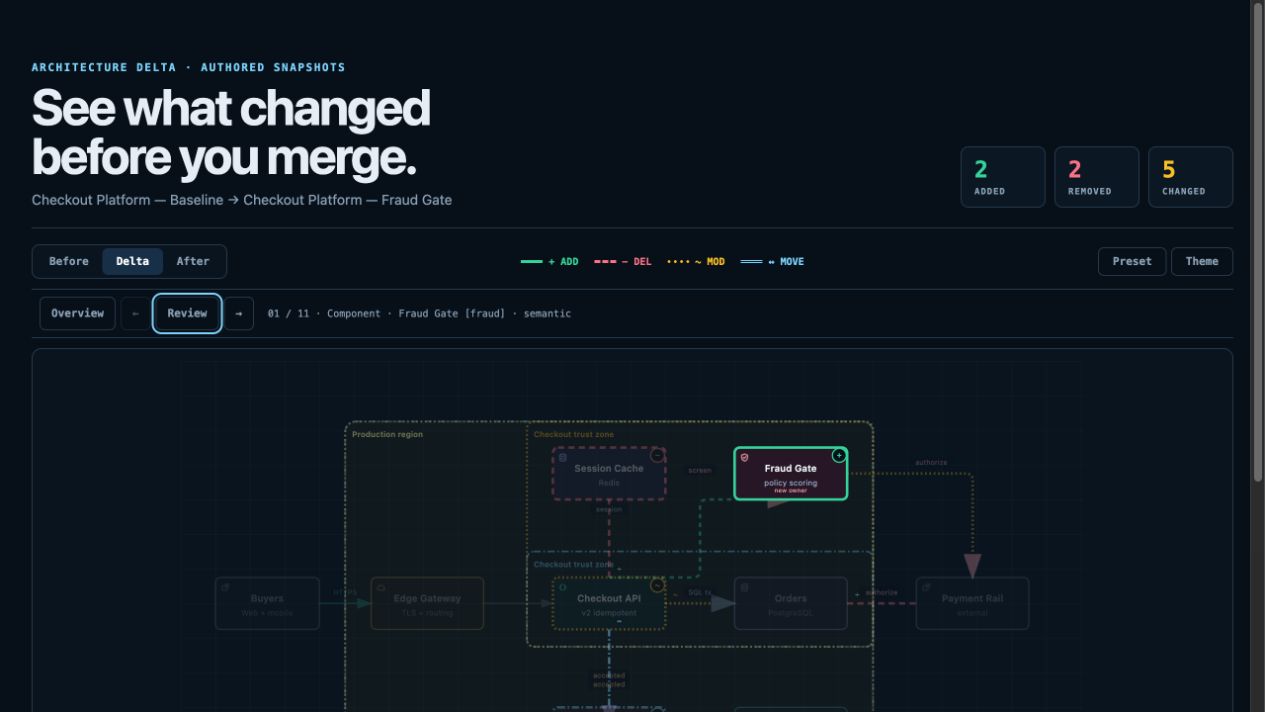
For design or PR review, Architecture Delta compares validated Before / Delta / After snapshots with a machine receipt. Select an authored change or play one finite, viewer-only Review; it infers no impact, risk, or merge safety.
node archify/bin/archify.mjs compare architecture base.json head.json architecture-delta.html --json
Not sure which one fits? Use the interactive scenario guide, or ask the zero-dependency CLI:
node archify/bin/archify.mjs guide "Show an API request with Redis cache miss"
node archify/bin/archify.mjs guide "Map Kafka topics, consumer groups, replay, and DLQ" --json
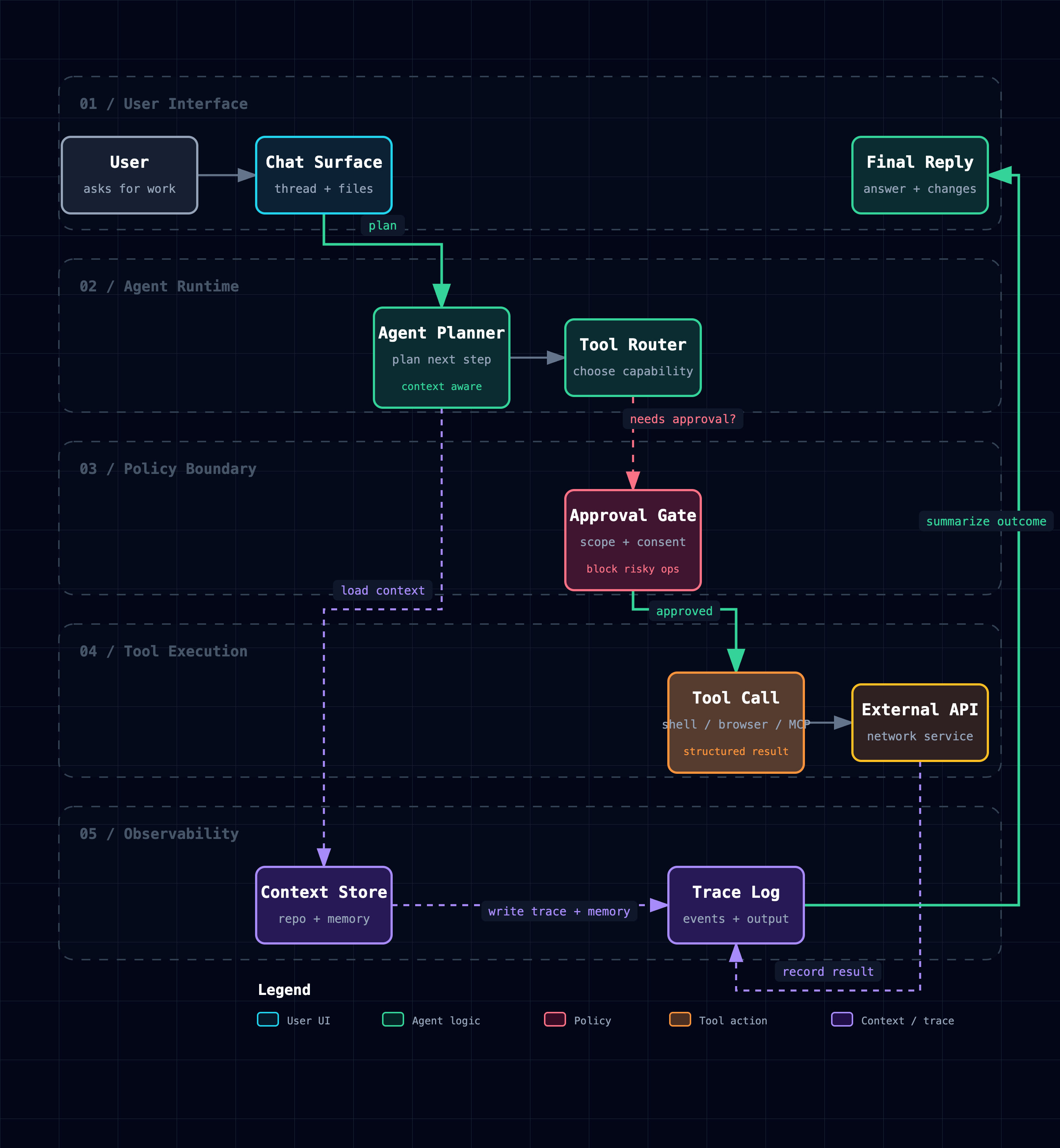
Workflow keeps the happy path clear across lanes:
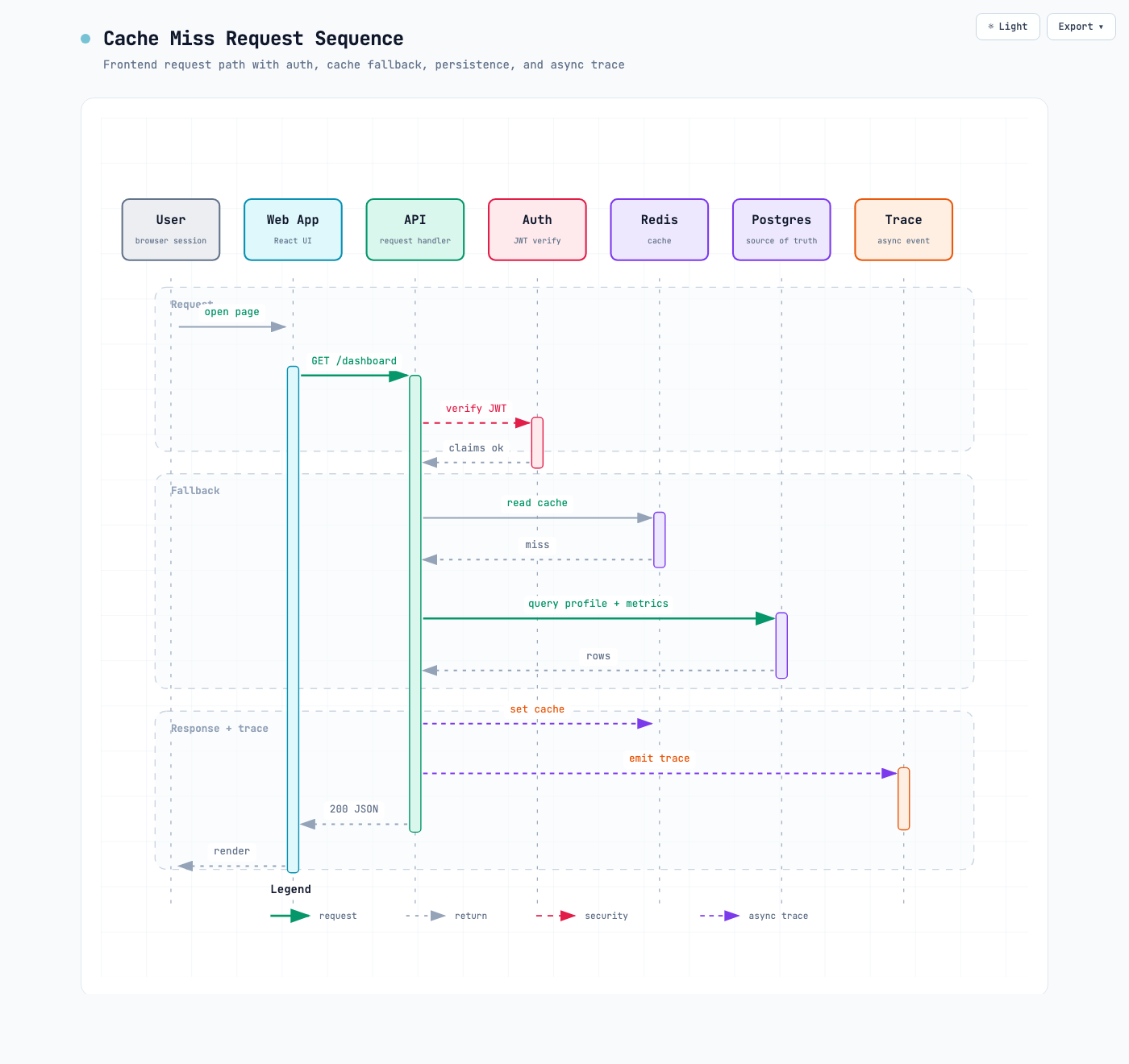
Sequence explains one interaction over time:
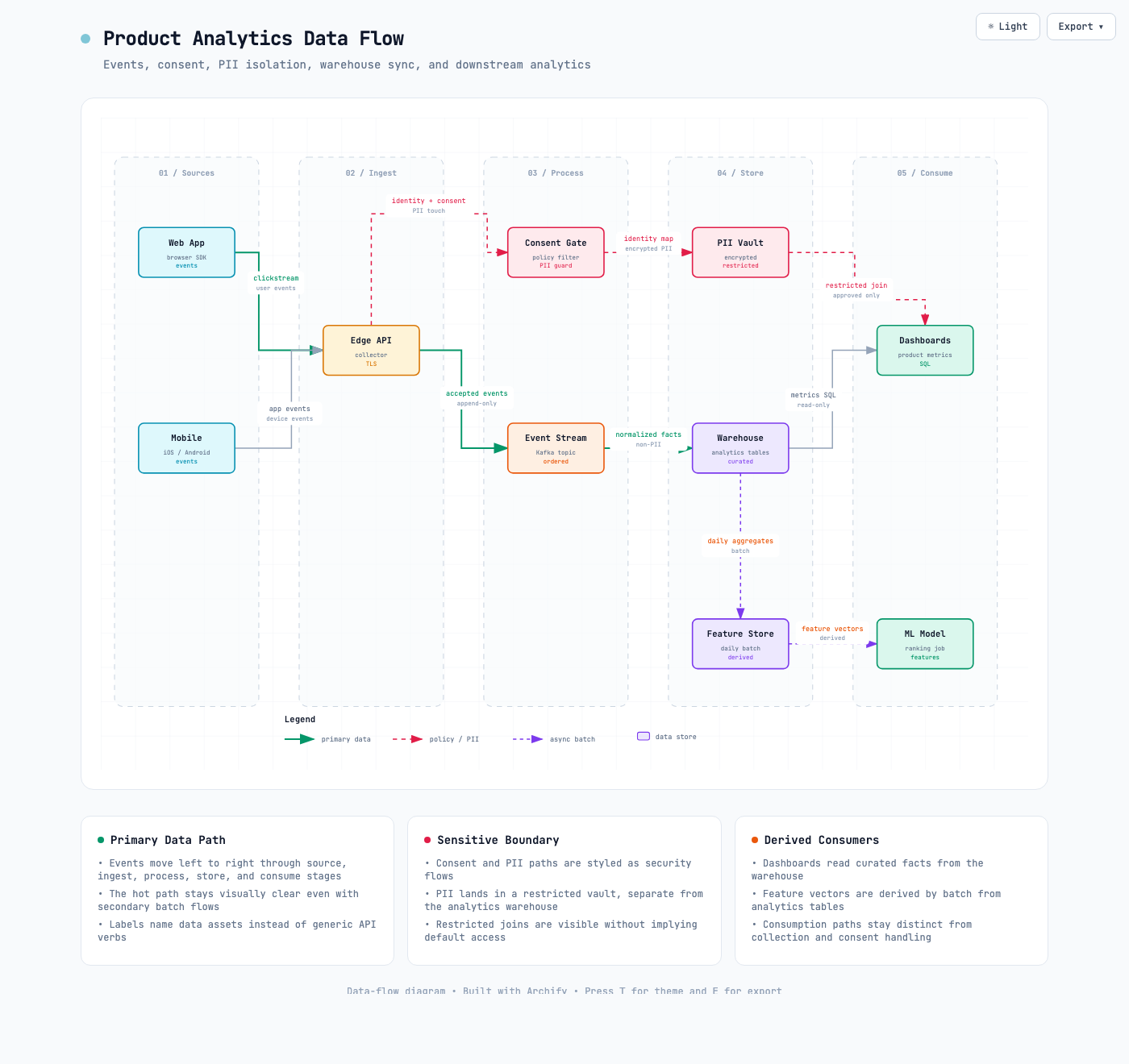
Data Flow makes movement and sensitivity boundaries explicit:
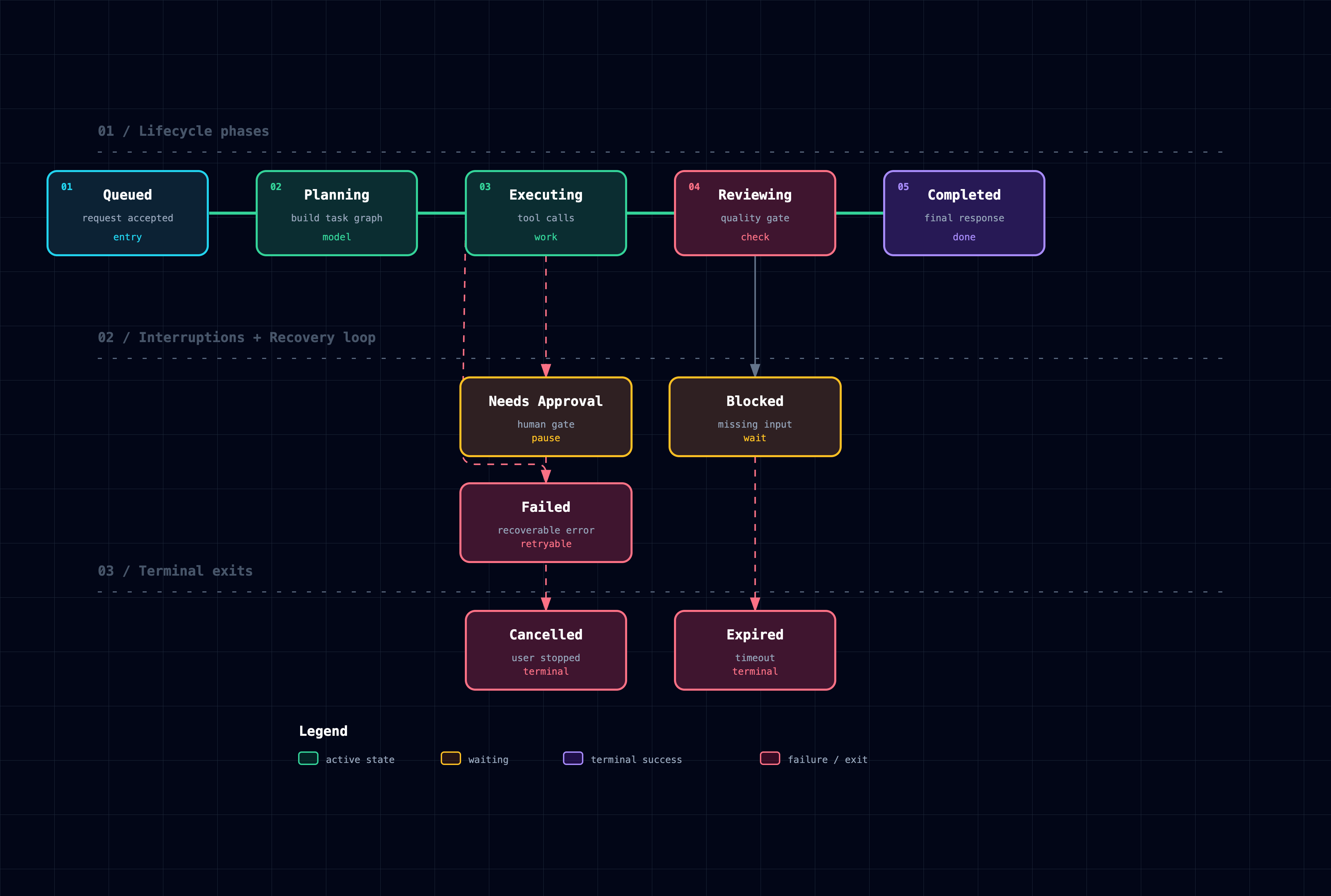
Lifecycle separates progress, waits, retries, and terminal outcomes:
New in 3.1: ERD, Class, Tree, Timeline and Waterfall.
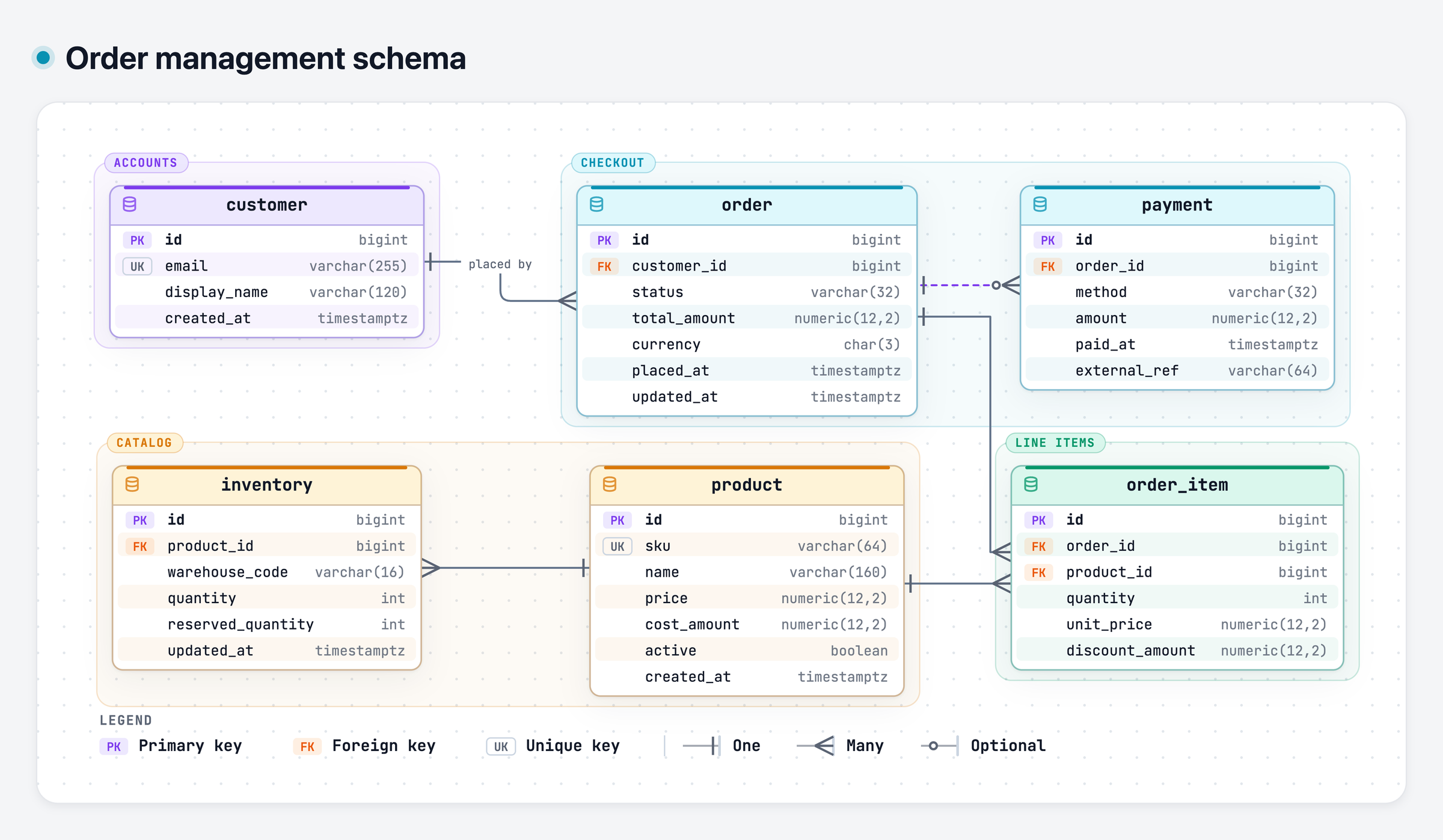
ERD keeps tables, every column and key, and relationship cardinality together:
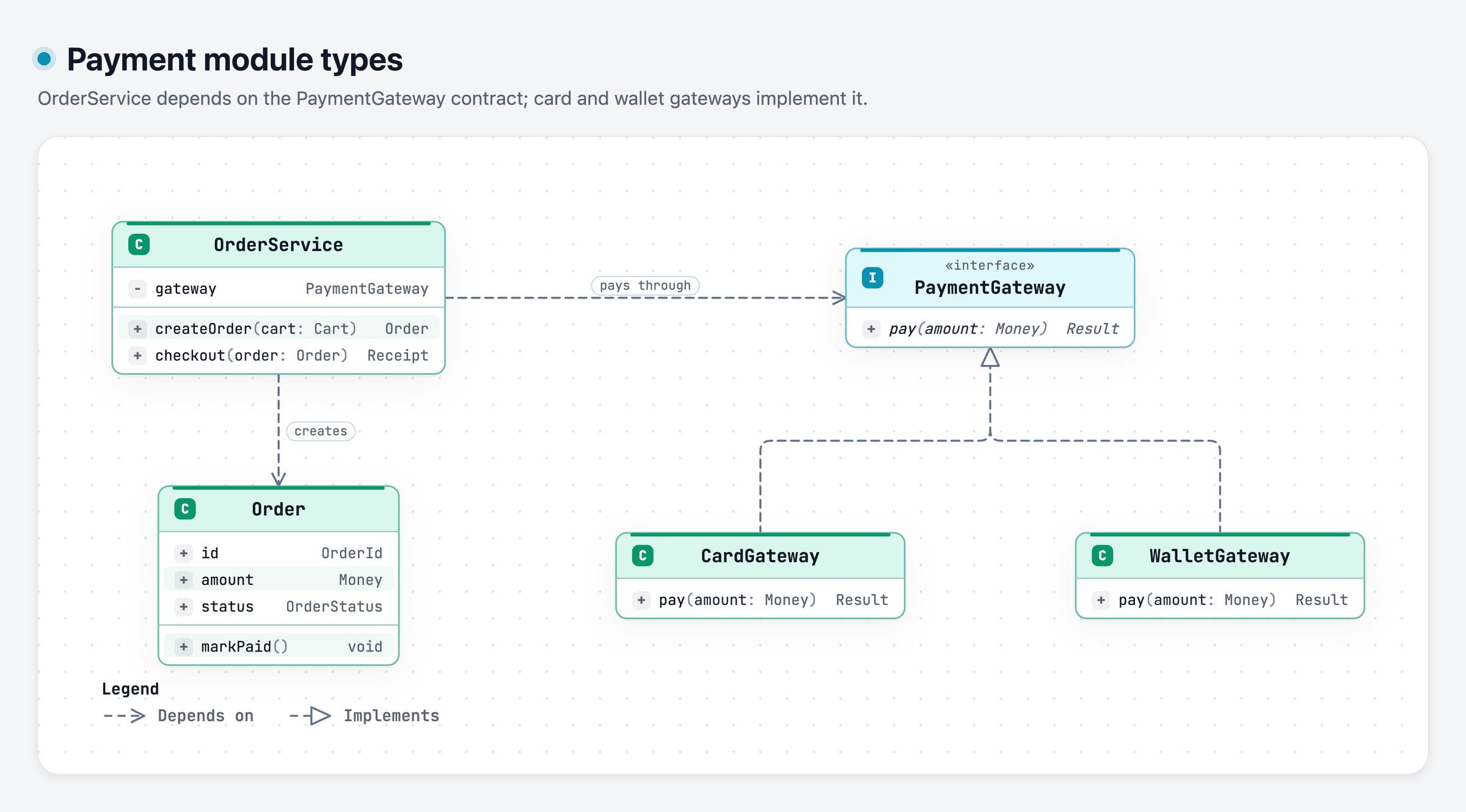
Class shows contracts, selected members, and which types depend on or implement them:
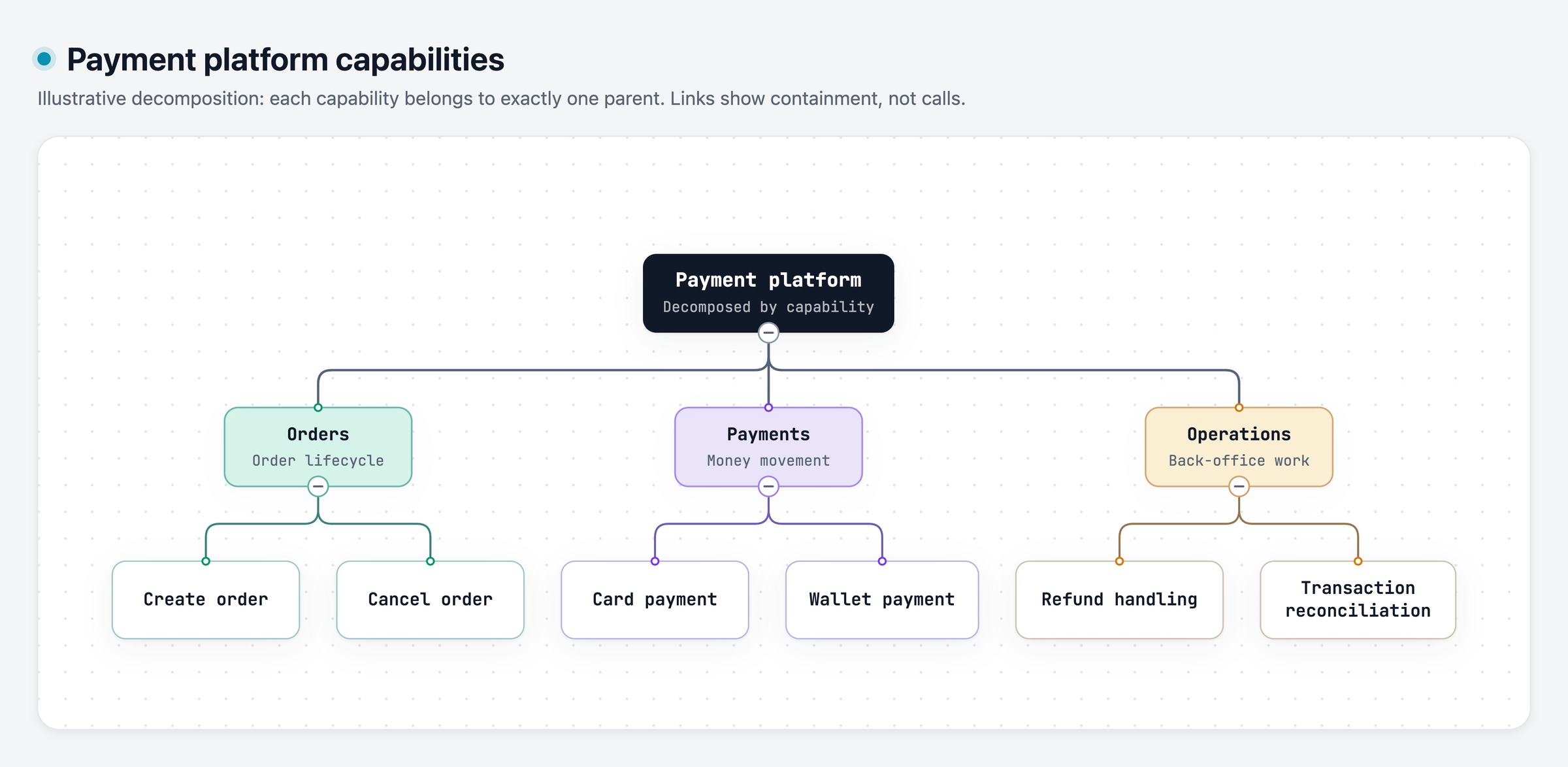
Tree shows single-parent containment, such as a capability breakdown:
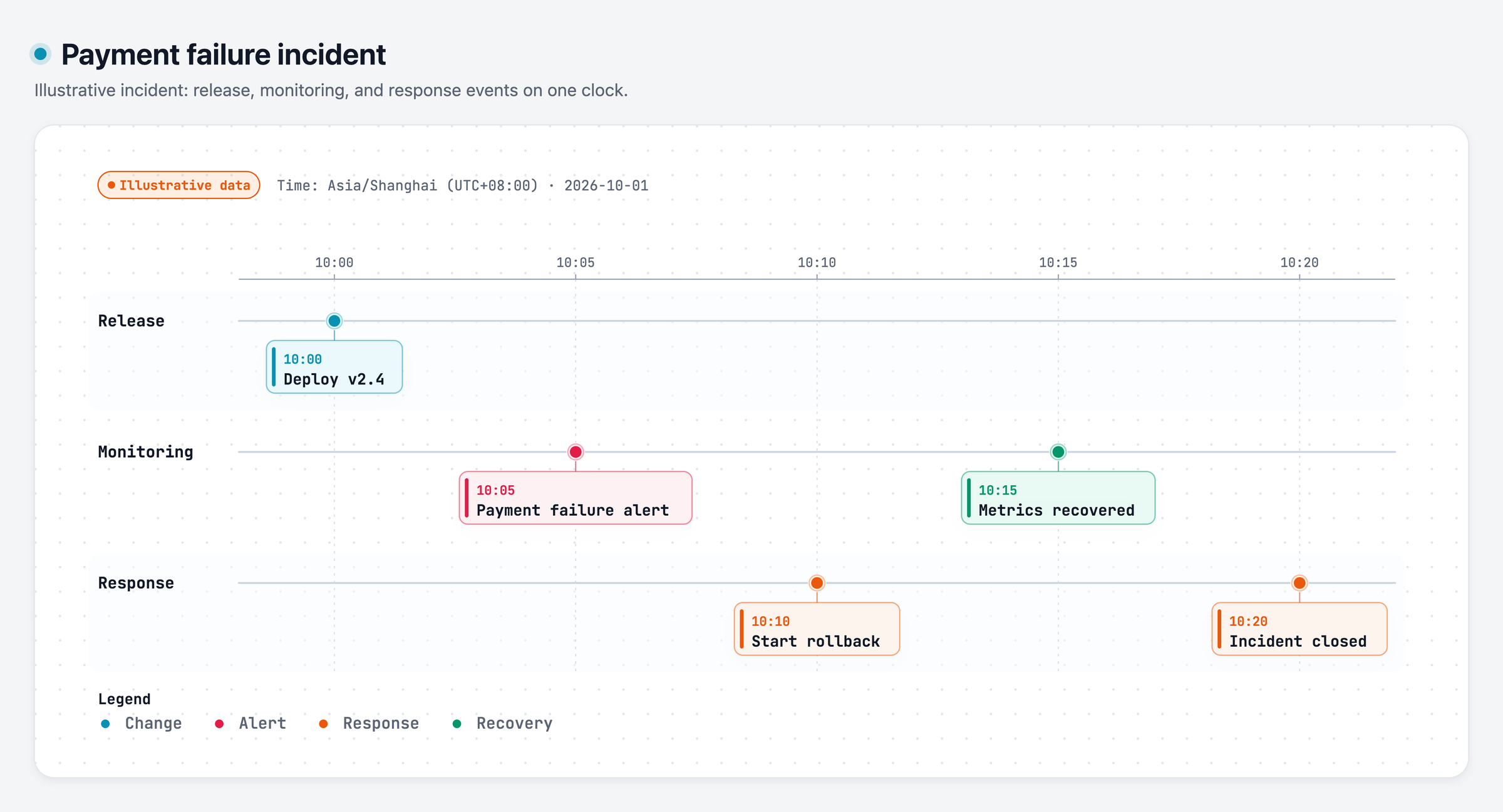
Timeline places events on one proportional clock, with a lane per source:
Waterfall shows where the time went across nested and overlapping spans:
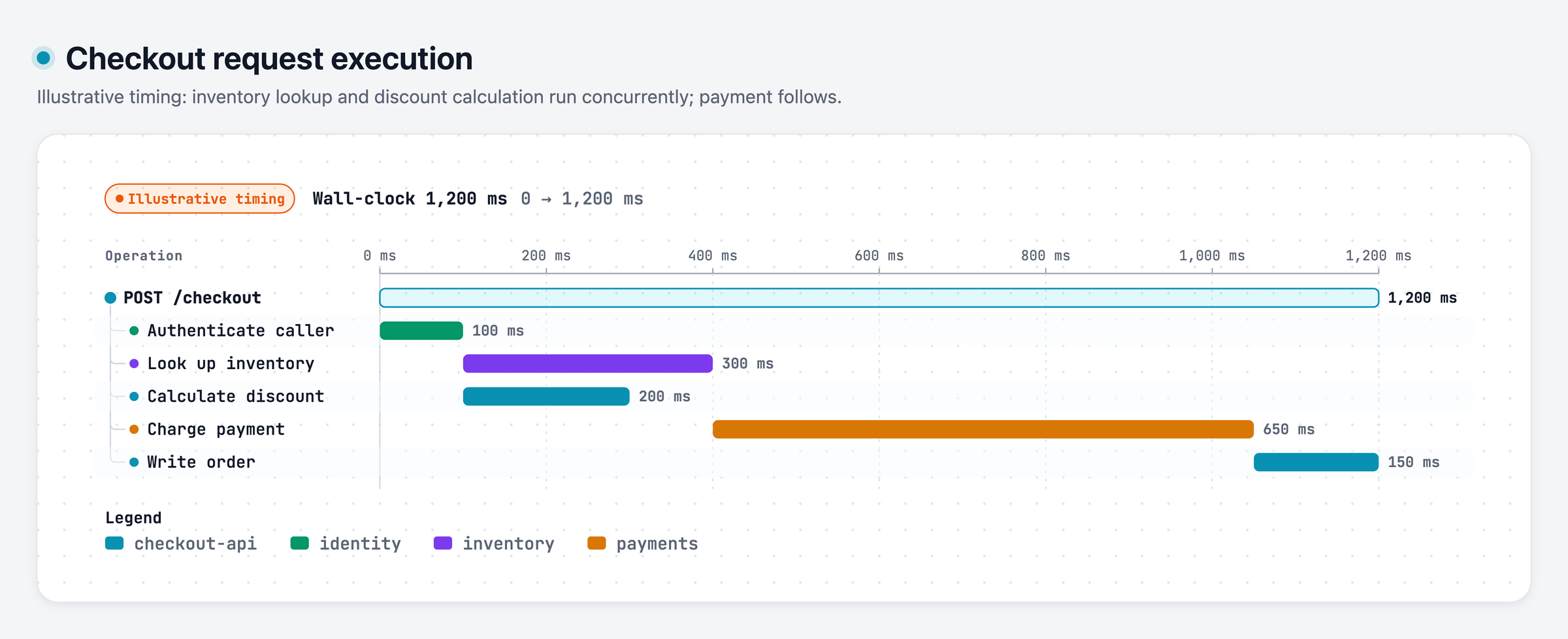
Explore these examples: ERD · Class · Tree · Timeline · Waterfall. The Timeline and Waterfall examples use illustrative data; treat timestamps or durations as real only when they come from logs or traces.
Architecture examples: web-app · Archify pipeline · grid placement · desktop agent
Why Archify
| Understand the structure | Walk through the story |
|---|---|
| Map components, workflows, and relationships from code or a description. | Explore nodes, follow paths, and share any view as a link. |
| Extend it your way | Share the result |
| Keep an editable source and build on the open-source code or generated HTML with your own interactions and use cases. | Share a self-contained HTML file or export images, video, and share cards. |
The engineering behind the experience
- Layout judgment over generic auto-layout — the agent chooses hierarchy, spacing, routes, and emphasis; shared automatic endpoints spread deterministically instead of piling arrows on one midpoint.
- Typed JSON IR — every renderer-backed mode has a schema and reproducible source.
- Atomic validation before delivery — schema, layout, HTML/SVG, route, and label-to-route clearance checks must all pass before a showcase artifact replaces the last known good output.
- Failures come with a repair receipt —
validate --jsonanddeliver --jsonreturn stable rule codes, the exact subject, measured evidence, and only supported repair controls instead of a Node stack or an unstructured retry guess. - Last-good live preview — an optional desktop loop watches one JSON file, refreshes only after the latest candidate passes every gate, and keeps the previous verified diagram visible when a save is incomplete or invalid.
- Truthful interaction — focus, upstream/downstream reach, exact routes, role comparison, and stories reuse authored nodes and relationships instead of inventing topology or claiming runtime impact.
- Source evidence, only when requested — Evidence-backed Architecture nodes mark themselves
SRC nand open Git-verified files and line ranges pinned to one public commit; ordinary artifacts stay source-free. - Portable by default — the result is one HTML file; exports remain full-diagram and free of temporary viewer state.
Archify is not a general-purpose drawing editor or a Mermaid theme. It turns technical intent into a communication artifact.
How it works
Generation, validation, preview, and delivery details
| Step | What happens |
|---|---|
| Generate | The agent creates typed JSON IR from your description. |
| Validate | Bundled validators and layout rules check the source; failures identify the exact local repair in machine-readable JSON. |
| Preview (optional) | A loopback-only desktop session watches one source and reloads only verified revisions; failures keep the last-good artifact. |
| Deliver | A same-directory candidate is rendered and checked; only a passing artifact atomically replaces the target, then optional --open launches that exact file. |
| Iterate | The agent updates the source while unrelated structure stays stable. |
Useful repository commands:
cd archify
node bin/archify.mjs doctor
node bin/archify.mjs demo /tmp/archify-demo
node bin/archify.mjs guide "Show CI/CD checks, approval, deploy, and rollback"
node bin/archify.mjs validate workflow examples/agent-tool-call.workflow.json --quality showcase --json
node bin/archify.mjs preview workflow examples/agent-tool-call.workflow.json /tmp/workflow.html --quality showcase
node bin/archify.mjs deliver workflow examples/agent-tool-call.workflow.json /tmp/workflow.html --quality showcase --open --json
preview is an explicit loopback-only desktop mode: it watches one JSON file on a random 127.0.0.1 port, keeps the last verified output through failures, stops with Ctrl-C, and adds no generated-HTML runtime. Use --no-open for tests or manual URL opening.
deliver --open is an opt-in one-shot handoff after commit. Opener failure preserves success; JSON remains on stdout and the absolute fallback path goes to stderr.
On failure, validate --json and deliver --json emit one JSON object. Apply only each diagnostics[] subject's supportedFixes, within the Skill's two correction rounds; visual review remains separate.
Settings:
{
  "meta": {
    "locale": "en",
    "animation": "trace",
    "visual_preset": "signal-flow"
  }
}
meta.locale localizes page title, Legend, states/errors, a11y, HTML/SVG lang—never authored content. en, zh-CN, zh-TW, es, ko, and ar are bundled and need only meta.locale; meta.translations (canonical message key → translated string) overrides individual keys and keeps the rest of the language. Other languages supply their catalog there (see archify/examples/locales/), or the renderer falls back to English and discloses it. Static omits animation; classic defaults.
Explore and share the output
| Action | Control |
|---|---|
| Open the factual Diagram Guide | ? |
| Find and focus a semantic node | / |
| Trace upstream/downstream authored reach | Focus a node → Upstream / Downstream |
| Probe a directed route and inspect its journey | R or PATH |
| Compare one or two semantic roles | L or LENS |
| Open the live overview radar | M or MAP |
| Enter Presentation Stage | F |
Choose visual style (S cycles) / toggle theme / open Export |
S / T / E |
| Zoom or reset | + / - / 0 |
Stable links can restore #focus=<id>, #focus=<id>&reach=upstream|downstream, #relation=<id>, #route=<source>~<target>, and #lens=<kind>~<kind>. Live repeats connection flow until paused; semantic previews remain bounded. Motion respects prefers-reduced-motion and never enters canonical exports.
The complete generation and viewer contract lives in archify/SKILL.md.
Installation options
| Surface | Install location or method | Capability |
|---|---|---|
| Claude Code | ~/.claude/skills/ or .claude/skills/ |
Full renderer + validation workflow |
| Codex CLI | ~/.agents/skills/ or .agents/skills/ |
Full renderer + validation workflow |
| opencode | ~/.config/opencode/skills/, .opencode/skills/, or .agents/skills/ |
Full renderer + validation workflow |
| Claude.ai | Upload archify.zip under Settings → Capabilities → Skills |
Depends on Node.js access in the sandbox |
| Project Knowledge | Upload archify.zip to the project |
Prompt-driven architecture fallback |
| Hermes Agent | Opt-in: hermes skills install skills-sh/tt-a1i/archify/archify -y |
Community Skill-only integration; Node >=18; not a Nous official product. No telemetry. It is not a switcher target. Details. |
| DeepSeek Harness | Opt-in: dsh plugin --profile web add @tt-a1i/archify-dsh@1.0.0. Invoke: Use the archify skill to map this repository's runtime architecture. Remove: dsh plugin --profile web remove @tt-a1i/archify-dsh. |
Community integration for developer-preview @deepseek-ai/dsh@0.1.2-rc.1; Node ^22.19.0 || >=24.0.0; not an official DeepSeek product. No telemetry. Shell files need exact workspace paths, not Web Produced Files. Details. |
Reference and scope
Automatic Mermaid parsing, general-purpose auto-layout, hosted sharing, and WYSIWYG editing are intentionally outside the current scope.
Community
👋 Welcome to the Archify Community!
Connect with other users and developers, share ideas, request features, report bugs, discuss development, and help make Archify better together.
 Discord
 WeChat: scan the QR code below. WeChat group codes expire periodically; if this one has expired, ask for the current code through Discord or QQ.
 QQ group:
 1121948602
WeChat |
QQ |
Official channels and third-party services
- Open-source project: Current source and packages built from it are available under the Apache License 2.0; previously published releases retain their original licenses.
- Official website: archify.si currently provides project information, examples, and installation guidance.
- Third-party services: Pricing, data handling, and support are determined by the respective provider. A similar name or domain does not establish an official affiliation.
License
Apache-2.0 — free to use, modify, and distribute.
Historical MIT grants remain in effect; see NOTICE and LICENSE-MIT. Third-party components retain their own licenses. The software license does not change ownership of your authored content or grant general permission to use Archify trademarks.
Contributing
Building a standalone package on Archify? Submit it to the community catalog; the guide includes a collapsible example and complete Chinese steps.
Issues, pull requests, and real-world diagrams are welcome. Start with the contribution guide, use the reproducible bug form for failures, or submit a validated diagram through the community showcase form. · LINUX DO
Support Archify
If Archify has been useful to you, you can support its continued development. Thank you for helping keep the project going ❤️
Support via WeChat Pay
Scan the QR code below with WeChat, or save it and open it in WeChat to scan.

Support via Alipay
Scan the QR code below with Alipay, or save it and open it in Alipay to scan.

Using Archify, sharing it, reporting bugs, and contributing improvements are also ways to help.
Contributors
Thanks to everyone who helped build Archify. Go follow them. ❤️
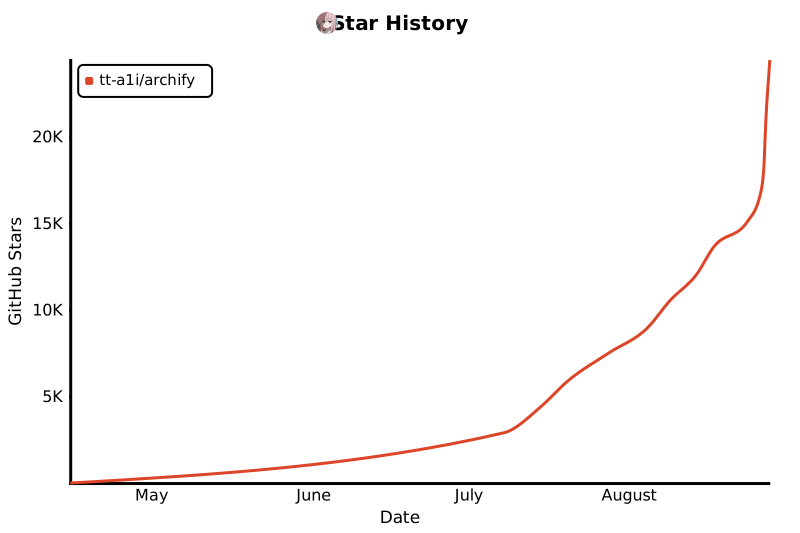
Star History
把你想理解、规划或分享的事,变成可以互动的可视化作品。
官方入口: archify.si · GitHub
Archify 开源免费。第三方提供的在线服务、收费套餐由其运营方负责,不代表 Archify 官方。 查看详细说明 →
从一个想法、一个问题或一份计划开始。把它描述给 AI Agent,Archify 就能生成可以探索、修改和分享的交互式 HTML。从旅行行程、知识地图到复杂系统,你都可以继续扩展,做成自己需要的样子。
看看社区正在创造什么,也想想你还能用它做些什么。
交互演示 · 开始使用 · 场景指南 · 社区交流 · English · 日本語 · 한국어
❤️ 合作与赞助伙伴:Kimi Work · Supercode · OpenLux
看看 Archify 能做什么
https://github.com/user-attachments/assets/88cff7dd-bdf3-4b97-950c-37cc079898b1
一句话,看懂你的项目。 35 秒演示:探索交互图、查看源码关联、追踪完整路径。试试可交互示例 ↗
安装,然后说出你的想法
支持 Cursor、Claude Code、Codex CLI 和 OpenCode;更多接入方式见下方安装选项。
npx skills add tt-a1i/archify -g
把这句话发给你的 Agent:
用 Archify 画出一个网站的请求流程:浏览器请求 API,
API 优先读取 Redis,缓存未命中时查询 PostgreSQL 并回填缓存。
继续说:“添加鉴权步骤”“突出缓存未命中的路径”“切换浅色主题”。
**不需要绑定代码库:**从描述开始即可。也可以让 Agent 阅读仓库,生成有源码依据的架构图。
按 Agent 选择安装方式 · 安装细节与更新检查 · 用 Agent 画图并检查结果
问一个问题,得到一页讲清楚的答案
不是每个答案都是一张图。让 agent 用一页来回答,Archify 会生成一份 explainer:先给结论,再按问题分成几个面板,用表格、步骤、图表、代码和经过校验的图把理由讲清楚。
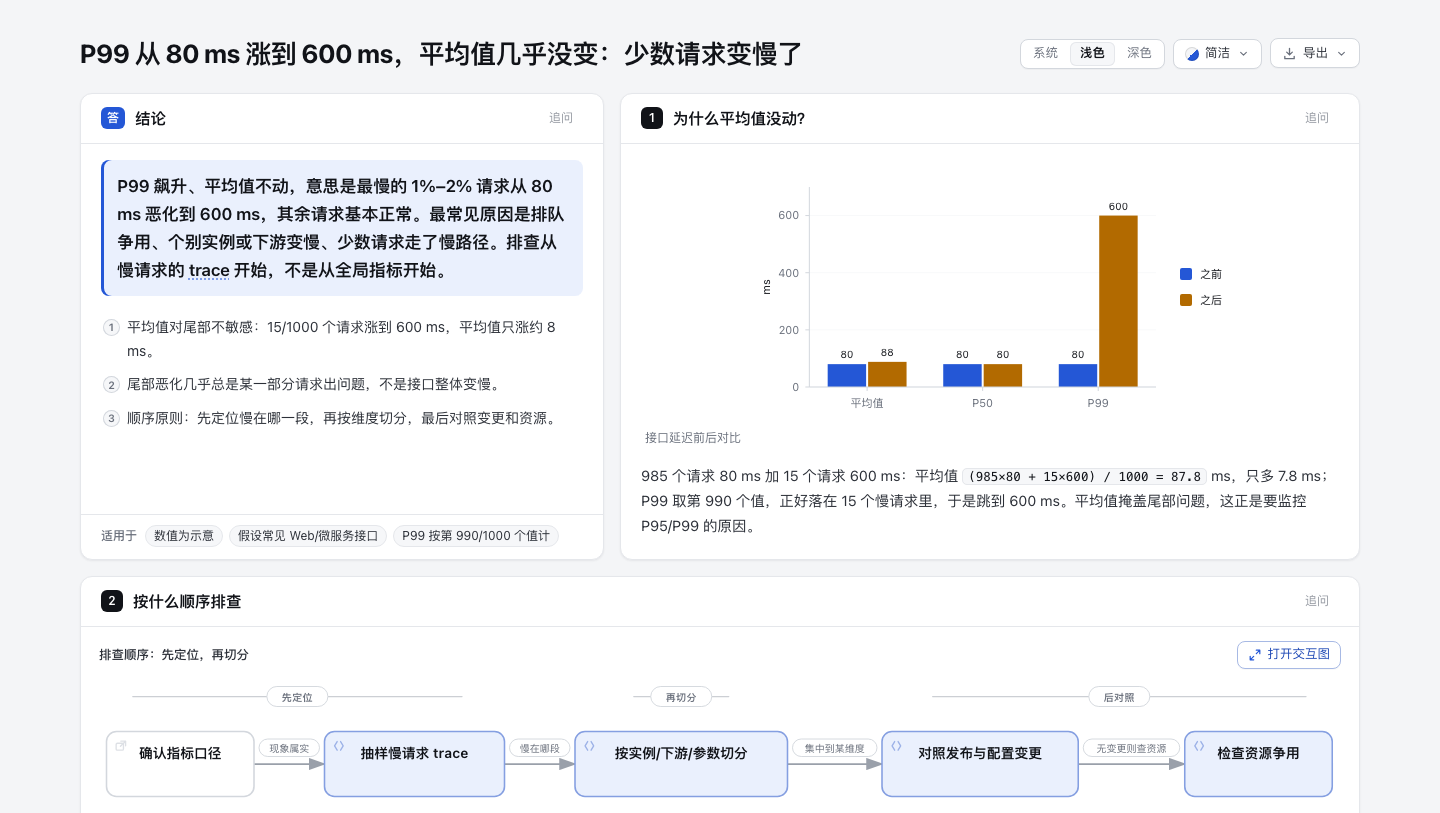
- 结论先行。 先写答案和理由,每个面板只回答一个问题。
- 图和文字一起讲。 步骤放在它讲解的图旁边,读到哪一步,图上就亮起哪一部分;点任意节点进入完整的交互图。
- 能核对。 结论标注编号来源;仓库代码固定到具体提交,悬停即可看到原文。
- 好分享。 一个 HTML 文件,四种样式,浅色深色都有;可导出 PNG、WebP、JPG 长图或打印成 PDF。对任何面板都能追问,生成的追问让 agent 只改这一块。
用 Archify 一页回答:接口 P99 从 80 ms 涨到 600 ms,平均值几乎没变,
可能是什么原因,应该怎么排查?
在线示例:P99 延迟排查 · 读 Archify 仓库:finalize 怎么保住旧产物 · 第一次租房要确认什么 · 第一次打开 HTTPS 网站(英文)
❤️ 赞助伙伴
Archify × Kimi Work。 在 Kimi Work 插件商店搜索 「可交互架构图」,用一句话描述你的系统,即可生成可交互的图。在 Kimi Work 中使用 →
supercode.sh |
Supercode 赞助 Archify,通过 Token 优化、精选 Skills 和规范驱动开发增强 Codex 与 Cursor。Archify 已入选 Supercode Editor’s Choice 技能。 |
OpenLux |
感谢 OpenLux 对本项目的赞助!OpenLux 是一个面向企业的一站式 AI 聚合平台,汇集全球各大厂商主流大模型,平台提供高效、稳定的服务与及时的技术支持。Claude、OpenAI、Gemini 系列模型基准折扣分别低至官方的 0.882 折、0.4 折和 0.8 折。 Archify 用户还可享受专属福利:通过专属链接注册,充值最高可享 7.5% 优惠! 立即体验 → |
PackyCode |
PackyCode 提供统一域名、统一密钥和智能容灾切换,一句话接入主流大模型,提供专属 Codex / Claude Code 高速通道。 新用户可获 $1 免费体验额度,首充享折扣,多分组折扣低至 2 折起。支持人民币 1:1 充值,无汇率加价或额外充值手续费。 立即体验 PackyCode → |
AICodeMirror |
感谢 AICodeMirror 赞助 Archify!AICodeMirror 提供 Claude / Codex / Gemini API 中转服务,支持企业级高并发、开票和 7×24 技术支持。Codex 通道低至基准价格 0.7 折,充值还有额外优惠。 Archify 专属福利:通过专属链接注册,可享首充 8 折。 立即体验 AICodeMirror → |
Infistar.cc 无限星河 |
感谢 Infistar.cc 无限星河赞助 Archify!一个 API Key 覆盖文案、图片与视频创作,支持 GPT、Claude、Gemini、DeepSeek、通义千问、可灵等主流模型,无需分组。大模型低至官方 0.1 折,AI 生图低至 ¥0.06/张。 Archify 专属福利:通过专属链接注册即送 $5 体验额度,并享首充特惠。 立即体验 Infistar → |
EverMind · Raven | 感谢 EverMind 赞助 Archify。EverMind 专注 Agent 记忆基础设施,旗下 Raven 已支持 Archify Skill,让 Raven 工作流可以直接生成经过验证的交互式系统地图。 |
想赞助 Archify?欢迎通过邮件联系我们。
用图把事情讲明白
| 讲清 Agent 如何调用工具 | 跟随一次缓存回源请求 | 看清服务与数据库的关系 |
|---|---|---|
|
|
|
| 追踪一个步骤影响到的全部下游。 | 点亮 Web App 到数据库的路径。 | 聚焦后端与数据库之间已定义的连接。 |
Proof Lab 收录全部 11 个仓库内场景、JSON 源和校验回执。
看懂一个真实代码仓库
CODE → DIAGRAM · 有源码依据的系统地图
Archify 追踪 mco-org/mco 的 9f1a1cf 版本并生成这张校验地图。打开成品 ↗ · 追踪下游 ↗ · Typed Source
易于扩展,社区还在不断创造新用法
COMMUNITY STORIES · 社区用户提供的部分案例
生成之后,还可以继续创造。 Archify 开源,成品是独立 HTML,你可以让 Agent 在此基础上继续修改、接入链接、扩展交互,做出适合自己场景的作品。社区已经把它用到了团队协作、旅行规划、法律核验、合同审查和故障复盘;下面只是其中一部分。
一位用户从纸上手绘的多智能体架构开始,让 Agent 生成交互图,再通过对话加入 Kimi 执行池。另一些用户让 Agent 阅读项目,把生成的架构图带进飞书或钉钉,继续和团队讨论。
还有用户把上海 CityWalk 攻略整理成了四天行程图:按天切换路线,点击节点查看地点信息,并跳转高德地图、小红书和大众点评。作者还扩展了到达打卡和停留记录,让一张路线图变成旅途中可以实际使用的小工具。这些扩展由社区作者为该作品添加。
▶ 点击体验交互版 · 切换 D1–D4 行程,点击地点查看详情。
社区作品 · 上海 CityWalk · 四天行程与地点链接
下载下来,亲手点一点
成品是一个独立的 HTML 文件。下载后用浏览器打开,即可使用该作品包含的节点详情和路径探索,无需安装 Archify。把 HTML 文件发给别人,交互也会一起保留;外部网站和地图链接需要网络。
打开上海 CityWalk 交互版 ↗ · 下载 HTML ↓
试试切换 D1–D4、点击地点卡片,或打开地图链接。行程中的时间和地点信息为作者创作时的记录。
社区与关注
- GitHub Trending 全球仓库周榜第一。 作者于 2026 年 9 月 1 日发布的榜单截图,筛选为所有语言、This week。
- 量子位报道与人物采访。 项目报道 · 开发者故事。
- 开发者社区推荐。 midudev 分享。
这里选列部分公开报道、分享与历史里程碑;排名日期及来源见链接。
预览
深浅主题、导出菜单与分享卡片
同一张图,两套主题,一键切换:
| 深色 | 浅色 |
|---|---|
|
|
Export 菜单支持复制 PNG,并下载静态或动态格式:
路径解析后,Export → Route Share Card 会把真实路径下载为 1200×630 PNG,并保留完整拓扑上下文。
完成 authored Upstream 或 Downstream reach 后,Export → Reach Share Card 会捕获这次阅读结果,但不冒充运行时影响分析。
在本地打开 examples/web-app.html,即可体验完整 Viewer。
快速开始
当前稳定版本: v3.2.0。详见版本历史。
1. 安装
npx skills add tt-a1i/archify -g
更多安装方式与更新检查说明
显式、非交互地安装到 Cursor:
npx -y skills add tt-a1i/archify --skill archify --agent cursor --global --copy --yes
如果只想临时体验:
npx skills use tt-a1i/archify@archify --agent codex
DeepSeek Harness(社区集成、显式启用):运行 dsh plugin --profile web add @tt-a1i/archify-dsh@1.0.0;参见兼容范围、限制与安全说明。Agent 切换器只为 cursor、codex、claude-code 和 opencode 生成命令。
安装后的 Skill 包含一个低频、失败静默的发布检查,它最多只显示可选更新提醒,绝不会自行下载或安装更新。一次成功检查后,下次网络请求通常约在 24 小时(±20%)后发出;检查失败后,活跃使用可能在首次 6 小时、后续 24 小时退避到期时重试。请求只访问 https://archify.si/skill-updates/archify/stable.json。服务端会自然获得 IP、请求时间和常规 HTTP 元数据;检查器不会发送本地版本、Agent、项目数据、用户输入、账户/设备标识,也不会保存或回传 ETag。是否更新以及何时更新始终由你决定。如需完全关闭检查(包括网络请求和提醒状态写入),请在 Agent 环境中设置 ARCHIFY_UPDATE_CHECK_DISABLED=1。
获取更新
- 订阅新版本: 在本 GitHub 仓库顶部选择 Watch → Custom → Releases,订阅版本发布通知。点 Star 不会自动订阅更新。
- 查看更新内容: 版本说明。
- 使用 RSS 阅读器: 订阅版本更新源。
带有更新检查器的安装版本,也会在交付图时检查新的稳定版,并可显示提醒。不带检查器的旧安装需要先手动更新,才能获得这项功能。是否升级、何时升级由你决定,Archify 不会自动安装更新。
2. 直接从描述开始——不需要代码库
用 Archify 画出:Browser -> API -> Redis 缓存 -> PostgreSQL 回源。
需要源码证据时,打开仓库后改用:
分析这个仓库,然后使用 archify 生成一张高层运行时架构图。
只保留 8–12 个核心组件,突出一条主要路径,并标出外部依赖与信任边界。
辅助信息放进说明卡片,不要继续增加连线。
3. 在对话中细调
继续说:增加 Redis、把鉴权移到左侧、突出回滚路径。Archify 会保留 Typed Source,只修改相关部分。
选择合适的图表
十种图表、架构差异对比与示例
| 类型 | 最适合 | Prompt 中应包含 |
|---|---|---|
| Architecture | 组件、服务、存储和系统边界 | 范围、核心组件、主要路径 |
| Workflow | CI/CD、审批、工具调用、Runbook | 参与者、顺序、分支、异常 |
| Sequence | API 调用、缓存回源、鉴权、异步链路 | 调用方、被调用方、返回、时序 |
| Data Flow | 数据管线、血缘、PII、下游消费者 | 来源、转换、存储、边界 |
| Lifecycle | 状态、重试、等待、终态 | 状态、事件、重试与取消路径 |
| ERD | 数据库结构:表、字段、键、基数关系 | 表、每个字段及类型、主键/外键/唯一键、关系基数 |
| Class | 类、接口、关键成员与类型关系 | 类型、关键成员、继承与接口实现、组合与依赖 |
| Tree | 单一父级的层级结构:仓库、模块、能力拆解 | 根节点、层级、各分支包含的内容 |
| Timeline | 何时发生了什么:故障复盘、发布历史 | 带时区的时间点、事件、来源泳道,以及时间是真实观测还是示意 |
| Waterfall | 一次请求或 Agent 运行的耗时分布 | Span、开始时间与时长、嵌套关系,以及耗时是实测还是示意 |
做生产部署评审时,Architecture 可以按需启用 deployment-ownership
工程画像:负责人、单一区域归属、数据库私有边界或边界穿越机制缺失时会直接阻断。
它不会被静默开启,只校验作者写入的事实,不代表线上基础设施已经核验。可查看
通过校验的部署证明。
做设计或 PR 评审时,Architecture Delta 生成已校验的 Before / Delta / After 和机器回执。精确选择任一作者变更,或播放一次有限 Review;全程只读,不推断影响、风险或合并安全。
node archify/bin/archify.mjs compare architecture base.json head.json architecture-delta.html --json
不知道选哪一种?打开交互式场景指南,或直接询问零依赖 CLI:
node archify/bin/archify.mjs guide "展示带 Redis 缓存未命中的 API 请求"
node archify/bin/archify.mjs guide "梳理 Kafka Topic、消费者组、重放和死信队列" --json
Workflow 用泳道保持主路径清晰:
Sequence 解释一次交互随时间如何推进:
Data Flow 突出数据移动和敏感边界:
Lifecycle 区分正常进展、等待、重试和终态:
3.1 新增 ERD、Class、Tree、Timeline 和 Waterfall。
ERD 把表、每个字段与键,以及关系基数放在一起:
Class 展示接口契约、关键成员,以及哪些类型依赖或实现它们:
Tree 展示单一父级的包含关系,例如能力拆解:
Timeline 把事件放在同一条按比例的时间轴上,每个来源一条泳道:
Waterfall 展示嵌套、重叠的 Span 中时间花在了哪里:
打开这些示例:ERD · Class · Tree · Timeline · Waterfall。其中 Timeline 和 Waterfall 示例使用示意数据;只有来自日志或链路追踪的时间和耗时,才能当作真实数据。
Architecture 示例:Web App · Archify Pipeline · Grid 布局 · 桌面 Agent
为什么用 Archify
| 读懂结构 | 边看边讲 |
|---|---|
| 从代码或描述出发,整理关键组件、流程和关系。 | 点击节点、追踪路径、把任意视图分享成链接。 |
| 易于扩展 | 方便交付 |
| 保留可编辑源文件,也可基于开源代码和 HTML 成品扩展自己的交互与用途。 | 分享独立 HTML,或导出图片、视频与分享卡片。 |
这些体验背后的工程能力
- 用布局判断代替通用自动布局 —— Agent 根据故事选择层级、留白、线路和强调关系;共享的自动端点会确定性展开,不再让多支箭头堆在同一个中点。
- Typed JSON IR —— 每种 Renderer 模式都有 Schema 和可复现的源文件。
- 原子交付前校验 —— Schema、布局、HTML/SVG、线路和标签到其他路径的净空检查必须全部通过,Showcase 成品才会替换上一份可信结果。
- 失败也有结构化修复回执 ——
validate --json和deliver --json会返回稳定规则码、准确对象、测量证据和真正支持的修复旋钮,不再让 Agent 从 Node 堆栈或自由文本里猜。 - 保留最后好图的实时预览 —— 可选桌面循环只监听一个 JSON;只有最新候选通过全部门禁才刷新,半写入或无效保存时继续显示上一份验证成品。
- 交互不编造拓扑 —— 聚焦、上下游可达范围、精确路径、角色对比和故事都复用作者定义的节点与关系,也不把图上可达误报成真实运行时影响。
- 只在需要时附源码证据 —— 有证据的 Architecture 节点会显示
SRC n,并可打开由 Git 校验、固定到公开 commit 的文件与行号;普通成品不携带源码信息。 - 结果默认便携 —— 一个 HTML 文件即可分享;导出永远是完整原图,不携带临时 Viewer 状态。
Archify 不是通用绘图编辑器,也不是 Mermaid 主题;它负责把技术意图变成可交流的成品。
工作原理
生成、校验、预览与交付的技术细节
| 步骤 | 发生什么 |
|---|---|
| 生成 | Agent 根据描述创建 Typed JSON IR。 |
| 校验 | 内置 Validator 和布局规则检查源文件;失败时用机器可读 JSON 指出准确的局部修复。 |
| 预览(可选) | 仅 loopback 的桌面会话监听一个源文件,只刷新验证版本;失败时保留最后好图。 |
| 交付 | 在目标同目录生成并检查候选;只有通过门禁的结果才原子替换目标文件,随后可选用 --open 打开这个确切成品。 |
| 迭代 | Agent 修改源文件,不干扰无关结构。 |
仓库常用命令:
cd archify
node bin/archify.mjs doctor
node bin/archify.mjs demo /tmp/archify-demo
node bin/archify.mjs guide "展示 CI/CD 检查、审批、部署和回滚"
node bin/archify.mjs validate workflow examples/agent-tool-call.workflow.json --quality showcase --json
node bin/archify.mjs preview workflow examples/agent-tool-call.workflow.json /tmp/workflow.html --quality showcase
node bin/archify.mjs deliver workflow examples/agent-tool-call.workflow.json /tmp/workflow.html --quality showcase --open --json
preview 是显式启用的桌面创作模式,不是默认后台服务:它只在随机端口监听 127.0.0.1,只观察指定 JSON,失败时保留上一份验证输出,并通过 Ctrl-C 停止。测试或准备手动打开打印出的本地 URL 时可加 --no-open。生成的 HTML 不会携带 Preview Runtime。
deliver --open 适合一次性的本地交互交付。它默认关闭,并且只在验证成品原子提交后执行;系统无法打开时,交付仍保持成功,JSON 只写 stdout,stderr 会给出可手动打开的绝对路径。
失败时,validate --json 和 deliver --json 仍然只输出一个 JSON 对象。读取 diagnostics[],只修改其中 subject 指向的对象,并使用 supportedFixes 列出的修复方式;不要整图重写,也不要突破 Skill 最多两轮的聚焦修复上限。确定性诊断仍不等于视觉复核。
动态和演示样式需要显式选择:
{
  "meta": {
    "locale": "zh-CN",
    "animation": "trace",
    "visual_preset": "signal-flow"
  }
}
不设置 animation 时结果完全静态;classic 始终是默认视觉预设。设计评审、发布说明和技术文档可以显式选择 editorial,获得暖纸张与深墨色的编辑风格,同时保持几何完全不变。将 meta.locale 设为任意合法语言标签,可选择 <html lang>、默认图例、无障碍文案和所有固定 Viewer UI。en、zh-CN、zh-TW、es、ko 与 ar 已内置,只需设置 meta.locale;meta.translations(规范消息键到译文字符串的映射)可逐键覆盖,其余文案保持所选语言。其他语言需在该字段中提供完整目录(参见 archify/examples/locales/),否则渲染器回退为英文并在 stderr 中说明。作者编写的标题、节点、关系和卡片不会被机器翻译。未带该字段的旧文件仍然有效,并默认使用英文。对于既未内置也未提供 meta.translations 的创作语言,应省略 meta.locale、保持 authored content 使用用户要求的语言,并主动告知用户固定 Viewer UI 与 <html lang> 回退为英文,因此该成品不属于完整本地化。
探索与分享
| 操作 | 控制方式 |
|---|---|
| 打开事实型 Diagram Guide | ? |
| 查找并聚焦语义节点 | / |
| 追踪作者定义的上游 / 下游可达范围 | 聚焦节点 → Upstream / Downstream |
| 探查有向路径并逐站检查 | R 或“路径” |
| 对比一种或两种语义角色 | L 或“透镜” |
| 打开实时全局雷达 | M 或“地图” |
| 进入 Presentation Stage | F |
| 选择视觉风格(S 循环)/ 切换主题 / 打开 Export | S / T / E |
| 缩放或复位 | + / - / 0 |
稳定链接可以恢复 #focus=<id>、#focus=<id>&reach=upstream|downstream、#relation=<id>、#route=<source>~<target> 和 #lens=<kind>~<kind>。动态模式持续播放连线流动,直到读者暂停;语义预览仍有限运行。动效遵守 prefers-reduced-motion,并且不会进入标准导出。
完整生成与 Viewer 契约请查看 archify/SKILL.md。
安装方式
| 使用位置 | 安装位置或方法 | 能力 |
|---|---|---|
| Claude Code | ~/.claude/skills/ 或 .claude/skills/ |
完整 Renderer + Validation 工作流 |
| Codex CLI | ~/.agents/skills/ 或 .agents/skills/ |
完整 Renderer + Validation 工作流 |
| opencode | ~/.config/opencode/skills/、.opencode/skills/ 或 .agents/skills/ |
完整 Renderer + Validation 工作流 |
| Claude.ai | Settings → Capabilities → Skills 中上传 archify.zip |
取决于沙箱是否提供 Node.js |
| Project Knowledge | 把 archify.zip 上传到项目 |
Prompt 驱动的 Architecture Fallback |
| Hermes Agent | 显式启用:hermes skills install skills-sh/tt-a1i/archify/archify -y |
社区 Skill-only;Node >=18;不是 Nous 官方产品。没有遥测。非切换器目标。详情。 |
| DeepSeek Harness | 显式启用:dsh plugin --profile web add @tt-a1i/archify-dsh@1.0.0;调用:Use the archify skill to map this repository's runtime architecture.;卸载:dsh plugin --profile web remove @tt-a1i/archify-dsh。 |
面向开发者预览版 @deepseek-ai/dsh@0.1.2-rc.1 的社区集成;Node ^22.19.0 || >=24.0.0;不是 DeepSeek 官方产品。没有遥测;shell 文件不会自动进入 Web Produced Files,请返回精确工作区路径。详情。 |
参考与边界
自动 Mermaid Parser、通用自动布局、托管分享服务和 WYSIWYG 编辑器目前都不在产品范围内。
社区交流
👋 欢迎加入 Archify 社区!
与其他用户和开发者交流、分享想法、提出功能建议、报告问题、讨论开发,并一起让 Archify 变得更好。
- 加入 Discord
- 微信群:扫描下方二维码。微信群二维码会定期失效;如二维码已过期,请通过 Discord 或 QQ 联系管理员获取最新二维码。
- QQ 群:
1121948602
| 微信群 |
QQ 群 |
官方入口与第三方服务
- 开源项目: 当前源码及由其构建的安装包可按 Apache-2.0 协议使用;历史发行版保留原有许可。
- 官方网站: archify.si 目前提供项目介绍、示例和安装指引。
- 第三方服务: 是否收费、如何处理数据、提供什么支持,由第三方运营方决定。名称或域名相似不代表官方合作。
License
Apache-2.0 —— 可以自由使用、修改和分发。
历史 MIT 授权继续有效,见 NOTICE 和 LICENSE-MIT。第三方组件保留各自许可;软件许可不改变用户原创内容的权属,也不授予一般性的 Archify 商标使用权。
参与贡献
基于 Archify 做了独立包?提交到社区目录。详细步骤和 JSON 示例默认折叠,按需展开即可。
欢迎提交 Issue、Pull Request 和真实场景图。请先阅读贡献指南;遇到问题时使用可复现 Bug 表单,也可以通过社区 Showcase 表单提交已验证成品。
较大的功能或行为调整请先通过 Issue 对齐价值、兼容边界和非目标,再基于最新 main 开发。一个 PR 尽量只解决一个问题;核心代码和回归测试先行,生成物最后统一重建。Archify 坚持 Agent-first,优先完善稳定的机器可读诊断和现有权威合同,避免新增容易与 CLI 漂移的重复说明。 · LINUX DO
支持 Archify
如果 Archify 对你有帮助,欢迎支持项目的持续开发。谢谢你让这个项目继续走下去 ❤️
通过微信赞赏支持
使用微信扫描下方二维码,或保存图片后在微信中识别。
通过支付宝赞赏支持
使用支付宝扫描下方二维码,或保存图片后在支付宝中识别。
使用、分享、反馈问题和贡献改进,也都是对项目的支持。
贡献者
感谢每一位参与构建 Archify 的人。欢迎关注他们。 ❤️
Star History