GL-APP
AI-Powered-Fitness-Training-Assistant.A local-first fitness training tracker for workouts, nutrition, body metrics, and progress analytics, with optional AI assistance, cloud sync, and local RAG knowledge retrieval.一款本地优先的专业健身训练记录应用,覆盖训练、饮食、身体数据与进度分析,并可选接入 AI 助手、云端同步和本地 RAG 知识检索。
原始仓库简介 · 中文摘要待补充 ·
README / 项目原文
仓库未提供英文 README,当前显示作者提供的原文。
健录 (FitnessLog) - AI-Powered Fitness Training Assistant




中文 | English
🎯 为什么需要这个应用?
🎯 Why This App?
问题:传统健身App的三大痛点
Problem: Three Major Pain Points of Traditional Fitness Apps
1. 缺乏真正的个性化指导
1. Lack of True Personalization
市面上大多数健身App提供的是固定的训练模板:初学者计划、增肌计划、减脂计划等。但每个人的情况都不同:
Most fitness apps offer fixed training templates: beginner programs, muscle gain plans, fat loss plans, etc. However, everyone's situation is different:
- 训练基础不同:新手和老手的训练容量、恢复能力完全不同
- Different training backgrounds: Beginners and advanced lifters have completely different training capacities and recovery abilities
- 时间安排不同:有人一周能练5天,有人只能练3天
- Different schedules: Some can train 5 days a week, others only 3
- 身体状况不同:有人膝盖有伤,有人腰椎间盘突出
- Different physical conditions: Some have knee injuries, others have herniated discs
- 目标不同:有人想增肌,有人想提高运动表现,有人只是想健康
- Different goals: Muscle gain, athletic performance, or just staying healthy
固定模板无法考虑这些个体差异,导致:新手不知道从哪里开始,老手觉得计划太简单或不适合,有伤病的人不敢练。
Fixed templates can't account for these individual differences, resulting in: beginners not knowing where to start, advanced users finding plans too simple or unsuitable, and injured individuals afraid to train.
2. 数据孤立,无法提供整体性建议
2. Isolated Data, Unable to Provide Holistic Advice
大多数App把功能模块割裂开:
Most apps fragment their features into isolated modules:
- 训练模块:只记录你练了什么
- Training module: Only records what you trained
- 饮食模块:只记录你吃了什么
- Diet module: Only records what you ate
- 身体数据:只记录你的体重变化
- Body data: Only records your weight changes
但实际上,这三者是紧密关联的:
In reality, these three are tightly interconnected:
- 你今天练了大重量深蹲,应该多吃碳水帮助恢复
- You did heavy squats today? You should eat more carbs to aid recovery
- 你最近体重停滞了,可能是训练容量不够,或者饮食摄入不足
- Your weight plateaued? It might be insufficient training volume or inadequate nutrition
- 你的力量进步很快,但体重没变,说明你在"重组身体成分"
- Your strength is increasing rapidly but weight unchanged? You're "recomposing" your body
没有AI的帮助,用户很难把这些数据串联起来,得出有价值的洞察。
Without AI assistance, users struggle to connect these data points and derive valuable insights.
3. 依赖网络且隐私担忧
3. Network Dependency and Privacy Concerns
许多健身App强制要求注册账号、上传数据到云端:
Many fitness apps force account registration and cloud data upload:
- 离线不可用:没网络就打不开App,更别说记录训练
- Offline unavailable: Can't even open the app without internet, let alone log workouts
- 隐私风险:你的身体数据、训练习惯都在别人的服务器上
- Privacy risks: Your body data and training habits are on someone else's servers
- 服务依赖:公司倒闭或停服,你的数据就没了
- Service dependency: If the company shuts down, your data is gone
对于重视隐私的用户来说,这是不可接受的。
For privacy-conscious users, this is unacceptable.
解决方案:AI + 本地优先架构
Solution: AI + Local-First Architecture
健录的核心理念是:用AI解决个性化问题,用本地化保护隐私。
FitnessLog's core philosophy: Use AI to solve personalization, use local-first to protect privacy.
Multi-Agent AI System
我们不是简单地把ChatGPT接入App,而是构建了一个专业的Multi-Agent系统:
We didn't simply integrate ChatGPT into the app, but built a professional Multi-Agent system:
- Supervisor Agent 理解你的需求,判断需要哪个领域的专家
- Understands your needs and determines which domain expert is required
- Training Agent 是训练专家,懂渐进超负荷、训练容量、周期化
- Training expert who understands progressive overload, training volume, and periodization
- Nutrition Agent 是营养专家,会根据你的目标和训练强度给建议
- Nutrition expert who provides advice based on your goals and training intensity
- Progress Agent 是数据分析师,帮你发现训练中的问题和进步
- Data analyst who helps you discover training issues and progress
为什么这样设计? 因为健身是个多学科交叉的领域,单一AI容易"似是而非",多Agent分工协作才能保证专业性。
Why this design? Because fitness is a multidisciplinary field. A single AI tends to be "seemingly correct but actually wrong." Multiple specialized agents working together ensure professionalism.
本地优先 + AI可编辑
Local-First + Editable AI
- 数据完全本地存储:你的所有数据都在手机上,不强制上云
- Complete local data storage: All your data stays on your phone, no forced cloud upload
- AI生成的内容可预览和编辑:不是黑盒,你可以调整AI的建议
- AI-generated content is previewable and editable: Not a black box, you can adjust AI suggestions
- 离线依然可用:基础功能(训练记录、数据统计)完全不需要网络
- Offline functionality: Core features (workout logging, statistics) work completely offline
- 云端同步是可选的:需要多设备同步或AI助手时才连接服务器
- Optional cloud sync: Only connect to server when you need multi-device sync or AI assistant
这种架构平衡了AI的智能化和本地化的隐私保护,用户始终掌握主动权。
This architecture balances AI intelligence with local privacy protection, keeping users always in control.
✨ 技术亮点
✨ Technical Highlights
🤖 Multi-Agent AI System
为什么不用单一AI?
Why Not a Single AI?
健身是一个高度专业化的领域,涉及运动生理学、营养学、康复医学等多个学科。单一的通用AI(如直接接入ChatGPT)存在严重问题:
Fitness is a highly specialized field involving exercise physiology, nutrition, rehabilitation medicine, and more. A single general-purpose AI (like directly integrating ChatGPT) has serious issues:
- 知识不够深入:对于"渐进超负荷"、"训练容量"、"RPE"等专业概念理解肤浅
- Insufficient depth: Shallow understanding of professional concepts like "progressive overload," "training volume," "RPE"
- 容易产生幻觉:可能编造不存在的训练方法或营养建议
- Prone to hallucinations: May fabricate non-existent training methods or nutritional advice
- 无法整合数据:不知道如何关联训练数据、饮食数据、身体数据
- Cannot integrate data: Doesn't know how to correlate training, diet, and body data
- 缺乏安全边界:可能给出危险的医疗建议
- Lacks safety boundaries: May give dangerous medical advice
我们的Multi-Agent架构
Our Multi-Agent Architecture
用户请求 → Supervisor Agent(任务分发)
User Request → Supervisor Agent (Task Distribution)
              ↓
    ┌─────────┼─────────┐
    ↓         ↓         ↓
Training  Nutrition  Progress
 Agent      Agent      Agent
    ↓         ↓         ↓
工具调用(读取数据、生成计划、保存结果)
Tool Calls (Read data, Generate plans, Save results)
Supervisor Agent - 任务调度中心
Supervisor Agent - Task Orchestration Center
职责:理解用户意图,决定调用哪个专业Agent
Responsibility: Understand user intent and decide which specialized agent to call
- 用户说"我想增肌" → 调用Training Agent生成训练计划
- User says "I want to build muscle" → Call Training Agent to generate training plan
- 用户说"我今天吃了什么" → 调用Nutrition Agent分析营养摄入
- User says "What did I eat today" → Call Nutrition Agent to analyze nutrition intake
- 用户说"最近进步慢了" → 调用Progress Agent分析训练数据
- User says "My progress slowed down" → Call Progress Agent to analyze training data
技术保障:
Technical Safeguards:
- 意图识别:基于LLM理解自然语言,提取关键信息(目标、频率、限制条件等)
- Intent Recognition: LLM-based natural language understanding to extract key information (goals, frequency, constraints, etc.)
- 上下文管理:记录对话历史,支持多轮对话
- Context Management: Record conversation history, support multi-turn dialogue
- 安全拦截:识别医疗相关请求,拒绝给出诊断或治疗建议
- Safety Interception: Identify medical-related requests, refuse to give diagnosis or treatment advice
Training Agent - 训练计划专家
Training Agent - Training Plan Expert
职责:生成科学的训练计划,考虑渐进超负荷原则
Responsibility: Generate scientific training plans considering progressive overload principles
- 读取用户的历史训练数据(最近练了什么、力量水平如何)
- Read user's training history (recent workouts, strength levels)
- 读取用户的身体数据(身高体重、训练经验)
- Read user's body data (height, weight, training experience)
- 基于运动科学原理生成计划:
- Generate plans based on exercise science:
- 选择合适的动作:考虑目标肌群、设备可用性
- Select appropriate exercises: Consider target muscle groups and equipment availability
- 安排训练容量:组数、次数、重量的科学配比
- Arrange training volume: Scientific ratio of sets, reps, and weight
- 考虑恢复时间:不会让同一肌群连续大重量训练
- Consider recovery time: Avoid consecutive heavy training of the same muscle group
授权工具:
Authorized Tools:
read_user_profile:读取用户基本信息 / Read user basic informationread_training_history:读取历史训练记录 / Read training historyread_body_data:读取身体数据变化 / Read body data changesgenerate_training_plan:生成训练计划草案 / Generate training plan draftsave_training_plan_draft:保存待用户确认的计划 / Save plan pending user confirmation
Nutrition Agent - 营养分析专家
Nutrition Agent - Nutrition Analysis Expert
职责:分析饮食摄入,提供营养建议
Responsibility: Analyze dietary intake and provide nutritional advice
- 读取用户今天的饮食记录
- Read user's daily diet records
- 读取用户今天的训练强度
- Read user's training intensity for the day
- 计算营养素摄入(蛋白质、碳水、脂肪、热量)
- Calculate nutrient intake (protein, carbs, fat, calories)
- 基于目标(增肌/减脂/保持)给出建议
- Provide advice based on goals (bulk/cut/maintain)
专业性保证:
Professional Standards:
- 蛋白质摄入:增肌期1.6-2.2g/kg体重/天
- Protein intake: 1.6-2.2g/kg bodyweight/day during bulking
- 碳水化合物:根据训练强度调整(大重量训练日多吃碳水)
- Carbohydrates: Adjust based on training intensity (more carbs on heavy training days)
- 脂肪:不低于总热量的20%,保证激素合成
- Fat: Not less than 20% of total calories to ensure hormone synthesis
Progress Agent - 数据分析专家
Progress Agent - Data Analysis Expert
职责:分析训练进度,发现问题和机会
Responsibility: Analyze training progress, identify issues and opportunities
- 对比不同时期的力量数据(是否进步)
- Compare strength data across different periods (progression check)
- 分析训练频率和容量(是否过度训练或训练不足)
- Analyze training frequency and volume (overtraining or undertraining)
- 结合体重变化分析身体成分变化
- Analyze body composition changes combined with weight changes
- 识别瓶颈:某个肌群长期没练、某个动作长期没进步
- Identify bottlenecks: muscle groups neglected, exercises plateaued
技术保障机制
Technical Safeguard Mechanisms
1. Tool Contract System(工具契约系统)
1. Tool Contract System
问题:如果Nutrition Agent能调用delete_all_training_data怎么办?
Problem: What if Nutrition Agent could call delete_all_training_data?
解决方案:每个Agent只能调用明确授权的工具
Solution: Each Agent can only call explicitly authorized tools
@Agent(name = "nutrition")
@AuthorizedTools({
    "read_diet_records",
    "read_training_summary",
    "generate_diet_advice"
})
public class NutritionAgent {
    // 编译时保证:只能调用授权的工具
    // Compile-time guarantee: Can only call authorized tools

    // 运行时检查:调用未授权工具会被拦截
    // Runtime check: Calls to unauthorized tools are intercepted
}
2. Safety Policy(安全策略)
2. Safety Policy
问题:用户问"我膝盖疼怎么办",AI不能诊断和开药
Problem: User asks "My knee hurts, what should I do?" AI cannot diagnose or prescribe
解决方案:多层安全检查
Solution: Multi-layer safety checks
- 医疗关键词检测:疼痛、受伤、疾病、药物等
- Medical keyword detection: pain, injury, disease, medication, etc.
- 免责声明:明确告知"我不是医生,建议咨询专业医师"
- Disclaimer: Clearly state "I'm not a doctor, please consult a professional physician"
- 工具权限限制:AI无法访问用户的医疗记录
- Tool permission limits: AI cannot access user's medical records
3. Audit Log(审计日志)
3. Audit Log
作用:可追溯性和可调试性
Purpose: Traceability and debuggability
- 记录每次AI调用:输入、输出、调用的工具、执行结果
- Log every AI call: input, output, tools called, execution results
- 记录用户确认操作:什么时候确认、确认了什么内容
- Log user confirmations: when confirmed, what was confirmed
- 记录失败情况:为什么失败、如何恢复
- Log failures: why it failed, how to recover
实际应用:
Practical Applications:
- 开发阶段:发现AI的错误模式,改进Prompt
- Development: Identify AI error patterns, improve prompts
- 生产阶段:用户反馈问题时,可以回溯当时的对话
- Production: When users report issues, can trace back to the original conversation
📚 RAG Knowledge Base(检索增强生成)
📚 RAG Knowledge Base (Retrieval-Augmented Generation)
为什么纯LLM不够?
Why Pure LLM Isn't Enough?
大语言模型(LLM)虽然强大,但在专业领域存在致命缺陷:
Large Language Models (LLMs), while powerful, have critical flaws in specialized domains:
- 知识截止日期:模型训练时的数据是有时间限制的,无法获取最新研究
- Knowledge cutoff: Training data has a time limit, cannot access latest research
- 幻觉问题:在不确定时会"编造"看似合理但实际错误的信息
- Hallucination: "Fabricates" seemingly reasonable but actually incorrect information when uncertain
- 缺乏引用:无法说明信息来源,用户无法验证
- Lack of citations: Cannot indicate information sources, users cannot verify
在健身领域的风险:
Risks in Fitness Domain:
- AI说"深蹲膝盖不能超过脚尖"(这是过时的观点)
- AI says "Knees can't go past toes in squats" (this is an outdated view)
- AI说"增肌需要每天吃10个鸡蛋"(不科学且可能有害)
- AI says "Muscle gain requires eating 10 eggs daily" (unscientific and potentially harmful)
- AI说"腰疼可以练硬拉"(可能加重伤病)
- AI says "You can deadlift with back pain" (may worsen injury)
RAG架构:让AI基于可验证的知识回答
RAG Architecture: Making AI Answer Based on Verifiable Knowledge
用户提问 → 向量化查询
User Question → Vectorize Query
              ↓
         知识库检索(相关文档)
         Knowledge Base Search (Relevant Documents)
              ↓
         LLM生成回答(基于检索到的文档)
         LLM Generate Answer (Based on Retrieved Documents)
              ↓
         返回答案 + 知识来源
         Return Answer + Knowledge Source
知识库内容
Knowledge Base Content
我们内置了专业的健身知识文档(YAML格式):
We've built-in professional fitness knowledge documents (YAML format):
训练原理(training-principles-2026.03.yml)
Training Principles (training-principles-2026.03.yml)
- 渐进超负荷原理:如何科学增加训练强度
- Progressive overload: How to scientifically increase training intensity
- 训练容量:组数、次数、频率的科学配比
- Training volume: Scientific ratio of sets, reps, and frequency
- 周期化训练:如何安排不同阶段的训练
- Periodization: How to arrange training in different phases
- 肌肥大机制:机械张力、代谢压力、肌肉损伤
- Hypertrophy mechanisms: Mechanical tension, metabolic stress, muscle damage
营养基础(nutrition-basics-2026.03.yml)
Nutrition Basics (nutrition-basics-2026.03.yml)
- 三大营养素:蛋白质、碳水、脂肪的作用和摄入量
- Macronutrients: Roles and intake of protein, carbs, and fat
- 增肌期营养:热量盈余、蛋白质摄入、碳水时机
- Bulking nutrition: Caloric surplus, protein intake, carb timing
- 减脂期营养:热量赤字、保持肌肉、饮食心理
- Cutting nutrition: Caloric deficit, muscle preservation, diet psychology
- 补剂指南:肌酸、蛋白粉、BCAA等的作用和必要性
- Supplement guide: Effects and necessity of creatine, protein powder, BCAA, etc.
恢复知识(recovery-basics-2026.03.yml)
- 睡眠的重要性:生长激素分泌、肌肉修复
- 主动恢复:拉伸、泡沫轴、轻度有氧
- 过度训练识别:如何判断是否需要减量
产品帮助(product-help-2026.03.yml)
- 如何使用训练记录功能
- 如何设置训练目标
- 如何查看进度统计
技术实现
Technical Implementation
向量化(Embedding)
Vectorization (Embedding)
使用Ollama本地运行nomic-embed-text模型:
Using Ollama to locally run nomic-embed-text model:
- 知识文档被切分成小块(chunk),每块向量化
- Knowledge documents are split into chunks, each vectorized
- 用户问题也被向量化
- User questions are also vectorized
- 通过向量相似度找到最相关的知识块
- Find most relevant knowledge chunks through vector similarity
向量存储(Qdrant)
Vector Storage (Qdrant)
- 高性能的向量数据库
- High-performance vector database
- 支持过滤和混合搜索
- Supports filtering and hybrid search
- 可以根据文档类型、日期、标签筛选
- Can filter by document type, date, and tags
效果对比
Effect Comparison
不使用RAG:
Without RAG:
用户:增肌一天要吃多少蛋白质?
User: How much protein should I eat per day for muscle gain?
AI:建议每公斤体重2-3克。(过高,可能是幻觉)
AI: Recommend 2-3 grams per kg bodyweight. (Too high, possibly hallucination)
使用RAG:
With RAG:
用户:增肌一天要吃多少蛋白质?
User: How much protein should I eat per day for muscle gain?
AI:根据《营养基础》文档,增肌期蛋白质摄入建议为每公斤体重1.6-2.2克。 更多并不总是更好,超过2.2g/kg并不会带来额外的肌肉增长。
AI: According to the "Nutrition Basics" document, the recommended protein intake during bulking is 1.6-2.2 grams per kg bodyweight. More isn't always better; exceeding 2.2g/kg doesn't bring additional muscle growth.
知识来源:nutrition-basics-2026.03.yml
Knowledge Source: nutrition-basics-2026.03.yml
🔄 本地写入恢复机制(Local Write Recovery)
🔄 Local Write Recovery Mechanism
问题场景
Problem Scenario
想象这个场景:
Imagine this scenario:
- 用户跟AI说"给我生成一个增肌计划"
- User tells AI "Generate a muscle building plan for me"
- AI花了30秒,生成了一个完整的4天训练计划
- AI takes 30 seconds to generate a complete 4-day training plan
- 用户查看后很满意,点击"保存到本地"
- User reviews it, satisfied, clicks "Save locally"
- 网络突然断了,保存失败
- Network suddenly drops, save fails
- 用户返回,AI生成的计划消失了
- User goes back, AI-generated plan is gone
这是灾难性的用户体验:
This is a catastrophic user experience:
- 用户浪费了时间(AI生成需要时间)
- User wasted time (AI generation takes time)
- 用户失去了内容(可能再也生成不出一模一样的)
- User lost content (may never generate the exact same thing again)
- 用户不信任系统(害怕再次丢失)
- User loses trust in the system (afraid of losing data again)
传统方案的问题
方案1:重新生成
- 缺点:浪费时间,且可能生成不同的内容
方案2:本地暂存
- 缺点:用户换设备或重装APP,暂存的内容就没了
方案3:强制网络检查
- 缺点:没网就不能用AI,体验差
我们的Local Write Recovery方案
Our Local Write Recovery Solution
核心思想:
Core Idea:
- AI生成的内容立即可见可编辑(不立即保存)
- AI-generated content is immediately visible and editable (not saved immediately)
- 用户确认后,才尝试保存到数据库
- Only attempt to save to database after user confirmation
- 保存失败时,自动记录到本地草案
- When save fails, automatically record to local draft
- 重新联网时,提醒用户恢复
- When reconnected, remind user to recover
技术流程
Technical Flow
第1步:AI生成内容
Step 1: AI Generates Content
┌─────────────┐
│ 用户请求 / User Request │
└──────┬──────┘
       ↓
┌─────────────┐
│ AI生成计划 / AI Generates Plan │ (在服务器端完成 / Completed on server)
└──────┬──────┘
       ↓
┌─────────────┐
│ 返回给前端 / Return to Frontend │ (JSON格式,还不是数据库记录 / JSON format, not yet DB record)
└──────┬──────┘
       ↓
┌─────────────┐
│ 前端展示预览 / Frontend Preview │ (用户可编辑 / User can edit)
└─────────────┘

第2步:用户确认保存
Step 2: User Confirms Save
┌─────────────┐
│ 用户点击确认 / User Clicks Confirm │
└──────┬──────┘
       ↓
┌─────────────┐
│ 调用保存API / Call Save API │ POST /api/agent/training/save-draft
└──────┬──────┘
       ↓
    成功?/ Success?
    /    \
   是/Yes  否(网络异常)/ No (Network Error)
   ↓       ↓
  保存到   自动保存LocalWriteReference到本地数据库
  服务器   Auto-save LocalWriteReference to local DB
  Save to  {
  Server   agent_action_id: "xxx",
           data_type: "training_plan",
           local_data: {计划的完整JSON / Complete plan JSON},
           retry_count: 0
           }

第3步:恢复机制
Step 3: Recovery Mechanism
用户下次打开APP或重新联网
User reopens app or reconnects
       ↓
  检查本地是否有LocalWriteReference
  Check if LocalWriteReference exists locally
       ↓
    有待恢复数据?/ Pending recovery data?
       ↓
  显示恢复提示:"您有1个训练计划待保存"
  Show recovery prompt: "You have 1 training plan pending save"
       ↓
  用户点击"重试" / User clicks "Retry"
       ↓
  再次调用保存API / Call save API again
       ↓
    成功?/ Success?
     ↓
  删除LocalWriteReference
  Delete LocalWriteReference
技术细节
Technical Details
1. 幂等性保证
1. Idempotency Guarantee
问题:用户点了2次"重试",会不会保存2个一样的计划?
Problem: If user clicks "Retry" twice, will it save duplicate plans?
解决:使用agent_action_id作为幂等键
Solution: Use agent_action_id as idempotency key
@Transactional
public void saveDraft(TrainingPlanDraft draft) {
    // 检查是否已经保存过
    // Check if already saved
    TrainingPlan existing = planDao.findByAgentActionId(
        draft.getAgentActionId()
    );

    if (existing != null) {
        // 已经保存过,返回成功(幂等)
        // Already saved, return success (idempotent)
        return;
    }

    // 没保存过,执行保存
    // Not saved yet, proceed with save
    planDao.insert(draft.toEntity());
}
2. 数据一致性
2. Data Consistency
问题:如果保存了一半,数据库崩了怎么办?
Problem: What if the database crashes halfway through saving?
解决:使用Spring事务 + agent_action_id关联
Solution: Use Spring transactions + agent_action_id association
@Transactional
public void saveTrainingPlan(TrainingPlanDraft draft) {
    // 1. 保存主记录 / Save main record
    TrainingPlan plan = planDao.insert(draft.getPlan());

    // 2. 保存关联的动作 / Save associated exercises
    for (Exercise ex : draft.getExercises()) {
        ex.setPlanId(plan.getId());
        ex.setAgentActionId(draft.getAgentActionId());
        exerciseDao.insert(ex);
    }

    // 3. 更新AgentAction状态 / Update AgentAction status
    agentActionDao.updateStatus(
        draft.getAgentActionId(),
        "COMPLETED"
    );

    // 事务提交:要么全成功,要么全失败
    // Transaction commit: all succeed or all fail
}
3. 用户体验优化
不打扰用户:
- 保存成功 → 静默完成,不弹窗
- 保存失败 → 自动保存草案,小提示"已保存到本地草案"
- 重新联网 → 在合适时机(打开AI助手页面)提示恢复
给用户选择权:
// 恢复提示UI
AlertDialog(
    title = "发现待恢复的训练计划",
    message = "您有1个训练计划因网络问题未保存成功,是否重试?",
    positiveButton = "重试保存",
    negativeButton = "暂不保存",
    neutralButton = "删除草案"
)
实际案例
场景1:地铁里用AI生成计划
- 用户在地铁里(断网),生成了训练计划
- 点击保存 → 失败,自动保存到本地草案
- 到家连上WiFi,打开APP → 提示恢复
- 点击重试 → 保存成功
场景2:服务器临时故障
- 用户生成了饮食建议
- 点击保存 → 服务器返回500错误
- 自动保存到本地草案
- 5分钟后服务器恢复,用户再次打开
- 提示恢复 → 保存成功
场景3:用户改主意了
- 用户生成了计划但没立即保存
- 关闭APP
- 第二天打开,发现有草案
- 点击"删除草案"→ 清理掉
技术优势总结
Technical Advantages Summary
✅ 永不丢失数据:AI生成的内容总能找回
✅ Never Lose Data: AI-generated content can always be recovered
✅ 离线友好:网络不好也能用
✅ Offline-Friendly: Works even with poor network
✅ 幂等性保证:重试不会重复保存
✅ Idempotency Guarantee: Retrying won't create duplicates
✅ 用户可控:可选择恢复、删除或稍后处理
✅ User Control: Can choose to recover, delete, or handle later
🏗️ 架构设计
🏗️ Architecture Design
Android端:MVVM + Room + Coroutines
Android: MVVM + Room + Coroutines
- 完全本地化数据存储,离线可用
- Complete local data storage, offline capable
- 云端同步为可选功能,非强制
- Cloud sync is optional, not mandatory
后端:Spring Boot + MyBatis-Plus
Backend: Spring Boot + MyBatis-Plus
- RESTful API设计
- RESTful API design
- JWT认证 + Spring Security
- JWT authentication + Spring Security
- 幂等性保证和事务一致性
- Idempotency guarantee and transactional consistency
🔒 隐私与安全
🔒 Privacy & Security
- ✅ 数据默认完全本地存储
- Data stored locally by default
- ✅ AI操作需要用户明确确认
- AI operations require explicit user confirmation
- ✅ 云端同步为可选功能
- Cloud sync is optional
- ✅ 敏感医疗建议自动拦截
- Sensitive medical advice automatically intercepted
📱 应用截图
📱 App Screenshots

AI智能助手
AI Assistant
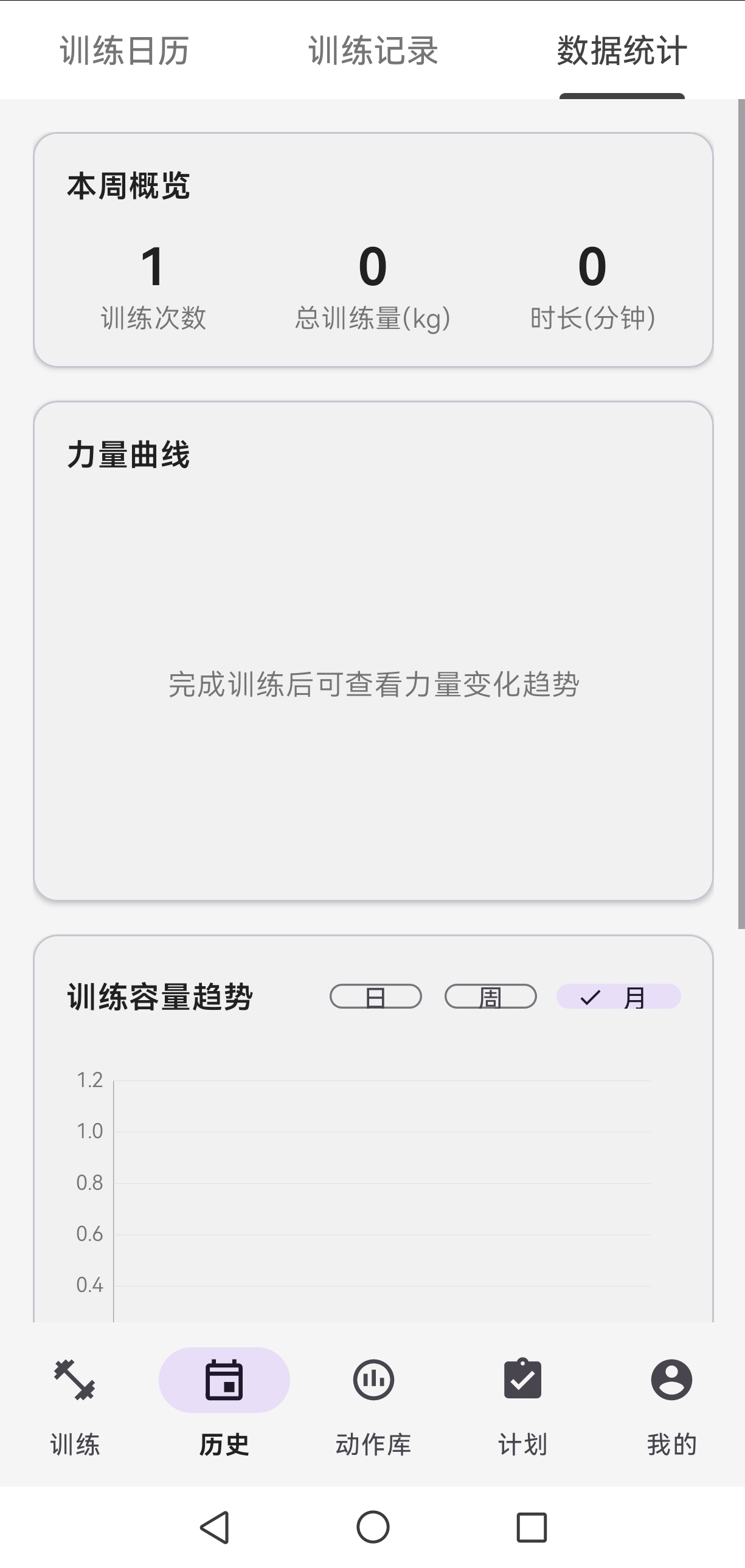
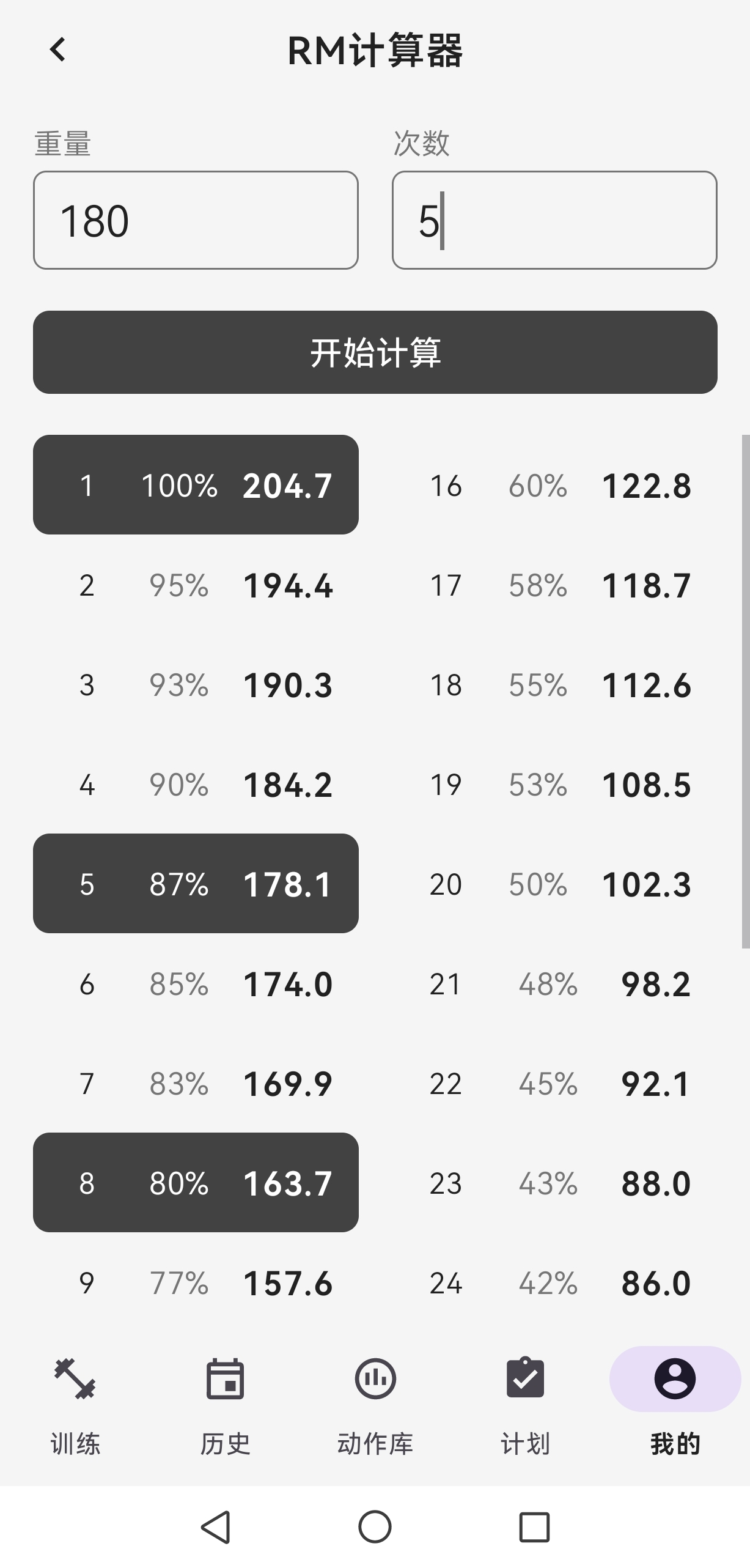
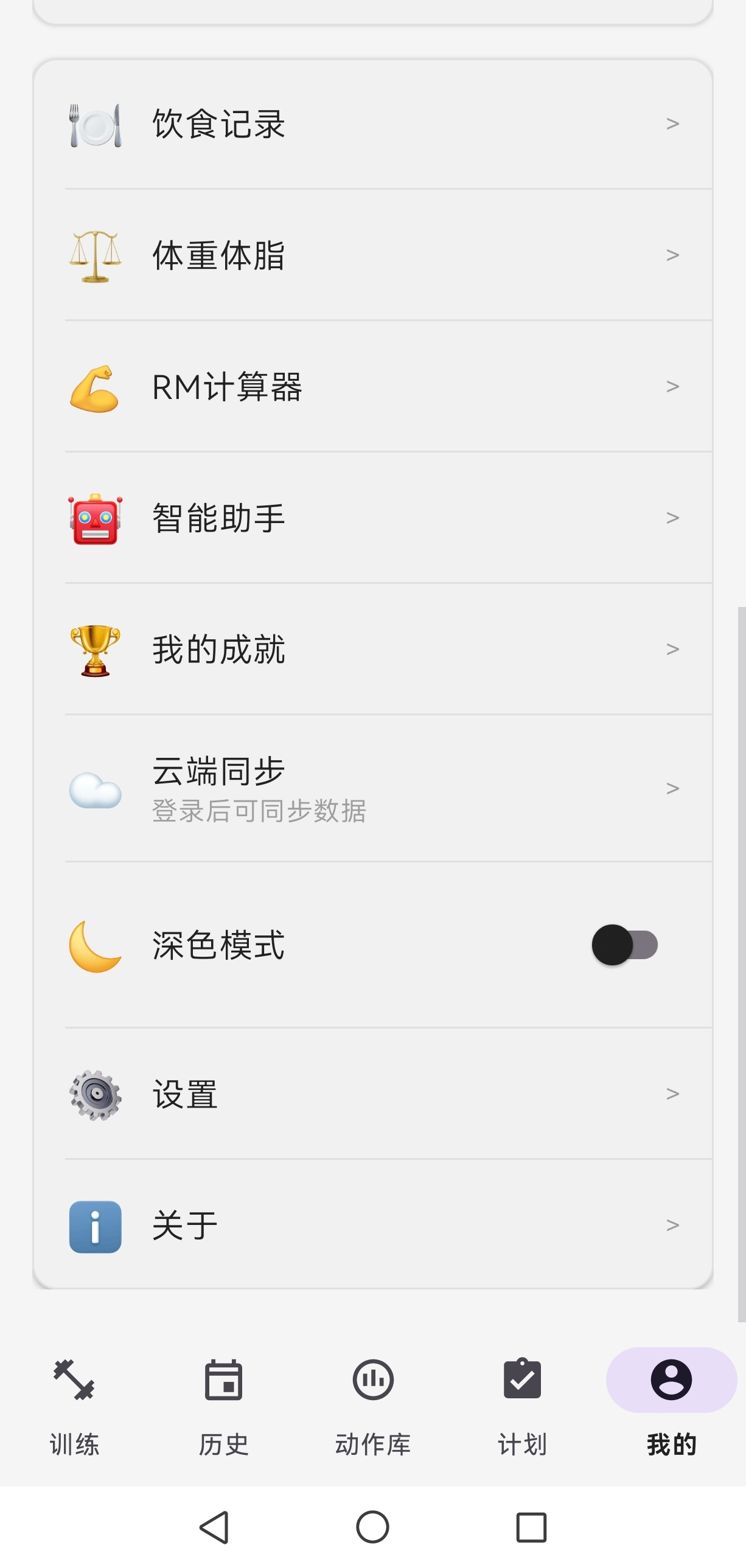
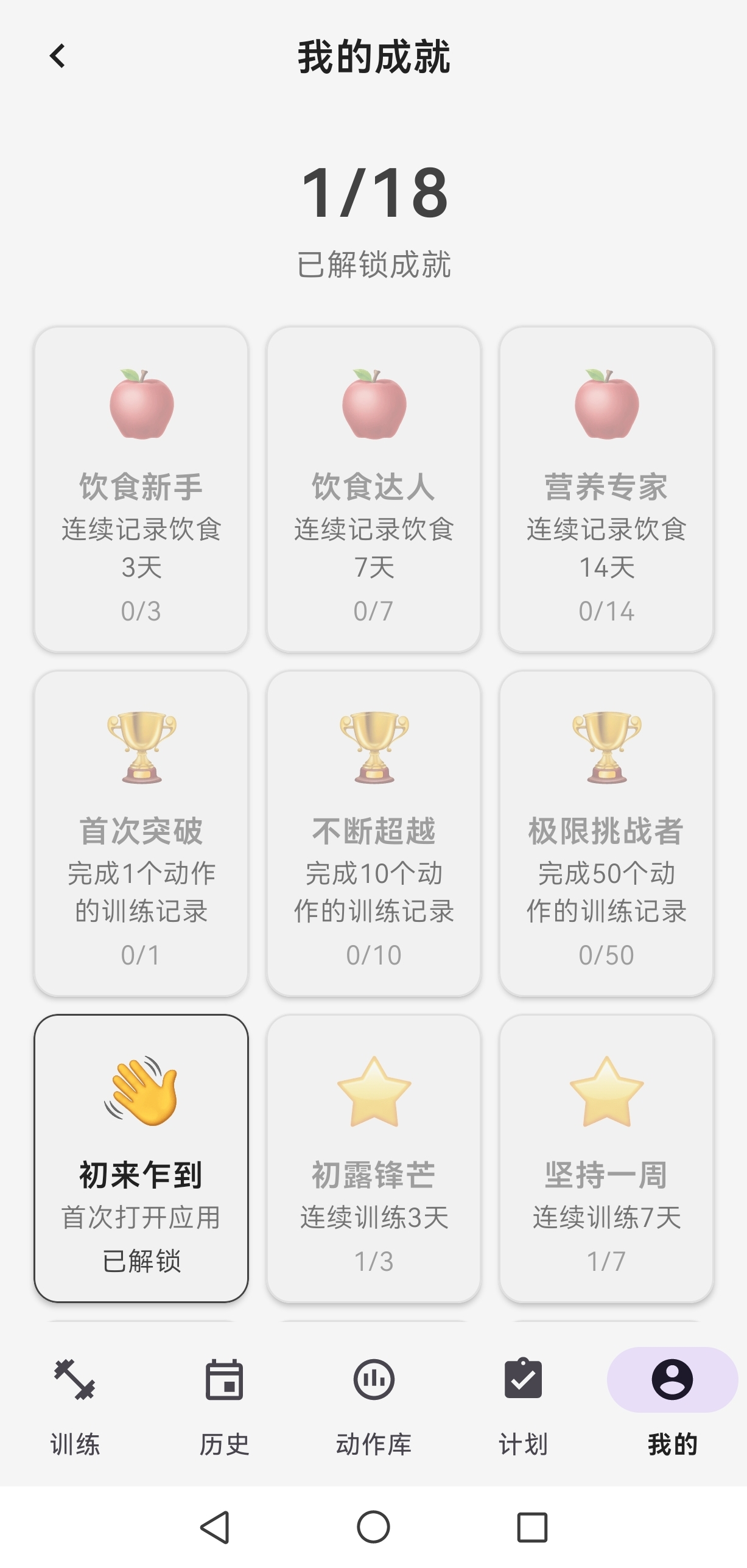
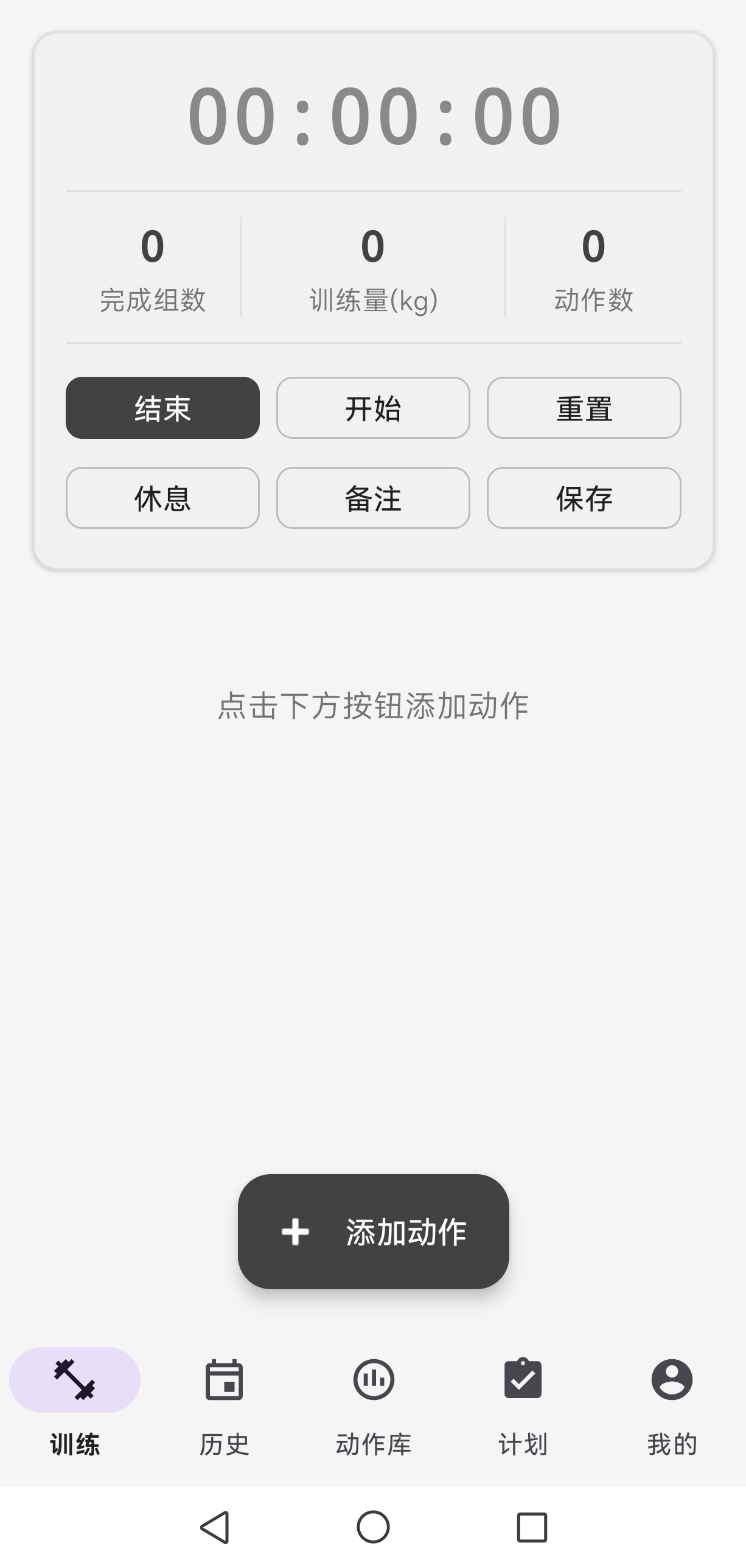
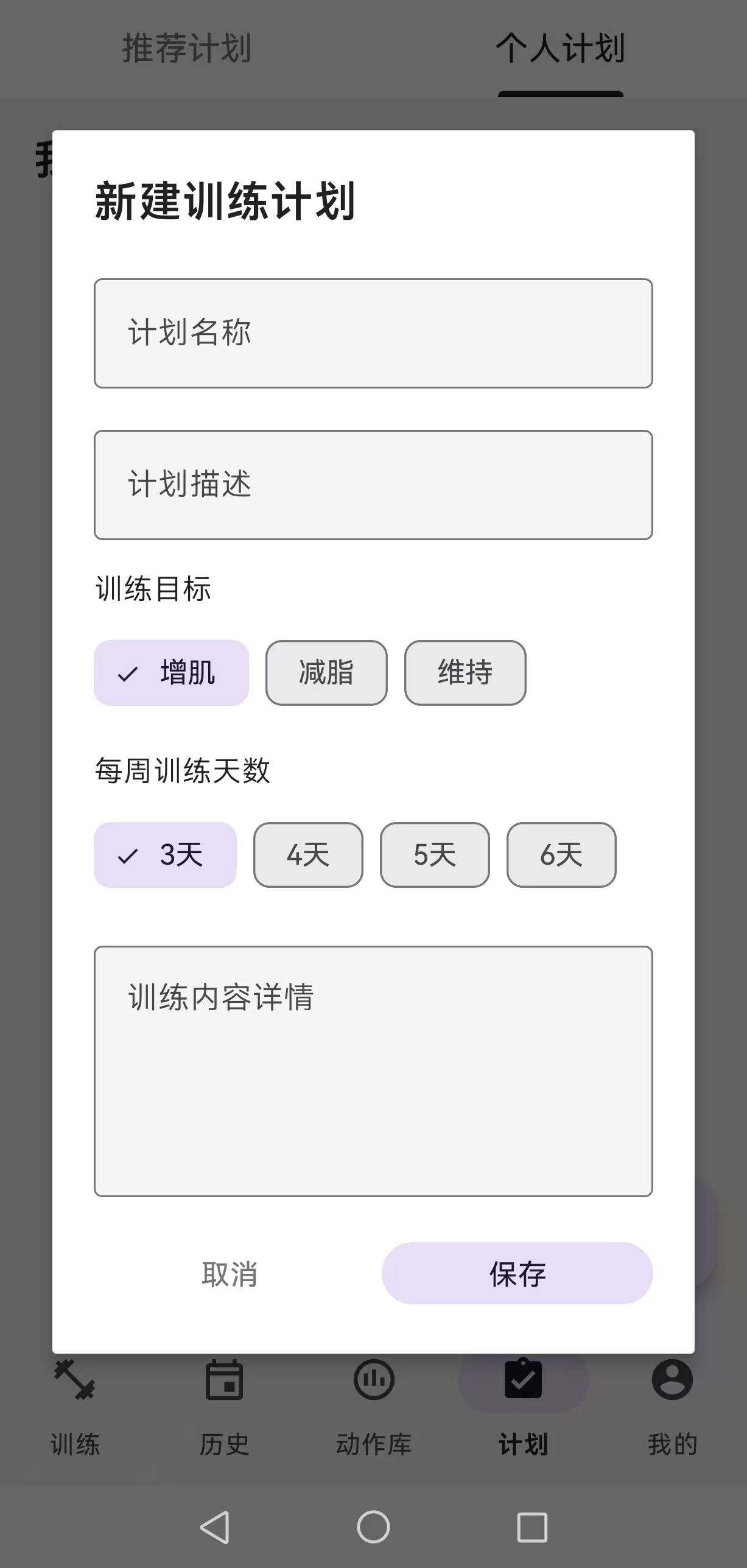
训练记录与数据统计
Training Log & Statistics
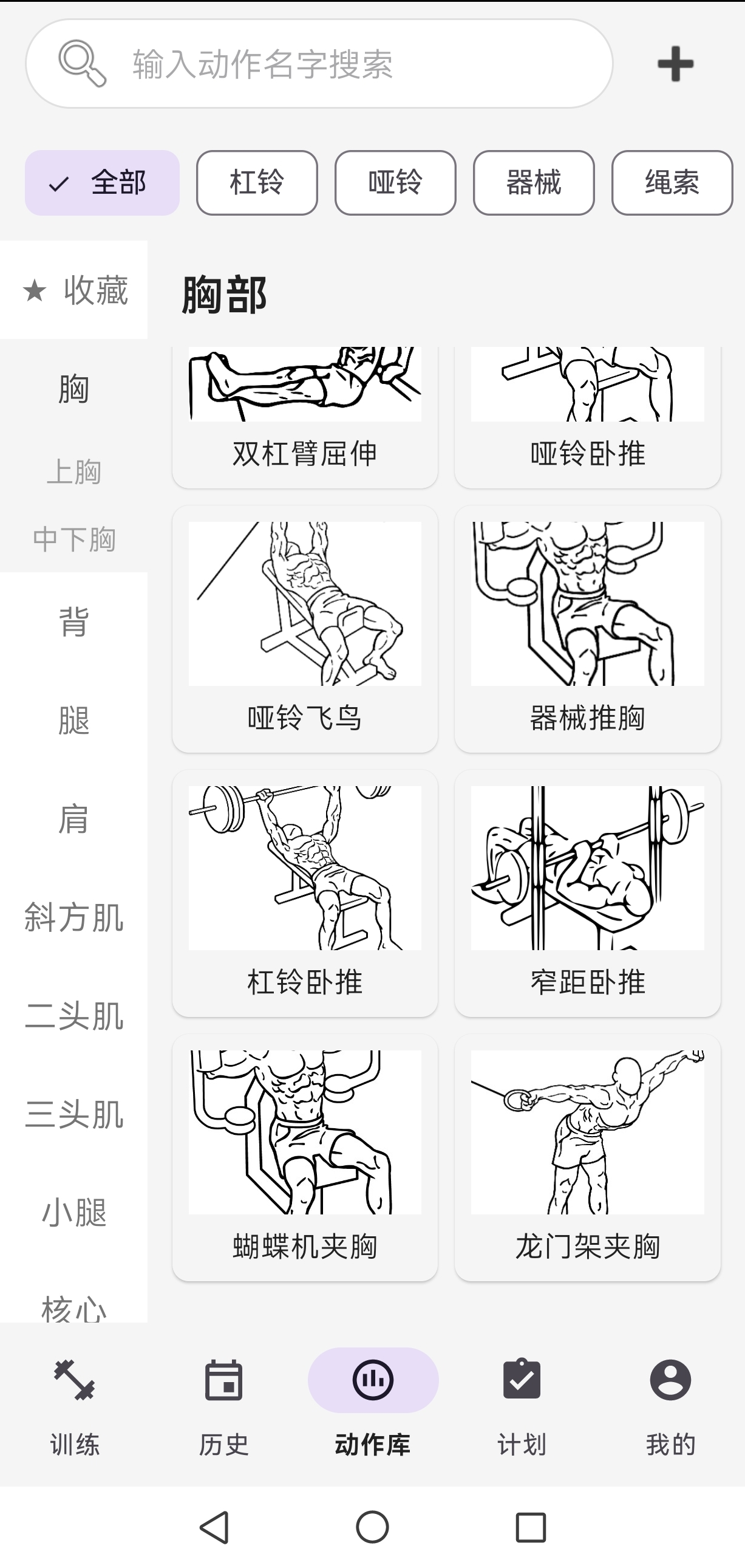
动作库与身体数据
Exercise Library & Body Data
🚀 核心功能
🚀 Core Features
AI智能助手系统
AI Assistant System
与传统的固定模板不同,AI助手能理解你的具体情况:
Unlike traditional fixed templates, the AI assistant understands your specific situation:
- 💬 自然语言交互: "我想增肌,一周练3天" → AI生成个性化训练计划
- Natural language interaction: "I want to build muscle, train 3 days a week" → AI generates personalized training plan
- 🎯 多Agent协作: Supervisor理解意图 → 专业Agent执行 → 确保建议的专业性
- Multi-Agent collaboration: Supervisor understands intent → Specialized agents execute → Ensures professional advice
- ✏️ 可编辑草案: AI生成的计划可预览和修改,不是黑盒
- Editable drafts: AI-generated plans are previewable and modifiable, not a black box
- 🔄 本地写入恢复: 网络异常自动保存,防止数据丢失
- Local write recovery: Auto-saves on network failure, prevents data loss
- 📚 知识库支持: 基于专业健身知识,而非随机生成
- Knowledge base support: Based on professional fitness knowledge, not random generation
训练记录
Training Log
完整记录训练过程,为AI分析提供数据基础:
Complete training records provide data foundation for AI analysis:
- � 详细记录:动作、组数、重量、次数、超级组
- Detailed logging: Exercises, sets, weight, reps, supersets
- 📊 自动计算:训练量、训练强度、容量统计
- Auto-calculation: Training volume, intensity, capacity statistics
- 🏋️ 模板系统:常用训练快速开始
- Template system: Quick start for common workouts
- 📈 AI分析:识别训练瓶颈和进步空间
- AI analysis: Identify training bottlenecks and improvement opportunities
数据统计与分析
Statistics & Analysis
不只是展示数据,更提供洞察:
Not just displaying data, but providing insights:
- 📉 可视化图表:训练趋势、肌肉群分析
- Visual charts: Training trends, muscle group analysis
- 🏆 个人记录追踪:PR突破自动识别
- Personal record tracking: PR breakthroughs auto-identified
- 🧮 1RM计算器:科学评估力量水平
- 1RM calculator: Scientific strength level assessment
- 🤖 AI进度分析:发现问题,提出改进建议
- AI progress analysis: Identify issues, suggest improvements
饮食管理
Diet Management
训练和饮食联动分析:
Integrated training and diet analysis:
- 🍎 200+食物数据库:快速记录
- 200+ food database: Quick logging
- 📊 营养成分自动计算:蛋白质、碳水、脂肪
- Auto-calculate nutrition: Protein, carbs, fat
- 🎯 AI饮食建议:结合训练强度和目标
- AI diet advice: Based on training intensity and goals
- 📝 自定义食物:扩展数据库
- Custom foods: Extend the database
身体数据追踪
Body Data Tracking
为AI提供全面的分析维度:
Provide comprehensive dimensions for AI analysis:
- ⚖️ 多维度记录:体重、体脂率、围度
- Multi-dimensional records: Weight, body fat %, measurements
- 📈 变化曲线:可视化进步
- Change curves: Visualize progress
- 🎯 目标管理:设定目标,追踪进度
- Goal management: Set goals, track progress
🛠️ 技术栈
🛠️ Tech Stack
Android客户端
Android Client
- 语言: Kotlin - 现代化、安全的Android开发语言
- Language: Kotlin - Modern, safe Android development language
- 架构: MVVM - 清晰的职责分离,易于测试和维护
- Architecture: MVVM - Clear separation of concerns, easy to test and maintain
- 数据库: Room - 类型安全的SQLite抽象层,完全本地化
- Database: Room - Type-safe SQLite abstraction, completely local
- 网络: Retrofit + OkHttp - 可靠的HTTP客户端
- Network: Retrofit + OkHttp - Reliable HTTP client
- 异步: Coroutines - 简洁的异步编程
- Async: Coroutines - Concise asynchronous programming
- 图表: MPAndroidChart - 专业的数据可视化
- Charts: MPAndroidChart - Professional data visualization
- 图片: Glide - 高效的图片加载
- Images: Glide - Efficient image loading
后端服务器
Backend Server
- 框架: Spring Boot 3.2.0 - 成熟稳定的企业级框架
- Framework: Spring Boot 3.2.0 - Mature and stable enterprise framework
- 数据库: MySQL - 可靠的关系型数据库
- Database: MySQL - Reliable relational database
- ORM: MyBatis-Plus - 灵活的数据访问层
- ORM: MyBatis-Plus - Flexible data access layer
- 认证: JWT - 无状态的身份验证
- Authentication: JWT - Stateless authentication
- 安全: Spring Security - 企业级安全框架
- Security: Spring Security - Enterprise security framework
- AI: DeepSeek LLM - 高性能的中文大模型
- AI: DeepSeek LLM - High-performance Chinese LLM
- 向量数据库: Qdrant - 专业的向量检索
- Vector DB: Qdrant - Professional vector search
- Embedding: Ollama - 本地化的向量化服务
- Embedding: Ollama - Local vectorization service
架构设计理念
Architecture Design Philosophy
为什么选择本地优先架构?
Why Choose Local-First Architecture?
- 隐私保护: 敏感的身体和训练数据不强制上云
- Privacy protection: Sensitive body and training data not forced to cloud
- 离线可用: 核心功能不依赖网络
- Offline capability: Core features don't depend on network
- 性能优越: 本地操作响应迅速
- Superior performance: Local operations respond instantly
- 成本可控: 用户可选择是否使用云端服务
- Cost control: Users choose whether to use cloud services
为什么AI操作需要后端?
Why Do AI Operations Need Backend?
- 算力要求: LLM推理需要GPU资源
- Computational requirements: LLM inference requires GPU resources
- 知识库: RAG检索需要向量数据库
- Knowledge base: RAG retrieval requires vector database
- 安全控制: 统一的安全策略和审计日志
- Security control: Unified security policies and audit logs
项目结构
Project Structure
.
├── app/                          # Android应用 / Android App
│   ├── src/main/
│   │   ├── java/com/fitness/training/
│   │   │   ├── data/            # 数据层 / Data Layer
│   │   │   │   ├── entity/      # 实体类 / Entity Classes
│   │   │   │   ├── dao/         # 数据访问对象 / Data Access Objects
│   │   │   │   └── database/    # 数据库配置 / Database Configuration
│   │   │   ├── network/         # 网络层 / Network Layer
│   │   │   ├── ui/              # UI层 / UI Layer
│   │   │   ├── util/            # 工具类 / Utility Classes
│   │   │   ├── ai/              # AI助手 / AI Assistant
│   │   │   └── config/          # 配置 / Configuration
│   │   └── res/                 # 资源文件 / Resources
│   └── build.gradle.kts
├── fitness-server/              # Spring Boot后端 / Spring Boot Backend
│   ├── src/main/
│   │   ├── java/com/fitness/server/
│   │   │   ├── agent/           # AI Agent系统 / AI Agent System
│   │   │   ├── knowledge/       # RAG知识库 / RAG Knowledge Base
│   │   │   ├── controller/      # 控制器 / Controllers
│   │   │   ├── service/         # 业务逻辑 / Business Logic
│   │   │   ├── entity/          # 实体类 / Entity Classes
│   │   │   ├── mapper/          # MyBatis映射 / MyBatis Mappers
│   │   │   └── util/            # 工具类 / Utility Classes
│   │   └── resources/
│   │       ├── application.yml  # 配置文件(需自行创建)/ Config (need to create)
│   │       ├── schema.sql       # 数据库脚本 / Database Scripts
│   │       ├── sql/             # 数据库迁移脚本 / DB Migration Scripts
│   │       └── knowledge/       # 知识库文档 / Knowledge Documents
│   └── pom.xml
└── README.md
快速开始
Quick Start
Android客户端
Android Client
环境要求
Requirements
- Android Studio Arctic Fox或更高版本
- Android Studio Arctic Fox or higher
- JDK 17
- Android SDK 24+(最低支持Android 7.0)
- Android SDK 24+ (Minimum Android 7.0)
构建步骤
Build Steps
- 克隆项目 / Clone the project
git clone https://github.com/wua520/GL-APP.git
cd GL-APP
打开Android Studio,导入项目
- Open Android Studio and import the project
同步Gradle依赖
- Sync Gradle dependencies
运行应用
- Run the app
签名配置(可选)
Signing Configuration (Optional)
如果需要生成release版本,创建keystore.properties文件:
To generate a release version, create a keystore.properties file:
storeFile=your-keystore-file.jks
storePassword=your-store-password
keyAlias=your-key-alias
keyPassword=your-key-password
后端服务器(可选)
Backend Server (Optional)
注意: AI助手功能需要后端服务器支持。应用可以完全离线使用基础功能,后端服务器用于云端同步和AI助手。
Note: AI assistant features require backend server. The app can be used completely offline for basic features; backend server is for cloud sync and AI assistant.
环境要求
Requirements
- JDK 17
- MySQL 8.0+
- Maven 3.6+
- DeepSeek API Key(用于AI功能)
- DeepSeek API Key (for AI features)
- Qdrant向量数据库(可选,用于RAG知识库)
- Qdrant vector database (optional, for RAG knowledge base)
部署步骤
Deployment Steps
- 创建数据库 / Create database
mysql -u root -p
CREATE DATABASE fitness_db CHARACTER SET utf8mb4 COLLATE utf8mb4_unicode_ci;
USE fitness_db;
source fitness-server/src/main/resources/schema.sql;
source fitness-server/src/main/resources/sql/agent_tables.sql;
source fitness-server/src/main/resources/sql/f0_add_training_plan_agent_action_id.sql;
source fitness-server/src/main/resources/sql/sync_diet_record_agent_fields.sql;
source fitness-server/src/main/resources/sql/agent_migration_local_write.sql;
source fitness-server/src/main/resources/sql/f2_knowledge_base.sql;
- 配置应用 / Configure application
创建fitness-server/src/main/resources/application-local.yml:
Create fitness-server/src/main/resources/application-local.yml:
server:
  port: 8080

spring:
  datasource:
    url: jdbc:mysql://localhost:3306/fitness_db?useSSL=false&serverTimezone=Asia/Shanghai
    username: your-username
    password: your-password
    driver-class-name: com.mysql.cj.jdbc.Driver

jwt:
  secret: your-jwt-secret-key-at-least-32-characters-long
  expiration: 604800000  # 7天 / 7 days

# AI配置 / AI Configuration
deepseek:
  api-key: your-deepseek-api-key
  base-url: https://api.deepseek.com

# RAG知识库配置(可选)/ RAG Knowledge Base Configuration (Optional)
knowledge:
  enabled: true
  qdrant:
    host: localhost
    port: 6333
  embedding:
    model: nomic-embed-text
    base-url: http://localhost:11434  # Ollama服务地址 / Ollama service address
启动Qdrant(可选,用于RAG知识库)
Start Qdrant (Optional, for RAG knowledge base)
docker run -p 6333:6333 qdrant/qdrant
启动Ollama(可选,用于本地embedding)
Start Ollama (Optional, for local embedding)
# 安装Ollama后运行 / After installing Ollama, run:
ollama pull nomic-embed-text
ollama serve
- 启动服务器 / Start server
cd fitness-server
mvn clean package
java -jar target/fitness-server-1.0.0.jar --spring.profiles.active=local
- 修改Android客户端配置 / Configure Android client
在app/src/main/java/com/fitness/training/config/AppConfig.kt中:
In app/src/main/java/com/fitness/training/config/AppConfig.kt:
object Server {
    const val CLOUD_ENABLED = true
    const val BASE_URL = "http://your-server-ip:8080/"
}
配置说明
Configuration
功能开关
Feature Toggles
在AppConfig.kt中可以控制功能开关:
Control feature toggles in AppConfig.kt:
CLOUD_ENABLED: 是否启用云端同步 / Enable cloud syncAI_ENABLED: 是否启用AI助手 / Enable AI assistantSHOW_CLOUD_ACCOUNT: 是否显示云端账号功能 / Show cloud account featuresSHOW_AI_ASSISTANT: 是否显示AI助手入口 / Show AI assistant entry
AI助手配置
AI Assistant Configuration
要使用AI助手功能,需要:
To use AI assistant features, you need:
- 后端配置: 在
application-local.yml中配置DeepSeek API密钥- Backend configuration: Configure DeepSeek API key in
application-local.yml
- Backend configuration: Configure DeepSeek API key in
- Android配置: 确保
AppConfig.kt中启用AI功能- Android configuration: Ensure AI features are enabled in
AppConfig.kt
- Android configuration: Ensure AI features are enabled in
object Features {
    const val AI_ENABLED = true
    const val SHOW_AI_ASSISTANT = true
}

object Server {
    const val CLOUD_ENABLED = true
    const val BASE_URL = "http://your-server-ip:8080/"
}
RAG知识库(可选)
RAG Knowledge Base (Optional)
知识库功能可以让AI助手提供更专业的建议:
Knowledge base enables AI assistant to provide more professional advice:
- 默认包含训练原理、营养基础、恢复知识等专业文档
- Includes training principles, nutrition basics, recovery knowledge, and other professional documents by default
- 支持自定义添加知识文档(YAML格式)
- Supports custom knowledge documents (YAML format)
- 使用向量检索提供相关上下文
- Uses vector search to provide relevant context
应用特色
App Features
- AI智能助手: 专业的训练、饮食、进度分析Agent系统
- AI Assistant: Professional training, diet, and progress analysis Agent system
- 多Agent协作: Supervisor统筹调度,专业领域分工明确
- Multi-Agent Collaboration: Supervisor orchestration with clear domain specialization
- 本地优先: 完全本地存储,AI生成内容可离线编辑
- Local-First: Complete local storage, AI-generated content editable offline
- 界面简洁: 采用灰白配色,专业低调
- Clean Interface: Gray-white color scheme, professional and understated
- 数据本地: 完全本地存储,保护隐私
- Data Local: Complete local storage, privacy protection
- 完全免费: 无广告,无内购
- Completely Free: No ads, no in-app purchases
- 离线使用: 基础功能无需网络即可使用
- Offline Usage: Basic features work without network
- 支持深色模式: 适应不同使用场景
- Dark Mode Support: Adapts to different usage scenarios
- 安全可控: AI操作需用户确认,支持本地写入恢复
- Safe and Controllable: AI operations require user confirmation, supports local write recovery
版本信息
Version Info
- 当前版本: 1.0 / Current Version: 1.0
- 最低Android版本: Android 7.0 (API 24) / Minimum Android: Android 7.0 (API 24)
- 目标Android版本: Android 14 (API 34) / Target Android: Android 14 (API 34)
隐私政策
Privacy Policy
应用数据完全存储在本地设备,不会上传到任何服务器(除非用户主动启用云端同步功能)。
App data is stored completely on the local device and will not be uploaded to any server (unless the user actively enables cloud sync).
详细隐私政策:隐私政策
Detailed Privacy Policy: Privacy Policy
用户协议
Terms of Service
开发者
Developer
- 邮箱 / Email: w303363639@gmail.com
许可证
License
本项目采用 MIT 许可证。详见 LICENSE 文件。
This project is licensed under the MIT License. See the LICENSE file for details.
贡献
Contributing
欢迎提交Issue和Pull Request!
Issues and Pull Requests are welcome!
致谢
Acknowledgments
感谢所有开源库的作者和贡献者。
Thanks to all open-source library authors and contributors.
注意: 本项目仅供学习交流使用。
Note: This project is for learning and communication purposes only. ""