LinguaHaru
Next-Gen AI Translation Tool Powered by LLM. Support Office documents, PDF, TXT, and more format with just one click.
原始仓库简介 · 中文摘要待补充 ·
README / 项目原文

LinguaHaru
English | 简体中文 | 日本語
User Guide (Wiki)


One-click, high-quality AI translation for documents, subtitles, images, video and live speech.
Two polished frontends (native desktop and web console) over one battle-tested engine — unzip and run, no installation.
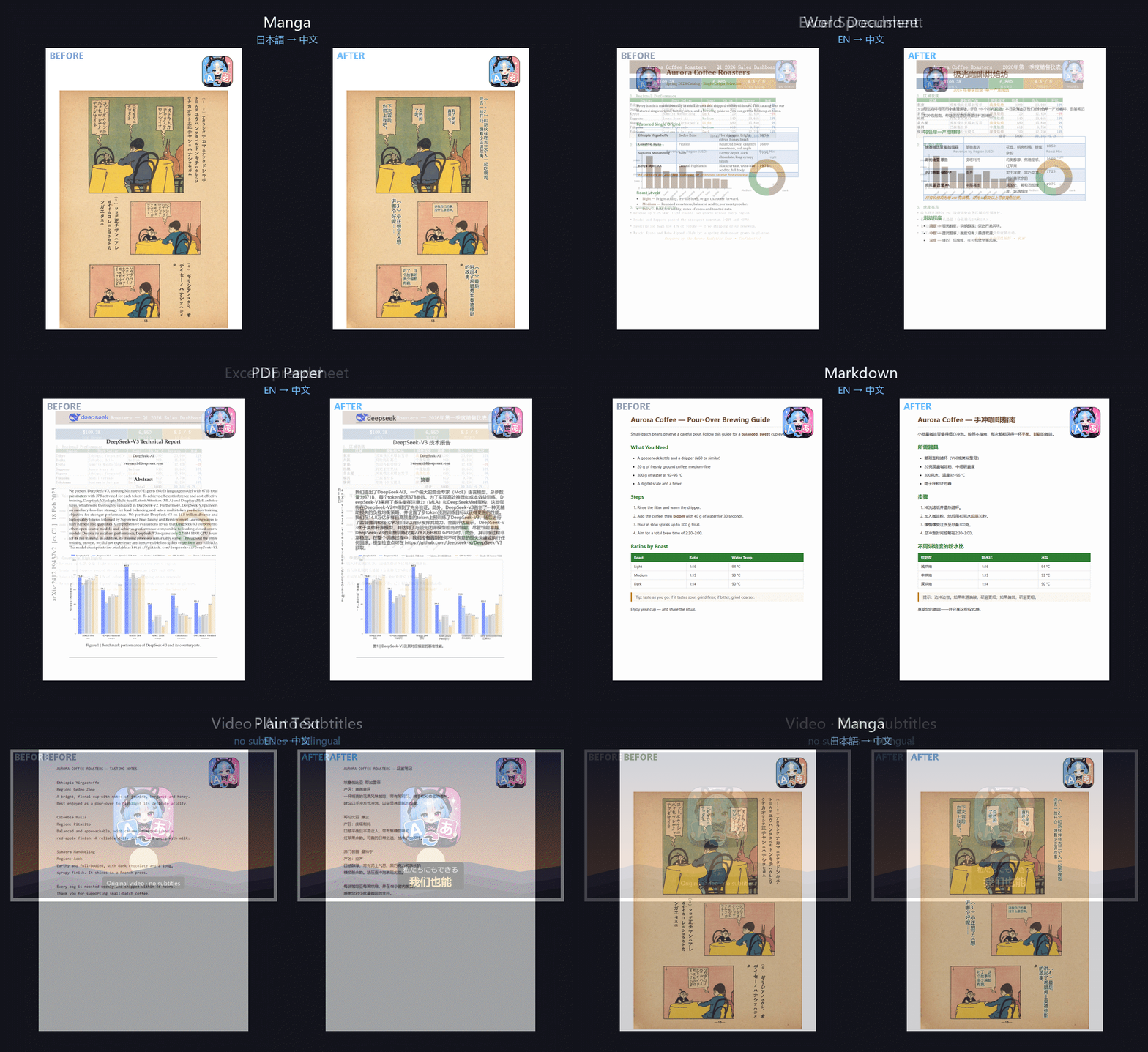
Original on the left, translation on the right — manga, PDF papers, Word, Excel. Layout, images and formatting preserved.
Supported Formats
| Category | Formats |
|---|---|
| Office documents | DOCX · PPTX · XLSX · PDF |
| Text & e-books | TXT · Markdown · EPUB · HTML · ODT · JSON · CSV / TSV |
| Subtitles | SRT · VTT · ASS · SSA · LRC |
| Images (plugin) | PNG · JPG · WebP · BMP … including scanned manga |
| Video & audio (plugin) | MP4 · MKV · MP3 · WAV … automatic transcription plus subtitle translation |
| Live speech (plugin) | Microphone or system audio, translated as you speak |
Why LinguaHaru
Translation engine built for quality and speed. Smart batching, concurrent requests with per-model rate control, translation caching, glossary enforcement, placeholder protection and post-translation QA checks. Atomic incremental writes make every job crash-safe; interrupted runs resume exactly where they stopped.
Two full frontends, one backend.
- Desktop — native Windows and macOS (Apple Silicon) app in Fluent Design (light/dark, floating live captions, drag-and-drop everywhere).
- Web console — the same features in your browser, with multi-user session isolation, LAN sharing and a public server mode.
Everything heavy is a plugin. The base download stays small; install only what you need from the in-app Plugins page. NVIDIA GPUs are detected automatically and the GPU runtimes (CUDA torch, onnxruntime-gpu) are installed for you. Uninstalling a plugin reclaims every dependency it brought in.
| Plugin | What it adds | GPU |
|---|---|---|
| Layout-preserving PDF translation (BabelDOC engine) | — | |
| Image OCR | Image translation with text re-rendering; PP-OCRv6 | Auto (~60× faster than CPU) |
| Manga mode | Bubble detection, text erasing and re-lettering for scanned comics/PDFs, with proofread-and-re-export | Auto |
| Video / Audio | Speech transcription (SenseVoice, Whisper, Qwen3-ASR) and subtitle translation; ffmpeg bundled | Auto |
| Real-Time Voice | Streaming captions with sentence correction, hallucination guards and glossary enforcement | Auto |
| Voice input | Microphone input and read-aloud on the quick-translate page | Auto |
Daily-driver conveniences. Google-style quick translation with voice input and read-aloud; a full glossary manager (create / import / delete) applied across document, quick and live translation; per-project history with one-click resume; live token counts; an in-app proofreading editor with re-export; a first-run interactive tour; UI in English, 简体中文, 繁體中文 and 日本語; 13 built-in translation languages, plus custom ones.
Safe and stable. Fatal API errors (bad key, no balance) are detected and explained in your language; failed or stopped runs land in history and can be resumed; per-user session isolation and CSRF protection on the web; SHA-256-verified self-update with automatic rollback.
Mainland-China friendly. Dependencies, models and updates all fall back to fast mirrors automatically (Tsinghua PyPI, hf-mirror, ModelScope, Baidu BOS, ghproxy) — no VPN required.
Quick Start
Option A (recommended): portable build
No Python, no CUDA setup. Download, unzip, double-click.
- Grab a package from Releases:
LinguaHaru-*-desktop-portable.zip— native desktop app (Windows)LinguaHaru-*-desktop-mac.zip— native desktop app for macOS 13+ on Apple Silicon (openLinguaHaru.app; the first time, click the grey Done — not Move to Trash — then System Settings > Privacy & Security > Open Anyway)LinguaHaru-*-web-portable.zip— web console (opens your browser automatically)
- Unzip anywhere, then run
Start-Desktop.batorStart-Web.bat. - In Interface Management, add an interface (e.g. DeepSeek), paste your API key, click the card to activate.
- Need PDF / OCR / video / live voice? Install the plugin from the Plugins page — one click, GPU handled automatically.
- When a new version ships, the app updates itself in place — plugins, models and settings are preserved.
Option B: run from source
conda create -n lingua-haru python=3.12 && conda activate lingua-haru
pip install -r requirements/base.txt

pip install -r requirements/web.txt   # web:     python -m webapp.server
pip install -r requirements/qt.txt    # desktop: python app_qt.py
Optional plugins can be installed from the in-app Plugins page, or manually:
pip install -r plugins/pdf/requirements.txt       # PDF (BabelDOC)
pip install -r plugins/ocr/requirements.txt       # image OCR + manga mode
pip install -r plugins/video/requirements.txt     # video/audio + real-time voice
pip install -r plugins/speechio/requirements.txt  # voice input + read-aloud
Recommended engine
DeepSeek's latest Flash model — fast, high-quality and inexpensive. Paste your API key into Interface Management and activate.
Local models (Ollama / LM Studio) are supported for offline or privacy-sensitive use, but online APIs are noticeably faster and better for most workloads.
Screenshots
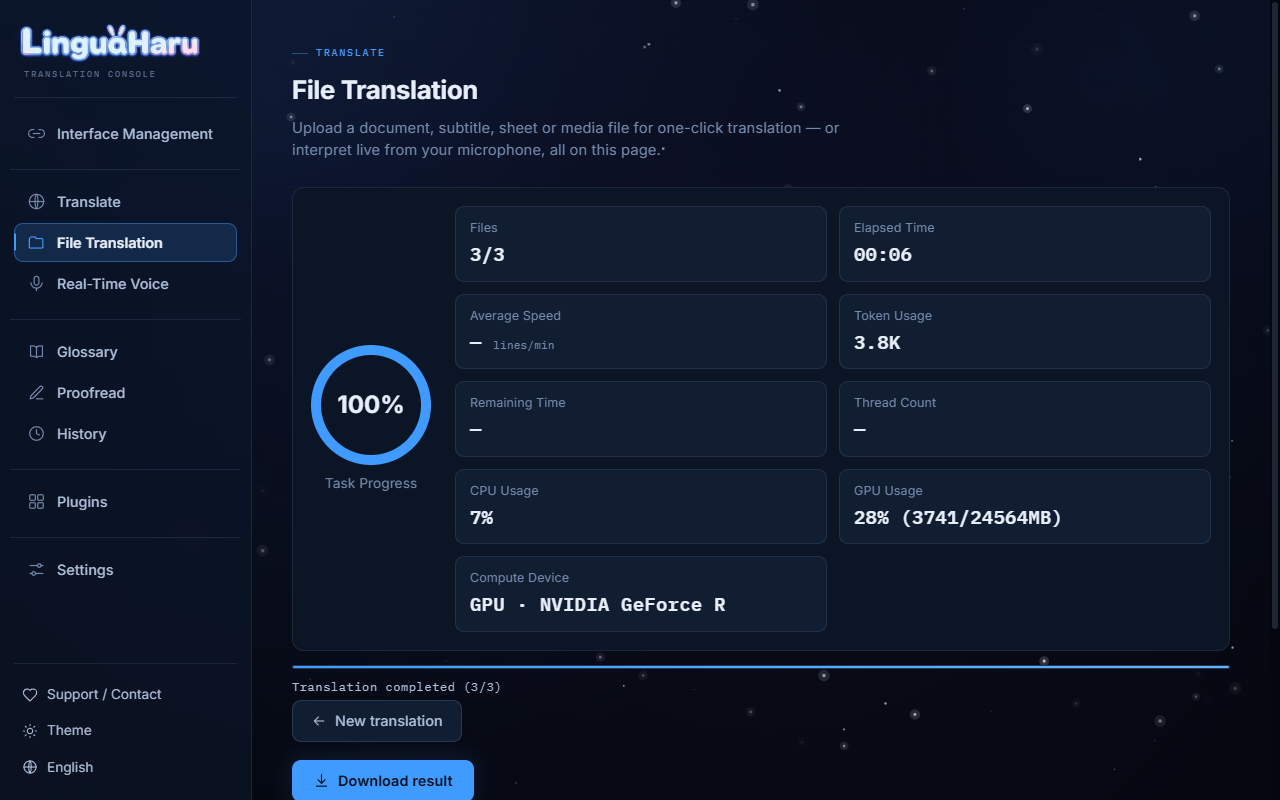 |
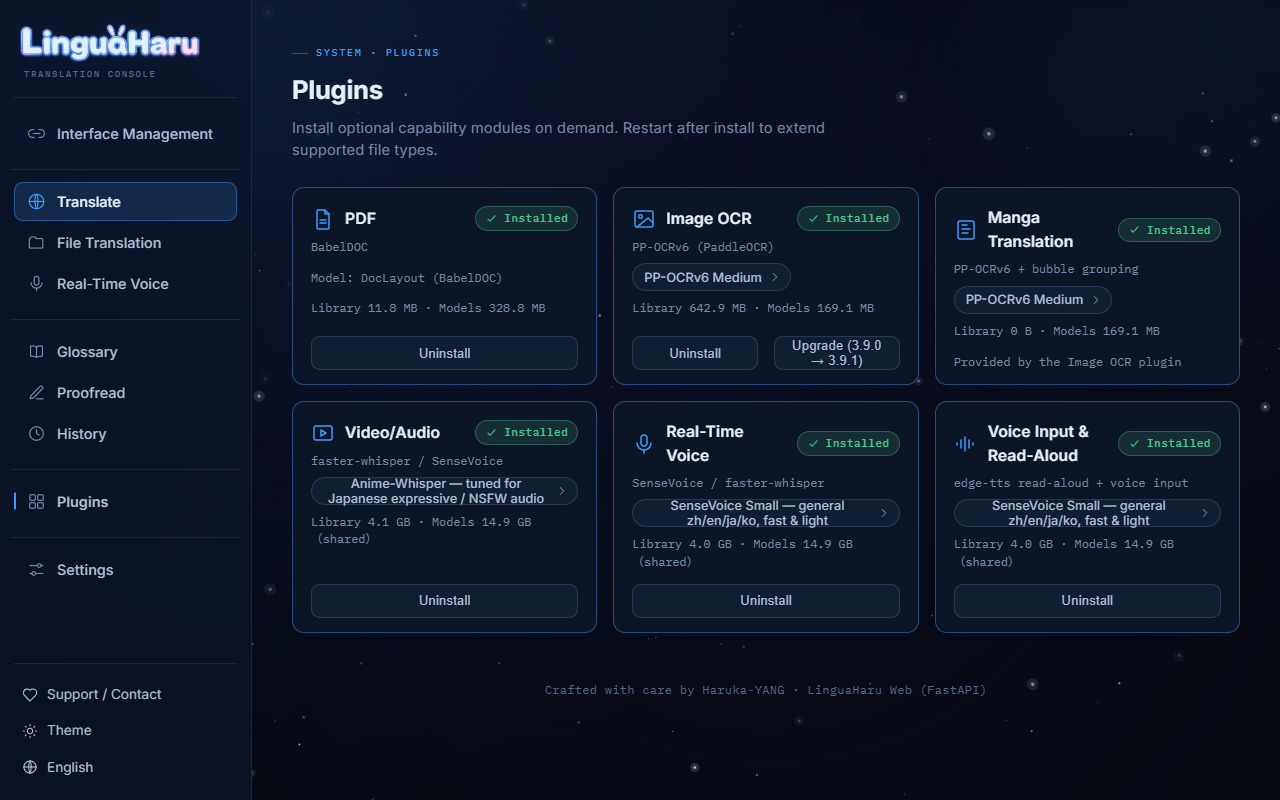 |
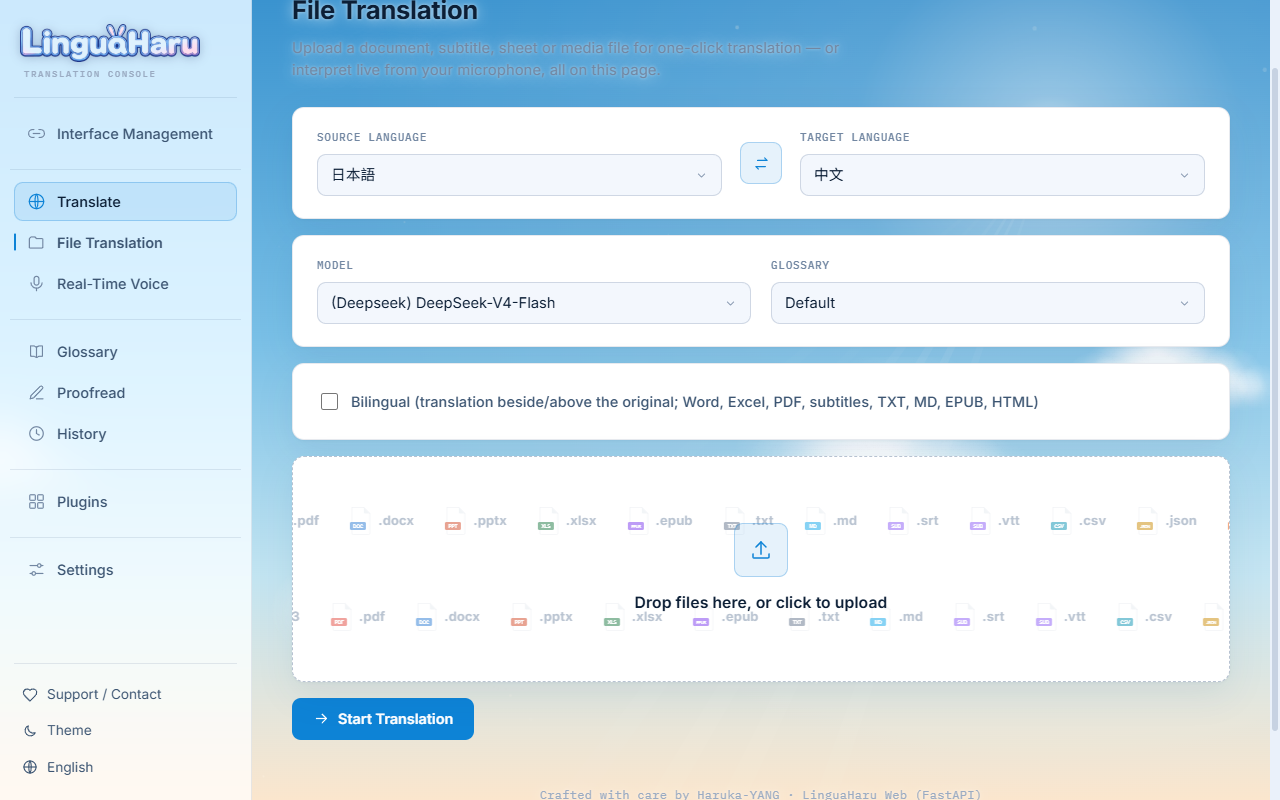
| One-click file translation with a live dashboard | On-demand plugins with automatic GPU |
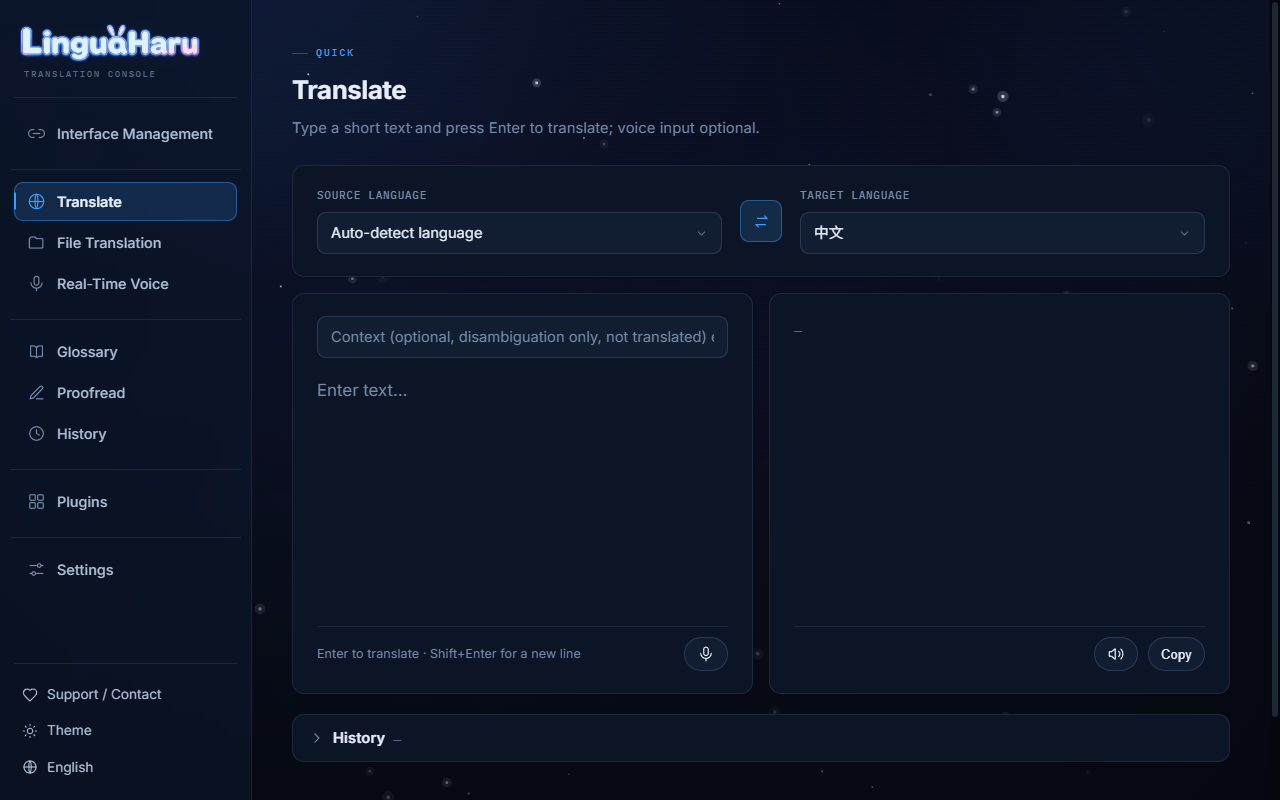 |
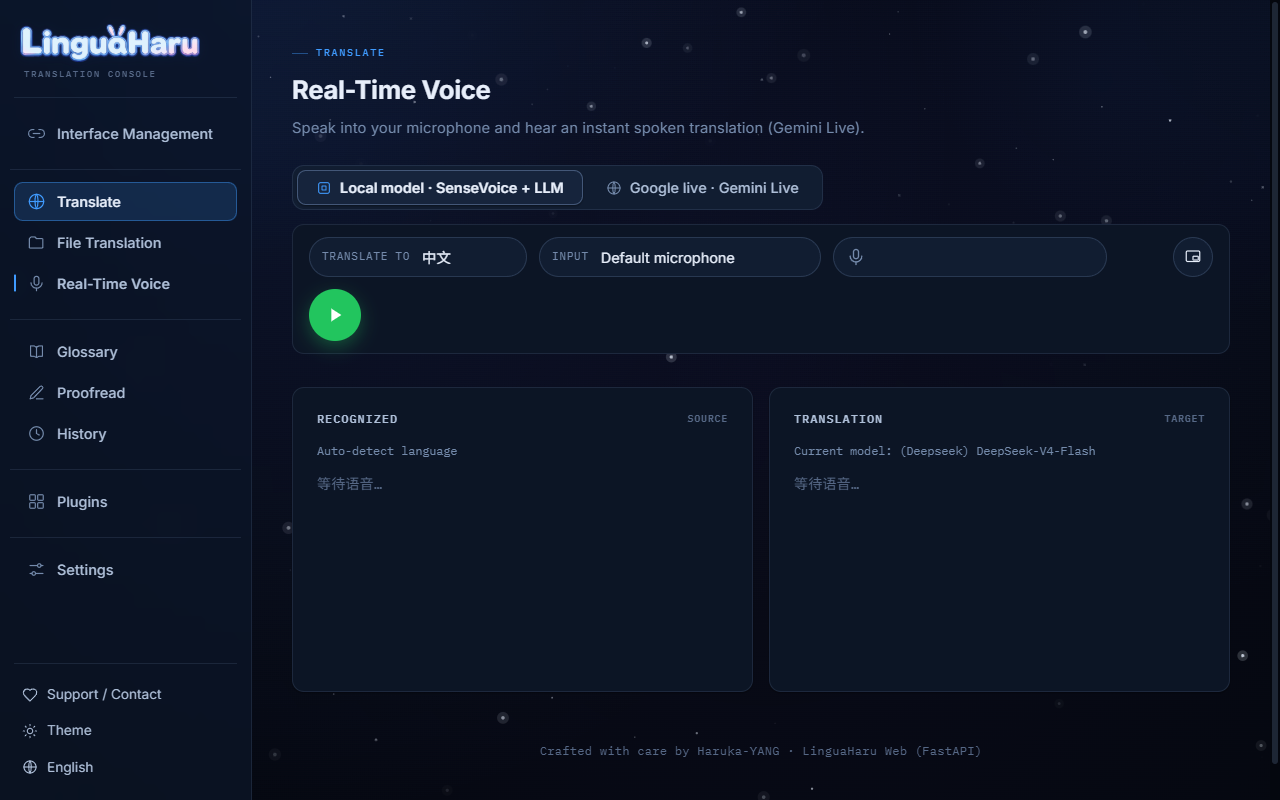 |
| Quick translate with voice input | Real-time voice captions |
 |
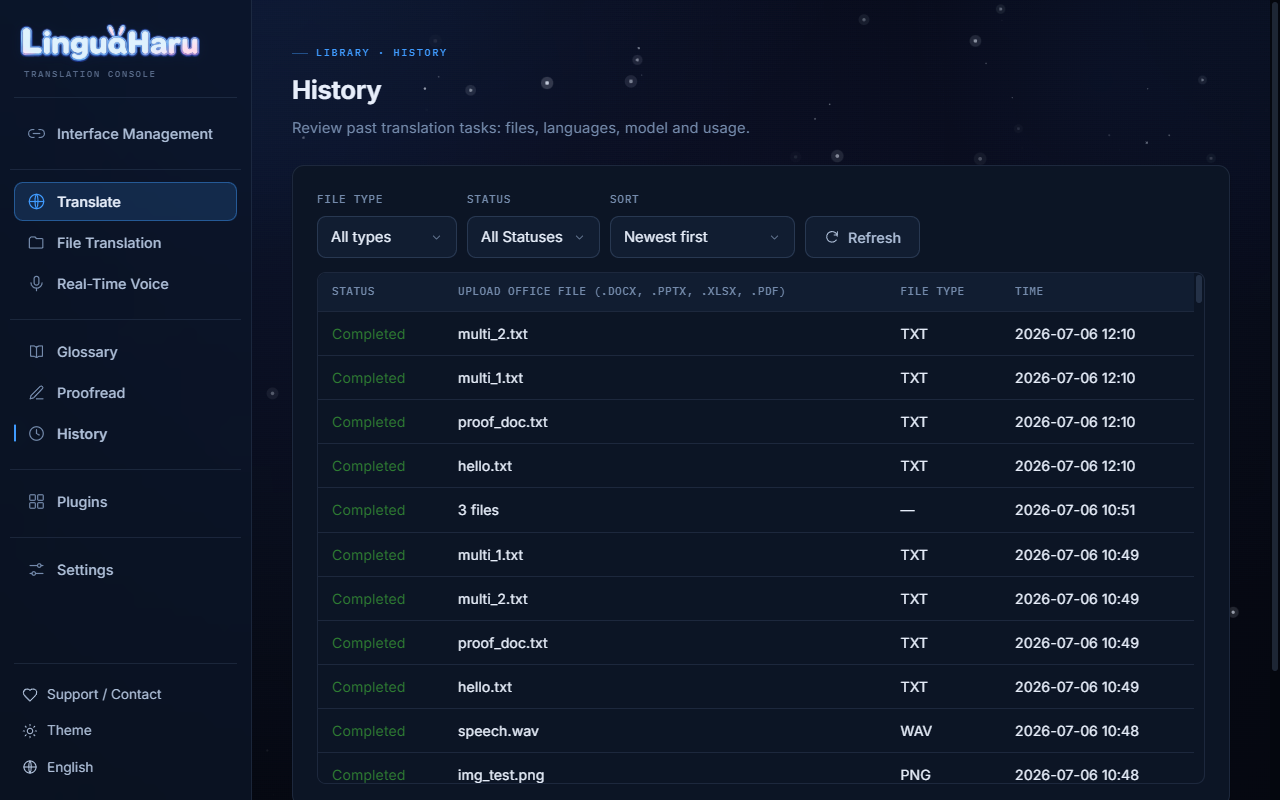 |
| Light theme | History with one-click resume |
Deployment
| Mode | How |
|---|---|
| Desktop | Start-Desktop.bat (portable) or python app_qt.py |
| Local web | Start-Web.bat (portable) or python -m webapp.server — auto-picks a free port from 8080 |
| LAN sharing | Toggle LAN mode in web Settings; every device on the network can use one host |
| Public server | Server mode hides key/model management from visitors and serves with the host's key |
| Docker | docker compose up -d — see Dockerfile / docker-compose.yml; honors HOST / PORT / ADMIN_PASSWORD |
Project Structure
core/                Backend — all non-UI logic
  engine/            Translation engine (batching, retry, QA, caching)
  translators/       Per-format translator classes (docx, pptx, xlsx, pdf, srt, ...)
  pipelines/         Extract/restore pipelines + media (STT) / image (OCR) / manga
  llm/               LLM API wrappers (online / local)
webapp/              Web frontend — FastAPI + static HTML/CSS/JS
qt_app/              Desktop frontend — PySide6 + Fluent Widgets
plugins/             Optional-plugin manifests (installed on demand in-app)
config/              Static config — prompts, locales, api_config, default settings
assets/              Static assets — icons, images, tiktoken data
glossary/            Seed glossary (Default.csv)
requirements/        base.txt + per-frontend extras
tools/               Build scripts (portable builder)
tests/               Test suite (formats corpus, web sessions, i18n, updater, ...)
Contact
Disclaimer
This software is fully open-source under the GPL-3.0 license and can be freely used. It only provides AI-based translation services; the creator holds no responsibility for the translated content. Please ensure your use complies with applicable laws and regulations. Attribution is always appreciated and makes us happy~ but it's totally optional (´ω`)♡
LinguaHaru
English | 简体中文 | 日本語
使用说明(Wiki)
一键式高质量 AI 翻译 —— 文档、字幕、图片、视频与实时语音。
两套精心打磨的界面(原生桌面端 + Web 控制台)共用一个久经考验的引擎,解压即用,无需安装。
左为原文,右为译文 —— 漫画、PDF 论文、Word、Excel,排版、图片与格式完整保留。
支持的格式
| 类别 | 格式 |
|---|---|
| 办公文档 | DOCX · PPTX · XLSX · PDF |
| 文本与电子书 | TXT · Markdown · EPUB · HTML · ODT · JSON · CSV / TSV |
| 字幕 | SRT · VTT · ASS · SSA · LRC |
| 图片(插件) | PNG · JPG · WebP · BMP …… 含扫描版漫画 |
| 视频与音频(插件) | MP4 · MKV · MP3 · WAV …… 自动转写并翻译字幕 |
| 实时语音(插件) | 麦克风或系统声音,边说边译 |
为什么选 LinguaHaru
为质量与速度而生的翻译引擎。 智能分批、并发请求与按模型限流、翻译缓存、术语表强制、占位符保护、译后 QA 检查。原子化增量写盘让任何任务都崩溃安全;中断的任务可以精确续传。
两套完整前端,一个后端。
- 桌面端 —— Fluent Design 原生 Windows / macOS(Apple Silicon)应用(浅色/深色、悬浮实时字幕、全局拖拽)。
- Web 控制台 —— 浏览器里的同款全功能,支持多用户会话隔离、局域网共享与公共服务器模式。
重的东西全是插件。 基础包保持小巧,需要什么在应用内插件页装什么。自动检测 NVIDIA 显卡并安装 GPU 运行时(CUDA torch、onnxruntime-gpu);卸载插件会完整回收它带来的所有依赖。
| 插件 | 提供的能力 | GPU |
|---|---|---|
| 保留排版的 PDF 翻译(BabelDOC 引擎) | — | |
| 图片 OCR | 图片翻译并回填文字;PP-OCRv6 | 自动(比 CPU 快约 60×) |
| 漫画模式 | 扫描漫画/PDF 的气泡识别、抹字、译文回填,支持校对后再导出 | 自动 |
| 视频/音频 | 语音转写(SenseVoice、Whisper、Qwen3-ASR)+ 字幕翻译;内置 ffmpeg | 自动 |
| 实时语音 | 流式字幕、整句修正、防幻觉、术语加固 | 自动 |
| 语音输入 | 速译页的麦克风输入与朗读 | 自动 |
日常好用的细节。 Google 风格的速译(带语音输入与朗读);完整词汇表管理(新建/导入/删除),文档、速译、实时翻译全局套用;项目级历史与一键续译;实时 token 统计;应用内校对编辑器并可重新导出;首次运行交互式引导;界面支持简体中文、繁體中文、English、日本語;内置 13 种翻译语言,并可自定义。
安全稳定。 致命 API 错误(密钥无效、余额不足)自动识别并用你的语言解释;失败/中断任务进历史、可续译;Web 端按用户会话隔离 + CSRF 防护;SHA-256 校验的自更新,失败自动回滚。
对中国大陆网络友好。 依赖、模型、更新全链路自动回退到高速镜像(清华 PyPI、hf-mirror、ModelScope、百度 BOS、ghproxy),无需科学上网。
快速开始
方式 A(推荐):便携版
不需要 Python,不需要配 CUDA。下载、解压、双击。
- 从 Releases 下载:
LinguaHaru-*-desktop-portable.zip—— 原生桌面端(Windows)LinguaHaru-*-desktop-mac.zip—— macOS 桌面端(macOS 13 以上、M 系列芯片;打开LinguaHaru.app。第一次弹窗时点灰色的「完成」,不要点「移到废纸篓」,然后在「系统设置 > 隐私与安全性」里点「仍要打开」)LinguaHaru-*-web-portable.zip—— Web 端(自动打开浏览器)
- 解压到任意位置,运行
Start-Desktop.bat或Start-Web.bat。 - 在 接口管理 添加接口(如 DeepSeek),粘贴 API 密钥,点击卡片激活。
- 需要 PDF / OCR / 视频 / 实时语音?在 插件 页一键安装 —— GPU 自动处理。
- 有新版本时应用内一键自更新 —— 已装插件、模型与设置全部保留。
方式 B:源码运行
conda create -n lingua-haru python=3.12 && conda activate lingua-haru
pip install -r requirements/base.txt

pip install -r requirements/web.txt   # Web:   python -m webapp.server
pip install -r requirements/qt.txt    # 桌面:  python app_qt.py
可选插件可在应用内插件页安装,或手动:
pip install -r plugins/pdf/requirements.txt       # PDF(BabelDOC)
pip install -r plugins/ocr/requirements.txt       # 图片 OCR + 漫画模式
pip install -r plugins/video/requirements.txt     # 视频/音频 + 实时语音
pip install -r plugins/speechio/requirements.txt  # 语音输入 + 朗读
推荐引擎
DeepSeek 最新 Flash 模型 —— 快、好、便宜。在接口管理里粘贴 API 密钥并激活即可。
本地模型(Ollama / LM Studio)适合离线或隐私敏感场景,但多数情况下在线 API 明显更快更好。
界面一览
|
|
| 一键文件翻译 + 实时仪表盘 | 按需插件 + GPU 自动启用 |
|
|
| 速译(带语音输入) | 实时语音字幕 |
|
|
| 浅色主题 | 历史记录 + 一键续译 |
部署方式
| 模式 | 方法 |
|---|---|
| 桌面 | Start-Desktop.bat(便携版)或 python app_qt.py |
| 本机 Web | Start-Web.bat(便携版)或 python -m webapp.server —— 从 8080 起自动选空闲端口 |
| 局域网共享 | Web 设置里打开局域网模式,同一网络所有设备共用一台主机 |
| 公共服务器 | 服务器模式对访客隐藏密钥/模型管理,使用主机的密钥提供服务 |
| Docker | docker compose up -d —— 见 Dockerfile / docker-compose.yml;支持 HOST / PORT / ADMIN_PASSWORD |
项目结构
core/                后端 —— 全部非 UI 逻辑
  engine/            翻译引擎(分批、重试、QA、缓存)
  translators/       各格式翻译器(docx、pptx、xlsx、pdf、srt……)
  pipelines/         抽取/回填管线 + 媒体(STT)/ 图片(OCR)/ 漫画
  llm/               LLM API 封装(在线 / 本地)
webapp/              Web 前端 —— FastAPI + 静态 HTML/CSS/JS
qt_app/              桌面前端 —— PySide6 + Fluent Widgets
plugins/             可选插件清单(应用内按需安装)
config/              静态配置 —— 提示词、语言包、接口配置、默认设置
assets/              静态资源 —— 图标、图片、tiktoken 数据
glossary/            种子词汇表(Default.csv)
requirements/        base.txt + 各前端附加依赖
tools/               构建脚本(便携包构建器)
tests/               测试套件(格式语料、Web 会话、i18n、更新器……)
联系方式
软件声明
本软件基于 GPL-3.0 协议完全开源,可自由使用。 软件仅提供基于 AI 的翻译服务,作者不对翻译内容承担任何责任。 请确保您的使用符合相关法律法规。 署名永远令人开心~ 但完全是自愿的 (´ω`)♡