printfilm
PRINTFILM: AI short-video marketing and AI short-drama creation platform
原始仓库简介 · 中文摘要待补充 · ai / ai-video / short-drama / short-video
README / 项目原文
PRINTFILM


把故事做成能播的片子 — AI 漫剧与 AI 短视频,从文案到成片。
分步短视频创作:创作设置 → 文案与分镜 → 参考图生图 → 图生视频 → 合成预览。新建默认 AI 视频、3D 动画画风、9:16 竖屏、约 60 秒,也可选择静图成片,各阶段检查与编辑后再继续制作。
源码:github.com/yi1108/printfilm · 版本 0.2.0
界面预览
工作台
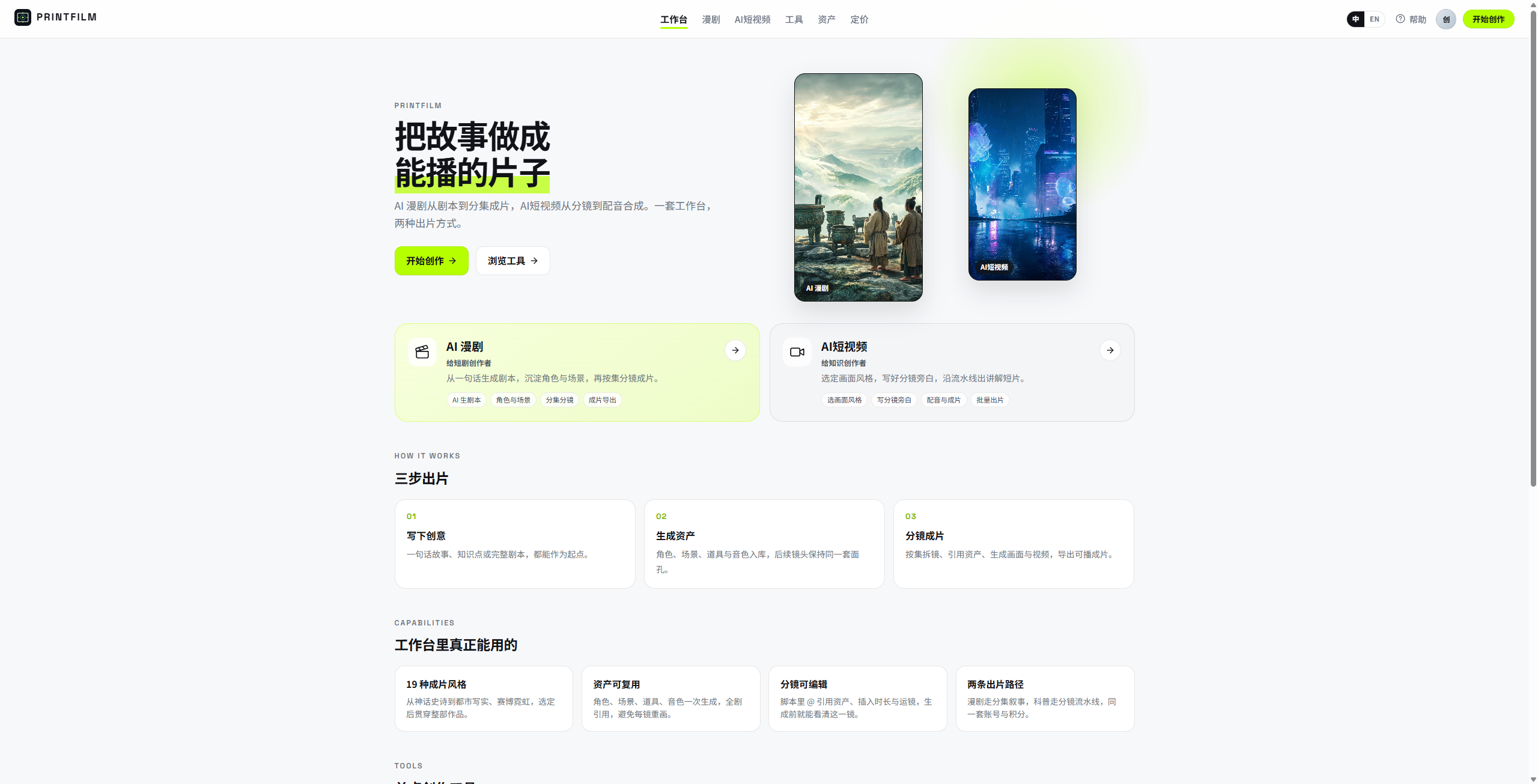
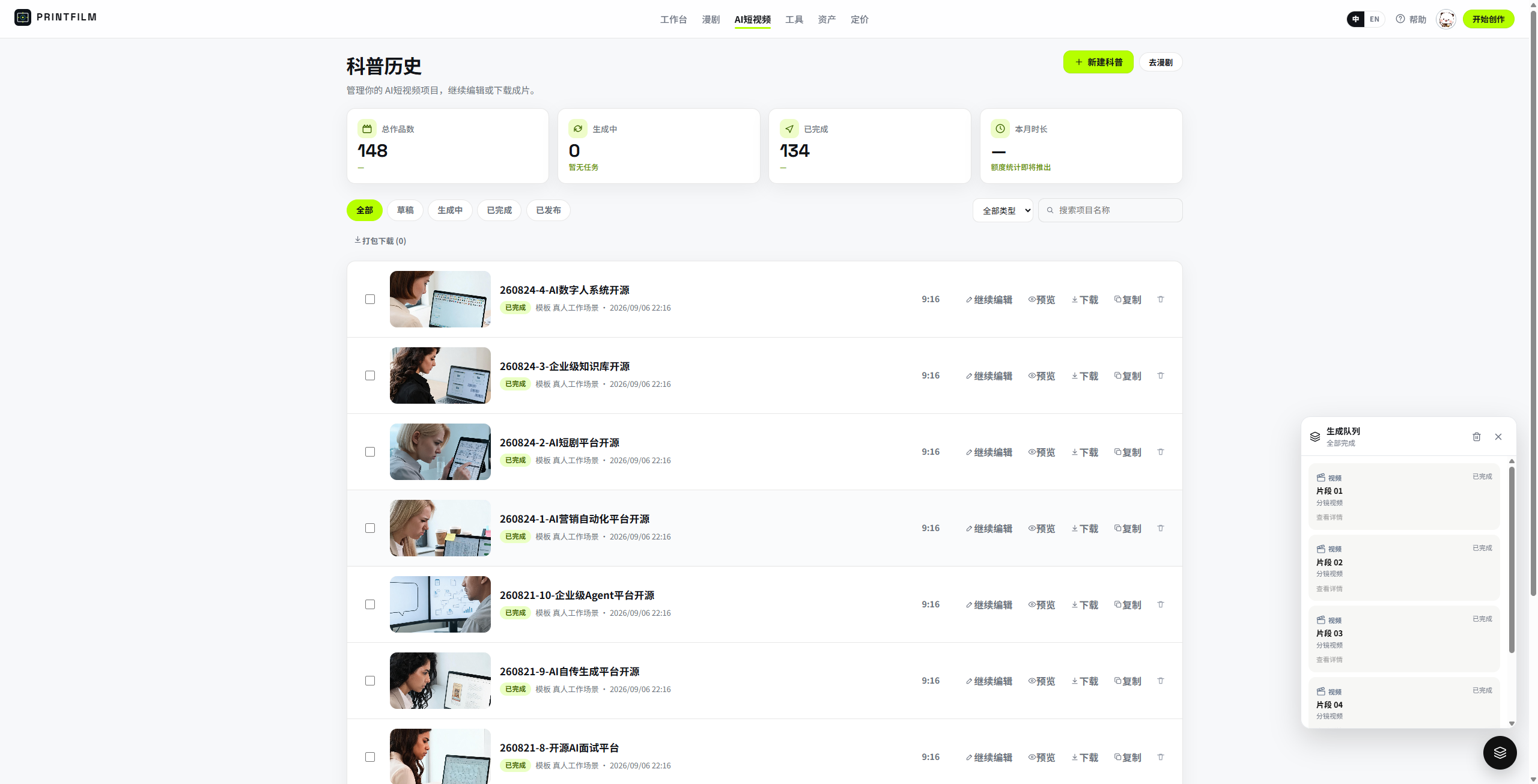
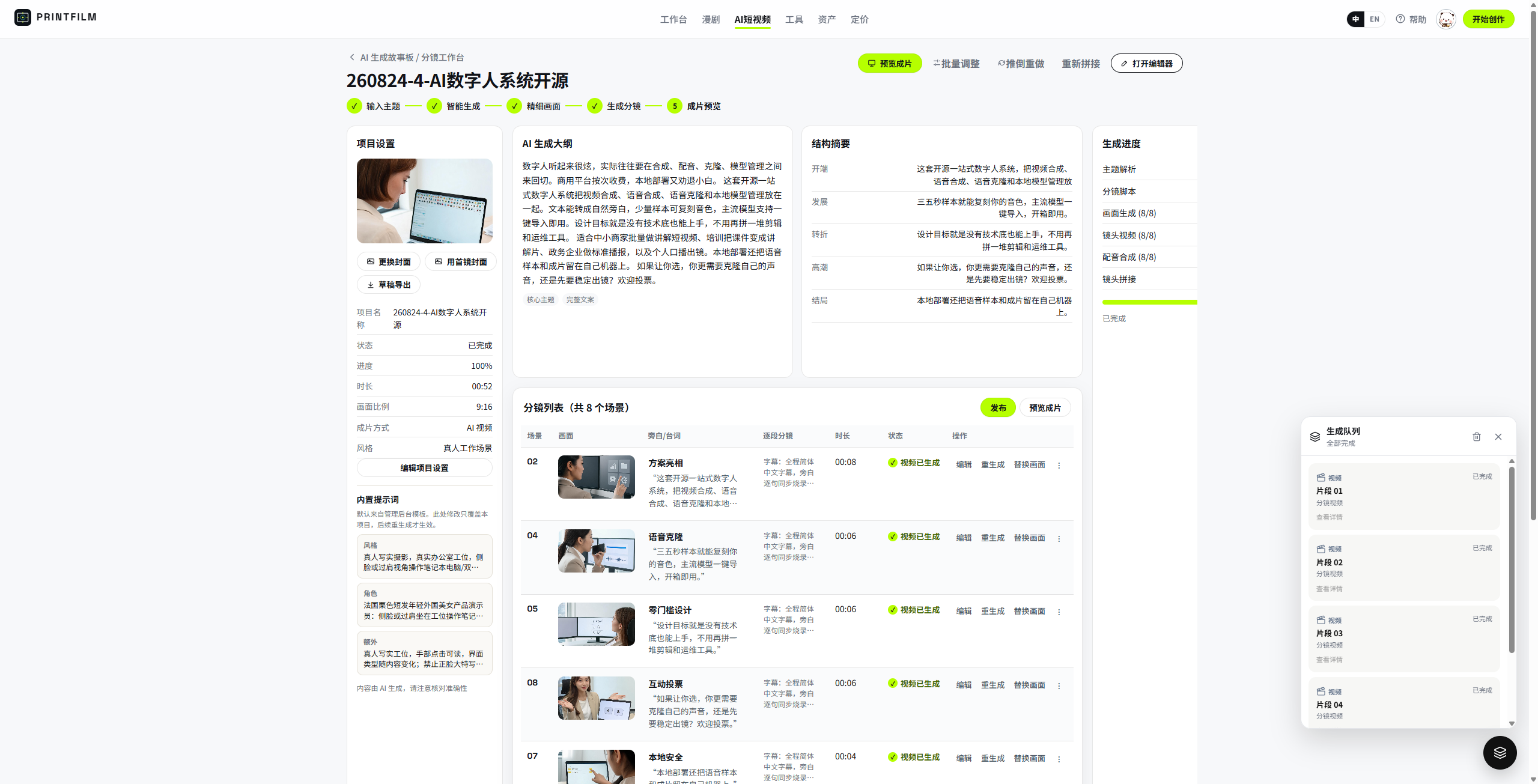
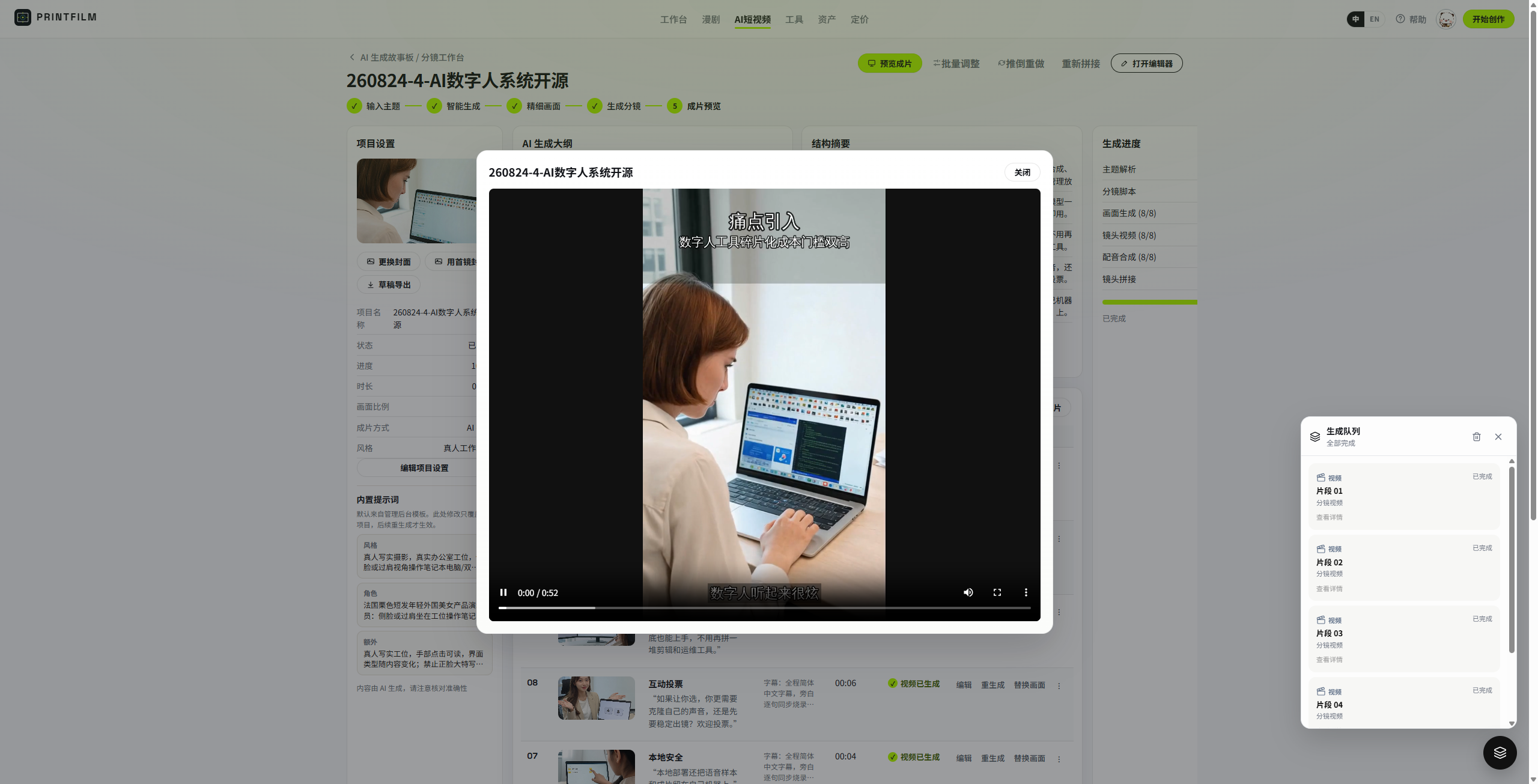
AI 短视频 — 历史、分镜、成片
| 项目历史 | 分镜工作台 | 成片预览 |
|---|---|---|
 |
 |
 |
AI 漫剧 — 项目、分集、剧本、分镜、资产
| 项目列表 | 分集工作台 | 剧本解析 |
|---|---|---|
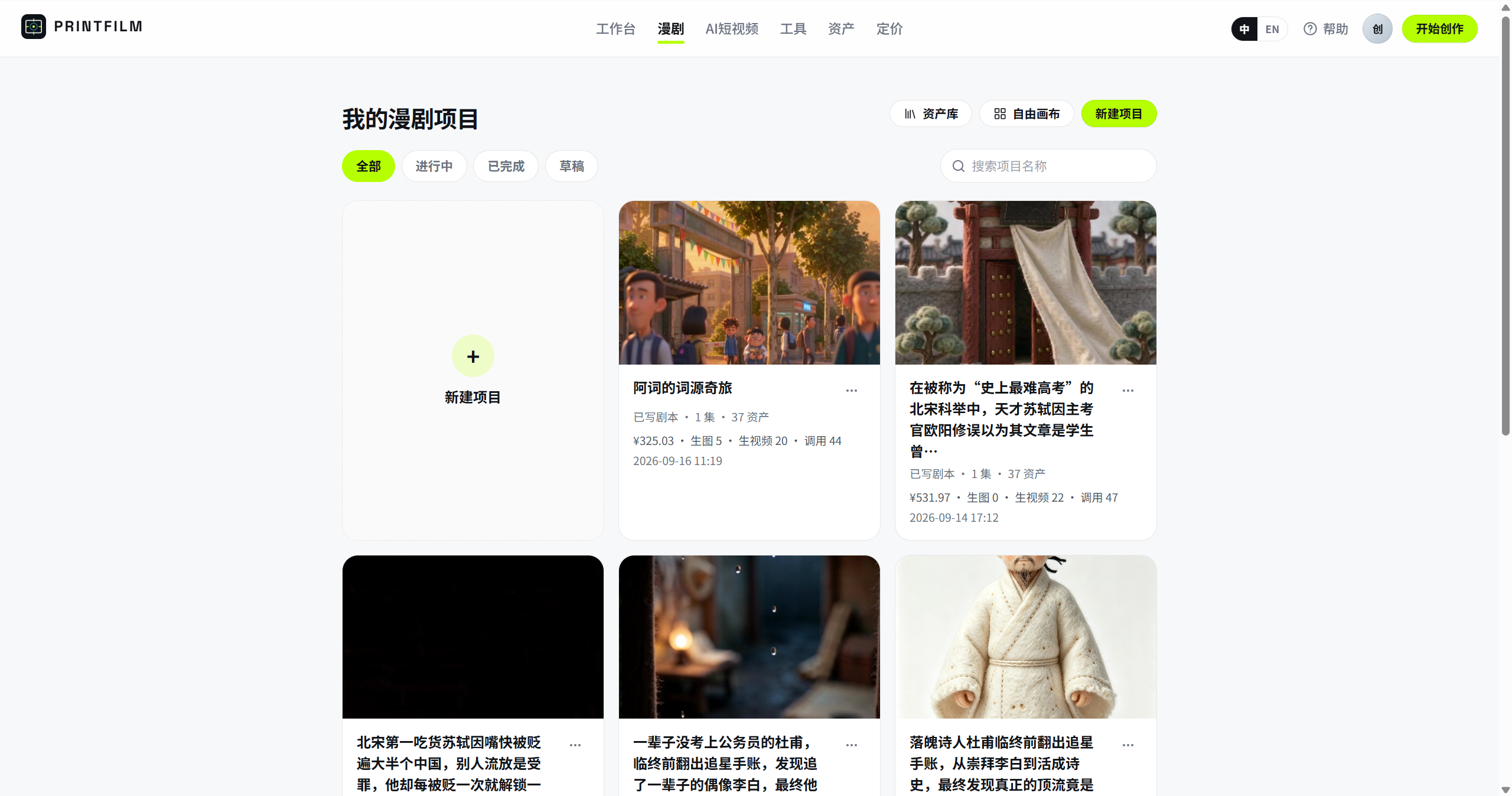 |
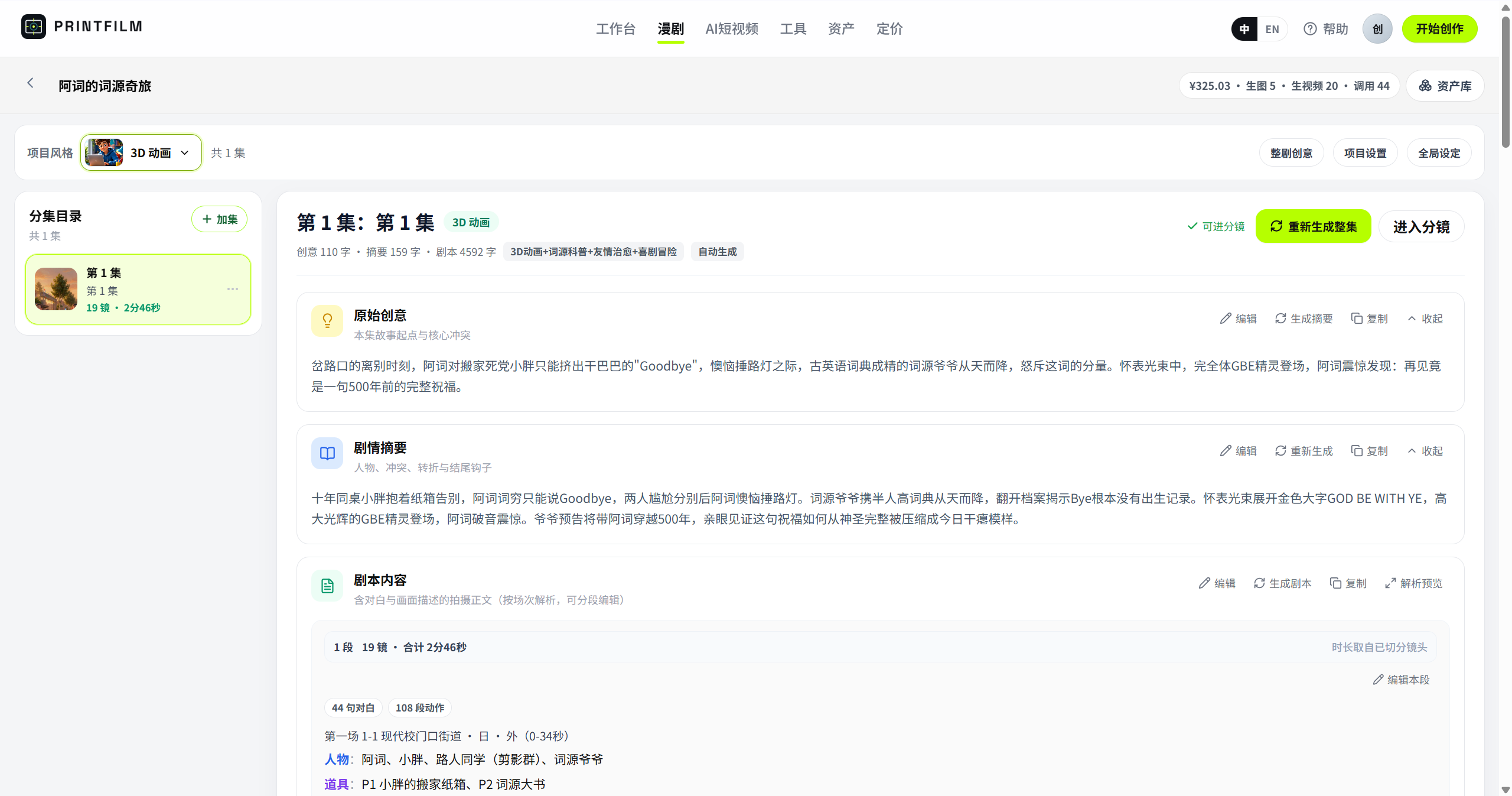 |
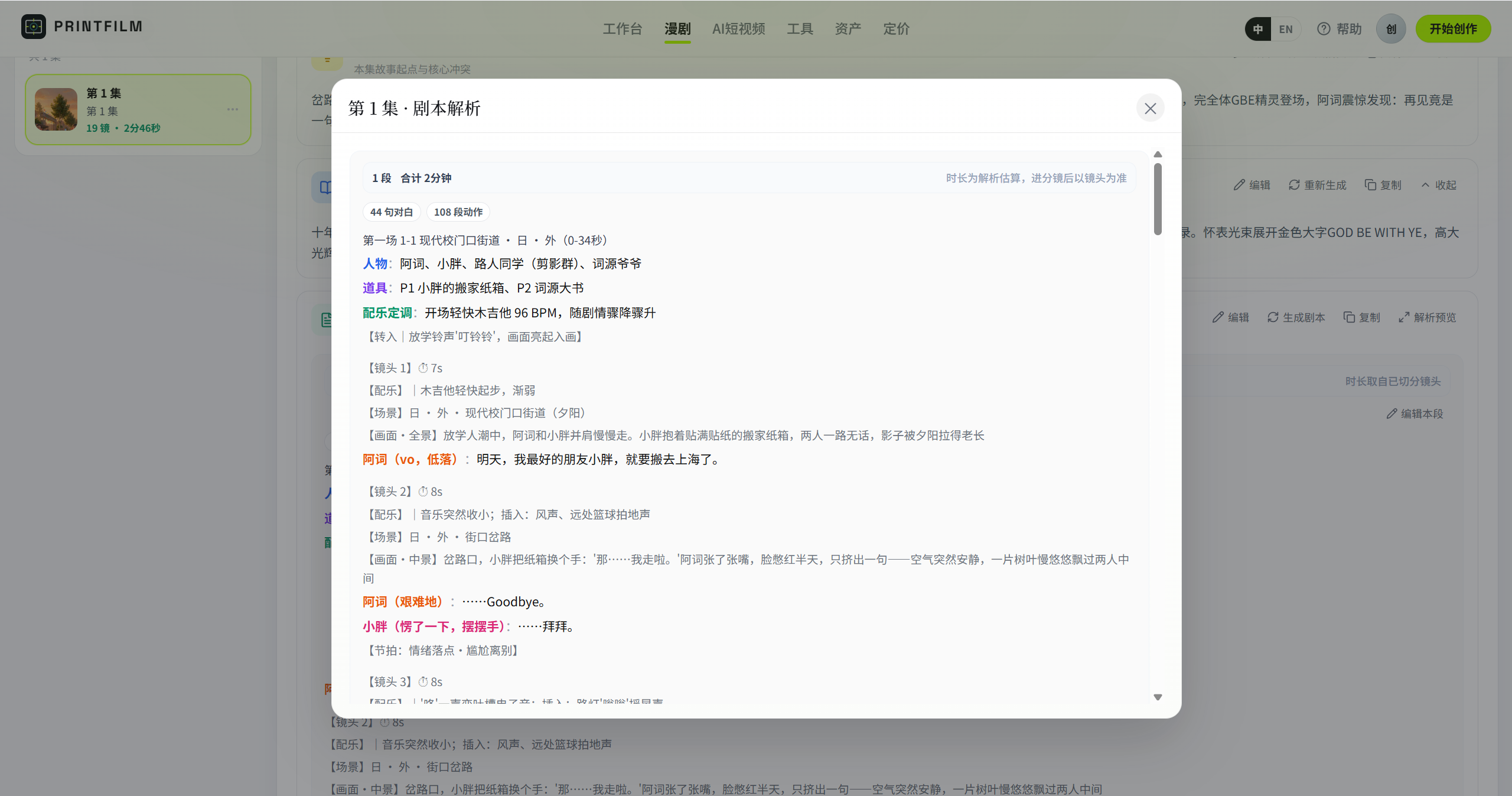 |
| 分镜编辑 | 资产库 | 管理后台 |
|---|---|---|
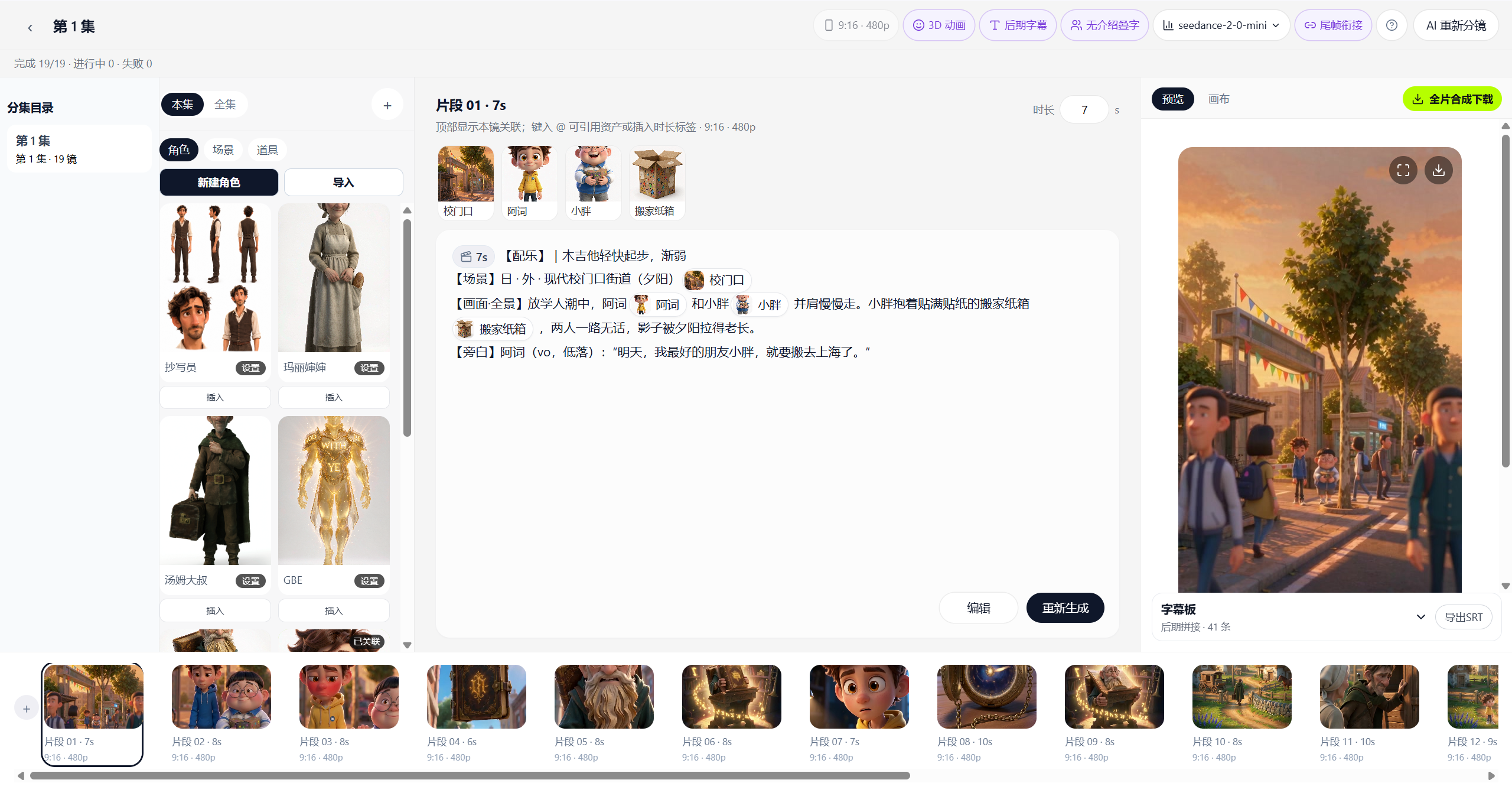 |
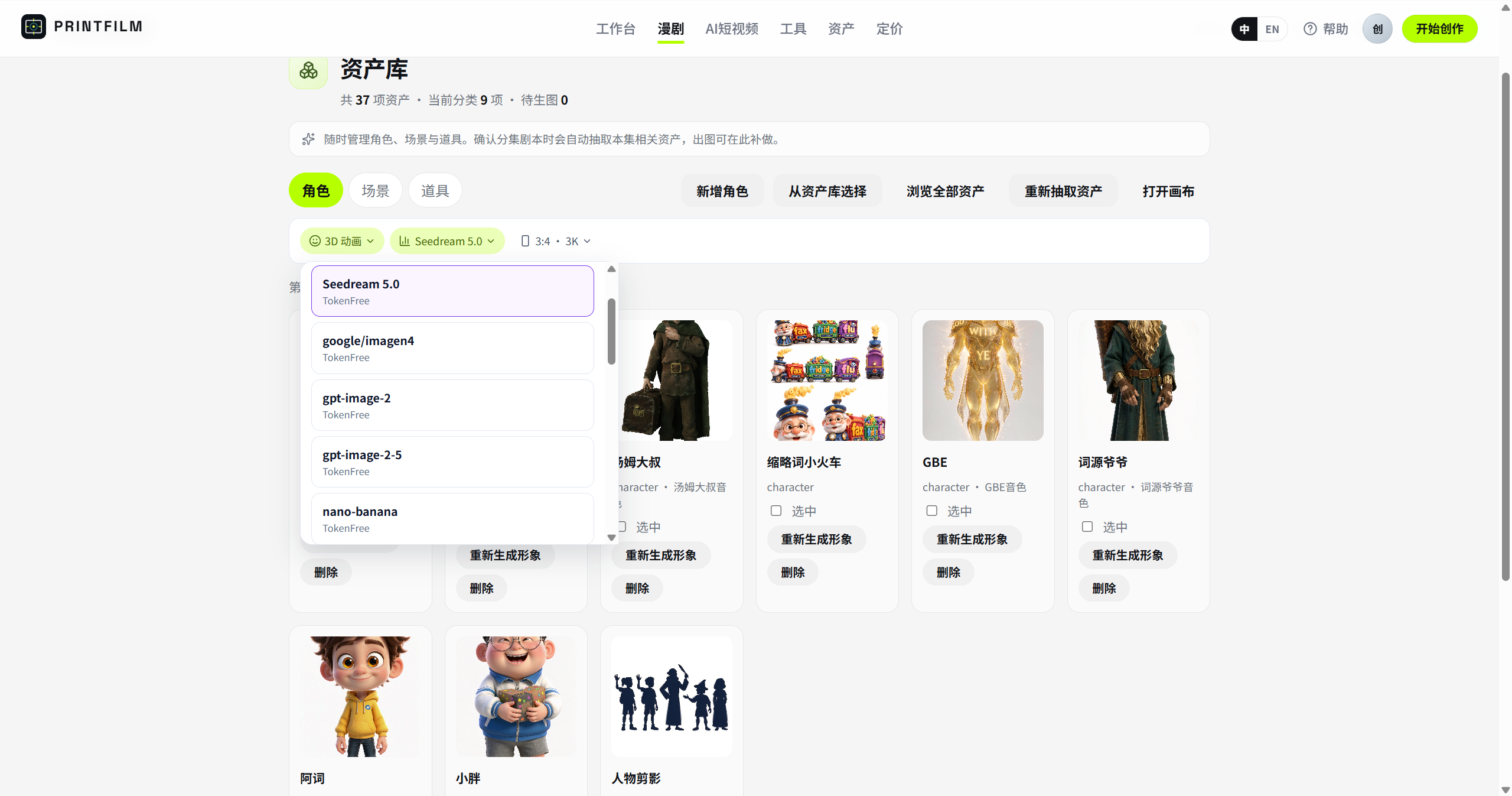 |
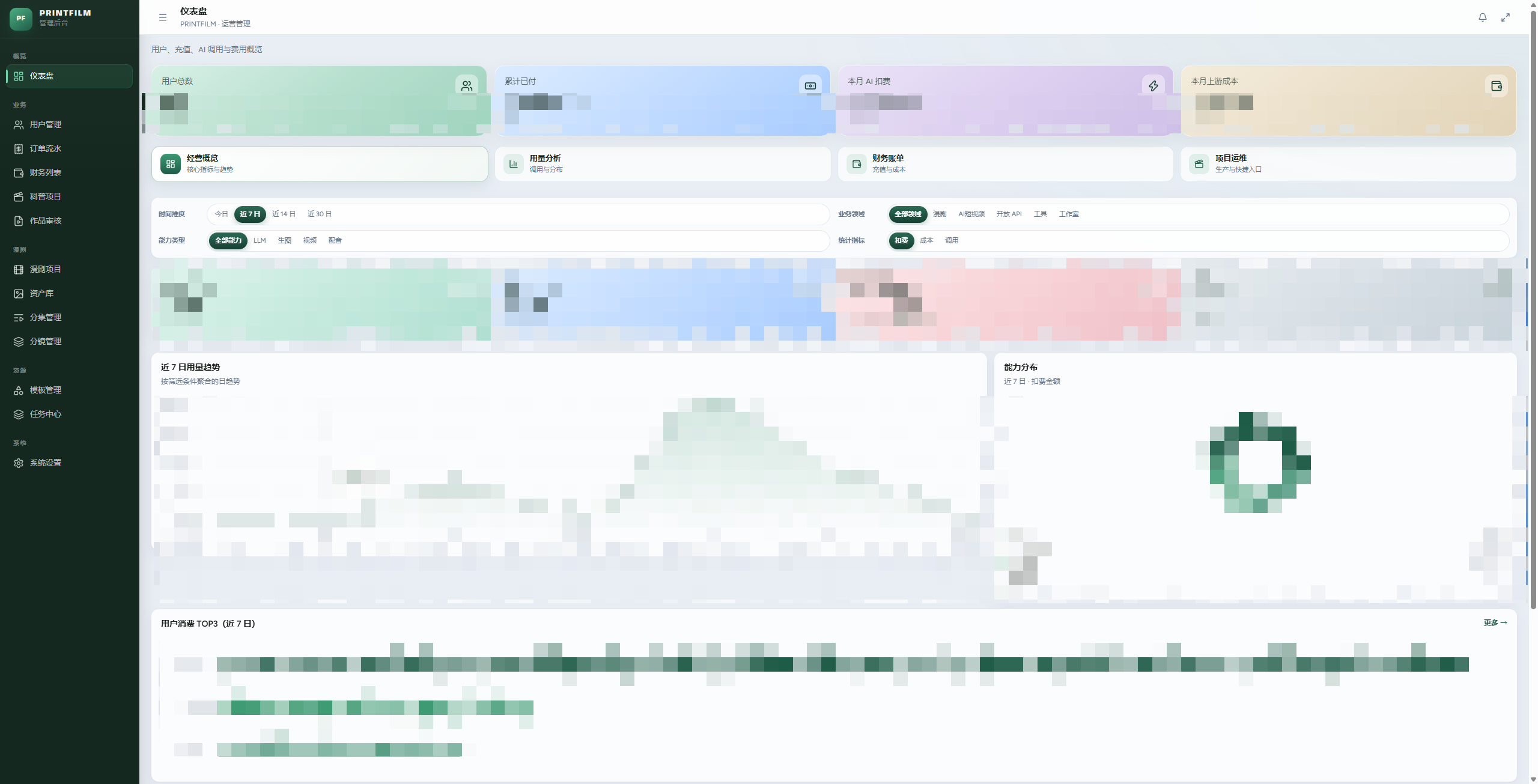 |
核心功能
1. AI 漫剧
从一句话到分集成片,角色与场景可复用。
- 大纲 / 剧情摘要 / 剧本内容
- 资产库:角色、场景、道具
- 解析成镜后进入分镜编辑与画布
- 细则见 docs/EPISODE_RULES.md
2. AI 短视频
在 /history 通过项目卡片管理短视频,点击新建进入 /studio/new。
- 精选四款非真人风格:3D 动画、二维动漫、绘本插画、国风水墨
- 输入想法生成文案,或粘贴已有文案;文案可编辑并保存草稿
- 确认文案后生成分镜,逐镜编辑旁白与画面;每镜使用固定画风参考图,并参考前镜图片延续角色与视觉风格
- AI 视频模式把每镜图片生成为带声音的镜头视频,支持单镜预览和重生;选择模型与清晰度后分阶段生成,再手动合成成片
- 静图模式生成图片和外部 TTS 配音,FFmpeg 添加图片运镜和字幕;两种模式都支持预览、下载
- 制作中可停止,失败时继续补齐缺失素材;离开页面后可回到项目恢复进度
- 旧对话项目在任务停止并结算后移交分步编辑,各历史版本保留原素材
3. 独立生成与短剧 Skills
图片、视频、音频提供独立生成入口;短剧创作技能见短剧Skills。
4. 管理后台
用户、订单、模板、任务中心和模型路由。
工作流程
选择画风、输入想法或已有文案
    → 编辑与保存文案 → 确认后生成分镜
    → 检查分镜卡片 → 使用画风参考图生成图片
    → AI 视频:图片生成镜头视频与声音 → 检查并合成
      静图成片:生成外部 TTS 配音 → 合成运镜、字幕与旁白
    → 预览与下载成片
每个阶段完成后停下来等待检查,下一步由用户明确启动。项目列表、分镜和素材均采用卡片展示。漫剧和工具中心沿用原有流程。
当前新建短片直接使用项目接口,旧对话会话的创建、消息及查询接口已移除,仅保留历史项目转入工作台的 open-editor 接口。历史任务恢复与项目交接仍依赖 creation_sessions、creation_messages、creation_runs 及项目会话字段;目标时长字段同时供当前流程使用。默认启动会自动处理结构;已有数据库设置 DATABASE_BOOTSTRAP_ENABLED=false 时,先在 backend 目录执行以下专用增量迁移,再重启后端。该命令只创建上述三张表、两个项目字段及索引,不执行种子数据,也不修改其他业务结构或已有数据;可重复运行。
python scripts/prepare_creation_schema.py
python scripts/prepare_creation_schema.py --check
Windows 可将 python 替换为 .venv\Scripts\python.exe;使用 backend/.env 的现有数据库配置。--check 只读检查,结构缺失时返回非零退出码。
技术特点
- 两条产品线共用一套生成能力 — 漫剧与短视频走同一上游
- 进程内任务平台 — scheduler / executor / poller,无需单独 Celery Worker
- 模型可换 — 管理后台配置 TokenFree Key 与模型,不必改代码
- Docker 一键启动 — 公开镜像,拉取无需登录
- 可选计费 — 默认关闭;开启后按用量结算,见 docs/BILLING.md
技术栈
| 层 | 选型 |
|---|---|
| 后端 | Python 3.12 · FastAPI · SQLAlchemy · PostgreSQL · Redis |
| 前端 | React 19 · TypeScript · Vite 8(管理端 Tailwind + shadcn) |
| AI | TokenFree New API(文字 / 图 / 视频) |
| 部署 | Docker 全栈镜像,或本机三进程 + 中间件容器 |
快速开始(Docker 一键启动)
本机只需安装 Docker Desktop(或 Docker Engine + Compose)。镜像在阿里云 ACR gcc 公开命名空间,拉取无需登录。
1. 克隆并准备环境变量
git clone https://github.com/yi1108/printfilm.git
cd printfilm

cp deploy/.env.docker.example deploy/.env.docker
编辑 deploy/.env.docker,至少改这三项:
| 变量 | 说明 |
|---|---|
POSTGRES_PASSWORD |
数据库密码(勿用示例默认值) |
SECRET_KEY |
任意长随机串(会话 / 密钥加密) |
OPENAI_API_KEY / ARK_API_KEY |
TokenFree API Key(同一把填两处即可) |
无 Key 想先看界面:把 ARK_MOCK=true。
2. 一键启动
docker compose --env-file deploy/.env.docker up -d
等约半分钟(API 健康检查通过后,web / admin 才会起来)。
| 服务 | 地址 |
|---|---|
| 用户端 | http://localhost:8080 |
| 管理后台 | http://localhost:8081 |
| API / 文档 | http://localhost:8000 · /docs |
| 健康检查 | http://localhost:8000/api/health |
常用:
docker compose --env-file deploy/.env.docker ps          # 状态
docker compose --env-file deploy/.env.docker logs -f api # 看日志
docker compose --env-file deploy/.env.docker down        # 停止(保留数据卷)
3. 注册与管理员
| 角色 | 怎么拿 |
|---|---|
| 普通用户 | 打开用户端 → /auth 邮箱注册 |
| 管理员 | 先用该邮箱注册 → 在 .env.docker 设 ADMIN_BOOTSTRAP_EMAILS=你的邮箱 → docker compose --env-file deploy/.env.docker up -d --force-recreate api(只提权,不造号) |
仓库无内置演示账号;生产请立刻改掉密钥。
4. 更新到最新镜像
docker compose --env-file deploy/.env.docker pull
docker compose --env-file deploy/.env.docker up -d
5. 从源码构建(可选)
改过前后端代码,或拉不到 ACR 时:
docker compose --env-file deploy/.env.docker -f docker-compose.full.yml up -d --build
配置 TokenFree API Key
开源版文字 / 图 / 视频统一走 TokenFree New API(OpenAI 兼容:https://www.tokenfree.com/v1)。没有 Key 时只能 ARK_MOCK=true 看界面,不能真实生图 / 生视频。
A. 在 TokenFree 拿到 Key
- 打开 https://www.tokenfree.com 注册并登录。
- 进入控制台的 API 密钥 / Tokens(部分部署路径为
/token或/keys)。 - 点击 创建,填名称(如
printfilm),按需设额度 / 过期时间。 - 立刻复制完整 Key(形如
sk-…,只显示一次)。 - 确认账户有余额或可用额度;模型列表里能看到你要用的对话 / 生图 / 视频模型。
Key 等同密码,不要提交到 Git、不要发到群聊。泄露后在 TokenFree 控制台作废并重建。
B. 写入 Docker 环境(推荐自托管首次启动)
编辑 deploy/.env.docker:
OPENAI_API_KEY=sk-你的密钥
OPENAI_BASE_URL=https://www.tokenfree.com/v1
ARK_API_KEY=sk-你的密钥
ARK_MOCK=false
MODEL_LLM=kimi-k2.6
MODEL_IMAGE=seedream-5-0-pro
MODEL_VIDEO=seedance-2-5
OPENAI_API_KEY 与 ARK_API_KEY 填同一把即可。然后重建 API 容器使环境生效:
docker compose --env-file deploy/.env.docker up -d --force-recreate api
打开 http://localhost:8000/api/health ,ark_mock 应为 false。
C. 在管理后台填写(推荐日常改 Key)
- 用管理员登录 http://localhost:8081 。
- 打开 系统设置 → 模型(路由 / TokenFree 渠道)。
- 在 TokenFree 渠道填入 API Key 并保存。
- 按需调整默认文字 / 图 / 视频模型;保存后即时生效,一般不必改
.env。
后台保存的 Key 会加密进数据库;换机器迁移时记得一并备份库,或重新在后台填写。
D. 联调排查
| 现象 | 处理 |
|---|---|
| 生图 / 生视频报未配置 Key | 检查 .env.docker 是否仍为 replace-me,或后台渠道是否已填 Key |
ark_mock: true |
关掉 ARK_MOCK,并确认 Key 非空后 --force-recreate api |
| 401 / 额度不足 | 到 TokenFree 控制台看 Key 是否启用、余额是否够 |
| 模型名 404 | 在后台模型列表里选 TokenFree 实际提供的模型 id |
适用场景
- 短视频 / 获客片:把卖点做成可投放的短片
- 漫剧 / 短剧:从大纲到分集,角色场景保持一致
- 单点出图出片:工具中心直接生成
- 自托管:Docker 拉镜像即可在自己的机器上跑
目录结构
backend/                  FastAPI、流水线、计费、任务运行时
frontend/                 用户端
admin/                    运营后台
deploy/                   环境变量示例、中间件 compose
docs/                     规范与专题文档
docker-compose.yml        拉公开镜像一键启动
docker-compose.full.yml   从源码构建
社区
- GitHub:https://github.com/yi1108/printfilm
- 微信加
gitpp88(备注「入群」):部署答疑 / 短剧交流 / 模板分享
Star History
更多文档
| 文档 | 内容 |
|---|---|
| docs/STANDARDS.md | 工程规范 |
| docs/API.md | 中文 API 文档、认证与接口接入约定 |
| docs/BILLING.md | 计费与易支付 |
| docs/EPISODE_RULES.md | 漫剧分集 |
| docs/SEEDANCE_2_5.md | Seedance 参数 |
| deploy/README.md | 本机中间件与运维 |
贡献
欢迎 Issue / PR。提交前对照 docs/STANDARDS.md:简体中文文案、函数注释、服务端分页;勿提交 .env、密钥与生成媒体。
cd frontend && npm run lint
cd ../admin && npm run lint
cd ../backend && pytest
开源许可
本项目采用 MIT License。
PRINTFILM
Turn stories into videos you can ship — AI short drama and AI short video, from script to final cut.
Step-by-step short-video creation: settings → copy and storyboard → reference-guided images → image-to-video → final preview. New projects default to AI video, 3D animation, 9:16 portrait and approximately 60 seconds; still-image production is also available. Review and edit each stage before continuing.
Source: github.com/yi1108/printfilm · Version 0.2.0
Screenshots
Studio
AI short video — history, storyboard, final cut
| Project history | Storyboard studio | Final preview |
|---|---|---|
|
|
|
AI short drama — projects, episodes, scripts, storyboards, assets
| Project list | Episode workspace | Script parse |
|---|---|---|
|
|
|
| Storyboard edit | Asset library | Admin |
|---|---|---|
|
|
|
Core features
1. AI short drama
From a one-liner to episode-ready video, with reusable characters and scenes.
- Outline / plot summary / full script
- Asset library: characters, scenes, props
- Parse into shots, then edit on the storyboard canvas
- Details: docs/EPISODE_RULES.md
2. AI short video
Manage short videos as project cards at /history, then start a new project at /studio/new.
- Four curated styles: 3D animation, 2D anime, picture-book illustration, and ink painting
- Generate copy from an idea or paste an existing script; edit and save it as a draft
- Confirm the copy to generate editable storyboards; use a fixed style image and previous-shot references to guide each image
- AI video mode generates clips and sound from each shot image, with selectable models, resolution, individual previews and retries before final composition
- Still-image mode retains external TTS, camera motion and captions; both modes support preview and download
- Stop production or resume missing media after a failure; saved projects and tasks recover after leaving the page
- Existing conversations transfer to the step editor after their producers stop and settle; historical versions retain their media
3. Independent generation and Drama Skills
Images, videos and audio have independent generation pages. Explore Drama Skills for short-drama creation skills.
4. Admin console
Users, orders, templates, task center, and model routing.
Workflow
Choose a style and enter an idea or existing copy
    → Edit and save copy → Confirm to generate storyboard cards
    → Review storyboard → Generate images using style references
    → AI video: Generate clips and sound from images → Review and compose
      Still images: Generate external TTS → Compose motion and captions
    → Preview and download the final video
Each stage pauses for review until the user starts the next one. Projects, storyboards and media use cards. Drama and standalone tools retain their existing workflows.
New short videos use the project APIs directly. The old conversation creation, messaging and query APIs have been removed; only open-editor remains for transferring historical projects into the current workspace. Historical task recovery and project handoff still require creation_sessions, creation_messages, creation_runs and the project conversation field; the duration field also serves the current workflow. Startup handles the schema by default. For an existing database with DATABASE_BOOTSTRAP_ENABLED=false, run the scoped, repeatable migration below from backend, then restart the backend. It creates only those three tables, two project fields and indexes; it does not seed data, change other business structures or rewrite existing rows.
python scripts/prepare_creation_schema.py
python scripts/prepare_creation_schema.py --check
On Windows, use .venv\Scripts\python.exe in place of python. The command uses the existing database configuration in backend/.env. --check is read-only and exits nonzero if required structures are missing.
Technical highlights
- Two product lines, one generation stack — drama and short video share the same upstream
- In-process task platform — scheduler / executor / poller; no separate Celery worker
- Swappable models — configure TokenFree keys and models in admin; no code changes
- One-command Docker — public images, pull without login
- Optional billing — off by default; usage-based when enabled — see docs/BILLING.md
Tech stack
| Layer | Stack |
|---|---|
| Backend | Python 3.12 · FastAPI · SQLAlchemy · PostgreSQL · Redis |
| Frontend | React 19 · TypeScript · Vite 8 (admin: Tailwind + shadcn) |
| AI | TokenFree New API (text / image / video) |
| Deploy | Full-stack Docker images, or local three processes + middleware containers |
Quick start (Docker)
You only need Docker Desktop (or Docker Engine + Compose). Images live in Aliyun ACR gcc public namespace — no login required to pull.
1. Clone and prepare env
git clone https://github.com/yi1108/printfilm.git
cd printfilm

cp deploy/.env.docker.example deploy/.env.docker
Edit deploy/.env.docker and change at least these three:
| Variable | Notes |
|---|---|
POSTGRES_PASSWORD |
DB password (do not keep the example default) |
SECRET_KEY |
Long random string (session / key encryption) |
OPENAI_API_KEY / ARK_API_KEY |
TokenFree API Key (same key in both fields) |
No key yet, just want the UI? Set ARK_MOCK=true.
2. Start
docker compose --env-file deploy/.env.docker up -d
Wait about half a minute (web / admin start after the API health check passes).
| Service | URL |
|---|---|
| App | http://localhost:8080 |
| Admin | http://localhost:8081 |
| API / docs | http://localhost:8000 · /docs |
| Health | http://localhost:8000/api/health |
Common commands:
docker compose --env-file deploy/.env.docker ps          # status
docker compose --env-file deploy/.env.docker logs -f api # logs
docker compose --env-file deploy/.env.docker down        # stop (keep volumes)
3. Register and admin
| Role | How |
|---|---|
| User | Open the app → /auth and register with email |
| Admin | Register that email first → set ADMIN_BOOTSTRAP_EMAILS=your@email in .env.docker → docker compose --env-file deploy/.env.docker up -d --force-recreate api (promotes only; does not create accounts) |
No built-in demo accounts; change secrets immediately for production.
4. Update to latest images
docker compose --env-file deploy/.env.docker pull
docker compose --env-file deploy/.env.docker up -d
5. Build from source (optional)
When you changed frontend/backend code, or cannot pull from ACR:
docker compose --env-file deploy/.env.docker -f docker-compose.full.yml up -d --build
Configure TokenFree API Key
The open-source build routes text / image / video through TokenFree New API (OpenAI-compatible: https://www.tokenfree.com/v1). Without a key you can only use ARK_MOCK=true for the UI — real generation will not work.
A. Get a key from TokenFree
- Open https://www.tokenfree.com and sign in.
- Go to API keys / Tokens in the console (some deployments use
/tokenor/keys). - Click Create, name it (e.g.
printfilm), set quota / expiry as needed. - Copy the full key immediately (looks like
sk-…, shown once). - Confirm the account has balance/quota and the models you need appear in the list.
Treat the key like a password. Do not commit it to Git or paste it in chat. If leaked, revoke and recreate it in the TokenFree console.
B. Write into Docker env (recommended for first self-host)
Edit deploy/.env.docker:
OPENAI_API_KEY=sk-your-key
OPENAI_BASE_URL=https://www.tokenfree.com/v1
ARK_API_KEY=sk-your-key
ARK_MOCK=false
MODEL_LLM=kimi-k2.6
MODEL_IMAGE=seedream-5-0-pro
MODEL_VIDEO=seedance-2-5
Use the same value for OPENAI_API_KEY and ARK_API_KEY. Recreate the API container:
docker compose --env-file deploy/.env.docker up -d --force-recreate api
Open http://localhost:8000/api/health — ark_mock should be false.
C. Set key in admin (recommended for day-to-day key changes)
- Log in as admin at http://localhost:8081 .
- Open System settings → Models (routing / TokenFree channel).
- Paste the API Key into the TokenFree channel and save.
- Adjust default text / image / video models as needed; changes apply immediately — usually no
.envedit required.
Keys saved in admin are encrypted in the database; when migrating hosts, back up the DB or re-enter the key.
D. Troubleshooting
| Symptom | Fix |
|---|---|
| Image / video says key not configured | Check .env.docker is not still replace-me, or that the admin channel has a key |
ark_mock: true |
Set ARK_MOCK=false, ensure key is non-empty, then --force-recreate api |
| 401 / insufficient quota | Check key status and balance in TokenFree console |
| Model 404 | Pick a model id that TokenFree actually lists in admin |
Use cases
- Short video / acquisition clips: turn selling points into ad-ready shorts
- Short drama: outline to episodes with consistent characters and scenes
- One-shot image/video: generate directly from the tools hub
- Self-host: pull Docker images and run on your own machine
Layout
backend/                  FastAPI, pipeline, billing, task runtime
frontend/                 User app
admin/                    Ops console
deploy/                   Env examples, middleware compose
docs/                     Standards and topic docs
docker-compose.yml        One-command public images
docker-compose.full.yml   Build from source
Community
- GitHub: https://github.com/yi1108/printfilm
- WeChat: add
gitpp88(note “join group”): deploy help / drama chat / template sharing
Star History
More docs
| Doc | Content |
|---|---|
| docs/STANDARDS.md | Engineering standards |
| docs/BILLING.md | Billing and Epay |
| docs/EPISODE_RULES.md | Drama episode rules |
| docs/SEEDANCE_2_5.md | Seedance parameters |
| deploy/README.md | Local middleware and ops |
Contributing
Issues / PRs welcome. Before submitting, follow docs/STANDARDS.md: Simplified Chinese product copy, function comments, server-side pagination; do not commit .env, secrets, or generated media.
cd frontend && npm run lint
cd ../admin && npm run lint
cd ../backend && pytest