drama-skills
面向 Claude Code 和 Codex 的 AI 短剧技能合集,覆盖剧本、角色资产、分镜、图像与视频提示词和审查。
中文简介经编辑校订 · agent-skills / ai-short-drama / ai-video / aigc / claude-code / claude-code-skills
README / 项目原文

Drama Skills
面向编剧、漫剧工作室和编导的 AI 短剧创作工作流:十一个技能,从一个点子或一部原著做到分集剧本、分镜、图片/视频提示词和成片。






上面这段 68 秒竖屏样片是《让你管账号》第 1 集开头:从一部 20 章的原著改编,分镜 20 镜,逐镜生成后剪成成片, 字幕、系统面板与音效在剪辑时叠加。视频生成成本约 40 元。
这是什么
Drama Skills 覆盖 AI 短剧 / 漫剧从点子或原著到成片的全流程:原著分析 → 分集剧本 → 视觉设定 → 图片提示词与分镜 → 视频提示词 → 确认后生产 → 剪辑成片 → 审查。 它以 11 个 skill 的形式装进你已经在用的编程 Agent(Claude Code、Codex 及其他支持 Agent Skill 规范的环境), 写作用的模型就是该 Agent 的模型。
- 五份 Markdown 分别记录创作决定 — 按阶段维护
剧本.md、视觉设定.md、分镜.md、图片提示词.md、视频提示词.md,剪成片时增加剪辑单.md;只做部分阶段就交付对应文档。创作决定以这些文档为准。 - 用可核对的文件事实约束跨镜一致性 — 需要跨镜保持的造型写成一条能原样贴进提示词的短语(连续性锁); 每个关键帧都写明视觉依据;检查脚本核对已声明的引用与连续性锁,报错示例见下文。
- 先预览、确认,再生产 — 任何图片、视频、配音或音乐任务,都先在文件里看到这一批准确的内容和参数, 明确确认后才调用外部接口花钱。
- 成片也在套件里 — 剪辑技能逐段写下入点、出点为什么选在那里,字幕逐字取自剧本,统一响度后渲染; 核对和测量脚本只回报事实,不下判断。
由来
这套技能来自我们自己的漫剧工作室产线:2025 年至今累计上千个 AI 短剧 / 漫剧项目, 中间换过几轮自建和开源工具。前后端加起来近 8 万行代码,在模型能力和需求的迭代速度 面前逐渐维护不动了。
后来干脆抛开自建的一体化图形工具,把历史项目工程和图片 / 视频提示词蒸馏成这套技能, 让制作人直接用 agent CLI 加文件维护工程、生成提示词,确认之后再送去生成——结果意外地顺手。 现在留在自建工具里的,只剩排队抽卡。
刻意把确认放在生产之前:提示词先落进文件,生产 skill 展示本次准确数量、内容、参考、 参数、输出和 adapter;用户看到预览并明确确认后才执行。供应商凭据不进入项目, 项目文件和其他 Skill 都不绑定供应商。
安装
从 GitHub 安装
前提:你已经在用 Claude Code、Codex 或其他支持 Agent Skill 规范的编程 Agent;下面这条命令需要终端里能运行 npx(Node.js)。
npx skills add zenstory-ai/drama-skills -y -g
-g 全局安装,所有目录可用;去掉 -g 则只装到当前目录。更新时重新执行同一条命令即可。
脚本需要 Python 3.9 或更新版本,请先检查本机版本;剪辑成片另需 ffmpeg / ffprobe 在 PATH 上。
支持导入 GitHub 仓库或 skill 的平台,也可以直接对 Agent 说:
安装这些技能 https://github.com/zenstory-ai/drama-skills
手动链接(可安装全部,也可只链接需要的技能)
git clone https://github.com/zenstory-ai/drama-skills.git && cd drama-skills

# Claude Code
mkdir -p "$HOME/.claude/skills"
for skill in skills/*; do
  ln -s "$PWD/$skill" "$HOME/.claude/skills/$(basename "$skill")"
done

# Codex
mkdir -p "${CODEX_HOME:-$HOME/.codex}/skills"
for skill in skills/*; do
  ln -s "$PWD/$skill" "${CODEX_HOME:-$HOME/.codex}/skills/$(basename "$skill")"
done
每个技能都是独立安装单元;只用写作、审查或生产等单一能力时,只链接对应目录即可。
short-drama 提供项目初始化、路由与 Dashboard。
ClawHub 分发条目由显式发布清单管理,可在 ClawHub 中查找。
调用写法随运行环境而变:Claude Code 用 /short-drama,Codex 用 $short-drama,
也可以直接用自然语言说明任务。下文以 $ 为例,Claude Code 用户按环境改用 /。
变更见 CHANGELOG.md 与 Releases; 升级既有项目要做什么,见常见问题「升级到新版本后要做什么」。
快速开始
按实际项目修改下面的请求即可使用:
# 0. 有原著时(可选):先抽样快评,再决定要不要全量拆
用 $short-drama-novel-analyze 快评 输入/这本小说.txt,先告诉我值不值得拆

# 已有多集完整剧本时(可选):按文件实际结构索引,每次只读当前集,断点续做分集地图
用 $short-drama-develop 从 输入/剧本完整版.txt 生成分集地图;先识别这份文件的分集方式,不要整稿塞进上下文

# 1. 新建项目
用 $short-drama 初始化一个都市打脸题材的短剧项目,竖屏 9:16

# 2. 写第一集
用 $short-drama-write 写第 1 集:外卖员在高档餐厅被经理羞辱,亮出集团董事身份

# 3. 拆资产,写提示词与分镜(可在同一请求内连续完成)
用 $short-drama-assets 从第 1 集拆人物/场景/道具
需要统一视觉语言时,可选用 $short-drama 做 Look Development
用 $short-drama-image-prompts 为已接受的资产写参考图提示词
用 $short-drama-storyboard 给第 1 集做正式分镜与冻结关键帧
用 $short-drama-video-prompts 把分镜逐镜翻译成视频提示词
# 指定目标视频模型、并且要人物/场景/道具跨镜一致时,把参考图的事也说清楚:
用 $short-drama-video-prompts 按 MiniMax H3 写第 1 集视频提示词;先在项目里找已有的角色图、场景图、道具图和本镜起始帧绑成参考,缺哪张就列出来,不要改成文生视频
# 参考图在自己的界面里出、不进项目时,让技能写出逐镜挂图计划,视频提示词照常产出:
用 $short-drama-video-prompts 按 MiniMax H3 写第 1 集视频提示词;参考图我自己挂,逐镜告诉我挂哪几张、什么顺序、每张管什么

# 4. 明确确认后投产
用 $short-drama-produce 预览第 1 集已接受的图片、视频、TTS 或时间线音乐任务;等我确认后再执行

# 5. 把生产出来的素材剪成成片
用 $short-drama-edit 把第 1 集已生产的镜头剪成成片,逐段写清入出点理由

# 6. 需要时再审查
用 $short-drama-review 审查第 1 集的剧本与提示词
从原著出发、第一轮只要文本交接的写法:
用我拥有或获准改编的
输入/故事.txt,先列出必须保留的事实、人物动机与暂不可揭示的信息,再提出分集方案;章节数不要直接当集数。只写第一集,并交接其中三个镜头的起止动作、双手、持物和视线。区分IMG-*、待提供的PLAN-*与已实际检查的REF-*,止步于文本,不生成图片、视频、配音或音乐。
看看它的输出
下面节选来自仓库里的文件或一次真实运行,省略处以「……」标出。完整版(原著快评的回填对照、改编契约、 剪辑实测与模型行为观察)在真实产出节选。
一集写出来是什么样
公开样例 《让你管账号》EP001 里,同一个镜头在四份文档里各管一层。剧本只写发生了什么:
[OS] 其他军团的人:火箭军?四个号,加起来四个粉吧。

笔记本的扬声器里一片哄笑。桌后,周薄森对着屏幕坐得笔直,脸绷着。桌前,江晨双手撑着桌沿,猛地回神。
视觉设定.md 给需要跨镜保持的造型上「连续性锁」,锁面是一条能原样贴进提示词的短语:
- 连续性锁:LOCK-JIANGCHEN-DRESS《江晨松枝绿常服》(镜头:SHOT-EP001-002、SHOT-EP001-003、SHOT-EP001-007、……;
  图片提示词项:IMG-JIANGCHEN-SHEET)· 锁面:pine-green lapel service jacket
分镜.md 写这一镜的起点和终点、运镜为什么这样动,冻结关键帧只画起点那一格,锁面原样出现在里面:
## SHOT-EP001-002 · 四个号,四个粉
- 运镜:缓推,哄笑声最响时开始,越过笔记本背面推向桌后,停在周薄森绷紧的脸;这阵笑是冲他去的。
- 起点:周薄森面对笔记本坐得笔直,右手搭在茶杯旁;江晨双手掌心朝下撑在玻璃桌沿,眼神涣散。
- 终点:画面停在周薄森绷紧的脸与屏幕冷光;江晨仍撑着桌沿,留在画右边缘。

### 冻结关键帧提示词
> 9:16 vertical two-person medium shot in a present-day army arts-troupe office, framed at chest height: Jiangchen, a lean
> young man in a pine-green lapel service jacket, stands mid-ground on frame right …… with both palms flat on the glass and a
> dazed, unfocused look; Zhoubosen, a broad square-faced middle-aged officer, sits bolt upright behind the desk …… facing a
> thin silver laptop whose lid faces the camera, …… his right hand beside a double-walled glass tea tumbler on a dark round
> coaster; …… no text, no logo.
视频提示词.md 只写起点到终点之间模型要执行的动作,整段复制进生成界面就能用:
## MOTION-EP001-002 · 四个号,四个粉
### 可复制提示词
> …… Laughter keeps pouring out of the laptop's small speaker. The seated officer's jaw tightens and his back straightens a
> little more. The young man blinks once and his eyes snap into focus. At the loudest point of the laughter, the camera moves
> steadily forward past the back of the laptop and stops when the seated officer's tight face fills the middle of the frame,
> the young man remaining at the right edge. ……
四份原文:剧本.md ·
视觉设定.md ·
分镜.md ·
视频提示词.md。
写漏了会被指出来
creator_markdown_check.py 核对五份文档之间的引用。把样例故意改坏两处——删掉 SHOT-002 视觉依据里的周薄森、
把 MOTION-003 的时长从 2s 改成 3s——报错会指出对应镜头和原因:
ERROR: SHOT-EP001-002: 冻结关键帧提示词写到人物「周薄森」,视觉依据没有覆盖;本镜确实看不见时在视觉依据末尾加「;画外:人物「周薄森」」,正文里这个名字不可靠时在《视觉设定.md》写「画面代称:无」
ERROR: SHOT-EP001-003: 分镜时长 2 秒与视频提示词 3 秒不一致;视频提示词只能原样照抄已接受的镜头时长
十一个技能
各阶段按请求调用:文本交付在所需阶段完成,审查可针对任一已有产物;静态漫剧从关键帧与配音进入生产和剪辑。
flowchart LR
    classDef phase fill:#e8f4fd,color:#1a1a2e,stroke:#4a9be8,stroke-width:1px
    classDef final fill:#fce4ec,color:#333,stroke:#e57373,stroke-width:1px

    nva["原著分析<br/>$short-drama-novel-analyze"]:::phase
    dev["故事开发<br/>$short-drama-develop"]:::phase
    write["分集剧本<br/>$short-drama-write"]:::phase
    assets["资产决策<br/>$short-drama-assets"]:::phase
    img["图片提示词<br/>$short-drama-image-prompts"]:::phase
    sb["分镜/关键帧<br/>$short-drama-storyboard"]:::phase
    vid["视频提示词<br/>$short-drama-video-prompts"]:::phase
    prod["确认后生产<br/>$short-drama-produce"]:::phase
    cut["剪辑成片<br/>$short-drama-edit"]:::phase
    rev["审查<br/>$short-drama-review"]:::final
    pkg["文本交付包"]:::final

    nva -.有原著时.-> dev
    dev -.可选.-> write --> assets
    assets --> img
    assets --> sb --> vid
    img --> prod
    vid --> prod
    prod --> cut --> rev --> pkg
| 技能 | 职责 |
|---|---|
short-drama |
初始化、路由、视觉方向/Look Development 与 Dashboard |
short-drama-novel-analyze |
长篇原著的抽样改编快评、章节索引、逐章功能提取、剧情单元与节奏、改编价值与分集候选 |
short-drama-develop |
小说/长材料的可追溯改编、多集整稿的 Agent 主导切片与续跑、故事引擎、分集地图、导演阐述、题材与钩子手册 |
short-drama-write |
单集目标、因果节拍、可拍剧本和项目选择的制作稿格式 |
short-drama-assets |
人物/造型、地点/视图、道具/状态、可选的角色声音方向与连续性决策 |
short-drama-image-prompts |
Lookdev 风格帧、角色/场景/道具参考板提示词与定点修改说明 |
short-drama-storyboard |
可选场次视觉计划与 Coverage Audition、原文落实、镜头、边界和冻结关键帧 |
short-drama-video-prompts |
单镜动作、多人物表演与注意交接、摄影、声音、起止状态、补拍说明,以及跨镜时间线音乐规格 |
short-drama-produce |
展示有边界的图片/视频/TTS/音乐任务,取得本次明确确认后通过外部 adapter 执行并记录结果;可选支持 Seedance、GPT Image 2、MiniMax H3 视频与 MiniMax Music |
short-drama-edit |
逐镜素材的可用带、入出点取舍、镜序、台词完整性、字幕与响度,写成剪辑单并渲染成片 |
short-drama-review |
结构/内容审查、授权生产观察的项目级校准诊断与修订结论 |
本地短剧创作台
在智能体里一句话启动(Codex 写作 $short-drama dashboard):
/short-drama dashboard
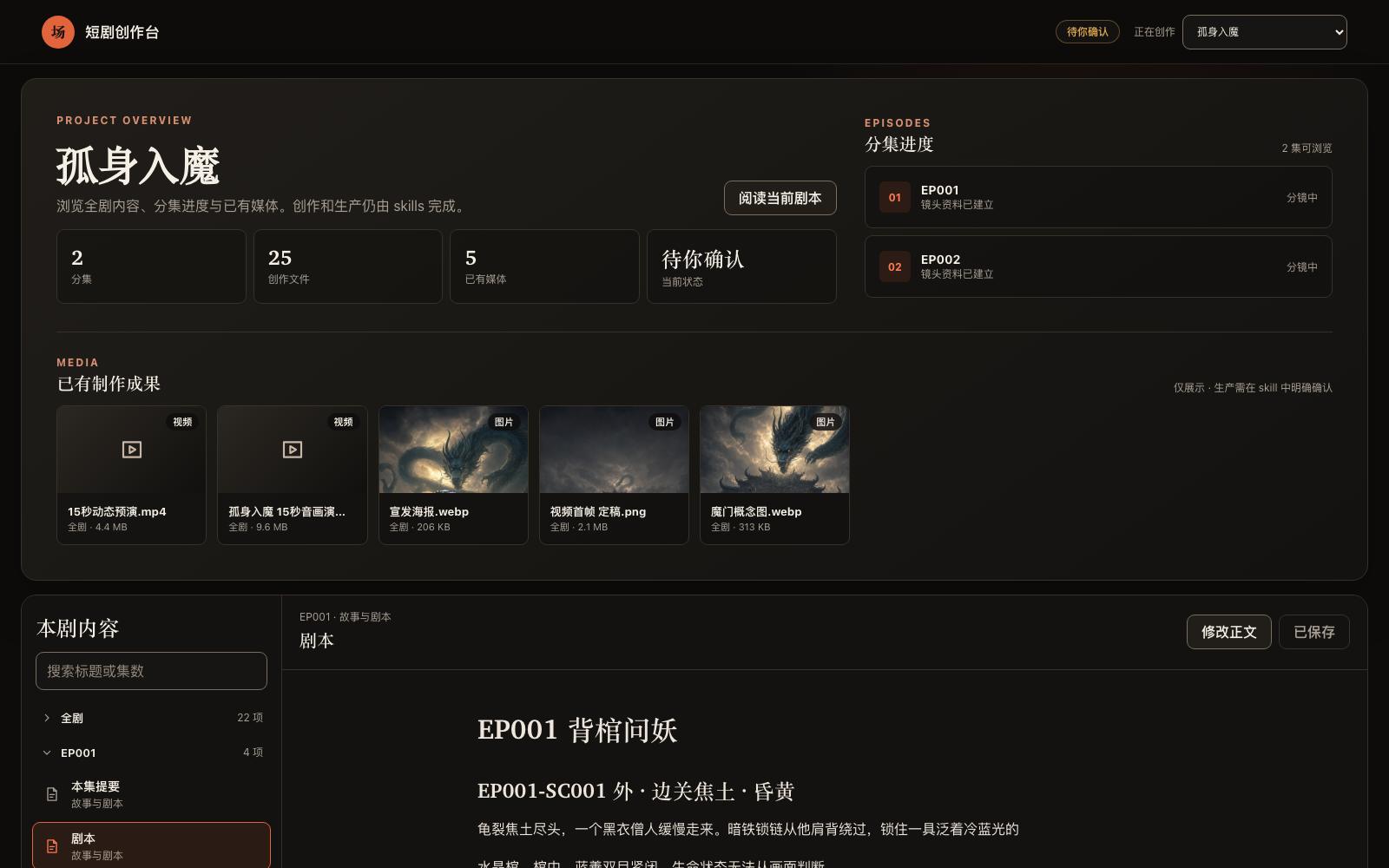
macOS、Linux、WSL 与 Windows 原生都可运行。创作台以 --detach 独立进程运行,链接在整个创作期间
保持有效;--status 打印当前链接,--stop 关闭。服务只监听本机,项目内容不上传。
全部跑完后导出交付:$short-drama 用 project_tool.py export <project> --out <项目外目录>
把每集现有的五份创作文档、剪辑单.md 和 制作成果/ 复制成带清单和校验和的交付目录。
只交文本时加 --no-media;缺少哪些创作文档会记在清单里。
常见问题
MiniMax H3 的提示词有六段,全部复制还是只复制第一段?
全部复制。六段属于同一条正文、一次提交:retention_analysis 引用的 <Subject N> 在 subject_definitions 里定义,
<Picture N> 按本镜「输入参考图」的顺序编号,拆开提交后面几段就没有指代对象了。从 ### 可复制提示词 下第一行到最后一行
整段贴进那一次生成,下一镜换它自己那条。见五份创作文档与
MiniMax H3 方言。
参考图我在自己的界面里出、不想放进项目,还能拿到图生视频提示词吗?
能。让分镜把这一镜要挂的图写成 PLAN-* 槽位(定位符是 IMG-* 板子或本镜 SHOT-* 冻结关键帧,顺序 就是挂图次序,
每张写用途),视频提示词照常按图生视频产出,并逐镜列出挂哪几张、什么顺序、每张管什么;只有让套件实际调用接口生成时才需要真实文件。
REF-* 留给项目里确实存在并检查过的图片。
指定了目标视频模型,为什么收到的是文生视频提示词?
点名模型不等于选择文生视频。先把模型写进 short-drama.json 的 production_profile,再让分镜按可见人物、地点、道具和起始帧
去项目里找已有的图绑成带用途的 REF-*;仍缺图就列表停下,不改成文生视频。见
漫剧创作全流程指引 · 常见卡点。
H3 视频里对白赶读或被截断怎么办?
分镜阶段先估对白时长再定镜长:H3 中文小样本约 4.1 个可发声字/秒,较密的输入会赶词或静默截断。分镜把估时依据写在本镜「声音」里, 放不下就延长镜头或拆镜;视频提示词只能原样照抄已接受的时长。见对白估时。
说话的是 A,口型却落在画里 B 的脸上?
先检查说话人绑定:小样本中出现过口型落在更显眼正脸上的情况。说话人第一次出现时在 <d> 外交代画内画外与音色,台词紧跟他的动作句;
台词期间画里还有别的正脸时,把那个人明写成闭嘴不说话,分镜能安排时先让他出画或背身。见
MiniMax H3 方言 · 说话人绑定;样本小,生成后仍核对。
视频任务提交后进程断了,要重投吗?
先恢复原任务。异步任务提交后可能已产生费用,内置 adapter 拿到供应商任务 ID 就落盘。中断后让生产技能运行 audit;
它会把带任务 ID 的未完成尝试报成 orphaned_provider_job,再用 collect 取回既有结果,不提交新生成任务。
确认原任务已终态失败、无需继续取回后,再为重投重新预览和确认;暂时无法轮询或下载时先排查取回路径。见
确认后生产。
需要 GPU 或自己部署模型吗?生成媒体的钱从哪出?
不需要 GPU。写作、分镜和提示词由你正在用的编程 Agent 的模型完成,本地脚本负责索引、检查、生产任务交接与剪辑渲染。生成媒体走 $short-drama-produce
的外部 adapter,用你在项目外配置的供应商凭据、按供应商计费,每个任务预览并明确确认后才执行。剪辑成片需要本机有 ffmpeg / ffprobe。
能在 Codex 里用吗?Windows 能用吗?
能。Claude Code 用 /short-drama,Codex 用 $short-drama,其他支持 Agent Skill 规范的环境按各自写法调用。
创作台在 macOS、Linux、WSL 与 Windows 原生都能跑;CI 在 Windows 上单独回归安装、分集导入与创作台。
静态漫剧(关键帧切换 + 配音)也要写视频提示词吗?
不用。分镜关键帧与图片提示词直接进入生产预览,跳过视频提示词那一层。见漫剧创作全流程指引。
升级到新版本后要做什么?
重跑同一条安装命令;既有项目对每集跑一次 creator_markdown_check.py,收紧过的规则会在这里报出来(例如 v0.7.0 起,
分镜「来源」引文点到的人物或道具没进视觉依据、也没声明画外会报错,视频提示词与分镜时长不一致会报错),文档规则的改法见
CHANGELOG.md 里的《升级》段。剪过片的再跑一次 edit_tool.py check:v0.7.1 起「未采用镜头」要逐个写镜号和理由,
「001 至 009」这种范围写法不再被接受。
延伸阅读
- 示例:examples/,公开完整样例是 《让你管账号》EP001;其余目录是仓库校验器的回归夹具。
- 真实产出节选:一镜穿过四份文档、检查器报错、剪辑单与实测、原著快评回填、改编契约、模型行为观察。
- 评估:按文档实跑一次的完整产物、发布前的回归闸门与主工作流实跑方法。
- 漫剧创作全流程指引:把十一个技能按漫剧产线从头串一遍,每步命令、产物与卡点。
- 跨镜一致性怎么做:跨镜、跨集角色一致性,三视图之外的三层文件事实。
- 小说改短剧指南:从有权改编的原著出发,形成分集决策、单集剧本与小范围分镜交接。
- 角色跨镜一致性指南:分开人物身份、本场造型与逐镜变化的双手、持物、视线;区分
IMG-*、PLAN-*与REF-*。 - An open-source AI short-drama pipeline:英文读者的分阶段说明。
交流
- Telegram 群:https://t.me/+CZmsmvWIhb4zZTNl —— 日常交流、踩坑、用法分享与新功能讨论。
- GitHub Issues:Bug、输出质量 Case、功能请求,请按结构化表单附上复现材料或具体输出。
贡献
修改原则与必跑测试见 CONTRIBUTING.md。
致谢
LINUX DO - The New Ideal Community — 社区支持
ZenStory AI 项目
本项目由 ZenStory AI 维护——一组开源、面向 agent 的故事创作、改编与生产工具(GitHub 组织:zenstory-ai)。同组织项目:
| 项目 | 用途 |
|---|---|
| oh-story-claudecode | 网文写作 skill 包:扫榜、拆文、写作、去AI味、封面图 |
| drama-skills | AI 短剧 / 漫剧创作 skill 合集:剧本、资产、分镜、图片/视频提示词、独立审查(本仓库) |
| novel-to-game | 面向原著改编、指定运行环境构建与运行证据 QA 的 agent skills |
| video-recap-skills | 将支持的视频文件制作成中文解说,可选导出可编辑的剪映/CapCut 草稿 |
| oh-story-dsh | DeepSeek Harness 社区插件,提供小说、短剧、游戏和视频解说工作台 |
| zenstory | 对话即创作的 AI 小说写作工作台(app.zenstory.ai) |
Drama Skills
An AI short-drama creation workflow for screenwriters, motion-comic studios, and directors: eleven skills that take an idea or a source novel to episode scripts, storyboards, image/video prompts, and a finished cut.
Project page · Install · See what it produces · 中文

The 68-second portrait sample above is the opening of Let You Run the Account, EP001: adapted from a 20-chapter novel, storyboarded into 20 shots, generated shot by shot and cut into a film, with subtitles, system panels and sound effects added in the edit. Video generation cost about ¥40.
What it is
Drama Skills covers the whole AI short-drama / motion-comic pipeline from idea or novel to a finished cut: source analysis → episode script → visual design → image prompts and storyboard → video prompts → confirmed production → editing → review. It installs as 11 skills into the coding agent you already use (Claude Code, Codex, and any other runtime that supports the Agent Skill spec); the writing model is that agent's model.
- Five Markdown files record the creative decisions — each episode maintains the documents for its requested stages:
剧本.md(script),视觉设定.md(visual design),分镜.md(storyboard),图片提示词.md(image prompts) and视频提示词.md(video prompts), plus剪辑单.md(cut list) when you cut a film. These files are authoritative for their respective creative decisions. - File-based facts help preserve continuity across shots — a look that must hold across shots is written as one phrase (a continuity lock) that is pasted into every affected prompt unchanged; every keyframe states its visual basis. The checker verifies declared references and continuity locks; real error output is shown below.
- Preview, confirm, then produce — every image, video, voice or music job is shown in a file first, with the exact content and parameters of this batch; an external API is called, and money spent, only after you explicitly confirm.
- The cut is part of the suite — the editing skill writes down why each in and out point sits where it does, takes subtitles verbatim from the script, normalises loudness and renders; the check and measurement scripts report facts only and pass no verdict.
Where this came from
These skills come out of our own motion-comic studio's production line: over a thousand AI short-drama and motion-comic projects since 2025, across several generations of in-house and open-source tooling. Front end and back end together reached nearly 80,000 lines, and stopped being maintainable at the pace models and requirements were moving.
The answer turned out to be dropping the monolithic all-in-one GUI — distilling the historical project workspaces and image/video prompts into this skill suite, and letting producers maintain projects and write prompts directly through an agent CLI over plain files, confirming the prompts before anything goes to generation. It works noticeably better. What is left of the in-house tooling is the generation queue.
Confirmation deliberately comes before production: prompts land in files first. The production skill shows the exact count, content, references, parameters, outputs, and adapter; it executes only after the user sees and confirms that preview. Credentials stay outside the project, and project files and the other skills remain provider-neutral.
Install
Install from GitHub
Prerequisite: you already use Claude Code, Codex or another coding agent that supports the Agent Skill spec; the
command below needs npx (Node.js) in your terminal.
npx skills add zenstory-ai/drama-skills -y -g
-g installs globally for every directory; drop it to install into the current directory only.
To update, run the same command again. The scripts need Python 3.9 or newer; check your installed
version first. Cutting a film additionally needs ffmpeg / ffprobe on PATH.
You can also just tell your agent (any platform that can import a GitHub repository or skill):
Install this skill suite: https://github.com/zenstory-ai/drama-skills
Manual linking (install all skills or only the ones you need)
git clone https://github.com/zenstory-ai/drama-skills.git && cd drama-skills

# Claude Code
mkdir -p "$HOME/.claude/skills"
for skill in skills/*; do
  ln -s "$PWD/$skill" "$HOME/.claude/skills/$(basename "$skill")"
done

# Codex
mkdir -p "${CODEX_HOME:-$HOME/.codex}/skills"
for skill in skills/*; do
  ln -s "$PWD/$skill" "${CODEX_HOME:-$HOME/.codex}/skills/$(basename "$skill")"
done
Each skill is an independent installation unit. For a single writing, review, or
production capability, link only that directory. short-drama provides project
initialization, routing, and the Dashboard.
ClawHub packages are managed by the explicit publish inventory and can be found through ClawHub.
Invocation differs by runtime: Claude Code uses /short-drama, Codex uses
$short-drama, and you can always drop the prefix and just describe the task in
plain language. The examples below use $; Claude Code users should use / for their runtime.
Changes are in CHANGELOG.md and Releases; what to do when upgrading an existing project is in the FAQ entry What do I do after upgrading?.
Quick start
Copy any of these requests, tweak the details, and send:
# 0. With a source novel (optional): triage before committing to a full pass
Use $short-drama-novel-analyze to triage 输入/novel.txt and tell me whether it is worth adapting

# With a complete multi-episode script (optional): infer this file's boundaries,
# read one episode at a time, and resume the episode map from disk
Use $short-drama-develop to build the episode map from 输入/full-screenplay.txt without loading the whole season into context

# 1. New project
Use $short-drama to init a vertical 9:16 urban face-slapping short-drama project

# 2. Write episode 1
Use $short-drama-write to write EP001: a delivery rider humiliated by the manager at a luxury restaurant reveals he is a director of the group

# 3. Extract assets, write prompts and storyboards (these can be one request)
Use $short-drama-assets to extract characters/scenes/props from EP001
When the visual language needs alignment, optionally use $short-drama for Look Development
Use $short-drama-image-prompts to write reference prompts for accepted assets
Use $short-drama-storyboard to author EP001's storyboard and frozen keyframes
Use $short-drama-video-prompts to translate each authored shot into a video prompt
# When you name a target model and need people/places/props consistent across shots, say so about references too:
Use $short-drama-video-prompts to write EP001's video prompts for MiniMax H3; first look through the project for existing character, location and prop images plus this shot's start frame and bind them as references, list whatever is still missing, and do not fall back to text-to-video
# When you make the reference images yourself and they never enter the project, ask for the attach plan instead:
Use $short-drama-video-prompts to write EP001's video prompts for MiniMax H3; I attach the reference images myself, so tell me per shot which pictures to attach, in what order, and what each one governs

# 4. Produce after explicit confirmation
Use $short-drama-produce to preview EP001's accepted image, video, TTS, or timeline-music job; execute only after I confirm

# 5. Cut the generated material into a film
Use $short-drama-edit to cut EP001's produced shots into a film, stating the reason behind every in and out point

# 6. Review when needed
Use $short-drama-review to review EP001's script and prompts
Starting from a source novel, with the first pass stopping at a text handoff:
Use
输入/story.txt, which I own or am authorized to adapt. First list the facts, character motivations, and unrevealed information that must be preserved, then propose the episode split; do not treat chapter count as episode count. Write only EP001 and hand off three of its shots with start/end action, both hands, held props, and gaze. DistinguishIMG-*, pendingPLAN-*, and actually inspectedREF-*; stop at text and do not generate images, video, voices, or music.
See what it produces
The excerpts below come from files in this repository or from one real run; cuts are marked with "…". The full version (the source triage checked against its full pass, the adaptation contract, the measured cut, and the model observations) is in Excerpts of real output.
What an episode looks like
In the public sample Let You Run the Account, EP001, the same shot is owned one layer at a time across four documents. The script only says what happens (translated):
[OS] Someone from another army unit: The Rocket Force? Four accounts, four followers between them, right?

Laughter pours out of the laptop's speaker. Behind the desk, Zhou Bosen sits bolt upright facing the screen, face set.
In front of it, Jiang Chen, palms on the desk edge, snaps back to himself.
视觉设定.md (visual design) gives a look that must hold across shots a continuity lock, whose lock phrase can be
pasted into a prompt unchanged (translated):
- Continuity lock: LOCK-JIANGCHEN-DRESS "Jiang Chen's pine-green service uniform" (shots: SHOT-EP001-002, SHOT-EP001-003, SHOT-EP001-007, …;
  image prompt entry: IMG-JIANGCHEN-SHEET) · lock phrase: pine-green lapel service jacket
分镜.md (storyboard) writes this shot's start and end and why the camera moves the way it does; the frozen keyframe draws
the start frame alone, with the lock phrase inside it (translated; the prompt is quoted as written):
## SHOT-EP001-002 · Four accounts, four followers
- Camera: slow push-in, starting at the loudest point of the laughter, past the back of the laptop toward the desk, stopping
  on Zhou Bosen's set face; the laughter is aimed at him.
- Start: Zhou Bosen sits bolt upright facing the laptop, right hand beside his tea tumbler; Jiang Chen's palms rest flat on
  the glass edge, his eyes unfocused.
- End: the frame settles on Zhou Bosen's set face in the screen glow; Jiang Chen still leans on the desk at the right edge.

### Frozen keyframe prompt
> 9:16 vertical two-person medium shot in a present-day army arts-troupe office, framed at chest height: Jiangchen, a lean
> young man in a pine-green lapel service jacket, stands mid-ground on frame right … with both palms flat on the glass and a
> dazed, unfocused look; Zhoubosen, a broad square-faced middle-aged officer, sits bolt upright behind the desk … facing a
> thin silver laptop whose lid faces the camera, … his right hand beside a double-walled glass tea tumbler on a dark round
> coaster; … no text, no logo.
视频提示词.md (video prompts) writes only the actions the model performs between start and end, ready to paste into the
generation tool as one block:
## MOTION-EP001-002 · Four accounts, four followers
### Copyable prompt
> … Laughter keeps pouring out of the laptop's small speaker. The seated officer's jaw tightens and his back straightens a
> little more. The young man blinks once and his eyes snap into focus. At the loudest point of the laughter, the camera moves
> steadily forward past the back of the laptop and stops when the seated officer's tight face fills the middle of the frame,
> the young man remaining at the right edge. …
The four originals: 剧本.md ·
视觉设定.md ·
分镜.md ·
视频提示词.md.
Omissions get pointed out
creator_markdown_check.py checks the references between the five documents. Break the sample in two places on purpose,
removing Zhou Bosen from SHOT-002's visual basis and changing MOTION-003's duration from 2s to 3s. The errors identify
the affected shots and causes:
ERROR: SHOT-EP001-002: 冻结关键帧提示词写到人物「周薄森」,视觉依据没有覆盖;本镜确实看不见时在视觉依据末尾加「;画外:人物「周薄森」」,正文里这个名字不可靠时在《视觉设定.md》写「画面代称:无」
ERROR: SHOT-EP001-003: 分镜时长 2 秒与视频提示词 3 秒不一致;视频提示词只能原样照抄已接受的镜头时长
The first line: the frozen keyframe names the character "Zhou Bosen" but the visual basis does not cover him; if he is genuinely not visible, declare him off-screen. The second: the storyboard says 2 seconds and the video prompt says 3.
The eleven skills
Use the stages your request needs: a text handoff can stop at its target stage, review can cover any existing artifact, and static motion comics move from keyframes and voices to production and editing.
flowchart LR
    classDef phase fill:#e8f4fd,color:#1a1a2e,stroke:#4a9be8,stroke-width:1px
    classDef final fill:#fce4ec,color:#333,stroke:#e57373,stroke-width:1px

    nva["Source analysis<br/>$short-drama-novel-analyze"]:::phase
    dev["Story development<br/>$short-drama-develop"]:::phase
    write["Episode script<br/>$short-drama-write"]:::phase
    assets["Asset decisions<br/>$short-drama-assets"]:::phase
    img["Image prompts<br/>$short-drama-image-prompts"]:::phase
    sb["Storyboard/keyframes<br/>$short-drama-storyboard"]:::phase
    vid["Video prompts<br/>$short-drama-video-prompts"]:::phase
    prod["Confirmed production<br/>$short-drama-produce"]:::phase
    cut["Editing<br/>$short-drama-edit"]:::phase
    rev["Review<br/>$short-drama-review"]:::final
    pkg["Text delivery package"]:::final

    nva -.with a source.-> dev
    dev -.optional.-> write --> assets
    assets --> img
    assets --> sb --> vid
    img --> prod
    vid --> prod
    prod --> cut --> rev --> pkg
| Skill | Responsibility |
|---|---|
short-drama |
Init, routing, visual direction/Look Development, and Dashboard |
short-drama-novel-analyze |
Sampled adaptation triage, chapter index, per-chapter function extraction, story units and rhythm, adaptation value, and episode candidates for a long source |
short-drama-develop |
Traceable adaptation, Agent-led indexing/slicing/resume for complete multi-episode scripts, story engine, episode map, director brief, genre & hook playbook |
short-drama-write |
Episode contract, causal beats, performable screenplay, and the project's accepted production dialect |
short-drama-assets |
Character/Look, Location/View, Prop/State, optional voice direction, continuity decisions |
short-drama-image-prompts |
Lookdev style frames, reusable character/location/prop reference prompts, and scoped edits |
short-drama-storyboard |
Optional scene visual plans and Coverage Auditions, source coverage, shots, boundaries, and frozen keyframes |
short-drama-video-prompts |
Single-shot action, multi-actor performance and attention handoffs, camera, sound, start/end states, reshoot notes, and cross-shot timeline-music specs |
short-drama-produce |
Preview a bounded image/video/TTS/music job, require explicit confirmation, execute an external adapter, and record results; optional Seedance, GPT Image 2, MiniMax H3 video, and MiniMax Music profiles are included |
short-drama-edit |
Usable band per generated clip, in/out points and shot order, dialogue integrity, subtitles and loudness; written as a cut list and rendered into a film |
short-drama-review |
Structural/content review, project-bounded diagnosis from authorized production observations, and revision verdicts |
Local creator workspace
One line inside your agent (Codex writes $short-drama dashboard):
/short-drama dashboard
Runs on macOS, Linux, WSL, and native Windows. It serves with --detach, in its own process, so
the link stays valid for the whole session; --status reprints it and --stop shuts it down. It listens on the
local machine only; project content is not uploaded.
When everything is written, hand it over: project_tool.py export <project> --out <dir outside the project> copies each episode's existing five creator documents, 剪辑单.md, and 制作成果/ into one delivery
directory with a manifest and checksums. Add --no-media for a text-only handoff; the manifest lists missing creator documents.
FAQ
The MiniMax H3 prompt has six paragraphs. Paste all of them, or only the first?
All of them. The six paragraphs are one prompt body, submitted once: the <Subject N> that retention_analysis
refers to are defined in subject_definitions, and <Picture N> is numbered by the order of this shot's input
references, so the later paragraphs have nothing to point at if submitted separately. Paste everything from the first
line under ### 可复制提示词 to the last into that one generation; the next shot gets its own complete body. See
the five creator documents and the
MiniMax H3 dialect (Chinese).
I make reference images in my own tool and don't want them in the project. Can I still get image-to-video prompts?
Yes. Have the storyboard write the pictures this shot needs as PLAN-* slots (located by an IMG-* board or this
shot's SHOT-* frozen keyframe; order is the attach order and every picture states its purpose). Video prompts are
produced as image-to-video as usual and list, per shot, which pictures to attach, in what order, and what each one
governs; real files are only needed when the suite itself calls a provider. REF-* is reserved for images that really
exist in the project and have been checked.
I named a target video model, so why did I get text-to-video prompts?
Naming a model is not choosing text-to-video. First the model goes into production_profile in short-drama.json;
then the storyboard looks through the project for existing images of the visible characters, locations, props and
start frame and binds them as REF-* with a purpose. If pictures are still missing it lists them and stops rather than
falling back to text-to-video. See
Comic-drama workflow guide · common snags (Chinese).
Dialogue in H3 clips is rushed or cut off. What do I do?
Estimate dialogue time at the storyboard stage before fixing the shot length: on a small H3 Chinese sample the natural pace is about 4.1 voiced characters per second, and denser input rushes or truncates silently. The storyboard writes its estimate into the shot's "sound" line and lengthens or splits the shot when the line does not fit; the video prompt may only copy the accepted duration. Method: 对白估时 (Chinese).
A is speaking, but the lips move on B's face
Check speaker binding first: in a small sample, lip movement sometimes landed on the more prominent front-facing face. When a speaker first appears,
state outside <d> whether they are on- or off-screen and their voice, and put the line right after their action
sentence; when another face is still front-on during the line, write that person explicitly as mouth closed, not
speaking, and where the storyboard allows, get them out of frame or turned away first. See
MiniMax H3 dialect · speaker binding;
small sample, still check after generating.
The process died after a video job was submitted. Resubmit?
Recover the existing job first. An asynchronous submission may already have incurred a charge; the bundled adapters
write the provider job ID to disk as soon as they receive it. Have the production skill run audit, which reports an
unfinished attempt with an ID as orphaned_provider_job, then use collect to retrieve it without submitting a new
generation. Preview and confirm a retry only after the original job is known to have failed terminally and no result
remains to collect; a polling or download interruption first needs recovery. See
confirmed production (Chinese).
Do I need a GPU or my own model? Who pays for generation?
No GPU. Writing, storyboards and prompts are done by the model of the coding agent you already use; local scripts handle indexing, validation, production handoffs, and edit rendering. Media generation goes through $short-drama-produce's external adapters, using
provider credentials you configure outside the project and billed by the provider; every job is previewed and only
runs after you explicitly confirm. Cutting a film needs ffmpeg / ffprobe on this machine.
Does it work in Codex? On Windows?
Yes. Claude Code uses /short-drama, Codex uses $short-drama, and other runtimes that support the Agent Skill spec
use their own invocation. The workspace runs on macOS, Linux, WSL and native Windows; CI runs a separate Windows job
for installation, episode intake and the workspace.
Do static motion comics (keyframe switching plus voice-over) need video prompts?
No. Storyboard keyframes and image prompts go straight to the production preview, skipping the video-prompt layer. See the Comic-drama workflow guide (Chinese).
What do I do after upgrading?
Run the same install command again; for an existing project, run creator_markdown_check.py once per episode, where
tightened rules surface (for example, since v0.7.0 a character or prop named in a storyboard "source" quotation but
missing from its visual basis and not declared off-screen is reported, and a video prompt whose duration differs from
its shot is reported); the upgrade notes in CHANGELOG.md say how to fix the tightened document rules.
For episodes you have cut, run edit_tool.py check too: since v0.7.1 every unused shot must be listed with its own
ID and reason, and a range such as "001 to 009" is no longer accepted.
Further reading
- Samples: examples/; the public creator-first sample is Let You Run the Account, EP001. The other example directories are validator-regression fixtures.
- Excerpts of real output: one shot through four documents, checker errors, the cut list and its measurements, the source triage backfill, the adaptation contract, model observations.
- Evaluations (Chinese): the complete output of one run made by following the docs, the pre-release regression gate, and how a main-workflow run is done.
- An open-source AI short-drama pipeline: what the pack does, stage by stage.
- Comic-drama workflow guide (Chinese): the eleven skills as one production line, with per-step commands, outputs, and common pitfalls.
- Cross-shot consistency (Chinese): character consistency across shots and episodes, and the three layers of file facts beyond a turnaround sheet.
- Novel-to-short-drama guide: from an authorized source to episode decisions, one script, and a first small set of shots.
- Character consistency guide: separate character identity, the compatible look for this scene, and per-shot hands, props, and gaze; tell
IMG-*,PLAN-*, andREF-*apart.
Community
- Telegram: https://t.me/+CZmsmvWIhb4zZTNl — chat, troubleshooting, sharing workflows, and feature discussion.
- GitHub Issues: bugs, output-quality cases, and feature requests. Please use the structured form and attach reproduction material or the concrete output.
Contributing
Principles and the required test run are in CONTRIBUTING.md (Chinese).
Acknowledgements
LINUX DO - The New Ideal Community — community support
Part of ZenStory AI
This project is maintained by ZenStory AI — open-source, agent-native tools for creating, adapting and producing stories (GitHub org: zenstory-ai). Sibling projects:
| Project | What it does |
|---|---|
| oh-story-claudecode | Web-fiction writing skill pack: chart scanning, deconstruction, drafting, de-AI-flavor, covers |
| drama-skills | AI short-drama / motion-comic suite: scripts, assets, storyboards, image & video prompts, review (this repo) |
| novel-to-game | Agent skills for source-grounded novel adaptation, target-runtime builds, and evidence-based QA |
| video-recap-skills | Create Chinese-narration recaps from supported video files, with optional editable JianYing/CapCut draft export |
| oh-story-dsh | Community DeepSeek Harness plugin with novel, short-drama, game and video-recap workbenches |
| zenstory | Chat-to-create AI novel-writing workbench (app.zenstory.ai) |